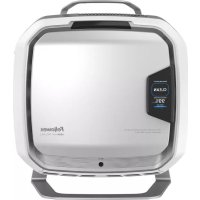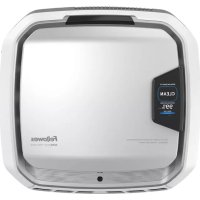
Pro AM 4 PC - Air purifier AeraMax - Free user manual and instructions
Find the device manual for free Pro AM 4 PC AeraMax in PDF.


User questions about Pro AM 4 PC AeraMax
0 question about this device. Answer the ones you know or ask your own.
Ask a new question about this device
Download the instructions for your Air purifier in PDF format for free! Find your manual Pro AM 4 PC - AeraMax and take your electronic device back in hand. On this page are published all the documents necessary for the use of your device. Pro AM 4 PC by AeraMax.
USER MANUAL Pro AM 4 PC AeraMax
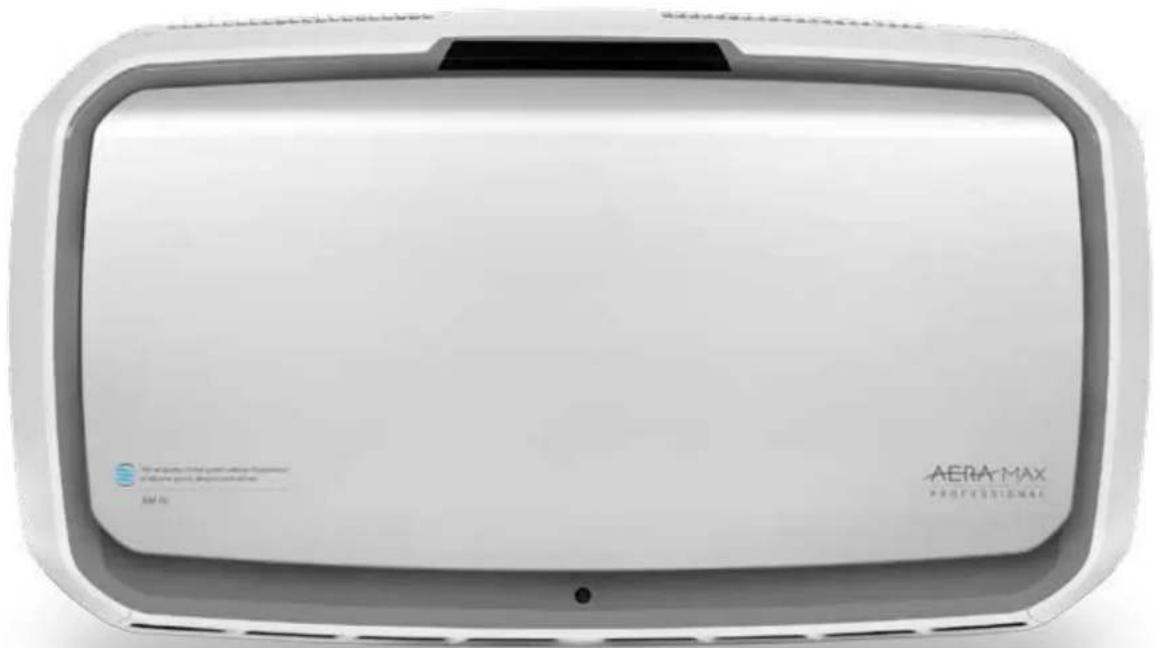
AeraMax® Pro AM IV and AM4 PC
AERA MAX
PROFESSIONAL
Air Purifier | Purificateur d'air | Purificador de aire
PLEASE READ THESE INSTRUCTIONS BEFORE USE.
DO NOT DISCARD: KEEP FOR FUTURE REFERENCE.
VEUILLEZ LIRE CES INSTRUCTIONS AVANT D'UTILISER L'APPAREIL.
NE PAS JETER: CONSERVER AFIN DE CONSULTER LES DIRECTIVES ULTE
RIEUREMENT, EN CAS DE BESOIN.
SAFETY INSTRUCTIONS/WARNING
Thank you for purchasing the AeroMax PRO AM IV.
Please read and save these instructions. Read carefully before attempting to assemble, install, operate or maintain this product. Protect yourself and others by observing all safety information. Failure to comply with instructions could result in personal injury and/or property damage. Retain instructions for future reference.
IMPORTANT CAUTIONS AND INSTRUCTIONS FOR USING AIR PURIFIER:
WARNING: Follow the instructions in this manual to reduce the risk of electric shock, short circuit, and/or fire:
- Do not use this air purifier as sole protection against harmful pollutants.
- Use this unit only in the manner intended by the manufacturer. If you have questions, contact the manufacturer.
- Installation work and electrical wiring must be done by qualified person(s). All electrical installation work must be conducted and carried out in accordance with all federal, state and local codes and regulations.
- Before servicing or cleaning the unit, switch power off at service panel. Lock service panel, or affix a warning tag, to prevent power from being switched back on accidentally.
- The AeroMax® PRO air quality control system must be grounded.
- Use only the electrical power (voltage and frequency) specified for the model air purifier being installed.
-
Do not obstruct the air inlet or air outlet of the air purifier.
-
When drilling into mounting surface, do not damage electrical wiring and other hidden utilities.
- Do not use unit without filters installed.
- Do not wash and reuse any of the filters.
- Do not use attachments or filters other than AeraMax® PRO brand, as unit will not function.
- Do not spray aerosols on, or into the unit.
- Do not use detergent to clean the unit.
- Do not insert fingers, liquids, or foreign objects into the air intake or outlet.
- Do not use the unit for anything other than air purification.
LIMITED PRODUCT WARRANTY
Limited Warranty: Fellowes, Inc. ("Fellowes") warrants the AeroMax® PRO air quality control system (the "Product") to be free of defects in material and workmanship for the time periods as set forth below.
For PC units only: The particle counters and display screen for a period of three (3) years from the date of original purchase of the Product.
For standard and PC units: All other parts for a period of five (5) years from the date of original purchase of the Product.
In the event that the Product is installed into new construction, the warranty period shall commence on the date of the occupancy permit or one year after the date of purchase, whichever is earlier. If any part is found to be defective during the warranty period, your sole and exclusive remedy will be repair or replacement, at Fellowes' option and expense, of the defective part. This warranty does not cover damage caused by use of non-Fellowes approved filters or failure to follow the recommended replacement schedule. This warranty does not apply in cases of abuse, mishandling, failure to comply with product usage standards, operation using an improper power supply (other than listed on the label), or unauthorized repair. Fellowes reserves the right to charge the consumers for any additional costs incurred by Fellowes to provide parts or services outside of the country where the Product was initially sold by an authorized reseller. This warranty does not cover replaceable filters. In the event that the Product is not readily accessible to Fellowes designated service personnel, Fellowes reserves the right to supply customer with replacement parts or Product in full satisfaction of its obligations under this warranty and any service obligations. ANY IMPLIED WARRANTY, INCLUDING THAT OF MERCHANTABILITY OR FITNESS FOR A PARTICULAR PURPOSE, IS HEREBY LIMITED IN DURATION TO THE APPROPRIATE WARRANTY PERIOD SET FORTH ABOVE. In no event shall Fellowes be liable for any consequential, incidental, indirect or special damages. This warranty gives you specific legal rights. The duration, terms, and conditions of this warranty are valid worldwide, except where different limitations, restrictions, or conditions may be required by local laws.
PACKAGING CONTENTS
AeraMax® PRO Air Quality Control System
- True HEPA Filter with AeroSafe™ Antimicrobial Treatment (2 filters)
- Activated Carbon Filter w/Pre-Filter (2 of each filter)
- Keys for Locking Front Panel (2)
- Mounting Template
Pan Head Phillips Screws - M6 x 50mm (4) - Drywall Anchors - 10mm OD (4)
- Registration information
PRODUCT SPECIFICATIONS
| AeraMax® PRO AM IV | |
| Dimensions (H x W x D) 19.6 x 34.7 x 9 inches | / 49.7 x 88.1 x 22.8 cm |
| Weight of System (including filters) 33.3 lbs. / | 15.1 kg |
| Power Requirements 120V, 60Hz, 2A | |
| Power Consumption (5 fan speeds) 8, 12, 18, 35, 166 watt | |
| Air Delivery (5 fan speeds) 153, 186, 224, 280 | 440 CFM |
| Decibels 42, 44, 51, 53, 68 dB | |
| Display Capacitive Touch, Internal Access Only | |
| Sensors EnviroSmart™ | |
| Sensor Controlled Operation Modes 2 Primary modes - Normal Mode and Quiet Mode | |
| Supplied Filters | 2 True HEPA Filters with AeraSafe™ Antimicrobial Treatment with an estimated average filter life of 1 year, 2 Activated Carbon Filters with Pre-Filter, estimated average filter life 6 months. |
| Cleaning System | High Efficiency Particulate Air (HEPA) filter rated efficiency of 99.97% of airborne particulate at 0.3 microns. Carbon Filter adsorbs odor and volatile organic compounds, PlasmaTRUE™ bipolar ionizer. |
| Color | • Stainless (item# 9416301), • White (item# 9446201), • Graphite (item #9446301), • Custom finish available, call for more details |
| REPLACEMENT FILTERS | |
| HEPA | True HEPA filter replacement with AeroSafe™ treatment. Average filter life 2 years: 9416601 - 2 pack |
| Carbon | Granular activated carbon replacement filter with pre-filter. Average filter life 6 months: 9416501 - 4 pack |
For additional replacement filter and accessory information please visit: www.aeramaxpro.com
INFORMATION TO THE USER
This equipment has been tested and found to comply with the limits for Class B digital device, pursuant to part 15 of the FCC Rules. These limits are designed to provide reasonable protection against harmful interference in an installation. This equipment generates, uses and can radiate radio frequency energy and, if not installed and used in accordance with the instructions, may cause harmful interference to radio communications. However, there is no guarantee that interference will not occur in a particular installation. If this equipment does cause harmful interference to radio or television reception, which can be determined by turning the equipment off and on, the user is encouraged to try to correct the interference by one or more of the following measures:
Reorient or relocate the receiving antenna
- Increase the separation between the equipment and receiver
- Connect the equipment on a circuit different from that to which the receiver is connected.
- Consult the dealer or experienced radio/TV technician for help.
WARNING: Any changes or modifications not expressly approved by the manufacturer could void the user's authority to operate the equipment and warranty.
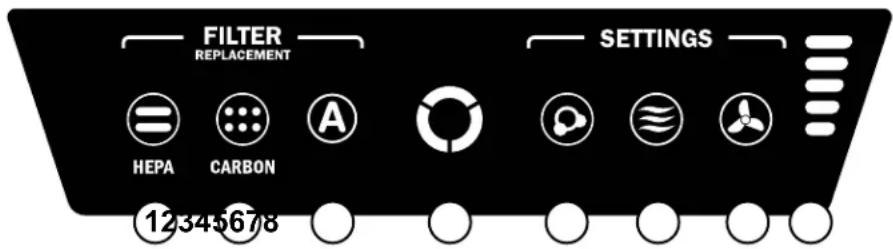
NOTE: after the unit is turned on the "AQ" light will flash for a few minutes while the system self-calibrates.
1 HEPA FILTER REPLACEMENT INDICATOR - This indicator will show its status when the access panel is open or closed. If the light is red this indicates the filter needs replacing. The replacement period will vary depending on the filters used, hours of use, air quality, and rate of air flow. For filter replacement indicator descriptions see FILTER REPLACEMENT INDICATORS section.
2 CARBON FILTER REPLACEMENT INDICATOR - This indicator will show its status when the access panel is open or closed. If the light is red this indicates the filter needs replacing. The replacement period will vary depending on the filters used, hours of use, air quality, and rate of air flow. For filter replacement indicator descriptions see FILTER REPLACEMENT INDICATORS section.
3 ACCESSORY INDICATOR - This indicator will show its status when the access panel is open or closed. This indicator will only be used if an accessory filter is installed in the unit. If the light is red this indicates the filter needs replacing. The replacement period will vary depending on the filters used, hours of use, air quality, and rate of air flow. For filter replacement indicator descriptions see FILTER REPLACEMENT INDICATORS section.
AIR QUALITY SENSOR - This indicator will show its status when the access panel is open or closed. This indicator monitors the air quality and adjusts the fan speed to keep your air purified. Blue, amber, and red lights indicate the purity of your air.
5 PlasmaTRUETM TECHNOLOGY - This indicator will show its status when the access panel is open or closed. Creates an ionized field to help safely remove airborne pollutants. To turn on and off the PlasmaTRUETM TECHNOLOGY, touch and hold the PLASMA indicator. A blue light illuminates when the PlasmaTRUETM TECHNOLOGY is enabled. To disable the PlasmaTRUETM TECHNOLOGY, press and hold "Plasma" indicator until light is off.
6 AUTO MODE - To select, press and hold the button until the icon illuminates. This mode uses the EnviroSmart™ technology to monitor the air quality, motion and noise level to adjust the fan speed in order to purify your air as quickly as possible. This button also includes QUIET MODE. To select, press and hold until the button turns green. The machine will continue to use EnviroSmart™ but only utilizes the 3 lowest, most quiet of the 5 fan speeds.
7 MANUAL MODE - To select, press the button until the icon illuminates. This mode allows you to choose one of the 5 fan speeds and keep the unit at this speed until AUTO MODE is chosen again. The internal sensors will not adjust the fan speed in this mode.
8 FAN SPEED INDICATORS - The fan has 5 speeds and can reach turbo speed to clean the room in case of high levels of contaminants. The number of bars illuminated indicates fan speed.
1 - whisper 4 - high
2-low 5-turbo
3 - medium
OPERATION
The air purifier continuously works in automatic mode; the user can select which preference they would like the purifier to use based on the location or desired operation of the air purifier. The purifier will operate through a minimized range of speeds, not exceeding the maximum level selected, in order to run quietly while cleaning the room of contaminants. Once air is cleaned, and no sensors are activated, the unit lowers to energy saving mode to reduce energy consumption and extend the life of the filters.
When Auto Mode is selected, the Auto mode indicator will be blue. This mode uses the EnviroSmart™ technology to monitor the air quality, motion and noise level to adjust the fan speed in order to purify your air as quickly as possible. Once air is cleaned, and no sensors are activated, the unit lowers to energy saving mode to reduce energy consumption and extend the life of the filters.
When Quiet Mode is selected, the Auto Mode indicator will be green. The machine will continue to use EnviroSmart™ but only utilizes the 3 lowest, most quiet of the 5 fan speeds.
When Manual Mode is selected, the Manual mode indicator will be blue. This mode allows you to choose one of the 5 fan speeds and keep unit at this speed until Auto Mode is chosen/selected. EnviroSmart™ sensors will NOT adjust the fan speed in this mode.
DISPLAY PANEL AMIV
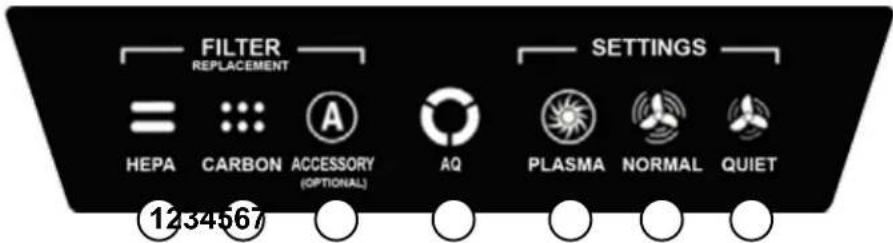
NOTE: after the unit is turned on the "AQ" light will flash for a few minutes while the system self-calibrates.
1 HEPA FILTER REPLACEMENT INDICATOR - This indicator will show its status when the access panel is open or closed. If the light is red this indicates the filter needs replacing. The replacement period will vary depending on the filters used, hours of use, air quality, and rate of air flow. For filter replacement indicator descriptions see FILTER REPLACEMENT INDICATORS section.
2 CARBON FILTER REPLACEMENT INDICATOR - This indicator will show its status when the access panel is open or closed. If the light is red this indicates the filter needs replacing. The replacement period will vary depending on the filters used, hours of use, air quality, and rate of air flow. For filter replacement indicator descriptions see FILTER REPLACEMENT INDICATORS section.
3 ACCESSORY INDICATOR - This indicator will show its status when the access panel is open or closed. This indicator will only be used if an accessory filter is installed in the unit. If the light is red this indicates the filter needs replacing. The replacement period will vary depending on the filters used, hours of use, air quality, and rate of air flow. For filter replacement indicator descriptions see FILTER REPLACEMENT INDICATORS section.
AIR QUALITY SENSOR - This indicator will show its status when the access panel is open or closed. This indicator monitors the air quality and adjusts the fan speed to keep your air purified. Blue, amber, and red lights indicate the purity of your air.
5 PlasmaTRUETM TECHNOLOGY This indicator will show its status when the access panel is open or closed. Creates an ionized field to help safely remove airborne pollutants. To turn on and off the PlasmaTRUETM TECHNOLOGY, touch and hold the PLASMA indicator. A blue light illuminates when the PlasmaTRUETM TECHNOLOGY is enabled. To disable the PlasmaTRUETM TECHNOLOGY, press and hold "Plasma" indicator until light is off.
6 NORMAL MODE - Select this mode for restrooms, cafeterias, fitness areas, and other louder areas as rapid purification is initiated when the room is occupied and/or strong airborne contaminants are present. To select, press and hold the "Normal" indicator until icon illuminates. This mode monitors air quality, motion, and noise level to adjust the fan speed in order to keep your air purified as quickly as possible. The fan can reach turbo speed to clean the room in the case of high levels of contaminant.
7 QUIET MODE - This mode utilizes the 3 lowest, most quiet of the 5 fan speeds. Select this mode for classrooms, meeting rooms, offices, and other quieter areas as the unit will not run faster than the maximum set speed. To select, press and hold the "Quiet" indicator until icon illuminates. Continue to press and hold the indicator to switch between the maximum speeds in this mode. There are three different levels; each level represents a maximum fan speed that the unit can achieve. Level 1 = The lowest speed, the unit will beep one time when this mode has been selected and the unit will not run faster than this lowest speed.
- Level 2 = Low speed, the unit will beep two times when this mode has been selected and the unit will not run faster than low speed.
- Level 3 = Medium speed, the unit will beep three times when this mode has been selected and the unit will not run faster than medium speed.
The Quiet Mode monitors air quality, motion, and noise level to adjust the fan speed in order to keep the air purified as efficiently as possible while not exceeding the maximum speed level selected.
OPERATION
The air purifier continuously works in automatic mode; the user can select which preference they would like the purifier to use based on the location or desired operation of the air purifier. The purifier will operate through a minimized range of speeds, not exceeding the maximum level selected, in order to run quietly while cleaning the room of contaminants. Once air is cleaned, and no sensors are activated, the unit lowers to energy saving mode to reduce energy consumption and extend the life of the filters.
When Normal mode is selected the Normal indicator on the control panel will be blue when the access panel is open. The purifier will operate through its full range of speeds in order to clean the room of contaminants as quickly as possible. Once air is cleaned, and no sensors are activated, the unit lowers to energy saving mode to reduce energy consumption and extend the life of the filters.
When Quiet mode is selected the Quiet indicator on the control panel will be blue when the access panel is open. The purifier will operate through a minimized range of speeds in order to stay as quiet as possible while cleaning the room of contaminants. Once air is cleaned, and no sensors are activated, the unit lowers to energy saving mode to reduce energy consumption and extend the life of the filters.
CARE AND MAINTENANCE
CLEANING:
- Clean external housing as necessary by wiping with a dry, soft cloth; for stains, use a warm, damp cloth.
- Do not use volatile fluids such as benzene, paint thinner, scouring powder or other cleaners that may damage the unit surface.
- Clean intake and exhaust vents by wiping with a dry, soft cloth.
FILTER REPLACEMENT INDICATORS:
The replacement filter indicators will signal when to replace the HEPA Filter and/or Carbon with Pre-Filter. The replacement period will vary depending on the hours of use, air quality, and rate of air flow. However, under normal usage, most HEPA Filters need to be replaced every 2 years, and Carbon with Pre-Filter every 6 months. When a filter needs to be replaced the following color will be shown on any one of the HEPA, CARBON, or ACCESSORY filter replacement indicators:
Red Flashing = RIGHT filter 90% full
Amber Flashing = LEFT filter 90% full
Red Flash, Pause, Amber Flash, Pause = Right & LEFT filters 90% full
Red = Replace RIGHT filter
Amber = Replace LEFT filter
Red & Amber Alternating = Replace Right & Left filters
Do not wash and reuse any of the filters - they will not work effectively. Only use AeroMax PRO brand replacement filters as units will not function using any other replacements.
FILTER REPLACEMENT PROCEDURE:
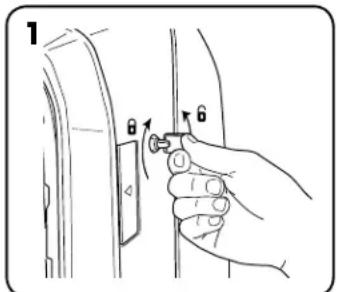
Unlock access panel: to unlock, insert the key provided and rotate counter-clockwise 14 turn.
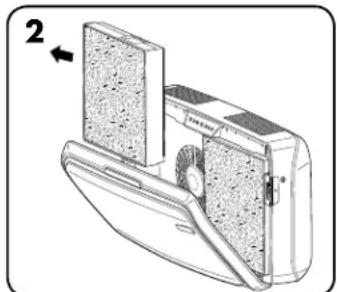
Open front access panel by pressing latches on both sides of unit. Allow panel to open fully. Remove filter(s) to be replaced.
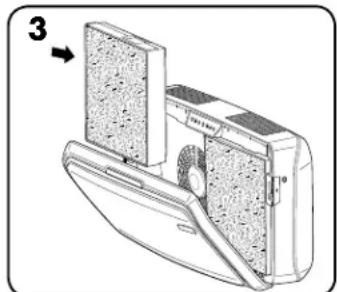
Remove any packaging wrap from the new filters(s) and re-install the filters.
FILTER REPLACEMENT:
When installing a new filter the unit will automatically detect the filter type but the user will have to manually reset the filter replacement indicators. To reset the flashing filter replacement indicator use the following procedure:
Touch and hold the illuminated indicator for three seconds until a beep is heard and the indicator is flashing green.
2 Release finger from indicator.
3 Touch and hold the indicator for three seconds until a beep is heard and the indicator light turns off.
Note: If you do not complete step three within 10 seconds of completing step 1 then the indicator light will not be reset.
TROUBLESHOOTING
| PROBLEM: POSSIBLE SOLUTION: | |
| The air quality control system fails to start. | Check to assure unit is connected to power supply. Make sure filters are genuine AeroMax® PRO filters, as unit will not function with other brands. IMPORTANT: Make sure filter detection area on genuine AeroMax® PRO replacement filter aligns with window in filter frame. Review “Re-Installing Filters” section for further detail. Make sure front access panel is closed completely. Make sure power switch is on. |
| The unit makes a faint ticking sound. | This indicates that the “PlasmaTRUETM” bipolar ionizer is working. |
| The HEPA and/or Carbon Filter replacement indicator light remain lit after replacing the filter(s). | Repeat filter light reset instruction. |