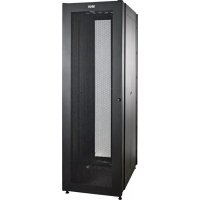
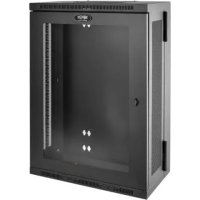
SmartRack SR2000 - Wardrobe Tripp Lite - Free user manual and instructions
Find the device manual for free SmartRack SR2000 Tripp Lite in PDF.


| Product Type | 19-inch Equipment Storage Cabinet |
| Brand | Tripp Lite |
| Model | SmartRack SR2000 |
| Height | 2101 mm (82.7 in) |
| Width | 650 mm (26 in) |
| Depth | 1140 mm (45 in) |
| Net Weight | 99 kg (219 lb) |
| Static Load Capacity | 907 kg (2000 lb) |
| Caster Load Capacity | 680 kg (1500 lb) |
| Material | Heavy-duty Steel |
| Color | Black (standard) |
| Doors | Lockable front and rear, reversible front door |
| Side Panels | Removable and lockable |
| Mounting Rails | Depth adjustable (575 to 756 mm) |
| Casters | 4 casters (short movement) + 4 leveling feet |
| Grounding | Front/rear grounding point (M6 screw included) |
| Included Hardware | 60 M6 screws, 60 cage nuts, 60 nylon washers, keys |
| Warranty | 5-year limited |
| Maintenance | Clean with a soft, dry cloth; avoid solvents |
| Environment | Climate-controlled indoor, away from moisture and dust |
Frequently Asked Questions - SmartRack SR2000 Tripp Lite
User questions about SmartRack SR2000 Tripp Lite
0 question about this device. Answer the ones you know or ask your own.
Ask a new question about this device
Download the instructions for your Wardrobe in PDF format for free! Find your manual SmartRack SR2000 - Tripp Lite and take your electronic device back in hand. On this page are published all the documents necessary for the use of your device. SmartRack SR2000 by Tripp Lite.
USER MANUAL SmartRack SR2000 Tripp Lite
SmartRack® 2000 Series Enclosures
Important Safety Instructions 2 Overview 2
Feature Identification 3
Enclosure Installation 4
Preparation 4
Unpacking 4
Placement 5
Leveling 6
Ground Connection 6
Enclosure Configuration 7
Adding or Removing Front and Rear Doors
Adding or Removing Side Panels 7
Adjusting Mounting Rails 8
Combining (Baying) Enclosures 9
Equipment Installation 9 Installing or Removing Cage Nuts 10
Specifications 11
Storage and Service 11 Warranty and Product Registration 12
Espanol 13
Français 25
PROTECT YOUR INVESTMENT!
Register your product for quicker service and ultimate peace of mind.
You could also win an ISOBAR6ULTRA surge protector—a $50 value!
www.triplite.com/warranty



1111 W. 35th Street, Chicago, IL 60609 USA · www.triplite.com/support
Copyright © 2014 Tripp Lite. All trademarks are the sole property of their respective owners.
Important Safety Instructions
SAVE THESE INSTRUCTIONS
All sections of this manual contain instructions and warnings that should be followed during the installation and use of the SmartRack Enclosures described in this manual. Read all instructions and warnings thoroughly before attempting to move, install or use the SmartRack Enclosures described in this manual. Failure to comply will create a risk of personal injury and property damage and may invalidate the warranty.
- Keep the enclosure in a controlled indoor environment, away from moisture, temperature extremes, flammable liquids and gasses, conductive contaminants, dust and direct sunlight.
- Leave adequate space at the front and rear of the enclosure for proper ventilation. Do not block, cover or insert objects into the external ventilation openings of the enclosure.
The enclosure is extremely heavy. Use caution when handling the enclosure. Do not attempt to unpack, move or install it unassisted. Use a mechanical device such as a forklift or pallet jack to move the enclosure in the shipping container. - Do not place any object on the enclosure, especially containers of liquid, and do not attempt to stack the enclosures.
- Inspect the shipping container and the enclosure for shipping damage. Do not use the enclosure if it is damaged.
- Leave the enclosure in the shipping container until it has been moved as close to the final installation location as possible. The casters are designed for minor position adjustments within the final installation area only. The casters are not designed for moving the enclosure over longer distances.
The casters are not designed to provide long-term support for the enclosure after final installation. Use the levelers to provide long-term support. - Install the enclosure in a structurally sound area with a level floor that is able to bear the weight of the enclosure, all equipment that will be installed in the enclosure and any other enclosures and/or equipment that will be installed nearby.
- Do not push the enclosure from the side panels to move it. Pushing from the side panels will cause a tipping hazard.
- When rolling the enclosure on its casters, always push it from behind, never pull it toward you.
- A rolling enclosure can cause personal injury and property damage if not properly supervised. If rolling the enclosure down a ramp is required, use extreme caution. Do not attempt to use ramps that have a slope steeper than 1:12.
- Use caution when cutting packing materials. The enclosure could be scratched, causing damage not covered by the warranty.
- Save all packing materials for later use. Repacking and shipping the enclosure without the original packing materials may cause product damage that will void the warranty.
- Do not re-ship the enclosure with additional equipment unless the enclosure was shipped with a special shock pallet ("SP1" models only). The combined weight of the enclosure and installed equipment must not exceed the load capacity of the pallet. Tripp Lite is not responsible for any damage that occurs during re-shipment.
- Use of this equipment in life support applications where failure of this equipment can reasonably be expected to cause the failure of the life support equipment or to significantly affect its safety or effectiveness is not recommended. Do not use this equipment in the presence of a flammable anesthetic mixture with air, oxygen or nitrous oxide.
Overview
SmartRack Enclosures accommodate all standard 19-inch rackmount equipment, regardless of vendor, and ship fully assembled for quick and easy deployment. They feature adaptable, heavy-duty cabinets in 42U, 45U and 48U heights, with or without side panels. Several models are available with an integrated shock pallet that allows resellers, integrators and enterprise customers to pre-configure equipment and re-ship the enclosures to the final installation site.
SmartRack Enclosures have variable mounting depths, ideal for servers. Integrated baying hardware enables cost-effective, orderly and efficient expansion. The cabinets include quick-release doors and side panels for convenient maintenance and split rear doors for improved access and reduced clearance requirements. Front access doors are reversible for installation flexibility. Front and rear doors and side panels are lockable.
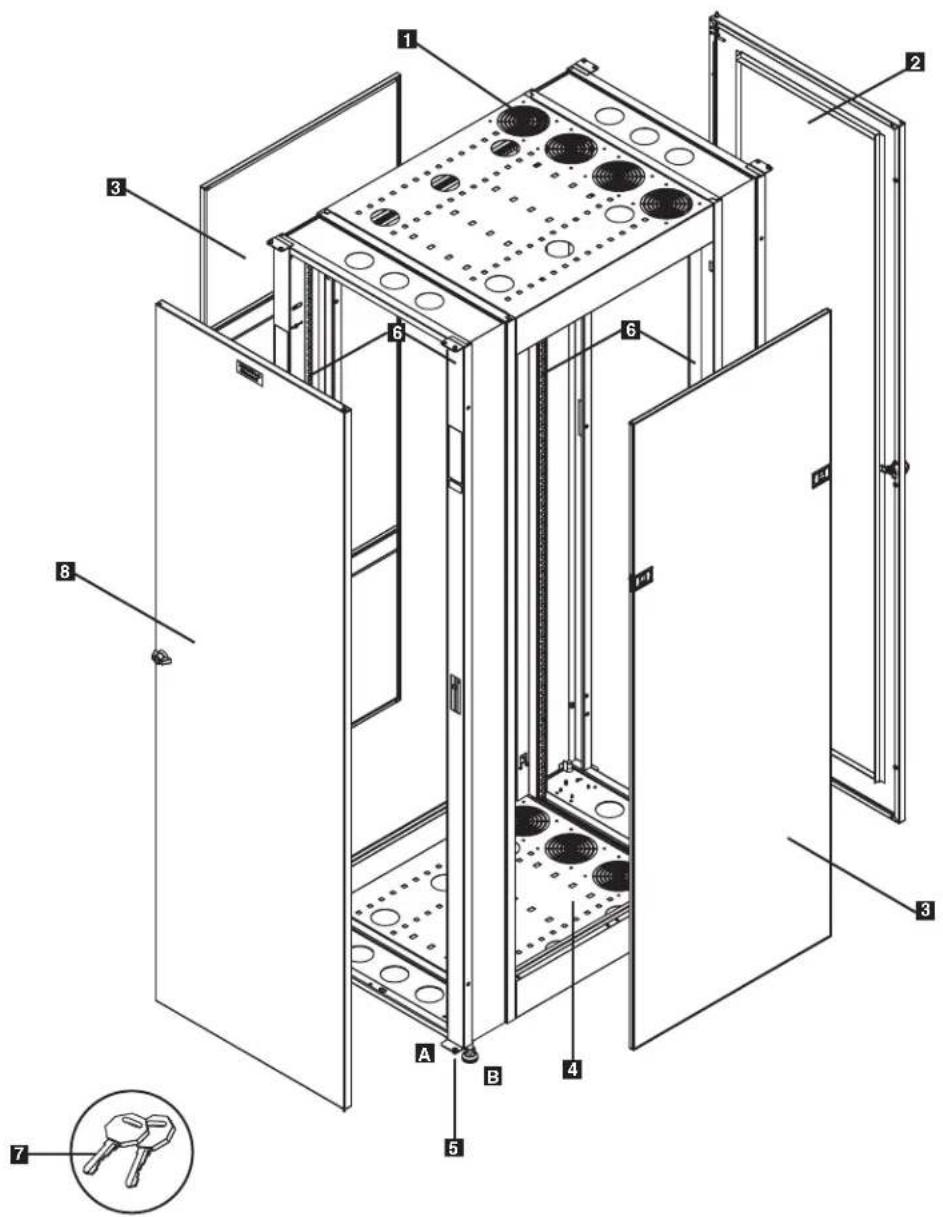
Model SR2000 is shown. Other 2000 Series models will have similar features with any differences noted.
1 Roof Panel with Cable Access Ports
2 Locking Rear Door
Full-Length Side Panels (Side panels not included with "EXP" models)
4 Bottom Panel with Cable Access Ports
5 Casters A and Levelers B
6 Mounting Rails (Provide horizontal and vertical mounting points for equipment)
7 Keys (Opens front/ear door and side panels)
3 Locking Front Door
Not Shown: Mounting hardware, documentation, shipping brackets and other shipping materials.
Enclosure Installation

Caution! Read All Instructions andWarnings Before Installation!

WARNING: The rack enclosure is extremely heavy. Do not attempt to unpack, move or install the enclosure without assistance. Until it has been properly installed and stabilized, the enclosure is prone to tipping and could cause property damage and/or personal injury. Use extreme caution when handling the enclosure and be sure to follow all handling and installation instructions. Do not attempt to install equipment without first stabilizing the enclosure.
Preparation
The enclosure must be installed in a structurally sound area with a level floor that is able to bear the weight of the enclosure, all the equipment that will be installed in the enclosure and any other enclosures and/or equipment that will be installed nearby. Before unpacking the enclosure, you should transport the shipping container closer to the final installation location to minimize the distance you will need to move the unit after the protective packaging has been removed. If you plan to store the enclosure for an extended period before installation, follow the instructions in the Storage and Service section.
You need several tools (user-supplied):
10 mm Open-end Wrench
19 mm Open-end Wrench
Utility Blade
Carpenter's Level
Phillips-head Screwdriver
5/32" Hex Key
You also need the following hardware (included):
(40) Phillips-head Mounting Screws (M6 x 5/8")
(40) Cage Nuts (M6)
(40) Nylon Cup Washers
Unpacking
NOTE: If the enclosure is an "SP1" model with a shock pallet, follow the special unpacking instructions attached to the shipping container instead of the unpacking instructions in this section. All warnings still apply.
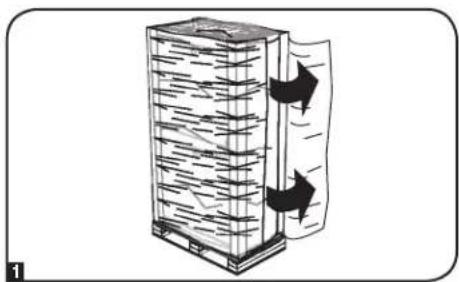
1 Confirm that the shipping container is upright and stable, then use a utility blade to cut the shrinkwrap securing the corner protectors. Apply the utility blade directly over the corner protectors to prevent the utility blade from scratching the enclosure or cutting the heavy protective plastic bag beneath the shrink-wrap. WARNING: Do not scratch the enclosure or cut the heavy plastic bag beneath the shrink-wrap. Do not push or pull the enclosure while unpacking.
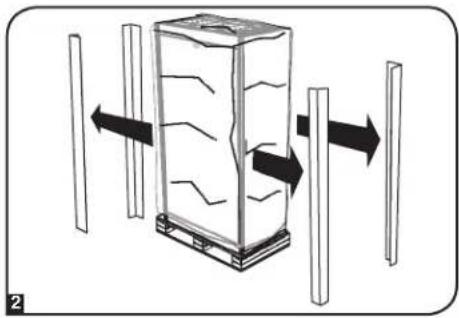
2 Remove the corner protectors. Save all packing materials (including the pallet) for later use unless you are certain they will not be required. The packing materials are recyclable.
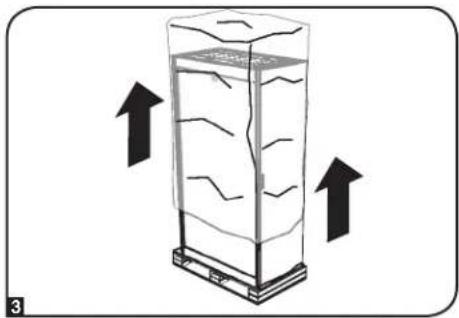
3 Remove the heavy plastic bag surrounding the enclosure. Examine the enclosure for any damage or loose parts. Confirm that all parts are present. If anything is missing or damaged, contact Tripp Lite for assistance. Do not attempt to use the enclosure if it has been damaged.
Enclosure Installation
Unpacking (continued)
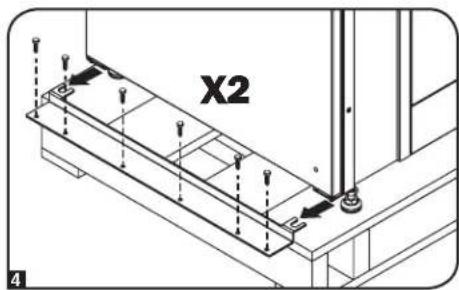
Use a 10 mm open-end wrench to remove the shipping brackets. Be extremely careful, as the enclosure could shift unexpectedly after bracket removal. Save the brackets and bracket hardware for later use.
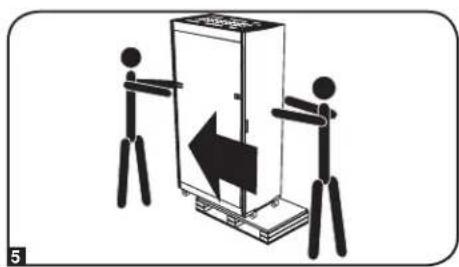
Position at least one person at the front of the enclosure and one person at the rear of the enclosure. Slowly push the enclosure toward the back of the shipping pallet until all four casters go over the edge of the pallet and touch the floor. WARNING: Use at least one assistant when removing the enclosure from the pallet. Be extremely careful when moving the enclosure.
Placement
1 Use the casters to move the enclosure for a short distance over a level, smooth, stable surface by pushing it from the front or rear (not the side panels). Do not attempt to roll the enclosure over long distances. The enclosure should be moved close to its installation location inside its shipping container before it is unpacked. (Use a forklift or pallet jack to move the shipping container.) WARNING: Do not push or pull the enclosure at the side panels or pull the enclosure toward you.
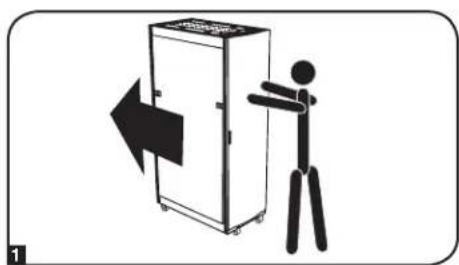
Enclosure Installation
Leveling
WARNING: Level the enclosure before attempting to install equipment. The casters are not designed to provide long-term support for the enclosure. Use the levelers to provide long-term support. Install the enclosure in a structurally sound area with a level floor that is able to bear the weight of the enclosure, all equipment that will be installed in the enclosure and any other enclosures and/or equipment that will be installed nearby.
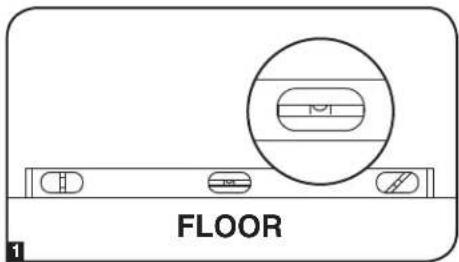
After the enclosure has been moved to the installation location, use a carpenter's level to check the slope of the floor. If the floor slopes more than 1% , choose an alternate installation site.
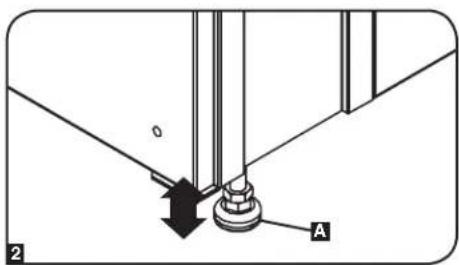
Use an 19 mm open-end wrench to lower each leveler A until it reaches the floor. (There are 4 levelers, 2 at the front and 2 at the rear.) Make sure each leveler contacts the floor solidly. Note: Lower a leveler by turning it clockwise; raise a leveler by turning it counter-clockwise.
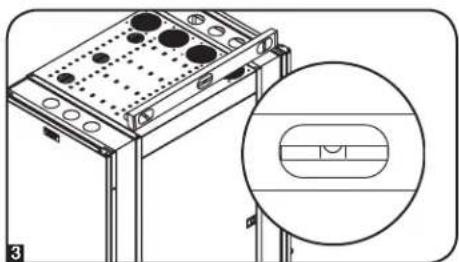
After lowering each leveler, use the carpenter's level to confirm that the enclosure is level in all directions. Adjust the levelers as required until the enclosure is level.
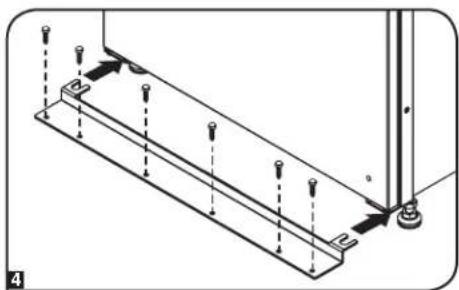
4 (Optional) If you wish to provide an additional measure of stability, you can use the 2 shipping brackets and hardware that attached the enclosure to the shipping pallet. Use a 10mm open-end wrench to secure the brackets to mounting points in the floor using user-supplied hardware.
Ground Connection
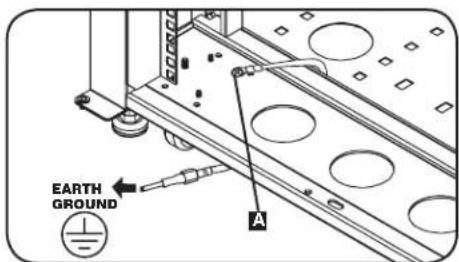
All the parts of the enclosure are grounded to the frame of the enclosure. Use the enclosure's front or rear threaded grounding point A and an M6 screw (included) to connect the frame of the enclosure directly to your facility's earth ground connection with an 8 AWG (3.264 mm) wire. Route the ground wire under the enclosure's frame to ensure unhindered door operation. WARNING: Attach each enclosure to earth ground separately. Do not use the enclosure without an earth ground connection.
Enclosure Configuration
Adding or Removing Front and Rear Doors
WARNING: Do not attempt to add or remove doors without assistance.
Removing Door
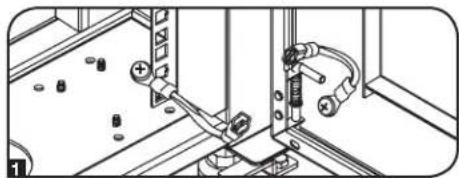
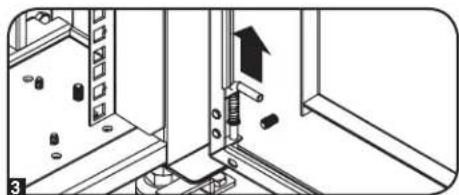
1 Disconnect the doors ground wire.
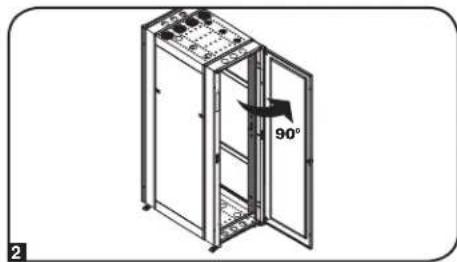
2 Open the door until it is perpendicular (90 degrees) to the front of the enclosure.
Lift the "L" shaped, spring hinge pin. Once the pin is disengaged, lift the door off of the hinges and remove it from the enclosure.
To Reinstall Door, Reverse Steps 1-3
(Optional) If the enclosure is joined to another enclosure, turn the door back toward the enclosure as you lift it from the hinges.
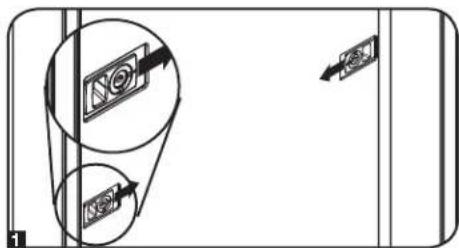
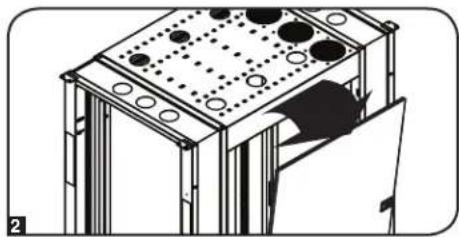
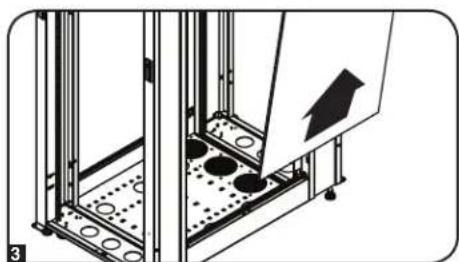
Adding or Removing Slide Panels
Removing Side Panel
1 Slide the two unlocked latches to disengage the panel.
2 Tilt the top of the panel away from the enclosure.
8 Lift the panel away from the brace that supports it.
To Reinstall Side Panel, Reverse Steps 1-3
Enclosure Configuration
Adjusting Mounting Rails
WARNING: Do not attempt to adjust rails without assistance. Do not attempt to adjust rails while equipment is installed in the enclosure. Do not attempt to use rails without screws installed (4 per rail).
Overall equipment mounting depths between 22 5/8 inches (575 mm) and 29 3/4 inches (756 mm) can be achieved by adjusting the front and rear rails.
The mounting rails are pre-installed to accommodate equipment with a mounting depth of 29 inches (737 mm). Do not adjust the mounting rails unless your equipment requires a different mounting depth. The rear mounting rails can be adjusted independently in 3/8-inch (9.5 mm) increments for varied mounting depths.
Rear Rail Adjustment
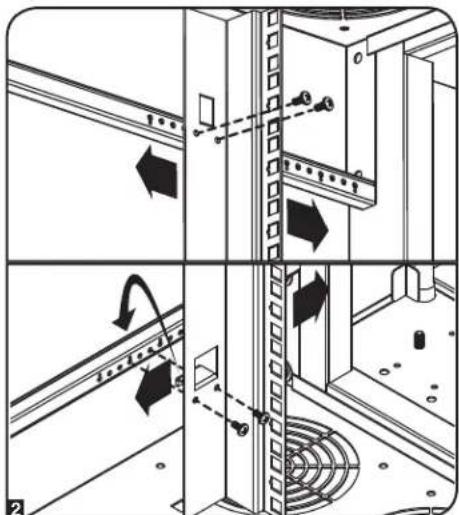
1 Each rear mounting rail is connected to the enclosure with 4 screws - 1 pair at the upper beam A and 1 pair at the lower beam B.
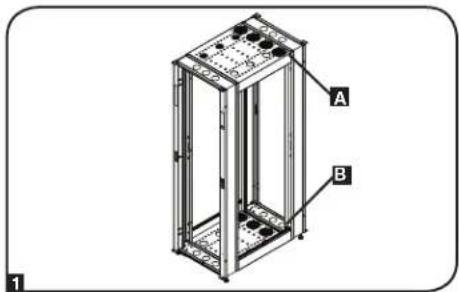
2 Remove the screws fastening each of the rear mounting rails to the enclosure. Slide the mounting rails to the desired depth and reattach them using the screws you removed.
Front Rail Adjustment
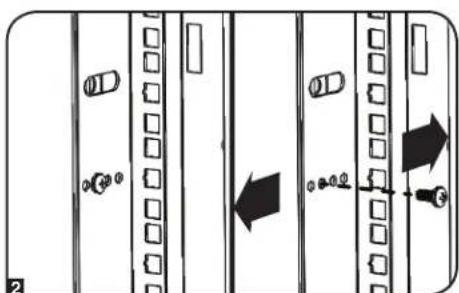
1 Each front mounting rail is mounted to the enclosure frame using 3 screws - 1 screw at the upper beam A, 1 screw at the middle beam B, and 1 screw at the lower beam C.
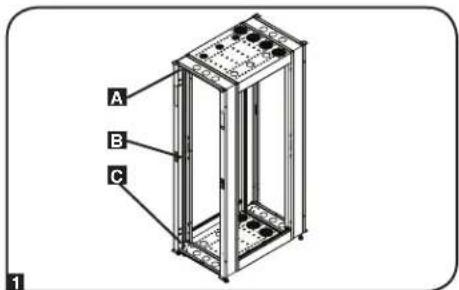
2 Remove the screws fastening each of the front mounting rails to the enclosure. Slide the mounting rails to the desired position and reattach them using the screws you removed.
Enclosure Configuration
Combining (Baying) Enclosures
WARNING: Combining enclosures is not a substitute for stabilizing the enclosures. Each enclosure in a bay of combined enclosures requires the same stabilizing measures as a standalone enclosure.
1 Arrange the enclosures in the correct position for baying.
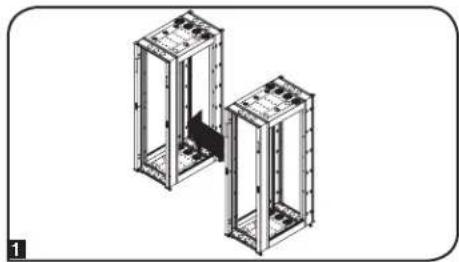
2 Each enclosure includes 4 connection points A. Align the enclosures' baying connection points.
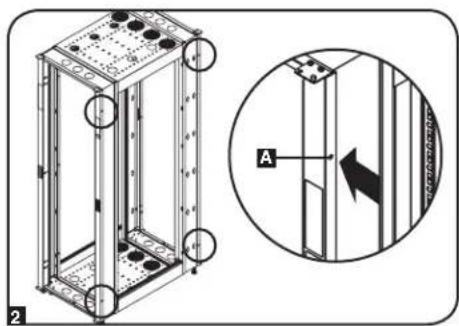
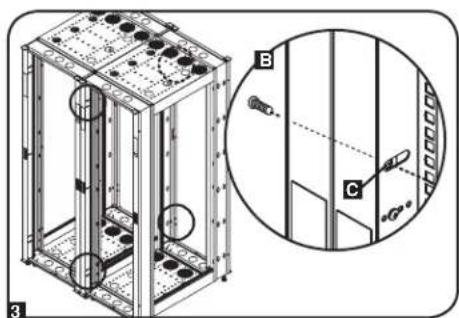
3 Once the desired positioning of the enclosures has been made and the baying connection points are aligned, insert a user-supplied, 1/4-20 threaded screw into the baying connection point. Secure the screw until its threads are tightened within the adjoining enclosure's welded hex nut. Repeat for all baying connection points. If no further adjustment is needed, tighten all screws.
Note: You may wish to remove the doors from the enclosures before combining them. Reinstalling the doors afterward is optional. Remove the interior side panels before baying enclosures if you wish to enable access between enclosures.
Equipment Installation
WARNING: Do not install equipment until you have stabilized the enclosure. Install heavier equipment first and install it toward the bottom of the enclosure. Install equipment starting from the bottom of the enclosure and proceeding toward the top of the enclosure - never the reverse. If using sliding equipment rails, be careful when extending the rails. Do not extend more than one set of sliding equipment rails at one time. Avoid extending sliding equipment rails near the top of the enclosure.
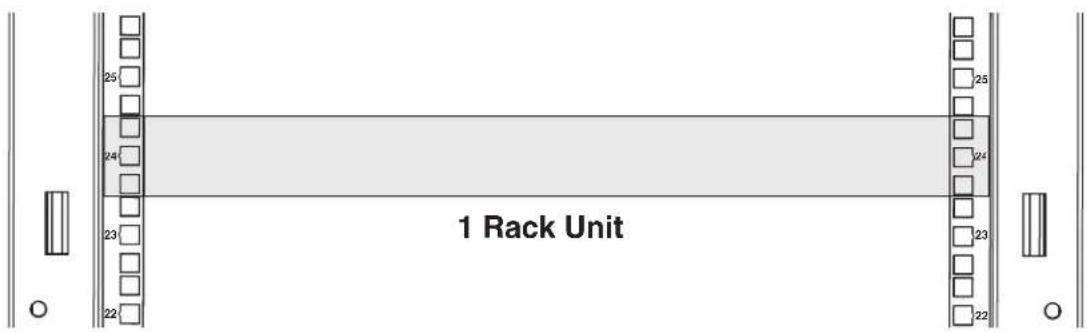
Note: The square holes at the middle of each rack unit are numbered and also include a small notch to aid identification. A single rack unit includes the space occupied by the numbered hole and the holes directly above and below.
Equipment Installation
Installing or Removing Cage Nuts
WARNING: The flanges of the cage nuts should engage the sides of the square opening in the rail, not the top and bottom. Follow the instructions in your equipment documentation to ensure proper installation of your equipment.
Installing Cage Nuts
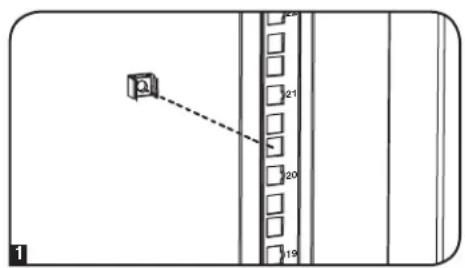
1 Locate the numbered square openings in the mounting rails where you plan to install your equipment. You will install cage nuts (included) into the square openings in order to provide an attachment point for the mounting screws (included). Note: Consult your equipment documentation to determine how many cage nuts will be required and where they will need to be installed.
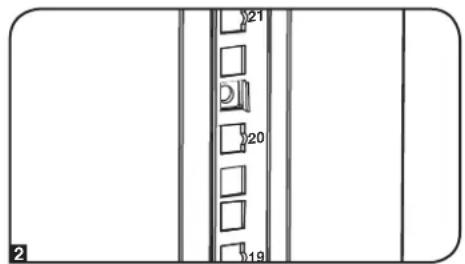
2 From the inside of the mounting rail, insert one of the flanges of the cage nut through the square opening. Press it against the side of the square opening. Each flange should engage one side of the square opening, not the top or bottom.
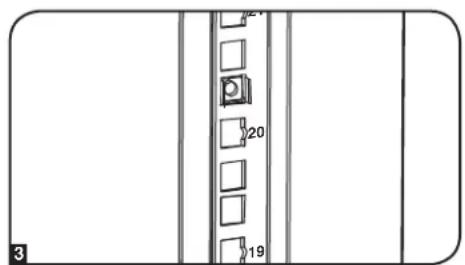
3 Compress the cage nut at the sides slightly to allow the remaining flange to fit through the square opening. When the cage nut is properly installed, both flanges will protrude through the square opening and will be visible on the outer surface of the mounting rail. Repeat steps 1-3 until all required cage nuts are installed.
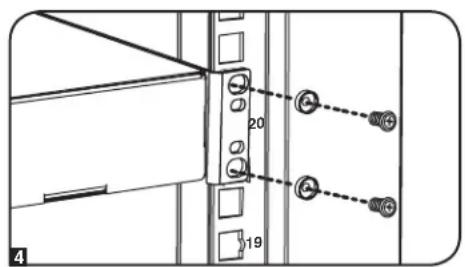
4 After installing the required cage nuts, use the included mounting screws and cup washers to secure your equipment to the rack rail. Place the cup washers between the screws and the equipment mounting brackets. Note: Your equipment may also include mounting hardware. Read the mounting instructions that came with your equipment before installing your equipment.
To Remove Cage Nuts, Reverse Steps 1-3
Note: You may wish to use a cage nut tool (user-supplied) to aid cage nut installation and removal.
Specifications
| Load Capacity Unit Dimensions Shipping Dimensions | ||||||||||
| Model Static Rolling Height Width Depth Weight Height Width Depth Weight | ||||||||||
| SR2000 2000 lb | (907 kg) | 1500 lb(680 kg) | 77.7 in(1974 mm) | 23.63 in(600 mm) | 43 in(1092 mm) | 169 lb(77 kg) | 82.7 in(2101 mm) | 26 in(650 mm) | 45 in(1140 mm) | 219 lb(99 kg) |
Storage and Service
Storage
The enclosure should be stored in a controlled indoor environment, away from moisture, temperature extremes, flammable liquids and gasses, conductive contaminants, dust and direct sunlight. Store the enclosure in its original shipping container if possible.
Service
Your Tripp Lite product is covered by the warranty described in this manual. A variety of Extended Warranty and On-Site Service Programs are also available from Tripp Lite. For more information on service, visit www.triplite.com/support. Before returning your product for service, follow these steps:
- Review the installation and operation procedures in this manual to ensure that the service problem does not originate from a misreading of the instructions.
- If the problem continues, do not contact or return the product to the dealer. Instead, visit www.triplite.com/support.
- If the problem requires service, visit www.triplite.com/support and click the Product Returns link. From here you can request a Returned Material Authorization (RMA) number, which is required for service. This simple on-line form will ask for your unit's model and serial numbers, along with other general purchaser information. The RMA number, along with shipping instructions, will be emailed to you. Any damages (direct, indirect, special or consequential) to the product incurred during shipment to Tripp Lite or an authorized Tripp Lite service center is not covered under warranty. Products shipped to Tripp Lite or an authorized Tripp Lite service center must have transportation charges prepaid. Mark the RMA number on the outside of the package. If the product is within its warranty period, enclose a copy of your sales receipt. Return the product for service using an insured carrier to the address given to you when you request the RMA.
Warranty and Product Registration
5-Year Limited Warranty
e should prove defective in material or workmanship within that period, Seller will repair or replace the product, in its sole discretion.
THIS WARRANTY DOES NOT APPLY TO NORMAL WEAR OR TO DAMAGE RESULTING FROM ACCIDENT, MISUSE, ABUSE OR NEGLECT. SELLER MAKES NO EXPRESS WARRANTIES OTHER THAN THE WARRANTY EXPRESSLY SET FORTH HEREIN. EXCEPT TO THE EXTENT PROHIBITED BY APPLICABLE LAW, ALL IMPLIED WARRANTYES, INCLUDING ALL WARRANTYES OF MERCHANTABILITY OR FITNESS, ARE LIMITED IN DURATION TO THE WARRANTY PERIOD SET FORTH ABOVE; AND THIS WARRANTY EXPRESSLY EXCLUDING ALL INCIDENTAL AND CONSEQUENTIAL DAMAGES. (Some states do not allow limitations on how long an implied warranty lasts, and some states do not allow the exclusion or limitation of incidental or consequential damages, so the above limitations or exclusions may not apply to you. This warranty gives you specific legal rights, and you may have other rights which vary from jurisdiction to jurisdiction).
WARNING: The individual user should take care to determine prior to use whether this device is suitable, adequate or safe for the use intended. Since individual applications are subject to great variation, the manufacturer makes no representation or warranty as to the suitability or fitness of these devices for any specific application.
Warranty Registration
Visit www.triplite.com/warranty today to register your new Tripp Lite product. You'll be automatically entered into a drawing for a chance to win a FREE Tripp Lite product!
- No purchase necessary. Void where prohibited. Some restrictions apply. See Web site for details.
Regulatory Compliance Identification Numbers
For the purpose of regulatory compliance certifications and identification, your Tripo Lite product has been assigned a unique series number. The series number can be found on the product nameplate label, along with all required approval markings and information. When requesting compliance information for this product, always refer to the series number. The series number should not be confused with the marketing name or model number of the product.
WEEE Compliance Information for Tripp Lite Customers and Recyclers (European Union)

Under the Waste Electrical and Electronic Equipment (WEEE) Directive and implementing regulations, when customers buy new electrical and electronic equipment from Tripp Lite they are entitled to:
- Send old equipment for recycling on a one-for-one, like-for-like basis (this varies depending on the country)
- Send the new equipment back for recycling when this ultimately becomes waste
Tripp Lite follows a policy of continuous improvement. Product specifications are subject to change without notice.
Note on Labeling
This symbol is used on the product: Ground Connection


1111 W. 35th Street, Chicago, IL 60609 USA · www.triplite.com/support
Manufacturing Excellence.
1111 W. 35th Street, Chicago, IL 60609 USA · www.triplite.com/support
- SmartRack® 2000 Series Enclosures
- PROTECT YOUR INVESTMENT!
- Important Safety Instructions
- SAVE THESE INSTRUCTIONS
- Overview
- Enclosure Installation
- Caution! Read All Instructions andWarnings Before Installation!
- Preparation
- Unpacking
- Unpacking (continued)
- Placement
- Leveling
- Ground Connection
- Enclosure Configuration
- Adding or Removing Front and Rear Doors
- Removing Door
- To Reinstall Door, Reverse Steps 1-3
- Adding or Removing Slide Panels
- Removing Side Panel
- Adjusting Mounting Rails
- Rear Rail Adjustment
- Front Rail Adjustment
- Combining (Baying) Enclosures
- Equipment Installation
- Installing or Removing Cage Nuts
- Installing Cage Nuts
- To Remove Cage Nuts, Reverse Steps 1-3
- Specifications
- Storage and Service
- Storage
- Service
- Warranty and Product Registration
- 5-Year Limited Warranty
- Warranty Registration
- Regulatory Compliance Identification Numbers
- WEEE Compliance Information for Tripp Lite Customers and Recyclers (European Union)
- Note on Labeling
Brand : Tripp Lite
Model : SmartRack SR2000
Category : Wardrobe