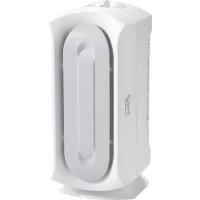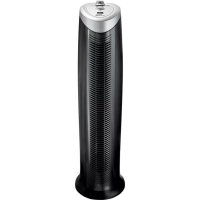
True Air 04493 - Air purifier HAMILTON BEACH - Free user manual and instructions
Find the device manual for free True Air 04493 HAMILTON BEACH in PDF.


| Product Type | Air Purifier |
| Brand | Hamilton Beach |
| Model | True Air 04493 |
| Dimensions (approx.) | 30 × 20 × 40 cm |
| Weight (approx.) | 3 kg |
| Power Supply | 120 V, 60 Hz, AC |
| Energy Consumption | ENERGY STAR certified, low consumption |
| Filtration | High efficiency permanent HEPA filter (captures 99% of particles up to 5 microns) + Replaceable carbon filter (every 3 months) |
| Functions | 3 speeds (Whisper Clean, Medium, Quick Clean) + Ionizer |
| Ionizer | Emits negative ions to agglomerate small particles |
| Noise Level | Quiet in Whisper Clean mode |
| Recommended Use | Indoor room, flat and stable surface, away from heat sources and humidity |
| Maintenance | Wipe exterior with a soft cloth; intake grille washable with soapy water; HEPA filter vacuumable; replace carbon filter every 3 months |
| Safety | Polarized plug, do not immerse, unplug before cleaning, do not use outdoors |
| Warranty | 1 year limited (defects in materials and workmanship) |
| Replacement Parts | Replaceable carbon filter (ref. True Air / Hamilton Beach) |
| Customer Service | USA: 1.800.851.8900, Canada: 1.800.267.2826, Mexico: 01.800.71.16.100 |
| Website | hamiltonbeach.com, trueair.com |
Frequently Asked Questions - True Air 04493 HAMILTON BEACH
User questions about True Air 04493 HAMILTON BEACH
0 question about this device. Answer the ones you know or ask your own.
Ask a new question about this device
Download the instructions for your Air purifier in PDF format for free! Find your manual True Air 04493 - HAMILTON BEACH and take your electronic device back in hand. On this page are published all the documents necessary for the use of your device. True Air 04493 by HAMILTON BEACH.
USER MANUAL True Air 04493 HAMILTON BEACH
Visit hamiltonbeach.com for delicious recipes, tips, and to register your product online!
Please call us – our friendly associates are ready to help. USA: 1.800.851.8900
Questions?
natural_image
Black and white photo of a dual-tiered electric air conditioner (no visible text or labels)Hamilton Beach.
TrueAir® Air Purifier
In order to prevent the risk of fire, electric shock, personal injury, or damage to property, follow these instructions carefully. When using electric appliances, basic safety precautions should be followed, including the following:
- Read all instructions before using this air purifier. Save these instructions for reference.
- Do not immerse this product in water or splash water on it. An electrical short may result in shock or fire.
- Do not handle the plug with wet hands; electrical shock may occur, resulting in injury or death.
- Never attempt to disassemble or alter the product in any way not instructed by this manual. Shock, fire, or bodily injury may occur. Call 1.800.851.8900 (U.S.) or 1.800.267.2826 (Canada) for assistance.
- Do not operate this product in any greasy environment such as in the kitchen. This product is not intended to filter oil or grease from the air.
-
Do not operate this product near an open fire. It may ignite and cause fire, resulting in bodily injury or property damage.
-
Do not operate this product in a garage or other area with oil or chemicals such as solvents or insecticides.
- Always unplug the power cord from the receptacle when the air purifier is not in use, before cleaning, replacing parts, or before moving to another location.
- Do not insert foreign objects into the product for any reason. Bodily injury or property damage may occur.
- Do not use this product outdoors. It is intended for indoor use only.
- Do not use air purifier in unheated areas such as a garage or porch.
- Do not operate this appliance if the inlet or outlet grilles are broken or damaged.
- WARNING: To reduce the risk of fire or electric shock, do not use this purifier with any solid-state speed control device.
SAVE THESE INSTRUCTIONS!
OTHER CONSUMER SAFETY INFORMATION
This appliance is intended for household use only.
WARNING! Shock Hazard: This appliance has a polarized plug (one wide blade) that reduces the risk of electric shock. The plug fits only one way into a polarized outlet. Do not defeat the safety purpose of the plug by modifying the plug in any way or by using an adapter. If the plug does not fit, reverse the plug. If it still does not fit, have an electrician replace the outlet.
If a longer cord is necessary, an approved extension cord may be used. The electrical rating of the extension cord must be equal to or greater than the rating of the air purifier. Route the electrical or extension cord where it cannot be tripped over and will be clear of furniture to prevent damage from pinching.
Parts and Features
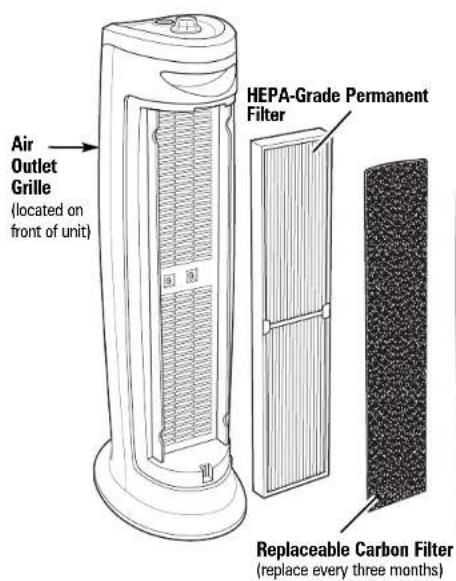
About the Air Purifier:
The air purifier functions as an air cleaner by helping to remove particulates (such as pet dander, dust, pollen, mold, and mildew spores) from the air.
The air is cleaned in four stages:
- The fan draws room air into the unit through the air inlet grille.
- Air then passes through the unit's carbon filter, which assists in eliminating odors.
-
The HEPA-grade permanent filter then removes particles, as small as 5 microns at 99% effectiveness, from air passing through the filter.
-
The purified air is then released back into the room through the air outlet grille.
This product earned the ENERGY STAR® by meeting strict energy-efficiency guidelines set by the US EPA. US EPA does not endorse any manufacturer claims of healthier indoor air from the use of this product. The energy efficiency of this ENERGY STAR-qualified model is measured based on a ratio between the model's CADR for dust and the electrical energy it consumes—or CADR/Watt.
Selecting the Proper Location
IMPORTANT: Your air purifier is designed for easy use and maintenance. Make sure that you remove all packing materials and that HEPA-grade permanent filter and carbon filter are properly installed before use. Remember to remove the plastic bags from filters before using.
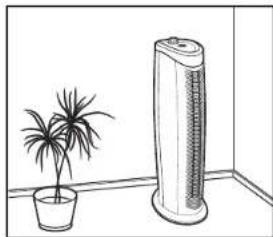
To prevent the risk of personal injury or damage to the air purifier and provide the best possible performance of your air purifier, follow the placement guidelines below:
DO:
- Place the air purifier on a flat, stable surface.
natural_image
Line drawing of a potted plant next to a tall electric air conditioner unit (no text or symbols)- Place the air purifier near an electrical outlet. Make sure that the air purifier and the cord do not present tripping hazards.
- Select a central location with adequate air circulation.
- Turn off and unplug the air purifier before moving or servicing it or if it will not be used for several days.
- Route the electrical cord clear of furniture to prevent damage from pinching.
DO NOT:
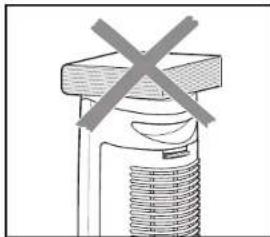
- Do not stand, sit, or place any objects on the air purifier. It is not designed to support additional weight.
natural_image
Simple line drawing of a mechanical component with a cross mark, no text or symbols present- Do not block the air intake grille with drapes, curtains, or blinds. This may cause reduced performance.
- Do not use in a kitchen, garage, or area with grease, oil, or chemicals such as solvents or insecticides.
- Do not place on or near heat sources such as stoves, radiators, or heaters, or in direct sunlight.
- To reduce electrical noise and interference, do not place on, near, or plug into the same outlet as TVs, baby monitors, or cordless phones.
How to Use Your Air Purifier
natural_image
Diagram of a mechanical device with a rotating arrow indicating rotation (no text or symbols)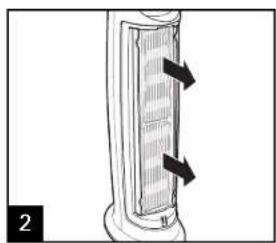
natural_image
Diagram of a cylindrical device with internal heat exchanger and directional arrows indicating flow or movement (no text or symbols)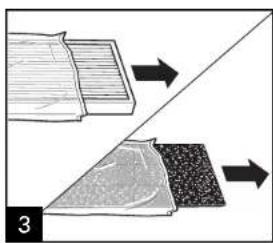
natural_image
Diagram showing two layered materials with directional arrows indicating process flow (no text or symbols)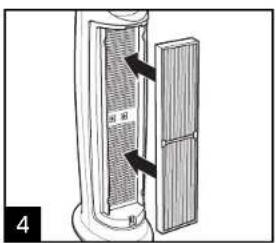
natural_image
Diagram showing a cylindrical object with layered structure and a textured surface, no text or symbols present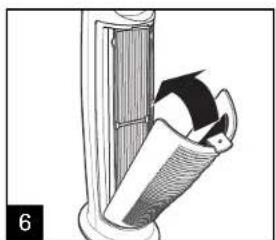
natural_image
Diagram of a mechanical device with a lever and handle, showing motion direction (no text or symbols)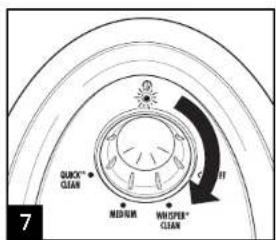
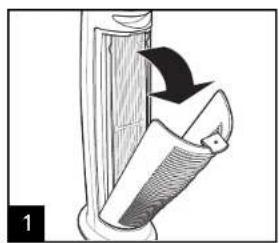
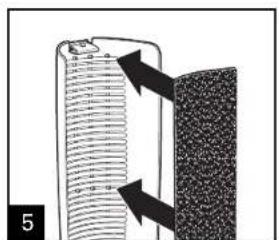
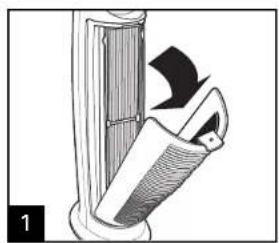
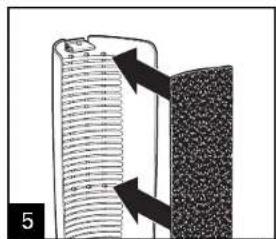
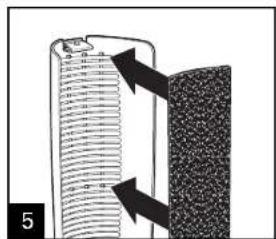
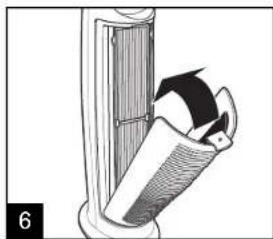
Align the top edge of carbon filter with the top set of plastic pegs located inside the air inlet grille. Push the filter down onto all three sets of pegs (top, middle, and bottom) until the plastic pegs poke through the other side of the filter, securing it to the air inlet grille. The air inlet grille can now be placed onto the unit.
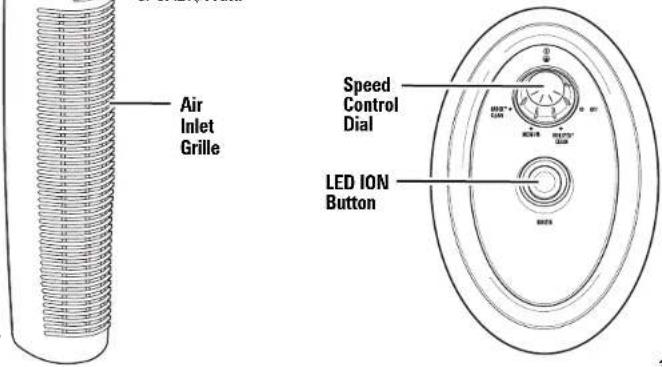
WHISPER ^™ CLEAN = quiet operation or constant low-speed filtration
MEDIUM = slightly higher fan speed to filter dust, pollen, smoke, etc.
QUICK ^™ CLEAN = high-speed filtration for more immediate cleaning
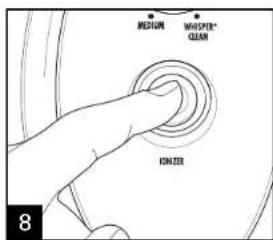
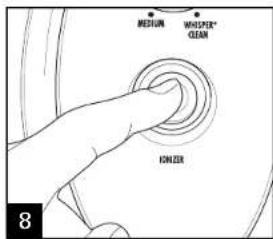
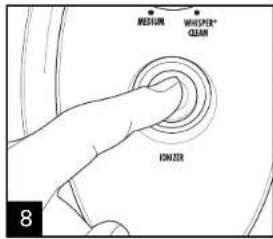
IONIZER = releases negatively charged ions into the air, which join with small particles (such as dust) to form large particles that are more easily captured by the filter
Care and Cleaning
WARNING
Electrical Shock Hazard.
Disconnect power before cleaning.
Do not immerse air purifier or cord in any liquid.
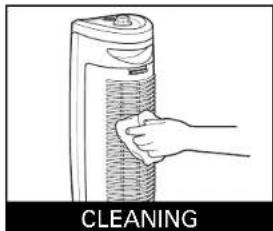
Wipe exterior (including air intake and outlet grilles) with a soft cloth. The air intake grille can also be removed and washed in warm, soapy water. Make sure the grille is completely dry before replacing.
NOTE: Do not place any part of the air purifier in the dishwasher.
natural_image
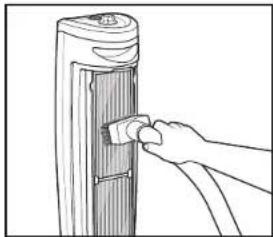
Line drawing of a hand inserting a small component into a vertical panel (no text or symbols)Permanent HEPA-grade filter may be vacuumed clean as needed.
Replacement Carbon Filter
Replace filter approximately every
3 months for best performance.
To Order Replacement Filter, Call:
1.800.851.8900 (U.S.)
1.800.267.2826 (Canada)
01.800.71.16.100 (Mexico)
or visit trueair.com
hamiltonbeach.com
Replacing Carbon Filter
natural_image
Diagram of a mechanical device with a rotating blade and handle, showing no text or symbols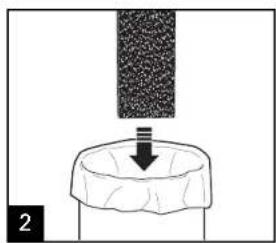
natural_image
Diagram showing a container with a downward arrow and a textured surface above it, labeled '2' (no text or symbols on the diagram itself)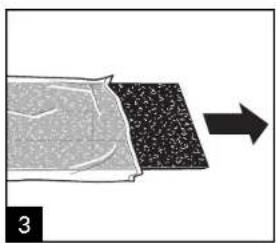
natural_image
Diagram showing a material being processed with a directional arrow, no text or symbols present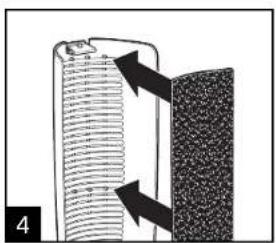
Refer to Steps 5 and 6 in How to Use Your Air Purifier.
Troubleshooting
PROBLEM
Fan does not turn on.
Reduced airflow or poor filtering.
PROBABLE CAUSE
- Is the unit plugged into a working electrical outlet?
• Is the speed control dial turned on?
• Air intake or outlet grilles may be blocked. Make sure nothing is in front of or directly behind the air purifier. See Selecting the Proper Location for more information. - Filter may be clogged. See Care and Cleaning for more information.
Limited Warranty
This warranty applies to products purchased in the U.S. and Canada. This is the only express warranty for this product and is in lieu of any other warranty or condition.
This product is warranted to be free from defects in material and workmanship for a period of one (1) year from the date of original purchase. During this period, your exclusive remedy is repair or replacement of this product or any component found to be defective, at our option; however, you are responsible for all costs associated with returning the product to us and our returning a product or component under this warranty to you. If the product or component is no longer available, we will replace with a similar one of equal or greater value.
This warranty does not cover glass, filters, wear from normal use, use not in conformity with the printed directions, or damage to the product resulting from accident, alteration, abuse, or misuse. This warranty extends only to the original consumer purchaser or gift recipient. Keep the original sales receipt, as proof of purchase is required to make a warranty claim. This warranty is void if the product is used for other than single-family household use.
We exclude all claims for special, incidental, and consequential damages caused by breach of express or implied warranty. All liability is limited to the amount of the purchase price. Every implied warranty, including any statutory warranty or condition of merchantability or fitness for a particular purpose, is disclaimed except to the extent prohibited by law, in which case such warranty or condition is limited to the duration of this written warranty. This warranty gives you specific legal rights. You may have other legal rights that vary depending on where you live. Some states or provinces do not allow limitations on implied warranties or special, incidental, or consequential damages, so the foregoing limitations may not apply to you.
To make a warranty claim, do not return this appliance to the store. Please call 1.800.851.8900 in the U.S. or 1.800.267.2826 in Canada or visit hamiltonbeach.com in the U.S. or hamiltonbeach.ca in Canada. For faster service, locate the model, type, and series numbers on your appliance.
CONSEILS DE SÉCURITÉ IMPORTANTS
natural_image
Line drawing of a potted plant next to a tall air conditioner unit (no text or symbols)natural_image
Simple line drawing of a mechanical component with a cross mark, no text or symbols presentnatural_image
Diagram of a door handle with a curved arrow indicating rotation or movement (no text or symbols)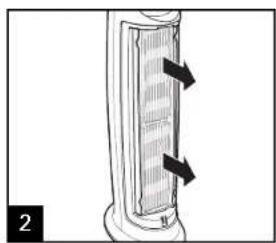
natural_image
Diagram of a cylindrical device with internal grating and directional arrows indicating flow or movement (no text or symbols)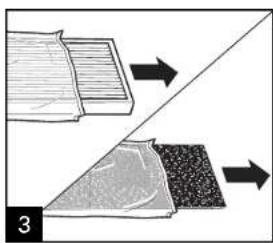
natural_image
Diagram showing two mechanical components with directional arrows, no text or symbols present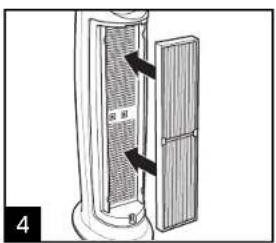
natural_image
Diagram showing a cylindrical object with layered structure and arrows pointing to a textured surface (no text or symbols)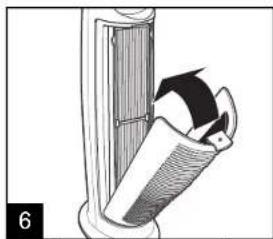
natural_image
Diagram of a door handle with an arrow indicating rotation or movement (no text or symbols)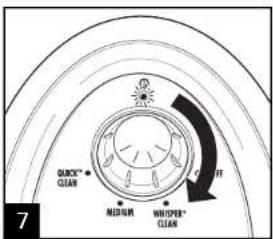
natural_image
Line drawing of a hand inserting a component into a vertical cylindrical device (no text or symbols)natural_image
Diagram of a door handle with a black arrow indicating rotation or movement (no text or symbols)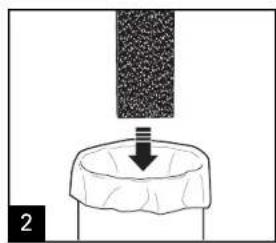
natural_image
Diagram showing a downward arrow emerging from a textured surface, with no visible text or symbols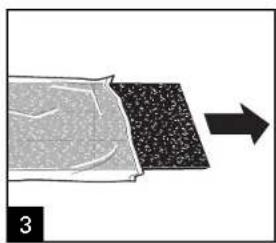
natural_image
Diagram showing a material being processed with a directional arrow, no text or symbols present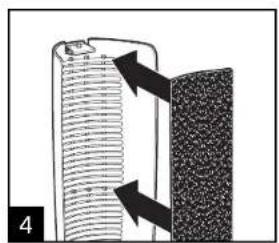
natural_image
Diagram showing a cylindrical device with internal structure and arrows indicating flow or movement (no text or symbols)natural_image
Illustration of a cylindrical mechanical component with threaded end and flange (no text or symbols)natural_image
Line drawing of a potted plant next to a tall air conditioner unit (no text or symbols)natural_image
Simple line drawing of a mechanical component with a cross mark, no text or symbols presentnatural_image
Diagram of a door handle with a curved arrow indicating rotation or movement (no text or symbols)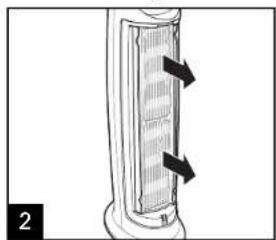
natural_image
Diagram of a cylindrical device with internal grating and two arrows indicating direction (no text or symbols)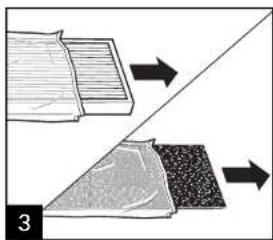
natural_image
Diagram showing two layered materials with directional arrows indicating movement, no text or symbols present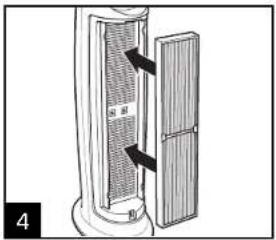
natural_image
Diagram of a mechanical device with a rotating lever and handle, showing motion direction (no text or symbols)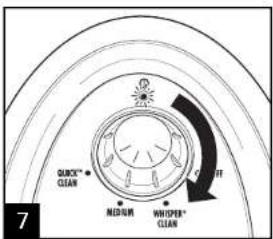
natural_image
Illustration of a hand holding a cylindrical device labeled 'LIMPIEZA' (no other text or symbols)natural_image
Line drawing of a hand inserting a small component into a vertical panel (no text or symbols)o visite trueair.com
hamiltonbeach.com

natural_image
Diagram of a device with a curved arrow indicating rotation or movement, no text or symbols present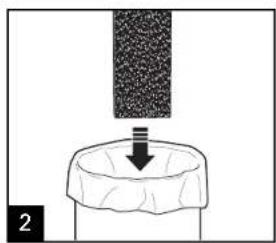
natural_image
Diagram showing a downward arrow emerging from a textured surface, with no visible text or symbols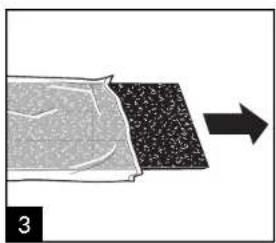
natural_image
Diagram showing a material or material sample being processed with an arrow indicating process (no text or symbols present)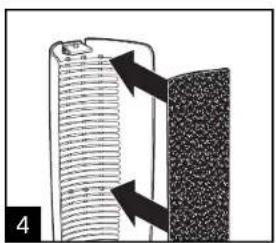
natural_image
Diagram showing a cylindrical object with internal layered structure and directional arrows, next to a textured rectangular block (no text or symbols)Col. Palmitas Polanco
Mixcoac MEXICO 03910 D.F.
Tel: 01 55 5563 8723 • Fax: 01 55 5615 1856