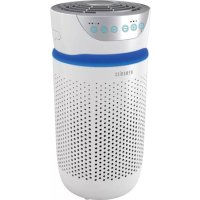
TotalClean APT20WT - Air purifier HOMEDICS - Free user manual and instructions
Find the device manual for free TotalClean APT20WT HOMEDICS in PDF.



| Product Type | Air Purifier |
| Brand | HoMedics |
| Model | TotalClean APT20WT |
| Filtration System | All-in-One HEPA Filter, Activated Carbon, Pre-Filter |
| UV-C Technology | Yes, replaceable bulb (lifespan ~10,000 h) |
| Ionizer | Yes, with on/off function |
| Aromatherapy Tray | Yes, with 3 pads included |
| Fan Speeds | 3 (Low, Medium, High) |
| Built-in Timer | 2, 4, 8, 12 hours |
| Night Light | Yes, 3 options (blue, off, display only) |
| Filter Replacement Indicator | Yes, lights up when needed |
| Recommended Coverage | 15.8 m² (170 ft²) |
| Air Changes per Hour | 4.8 times/h at high speed (closed room) |
| Power Supply | Mains, 120 V ~ 60 Hz (suitable for polarized outlets) |
| Warranty | 3 years (limited) |
| Pre-Filter Maintenance | Vacuum once a month |
| HEPA Filter Replacement | Every 12 months (ref. AP-T20FL) |
| UV-C Bulb Replacement | Approx. 10,000 hours (ref. AP-UVC1) |
| Aromatherapy Pads | Replacement: UHE-PAD1 |
| Polarized Plug | Yes, for electrical safety |
| Recommended Use | Indoor, horizontal surface, 15 cm from walls |
Frequently Asked Questions - TotalClean APT20WT HOMEDICS
User questions about TotalClean APT20WT HOMEDICS
0 question about this device. Answer the ones you know or ask your own.
Ask a new question about this device
Download the instructions for your Air purifier in PDF format for free! Find your manual TotalClean APT20WT - HOMEDICS and take your electronic device back in hand. On this page are published all the documents necessary for the use of your device. TotalClean APT20WT by HOMEDICS.
USER MANUAL TotalClean APT20WT HOMEDICS
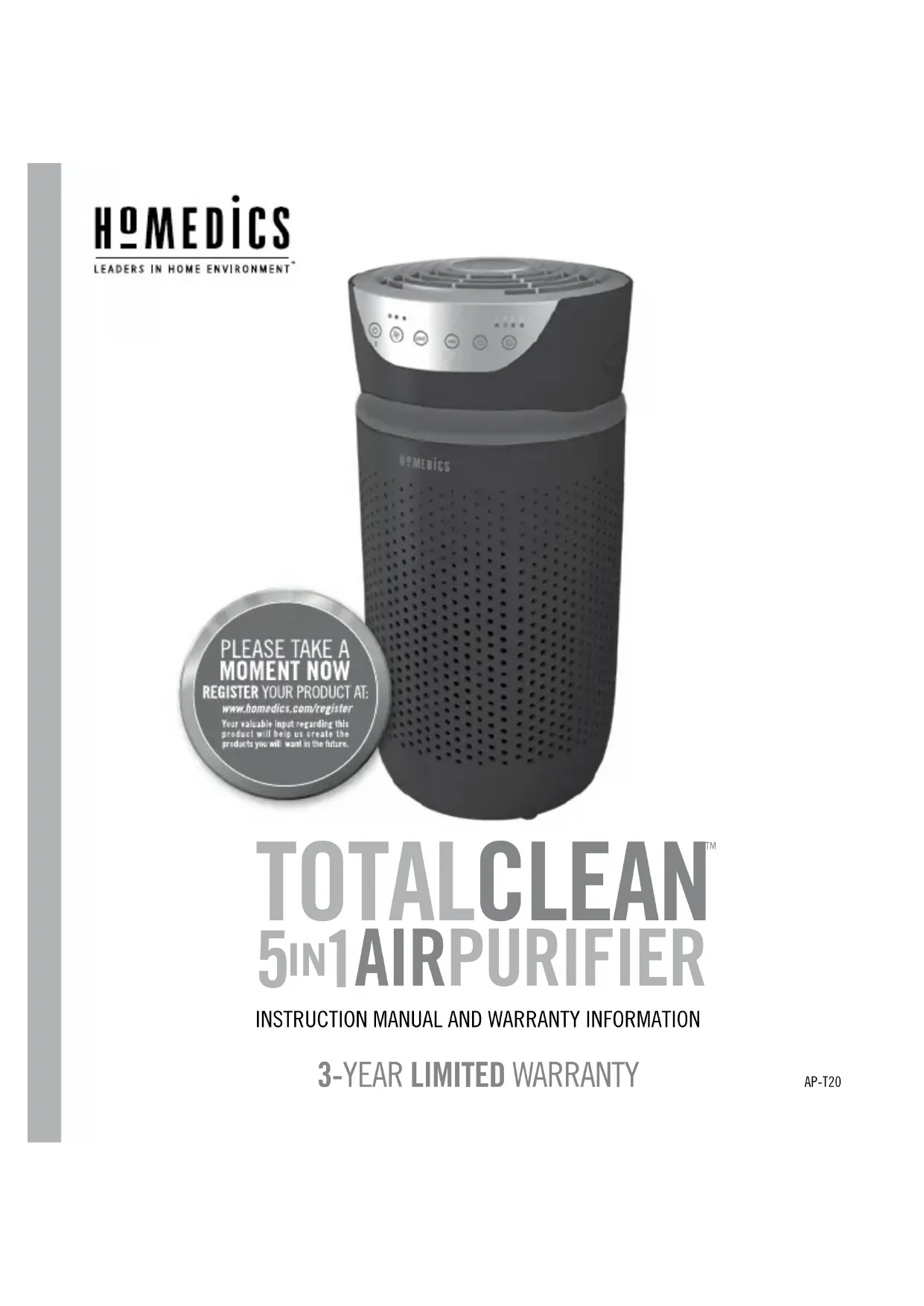
TOTALCLEAN™
5IN1AIRPURIFIER
INSTRUCTION MANUAL AND WARRANTY INFORMATION
3-YEAR LIMITED WARRANTY
IMPORTANT SAFETY INSTRUCTIONS:
WHEN USING ELECTRICAL PRODUCTS, ESPECIALLY WHEN CHILDREN ARE PRESENT, BASIC SAFETY PRECAUTIONS SHOULD ALWAYS BE FOLLOWED, INCLUDING THE FOLLOWING:
READ ALL INSTRUCTIONS BEFORE USING.
DANGER — TO REDUCE THE RISK OF ELECTRIC SHOCK:
- Always unplug the air purifier from the electrical outlet immediately after using and before cleaning or replacing filters.
- Keep cord away from heated surfaces.
• Always place the air purifier on a firm, level surface. - Always place the air purifier at least 6 inches away from walls and 3 feet from heat sources such as stoves, radiators, or heaters.
- DO NOT reach for an appliance that has fallen into water. Unplug it immediately.
- DO NOT place or store appliance where it can fall or be pulled into a tub or sink.
- DO NOT place in or drop into water or other liquid.
- Keep dry — DO NOT operate in wet or moist conditions.
- Check your air purifier cord and plug connections. Faulty wall outlet connections or loose plugs can cause the outlet or plug to overheat. Be sure the plug fits tightly in the outlet.
NOTE: This appliance has a polarized plug (one blade is wider than the other). To reduce the risk of shock, this plug is intended to fit only one way in a polarized outlet. If the plug does not fit fully in the outlet, reverse the plug. If it still does not fit, contact a qualified electrician.
CAUTION: DO NOT attempt to defeat this safety feature. To do so could result in an electric shock hazard.
WARNING — TO REDUCE THE RISK OF BURNS, FIRE, ELECTRIC SHOCK, OR INJURY TO PERSONS:
• Always unplug the air purifier when not in use.
- Do not operate the air purifier with a damaged cord or plug, or after the air purifier malfunctions, or has been dropped or damaged in any manner. Return to a HoMedics Service Center for examination, electrical or mechanical adjustment, or repair.
- This air purifier is not intended for use in bathrooms, laundry areas, and similar moist indoor locations.
- Do not run cord under carpeting. Do not cover cord with throw rugs, runners, or similar coverings. Do not route cord under furniture or appliances. Arrange cord away from traffic areas where it can be tripped over.
- To disconnect the air purifier, first turn controls to the off position, then remove plug from outlet.
- Do not tilt or move the air purifier while it is in operation. Shut off and remove plug from outlet before moving.
- Do not insert or allow foreign objects to enter any ventilation or exhaust opening as this may cause an electric shock or fire, or damage the air purifier.
- Do not block air intakes or exhaust in any manner. Do not use on any soft surface, like a bed, where openings may become blocked.
- Use this air purifier only for its intended use as described in this manual. Any other use not recommended by the manufacturer may cause fire, electric shock, or injury to persons.
- DO NOT use outdoors.
• This product is intended for household use only.
SAVE THESE IMPORTANT INSTRUCTIONS FOR EASY REFERENCE.
UNIQUE FEATURES & SPECIFICATIONS
Removes up to 99% of airborne particles as small as 0.3 microns, such as allergens, pollen, dust, germs, pet dander, odor, mold spores, and smoke from air that passes through the filter.
Reduces household odors and VOCs (volatile organic compounds)/gases as shown by independent laboratory testing.
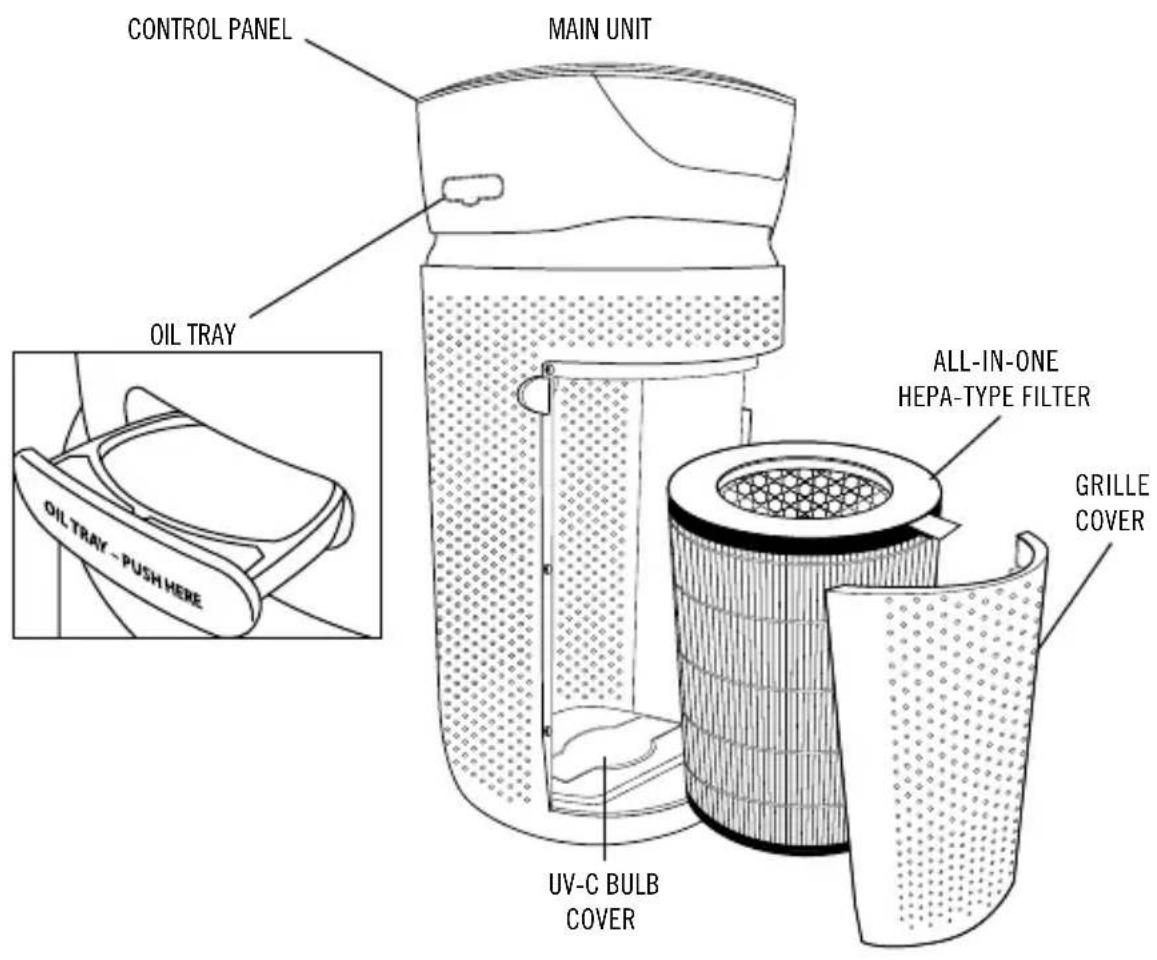
- PRE-FILTER
Captures large particles.
UV-C TECHNOLOGY WITH ON/OFF
When on, UV-C technology kills germs, viruses, and bacteria.
IONIZER WITH ON/OFF
When on, assists in the air purification process.
3 SPEEDS
Low, medium, and high.
BUILT-IN TIMER
Choose from 2, 4, 8, or 12 hours.
REPLACE FILTER INDICATOR
Illuminates when it is time to replace the filter.
SUGGESTED ROOM SIZE
170 FT ^2 /15.8 M ^2 . Portable air purifiers will be more effective in rooms where all the doors and windows are closed.
AIR CHANGES PER HOUR
This air purifier will purify the air in a 170 FT ^2 /15.8 M ^2 room (assuming an 8 FT/2.43 M ceiling) 4.8 times per hour on high speed in a closed room.
OIL TRAY
Includes 3 essential oil pads. Use with essential oil (not included) to deliver scent into the air.
HOW TO USE
BEFORE TURNING THE UNIT ON
- Take the air purifier out of the box and remove the clear protective plastic bag.
- Place the air purifier on a firm, level surface.
- Plug the power cord into a standard AC outlet.
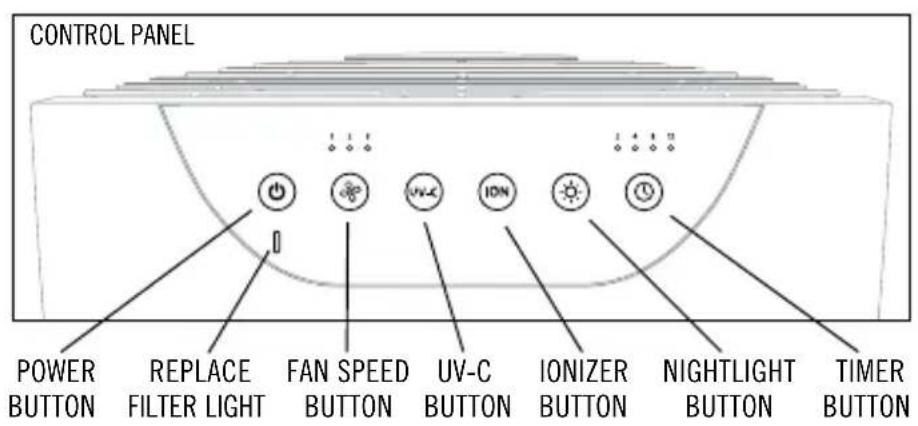
POWER BUTTON AND FAN SPEED SETTINGS
- To turn the air purifier on, press the power button.
- This air purifier has 3 fan speed settings: low (1), medium (2), and high (3). The higher the fan speed setting, the faster the air will be purified. To select or change fan speed, press the fan speed ✿ button until the desired setting is reached.
UV-C TECHNOLOGY WITH ON/OFF
The UV-C technology kills germs, viruses, and bacteria by penetrating its DNA, resulting in the microorganism's death or the inability to reproduce. Press the UV-C on to turn the UV-C technology on. The blue LED will glow. Press the UV-C on again to turn the UV-C technology off.
IONIZER SETTING WITH ON/OFF
Ion particles have a positive or negative charge that attaches to airborne particles, making them easier to be captured by the filtration system. Press the ionizer 1 button to turn the ionizer on. The blue light will glow to indicate the ionizer is in use. Press the ionizer 1 button again to turn the ionizer off.
NOTE: Dust particles may accumulate on surfaces around the air purifier when the ionizer is in use. These dust particles can be vacuumed or wiped away with a soft, damp cloth.
NOTE: You may hear occasional popping sounds when the ionizer is used. This is normal.
NOTE: The ionizer produces less ozone than the UL-established limits of 0.05 ppm. Ozone may be harmful around birds and small pets. To prevent ozone buildup, use the ionizer feature in a well-ventilated area.
NIGHTLIGHT
The nightlight has 3 options. Press once to turn the blue nightlight on. Press again to turn the blue nightlight ring and the display lights off. Press a third time to turn the display lights on.
TIMER
Press the timer button until the desired timer setting is lit on the display. The timer button will cycle through the following settings: 2 hours, 4 hours, 8 hours, 12 hours, and off. To cancel the timer at any time, press the timer button until all timer LEDs are off. The air purifier will run continuously when the timer function is off.
OIL TRAY
Use essential oil (not included) to deliver scent into the air.
NOTE: For use with the included HoMedics essential oil pads only. Do not add essential oils anywhere else in the unit as it may cause damage.
NOTE: Do not leave a filled essential oil pad in the oil tray if it will be out of use for a long period of time.
ARE ESSENTIAL OILS SAFE TO USE AROUND PETS?
We should always exercise caution when using essential oils around our pets. Keep all essential oil and aromatherapy products (like diffusers) out of reach of pets. Keep open bottles away from pets to avoid internal consumption. We do not recommend the topical use of essential oils on pets, as they have a strong sense of smell and cannot get rid of the oil if they don't like it or it is disturbing them. When diffusing essential oils around pets, always diffuse in a well-ventilated area and leave an option for them to remove themselves from the space, such as leaving a door open. Every animal is different, so carefully observe how each animal responds when introducing an essential oil for the first time. If irritation occurs, discontinue the use of the essential oil. We recommend seeking medical attention if ingestion of essential oil occurs.
ADDING ESSENTIAL OILS
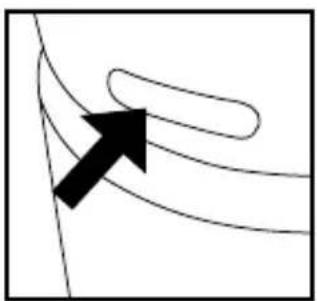
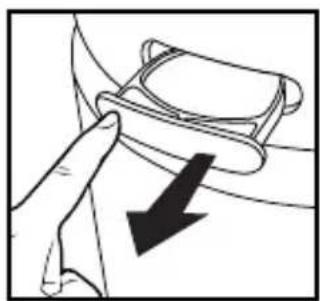
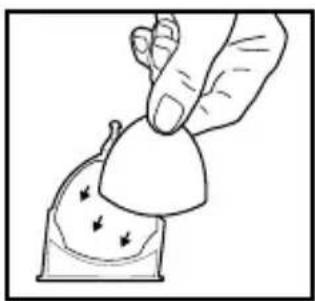
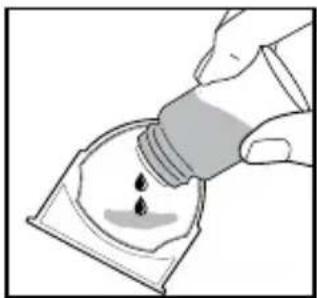
WARNING: PUTTING OIL ANYWHERE BUT THE OIL TRAY WILL DAMAGE THE AIR PURIFIER.
natural_image
Abstract diagram with curved lines and a black arrow pointing upward (no text or symbols)- The oil tray is located on the side of the air purifier above the nightlight ring.
natural_image
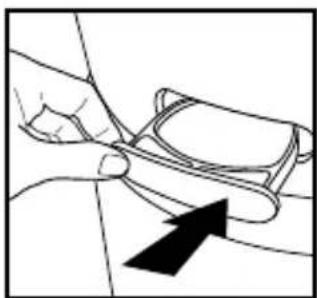
Illustration of a hand adjusting a belt buckle with a black arrow indicating downward motion (no text or symbols)- Push to open and remove the tray.
natural_image
Illustration of a hand holding a small object with arrows indicating motion or force (no text or symbols)- Place 1 aroma pad (3 included) into the oil tray.
natural_image
Illustration of a hand pouring liquid into a container with a droplet (no text or symbols)- Add 5–7 drops of essential oil to the pad. You may use more or less depending on personal preference. WARNING: Only place essential oil on the pad and NOT directly into the tray.
natural_image
Line drawing of a hand holding a small object with an arrow pointing to it (no text or symbols present)- Place the oil tray back in its compartment and push to close. The scent will start automatically when the air purifier is turned on.
To purchase genuine HoMedics Replacement Essential Oil Pads, Model # UHE-PAD1, go to your retailer where you purchased your HoMedics TotalClean Air Purifier, or visit www.homedics.com (US), www.homedics.ca (CAN).
To purchase genuine HoMedics Essential Oils, go to your retailer where you purchased your HoMedics TotalClean Air Purifier, or visit www.homedics.com (US), www.homedics.ca (CAN).
FILTER REPLACEMENT
REPLACE FILTER LIGHT
The replace filter light illuminates when it is time to replace the HEPA-type filter based on the air purifier's hours of use.
REPLACING THE HEPA-TYPE FILTER
For optimal performance, replace every 12 months under normal usage conditions.
natural_image
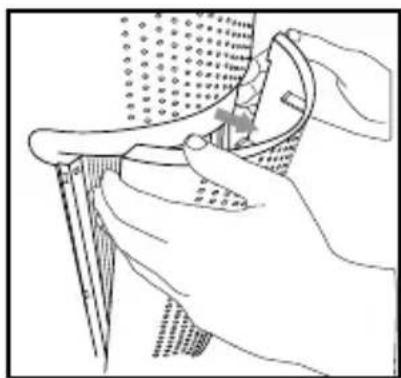
Line drawing of a hand using a tool to adjust or install a component, with no visible text or symbols.- Unplug the air purifier. Pull the indents on each side of the grille cover.
natural_image
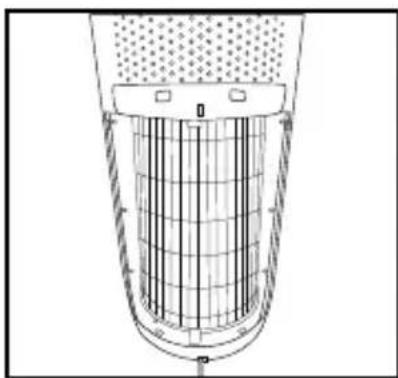
Technical line drawing of a cylindrical device with internal grid structure (no text or symbols)- Remove the grille cover and set aside.
natural_image
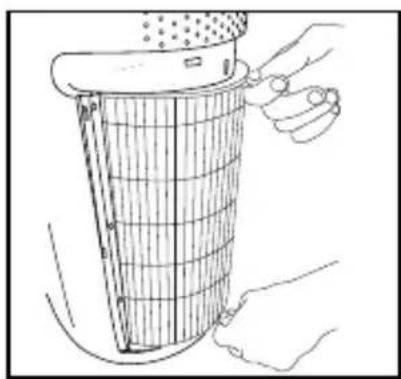
Line drawing of hands holding a filter or grating device (no text or symbols)- Pull the tabs to remove the old filter.
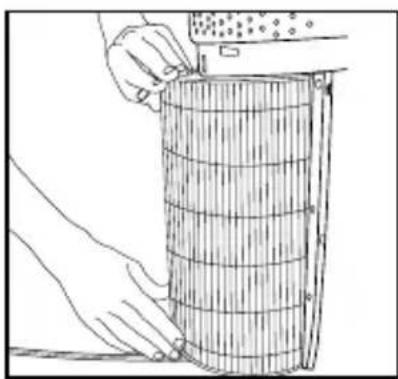
natural_image
Line drawing of hands holding a cylindrical object with internal grid lines (no text or symbols)- With the filter tabs facing outward, slide the new HEPA-type filter into the filter cavity.
To purchase genuine HoMedics replacement HEPA-type filters, model AP-T20FL, go back to your retailer where you purchased your air purifier, or visit www.homedics.com (US), www.homedics.ca (CAN).
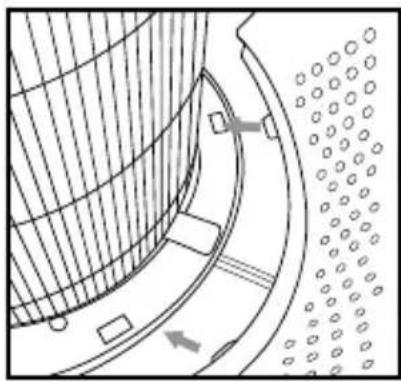
natural_image
Diagram of a curved mechanical component with internal structure and directional arrows (no text or symbols)- Place the tabs at the bottom of the grille cover into the base of the air purifier. Gently push the grille cover until it snaps into place.
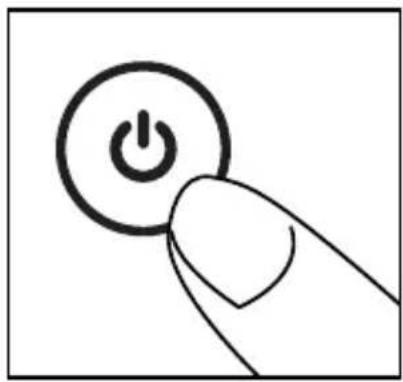
natural_image
Hand holding a button with a power symbol (no text or labels)- Plug the power cord into a standard AC outlet. Turn the air purifier on. Press and hold the ionizer ONton for 3 seconds to reset the indicator.
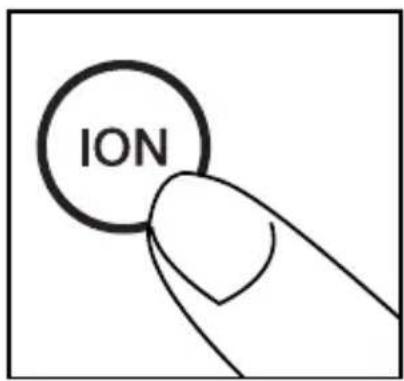
UV-C BULB REPLACEMENT
REPLACING THE UV-C BULB
The UV-C bulb is designed to last for approximately 10,000 hours of use. The UV-C button on the control panel will flash red when the UV-C bulb burns out and needs to be replaced. The UV-C button will change to blue once the bulb has been replaced.
NOTE: The air purifier will continue to operate without the UV-C function when the UV-C bulb burns out.
CAUTION: Do not operate the air purifier without the protective UV-C bulb cover.
CAUTION: Unplug the power cord before servicing or replacing the UV-C bulb.
natural_image
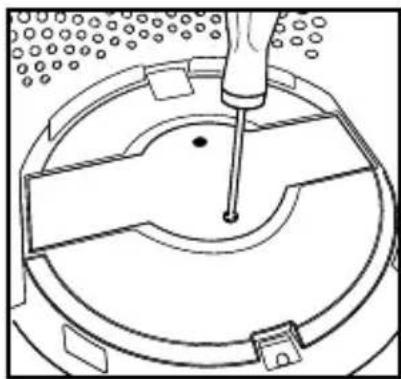
Technical line drawing of a mechanical component with a central pin and circular base (no text or symbols)- Unplug the air purifier and remove the HEPA-type filter. Using a Phillips-head screwdriver (not included), unscrew the 2 screws located on the UV-C bulb cover.
natural_image
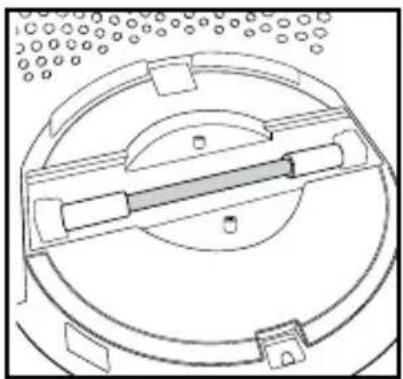
Technical line drawing of a circular mechanical component with internal components and mounting holes (no text or symbols)- Remove the cover to expose the UV-C bulb.
natural_image
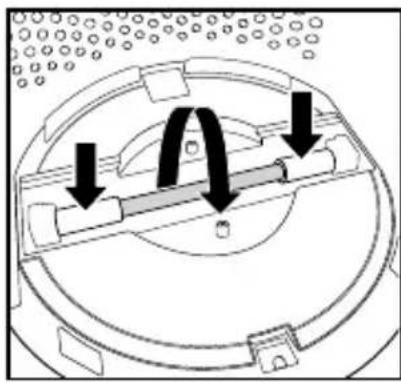
Diagram of a mechanical assembly with arrows indicating motion or force directions (no text or symbols present)- Gently push from the sides and rotate the UV-C bulb to remove.
natural_image
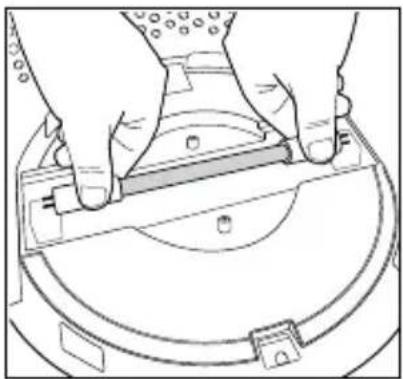
Line drawing of hands installing or adjusting a mechanical component on a circular base (no text or symbols)- Remove and replace the UV-C bulb. Re-install the UV-C bulb cover, HEPA-type filter, and grille cover.
NOTE: The UV-C bulb contains mercury (Hg). Dispose of according to local, state, and federal law / www.lamprecycle.org.
To purchase genuine HoMedics UV-C replacement bulbs, model AP-UVC1, go back to your retailer where you purchased your air purifier, or visit www.homedics.com (US), www.homedics.ca (CAN).
CLEANING AND MAINTENANCE
CLEANING THE PRE-FILTER
natural_image
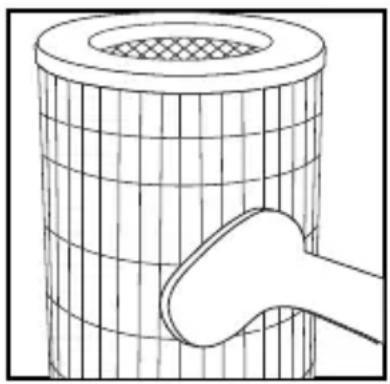
Diagram of a cylindrical object with a mesh pattern and a curved handle, no text or symbols presentNOTE: For best performance, vacuum the pre-filter once a month under normal usage.
- Unplug the air purifier.
- Remove the HEPA-type filter as described in the Replacing the HEPA-Type Filter section.
- Vacuum the outside of the HEPA-type filter using the brush attachment of your vacuum cleaner, cleaning it thoroughly.
- Place the HEPA-type filter back into the air purifier and close grille.
- Plug the power cord into a standard AC outlet.
TO CLEAN THE OIL TRAY
natural_image
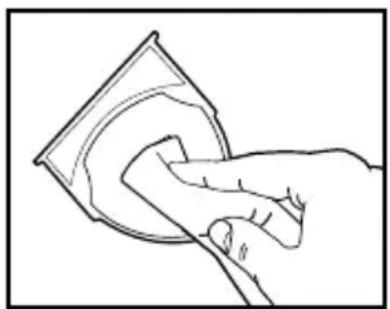
Line drawing of a hand cleaning a circular object with a magnifying glass (no text or symbols)Open the oil tray and remove the pad. Essential oil pads should be changed when switching to a different essential oil scent. If continuing to use the same scent, set the essential oil pad aside for reuse. Wipe down the inside of the oil tray with a soft cloth. Place the essential oil pad back in the tray and close.
NOTE: Leave the essential oil pad out of the oil tray when storing.
FOR BEST PERFORMANCE:
- NEVER use water or any household cleaners or detergents to clean the HEPA-type filter.
- Clean off the outside of the unit with a soft, dry cloth as needed.
- NEVER use water, wax, polish, or any chemical solution to clean the outside of the unit.
- Clean off the grille cover using a soft, damp cloth or the brush attachment of your vacuum as needed.
• Vacuum the pre-filter monthly under normal usage conditions. - Replace the HEPA-type filter every 12 months under normal usage conditions.
- Always use a genuine HoMedics replacement filter for optimal performance.
TROUBLESHOOTING
| PROBLEM POSSIBLE CAUSE SOLUTION | ||
| Unit will not operate • Unit is not plugged in• Power button not pressed• No power to unit• HEPA-type filter not installed correctly• Grille cover not installed correctly | • Plug unit in• Press the power button to turn the power on• Check circuits, fuses, try a different outlet• Reinstall the HEPA-type filter• Reinstall the grille cover | |
| Reduced airflow • The grille may be blocked• Pre-filter needs to be vacuumed• The HEPA-type filter needs to be replaced | • Check to make sure nothing is blocking the grille and air outlet• Vacuum the pre-filter with the brush attachment of your vacuum cleaner• Replace the HEPA-type filter | |
| Reduced odor removal • The HEPA-type filter needs to be replaced | • Replace the HEPA-type filter | |
| Excessive noise • The unit is not level • Place the unit on a flat, level surface | • | |
| Replace filter light remains lit after filter replacement | • The replace filter indicator needs to be reset | • Press and hold the ionizer button for 3 seconds until the replace filter light turns off |
| Display lights are off | • Nightlight setting | • Press the nightlight button until the desired lights are on/off |
LIMITED 3-YEAR WARRANTY
HoMedics sells its products with the intent that they are free of defects in manufacture and workmanship for a period of three years from the date of original purchase, except as noted below. HoMedics warrants that its products will be free of defects in material and workmanship under normal use and service. This warranty extends only to consumers and does not extend to Retailers.
To obtain warranty service on your HoMedics product, contact a Consumer Relations representative for assistance. Please make sure to have the model number of the product available.
HoMedics does not authorize anyone, including but not limited to Retailers, the subsequent consumer purchaser of the product from a Retailer, or remote purchasers, to obligate HoMedics in any way beyond the terms set forth herein. This warranty does not cover damage caused by misuse or abuse; accident; the attachment of any unauthorized accessory; alteration to the product; improper installation; unauthorized repairs or modifications; improper use of electrical/power supply; loss of power; dropped product; malfunction or damage of an operating part from failure to provide manufacturer's recommended maintenance; transportation damage; theft; neglect; vandalism; or environmental conditions; loss of use during the period the product is at a repair facility or otherwise awaiting parts or repair; or any other conditions whatsoever that are beyond the control of HoMedics.
This warranty is effective only if the product is purchased and operated in the country in which the product is purchased. A product that requires modifications or adoption to enable it to operate in any other country than the country for which it was designed, manufactured, approved, and/or authorized, or repair of products damaged by these modifications is not covered under this warranty.
THE WARRANTY PROVIDED HEREIN SHALL BE THE SOLE AND EXCLUSIVE WARRANTY. THERE SHALL BE NO OTHER WARRANTIES EXPRESS OR IMPLIED, INCLUDING ANY IMPLIED WARRANTY OF MERCHANTABILITY OR FITNESS OR ANY OTHER OBLIGATION ON THE PART OF THE COMPANY WITH RESPECT TO PRODUCTS COVERED BY THIS WARRANTY. HOMEDICS SHALL HAVE NO LIABILITY FOR ANY INCIDENTAL, CONSEQUENTIAL, OR SPECIAL DAMAGES. IN NO EVENT SHALL THIS WARRANTY REQUIRE MORE THAN THE REPAIR OR REPLACEMENT OF ANY PART OR PARTS THAT ARE FOUND TO BE DEFECTIVE WITHIN THE EFFECTIVE PERIOD OF THE WARRANTY. NO REFUNDS WILL BE GIVEN. IF REPLACEMENT PARTS FOR DEFECTIVE MATERIALS ARE NOT AVAILABLE, HOMEDICS RESERVES THE RIGHT TO MAKE PRODUCT SUBSTITUTIONS IN LIEU OF REPAIR OR REPLACEMENT.
This warranty does not extend to the purchase of opened, used, repaired, repackaged, and/or resealed products, including but not limited to sale of such products on internet auction sites and/or sales of such products by surplus or bulk resellers. Any and all warranties or guarantees shall immediately cease and terminate as to any products or parts thereof that are repaired, replaced, altered, or modified, without the prior express and written consent of HoMedics.
This warranty provides you with specific legal rights. You may have additional rights that may vary from country to country. Because of individual country regulations, some of the above limitations and exclusions may not apply to you.
For more information regarding our product line in the USA, please visit www.homedics.com. For Canada, please visit www.homedics.ca.
FOR SERVICE IN THE USA:
Email: cservice@homedics.com
8:30am–7:00pm EST Monday–Friday
1-800-466-3342
FOR SERVICE IN CANADA:
Email: cservice@homedicsgroup.ca
8:30am-5:00pm EST Monday-Friday
1-888-225-7378
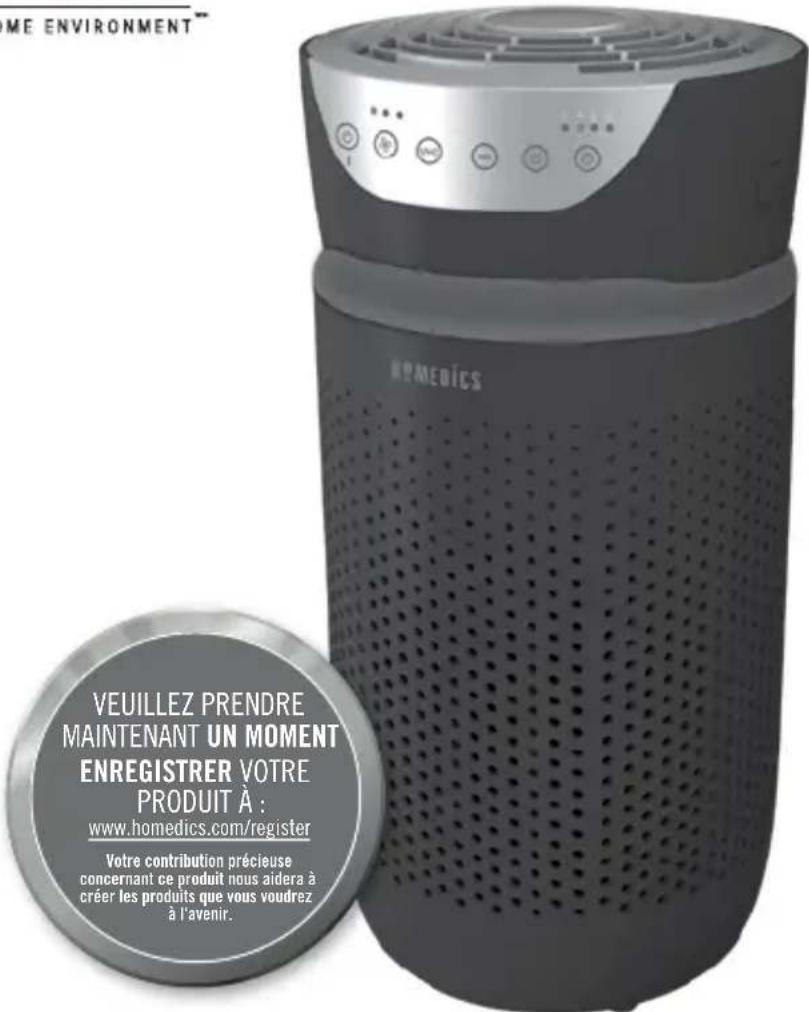
TOTALCLEAN™/MC 5IN1AIRPURIFIER
MODE D'EMPLOI ET INFORMATIONS SUR LA GARANTIE
GARANTIE LIMITÉE DE 3 ANS
INSTRUCTIONS DE SÉCURITÉ IMPORTANTES:
LORS DE L'UTILISATION D'APPAREILS ÉLECTRIQUES, EN PARTICULIER LORSQUE DES ENFANTS SONT PRÉSENTS, DES MESURES DE SÉCURITÉ DE BASE DOIVENT TOUJOURS ÊTRE SUIVIES, DONT LES SUIVANTES:
LIRE TOUTES LES INSTRUCTIONS AVANT L'UTILISATION.
DANGER — POUR RÉDUIRE LE RISQUE DE CHOC ÉLECTRIQUE:
TECHNOLOGIE UV-C AVEC MARCHE/ARRÊT
TECHNOLOGIE UV-C AVEC MARCHE/ARRÊT
natural_image
Abstract diagram with curved lines and a black arrow pointing upward (no text or symbols)natural_image
Illustration of a hand adjusting a belt buckle with a black arrow indicating downward motion (no text or symbols)natural_image
Illustration of a hand holding a small object with arrows indicating motion or force (no text or symbols)natural_image
Illustration of a hand pouring liquid into a container with a droplet (no text or symbols)natural_image
Line drawing of a hand holding a pair of eyeglasses with an arrow pointing to the pair (no text or symbols present)REEMPLACEMENT DES FILTRES
BOUTON DE L'INDICATEUR DE REMPLACEMENT DU FILTRE
natural_image
Illustration of hands using a tool to adjust or install a mechanical component (no text or symbols visible)natural_image
Technical line drawing of a cylindrical device with internal grid structure (no text or symbols)natural_image
Line drawing of a hand holding a tool next to a grid-patterned cylindrical object (no text or symbols)natural_image
Line drawing of hands using a tool to cut a cylindrical object with a ruler, no text or symbols presentnatural_image
Technical diagram of a curved mechanical component with internal structure and mounting holes (no text or symbols)natural_image
Hand holding a finger pressing a button with a power symbol (no text or labels)REEMPLACEMENT DE L'AMPOULE UV-C
REEMPLACEMENT DE L'AMPOULE UV-C
natural_image
Technical line drawing of a mechanical component with a tool inserted, showing internal structure and mounting holes (no text or symbols)natural_image
Technical line drawing of a circular mechanical component with internal channels and mounting holes (no text or symbols)natural_image
Diagram of a mechanical component with arrows indicating motion or force direction (no text or symbols)natural_image
Line drawing of hands installing or adjusting a mechanical component on a circular base (no text or symbols)natural_image
Diagram of a cylindrical object with a mesh pattern and a curved handle, no text or symbols presentnatural_image
Line drawing of a hand cleaning a circular object with a magnifying glass (no text or symbols)natural_image
Abstract diagram with curved lines and a black arrow pointing upward (no text or symbols)natural_image
Illustration of a hand pressing down on a belt buckle with a black arrow indicating downward motion (no text or symbols)natural_image
Line drawing of a hand holding a container with arrows indicating flow or movement (no text or symbols)natural_image
Illustration of a hand pouring liquid into a container with a droplet (no text or symbols)natural_image
Line drawing of a hand adjusting a pair of eyeglasses with an arrow pointing to the pair (no text or symbols present)natural_image
Line drawing of hands using a tool to adjust or install a component, no text or symbols presentnatural_image
Technical line drawing of a mechanical component with internal grid structure (no text or symbols)natural_image
Line drawing of a hand holding a filter or grating device (no text or symbols present)natural_image
Line drawing of hands holding a cylindrical object with measurement markings (no text or symbols)natural_image
Technical diagram of a curved mechanical component with internal structure and directional arrows (no text or symbols)natural_image
Hand holding a button with a power symbol (no text or labels)natural_image
Technical line drawing of a mechanical component with a central pin and circular base (no text or symbols)natural_image
Diagram of a mechanical component with arrows indicating motion or force direction (no text or symbols)natural_image
Technical line drawing of a circular mechanical component with internal channels and mounting brackets (no text or symbols)natural_image
Line drawing of hands installing or adjusting a mechanical component on a circular base (no text or symbols)natural_image
Diagram of a cylindrical object with a mesh top and a curved handle inserted into it (no text or symbols)natural_image
Line drawing of a hand cleaning a circular object with a magnified inset (no text or symbols)
- TOTALCLEAN™
- 5IN1AIRPURIFIER
- IMPORTANT SAFETY INSTRUCTIONS:
- DANGER — TO REDUCE THE RISK OF ELECTRIC SHOCK:
- WARNING — TO REDUCE THE RISK OF BURNS, FIRE, ELECTRIC SHOCK, OR INJURY TO PERSONS:
- UNIQUE FEATURES & SPECIFICATIONS
- - PRE-FILTER
- UV-C TECHNOLOGY WITH ON/OFF
- IONIZER WITH ON/OFF
- SPEEDS
- BUILT-IN TIMER
- REPLACE FILTER INDICATOR
- SUGGESTED ROOM SIZE
- AIR CHANGES PER HOUR
- OIL TRAY
- HOW TO USE
- BEFORE TURNING THE UNIT ON
- POWER BUTTON AND FAN SPEED SETTINGS
- IONIZER SETTING WITH ON/OFF
- NIGHTLIGHT
- TIMER
- ARE ESSENTIAL OILS SAFE TO USE AROUND PETS?
- ADDING ESSENTIAL OILS
- FILTER REPLACEMENT
- REPLACE FILTER LIGHT
- REPLACING THE HEPA-TYPE FILTER
- UV-C BULB REPLACEMENT
- REPLACING THE UV-C BULB
- CLEANING AND MAINTENANCE
- CLEANING THE PRE-FILTER
- TO CLEAN THE OIL TRAY
- FOR BEST PERFORMANCE:
- LIMITED 3-YEAR WARRANTY
- TOTALCLEAN™/MC 5IN1AIRPURIFIER
- INSTRUCTIONS DE SÉCURITÉ IMPORTANTES:
- DANGER — POUR RÉDUIRE LE RISQUE DE CHOC ÉLECTRIQUE:
- TECHNOLOGIE UV-C AVEC MARCHE/ARRÊT
- REEMPLACEMENT DES FILTRES
- BOUTON DE L'INDICATEUR DE REMPLACEMENT DU FILTRE
- REEMPLACEMENT DE L'AMPOULE UV-C
Brand : HOMEDICS
Model : TotalClean APT20WT
Category : Air purifier