LR20 - Rangefinder BOSCH - Free user manual and instructions
Find the device manual for free LR20 BOSCH in PDF.



| Product type | Rotary laser level / laser distance meter |
| Brand | Bosch |
| Model | LR20 (compatible with GRL2000-40H / GRL2000-40HV) |
| Dimensions (L x W x H) | 190 x 180 x 170 mm (7.5 x 7 x 6.7 in) |
| Weight | 1.76 kg (3.9 lbs) |
| Power supply | 2 alkaline batteries 1.5 V type LR20 |
| Battery life | Approx. 50 hours |
| Range without receiver | Approx. 60 m (200 ft) |
| Range with receiver | Approx. 600 m (2000 ft) |
| Leveling accuracy | ±1/16 in at 100 ft (GRL2000-40H) or ±1/8 in at 100 ft (GRL2000-40HV) |
| Self-leveling range | ±8% (±5°) |
| Leveling time | Approx. 15 seconds |
| Rotation speed | 600 rpm (GRL2000-40H) or 150/300/600 rpm (GRL2000-40HV) |
| Laser class | 2 (GRL2000-40H) / 3R (GRL2000-40HV) |
| Laser type | 635 nm, <1 mW (class 2) or <5 mW (class 3R) |
| Protection rating | IP56 (dust and water jet protected) |
| Operating temperature | -10 °C to +50 °C (14 °F to 122 °F) |
| Storage temperature | -20 °C to +70 °C (-4 °F to 158 °F) |
| Main functions | Self-leveling, rotation mode, line mode, point mode, anti-shock function (ADS), remote control, laser receiver |
| Maintenance and cleaning | Clean with a soft damp cloth; do not immerse; store in protective case |
| Safety | Avoid direct eye exposure to the laser beam; use laser viewing glasses; follow safety instructions |
| Spare parts and repairability | Repair only by an authorized Bosch service center; use original spare parts |
| Included accessories | LR20 laser receiver, RC4 remote control, tripod, laser viewing glasses, wall mount, ceiling measuring plate, protective case |
Frequently Asked Questions - LR20 BOSCH
User questions about LR20 BOSCH
0 question about this device. Answer the ones you know or ask your own.
Ask a new question about this device
Download the instructions for your Rangefinder in PDF format for free! Find your manual LR20 - BOSCH and take your electronic device back in hand. On this page are published all the documents necessary for the use of your device. LR20 by BOSCH.
USER MANUAL LR20 BOSCH
IMPORTANT: IMPORTANT : IMPORTANTE: Read Before Using Lire avant usage Leer antes de usar

Operating /Safety Instructions Consignes de fonctionnement/sécurité Instrucciones de funciona y seguidad
GRL2000-40H
GRL2000-40HV
RC4

BOSCH
Call Toll Free for Consumer Information & Service Locations
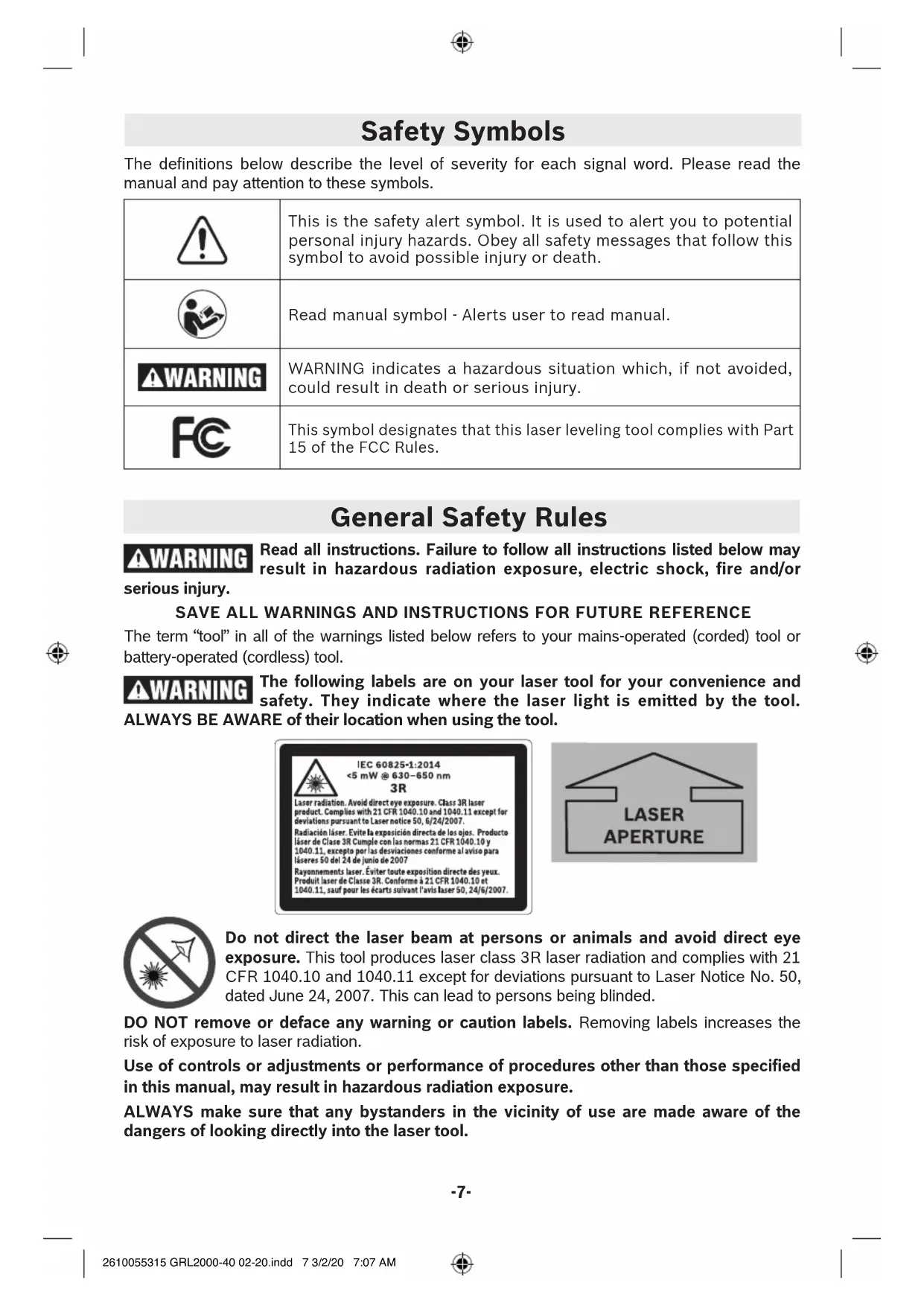
The definitions below describe the level of severity for each signal word. Please read the manual and pay attention to these symbols.
| ! | This is the safety alert symbol. It is used to alert you to potential personal injury hazards. Obey all safety messages that follow this symbol to avoid possible injury or death. |
| Read manual symbol - Alerts user to read manual. | |
| ▲WARNING | WARNING indicates a hazardous situation which, if not avoided, could result in death or serious injury. |
| FC | This symbol designates that this laser leveling tool complies with Part 15 of the FCC Rules. |
General Safety Rules
WARNING Read all instructions. Failure to follow all instructions listed below may result in hazardous radiation exposure, electric shock, fire and/or serious injury.
SAVE ALL WARNING AND INSTRUCTIONS FOR FUTURE REFERENCE
The term "tool" in all of the warnings listed below refers to your mains-operated (corded) tool or battery-operated (cordless) tool.
WARNING The following labels are on your laser tool for your convenience and safety. They indicate where the laser light is emitted by the tool. ALWAYS BE AWARE of their location when using the tool.
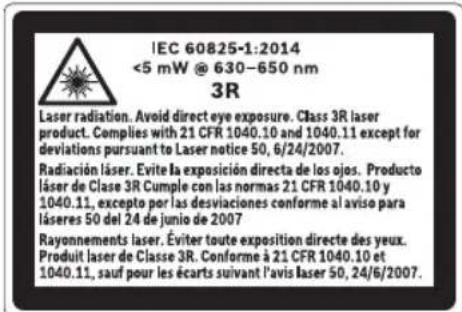
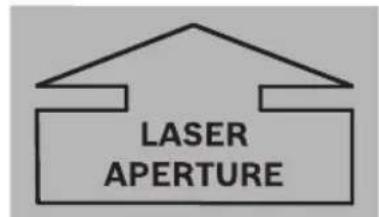

Do not direct the laser beam at persons or animals and avoid direct eye exposure. This tool produces laser class 3R laser radiation and complies with 21 CFR 1040.10 and 1040.11 except for deviations pursuant to Laser Notice No. 50, dated June 24, 2007. This can lead to persons being blinded.
DO NOT remove or deface any warning or caution labels. Removing labels increases the risk of exposure to laser radiation.
Use of controls or adjustments or performance of procedures other than those specified in this manual, may result in hazardous radiation exposure.
ALWAYS make sure that any bystanders in the vicinity of use are made aware of the dangers of looking directly into the laser tool.
DO NOT place the laser tool in a position that may cause anyone to stare into the laser beam intentionally or unintentionally. Serious eye injury could result.
ALWAYS position the laser tool securely. Damage to the laser tool and/or serious injury to the user could result if the laser tool fails.
ALWAYS use only the accessories that are recommended by the manufacturer of your laser tool. Use of accessories that have been designed for use with other laser tools could result in serious injury.
DO NOT use this laser tool for any purpose other than those outlined in this manual. This could result in serious injury.
DO NOT leave the laser tool "ON" unattended in any operating mode.
DO NOT disassemble the laser tool. There are no user serviceable parts inside. Do not modify the product in any way. Modifying the laser tool may result in hazardous laser radiation exposure.
DO NOT use the laser viewing glasses as safety goggles. The laser viewing glasses are used for improved visualization of the laser beam, but they do not protect against laser radiation.
DO NOT use the laser viewing glasses as sun glasses or in traffic. The laser viewing glasses do not afford complete UV protection and reduce color perception.
DO NOT use any optical tools such as, but not limited to, telescopes or transits to view the laser beam. Serious eye injury could result.
DO NOT stare directly at the laser beam or project the laser beam directly into the eyes of others. Serious eye injury could result.
Work area safety
Keep work area clean and well lit. Cluttered or dark areas invite accidents.
DO NOT operate the laser tool around children or allow children to operate the laser tool. Serious eye injury could result.
DO NOT use laser tools, attachments and accessories outdoors when lightning conditions are present.
Do not operate the laser tool in explosive environments, such as in the presence of flammable liquids, gases or dusts. Sparks can be created in the laser tool which may ignite the dust or fumes.
Electrical safety
△WARNING
Batteries can explode or leak, cause injury or fire.
To reduce this risk, always follow all instructions and warnings on the battery label and package.
DO NOT expose the laser tool and battery to rain or wet conditions. Water entering laser tool will increase the risk of fire and personal injury.
DO NOT short any battery terminals.
DO NOT charge alkaline batteries.
DO NOT mix old and new alkaline batteries. Replace all of them at the same time with new batteries of the same brand and type.
DO NOT mix battery chemistries.
Dispose of or recycle batteries per local code.
DO NOT dispose of batteries in fire.
Keep batteries out of reach of children.
Remove batteries if the device will not be used for several months.
Personal safety
If laser radiation strikes your eye, you must deliberately close your eyes and immediately turn your head away from the beam.
Do not make any modifications to the laser equipment.
Stay alert, watch what you are doing and use common sense when operating a tool. Do not use a tool while you are tired or under the influence of drugs, alcohol or medication. A moment of inattention while operating a tool may result in serious personal injury or incorrect measurement results.
Use safety equipment. Always wear eye protection. Safety equipment such as dust mask, non-skid safety shoes, hard hat, or hearing protection used for appropriate conditions will reduce personal injuries.
Use caution when using laser tools in the vicinity of electrical hazards.
Magnets
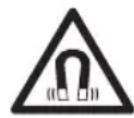
Keep the tool, laser receiver LR20 (23), and laser target plate (29) away from cardiac pacemakers.
The magnets of the tool and laser
target plate generate a field that can impair the function of cardiac pacemakers.
Keep the tool, laser receiver LR20 (23), and laser target plate (29) away from magnetic data medium and magnetically-sensitive equipment. The effect of the magnets of the tool and laser target plate can lead to irreversible data loss.
Use and care
Use the correct tool for your application. The correct tool will do the job better and safer.
Do not use the tool if the switch does not turn it on and off. Any tool that cannot be controlled with the switch is dangerous and must be repaired.
Store idle tool out of the reach of children and do not allow persons unfamiliar with the tool or these instructions to operate the tool. Tools are dangerous in the hands of untrained users.
Maintain tools. Check for misalignment or binding of moving parts, breakage of parts and any other condition that may affect the operation. If damaged, have the tool repaired before use. Many accidents are caused by poorly maintained tools.
Use the tool, accessories, etc., in accordance with these instructions and in the manner intended for the particular type of tool, taking into account the working conditions and the work to be performed. Use of the tool for operations different from those intended could result in a hazardous situation.
Service
Have your tool serviced by a qualified repair person using only identical replacement parts. This will ensure that the safety of the tool is maintained.
Develop a periodic maintenance schedule for tool. When cleaning a tool be careful not to disassemble any portion of the tool since internal wires may be misplaced or pinched or may be improperly mounted.
Certain cleaning agents such as gasoline, carbon tetrachloride, ammonia, etc., may damage plastic parts.
SAVE THESE INSTRUCTIONS.
FCC Caution
The manufacturer is not responsible for radio interference caused by unauthorized modifications to this equipment. Such modifications could void the user's authority to operate the equipment. This device complies with Part 15 of the FCC Rules. Operation is subject to the following two conditions:
1) This device may not cause harmful interference, and
2) This device must accept any interference received, including interference that may cause undesired operation.
NOTE! This equipment has been tested and found to comply with the limits for a Class B digital devices, pursuant to Part 15 of the FCC rules. These limits are designed to provide reasonable protection against harmful interference in a residential installation. This equipment generates uses and can radiate radio frequency energy and, if not installed and used in accordance with the instructions, may cause harmful interference to radio communications. However, there is no guarantee
that interference will not occur in a particular installation. If this equipment does cause harmful interference to radio or television reception, which can be determined by turning the equipment off and on, the user is encouraged to try to correct the interference by one or more of the following measures:
Reorient or relocate the receiving antenna.
- Increase the separation between the equipment and receiver.
- Connect the equipment into an outlet on a circuit different from that to which the receiver is connected.
- Consult the dealer or an experienced radio/ TV technician for help.
Industry Canada (IC)
This device complies with Industry Canada's licence-exempt RSSs. Operation is subject to the following two conditions:
(1) This device may not cause interference; and
(2) This device must accept any interference, including interference that may cause undesired operation of the device.
Features
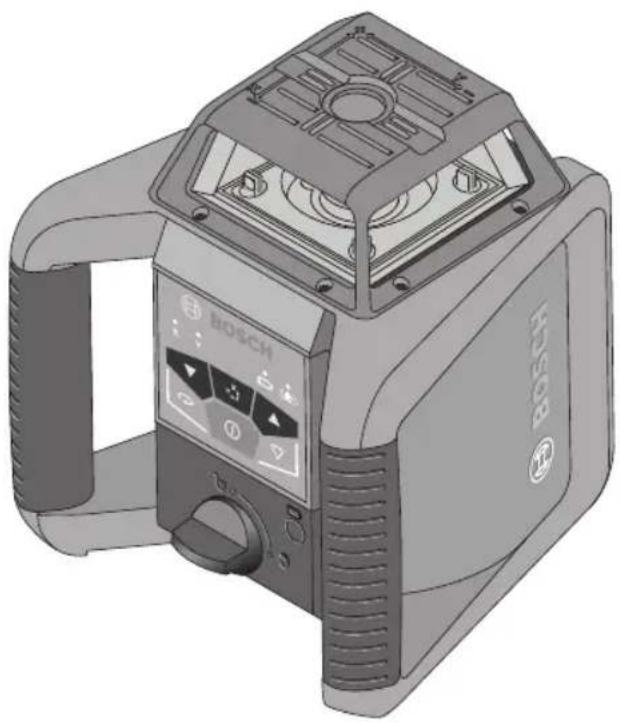
The numbering of the product features shown refers to the illustration of the laser tool on the graphic pages 2, 3, and 5.
1 On/Off button
16 5/8-11 tripod mount
2 Button for dual-axis slope operation
17 Serial number
3 Rotational speed selection (GRL2000-40HV only)
18 Laser warning label
4 Lower/counterclockwise direction button
19 Warning label, laser radiation exit opening
5 X/Y axis leveling indicator LEDs
20 Remote control*
6 Variable laser beam
21 Tripod*
7 Exit opening for plumb beam (GRL2000-40HV only)
22 Leveling rod*
8 Plumb beam (GRL2000-40HV only)
23 LR20 Laser receiver
9 Sensor for remote control
24 Laser viewing glasses*
10 Low Battery indicator
25 Wall mount/alignment unit*
11 Shock-warning indicator
26 Wall mount fastening screw*
12 Upper/clockwise direction button
27 Wall mount locking screw*
13 Line operation and length selection (GRL2000-40HV only)
28 5/8-11 instrument mount*
14 Battery compartment
29 Ceiling measurement plate*
15 Battery compartment lock
30 Case*
31 Receiver bracket
*Illustrated accessory may be optional on some models and not included in standard package.
Rotational Laser Level GRL2000-40H GRL2000-40HV
| Working range (Diameter) | ||
| -without laser receiver | approx. 200 ft | approx. 200 ft |
| (approx. 60 m) | (approx. 60 m) | |
| -with laser receiver | approx. 2000 ft | approx. 2000 ft |
| (approx. 600 m) | (approx. 600 m) | |
| Leveling Accuracy1) 2) | ||
| -Horizontal | ±1/16 in at 100 ft | ±1/16 in at 100 ft |
| (±1.5 mm at 30 m) | (±1.5 mm at 30 m) | |
| -Vertical | ±1/8 in at 100 ft | |
| (±3 mm at 30 m) | ||
| Self-leveling range ±8% (±4.6°) ±8% (±4.6°) | ||
| Singe/dual-axis slope operation 8% 8% | ||
| Leveling duration approx 30s approx 30s | ||
| Rotational speed 600min | -1 | 0/150/300/600min-1 |
| Scan angle for line operation -10°/25°/50° | ||
| Operating temperature 14°F ~122°F | (-10°C ~ +50°C) | 14°F ~122°F |
| (-10°C ~ +50°C) | ||
| Storage temperature -4°F ~ 158°F | (-20°C ~ +70°C) | -4°F ~ 158°F |
| (-20°C ~ +70°C) | ||
| Relative air humidity, max. 90% 90% | ||
| Laser class | 3R | 3R |
| Laser type | 635 nm, <5 mW | 635 nm, <5 mW |
| Laser beam Ø at the exit opening, approx.1) | 0.2 in (4 mm) | 0.2 in (4 mm) |
| Tripod mount | 5/8 in-11 | 5/8 in-11 |
| Batteries (alkali-manganese) | 2 x 1.5 VD (LR20) | 2 x 1.5 VD (LR20) |
| Operating life time, approx. | ||
| -Batteries (alkali-manganese)1) | 30 h | 30 h |
| Weight | 3.9 lb (1.86 kg) | 3.9 lb (1.86 kg) |
| Dimensions | 7.4 x 7.2 x 6.7 in | 7.4 x 7.2 x 6.7 in |
| (187 x 182 x 170 mm) | (187 x 182 x 170 mm) | |
| Degree of protection | IP 56 | IP 56 |
1) at 68^ (20^)
2) alongside the axes.
Intended Use
Rotational Laser Level
The laser tool is intended for determining and checking precise horizontal partitions, vertical lines, building lines and plumb points.
The laser tool is suitable for indoor and outdoor use.
WARNING Working safely with the laser tool is possible only when the operating and safety information are read completely and the instructions contained therein are strictly followed. Never make warning labels on the laser tool unrecognizable.
Use of controls or adjustments or performance of procedures other than those specified herein may result in hazardous radiation exposure.
The use of optical instruments with this product will increase risk of eye injury.
Have the laser tool repaired only through qualified specialist using original spare parts. This ensures that the safety of the laser tool is maintained.
Do not allow children to use the laser tool without supervision. They could unintentionally blind other persons.
Do not use the laser viewing glasses as safety goggles. The laser viewing glasses are used for improved visualization of the laser beam, but they do not protect against laser radiation.
Do not use the laser viewing glasses as sun glasses or in traffic. The laser viewing glasses do not afford complete UV protection and reduce color perception.
Preparation
Inserting/Replacing the Battery
WARNING ALWAYS turn off the laser and the main power switch before removing and replacing batteries.
Alkaline batteries are recommended for the tool.
Always replace all batteries at the same time. Use only batteries from one brand and with identical capacity.
Remove the batteries from the tool when not using for extended periods. When storing for extended periods, the batteries can corrode and self-discharge.
When inserting, pay attention to the correct polarity according to the representation of the inside battery lid.
It is the user's responsibility to periodically check the accuracy of the laser tool as work progresses. Always check the accuracy of the laser tool after it has been dropped or subject to extreme temperatures and temperature variations.
To open the battery compartment 14, turn the locking knob 15 to position and pull out the battery compartment.
Always replace all batteries at the same time. Only use batteries from one brand and with identical capacity.
Shut the battery compartment 14 and turn the locking knob 15 to the locked position.
In case the batteries have been inserted incorrectly, the laser tool cannot be switched on. Insert the batteries with correct polarity.
Remove the batteries from the tool when not using it for extended periods. When storing for extended periods, the batteries can corrode and self-discharge.
Low Battery Indicator
When the charge-control indicator 10 lights up (not flashing) red for the first time, the laser tool can still be operated for approx. 2h .
When the Low Battery Indicator starts to blink, the laser tool switches off automatically after 5 minutes.
Operation
Initial Operation
WARNING
Protect the laser tool against moisture and
direct sun irradiation.
Do not subject the laser tool to extreme temperatures or variations in temperature. As an example, do not leave it in vehicles for longer periods. In case of large variations in temperature, allow the tool to adjust to the ambient temperature before putting it into operation. In case of extreme temperatures or variations in temperature, the accuracy of the tool can be impaired.
It is the user's responsibility to periodically check the accuracy of the laser tool as work progresses. Always check the accuracy of the laser tool after it has been dropped or subject to extreme temperatures and temperature variations.
Avoid heavy impact and prevent the laser tool from falling. After heavy exterior impact on the laser tool, an accuracy check should always be carried out before continuing to work (see "Leveling Accuracy").
WARNING
If glass lighthouse breaks when dropped, broken
glass can cause laceration hazard and unit to loose its IP rating. Contact customer service immediately.
Setting Up the Laser Tool
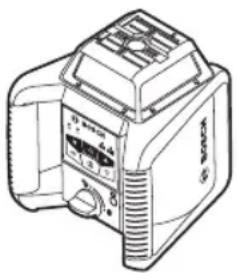
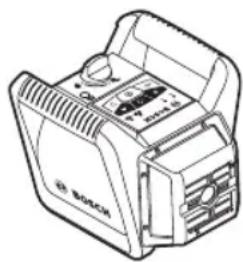
Horizontal Position Vertical Position
GRL2000-40HV only
Set up the laser tool on a sturdy surface in the horizontal or vertical position; mount it on a tripod 21 or to the wall mount with alignment unit 25.
Due to the high leveling accuracy, the laser tool reacts sensitively to ground vibrations and position changes. Therefore, pay attention that the position of the laser tool is stable in
order to avoid operational interruptions due to re-leveling.
Turning on the Laser Tool
WARNING
DO NOT direct the laser beam at persons or
animals and do not stare into the laser beam yourself, not even from a large distance.
Do not leave the switched on laser tool unattended and switch the laser tool off after use. Serious eye injury could result from the laser beam.
Immediately after switching on, the laser tool sends out the vertical plumb beam 8 and the variable laser beam 6.
For switching on the laser tool, press the On/Off button 1. The indicators 5, 10 and 11 light up briefly. The laser tool immediately starts the automatic leveling. During the leveling, the leveling indicators 5 flash green.
The laser tool is leveled in as soon as leveling indicators 5 light up green continuously and the laser beam is turned on. After the leveling is completed, the laser tool automatically starts in rotational operation.
With the operating mode buttons 3 and 13, the operating modes can already be specified during leveling (see "Operating Modes, page 15). In this case, the laser tool starts in the set operating mode upon completion of leveling.
For GRL2000-40HV in vertical mode the Y leveling indicator LED is off by de fault, unless it has been tilted/moved from its default position.
Turning off the Laser Tool
To switch off the laser tool, long press the On/Off button 1 again.
- Do not leave the switched on unattended and switch the laser tool off after use.
Working Advice
Always use the center of the laser point for marking. The size of the laser point changes with the distance.
laser 1
Operating Modes
Overview
All three operating modes are possible with the laser tool in horizontal and vertical position.
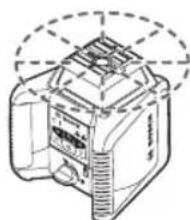
Rotational Operation
Rotational operation is suitable when using the laser receiver. You can select between different rotational speeds.
Point Operation (GRL2000-40HV)
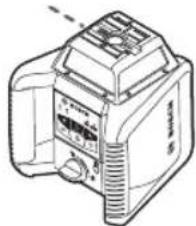
This operation mode enables the best visibility of the variable laser beam. As an example, it is used for easy projecting of heights or checking building lines.
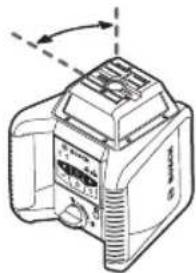
Line Operation (GRL2000-40HV)
In this operation mode, the variable laser beam moves within a limited aperture angle. This increases the visibility of the laser beam in comparison to rotational operation. You can select between different aperture angles.
Rotation Mode (GRL2000-40H)
Each time after switching on, the laser tool is in rotational operation mode with standard rotational speed (600min^-1) . Adjusting the speed for the GRL2000-40H is not possible.
Rotation Mode (GRL2000-40HV)

Each time after switching on, the laser tool is in rotational operation
mode at default rotational speed (300min^-1)
Rotational operation starts at default rotational speed (300min^-1)
To change the rotational speed, press the rotational operation button 3 again until the requested speed is reached.
When working with the laser receiver, the highest rotational speed should be set. When working without laser receiver, reduce the rotational speed for improved visibility of the laser beam and use the laser viewing glasses 24.
Point Operation (GRL2000-40HV)
To switch to point operation press the rotational operation button 3 until you reach the desired setting.
Note: Due to inertia, it is possible for the laser to make a few revolutions before point operation is set.
Line Operation (10^ / 25^ / 50^) (GRL2000-40HV)

To switch to line operation, press the line operation button 13. The laser tool switches to line operation with
the smallest aperture angle.
To change the aperture angle, press the line operation button 13 until you reach the desired setting.
Note: Due to inertia, it is possible for the laser to slightly move beyond the end point of the laser line.
To position the laser line or the laser point within the rotational plane, press the button 4 or 12 to the requested position or use the remote control 20.
To return to rotational operation press the rotational operation button 3.
Manual Operation and Manual Slope
The automatic leveling of the laser level can be switched off (manual operation):
- in the horizontal position for both axes independently of each other
- in the vertical position for the X-axis (the Y-axis cannot be leveled in the vertical position) (GRL2000-40HV only).
The X-axis and Y-axis are marked on top of the GRL.
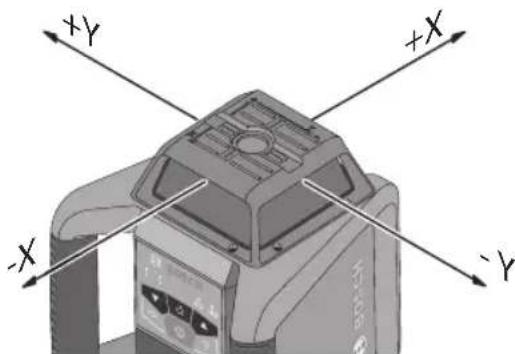
It is possible to set up the laser level at any inclination in the manual operation mode. The axes can also be tilted additionally, within a range of ± 8% on the laser level.
To switch off the automatic leveling for the X-axis press the button for dual-axis slope operation 2 once. The X leveling indicator LED 5 will start flashing red. During this time, the X-axis can be tilted additionally by pressing the lower/upper direction buttons 4 and 12.
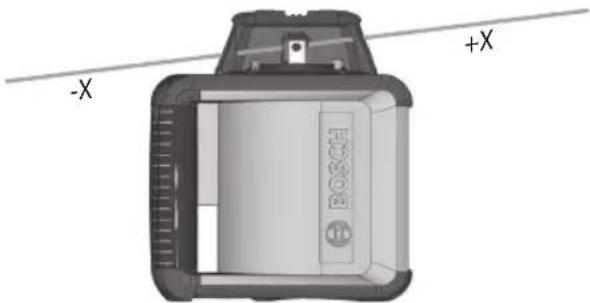
5 seconds after the last adjustment the X leveling indicator LED 5 will light up red continuously.
To switch off the automatic leveling for the Y-axis (while the X-axis is leveled) press the button for dual-axis slope operation 2 twice. The Y leveling indicator LED will start flashing red. During this time the Y-axis can be tilted additionally by pressing the lower/upper direction button 4 and 12.
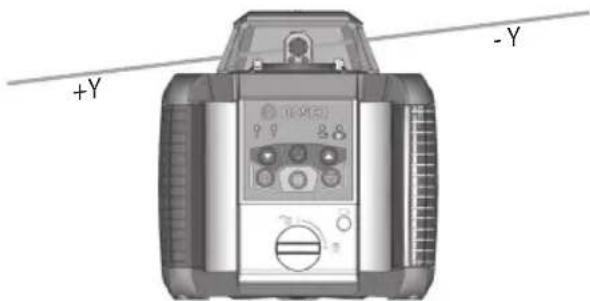
5 seconds after the last adjustment the Y leveling indicator LED 5 will light up red continuously.
To switch off the automatic leveling and/or tilt both X and Y axis, first tilt the Y-axis as described above and then the X-axis by pressing the button for dual-axis slope operation 2 again and adjusting it accordingly.
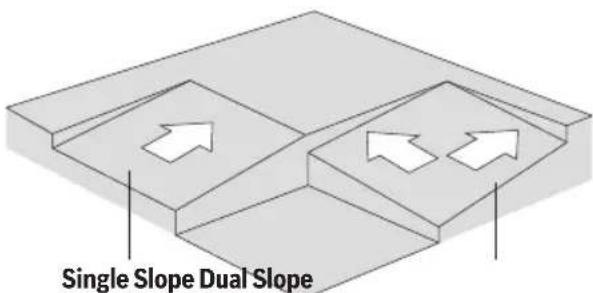
5 seconds after the last adjustment both X and Y leveling indicator LEDs 5 will light up red continuously.
If one of both axes is in manual operation (respective leveling indicator LED is continuously red) press the button for dual-axis slope operation 2 to additionally tilt the axis, which was last set to manual operation. Press the button for dual-axis slope operation 2 again to adjust/tilt the other axis.
To reset both axes to automatic leveling press the button for dual-axis slope operation 2 as many times as necessary - until both X and Y leveling indicator LEDs 5 start flashing green (leveling still in process) or light up green.
Manual Operation and Manual Slope in Vertical Mode (GRL2000-40HV only)
In vertical mode only the X-axis will be reset to automatic leveling (the Y-axis cannot be leveled in the vertical position).
The Y leveling indicator LED 5 is off by default, unless it has been tilted/moved from its default position.
Turning the Rotational Plane in the Vertical Position
When the laser level is in the vertical position, it is possible to rotate the rotational plane around the X-axis for easy sighting out or parallel alignment in a range of ± 8% . To activate the function, press the button for dual-axis slope
operation 2 on the laser level twice or the button for dual-axis slope operation 10a on the remote control followed by the Y lower/upper direction button. The Y leveling indicator LED 5 will start flashing red. Press the Y lower/upper direction button 4 or 12 until the required position is reached.
Leveling Accuracy
Automatic Leveling
Overview
After switching on, the laser tool automatically detects the horizontal or vertical position. To change between horizontal and vertical position, switch the laser tool off, reposition it and switch on again.
After switching on, the laser tool checks the horizontal and vertical position and automatically levels out any unevenness within the self-leveling range of approx. 8% (4.6^)
When the laser tool is inclined by more than 8% after switching on or after a position change, leveling in is no longer possible. In this case, the rotor is stopped, the laser off and leveling indicator 5 continuously lights up red. Switch the laser tool off, reposition it, switch it on again and wait for it to re-level.
When the laser tool is leveled automatic re-leveling takes place after position changes. The rotor stops during the leveling process, the laser beam is off, and the leveling indicator 5 flashes green.
Shock-warning Function
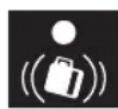
The laser tool has a shock warning function; after position changes or shock to the laser tool, or in case of
ground vibrations, it prevents the laser tool from leveling at changed heights, and thus prevents vertical errors.
The shock warning function is ON by default every time the laser tool is switched on. ADS is active 30 seconds after device is leveled.
When the ADS is enabled the shock-warning indicator 11 is turned off.
After a position change or when heavy ground vibrations are detected, the shock-warning function is triggered: The rotation stops, the laser off, the leveling indicator 5 goes out, and the shock-warning indicator 11 flashes red.
The current operating mode is stored.
After the shock-warning function has been triggered, press the power button 1 shortly to reset it.
The shock-warning function is restarted and the laser tool starts leveling. As soon as the laser tool is leveled (leveling indicator 5 continuously lights up green), it starts in the stored operating mode. Now, align the laser beam with a reference point and correct the position, if required.
To switch off the shock warning function, press the power button 1 shortly once, or, when the shock warning is triggered (shock warning indicator 11 flashing red) press the power button shortly twice. When the shock warning function is turned off, the shock warning indicator 11 lights up red.
Accuracy Check
Influences on Accuracy
The ambient temperature has the greatest influence on accuracy. Especially temperature differences occurring from the ground upward can divert the laser beam.
In addition to external influences, device specific influences (e.g. falls or heavy impacts) can also lead to deviations. For this reason, check the accuracy each time before beginning work.
The deviations play a role in excess of approx. 65 ft (20 m) distance and can easily reach two to four times the deviation at 330 ft (100 m).
Because the largest difference in temperature layers is close to the ground, the laser tool should always be mounted on a tripod when operating at distances exceeding 65 ft (20 m). If possible, also set up the laser tool in the center of the work area.
If the laser tool exceeds the maximum deviation in one of the four measuring procedures, have it checked by a Bosch customer service center.
WARNING It is the user's responsibility to periodically check the accuracy of the laser tool as work progresses. Always check the accuracy of the laser tool after it has been dropped or subjected to extreme temperatures and temperature variations.
Checking the Leveling Accuracy in the Horizontal Position
An unobstructed area of 100 ft (30m) on a firm surface in front of a wall is required for the check. A complete accuracy check must be carried out for the X- and Y-axis.
- Mount the laser tool in the horizontal position onto a tripod or place it on a firm and level surface at a distance of 100 ft (30 m) to the wall. Switch the laser tool on.
After the leveling, mark the center of the laser beam on the wall (point I).
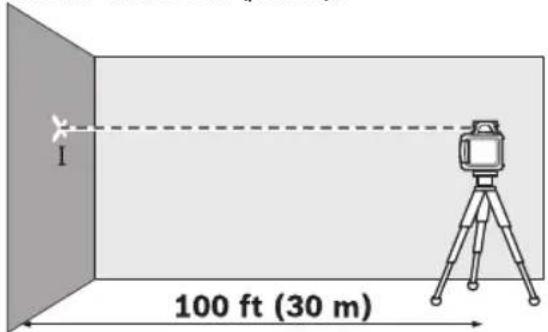
- Rotate the laser tool by 180^ , allow it to level in and mark the center point of the laser beam on the wall (point II). Make sure that point II is as vertical as possible above or below point I.
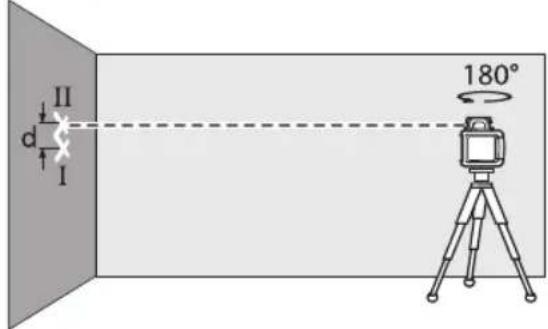
- The difference d of both marked points I and II on the wall results in the actual
height deviation of the laser tool for the measured axis.
Repeat the procedure for the other axis. For this, turn the laser tool by 90^ before starting.
The maximum permitted deviation over the recommended distance of 100 ft (30m) is as follows:
$$ \begin{array}{l} 1 0 0 \mathrm {f t} \times \pm 1 / 1 6 \text {i n} = \pm 1 / 1 6 \text {i n} \ (3 0 \mathrm {m} \times \pm 0. 0 5 \mathrm {m m} = \pm 1. 5 \mathrm {m m}) \ \end{array} $$
The difference d between points I and II must therefore be maximum 1/8 in (3 mm) in each of the two accuracy check procedures.
Checking the Leveling Accuracy in the Vertical Position
An unobstructed area of 30 ft (10 m) on a firm surface in front of a wall is required for the check. Fasten a plumb bob rope to the wall.
Mount the laser tool in the vertical position onto a tripod, or place it on a firm and level surface. Switch the laser tool on and allow it to level.
Align the laser tool such that the laser beam impinges centrally on the plumb bob rope at the upper end. The difference d between laser beam and plumb bob rope at the bottom end of the rope results in the deviation of the laser tool to the vertical line.
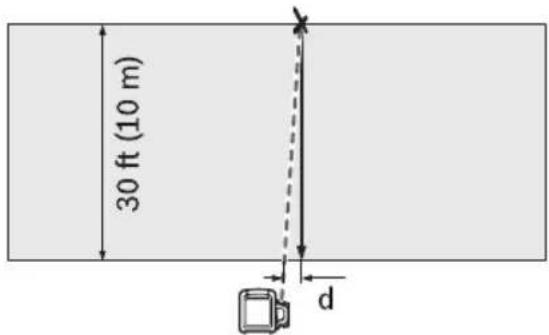
The maximum permitted deviation over a 30 ft (10 m) distance is as follows:
$$ \begin{array}{l} 3 0 f t x \pm 1 / 8 i n = \pm 3 / 6 4 i n \ (1 0 \mathrm {m} \times \pm 0. 1 \mathrm {m m} = \pm 1 \mathrm {m m}) \ \end{array} $$
The difference d must therefore be a maximum of 3/64 in (1 mm).
Calibration
X and Y Axes Calibration
- Make sure the laser level is turned off.
- Mount the laser level in the horizontal position on a tripod or a firm and level surface in front of a wall.
- Place it at a distance of 100 ft (30 m) in front of the wall. The X-axis indicator on the top cage must be perpendicular to the wall.
While holding the button for dual-axis slope operation 2, press and release the On/Off button 1. Release the button for dual-axis slope operation 2 when the X axis leveling indicator LED 5 (green) and shock warning indicator LED 11 (red) start flashing simultaneously at a rate of 1x per second. - Wait until the tool is leveled - the prism will start rotating.
- Transfer the height (point I) of the laser beam onto the wall. If necessary, use the laser receiver to do so.
- Turn the laser level by 180^ while making sure not to shift the height of the tool.
- Wait until the prism starts rotating - then the tool is leveled.
- Transfer the height (point II) of the laser beam onto the wall. If necessary, use the laser receiver to do so. Make sure it is a vertical as possible to point I.
- Determine the exact center between the points I and II and mark it on the wall (point III).
- Press the lower/upper direction button 4 or 12 until the laser beam matches point III. Use the laser receiver if necessary.

-
Press the button for dual-axis slope operation 2 to save the calibration.
-
The X axis leveling indicator LED 5 will flash 6 times, and the tool will proceed to Y axis calibration - the Y axis leveling indicator LED 5 (green) and shock-warning indicator LED 11 (red) start flashing simultaneously at a rate of 1x per sec.
- Turn the laser level by 90 degrees (The Y-axis indicator on the top cage must be perpendicular to the wall).
- Wait until the tool is leveled - the prism will start rotating.
- Transfer the height "Y1" of the laser beam onto the wall. If necessary, use the laser receiver to do so.
- Turn the laser level by 180^ while making sure not to change the height of the tool.
- Wait until the prism starts rotating - then the tool is leveled.
- Transfer the height "Y2" of the laser beam onto the wall. If necessary, use the laser receiver to do so. Make sure it is as vertical as possible to "Y1".
- Determine the exact center between the points "Y1" and "Y2" and mark it on the wall ("Y3").
- Press the lower/upper direction buttons 4 or 12 until the laser beam matches "Y3". Use the laser receiver if necessary.
- Press the button for dual-axis slope operation 2 to save the calibration.
- The Y axis leveling indicator LED 5 will flash 6 times and tool will exit the calibration mode.
Check the leveling accuracy after calibration. If the deviation is still outside of the maximum permitted limit, have the laser level checked by a Bosch customer service agent.
If during adjustment of either axis the respective X or Y axis leveling indicator LED 5 starts flashing red the deviation is outside of the maximum permitted limit. Pressing the button for dual-axis slope operation 2 will exit the calibration mode without saving the new value and an error will be shown by simultaneously flashing the X and Y leveling indicator LEDs 5 at a rate of 3x per second. Restart the calibration and if the error persists, have the laser tool checked by a Bosch customer service agent.
Z-Axis Calibration (GRL2000-40HV only)
- Make sure the laser is turned off.
- Mark a vertical line on the wall using a plumb line.
- Mount the laser level in the vertical position on a tripod or a firm and level surface.
- Place the laser level in front of a 30 ft (10 m) high wall.
- While holding the button for dual-axis slope operation 2, press and release the On/Off button 1. Release the button for dual-axis slope operation 2 when the X axis leveling indicator LED 5 (green) and shock warning indicator LED 11 (red) start flashing simultaneously at a rate of 1x per second.
- Wait until the tool is leveled - the prism will start rotating.
-
Align the laser level so that the laser beam crosses the vertical line on the wall.
Using the lower/upper direction button 4 or 12 adjust the laser beam until it is as parallel as possible to the vertical line on the wall. -
If you are not able to match it, repeat the previous steps (align tripod, allow measuring tool to level in, align laser beam using the lower/upper direction buttons 4 and 12).
- Press the button for dual-axis slope operation 2 to save the calibration.
- The X axis leveling indicator LED 5 will flash 6 times.
If during adjustment, the X axis leveling indicator LED 5 starts flashing red the deviation is outside of the maximum permitted limit. Pressing the button for dual-axis slope operation 2 will exit the calibration mode without saving the new value and an error will be shown by flashing the X and Y axis leveling indicator LEDs 5 simultaneously at a rate of 3x per second. Restart the calibration and if the error persists, have the laser tool checked by a Bosch customer service agent.
Check the leveling accuracy after calibration. If the deviation is still outside of the maximum permitted limit, have the laser level checked by a Bosch customer service agent.
Applications
Indicating a Plumb Line/Vertical Plane (see figure B)
To indicate a plumb line or a vertical plane, set up the laser tool in the vertical position.
When the vertical plane is supposed to run at a right angle to a reference line (e.g. a wall), then align the plumb beam 8 with this reference line.
The plumb line is indicated by the variable laser beam 6.
Working without Laser Receiver (see figure C)
Under favorable light conditions (dark environment) and for short distances, it is possible to work without the laser receiver. For better visibility of the laser beam, select line operation or point operation, and rotate the beam with the direction buttons on the tool 4 and 12 or the remote control.
Working with the Laser Receiver (see figure D)
Under unfavorable light conditions (bright environment, direct sunlight) and for larger distances, use the laser receiver for improved finding of the laser beam. When working with the laser receiver, select rotational operation with the highest rotational speed.
Operating Over Long Distances (see figure E)
When operating over long distances, the laser receiver must be used to find the laser beam. In order to reduce interferences, the laser tool should always be set up in the center of the work area and on a tripod.
Working Outdoors (see figure F)
The laser receiver should always be used when working outdoors.
When working on unstable ground, mount the laser tool onto the tripod 21. Activate the shock-warning function in order to avoid errors in case of ground vibrations or shock to the laser tool.
GRL2000-40H and GRL2000-40HV LED Indication
| XY Battery | ADS Status | |||||
| Green Red Green Red | Red Red | |||||
| ○ | Battery sufficient for more than 2h operation | |||||
| ● | Battery status low | |||||
| ☒ | Battery status very low, tool about to shut down | |||||
| ○ | ADS activated | |||||
| ● | ADS de-activated | |||||
| ☒ | ADS triggered | |||||
| 1x/s | 1x/s | 1x/s | 1x/s | tool on "standby" (activated via RC) | ||
| 3x/s | 3x/s | 3x/s | 3x/s | tool in start-up mode | ||
| ☒ | axis leveling in process | |||||
| ● | ● | axis is leveled | ||||
| ☒ | ☒ | Y axis is adjustable | ||||
| ● | ● | axis set to manual/slope operation | ||||
| ☒ | ☒ | Error | ||||
- steady
flashing
o off
Use with Accessories
Laser Viewing Glasses
(Accessory)
WARNING DO NOT use the laser viewing glasses as
safety goggles. The laser viewing glasses are used for improved visualization of the laser beam, but they do not protect against laser radiation.
DO NOT use the laser viewing glasses as sun glasses or in traffic. The laser viewing glasses do not afford complete UV protection and reduce color perception.
The laser viewing glasses filter out the ambient light. This makes the red light of the laser appear brighter for the eyes.
Working with the Laser Receiver
(Accessory)
WARNING Have your laser receiver serviced by a qualified
repair person using only identical replacement parts. This will ensure that the safety of the laser receiver is maintained.
Read and strictly observe the safety warnings in the operating instructions of the laser receiver.
Under unfavorable light conditions (bright environment, direct sunlight) and for larger distances, use the laser receiver 23 for improved finding of the laser beam.
When working with the laser receiver, select rotational operation with the highest rotational speed.
Before working with the laser receiver, read and observe the laser receiver operating instructions.
Working with the Remote Control (Accessory)
While pressing the operator buttons, the laser tool can be brought out of alignment so that the rotation is briefly stopped. This effect can be avoided by using the remote control 20.
Sensor for the remote control 9 for the remote control are located on four sides of the laser tool.
Working with the Tripod
(Accessory)
The laser tool is equipped with a 5/8 tripod mount for horizontal operation on a tripod.
Place the laser tool via the tripod mount 16 onto the 5 / 8 male thread of the tripod and screw the locking screw of the tripod tight.
On a tripod with a measuring scale on the elevator column, the height difference can be adjusted directly.
Working with Wall Mount/Alignment Unit
(Accessory) (see figure A)
You can also mount the laser tool to the wall mount with alignment unit 25. For this, screw the 5 / 8 screw 28 of the wall mount into the tripod mount 16 of the laser tool.
Mounting to a wall: Mounting to a wall is recommended, e.g., for work above the elevation height of tripods or for work on unstable surfaces and without tripod. For this, fasten the wall mount 25, with the laser tool mounted, as vertical as possible to a wall.
For mounting to the wall, you can either fasten the wall mount 25 with fastening screw 26 to a lath (width maximal 8mm ) or hang it up with two hooks.
Mounting on a tripod: The wall mount 25 can also be screwed onto a tripod with the tripod mount on the back side. This method of fastening is especially recommended for work where the rotational plane is to be aligned with a reference line.
With the alignment unit, the mounted laser tool can be moved vertically (when mounted to the wall) or horizontally (when mounted to a tripod) within a range of approx. 6 in. For this, loosen screw 27 on the alignment unit, move the laser tool to the desired position, and retighten screw 27 again.
Working with the Ceiling Measurement Plate (see figure A)
As an example, the ceiling measurement plate 29 can be used for easy height adjustment of drop ceilings. Fasten the ceiling measurement plate with the magnetic holder, e.g., to a beam.
The reflecting half of the ceiling measurement plate improves the visibility of the laser beam in unfavorable conditions; the laser beam can also be seen from the rear side through the transparent half.
Working with the Measuring Rod (Accessory) (see figure F)
WARNING Do not operate during storms or near high voltage. Risk of being struck by lightning or electrocution.
Keep at a safe distance from electrical installations. It is essential to work in this environment, first contact the safety authorities responsible for the electrical installations and follow their instructions.
For checking irregularities or projecting gradients, it is recommended to use the measuring rod 22 together with the laser receiver.
Maintenance and Service
WARNING protective case.
Store and transport the tool only in the supplied
Check the tool each time before using.
Keep the tool clean and dry at all times to ensure proper and safe operation.
Do not immerse the tool into water or other fluids.
Wipe off debris using a moist and soft cloth. Do not use any cleaning agents or solvents.
Regularly clean the surfaces at the exit opening of the laser.
In case of visible damage or loose components in the interior of the tool, the safe function is no longer ensured.
If the tool should fail despite the care taken in manufacturing and testing
procedures, repair should be carried out by an authorized after-sales service center for Bosch power tools.
In all correspondence and spare parts orders, please always include the 10-digit article number given on the type plate of the tool.
In case of repairs, send in the tool packed in its protective case 30.
ENVIRONMENT PROTECTION

Recycle raw materials & batteries instead of disposing of waste. The unit, accessories, packaging & used batteries should be sorted for
environmentally friendly recycling in accordance with the latest regulations.
RC4 Remote Control

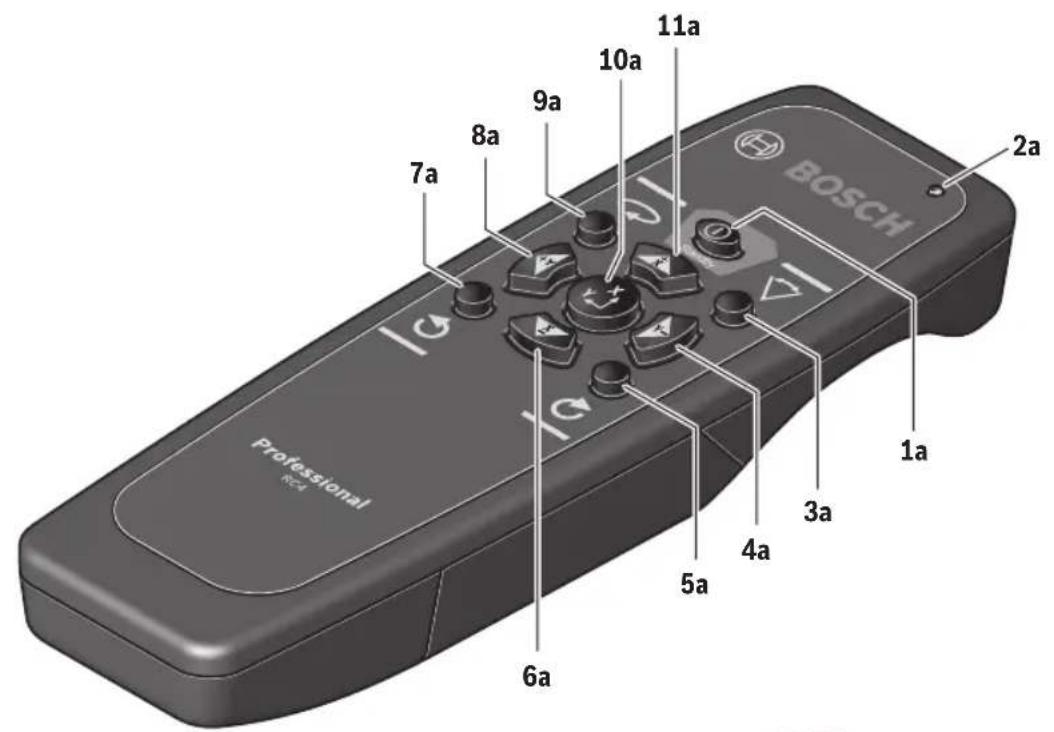
RC4
Remote control

Safety Notes Read and observe all instructions.SAVE THESE INSTRUCTIONS FOR FUTURE REFERENCE.
WARNING
Have the remote control repaired only through a
qualified repair person and only using identical replacement parts. This will ensure that the functionality of the remote control is maintained.
Do not operate the remote control in explosive atmospheres, such as in the presence of flammable liquids, gases or dusts. Sparks can be created in the remote control which may ignite the dust or fumes.
Read and strictly observe the safety warnings in the operating instructions of the rotational laser.
Product Description and Specifications
Intended Use
The remote control is intended for controlling Bosch rotational laser levels with infra-red receivers, in indoor and outdoor use.
Product Features
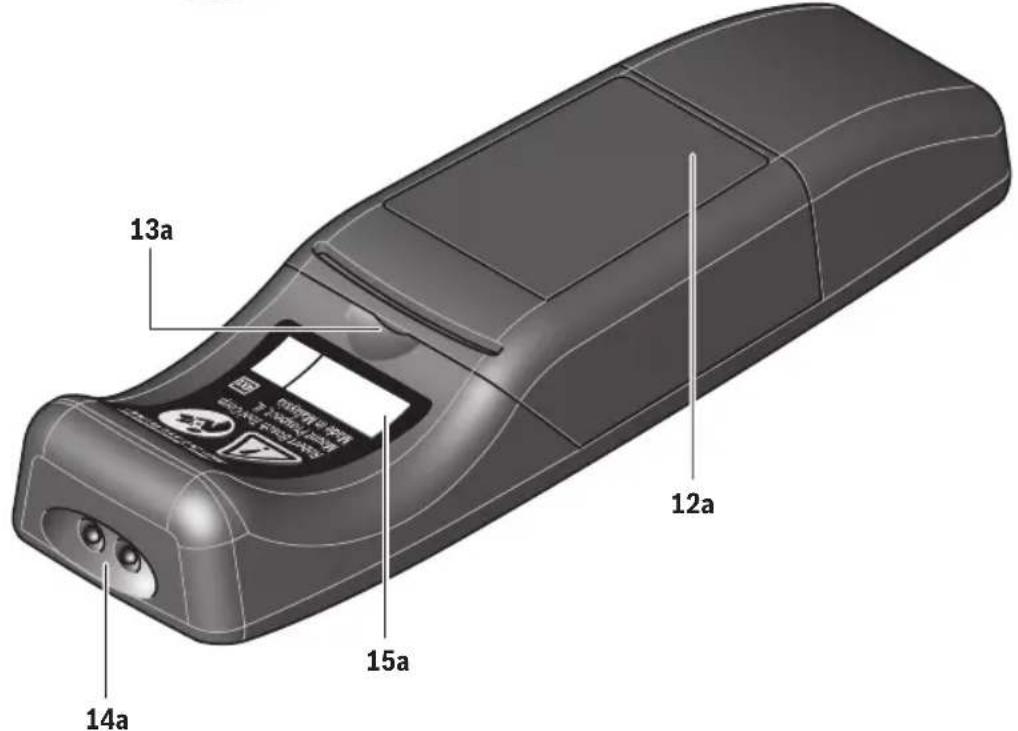
The numbering of the product features refers to the illustration of the remote control on the graphics page 24.
1a Hibernation mode button
2a Operation indicator
3a Sweep mode button
4a Y-axis negative direction button
5a Button for "rotation in clockwise direction"
6a X-axis negative direction button
7a Button for "rotation in counter clockwise direction"
8a Y-axis positive direction button
9a Button for rotational operation and selection of the rotation speed
10a Button for slope operation or full auto-leveling
11a X-axis positive direction button
12a Battery lid
13a Latch of battery lid
14a Outlet opening for infrared beam
15a Serial number
Technical Data
Remote Control RC4
Article Number 3601K69S10
Working Range1 100-ft
Operating Temperature +14^ to 1220^ (-10^ to +50^)
Storage Temperature -40°F to 158°F (-20°C to +70°C)
Batteries 2 x AA1.5v Alkaline
Weight 3.8 oz
1) The working range can be decreased by unfavourable environmental conditions (e.g. direct sun irradiation).
Please observe the article number on the type plate of your remote control. The trade names of individual remote controls may vary. For clear identification of your remote control, see the serial number on the type plate.
Assembly
Inserting/Replacing the Battery
Using alkaline batteries is recommended for operation of the remote control. To open the battery lid 12a, pull on the latch 13a and remove the battery lid. Insert the batteries. When inserting, pay attention to the correct polarity according to the representation on the inside of the battery compartment.
The batteries must be replaced when operation indicator 2a no longer lights up after pressing any button on the remote control.
Always replace all batteries at the same time. Only use batteries from one brand and with the identical capacity.
Remove the batteries from the remote control when not using it for longer periods. When storing for longer periods, the batteries can corrode and discharge themselves.
Operation
Initial Operation
Protect the remote control against moisture and direct sunlight. Do not subject the remote control to extreme temperatures or variations in temperature. As an example, do not leave it in vehicles for longer periods. In case of large variations in temperature, allow the remote control to adjust to the ambient temperature before putting it into operation. The remote control remains ready for operation as long as batteries with sufficient voltage are inserted.
Set up the rotational laser in such a manner that the signals of the remote control directly reach one of the reception lenses on the rotational laser (for this, see the operating instructions of the rotational laser). When the remote control cannot be pointed directly against a reception lens, the working range is reduced. By reflecting the signal (e.g. against walls), the working range can be improved, even for indirect signals. After pressing a button on the remote control, the illuminated operation indicator 2a indicates that a signal was sent out. Switching the rotational laser on/off with the remote control is not possible.
Operating Modes
Function of buttons that are both on the rotational laser level as well as on the remote control do not differ. With exception of the hibernation mode, no additional functions of the rotational laser level can be controlled with the remote control. Example: Pressing the rotation operation button switches the rotational laser level from line operation to rotation operation. This happens no matter if you press the rotation operation button on the rotational laser level or on the remote control. When the rotational laser level does not have different rotational speeds, then the rotational speed can also not be changed with the remote control.
The ADS function cannot be controlled with the remote control. For detailed information of the rotational laser functions, see the operating instructions of the rotational laser.
Hibernation Mode
The rotational laser level can be switched to hibernation mode. For this, press the hibernation mode button 1a on the remote control. Rotation laser level is switched off, and the set operating mode is saved. Hibernation mode can only be started with the remote control.
Press any button on the remote control or keypad to restart the rotational laser level in the saved operating mode.
Rotation, Line and Point Operation
By pressing the rotation operation button 9a, you can switch from line to rotation operation and change between 3 different speed and spot mode settings. By pressing
the line operation button 3a, you can switch from rotation to line operation or increase the aperture angle in steps.
Rotating the Laser Point/Laser Line in the Rotational Plane
The laser point or the laser line can be rotated in steps by 360^ within the rotational plane. Press button 5a to rotate in clockwise direction, and button 7a to rotate in counter clockwise direction.
Pressing and holding the buttons increases the speed of the rotation head in the desired direction. Rotating is (independent of the position of the rotational laser level) also possible in slope operation.
Manual Operation and Manual Slope from the Remote Control
To switch off the automatic leveling, press the slope operation button on the remote control once. The X leveling indicator LED will start flashing red (if the unit was already set to manual mode in the Y axis only, then the Y leveling indicator LED will start flashing red), then press the X lower/upper direction button or the Y lower/upper button to adjust the respective axis. The setting will be locked down after 5 seconds and the leveling indicator LED will stop flashing. The axis is no longer adjustable. If the slope operation button 10a has been pressed, but no adjustment button has been pressed within 5 seconds the unit will return to the previously set mode.
To reset both axes to automatic leveling press the slope operation button again while the respective leveling indicator LED is flashing. The X and/or Y leveling indicator LED will start flashing green (leveling still in process) or light up green.
Maintenance and Service
Keep the remote control clean at all times.
Do not immerse the remote control into water or other fluids.
Wipe off debris using a moist and soft cloth. Do not use any cleaning agents or solvents.
If the remote control should fail despite the care taken in manufacture and testing, repair should be carried out by an authorised customer services agent for Bosch power tools. Do not open the remote control yourself.
LIMITED WARRANTY OF BOSCH LASER AND MEASURINGTOOLPRODUCTS
Robert Bosch Tool Corporation ("Seller") warrants to the original purchaser only, that all Bosch lasers and measuring tools will be free from defects in material or workmanship for a period of one (1) year from date of purchase. Bosch will extend warranty coverage to two (2) years when you register your product within eight (8) weeks after date of purchase. Product registration card must be complete and mailed to Bosch (postmarked within eight weeks after date of purchase), or you may register on-line at www.boschtools.com/Service/ProductRegistration. If you choose not to register your product, a one (1) year limited warranty will apply to your product.
30 Day Money Back Refund or Replacement
If you are not completely satisfied with the performance of your laser and measuring tools, for any reason, you can return it to your Bosch dealer within 30 days of the date of purchase for a full refund or replacement. To obtain this 30-Day Refund or Replacement, your return must be accompanied by the original receipt for purchase of the laser or optical instrument product. A maximum of 2 returns per customer will be permitted.
SELLER'S SOLE OBLIGATION AND YOUR EXCLUSIVE REMEDY under this Limited Warranty and, to the extent permitted by law, any warranty or condition implied by law, shall be the repair or replacement of parts, without charge, which are defective in material or workmanship and which have not been misused, carelessly handled, or misrepaired by persons other than Seller or Authorized Service Center. To make a claim under this Limited Warranty, you must return the complete Bosch laser or measuring tool, transportation prepaid, to any BOSCH Factory Service Center or Authorized Service Center. Please include a dated proof of purchase with your tool. For locations of nearby service centers, please use our on-line service locator or call 1-877-267-2499.
THIS WARRANTY PROGRAM DOES NOT APPLY TO TRIPODS AND RODS. Robert Bosch Tool Corporation ("Seller") warrants tripods and leveling rods for a period of one (1) year from date of purchase.
THIS LIMITED WARRANTY DOES NOT APPLY TO OTHER ACCESSORY ITEMS AND RELATED ITEMS. THESE ITEMS RECEIVE A 90 DAY LIMITED WARRANTY.
To make a claim under this Limited Warranty, you must return the complete product, transportation prepaid. For details to make a claim under this Limited Warranty please visit www.boschtools.com or call 1-877-267-2499.
ANY IMPLIED WARRANTYES SHALL BE LIMITED IN DURATION TO ONE YEAR FROM DATE OF PURCHASE. SOME STATES IN THE U.S., AND SOME CANADIAN PROVINCES DO NOT ALLOW LIMITATIONS ON HOW LONG AN IMPLIED WARRANTY LASTS, SO THE ABOVE LIMITATION MAY NOT APPLY TO YOU.
IN NO EVENT SHALL SELLER BE LIABLE FOR ANY INCIDENTAL OR CONSEQUENTIAL DAMAGES (INCLUDING BUT NOT LIMITED TO LIABILITY FOR LOSS OF PROFITS) ARISING FROM THE SALE OR USE OF THIS PRODUCT. SOME STATES IN THE U.S., AND SOME CANADIAN PROVINCES DO NOT ALLOW THE EXCLUSION OR LIMITATION OF INCIDENTAL OR CONSEQUENTIAL DAMAGES, SO THE ABOVE LIMITATION MAY NOT APPLY TO YOU.
THIS LIMITED WARRANTY GIVES YOU SPECIFIC LEGAL RIGHTS, AND YOU MAY ALSO HAVE OTHER RIGHTS WHICH VARY FROM STATE TO STATE IN THE U.S., OR PROVINCE TO PROVINCE IN CANADA AND FROM COUNTRY TO COUNTRY.
THIS LIMITED WARRANTY APPLIES ONLY TO PRODUCTS SOLD WITHIN THE UNITED STATES OF AMERICA, CANADA AND THE COMMONWEALTH OF PUERTO RICO. FOR WARRANTY COVERAGE WITHIN OTHER COUNTRIES, CONTACT YOUR LOCAL BOSCH DEALER OR IMPORTER.
ST Copyright Notice:
COPYRIGHT(C) 2016 STMicroelectronics
Redistribution and use in source and binary forms, with or without modification, are permitted provided that the following conditions are met:
- Redistributions of source code must retain the above copyright notice, this list of conditions and the following disclaimer.
- Redistributions in binary form must reproduce the above copyright notice, this list of conditions and the following disclaimer in the documentation and/or other materials provided with the distribution.
- Neither the name of STMicroelectronics nor the names of its contributors may be used to endorse or promote products derived from this software without specific prior written permission.
THIS SOFTWARE IS PROVIDED BY THE COPYRIGHT HOLDERS AND COLNTRIBUTORS "AS IS" AND ANY EXPRESS OR IMPLIED WARRANTY, INCLUDING, BUT NOT LIMITED TO, THE IMPLIED WARRANTY OF MERCHANTABILITY AND FITNESS FOR A PARTICULAR PURPOSE ARE DISCLAIMED. IN NO EVENT SHALL THE COPYRIGHT HOLDER OR COLNTRIBUTORS BE LIABLE FOR ANY DIRECT, INDIRECT, INCIDENTAL, SPECIAL, EXEMPLARY, OR CONSEQUENTLY DAMAGES (INCLUDING, BUT NOT LIMITED TO, PROCEDURE OF SUBSTITUTE GOODS OR SERVICES; LOSS OF USE, DATA, OR PROFITS; OR BUSINESS INTERVENTION) HOWEVER CAUSED AND ON ANY THEORY OF LIABILITY, WHETHER IN CONTRACT, STRICT LIABILITY, OR TORT (INCLUDING NEGLIGENCE OR OTHERWISE) ASING IN ANY WAY OUT OF THE USE OF THIS SOFTWARE, EVEN IF ADVISED OF THE POSSIBILITY OF SUCH DAMAGE.
ARM Copyright Notice:
Copyright © 1995-2019 Arm Limited (or its affiliates). All rights reserved.
Redistribution and use in source and binary forms, with or without modification, are permitted provided that the following conditions are met:
- Redistributions of source code must retain the above copyright notice, this list of conditions and the following disclaimer.
- Redistributions in binary form must reproduce the above copyright notice, this list of conditions and the following disclaimer in the documentation and/or other materials provided with the distribution.
- Neither the name of ARM nor the names of its contributors may be used to endorse or promote products derived from this software without specific prior written permission.
THIS SOFTWARE IS PROVIDED BY THE COPYRIGHT HOLDERS AND COLNTRIBUTORS "AS IS" AND ANY EXPRESS OR IMPLIED WARRANTY, INCLUDING, BUT NOT LIMITED TO, THE IMPLIED WARRANTY OF MERCHANTABILITY AND FITNESS FOR A PARTICULAR PURPOSE ARE DISCLAIMED. IN NO EVENT SHALL COPYRIGHT HOLDERS AND COLNTRIBUTORS BE LIABLE FOR ANY DIRECT, INDIRECT, INCIDENTAL, SPECIAL, EXEMPLARY, OR CONSEQUENTIAL DAMAGES (INCLUDING, BUT NOT LIMITED TO, PROCEDURE OF SUBSTITUTE GOODS OR SERVICES; LOSS OF USE, DATA, OR PROFITS; OR BUSINESS INTERRUsION) HOWEVER CAUSED AND ON ANY THEORY OF LIABILITY, WHETHER IN CONTRACT, STRICT LIABILITY, OR TORT (INCLUDING NEGLIGENCE OR OTHERWISE) ARISING IN ANY WAY OUT OF THE USE OF THIS SOFTWARE, E F THE POSSIBILITY OF SUCH DAMAGE.
DO NOT expose the laser tool and battery to rain or wet conditions. Water entering laser tool will increase the risk of fire and personal injury.
NE COURT-CIRCUITEZ PAS de bornes des piles.
NE RECHARGEZ PAS des piles alcalines.
DO NOT expose the laser tool and battery to rain or wet conditions. Water entering laser tool will increase the risk of fire and personal injury.
Industry Canada (IC)
Use with Accessories
Gafas para láser
© Robert Bosch Tool Corporation 1800 W. Central Road Mt. Prospect, IL 60056-2230
Exportado por: Robert Bosch Tool Corporation Mt. Prospect, IL 60056-2230, E.U.A.
Importado en Mexico por: Robert Bosch, S.A. de C.V., Calle Robert Bosch No. 405, Zona Industrial, Toluca, Edo. de Mexico, C.P. 50070, Tel. (722) 2792300

2610055315
2610055315 03/2020
Printed in U.S.A.


- IMPORTANT: IMPORTANT : IMPORTANTE: Read Before Using Lire avant usage Leer antes de usar
- Operating /Safety Instructions Consignes de fonctionnement/sécurité Instrucciones de funciona y seguidad
- BOSCH
- General Safety Rules
- Work area safety
- Electrical safety
- △WARNING
- Personal safety
- Magnets
- Use and care
- Service
- FCC Caution
- Industry Canada (IC)
- Features
- Intended Use
- Rotational Laser Level
- Preparation
- Inserting/Replacing the Battery
- Operation
- Initial Operation
- WARNING
- Setting Up the Laser Tool
- Turning on the Laser Tool
- Turning off the Laser Tool
- Working Advice
- Operating Modes
- Overview
- Rotational Operation
- Point Operation (GRL2000-40HV)
- Line Operation (GRL2000-40HV)
- Rotation Mode (GRL2000-40H)
- Rotation Mode (GRL2000-40HV)
- Line Operation (10° / 25° / 50°) (GRL2000-40HV)
- Manual Operation and Manual Slope
- Manual Operation and Manual Slope in Vertical Mode (GRL2000-40HV only)
- Turning the Rotational Plane in the Vertical Position
- Leveling Accuracy
- Automatic Leveling
- Shock-warning Function
- Accuracy Check
- Influences on Accuracy
- Checking the Leveling Accuracy in the Horizontal Position
- Checking the Leveling Accuracy in the Vertical Position
- Calibration
- X and Y Axes Calibration
- Z-Axis Calibration (GRL2000-40HV only)
- Applications
- Indicating a Plumb Line/Vertical Plane (see figure B)
- Working without Laser Receiver (see figure C)
- Working with the Laser Receiver (see figure D)
- Operating Over Long Distances (see figure E)
- Working Outdoors (see figure F)
- Use with Accessories
- Laser Viewing Glasses
- WARNING DO NOT use the laser viewing glasses as
- Working with the Laser Receiver
- WARNING Have your laser receiver serviced by a qualified
- Working with the Remote Control (Accessory)
- Working with the Tripod
- Working with Wall Mount/Alignment Unit
- Working with the Ceiling Measurement Plate (see figure A)
- Working with the Measuring Rod (Accessory) (see figure F)
- Maintenance and Service
- WARNING protective case.
- ENVIRONMENT PROTECTION
- RC4 Remote Control
- Remote control
- Product Description and Specifications
- Product Features
- Technical Data
- Remote Control RC4
- Assembly
- Hibernation Mode
- Rotation, Line and Point Operation
- Rotating the Laser Point/Laser Line in the Rotational Plane
- Manual Operation and Manual Slope from the Remote Control
- LIMITED WARRANTY OF BOSCH LASER AND MEASURINGTOOLPRODUCTS
- Day Money Back Refund or Replacement
- ST Copyright Notice:
- ARM Copyright Notice:
- Gafas para láser
Brand : BOSCH
Model : LR20
Category : Rangefinder