GN 155 - Microphone AKG - Free user manual and instructions
Find the device manual for free GN 155 AKG in PDF.


| Product type | Modular electrostatic condenser microphone |
| Brand | AKG |
| Model | GN 155 |
| Available polar patterns | Cardioid (CK31), Omnidirectional (CK32), Hypercardioid (CK33, CK47, CK80) |
| Frequency response | 20 Hz – 20 kHz (depending on capsule) |
| Sensitivity | 14 – 30 mV/Pa (depending on capsule) |
| Impedance | < 600 Ω |
| Power supply | Phantom 9 – 52 V (via DPA adapter) |
| Dimensions (gooseneck) | 149 cm long (GN 155 SET module) |
| Estimated weight | Approximately 200 g (without cable) |
| Main functions | Interchangeable capsule modules, flexible gooseneck, LED ring, bass attenuator, programmable ON/OFF buttons (Push-to-Talk, Push-to-Mute) |
| Maintenance and cleaning | Clean with a dry cloth. Avoid any liquid. Do not expose to heat, humidity or dust. |
| Safety | Do not spill liquid. Avoid heat sources. Discharge static electricity before handling circuits. |
| Spare parts and repairability | Capsule modules (CK31, CK32, CK33, CK47, CK80), mounting modules (GN15/30/50 etc.), windshields (W30, W70, W80), optional stands and feet. Repair by qualified technician. |
| General information | Modular system for sound reinforcement and recording. Compliant with IEC standards. Declaration of conformity at www.akg.com. |
Frequently Asked Questions - GN 155 AKG
User questions about GN 155 AKG
0 question about this device. Answer the ones you know or ask your own.
Ask a new question about this device
Download the instructions for your Microphone in PDF format for free! Find your manual GN 155 - AKG and take your electronic device back in hand. On this page are published all the documents necessary for the use of your device. GN 155 by AKG.
USER MANUAL GN 155 AKG
Please read the manual before using the equipment!
MODE D'EMPLOI p.42
1 Safety and Environment 23
2 Description 23
2.1 Introduction 23
2.2 Capsule Modules 23
2.3 W 30 Windscreen 24
2.4 Installation Modules 24
2.4.1 LED Ring 25
2.5 Optional Accessories 25
3 Microphone Applications 26
4 Installation and Connection 27
4.1 Capsule Modules 27
4.2 GN 15/30/50 ESP Installation Modules 27
4.2.1 ON/OFF Key, LED Ring, Bass Cut 27
4.2.2 Installation and Connection.. 31
4.3 GN 15/30/50 E Installation Modules. 32
4.3.1 LED Ring 32
4.3.2 Bass Cut, Installation, Connection 32
4.4 GN 15/30/50 E 5PIN Installation Modules 33
4.4.1 LED Ring 33
4.4.2 Bass Cut, Installation, Connection 33
4.5 GN 15/30/50 Installation Modules 33
4.5.1 MIC OPEN Indication 33
4.5.2 Tabletop Installation 34
4.6 GN 30/50 Minijack 35
4.6.1 LED Ring, Bass Cut 35
4.6.2 Installation and Connection 35
4.7 GN 155 SET Installation Module. 36
4.7.1 Goosenck Extension 36
4.8 HM 1000 Hanging Module 37
4.8.1 Steadying the Microphone 37
4.8.2 Applications 38
4.8.3 Audio Connection 38
4.9 GN 15 HT Installation Module. 38
4.10 GN 30 OC Installation Module 39
4.11 Defeating the LED Ring 39
5 Specifications 40
Figs. 11 to 25 122
1 Safety and Environment

- Do not spill any liquids on the equipment and do not drop any objects through the ventilation slots in the equipment.
- Do not place the equipment near heat sources such as radiators, heating ducts, or amplifiers, etc. and do not expose it to direct sunlight, excessive dust, moisture, rain, mechanical vibrations, or shock.
- The packaging of the equipment is recyclable. To dispose of the packaging, make sure to use a collection/recycling system provided for that purpose and observe local legislation relating to waste disposal and recycling.
- Electrostatic charges may damage electronic circuits. Therefore, be sure to touch a bare, grounded metal part to discharge any static charge that may have built up on your body, before touching any electronic circuit board.
2 Description

Thank you for purchasing a Discreet Acoustics module! The Discreet Acoustics Modular Series comprises five Capsule Modules and eighteen Installation Modules. All modules are interchangeable so you can put together the ideal Discreet Acoustics Modular microphone for every application at any location.
2.1 Introduction
CK 31 (Order no. 2765Z0020): Screw-on cardioid Capsule Module. With W 30 foam windscreen.
CK 32 (Order no. 2765Z0021): Screw-on omnidirectional Capsule Module. With W 30 foam windscreen.
CK 33 (Order no. 2765Z0022): Screw-on hypercardioid Capsule Module. With W 30 foam windscreen.
CK 47 (Order no. 2765Z0023): Screw-on hypercardioid Capsule Module. Acoustically equivalent to the proven AKG C 747. With W 70 foam windscreen.
CK 80 (Order no. 2765Z0024): Screw-on hypercardioid Capsule Module with speech-optimized frequency response. With W 80 foam windscreen.
2.2Capsule Modules
2.3W30 Windscreen
The W 30 is a newly designed, two-layer windscreen. A special combination of two different materials provides optimum rejection of wind noise.
2.4Installation Modules
GN 15 (Order no. 2765Z0001): 160-mm (6.3-in.) goose-neck with DPA external in-line XLR phantom power adapter for permanent screw-on installation.
GN 15 E (Order no. 2765Z0002): 235-mm (9.25-in.) gooseneck with integrated XLR phantom power adapter for temporary installation and PS 3 F-Lock panel mount socket.
GN 15 E 5PIN (Order no. 2765Z0039): 235-mm (9.25-in.) gooseneck with integrated phantom power adapter and 5-pin XLR connector, for external LED ring powering.
GN 15 ESP (Order no. 2765Z0045): 258-mm (10.2-in.) gooseneck module for temporary installation. With integrated DPA-P XLR phantom power adapter, programmable ON/OFF switch, switchable bass cut, defeatable LED ring, and PS 3 F-Lock panel mount socket.
GN 15 HT (Order no. 2765Z0017): The GN 15 HT Installation Module allows you to connect any Discreet Acoustics Capsule Module to the HT 4000 handheld transmitter from AKG. With 60-mm (2.4-in.) goose-neck for precise positioning of the Capsule Module and status indicator LED ring.
GN 30 (Order no. 2765Z0003): Identical to GN 15. 305 mm (12 in.) long.
GN 30 OC (Order no. 2765Z0005): 305-mm (12-in.) gooseneck with unterminated leads for permanent screw-on installation
GN 30 E (Order no. 2765Z0004): Identical to GN 15 E. 380~mm (15 in.) long.
GN 30 E 5PIN (Order no. 2765Z0040): Identical to GN 15 E 5PIN, 380 mm (15 in.) long.
GN 30 ESP (Order no. 2765Z0046): Identical to GN 15 ESP. 403 mm (15.9 in.) long.
GN 30 Minijack (Order no. 2765Z0036): 305-mm (12-in.) gooseneck with mini jack plug, HCS mounting flange, and permanently connected DPA phantom power adapter with 3-pin XLR connector.
GN 50 (Order no. 2765Z0008): Identical to GN 15. 500mm (20 in.) long.
GN 50 E (Order no. 2765Z0004): Identical to GN 15 E. 572 mm (22.5 in.) long.
GN 50 E 5PIN (Order no. 2765Z0041): Identical to GN 15 E 5PIN, 572 mm (22.5 in.) long.
GN 50 ESP (Order no. 2765Z0047): Identical to GN 15 ESP. 598 mm (23.5 in.) long.
GN 50 Minijack (Order no. 2765Z0037): Identical to GN 30 Minijack. 500 mm (20 in.) long.
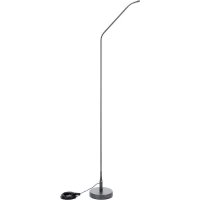
GN 155 SET (Order no. 2765Z0018): The GN 155 SET Installation Module comprises a 149-cm (61-in.) goose-neck with an LED ring, 10-m (33-ft.) cable, and DPA phantom power adapter, an ST 305 floor stand, and a 10-cm (4-in.) extension stub with protective sheath.
HM 1000 (Order no. 2765Z0010): Hanging module with 10-m (33-ft.) cable and DPA in-line XLR phantom power adapter.
All Installation Modules feature an LED ring that is lit to indicate the microphone is ready to operate.
B 18 battery power supply for all Installation Modules except GN 30 OC.
PS 3 F-Lock panel mount socket for GN 15 E, GN 30 E, and GN 50 E Installation Modules (see figs. 17 and 18).
MF-DA panel mount socket for GN 15, GN 30, and GN 50 Installation Modules (see fig. 13).
H 500 shock mount for GN 15 E, GN 30 E, and GN 50 E Installation Modules (see fig. 14).
H 600 + A608 shock mount for all Installation Modules except HM 1000 (see figs. 15 and 16).
SA 60 stand adapter for all Installation Modules except HM 1000 (see figs. 20, 21, and 22).
SA 80 clamp for GN 15/30/50 E/ESP Installation Modules (see figs. 23 and 24).
ST 1, ST 45, ST 46 table stands for all Installation Modules except HM 1000 (see figs. 19, 20, 21, and 22).
2.4.1LEDRing
2.5Optional Accessories
3 Microphone Applications
Note that both the maximum working distance and the area covered by the microphone depend on the pickup angle. The smaller the pickup angle (hypercardioid), the longer the maximum distance between the talker and the microphone and the smaller the area covered by the microphone.
Whether an omnidirectional, cardioid, or hypercardioid capsule will give the best results therefore depends on the specific application situation (see Table 1).
Note: Omnidirectional capsules are primarily suited for recording use.
Table 1: Microphone applications
| Capsule | Polar Pattern Position Module | Working Distance with Goosenck | Working Distance with Hanging | |
| CK 31 Cardioid Behind the 30 to 60 cm 1 to 3 microphone only (1 to 2 ft) (3.5 to 10 ft.) | ||||
| Application: Sound systems | ||||
| CK 32 Omni Not relevant 30 to 200 cm 1 to 7 m (1 to 7 ft.) | (3.5 to 23 ft.) | |||
| Application: Recording only | ||||
| CK 33 Hypercardioid 90° to 135° off microphone axis 30 to 90 cm (1 to 3 ft.) 2 to 4 m (7 to 14 ft.) | ||||
| Application: Sound systems | ||||
| CK 47 Hypercardioid 90° to 135° off microphone axis 30 to 90 cm (1 to 3 ft.) 2 to 4 m (7 to 14 ft.) | ||||
| Application: High quality sound reinforcement even in acoustically difficult locations | ||||
| CK 80 Hypercardioid 90° to 135° off microphone axis 30 to 90 cm (1 to 3 ft.) 2 to 4 m (7 to 14 ft.) | ||||
| Application: Speech reinforcement | ||||
All Discreet Acoustics Modular Capsule Modules are condenser microphones and therefore require a power supply (phantom power). The Installation Modules have been designed for connection to microphone inputs with 9 to 52V phantom power.
- Screw the Capsule Module onto the Installation Module. The screw thread is relatively fine and therefore very smooth-running. Make sure not to tilt the capsule when placing it on the Installation Module thread because this would damage the thread.
- To lock the capsule, use commercial minimum-tack screw locking adhesive that allows you to unscrew the capsule later if need be.
- Before replacing a Capsule Module, be sure to switch your sound system OFF in order to prevent unwanted noise.
Prior to using the GN 15/30/50 ESP, you may choose to program the functions of the ON/OFF key, LED ring, and bass cut filter as detailed in Tables 2/2a on pages 28/29.
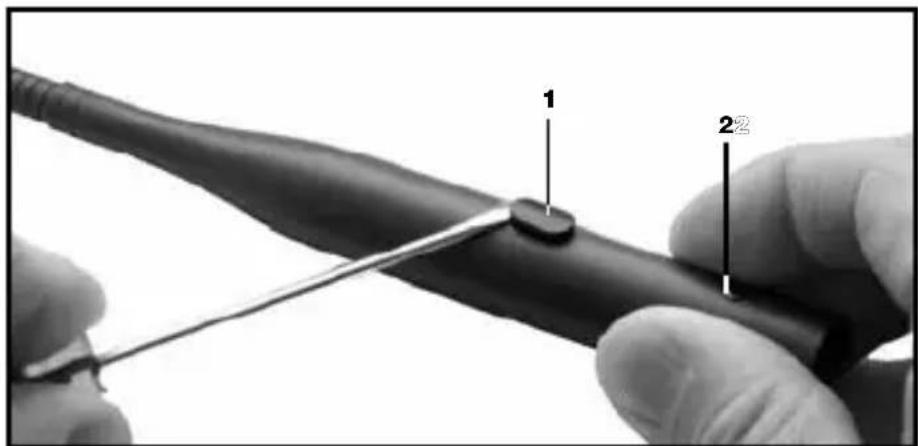
Fig. 1: Opening the DPA-P.
- Use a screwdriver to lever the ON/OFF button (1) out of the shell.
- Unscrew the fixing screw (2) CCW.
- Touch a bare, grounded metal part to discharge any static charge that may have built up on your body. (Electrostatic charges may damage electronic circuits.)
- Pull the circuit board out of the shell WITH EXTRA CARE.
4.1 Capsule Modules
Important:
4.2GN15/30/50ESP InstallationModules
4.2.1ON/OFFKey, LEDRing,Bass Cut
Refer to fig. 1.
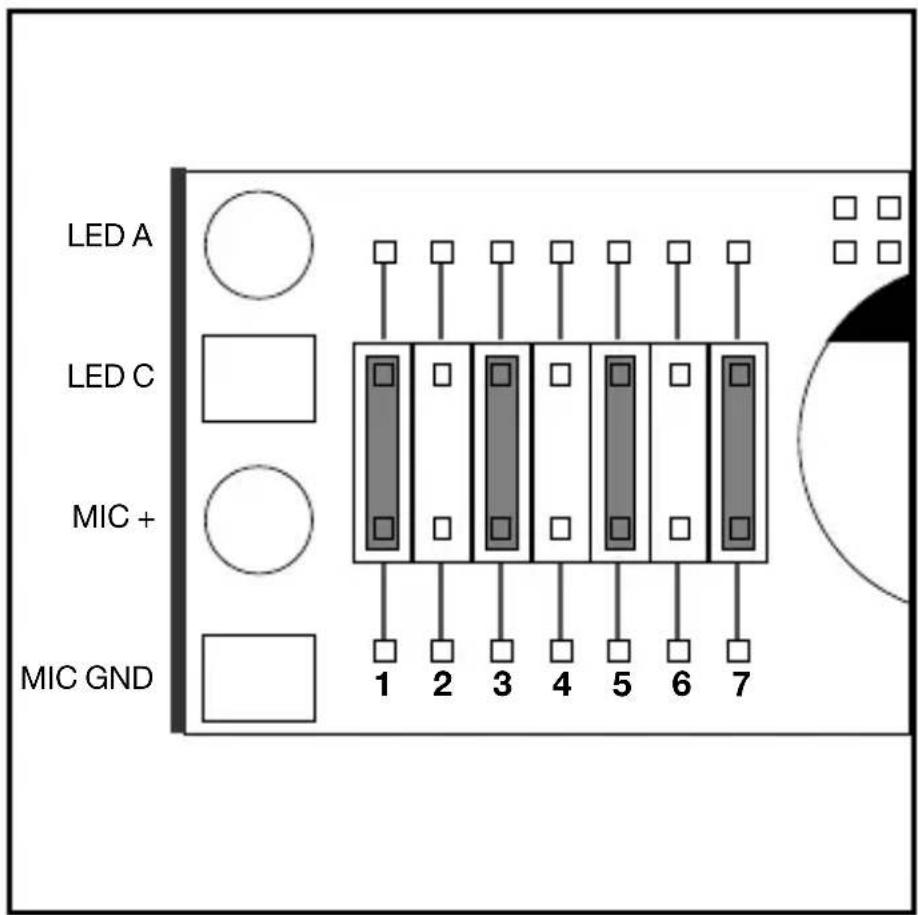
Fig. 2: DPA-P jumpers and pinout (factory setting shown).
Refer to fig. 2.
-
At the factory, jumpers have been placed in positions 1, 3, 5, and 7:
-
On powering up, the microphone will be muted and the LED ring will be dark.
- To open the microphone, press the ON/OFF key. The LED ring will be lit to indicate the microphone is open.
- To mute the microphone, press the ON/OFF key again. The LED ring will go out.
Positions 1 and 7 set the following functions:
Table 2: LED Ring and Bass Cut.
| Position Jumper in place No jumper | |
| 1 Flat frequency response Bass rolloff: | -6 dB below 200 Hz |
| 7 Mic on/off -> LED on/off LED off |
Note:
- Positions 1 and 7 will not affect the function of the ON/OFF key.
Positions 2 through 6 set the following functions:
Table 2a: ON/OFF Key
| ON/OFF Key Functions Jumper Configurations | ||
| Microphone ON/OFF | Microphone OFF on system power-up | 1 2 3 4 5 6 7 |
| Microphone ON on system power-up | 1 2 3 4 5 6 7 | |
| Push-to-mute | 1 2 3 4 5 6 7 | |
| Push-to-talk | 1 2 3 4 5 6 7 | |
| Microphone permanently ON. Key disabled. | 1 2 3 4 5 6 7 | |
4 Installation and Connection
Important:
- Positions, 2, 3, 4: Be sure to place a jumper at one (but no more than one) of these three positions. If you place no jumper at any of these positions, pushing the ON/OFF button will have no effect.
- Positions 5, 6: Make sure there is a jumper placed at one of these positions at all times. With jumpers at both or none of these positions, the microphone status on power-up will be undefined.
- Never place two jumpers at positions 6 and 2 or 5 and 4 at the same time. This would effectively deactivate the ON/OFF button.
-
Do not use any jumper configurations other than those given in Table 2a. Other configurations may cause malfunction.
-
Push the circuit board into the shell. To make the circuit board slide more easily into the shell, turn the circuit board two or three times completely about its longitudinal axis as you push the circuit board in.
- Push the ON/OFF button into the opening in the shell to the point that the button clicks into place and tighten the fixing screw.
Important: Refer to fig. 3.
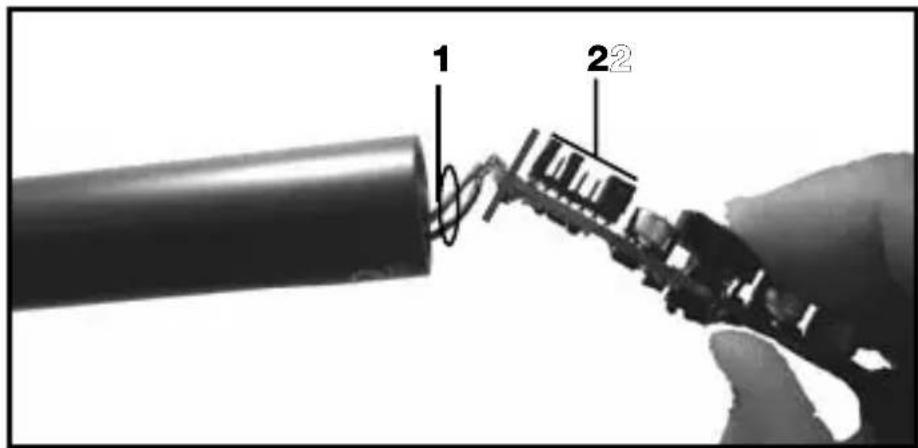
Fig. 3: Inserting the circuit board into the barrel.
- To prevent the circuit board from getting caught inside the barrel, make absolutely sure that the connecting wires (1) will not lie on top of the jumpers (2). You can double-check on that through the opening for the ON/OFF key as you push the circuit board home.
4 Installation and Connection
- Use the supplied PS 3 F-Lock panel mount socket to install the Installation Module in a tabletop or an optional SA 60 stand adapter to mount the Installation Module on a floor or table stand.
- For even better vibrational noise rejection, you can fix the Installation Module to the tabletop with an optional H 500 (see fig. 14) or H 600 + A 608 shock mount (see figs. 15 and 16).
- Use a shielded cable to connect the Installation Module to a microphone input with phantom power.
- If the phantom power on your mixing console is switchable, switch the phantom power on. (Refer to the instruction manual for your mixing console.) The Capsule Module and the LED ring will be powered from the phantom supply.
4.2.2 Installation and Connection
Note:
4 Installation and Connection
4.3GN15/30/50E Installation Modules
4.3.1LEDRing
The LED rings on the GN 15/30/50 E operate off phantom power.
If you connected the microphone correctly, the LED will be lit at moderate intensity as soon as you switch the system and phantom power on. This indicates that the system is correctly wired and ready to operate but NOT that the microphone channel is open.
4.3.2BassCut, Installation, Connection
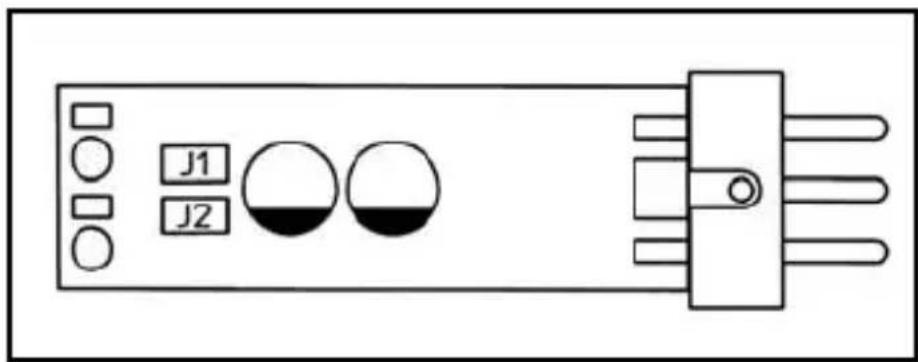
Fig. 4: DPA circuit board
The DPA phantom power adapter provides a 6-dB/octave bass cut filter below 200Hz to reduce low-frequency noise.
-
Activating the Bass Cut Refer to fig. 4.
-
Before grasping the circuit board, touch a bare, grounded metal part to discharge any static charge that may have built up on your body. (Electrostatic charges may damage electronic circuits.)
-
Remove jumper J1 from the circuit board of the phantom power adapter.
-
Installation and Connection
Refer to Section 4.2.2.
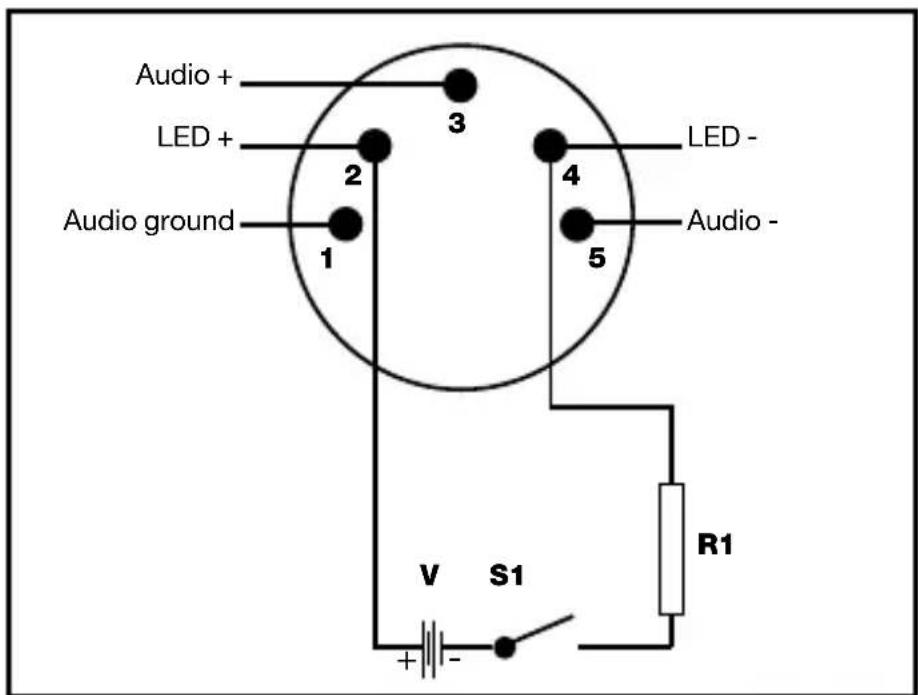
Pins 2 and 4 on the 5-pin XLR connector are available for powering the LED ring from an external source. The specifications of resistor R1 depend on the available powering voltage V:
| V R1 Max. Power |
| 6 V 390 Ω0.1 W |
| 12 V 1000 Ω0.25 W |
| 24 V 2200 Ω0.25 W |
| 48 V 4700 Ω0.5 W |
Refer to Sections 4.2.2 and 4.3.2.
The LED rings on the GN 15/30/50 Installation Modules will be powered from the phantom supply. (See also Section 4.3.1.)
To obtain an open channel indication, the installation technician may connect the LED ring to an external power source. In this mode, the LED ring will light much more brightly to draw the required attention to the open microphone.
4.4GN15/30/50E
5PIN Installation
Modules
4.4.1LEDRing
Fig. 5: LED ring external powering.
Refer to fig. 5.
Table 3: Electrical values for external powering of LED ring
4.4.2BassCut, Installation, Connection
4.5GN15/30 /50 Installation Modules
4.5.1MICOPEN Indication
- Unsolder the black wire (LED +) and the outer shield (LED -) from the DPA phantom power adapter.
- Connect the black wire (LED +) and the outer shield (LED -) to a voltage source with an output voltage as per Table 4:
Table 4: Electrical values for external powering of LED ring
| Voltage Req'd resistor Max. power |
| 6 V 390 Ω0.1 W |
| 12 V 1k Ω0.25 W |
| 24 V 2.2 kΩ0.25 W |
| 48 V 4.7 kΩ0.5 W |
4.5.2Tabletop Installation, Connection
- Drill an 11-mm (7/16") hole through the tabletop.
- Thread the connecting cable of the Installation Module through the opening and the supplied fixing screw.
- Screw the fixing screw into the Installation Module from below to fix the Installation Module in place.
Note:
- For even better vibrational noise rejection, you can fix the Installation Module to the tabletop with an optional H 600 + A 608 shock mount (see figs. 15 and 16).
Audio Connection
- Plug the cable of the DPA phantom power adapter into the female mini XLR connector on the connecting cable of the Installation Module.
- Use a shielded cable to connect the DPA phantom power adapter to a microphone input with phantom power.
- If the phantom power on your mixing console is switchable, switch the phantom power on. (Refer to the instruction manual for your mixing console.) The Capsule Module and the LED ring will be powered from the phantom supply.
- Connectingtoa BodypackTTransmitter
You may also connect the GN 15, GN 30, and GN 50 installation modules to a PT 40, PT 400, or PT 4000 body-pack transmitter from AKG. All you need to do is change the wiring of the mini XLR connector as shown in fig. 6 on page 35:
Fig. 6: Connector pinout for connecting to bodypacks
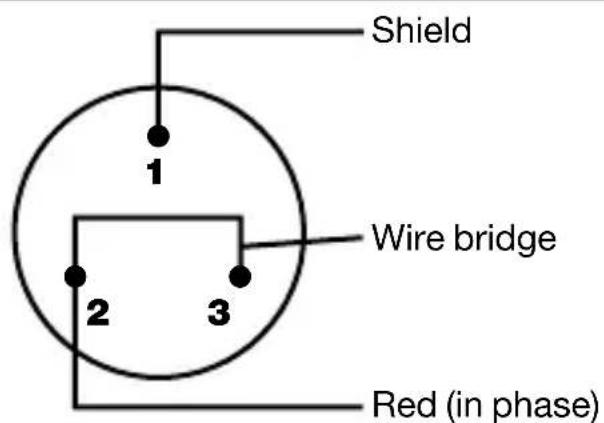
Pin 1: shield Black wire: unused
Pin 2: red wire (in phase) Outer shield: unused
Pin 3: bridge to pin 2
The LED rings on the GN 30/50 Minijack Installation Modules will be powered from the phantom supply. (See also Section 4.3.1.)
To obtain an open channel indication, the installation technician may connect the LED ring to an external power source. In this mode, the LED ring will light much more brightly to draw the required attention to the open microphone.
- Unsolder the black wire (LED +) and the outer shield (LED -) from the HSC mounting flange and insulate the bare ends of the two wires.
-
Solder to the two contacts on the HSC that are now unused a two-conductor cable for powering the LED ring.
To activate the bass cut, refer to Section 4.3.2. -
Drill a hole 40 to 42mm (1.6 to 1.7 in.) in diameter into the tabletop.
- Use the supplied screws to fix the mounting flange in the hole.
- Use the supplied pipe clip to fix the phantom power adapter to the underside of the table.
- Use a shielded cable to connect the DPA phantom power adapter to a microphone input with phantom power.
4.6GN30/50Mini-jack
4.6.1LEDRing, BassCut
Refer to fig. 25 on page 126.
4.6.2 Installation and Connection
Refer to fig. 25 on page 126.
- If the phantom power on your mixing console is switchable, switch the phantom power on. (Refer to the instruction manual for your mixing console.)
- External powering only: Connect the feeder cable for the LED ring to a suitable voltage source.
- Insert the jack plug on the gooseneck into the mini jack on the mounting flange and screw the gooseneck down.
4.7GN155SETInstallationModule
To activate bass cut, refer to Section 4.3.2.
- For external powering of LED ring, refer to Section 4.5.1.
Refer to fig. 7 (left).
4.7.1Goosenck Extension
Refer to fig. 7 (right).
Fig. 7: GN 155 SET.
4.8HM1000 HangingModule
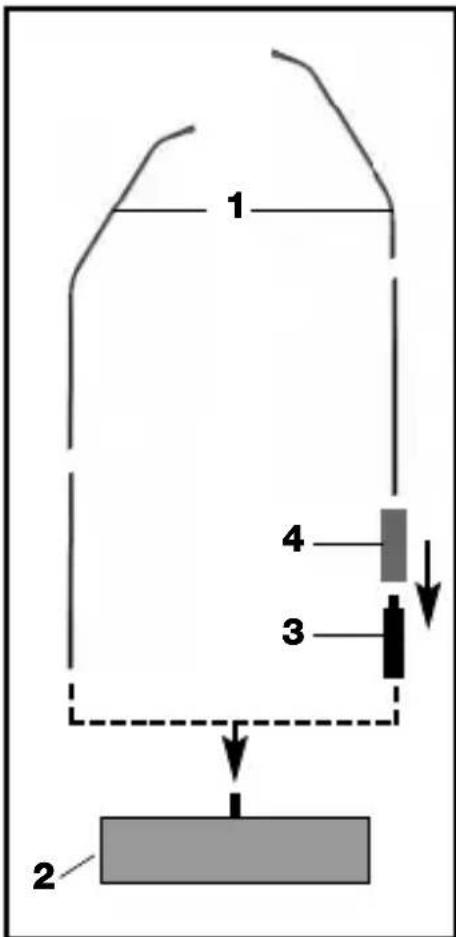
- Screw the desired Capsule Module onto the Installation Module (1) CW.
- Screw the Installation Module (1) onto the supplied floor stand (2) CW.
-
Connect the DPA phantom power adapter to a microphone input with phantom power.
-
Screw the desired Capsule Module onto the Installation Module (1) CW.
- Screw the extension stub (3) onto the supplied floor stand (2) CW.
-
Slide the protective sheath (4) over the extension stub (3).
-
Screw the Installation Module (1) onto the extension stub (3) CW.
-
Prior to installing the HM 1000, straighten the cable by carefully pulling it through your fingers. Make sure not to buckle or twist the cable.
- Fasten a hook to the ceiling, use an existing hook, or stretch a line across the hall.
-
Pass the cable through the hook or over the line so that it will hang at the desired height.
-
Fix the cable in place with electrician's tape.
-
Do not tie a knot into the cable to hang it on the hook.
Important:
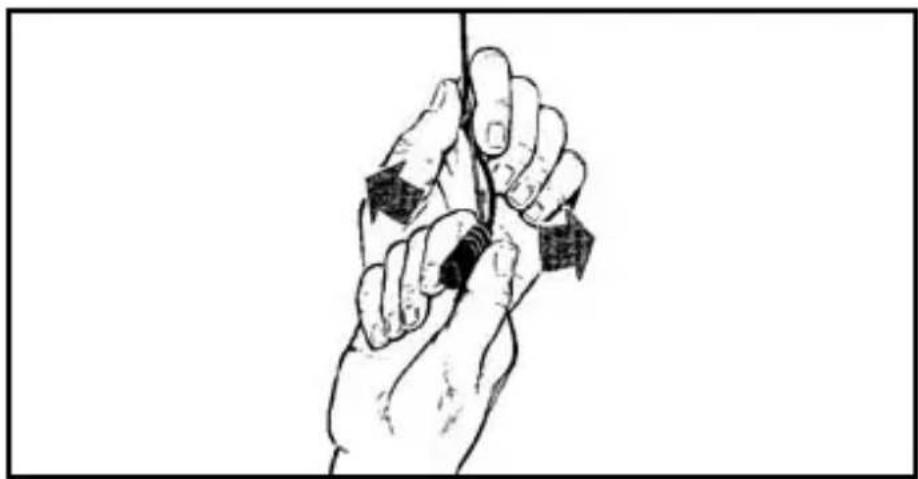
Fig. 8: Aligning the microphone.
- Hold the cable with one hand and turn the microphone carefully into the desired position.
To activate the bass cut, refer to Section 4.3.2.
To power the LED ring from an external source, refer to Section 4.5.1.
To keep the microphone steady even in a draft,
- Stretch a suitable length of fishing line horizontally across the room, passing the fishing line through the eye on the HM 1000.
- Fix the fishing line to two opposite walls so as to create just enough downward pull to steady the microphone laterally.
4.8.1 Steadying themicrophone
4.8.2Applications
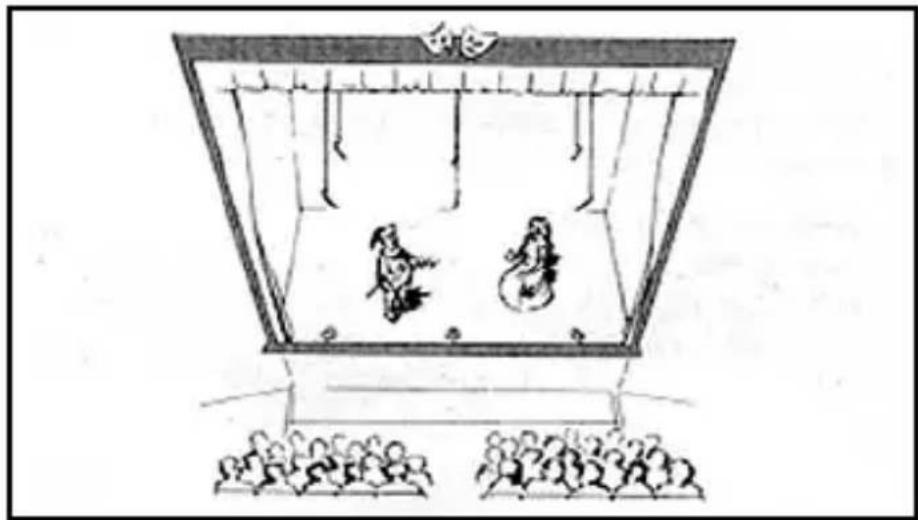
Fig. 9: Theater stage miking
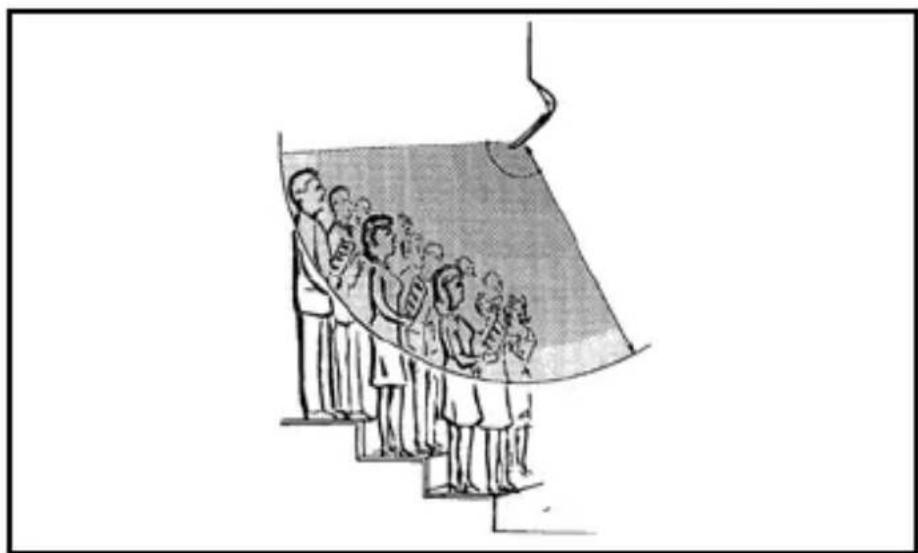
Fig. 10: Miking up a choir
4.8.3Audio Connection
4.9GN15HT InstallationModule
Also read the instruction manual of the HT 4000 handheld transmitter!
LED ring:
Refer to section 4.5.2, Audio Connection
- Screw the desired Capsule Module onto the GN 15 HT Installation Module CW.
- Screw the Installation Module onto the HT 4000 handheld transmitter GW.
- Use the SA 63 stand adapter supplied with the transmitter to mount the transmitter on an (optional) ST 45 table stand.
- Switch the transmitter ON. The LED ring on the Installation Module will illuminate to indicate the transmitter is ON.
4 Installation and Connection
- The LED ring will remain lit even if you press the MUTE button on the transmitter!
Remember that the LED ring does NOT necessarily indicate that the microphone is open and will not extinguish unless you switch the transmitter OFF.
- Of course, you may also use the microphone handheld, e.g., for questions from the audience.
The GN 30 OC Installation Modules has been designed for 1.5V to 10V a-b powering. The unterminated cable provides the following connections:
Red: microphone (hot), supply voltage +
Shield: Microphone (ground), supply voltage -
Black: LED +
Outer shield: LED -
- Connect the microphone wires to a microphone input with a-b powering.
-
Connect the black wire (LED +) and the outer screen (LED -) to a voltage source with an output voltage as per Table 4 on page 30.
-
GN 15/30/50 ESP: Referring to fig. 2 and Table 2 on page 28, remove the jumper from position 7.
- GN 15/30/50, GN 15/30/50 E, GN 30/50 Minijack, GN 155 SET, HM 1000: Referring to fig. 4 on page 32, remove jumper J2.
- GN 30 OC: Disconnect the LED feeder cable from the voltage source.
The unlit LED ring is nearly invisible because its color matches that of the case.
Important:
Note:
4.10GN30OC Installation Module
4.11Defeatingthe LEDRing
5 Specifications
| Installation Module w/ CK 31 CK 32 CK 33 | |||
| Type Pre-polarized condenser microphone | |||
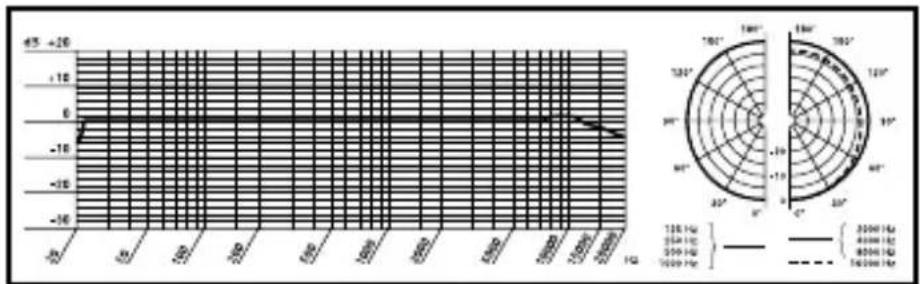
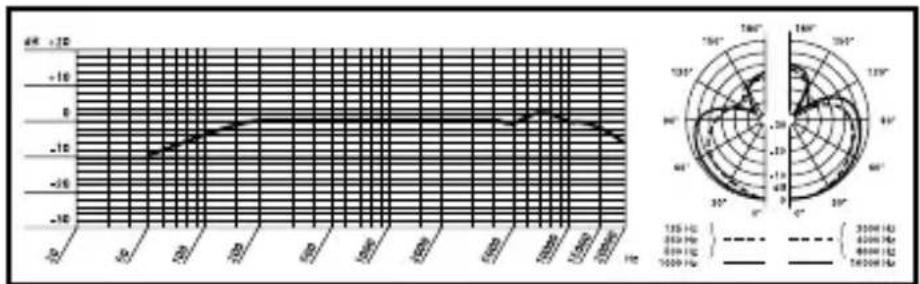
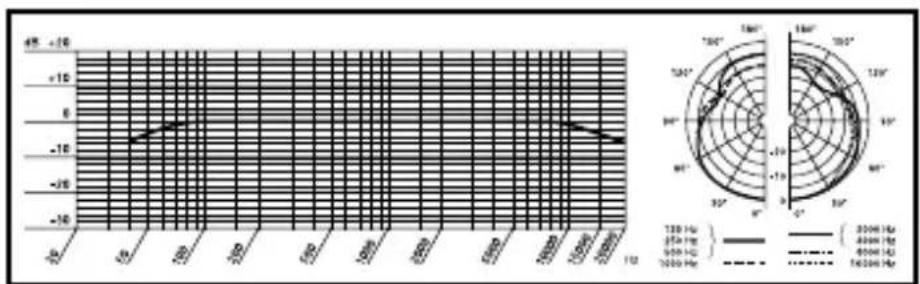
| Polar pattern Cardioid Omni Hypercardioid | |||
| Frequency range 50-20,000 Hz 20-20,000 Hz | |||
| Sensitivity 20 mV/Pa 14 mV/Pa 20 mV/Pa ± -34 dBV* ± -37 | |||
| Electrical impedance | <600 Ω | <600 Ω | <600 Ω |
| Rated load impedance | >2000 Ω | >2000 Ω | >2000 Ω |
| Power requirement | 9-52 V phantom power to IEC 61938 - Requires DPA-P or DPA adapter (integrated in GN** and HM 1000 Installation Modules) | ||
| Size (dia. x length) | 13 x 25 mm(0.5 x 0.95 in.) | 13 x 25 mm(0.5 x 0.95 in.) | 13 x 25 mm(0.5. x 0.95 in.) |
| Connector** | XLR-3 or XLR-5 | XLR-3 or XLR-5 | XLR-3 or XLR-5 |
| Installation Module w/ CK 47 CK 80 | ||
| Type Pre-polarized condenser microphone | ||
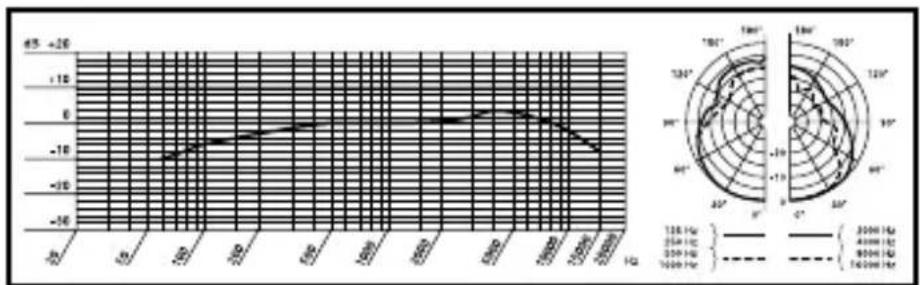
| Polar pattern Hypercardioid Hypercardioid | ||
| Frequency range 20-20,000 Hz 60-15,000 Hz | ||
| Sensitivity 16.5 mV/Pa | 30 mV/Pa △ -35.5 dBV* | △ -30 dBV* |
| Electrical impedance | <600 Ω | <600 Ω |
| Rated load impedance | >2000 Ω | >2000 Ω |
| Power requirement | 9-52 V phantom power to IEC 61938 - Requires DPA-P or DPA adapter (integrated in GN** and HM 1000 Installation Modules) | |
| Size (dia. x length) | 13 x 154 mm (0.5 x 5.85 in.) | 13 x 128 mm (0.5 x 4.86 in.) |
| Connector** | XLR-3 or XLR-5 | XLR-3 or XLR-5 |
*Re 1 V/Pa
** Except GN 30 OC
This product conforms to the standards listed in the Declaration of Conformity. To order a free copy of the Declaration of Conformity, visit http://www.akg.com or contact sales@akg.com.
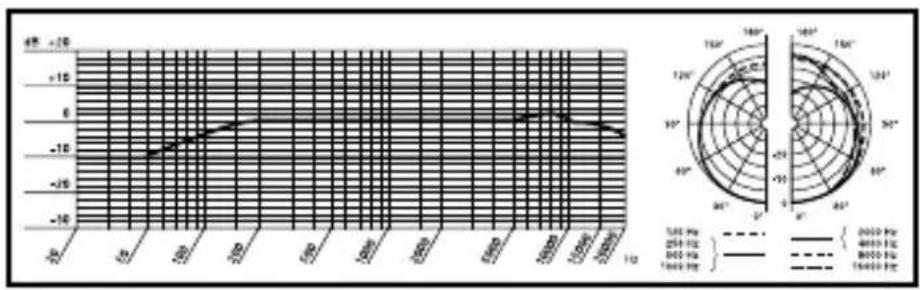
CK31Frequency Responseand PolarDiagrams
CK32Frequency Responseand PolarDiagrams
CK33FrequeCy Responseand PolarDiagrams
CK47Frequency Responseand PolarDiagrams
CK80Frequency Responseand PolarDiagrams
Table des matieres
Page
4.2.2Montageet raccordement
Remarque:
4 Montage et raccordement
4.3 Modulesmontage GN15/30/50E 4.3.1Annealumineux
4.6.2Montage, raccordement
Voir Fig. 25 page 126.
4 Montage et raccordement
4.8.3Raccordement audio
For other products and distributors worldwide visit www.akg.com

H A Harman International Company
Technische Änderungen vorbehalten. Specifications subject to change without notice. Ces caractéristiques sont susceptibles de modifications. Ci riserviamo il diritto di effettuare modifiche tecniche. Nos reservamos el derecho de introducir modificaciones sociales. Especificações sujeitas a mudanças sem avis的前提。
Printed in Taiwan. 09/09/9100 U 12250


- Safety and Environment
- Description
- Introduction
- 2.2Capsule Modules
- 2.3W30 Windscreen
- 2.4Installation Modules
- 2.4.1LEDRing
- 2.5Optional Accessories
- Microphone Applications
- Capsule Modules
- Important:
- 4.2GN15/30/50ESP InstallationModules
- 4.2.1ON/OFFKey, LEDRing,Bass Cut
- Installation and Connection
- Installation and Connection
- Note:
- 4.3GN15/30/50E Installation Modules
- 4.3.1LEDRing
- 4.3.2BassCut, Installation, Connection
- 4.5.2Tabletop Installation, Connection
- Audio Connection
- - Connectingtoa BodypackTTransmitter
- 4.6GN30/50Mini-jack
- 4.6.1LEDRing, BassCut
- Installation and Connection
- 4.7GN155SETInstallationModule
- 4.7.1Goosenck Extension
- 4.8HM1000 HangingModule
- 4.8.2Applications
- 4.8.3Audio Connection
- 4.9GN15HT InstallationModule
- 4.10GN30OC Installation Module
- 4.11Defeatingthe LEDRing
- Specifications
- Table des matieres
- 4.2.2Montageet raccordement
- Remarque:
- Montage et raccordement
- 4.6.2Montage, raccordement
- 4.8.3Raccordement audio
- H A Harman International Company
Brand : AKG
Model : GN 155
Category : Microphone