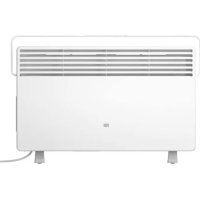
Mi Smart Space Heater S - Tumble dryer Xiaomi - Free user manual and instructions
Find the device manual for free Mi Smart Space Heater S Xiaomi in PDF.



| Product type | Convection heater with drying rack |
| Brand | Xiaomi |
| Model | Mi Smart Space Heater S (KRDNQ03ZM) |
| Intended use | Indoor supplemental heating and laundry drying |
| Rated power | 2200 W |
| Rated voltage | 230 V ~ |
| Rated frequency | 50 Hz |
| Dimensions (L × H × D) | 780 × 526 × 216 mm |
| Weight | Approximately 5.5 kg (not specified, estimate) |
| Wireless connectivity | Wi-Fi IEEE 802.11b/g/n 2.4 GHz |
| Protection rating (IP) | IPX4 (splash-proof) |
| Safety features | Overheat protection shutdown, do not cover, do not use extension cord |
| Drying rack | Foldable, max load 1.5 kg, for small garments |
| Temperature control | Touch thermostat with multiple constant temperatures and continuous mode |
| Timer (delayed shutdown) | 1 h, 3 h, 5 h, 9 h |
| Control | Touch panel + Mi Home / Xiaomi Home app |
| Display | LED indicators (power, Wi-Fi, thermostat) |
| Installation | On stable feet, flat surface, keep 1 m distance from flammable materials |
| Maintenance | Unplug and let cool before cleaning, soft damp cloth, no detergent |
| Warranty | Limited manufacturer warranty, conditions on mi.com |
| Certifications | European Directive 2014/53/EU for radio equipment |
| Package contents | Heater, drying rack, 2 feet, 4 screws, L-shaped screwdriver, manual |
Frequently Asked Questions - Mi Smart Space Heater S Xiaomi
User questions about Mi Smart Space Heater S Xiaomi
0 question about this device. Answer the ones you know or ask your own.
Ask a new question about this device
Download the instructions for your Tumble dryer in PDF format for free! Find your manual Mi Smart Space Heater S - Xiaomi and take your electronic device back in hand. On this page are published all the documents necessary for the use of your device. Mi Smart Space Heater S by Xiaomi.
USER MANUAL Mi Smart Space Heater S Xiaomi
Read this manual carefully before use, and retain it for future reference.
- This heater is intended for indoor use only. During use, stably place the heater on a level surface, and do not tilt or tip it over.
• Make sure the feet are correctly installed before using the heater. - Please plug the heater into a 230V AC power outlet.
- The used power outlet must be grounded and have a rated current of at least 10 A so as to avoid accidents.
- Do not cover the heater or its power cord so as to avoid overheating.
-
Do not touch the heater with wet hands.
-
During or right after its use, do not touch the heater so as to avoid getting scalded.
- To prevent the risk of overheating or fire, never use an extension cord.
- Only use the heater in a well-ventilated environment. Do not insert foreign objects into the air inlets and outlets of the heater.
- Do not insert any wires or other foreign objects into any opening of the heater so as to avoid electric shocks. Do not place or use the heater in garages or workshops, nor near gasoline, paint, or other flammable and explosive materials.
-
This electric heater is equipped with a drying rack that should only be used for drying laundry.
-
Do not place laundry directly onto the heater. Once it is dry, please remove laundry from the drying rack as soon as possible to prevent any damage or danger.
- Do not use the heater if its power cord or the power plug is damaged or broken. In case any damages occur, it must be replaced with a genuine one from the manufacturer or the after-sales service department to avoid safety hazards.
- Do not use this heater in the immediate surroundings of a bath, a shower or a swimming pool.
- Do not use this heater if it has been dropped.
-
Do not use if there are visible signs of damage to the heater.
-
Do not place the heater directly in a bathtub or other water container.
- Do not place the heater directly below the socket outlet.
This is a high-power heating product.
- Check whether the plug properly fits into the power outlet when using this heater for the first time.
Checking method: Insert the power plug into the power outlet, then select the highest constant temperature. Turn off and unplug the heater after about 30 minutes to check whether the prongs of the power plug are too hot (temperatures in excess of 55°C). If so, try a different power outlet so as to avoid the risk of a molten power plug or fire due to overheating.
- During using this heater, do not share the same electrical circuit with other devices to avoid overloading the circuit.
- If the heater is not going to be used for an extended period of time, please turn off the on/off switch and unplug the power cord.
- If the heater stops functioning, contact the after-sales service department. Never attempt to disassemble the heater by yourself.
- This appliance can be used by children aged from 8 years and above and persons with reduced physical, sensory or mental capabilities or lack of experience and knowledge if they have been given supervision or instruction concerning use of the appliance in a safe way and understand the hazards involved.
• Children shall not play with the appliance.
• Children of less than 3 years should be kept away unless continuously supervised.
- Children aged from 3 years and less than 8 years shall only switch on/off the appliance provided that it has been placed or installed in its intended normal operating position and they have been given supervision or instruction concerning use of the appliance in a safe way and understand the hazards involved. Children aged from 3 years and less than 8 years shall not plug in, regulate and clean the appliance or perform user maintenance.
- Cleaning and user maintenance shall not be made by children without supervision.
CAUTION
Some parts of this product can become very hot and cause burns.
Particular attention has to be given where children and vulnerable people are present.
Warning
Do not immerse the heater in water.
Do not spill any water into the heater.
Do not use any detergent to wipe the heater clean.
In order to avoid overheating, do not cover the heater.
Do not use this heater in small rooms when they are occupied by persons not capable of leaving the room on their own, unless constant supervision is provided.
To reduce the risk of fire, keep textiles, curtains, or any other flammable material a minimum distance of 1 m from the air outlet. Be careful of the high temperature. Do not use the drying rack to hang heavy items, nor use it as a handle.
Product Overview
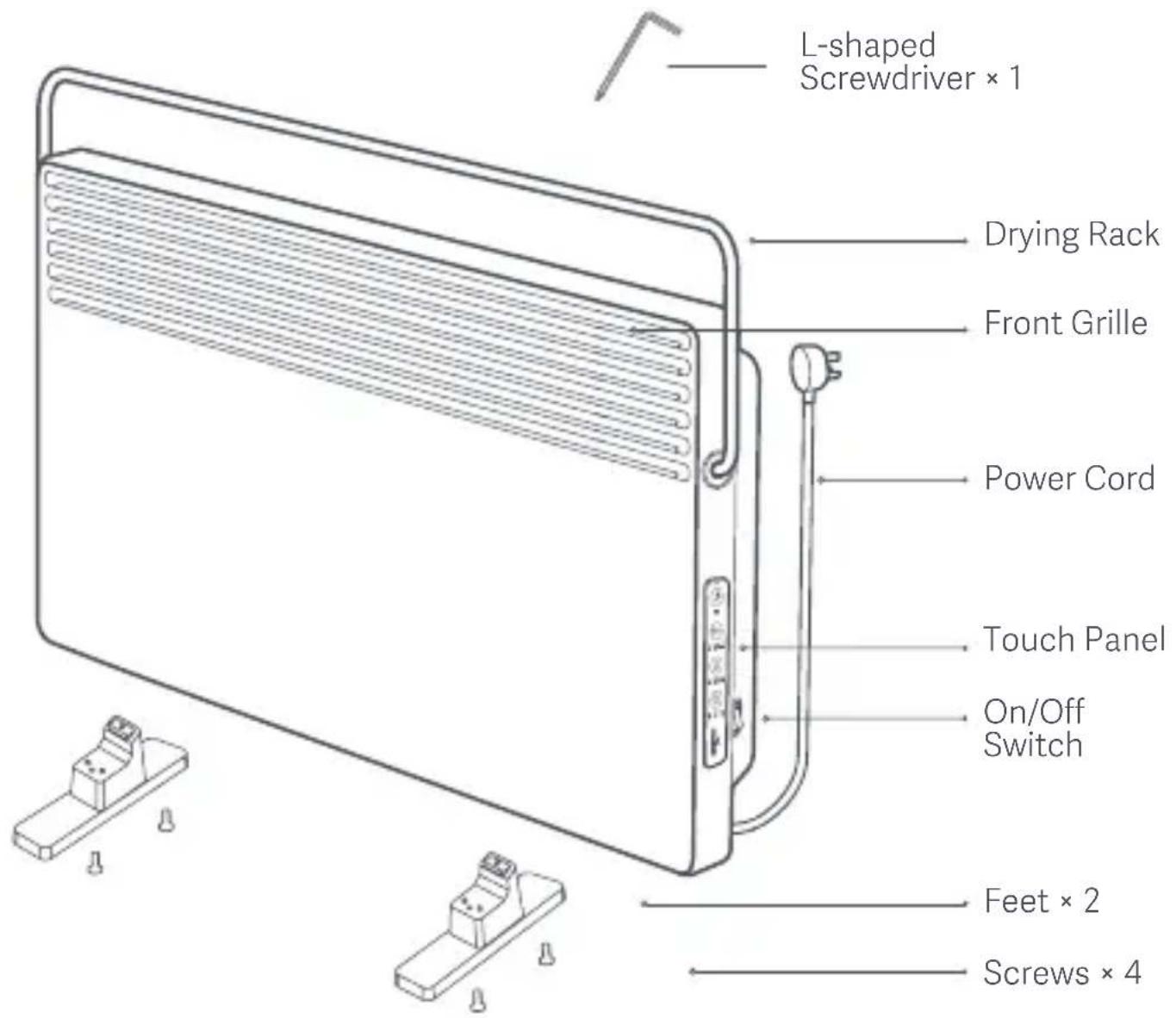
Product Overview
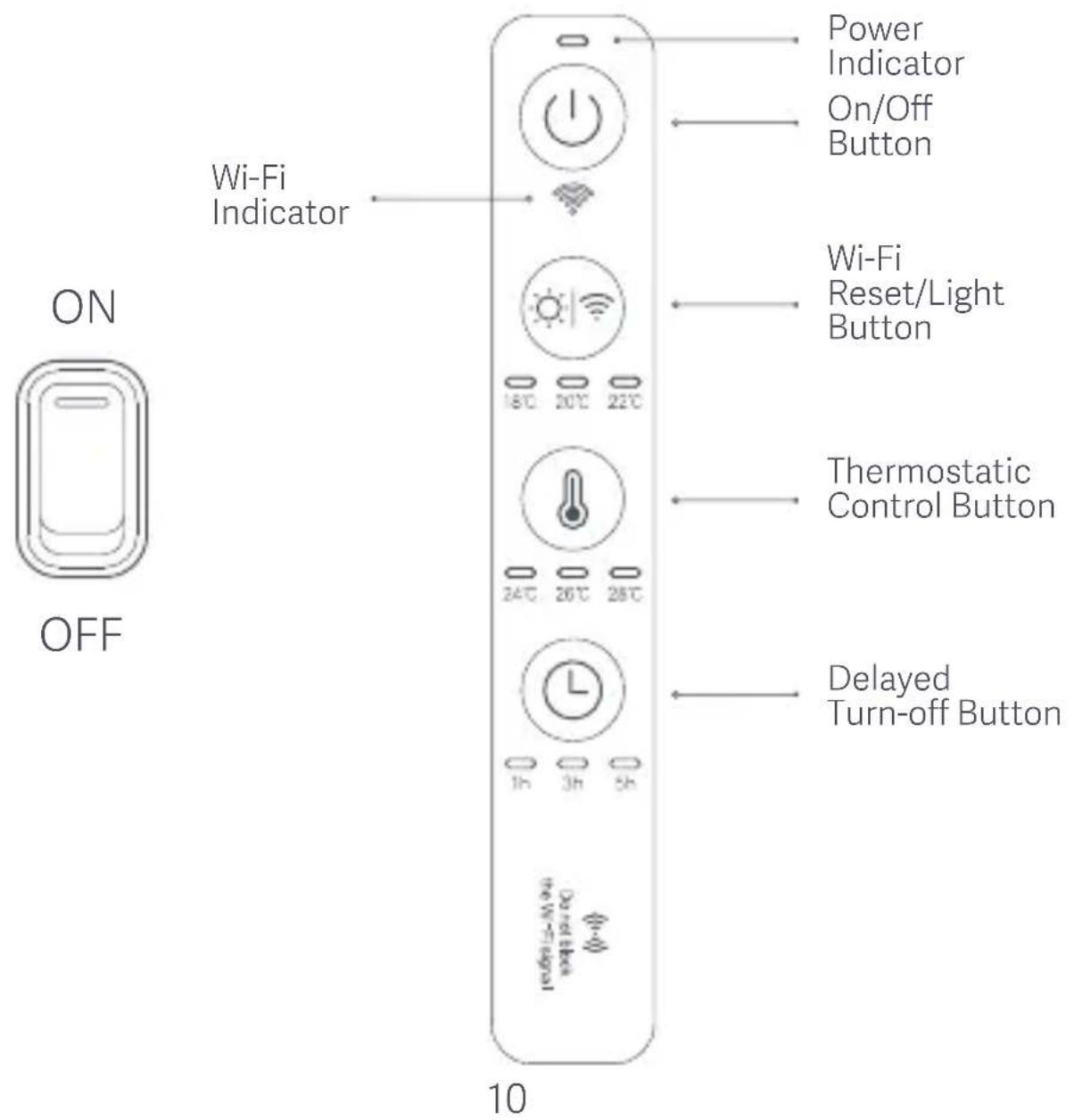
On/Off Switch & Touch Panel
Installation
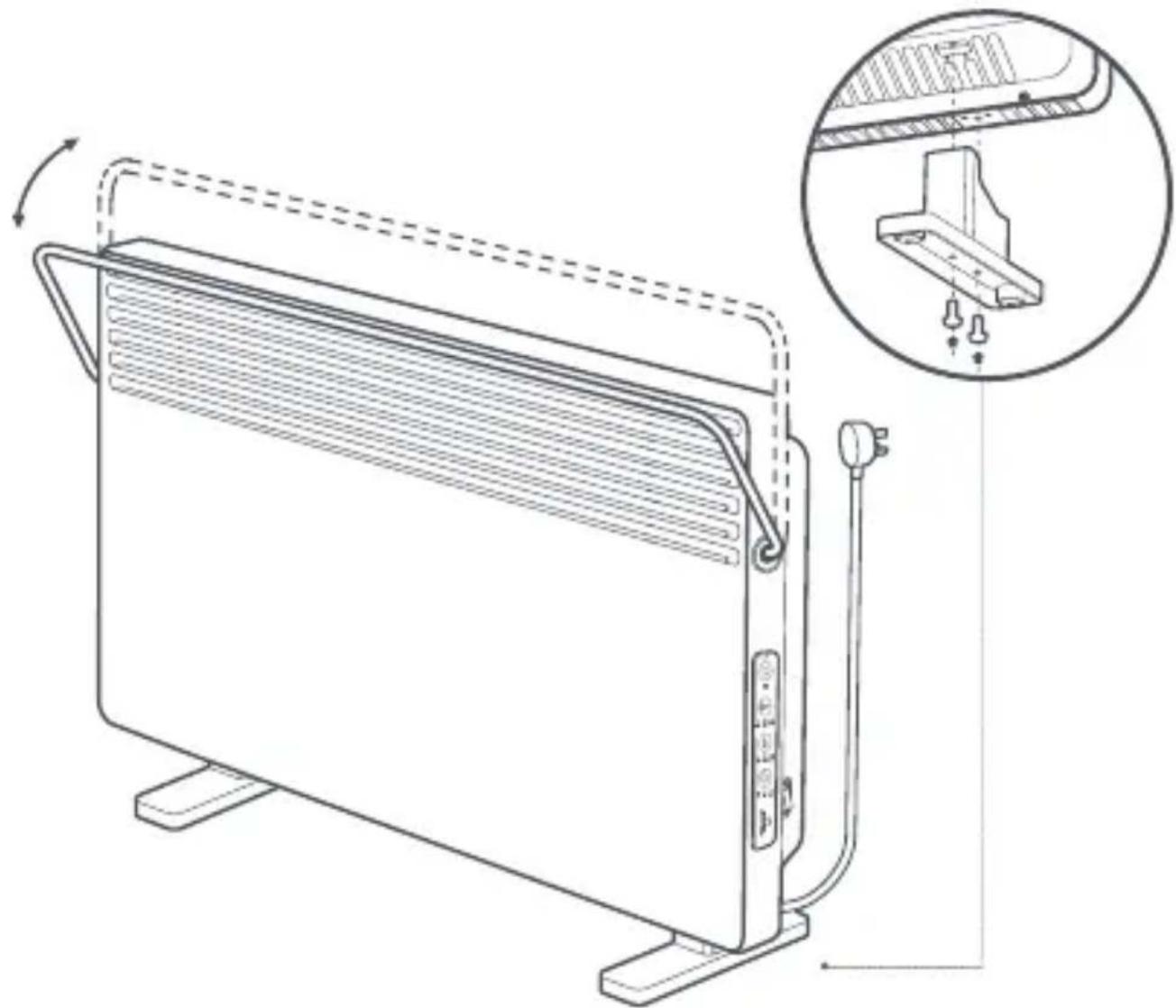
Install the feet with the screws as shown in the figure.
The maximum rotation angle of the drying rack is 40 degrees.
natural_image
Line drawing of a solar heating unit with cooling fins and a close-up inset showing internal components (no text or symbols)How to Use

If the heater is not going to be used for an extended period of time, please turn off the on/off switch and unplug the power cord.
Turning On/Off
Turn on the on/off switch and then press the on/off button ⏻ to turn on the heater, press it again to turn it off.
Enabling/Disabling Light and Resetting Wi-Fi
Press the Wi-Fi reset/light button 📋 to enable or disable the light of the touch panel. Press and hold the button to reset the Wi-Fi connection of the heater. Once the Wi-Fi connection is reset successfully, the Wi-Fi indicator will blink and the heater will enter the awaiting connection mode.
Adjusting Temperature
Press the thermostatic control button ⏻ to select the preferred constant temperature.
Note: Press and hold the thermostatic control button, the heater will continue to heat. Press the button again to stop heating.
Delayed Turn-off
Press the delayed turn-off button 📊 to select: disabled, 1-hour delay, 3-hour delay, 5-hour delay, and 9-hour delay.
Connect with Mi Home / Xiaomi Home App
This product works with Mi Home / Xiaomi Home app *. Control your device, and interact it and other smart home devices with Mi Home / Xiaomi Home app.
Scan the QR code to download and install the app. You will be directed to the connection setup page if the app is installed already. Or search "Mi Home / Xiaomi Home" in the app Store to download and install it.
Open Mi Home / Xiaomi Home app, tap "+" on the upper right, and then follow prompts to add your device.
* The app is referred to as Xiaomi Home app in Europe (except for Russia). The name of the app displayed on your device should be taken as the default.
Note: The version of the app might have been updated, please follow the instructions based on the current app version.

How to Use the Drying Rack
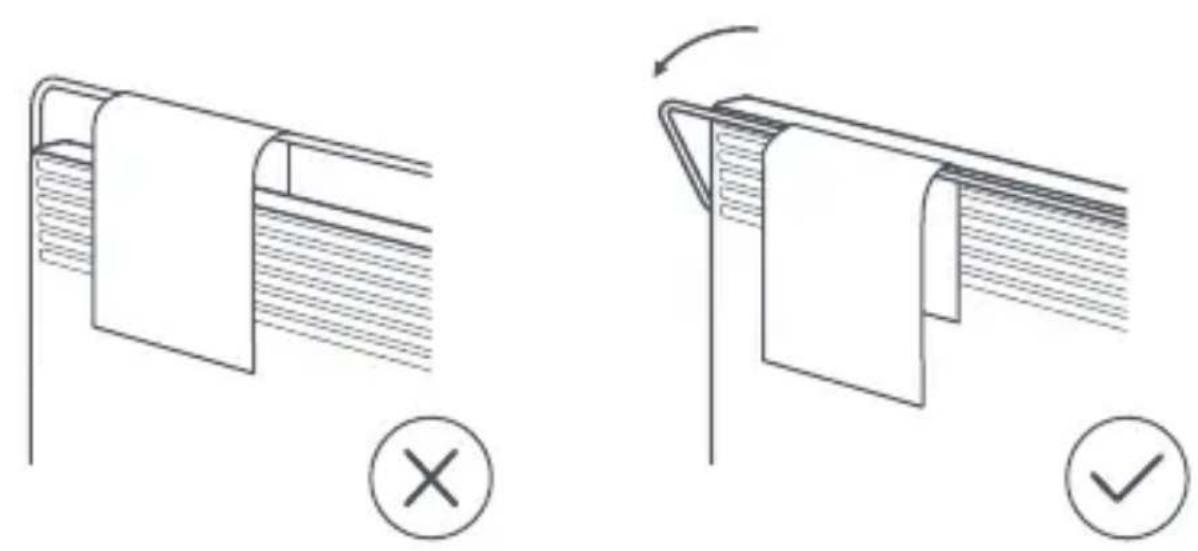
When the drying rack is folded down, it can be used to dry small pieces of clothing, towels, socks, etc. Do not use the rack to dry large down feathers, synthetic fiber, or fur items.
natural_image
Two technical diagrams showing fabric folding or assembly process, with no visible text or symbolsNote: Place the heater on level ground and do not hang a load of more than 1.5 kg on the drying rack.
Daily Care & Maintenance
- Unplug the heater and let it cool down before your cleaning.
- Gently wipe the outer surface of the heater with a soft, damp cloth and let it thoroughly dry before its use.
Note: Illustrations of product, accessories, and user interface in the user manual are for reference purposes only. Actual product and functions may vary due to product enhancements.
Specifications
| Name | Mi Smart Space Heater S | Rated Power | 2200 W | |
| Model | KRDNQ03ZM | Rated Voltage | 230 V~ | |
| Dimensions | 780 × 526 × 216 mm | Rated Frequency | 50 Hz | |
| Wireless Connectivity | Wi-Fi IEEE 802.11b/g/n 2.4GHz | IP Code | IPX4 | |
| Max RF Output Power | Wi-Fi 2.4GHz (2400 - 2483.5 MHz): <20 dBm | |||
Under normal use of condition, this equipment should be kept a separation distance of at least 20cm between the antenna and the body of the user.
Regulatory Compliance Information
Europe — EU declaration of conformity

Hereby, Beijing Smartmi Electronic Technology Co., Ltd. declares that the radio equipment type KRDNQ03ZM is in compliance with Directive 2014/53/EU. The full text of the EU declaration of conformity is available at the following internet address: http://www.mi.com/global/service/support/declaration.html
Disposal and recycling information
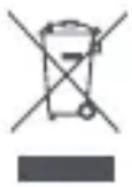
All products bearing this symbol are waste electrical and electronic equipment (WEEE as in directive 2012/19/EU) which should not be mixed with unsorted household waste. Instead, you should protect human health and the environment by handing over your waste equipment to a designated collection point for the recycling of waste electrical and electronic equipment, appointed by the government or local authorities. Correct disposal and recycling will help prevent potential negative consequences to the environment and human health. Please contact the installer or local authorities for more information about the location as well as terms and conditions of such collection points.

natural_image
Line drawing of a solar heating unit with cooling fins and a close-up inset showing internal components (no text or symbols)Modalità d'utilizzo

natural_image
Line drawing of a solar heating unit with cooling fins and a magnified inset showing internal components (no text or symbols)Utilisation

natural_image
Line drawing of a solar heating unit with cooling fins and a close-up inset showing internal components (no text or symbols)Modo de uso

natural_image
Line drawing of a solar heating unit with cooling fins and a close-up inset showing internal components (no text or symbols)Verwendung

natural_image
Line drawing of a solar heating unit with cooling fins and a close-up inset showing internal components (no text or symbols)Инструкция

natural_image
Line drawing of a solar heating unit with cooling fins and a close-up inset showing its internal structure (no text or symbols)Użytkowanie

Użytowanie suszarki
THIS WARRANTY GIVES YOU SPECIFIC RIGHTS, AND YOU MAY HAVE OTHER RIGHTS CONVEYED BY LAWS OF YOUR COUNTRY, PROVINCE OR STATE. INDEED, IN SOME COUNTRIES, PROVINCES OR STATES, CONSUMER LAW MAY IMPOSE A MINIMUM WARRANTY PERIOD. OTHER THAN AS PERMITTED BY LAW, XIAOMI DOES NOT EXCLUDE, LIMIT OR SUSPEND OTHER RIGHTS YOU MAY HAVE. FOR A FULL UNDERSTANDING OF YOUR RIGHTS WE INVITE YOU TO CONSULT THE LAWS OF YOUR COUNTRY, PROVINCE OR STATE.
1. LIMITED PRODUCT WARRANTY
XIAOMI warrants that the Products are free from defects in materials and workmanship under normal use and use in accordance with the respective Product user manual, during the Warranty Period.
The duration and conditions related to the legal warranties are provided by respective local laws. For more information about the consumer warranty benefits, please refer to Xiaomi's official website https://www.mi.com/en/service/warranty/.
Xiaomi warrants to the original purchaser that its Xiaomi Product will be free from defects in materials and workmanship under normal use in the period mentioned above.
Xiaomi does not guarantee that the operation of the Product will be uninterrupted or error free.
Xiaomi is not liable for damages arising from non-compliance with the instructions related to the use of the Product.
2.REMEDIES
If a hardware defect is found and a valid claim is received by Xiaomi within the Warranty Period, Xiaomi will either (1) repair the product at no charge, (2) replace the product, or (3) refund the Product, excluding potential shipping costs.
3. HOW TO OBTAIN WARRANTY SERVICE
To obtain warranty service, you must deliver the Product, in its original packaging or similar packaging providing an equal degree of Product protection, to the address specified by Xiaomi. Except to the extent prohibited by applicable law, Xiaomi may require you to present proofs or proof of purchase and / or comply with registration requirements before receiving warranty service.
4.EXCLUSIONS AND LIMITATIONS
Unless otherwise stipulated by Xiaomi, this Limited Warranty applies only to the Product manufactured by or for Xiaomi and identifiable by the trademarks, trade name or "Xiaomi" or "Mi" logo.
The Limited Warranty does not apply to any (a) Damage due to acts of nature or God, for example, lightning strikes, tornadoes, flood, fire, earthquake or other external causes; (b) Negligence; (c) Commercial use; (d) Alterations or modifications to any part of the Product; (e) Damage caused by use with non-Xiaomi products; (f) Damage caused by accident, abuse or misuse; (g) Damage caused by operating the Product outside the permitted or intended uses described by Xiaomi or with improper voltage or power supply; or (h) Damage caused by service (including upgrades and expansions) performed by anyone who is not a representative of Xiaomi.
It is your responsibility to backup any data, software, or other materials you may have stored or preserved on the product. It is likely that the data, software or other materials in the equipment will be lost or reformatted during the service process, Xiaomi is not responsible for such damage or loss.
No Xiaomi reseller, agent, or employee is authorized to make any modification, extension, or addition to this Limited Warranty. If any term is held to be illegal or unenforceable, the legality or enforceability of the remaining terms shall not be affected or impaired.
Except as prohibited by laws or otherwise promised by Xiaomi, the after-sales services shall be limited to the country or region of the original purchase.
Products which were not duly imported and/or were not duly manufactured by Xiaomi and/or were not duly acquired from Xiaomi or a Xiaomi's official seller are not covered by the present warranties. As per applicable law you may benefit from warranties from the non-official retailer who sold the product. Therefore, Xiaomi invites you to contact the retailer from whom you purchased the product.
The present warranties do not apply in Hong Kong and Taiwan.
5. IMPLIED WARRANTIES
Except to the extent prohibited by applicable law, all implied warranties (including warranties of merchantability and fitness for a particular purpose) will have a limited duration up to a maximum duration
of this limited warranty. Some jurisdictions do not allow limitations on the duration of an implied warranty, so the above limitation will not be applied in these cases.
6. DAMAGE LIMITATION
Except to the extent prohibited by applicable law, Xiaomi shall not be liable for any damages caused by accidents, indirect, special or consequential damages, including but not limited to loss of profits, revenue or data, damages resulting from any breach of express or implied warranty or condition, or under any other legal theory, even if Xiaomi has been informed of the possibility of such damages. Some jurisdictions do not allow the exclusion or limitation of special, indirect, or consequential damages, so the above limitation or exclusion may not apply to you. 7.XIAOMI CONTACTS
For customers, please visit the website: https://www.mi.com/en/service/warranty/
The contact person for the after-sale service may be any person in Xiaomi's authorized service network, Xiaomi's authorized distributors or the final vendor who sold the products to you. If in doubt please contact the relevant person as Xiaomi may identify.
LA PRESENTE GARANZIA RICONOSCE AL CLIENTE DIRITTI LEGALI SPECIFICI E IL CLIENTE POTREBBE AVERE ALTRI DIRITTI PREVISTI DA LEGGI DEL PROPRIO PAESE, PROVINCIA O STATO. IN ALCUNI PAESI, PROVINCE O STATI, LA LEGGE PER LA TUTELA DEI CONSUMATORI PUÒ IMPORRE UN PERIODO MINIMO DI GARANZIA. ECCETTO NEI CASI CONSENTITI DALLA LEGGE, XIAOMI NON ESCLUDE, LIMITA O REVOCA ALTRI DIRITTI CHE L'UTENTE PUÒ AVERE. PER UNA COMPRENSIONE COMPLETA DEI PROPRI DIRITTI, INVITIAMO GLI UTENTI A CONSULTARE LE LEGGI DEL PROPRIO PAESE, PROVINCIA O STATO.
1. GARANZIA LIMITATA DI PRODOTTO
https://www.mi.com/en/service/warranty/
https://www.mi.com/en/service/warranty/
• Manufactured by: Beijing Smartmi Electronic Technology Co., Ltd. (a Mi Ecosystem company)
Address: Room 201-203, Unit 6, Building A, No. 66, Zhufang Road, Qinghe, Haidian District, Beijing
For further information, please go to www.mi.com
For detailed e-manual, please go to www.mi.com/global/service/userguide
* Fabbricato da: Beijing Smartmi Electronic Technology Co., Ltd. (una società Mi Ecosystem)
Indirizzo: Room 201-203, Unit 6, Building A, No. 66, Zhufang Road, Qinghe, Haidian District, Beijing
Adresses: Room 201-203, Unit 6, Building A, No. 66, Zhufang Road, Qinghe, Haidian District, Beijing
Dirección: Room 201-203, Unit 6, Building A, No. 66, Zhufang Road, Qinghe, Haidian District, Beijing
Adresse: Room 201-203, Unit 6, Building A, No. 66, Zhufang Road, Qinghe, Haidian District, Beijing
Адрес: Room 201-203, Unit 6, Building A, No. 66, Zhufang Road, Qinghe, Haidian District, Beijing
Adres: Room 201-203, Unit 6, Building A, No. 66, Zhufang Road,
Qinghe, Haidian District, Beijing
- CAUTION
- Warning
- Product Overview
- Installation
- How to Use
- Turning On/Off
- Enabling/Disabling Light and Resetting Wi-Fi
- Adjusting Temperature
- Delayed Turn-off
- Connect with Mi Home / Xiaomi Home App
- How to Use the Drying Rack
- Daily Care & Maintenance
- Regulatory Compliance Information
- Disposal and recycling information
- Modalità d'utilizzo
- Utilisation
- Modo de uso
- Verwendung
- Инструкция
- Użytkowanie
- Użytowanie suszarki
- LIMITED PRODUCT WARRANTY
- 2.REMEDIES
- HOW TO OBTAIN WARRANTY SERVICE
- 4.EXCLUSIONS AND LIMITATIONS
- IMPLIED WARRANTIES
- DAMAGE LIMITATION
- GARANZIA LIMITATA DI PRODOTTO
Brand : Xiaomi
Model : Mi Smart Space Heater S
Category : Tumble dryer