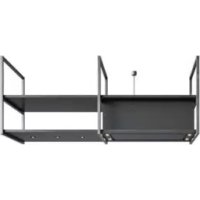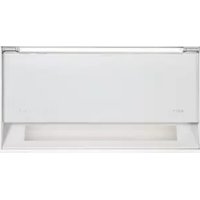
Fusion 680 - Basket NOVY - Free user manual and instructions
Find the device manual for free Fusion 680 NOVY in PDF.


User questions about Fusion 680 NOVY
0 question about this device. Answer the ones you know or ask your own.
Ask a new question about this device
Download the instructions for your Basket in PDF format for free! Find your manual Fusion 680 - NOVY and take your electronic device back in hand. On this page are published all the documents necessary for the use of your device. Fusion 680 by NOVY.
USER MANUAL Fusion 680 NOVY
Programming activeren
Programming deactiveren
1 INSTRUCTIONS FOR SAFETY AND USE 27
2 CONTROLS AND FUNCTIONS 29
2.1 Operating the device 29
2.2Turning the extraction on and off 29
2.3 Lighting 29
2.4 Programming recirculation (optional) 30
2.5 InTouch 30
3 CLEANING AND MAINTENANCE 31
3.1 General maintenance 31
3.2 Grease filter 31
3.3 Monoblock recirculation filter (optional) 32
3.4 Service 32
4 Quickguide 33
4.1 Settings 33
4.2 Indications 33
1 INSTRUCTIONS FOR SAFETY AND USE
Further information on Novy products, accessories and services may be found on the internet:
www.novy.co.uk
These are the directions for use for the appliance as shown on the front. The installation instructions are in a separate booklet supplied with the appliance.
These directions for use make use of a number of symbols. The meanings of the symbols are shown below.
| SymbolMeaningAction | |
| Indication Explanation of an indication on the device. | |
| Warning This symbol indicates an important tip or a dangerous situation. |
Observe this instruction in order to prevent injury and damage to property.
Technical safety instructions
- This appliance complies with the applicable safety instructions. However, improper use may cause personal injury or damage to the appliance.
- Read the directions for use and the installation instructions before installing and using this appliance. You will find important information here for the assembly and use of the appliance.
- Safety is guaranteed only with expert installation in accordance with the installation manual. The installing technician is responsible for proper operation at the installation location.
- The appliance is intended exclusively for household use (preparation of food) and excludes all other domestic, commercial or industrial use. Do not use the appliance outside.
- Check the condition of the appliance and the installation fittings as soon as you remove them from the packaging. Remove the appliance from the packaging with care. Do not use sharp knives to open the packaging.
- Do not install the appliance if it is damaged, and in that case inform Novy.
- Keep good care of this manual and pass it on to any person who may use the appliance after you.
- Novy is not liable for damage resulting from incorrect assembly, incorrect connection, incorrect use or incorrect operation.
- Do not touch live components.
- Do not convert or alter the appliance.
- Remove labels and stickers on the appliance with tips for use or installation. The type sticker is to be found behind the grease filter in the appliance. Do not remove it.
Safety instructions with children in the house
- The appliance's packaging forms a hazard for children. Do not let children play with the packaging materials. Keep packaging materials away from children.
- Children from the age of 8 years and older may use this appliance only under the supervision of a person who is responsible for their safety, or if they have been taught how to use this piece of equipment under safe circumstances.
- Keep an eye on children in order to ensure that they do not play with the appliance.
- Children younger than 8 years should be kept away from the appliance and the connection cable.
- Cleaning and maintenance of the appliance may not be carried out by children.
- The appliance's lighting is extremely bright and may damage the eyes. In particular, ensure that babies do not look directly into the lights.
- Ensure that batteries are stored out of children's reach. Do not allow children to replace batteries without supervision.
Safety instructions when using the appliance
- People with restricted physical, sensory or intellectual capacities, or people lacking in knowledge or experience, may use this appliance only under the supervision of a person who is responsible for their safety, or if they have been taught how to use this piece of equipment under safe circumstances.
- Flambeing under the appliance is not allowed under any circumstances.
- Whenever you are frying, roasting, grilling or deep-frying, always stay close. Overheated oil and fat can rapidly catch alight and as a result damage the extractor hood.
- Clean the grease filter regularly in accordance with the instructions in these directions for use. Failure to follow the cleaning instructions will lead to grease deposits in the filter with a resultant fire hazard.
- Never use the appliance without the grease filters in order to prevent dirt and grease penetrating the appliance, which may impact the operation and functioning over time.
- In the event of f_B , always switch the appliance off.
- Never douse burning fats with water, but cover the pan with a suitable lid or fire blanket.
Note that certain parts of the appliance within each of the hands may become hot while cooking. - Gas burners can build up a lot of heat while operating.
Make sure that this heat cannot increase too much in the cooker hood. The cooker hood installed above the gas burners may become damaged or catch fire. - Only operate the gas burners with cookware on them.
- Turn off the gas burner when you remove the cookware from the gas.
- When using several gas burners at the same time, set the cooker hood to position 2 or higher.
- Never operate large burners of more than 5kW with the highest flame for longer than 15 minutes, e.g. a wok.
-
Switch on the appliance a few minutes before starting to cook for effective extraction of the cooking vapours.
-
Make use of the delay position if the appliance has one. The instructions for the delay position are set out in these directions for use.
-
Avoid all draughts above the cooking surface.
-
Position your cooking utensils in such a way that rising vapour is directed under the extraction surface of the hood.
-
Cooking with induction: set the intensity of the ap pliance and hob as low as possible in order to limit excess vapour.
- If the appliance has an bottom panel, ensure that it is always properly closed. Take care that it is properly inserted into the clamps and cannot come free. When opening the bottom panel, do not put your hands on the side of the hinges in order to prevent being crushed.
- Do not place objects on top of the appliance, as these may fall and cause a dangerous situation.

However large the kitchen or the room with open kitchen is, only so much air can be extracted from the room as is supplied. Too little air supply could result in a yield loss of 50% and more.
[!] If the extraction is used at the same time as a combustion system (for example heaters fired by gas, oil, wood or coal, hot water boilers using gas, gas hobs and gas ovens), combustion gases may be sucked back in and lead to poisoning.
A combustion system uses air from the room as combustion air. Combustion gases arise as a result, which are removed to the outside by an extraction system.
The appliance sucks in air from the kitchen and adjacent rooms. Negative pressure occurs if the air supply is inadequate. The toxic gases are then sucked back from the chimney or extraction duct into the room.
With simultaneous use of the appliance and combustion appliances in the same room, the negative pressure may not exceed 4Pa (= 0.04mBar) .Negative pressure can be prevented by allowing sufficient air into the room through openings that cannot be closed (for example through windows or doors, in combination with a ventilation cabinet in the wall).
Have an expert assess the overall ventilation system in your home for a proposal on suitable measures in the area of air supply.
When using the appliance with an internal or external motor (unit) with air extraction to the outside, there must be adequate air supply in the room where the appliance has been installed / is positioned, so that fresh air can flow in. Fresh air can be provided by tilting a window, opening a door or installing an inlet grille.
With an appliance with recirculation, there must be a minimum of ventilation in the room where the appliance has been installed / is positioned. Ventilation can be provided by the overall ventilation in the home or by tilting a window or opening a door.
Certain appliances are fitted with a connection for a window contact switch (see the technical specifications for
your appliance). If the appliance is to operate at the same time as a heating appliance that needs air from the room, and if the required supply can only take place through a single open window, there is the option of connecting the appliance to a window contact switch (not included). This ensures that the appliance operates only when the window is open. If the window is closed, the fan cannot be switched on.
Contact your technician for the correct accessories for your appliance.

Stationary measures against damage
- The correct installation method is described in the installation instructions. Read these instructions through carefully.
- The installation and electrical connection of the appliance should be left to a recognised expert.
- NOVY cannot accept liability for any damage arising from incorrect installation or connection.
- Check the distance between the hob and the appliance. The minimum and maximum heights are shown in the installation instructions.

Stationary measures in the event of a fault
If a fault occurs, switch off the appliance and disconnect the power supply.
- Repairs should be carried out only by specialised personnel. Do not under any circumstances open the equipment yourself. Contact the Novy service department.
ENVIRONMENTAL PROTECTION
Tips for saving energy
The new appliance is exceptionally efficient and economical with energy. Some tips follow below for making your appliance even more energy-efficient.
- Switch the appliance on at the lowest speed when you start cooking to adjust the relative humidity and eliminate cooking odours.
- Only use the highest speed when absolutely necessary.
- Only increase the speed of the appliance when the quantity of vapour so requires.
- Keep the appliance filter/filters clean to optimise grease and odour filtering efficiency.
- Switch to higher power in good time if much vapour is released. This is more efficient than using the appliance for a long time, and catching vapour already spread in the kitchen.
- Do not allow the appliance to unnecessarily ventilate after cooking.
- Switch the lighting off when leaving the kitchen or if the kitchen is already light enough.
- Ensure adequate air supply in the room, so that the appliance can operate efficiently and economically.
Put lids on the pots to reduce cooking vapours and condensation.
Recycling the transport packaging and the old appliance
This appliance is protected against damage during transport by packaging. The materials used are not harmful to the environment and are suitable for recycling. Ensure environmentally-friendly disposal of the packaging. Your appliance also contains many materials that can be recycled.
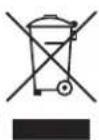
For this reason, used appliances should be separated from other waste. Recycling of old appliances arranged by your manufacturer will in this way be carried out under the best circumstances. For recycling your appliance, we refer you to the recent European guidelines in force concerning electrical and electronic waste. Ask your municipality or your salesperson about the closest collection point for your old appliance.
Keep old appliances out of the reach of children.
Recycling batteries
Do not put batteries into the standard household refuse. Ask your municipality or your salesperson about the closest battery collection point. Keep batteries out of the reach of children.
2 CONTROLS AND FUNCTIONS
2.1 Operating the device
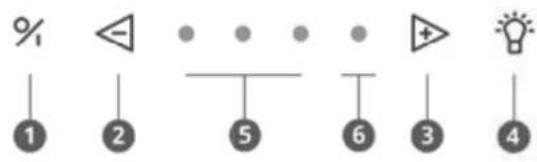
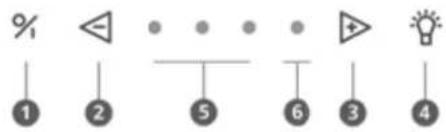
Switch on / off
Decrease speed level
8 Increase speed level
4 Illumination
5 Indication lights green speed 1,2,3
6 Indication light red Power mode
2.2 Turning the extraction on and off
Turning the extraction on off
Open the rotating valve by turning it towards you to effectively remove cooking vapours.
Press button 1 to turn on the extractor. The extractor always starts in the function last used (lighting and/or motor).

Turning the extraction off with delay mode
To set delay mode press key 1 once.
The first indicator light flashes, the other indicator lights come on at the last position set. After 10 minutes the motor and lighting automatically switch off.

The delay time is set by default to 10 minutes in extraction mode. It is advised to always fully allow this function to work.
Switching extraction off without delay mode
Press key 1 twice.

Extractor power level
To increase the power level press key 3

To decrease the power level press key 2

- Three green LEDs show positions one to three.
- The red LED shows the Power position. The Power position is only used if there are strong odours, or a lot of smoke or vapour. Its use must be kept to a minimum because of the large extraction of air in this position.
The Power position automatically goes back to speed three after 6 minutes. - The motor has a thermal switch that switches the motor off with overheating. After cooling the motor will switch on again.

Determining the cause of overheating is required. This can be caused for example by a pan fire, the impeller motor being blocked or an object getting in the exhaust opening and causing it to be partly or fully blocked.
Auto-Stop
To avoid the extractor hood from staying on, the motor is automatically switched off after 3 hours (only if in 3 hours operation has not been changed). The extractor hood lighting stays on.
2.3 Lighting
Turning the lighting on and off
To turn the lighting on or off press 4
The light works independent of the motor.

When switching the lighting on it will always go to full power and can also be used when the fan is switched off.
Dimming the LED lighting
When the LED lighting is switched on you can dim it by keeping key 4 pressed.
2.4 Programming recirculation (optional)

If recirculation is selected programming must take place once.
This programming function activates the replacement indicator of the monobloc recirculation filter and the delay time is changed.
Activating programming
- The motor must be switched off
- Press the 2 and the 3 keys at the same time for 3 seconds until the red LED fl ashes 5 times.

The following functions then operate:
- Replacement indicator of the monobloc filter is activated. After a set time a red indicator light on the appliance shows that the monobloc filter must be replaced.
- The delay time is set to 30 minutes (instead of the default 10 minutes).

Use the delay time of 30 minutes so the cooking odours can be properly removed in the monobloc fi filter.
Read paragraph 3.4 for more information about replacement of the monobloc recirculation fi Iiter.
Deactivating programming
- The motor must be switched off
- Press 2 and 3 at the same time for 3 seconds until the 3rd green LED flashes 3 times.

The delay time is again set to 10 minutes (instead of 30 minutes) and cleaning indicator for recirculation is switched off.
2.5 InTouch
The cooker hood has the InTouch function. If you have an induction hob from Novy with InTouch, you can operate the extraction hood from the hob.
Visit the website for the different models of induction hobs with InTouch.
Turning the InTouch function on and off

The InTouch function is off by default. To connect the cooker hood to a Novy induction hob with InTouch, the InTouch function must fi rst be switched on on the cooker hood.
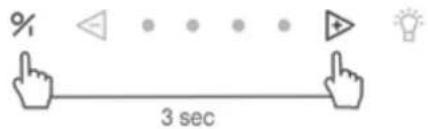
The InTouch function is off by default. The function can be switched on by pressing the 1 and 3 keys at the same time for 3 seconds.
The 2nd and 3rd LEDs fl ash 3 times to confirm (the appliance must be switched off).
To switch the InTouch function off press the 1 and 2 keys at the same time for 3 seconds and the 2nd and 4th LEDs fl ash 3 times to confirm. (The appliance must be switched off).
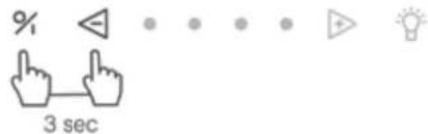

Turning off the InTouch function on the cooker hood results in the connection between cooker hood and Novy induction hob with InTouch and/or remote control is also disabled.
Programming InTouch on the induction plate
- Connect the plate to the mains supply.
- Touch simultaneously the keys and on the induction plate until you hear a beep signal (prox. 7 sec.).
- The cooker plate now searches automatically for the hood code.
- Wait until the cooker hood illumination begins to flash or you hear a "click" sound when you have an extractor hood without lighting (Be patient, this can betake a while).
- Does the light blink or you hear the "click" sound; press immediately on any InTouch key or or on the induction hob.
- You will hear a "beep" signal to indicate the link between the two devices.
Now you can operate the hood with the keys on the induction plate.
You can find more information about using the InTouch functions in the InTouch manual for the hob.
The InTouch function between cooker hood and hob works with a fixed code.
If the set code disrupts other transmitters, another code can be selected. There are 10 different codes.
A remote control is required to change the code.
More information on reprogramming with the remote control can be found in the manual of the remote control.

You can obtain a remote control from a dealer or the Novy website. Article number remote control: 840.029.
3 CLEANING AND MAINTENANCE

Follow all instructions as described in the Conditions for Safety and Use section.

Follow the cleaning instructions below for a longer working life and optimal operation of the appliance.
3.1 General maintenance

Allow the lighting to cool down suffi cientsly before you start cleaning the extractor hood.

Never use aggressive, abrasive or chlorinated products.

Do not use a high pressure or steam cleaner.
Stainless steel
Clean with a cleansing tissue with mild cleaning agent then dry with a soft cloth. Maintenance of the stainless steel can be performed with the Novy cleaner (906060).
Coated parts of the extractor hood
The extractor hood can be cleaned with a damp cleansing tissue and a mild cleaning agent.
Glass
Glass parts of the extractor hood can be cleaned with a soft cloth and a glass cleaner.
3.2 Grease filter

If the following instructions are not carried out, serious soiling can cause a fire hazard.
Indication cleaning grease fi Iter

Indication: 4 fl ashing indicator lights


After 20 cooking hours 4 fl ashing indicator LEDs show that the grease fi liter must be cleaned.
Reset the cleaning indicator

When you replace the grease fi ler after cleaning, it is suffi cients to press the 2 key for 5 seconds to again set the indicator.

If you do not do this the indicator light will continue to flash when switching on the extractor hood.
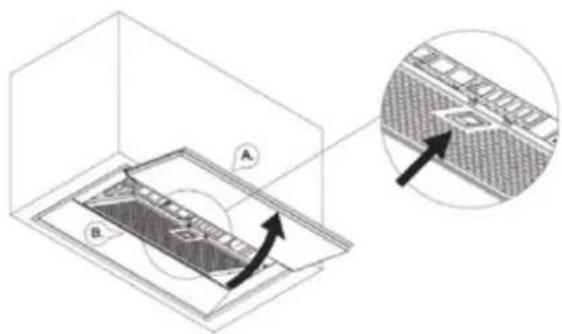
Accessing the grease fi lter
Open the rotating valve A. Protect the hob. You can take the grease fi Iter B from the hood by pulling the handle on the fi Iter. The fi Iter will come down.
Cleaning the grease fi Iter
The metal grease fi tter can be cleaned by hand or in a dishwasher. We recommend cleaning the grease fi tter by hand.
Cleaning the filter by hand:
- Immerse the fi Iter in a solution of boiling water to which a degreasing detergent has been added.
- Use a brush for cleaning
- Then rinse the filters with warm water under a tap and allow them to dry.
Cleaning the filter in a dishwasher:
- Use a customary dishwasher detergent
- Do not put the saturated grease fi iters together with crockery in the dishwasher
- Select a programme with a low temperature
- After cleaning allow the fi Iter to drain.

When cleaning in a dishwasher the fi titer may discolour as a result of the salt content. This does not affect its operation.
Replacing the grease fi I ters
Before replacing the grease fi liter, clean the edges of the part in the extractor hood in which the fi liter is placed.
- Grasp the fi tter with 2 hands.
- Make sure that the lock or the lip on the fi tter is on the bottom side.
- Insert the back of the fi lter in the opening, press the fi lter upwards at the front and make sure it clicks tight.

You can obtain a new grease filter from a dealer or the Novy website.
Article number grease fi Iter: 680:680.020 (1x) 686:680.020 (2x)
3.3 Monoblock recirculation fi Iter (optional)
When selecting recirculation, always set the recirculation programme on the extractor hood (see paragraph 2.4). If recirculation is chosen a monobloc recirculation fi Iter is fi tted in the extractor hood behind the grease fi Iter.
Replacement indicator monobloc recirculation fi lter

Indication: red indicator light stays on

After a set time a red indicator light on the appliance shows that the monobloc fi liter must be replaced.
Reset the replacement indicator

The motor must be on. When you fit the new monobloc fi tters, it is suffi cient to press the 2 and 3 keys for 5 seconds at the same time to reset replacement indication.

Accessing the monoblock recirculation fi Iter
Remove the Monoblock recirculation fi lIter
- Open the rotating valve with both hands and remove the aluminium grease fiiter from the hood (3.2).
- The Monoblock recirculation filter is located in its opening in the cooker hood. Remove it from the cooker hood.
Place the Monoblock recirculation fi Iter
- Open the rotating valve with both hands and remove the aluminium grease filter from the hood (3.2).
- Place the Monoblock recirculation fi Iter is its opening in the cooker hood.
- Replace the aluminium grease fiiter and close the rotating valve.

You can obtain a new monobloc fi iter from a dealer or the Novy website.
Article number monobloc fi Iter: 680400.
3.4 Service
If there is a fault you can contact your (kitchen) supplier and/or Novy Customer Service.
Belgium Tel.: +32 (0)56 36 51 02
France Tel.: +33 (0)3 20 94 06 62
Germany Tel.: +49 (0)511 54 20 771
The Netherlands Tel.: +31 (0)88 011 91 10
Unite Kingdom Tel.: +44 (0) 207 866 2493
For all other countries: your local installer or
Novy in Belgium: +32 (0)56 36 51 02
To be able to deal with the fault promptly and effi ciently it is necessary that the Repaired Service knows which type of appliance you have.

You can find the type number on a sticker in the inside of the extractor hood. This becomes visible as soon as you take the fi liter out of the extractor hood.
You can note the type number here:
4 QUICKGUIDE
4.1 Settings
| EXPOSED ACTION INDICATION NOTE PAG. | ||||
| Switching on the engine | 1 | p 29 | ||
| Switching off the motor with delay mode | 1 | Green LED fl ashes Engine stays on for 10 minutes | p 29 | |
| Switching off the motor without delay mode | 2 x 1 | Engine goes off immediately | p 29 | |
| Increase engine speed | 3 | p 29 | ||
| Decrease engine speed | 2 | p 29 | ||
| Lighting on | 4 | p 29 | ||
| Dimming the lighting Continue to press 4 | p 30 | |||
| Recirculation on | 2 + 3 for 3 seconds | Red LED fl ashes 5x! Motor must be switched off! | p 30 | |
| Recirculation off | 2 + 3 for 3 seconds | Third green LED fl ashes 5x | ! Motor must be switched on! | p 30 |
| Reset cleaning indicator grease filters | 2 for 5 seconds. | p 31 | ||
| Reset replacement indicator monoblock | 2 + 3 for 3 seconds | Red LED fl ashes 3x! Motor must be switched on! | p 32 | |
| InTouch on | 1 + 3 for 3 seconds | 2nd en 3th LED fl ashes | ! Motor must be switched off! | p 30 |
| InTouch off | 1 + 2 for 3 seconds | 2nd en 4th LED fl ashes | ! Motor must be switched off! | p 30 |
4.2 Indications
| INDICATION EXPOSED NOTE | PAGE | ||
| Four fl ashing LEDs Grease fl ter must be cleaned | If the cleaning instructions are not followed, excessive contamination, risk of fire and loss of effi ciency will result. | p 31 | |
| Red indication LED lights up Time to replace the monobloc recirculation fi lter used | p 32 |
BELGIE
France: Tel: 0320.940662