LPC53 - Audio System LG - Free user manual and instructions
Find the device manual for free LPC53 LG in PDF.



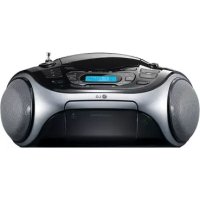
| Brand | LG |
| Model | LPC53 |
| Product type | Integrated audio system with CD player, cassette, FM/AM radio, USB and portable input |
| Dimensions (W x H x D) | 391 x 162 x 280 mm |
| Net weight | 2.61 kg |
| Mains power supply | 200-240 V~, 50/60 Hz |
| Emergency power supply | 6 C-type batteries (R14) not included |
| Power consumption | 2.5 W x 2 channels (THD 10%) |
| Main functions | CD playback (audio, MP3/WMA), cassette, FM/AM radio, USB, USB and cassette recording, clock, alarm, timer |
| Maintenance and cleaning | Clean with a soft, dry cloth. Do not use solvents or abrasive products. |
| Safety | Do not expose to rain or moisture. Do not open the casing. Do not block ventilation openings. Use a dedicated circuit. 5 A fuse type BS1362. |
| Spare parts and repairability | Refer all repairs to qualified personnel. No user-serviceable parts. |
Frequently Asked Questions - LPC53 LG
User questions about LPC53 LG
0 question about this device. Answer the ones you know or ask your own.
Ask a new question about this device
Download the instructions for your Audio System in PDF format for free! Find your manual LPC53 - LG and take your electronic device back in hand. On this page are published all the documents necessary for the use of your device. LPC53 by LG.
USER MANUAL LPC53 LG
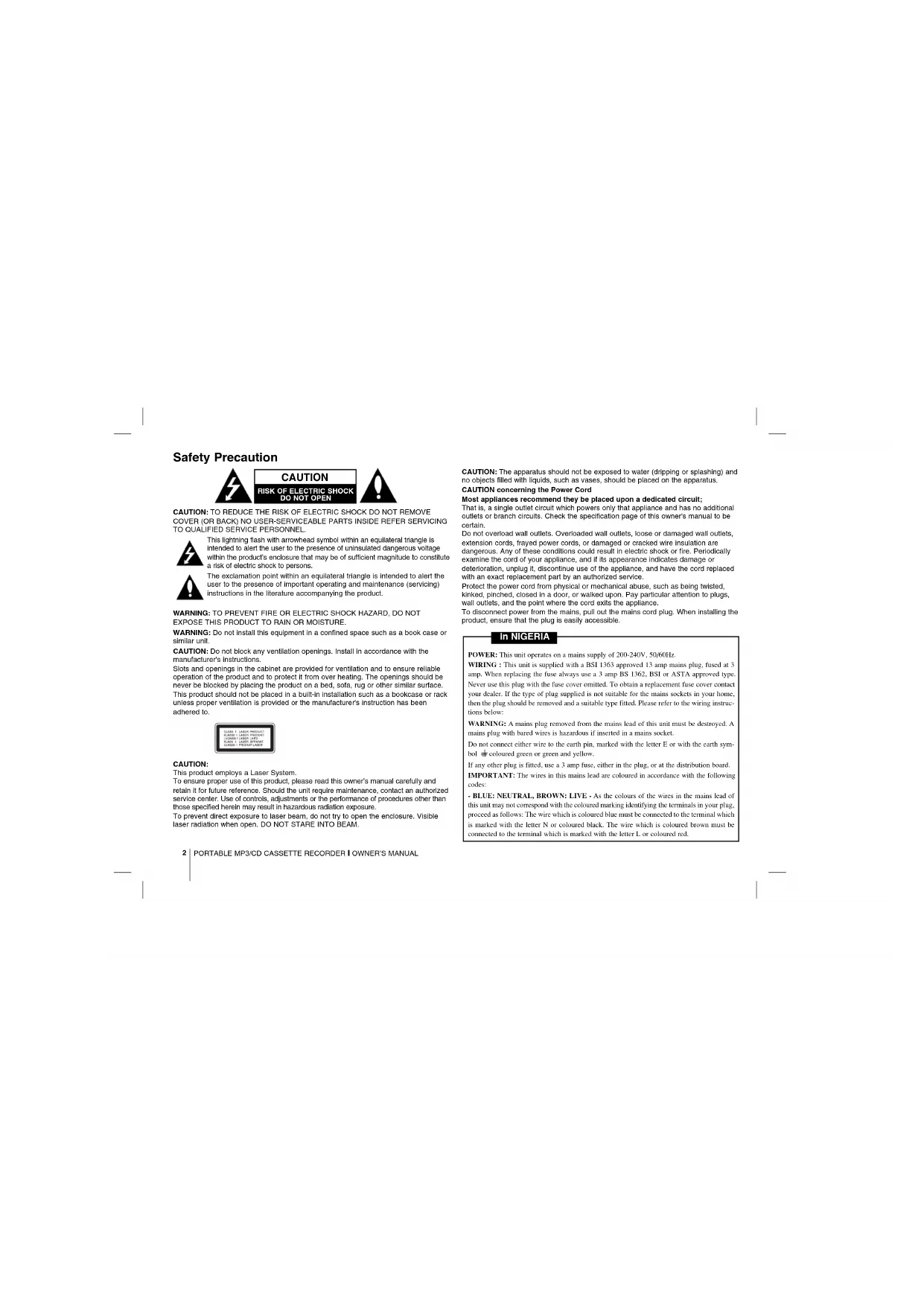
This lightning flash with arrowhead symbol within an equilateral triangle is intended to alert the user to the presence of uninsulated dangerous voltage within the product's enclosure that may be of sufficient magnitude to constitute a risk of electric shock to persons.

The exclamation point within an equilateral triangle is intended to alert the user to the presence of important operating and maintenance (servicing) instructions in the literature accompanying the product.
WARNING: TO PREVENT FIRE OR ELECTRIC SHOCK HAZARD, DO NOT EXPOSE THIS PRODUCT TO RAIN OR MOISTURE.
WARNING: Do not install this equipment in a confined space such as a book case or similar unit.
CAUTION: Do not block any ventilation openings. Install in accordance with the manufacturer's instructions.
Slots and openings in the cabinet are provided for ventilation and to ensure reliable operation of the product and to protect it from over heating. The openings should be never be blocked by placing the product on a bed, sofa, rug or other similar surface. This product should not be placed in a built-in installation such as a bookcase or rack unless proper ventilation is provided or the manufacturer's instruction has been adhered to.
CAUTION:
This product employs a Laser System.
To ensure proper use of this product, please read this owner's manual carefully and retain it for future reference. Should the unit require maintenance, contact an authorized service center. Use of controls, adjustments or the performance of procedures other than those specified herein may result in hazardous radiation exposure.
To prevent direct exposure to laser beam, do not try to open the enclosure. Visible laser radiation when open. DO NOT STARE INTO BEAM.
CAUTION: The apparatus should not be exposed to water (dripping or splashing) and no objects filled with liquids, such as vases, should be placed on the apparatus.
CAUTION concerning the Power Cord
Most appliances recommend they be placed upon a dedicated circuit;
That is, a single outlet circuit which powers only that appliance and has no additional outlets or branch circuits. Check the specification page of this owner's manual to be certain.
Do not overload wall outlets. Overloaded wall outlets, loose or damaged wall outlets, extension cords, frayed power cords, or damaged or cracked wire insulation are dangerous. Any of these conditions could result in electric shock or fire. Periodically examine the cord of your appliance, and if its appearance indicates damage or deterioration, unplug it, discontinue use of the appliance, and have the cord replaced with an exact replacement part by an authorized service.
Protect the power cord from physical or mechanical abuse, such as being twisted, kinked, pinched, closed in a door, or walked upon. Pay particular attention to plugs, wall outlets, and the point where the cord exits the appliance.
To disconnect power from the mains, pull out the mains cord plug. When installing the product, ensure that the plug is easily accessible.
In NIGERIA
POWER: This unit operates on a mains supply of 200-240V, 50/60Hz.
WIRING: This unit is supplied with a BSI 1363 approved 13 amp mains plug, fused at 3 amp. When replacing the fuse always use a 3 amp BS 1362, BSI or ASTA approved type. Never use this plug with the fuse cover omitted. To obtain a replacement fuse cover contact your dealer. If the type of plug supplied is not suitable for the mains sockets in your home, then the plug should be removed and a suitable type fitted. Please refer to the wiring instructions below:
WARNING: A mains plug removed from the mains lead of this unit must be destroyed. A mains plug with hared wires is hazardous if inserted in a mains socket.
Do not connect either wire to the earth pin, marked with the letter E or with the earth symbol 12 coloured green or green and yellow.
If any other plug is fitted, use a 3 amp fuse, either in the plug, or at the distribution board. IMPORTANT: The wires in this mains lead are coloured in accordance with the following codes:
- BLUE; NEUTRAL, BROWN; LIVE - As the colours of the wires in the mains lead of this unit may not correspond with the coloured marking identifying the terminals in your plug, proceed as follows: The wire which is coloured blue must be connected to the terminal which is marked with the letter N or coloured block. The wire which is coloured brown must be connected to the terminal which is marked with the letter L or coloured red.
There is so much your MP3/CD CASSETTE RECORDER can do
English
Contents
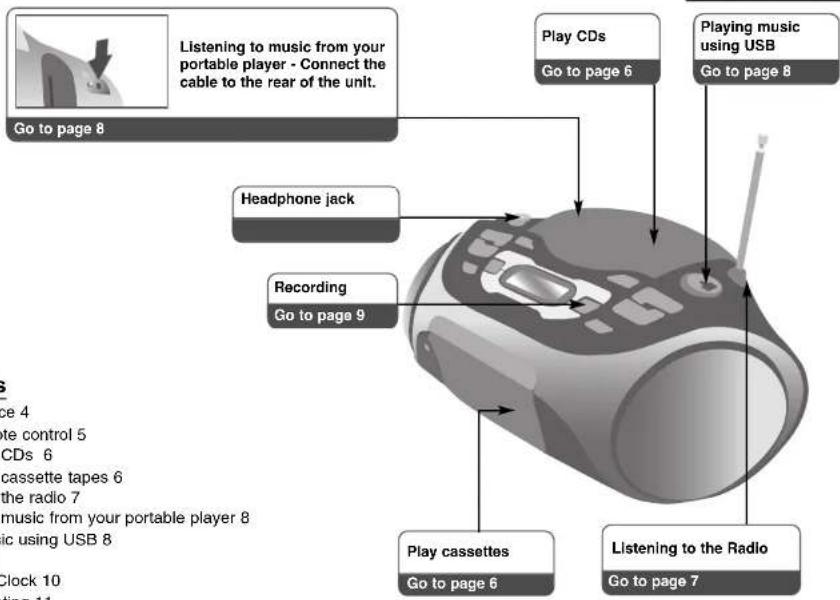
Power Source 4
About Remote control 5
Listening to CDs 6
Listening to cassette tapes 6
Listening to the radio 7
Listening to music from your portable player 8
Playing music using USB 8
Recording 9
Setting the Clock 10
Troubleshooting 11
Specifications 11
Power Source
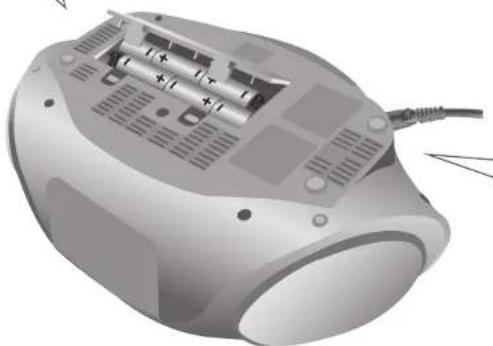
Battery Installation
- Press and open the battery cover.
- Put six "C" (R14) batteries (not included) into the compart-
ment making sure the ⊕ and ⊖ are correctly positioned. - Replace the battery cover.
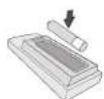
Put the battery In the remote control Make sure that the + (plus) and - (minus) on the battery (size AAA) match those on the remote control.
natural_image
Illustration of a computer monitor with internal battery modules and external cable (no text or symbols)AC Power Cord Connection
- Before connecting the AC power cord, check that the operating voltage of your unit is identical with the voltage of your local power supply.
- Connect one end of the AC power cord (included) to the AC IN socket located at the backside of your unit.
- Plug the other end into the wall outlet.
Note:
- Unplug the AC power cord from the wall outlet if you do not to use for an extended period of time.
• To avoid damage from possible battery leakage, remove the batteries if you do not plan to use the unit for an extended period of time. - When the batteries are weak, replace all the batteries with new ones.
- During the AC power cord connect to the wall outlet, the batteries are not worn out.
About Remote control
Sound quality adjustment
You can choose sound impressions.
Turn on or off
To enter power save mode press and hold.
Search for a folder of MP3/WMA files
When a CD containing MP3/WMA files in several folders is being played, press PRESET/FOLDER to select the folder you want to play.
Choose a 'preset number' for a radio
station (see Listening to the radio / page 7)
Fall asleep while listening to your player.
Listen to your tracks again and again
Press MODE repeatedly, You can enjoy the music repeatedly or randomly.
Search / Skip the radio station, music and file.
▶/II : • CD / USB - Starts or pauses playback • TAPE - Forward / Reverse Play
■: Stops playback or recording
XDSS
Press XDSS to reinforce treble, bass and the sur-
round effect
For storing radio stations
(see Listening to the radio / page 7)
Listen to your tracks in any order
(see Listening to CDs / page 6)
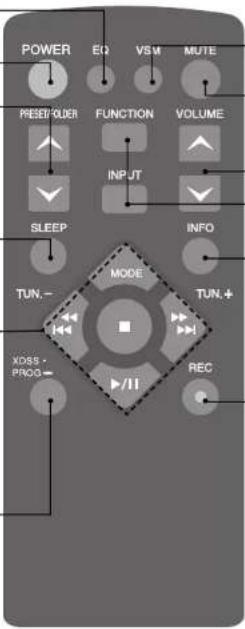
VSM (Virtual Sound Matrix)
Temporarily stop the sound
Press the button again to return to the sound.
To change the functions or input
(TUNER, USB, PORTABLE, CD, TAPE)
See information about your music
MP3/WMA files often come with tags. The tag gives the Title, Artist, Album or Time information.
Press INFO while a file is playing to see this information.
Starts recording
Listening to CDs
| Audio CD and MP3/WMA CD can be played back in this player. | ||
| ON PLAYER ON REMOTE | ||
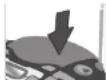 1. Open the CD door: 1. Open the CD door: | ▲ CD OPEN | |
| 2. Insert the CD: Label facing up. | ||
| 3. Close the CD door: | ▲ CD OPEN | |
| 4. Select the CD function: | FUNCTION | FUNCTION |
| 5. Start the CD playing: | ▶ | ▶/II |
| 6. To stop a CD playing: | ■□ | ■□ |
Listening to CDs - more you can do
Pause or restart a CD
Press CD PAUSE on the unit or ▶/|| on the remote control during playback. Press ▶/on the unit or ▶/|| on the remote control to resume play.
Search for a section within a track
Press and hold ◀◀◀◀/▶▶▶▶ during playback.
Speed search for tracks
Press and hold ◀◀◀◀◀/▶▶▶▶I only in stop status. Track skips continuously in turn.
Skip to another track
Press ◀◀◀◀/▶▶▶▶ only in stop status.
Listen to your tracks in any order
Up to 40 tracks on a CD can be listened to in the order of your choice. Insert a CD and wait for it to be read. Press and hold PROG then use I◄◄◄◄/►►►►I to select the track. Press PROG again to save and select the next track. Press ►/II To clear your selection, press ■ twice. Playing music using USB, you can also adjust this program.
6 | PORTABLE MP3/CD CASSETTE RECORDER | OWNER'S MANUAL
Listening to cassette tapes
| ON PLAYER ON REMOTE | ||
| 1. Select the TAPE function | FUNCTION | FUNCTION |
| 2. Open the tape door | PUSH EJECT | |
| 3. Insert the tape | ||
| 4. Close the tape door | ||
| 5. Start the tape playing | ◀ / ▶ | ▶/II |
| 6. To stop a tape playingCassette deck will automaticallystop at the end of the tape | ■ | ■ |
Listening to cassette tapes - more you can do
To play during fast backward or Forward
After pressing ◀◀◀◀◀/▶▶▶▶ during playback, or stop, press ◀ / ▶ at a point you want.
AUTO REVERSE MODE
You can set the tape to play one side until the end of the tape or both sides, by pressing MODE on the remote one or more times.
Listening to the radio
| ON PLAYER ON REMOTE | ||
| 1. Select either FM or AM: | FUNCTION | FUNCTION |
| 2. Select the radio station: | TUNING (-)/TUNING (+) | TUN.- / TUN.+ |
| 3. To save a radio station:A preset number will show in the display. | Press and hold PROG | Press and hold PROG |
| 4. To select a 'saved' station: | ◀ / ▶ | PRESET/FOLDER |
| 5. To confirm press: Up to 50 radio stations can be saved.(AM:20, FM:30) | PROG | PROG |
Listening to the radio - more you can do
Look for radio stations automatically
Press and hold TUNING (-)/TUNING (+) on the player or TUN.-/TUN.+ on the remote control. The tuner will scan automatically and stop when it finds a radio station.
Delete all the saved stations
Press and hold ■ for two seconds. "CLEAR" shows. Press ■ on the unit to erase all the saved stations.
Listening to music from your portable player
| The player can be used to play the music from many types of portable player. | ||
| ON PLAYER ON REMOTE | ||
| 1. Connect the portable player by plugging the unit into PORTABLE IN on the player. | ||
| 2. Turn the power on: | ∅/I | POWER |
| 3. Select the PORTABLE function: | FUNCTION | INPUT |
| 4. Turn the portable player on and start it playing: | ||
Playing music using USB
| ON PLAYER ON REMOTE | ||
| 1. Connect the portable player to the system using a USB cable (not supplied). | ||
| 2. Select the USB function: The display will show CHECKING, followed by the number of files displayed: | FUNCTION | INPUT |
| 3. Start the USB playing: | ▶▶ | ▶/II |
| 4. To stop a USB playing: | ■□ | ■□ |
| 5. Before disconnecting the portable USB player, change to any other function by pressing: | FUNCTION | FUNCTION or INPUT |
| 6. Remove the USB player: | ||
NOTES :
- Some portable devices are not compatible with this system.
- When various cards are connected to the Memory Card Reader, the first detected card is recognized.
- Do not extract the USB device in operating.
• A back up demands to prevent a data damage. - If you use a USB extension cable or USB hub, the USB device might not be recognized.
- A device using NTFS file system is not supported (Only the FAT (16/32) file system is supported.).
• Digital camera and mobile phones are not supported. - USB port of the unit can not be connected to PC. The unit can not be used as a storage device.
- HDD type USBs may not work when power is not supported in it by itself.
• To play from the first song, press ■ twice during CD/USB playback.
Recording
Recording to USB or Cassette. Connect USB to or put the blank cassette tape into the player before recording.
| ON PLAYER ON REMOTE | ||
| 1. Select the mode in which you want to record and play: | FUNCTION | FUNCTION or INPUT |
| 2. Start the Recording: | ● / II | ● / REC |
| 3. Select the USB / TAPE | → ● / II | → ● / REC |
| 4. Recording to USB, Select One / All | → ● / II | → ● / REC |
| 5. To stop recording | ■_ | ■□ |
The making of unauthorized copies of copy-protected material, including computer programs, files, broadcasts and sound recordings, may be an infringement of copyrights and constitute a criminal offense. This equipment should not be used for such purposes.
Be responsible Respect copyrights
Recording - more you can do
To pause the recording
Press ● / || when recording to cassette tape.
Adjusting the recording speed
Normal speed - Press ● / || at play status to record the CD to the USB at normal speed.i.e,real time playback and recording
High speed - Press ● / II at stop status to record the CD to USB at high speed. During high speed recording, there will be no speaker sound output.
Recording your voice
In the TAPE function, press ●/■ Then "MIC REC" will be displayed. And record your voice. To stop the recording press ■
NOTES
- During MP3 / WMA recording, display will show the percentage of recording progress "XX [ 100 ]" after each recorded file.
- During MP3 / WMA recording, there will be no speaker sound output.
- You cannot record radio broadcasting to USB.
Setting the Clock
| ON PLAYER | |
| 1. Press for at least 2 seconds: | CLOCK |
| 2. Choose from either: AM 12:00 (for an am and pm display) or 00:00 (for a 24 hour display) | |
| 3. Confirm your selection: | CD PAUSE/SET |
| 4. Select the hours: | |
| 5. Press: | CD PAUSE/SET |
| 6. Select the minutes: | |
| 7. Press: | CD PAUSE/SET |
Use your player as an alarm clock
Press and hold TIMER on the player for two seconds. Each function, TUNER, CD, USB, TAPE flashes for two seconds. Press CD PAUSE/SET on the player when the function you want to be woken by is showing. If you choose TUNER you will be shown the stations you have saved as presets. Use I◀◀◀◀/▶▶▶▶ on the player to select the station you want, then press CD PAUSE/SET.
You will be shown the ON TIME display. This is where you set the time you want the alarm to go off. Use I◄◄◄/►►►► on the player to change the hours and minutes and CD PAUSE/SET to save.
You will then be shown the OFF TIME display. This is where you set the time you want the function to stop. Use I ◀◀◀◀/▶▶▶▶ on the player to change the hours and minutes and press CD PAUSE/SET to save.
Next you will be shown the volume (VOL) you want to be woken by. Use ▼ / ▲ on the player to change the volume and CD PAUSE/SET to save. Switch the system off. The clock icon shows that the alarm is set.
When the system is turned off you can check the time the alarm is set for by pressing TIMER. You can also turn the alarm on and off by pressing TIMER. To set the alarm to go off at a different time, switch the system on and reprogrammed following the same steps as initially.
Fall asleep while listening to your player
Press SLEEP on the remote control one or more times to select delay time, after the player will turn off. Press SLEEP on the remote control repeatedly. You can adjust the time from 90 to 10 minutes.
Sound quality adjustment
You can choose sound impressions. Press EQ on the remote control repeatedly, the display changes in the following order, FLAT → POP → ROCK → CLASSIC
VSM (Virtual Sound Matrix)
You can select the Virtual sound. Press VSM on the remote control to set the virtual sound.
About MP3/WMA
MP3/WMA Disc compatibility with this unit is limited as follows: • Sampling Frequency : 8 - 48 kHz (MP3), 32 - 48 kHz (WMA)
- Bit rate : 8 - 320 kbps (MP3) 48 - 320 kbps (WMA)
- CD-R physical format should be "ISO 9660"
- If you record MP3/WMA files using the software which cannot create a FILE SYSTEM, for example "Direct-CD" etc., it is impossible to playback MP3 files. We recommend that you use "Easy-CD Creator", which creates an ISO 9660 file system.
- Do not use special letters such as "/ : * ? " < >"etc.
- Support files up to 99 files, each file can contents up 999 sound tracks. - You have to set the disc format option to [Mastered] in order to make the discs compatible with the LG players when formatting rewritable discs. When setting the option to Live File System, you cannot use it on LG players.
(Mastered/Live File System : Disc format system for Windows Vista)
Troubleshooting
| Symptom Cause Correction | ||
| POWER | ||
| No power | The power cord is not plugged in. | Plug in the power cord. |
| The battery is not remaining. | Change the battery with a new one. | |
| RADIO | ||
| No sound | The function switch is not set to the Radio mode. | Set the switch to the Radio mode. |
| Some noise occurs. | There are electronic devices near the player. | Set the player far from the devices. |
| CD | ||
| The unit does not start playback | An unplayable disc is inserted. | Insert a playable disc. |
| The disc is placed upside down. | Place the disc with the playback side down. | |
| The disc is not placed within the guide. | Place the disc on the disc tray correctly inside the guide. | |
| The disc is dirty. | Clean the disc. | |
| TAPE | ||
| Unable to record | Record protect tabs are removed. | Cover holes on back edge of tape with tap. |
| Remote control | ||
| The remote control does not work properly. | The remote control is too far from the unit. | Operate the remote control within about 23 ft (7 m). |
| There is an obstacle in the path of the remote control and the unit. | Remove the obstacle. | |
| The battery in the remote control is exhausted. | Replace the battery with new one. | |
Specifications
| General | |
| Power supply Refer to the back panel of the unit. | |
| Power consumption Refer to the back panel of the unit. | |
| Net Weight 2.61 kg | |
| External dimensions (W x H x D) 391 x 162 x 280 mm | |
| Output Power (T.H.D 10%) 2.5 W X 2 Ch | |
| Speakers 3 Ohm X 2 | |
| Battery Operation DC 9 V | |
| Tuner | |
| FM | |
| Tuning Range 65 - 108 MHz, 87.5 - 108.0 MHz | |
| Intermediate Frequency 10.7 MHz | |
| Antenna Telescopic antenna | |
| AM | |
| Tuning Range 522 - 1620 kHz or 520 - 1720 kHz | |
| Antenna Ferrite bar antenna | |
| CD | |
| Frequency response 100 - 18000 Hz | |
| Signal-to-noise ratio 55 dB | |
| T.H.D 0.5 % | |
| Cassette tape player | |
| Recording System AC Bias Magnet Erase | |
| Frequency Response | 125 - 8000 Hz |
| Signal to Noise Ratio | 40 dB |
| USB | |
| Version | 1.1 |
Designs and specifications are subject to change without notice.
natural_image
Illustration of a computer mouse with internal battery pack and cable (no text or symbols)(TUNER, USB, PORTABLE, CD, TAPE)
natural_image
Illustration of a handheld electronic device with battery pack and cable (no text or symbols)Fall asleep while listening to your player.
Listen to your tracks in any order
(TUNER, USB, PORTABLE, CD, TAPE)
See information about your music
MP3/WMA Disc compatibility with this unit is limited as follows:

- CAUTION:
- In NIGERIA
- English
- Contents
- Power Source
- Battery Installation
- AC Power Cord Connection
- Note:
- About Remote control
- Listening to CDs - more you can do
- Listening to cassette tapes - more you can do
- AUTO REVERSE MODE
- Listening to the radio - more you can do
- Look for radio stations automatically
- Delete all the saved stations
- NOTES :
- Recording
- Recording - more you can do
- NOTES
- Use your player as an alarm clock
- Fall asleep while listening to your player
- Sound quality adjustment
- VSM (Virtual Sound Matrix)
- About MP3/WMA
- Fall asleep while listening to your player.
- Listen to your tracks in any order
- See information about your music
- MP3/WMA Disc compatibility with this unit is limited as follows:
Brand : LG
Model : LPC53
Category : Audio System