P85149 (MD 87319) - Powerline Adapter MEDION - Free user manual and instructions
Find the device manual for free P85149 (MD 87319) MEDION in PDF.


| Product type | CPL Wi-Fi adapter kit (2 adapters) |
| Brand | Medion |
| Model | P85149 (MD 87319) |
| Input voltage | 100 - 240 V~50/60 Hz, 0.15 A |
| Power consumption | < 6 W in operation |
| Wired connectivity | 2 Ethernet RJ-45 ports 100 Mbit/s |
| Wireless connectivity | Wi-Fi IEEE 802.11b/g/n |
| CPL transmission speed | Up to 500 Mbit/s |
| CPL standard | HomePlug AV, compatible with IEEE P1901 |
| CPL encryption | AES 128-bit |
| Wi-Fi security | WEP, WPA-PSK, WPA2-PSK, WPA/WPA2-PSK, WPS |
| Range | Via the electrical network (varies by installation) |
| Weight (per adapter) | Approx. 183 g |
| Dimensions (Wi-Fi adapter) | Approx. 100 x 70 x 50 mm (estimate) |
| Ambient conditions | Temperature 5-40°C, humidity 10-90% without condensation |
| Energy saving function | Automatic standby after 1 min without activity |
| Configuration interface | Web interface (http://wlan.powerline or backup IP) |
| Package contents | 2 CPL adapters, 2 RJ-45 cables, instruction manual, warranty card |
| Maintenance and cleaning | Unplug before cleaning, use a soft lint-free cloth, no solvents |
| Safety | Do not open the housing (risk of electric shock), do not expose to liquids |
| Repairability | Not user-repairable, contact Medion support |
Frequently Asked Questions - P85149 (MD 87319) MEDION
User questions about P85149 (MD 87319) MEDION
0 question about this device. Answer the ones you know or ask your own.
Ask a new question about this device
Download the instructions for your Powerline Adapter in PDF format for free! Find your manual P85149 (MD 87319) - MEDION and take your electronic device back in hand. On this page are published all the documents necessary for the use of your device. P85149 (MD 87319) by MEDION.
USER MANUAL P85149 (MD 87319) MEDION
Password:XXXXXXXXX (9 mal X)

HINWEIS!
MD 87319 (WLAN Adapter)
Anschlüss: 2 x Ethernet (LAN) 100Mbit/s
WLAN:
IEEE802.11b/g/n
Übertragungs-
1. Notes on how to use these instructions .... 51
1.1. Symbols and key words used in these instructions 51
EN
- Package contents
- Proper use
- Safety instructions
4.1. Operating safety 54
4.2. Electromagnetic compatibility 56
4.3. Notes on conformity 56
4.4. Transport and packaging 57
- System requirements
- Function
- Overview of the device 59
7.1. Powerline WLAN Adapter
- Possible LED displays 60
8.1. Powerline WLAN Adapter
8.2. Buttons on the Powerline
WLAN Adapter 62
- Connection 6
9.1. Notes on power supply. 64
9.2. Connecting to a network device 65
- Connecting the device via Wi-Fi with the Powerline WLAN Adapter 66
10.1. Connect via WPS button 66
11. Setting up the device via the web interface 67
11.1. Logging on to the web interface ....67
11.2. Setup wizard 69
11.3. Wireless Setup 73
11.4. PLC Setting 76
11.5. Advanced Security 78
11.6. Access Control 79
11.7. Maintenance 79
11.8. Firmware Update 80
11.9.Status 81
11.10.Logout 81
12. Changing the Powerline network key .... 81
13. Adding the adapter to the Powerline network 83
14. Removing a Powerline Adapter from the Powerline network 85
- Energy-saving mode 85
- Factory settings 86
- Troubleshooting 87
- Cleaning 90
- Disposal 91
- Technical data 92
- Legal notice 93
1. Notes on how to use these instructions

Read the safety instructions carefully before use. Note the warnings on the device and in the operating instructions.
Always keep the operating instructions close to hand. If you sell the device or give it away, make sure you also hand over these instructions and the warranty card.
1.1. Symbols and key words used in these instructions

DANGER!
Warning: immediate mortal danger!
WARNING!
Warning: possible mortal danger and/or serious irreversible injuries!

CAUTION!
Please follow the guidelines to avoid injuries and/or property damage!
ATTENTION!
Please follow the guidelines to avoid property damage!

NOTE!
Additional information on using the device.

NOTE!
Please follow the guidelines in the operating instructions!

WARNING!
Warning: danger of electric shock!
Bullet point/information on operating steps and results
Tasks to be performed
2. Package contents
Please check your purchase to ensure that all items are included. If anything is missing, please contact us within 14 days of purchase. The following items are supplied with the product you have purchased:
-1 Powerline WLAN Adapter
-1 RJ45 network cable
-Operating instructions and warranty card
3. Proper use
The Powerline Adapters are used to transfer network signals via the sockets connected to the mains. The Powerline WLAN Adapter also provides a Wi-Fi access point for your network. This device is for private use only and may not be used for commercial purposes.
4. Safety instructions
4.1. Operating safety
- This device is not intended for use by people (including children) with reduced physical, sensory or mental abilities or by those without experience and/or knowledge, unless they are supervised by a person responsible for their safety or they have been instructed in its use by that person. Children should be supervised to ensure they do not play with this device.
- You must also comply with the operating instructions of the devices that you connect to the Powerline Adapter.
- Do not place liquid-filled containers, such as vases, on or near the device. The container may tip over and the liquid may impair the electrical safety of the device.
-
Keep the device away from moisture and from water in droplet or spray form. Avoid knocks, dust, heat and direct sunlight in order to prevent malfunction. The operating temperature is 5 - 35ircC .
-
Never open the device housing; it contains no parts requiring maintenance! There is a risk of electric shock when the housing is open. This invalidates the warranty and may render the device unusable.
- Plug the Powerline Adapter into freely accessible mains sockets so that it can quickly be disconnected from the electricity network in case of danger.
- After transporting the device, wait until it has reached room temperature before switching it on. Major fluctuations in temperature or humidity can lead to condensation which could cause an electrical short-circuit.
- To avoid static charges, you should not operate the device in extremely dry conditions.
- In circumstances where there are electrostatic discharges, the device could malfunction. In this case, the device must be reset to the factory settings.
4.2. Electromagnetic compatibility
- You must comply with the European directives on electromagnetic compatibility (EMC) when making connections. Maintain a distance of at least one metre from high-frequency and magnetic sources of noise (TV set, loudspeakers, mobile phones, etc.) in order to avoid malfunctions and data loss.
4.3. Notes on conformity
C E Medion AG hereby declares that the product MD 87319 conforms to the following European requirements:
EMC Directive 2004/108/EC
- Low Voltage Directive 2006/95/EC
- Ecodesign Directive 2009/125/EC
RoHS Directive 2011/65/EU.
Full declarations of conformity are available at www.medion.com/conformity.
4.4. Transport and packaging
Keep the original packaging in case you need to send the device by post.
5. System requirements
Before installing the Powerline Adapter, ensure that the following conditions are met:
-1 wall socket (100-240 V 50/60 Hz).
-LAN connection
-WLAN adapter (if a Wi-Fi connection is required)
6. Function
You can use the Powerline Adapters to extend your existing LAN network via the mains network in your house without the need for any additional cables.
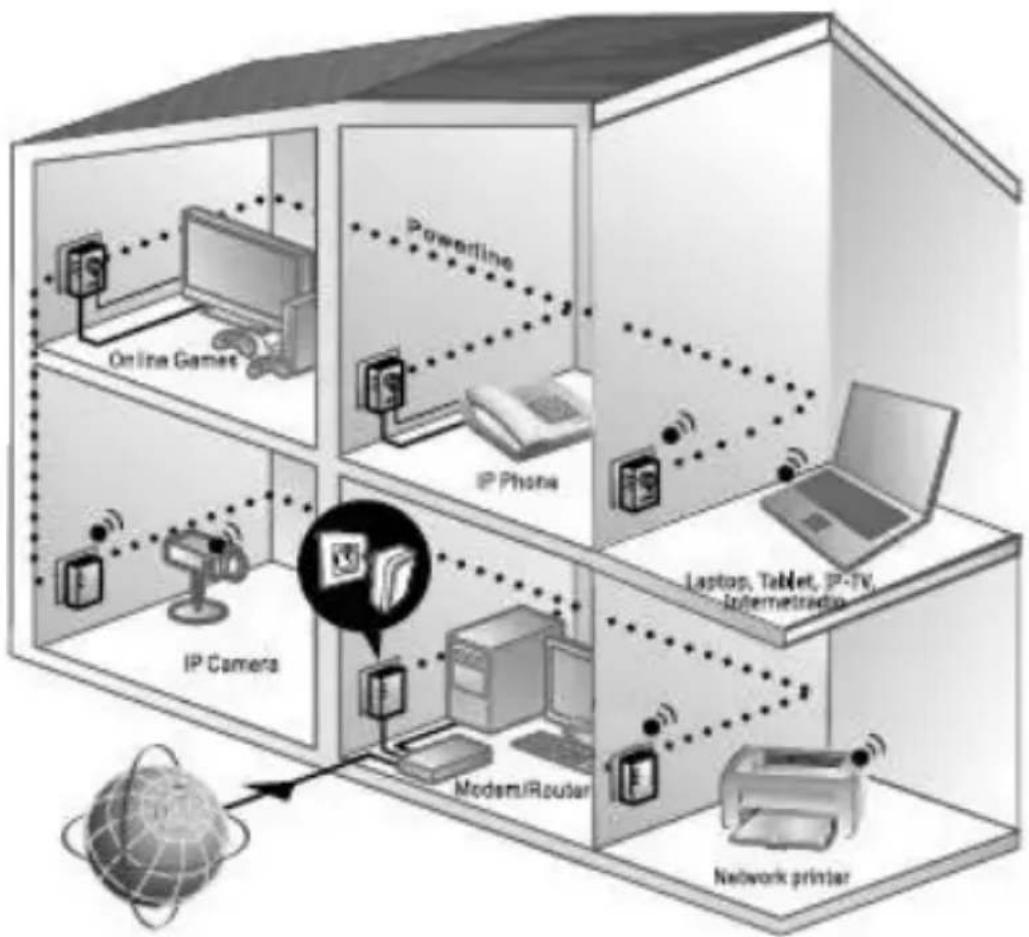
Example of use
You can use the Powerline WLAN Adapter to connect additional devices wirelessly and thus access your network (see "10. Connecting the device via Wi-Fi with the Powerline WLAN Adapter" on page 66).
7. Overview of the device
7.1. Powerline WLAN Adapter
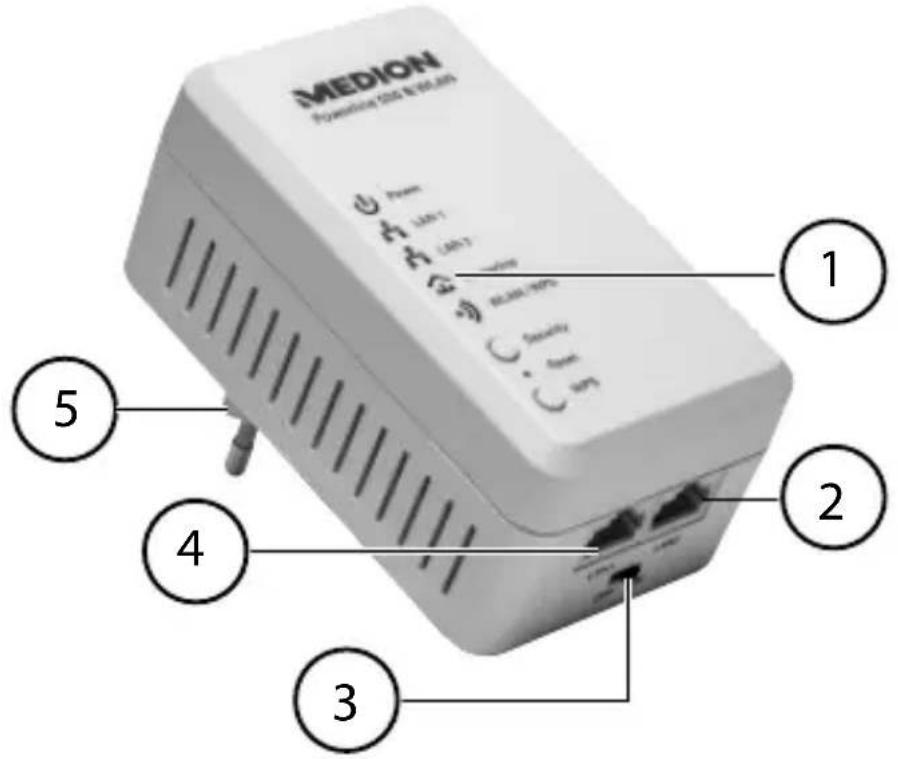
1) LED displays Power, LAN1/LAN2,
Powerline, WLAN/WPS;
SECURITY, RESET and WPS buttons
2) LAN 2: RJ45 LAN connection
3) ON/OFF: On/off switch
4) LAN 1: RJ45 LAN connection
5) Mains connection plug
8. Possible LED displays
8.1. Powerline WLAN Adapter
| LED Status Meaning | ||
| Power | Lights up green | The adapter is switched on. |
| Flashes green | Adapter is restarting or carrying out security settings. | |
| Off | The adapter is not receiving power. | |
| WLAN/WPS | Lights up green | Wi-Fi is switched on. |
| Flashes green | Data is being transferred. | |
| Lights up orange | WPS successfully completed. | |
| Flashing orange | WPS active. | |
| Off Wi-Fi switched off. | ||
| LAN1/2 | Lights up green | LAN cable is plugged in, adapter is ready for data transfer. |
| Flashes green | Data is being transferred. | |
| Off | The LAN connection is not active (no LAN cable connected, network device switched off). | |
| Power-line | Lights up green | An additional Powerline Adapter has been detected on the same network. Connection speed is at > 40 Mbit/sec |
| Lights up orange | Connection speed is at > 20-40 Mbit/sec | |
| Lights up red | Connection speed is at < 20 Mbit/sec | |
| Off | No connection to another adapter or no devices found with the same network key | |
DE
EN
FR
GPL/
LGPL
8.2. Buttons on the Powerline WLAN Adapter
| Function Button Description | ||
| Leave network and generate random KEY | Security Press | for 12 seconds: the POWER LED flashes on and off. |
| Connecting to an existing network | Security Press | for 2–3 seconds: the POWER LED flashes for 2 minutes. |
| Reset the adapter to the factory defaults. | Reset Press for 5 seconds until the WLAN/WPS LED flashes orange. Then the device restarts. | |
| Starting WPS PBC | WPS Press for 2–3 seconds: the WLAN/WPS LED flashes orange for 2 minutes. | |
| Wi-Fi ON/OFF | WPS Press for 10 seconds until the WLAN/WPS LED goes off. | |
9. Connection
To set up a network of Powerline Adapters, there must always be at least two adapters connected for the data transmission.
There are two options: The direct connection between two network-capable devices (of which one is connected via Wi-Fi or the LAN port) or a connection between a network-capable device and a router (to the Internet).
Connect the Powerline Adapter to a wall outlet (100-240 V~50/60 Hz) close to the network-capable device.

NOTE
To guarantee continuous access to an existing LAN network, it is necessary to ensure the Powerline Adapter is connected to a permanent power source.
9.1. Notes on power supply

NOTE
Connect the Powerline Adapter directly to the wall outlet and not to an extension cord or multiple socket (power strip) as these can adversely affect the transmission quality. You can use the integrated socket of the Powerline Adapter to operate other devices.
Plug the Powerline Adapter into an individual socket if possible.



NOTE
If no connection is made after the connection of the adapter to the computer, try the connection again via a different wall outlet.
Please note that the data transmission is dependent on the utilisation and quality of the mains network:
- The longer the line between the two Powerline Adapters, the slower the data transfer.
- Depending on the capacity utilisation of the electricity network, the speed of the data transmission can vary or even be interrupted.
- On older mains networks that do not correspond to the current state of the art, the data transfer rate may be slightly slower.
9.2. Connecting to a network device
To connect two network devices such as a PC and a router within a network with the Powerline Adapter, one device must be connected to the Powerline Adapter using a LAN cable (RJ45) and the other device connected wirelessly or via a LAN cable (RJ45) to the Powerline WLAN Adapter.
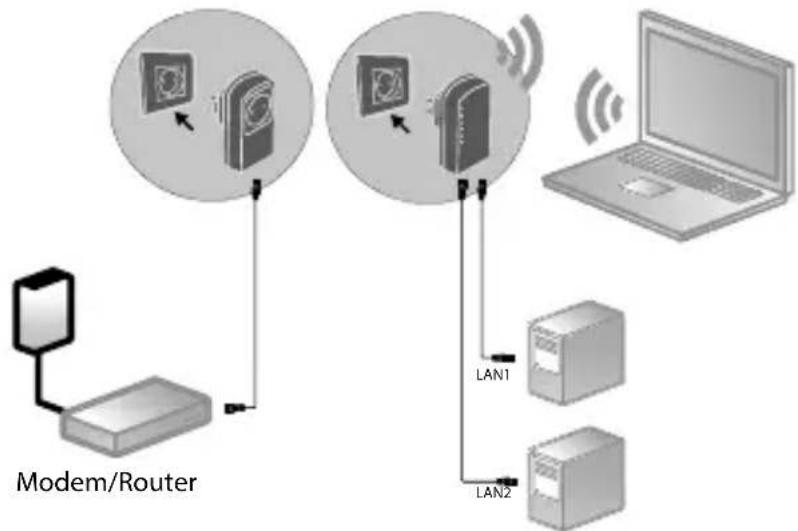
Connection example
- Connect the supplied LAN cable (RJ45) to the LAN connection on the Powerline Adapter and the LAN port on the router.
If necessary, connect the LAN port of the computer to the LAN connection on the Powerline WLAN Adapter using the second supplied LAN cable (RJ45) or connect the computer wirelessly via the Powerline WLAN Adapter as soon as this is integrated into the network.
Plug the Powerline Adapter into an individual socket if possible.
Switch the computer and router on.
The set-up is successful if the LED indicators Power and Powerline light up on both Powerline Adapters.
10. Connecting the device via Wi-Fi with the Powerline WLAN Adapter
10.1. Connect via WPS button
To register a device via WPS, proceed as follows:
Press the WPS button on your Powerline WLAN Adapter for 2-3 seconds. The WPS display starts flashing orange.
Within 2 minutes, also press the WPS button on your end device. If you are using a Windows 7 computer or upwards, you can simply connect to the "Powerline-WLAN" Wi-Fi network.
Once the Wi-Fi encryption is successfully completed, the WPS display lights up orange.
10.1.1. Manual connection
To register a device manually, proceed as follows: SSID (network name): Powerline-WLAN Password:XXXXXXXXXX (9 Xs)

NOTE!
Please change the default password via the web interface of the Powerline WLAN Adapter.
11. Setting up the device via the web interface
11.1. Logging on to the web interface
There are several ways of opening the web interface:
- Via the network name
To get to the web interface via the network, there must already be a Powerline network connection between Powerline Adapter and Powerline WLAN Adapter and the Powerline Adapter must be connected to a router.
Now you can connect your PC/ notebook via network cable or Wi-Fi to the Powerline WLAN Adapter.
- Open the Internet browser on a computer and type the following in the address line: "wlan.powerline".
In the login window, enter the password for the web Interface.
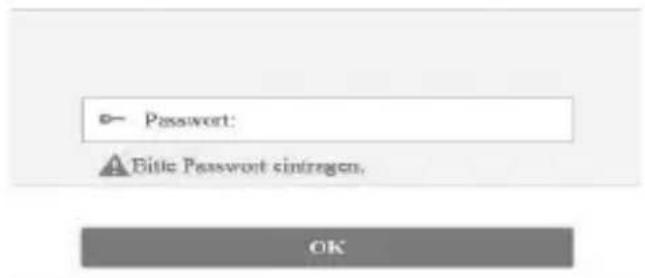

PLEASE NOTE:
The default password is "admin".
Set the language for the web interface in the upper right-hand corner of the screen.
- Then click on LOGIN. The home page of the web interface appears.
- Via the emergency IP address
If there is no connection between the Powerline Adapter and a router, you can access the web interface via the emergency IP address.
- Connect your PC or notebook to the Powerline WLAN Adapter via Wi-Fi or with a network cable.
Now assign your PC/notebook a fixed IP address from the range 192.168.33.2- 192.168.33.254 (e.g. 192.168.33.2). - Open the Internet browser on a computer and enter the IP address http://192.168.33.1 in the address line and follow the instructions.
11.2. Setup wizard
11.2.1. Wizard
The easiest way to make the basic settings is by using the wizard.
To carry out the wizard, click on Wizard in the Configuration menu:
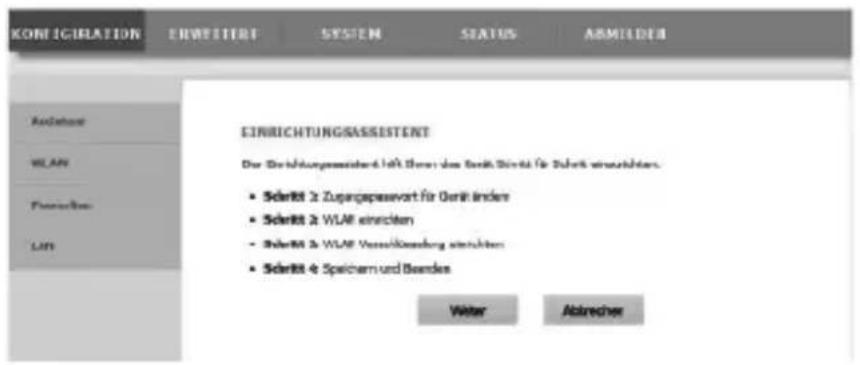
The wizard guides you through 4 steps. Click on Next to get to the next step.
11.2.2. Change Device Login Password
Here you can assign a password to limit access via the web interface.
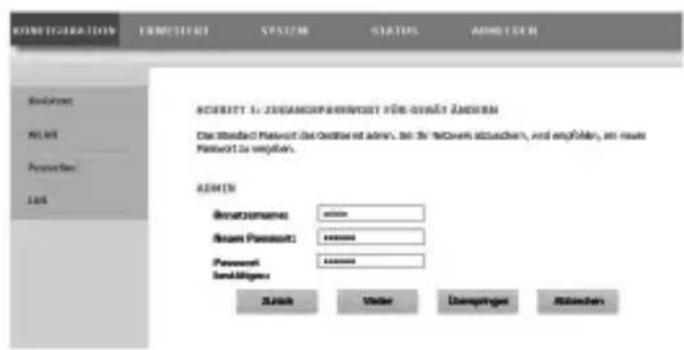

NOTE:
The default password is "admin". To ensure sufficient protection for your network, you should set a different password here.
If you do not want to set a different password, click on Skip.
After you have entered the new password, click on Next to go to the next page.
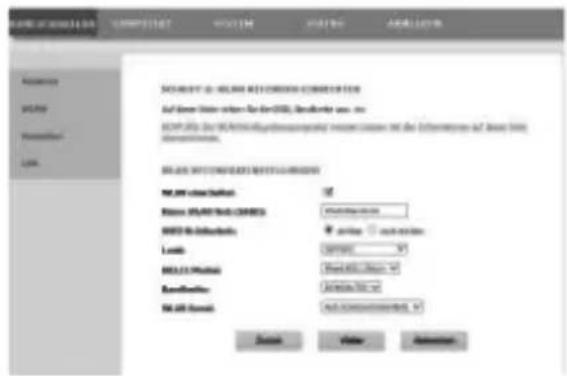
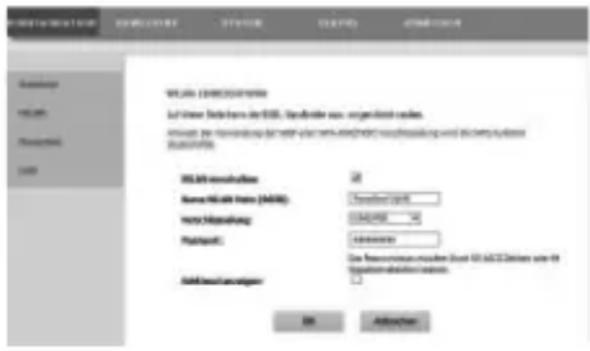
11.2.3. Setup Wireless Connection
On this page you make the settings for the wireless network adapter of your Powerline Adapter.
- Enable Wireless Interface
Here you can turn the Wi-Fi network of the Powerline Adapter on or off.
- Wireless Network Name (SSID)
The name of the wireless network (SSID) can be up to 32 characters and can only contain letters, numbers and underscores or any combinations thereof. The SSID is case-sensitive.
- Visibility Status
If you select VISIBLE, the SSID is discoverable by all other Wi-Fi devices.
- If you select INVISIBLE, the SSID is not broadcast and other Wi-Fi devices must know the correct SSID before making a connection.
Region
Select the country in which you are operating the Powerline Adapter.
802.11 Mode
Select the appropriate Wi-Fi mode for your wireless network. The standard setting is mixed 802.11b/g/n.
- Bandwidth
For all 802.11 Wi-Fi modes that are compatible with 802.11n, you can manually adjust the bandwidth here.
- Wireless Channel
Set the wireless channel here that the Powerline Adapter should use for broadcasting its Wi-Fi network. The standard setting is AUTOSCAN. In this setting the Powerline Adapter automatically seeks out the best wireless channel. After you have made the wireless settings, click Next:
11.2.4. Setup Wireless Security
The Wi-Fi router of the Powerline Adapter supports the encryption standards WEP, WPA-PSK, WPA2-PSK and WPA/WPA2-PSK.
If you do not want to use any encryption, select the option NONE (not recommended).
Enter the appropriate encryption algorithm for each encryption type (TKIP or AES) and a network key.
After you have finished setting up the network encryption, click NEXT:
11.2.5. Save and Complete
On this page you can see the configuration of the Powerline Adapter. If you want to change any settings, click BACK. Click COMPLETE to accept the settings and to exit the wizard.
11.3. Wireless Setup
11.3.1. Wireless Basic
You can adjust the settings for the wireless network here.
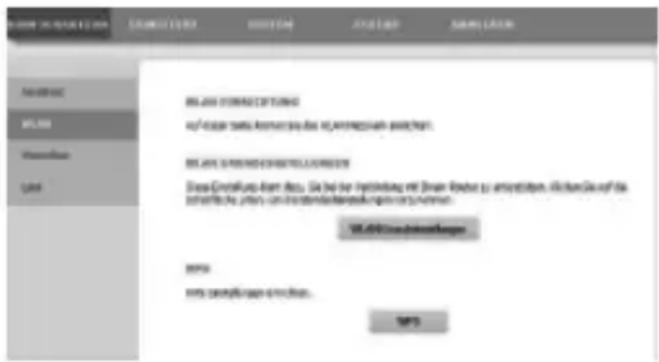
11.3.2. Enable Wireless Interface
Turn Wi-Fi network on or off.
11.3.3. Wireless Name (SSID)
The name of the wireless network (SSID) can be up to 32 characters and can only contain letters, numbers and underscores or any combinations thereof. The SSID is case-sensitive.
11.3.4. Wireless Security Mode
The Wi-Fi router of the Powerline Adapter supports the encryption standards WEP, WPA-PSK, WPA2-PSK and WPA/WPA2-PSK.
If you do not want to use any encryption, select the option NONE (not recommended).
11.3.5. Passphrase
Here you can assign a network key.
11.3.6. Show encryption key
Shows the network key in the web interface.
After you have made all the settings, click OK:
11.3.7. WPS
You can use the WPS function (Wi-Fi protected setup) to add a wireless client to your network without entering the SSID, encryption and password. To make the connection, you merely need to press the WPS button on the Powerline Adapter and then on the wireless client. To be able to use this function, the Wi-Fi client must support WPS.
11.3.8. Enabled WPS
Here you can turn the WPS function on or off.
11.3.9. WPA Mode
Here you can display the current WPA encryption.

NOTE!
If you enable the WPS function, you must use one of the encryption types WPA-PSK, WPA2-PSK or WPA/WPA2-PSK and the SSID must be transmitted.
The WPS function can be carried out via PBC, PIN and AP-PIN.
11.3.10. PBC MODE
- Select PBC from the WPS menu and then click the PBC button on the WPS page or press the WPS button on the Powerline WLAN adapter to use the WPS connection.
-
Then press the WPS button on the Wi-Fi client within 2 minutes or confirm the WPS connection via the settings menu of the wireless client to complete the connection. After the network connection has been established via WPS, the following page appears and the wireless client is connected to the Wi-Fi of the Powerline Adapter.
-
Click APPLY to complete the setup.
11.3.11. PIN Mode
- Select PIN from the WPS menu and enter the PIN (number code) of the wireless client on the WPS page. Then click on the PIN button in the settings menu of the wireless client within 2 minutes to complete the connection via WPS.
11.3.12. AP-PIN Mode
- Select AP-PIN from the WPS menu and enter the AP-PIN (number code) of the wireless client on the WPS page. Then click on the PIN button in the settings menu of the wireless client within 2 minutes to complete the connection via WPS.
11.4. PLC Setting
On this page you can see all the information (device name, MAC address, network key and network name) regarding the Powerline WLAN Adapter and the logged-on clients.
- Click the REFRESH button to refresh the display.
- Click ADD MEMBER to add a new device to the Powerline network.
Then enter the device information and click APPLY to add the device to the network.
11.4.1. LAN Setup
Here you can see the information on the LAN connection of the Powerline Adapter.
In the field IP-ADDRESS you can select a different IP address for the Powerline Adapter's LAN network adapter.
11.4.2. Advanced Wireless
You can change the advanced settings for the wireless adapter of the Powerline Adapter here.
11.4.3. Wireless Name (SSID)
The name of the wireless network (SSID) can be up to 32 characters and can only contain letters, numbers and underscores or any combinations thereof. The SSID is case-sensitive.
11.4.4. Network Name Status
If you select VISIBLE, the SSID is discoverable by all other Wi-Fi devices.
If you select INVISIBLE, the SSD is not broadcast and other Wi-Fi devices must know the correct SSD before making a connection.
11.4.5. Transmission Rate
Set the Wi-Fi transfer rate here. The standard setting is AUTO.
11.4.6. Transmit Power
Set a transfer rate of 100% , 80% , 60% , 40% , or 20% .
11.4.7. User Isolation
If you enable this function, clients that are registered on the wireless network cannot communicate with one another.
- Set the function to OFF to allow the clients to communicate with each other.
11.4.8. Enable WMM (Wireless QoS)
This feature is not available.
If this function is disabled, the Powerline WLAN Adapter adopts the WMM priorities from the router. When WMM is activated, the streaming of multimedia content is optimised.
11.4.9. Max. Clients
Enter a number from 1-32 for the maximum number of clients that can log on to the Powerline WLAN Adapter.
11.5. Advanced Security
11.5.1. Wireless Security Mode
The Wi-Fi router of the Powerline Adapter supports the encryption standards WEP, WPA-PSK, WPA2-PSK and WPA/WPA2-PSK.
If you do not want to use any encryption, select the option NONE (not recommended).
11.6.Access Control
11.6.1. Add
You can add a client to the list here.
- Then enter the MAC address and a description for the client and click on OK to add the client to the list.
11.7.Maintenance
11.7.1. User Password
Here you can set a new password for access to the web interface of the Powerline Adapter.
11.7.2. Reboot/Restore
Reboot
Click on the REBOOT button to restart the Powerline Adapter (recommended for system crash/malfunction)
- Click on the RESTORE button to reset the Powerline Adapter to its factory defaults and restart the device (recommended for system crash/malfunction and loss of the password).

NOTE:
After a reset to factory defaults, all the settings and passwords are deleted and must be re-entered.
11.8. Firmware Update
If you receive a software update from our service, save it onto your computer.
Then click on BROWSE to execute and install the software update from your computer.
If your settings are to be retained after the software update, clear the check mark next to the entry CLEAR CONFIG.
- Click on APPLY to start the installation.

WARNING!
While resetting to factory settings or applying a software update, never press the RESET button on the Powerline Adapter. This will lead to a system failure and thus destroy the Powerline Adapter!
11.9.Status
Here you can view all information about the ports and the Wi-Fi configuration of the Powerline Adapter.
11.10.Logout
When you are finished with the web interface, use this entry to log off from the web interface.
12. Changing the Powerline network key
The change of the network key is appropriate if, for example, there are security concerns or if a large network is to be divided into two or more smaller networks.

NOTE
To do this, it is useful to plug all the adapters that are to receive the new Powerline network key into the same multiple socket.
Both Powerline Adapters are connected and ready for operation. The POWER LED lights up.
This step is to be carried out on each adapter.
Press the SECURITY button on the Powerline WLAN Adapter for 12 seconds.
This Powerline Adapter now generates a random, unique network key.
Press the SECURITY button on the Powerline WLAN Adapter again for about 2-3 seconds.
The Power LED flashes green.
Press the SECURITY button on the Powerline WLAN Adapter again for about 2-3 seconds or the SECURITY/RESET button for about 1-2 seconds on the second MEDION-Powerline Adapter.
The Power LED flashes green.
Once both the POWER and the POWERLINE LED light up permanently green, the encryption has been completed successfully.
13. Adding the adapter to the Powerline network

NOTE
To do this, it is useful to plug all the adapters that are to receive the new network key into the same multiple socket.
For every additional Powerline Adapter that is to be given a new network key, proceed as follows:
All Powerline Adapters that are to be configured are connected and ready for operation. The POWER LED lights up.
- Connect the Powerline WLAN Adapter with which the existing network is to be extended to a socket. The POWER LED lights up.
Press the SECURITY button on the Powerline WLAN Adapter for 12 seconds.
This Powerline Adapter now generates a random, unique network key.
Press the SECURITY button on the Powerline WLAN Adapter again for about 2-3 seconds.
The Power LED flashes green.
Press the SECURITY button on the Powerline WLAN Adapter again for about 2-3 seconds or the SECURITY/RESET button for about 1-2 seconds on the second MEDION-Powerline Adapter.
The Power LED flashes green.
When the POWER and the POWERLINE LEDs on all Powerline Adapters light up permanently green, the system extension and encryption have been completed successfully.

NOTE
Repeat the above steps for each additional Powerline Adapter.
14. Removing a Powerline Adapter from the Powerline network
If you want to remove a Powerline Adapter from the existing network, proceed as follows:
Press the SECURITY button on the Powerline WLAN Adapter for 12 seconds.
This Powerline Adapter now generates a random, unique network key and is thus no longer in the Powerline network.
The POWERLINE LED no longer lights up.
15. Energy-saving mode
If all the network devices are turned off and no more data is being transferred, the Powerline Adapters switch to standby mode after approximately one minute. The power indicator will flash.
As soon as the network devices are switched on again, the Powerline Adapters are also restarted.
16. Factory settings
The two Powerline Adapters in the set you have bought are already paired on delivery.
By changing the Powerline network key or removing individual adapters from the Powerline network, this preset will be deleted.
Here is how you can restore the factory setting:
Press the RESET button on the Powerline WLAN Adapter for 5 seconds.
All LEDs go off for a short while. The device will be reset and restarts. The procedure is completed when the Power LED lights up permanently.
17. Troubleshooting
If errors occur, check first whether you can correct the problem yourself. The following list may help you.

CAUTION
Never try to repair the device yourself. Contact our service centre or another suitable specialist workshop if a repair is necessary.
| Problem Possible cause Rectification | ||
| The POWER LED does not light up. | Is the Powerline Adapter correctly connected to the mains? | Try unplugging the Power-line Adapter and plugging it back in again. |
| The LAN LED does not light up. | Is the LAN cable (RJ45) correctly connected to the adapter and the computer or router? | Check the LAN card and/or DSL connection of your computer. |
| Is the computer/router switched on? | Switch on network devices. | |
| The POWER-LINE LED does not light up. | There is no con- nection be- tween the Pow- erline Adapters. | |
| ·Possibly, the power out- lets being used are not suitable for making a Powerline connection. | Try different power outlets. | |
| • Maybe the adapters are not synchronised. | You can test whether the adapters are on the same network: ► Plug the two adapters into adjacent power outlets on a multiple socket strip. ► If no Powerline LED is illuminated, the adapters are not in the same network. ► In this case, carry out a reset of all adapters as described under “16. Factory settings” on page 86. | |
18. Cleaning
- Always unplug the Powerline Adapter and disconnect all the cables before cleaning the device.
- Do not use solvents, corrosive agents or aerosol-based detergents to clean the device.
- Clean the device with a soft, lint-free cloth.
Store the packaging material in a safe place; only use this box to transport the device.

ATTENTION!
None of the parts inside the device require cleaning or maintenance.
19. Disposal
Packaging

Your device is packaged to protect it from damage in transit. Packaging materials are raw materials and can therefore be reused or recycled.
Device

Do not under any circumstances dispose of the device with the household rubbish at the end of its service life! Please consult your local authority for advice on correct and eco-friendly methods of disposal.
20. Technical data
MD 87319 (WLAN Adapter)
Input voltage: 100 - 240V 50 / 60Hz,0.15A
Power consumption: < 6 W in operation
Connections: 2 x Ethernet (LAN) 100 Mbit/s
WLAN: IEEE802.11b/g/n
Transfer
speed: up to 500 Mbit/s
Powerline AV standard: 128 bit AES encryption
Protocol HomePlug AV, compatible
with IEEE P1901, compatible
with 200 and 500 Mbit/s Pow
erline Adapters, coexistent
with HomePlug 1.0
Environmental requirements
Temperature
(operational) 5ircC - 35ircC
Humidity
(operational) 10%-90%, non-
condensing
Dimensions
Powerline WLAN Adapter
(W x H x D) 61 × 106 × 86 mm
Weight (per adapter) approx. 183 g
21. Legal notice
Copyright © 2015
All rights reserved.
This operating manual is protected by copyright.
Mechanical, electronic and any other form of reproduction is prohibited without the written permission of the manufacturer Copyright is owned by the company:
Medion AG
Am Zehnhof 77
45307 Essen
Germany
The operating manual can be reordered via the service hotline and is available for download via the service portal at www.medion.com/gb/service/start/.
You can also scan the QR code above and download the operating manual onto your mobile device via the service portal.

Sommaire
DE
5. Conditions requires
11.2.3. Setup Wireless Connection
- Enable Wireless Interface
11.2.4. Setup Wireless Security
11.3.2. Enable Wireless Interface
MD 87319 (adaptateur Wi-Fi)
(I x H x P): 61 x 106 x 86 mm
I. GNU General Public Licence
Version 2, June 1991
Copyright (C) 1989,
1991 Free Software Foundation, Inc.
51 Franklin Street, Fifth Floor, Boston,
MA 02110-1301, USA
Everyone is permitted to copy and distribute verbatim copies of this license document, but changing it is not allowed.
Preamble
The licenses for most software are designed to take away your freedom to share and change it. By contrast, the GNU General Public License is intended to guarantee your freedom to share and change free software--to make sure the software is free for all its users.
This General Public License applies to most of the Free Software Foundation's software and to any other program whose authors commit to using it. (Some other Free Software Foundation software is covered by the GNU Lesser General Public License instead.) You can apply it to your programs, too.
When we speak of free software, we are referring to freedom, not price. Our General Public Licenses are designed to make sure that you have the freedom to distribute copies of free software (and charge for this service if you wish), that you receive source code or can get it if you want it, that you can change the software or use pieces of it in new free programs; and that you know you can do these things.
To protect your rights, we need to make restrictions that forbid anyone to deny you these rights or to ask you to surrender the rights. These restrictions translate to certain responsibilities for you if you distribute copies of the software, or if you modify it.
For example, if you distribute copies of such a program, whether gratis or for a fee, you must give the recipients all the rights that you have. You must make sure that they, too, receive or can get the source code. And you must show them these terms so they know their
rights.
We protect your rights with two steps: (1) copyright the software, and (2) offer you this license which gives you legal permission to copy, distribute and/or modify the software.
Also, for each author's protection and ours, we want to make certain that everyone understands that there is no warranty for this free software. If the software is modified by someone else and passed on, we want its recipients to know that what they have is not the original, so that any problems introduced by others will not reflect on the original authors' reputations.
Finally, any free program is threatened constantly by software patents. We wish to avoid the danger that redistributors of a free program will individually obtain patent licenses, in effect making the program proprietary. To prevent this, we have made it clear that any patent must be licensed for everyone's free use or not licensed at all. The precise terms and conditions for copying, distribution and modification follow.
TERMS AND CONDITIONS FOR COOPYING, DISTRIBUTION AND MODIFICATION
- This License applies to any program or other work which contains a notice placed by the copyright holder saying it may be distributed under the terms of this General Public License. The „Program“, below, refers to any such program or work, and a „work based on the Program“ means either the Program or any derivative work under copyright law: that is to say, a work containing the Program or a portion of it, either verbatim or with modifications and/or translated into another language. (Hereinafter, translation is included without limitation in the term „modification“.) Each licensee is addressed as „you".
Activities other than copying, distribution and modification are not covered by this License; they are outside its scope. The act of running the Program is not restricted, and the output from the Program is covered only if its contents constitute a work based on the Program (independent of having been made by running the Program). Whether that is true depends on what the Program does.
- You may copy and distribute verbatim copies of the Program's source code as you receive it, in any medium, provided that you conspicuously and appropriately publish on each copy an appropriate copyright notice and disclaimer of warranty; keep intact all the notices that refer to this License and to the absence of any warranty; and give any other recipients of the Program a copy of this License along with the Program.
You may charge a fee for the physical act of transferring a copy, and you may at your option offer warranty protection in exchange for a fee.
- You may modify your copy or copies of the Program or any portion of it, thus forming a work based on the Program, and copy and distribute such modifications or work under the terms of Section 1 above, provided that you also meet all of these conditions:
a) You must cause the modified files to carry prominent notices stating that you changed the files and the date of any change.
b) You must cause any work that you distribute or publish, that in whole or in part contains or is derived from the Program or any part thereof, to be licensed as a whole at no charge to all third parties under the terms of this License.
c) If the modified program normally reads commands interactively when run, you must cause it, when started running for such interactive use in the most ordinary way, to print or display an announcement including an appropriate copyright notice and a notice that there is no warranty (or else, saying that you provide a warranty) and that users may redistribute the program under these conditions, and telling the user how to view a copy of this License. (Exception: if the Program itself is interactive but does not normally print such an announcement, your work based on the Program is not required to print an announcement.)
These requirements apply to the modified work as a whole. If identifiable sections of that work are not derived from the Program, and can be reasonably considered independent and separate works in themselves, then this License, and its terms, do not apply to those sections when you distribute them as separate works. But when you distribute the same sections as part of a whole which is a work
based on the Program, the distribution of the whole must be on the terms of this License, whose permissions for other licensees extend to the entire whole, and thus to each and every part regardless of who wrote it.
Thus, it is not the intent of this section to claim rights or contest your rights to work written entirely by you; rather, the intent is to exercise the right to control the distribution of derivative or collective works based on the Program.
In addition, mere aggregation of another work not based on the Program with the Program (or with a work based on the Program) on a volume of a storage or distribution medium does not bring the other work under the scope of this License.
- You may copy and distribute the Program (or a work based on it, under Section 2) in object code or executable form under the terms of Sections 1 and 2 above provided that you also do one of the following:
a) Accompany it with the complete corresponding machine-readable source code, which must be distributed under the terms of Sections 1 and 2 above on a medium customarily used for software interchange; or,
b) Accompany it with a written offer, valid for at least three years, to give any third party, for a charge no more than your cost of physically performing source distribution, a complete machine-readable copy of the corresponding source code, to be distributed under the terms of Sections 1 and 2 above on a medium customarily used for software interchange; or,
c) Accompany it with the information you received as to the offer to distribute corresponding source code. (This alternative is allowed only for noncommercial distribution and only if you received the program in object code or executable form with such an offer, in accord with Subsection b above.)
The source code for a work means the preferred form of the work for making modifications to it. For an executable work, complete source code means all the source code for all modules it contains, plus any associated interface definition files, plus the scripts used to control
compilation and installation of the executable. However, as a special exception, the source code distributed need not include anything that is normally distributed (in either source or binary form) with the major components (compiler, kernel, and so on) of the operating system on which the executable runs, unless that component itself accompanies the executable.
If distribution of executable or object code is made by offering access to copy from a designated place, then offering equivalent access to copy the source code from the same place counts as distribution of the source code, even though third parties are not compelled to copy the source along with the object code.
- You may not copy, modify, sublicense, or distribute the Program except as expressly provided under this License. Any attempt otherwise to copy, modify, sublicense or distribute the Program is void, and will automatically terminate your rights under this License.
However, parties who have received copies, or rights, from you under this License will not have their licenses terminated so long as such parties remain in full compliance.
-
You are not required to accept this License, since you have not signed it. However, nothing else grants you permission to modify or distribute the Program or its derivative works. These actions are prohibited by law if you do not accept this License. Therefore, by modifying or distributing the Program (or any work based on the Program), you indicate your acceptance of this License to do so, and all its terms and conditions for copying, distributing or modifying the Program or works based on it.
-
Each time you redistribute the Program (or any work based on the Program), the recipient automatically receives a license from the original licensor to copy, distribute or modify the Program subject to these terms and conditions. You may not impose any further restrictions on the recipients' exercise of the rights granted herein. You are not responsible for enforcing compliance by third parties to this License.
-
If, as a consequence of a court judgment or allegation of patent infringement or for any other reason (not limited to patent issues), conditions are imposed on you (whether by court order, agreement
or otherwise) that contradict the conditions of this License, they do not excuse you from the conditions of this License.
If you cannot distribute so as to satisfy simultaneously your obligations under this License and any other pertinent obligations, then as a consequence you may not distribute the Program at all. For example, if a patent license would not permit royalty-free redistribution of the Program by all those who receive copies directly or indirectly through you, then the only way you could satisfy both it and this License would be to refrain entirely from distribution of the Program.
If any portion of this section is held invalid or unenforceable under any particular circumstance, the balance of the section is intended to apply and the section as a whole is intended to apply in other circumstances.
It is not the purpose of this section to induce you to infringe any patents or other property right claims or to contest validity of any such claims; this section has the sole purpose of protecting the integrity of the free software distribution system, which is implemented by public license practices. Many people have made generous contributions to the wide range of software distributed through that system in reliance on consistent application of that system; it is up to the author/donor to decide if he or she is willing to distribute software through any other system and a licensee cannot impose that choice.
This section is intended to make thoroughly clear what is believed to be a consequence of the rest of this License.
-
If the distribution and/or use of the Program is restricted in certain countries either by patents or by copyrighted interfaces, the original copyright holder who places the Program under this License may add an explicit geographical distribution limitation excluding those countries, so that distribution is permitted only in or among countries not thus excluded. In such case, this License incorporates the limitation as if written in the body of this License.
-
The Free Software Foundation may publish revised and/or new versions of the General Public License from time to time. Such new versions will be similar in spirit to the present version, but may differ
in detail to address new problems or concerns.
Each version is given a distinguishing version number. If the Program specifies a version number of this License which applies to it and "any later version", you have the option of following the terms and conditions either of that version or of any later version published by the Free Software Foundation. If the Program does not specify a version number of this License, you may choose any version ever published by the Free Software Foundation.
- If you wish to incorporate parts of the Program into other free programs whose distribution conditions are different, write to the author to ask for permission. For software which is copyrighted by the Free Software Foundation, write to the Free Software Foundation; we sometimes make exceptions for this. Our decision will be guided by the two goals of preserving the free status of all derivatives of our free software and of promoting the sharing and reuse of software generally.
NO WARRANTY
-
BECAUSE THE PROGRAM IS LICENSED FREE OF CHARGE, THERE IS NO WARRANTY FOR THE PROGRAM, TO THE EXTENT PERMITTED BY APPLICABLE LAW. EXCEPT WHEN OTHERWISE STATED IN WRITING THE COPYRIGHT HOLDERS AND/OR OTHER PARTIES PROVIDE THE PROGRAM „AS IS“ WITHOUT WARRANTY OF ANY KIND, EITHER EXPRESSED OR IMPLIED, INCLUDING, BUT NOT LIMITED TO, THE IMPLIED WARRANTYES OF MERCHANTABILITY AND FITNESS FOR A PARTICULAR PURPOSE. THE ENTIRE RISK AS TO THE QUALITY AND PERFORMANCE OF THE PROGRAM IS WITH YOU. SHOULD THE PROGRAM PROVE DEFECTIVE, YOU ASSUME THE COST OF ALL NECESSARY SERVICING, REPAIR OR CORRECTION.
-
IN NO EVENT UNLESS REQUIRED BY APPLICABLE LAW OR AGREED TO IN WRITING WILL ANY COPYRIGHT HOLDER, OR ANY OTHER PARTY WHO MAY MODIFY AND/OR REDISTRIBUTE THE PROGRAM AS PERMITTED ABOVE, BE LIABLE TO YOU FOR DAMAGES, INCLUDING ANY GENERAL, SPECIAL, INCIDENTAL OR CONSEQUENTIAL DAMAGES ARISING OUT OF THE USE OR INABILITY TO USE THE PROGRAM (INCLUDING BUT NOT LIMITED TO LOSS OF DATA OR DATA BEING RENDERED INACCURATE OR LOSSES SUSTAINED BY YOU OR THIRD
PARTIES OR A FAILURE OF THE PROGRAM TO OPERATE WITH ANY OTHER PROGRAMS), EVEN IF SUCH HOLDER OR OTHER PARTY HAS BEEN ADVISED OF THE POSSIBILITY OF SUCH DAMAGES.
END OF TERMS AND CONDITIONS
LGPL VERSION 2.1
GNU LESSER GENERAL PUBLIC LICENSE
Version 2.1, February 1999
Copyright (C) 1991, 1999 Free Software Foundation, Inc.
51 Franklin Street, Fifth Floor, Boston, MA 02110-1301 USA
Everyone is permitted to copy and distribute verbatim copies of this license document, but changing it is not allowed.
[This is the first released version of the Lesser GPL. It also counts as the successor of the GNU Library Public License, version 2, hence the version number 2.1.]
Preamble
The licenses for most software are designed to take away your freedom to share and change it. By contrast, the GNU General Public Licenses are intended to guarantee your freedom to share and change free software--to make sure the software is free for all its users.
This license, the Lesser General Public License, applies to some specially designated software packages--typically libraries--of the Free Software Foundation and other authors who decide to use it. You can use it too, but we suggest you first think carefully about whether this license or the ordinary General Public License is the better strategy to use in any particular case, based on the explanations below.
When we speak of free software, we are referring to freedom of use, not price. Our General Public Licenses are designed to make sure that you have the freedom to distribute copies of free software (and charge for this service if you wish); that you receive source code or can get it if you want it; that you can change the software and use pieces of it in new free programs; and that you are informed that
you can do these things.
To protect your rights, we need to make restrictions that forbid distributors to deny you these rights or to ask you to surrender these rights. These restrictions translate to certain responsibilities for you if you distribute copies of the library or if you modify it.
For example, if you distribute copies of the library, whether gratis or for a fee, you must give the recipients all the rights that we gave you. You must make sure that they, too, receive or can get the source code. If you link other code with the library, you must provide complete object files to the recipients, so that they can relink them with the library after making changes to the library and recompiling it. And you must show them these terms so they know their rights.
We protect your rights with a two-step method: (1) we copyright the library, and (2) we offer you this license, which gives you legal permission to copy, distribute and/or modify the library.
To protect each distributor, we want to make it very clear that there is no warranty for the free library. Also, if the library is modified by someone else and passed on, the recipients should know that what they have is not the original version, so that the original author's reputation will not be affected by problems that might be introduced by others.
Finally, software patents pose a constant threat to the existence of any free program. We wish to make sure that a company cannot effectively restrict the users of a free program by obtaining a restrictive license from a patent holder. Therefore, we insist that any patent license obtained for a version of the library must be consistent with the full freedom of use specified in this license.
Most GNU software, including some libraries, is covered by the ordinary GNU General Public License. This license, the GNU Lesser General Public License, applies to certain designated libraries, and is quite different from the ordinary General Public License. We use this license for certain libraries in order to permit linking those libraries into non-free programs.
When a program is linked with a library, whether statically or using a shared library, the combination of the two is legally speaking a com
bined work, a derivative of the original library. The ordinary General Public License therefore permits such linking only if the entire combination fits its criteria of freedom. The Lesser General Public License permits more lax criteria for linking other code with the library.
We call this license the „Lesser“ General Public License because it does Less to protect the user's freedom than the ordinary General Public License. It also provides other free software developers Less of an advantage over competing non-free programs. These disadvantages are the reason we use the ordinary General Public License for many libraries. However, the Lesser license provides advantages in certain special circumstances.
For example, on rare occasions, there may be a special need to encourage the widest possible use of a certain library, so that it becomes a de-facto standard. To achieve this, non-free programs must be allowed to use the library. A more frequent case is that a free library does the same job as widely used non-free libraries. In this case, there is little to gain by limiting the free library to free software only, so we use the Lesser General Public License.
In other cases, permission to use a particular library in non-free programs enables a greater number of people to use a large body of free software. For example, permission to use the GNU C Library in non-free programs enables many more people to use the whole GNU operating system, as well as its variant, the GNU/Linux operating system.
Although the Lesser General Public License is Less protective of the users' freedom, it does ensure that the user of a program that is linked with the Library has the freedom and the wherewithal to run that program using a modified version of the Library.
The precise terms and conditions for copying, distribution and modification follow. Pay close attention to the difference between a "work based on the library" and a "work that uses the library". The former contains code derived from the library, whereas the latter must be combined with the library in order to run.
TERMS AND CONDITIONS FOR COOPYING, DISTRIBUTION AND MODIFICATION
- This License Agreement applies to any software library or other program which contains a notice placed by the copyright holder or other authorized party saying it may be distributed under the terms of this Lesser General Public License (also called „this License"). Each licensee is addressed as „you".
A „library“ means a collection of software functions and/or data prepared so as to be conveniently linked with application programs (which use some of those functions and data) to form executables. The „Library“, below, refers to any such software library or work which has been distributed under these terms. A „work based on the Library“ means either the Library or any derivative work under copyright law: that is to say, a work containing the Library or a portion of it, either verbatim or with modifications and/or translated straightforwardly into another language. (Hereinafter, translation is included without limitation in the term „modification“.)
"Source code" for a work means the preferred form of the work for making modifications to it. For a library, complete source code means all the source code for all modules it contains, plus any associated interface definition files, plus the scripts used to control compilation and installation of the library.
Activities other than copying, distribution and modification are not covered by this License; they are outside its scope. The act of running a program using the Library is not restricted, and output from such a program is covered only if its contents constitute a work based on the Library (independent of the use of the Library in a tool for writing it). Whether that is true depends on what the Library does and what the program that uses the Library does.
- You may copy and distribute verbatim copies of the Library's complete source code as you receive it, in any medium, provided that you conspicuously and appropriately publish on each copy an appropriate copyright notice and disclaimer of warranty; keep intact all the notices that refer to this License and to the absence of any warranty; and distribute a copy of this License along with the Library.
You may charge a fee for the physical act of transferring a copy, and you may at your option offer warranty protection in exchange for a
fee.
- You may modify your copy or copies of the Library or any portion of it, thus forming a work based on the Library, and copy and distribute such modifications or work under the terms of Section 1 above, provided that you also meet all of these conditions:
a) The modified work must itself be a software library.
b) You must cause the files modified to carry prominent notices stating that you changed the files and the date of any change.
c) You must cause the whole of the work to be licensed at no charge to all third parties under the terms of this License.
d) If a facility in the modified Library refers to a function or a table of data to be supplied by an application program that uses the facility, other than as an argument passed when the facility is invoked, then you must make a good faith effort to ensure that, in the event an application does not supply such function or table, the facility still operates, and performs whatever part of its purpose remains meaningful.
(For example, a function in a library to compute square roots has a purpose that is entirely well-defined independent of the application. Therefore, Subsection 2d requires that any application-supplied function or table used by this function must be optional: if the application does not supply it, the square root function must still compute square roots.)
These requirements apply to the modified work as a whole. If identifiable sections of that work are not derived from the Library, and can be reasonably considered independent and separate works in themselves, then this License, and its terms, do not apply to those sections when you distribute them as separate works. But when you distribute the same sections as part of a whole which is a work based on the Library, the distribution of the whole must be on the terms of this License, whose permissions for other licensees extend to the entire whole, and thus to each and every part regardless of who wrote it.
Thus, it is not the intent of this section to claim rights or contest your rights to work written entirely by you; rather, the intent is to
exercise the right to control the distribution of derivative or collective works based on the Library.
In addition, mere aggregation of another work not based on the Library with the Library (or with a work based on the Library) on a volume of a storage or distribution medium does not bring the other work under the scope of this License.
- You may opt to apply the terms of the ordinary GNU General Public License instead of this License to a given copy of the Library. To do this, you must alter all the notices that refer to this License, so that they refer to the ordinary GNU General Public License, version 2, instead of to this License. (If a newer version than version 2 of the ordinary GNU General Public License has appeared, then you can specify that version instead if you wish.) Do not make any other change in these notices.
Once this change is made in a given copy, it is irreversible for that copy, so the ordinary GNU General Public License applies to all subsequent copies and derivative works made from that copy.
This option is useful when you wish to copy part of the code of the Library into a program that is not a library.
- You may copy and distribute the Library (or a portion or derivative of it, under Section 2) in object code or executable form under the terms of Sections 1 and 2 above provided that you accompany it with the complete corresponding machine-readable source code, which must be distributed under the terms of Sections 1 and 2 above on a medium customarily used for software interchange.
If distribution of object code is made by offering access to copy from a designated place, then offering equivalent access to copy the source code from the same place satisfies the requirement to distribute the source code, even though third parties are not compelled to copy the source along with the object code.
- A program that contains no derivative of any portion of the Library, but is designed to work with the Library by being compiled or linked with it, is called a „work that uses the Library“. Such a work, in isolation, is not a derivative work of the Library, and therefore falls outside the scope of this License.
However, linking a „work that uses the Library“ with the Library creates an executable that is a derivative of the Library (because it contains portions of the Library), rather than a „work that uses the library“. The executable is therefore covered by this License. Section 6 states terms for distribution of such executables.
When a "work that uses the Library" uses material from a header file that is part of the Library, the object code for the work may be a derivative work of the Library even though the source code is not. Whether this is true is especially significant if the work can be linked without the Library, or if the work is itself a library. The threshold for this to be true is not precisely defined by law.
If such an object file uses only numerical parameters, data structure layouts and accessors, and small macros and small inline functions (ten lines or less in length), then the use of the object file is unrestricted, regardless of whether it is legally a derivative work. (Executables containing this object code plus portions of the Library will still fall under Section 6.)
Otherwise, if the work is a derivative of the Library, you may distribute the object code for the work under the terms of Section 6. Any executables containing that work also fall under Section 6, whether or not they are linked directly with the Library itself.
- As an exception to the Sections above, you may also combine or link a "work that uses the Library" with the Library to produce a work containing portions of the Library, and distribute that work under terms of your choice, provided that the terms permit modification of the work for the customer's own use and reverse engineering for debugging such modifications.
You must give prominent notice with each copy of the work that the Library is used in it and that the Library and its use are covered by this License. You must supply a copy of this License. If the work during execution displays copyright notices, you must include the copyright notice for the Library among them, as well as a reference directing the user to the copy of this License. Also, you must do one of these things:
a) Accompany the work with the complete corresponding machine-readable source code for the Library including whatever changes
were used in the work (which must be distributed under Sections 1 and 2 above); and, if the work is an executable linked with the Library, with the complete machine-readable „work that uses the Library“, as object code and/or source code, so that the user can modify the Library and then relink to produce a modified executable containing the modified Library. (It is understood that the user who changes the contents of definitions files in the Library will not necessarily be able to recompile the application to use the modified definitions.) b) Use a suitable shared library mechanism for linking with the Library. A suitable mechanism is one that (1) uses at run time a copy of the library already present on the user's computer system, rather than copying library functions into the executable, and (2) will operate properly with a modified version of the library, if the user installs one, as long as the modified version is interface-compatible with the version that the work was made with.
c) Accompany the work with a written offer, valid for at least three years, to give the same user the materials specified in Subsection 6a, above, for a charge no more than the cost of performing this distribution.
d) If distribution of the work is made by offering access to copy from a designated place, offer equivalent access to copy the above specified materials from the same place.
e) Verify that the user has already received a copy of these materials or that you have already sent this user a copy.
For an executable, the required form of the „work that uses the Library“ must include any data and utility programs needed for reproducing the executable from it. However, as a special exception, the materials to be distributed need not include anything that is normally distributed (in either source or binary form) with the major components (compiler, kernel, and so on) of the operating system on which the executable runs, unless that component itself accompanies the executable.
It may happen that this requirement contradicts the license restrictions of other proprietary libraries that do not normally accompany the operating system. Such a contradiction means you cannot use both them and the Library together in an executable that you dis
tribute.
- You may place library facilities that are a work based on the Library side-by-side in a single library together with other library facilities not covered by this License, and distribute such a combined library, provided that the separate distribution of the work based on the Library and of the other library facilities is otherwise permitted, and provided that you do these two things:
a) Accompany the combined library with a copy of the same work based on the Library, uncombined with any other library facilities. This must be distributed under the terms of the Sections above.
b) Give prominent notice with the combined library of the fact that part of it is a work based on the Library, and explaining where to find the accompanying uncombined form of the same work. - You may not copy, modify, sublicense, link with, or distribute the Library except as expressly provided under this License. Any attempt otherwise to copy, modify, sublicense, link with, or distribute the Library is void, and will automatically terminate your rights under this License. However, parties who have received copies, or rights, from you under this License will not have their licenses terminated so long as such parties remain in full compliance.
- You are not required to accept this License, since you have not signed it. However, nothing else grants you permission to modify or distribute the Library or its derivative works. These actions are prohibited by law if you do not accept this License. Therefore, by modifying or distributing the Library (or any work based on the Library), you indicate your acceptance of this License to do so, and all its terms and conditions for copying, distributing or modifying the Library or works based on it.
-
Each time you redistribute the Library (or any work based on the Library), the recipient automatically receives a license from the original licensor to copy, distribute, link with or modify the Library subject to these terms and conditions. You may not impose any further restrictions on the recipients' exercise of the rights granted herein. You are not responsible for enforcing compliance by third parties with this License.
-
If, as a consequence of a court judgment or allegation of patent infringement or for any other reason (not limited to patent issues), conditions are imposed on you (whether by court order, agreement or otherwise) that contradict the conditions of this License, they do not excuse you from the conditions of this License. If you cannot distribute so as to satisfy simultaneously your obligations under this License and any other pertinent obligations, then as a consequence you may not distribute the Library at all. For example, if a patent license would not permit royalty-free redistribution of the Library by all those who receive copies directly or indirectly through you, then the only way you could satisfy both it and this License would be to refrain entirely from distribution of the Library.
If any portion of this section is held invalid or unenforceable under any particular circumstance, the balance of the section is intended to apply, and the section as a whole is intended to apply in other circumstances.
It is not the purpose of this section to induce you to infringe any patents or other property right claims or to contest validity of any such claims; this section has the sole purpose of protecting the integrity of the free software distribution system which is implemented by public license practices. Many people have made generous contributions to the wide range of software distributed through that system in reliance on consistent application of that system; it is up to the author/donor to decide if he or she is willing to distribute software through any other system and a licensee cannot impose that choice.
This section is intended to make thoroughly clear what is believed to be a consequence of the rest of this License.
-
If the distribution and/or use of the Library is restricted in certain countries either by patents or by copyrighted interfaces, the original copyright holder who places the Library under this License may add an explicit geographical distribution limitation excluding those countries, so that distribution is permitted only in or among countries not thus excluded. In such case, this License incorporates the limitation as if written in the body of this License.
-
The Free Software Foundation may publish revised and/or new
versions of the Lesser General Public License from time to time. Such new versions will be similar in spirit to the present version, but may differ in detail to address new problems or concerns.
Each version is given a distinguishing version number. If the Library specifies a version number of this License which applies to it and "any later version", you have the option of following the terms and conditions either of that version or of any later version published by the Free Software Foundation. If the Library does not specify a license version number, you may choose any version ever published by the Free Software Foundation.
- If you wish to incorporate parts of the Library into other free programs whose distribution conditions are incompatible with these, write to the author to ask for permission. For software which is copyrighted by the Free Software Foundation, write to the Free Software Foundation; we sometimes make exceptions for this. Our decision will be guided by the two goals of preserving the free status of all derivatives of our free software and of promoting the sharing and reuse of software generally.
NO WARRANTY
-
BECAUSE THE LIBRARY IS LICENSED FREE OF CHARGE, THERE IS NO WARRANTY FOR THE LIBRARY, TO THE EXTENT PERMITTED BY APPLICABLE LAW. EXCEPT WHEN OTHERWISE STATED IN WRITING THE COPYRIGHT HOLDERS AND/OR OTHER PARTIES PROVIDE THE LIBRARY "AS IS" WITHOUT WARRANTY OF ANY KIND, EITHER EXPRESSED OR IMPLIED, INCLUDING, BUT NOT LIMITED TO, THE IMPLIED WARRANTYES OF MERCHANTABILITY AND FITNESS FOR A PARTICULAR PURPOSE. THE ENTIRE RISK AS TO THE QUALITY AND PERFORMANCE OF THE LIBRARY IS WITH YOU. SHOULD THE LIBRARY PROVE DEFECTIVE, YOU ASSUME THE COST OF ALL NECESSARY SERVICING, REPAIR OR CORRECTION.
-
IN NO EVENT UNLESS REQUIRED BY APPLICABLE LAW OR AGREED TO IN WRITING WILL ANY COPYRIGHT HOLDER, OR ANY OTHER PARTY WHO MAY MODIFY AND/OR REDISTRIBUTE THE LIBRARY AS PERMITTED ABOVE, BE LIABLE TO YOU FOR DAMAGES, INCLUDING ANY GENERAL, SPECIAL, INCIDENTAL OR CONSEQUENTIAL DAMAGES ARISING OUT OF THE USE OR INABILITY TO USE THE LIBRARY (INCLUDING BUT NOT LIMITED TO LOSS OF DATA OR DATA BEING RENDERED INACCURATE OR LOSSES SUSTAINED BY YOU OR THIRD PARTIES OR A FAILURE OF THE LIBRARY TO OPERATE WITH ANY OTHER SOFTWARE), EVEN IF SUCH HOLDER OR OTHER PARTY HAS BEEN ADVISED OF THE POSSIBILITY OF SUCH DAMAGES. END OF TERMS AND CONDITIONS
MEDION
- HINWEIS!
- MD 87319 (WLAN Adapter)
- Notes on how to use these instructions .... 51
- Setting up the device via the web interface 67
- Changing the Powerline network key .... 81
- Adding the adapter to the Powerline network 83
- Removing a Powerline Adapter from the Powerline network 85
- Notes on how to use these instructions
- Symbols and key words used in these instructions
- CAUTION!
- ATTENTION!
- NOTE!
- WARNING!
- Warning: danger of electric shock!
- Package contents
- Proper use
- Safety instructions
- Operating safety
- Electromagnetic compatibility
- Notes on conformity
- Transport and packaging
- System requirements
- Function
- Overview of the device
- Powerline WLAN Adapter
- Possible LED displays
- Powerline WLAN Adapter
- Buttons on the Powerline WLAN Adapter
- Connection
- NOTE
- Notes on power supply
- Connecting to a network device
- Connection example
- Connecting the device via Wi-Fi with the Powerline WLAN Adapter
- Connect via WPS button
- Manual connection
- Setting up the device via the web interface
- Logging on to the web interface
- - Via the network name
- PLEASE NOTE:
- - Via the emergency IP address
- Setup wizard
- Wizard
- Change Device Login Password
- NOTE:
- Setup Wireless Connection
- - Enable Wireless Interface
- - Wireless Network Name (SSID)
- - Visibility Status
- Region
- Mode
- - Bandwidth
- - Wireless Channel
- Setup Wireless Security
- Save and Complete
- Wireless Setup
- Wireless Basic
- Enable Wireless Interface
- Wireless Name (SSID)
- Wireless Security Mode
- Passphrase
- Show encryption key
- WPS
- Enabled WPS
- WPA Mode
- PBC MODE
- PIN Mode
- AP-PIN Mode
- PLC Setting
- LAN Setup
- Advanced Wireless
- Wireless Name (SSID)
- Network Name Status
- Transmission Rate
- Transmit Power
- User Isolation
- Enable WMM (Wireless QoS)
- Max. Clients
- Advanced Security
- Wireless Security Mode
- 11.6.Access Control
- Add
- 11.7.Maintenance
- User Password
- Reboot/Restore
- Reboot
- Firmware Update
- 11.9.Status
- 11.10.Logout
- Changing the Powerline network key
- Adding the adapter to the Powerline network
- Removing a Powerline Adapter from the Powerline network
- Energy-saving mode
- Factory settings
- Troubleshooting
- CAUTION
- Cleaning
- Disposal
- Packaging
- Device
- Technical data
- Environmental requirements
- Temperature
- Legal notice
- Germany
- Sommaire
- Conditions requires
- GNU General Public Licence
- tribute.
- NO WARRANTY
- MEDION
Brand : MEDION
Model : P85149 (MD 87319)
Category : Powerline Adapter