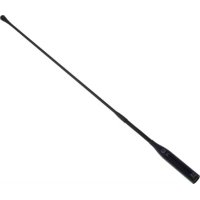
CGN 99 HL - Microphone AKG - Free user manual and instructions
Find the device manual for free CGN 99 HL AKG in PDF.



| Product type | Hypercardioid gooseneck microphone |
| Brand | AKG |
| Model | CGN 99 H/L |
| Directivity | Hypercardioid |
| Frequency response | 50 - 19 000 Hz |
| Sensitivity | 12 mV/Pa (-38 dBV re 1V/Pa) |
| Max SPL (1% distortion) | 125 dB |
| Equivalent noise level | < 21 dB-A |
| Signal-to-noise ratio (A-weighted) | > 73 dB |
| Electrical impedance | < 600 Ω |
| Power supply | Phantom power 9-52 V according to IEC 61938 (integrated DPA adapter) |
| Current consumption | < 3 mA |
| Connector | XLR-3 |
| Dimensions (capsule diameter x length) | 13.5 x 576 mm |
| Net weight | 170 g |
| Shipping weight | 500 g |
| Finish | Matte black |
| Key features | Gooseneck microphone with integrated phantom power adapter circuit, included foam windscreen, selectable low-cut via J1 jumper |
| Maintenance & cleaning | Avoid liquids, dust, excessive heat or humidity. Clean with a dry cloth if necessary. |
| Safety | Do not expose to moisture, drops or vibrations. Packaging recyclable. |
| Spare parts & repairability | Windscreen (ref. 2965Z2001), PS3 F-Lock mounting base, H500/H600 elastic suspension mounts, SA60 adapter, ST1/ST45 table stands. DPA board with J1 jumper for low-cut. |
| General information | Recommended use for sound reinforcement with source distance 30-90 cm and speakers placed laterally or obliquely behind the microphone. |
Frequently Asked Questions - CGN 99 HL AKG
User questions about CGN 99 HL AKG
0 question about this device. Answer the ones you know or ask your own.
Ask a new question about this device
Download the instructions for your Microphone in PDF format for free! Find your manual CGN 99 HL - AKG and take your electronic device back in hand. On this page are published all the documents necessary for the use of your device. CGN 99 HL by AKG.
USER MANUAL CGN 99 HL AKG
Please read the manual before using the equipment!
MODE D'EMPLOII ...... p. 22
natural_image
Illustration of a hand holding a cable with directional arrows indicating force or movement (no text or symbols)natural_image
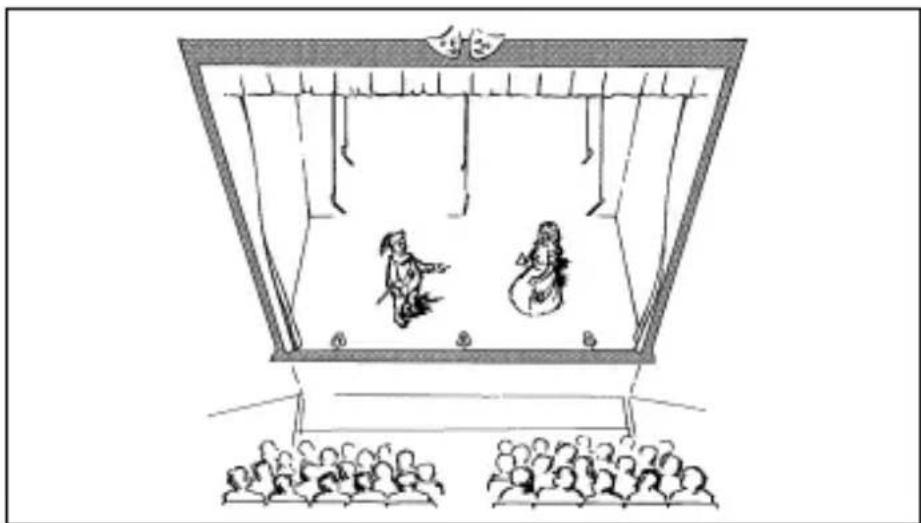
Illustration of a traditional theater performance with two costumed performers and audience seated (no text or symbols)Fig.2: Theater- beschallung
natural_image
Illustration of a group of people standing on stairs under a curved structure (no text or symbols)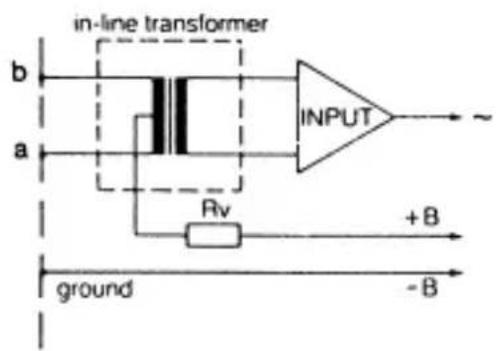
Fig. 8: Print DPA
line
| Time (Hz) | Voltage (dB) | Current (V) | |-----------|--------------|-------------| | 0.0 | -50 | 0 | | 0.1 | -45 | 10 | | 0.2 | -40 | 20 | | 0.3 | -35 | 30 | | 0.4 | -30 | 40 | | 0.5 | -25 | 50 | | 0.6 | -20 | 60 | | 0.7 | -15 | 70 | | 0.8 | -10 | 80 | | 0.9 | -5 | 90 | | 1.0 | 0 | 100 | | 1.1 | 5 | 110 | | 1.2 | 10 | 120 | | 1.3 | 15 | 130 | | 1.4 | 20 | 140 | | 1.5 | 25 | 150 | | 1.6 | 30 | 160 | | 1.7 | 35 | 170 | | 1.8 | 40 | 180 | | 1.9 | 45 | 190 | | 2.0 | 50 | 200 | | 2.1 | 55 | 210 | | 2.2 | 60 | 220 | | 2.3 | 65 | 230 | | 2.4 | 70 | 240 | | 2.5 | 75 | 250 | | 2.6 | 80 | 260 | | 2.7 | 85 | 270 | | 2.8 | 90 | 280 | | 2.9 | 95 | 290 | | 3.0 | 100 | 300 | | 3.1 | 105 | 310 | | 3.2 | 110 | 320 | | 3.3 | 115 | 330 | | 3.4 | 120 | 340 | | 3.5 | 125 | 350 | | 3.6 | 130 | 360 | | 3.7 | 135 | 370 | | 3.8 | 140 | 380 | | 3.9 | 145 | 390 | | 4.0 | 150 | 400 | | 4.1 | 155 | 410 | | 4.2 | 160 | 420 | | 4.3 | 165 | 430 | | 4.4 | 170 | 440 | | 4.5 | 175 | 450 | | 4.6 | 180 | 460 | | 4.7 | 185 | 470 | | 4.8 | 190 | 480 | | 4.9 | 195 | 490 | | 5.0 | 200 | 500 | | 5.1 | 205 | | | 5.2 | | +2 | | ... | | | | ... | ... | ... | | ... | ... | ... | | ... | ... | ... | | ... | ... | ... | | ... | ... | ... | | ... | ... | ... | | ... | ... | ... | | ... | ... | ... | | ... | ... | ... | | ... | ... | ... | | ... | ... | ... (with label 'a' and 'b') in the chart, but the values are estimated based on the y-axis label 'a'. The y-axis label 'a' is also labeled 'a'. The y-axis label 'b' is also labeled 'b'. The y-axis label 'c' is also labeled 'c'. The y-axis label 'd' is also labeled 'd'. The y-axis label 'e' is also labeled 'e'. The y-axis label 'f' is also labeled 'f'. The y-axis label 'g' is also labeled 'g'. The y-axis label 'h' is also labeled 'h'. The y-axis label 'i' is also labeled 'i'. The y-axis label 'j' is also labeled 'j'. The y-axis label 'k' is also labeled 'k'. The y-axis label 'l' is also labeled 'l'. The y-axis label 'm' is also labeled 'm'. The y-axis label 'n' is also labeled 'n'. The y-axis label 'o' is also labeled 'o'. The y-axis label 'p' is also labeled 'p'. The y-axis label 'q' is also labeled 'q'. The y-axis label 'r' is also labeled 'r'. The y-axis label 's' is also labeled 's'. The y-axis label 't' is also labeled 't'. The y-axis label 'u' is also labeled 'u'. The y-axis label 'v' is also labeled 'v'. The y-axis label 'w' is also labeled 'w'. The y-axis label 'x' is also labeled 'x'. The y-axis label 'y' is also labeled 'y'. The y-axis label 'z' is also labeled 'z'. The y-axis label 'a' is also labeled 'a'. The y-axis label 'a' is also labeled 'a'. The y-axis label 'b' is also labeled 'b'. The y-axis label 'b' is also labeled 'b'. The y-axis label 'c' is also labeled 'c'. The y-axis label 'c' is also labeled 'c'. The y-axis label 'd' is also labeled 'd'. The y-axis label 'd' is also labeled 'd'. The y-axis label 'e' is also labeled 'e'. The y-axis label 'e' is also labeled 'e'. The y-axis label '(e') is also labeled '(e'). The y-axis labels are not explicitly provided in the code.Frequenzgang & Polardiagramm CGN 99 H/L
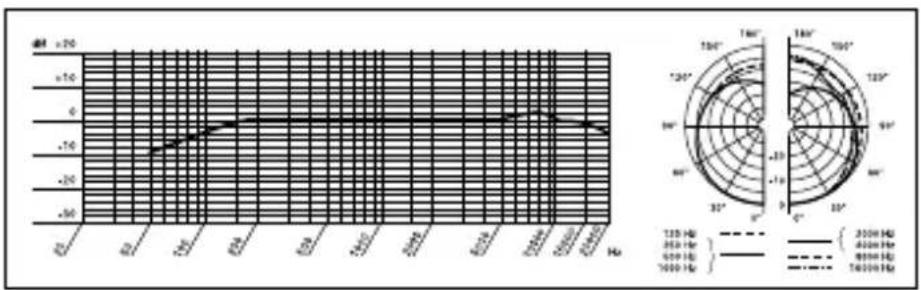
line
| Frequency (Hz) | Current (V) | | -------------- | ----------- | | 0 | -50 | | 120 | -40 | | 350 | -30 | | 600 | -20 | | 900 | -10 | | 1200 | 0 | | 3500 | 10 | | 6000 | 20 | | 9000 | 30 | | 12000 | 40 | | 35000 | 50 | | 60000 | 60 | | 90000 | 70 | | 120000 | 80 | | 350000 | 90 | | 600000 | 100 | | 900000 | 110 | | 1200000 | 120 | | 3500000 | 130 | | 6000000 | 140 | | 9000000 | 150 | | 12000000 | 160 | | 35000000 | 170 | | 60000000 | 180 | | 90000000 | 190 | | 120000000 | 200 | | 35000000 | 210 | | 60000000 | 220 | | 90000000 | 230 | | 120000000 | 240 | | 35000000 | 250 | | 60000000 | 260 | | 90000000 | 270 | | 120000000 | 280 | | 35000000 | 290 | | 60000000 | 300 | | 90000000 | 310 | | 120000000 | 320 | | 35000000 | 330 | | 60000000 | 340 | | 9000000 | 35 | | 125 | -4 | | 35 | -5 | | 65 | -6 | | 95 | -7 | | 125 | -8 | | 35 | -9 | | 65 | -15 | | 95 | -25 | | 125 | -35 | | 35 | -45 | | 65 | -55 | | 95 | -65 | | 125 | -75 | | 35 | -85 | | 65 | -95 | | 95 | -115 | | 125 | -135 | | 35 | -155 | | 65 | -175 | | 95 | -195 | | 125 | -215 | | 35 | -235 | | 65 | -255 | | 95 | -275 | | 125 | -295 | | 35 | -315 | | 65 | -335 | | 95 | -355 | | 125 | -375 | | 35 | -395 | | 65 | -415 | | 95 | -435 | | 125 | -455 | | 35 | -475 | | 65 | -495 | | 95 | -515 | | 125 | -535 | | 35 | -555 | | 65 | -575 | | 95 | -595 | | 125 | -615 | | 35 | -635 | | 65 | -655 | | 95 | -675 | | 125 | -695 | | 35 | -715 | | 65 | -735 | | 95 | -755 | | 125 | -775 | | 35 | -795 | | 65 | -815 | | 95 | -835 | | 125 | -855 | | 35 | -875 | | 65 | -895 | | 95 | -915 | | 125 | -935 | | 35 | -955 | | 65 | -975 | | 95 | -995 | | 125 | -1.1 | | 35 | -1.2 | | 65 | -1.3 | | 95 | -1.4 | | 125 | -1.5 | | 35 | -1.6 | | 65 | -1.7 | | 95 | -1.8 | | 125 | -1.9 | | 35 | -2.1 | | 65 | -2.2 | | 95 | -2.3 | | 125 | -2.4 | | 35 | -2.6 | | 65 | -2.7 | | 95 | -2.8 | | 125 | -2.9 | | 35 | -3.1 | | 65 | -3.2 | | 95 | -3.3 | | 125 | -3.4 | | 35 | -3.6 | | 65 | -3.7 | | 95 | -3.8 | | 125 | -4.1 | | 35 | -4.2 | | 65 | -4.3 | | 95 | -4.4 | | 125 | -4.6 | | 35 | -4.8 | | 65 | -4.9 | | 95 | -4.7 | | 125 | -4.8 | | ... | ... | The chart displays a radar plot with two axes: one for current (V) and one for voltage (V). The right panel shows the corresponding current (V) in degrees (°) and the current (V) in volts (°). The left panel shows the current (V) in dB (dB) for the current (V) in dB (dB) for the voltage (V) in dB (dB). The right panel shows the current (V) in dB (dB) for the current (V) in dB (dB) for the voltage (V) in dB (dB). The data is presented in a grid format with three distinct series: 'Current' (solid line), 'Voltage' (dashed line), and 'Capacitor' (dotted line). The chart is divided into four quadrants by repeating the 'Current' to 'Capacitor' plane.Frequenzgang & Polardiagramm CHM 99

1 Safety and Environment
- Do not spill any liquids on the equipment and do not drop any objects through the ventilation slots in the equipment.
- Do not place the equipment near heat sources such as radiators, heating ducts, or amplifiers, etc. and do not expose it to direct sunlight, excessive dust, moisture, rain, mechanical vibrations, or shock.
- The packaging of the equipment is recyclable. To dispose of the packaging, make sure to use a collection/recycling system provided for that purpose and observe local legislation relating to waste disposal and recycling.

2 Description
2.1 Introduction
Thank you for purchasing a Discreet Acoustics module. The Discreet Acoustics Compact Series comprises four gooseneck microphones, one flown microphone, and dedicated accessories for every application and every type of venue.
2.2 Microphones Refer to figs. 9 to 14.
CGN 99 C/S (order no. 2965H00110): 380-mm (15-in.) cardioid gooseneck microphone with integrated DPA XLR phantom power adapter and external foam windscreen.
CGN 99 H/S (order no. 2965H00120): 380-mm (15-in.) hypercardioid gooseneck microphone with integrated DPA XLR phantom power adapter and external foam windscreen.
CGN 99 C/L (order no. 2965H00130): 576-mm (23-in.) cardioid gooseneck microphone with integrated DPA XLR phantom power adapter and external foam windscreen.
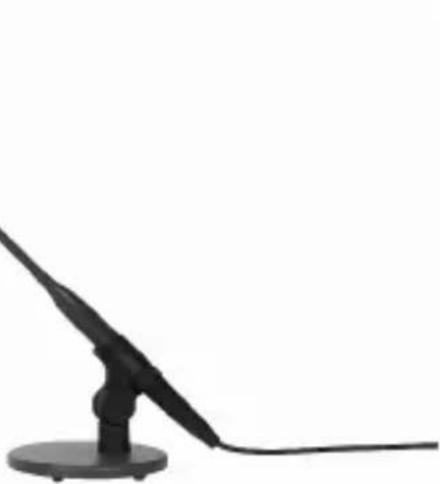
CGN 99 H/L (order no. 2965H00140): 576-mm (23-in.) hypercardioid gooseneck microphone with integrated DPA XLR phantom power adapter and external foam windscreen.
CHM 99 (order no. 2965H00150): cardioid flown microphone with spring clamp and 10-m (33-ft.) special cable with DPA XLR phantom power adapter.
Always use the supplied windscreen (unless it would be too visually obtrusive). It protects the microphone from dust and moisture, and reduces pop and wind noise to a minimum.
2.3 Windscreen (2965Z2001)
B 18 battery power supply for all Discreet Acoustics Compact microphones.
2.4 Optional Accessories
PS3 F-Lock panel mount socket for all Discreet Acoustics Compact gooseneck microphones (not for CHM 99).
Refer to fig. 9.
H 500 shock mount for all Discreet Acoustics Compact gooseneck microphones (not for CHM 99).
Refer to fig.10.
H 600 shock mount for all Discreet Acoustics Compact gooseneck microphones (not for CHM 99).
Refer to fig.11.
SA 60 stand adapter for all Discreet Acoustics Compact gooseneck microphones (not for CHM 99).
Refer to fig.12.
ST 1, ST 45 table stands for all Discreet Acoustics Compact gooseneck microphones (not for CHM 99).
Refer to fig.13.
3 Microphone Applications
Note that both the maximum working distance and the area covered by the microphone depend on the pickup angle. The smaller the pickup angle (hypercardioid), the longer the maximum distance between the talker and the microphone and the smaller the area covered by the microphone.
Refer to Table 1.
Whether a cardioid or hypercardioid capsule will give the best results therefore depends on the specific application situation).
3 Microphone Applications
| Microphone | Polar Pattern | Speaker position | Working distance | Application |
| CGN 99 C/S | Cardioid | Beinde the micro-phone only | 30 to 60 cm* (1 to 2 feet) | Sound system |
| CGN 99 H/S | Hypercardioid | 90° to 135° off microphone axis | 30 to 90 cm* (1 to 3 feet) | Sound system |
| CGN 99 C/L | Cardioid | Behind the micro-phone only | 30 to 60 cm* (1 to 2 feet) | Sound system |
| CGN 99 H/L | Hypercardioid | 90° to 135° off microphone axis | 30 to 90 cm* (1 to 3 feet) | Sound system |
| CHM 99 | Cardioid | Behind the micro-phone only | 1 to 3 m* (3.5 to 10 feet) | Sound system |
Table 1: Microphone applications.
* Depending upon Acoustic environment
4 Installation and Connection
4.1 Introduction
All Discreet Acoustics Compact microphones are condenser microphones and therefore require a power supply (phantom power). The microphones have been designed for connection to microphone inputs with 9 to 52 V phantom power. To connect Discreet Acoustics Compact microphones to inputs without phantom power, refer to Section 4.4.
4.2 CGN 99 ...
Gooseneck
Microphones
Refer to figs. 9 and 12.
Note:
Refer to figs. 10 and 11.
- Use the optional PS 3 F-Lock panel mount socket to install the microphone in a tabletop or an optional SA 60 stand adapter to mount the microphone on a floor or table stand.
For even better vibrational noise rejection, you can fix the microphone to the tabletop with an optional H 500 or H 600 shock mount.
-
Use a shielded cable to connect the microphone to a microphone input with phantom power.
-
If the phantom power on your mixing console is switchable, switch the phantom power on. (Refer to the instruction manual for your mixing console.) The microphone is powered directly from the phantom power source on the console.
-
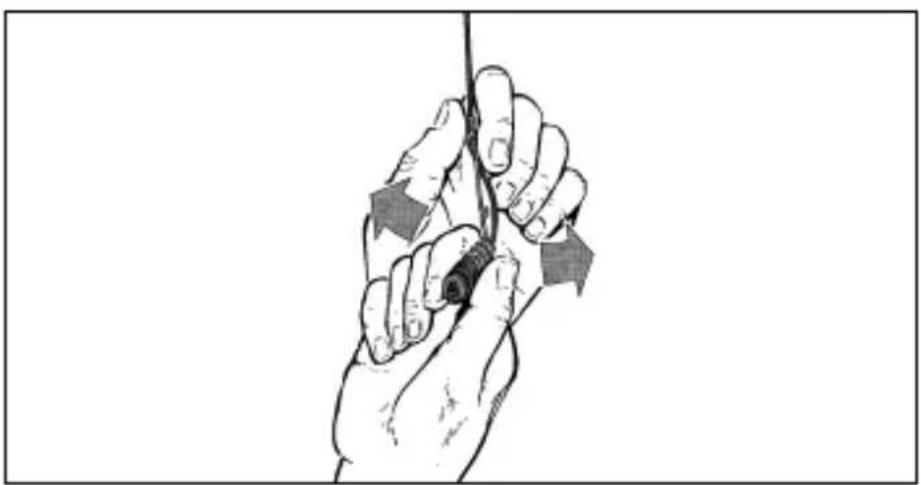
Prior to installing the microphone, straighten the cable by carefully pulling it through your fingers. Make sure not to buckle or twist the cable. Let hang for 1 day to untwist.
- Fasten a hook to the ceiling, use an existing hook, or stretch a fishing line across the hall.
- Pass the cable through the hook or over the line so that it will hang at the desired height.
4.3 CHM 99 Flown Microphone
Do not tie a knot into the cable to hang it on the hook. This may cause the cable to twist and misalign the microphone after a while.
Important!
natural_image
Illustration of a hand holding a cable with directional arrows indicating force or movement (no text or symbols)- Hold the cable with one hand and turn the microphone carefully into the desired position.
Fig. 1: Aligning the microphone.
Refer to fig. 1.
- The cable on the CHM 99 will twist as the ambient temperature changes, e.g., in the heat generated by spotlights.
- The angle of twist depends both on the ambient temperature and the cable length. The shorter the cable, the smaller the amount of twist.
Note:
4 Installation and Connection
- If you use spotlights, be sure to turn them on before aligning the microphone.
- When you turn the spotlights off, the microphone will rotate out of alignment. Upon turning the spotlights back on, the microphone should rotate back into its original position.
4.3.1 Stabilizing the Microphone
To stabilize the microphone,
- Leave an appropriate length of fishing line through the eyelet on the spring clamp of the CHM 99.
- Fix the fishing line to two opposite walls so as to create just enough downward pull to steady the microphone laterally.
4.3.2 Applications
natural_image
Illustration of a traditional Chinese opera performance with two costumed performers and audience (no text or symbols)Fig. 2: Theater stage miking
natural_image
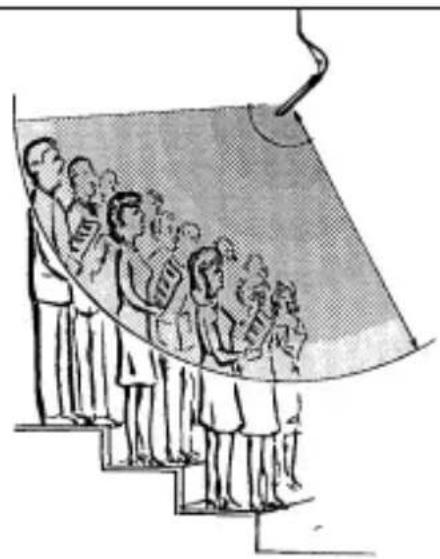
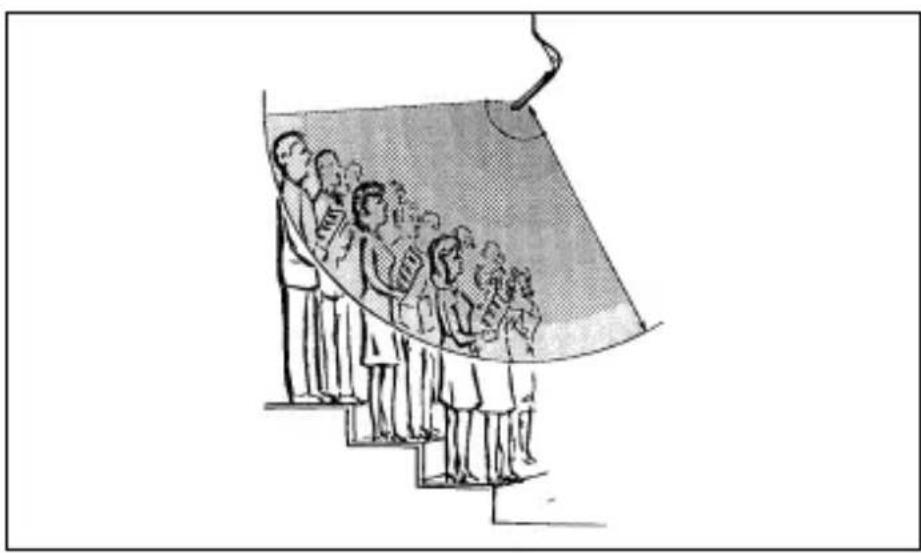
Illustration of a group of people standing on steps under a curved structure, possibly depicting a stage or pathway (no text or symbols present)Fig. 3: Miking up a choir
- Use a shielded balanced cable to connect the microphone to a microphone input with phantom power.
- If the phantom power on your mixing console is switchable, switch the phantom power on. (Refer to the instruction manual for your mixing console.)
The microphone is powered directly from the phantom power source.
If your mixer has no phantom power, insert an external phantom power supply between the DPA phantom power adapter and mixer input. We recommend the optional B 18 power supplies from AKG. Using any power supplies not recommended by AKG may damage your microphone and voids the warranty.
You may also consider having a qualified technician retrofit a phantom power supply as per IEC 61938 to balanced or unbalanced mixer inputs. The IEC 61938 standard specifies a positive voltage of 12, 24, or 48 V on the audio lines versus the cable shield.
4.3.3 Audio Connection
4.4 Connecting to Inputs without Phantom Power
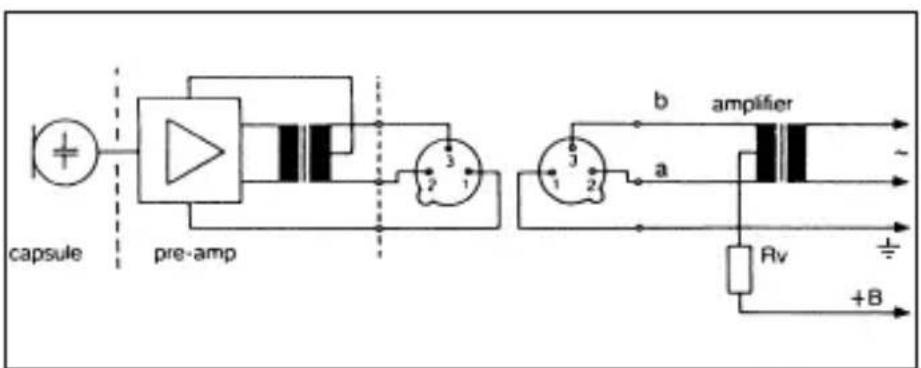
4.4.1 Balanced Inputs
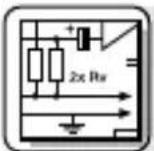
Fig. 4: Input transformer with center tap (ungrounded)
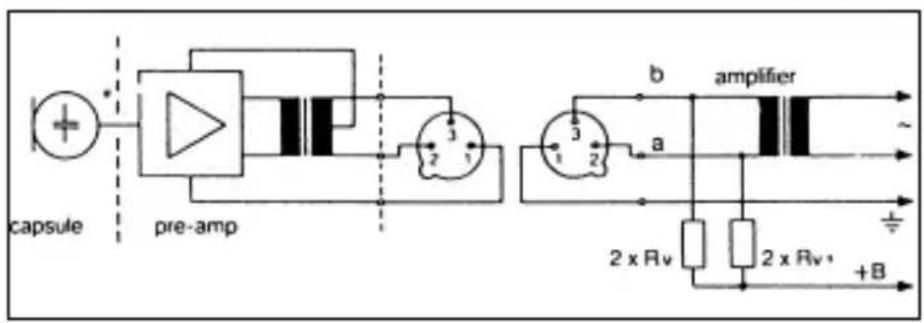
Fig. 5: Input transformer with no center tap (ungrounded)
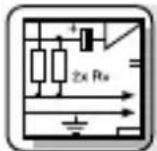
If your equipment inputs are grounded or transformerless, wire either capacitors or extra transformers into the audio lines as shown in fig. 9 above in order to prevent any current leakage into the input stage.
4.4.2 Unbalanced Inputs
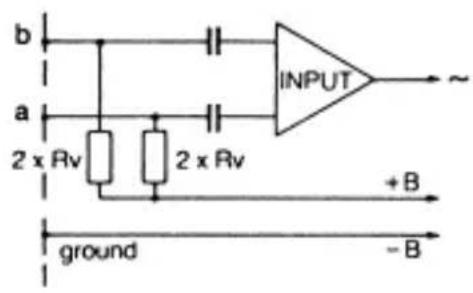
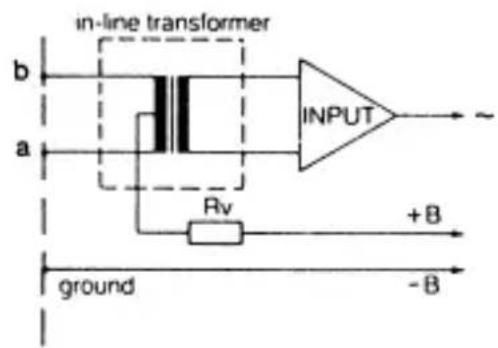
Fig. 6: Unbalanced input stage
VDC Rv 2 x Rv*
| 12 V ±2 V 330 Ω 680 Ω | |
| Table 2: Standard values for Rv and 2 x Rv | 24 V ±4 V 680 Ω 1,200 Ω |
| 48 V ±4 V 3,300 Ω 6,800 Ω |
* In order to satisfy the IEC 61938 symmetry requirement, make sure the actual values of the two resistors 2 x Rv do not differ by more than 0.5%!
The DPA phantom power adapter is equipped with a bass cut filter to minimize low-frequency noise.
4.5 Bass Cut
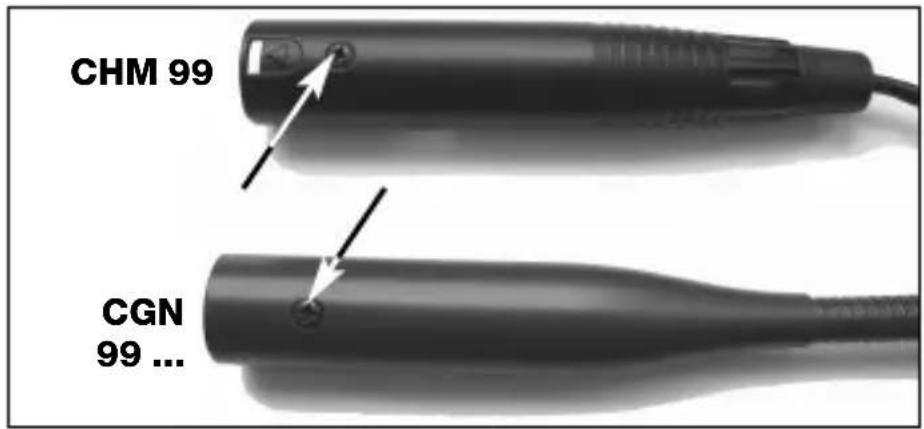
- Unscrew the fixing screw on the microphone or DPA phantom power adapter.
- Pull the circuit board out of the case WITH CAUTION – so as not to break the internal leads.
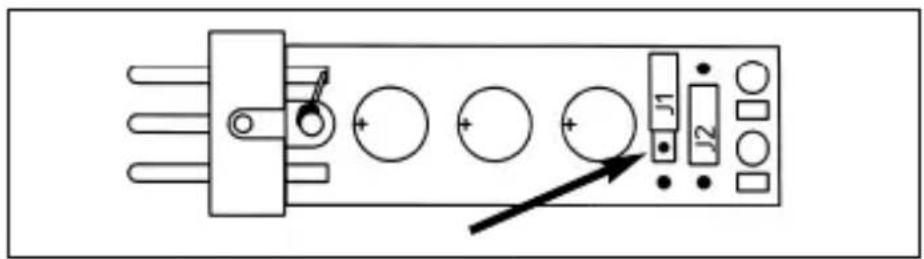
- To acitvate the bass cut filter, plug the jumper J1 into the central contact pair on the circuit board.
Fig. 7: Fixing screw.
Refer to fig. 7.
Fig. 8: DPA circuit board.
Refer to fig. 8.
5 Specifications
| Microphone CGN 99 C/S | CGN 99 H/S CGN 99 C/L CGN | 99 H/L CHM 99 | |
| Type Pre-polarized condenser microphone | |||
| Polar pattern Cardioid Hypercardioid Cardioid | |||
| Frequency range 70 to 18,000 Hz 50 to 19,000 Hz 70 to 18,000 Hz | |||
| Sensitivity 18 mV/Pa 12 mV/Pa 18 mV/Pa -35 dBV* | -38 dBV* | -35 dBV* | |
| Max. SPL for 1% THD 125 dB 125 | dB 125 | dB | |
| Equivalent noise level | <21 dB-A | <21 dB-A | <21 dB-A |
| Signal/noise ratio (A-weighted.) | >73 dB | >73 dB | >73 dB |
| Electrical impedance | <600 Ω | <600 Ω | <600 Ω |
| Recommended load impedance | >2000 Ω | >2000 Ω | >2000 Ω |
| Power requirement | 9 to 52 V phantom power to IEC 61938 (DPA adapter integrated) | ||
| Current consumption <3 mA | <3 mA | <3 mA | |
| Connector | XLR-3 | XLR-3 | XLR-3 |
| Finish | matte black | matte black | matte black |
| Size 13.5 x 380 mm 13.5 x 380 mm (capsule dia. x length) | (0.5 x 15 in.)13.5 x 580 mm(0.5 x 23 in.) | (0.5 x 15 in.)13.5 x 580 mm(0.5 x 23 in.) | 13.5 x 55 mm(0.5 x 2.1 in.) |
| Net/shipping weight | 160/480 g(5.7/17 oz.) (5.7/17 oz.)170/500 g(6/17.7 oz.) (6/17.7 oz.) | 160/480 g(5.7/17 oz.)170/500 g(6/17.7 oz.) (6/17.7 oz.) | 20/480 g(17 oz.) |
| Order no. | 2965H001102965H00130 | 2965H001202965H00140 | 2965H00150 |
* re 1 V/Pa
This product conforms to the standards listed in the Declaration of Conformity. To order a free copy of the Declaration of Conformity, visit http://www.akg.com or contact sales@akg.com.
line
| Frequency | Value | | --------- | ----- | | 1250 Hz | -70 | | 2500 Hz | -65 | | 4000 Hz | -60 | | 6000 Hz | -55 | | 8000 Hz | -50 | | 10000 Hz | -45 | | 12000 Hz | -40 |CGN 99 C/S
Frequency
Response &
Polar Diagram
line
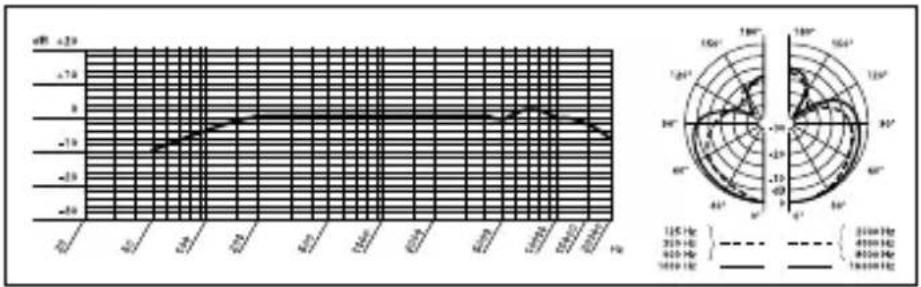
| Time (s) | Current (mA) | |----------|--------------| | 0 | -10 | | 1 | -5 | | 2 | 0 | | 3 | 5 | | 4 | 10 | | 5 | 15 | | 6 | 20 | | 7 | 25 | | 8 | 30 | | 9 | 35 | | 10 | 40 | | 11 | 45 | | 12 | 50 | | 13 | 55 | | 14 | 60 | | 15 | 65 | | 16 | 70 | | 17 | 75 | | 18 | 80 | | 19 | 85 | | 20 | 90 | | 21 | 95 | | 22 | 100 | | 23 | 105 | | 24 | 110 | | 25 | 115 | | 26 | 120 | | 27 | 125 | | 28 | 130 | | 29 | 135 | | 30 | 140 | | 31 | 145 | | 32 | 150 | | 33 | 155 | | 34 | 160 | | 35 | 165 | | 36 | 170 | | 37 | 175 | | 38 | 180 | | 39 | 185 | | 40 | 190 | | 41 | 195 | | 42 | 200 | | 43 | 205 | | 44 | 210 | | 45 | 215 | | 46 | 220 | | 47 | 225 | | 48 | 230 | | 49 | 235 | | 50 | 240 | | 51 | 245 | | 52 | 250 | | 53 | 255 | | 54 | 260 | | 55 | 265 | | 56 | 270 | | 57 | 275 | | 58 | 280 | | 59 | 285 | | 60 | 290 | | 61 | 295 | | 62 | 300 | | 63 | 305 | | 64 | 310 | | 65 | 315 | | 66 | 320 | | 67 | 325 | | 68 | 330 | | 69 | 335 | | 70 | 340 | | 71 | 345 | | 72 | 350 | | 73 | 355 | | 74 | 360 | | 75 | 365 | | 76 | 370 | | 77 | 375 | | 78 | 380 | | 79 | 385 | | 80 | 390 | | 81 | 395 | | 82 | 400 | | 83 | 405 | | 84 | 410 | | 85 | 415 | | 86 | 420 | | 87 | 425 | | 88 | 430 | | 89 | 435 | | 90 | 440 | | 91 | 445 | | 92 | 450 | | 93 | 455 | | 94 | 460 | | 95 | 465 | | 96 | 470 | | 97 | 475 | | 98 | 480 | | 99 | 485 | |100 | - |CGN 99 H/S
Frequency
Response &
Polar Diagram
line
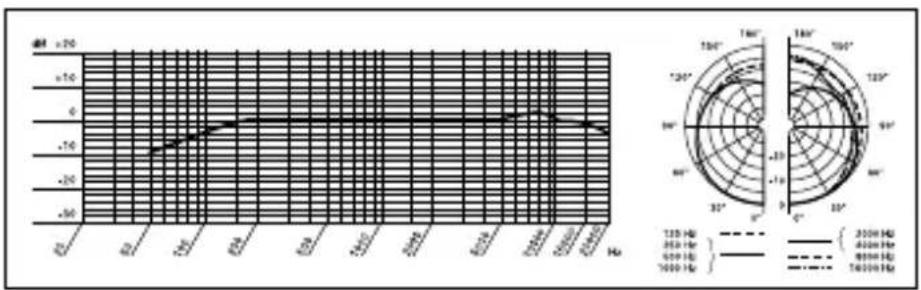
| Frequency (Hz) | Current (V) | Frequency (Hz) | | -------------- | ----------- | -------------- | | 2000 | -30 | 1500 | | 4000 | -25 | 1500 | | 8000 | -20 | 1500 | | 16000 | -15 | 1500 |CGN 99 C/L
Frequency
Response &
Polar Diagram
line
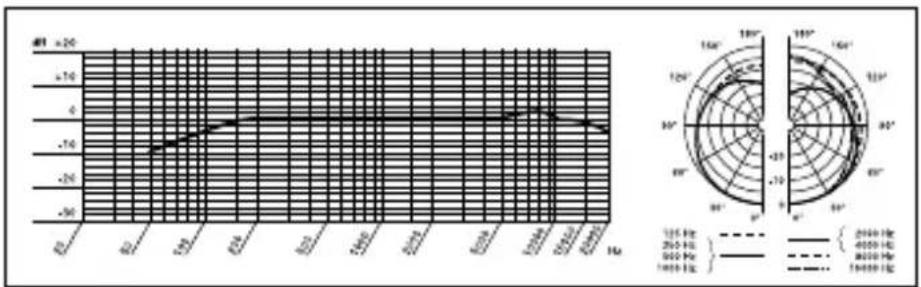
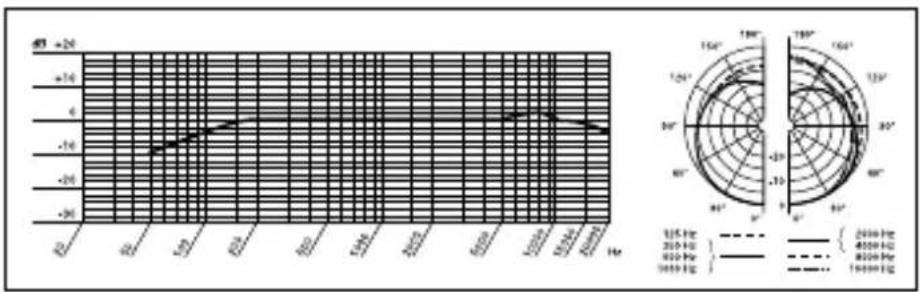
| Time (Hz) | Voltage (dB) | Current (V) | |-----------|--------------|-------------| | 0 | +2.5 | +180 | | 10 | +2.5 | +160 | | 20 | +2.5 | +140 | | 30 | +2.5 | +120 | | 40 | +2.5 | +100 | | 50 | +2.5 | +80 | | 60 | +2.5 | +60 | | 70 | +2.5 | +40 | | 80 | +2.5 | +20 | | 90 | +2.5 | -20 | | 100 | +2.5 | -40 | | 110 | +2.5 | -60 | | 120 | +2.5 | -80 | | 130 | +2.5 | -100 | | 140 | +2.5 | -120 | | 150 | +2.5 | -140 | | 160 | +2.5 | -160 | | 170 | +2.5 | -180 | | 180 | +2.5 | -200 | | 190 | +2.5 | -220 | | 200 | +2.5 | -240 | | 210 | +2.5 | -260 | | 220 | +2.5 | -280 | | 230 | +2.5 | -300 | | 240 | +2.5 | -320 | | 250 | +2.5 | -340 | | 260 | +2.5 | -360 | | 270 | +2.5 | -380 | | 280 | +2.5 | -400 | | 290 | +2.5 | -420 | | 300 | +2.5 | -440 | | 310 | +2.5 | -460 | | 320 | +2.5 | -480 | | 330 | +2.5 | -500 | | 340 | +2.5 | -520 | | 350 | +2.5 | -540 | | 360 | +2.5 | -560 | | 370 | +2.5 | -580 | | 380 | +2.5 | -600 | | 390 | +2.5 | -620 | | 400 | +2.5 | -640 | | 410 | +2.5 | -660 | | 420 | +2.5 | -680 | | 430 | +2.5 | -700 | | 440 | +2.5 | -720 | | 450 | +2.5 | -740 | | 460 | +2.5 | -760 | | 470 | +2.5 | -780 | | 480 | +2.5 | -800 | | 490 | +2.5 | -820 | | 500 | +2.5 | -840 | | 510 | +2.5 | -860 | | 520 | +2.5 | -880 | | 530 | +2.5 | -900 | | 540 | +2.5 | -920 | | 550 | +2.5 | -940 | | 560 | +2.5 | -960 | | 570 | +2.5 | -980 | | 580 | +2.5 | -1000 | | 590 | +2.5 | -1020 | | 600 | +2.5 | -1040 | | 610 | +2.5 | -1060 | | 620 | +2.5 | -1080 | | 630 | +2.5 | -1100 | | 640 | +2.5 | -1120 | | 650 | +2.5 | -1140 | | 660 | +2.5 | -1160 | | 670 | +2.5 | -1180 | | 680 | +2.5 | -1200 | | 690 | +2.5 | -1220 | | 700 | +2.5 | -1240 | | 710 | +2.5 | -1260 | | 720 | +2.5 | -1280 | | 730 | +2.5 | -1300 | | 740 | +2.5 | -1320 | | 750 | +2.5 | -1340 | | 760 | +2.5 | -1360 | | 770 | +2.5 | -1380 | | 780 | +2.5 | -1400 | | 790 | +2.5 | -1420 | | 800 | +2.5 | -1440 | | 810 | +2.5 | -1460 | | 820 | +2.5 | -1480 | | 830 | +2.5 | -1500 | | 840 | +2.5 | -1520 | | 850 | +2.5 | -1540 | | 860 | +2.5 | -1560 | | 870 | +2.5 | -1580 | | 880 | +2.5 | -1600 | | 890 | +2.5 | -1620 | | 900 | +2.5 | -1640 | | 910 | +2.5 | -1660 | | 920 | +2.5 | -1680 | | 930 | +2.5 | -1700 | | 940 | +2.5 | -1720 | | 950 | +2.5 | -1740 | | 960 | +2.5 | -1760 | | 970 | +2.5 | -1780 | | 980 | +2.5 | -1800 | | 990 | +2.5 | -1820 | | 100 | +2.5 | -1840 | | 1 | +3 | -186 | | 1 (approx.) from x-axis to right, y-axis range: ±3 to ±3, y-axis range: ±3 to ±3, x-axis range: ±3 to ±3, y-axis range: ±3 to ±3, x-axis range: ±3 to ±3, y-axis range: ±3 to ±3, x-axis range: ±3 to ±3, y-axis range: ±3 to ±3, x-axis range: ±3 to ±3, y-axis range: ±3 to ±3, x-axis range: ±3 to ±3, y-axis range: ±3 to ±3, y-axis range: ±3 to ±3, x-axis range: ±3 to ±3, x-axis range: ±3 to ±3, x-axis range: ±3 to ±3, x-axis range: ±3 to ±3, x-axis range: ±3 to ±3, x-axis range: ±3 to ±3, x-axis range: ±3 to ±3, x-axis range: ±3 to ±3, x-axis range: ±3 to ±3, x-axis range: ±3 to ±3, y-axis range: ±3 to ±3, x-axis range: ±3 to ±3, x-axis range: ±3 to ±3, x-axis range: ±3 to ±3, x-axis range: ±3 to ±3, x-axis range: ±3 to ±3, x-axis range: ±3 to ±3, x-axis range: ±3 to ±3, x-axis range: ±3 to ±3, y-axis range: ±3 to ±3, y-axis range: ±3 to ±3, y-axis range: ±3 to ±3, y-axis range: ±3 to ±3, y-axis range: ±3 to ±3, y-axis range: ±3 to ±3, y-axis range: ±3 to ±3, y-axis range: ±3 to ±3, y-axis range: ±3 to ±3, y-axis range: ±3 to ±3, x-axis range: ±3 to ±3, x-axis range: ±3 to ±3, x-axis range: ±3 to ±3, x-axis range: ±3 to ±3, x-axis range: ±3 to ±3, x-axis range: ±3 to ±3, x-axis range: ±3 to ±3, y-axis range: ±3 to ±3, y-axis range: ±3 to ±3, x-axis range: ±3 to ±3, x-axis range: ±3 to ±3, x-axis range: ±3 to ±3, x-axis range: ±3 to ±3, x-axis range: ±3 to ±3, x-axis range: ±3 to ±3, y-axis range: ±3 to ±3, y-axis range: ±3 to ±3, y-axis range: ±3 to ±3, x-axis range: ±3 to ±3, x-axis range: ±3 to ±3, x-axis range: ±3 to ±3, x-axis range: ±3 to ±3, x-axis range: ±3 to ±3, x-axis range: ±3 to ±3, y-axis range: ±3 to ±3, x-axis range: ±3 to ±3, x-axis range: ±3 to ±3, y-axis range: ±3 to ±3, x-axis range: ±3 to ±3, x-axis range: ±3 to ±3, x-axis range: ±3 to ±3, x-axis range: ±3 to ±3, x-axis range: ±3 to ±3, x-axis range: ±3 to ±3, y-axis range: ±3 to ±3, y-axis range: ±3 to ±3, x-axis range: ±3 to ±3, y-axis range: ±3 to ±3, x-axis range: ±3 to ±3, x-axis range: ±3 to ±3, x-axis range: ±3 to ±3, x-axis range:±4 ,x轴范围范围范围范围范围范围范围范围范围范围范围范围范围范围范围范围范围范围范围范围范围范围范围范围范围范围范围范围范围范围范围范围范围范围范围范围范围范围范围范围范围范围范围范围范围范围范围范围范围范围范围范围范围范围范围范围范围范围范围范围范围范围范围范围范围范围范围范围范围范围范围范围范围范围范围范围范围范围范围范围范围范围范围范围范围范围范围范围范围范围范围范围范围范围范围范围范围范围范围范围範圍范围范围範圍範圍範圍範圍範圍範圍範圍範圍範圍範圍範圍範圍範圍範圍範圍範圍範圍範圍範圍範圍範圍範圍範圍範圍範圍範圍範圍範圍範圍範圍範圍範圍範圍範圍範圍範圍範圍範圍範圍範圍範圍範圍範圍範圍範圍範圍範圍範圍範圍範圍範圈範圍範圍範圍範圍範圍範圍範圍範圍範圍範圍範圍範圍範圍範圍範圍範圍範圍範圍範圍範圍範圍範圍範圍範圍範圍範圍範圍範圍範圍範圍範圍範圍範圍範圍範圍範圍範圍範圍範圍範圍範圍範圍範圍範圍範圍範圍範圍範圍範圍範围範圍範圍範圍範圍範圍範圍範圍範圍範圍範圍範圍範圍範圍範圍範圍範圍範圍範圍範圍範圍範圍範圍範圍範圍範圍範圍範圍範圍範圍範圍範圍範圍範圍範圍範圍範圍範圍範圍範圍範圍範圍範圍範圍範圍範圍範圍範圍範圍範圍範跑行区间 [-9] ,x轴距值区间 [-9] ,y轴距值区间 [-9] ,z轴距值区间 [-9] ,w轴距值区间 [-9] ,x轴距值区间 [-9] ,y轴距值区间 [-9] ,x轴距值区间 [-9] ,x轴距值区间 [-9] ,x轴距值区间 [-9] ,x轴距值区间 [-9] ,x轴距值区间 [-9] ,x轴距值区间 [-9] ,x轴距值区间 [-9] ,x轴距值区间 [-9] ,x轴距值区间 [-9] ,x轴距值区间 [-9] ,y轴距值区间 [-9] ,y轴距值区间 [-9] ,y轴距值区间 [-9] ,y轴距值区间 [-9] ,y轴距值区间 [-9] ,y轴距值区间 [-9] ,y轴距值区间 [-9] ,y轴距值区间 [-9] ,y轴距值区间 [-9] ,y轴距值区间 [-9] ,x轴距值区间 [-9] ,x轴距值区间 [-9] ,x轴距值区间 [-9] ,x轴距值区间 [-9] ,x轴距值区间 [-9] ,x轴距值区间 [-9] ,x轴距值区间 [-9] ,x轴距值区间 [-9] ,y轴距值区间 [-9] ,x轴距值区间 [-9] ,x轴距值区间 [-9] ,x轴距值区间 [-9] ,x轴距值区间 [-9] ,x轴距值区间 [-9] ,x轴距值区间 [-9] ,x轴距值区间 [-9] ,y轴距值区间 [-9] ,y轴距值区间 [-9] ,x轴距值区间 [-9] ,x轴距值区间 [-9] ,x轴距值区间 [-9] ,x轴距值区间 [-9] ,x轴距值区间 [-9] ,x轴距值区間 (-9) ,x轴距值区間 (-9) ,x轴距值区間 (-9) ,x轴距值区間 (-9) ,x轴距值区間 (-9) ,x轴距值区間 (-9) ,x轴距值区間 (-9) ,x轴距值区間 (-9) ,x轴距值区間 (-9) ,x轴距值区間 (-9) ,x轴距值区間 (-9) ,x轴距值区間 (-9) ,x轴距值区間 (-9) ,x轴距值区間 (-9) ,x轴距值区間 (-9) ,x轴距值区間 (-9) ,x轴距值区間 (-9) ,x轴距值区間 (-9) ,x轴距值区間 (-9) , -1 , - , - , - , - , - , - , - , - , - , - , - , - , - , - , - , - , - , - , - , - , - , - , - , - , - , - , - , - , - , - , - , - , - , - , - , - , - , - , - , - , - , - , - , - , - , - , - , - , - , - , - , - , - , - , - , - , - , - , - , - , - , - , - , - , - , - , - ,,x轴距离 Range (dB) [dB] [dB] [dB] [dB] [dB] [dB] [dB] [dB] [dB] [dB] [dB] [dB] [dB] [dB] [dB] [dB] [dB] [dB] [dB] [dB] [dB] [dB] [dB] [dB] [dB] [dB] [dB] [dB] [dB] [dB] [dB] [dB] [dB] [dB] [dB] [dB] [dB] [dB] [dB] [dB] [dB] [dB] [dB] [dB] [dB] [dB] [dB] [dB]CGN 99 H/L
Frequency
Response &
Polar Diagram
line
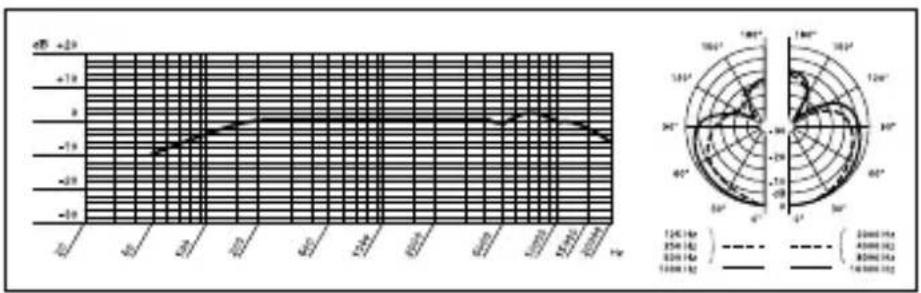
| Frequency (Hz) | Current (V) | | -------------- | ----------- | | 0 | -50 | | 120 | -40 | | 350 | -30 | | 600 | -20 | | 900 | -10 | | 1200 | 0 | | 3500 | 10 | | 6000 | 20 | | 9000 | 30 | | 12000 | 40 | | 35000 | 50 | | 60000 | 60 | | 90000 | 70 | | 120000 | 80 | | 350000 | 90 | | 600000 | 100 | | 900000 | 110 | | 1200000 | 120 | | 3500000 | 130 | | 6000000 | 140 | | 9000000 | 150 | | 12000000 | 160 | | 35000000 | 170 | | 60000000 | 180 | | 90000000 | 190 | | 120000000 | 200 | | 35000000 | 210 | | 60000000 | 220 | | 90000000 | 230 | | 120000000 | 240 | | 35000000 | 250 | | 60000000 | 260 | | 90000000 | 270 | | 120000000 | 280 | | 35000000 | 290 | | 60000000 | 300 | | 90000000 | 310 | | 120000000 | 320 | | 3500000 | 33 | | 65 | -4 | | 95 | -5 | | 125 | -6 | | 355 | -7 | | 655 | -8 | | 955 | -9 | | 1255 | -1 | | 3555 | -2 | | 6555 | -3 | | 9555 | -4 | | 1255 | -5 | | 3555 | -6 | | 6555 | -7 | | 9555 | -8 | | 1255 | -9 | | 3555 | -1 | | 6555 | -2 | | 9555 | -3 | | 1255 | -4 | | 3555 | -5 | | 6555 | -6 | | 9555 | -7 | | 1255 | -8 | | 3555 | -9 | | 6555 | -1 | | 9555 | -2 | | 1255 | -3 | | 3555 | -4 | | 6555 | -5 | | 9555 | -6 | | 1255 | -7 | | 3555 | -8 | | 6555 | -9 | | 9555 | -1 | | 1255 | -2 | | 355 | -3 | | 65 | -4 | | 95 | -5 | | 12 | -6 | | 3 | -7 | | 6 | -8 | | 9 | -9 | | 12 | -1 | | 3 | -2 | | 6 | -3 | | 9 | -4 | | 12 | -5 | | 3 | -6 | | 6 | -7 | | 9 | -8 | | 12 | -9 | | 3 | -1 | | 6 | -2 | | 9 | -3 | | 12 | -4 | | 3 | -5 | | 6 | -6 | | 9 | -7 | | 12 | -8 | | ... | ... | The chart displays a line graph with two y-axes (Left and Right) and a polar plot (Right). The x-axis is labeled 'Hz' and the y-axis is labeled 'A', but the labels are 'A', 'B', 'C', 'D' corresponding to the y-axis values. The right axis is labeled 'A', 'B', 'C', 'D'. The left axis is labeled 'E', and the right axis is labeled 'F'. The data series includes three series: 'A', 'B', and 'C' in the top row, and 'A', 'B', 'C' in the bottom row. The left axis is labeled 'E', 'B', 'C' in the middle row, and 'D'; the right axis is labeled 'F', 'A', 'B'. The plot shows a single line representing the current (A) and current (B) of a frequency (C) over a range from approximately +4 to +8 Hz. The right axis is labeled 'F'.CHM 99
Frequency
Response &
Polar Diagram

natural_image
Illustration of a hand holding a cable with directional arrows indicating force or movement (no text or symbols)natural_image
Illustration of a traditional Chinese opera performance with two costumed performers on stage and audience seated (no text or symbols)natural_image
Illustration of a group of people standing on steps under a curved structure (no text or symbols)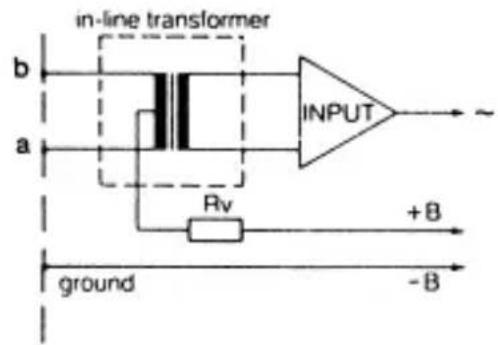
line
| Frequency (Hz) | Current (V) | | -------------- | ----------- | | 2000 | -20 | | 4000 | -15 | | 16000 | -10 |line
| Time (ms) | Voltage (dB) | Current (V) | |-----------|--------------|-------------| | 0 | -50 | 0 | | 10 | -40 | 10 | | 20 | -30 | 20 | | 30 | -20 | 30 | | 40 | -10 | 40 | | 50 | 0 | 50 | | 60 | 10 | 60 | | 70 | 20 | 70 | | 80 | 30 | 80 | | 90 | 40 | 90 | | 100 | 50 | 100 | | 110 | 40 | 90 | | 120 | 30 | 80 | | 130 | 20 | 70 | | 140 | 10 | 60 | | 150 | 0 | 50 | | 160 | -10 | 40 | | 170 | -20 | 30 | | 180 | -30 | 20 | | 190 | -40 | 10 | | 200 | -50 | 0 | The chart displays a line graph with two y-axes: the left axis represents voltage (dB) and the right axis represents current (V). The x-axis is labeled 'Time (ms)' in increments of 2. The data series includes 'Current (Hz)' and 'Capacitor (MHz)'.natural_image
Illustration of a hand gripping a cable with directional arrows indicating force or movement (no text or symbols)natural_image
Illustration of a traditional Chinese opera performance with two costumed performers and audience (no text or symbols)natural_image
Illustration of a group of people standing on steps under a curved structure, possibly a stage or banner (no text or symbols present)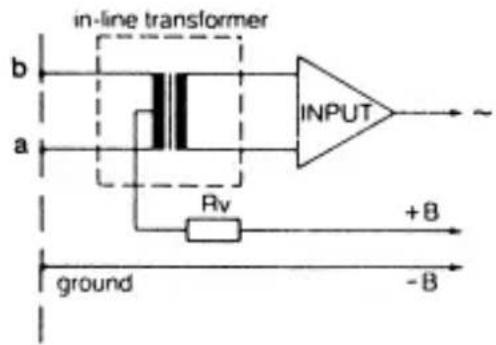
Fig. 6: Stadio d'ingresso asimmetrico
natural_image
Illustration of a hand gripping a cable with directional arrows indicating force or movement (no text or symbols)natural_image
Illustration of a traditional Chinese opera performance with two costumed performers and audience (no text or symbols)natural_image
Illustration of a group of people standing on stairs under a curved structure (no text or symbols)Fig. 3: Toma de coros
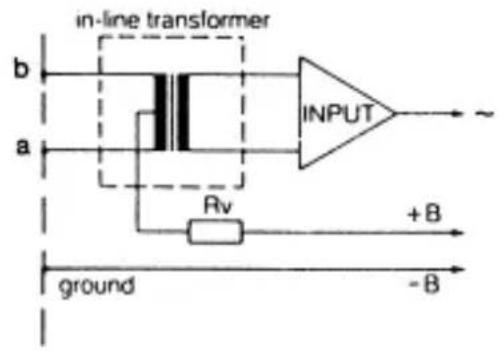
Fig. 8: circuito impreso del DPA
line
| Time (ms) | Voltage (dB) | Current (V) | |-----------|--------------|-------------| | 0.0 | -50 | 0 | | 0.1 | -45 | 10 | | 0.2 | -40 | 20 | | 0.3 | -35 | 30 | | 0.4 | -30 | 40 | | 0.5 | -25 | 50 | | 0.6 | -20 | 60 | | 0.7 | -15 | 70 | | 0.8 | -10 | 80 | | 0.9 | -5 | 90 | | 1.0 | 0 | 100 | | 1.1 | 5 | 110 | | 1.2 | 10 | 120 | | 1.3 | 15 | 130 | | 1.4 | 20 | 140 | | 1.5 | 25 | 150 | | 1.6 | 30 | 160 | | 1.7 | 35 | 170 | | 1.8 | 40 | 180 | | 1.9 | 45 | 190 | | 2.0 | 50 | 200 | | 2.1 | 55 | 210 | | 2.2 | 60 | 220 | | 2.3 | 65 | 230 | | 2.4 | 70 | 240 | | 2.5 | 75 | 250 | | 2.6 | 80 | 260 | | 2.7 | 85 | 270 | | 2.8 | 90 | 280 | | 2.9 | 95 | 290 | | 3.0 | 100 | 300 | | 3.1 | 105 | 310 | | 3.2 | 110 | 320 | | 3.3 | 115 | 330 | | 3.4 | 120 | 340 | | 3.5 | 125 | 350 | | 3.6 | 130 | 360 | | 3.7 | 135 | 370 | | 3.8 | 140 | 380 | | 3.9 | 145 | 390 | | 4.0 | 150 | 400 | | 4.1 | 155 | 410 | | 4.2 | 160 | 420 | | 4.3 | 165 | 430 | | 4.4 | 170 | 440 | | 4.5 | 175 | 450 | | 4.6 | 180 | 460 | | 4.7 | 185 | 470 | | 4.8 | 190 | 480 | | 4.9 | 195 | 490 | | 5.0 | 200 | 500 | | 5.1 | 205 | | | 5.2 | | +2 | | ... | | | | ... | ... | ... | | ... | ... | ... | | ... | ... | ... | | ... | ... | ... | | ... | ... | ... | | ... | ... | ... | | ... | ... | ... | | ... | ... | ... | | ... | ... | ... | | ... | ... | ... | | ... | ... | ... (with label 'a' and 'b') in the chart, but the values are estimated based on the y-axis label 'a'. The y-axis label 'a' is also labeled 'a'. The y-axis label 'b' is also labeled 'b'. The y-axis label 'c' is also labeled 'c'. The y-axis label 'd' is also labeled 'd'. The y-axis label 'e' is also labeled 'e'. The y-axis label 'f' is also labeled 'f'. The y-axis label 'g' is also labeled 'g'. The y-axis label 'h' is also labeled 'h'. The y-axis label 'i' is also labeled 'i'. The y-axis label 'j' is also labeled 'j'. The y-axis label 'k' is also labeled 'k'. The y-axis label 'l' is also labeled 'l'. The y-axis label 'm' is also labeled 'm'. The y-axis label 'n' is also labeled 'n'. The y-axis label 'o' is also labeled 'o'. The y-axis label 'p' is also labeled 'p'. The y-axis label 'q' is also labeled 'q'. The y-axis label 'r' is also labeled 'r'. The y-axis label 's' is also labeled 's'. The y-axis label 't' is also labeled 't'. The y-axis label 'u' is also labeled 'u'. The y-axis label 'v' is also labeled 'v'. The y-axis label 'w' is also labeled 'w'. The y-axis label 'x' is also labeled 'x'. The y-axis label 'y' is also labeled 'y'. The y-axis label 'z' is also labeled 'z'. The y-axis label 'a' is also labeled 'a'. The y-axis label 'a' is also labeled 'a'. The y-axis label 'b' is also labeled 'b'. The y-axis label 'b' is also labeled 'b'. The y-axis label 'c' is also labeled 'c'. The y-axis label 'c' is also labeled 'c'. The y-axis label 'd' is also labeled 'd'. The y-axis label 'd' is also labeled 'd'. The y-axis label '(e') is also labeled '(e'). The y-axis labels are not explicitly provided in the code.natural_image
Illustration of a hand gripping a cable with directional arrows indicating force or movement (no text or symbols)natural_image
Illustration of a traditional Chinese opera performance with two costumed performers and audience (no text or symbols)natural_image
Illustration of a group of people standing on steps under a curved structure, no text or symbols present4.4.1 Entradas balanceadas
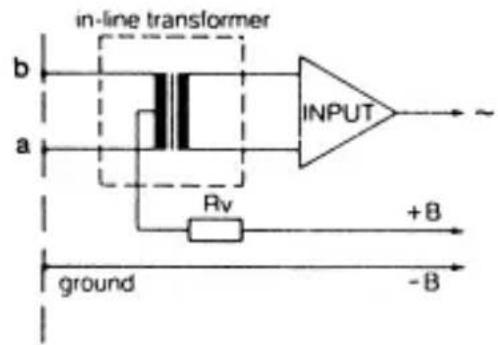
Fig. 8: A placa de circuito do DPA
- Para ativar o atenuador de graves insera a conexão de arame J1 no par de contatos central na placa de circuito.
Veja fig. 8.
5 Especificações
line
| Frequency (Hz) | Current (V) | | -------------- | ----------- | | 2000 | -20 | | 4000 | -15 | | 16000 | -10 |natural_image
Black curved object with a flared base, isolated on white background (no text or symbols)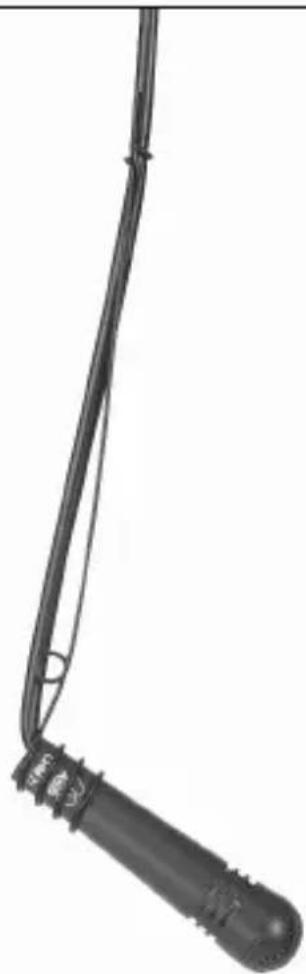
natural_image
Close-up of a black mechanical component with a curved neck and textured handle (no visible text or symbols)Fig. 14: CHM 99
Fig. 13: CGN 99 C/L + SA 60 + ST 45
natural_image
Silhouette of a black microphone on a stand against a white background (no text or symbols)Mikrofone · Kopfhörer · Drahtlosmikrofone · Drahtloskopfhörer · Kopfsprechgarnituren · Akustische Komponenten Microphones · Headphones · Wireless Microphones · Wireless Headphones · Headsets · Electroacoustical Components Microphones · Casques HiFi · Microphones sans fil · Casques sans fil · Micros-casques · Composants acoustiques Microfoni · Cuffie HiFi · Microfoni senza filo · Cuffie senza filo · Cuffie-microfono · Componenti acustici Micrófonos · Auriculares · Micrófonos inalámbricos · Auriculares inalámbricos · Auriculares con micrófono · Componentes acústicos Microfones · Fones de ouvido · Microfones s/fios · Fones de ouvido s/fios · Microfones de cabeça · Componentes acústicos
AKG Acoustics GmbH
Lemböckgasse 21–25, 1230 Vienna/AUSTRIA, phone: (+43-1) 86654-0*
e-mail: sales@akg.com
For other products and distributors worldwide visit www.akg.com




ROHS OK
H A Harman International Company
Technische Änderungen vorbehalten. Specifications subject to change without notice. Ces caractéristiques sont susceptibles de modifications. Ci riserviamo il diritto di effettuare modifiche tecniche. Nos reservamos el derecho de introducir modificaciones técnicas. Especificações sujeitas a mudanças sem aviso prévio.
Printed in China. 9100 U 10630


- Safety and Environment
- Description
- Introduction
- Microphones Refer to figs. 9 to 14.
- Microphone Applications
- Installation and Connection
- Introduction
- CGN 99 ...
- Gooseneck
- Microphones
- Note:
- CHM 99 Flown Microphone
- Important!
- Stabilizing the Microphone
- Applications
- Audio Connection
- Connecting to Inputs without Phantom Power
- Balanced Inputs
- Unbalanced Inputs
- Bass Cut
- Specifications
- Entradas balanceadas
- Especificações
- AKG Acoustics GmbH
- H A Harman International Company
Brand : AKG
Model : CGN 99 HL
Category : Microphone