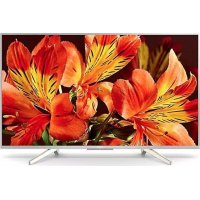
Bravia FW43BZ35F - Monitor SONY - Free user manual and instructions
Find the device manual for free Bravia FW43BZ35F SONY in PDF.



| Product type | Professional LCD Monitor |
| Brand | Sony |
| Model | Bravia FW43BZ35F |
| Screen size | 43 inches (109 cm) diagonal |
| Display resolution | 3840 x 2160 pixels (4K Ultra HD) |
| Backlight | LED |
| Connectivity | 4 HDMI inputs, 3 USB ports (2 USB 2.0, 1 USB 3.1 Gen1), LAN, Bluetooth 4.1, Wi-Fi 802.11b/g/n |
| Audio output | Speakers 10 W + 10 W, digital optical output, stereo mini-jack |
| Power supply | 220-240 V AC, 50 Hz (or supplied 19.5 V DC power adapter) |
| Power consumption (Standard mode) | 76 W |
| Power consumption (Intense mode) | 120 W |
| Standby power consumption | 0.50 W |
| Weight (with stand) | 11.3 kg |
| Weight (without stand) | 10.8 kg |
| Energy class | B |
| Operating temperature | 0 °C to 40 °C |
| Screen cleaning | Clean with a soft, dry cloth; do not use solvents or abrasive products |
| Safety | Use a suitable wall mount, do not block ventilation openings, avoid moisture and heat sources |
| Optional accessories | Wall mount bracket SU-WL450 |
| Main features | Android TV, built-in Chromecast, BRAVIA Sync, Wi-Fi, Bluetooth |
Frequently Asked Questions - Bravia FW43BZ35F SONY
User questions about Bravia FW43BZ35F SONY
0 question about this device. Answer the ones you know or ask your own.
Ask a new question about this device
Download the instructions for your Monitor in PDF format for free! Find your manual Bravia FW43BZ35F - SONY and take your electronic device back in hand. On this page are published all the documents necessary for the use of your device. Bravia FW43BZ35F by SONY.
USER MANUAL Bravia FW43BZ35F SONY
Parts and Controls 9
Controls and Indicators 9
Installing the LCD Monitor to the Wall . . .10
Using the optional Wall-Mount Bracket . . . 10
Troubleshooting. 12
Troubles and Solutions. 12
Specifications 13
Internet Connection and Data Privacy
This product connects to the internet during initial setup as soon as a network is connected in order to confirm internet connection, and later to configure the Home screen. Your IP address is used in these and all other internet connections. If you do not want your IP address be used at all, do not set-up the wireless internet function and do not connect an internet cable. Please refer to the privacy information presented in the set-up screens for further details of internet connections.
Introduction
Thank you for choosing this Sony product.
This manual is an informative guide. For professional usage, please refer to "Professional Guide".
Before operating the LCD Monitor, please read this manual thoroughly and retain it for future reference.
Note
Before operating the LCD Monitor, please read the "Safety Information" (page 3).
- Images and illustrations used in the Setup Guide and this manual are for reference only and may differ from the actual product.
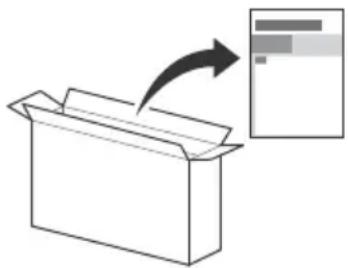
Attaching the Table-Top Stand to the LCD Monitor
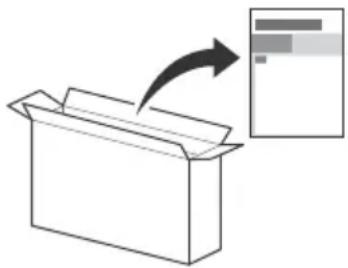
Refer to the Setup Guide on top of the cushion.
Help
Find more troubleshooting and other useful information directly from your LCD Monitor. Press HELP on the remote control to display a list of topics.
Location of the identification label
Labels for the LCD Monitor Model No., Production Date (year/ month) and Power Supply rating are located on the rear of the LCD Monitor or package.
For models with supplied mains adaptor:
Labels for the mains adaptor Model No. and Serial No. are located on the bottom of the mains adaptor.
WARNING
TO PREVENT THE
SPREAD OF FIRE, KEEP

CANDLES OR OTHER OPEN FLAMES AWAY FROM THIS PRODUCT AT ALL TIMES.
NOTICE FOR CUSTOMERS IN THE UNITED KINGDOM
A moulded plug complying with BS1363 is fitted to this equipment for your safety and convenience.
Should the fuse in the plug supplied need to be replaced with the same rating of fuse approved by ASTA or BSI to BS 1362 (i.e., marked with or) must be used.
If the plug supplied with this equipment has a detachable fuse cover, be sure to attach the fuse cover after you change the fuse. Never use the plug without the fuse cover. If you should lose the fuse cover, please contact your nearest Sony service station.
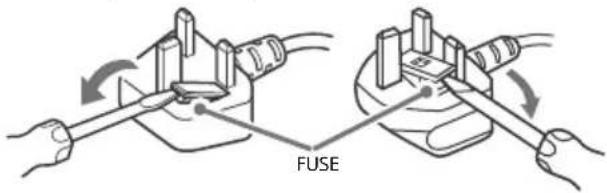
How to replace the fuse
Open the fuse compartment with a blade screwdriver, and replace the fuse.
Please refer to the illustration that actually equipped with the product.
IMPORTANT NOTICE
This product has been manufactured by or on behalf of Sony Visual Products Inc.
EU and UK Importer: Sony Europe B.V.
Inquiries to the EU Importer or related to product compliance in Europe should be sent to the manufacturer's authorized representative, Sony Belgium, bijkantoor van Sony Europe B.V., Da Vincilaan 7-D1, 1930 Zaventem, Belgium.
Inquiries to the UK Importer or related to product compliance in the UK should be sent to the manufacturer's authorized representative, Sony Europe B.V., The Heights, Brooklands, Weybridge, Surrey KT13 0XW, United Kingdom.
Notice for Radio Equipment
Hereby, Sony Visual Products Inc. declares that the radio equipment types FW-85BZ35F, FW-75BZ35F, FW-65BZ35F, FW-55BZ35F, FW-49BZ35F, FW-43BZ35F are in compliance with Directive 2014/53/EU. The full text of the EU declaration of conformity is available at the following internet address: http://www.compliance.sony.de/
This radio equipment can be operated in the EU without infringing applicable requirements on the use of radio spectrum.
Safety Information
WARNING
Caution
Risk of explosion if the battery is replaced by an incorrect type. Batteries must not be exposed to excessive heat such as sunshine, fire or the like or extremely low air pressure that can result in an explosion or leakage of flammable liquid or gas.
Stability Hazard
The LCD Monitor may fall, causing serious personal injury or death.
Never place a LCD Monitor in an unstable location. A LCD Monitor may fall, causing serious personal injury or death. Many injuries, particularly to children, can be avoided by taking simple precautions such as:
- Using cabinets or stands recommended by the manufacturer of the LCD Monitor.
- Only using furniture that can safely support the LCD Monitor.
- Ensuring the LCD Monitor is not overhanging the edge of the supporting furniture.
- Not placing the LCD Monitor on tall furniture (for example, cupboards or bookcases) without anchoring both the furniture and the LCD Monitor to a suitable support.
- Not placing the LCD Monitor on cloth or other materials that may be located between the LCD Monitor and supporting furniture.
Educating children about the dangers of climbing on furniture to reach the LCD Monitor or its controls. If your existing LCD Monitor is being retained and relocated, the same considerations as above should be applied.
Installation/Set-up
Install and use the LCD Monitor in accordance with the instructions below in order to avoid any risk of fire, electric shock or damage and/or injuries.
Installation
The LCD Monitor should be installed near an easily accessible mains socket.
- Place the LCD Monitor on a stable, level surface to prevent it from falling over and causing personal injury or property damage.
Install the LCD Monitor where it cannot be pulled, pushed, or knocked over.
- Install the LCD Monitor so that the LCD Monitor's Table-Top Stand does not protrude out from the LCD Monitor stand (not supplied). If the Table-Top Stand protrudes out from the LCD Monitor stand, it may cause LCD Monitor set to topple over, fall down, and cause personal injury or damage to the LCD Monitor.
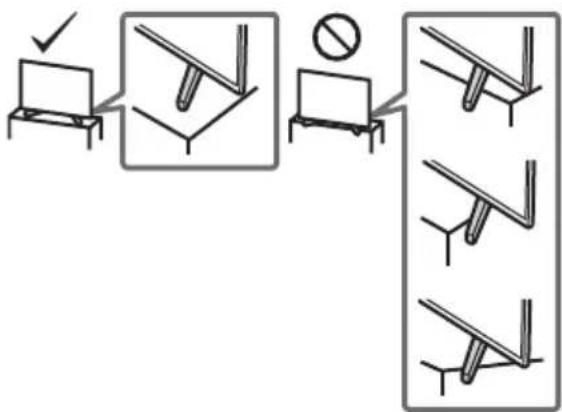
-
Only qualified service personnel should carry out wall-mount installations.
-
For safety reasons, it is strongly recommended that you use Sony accessories, including:
Wall-Mount Bracket SU-WL500 (FW-85/75BZ35F only)
Wall-Mount Bracket SU-WL450 (Except FW-85/75BZ35F)
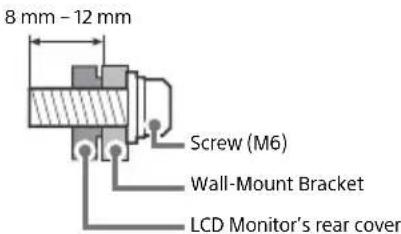
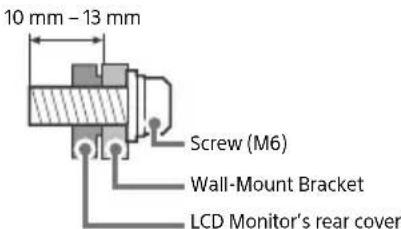
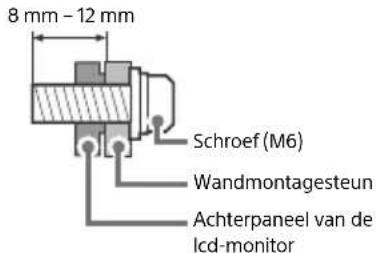
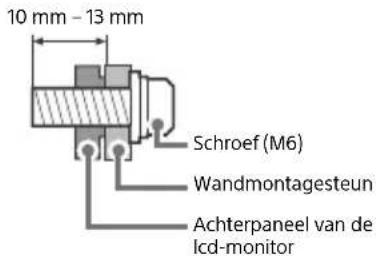
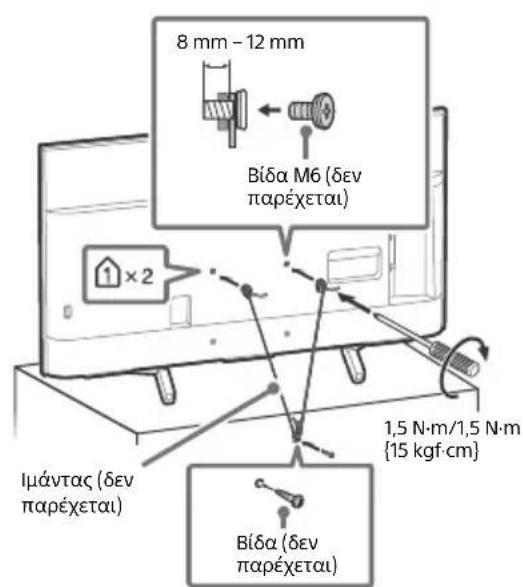
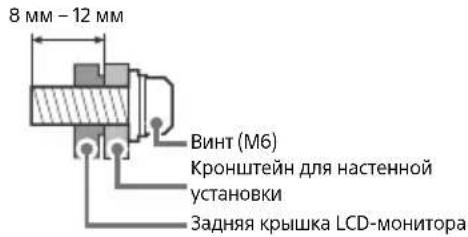
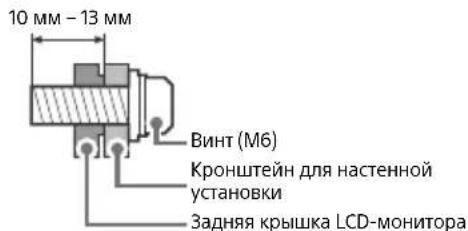
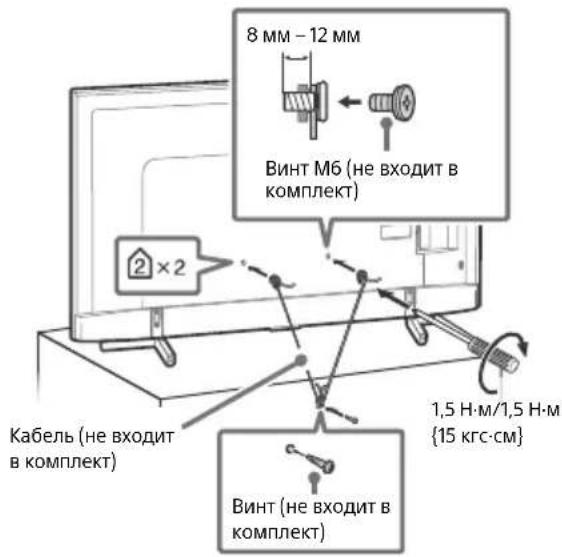
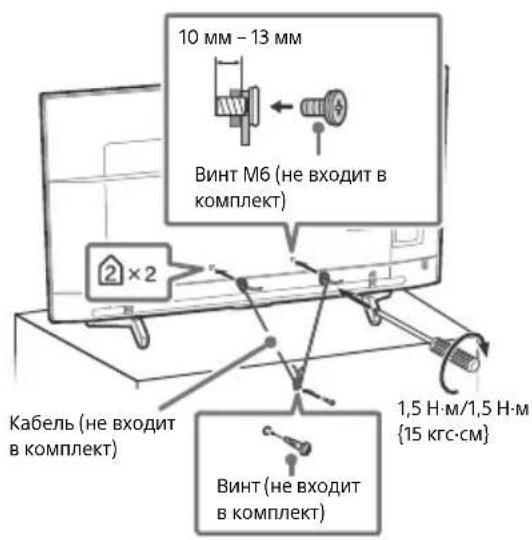
- Be sure to use the screws supplied with the Wall-Mount Bracket when attaching the Wall-Mount Bracket to the LCD Monitor. The supplied screws are designed as indicated by illustration when measured from the attaching surface of the Wall-Mount Bracket. The diameter and length of the screws differ depending on the Wall-Mount Bracket model.
Use of screws other than those supplied may result in internal damage to the LCD Monitor or cause it to fall, etc.
FW-85/49/43BZ35F
FW-75/65/55BZ35F
Transporting
- Before transporting the LCD Monitor, disconnect all cables.
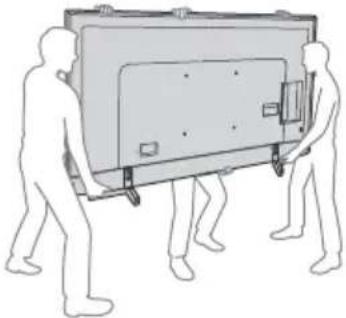
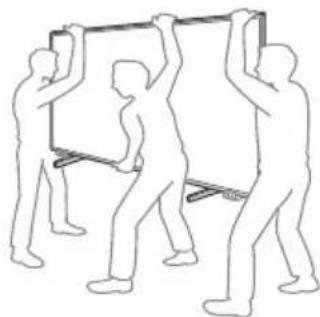
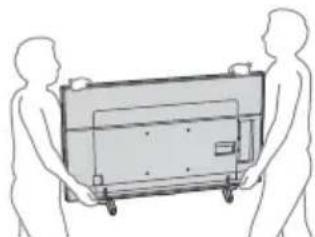
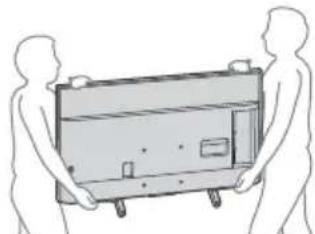
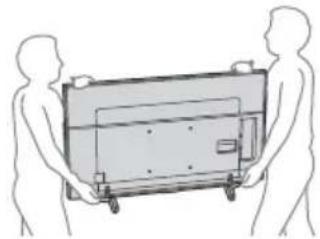
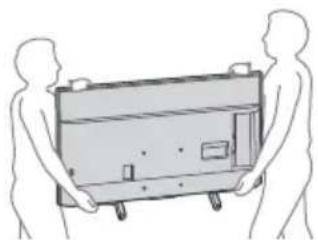
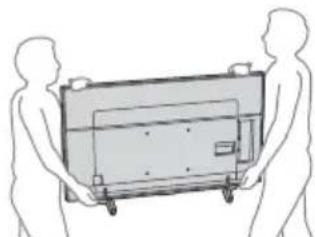
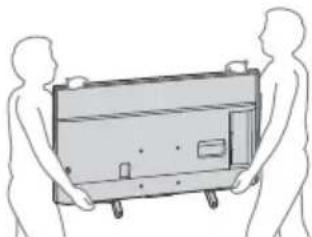
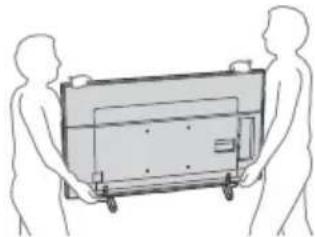
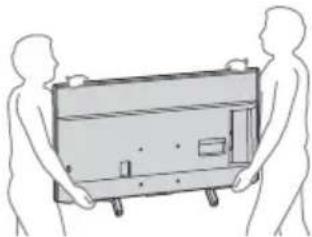
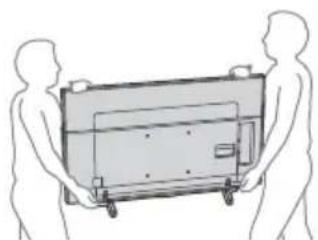
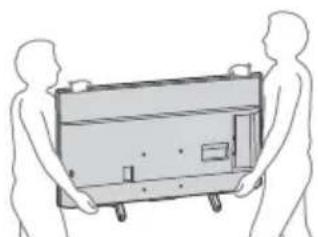
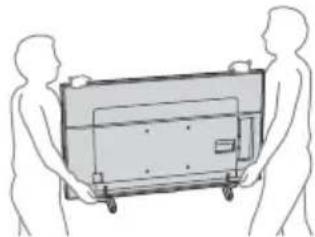
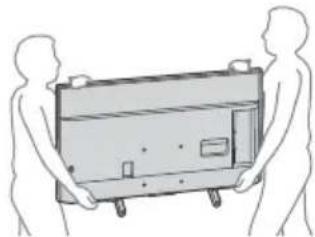
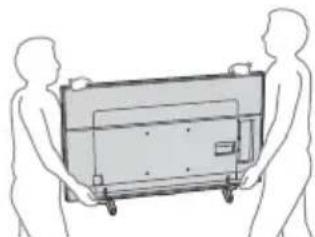
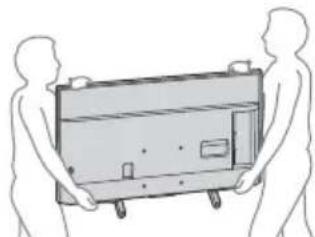
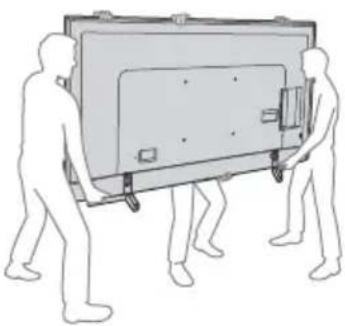
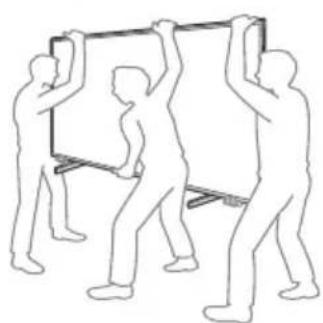
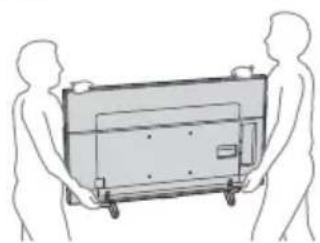
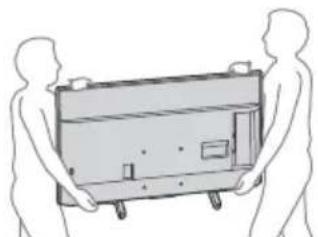
- Two or more people (three or more people for FW-85BZ35F) are needed to transport a large LCD Monitor.
- When transporting the LCD Monitor by hand, hold it as shown below. Do not put stress on the LCD panel and the frame around the screen.
- When lifting or moving the LCD Monitor, hold it firmly from the bottom.
FW-85BZ35F
FW-75/65/55BZ35F
FW-49/43BZ35F
- When transporting the LCD Monitor, do not subject it to jolts or excessive vibration.
- When transporting the LCD Monitor for repairs or when moving, pack it using the original carton and packing material.
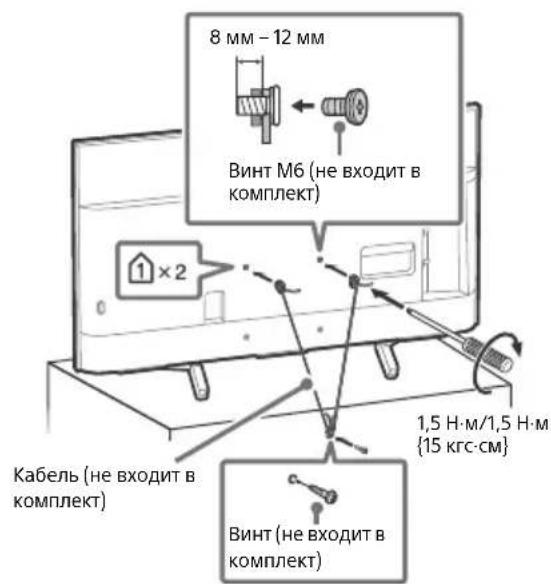
Topple prevention
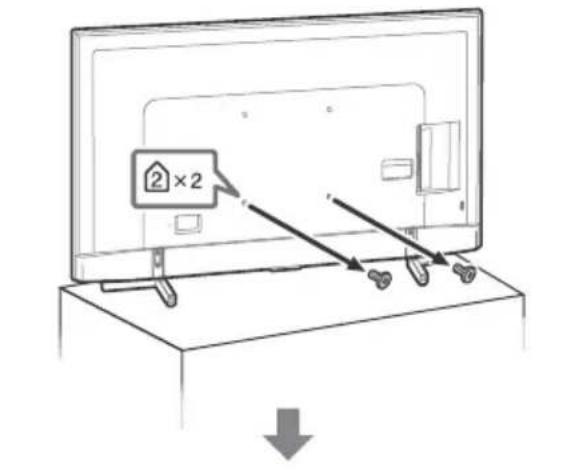
FW-85BZ35F
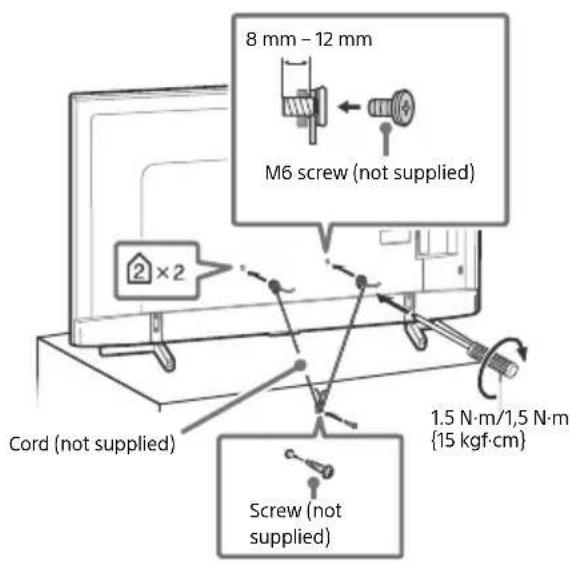
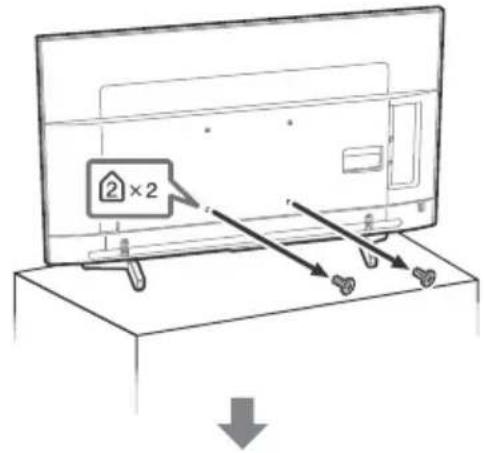
FW-75/65/55BZ35F
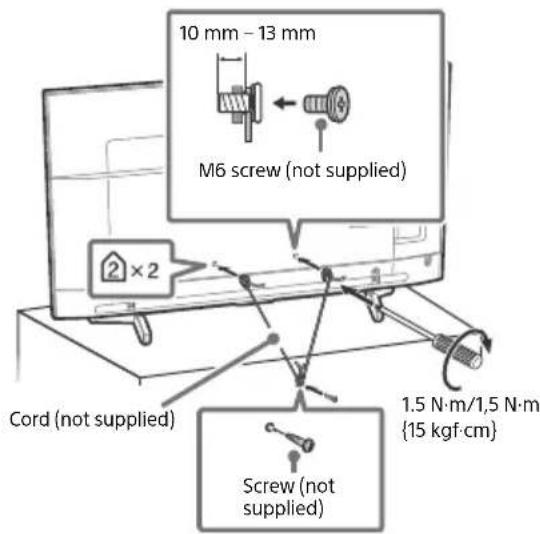
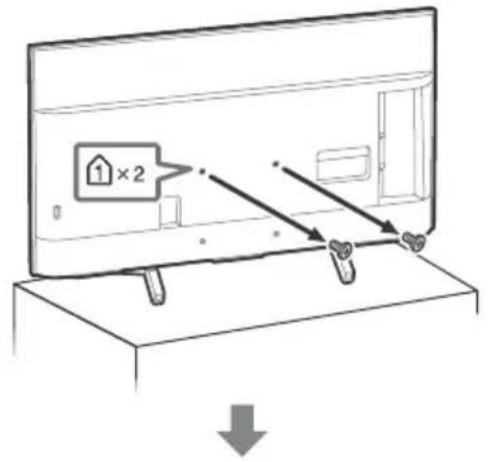
FW-49/43BZ35F
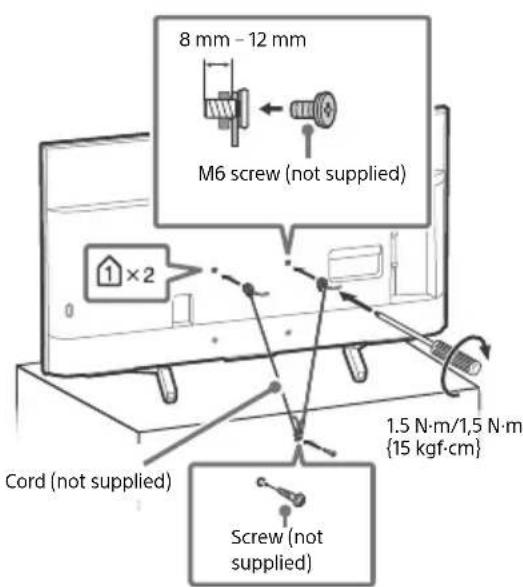
Ventilation
- Never cover the ventilation holes or insert anything in the cabinet.
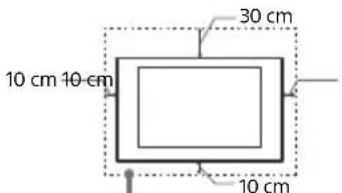
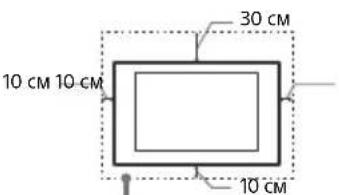
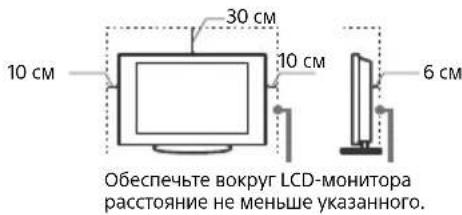
- Leave space around the LCD Monitor as shown below.
- It is strongly recommended that you use a Sony Wall-Mount Bracket in order to provide adequate air circulation.
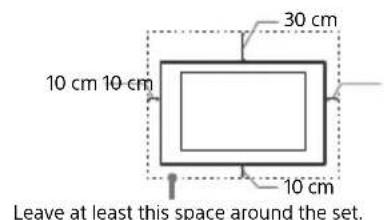
Installed on the wall
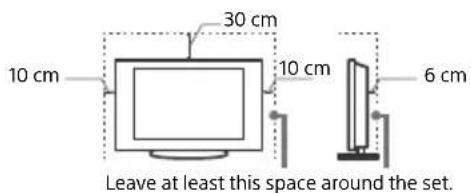
Installed with stand
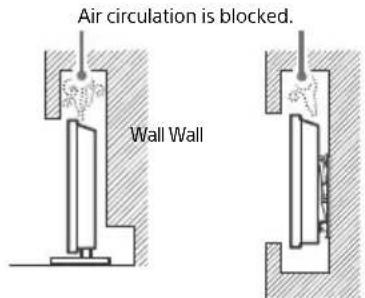
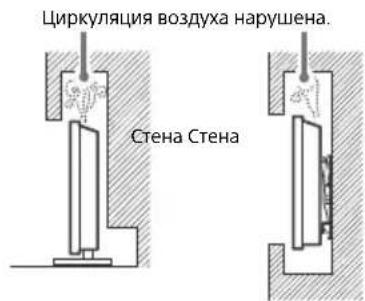
To ensure proper ventilation and prevent the collection of dirt or dust:
- Do not lay the LCD Monitor flat, install upside down, backwards, or sideways.
- Do not place the LCD Monitor on a shelf, rug, bed or in a closet.
- Do not cover the LCD Monitor with a cloth, such as curtains, or items such as newspapers, etc.
- Do not install the LCD Monitor as shown below.
Mains lead
Handle the mains lead and socket as follows in order to avoid any risk of fire, electric shock or damage and/or injuries:
- Use only mains leads supplied by Sony, not other suppliers.
- Insert the plug fully into the mains socket.
- Operate the LCD Monitor on a 220 V - 240 V AC supply only.
- When wiring cables, be sure to unplug the mains lead for your safety and take care not to catch your feet on the cables.
- Disconnect the mains lead from the mains socket before working on or moving the LCD Monitor.
- Keep the mains lead away from heat sources.
- Unplug the mains plug and clean it regularly. If the plug is covered with dust and it picks up moisture, its insulation may deteriorate, which could result in a fire.
Note
- Do not use the supplied mains lead on any other equipment.
- Do not pinch, bend, or twist the mains lead excessively. The core conductors may be exposed or broken.
- Do not modify the mains lead.
- Do not put anything heavy on the mains lead.
- Do not pull on the mains lead itself when disconnecting the mains lead.
-
Do not connect too many appliances to the same mains socket.
-
Do not use a poor fitting mains socket.
NOTE ON MAINS ADAPTOR (models with supplied mains adaptor only)
Warning
To reduce the risk of fire or electric shock, do not expose this apparatus to rain or moisture.
To prevent fire or shock hazard, do not place objects filled with liquids, such as vases, on the apparatus. Do not install this equipment in a confined space, such as a bookshelf or similar unit.
- Please ensure that the mains socket is installed near the equipment and shall be easily accessible.
- Be sure to use the supplied mains adaptor and mains lead.
- Do not use any other mains adaptor. It may cause a malfunction.
- Connect the mains adaptor to an easily accessible mains socket.
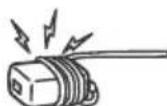
- Do not coil the mains lead around the mains adaptor. The core wire may be cut and/or it may cause a malfunction of the media receiver.
- Do not touch the mains adaptor with wet hands.
- If you notice an abnormality in the mains adaptor, disconnect it from the mains socket immediately.
- The set is not disconnected from the mains source as long as it is connected to the mains socket, even if the set itself has been turned off.
- As the mains adaptor will become warm when it is used for a long time, you may feel hot when touching it by hand.
Prohibited Usage
Do not install/use the LCD Monitor in locations, environments or situations such as those listed below, or the LCD Monitor may malfunction and cause a fire, electric shock, damage and/or injuries.
Locations:
- Outdoors (in direct sunlight), at the seashore, on a ship or other vessel, inside a vehicle, in medical institutions, unstable locations, near water, rain, moisture or smoke.
Environments:
- Places that are hot, humid, or excessively dusty; where insects may enter; where it might be exposed to mechanical vibration, near flammable objects (candles, etc.). The LCD Monitor shall not be exposed to dripping or splashing and no objects filled with liquids, such as vases, shall be placed on the LCD Monitor.
Situations:
- Use when your hands are wet, with the cabinet removed, or with attachments not recommended by the manufacturer. Disconnect the LCD Monitor from mains socket and aerial during lightning storms.
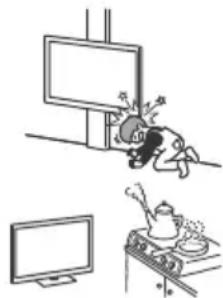
- Install the LCD Monitor so that it sticks out into an open space. Injury or damage from a person or object bumping into the LCD Monitor may result.
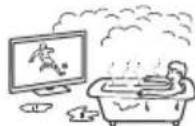
- Place the LCD Monitor in a humid or dusty space, or in a room with oily smoke or steam (near cooking tables or humidifiers). Fire, electric shock, or warping may result.
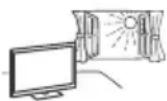
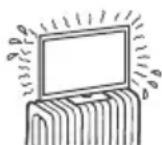
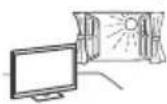
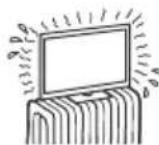
- Install the LCD Monitor in places subject to extreme temperature such as in direct sunlight, near a radiator or a heating vent. The LCD Monitor may overheat in such condition which can cause deformation of the enclosure and/or LCD Monitor malfunction.
- If the LCD Monitor is placed in the changing room of a public bath or hot spring, the LCD Monitor may be damaged by airborne sulfur, etc.
- For best picture quality, do not expose the screen to direct illumination or sunlight.
- Avoid moving the LCD Monitor from a cold area to a warm area. Sudden room temperature changes may cause moisture condensation. This may cause the LCD Monitor to show poor picture and/or poor colour. Should this occur, allow moisture to evaporate completely before powering the LCD Monitor on.
Broken pieces:
- Do not throw anything at the LCD Monitor. The screen glass may break by the impact and cause serious injury.
- If the surface of the LCD Monitor cracks, do not touch it until you have unplugged the mains lead. Otherwise this may cause an electric shock.
When not in use
- If you will not be using the LCD Monitor for several days, the LCD Monitor should be disconnected from the mains for environmental and safety reasons.
- As the LCD Monitor is not disconnected from the mains when the LCD Monitor is just turned off, pull the plug from the mains socket to disconnect the LCD Monitor completely.
- Some LCD Monitor may have features that require the LCD Monitor to be left in standby to work correctly.
For children
- Do not allow children to climb on the LCD Monitor.
- Keep small accessories out of the reach of children, so that they are not mistakenly swallowed.
If the following problems occur...
Turn off the LCD Monitor and unplug the mains lead immediately if any of the following problems occur.
Ask your dealer or Sony service centre to have it checked by qualified service personnel.
When:
- Mains lead is damaged.
Poor fitting of mains socket.
LCD Monitor is damaged by being dropped, hit or having something thrown at it. - Any liquid or solid object falls through openings in the cabinet.
About LCD Monitor Temperature
When the LCD Monitor is used for an extended period, the panel surrounds become warm. You may feel hot when touching there by the hand.
Precautions
Viewing the LCD Monitor
View the LCD Monitor in moderate light, as viewing the LCD Monitor in poor light or during long period of time, strains your eyes.
- When using headphones, adjust the volume so as to avoid excessive levels, as hearing damage may result.
LCD Screen
- Although the LCD screen is made with high-precision technology and 99.99% or more of the pixels are effective, black dots may appear or bright points of light (red, blue, or green) may appear constantly on the LCD screen. This is a structural property of the LCD screen and is not a malfunction
- Do not push or scratch the front filter, or place objects on top of this LCD Monitor. The image may be uneven or the LCD screen may be damaged.
- If this LCD Monitor is used in a cold place, a smear may occur in the picture or the picture may become dark. This does not indicate a failure. These phenomena disappear as the temperature rises.
- Ghosting may occur when still pictures are displayed continuously. It may disappear after a few moments.
- The screen and cabinet get warm when this LCD Monitor is in use. This is not a malfunction.
- The LCD screen contains a small amount of liquid crystal. Follow your local ordinances and regulations for disposal.
Handling and cleaning the screen surface/ cabinet of the LCD Monitor
Be sure to unplug the mains lead connected to the LCD Monitor from mains socket before cleaning.
To avoid material degradation or screen coating degradation, observe the following precautions.
- To remove dust from the screen surface/cabinet, wipe gently with a soft cloth. If dust is persistent, wipe with a soft cloth slightly moistened with a diluted mild detergent solution.
- Never spray water or detergent directly on the LCD Monitor. It may drip to the bottom of the screen or exterior parts and enter the LCD Monitor, and may cause damage to the LCD Monitor.
- Never use any type of abrasive pad, alkaline/acid cleaner, scouring powder, or volatile solvent, such as alcohol, benzene, thinner or insecticide. Using such materials or maintaining prolonged contact with rubber or vinyl materials may result in damage to the screen surface and cabinet material.
- Do not touch the LCD Monitor if your hand is covered in any chemical substance such as hand cream or sunblock.
Periodic vacuuming of the ventilation openings is recommended to ensure proper ventilation.
- When adjusting the angle of the LCD Monitor, move it slowly so as to prevent the LCD Monitor from moving or slipping off from its table stand.
Optional Equipment
- Keep optional components or any equipment emitting electromagnetic radiation away from the LCD Monitor. Otherwise picture distortion and/or noisy sound may occur.
- This equipment has been tested and found to comply with the limits set out in the EMC Directive using a connection signal cable shorter than 3 meters.
Wireless Function of the unit
- Do not operate this unit near medical equipment (pacemaker, etc.), as this may result in the malfunction of the medical equipment.
Although this unit transmits/receives scrambled signals, be careful of unauthorised interception. We cannot be responsible for any trouble as a result. - This equipment should be installed and operated keeping a separation distance of 20cm or more between the antenna of this device and a person's body.
Caution about handling the remote control
- Observe the correct polarity when inserting batteries.
- Do not use different types of batteries together or mix old and new batteries.
- Dispose of batteries in an environmentally friendly way. Certain regions may regulate the disposal of batteries. Please consult your local authority.
- Handle the remote control with care. Do not drop or step on it, or spill liquid of any kind onto it.
- Do not place the remote control in a location near a heat source, a place subject to direct sunlight, or a damp room.
Disposal of the LCD Monitor


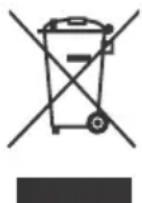
Disposal of old electrical & electronic equipment (applicable in the European Union and other countries with separate collection systems)
This symbol on the product or on its packaging indicates that this product shall not be treated as household waste. Instead it shall be handed over to the appropriate collection point for the recycling of electrical and electronic equipment.
By ensuring that this product is disposed of correctly, you will help to prevent potential negative consequences for the environment and human health, which could be caused by inappropriate waste handling of this product. The recycling of materials will help to conserve natural resources. For more detailed information about recycling of this product, please contact your local Civic Office, your household waste disposal service or the shop where you purchased the product.
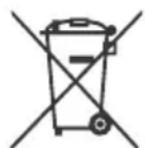
Disposal of waste batteries (applicable in the European Union and other countries with separate collection systems)
This symbol on the battery or on the packaging indicates that the battery provided with this product shall not be treated as household waste.
On certain batteries this symbol might be used in combination with a chemical symbol. The chemical symbol for lead (Pb) is added if the battery contains more than 0.004% lead. By ensuring that these batteries are disposed of correctly, you will help to prevent potentially negative consequences for the environment and human health which could be caused by inappropriate waste handling of the battery. The recycling of the materials will help to conserve natural resources. In case of products that for safety, performance or data integrity reasons require a permanent connection with an incorporated battery, this battery should be replaced by qualified service staff only. To ensure that the battery will be treated properly, hand over the product at end-of-life to the appropriate collection point for the recycling of electrical and electronic equipment. For all other batteries, please view the section on how to remove the battery from the product safely. Hand the battery over to the appropriate collection point for the recycling of waste batteries. For more detailed information about recycling of this battery, please contact your local Civic Office, your household waste disposal service or the shop where you purchased the product or battery.
Parts and Controls
Controls and Indicators
FW-85/75/65/55BZ35F
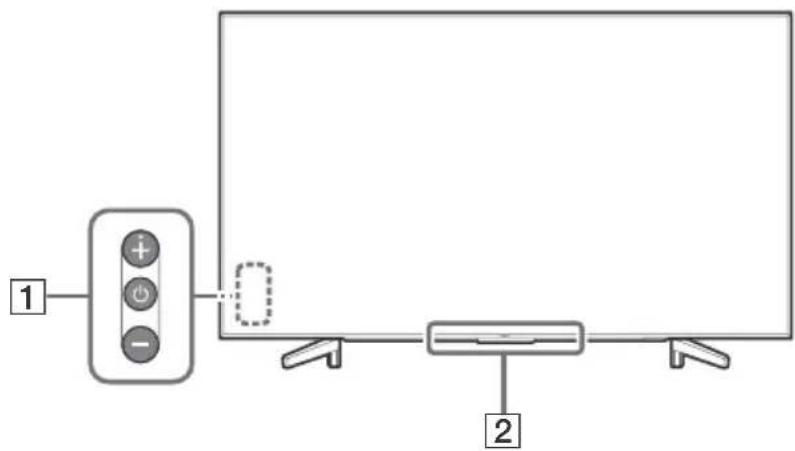
FW-49/43BZ35F
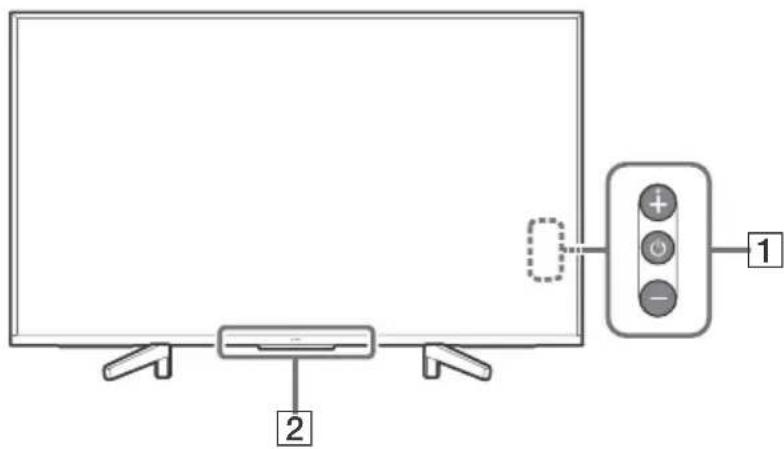
1 (Power) /+/-
When the TV is off,
Press to power on.
When the TV is on,
Press and hold to power off.
Press repeatedly to change the function, then press + or - button to:
- Adjust the volume.
- Select the channel.
- Select the input source of TV.
Remote Control sensor*/Light sensor*/Illumination LED
The illumination LED lights up or blinks according to the status of the TV.
For more information, refer to the Help Guide.
- Do not place anything near the sensor.
Installing the LCD Monitor to the Wall
Using the optional Wall-Mount Bracket
This LCD Monitor's instruction manual only provides the steps to prepare the LCD Monitor for Wall-Mount installation before it is installed on the wall.
To Customers:
For product protection and safety reasons, Sony strongly recommends that installation of your LCD Monitor be performed by Sony dealers or licensed contractors. Do not attempt to install it yourself.
To Sony Dealers and Contractors:
Provide full attention to safety during the installation, periodic maintenance and examination of this product.
Sufficient expertise is required for installing this product, especially to determine the strength of the wall for withstanding the LCD Monitor's weight. Be sure to entrust the attachment of this product to the wall to Sony dealers or licensed contractors and pay adequate attention to safety during the installation. Sony is not liable for any damage or injury caused by mishandling or improper installation.
Use the Wall-Mount Bracket SU-WL500 (not supplied) (FW-85/75BZ35F only) or SU-WL450 (not supplied) (Except FW-85/75BZ35F) to install the LCD Monitor to the wall.
When installing the Wall-Mount Bracket, also refer to the Operating Instructions and Installation Guide supplied with the Wall-Mount Bracket.
Note
- Be sure to store the removed screws in a safe place, keeping them away from children.
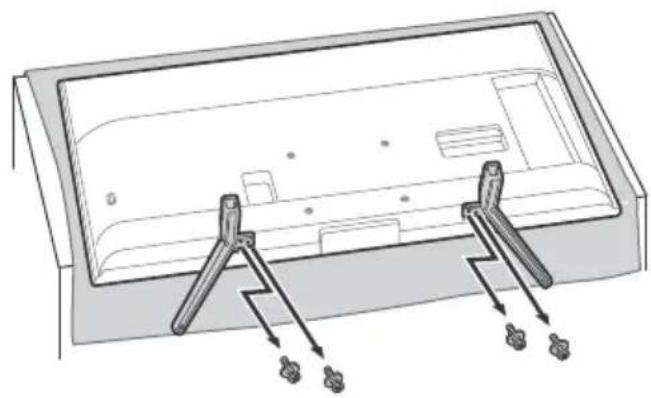
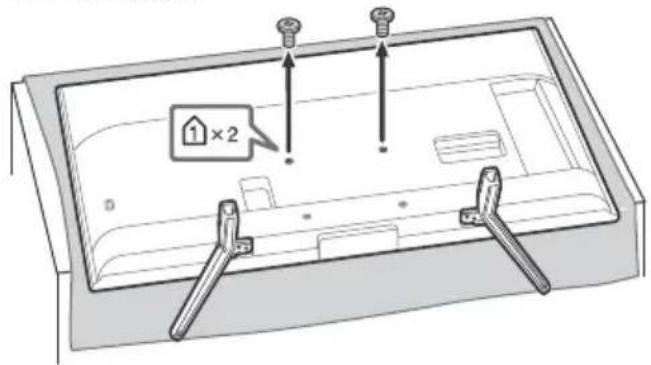
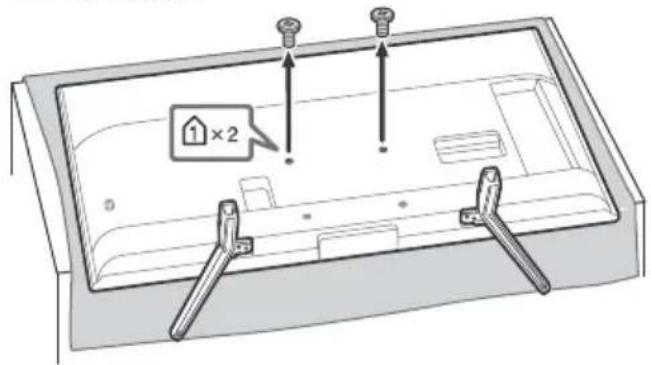
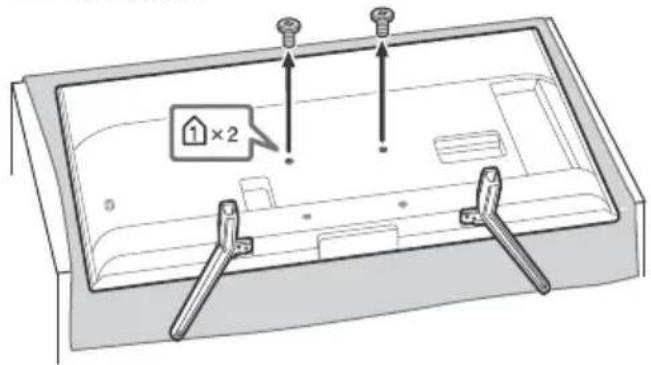
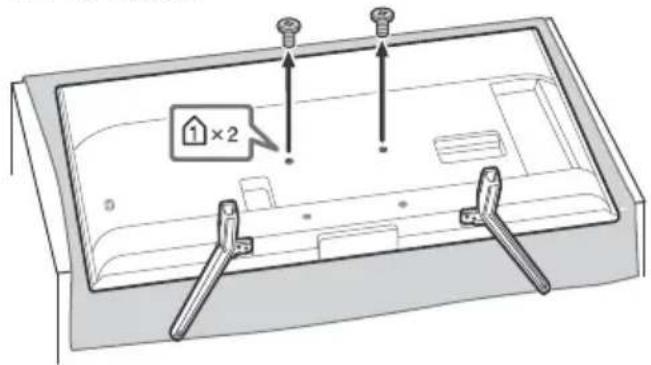
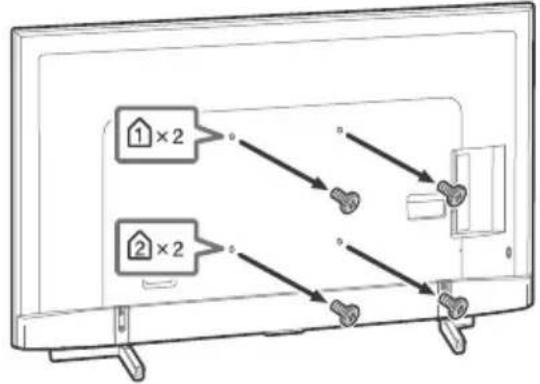
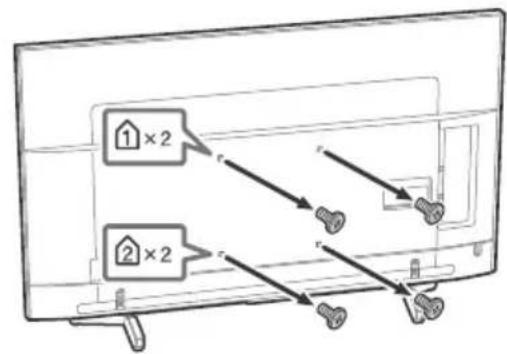
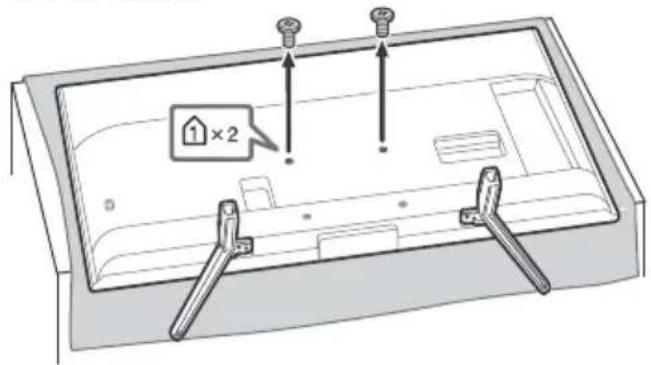
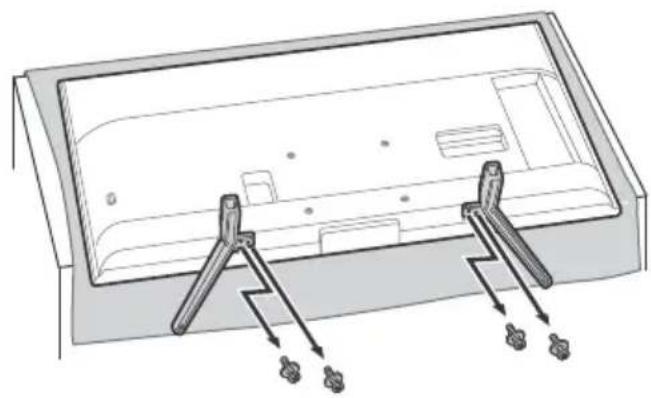
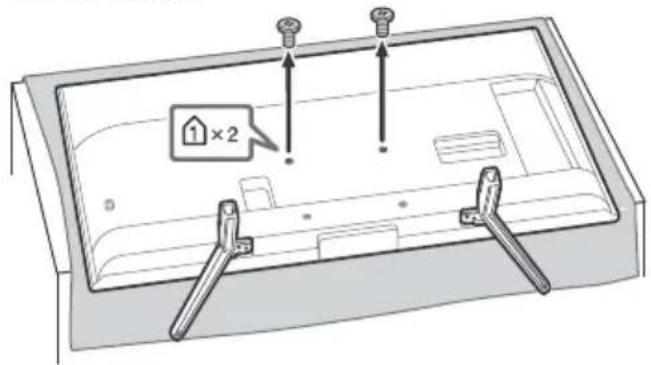
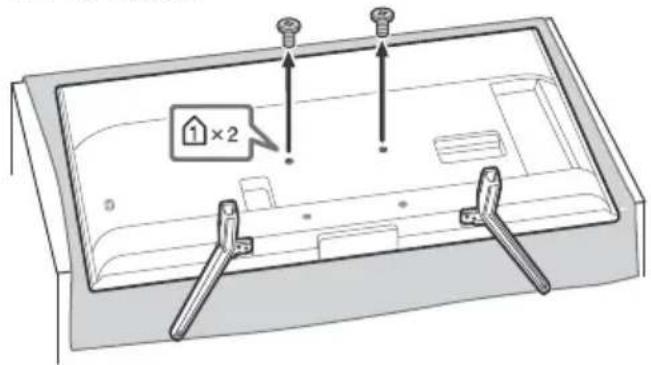
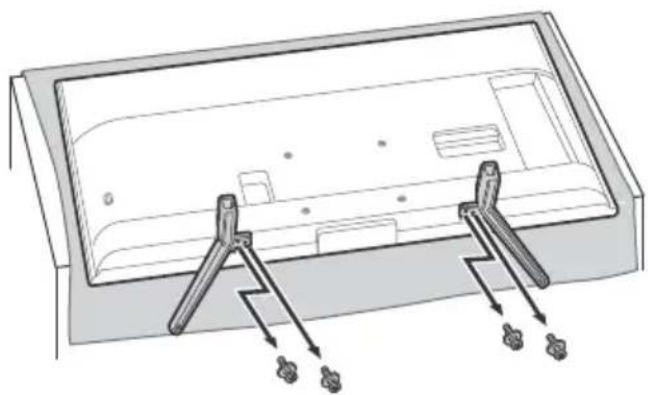
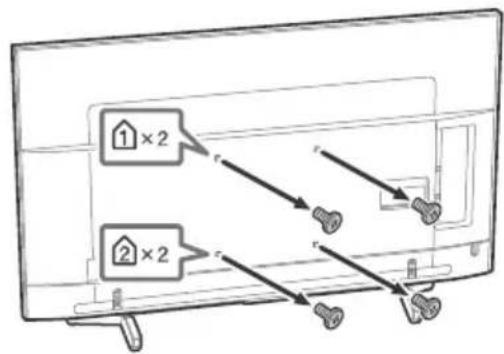
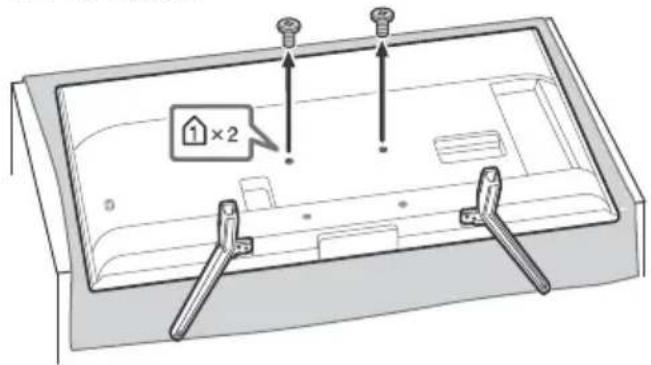
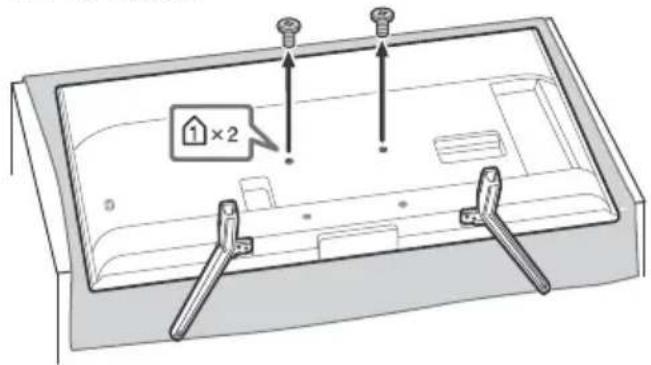
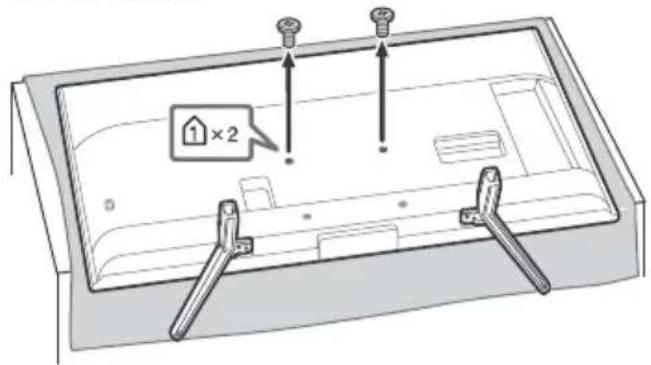
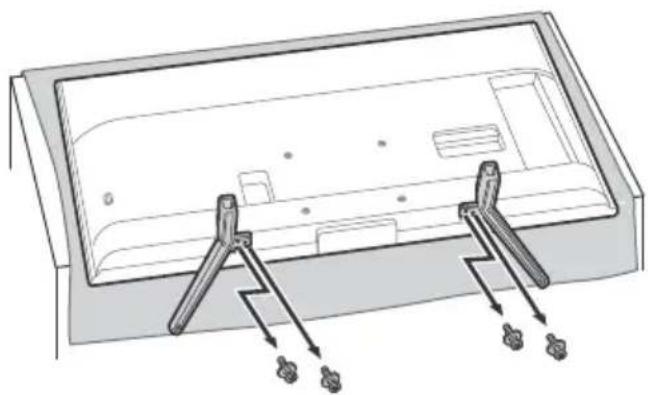
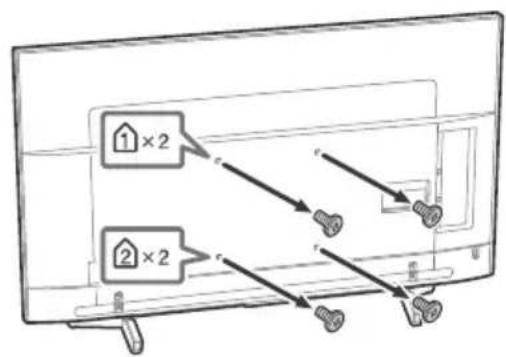
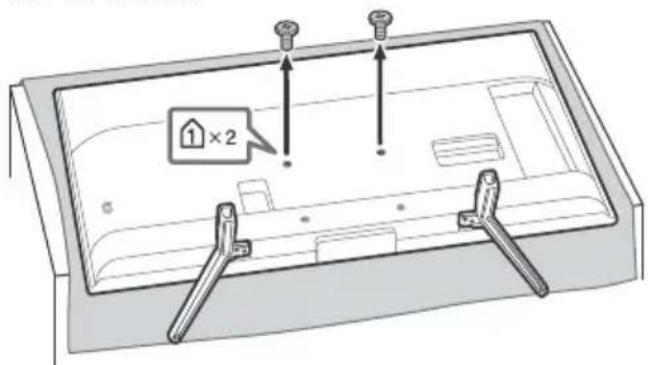
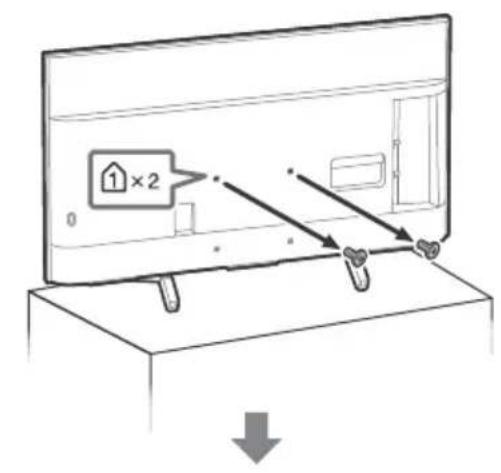
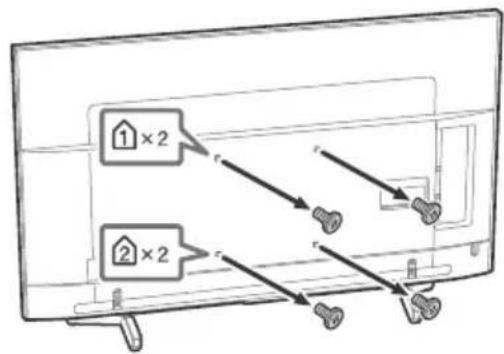
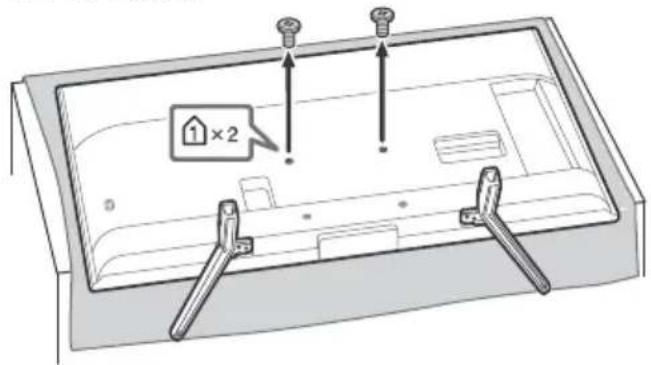
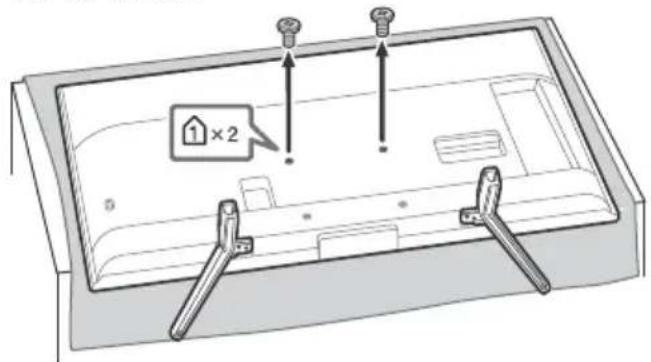
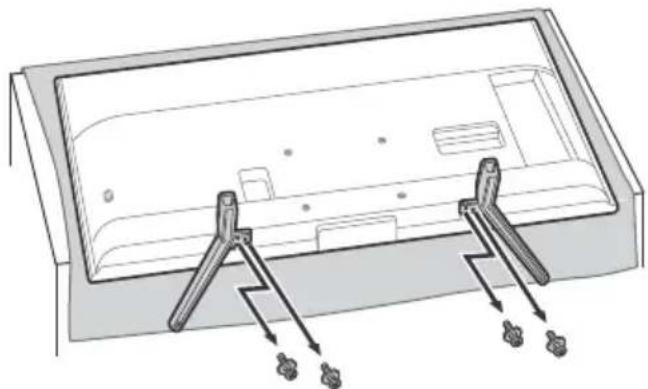
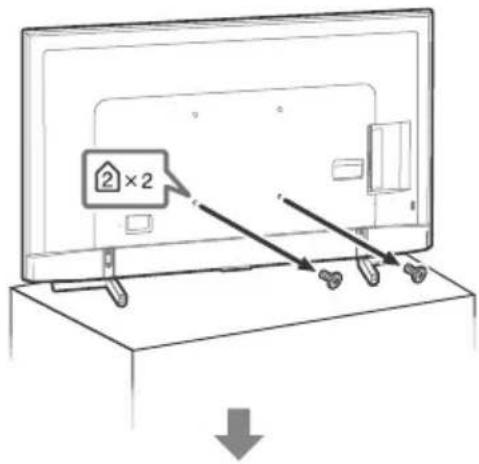
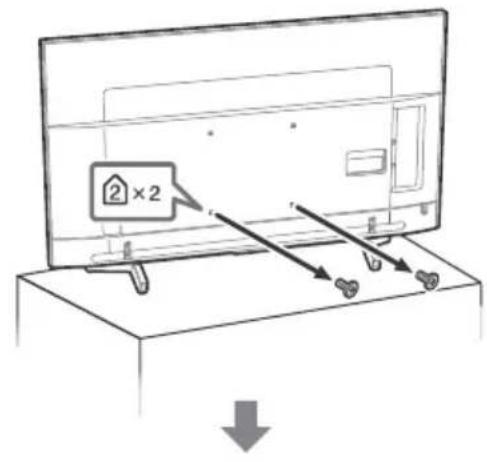
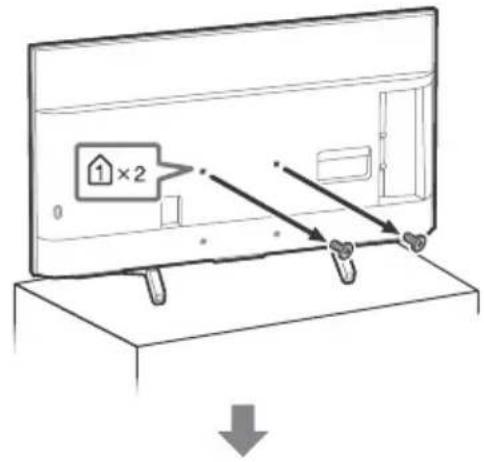
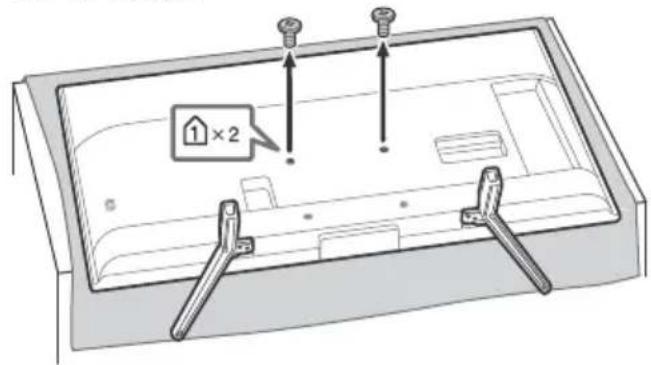
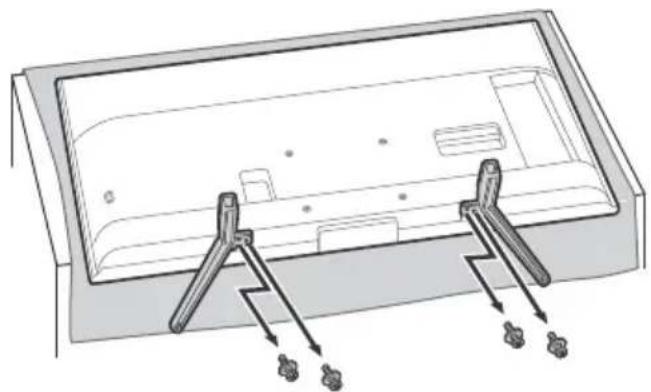
- Place the LCD Monitor with its screen facing down on a level and stable surface covered with a thick and soft cloth when removing the Table-Top Stand from the LCD Monitor to prevent damaging the surface of the LCD display. (FW-49/43BZ35F only)
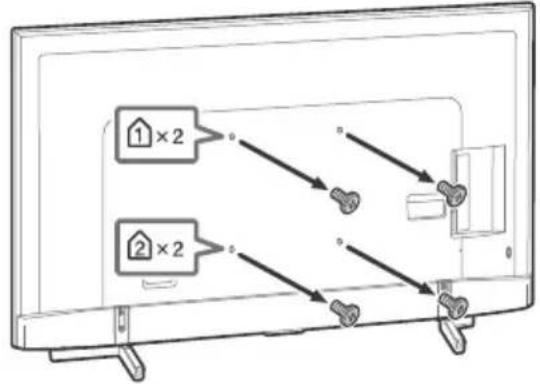
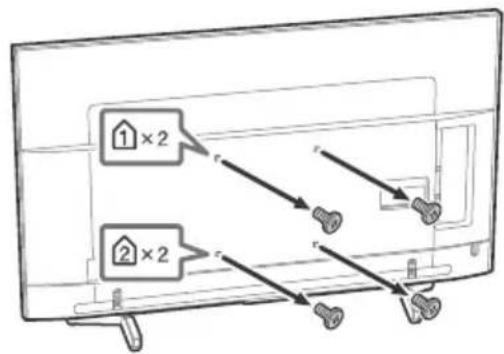
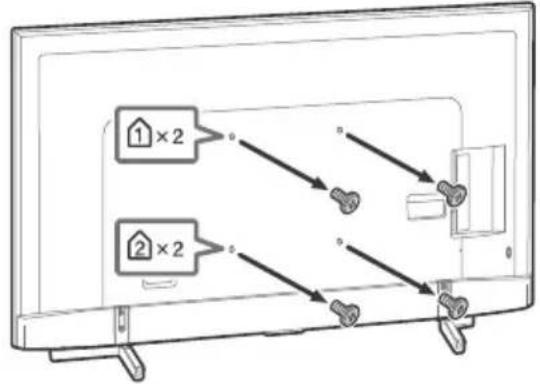
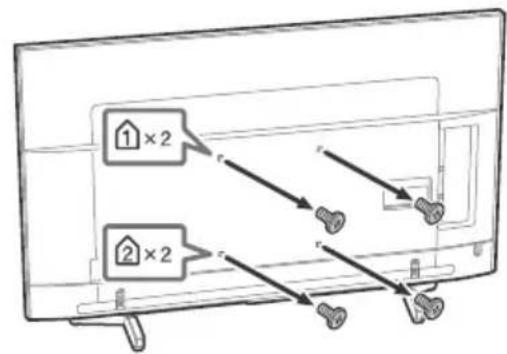
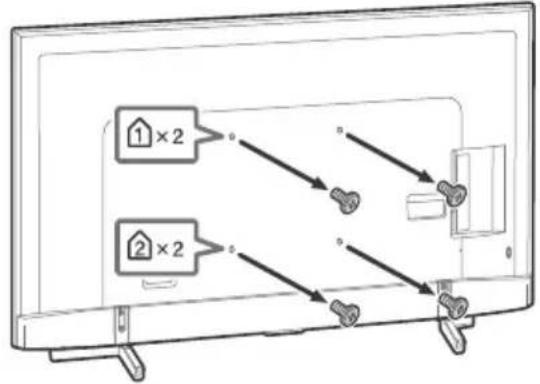
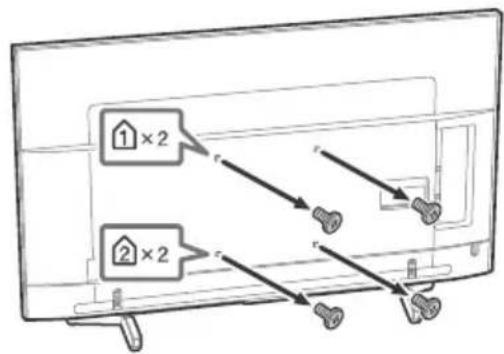
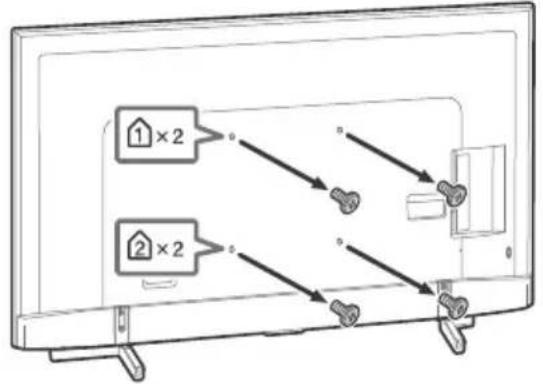
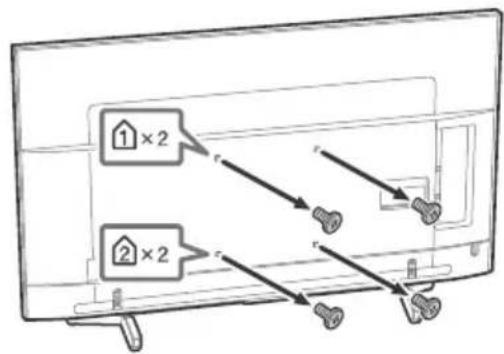
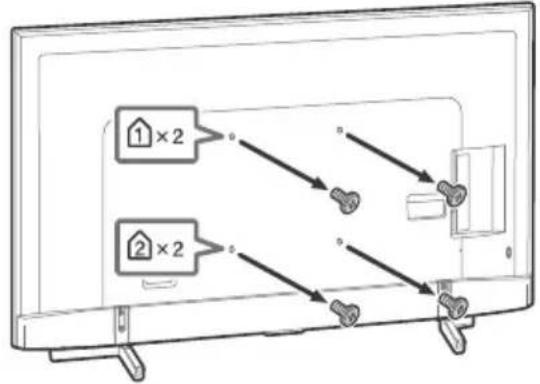
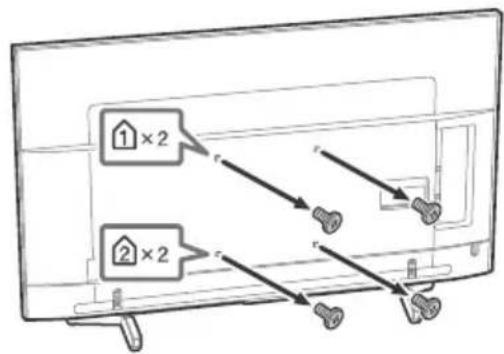
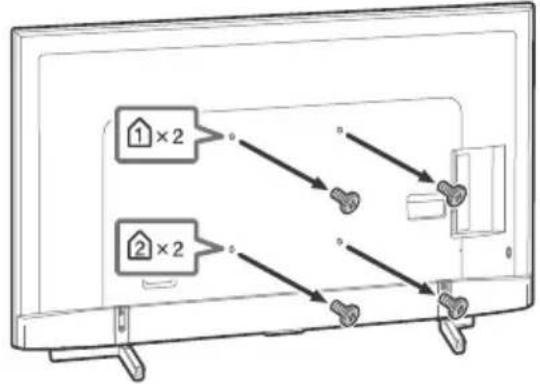
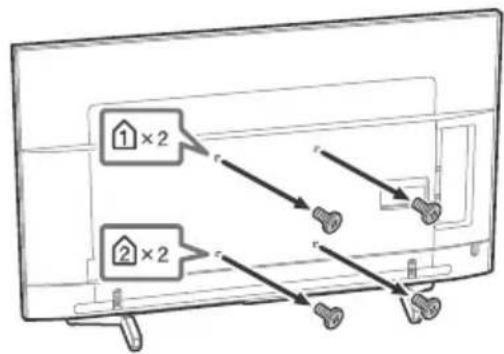
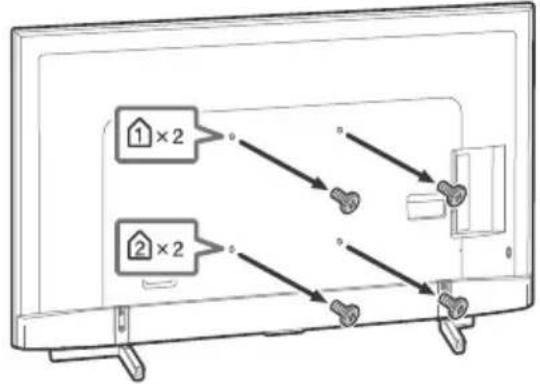
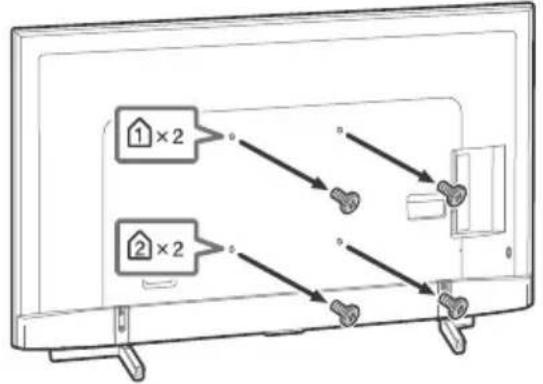
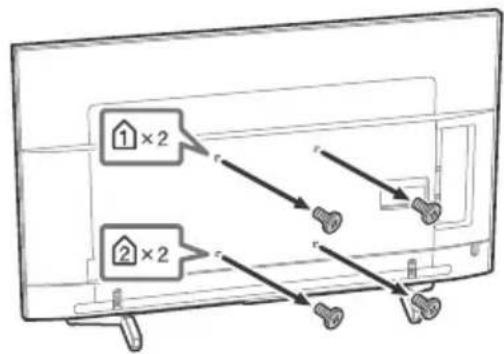
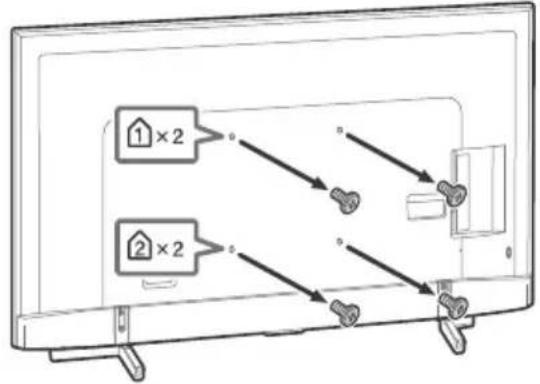
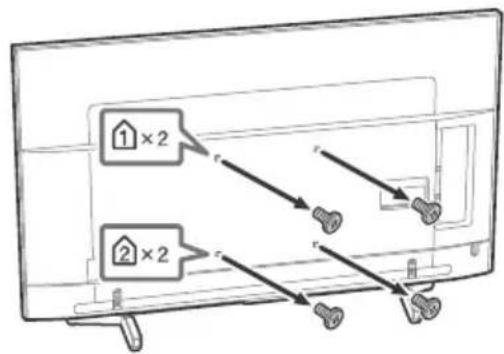
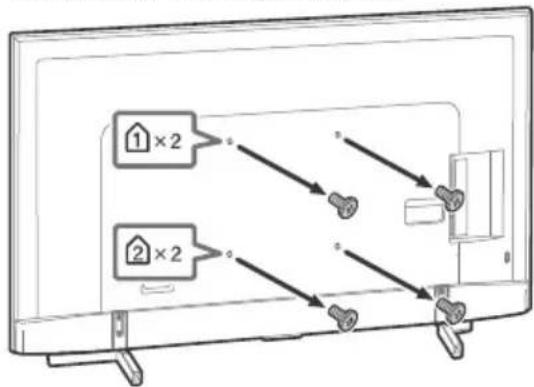
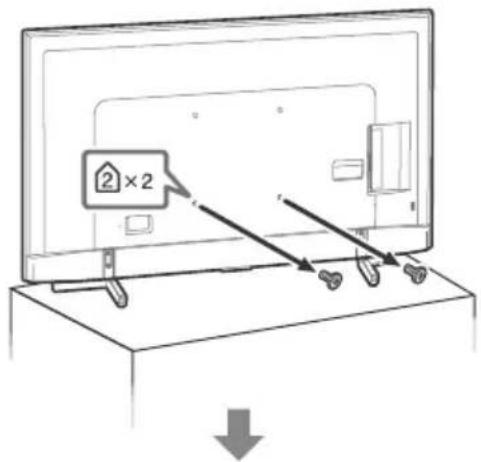
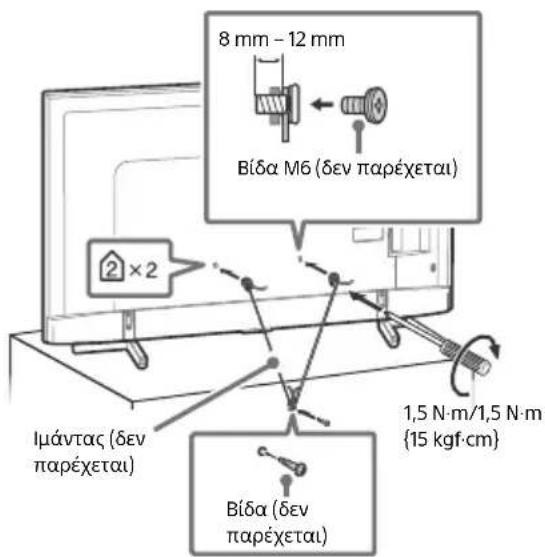
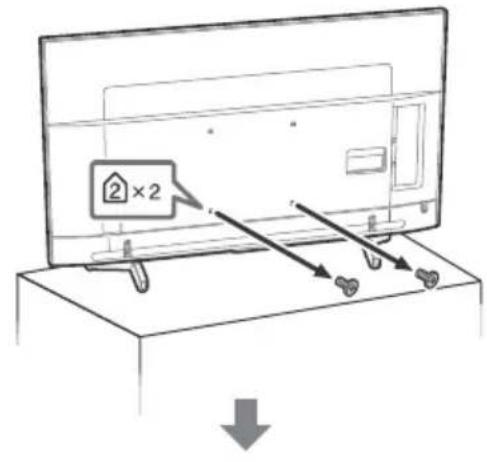
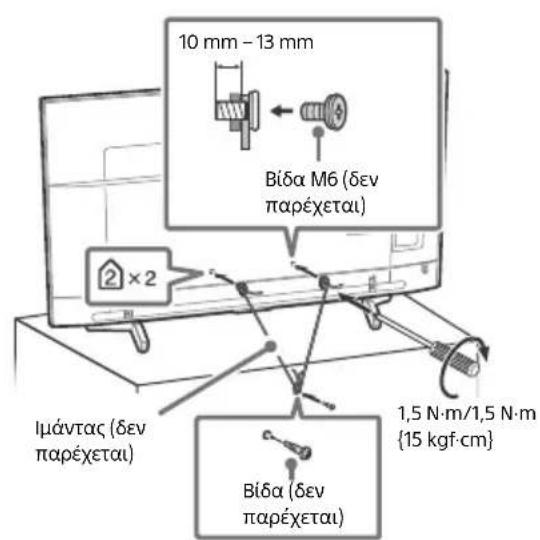
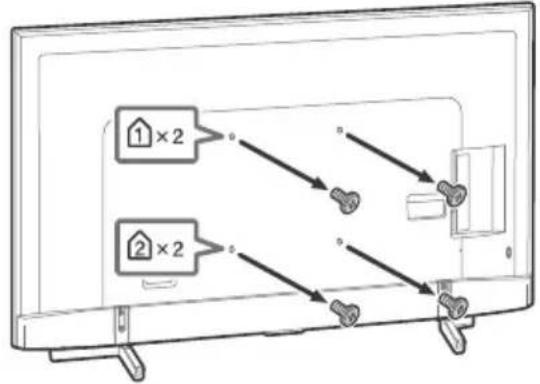
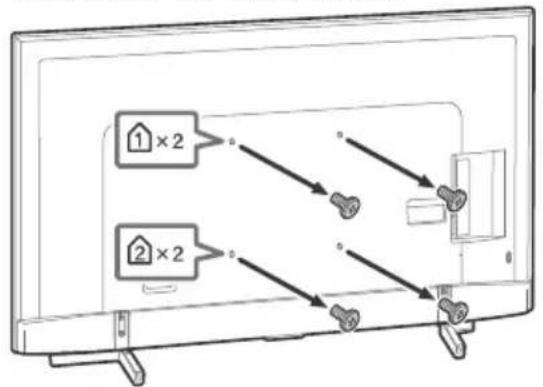
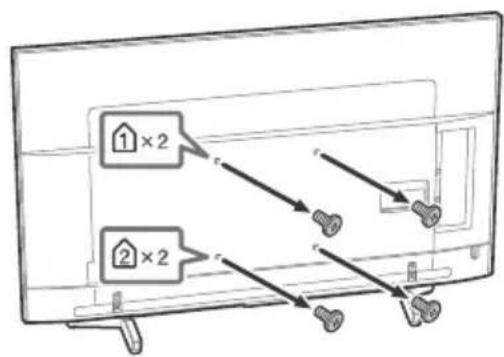
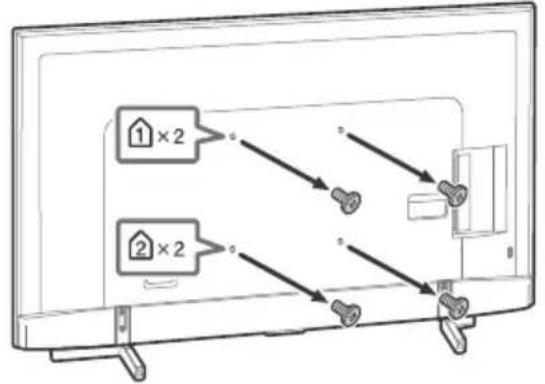
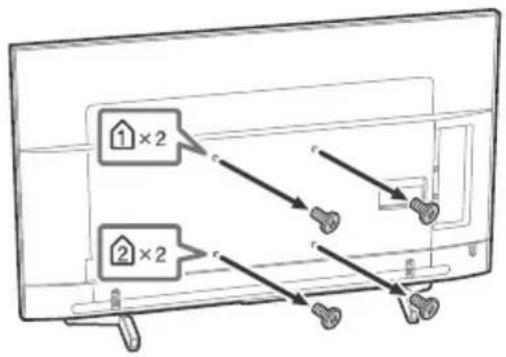
Remove the screws from the rear of the LCD Monitor.
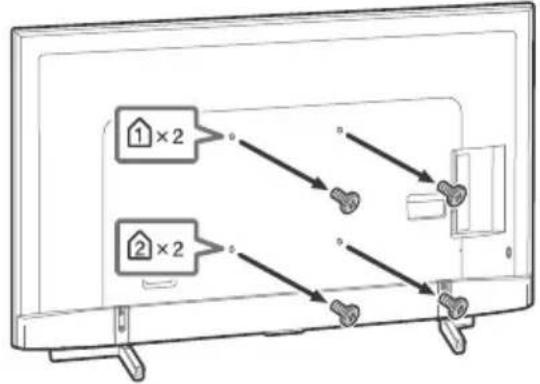
FW-85BZ35F FW-75/65/55BZ35F
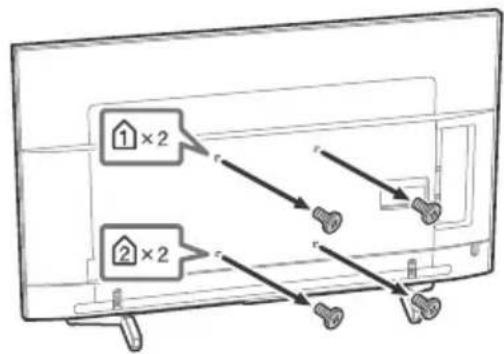
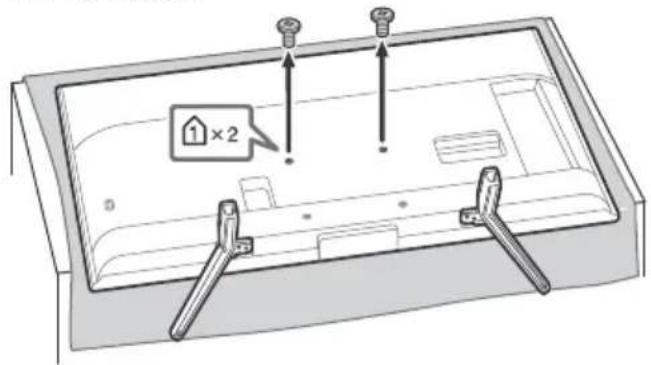
FW-49/43BZ35F
To detach the Table-Top Stand from the LCD Monitor (FW-49/43BZ35F only)
Troubleshooting
General troubleshooting for issues like: black screen, no sound, frozen picture, TV does not respond, or network is lost, do the following steps.
1 Restart your TV by pressing the power button on the remote control until a message appears. The TV will restart. If the TV does not recover, try unplugging the TV from the mains lead for two minutes and then plug it in again.
2 Refer to the Help menu by pressing HELP on the remote control.
3 Connect your TV to the Internet and perform a software update.
When [A new TV system software update is available...] message is displayed.
Sony strongly recommends you to update the TV software by selecting [Update Now]. These software updates improve your TV performance or add new features.
The following screen with [Updating...] will appear and the illumination LED flashes white while software is updating.
![SONY Bravia FW43BZ35F - When [A new TV system software update is available...] message is displayed. - 1](/content/2026/03/526797/images/6c75a9a983f4f9406b24b4ec31bd11798b663c2f80b156d190ddd76b6e58eadf.jpg)
Do not unplug the mains lead during the software update. If you do, the software update may not finish completely, and it may cause a software malfunction. Software updates can take up to 15 minutes.
When you plug in the TV, the TV may not be able to turn on for a while even if you press the power button on the remote control or the TV.
It takes time to initialize the system. Wait for about one minute, then operate it again.
Troubles and Solutions
When the illumination LED is flashing in red.
- Count how many times it flashes (interval time is three seconds).
Reboot the TV by disconnecting the mains lead for two minutes, then turn on the TV.
If the problem persists, disconnect the mains lead, and contact your dealer or Sony service centre with the number of times the illumination LED flashes.
The remote control does not function.
- Replace the batteries.
The TV surrounds become warm.
- When the TV is used for an extended period, the TV surrounds become warm. You may feel hot when touching there by the hand.
Specifications
System
Panel system
LCD (Liquid Crystal Display) Panel, LED Backlight
Colour system
PAL/SECAM/NTSC3.58 (Video only)/NTSC4.43
(Video only)
Sound output
10W+10W
Wireless technology
Protocol IEEE802.11b/g/n
Bluetooth Version 4.1
Frequency band(s)
| Wireless LAN (IEEE802.11b/g/n) | |
| Frequency range Out | put Power |
| 2400-2473 MHz < 20.0 dBm | |
| Bluetooth | |
| Frequency range Out | put Power |
| 2400-2483.5 MHz < 10.0 dBm | |
Software version
PKG. EUA
Press HELP on the remote control to know the software version.
Any updates of software/firmware for this equipment/accessories/components will never affect its conformity to Directive 2014/53/EU in future.
Input/Output jacks
C O M P O N E N
YPBPR (Component Video): 1080p (50, 60 Hz), 1080i (50, 60 Hz), 720p (50, 60 Hz), 576p, 576i, 480p, 480i
Audio input (phono jacks)
AVIN
Video input (common phono pin with Y input)
HDMI IN 1/2/3/4 (support 4K resolution, HDCP
2.3-compatible)
Video:
4096 × 2160p (50, 60 Hz) 1 2 , 4096 × 2160p
(24Hz)1 3840× 2160p (50,60Hz)2 3840×
2160p (24, 25, 30 Hz), 1080p (30, 50, 60 Hz),
1080/24p, 1080i (50, 60 Hz), 720p (30, 50,
60 Hz), 720/24p, 576p, 576i, 480p, 480i, PC
Formats*3
*1 When 4096 × 2160p is input and [Wide mode] is set to [Normal], the resolution is displayed as 3840 × 2160p . To display 4096 × 2160p , set [Wide mode] setting to [Full 1] or [Full 2].
*2 HDMI IN 2/3 only. To support 18 Gbps, set [HDMI signal format] to [Enhanced format].
*3 Refer to the Help Guide for details.
Audio:
5.1 channel linear PCM: 32/44.1/48/88.2/96/
176.4/192 kHz 16/20/24 bits, Dolby Digital,
Dolby Digital Plus and DTS
ARC (Audio Return Channel) (HDMI IN 3 only) (Two channel linear PCM: 48kHz 16 bits, Dolby Digital, Dolby Digital Plus, DTS)

DIGITAL AUDIO OUT (OPTICAL)
Digital optical jack (Two channel linear PCM: 48 kHz 16 bits, Dolby Digital, DTS)
HDMI 1 AUDIO IN
Headphone, Audio output, Subwoofer

1.2-3 SS
USB port 1 and 2 support High Speed USB (USB 2.0)
USB port 3 supports Super Speed USB (USB 3.1 Gen 1)

LAN
10BASE-T/100BASE-TX connector (Depending on the operating environment of the network, connection speed may differ. 10BASE-T/ 100BASE-TX communication rate and communication quality are not guaranteed for this TV.)

DC IN 19.5 V (models with supplied ins adaptor only)
Mains adaptor input
REMOTE
RS-232C, mini jack
This jack is for receiving the external control signal.
Others
Optional accessories
Wall-Mount Bracket: SU-WL500 (FW-85/75BZ35P only)
Wall-Mount Bracket: SU-WL450 (Except
FW-85/75BZ35F)
Operating temperature
0°C - 40°C
Operating humidity
10% - 80% RH (non-condensing)
Power, Product Fiche and others
Power requirements
except models with supplied mains adaptor
220V-240VAC,50Hz
models with supplied mains adaptor only
19.5 V DC with mains adaptor
Rating: Input 220 V - 240 V AC, 50 Hz
Energy Efficiency Class
FW-85BZ35F:A
FW-75BZ35F: A+
FW-65BZ35F:A+
FW-55BZ35F:A
FW-49BZ35F: A
FW-43BZ35F:B
Screen size (measured diagonally) (Approx.)
FW-85BZ35F: 214.8 cm / 85 inches
FW-75BZ35F: 189.3 cm / 75 inches
FW-65BZ35F: 163.9 cm / 65 inches
FW-55BZ35F: 138.8 cm / 55 inches
FW-49BZ35F: 123.2 cm / 49 inches
FW-43BZ35F: 108.0 cm / 43 inches
Power consumption
In [Standard] mode
FW-85BZ35F:233W
FW-75BZ35F:149W
FW-65BZ35F:120W
FW-55BZ35F:103W
FW-49BZ35F:88W
FW-43BZ35F:76W
In [Vivid] mode
FW-85BZ35F: 378 W
FW-75BZ35F:250W
FW-65BZ35F:196W
FW-55BZ35F:170W
FW-49BZ35F:145W
FW-43BZ35F:120W
Average annual energy consumption4
FW-85BZ35F: 323 kWh
FW-75BZ35F:207kWh
FW-65BZ35F:166kWh
FW-55BZ35F: 143 kWh
FW-49BZ35F: 122 kWh
FW-43BZ35F: 105 kWh
Standby power consumption*2*3
0.50 W (25 W in software/EPG update mode)
Display resolution
3,840 dots (horizontal) × 2,160 lines (vertical)
Output Rating
USB 1/2
5V=500mA MAX
USB3
5V=900mA MAX
Dimensions (Approx.) (w× h× d)
with Table-Top Stand
FW-85BZ35F: 191.1 × 117.6 × 42.9 cm
FW-75BZ35F: 167.3 × 103.1 × 37.1 cm
FW-65BZ35F: 145.0 × 90.0 × 31.5 cm
FW-55BZ35F: 123.1 × 77.6 × 31.5 cm
FW-49BZ35F: 109.8 × 70.3 × 27.9 cm
FW-43BZ35F: 96.5 × 62.8 × 27.9 cm
without Table-Top Stand
FW-85BZ35F: 191.1 × 109.8 × 7.3 cm
FW-75BZ35F: 167.3 × 96.3 × 5.4 cm
FW-65BZ35F: 145.0 × 83.6 × 5.2 cm
FW-55BZ35F: 123.1 × 71.3 × 5.2 cm
FW-49BZ35F: 109.8 × 64.4 × 5.8 cm
FW-43BZ35F: 96.5 × 56.9 × 5.8 cm
Mass (Approx.)
with Table-Top Stand
FW-85BZ35F:46.2kg
FW-75BZ35F: 40.1 kg
FW-65BZ35F:26.5kg
FW-55BZ35F: 20kg
FW-49BZ35F: 13.7 kg
FW-43BZ35F: 11.3 kg
without Table-Top Stand
FW-85BZ35F:44.1kg
FW-75BZ35F: 38.9 kg
FW-65BZ35F:25.6kg
FW-55BZ35F: 19.1 kg
FW-49BZ35F: 13.2kg
FW-43BZ35F: 10.8 kg
*1 Energy consumption per year, based on the power consumption of the television operating 4 hours per day for 365 days. The actual energy consumption will depend on how the television is used.
*2 Specified standby power is reached after the TV finishes necessary internal processes.
*3 Standby power consumption will increase when your TV is connected to the network.
Note
- Optional accessories availability depends on countries/region/TV model/stock.
- Design and specifications are subject to change without notice.
Trademark information
-
The terms HDMI and HDMI High-Definition Multimedia Interface, and the HDMI Logo are trademarks or registered trademarks of HDMI Licensing Administrator, Inc. in the United States and other countries.
Manufactured under license from Dolby Laboratories. Dolby, Dolby Audio, and the double-D symbol are trademarks of Dolby Laboratories. -
"BRAVIA", B and BRAVIA Sync are trademarks or registered marks of Sony Corporation.
- Vewd® Core. Copyright 1995-2017 Vewd Software AS. All rights reserved.
- Google, Android TV, Google Play, Chromecast built-in, YouTube and other related marks and logos are trademarks of Google LLC.
- Wi-Fi®, Wi-Fi Alliance®, Wi-Fi Direct® and Miracast® are registered trademarks of Wi-Fi Alliance.
- Wi-Fi Protected Setup™ is a trademark of Wi-Fi Alliance.
- The Wi-Fi CERTIFIED™ Logo is a certification mark of Wi-Fi Alliance.
- For DTS patents, see http:// patents.dts.com. Manufactured under license from DTS, Inc. DTS, the Symbol, & DTS and the Symbol together are registered trademarks, and DTS Digital Surround is a trademark of DTS, Inc. © DTS, Inc. All Rights Reserved.
- The Bluetooth® word mark and logos are registered trademarks owned by the Bluetooth SIG, Inc. and any use of such marks by Sony Corporation is under license. Other trademarks and trade names are those of their respective owners.
- TUXERA is a registered trademark of Tuxera Inc. in the US and other countries.
- USB-IF SuperSpeed USB Trident logo is a registered trademark of USB Implementers Forum, Inc.
- All other trademarks are the property of their respective owners.
Table des matieres
FW-85BZ35F FW-75/65/55BZ35F
FR
FW-49/43BZ35F
2160p (24, 25, 30 Hz), 1080p (30, 50, 60 Hz),
1080/24p, 1080i (50, 60 Hz), 720p (30, 50,
60 Hz), 720/24p, 576p, 576i, 480p, 480i, Formats PC*3
ARC (Audio Return Channel) (HDMI IN 3 uniquely)
DIGITAL AUDIO OUT (OPTICAL)
10% - 80% HR (sans condensation)
FW-43BZ35F : 108,0 cm / 43 pouces
FW-43BZ35F : 105 kWh
FW-75BZ35F:167,3×103,1×37,1cm
FW-65BZ35F:145,0×90,0×31,5cm
FW-55BZ35F:123,1×77,6×31,5cm
FW-49BZ35F:109,8×70,3×27,9cm
FW-43BZ35F:96,5×62,8×27,9cm
Sansupportdetable
FW-85BZ35F:191,1×109,8×7,3cm
FW-75BZ35F: 167,3× 96,3× 5,4 cm
FW-65BZ35F:145,0×83,6×5,2cm
FW-55BZ35F:123,1×71,3×5,2cm
FW-49BZ35F : 109,8×64,4×5,8 cm
FW-43BZ35F:96,5×56,9×5,8cm
Poids (approx.)
FW-75/65/55BZ35F
FW-49/43BZ35F
FW-85BZ35F FW-75/65/55BZ35F
FW-49/43BZ35F
2160p (24, 25, 30 Hz), 1080p (30, 50, 60 Hz),
1080/24p, 1080i (50, 60 Hz), 720p (30, 50, 60 Hz), 720/24p, 576p, 576i, 480p, 480i, Formatos de PC*3
*1 Si se introduce 4096 × 2160p y [Modo horizontal] se cambia a [Normal], laResolution做不到 será 3840 × 2160p. Para ver 4096 × 2160p, cambie el ajuste de [Modo horizontal] a [Completo 1] o [Completo 2].
DIGITAL AUDIO OUT (OPTICAL)
Toma digital optica (PCM lineal de dos canales: 48 kHz 16 bits, Dolby Digital, DTS)
HDMI 1 AUDIO IN →
10% - 80% RH (sin condensation)
FW-43BZ35F: 108,0 cm / 43 pulgadas
Consumo de energia
FW-49BZ35F: 109,8× 70,3× 27,9cm
FW-43BZ35F: 96,5× 62,8× 27,9cm
FW-49BZ35F: 109,8× 64,4× 5,8cm
FW-43BZ35F: 96,5× 56,9× 5,8cm
Peso (Aprox.)
FW-75BZ35F, FW-65BZ35F, FW-55BZ35F, FW-49BZ35F
FW-85/49/43BZ35F
FW-75/65/55BZ35F
Transport
FW-75/65/55BZ35F
FW-49/43BZ35F
FW-85BZ35F FW-75/65/55BZ35F
FW-49/43BZ35F
DIGITAL AUDIO OUT (OPTICAL)
FW-65BZ35F: 163,9 cm / 65 inch
FW-55BZ35F: 138,8 cm / 55 inch
FW-49BZ35F: 123,2 cm / 49 inch
FW-43BZ35F: 108,0 cm / 43 inch
Stroomverbruik
In stand [Standaard]
FW-85BZ35F:233W
FW-75BZ35F:149W
FW-65BZ35F:120W
FW-55BZ35F:103W
FW-49BZ35F:88W
FW-43BZ35F:76W
In stand [Levendig]
FW-85BZ35F: 378 W
FW-75BZ35F:250W
FW-65BZ35F:196W
FW-55BZ35F:170W
FW-49BZ35F:145W
FW-43BZ35F:120W
FW-55BZ35F: 123,1× 77,6× 31,5cm
FW-49BZ35F: 109,8× 70,3× 27,9cm
FW-43BZ35F: 96,5× 62,8× 27,9cm
FW-49BZ35F: 109,8× 64,4× 5,8cm
FW-43BZ35F: 96,5× 56,9× 5,8cm
Gewicht (Ong.)
met tafelstandaard
FW-85BZ35F:46,2 kg
FW-75BZ35F:40,1kg
FW-65BZ35F:26,5kg
FW-55BZ35F:20kg
FW-49BZ35F: 13,7 kg
FW-43BZ35F: 11,3 kg
FW-75BZ35F, FW-65BZ35F, FW-55BZ35F, FW-49BZ35F
FW-75/65/55BZ35F
FW-49/43BZ35F
FW-85BZ35F FW-75/65/55BZ35F
FW-49/43BZ35F
2160p (24, 25, 30 Hz), 1080p (30, 50, 60 Hz), 1080/24p, 1080i (50, 60 Hz), 720p (30, 50, 60 Hz), 720/24p, 576p, 576i, 480p, 480i,
Computerformate
DIGITAL AUDIO OUT (OPTICAL)
FW-43BZ35F: 108,0 cm / 43 Zoll
Leistungsaufnahme
Im [Standard]-Modus
FW-85BZ35F:233W
FW-75BZ35F:149W
FW-65BZ35F:120W
FW-55BZ35F:103W
FW-49BZ35F:88W
FW-43BZ35F:76W
Im [Brillant]-Modus
FW-85BZ35F:378W
FW-75BZ35F:250W
FW-65BZ35F: 196 W
FW-55BZ35F:170W
FW-49BZ35F:145W
FW-43BZ35F:120W
FW-75BZ35F: 167,3× 103,1× 37,1cm
FW-65BZ35F:145,0×90,0×31,5cm
FW-55BZ35F: 123,1× 77,6× 31,5cm
FW-49BZ35F: 109,8× 70,3× 27,9cm
FW-43BZ35F: 96,5× 62,8× 27,9cm
ohne Tischständer
FW-85BZ35F: 191,1× 109,8× 7,3cm
FW-75BZ35F:167,3×96,3×5,4 cm
FW-65BZ35F:145,0×83,6×5,2 cm
FW-55BZ35F: 123,1× 71,3× 5,2cm
FW-49BZ35F: 109,8× 64,4× 5,8cm
FW-43BZ35F: 96,5× 56,9× 5,8cm
Gewicht (Ca.)
mit Tischständer
FW-85BZ35F:46,2 kg
FW-75BZ35F: 40,1 kg
FW-65BZ35F:26,5kg
FW-55BZ35F:20kg
FW-49BZ35F:13,7kg
FW-43BZ35F: 11,3 kg
ohne Tischständer
FW-85BZ35F:44,1kg
FW-75BZ35F: 38,9 kg
FW-65BZ35F:25,6 kg
FW-55BZ35F: 19,1 kg
FW-49BZ35F: 13,2 kg
FW-43BZ35F:10,8kg
FW-85BZ35F FW-75/65/55BZ35F
FW-49/43BZ35F
Para Separar o Suporte de mesa do monitor LCD (Apenas nos modelos FW-49/43BZ35F)
2160p (24, 25, 30 Hz), 1080p (30, 50, 60 Hz),
1080/24p, 1080i (50, 60 Hz), 720p (30, 50,
60 Hz), 720/24p, 576p, 576i, 480p, 480i,
Formatos PC*3
DIGITAL AUDIO OUT (OPTICAL)
Tomada digital otica (PCM linear deinous canais: 48 kHz 16 bits, Dolby Digital, DTS)
HDMI 1 AUDIO IN
FW-43BZ35F: 108,0 cm / 43 polegadas
Consumo de energia
No modo [Standard]
FW-85BZ35F:233W
FW-75BZ35F:149W
FW-65BZ35F:120W
FW-55BZ35F:103W
FW-49BZ35F:88W
FW-43BZ35F:76W
No modo [Vivido]
FW-85BZ35F: 378 W
FW-75BZ35F:250W
FW-65BZ35F: 196 W
FW-55BZ35F:170W
FW-49BZ35F:145W
FW-43BZ35F:120W
FW-75BZ35F: 167,3× 103,1× 37,1cm
FW-65BZ35F:145,0×90,0×31,5cm
FW-55BZ35F: 123,1× 77,6× 31,5cm
FW-49BZ35F: 109,8× 70,3× 27,9cm
FW-43BZ35F: 96,5×62,8×27,9 cm
sem suporte de fixacao para mesas
FW-85BZ35F: 191,1× 109,8× 7,3cm
FW-75BZ35F: 167,3× 96,3× 5,4cm
FW-65BZ35F:145,0×83,6×5,2 cm
FW-55BZ35F: 123,1× 71,3× 5,2cm
FW-49BZ35F: 109,8 × 64,4 × 5,8 cm
FW-43BZ35F: 96,5× 56,9× 5,8cm
Peso (Aprox.)
FW-85BZ35F FW-75/65/55BZ35F
FW-49/43BZ35F
2160p (24, 25, 30 Hz), 1080p (30, 50, 60 Hz),
1080/24p, 1080i (50, 60 Hz), 720p (30, 50,
60 Hz), 720/24p, 576p, 576i, 480p, 480i, Formati PC*3
DIGITAL AUDIO OUT (OPTICAL)
Classe di efficienza energetica
FW-85BZ35F: A
FW-75BZ35F: A+
FW-65BZ35F: A+
FW-55BZ35F: A
FW-49BZ35F: A
FW-43BZ35F: B
Dimensioni schermo (diagonale) (circa) FW-85BZ35F:214,8 cm/85 pollici FW-75BZ35F:189,3 cm/75 pollici FW-65BZ35F:163,9 cm/65 pollici FW-55BZ35F:138,8 cm/55 pollici FW-49BZ35F:123,2 cm/49 pollici FW-43BZ35F:108,0 cm/43 pollici
Potenza assorbita
In modalità [Standard]
FW-85BZ35F: 233 W
FW-75BZ35F: 149 W
FW-65BZ35F: 120 W
FW-55BZ35F: 103 W
FW-49BZ35F: 88 W
FW-43BZ35F: 76 W
In modalità [Brillante]
FW-85BZ35F: 378 W
FW-75BZ35F: 250 W
FW-65BZ35F: 196 W
FW-55BZ35F: 170 W
FW-49BZ35F: 145 W
FW-43BZ35F: 120 W
Consumo energetico medio annuo* FW-85BZ35F: 323 kWh FW-75BZ35F: 207 kWh FW-65BZ35F: 166 kWh FW-55BZ35F: 143 kWh FW-49BZ35F: 122 kWh FW-43BZ35F: 105 kWh
senza supporto da tavolo FW-85BZ35F: 191,1× 109,8× 7,3cm FW-75BZ35F: 167,3× 96,3× 5,4cm FW-65BZ35F: 145,0× 83,6× 5,2cm FW-55BZ35F: 123,1× 71,3× 5,2cm FW-49BZ35F: 109,8× 64,4× 5,8cm FW-43BZ35F: 96,5× 56,9× 5,8cm
Peso (circa)
con piedistallo FW-85BZ35F:46,2 kg FW-75BZ35F:40,1 kg FW-65BZ35F:26,5 kg FW-55BZ35F:20 kg FW-49BZ35F:13,7 kg FW-43BZ35F:11,3 kg
senza supporto da cavolo FW-85BZ35F:44,1 kg FW-75BZ35F:38,9 kg FW-65BZ35F:25,6 kg FW-55BZ35F:19,1 kg FW-49BZ35F:13,2 kg FW-43BZ35F:10,8 kg
FW-75BZ35F, FW-65BZ35F, FW-55BZ35F, FW-49BZ35F
FW-43BZ35F overensstämmer med direktiv 2014/53/EU. Den fullständiga texten till EU-forsakran om overensstammelse fi pa foljande webbadress: http://www.compliance.sony.de/
Se Hjalpguiden for mer information.
- Placera ingenting nara sensorn.
Montera LCD-bildskärmen på vagggen
Anvanda Vaggfustet (tillval)
I bra克斯visingen forenna LCD-bildskarm ges endast stegen for att forbereda LCD-bildskarmen for vagginstallation innan den installeras på vagggen.
Till kunden:
FW-85BZ35F FW-75/65/55BZ35F
FW-49/43BZ35F
SE
For atta loss bordstativet fran LCD-bildskarmen (endast FW-49/43BZ35F)
Felsökning
For allman felsökning for problem som: svart skarm, inget ljud, frusen bild, TV:n reagerar inte, eller natverket ar tappat, utfor du foljande steg.
2160p (24, 25, 30 Hz), 1080p (30, 50, 60 Hz),
1080/24p, 1080i (50, 60 Hz), 720p (30, 50,
60 Hz), 720/24p, 576p, 576i, 480p, 480i,
PC-format*3
DIGITAL AUDIO OUT (OPTICAL)
FW-43BZ35F: 108,0 cm / 43 tum
Energiförbrukning
I [Standard]-lage
FW-85BZ35F:233W
FW-75BZ35F:149W
FW-65BZ35F:120W
FW-55BZ35F:103W
FW-49BZ35F:88W
FW-43BZ35F:76W
I [Dagsljus]-lage
FW-85BZ35F: 378 W
FW-75BZ35F:250W
FW-65BZ35F:196W
FW-55BZ35F:170W
FW-49BZ35F:145W
FW-43BZ35F:120W
FW-55BZ35F: 123,1× 77,6× 31,5cm
FW-49BZ35F: 109,8× 70,3× 27,9cm
FW-43BZ35F: 96,5× 62,8× 27,9cm
utan bordstativ
FW-85BZ35F: 191,1× 109,8× 7,3cm
FW-75BZ35F:167,3×96,3×5,4 cm
FW-65BZ35F:145,0×83,6×5,2 cm
FW-55BZ35F: 123,1× 71,3× 5,2cm
FW-49BZ35F:109,8×64,4×5,8cm
FW-43BZ35F: 96,5× 56,9× 5,8cm
Vikt (Ca.)
med bordstativ
FW-85BZ35F:46,2 kg
FW-75BZ35F: 40,1 kg
FW-65BZ35F:26,5kg
FW-55BZ35F:20kg
FW-49BZ35F:13,7kg
FW-43BZ35F: 11,3 kg
utan bordsstativ
FW-85BZ35F:44,1kg
FW-75BZ35F: 38,9 kg
FW-65BZ35F:25,6kg
FW-55BZ35F: 19,1 kg
FW-49BZ35F: 13,2 kg
FW-43BZ35F:10,8kg
FW-85BZ35F FW-75/65/55BZ35F
FW-49/43BZ35F
2160p (24, 25, 30 Hz), 1080p (30, 50, 60 Hz),
1080/24p, 1080i (50, 60 Hz), 720p (30, 50,
60 Hz), 720/24p, 576p, 576i, 480p, 480i,
Pc-formater*3
(to-kanals lineaer PCM: 48 kHz 16 bit, Dolby
Digital, Dolby Digital Plus, DTS).
DIGITAL AUDIO OUT (OPTICAL)
Digitalt optisk stik (to-kanals linear PCM: 48 kHz 16 bit, Dolby Digital, DTS)
HDMI 1 AUDIO IN
Analog lydindgang (Stereo-minijack)
AUDIO OUT → (Stereo-minijack)
Hovedtelefon, lydudgang, subwoofer
1.2-3 SS
USB-port 1 og 2 understotter High Speed USB
(USB 2.0)
USB-port 3 understotter Super Speed USB (USB 3.1 Gen 1)
LAN
10BASE-T/100BASE-TX-stik
FW-43BZ35F: 108,0 cm / 43 tommer
Strømforbrug
i [Standard] tilstand
FW-85BZ35F:233W
FW-75BZ35F:149W
FW-65BZ35F:120W
FW-55BZ35F:103W
FW-49BZ35F:88W
FW-43BZ35F:76W
I [Kraftig] tilstand
FW-85BZ35F: 378 W
FW-75BZ35F:250W
FW-65BZ35F:196W
FW-55BZ35F:170W
FW-49BZ35F:145W
FW-43BZ35F:120W
FW-75BZ35F: 167,3× 103,1× 37,1cm
FW-65BZ35F:145,0×90,0×31,5 cm
FW-55BZ35F: 123,1× 77,6× 31,5 cm
FW-49BZ35F: 109,8× 70,3× 27,9cm
FW-43BZ35F: 96,5×62,8×27,9 cm
Uden tv-fod
FW-85BZ35F: 191,1× 109,8× 7,3cm
FW-75BZ35F:167,3×96,3×5,4 cm
FW-65BZ35F:145,0×83,6×5,2 cm
FW-55BZ35F: 123,1× 71,3× 5,2cm
FW-49BZ35F: 109,8× 64,4× 5,8cm
FW-43BZ35F: 96,5× 56,9× 5,8cm
Vægt (Ca.)
Inkl. tv-fod
FW-85BZ35F:46,2 kg
FW-75BZ35F: 40,1 kg
FW-65BZ35F:26,5kg
FW-55BZ35F:20kg
FW-49BZ35F: 13,7 kg
FW-43BZ35F: 11,3 kg
Uden tv-fod
FW-85BZ35F:44,1kg
FW-75BZ35F: 38,9 kg
FW-65BZ35F:25,6kg
FW-55BZ35F: 19,1 kg
FW-49BZ35F: 13,2 kg
FW-43BZ35F:10,8kg
FW-75/65/55BZ35F
FW-49/43BZ35F
FW-85BZ35F FW-75/65/55BZ35F
FW-49/43BZ35F
DIGITAL AUDIO OUT (OPTICAL)
FW-43BZ35F: 108,0 cm / 43 tuumaa
Virrankulutus
[Vakio]-tilassa
FW-85BZ35F:233W
FW-75BZ35F:149W
FW-65BZ35F: 120 W
FW-55BZ35F:103W
FW-49BZ35F:88W
FW-43BZ35F:76W
[Kirkas]-tilassa
FW-85BZ35F: 378 W
FW-75BZ35F:250W
FW-65BZ35F:196W
FW-55BZ35F:170W
FW-49BZ35F:145W
FW-43BZ35F:120W
FW-75BZ35F: 167,3× 103,1× 37,1cm
FW-65BZ35F: 145,0×90,0×31,5 cm
FW-55BZ35F: 123,1× 77,6× 31,5cm
FW-49BZ35F: 109,8× 70,3× 27,9cm
FW-43BZ35F: 96,5× 62,8× 27,9cm
ilman poytajalustaa
FW-85BZ35F: 191,1× 109,8× 7,3cm
FW-75BZ35F: 167,3× 96,3× 5,4 cm
FW-65BZ35F:145,0×83,6×5,2 cm
FW-55BZ35F: 123,1× 71,3× 5,2cm
FW-49BZ35F: 109,8× 64,4× 5,8cm
FW-43BZ35F: 96,5× 56,9× 5,8cm
Paino (Noin)
poytajalustan kansa
FW-85BZ35F:46,2 kg
FW-75BZ35F:40,1kg
FW-65BZ35F:26,5kg
FW-55BZ35F:20kg
FW-49BZ35F:13,7kg
FW-43BZ35F:11,3kg
ilman poytajalustaa
FW-85BZ35F:44,1kg
FW-75BZ35F: 38,9 kg
FW-65BZ35F:25,6 kg
FW-55BZ35F: 19,1 kg
FW-49BZ35F: 13,2 kg
FW-43BZ35F:10,8kg
FW-85BZ35F FW-75/65/55BZ35F
FW-49/43BZ35F
For à lôsne bordstativet fra LCD-skjermen (kun FW-49/43BZ35F)
Feilsøking
Lydinngang (phonoplugger)

AVIN
Videoinggang (felles phonopinne med Y-inngang)
HDMI IN 1/2/3/4 (stotter 4K-opplsning, HDCP
2.3-kompatibel)
Video:
4096× 2160p (50, 60 Hz)*1*2, 4096× 2160p (24Hz)*1 3840× 2160p (50, 60 Hz)*2, 3840× 2160p (24, 25, 30 Hz), 1080p (30, 50, 60 Hz), 1080/24p, 1080i (50, 60 Hz), 720p (30, 50, 60 Hz), 720/24p, 576p, 576i, 480p, 480i, PC-formater*3
DIGITAL AUDIO OUT (OPTICAL)
Digital optisk kontakt (tokenans lineer PCM: 48 kHz 16 biter, Dolby Digital, DTS)
HDMI 1 AUDIO IN →
Analog lydinngang (minijack, stereo)
AUDIO OUT → / (minijack, stereo)
Hodetelefon, lydutgang, subwoofer
1,2-3 SS
FW-43BZ35F: 108,0 cm / 43 tommer
Strømforbruk
I [Standard]-modus
FW-85BZ35F:233W
FW-75BZ35F:149W
FW-65BZ35F:120W
FW-55BZ35F:103W
FW-49BZ35F:88W
FW-43BZ35F:76W
I [Dynamisk]-modus
FW-85BZ35F: 378 W
FW-75BZ35F:250W
FW-65BZ35F:196W
FW-55BZ35F:170W
FW-49BZ35F:145W
FW-43BZ35F:120W
FW-49BZ35F: 109,8× 70,3× 27,9cm
FW-43BZ35F: 96,5× 62,8× 27,9cm
uten bordstativ
FW-85BZ35F: 191,1× 109,8× 7,3cm
FW-75BZ35F: 167,3× 96,3× 5,4 cm
FW-65BZ35F:145,0×83,6×5,2 cm
FW-55BZ35F: 123,1× 71,3× 5,2cm
FW-49BZ35F: 109,8× 64,4× 5,8cm
FW-43BZ35F: 96,5× 56,9× 5,8cm
Vekt (ca.)
med bordstativ
FW-85BZ35F:46,2 kg
FW-75BZ35F: 40,1 kg
FW-65BZ35F:26,5kg
FW-55BZ35F:20kg
FW-49BZ35F:13,7kg
FW-43BZ35F: 11,3 kg
uten bordstativ
FW-85BZ35F:44,1kg
FW-75BZ35F: 38,9 kg
FW-65BZ35F:25,6kg
FW-55BZ35F: 19,1 kg
FW-49BZ35F: 13,2 kg
FW-43BZ35F:10,8kg
FW-85BZ35F FW-75/65/55BZ35F
FW-49/43BZ35F
DIGITAL AUDIO OUT (OPTICAL)
Pobó r mocy W trybie [Standardowy] FW-85BZ35F:233W FW-75BZ35F:149 W FW-65BZ35F:120 W FW-55BZ35F:103 W FW-49BZ35F:88 W FW-43BZ35F:76 W
W trybie [Zywy] FW-85BZ35F: 378 W FW-75BZ35F: 250 W FW-65BZ35F: 196 W FW-55BZ35F: 170 W FW-49BZ35F: 145 W FW-43BZ35F: 120 W
Średni roczny podór mocy*1 FW-85BZ35F: 323 kWh FW-75BZ35F: 207 kWh FW-65BZ35F: 166 kWh FW-55BZ35F: 143 kWh FW-49BZ35F: 122 kWh FW-43BZ35F: 105 kWh
z podstawa FW-85BZ35F:191,1x117,6x42,9 cm FW-75BZ35F:167,3x103,1x37,1cm FW-65BZ35F:145,0x90,0x31,5cm FW-55BZ35F:123,1x77,6x31,5cm FW-49BZ35F:109,8x70,3x27,9cm FW-43BZ35F:96,5x62,8x27,9cm
bez podstawy FW-85BZ35F: 191,1× 109,8× 7,3cm FW-75BZ35F: 167,3× 96,3× 5,4cm FW-65BZ35F: 145,0× 83,6× 5,2cm FW-55BZ35F: 123,1× 71,3× 5,2cm FW-49BZ35F: 109,8× 64,4× 5,8cm FW-43BZ35F: 96,5× 56,9× 5,8cm
Waga (przyblżona)
z podstawa FW-85BZ35F:46,2 kg FW-75BZ35F:40,1 kg FW-65BZ35F:26,5 kg FW-55BZ35F:20 kg FW-49BZ35F:13,7 kg FW-43BZ35F:11,3 kg bez podstawy FW-85BZ35F:44,1 kg FW-75BZ35F:38,9 kg FW-65BZ35F:25,6 kg FW-55BZ35F:19,1 kg FW-49BZ35F:13,2 kg FW-43BZ35F:10,8 kg
FW-75/65/5SBZ35F
FW-49/43BZ35F
Kata netaopapnuoBaaTe Tny oovnLCD e XtuunpaanuepbOakouc kpaaoouc.
- Otav metapepete tnv oovn LCD yia eniokeun n otav tnv metapepete oe alloxwpo, ouakeuaote tnv xpnaiouowvtac to apxiko xaptokouto kal ta uikauoakeuaic.
Anotponn ntwonc
FW-85BZ35F
Eεερισμός
Mny kaunntete notc onec aepioou tou nepiBnaatocKa uny eaoyete otidnote oTo eoTepiKo tou npieBnaatoc.
- AΦησε χωρο γύρω από την Θθόνη LCD σπως φαίνεται παρακάτω.
- Euviotatai Thepma n xpmon tnc Entioixiaoc Baoong tnc Sony wote va eivai duvatn n enapknc kuklophiopia tou aepa otny oboyn LCD.
Eykataoan otov toixo
- E E E E E E E O O C X W O O C (A N E U E E I A C O T O N L A K O F W C), A K T E C, P N A O I A N A L A O K A F N, M E O A O X N J M A T A, O E V O O K O K E I A, O E M N O T A O B E P E C E N I P A V E I E C, K O V T A O V E P O, B P O X N, U Y P A O I A N K A T V O.
περιβαλλον:
FW-85BZ35F FW-75/65/55BZ35F
FW-49/43BZ35F
DIGITAL AUDIO OUT (OPTICAL)
FW-75BZ35F: 167,3× 103,1× 37,1cm
FW-65BZ35F: 145,0×90,0×31,5 cm
FW-55BZ35F: 123,1× 77,6× 31,5cm
FW-49BZ35F: 109,8× 70,3× 27,9cm
FW-43BZ35F:96,5×62,8×27,9 cm
Xwpi C β aon EITipaneicTooTheTnOc
FW-85BZ35F: 191,1× 109,8× 7,3cm
FW-75BZ35F: 167,3× 96,3× 5,4cm
FW-65BZ35F:145,0×83,6×5,2cm
FW-55BZ35F: 123,1× 71,3× 5,2cm
FW-49BZ35F: 109,8× 64,4× 5,8cm
FW-43BZ35F: 96,5× 56,9× 5,8cm
Bapoc (Nepinou)
II npoopiecs yia to eunopiko onua
FW-75/65/5SBZ35F
FW-49/43BZ35F
FW-85BZ35F FW-75/65/55BZ35F
FW-49/43BZ35F
Masa Üstü Sehpasıl LCD Monitoründençikarmak icin (sadece FW-49/43BZ35F)
Sorun Giderme
DIGITAL AUDIO OUT (OPTICAL)
Dijital optik jak (iki kanal dogrusal PCM: 48 kHz, 16 bit, Dolby Digital, DTS)
HDMI 1 AUDIO IN
FW-65BZ35F: 163,9 cm / 65 in
FW-55BZ35F:138,8cm/55in
FW-49BZ35F: 123,2 cm / 49 in
FW-43BZ35F: 108,0 cm / 43 in
Guc tuketimi
[Standart] modunda:
FW-85BZ35F:233W
FW-75BZ35F:149W
FW-65BZ35F:120W
FW-55BZ35F:103W
FW-49BZ35F:88W
FW-43BZ35F:76W
[Canli] modunda:
FW-85BZ35F: 378 W
FW-75BZ35F:250W
FW-65BZ35F:196W
FW-55BZ35F:170W
FW-49BZ35F:145W
FW-43BZ35F:120W
Yllik ortalama enerji tuketimi*1
FW-85BZ35F: 323 kWh
FW-75BZ35F:207kWh
FW-65BZ35F:166kWh
FW-55BZ35F: 143 kWh
FW-49BZ35F: 122 kWh
FW-43BZ35F: 105 kWh
FW-75BZ35F: 167,3× 103,1× 37,1cm
FW-65BZ35F:145,0×90,0×31,5cm
FW-55BZ35F: 123,1× 77,6× 31,5cm
FW-49BZ35F: 109,8× 70,3× 27,9cm
FW-43BZ35F: 96,5× 62,8× 27,9cm
FW-75BZ35F:167,3×96,3×5,4 cm
FW-65BZ35F:145,0×83,6×5,2 cm
FW-55BZ35F: 123,1× 71,3× 5,2cm
FW-49BZ35F:109,8×64,4×5,8cm
FW-43BZ35F: 96,5× 56,9× 5,8cm
Ağırlik (yakl.)
Ponck HencnpaBHOCTeI .11
Ponck nyctpaHene HeNCnpaBHOtei . . .11
TexHnueckne xapaKTepeNtukn. 12
IOnKIIoueHne K INHTepHeTy N KOHΦnDeHuaNaIbHoCTb DaHHbIX
DaHHoe yCTPOBCTBO NOKNIUOaETcK INHTepHety BO BPEMnpeBHOaHbNo HAcTPOKN Cp3y Xe NocLe NOKNIUOeHNK cTeN, YTObI NoTBePdNtbo NOKNIUOeHNK INHTepHny, a 3aTe m n IHaCtPOKn HauaNbHoro 3kPaNa. Bau IP-AdpecNCNOB3yETcDn DaHHORo NOKNIUOeHNK a TAKKe dIg OCTaJIbHbIX NOKNIUOeHNK INHTepHny. Ecn Bbl He xOTInTe, YTObI BAAIP-ADPEC NcONb3OBAcR npu NOKNIUOeHNX, He HacTpANBaITe FyHKUNo 6ecnpOBoHOro NOKNIUOeHNN Hne NOKNIUOaHTe CeTEBoi KaBeJb. DnI NOUYehnI DOONNTHeBbIX CBeDEHnO NOKNIUOeHNX K INHTepHcy CM. INΦOpMaIIO O KOHmEduHuaNbHOctn Ha 3kpaHax NaCTPOKn.
BVeDeneHne
BlaRapumBac3aTo,4ToBbIbIbpaHn3OTTeLEBn3Op Sony. DAnHoe pyKOoCTBO npEHa3NaHeO nA cnpaBOuHbIX ceJeN. CBeEHn6 3KcNpyataunnpoecCNOHaJbHO rPOBnCM.B «PyKOoCTBE nA cneuaJIACTOB
Ipeep nepBbIM BKNIOUeHnEM LCD-MoHITopa BHIMATEJbHo 03HaKOMbTeCb C daHHoN INCTpyKuue N O3KcPiJaTaun N coXpaHInTe ee IIN KOHCyNbTaun B6dyuem.
PpmeaHne
-Пелейнайом pa6obtblc LCD-MOHHTOPOM npoHTaTe pa3dEn "CbeHnno 6e30NaCHOCTn" (ctp.3).
PcunHKn n3o6paXeHn, nCOnIb3yeMble B DOKyMeHe PyKOBoCTBO NO yCTAHOBKe" uB HactOraeM pYKOBoDCTBe, npEdCTaBneHbToJbKO Jn CnpaBKn mMOrYTlNuHaTbCt OT fAekTmecKOro N3denn.
KpenneHne hactoIbHOI NOCTABKN K LCD-MOHNTOPY
CM.pyKOBoDCTBO NO yCTaHOBKe,pacnoIoxeHHoe CBepxv yNaKOBKn.
Cnpabka
CBeHeHr O nonCKe HeNCnpaBHOteu npyRne NOE3HbIe CBeHeHr MOxHO npocMOptb HnOcpeCTBeHHo Ha LCD-MOHHTope.HaxMITE HELP Ha NylbTe dNCTaHNoHHOr ynpaBHeHr IOnO6paKeHr CNKcKa TEM.
PacnoJoxeHne ndHTnphiunpyuOeJ 3TUKETK
3TnkeK n C HOMePOM MoJeN, DaToI npOn3BODCTBa (ROJ/Mecu)
H XapaKTepNCtIKaMIM NCTOUYHKA PNTaHIN paCNOJXeHb Ha
3aDHei NaHEni LCD-MoHTopA nn Ha yNaKOBKe.
Длma moDEJIc npNJIaraeMbIM ceTeBbIM aIaNTepOM: 3TnkeTcHomepOM moJIeN H cepNIHbIM HomepOM cTeBOrO aIaNTepa pacNoJIOKeHb B HIXKHe YacTH cTeBOrO aIaNTepa.
Data n3rotOBHeHn yKa3aHa Ha n3dEHNn yNakOBKe Ha 3tNketke co wtpnx-KoDM B cneIyUoem fOpMaTe: YYYYY/MM, rJe YYYYY- roD, MM-Mecu n3rotOBHeHn.
PPEyPExKdEHNE
BO N36EXKAHNE
BO3ΓOPAHNIA
DEPKNTECBEUHJIN NCTOCHNIOTKPBITOTO OTHRAJNOTN3JEINB TEUEHNE BCEBOPEMEHN EFO PABOTbl.

Дл nxynateIeB Pocnn
YCTpoCTBO PpeHa3HaueHO ToIbKO IJIa NcNoIb3OBAHINB NOMeUeHNX.
BAKHHOEPIMEYAHHE
Ha3BaHne npOdykTa: LCD-MoHnTop
PpOn3BODnteB: CoHn BuxyAn PpOaKTC NHK., 2-10-1 Ocakn
UHHaraba-Ky TokNo, 141-8610 Raonna
CdeNaHO B CNoBaKnn Nn Maan3nn.
CTpaHa pOn3BODCTBa yKa3aHa Ha n3DeJnn UynakOBke.

MnnpTeHa TeppuTOpu CTpaH TaMoXeHHoro co103a: AO
CbeHnno6e3oNaCHOCTn
PNEyPPEKDEHNE
PpeDynpexKeHne
B clyae 3aemeHb 6aateKn HeHaIeXaue 6atapeko B03MOxeh B3pbIB. 3anpeheNO nDBepratb 6aateKn 4pe3MepHOy HarpEy, HapnPmep, BCNECTBn BO3dEChTBn COJIHeHbIX Lyyei, ORH N T.I., NIO pa3MeuATb IN B yCIOBnCXNIKOM HN3KOFO ATMoCΦepHOrO DaBHeNry, YTO MoKeT pINBeCt K B3pBbY INoBO YteKe JERKOBCnMaHEHouCe CxIKOCTNu Raa3a.
PnCKn, CBA3aHHbIe CHeYcToHNBblM
NIOJXeHnem
LCD-MOHITOP MOKeT yNaCTb N CTaTB pNpHNoH cepbe3HbIX TpaBM n DaXe CmePTn. HIKoRJa He YcTaHaBnBaIe LCD-MOHITOP Ha HeYcToHNoBn NOBepxHOCTn.LCD-MOHITOP MOKeT yNaCTb N CTaTB npuHNoH cepbe3HbIX TpaBM n DaXe CmePTn. Bo n36eKaHne pa3JNuHbIX TpaBM, B Ooc6eHHoCTn DnA DeTei, Heo6XoDmO co6KnOdaTcNeYIOUne Mepbl PpeDOCTOPOXHOCTn.
- NcnoIb3yIte CToKn nnIOCTaBKn, peKOMeHDoBaHHbIe npOnBDOInTeJem LCD-MoHITopa.
- IcnoIb3yIte ToIbKO TaKyIO Me6eJIb, KOtOpa MoKet HAdEJHO noIepKINBaTb LCD-MOnHTop.
- Y6eIntecb,HTo LCD-MOHITOp He BbICTynaet 3a Kpaar onopHou Me6enn.
He yctahabinbaTe yctpoictBO Ha BbICOKoME6enn (hAnpImep,Ha CTehHbIX nIIN KHNKbIX uKaΦax) 6e3 HnAedxaero KpenneHMe6enu LCD-MOnHTOP K noDxOJaueonOpHNOKCTpyKcun.
Peped yctahOBKO LCD-MoHTopHa NoDdEpxNBAIOUyO Me6eBb y6eINTeCb, YTO Ha He HET ppeMToB n3 TKAHNn DpyrHx noD06hBX MATEpAIOB.
Pa3brcnTe DeTm, TTO BnE3aTb Ha Me6eBb, TTO6bI Do6paTbcrdo LCD-MoHNTopa nnro EnerneMeHToB YnpabJeHn, OnaCHO. Ecnl LCD-MoHNTop yCtAHOBHeN erno Tpe6yTeC npemecTntb, Heo6xoDnMoO yueCTb yKa3aHNb Hbe Biiue KApToPb.
YcTaHOBKa/NoDKJIIOUeHne
Bo n36eKaHHe Bo3rOpaHn, NopaKeHn 3JleKTPnuYeCKM TOkOM, NOBpeKdHnL CD-MOHITopa HIN TPABM BbIPOHnIte yCTAHOBky n 3KcNpyatauIO LCD-MOHITopa B COOTBeTCTBm C HIXKcNeDyUOUMN Yka3aHnMn.
YCTaHOBKa
LCD-MOHITOP CnEpyETyCTaHABnBaTb B6n3n JERKOIOCTynHOI cTeBOI PO3ETKN.
Bo n36eXaHne onpOKnDbBAnHa YcTpoCTBa, nonyehn TpaBMblnn NOBpeXdEHNmMyUecTBa yCTaHOBnTe LCD-mOHITOp Ha yctOuHBYIO pOBHyIO nobepxHOCTb.
- YctahOBHTe LCD-MOHITOp B TaKOM MecTe, rIe erO HeNb3a 3aDeTb Nn ONpOKHHyTb.
- YCTAHOBITE LCD-MOHHTOP TaKIM O6pa30m, yTO6bl erO HACToIbHaa NOCTaBka He BbICrYnAa 3a NOCTABky DnLA LCD-MOHHTOPa (He BXoJIT B KOMNJIeKT). ECnn HAcTOnbHa NODCTaBka BbICTynaet 3a NOCTABky DnLA LCD-MOHHTOPa LCD-MOHHTOP MoKET ONpOKINHcyBn Uynactb, yTO MOxET npUBecTN K TpaBMe nn NIOBpeXdEHnO LCD-MOHHTOPa.

HacteHHaYCTAHOBKaLCD-MOHITOPaDIOJXHaBbINOLHTbCSrToIbKO KBaIIHnIuNpOBAHHbIMCNeuaJINCaMn CepBcHOChCnyk6bl.
- No coo6paXeHnM 6e30NaCHocTn HAcToTEnbO peKOMeHdyTeTcNcNoIb3OaTbakCeCCyapbl Sony, B Tom Yncne: - KpoHnH nIa HacteHHoYCTaHOBKn SU-WL500 (ToJIbKO moJeTI FW-85/75BZ35F) - KpoHnH nIa HacteHHoYCTaHOBKn SU-WL450 (a nckJIOueHm MoJeTI FW-85/75BZ35F)
-063aTeBnO NcNoBb3yIe BnHTbI, npNlaRaemble K KpoHtEnHy dIa HAcTeHHoY cTaHOBKn, KOrDa 6yDeTe npKpeNlTb KpoHtEnH dIa HAcTeHHoY cTaHOBKn K LCD-MoHTOpY. PpNlaeraMeBIE BnHTbI NMeOT KOHCTpyKuNIO, KOTOPa Yka3Ha H pucyHKe, npN I3MepeHNN OT KOHTaKTHO NOBepxHOCTn KoHtEnHa dIa HAcTeHHoY cTaHOBKn. DmApTp n dIIHa BnHTOB paJIiHuB b 3aBNCmOCTn OT MOnEIN KpoHtEnHa dIa HAcTeHHoY cTaHOBKn. NcNoB3ObaHHe BnHTOB, OTNIuHbIX O TBXODaIUX B KOMNJIeKT NOCTabKn, MoXeT npNUBeCTNu K NOBpeXdEHNIO LCD-MoHTop a NN Bb3BaTb erO naJeHne n T.D.
FW-85/49/43BZ35F
FW-75/65/55BZ35F
RU
PepemeeHne
-Пелей поемецнем LCD-MOHITOPa OTCOEINHHTe OT Hero BCE ka6eJI.
-Длга понокск LGD-mOHHTopa 60BJuINx pa3MepOB Tpe6yOTc
Два влпболес саловьк (tpи влпболес саловьк дд
пелегорг FW-85BZ35F).
- Pn nepeHocke LCD-MoHITopa BpyHyIO depKInTe erO, KaN oKa3aHO HIXe. He npNKnaDbIbAIte ycINNAKK-nAHei npamKe 3KpaHa.
- Pn noDbem e nn npeMeeHnn LCD-MoHITopa Kpenko npndepxmbaTe erO cH3y.
FW-85BZ35F
FW-75/65/55BZ35F
FW-49/43BZ35F
- PnpepeB03ke 6epeRHTe LCD-MoHITOp OT yIapOB n CJIbHO Bn6paun.
- ECnn Heo6xOIMo DocaBnTb LCD-MOHHTOp B pEmoHTHyo MaTePckyo nnpepeBETn B dpyroe MeTO, ynaKyIe erO B KApToHyo Kop06Ky N ynakobOCHbl MaTePnA,I B KOtOpbIX OH NoCTABJIcN n3HaayABo.
PpeoTbpaueHne onpokndbBaHna
FW-85BZ35F
Bentnla
HnKOrda He nepeKpbBaIte BENTINaONHOHe OTBepCTnI HBeCTABJIte B HIX HnKaKe npeDMtbl.
OCTABJITe CBO60Hoe npoctpaHCTBO BOKpyr LCD-MOHHTopa, KAK NOKa3aHO Ha pucyHKe Hnke.
ДяобсесениHaNeKaSei npKpyuN BO3Dyxa HAcTOnTeNbHo peKoMeH dyTecN CNoNb3ObaT bCneuaJIbHbI KpoHHTeH JnlaHctEHHO YCTaHOBKn IpOn3BODCTBa KOMNaHm Sony.
HacteHHa yCTaHOBka
OepeBte BOKpyr LCD-MOHITopa pacctoHne He MeHbwe yka3aHHoro.
YCTaHOBka c noDcTBKOJ
RU
-ДЯ obecneueHnHaJnxaUe BHTnIauu n npdeOTbpaueHn CkONJIeHn rpr3n nbln:
KNaIteLCD-MoHToP 3KaHOM BHN3; He yctaHaBnBaIe LCD-MoHToP nepeBepHytBM HxKHe CTOpOH BBePx, 3aDoM Hanepe nn Ha6ok.
- HcytaHaBnBaIe LCD-MOHHTop Ha noJIke, KObpe, KpObaTn nn B WkaFy.
- HHaKpbBaBnTe LCD-MOHHTOP TKaHbIO, HAnpIMeP, 3aHaBeCKaMn, a TaKxE rAeTaMn N.T.I.
HcyHKe Hxke.
Ka6eJb nHTaHn
Bo n36bexaHne Bo3ropaHn, nopaxeHn 3JeKTPnueckmTOKOM, nobpejdeHn LC-MOHTop a N/NN TpaB M opauaTecb c Kaabelem mTaHn n CeTeBO n po3eTKo B COOTBeTcBn C HxkeCneDyUmmM yKa3aHnnM
BCTaBnIe BnIKy Bpo3ETKyo KOHua.
IcnoB3yIe InnaHnLCD-MOnHToPa ToIbko CeTb nepemehHoro ToKa HapnxKeHEm 220 B-240 B.
BbnoHnaKa6eHbHe CoeHnHeHnMeXy UcTpoCTBaMn, B 1eJx 63oNaCHocN nBLeKeNT Keab NtHaNn i3 cTeBoi P0e3TKu 6ByBe octOPOKxHb, TOb6He He aIHyTbcS O Ka6en.
-песд Вьлолненгсм Ккux-лбо pa60 c LCD-MOHITOPOM WIN erо Nepehocko BbHbTe BUNKy Ka6eI NtTaHnOT ceTN.
KabeNITAHHe DOJKeH HAXOHTBCr PAnOM CIOUHKNAMTeTna.
Peynapno uCTNTe BUNky Ka6en NtAHN, PnpBapntbHO BbHmae en3 po3eKn. EcnHa BUNke NmEeTcN bNb, B KOtopoK cKaNNBaTeC bnA, aTo MoKET npNBecTN K nobpeXdHNO n3OJauuN i, KAK CNEcCTBne, K BO3rOpaHIO.
PpimueaHne
He nepekmaTe, He nepernbaTe n He nepekpyuBaTe KaebnntaHn, npnlarra n3nnuHne ycnna. B npotnbHom Cnyae MOryT OOrnltbCnNnpeNoMUTbcBHyTpeHHne KJIbKabEe.
He n3MeHnTe KOHCTpyKunIO Ka6eIaNTaHnA.
He cTaBbTe Hn He KnaDnte HnKaKne TgXKeIbe PpeMEmTbHa Kaebb NHTAH.
BbHmMaKa6eNb nHTaHnN 13 po3eTKn, He TAHnTe 3a cam Ka6eNb.
He noKnHouaTe CnUKOM MHOro np6opOB KoHOJ 3JeKtpopo3eTke.
He noJIb3yIeTecb 3NeKTpopo3eTKoC pIoXUMN KOHTaKTAMN.
3anpeeHHbI Tnbl IyCTaHOBKn
Bo n36exKaHHe Bo3rOpaHH, NopaxeHHN 3NeKtpuYeCKM TOKOM, NOBpExHHAeLCD-MoHTOpa H/INn TpaBM He yCTaHaJIbuaIte/ He 3KnpyTe LCD-MoHTOp B TaKnx MecTx, NOMEueHHx INCtuaHN, KOTOpBepeNCJEnHb HIXKe.
Mectonoloxhen:
HaOTKpbTOM BO3dyxE (NOI npMByIMCOnHeuHbIMN Lyamn) HAp6epery MOpR, HA KopaBne NIN Dpyrom CyDHe, B ABTOMOBNE, B MEUNHCKNX UypeXeHNHx, B HEYCTOINBOM NOLOXeHN; B0NJ3N BOBbl, NIN TaM, IRe BO3MOXHO BO3dEChTBnE Ha Hero DOJkDa, BNAH NIN DbIMa.
CpeDbI:
B JxapKnx, BnaJxHbix NnN CnIuKOM 3aIbIeHHbIX NOMueHnix; B MeCTax, rIe MOrY T bItb HaceKombie; B TaKnx MecTax, B KOTopbix LCD-MOHINTOPOM MoXET bItb NODepeKeH MexAHnueckoB I6paunn; B6JIa3N orHeOnaNchbIX oBeKToB (CbeueH n dp.). Ha LCD-MOHINTO He DOnKbH nONaTaB KaKe-ImBo KaIINn NnI 6bp3n; HeIb3ra CTaBNt Ha Hero npEpmTebl, CoepKaUne JxNkOcTn, HApNIMe B3y C CBeTAM.
Cunyaun:
- NcnoIb3ObaHHe n3dennK, KOrda MOKpbie pyK; ChrT KOpNycnny yCTAHOBnEhbl DonoJIHnTeJbHbe akCEccyapbl, He peKOMeHDoBaHHBe n3roTOBnTeEm. Bo Bpem rpo3blOTKnIOUaHTe LCD-MoHnTOP ot po3etkn 3JIeKTponNTAHIN aHTeHHbl.
- YctaHabnBaTb LCD-MOHITOp TaK, yTObI OH BbIaBJIcB OTKpbIToe npocTaPCHTO. CToIKHOBeHe neIOBeka NN ppeMTe C LCD-MOHITOpOM MoKet npUBecTu K TpaBMe NN yUep6y.
- YctaHaBnBaTb LCD-MOHITOp BO BnaxHbIX NIN PbIbHbIX NOMeUeHnX INN B NOMeUeHnX C MaCLyHbIM DblOMM INI napOM (HeNoJaNEKY OT KxOHHbIX CTOnOB INN yBnaxHnTeJIe Bo3dyxa).IVhae MoKeT PnON3oTN BO3rOpAHaME, YdAp 3JEKTPuYeCKM TO
YcTaHaBnBaTb LCD-MoHITop Ta, rDe Bo3MOxHO CnIbHoe NOBbIeHHe TEMnepaTybl, HApIMep NpIprMbIM cONHeHbIM NyamM, pAOM COTOnNTbHbIMn npN6OpamN INN o6OrpeBaTeJAM. B TAKIN yCNoBnx LCD-MoHITop MoKET neperpeTbc, YTO pNBeTe K dEΦOpMaun Kopnyca N/nn NobpeJeHIO LCD-MoHITopa.
- Pn yctaHOBKe B pa3deBaIke baccenHa nnr ropraero nCTOuHnka npCytCTByIOUe B BO3dyXe cepa nT. n. MOryT Bb3BaT nobpeXdHnA LCD-MOHTOPa.
Дагобсяченин haNHyUHeroKaeCTBa иЗБрженин НоДбргайтЕ кранВОЗдевстBNIO PRAMORO OCBSEцени NII
LCD-MOHHTOP He pekomeHnyetcnapeHocntb n3XoNoHORO NOMeueHHN B TENNOE. Pe3Kne n3MeHeHHaTeMnepatpybl B NOMeUeHHN MOrYT BbI3BaTb KOHNHeCAuHIO BLaHr. 3To MoKET npBecNT K CHNXeHHIO KauCtBA N3o6paXeHHN LCD-MOHHTopa H/nnn NCKaKeHHN IOBeTob. B 3Tom CnYyae DoxJNTecb NOnHO RNCapAHHN BLaHr, npExe Yem BKNoHcyb LCD-MOHHTop.
Ockon:
He 6pocaiTe HnKaKne IpeMeTbI LCD-MOHITop. OT ydapa 3kPAHHOe CTeKIO MoKET pa36Ntbcn HaHEcTn cepBe3HyTO TpaBM.
- ECNI Ha NOBepxHocTn LCD-MoHntopa 06pa3ObaNcB TpeuHbI, nepei Te, KAK npKIOCHyTbc K HEmY, BByHBe Ka6eIb NITAHINn n3 pOeTKn. B IpOTnBOM Cnyae 3TO MoXeT PnBecTn K yDapy 3JNEKTPNueckm TOKOM.
Ecn LCD-MoHTOp He nNoJb3yETc
EcnBHe cObnpaTeCb NOJb3OBaTbcra LCD-MOHHTOPOM TeueHHe HeCKoJIbKx DHe, No COo6paXeHnM 6e3OnaCHOCTn 3Heproc6peXeHn erO CneJeYer OTKnIOuHTb OT cETn 3NeKTPoNTAHn.
Tak KaK LCD-MOHINOp He OTKIOHaETcO T cETn npN BbIKIOueHn KHOKNoIe Iero NOHOrO OTKIOUeHn O3JKeTKPONITAHN BbIHbTe BUNky Kabena NITAHN n3 P03ETKn.
- HeKOTOpbIe LCD-MOHNTOpbI OCHaUeHb IyHKUNMn,ДлгКорр ekTHoI pa6ObTb KOTOpbIX Tpe6yErcOCTaBnAITbLCD-MOHTOPbE pexkime OxNDAHn.
MepblnpedoctopoxhOCTN BOTHOWeHn dete
- He no3BoJrTe DeTm B36HpTaBcHa LCD-MoHtOp.
XpaHnTe MeKne npHaNdxKHOCTB HBe DOcraMoCTn DeTei, TTo6bO hHe MoRnCn cyuAaHo NpOrnOtNTb NX.
EcnHmEoiT MeTo CJeDyUoune HenCnpaBHOCTn...
HemdneHHo BbIKIOHTe LCD-MOHITOp N BbIHbTe BnIKy Ka6JIa nIHTAHn I3 po3ETKn B CNeDyIOUX CNyuaX.
O6paTntecb K CBOemy dIJIepy IINB CepBnChbl ueHtp Sony dIaToro, YTO6bI KBaIINΦUnpOBaHbIe CneuaIaNCTbl cepBnCHOHcIyK6bl BbIIOHNII npOBepkY LCD-MoHtOpa.
B clyuae, ecn:
-Поврекдн КабелпТаня.
- 3NeKtpopo3eTka IMMeet NIOXHe KOHTaKTbI.
LCD-MOHITOP nonyynn noBpeKdeHn B pe3yntaTe naeHn, yda pa nnnonadnna 6poWeHHbIM B Hero npedmetom.
BHytpb Kopnyca LCD-MOHITopaYepe3 OTBepCTna nonana KJIKOCTb NIN KAKOI-NIO6o PpeDMeT.
OTemnepaType LCD-MOHHTopa
PnDInTeBHomNCNoB3OBAHmLCD-MoHTopa ero nobepxHOCTHarpeBaIOTCaHOBATcRopyHM Ha OuyIb.
Mepblnpedoctopoxknoctn
PpocMoTp LCD-MOHHTopa
CmOTpTe LCD-MOHHTop npn DOCTaTOHOM OCBeUeHNN; npocMTo ppi nIOXOM OCBeUeHNN NIN B TeueHne Upe3MePHO npoDOnKtJIbHO BpeMeHnyTOMJrE rna3a.
- Pn NJIb3OBaHH HayHNIKAMN He yCTaHaBNIBaIte CNIWKO60JIb7UIO rPOMKoCTb, YTO6bl He NOBpeNTb cIyX.
KK-3KpaH
XOTJKK-3KpaH N3ROTOBHeN NO BbICOKOTOH NTexHOJrnnu HcNo 3ΦΦeKTHBbIX ToeK DoCTnRAe T9,99% N BbIe,Ha 3KpaH eMOyT NoCTOHHo NOBaTBcRc YepHbe NIN RpKne CBtBHe (KpaCHBe,CnHne NIN ZeJIeHbe) TOckN.3To CPTyKTKPhoC CBOITBO XX-3KpaHa, KOTOpoe He RaJIaTeTc npn3HAKOM HenCnPaBHOChtN.
He Haxkmaite Ha 3aunthbIy fumtp, He capanaute ero n He ctaBte Ha LCD-MOHITOp kakme-Jn60 npedMeTb. 3TO MOxet npuBectn K HepabHOMePHOCTn N3o6paKeHnN noBpexdHIO KK-3KpaHa.
- Ecnn LCD-MoHTop pa60TaET B XOJIOHOM MecTe, 136paKeHMe MOKeT OKa3aTbCra pa3MbITbIM ININ CNIJKOM TEMhbIM.3TO He RAJIeTc npn3HaKOM HeNCnPpABHOCTN.3TN RAJIeHnI NCye3HYT C NOBIIeHHeM TEMpePaTypl.
- Pnp npdoJXnIeBHOJ deMOHCTpaun HneOdBHXHOro 136paKeHHN OYrTO NpBnTbCObctaOHTbHe NIO6paKeHHN. Yepe3 HeckonbKO ceKYD OHN MOYr NcE3HYtB.
BoBpMa pa6ObTy LCD-MoHHTopa 3KpaHn KOpNyc HarpeBaHOTc.3TO He RaJIeTc npu3HaKOM HeNCnpaBHOCtN.
KK-3KpaH coepxHt He6oJbwoe KoJIueCTBO KIuKnx KpIcTaalOB. PnP yTNIm3aun CoBIOJaTe COOTBeTCTBYUINMeCTHbI NOLOXKeHn INHCTpyKUn.
Yxod 3a noBepxHocTbHO kpaHa, Kopnycom LCD-MOHHTopa n nx qnCTka
IpeepyntckoLCD-MOHHTopaunBnIKN Ka6eJI nTaHnO tCOeUNHTe Ka6eBbOTcTn.
Дя obecneueHn COxPAHHOCTN KOHCTPYKUMOHbIX MaTePmaIOB n NOKpbTITN 3KpaH LCD-MOHHTOPa co6JIouDAJte CNeIyUOuNE MebpI npEOCTOpOXHOCTN.
-Дя удаленя nbлс nOBepxHocTn 3KpaHa/Kopnyca LC-MOnHTopa octopoxHo npOTnpaTe erO MfRKOI TKAHb. EcIn nbIb He ydaJIeTcN OJHOCTBIO, npOTpNTe 3KpaH MfRKOI TKAHbO, CNeIKA CMouEHHO B CnabOM pACTBOpe MfRKOI MOUSeero cpeCTBa.
HnKoIa He pa36pb3rNBaTe BoY nIu MoOuee CpeCTBO npraMo Ha LCD-MOHITop. CKoJIeHne XnIKoCTN BH3y EKpaHa IIN Ha HApJXbIX NobepxHOCTx IN pOnHKOBHeHne BHyTpB LCD-MOHITopa MoXeT pInBeCTn K BbIXOy LCD-MOHITopa n3 CTPOJ.

HnB Koem Cnyuae He nCNoIb3yIe HnKaKne a6pa3NBhIe MaTePnaJIbI, IeNoUHbIe/KNcNoTHeIe ONUCTNTEnI, YNCTTuIe NPOoIKn TAKNe JETyue NpeTBoPInTeIN, KAc CNpIr, 6EH3HN, PA36aBnTeJIbI INN INHcEKTHUnDbI. PnIMeHHeN 3TNX BeUcEeTB INN DnITeHBn KOtAKe Tn3dJeINMaN IN3pe3NbIb/NHnNA MOrYT NOBPeDnTb NOKpbItNE KOPNyCA INN NOBepHXOCTb 3KpaHa.
He npikacaiTecb k LCD-MOHITOpy,ecn Ha pykax nmeOTcKaKae-1I6o XmHnUeBMeBcTBa,HanpimEp Kpem dny pkyMN coNHe3auHHnKpE
-Дяобессеньи Надлжашей BeHTnJIaunп peKOMeHnyeTcRурнОДчecк КПОЧИСТь BeHTnJIaUNOHHIe OTHBepCTHcN cPOMOUsbNo bIyLecocA.
-Пи ретуларове угlaHaKaIHOHa LCD-MOHITopa n3MeHЯTe erO mIoXeHne MeДNeHNo n OCTopoXHo BO n36ExKaHne cocKaJIb3bIbAHnLA LCD-MOHITopa c nOДТаВК.
DOnonHnTeJIbHoe o6OpydoBaHne
-Деркnte dONHHTeNbHbe KOMNoHEtbl NnObOpyOBaHne, n3JyauoUee 3NeKtpomarHtHbe BOnHbI,Ha paCCToRHNOT LCD-MOHHTopa.B npotNBHom Cnyae MoKeT NMeTb MeTo nckaxHeHne N3O6paXeHnN/Nnn 3Byka.
- DAnHoe OObpyObaHne npoTeCtnpObaHo n npu3HaHO OrBeaUIOHM Tpe6ObaHnM K npedeIbHbIM 3HaueHnM, YcTaHOBHeHHm B IpuKePTnBe 3MC, npu NcNoJIb3ObaHncoeINHInTeHbHorO CNrHaNbHorO KaEJIa DNInHO MeHee 3 MetPOB.
BecnpoBODna yHKnua yctpoCTBa
He IcnoB3yTe YCTPOICTBO B6N3n MEniMHCKORO obopyoBaHAn (3JeKTOPHBHX CTMUYTROPOB cepa n T. d.) NocOKbky 3TO MOKeT PnBuECh N HeuCnpBaHOCTOn NocneHrOe.
Hecmotpa Ha To, Yo daHHoe yctpoCTBO nepedaet/NoIycaet 3aunphiobAHbte CnHbbl, ocTepeaTecb HecaHKUHOHPOBaHnHO nepexbata CnHana. Ml He Hecem OTBeTCTBeHHocTH 3a NIObyo npObnemy TaKOro poJa.
Данhoe obopydOBaHme CNeJyET yCTAHBnBaTb N BKNIOuTaH TaKOM paCToRHaHn, YTObl MExDy erO aHTeHHoN TEnOM YelOBeka 6BJNo He MeHee 20 cm.
IpeynpeKdHne OTHoCtTeNbHo NcNoJb3OBAHn IyJbTa DnCTaHcUHHO ynpabJeHH
BCTaBna 6aTapeuKn, co6JIOnaIte nOJaPHOCTb.
He nCnoB3yIte OndHOBpeMeHHo 6aTapeKn pa3nHybIX TINOB mCTapble HHOBBle 6aTapeKn.
- Pn ytni3aun 6atapeek Bcerda co6nlaute npabina oxpaHb okpykauoue cpebl. B heKOTOpbx permoHax npabinaytyni3aun 6atapeek Moryt 6bitb pernaMeHTnpoBaHb. Ipocba o6paatbcra no TOMy NOBDOY B MeCTHBe opraHb Blactn.
-BepeXHo 06paaIaTEcb CnYbTOM NCTaHcUHOHHOr ynpaBHeH. He bpcaiTe erO, He cTaHOBITecHa Hero n He JeHTe Ha Hero HnKaKnx XnIKoCTe.
He ocTabIyTe IyIbT DnCTaHcN IOHHOrO ynpBaJIeHnB6IIN3n MTOCHNKOB TEnJa IIN B MeCTe, NOBBePKeHOM PpRMOy BO3dEiCTBIO COJIHeuHbIX LyUeY, INI BO BlaXHOM NOMeUeHN.
Ytuln3aunLCD-MoHntopa
YtunnaOaIg OTCnyKWBwero 3JeKtpnueckoro N 3JeKtpoHHoro 06OpyOBAHn (DnpeKTHBa npMeHmAbCTpaHax Ebpocio3a n Dpyrnx CtpaHax, Tde DeiCTBYOT cnCTembl pa3delenbHoro c6opa OTXODOB)

YtJn3aunncnoJIb3OBAHHbIX
JemeHTOB nTuHn(DnpeKTHBa
npmehMa B cTpaHax Ebpoco3a
dpynx cTpaHax, rDe neCTBYOT
cnCTembl pa3deIbHorO c6opa
OTXODOB)
IcnoJb3yIe KPOHTeH dIa HAcTeHHo YcTaHOBKn SU-WL500 (He BxOHT B KOMnJIeKT) (ToIbKO MoJeN FW-85/75BZ35F) nIIS SU-WL450 (He BxOHT B KOMnJIeKT) (3a NcKJIouHeHem MoJeN FW-85/75BZ35F) Iy cTaNOBKn LCD-MOnHTopa Ha cTeHy.
Ipn yctaHOBKe KpoHsTeHa dJa HacteHHoY cTaHOBKn CM. TaKxE INcTpyKuNIO NO 3KcPnLyatauIN N PykoBoDCTBO no yctaHOBKe, npJlaRaembIe K PcoHsTeyHy dJa HacteHHoY cTaHOBKn.
PpimueaHne
XpaHnTe n3BneueHHbIe BnHTbI b HaNEXHOM HeOCTyHOM IaIeTeMecTe.
-Bo n36eKaHne NOBpeJdeHn JKK-dncJIeR BO BpeM OTOeINHeHn HAcTObHNOCTaBKn pa3MeCTuTE LCD-MOHITOP 3KpaHOM BHN3 Ha yCToIyHbO BoPOBHO IOBepXHOCTn,HaKpBTOn TOIcToN MArKO TkaHbIO. (ToIbKO Ira MoJeN Fw-49/43BZ35F)
N3BneKeNTe BnHTbI n3 3aHei naHeJI LCD-MoHITopa.
FW-85BZ35F FW-75/65/55BZ35F
FW-49/43BZ35F
OTKpeHHeHnHaCToIbHOJnoCTaBKnOTLCD-MOnHTopa(ToIbKOdJaMoJeIFNFW-49/43BZ35F)
ПОИСК ИССРаВност
OchOBhIe cno6bI nonka n ycTaPaeHnne HncnpaBHOCTe Iy CNeDyUoX npO6Ie: NycTo3KpaH, OTCyTCTBVE 3ByKa, 3aMep3uN KaAp, OTCyTCTBVe peakun TeJeBn3Op a npn HaxaTN KHOJOK, Notepa CETn. Pn BO3HKnHOBeHN DaHHbIX npO6Ie BblONHITc NeDyUoXne DeiCTBn.
1pe3anyctnte TeIeBn3Op,HaKIMa KHOKNy nITaHna Ha NylbTe DnCTaHcNIOHOrO ynpabJIeHn, noka He OTO6pa3NTc coo6uHne. TeIeBn3Op nepe3anyctntc. Ecn He ydaetc BO306HOBnTb pa6Ot y TeIeBn3opa, nonpo6yte OTcoeINHTb Ka6eJb NITaHna nepemeHHoro TOka OT TeIeBn3Opa Ha DBe MmHyTb, a 3aTeM CHOBa noDKlouHTe erO.
2 CM. MeHIO cnpaBKn, HaxaB Ha nyIbTe DnCTaHcNHOHHoro ynpaBHeHra KhoNky HELP.
3Поdkлочte TeJIeBn3Op K INHTepHeTy N BbIIOJIHnTe O6HOBJeHne npOprpAMMHorO obecneueHn.
EcnnoTo6paXaetc coo6eHne [OocTynpHo HOBoe 6HOBLeHne Ira TB-cnCTembl...].
Sony HactoTeIbHo peKOMeHdyet O6HOBntb nporpaMMHoe o6ecneueHne TeJeBu3opa, Bbl6pab [O6HOB. ceuac]. BlaarOapra 6HOBJIeHNIO nporpaMMHoro o6ecneueHn yLyUshaOTcra pa6OyHe xapaKTepnCTNKI TeJeBu3opa, a TaKKe DoCTyINbI HOBbie φYHKU
IpnObHOBJIeHnI pIpOrpaMMHOro o6ecneueHnI OTO6pa3ntcA cIeIyUoIuN IekpaH [Updating...] (O6HOBJIeHnE...), a TaKKe CBeToNDnHbI INHdNKaTOp 6yJeT MIRaTb 6eJbIM UBeTOM.
![SONY Bravia FW43BZ35F - EcnnoTo6paXaetc coo6eHne [OocTynpHo HOBoe 6HOBLeHne Ira TB-cnCTembl...]. - 1](/content/2026/03/526797/images/36c4e05735ce62bd640855f947ccc36bc1580af02a0f7e15cdf457e7b5ca9b75.jpg)
He OTOeHNHnTe Ka6eNb nHTaHnI
NepemEHNO TOKa BO BpEmo6HOBLeHnI
IporpaMMHOO oecneueHn. B npOTNBOM
Clyuae 6OBHbEHe nporpaMMHO
OecneueHn MOKeT He 3aBepuNTbc, YTO
MOKeT CTAb PnUHHo HekOppeKTHo pa6oTb
IporpaMMHOO oecneueHn. O6HOBLeHn
IporpaMMHOo oecneueHn MOKeT 3aHrTa Do
15 MmHyt.
Ecn CBeToNDnHbI INHdNkATOp Mnraet KpaChbIM UBeTOM.
-ПодсунтTe,сколько pa3 оHa Muraet (c INHTepBaIOM B TPN CekyHdbI). Ipee3anyCTnTe TeJIeBn3Op,OTKlnOuNb Ka6eIb NITAHnI NepeMeHHORo TOKa Ha DBe MNHyTbI, a 3aTEM CHOBA BKIOUChTe TeJIeBn3Op. Ecn np6bemy He ydaIOcb yCTpaHnTb, OTcoeDNHITE Ka6eIb NITAHnI nepeMeHHORo TOKa n O6paTnTECb K DInIepy NIN B cepBnCHbI ΚeHTp Sony, yKa3aB YncNo MURAHn CBETODNOHO rHdkaTopa.
He pa6oTaet nyIbT duCTaHcNoHHoro ynpaBLeHn.
- 3aMeHnte 6aTapeiKn.
NobepxHocTu TeJeBn3Opa HarpeBaIOTc.
- PnДЛNTeIbHOM NcNoIb3OBAHm TeJIeBn3Opa ero NOBepxHOCTn HarpeBaOTc. OH nCTaHOBraTc ropayMu Ha Ouynb.
RU
TexHnueckne xapakTepncTNKn
CnCTema
CnCTema naneJn
YPBPR(KOMNOHeHTbI BUNDeOcINHaJ)
1080p (50, 60 Γι), 1080i (50, 60 Γι), 720p (50,
60Tu),576p,576i,480p,480i
1080/24p, 1080i (50, 60 Φ), 720p (30, 50,
60T),720/24p,576p,576i,480p,480i,ΦopMaTbI K*3
DIGITAL AUDIO OUT (OPTICAL)
LunΦροBoO onTnueckn pa3bem (ДыхkaHaJIbHbI JInHeHbI PCM: 48 kTc 16 6nt, Dolby Digital, DTS)
HDMI 1 AUDIO IN
AHaIorOBbI ayDIOBxOJ (CTepeo MInHn-tHe3do)
AUDIO OUT → / (cTepeo MmHn-ΓHe3do)
HayuHnKn,ayDnoBbIXoD,ca6ByΦep
1,2-3 SS
USB-nopTb1n2noDepKmbaIOT
BbICOKOCKOPoCTHoe coeHHeHne USB (USB 2.0)
USB-nop3 nOJIepKINBaET CBepXCKOpocTHoe coeHHeHne USB (USB 3.1 Gen 1)
LAN
Pazbem 10BASE-T/100BASE-TX (Ckopoctb coeHHeHn3aBnCTOT onepaunOHNo Cpebl cetn. Ckopoctb n KaueCTBO nepeDaHu DaHHbIX nHTepfeniCa 10BASE-T/100BASE-TX dny daHHoro TeleBn3opa He rapaHTnpuyotc.)
DC IN 19.5 V (Tolbko MojeJIc
npnilaraembim cTeBbIM aanTepom)
BxoI ceteBoro anaTepa
REMOTE
RS-232C, MUNH-ΓHe3Do
KpoHHTeIN DnI Na HAcTeHHOn YcTaHOBKn:
SU-WL500(Tolbko Mojei Fw-85/75BZ35F)
KpoHHTeIN DnIa HAcTeHHOn YcTaHOBKn:
SU-WL450 (3a nckloucheHnEM moJeIeN
FW-85/75BZ35F)
YcnoBnaXpaHeHHa:
TobapbcoxpaHraTBynaKOBaHHOMBnE B
TEMhblx,Cyuxx,ChctbIX,XOPOIIOBEHTNIUPyeMbIX
NOMeUeHnX, N3OJInpObaHHbIX OT MeCT
XpaHEnn KncIOT n ⅢeNoe. Tempepatypa
XpaHEnn*:OT-20°C,do+60°C. OTHocuTeNbHa
BlaXHOCTb XpaHEnia*: < 80% (6e3
KOHdEHaCuIIN).
*PpimMeaHHe:MaKcImaJIbHbIe 3HaueHnI dIy o6oX
NapaMeTpOB He MOryT 6bItb DOCTnHHyTb
ODHOBpeMeHHO.
Paboya TemnepaTpya: oT 0°C do 40°C. Paboya
OTHOCHTeBHaB BlnaXKHOCTb: 10% - 80% (6e3
KoHdEHCauuN).
Klacc 3Hepronotpe6JeHnna FW-85BZ35F:A FW-75BZ35F:A+ FW-65BZ35F:A+ FW-55BZ35F:A FW-49BZ35F:A FW-43BZ35F:B
Pa3Mep əKpaHa (no dnaRaHaNl) (Pi np6I.) FW-85BZ35F:214,8 cm/85 JIOHMOB FW-75BZ35F:189,3 cm/75 JIOHMOB FW-65BZ35F:163,9 cm/65 JIOHMOB FW-55BZ35F:138,8 cm/55 JIOHMOB FW-49BZ35F:123,2 cm/49 JIOHMOB FW-43BZ35F:108,0 cm/43 JIOHMOB
YdJIbHa nOTpe6IeMa MoUHOCb BpeKIMe
[CTaHndapThbI] FW-85BZ35F:11,9MBT/cm² FW-75BZ35F:9,8MBT/cm² FW-65BZ35F:10,5MBT/cm² FW-55BZ35F:12,6MBT/cm² FW-49BZ35F:13,6MBT/cm² FW-43BZ35F:15,3MBT/cm²
3HepronoTepe6IeHne BpeXnme [CTaHapTHbI] FW-85BZ35F:233BT FW-75BZ35F:149BT FW-65BZ35F:120BT FW-55BZ35F:103BT FW-49BZ35F:88BT FW-43BZ35F:76BT
B pejkmE [Apkn] FW-85BZ35F:378BT FW-75BZ35F:250BT FW-65BZ35F:196BT FW-55BZ35F:170BT FW-49BZ35F:145BT FW-43BZ35F:120BT
CpeДпee exkeroДhoe 3HepronOTpe6JIeHne*1 FW-85BZ35F:323 KBT-4 FW-75BZ35F:207 KBT-4 FW-65BZ35F:166 KBT-4 FW-55BZ35F:143 KBT-4 FW-49BZ35F:122 KBT-4 FW-43BZ35F:105 KBT-4
MoUHocTb,notpe6JIeMaB DExJyPHom
peKIme*2*3 0,50BT(25BTBpeKIme o6HOBJIeHnI npOrpaMMHoro o6ecneueHnI nDaHHbIX EPG)
Pa3peSeHne 3840ToueK(no rOpu3OHTaIIx) × 2160 cTPOK(no BepTuKaIi)
BbXoHNble napaMeTpbl USB1/2 5B-500MA,MAKC. USB3 5B-900MA,MAKC.
Pa3mepbl (npn6n3.) (ω × B× r)
CHaCTOJIbHOI NOCTaBKOJ FW-85BZ35F:191,1×117,6×42,9cm FW-75BZ35F:167,3×103,1×37,1cm FW-65BZ35F:145,0×90,0×31,5cm FW-55BZ35F:123,1×77,6×31,5cm FW-49BZ35F:109,8×70,3×27,9cm FW-43BZ35F:96,5×62,8×27,9cm
Бe3 HAcToJbHOn IIOcTaBKn FW-85BZ35F:191,1×109,8×7,3cm FW-75BZ35F:167,3×96,3×5,4cm FW-65BZ35F:145,0×83,6×5,2cm FW-55BZ35F:123,1×71,3×5,2cm FW-49BZ35F:109,8×64,4×5,8cm FW-43BZ35F:96,5×56,9×5,8cm
Macca (npu6n3.)
C NaCTOJIbHOI NOICTaBKOJ FW-85BZ35F:46,2Kr FW-75BZ35F:40,1Kr FW-65BZ35F:26,5Kr FW-55BZ35F:20Kr FW-49BZ35F:13,7Kr FW-43BZ35F:11,3Kr
БeЗ HaCTOJIbHOn NOДCTaBKN Fw-85BZ35F:44,1Kr FW-75BZ35F:38,9Kr FW-65BZ35F:25,6Kr FW-55BZ35F:19,1Kr FW-49BZ35F:13,2Kr FW-43BZ35F:10,8Kr
1 3a noTpe6JIeHHe 3JIeKTPo3HepRnB rOd npHrTO 3HepronoTpe6JIeHHe TELeBn3Opa,pa60taUoero 4 4aca B DeHb B TeueHne 365 dHei. PaKTuYeCKoe 3HepronoTpe6JIeHHe 6ydt HapPMyIO 3aBncetb OT CNOcO6a IcNoIb3OBaHHra TteEun3Opa.
2 Yka3aHHa BeIuHnHa MoUHOCTn NOpTp e6JIeHnBpeXnme OxuaHnIOCTnRAeTCnPOCtne TOrO, KaTeneBn3Op BbIOnHnT Heo6xoDmblc BHyTpEHnepnoEcCbl.
*3 NopTe6bIeMaMoUHocTb BpeKmE OKnDaHnYBeNUnTCpN PNOKJIIOUeHN TeJeBUN3Opa K CeTN.
PpimechaHne
- OCTyINHOCTb DOONHHTeNbHbIX npHaADJeXHocTei 3aBnCtOT CTpaHbI/perNoHa/MoDeNi TeJeBn3opa/ HAnuY BnpOdaXe.
KoHCTpykunI Texnueckne xapakTepcntnKMOyT 6bItb N3MeHebl 6e3 yBEdOMJIeHN.
HΦopMaζη O TOpROBbIX MapKaX
- TepMHbI HDMI n HDMI High-Definition Multimedia Interface n Ilorotn HDMI YBJIaOTcra TOBaHbIMn 3HaKaAMn nJIN 3apeRNCrTpRuPoBAHHbIMn TOBaPbIMn 3HaKaAMn HDMI Licensing Administrator, Inc. B CoeINHeHHbIX UTaTAX n DpyrNx cTpaHax.
-ПюиЗБeДЕНО NO ЛицЕнЗИN Dolby Laboratories. ИЗВане Dolby, Dolby Audio И СИМВОЛ C ДВОИНО 6УКВОД D YАЛЯЮТС TopROВБIMI Маркамп Dolby Laboratories.
"BRAVIA", BRAVIA n BRAVIA Sync BILIOCTC TOPROBbIMn Mapkamn NJI 3aperncntpnpoBaHHbIMn 3HaKaAMn Sony Corporation. - Vewd® Core. Copyright 1995-2017 Vewd Software AS. All rights reserved.
Google,Android TV,Google Play, Chromecast built-in,YouTube n cOnyTCTBvUoUne MapKn N IJorOTnNbI YBnIOTcT TopROBbIMN 3HaKaMn Kopnpaunn Google LLC. - Wi-Fi®, Wi-Fi Alliance®, Wi-Fi Direct® n Miracast®явяются зерпстрированьIMTOproBIMu Марками Wi-Fi Alliance.
Wi-Fi Protected Setup™ Альягеля 3aperистриpopованно Торюв Марков Wi-Fi Alliance. - Iorotn Wi-Fi CERTIFIED™явяетса ceptиФИКАЦИОнHBIM 3HAKOM Wi-Fi Alliance.
- CbeHnO nataeHTax DTS cm. http:// patents.dts.com. N3roTOBneHo no liueH3nn DTS, Inc. DTS, cIMBOJ, a TaKxe DTS u cIMBOJ BmecTe YBJIOTcra 3aperncTpnpoBaHHbIMN TOBapHbIMN 3HaKaMn, a DTS Digital Surround YBJIeTcra TOBAPhIM 3HaKOM DTS, Inc. © DTS, Inc. BCE npaba 3aunuHebl.
3nak Bluetooth® nIorotnbI yBIAOTc 3apeHCTpnpOBaHHbIMN TOPROBIMN MapkAmN, KOTOpbIe npHaJNeXaT Bluetooth SIG, Inc.,JIIO6oe nx IcNoIb3OBAHne Sony Corporation NlueH3nPoBaHO. Bce octaJIbHbIe TOPROBbIE MapKIN TOPROBbIe HAnMeHOBAHNRAJBIAOTc CO6CTBeHHOCtBuCOOTBeTCTByUx INx BJaDeJIbCeB.
- TUXERAЯВлЯETc3aperIeCTpnpOBaHHbIM TOBapHbIM 3HaKOM Tuxera Inc. B CUSA n Дугnx CTpaHax.
- Jlorotin USB B φopme Tpe3y6ua USB-IF SuperSpeed YBnjaetcra 3apernctpnpoBaHHbIM TOBapHbIM 3HaKOM USB Implementers Forum, Inc. SS
Bce npyrne ToproBbie MapKn YBJIOTcC06CTBeHHOCTbIO COOTBetCTBYUUX BnaJeIbIeB.
y
HDMI
on HDMI Multimedia Interface HDMI Licensing Administrator, Inc.
. Dolby I
D-Dolby Audio,Dolby .Dolby Laboratories "BRAVIA Sync-BRAVIA, "BRAVIA" .Corporation
Core. Copyright 1995-2017 Vewd · Vewd Software AS. All rights reserved.
YouTube,Chromecast built-in Google LLC.
e ,Wi-Fi Alliance,Wi-Fi Wi-Fi D
WvOn Miracast -Wi-Fi Alliance
-
.Wi-Fi Alliance
-
.Wi-Fi Alliance 念 nwnn,DTS D
http://patents.dts.com.
DTS, Inc.
DTS DTS Digital-,DTS, Inc. Surround
Bluetooth
Bluetooth SIG, Inc.
Sony Corporation .yN .yN yN .yN .yN .yN
Tuxera TUXERA Inc.
USB-IF SuperSpeed USB Trident • USB Implementers
SS Forum, Inc.
nynnnnnnnnnnnnn
3*2n nn nnnn (EPG/nnn nn 25) nn 0.50 nnnnnn (NN) np 2,160 x (pNN) np 3,840 nnnn nnnn nnnn nnnn nnnn nnnn nnnn nnnn nnnn nnnn nnnn nnnn nnnn nnnn nnnn nnnn nnnn nnnn nnnn nnnn nnnn nnnn nnnn nnnn nnnn nnnn nnnn nnnn nnnn nn
nynbnnn-900 5
(y×x)(n)
42.9×117.6×191.1:FW-85BZ35F 37.1×103.1×167.3:FW-75BZ35F 31.5×90.0×145.0:FW-65BZ35F 31.5×77.6×123.1:FW-55BZ35F 27.9×70.3×109.8:FW-49BZ35F 27.9×62.8×96.5:FW-43BZ35F
7.3×109.8×191.1:FW-85BZ35F 5.4×96.3×167.3:FW-75BZ35F 5.2×83.6×145.0:FW-65BZ35F 5.2×71.3×123.1:FW-55BZ35F 5.8×64.4×109.8:FW-49BZ35F 5.8×56.9×96.5:FW-43BZ35F
()
y46.2:FW-85BZ35F
40.1:FW-75BZ35F
26.5:FW-65BZ35F
20:FW-55BZ35F
13.7:FW-49BZ35F
11.3:FW-43BZ35F
44.1:FW-85BZ35F
38.9:FW-75BZ35F
25.6:FW-65BZ35F
19.1:FW-55BZ35F
13.2:FW-49BZ35F
10.8:FW-43BZ35F
yynnnn nn y oyannn,nynnn n 1* .365 4 nynnn nn ynnn nn.
yynnnn nn yynnnn nn yynnnn nn yynnnn nn yynnnn nn yynnnn nn yynnnn nn yynnnn nn yynnnn nn yynnnn nn yynnnn nn yynnnn nn yynnnn nn yynnnn nn yynnnn nn yynnnn nn yynnnn nn yynnnn nn yynnnn nn yynnnn nn yynnnn nn
#
(7FW-85/75BZ35F)SU-WL500: nwnn (FW-85/75BZ35F 450 SU-WL450 nwnn 40°C-0°C nwnn (nyn) RH 80%-10%
07nn1 7n7n7n7n7n
A:FW-85BZ35F A+:FW-75BZ35F A+:FW-65BZ35F A:FW-55BZ35F A:FW-49BZ35F B:FW-43BZ35F
UN233:FW-85BZ35F UN149:FW-75BZ35F UN120:FW-65BZ35F UN103:FW-55BZ35F UN88:FW-49BZ35F UN76:FW-43BZ35F
[nynn]
378:FW-85BZ35F
250:FW-75BZ35F
196:FW-65BZ35F
170:FW-55BZ35F
145:FW-49BZ35F
120:FW-43BZ35F
- 65BZ35F
- 143:FW-55BZ35F
- 122:FW-49BZ35F
- 105:FW-43BZ35F
0nn,4K nHDMI IN 1/2/3/4
(HDCP 2.3
:NT
2160p×4096,²1(y7n 60,50)2160p×4096
2(yn60,50)2160p× 3840,1(yn24)
50,30)1080p,(7n30,25,24)2160p×3840
,50,30)720p,(yn60,50)1080i,24p/1080,(yn60
480i,480p,576i,576p,24p/720,(60
3*wNwnbW
[1]n [n]n nn np,2160p
[2 N7]
18 Gbps HDMI IN 2/3.2*
[nnn]HDMINn
.77777777777777773*
:yuv
/176.4/96/88.2/48/44.1/32:5.1PCM
,Dolby Digital,24/20/16 kHz 192
DTS-Dolby Digital Plus
(HDMI IN 3) (Audio Return Channel) ARC
16kHz48:PCM
(DTS,Dolby Digital Plus,Dolby Digital
DIGITAL AUDIO OUT (OPTICAL)
kHz48:PCM)
(DTS,Dolby Digital,16
HDMI 1 AUDIO IN
(1) a4 = a1 + 2d( a3 + a5)
(AUO)
nnn nn,nnnn

High Speed USB-2-1 USB
.(USB 2.0)
Super Speed USB USB 3
(.USB 3.1 GEN 1)
LAN
LAN□□
100BASE-TX/10BASE-T
wnnnn nn nnnn nn nn
10BASE-wwwnnnnwwnn
100BASE-TX/T
DCIN19.5V
(
ybnn bnnp
REMOTE
ypv,RS-232C
nnnnnnnnn nnny
07070
y
nNNLEDnn,()LCDn
yds noy noy
NTSC4.43/(N7) NTSC3.58/SECAM/PAL
(NPTP)
yuv
ON10+ON10
wnnnn
IEEE802.11b/g/n
4.1 Bluetooth
Tn()
| (IEEE 802.11b/g/n) Network LAN | |
| Network LAN | |
| <20.0 dBm | 2,400 - 2,473 MHz |
| Bluetooth | |
| ®®®®®®®®®®®®®®®®®®®®®®®®®®®®®®®®®®®®®®®®®® | |
| <10.0 dBm | 2,400 - 2,483.5 MHz |
PKG_EUA
Hn nn nnnn HELP by np
.
/071n/11y 11n11n
nnn nn by n nn
2014/53/EU
N/7
COMPONENT IN
1080i,(60,50)1080p:(YPP
480i,480p,576i,576p,(yin 60,50)720p,(yin 60,50)
(RCA yy) yyy
AVIN
(Y noooy nnuRCA ypv) intn no
LED-
·VWNTNNTNNNTNNNTNNNTNNNTNNNTNNNTNNNTNNNTNNNTNNNTNNNTNNNTNNNTNNNTNNNTNNNTNNNTNNNTNNNTNNNTNNNTNNNTNNNTNNNTNNNTNNNTNNNTNNNTNNNTNNNTNNNTNNNTNNNTNNNTNNNTNNNTNNNTNNNTNNNTNNNTNNNTNNNTNNNTNNNTNNNTNNNTNNNTNNNTNNNTNNNT
Tovbovnnn pynny nynnnn N.ynwn nn npnnn npnnn np, npynn on
Oynwnn nn np, npynn on
Oynwn nn np, npynn on
Oynwn nn np, npynn on
Oynwn nn np, npynn on
Oynwn nn np, npynn on
Oynwn nn np, npynn on
Oynwn nn np, npynn on
Oynwn nn np, npynn on
.7pnnn npnn nn
1 by nnn
yyn yyn ty pnn nywn nyn 1n nnynon.ynnynnnnynynynynnnynnnnnnnnnnnnnnnnnnnnnnnnnnnnnnnnnnnnnnnnnnnnnnnnnnnnnnnnnnnnnnnnnnnnnnnnnnnnnnnnnnnnnnnnnnnnnnnnnnnnnnnnnnnnn
.
2 HELP
.
3.
.
. pinn vov
n 1
[...]
Nn nn n nn nn nn nn nn nn nn nn nn nn nn nn nn nn nn nn nn nn nn nn nn nn nn nn nn nn nn nn nn nn nn nn nn nn nn nn nn nn nn nn nn nn nn nn nn nn nn nn nn nn nn nn nn nn nn nn nn nn nn nn nn nn nn nn nn nn nn nn nn nn nn nn nn nn nn nn nn nn nn nn nn nn nn nn nn nn nn nn nn nn nn nn nn nn nn nn nn nn nn nn
.
y (...Updatng] y n LED-n
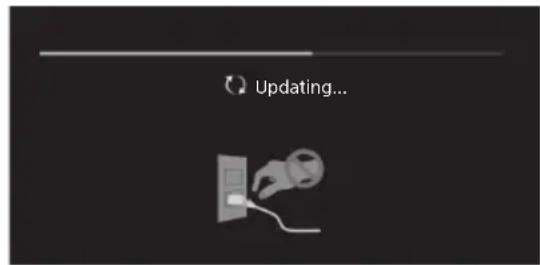
pnnn nn nnnnnnnnnnnnnnnnnnnnnnnnnnnnnnnnnnnnnnnnnnnnnnnnnnnnnnnnnnnnnnnnnnnnnnnnnnnnnnnnnnnnnnnnnnnnnnnnnnnnnnnnnnnnnnnnnnnnnnnnnnnnnnnnnnnnnnnnnnnnnnnnnnnnnnnnn
N N N 127, nnnn nn nn nn nn nn nn nn nn nn nn nn nn nn nn nn nn nn nn nn nn nn nn nn nn nn nn nn nn nn nn nn nn nn nn nn nn nn nn nn nn nn nn nn nn nn nn nn nn nn nn nn nn nn nn nn nn nn nn nn nn nn nn nn nn nn nn nn nn nn nn nn nn nn nn nn nn nn nn nn nn nn nn nn nn nn nn nn nn nn nn nn nn
ynnn npnn nn nnnn nn nnnn nn nnnn
LCD-702y 1nnn pnnn nn
FW-85BZ35FFW-75/6!
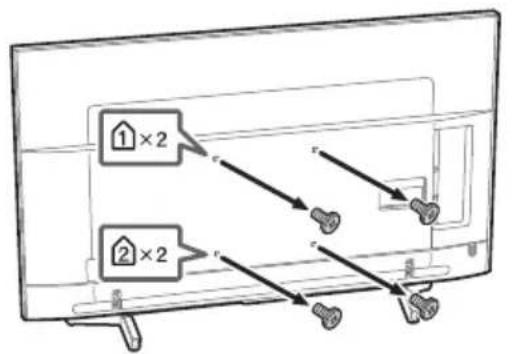
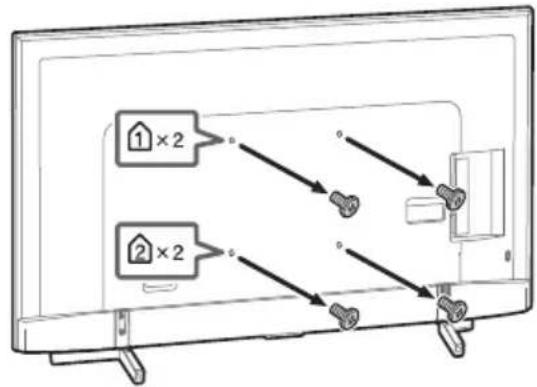
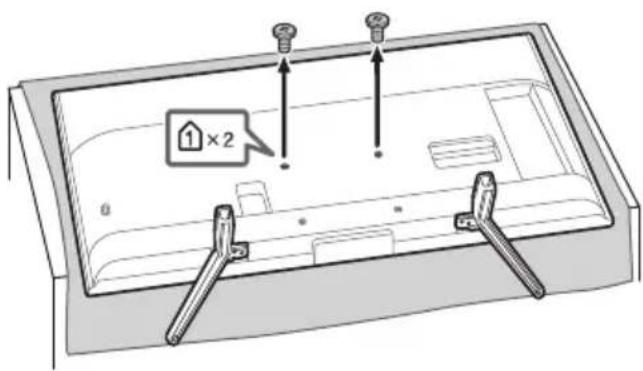
FW-49/43BZ35Fx
wn by npnnnnpnn, npnn nnnn nn nnnn nn
nLCD-n npwn nn nnnn pnn nnnn nnnn nnnn nnnn nnnn nnnn nn nnnn nn nnnn nn nnnn nn nnnn nn nnnn nn nnnn nn nnnn nn nnnn nn nnnn nn nnnn nn nnnn nn nnnn nn nnnn nn nnnn nn nnnn nn nnnn nn nnnn nn nnnn nn nnnn nn nnnn nn nnnn nn nnnn nn nnnn nn nnnn nn nnnn
(SU-WL450 nnnn nn (FW-85/75BZ35F) (Pn Su-WL500 nnnn nn nn nn nn nn nn nn nn nn nn nn nn nn nn nn nn nn nn nn nn nn nn nn nn nn nn nn nn nn nn nn nn nn nn nn nn nn nn nn nn nn nn nn nn nn nn nn nn nn nn nn nn nn nn nn nn nn nn nn nn nn nn nn nn nn nn nn nn nn nn nn nn nn nn nn nn nn nn nn nn nn nn nn nn nn nn nn nn nn nn nn nn nn nn nn nn nn nn nn nn
77
.
TNN, TNN TNN TNN TNN TNN TNN TNN TNN TNN TNN TNN TNN TNN TNN TNN TNN TNN TNN TNN TNN TNN TNN TNN TNN TNN TNN TNN TNN TNN TNN TNN TNN TNN TNN TNN TNN TNN TNN TNN TNN TNN TNN TNN TNN TNN TNN TNN TNN TNN TNN T
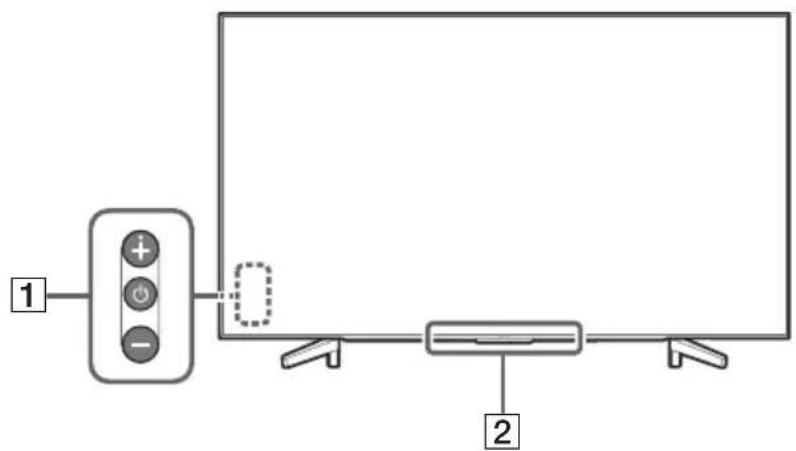
FW-49/43BZ35F
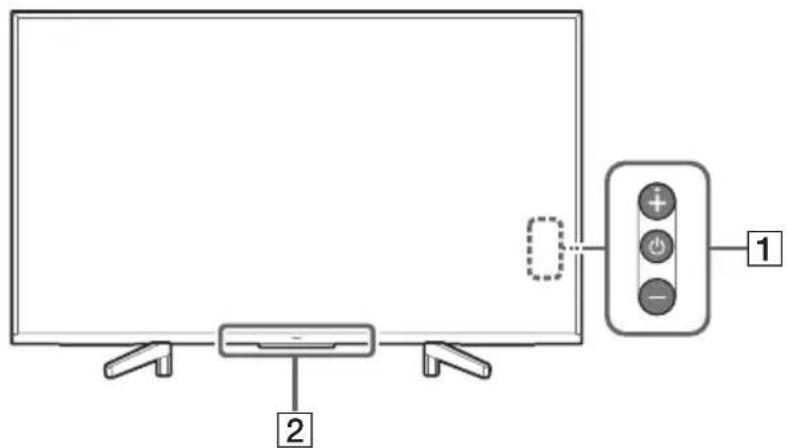
-/+/(n#y)
1
n
.ynysh 0 by ynb
nwnnwnn
. 10
y
:-+n+nnnbyy
.
. 1777777
.
nNn/NnNn/nnn/nnn nn 2
L
D
ONNNN NNNN IN NNN LED-nnnn
.
.
∴ Sn + 1 = 1( 2n + 1) ( 2n + 2) - 1( 2n + 3) ( 2n + 4) < 12( 2n + 1) ( 2n + 2)
ywnn/tonnow
LCD-7
bennn pwnLCD n 10nnn bannn nn np
.
y
17
yipn nn nnnn nn npan pann
non non non nnn np, nnon npn nn. non nnon
y
VNDNNSNLCD-NTNDVNO
LCD-702
wnnnn nnnn nn nnnn nn nnnn nn
LCD-nnnn nn nnnnnnnnnnnnn
.
nnpnnn nn nnnn nnnn nnnn LCD nnnn nn
·
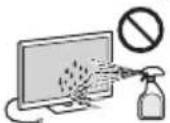
ipnbipbby onLCDn ton by
nnnnn nn nn nn nn nn
LCD-
n n,nnn nn
in nnnn nn nnnn,LCD-nnnnnnnn
#
nnpnnnnnnnnnnnnnnnnnnnnnnnn
ybnbnynnn nn nnnn
.
nnon by npnv nnaa Nnnn ptn
3 by nn nnnnne EMC-n
nynbnuynnnnnyan
yhyyhyy (12)
nnn nnnn nn
ynnn nnnn nn nnnn nnnn
nnnnna nnnn nn nnnn nn nnnn nn nnnn
.
y nnnn nnne 20 ynnn nnnn nn
OTN 177777
pnnn nn nnn
nno nnnn no nnnn no nnnn a
.
mnnnne nnnnne nnnnne nnnnne
- 10000000000000000000000000000000000000000000
ywnbnynnynn,nnnynn.
.
.
075
LCD-n70
-071N 170
.
...nwnnn nn nwnnn on
mnnnnn nn nnnnnn nn nnnn LCD -n nn nn
.
nwn nn nnn nn nn nn nn nn nn nn nn nn nn nn nn nn nn nn nn nn nn nn nn nn nn nn nn nn nn nn nn nn nn nn nn nn nn nn nn nn nn nn nn nn nn nn nn nn nn nn nn nn nn nn nn nn nn nn nn nn nn nn nn nn nn nn nn nn nn nn nn nn nn nn nn nn nn nn nn
.
:7vN3
.
nno nnpnn
.
.
LCD-n ton y nnnn
CD-7
.7777777777777
177
n#1b0n
-
TNNN NNNN NNNN LCD -n 1
TNNN
·
.
LCD
99.99%-7
in ynnnny nnnnnp, np on np
y (pN n, 0N) n y n
- vovv07p1y0y0y0y0y0y0y0y0y0y0y0y0y0y0y0y0y0y0y
.
-
LCD-n tonp npnnn nn nnnnnpn. LCD-n ton
□y
nbnbyyynnnn nn nnnnnnnnnnnnn
.7777777777777777777777
00000000000000000000000000000
.0777777
nN n.
.n7pn
Dp nOnn 777777777777777777777777
nnoyn noyn nynnnn mnpnn
yipnINP,pynnnnONNNON
.
yipn nni nnnn nn nnnn LCD
100000000000000000000000000000
n nnnnnnnnnnnnnnnnnnnnnnnnnnnnn
y x
10Xv
Pn nnnn nn nnnn nnnn nnnn nnnn nnnn nnnn nnnn nnnn nnnn nnnn nnnn nnnn nnnn nnnn nnnn nnnn nnnn nnnn nnnn nnnn nnnn nnnn nnnn nnnn nnnn nnnn nnnn nnnn nnnn nnnn nnnn nnnn nnnn nnnn
nbn nn nnnnnnnnnnnnnnnnnnnnnnnnnnnnnnnnnnnnnnnnnnnnnnnnnnnnnnnnnnnnnnnnnnnnnnnnnnnnnnnnnnnnnnnnnnn
mnybipnno,nowLCDn
:日
y# y# n by,ynn,(nn) nn
nnn,000000000000000000000000000000000000000000
∴ ED//MN
:
nynmipn;npnINnnpn
nwn nnn nn nnn nnnn nn nnnn nn nnnn nn nnnn nn nnnn nn nnnn nn nnnn nn nnnn nn nnnn nn nnnn nn nnnn nn nnnn nn nnnn nn nnnn nn nnnn nn nnnn nn nnnn nn nnnn nn nnnn nn nnnn nn nnnn nn nnnn nn nnnn nn nnnn nn nnnn nn nnnn
:
D
wnn ypa LCD-n np nn pnn n by
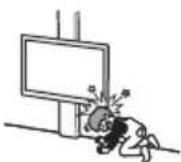
.007 1
DnDnNnNDLCNnNn
yNINOTNPOINNN
.LCD-nyynn
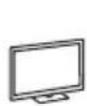

nBnLCD-nTnnn
DIN INN
yTn.(yN yDn yDn
.
nnpnnnepn nnnnnpnLCD-n npnnp
nwn nn nnnn nn nnnn nnnn
nnnnnnnnnnnnnnnnnnnnnnnnnnnnnnnnnnnnnnnnnnnnnnnnnnnnnnnnnnnnnnnnnnnnnnnnnnnnnnnnn
LCD-nn
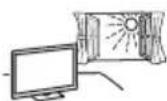
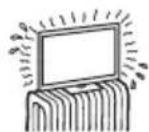
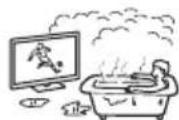
nannnnn nn nnnnnae LCD-n tonon
NNN,0000
p 10
nnn nn nnnn nn, nnnnnnnnnn nn
1
nwnnnn nn nnnn nnnn LCD
nnnnnnnnnnnnnnnnnnnnnnnnnnnnnnnnnnnnnnnnnnnnnnnnnnnnnnnnnnnnnnnnnnnnnnnnn
nnnnn nn, nnpaa. nannn yaa w/ LCD-n
LCDn nynnyan
:
wnby tonnnnLCD-n ton by oxyn pinnn
nnpnynnn nn nnnnnnnnnnnnn
pany onn n,PCLCD-n now
nannnnnnnnnnnnnnnnnnnnnnnnnnnnnnnnnnnnnnnnnnnnnnnnnnnnnnnnnnnnnnnnnnnnnnnnnnnnnnnnnnnnnnnnnnnnnn
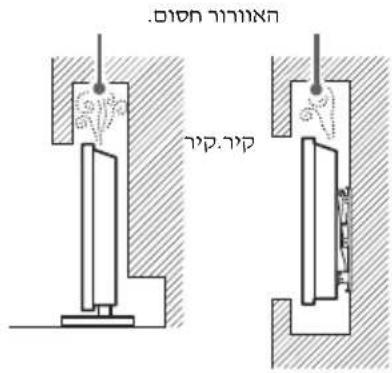
.
:PNNN
INTNNN
.102
一
一
y
一、1777年
bounn
wnnnn nn nnnn
:NININ
·
.07NN
.
·y
.
- 5y
1pynn ybnnn nn nn nns
.
ONNnOyOoT)nnnONNNN
()
nn
nnnnn nn nnnnnn, nnnnnnnn nn noonnnn noonnnn
.
Dyynnnn nn nnnnnn nn noe
n nn nnnnnnnnnnnnnnnnnnnnnnnnnnnnnnnnnnnnnnnnnnnnnnnnnnnnnnnnnnnnnnnnnnnnnnnnnnnnnnn
.0777777777777
nbpNnwnnnn7002pnnnynnnn
1povwnnnn nn nwn
npp
nnpnnnwnynnnnnnnnnnnn
ONNNNHNNNNNNNNN
n nn nnnnnnnnnnnnnnn
LCD-nnnp
.
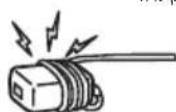
HE
FW-49/43BZ35F
FW-75/65/55BZ35F
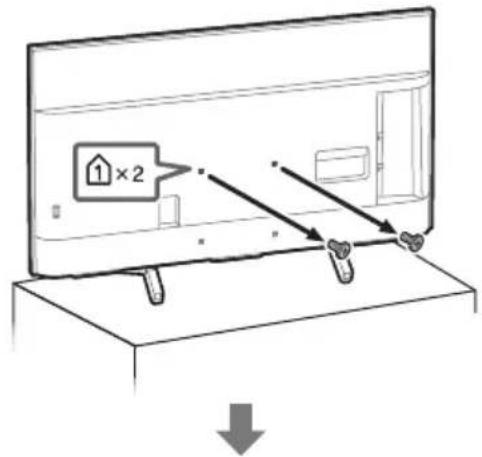
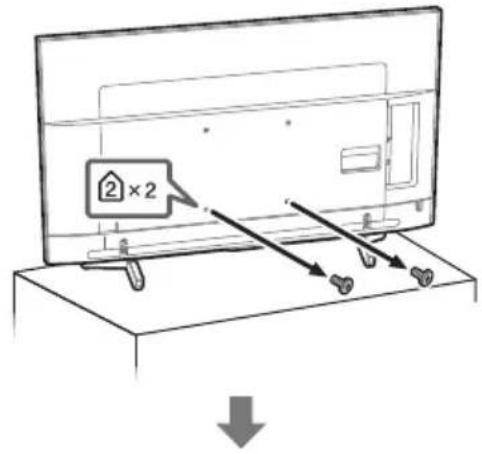
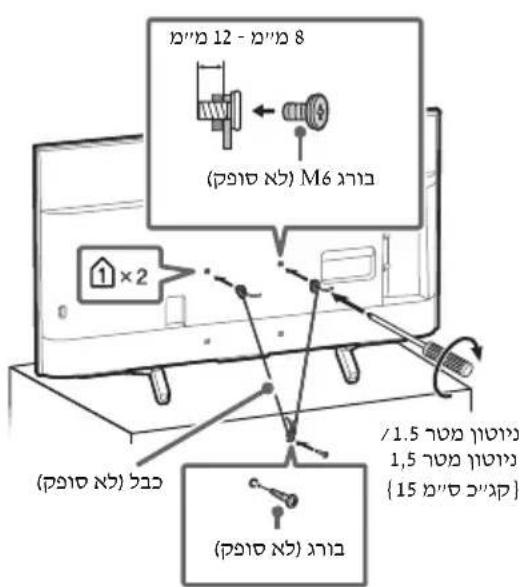
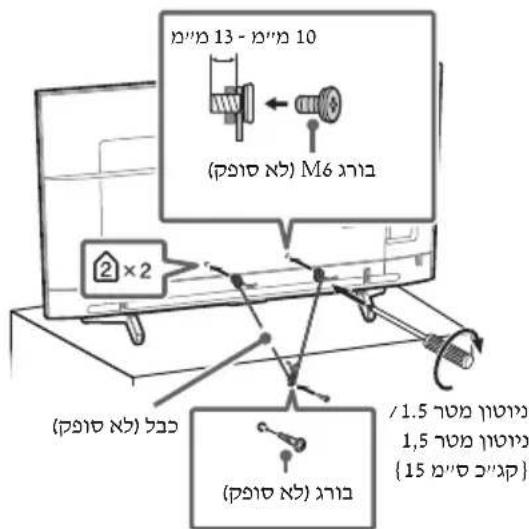
7771X
-
LCD-nTn
CD-7n
- NIN nn pao 7 Sony np nnae nn
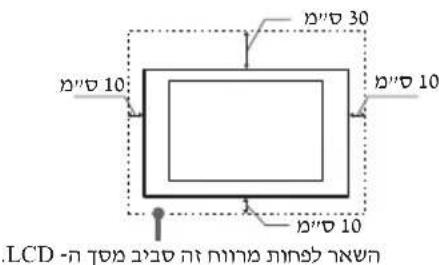
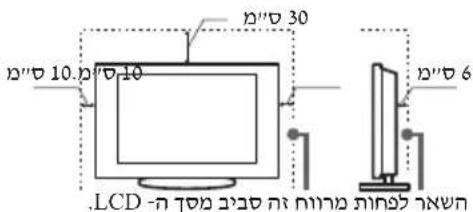
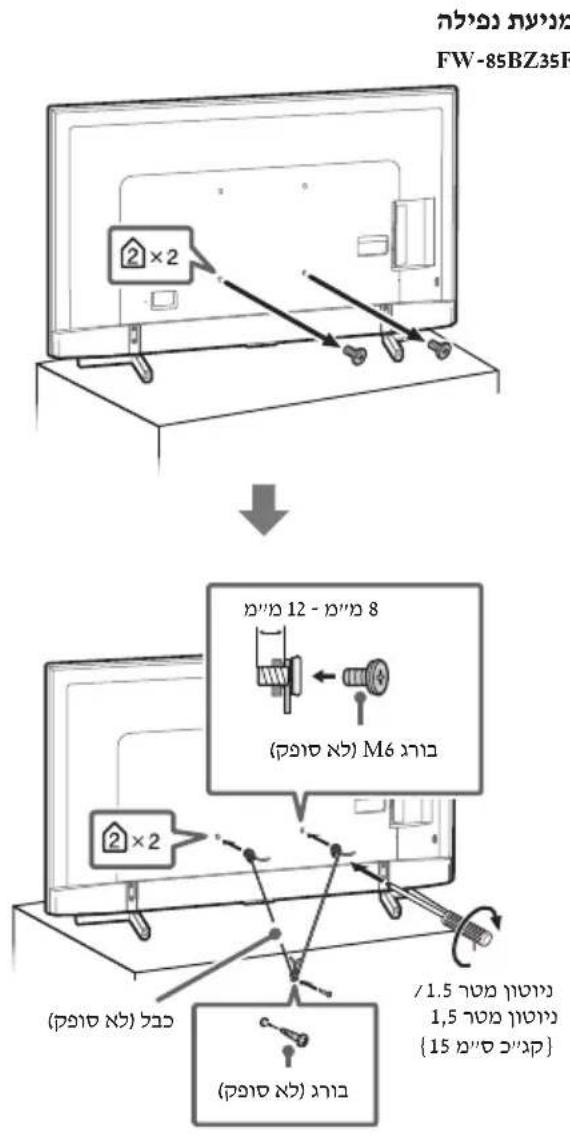
FW-85BZ35F
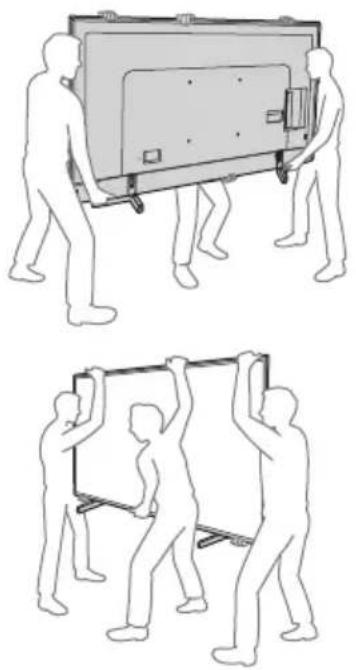
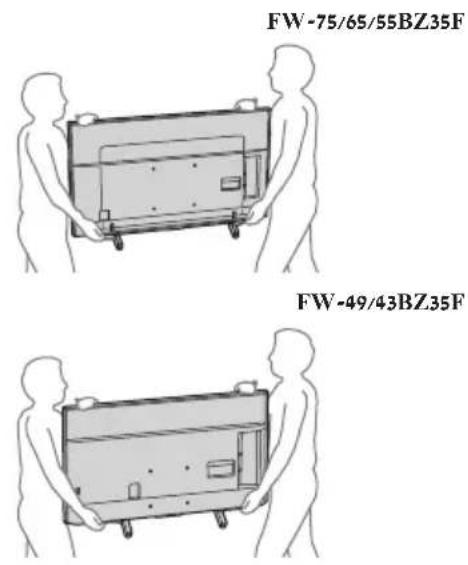
NNN,
07
#
nwnnynn
-wwwnynyipwLCD-nnnnnn
y 1
- 50%
.
Sony Europe B.V.: 10000000000000000
D
yynn yynn nynn nn (pynn) nyynn 1n nn nnnn LCD -n noh noh noh n,LCD -n noh noh noh noh
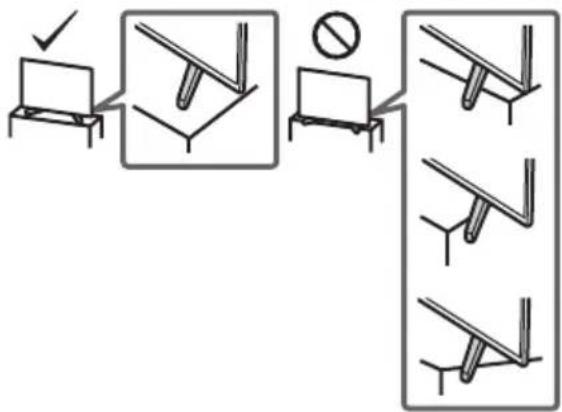
Tnwnnn nn nnnn nn nnnn nn nnnnn nn nn nn nn nn nn nn nn nn nn nn nn nn nn nn nn nn nn nn nn nn nn nn nn nn nn nn nn nn nn nn nn nn nn nn nn nn nn nn nn nn nn nn nn nn nn nn nn nn nn nn nn nn nn nn nn nn nn nn nn nn nn nn nn nn nn nn nn nn nn nn nn nn nn nn nn nn nn nn nn nn nn nn nn nn nn nn nn nn nn nn nn nn nn nn nn nn nn
(FW-85/75BZ35F tabu) SU-WL450 vip nbn -nbn nyn np np np np np np np np np np np np np np np np np np np np np np np np np np np np np np np np np np np np np np np np np np np np np np np np np np np np np np np np np np np np np np np np np np np np np np npnpnpnpnpnpnpnpnpnpnpnpnpnpnpnpnpnpnpnpnpnpnpnpnpnpnpnpnpnpnpnpnpnpnpnpnpnpnpnpnpnpnpnpnpnpnpnpnpnpnpnpnpnpnpnpnpnpnpnpnpnpnpnpnpnpnpnpnpnpnpnpnpnpnpnpnpnpnpnpnpnpnpnpnpnpnpnpnpnpnpnpnpnpnpnpnpnpnpnpnp
n nn nnnnnnnnnnnnnnnnnnnnnnnnnnnnnnnnnnnnnnnnnnnnnnnnnnnnnnnnnnnnnnnnnnnnnnnnnnnnnnnnnnnnnnnnnnnnnnnnnnnnnnnnnnnnnnnnnnnnnnnnnnnnnnnnnnnnnnnnnnnnnnnnnnnnn
FW-85/49/43BZ35F
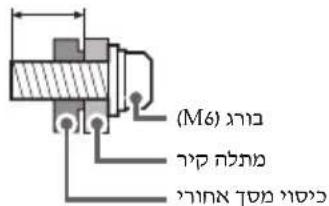
12-8
FW-75/65/55BZ35F
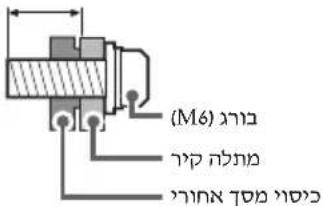
13-10
nnpnn nnn nn nnn nnn nnn nnn nnn nnn nnn nnn nnn nnn nnn nnn nnn nnn nnn nnn nnn nnn nnn nnn nnn nnn nnn nnn nnn nnn nnn nnn nnn nnn nnn nnn nnn nnn nnn nnn nnn nnn nnn nnn nnn nnn nnn nnn nnn nnn nnn
Da Vincilaan 7-D1, van Sony Europe B.V. Belgium, 1930 Zaventem
177 77y77
C
Sony Visual Products Inc.
FW-65BZ35F,FW-75BZ35F,FW-85BZ35F
FW-43BZ35F,FW-49BZ35F,FW-55BZ35F
bnnnn nn n bnon npun 2014/53/EU nnnn
:NNN NNNNNNNNN
http://www.compliance.sony.de/
nnnnn nn nnnnnnnnnnnnnnnnnnnnnnnnnnnnnnnnnnnnnnnnnnnnnnnnnnnnnnnnnnnnnnnnnnnnnnnnnnnnnnnnnnnnnnnnnnnnnnnnnnnnn
n nn nnnnnnnnnnnnnnnnnnnnnnnnnnnnnnnnnnnnnnnnnnnnnnnnnnnnnnnnnnnnnnnnnnnnnnnnnnnnnnnnnnnnnnnnnnnnnnnnnnnnnnnnn
nnn nn
77
#
n nn nnnnnnnnnnnnnnnnnnnnnnnnnnnnnnnnnnnnnnnnnnnnnnnnnnnnnnnnnnnnnnnnnnnnnnnnnnnnnnnnnnnnnnnnnnnnnnnnnnnnnnnnnnnnnnnnnnn
.070n 0
m
CD-CDLCD 1
LCD-n70
LCD-n702
-wnnnsy
.
IN 1
yNn nn LCD n nn nn nn (n nn)
.
.
·
·
.1npan nnnnLCD-n ton bn
Dnwn LCD n nn nn npnn npnn npnn npnn npnn npnn npnn npnn npnn npnn npnn npnn npnn npnn npnn npnn npnn npnn npnn npnn npnn npnn npnn npnn npnn npnn npnn npnn npnn npnn npnn npnn npnn npnn npnn npnn npnn npnn npnn npnn npnn npnn npnn npnn npnn npnn npnn npnn npnn npnn npinn npinn npinn npinn npinn npinn npinn npinn npinn npinn npinn npinn npinn npinn npinn npinn npinn npinn npinn npinn npinn npinn npinn npinn npinn npinn npinn npinn npinn npinn npinn npinn npinn npinn npinn npinn npinn npinnnpinnnpinnnpinnnpinnnpinnnpinnnpinnnpinnnpinnnpinnnpinnnpinnnpinnnpinnnpinnnpinnnpinnnpinnnpinnnpinnnpinnnpinnnpinnnpinnnpinnnpinnnpinnnpinnnpinnnpinnnpinnnpinnnpinnnpinnnpinnnpinnnpinnnpinnnpinnnpinnnpinnnpinnnpinnnpinnnpinnnpinnnpinnnpinnnpinnnpinnpinnnpinnnpinnnpinnnpinnnpinnnpinnnpinnnpinnnpinnnpinnnpinnnpinnnpinnnpinnnpinnnpinnnpinnnpinnnpinnnpinnnpinnnpinnnpinnnpinnnpinnnpinnnpinnnpinnnpinnnpinnnpinnnpinnnpinnnpinnnpenn
n7n/npnn
wnn nn nnnn nnnn LCD-n nn nn nn
nynnnn
#
n Sony nn by nnn
Tn-2y,ynpnnny
y
TNNN NPNN PNN,LCD-nnnynn
-
-
-
-
-
-
-
-
- 20.
-
-
-
-
-
-
-
myn
(3) "myny"ynon nn np,LCD-nynnyan
y
LCD-70757777777
y
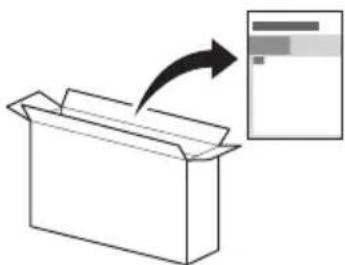
7
nnnnnnnnn nn nnnn nn nn nnnn
nwn npnnnne HELP y nLCD-n
.0NVD
n nn nn nn nn nn nn nn nn nn nn nn nn nn nn nn nn nn nn nn nn nn nn nn nn nn nn nn nn nn nn nn nn nn nn nn nn nn nn nn nn nn nn nn nn nn nn nn nn nn nn nn nn nn nn nn nn nn nn nn nn nn nn nn nn nn nn nn nn nn nn nn nn nn nn nn nn nn nn nn nn nn nn nn nn nn nn nn nn nn nn nn nn nn nn nn nn nn
/nuynnn,LCD-nn nn nnnnn
vnnn pna nnnn nn npn npn (vt)
mnnn nLCD-
:777777777777777
Nnnnnnnnnnnnnnnnnnnnnnnnnnnnnnnnnnnnnnnnnnnnnnnnnnnnnnnnnnnnnnnnnnnnnnnnnnnnnnnnnnnnnnnnnnnnnnnn
.
#

,
nwnnnnn
.
#
3
3. 1100
7.
8.
8.
9. 7pyn by LCD-n npnn
9. 1
11
11.
12
y7n7n7n7n7n7n
n nn nnnnnnnnnnnnnnnnnnnnnnnnnnnnnnnnnnnnnnnnnnnnnnnnnnnnnnnnnnnnnnnnnnnnnnnnnnnnnnnnnnnnnnnnnnnnnnnnnnnnnnnnnnnnnnnnnnnnnnnnnnnnnnnnnnnnnnnnn
07070707070707
HOMI
HIGH-DEFINITION MULTIMEDIA INTERFACE

DOLBY
AUDIO

Digital Surround

veWD
TUXERA

Bluetooth
4K
Actual resolution: 3840 x 2160 pixels
Résolution actuelle: 3840 x 2160 pixels
Risoluzione effettiva: 3840 x 2160 pixel
Resolucao do ecra: 3840 x 2160 pixels
Resolution real: 3840 x 2160 pixeles
πραγματική αναλυση: 3840 x 2160 pixels

- INTERNET CONNECTION AND DATA PRIVACY
- INTRODUCTION
- NOTE
- ATTACHING THE TABLE-TOP STAND TO THE LCD MONITOR
- HELP
- LOCATION OF THE IDENTIFICATION LABEL
- WARNING
- NOTICE FOR CUSTOMERS IN THE UNITED KINGDOM
- HOW TO REPLACE THE FUSE
- IMPORTANT NOTICE
- NOTICE FOR RADIO EQUIPMENT
- SAFETY INFORMATION
- CAUTION
- STABILITY HAZARD
- INSTALLATION/SET-UP
- INSTALLATION
- FW-85/49/43BZ35F
- FW-75/65/55BZ35F
- TRANSPORTING
- FW-85BZ35F
- FW-49/43BZ35F
- TOPPLE PREVENTION
- VENTILATION
- MAINS LEAD
- NOTE ON MAINS ADAPTOR (MODELS WITH SUPPLIED MAINS ADAPTOR ONLY)
- PROHIBITED USAGE
- LOCATIONS
- ENVIRONMENTS
- SITUATIONS
- BROKEN PIECES
- WHEN NOT IN USE
- FOR CHILDREN
- IF THE FOLLOWING PROBLEMS OCCUR
- WHEN
- ABOUT LCD MONITOR TEMPERATURE
- PRECAUTIONS
- VIEWING THE LCD MONITOR
- LCD SCREEN
- HANDLING AND CLEANING THE SCREEN SURFACE/ CABINET OF THE LCD MONITOR
- OPTIONAL EQUIPMENT
- WIRELESS FUNCTION OF THE UNIT
- CAUTION ABOUT HANDLING THE REMOTE CONTROL
- DISPOSAL OF THE LCD MONITOR
- DISPOSAL OF OLD ELECTRICAL & ELECTRONIC EQUIPMENT (APPLICABLE IN THE EUROPEAN UNION AND OTHER COUNTRIES WITH SEPARATE COLLECTION SYSTEMS)
- DISPOSAL OF WASTE BATTERIES (APPLICABLE IN THE EUROPEAN UNION AND OTHER COUNTRIES WITH SEPARATE COLLECTION SYSTEMS)
- PARTS AND CONTROLS
- CONTROLS AND INDICATORS
- INSTALLING THE LCD MONITOR TO THE WALL
- USING THE OPTIONAL WALL-MOUNT BRACKET
- TO CUSTOMERS
- TO SONY DEALERS AND CONTRACTORS
- TROUBLESHOOTING
- WHEN [A NEW TV SYSTEM SOFTWARE UPDATE IS AVAILABLE...] MESSAGE IS DISPLAYED
- WHEN YOU PLUG IN THE TV, THE TV MAY NOT BE ABLE TO TURN ON FOR A WHILE EVEN IF YOU PRESS THE POWER BUTTON ON THE REMOTE CONTROL OR THE TV
- TROUBLES AND SOLUTIONS
- WHEN THE ILLUMINATION LED IS FLASHING IN RED
- THE REMOTE CONTROL DOES NOT FUNCTION
- THE TV SURROUNDS BECOME WARM
- SPECIFICATIONS
- SYSTEM
- INPUT/OUTPUT JACKS
- OTHERS
- POWER, PRODUCT FICHE AND OTHERS
- DIMENSIONS (APPROX.) (W× H× D)
- MASS (APPROX.)
- TRADEMARK INFORMATION
- TABLE DES MATIERES
- POIDS (APPROX.)
- PESO (APROX.)
- TRANSPORT
- STROOMVERBRUIK
- GEWICHT (ONG.)
- MET TAFELSTANDAARD
- GEWICHT (CA.)
- PESO (CIRCA)
- MONTERA LCD-BILDSKÄRMEN PÅ VAGGGEN
- ANVANDA VAGGFUSTET (TILLVAL)
- TILL KUNDEN
- FELSÖKNING
- ENERGIFÖRBRUKNING
- UTAN BORDSTATIV
- VIKT (CA.)
- MED BORDSTATIV
- UTAN BORDSSTATIV
- VÆGT (CA.)
- PAINO (NOIN)
- FEILSØKING
- STRØMFORBRUK
- UTEN BORDSTATIV
- VEKT (CA.)
- WAGA (PRZYBLŻONA)
- ANOTPONN NTWONC
- EΕΕΡΙΣΜΌΣ
- ΠΕΡΙΒΑΛΛΟΝ
- BAPOC (NEPINOU)
- II NPOOPIECS YIA TO EUNOPIKO ONUA
- SORUN GIDERME
- AĞIRLIK (YAKL.)
- IONKIIOUEHNE K INHTEPHETY N KOHΦNDEHUANAIBHOCTB DAHHBIX
- BVEDENEHNE
- PPMEAHNE
- KPENNEHNE HACTOIBHOI NOCTABKN K LCD-MOHNTOPY
- CNPABKA
- PACNOJOXEHNE NDHTNPHIUNPYUOEJ 3TUKETK
- PPEYPEXKDEHNE
- ДЛ NXYNATEIEB POCNN
- BAKHHOEPIMEYAHHE
- HA3BAHNE NPODYKTA: LCD-MOHNTOP
- CBEHNNO6E3ONACHOCTN
- PNEYPPEKDEHNE
- PPEDYNPEXKEHNE
- PNCKN, CBA3AHHBIE CHEYCTOHNBBLM
- NIOJXEHNEM
- YCTAHOBKA/NODKJIIOUEHNE
- YCTAHOBKA
- PEPEMEEHNE
- PPEOTBPAUEHNE ONPOKNDBBAHNA
- BENTNLA
- HACTEHHA YCTAHOBKA
- YCTAHOBKA C NODCTBKOJ
- KA6EJB NHTAHN
- PPIMUEAHNE
- 3ANPEEHHBI TNBL IYCTAHOBKN
- MECTONOLOXHEN
- CPEDBI
- CUNYAUN
- OCKON
- ECN LCD-MOHTOP HE NNOJB3YETC
- MEPBLNPEDOCTOPOXHOCTN BOTHOWEHN DETE
- ECNHMEOIT METO CJEDYUOUNE HENCNPABHOCTN
- B CLYUAE, ECN
- OTEMNEPATYPE LCD-MOHHTOPA
- MEPBLNPEDOCTOPOXKNOCTN
- PPOCMOTP LCD-MOHHTOPA
- KK-3KPAH
- YXOD 3A NOBEPXHOCTBHO KPAHA, KOPNYCOM LCD-MOHHTOPA N NX QNCTKA
- DONONHNTEJIBHOE O6OPYDOBAHNE
- BECNPOBODNA YHKNUA YCTPOCTBA
- IPEYNPEKDHNE OTHOCTTENBHO NCNOJB3OBAHN IYJBTA DNCTAHCUHHO YNPABJEHH
- YTULN3AUNLCD-MOHNTOPA
- ПОИСК ИССРАВНОСТ
- ECNNOTO6PAXAETC COO6EHNE [OOCTYNPHO HOBOE 6HOBLEHNE IRA TB-CNCTEMBL...]
- ECN CBETONDNHBI INHDNKATOP MNRAET KPACHBIM UBETOM
- HE PA6OTAET NYIBT DUCTAHCNOHHORO YNPABLEHN
- NOBEPXHOCTU TEJEBN3OPA HARPEBAIOTC
- TEXHNUECKNE XAPAKTEPNCTNKN
- CNCTEMA
- PA3MEPBL (NPN6N3.) (Ω × B× R)
- MACCA (NPU6N3.)
- PPIMECHAHNE
- HΦOPMAΖΗ O TOPROBBIX MAPKAX
- Y
- (Y×X)(N)
- ()
- 07NN1 7N7N7N7N7N
- 07070
- LED
- YWNN/TONNOW
- LCD-7
- VNDNNSNLCD-NTNDVNO
- NYNBNUYNNNNNYAN
- PNNN NN NNN
- 075
- NWNNN NN NWNNN ON
- 7VN3
- LCD-N TON Y NNNN
- 177
- N#1B0N
- LCD
- 10XV
- BOUNN
- ONNNOYOOT)NNNONNNN
- 7771X
- NWNNYNN
- 177 77Y77
- C
- NNN NN
- 77
- M
- N7N/NPNN
- MYN
- LCD-70757777777
- 7
- N NN NN NN NN NN NN NN NN NN NN NN NN NN NN NN NN NN NN NN NN NN NN NN NN NN NN NN NN NN NN NN NN NN NN NN NN NN NN NN NN NN NN NN NN NN NN NN NN NN NN NN NN NN NN NN NN NN NN NN NN NN NN NN NN NN NN NN NN NN NN NN NN NN NN NN NN NN NN NN NN NN NN NN NN NN NN NN NN NN NN NN NN NN NN NN NN NN
- Y7N7N7N7N7N7N
- 4K
Brand : SONY
Model : Bravia FW43BZ35F
Category : Monitor