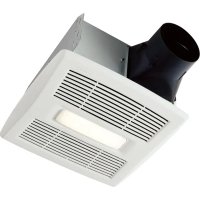
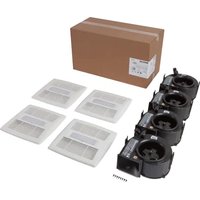
USER MANUAL Flex AE80SL BROAN
Roomside / Flex™ Series Humidity Sensing Fan/Light READ AND SAVE THESE INSTRUCTIONS
WARNING
TO REDUCE THE RISK OF FIRE, ELECTRIC SHOCK, OR INJURY TO PERSONS, OBSERVE THE FOLLOWING:
- Use this unit only in the manner intended by the manufacturer. If you have questions, contact the manufacturer at the address or telephone number listed in the warranty.
- Before servicing or cleaning unit, switch power off at service panel and lock the service disconnecting means to prevent power from being switched on accidentally. When the service disconnecting means cannot be locked, securely fasten a prominent warning device, such as a tag, to the service panel.
- Installation work and electrical wiring must be done by a qualified person(s) in accordance with all applicable codes and standards, including fire-rated construction codes and standards.
- Sufficient air is needed for proper combustion and exhausting of gases through the flue (chimney) of fuel burning equipment to prevent backdrafting. Follow the heating equipment manufacturer's guideline and safety standards such as those published by the National Fire Protection Association (NFPA), and the American Society for Heating, Refrigeration and Air Conditioning Engineers (ASHRAE), and the local code authorities.
- When cutting or drilling into wall or ceiling, do not damage electrical wiring and other hidden utilities.
- Ducted fans must always be vented to the outdoors.
- Acceptable for use over a tub or shower when connected to a GFCI (Ground Fault Circuit Interrupter) - protected branch circuit (ceiling installation only).
- It is recommended to wear safety glasses and gloves during installation.
- This unit must be grounded.
- Monitor your fan for unusual sounds, smells and smoke. If any appear, turn off the fan immediately and replace it.
CAUTION
- For general ventilating use only. Do not use to exhaust hazardous or explosive materials and vapors.
- For installation in flat ceilings only. Do not mount this product in a wall.
- To avoid motor bearing damage and noisy and/or unbalanced impellers, keep drywall spray, construction dust, etc. off power unit.
- DÓ NOT TOUCH THE HUMIDITY-SENSING CIRCUIT BOARD. Electrostatic discharge may damage the circuit board.
- Please read specification label on product for further information and requirements.
CLEANING & MAINTENANCE
For quiet and efficient operation, long life, and attractive appearance - lower or remove grille and vacuum interior of unit with the dusting brush attachment.
The motor is permanently lubricated and never needs oiling. If the motor bearings are making excessive or unusual noises, replace the blower assembly (includes motor and impeller).
SENSOR CLEANING
The humidity sensor is mounted in the control housing. The sensor will operate most reliably when cleaned occasionally as follows:
- Disconnect power at service entrance.
- Remove the grille. Use a dry dustcloth, clean toothbrush, or lightly vacuum to clean sensor and grille. DO NOT USE ABRASIVE CLOTH, STEEL WOOL PADS, OR SCOURING POWDERS.
- DO NOT USE cleaning sprays, solvents, or water on or near the sensor!
For Warranty Statement, Service Parts, Technical Support, or to Register your product, please visit our website or call:
In the United States - Broan.com 800-637-1453 or NuTone.com 888-336-6151. In Canada - Broan.ca or NuTone.ca 877-896-1119
OPERATION
The humidity sensor, fan and light can be operated separately. Use a 2- or 3-function wall control.
Flex™ Series Humidity Sensing Fan/Light ONLY: Do not use a speed control to operate the humidity sensor or the fan.
SENSOR OPERATION
This humidity-sensing fan uses a sophisticated humidity sensor that responds to: (a) rapid to moderate increases in humidity or (b) humidity above a set-point. The humidity sensor may occasionally turn the fan ON when environmental conditions change.
MANUAL ON WITH TIMED OFF
This humidity sensing fan has an additional operation feature. For odor or vapor control, the fan can be energized by cycling the power switch. Once the fan has been energized in this manner, it will remain on for the set timer period.
To manually energize the fan:
- If fan power switch is already ON, proceed to Step 2; otherwise, turn power switch ON for more than 1 second.
- Turn fan power switch OFF for less than 1 second.
- Turn fan power switch back ON and fan will turn ON.
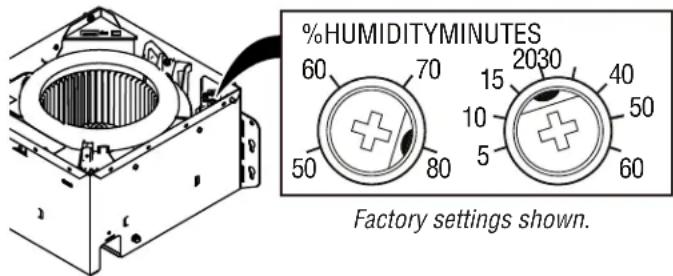
% HUMIDITY ADJUSTMENT
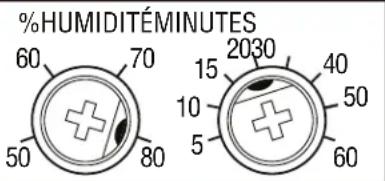
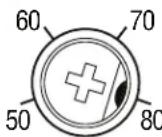
%HUMIDITY has been factory set at 80% for most shower applications. If fan is not responding to changing humidity conditions, adjust toward 50%. If fan is responding too often to changing humidity conditions, adjust toward 80%. If fan is still responding too often at 80%, contact Broan Technical Support.
To adjust the %HUMIDITY:
- Turn power off at electrical service panel.
- Use a small screwdriver to carefully rotate %HUMIDITY control to desired level.
- Turn power on.
- Repeat above steps if necessary.
MINUTES ADJUSTMENT (TIMER)
This humidity-sensing fan has a timer that controls how long the fan remains on after (a) rise in humidity and (b) humidity level are both below the user-adjustable %HUMIDITY setting, or after being energized by cycling power switch.
To adjust the timer:
- Disconnect power at electrical service panel.
- Use a small screwdriver to carefully rotate MINUTES control to increase or decrease time.
- Turn power on.
- Repeat above steps if necessary.
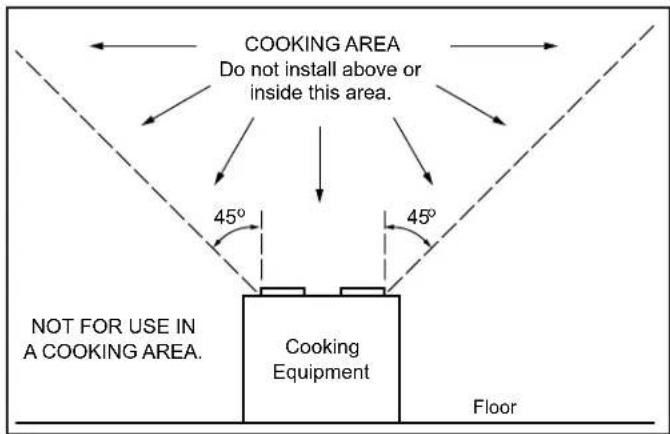
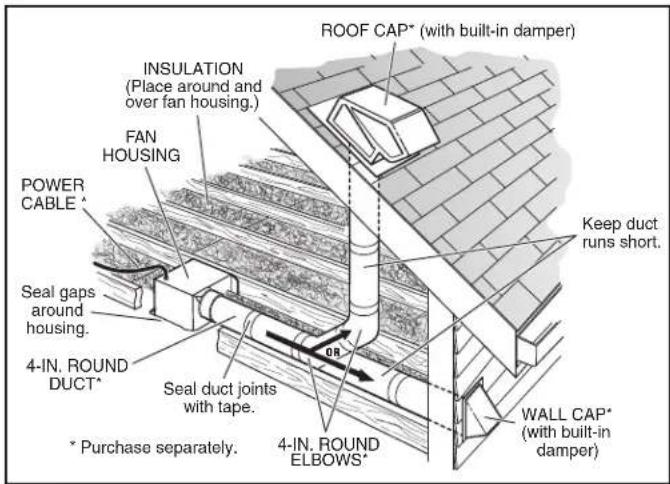
IMPORTANT - The ducting from this fan to the outside of the building has a strong effect on the air flow, noise and energy use of the fan. Use the shortest, straightest duct routing possible for best performance, and avoid installing the fan with smaller ducts than recommended. Insulation around the ducts can reduce energy loss and inhibit mold growth. Fans installed with existing ducts may not achieve their rated airflow.
OPTION - To mount housing anywhere between ceiling framing: Use optional Hanger Bar Kit (sold separately from local distributors or website). Follow mounting instructions included with kit.
ALL INSTALLATIONS
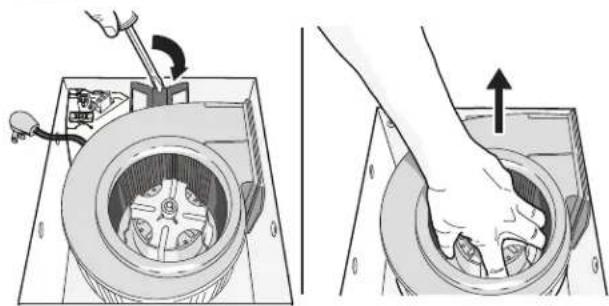
1 Remove all packing material, unplug and remove blower from fan housing.
natural_image
Two technical diagrams showing mechanical assembly and tool insertion, no text or symbols present
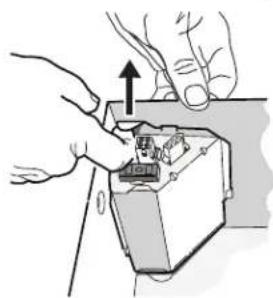
2 Remove wiring panel from fan housing (if already installed).
natural_image
Illustration of hands installing or adjusting a mechanical component with an upward arrow (no text or symbols)
- The models only:
Select 50, 80 or 110 CFM based on your room size and desired air flow.
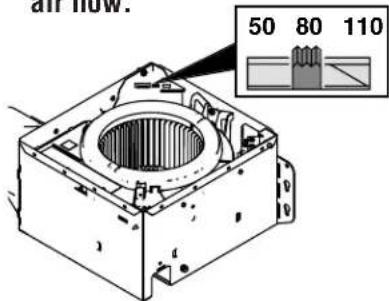
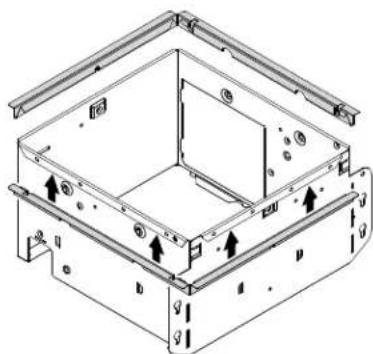
4 Some models only: A pair of flanges may be attached to housing if desired or required.
Snap both flange pieces under rolled-over edge of housing (all four sides).
natural_image
Technical line drawing of a mechanical housing or enclosure with mounting brackets and internal components (no text or symbols)
For Retrofit Installation - Skip to Page 3.
NEW INSTALLATION
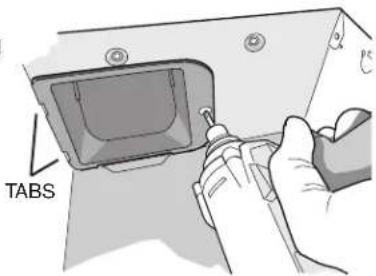
5 Attach damper/duct connector to fan housing.
Push connector through opening from inside of housing.
Engage tabs and secure with screw from parts bag.
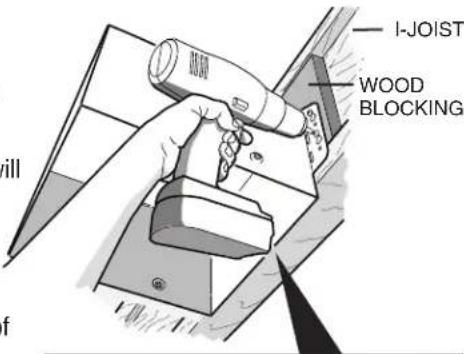
6 Mount housing to ceiling structure.
Make sure bottom of housing will be flush with finished ceiling.
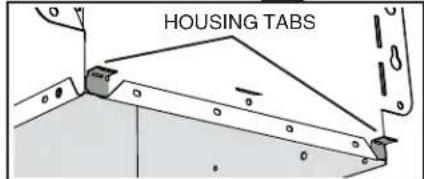
For proper location using 12 " ceiling material: Bend out housing tabs (on outside of housing) to fit against bottom of joist.
Secure housing through mounting ears with appropriate fasteners. If mounting housing to I-joist, use wood blocking as shown.
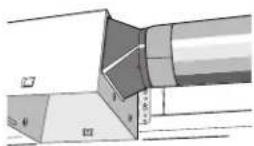
7 Connect 4-in. round duct.
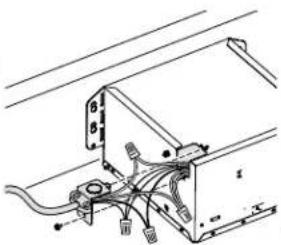
8 Connect wiring.
Connect power cable to wiring plate (from parts bag) using UL approved connector. Connect house wiring to fan wiring. Refer to wiring diagrams for connection details.
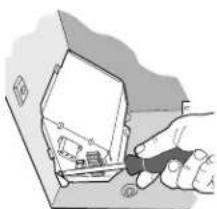
Use screw (from parts bag) to secure wiring plate to fan housing. Re-install wiring panel and secure with screw from parts bag.
natural_image
Illustration of a hand using a tool to cut or inspect a small electronic component (no text or symbols visible)
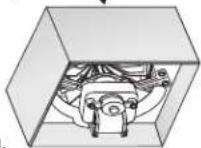
9 Install housing mask.
Place mask into housing opening to prevent drywall spr and constr damaging

10 Finish ceiling. Then continue with Step 11.
RETROFIT INSTALLATION
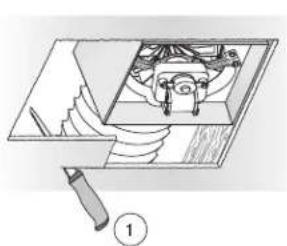
5 Remove old fan and prepare ceiling.
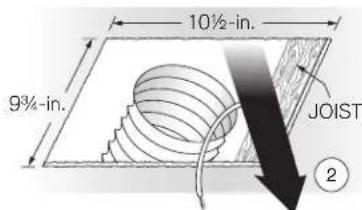
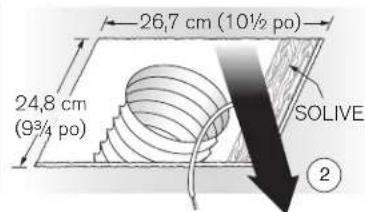
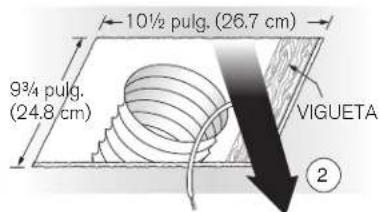
Enlarge ceiling opening (if necessary) to 9 ^3/4 " parallel to joist) by 10 ^1/2 " (perpendicular to joist). (Some models have a cut-out template on side of carton.)
natural_image
Diagram of a mechanical assembly with a tool and component, no visible text or symbols
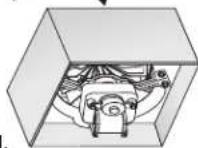
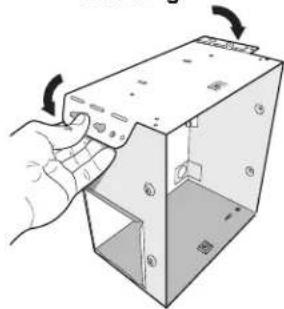
6 Fold mounting ears flat against housing.
natural_image
Hand inserting a component into a 3D box with arrows indicating rotation (no text or symbols)
Existing fan housings are typically attached to the structure:
- with screws, nails, or staples, which must be removed.
- with hangers or rails which are fastened to joists and must be removed along with housing.
A pry bar may be needed to remove the old housing.
Leave ductwork and wiring in place.
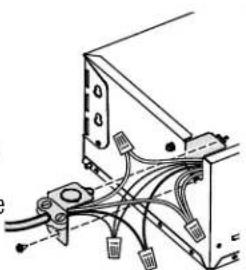
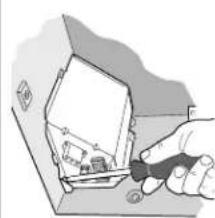
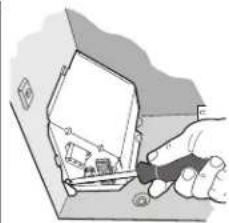
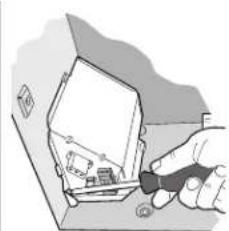
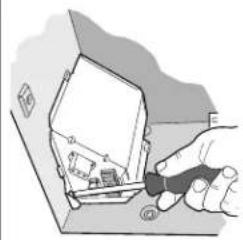
7 Connect wiring.
Connect power cable to wiring plate (from parts bag) using UL approved connector. Connect house wiring to fan wiring. Refer to wiring diagrams for connection details. Use screw (from parts bag) to secure wiring plate to fan housing. Re-install wiring panel and secure with screw from parts bag.
natural_image
Technical diagram of a mechanical or electrical component with wires and connectors (no text or symbols visible)
natural_image
Hand holding a tool interacting with a device inside a box (no visible text or symbols)
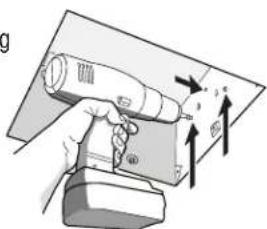
8 Mount fan to ceiling structure.
Mount housing to ceiling structure with appropriate fasteners in locations shown.
natural_image
Hand holding a handheld device with arrows indicating motion or force (no text or symbols visible)
9
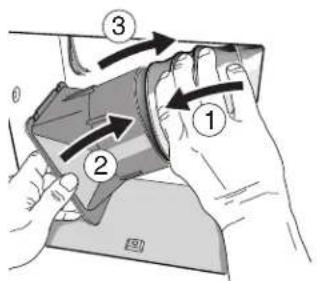
Connect 4-in. round duct.
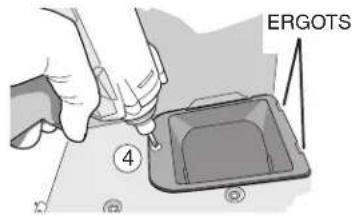
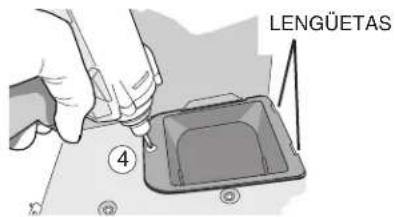
① Pull existing ducting through housing discharge opening and ② tape ducting to duct connector. ③ Push connector/ducting back through opening. Engage tabs and ④ secure with screw from parts bag.
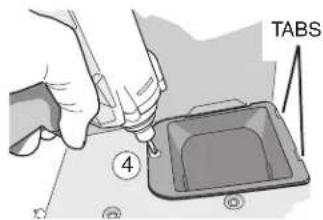
Continue with Step 11.
ALL INSTALLATIONS
11
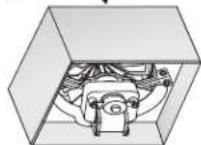
Install blower.
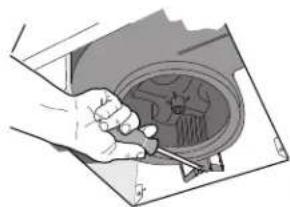
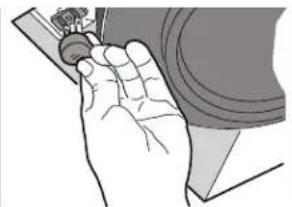
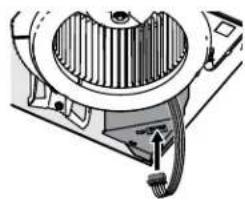
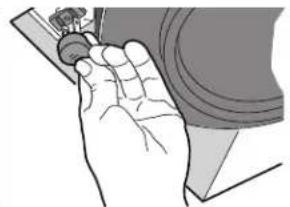
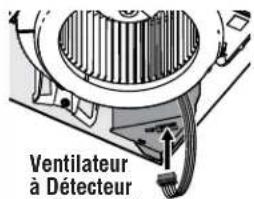
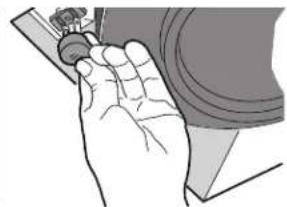
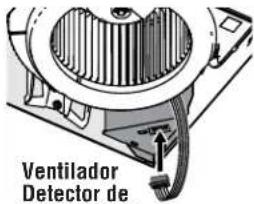
Re-install blower removed in Step 1. Secure blower with 2 screws from parts bag. Plug blower into black receptacle. Flex™ Series Humidity Sensing Fan/ Light ONLY: Plug 5-wire plug into controller module.
natural_image
Illustration of a hand holding a tool interacting with a mechanical component (no text or symbols visible)
natural_image
Illustration of a hand holding a small object, possibly a tool or device, with no visible text or symbols.
natural_image
Technical diagram of a mechanical component with internal gear and housing (no text or symbols)
12
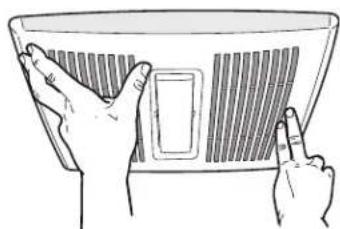
Install grille.
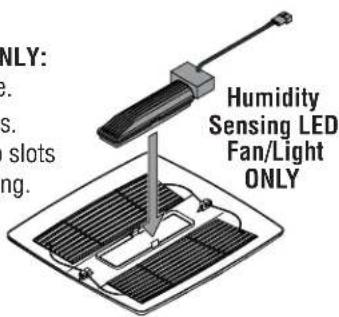
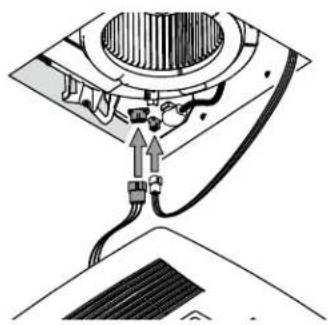
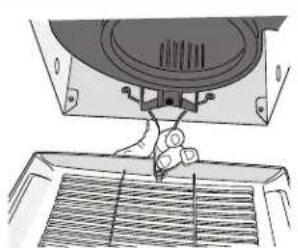
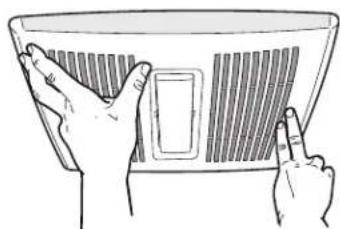
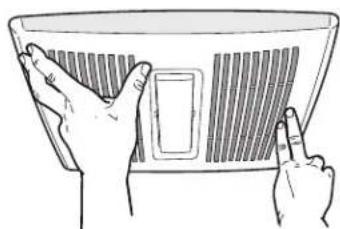
Humidity Sensing LED Fan/Light ONLY: Snap light module into inside of grille. Plug in light module and sensor wires. Squeeze grille springs and insert into slots in blower. Push grille up against ceiling.
Depending upon model - your grille may look different.
natural_image
Diagram of a mechanical device with a central component and cable, showing no text or symbols
natural_image
Diagram of a mechanical device with a handle and internal components, no visible text or symbols
natural_image
Illustration of two hands holding a fan or panel with a grid pattern (no text or symbols)
natural_image
Technical line drawing of a roof structure with a hook and pipe connection (no text or symbols)
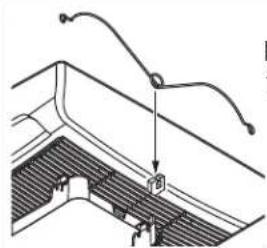
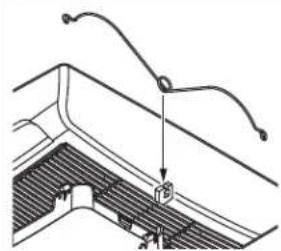
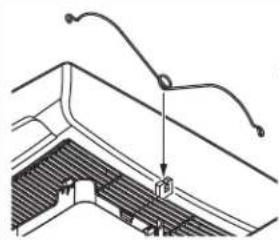
If grille spring becomes dislodged from grille - snap it back into place as shown.
WIRING DIAGRAMS
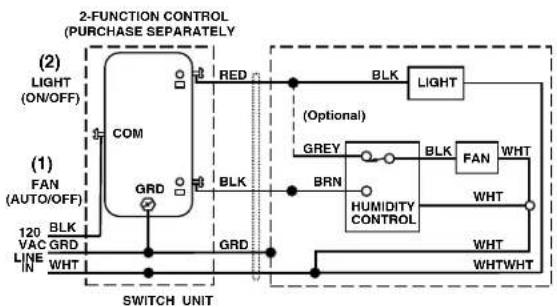
WIRING OPTION #1
- When first switch (1) is ON, fan will operate automatically, based on room humidity conditions.
- Turn fan ON immediately for the set timer period (to control odors), by cycling first switch.
- Use second switch (2) to turn light ON/OFF.
- With optional connection shown, fan will always be ON when light is ON.
flowchart
graph TD
    A["1) FAN (AUTO/OFF)"] --> B["COM"]
    B --> C["RED"]
    C --> D["BLK"]
    D --> E["Light"]
    E --> F["Optional"]
    F --> G["BRN"]
    G --> H["HUMIDITY CONTROL"]
    H --> I["WHT"]
    I --> J["WHTWHT"]
    J --> K["WHT"]
    K --> L["WHTWHT"]
    L --> M["SWITCH UNIT"]
    N["120 VAC LINE"] --> O["BLK GRD"]
    O --> P["GRD"]
    P --> Q["BRN"]
    Q --> R["HUMIDITY CONTROL"]
    R --> S["WHT"]
    S --> T["WHTWHT"]
    U["2) LIGHT (ON/OFF)"] --> V["COM"]
    W["SWITCH UNIT"] --> X["BRDN"]
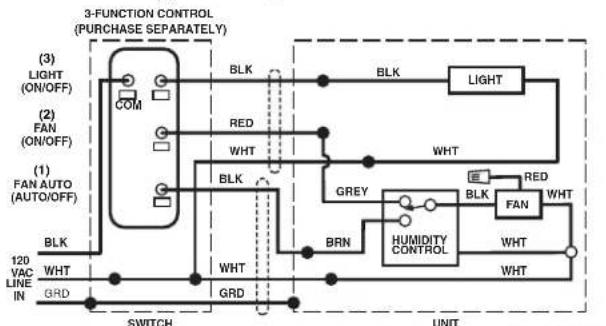
WIRING OPTION #2
- When first switch (1) is ON, fan will operate automatically based on room humidity conditions.
- Turn fan ON immediately (to control odors) by using second switch (2).
- Use third switch (3) to turn light ON/OFF.
flowchart
graph TD
    A["3-FUNCTION CONTROL (PURCHASE SEPARATELY)"] --> B["(1) FAN AUTO (AUTO/OFF)"]
    A --> C["(2) FAN (ON/OFF)"]
    A --> D["(3) LIGHT (ON/OFF)"]
    B --> E["BRN"]
    C --> F["BRN"]
    D --> G["BRN"]
    E --> H["SWITCH"]
    F --> I["SWITCH"]
    G --> J["SWITCH"]
    H --> K["UNIT"]
    I --> L["UNIT"]
    J --> M["UNIT"]
    K --> N["UNIT"]
    style A fill:#f9f,stroke:#333
    style B fill:#ccf,stroke:#333
    style C fill:#ccf,stroke:#333
    style D fill:#ccf,stroke:#333
    style E fill:#cfc,stroke:#333
    style F fill:#cfc,stroke:#333
    style G fill:#cfc,stroke:#333
    style H fill:#fcc,stroke:#333
    style I fill:#fcc,stroke:#333
    style J fill:#fcc,stroke:#333
    style K fill:#fcc,stroke:#333
    style L fill:#fcc,stroke:#333
    style M fill:#fcc,stroke:#333
1100264E
MISE EN MARCHE MANUELLE AVEC ARRÊT DIFFÉRÉ
natural_image
Technical line drawing of a mechanical assembly with a central circular component and mounting bracket (no text or symbols)
natural_image
Two technical diagrams showing a hand operating a mechanical device with a tool, no text or symbols present.
natural_image
Illustration of hands installing or adjusting a mechanical component with an upward arrow (no text or symbols)
natural_image
Technical line drawing of a mechanical housing or enclosure with mounting brackets and internal components (no text or symbols)
natural_image
Technical line drawing of a mechanical or electrical component with wires and connectors (no text or symbols)
natural_image
Illustration of a hand holding a tool interacting with a small electronic device inside a box (no text or symbols visible)
9
10
natural_image
Diagram of a mechanical assembly with a tool and component, no visible text or symbols
6
natural_image
Illustration of a hand using a tool to adjust or install a small electronic component (no text or symbols visible)
8
natural_image
Illustration of a hand holding a handheld device with arrows indicating motion or force (no text or symbols)
9
Raccordez un conduit rond de 10 cm (4 po).
natural_image
Illustration of a hand using a tool to adjust or install a mechanical component (no text or symbols visible)
natural_image
Illustration of a hand holding a small mechanical component (no text or symbols visible)
natural_image
Diagram of a mechanical device with a central component and cable, showing no text or symbols
natural_image
Diagram of a robotic arm operating a mechanical device with a mesh chamber (no text or symbols visible)
natural_image
Illustration of two hands holding a fan or grille device (no text or symbols visible)
natural_image
Technical line drawing of a roof structure with diagonal bracing and support beams (no text or symbols)
natural_image
Technical line drawing of a mechanical assembly with a circular component and internal components (no text or symbols)
%HUMEDAD
natural_image
Two technical diagrams showing mechanical assembly steps: one with tool and rotation, the other with hand and upward arrow (no text or symbols)
natural_image
Illustration of hands installing or adjusting a mechanical component with an upward arrow (no text or symbols)
natural_image
Technical line drawing of a mechanical housing or enclosure with mounting brackets and internal components (no text or symbols)
natural_image
Technical line drawing of an electrical enclosure with wiring and components (no text or symbols)
natural_image
Illustration of a hand holding a tool interacting with an open electronic device (no text or symbols visible)
9
natural_image
Technical line drawing of a mechanical assembly with no visible text or symbols
6
natural_image
Hand inserting a component into a device housing (no text or symbols visible)
natural_image
Illustration of a hand holding a tool interacting with an open electrical box (no text or symbols visible)
8
natural_image
Illustration of a hand using a tool to adjust or install a mechanical component (no text or symbols visible)
natural_image
Illustration of a hand holding a small mechanical component (no text or symbols visible)
12
Instale la rejilla.
natural_image
Diagram of a mechanical device with a central component and cable, showing no text or symbols
natural_image
Diagram of a mechanical device with a handle and meshed base, no visible text or symbols
natural_image
Illustration of two hands holding a fan or panel with a grid pattern (no text or symbols)
natural_image
Diagram of a roof structure with a chimney and curved roof elements (no text or symbols)