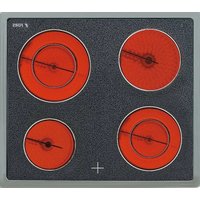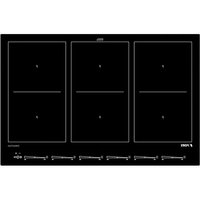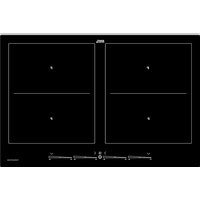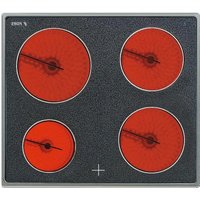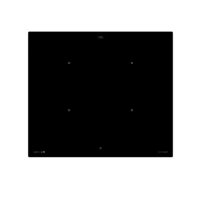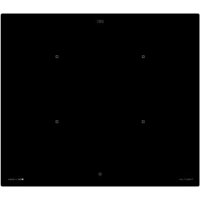
IKT 604 S FB - Cooker Fors - Free user manual and instructions
Find the device manual for free IKT 604 S FB Fors in PDF.


| Product type | Built-in induction hob |
| Brand | Fors |
| Model | IKT 604 S FB |
| Dimensions (H x W x D) | 50 x 600 x 520 mm |
| Number of cooking zones | 4 induction zones (Octa 220x190 mm) |
| Total power | 7.4 kW |
| Power per zone (max with Power) | 2.1 kW (3.7 kW) |
| Electrical supply | 380-415V 2N~, 50/60 Hz (components 220-240V) |
| Control type | Touch Control with sensitive area (Slider) |
| Main functions | Induction, Power function, automatic preheating, keep warm, timer, automatic shut-off, Stop function, Grill function, zone bridging |
| Safety | Child lock, locking, pan detection, residual heat indicator, overheat protection, automatic shut-off |
| Cleaning and maintenance | Ceramic glass surface, special ceramic glass cleaner, scraper for stubborn dirt, do not use steam cleaner |
| Spare parts and repairability | Fors after-sales service (0800 55 46 50), repair by approved professional |
| General information | Manual available in PDF, power cable not supplied, must be built-in |
Frequently Asked Questions - IKT 604 S FB Fors
If error code E2 is displayed, ventilation is insufficient.
User questions about IKT 604 S FB Fors
0 question about this device. Answer the ones you know or ask your own.
Ask a new question about this device
Download the instructions for your Cooker in PDF format for free! Find your manual IKT 604 S FB - Fors and take your electronic device back in hand. On this page are published all the documents necessary for the use of your device. IKT 604 S FB by Fors.
USER MANUAL IKT 604 S FB Fors
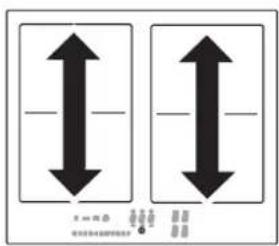
Module (Powermanagement)
4.23 Verriegelung
4.25 Powermanagement
1.1 For your information 24
1.2 Intended use 24
2 Safety Instructions andWarnings 25
2.1 For connection and operation 25
2.2 General information about the hob 25
2.3 For persons 26
2.4 Explanation for symbols and indications 27
3 Appliance description 28
3.1 Operating the hob with the sensor keys 29
3.2 Worth knowing about the slider (sensorfield).... 29
4 Operation 30
4.1 The induction hob 30
4.2 Pan recognition 30
4.3 Operation time limit 30
4.4 Other functions 30
4.5 Protection against overheating (induction) 30
4.6 Cookware for induction hobs 31
4.7 How to cut power consumption 31
4.8 Cooking levels 31
4.9 Residual heat display 31
4.10 Permanent pan recognition 32
4.11 Operating the keys 32
4.12 Switching on the hob and cooking zones 32
4.13 Switching off a cooking zone 32
4.14 Switching off the hob 32
4.15 Stop function 33
4.16 Recall function 33
4.17 Childproof lock 34
4.18 Bridging function (only for Octa cooking zones) 34
4.19 Automatic switch-off (timer) 35
4.20 Minute minder (egg timer) 35
4.21 Automatic boost function 36
4.22 Keep-warm levels 36
4.23 Locking 37
4.24 Power boost 37
4.25 Power management 37
4.26 Grill function (only for Octa cooking zones) .... 38
5 Cleaning and care 39
5.1 Glass ceramic hob 39
5.2 Specific soiling 39
6 What to do if trouble occurs? 40
7 Instructions for assembly 41
7.1 Safety instructions for kitchen unit fitters 41
7.2 Ventilation 41
7.3 Installation 41
7.4 Electrical connection 43
7.5 Technical data 43
7.6 Initial operation 43
8 Decommissioning and disposal of the appliance44
8.1 Switching the appliance off completely.. 44
8.2 Disposing of the packaging 44
18.3 Disposing of old appliances 44
9 Customer Service 45
1 General
1.1 For your information...
Please read this manual carefully before using your appliance. It contains important safety advice; it explains how to use and look after your appliance so that it will provide you with many years of reliable service.
Should a fault arise, please first consult the section on "What to do if trouble occurs?". You can often rectify minor problems yourself, thus saving unnecessary service costs.
Please keep this manual in a safe place and pass it on to new owners for their information and safety.
1.2 Intended use
The hob is to be used solely for preparing food in the home or in other environments. Similar environments:
- Use in shops, offices and other similar working environments
- Use in agricultural enterprises
- Use by customers in hotels, motels and other typical living environments
- Use in breakfast buffets
- It may not be used for any other purpose and may only be used under supervision.
2 Safety Instructions andWarnings
2.1 For connection and operation
- The appliances are constructed in accordance with the relevant safety regulations.
- Connecting the appliances to the mains and repairing and servicing the appliances may only be carried out by a qualified electrician according to currently-valid safety regulations. For your own safety, do not allow anyone other than a qualified service technician to install, service or repair the product.
- If the mains supply cable of this appliance is damaged, it must be replaced by the manufacturer, the Customer Service of the manufacturer or by another qualified person to avoid danger.
- The appliance may not be operated with an external timer or an external telecontrol system.
2.2 General information about the hob
- Never allow the induction hob to operate unattended, as the high power setting results in extremely fast reactions.
- When cooking, pay attention to the heat-up speed of the cooking zones. Avoid boiling the pots dry as there is a risk of the pots overheating!
- Do not place empty pots and pans on cooking zones which have been switched on.
Take care when using simmering pans as simmering water may dry up unnoticed, resulting in damage to the pot and to the hob for which no liability will be assumed. -
It is essential that after using a cooking zone you switch it off with the respective minus key and not just with the pan recognition device.
Overheated fats and oils may spontaneously ignite. Always supervise the preparation of food with fats and oils. Never extinguish ignited fats and oils with water! Switch the appliance off and then carefully cover the flame, for example with a lid or an extinguisher blanket. -
The glass ceramic surface of the hob is extremely robust. You should, however, avoid dropping hard objects onto the glass ceramic hob. Sharp objects which fall onto your hob might break it.
- There is a risk of electric shocks if the glass ceramic hob develops fractures, cracks, tears or damage of any other kind. Immediately switch off the appliance. Disconnect the fuse immediately and call Customer Service.
- If the hob cannot be switched off due to a defect in the sensor control immediately disconnect your appliance and call Customer Service.
Take care when working with home appliances! Connection cables must not come into contact with hot cooking zones. - Risk of fire: never store items on the hob.
- The glass ceramic hob should not be used as a storage area.
- Do not put aluminium foil or plastic onto the cooking zones. Keep everything which could melt, such as plastics, foil and in particular sugar and sugary foods away from hot cooking zones. Use a special glass scraper to immediately remove any sugar from the ceramic hob (when it is still hot) in order to avoid damaging the hob.
- Metal items (pots and pans, cutlery, etc.) must never be put down on the induction hob since they may become hot. Risk of burning!
- Do not place combustible, infl ammable or heat deformable objects directly underneath the hob.
- Metal items worn on your body may become hot in the immediate vicinity of the induction hob. Caution! Risk of burns! Non-magnetisable objects (e.g. gold or silver rings) are not affected.
- Never use the cooking zones to heat up unopened tins of food or packaging made of material compounds. The power supply may cause them to burst!
- Keep the sensor keys clean since the appliance may consider dirt to be finger contact. Never put anything ( pans, tea towels etc.) onto the sensor keys!
If food boils over onto the sensor keys, we advise you to activate the OFF key.
- Hot pans and pots should not cover resp. be moved to close to the sensor keys, since this will cause the appliance to switch off automatically.
- Place the pan as close to the centre of the cooking zone as possible.
- Whenever possible, use the back cooking zones for large pans so that the sensor keys are not heated up too much (touch control overheating; error message E2, touch control cut off).
- Activate the childproof lock if there are any pets in the home which could make contact with the hob.
- Never clean the glass ceramic hob with a steam cleaner or similar appliance!
2.3 For persons
- These appliances may be used by children aged 8 years and over and by persons with physical, sensory or mental impairments or by persons who lack experience and/or know-how, provided they are supervised or have been instructed in the safe used of the appliance and have understood the risks relating to the appliance. Children may not play with the appliance. Cleaning and maintenance by the user may only be carried out by children when they are supervised.
- The surfaces of the heating and cooking zones become hot during use. Keep small children away at all times.
- Only hob protective grids and hob covers produced by the hob manufacturer or the manufacturers of the hob protective grids and hob covers authorised by the manufacturer in the instructions for use may be used. The use of unsuitable hob protective grids and hob covers may result in accidents.
- Persons with cardiac pacemakers or implanted insulin pumps must make sure that their implants are not affected by the induction hob (the frequency range of the induction hob is 20-50 kHz).
2.4 Explanation for symbols and indications
The appliance was produced according to state of the art technology. Machines nevertheless give rise to risks which cannot be constructively avoided.
In order to guarantee sufficient safety for the use, safety instructions are also given. These instructions are marked by way of the highlighted texts which follow.
Suffi cient safety in operation will only be guaranteed when these instructions are observed.
The designated text passages have different meanings:

DANGER
Note indicating an imminent threat which may result in death or very serious injury.
CAUTION
Note indicating a potentially dangerous situation which may result in death or very serious injury.
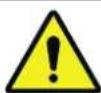
IMPORTANT
Note indicating a dangerous situation which may result in minor injury or damage to the appliance.

NOTE
Note to be observed in order to make handling the appliance easier.
The following danger symbols are used at some points:
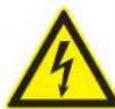
WARNING OF ELECTRICAL ENERGY RISK OF FATAL INJURY!
Live components have been installed near this symbol. Covers bearing this sign may only be removed by a certifi ed skilled electrician.
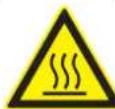
CAUTION! HOT SURFACES!
This symbol has been applied to surfaces which get hot. There is a risk of serious burning or scalding.
The surfaces may also be hot after the appliance has been switched off.

OBSERVE REGULATIONS FOR HANDLING ELECTROSTATICALLY SENSITIVE COMPONENTS AND MODULES (ESDS).
Electrostatically endangered components and modules are located behind covers bearing the adjacent symbol. Never touch plug connections, strip conductors or component pins. Only qualified staff members who are familiar with ESDs are authorised to carry out any technical intervention work.
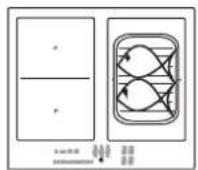
3 Appliance description
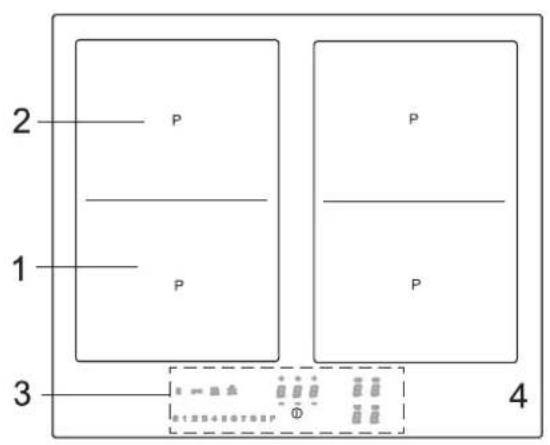
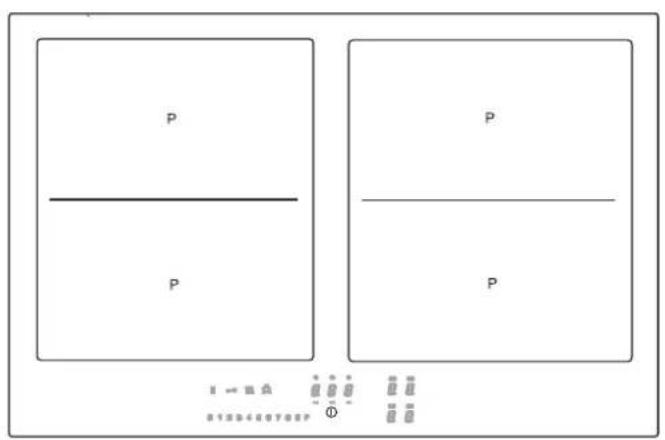
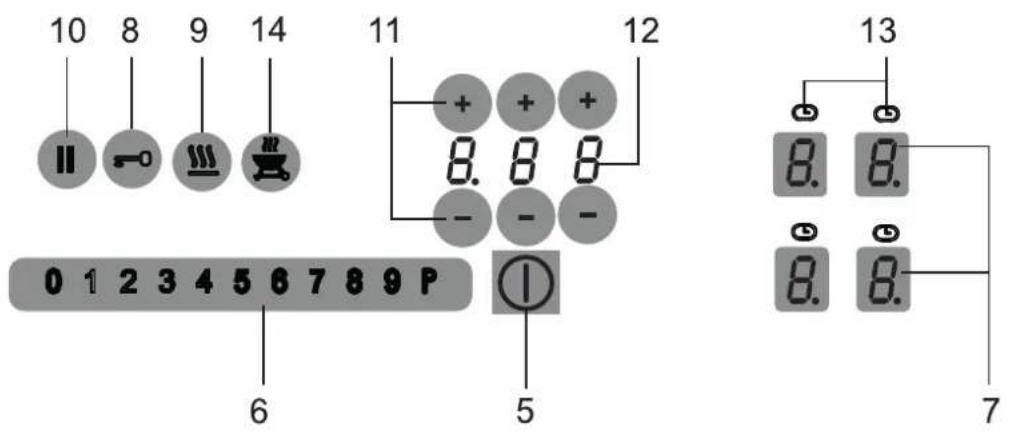
The decorative design may deviate from the illustrations.
- Front induction cooking zone
- Rear induction cooking zone
- Touch-Control panel
- Glass ceramic hob
- ON/OFF key
- Sensor field
-
Power setting display and selection key
-
Lock key
- Keep-warm key
- Stop key (pause)
- Minus key/Plus key Timer
- Timer indication
- Display cooking zone timer
- Grill key

NOTE
Most of the keys shown here will only become visible when the hob has been switched on.
3.1 Operating the hob with the sensor keys
The glass ceramic hob is operated with touch control sensor keys. The sensor keys are operated as follows: lightly touch a symbol on the surface of the ceramic glass plate. A buzzer will indicate when the controls have been operated correctly.
The touch control sensor key will then be indicated as "key".
Permanent pan recognition
If the hob has permanent pan recognition, a cooking setting can only be directly switched on via the sensor fi eld after a pan has been detected on the hob and the power display shows 0.
On-/Off key① (5)
This key is used to switch the entire hob on and off. It is, as it were, the main switch.
Power setting display and key (7) too
The power setting indicator shows the cooking level which has been selected, or:
H Residual heat
P .Power boost
Pan recognition
A Automatic boost function
11....Stop function
Childproof lock
Bridging function
Grill function
Keep-warm levels 42^ / 70^ / 94^
The corresponding cooking zone will be selected when the power setting display is touched. The stand-by dot of the cooking zone selected will light up.
Symbols
Timer function, automatic switch-off device
Locking
Lock key 一 ^ 一 (8)
The lock key can be used to lock all of the keys.
Keep-warm key 9
For melting, holding and simmering
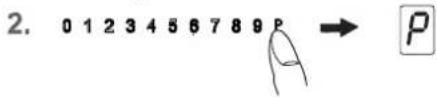
Power boost in the sensor fi eld12345678P
The power boost setting makes additional power available for induction cooking zones.
Stop key (10)
The STOP function can be used to briefly stop the cooking process.
Recall function |(10) (recovery function)
The most recent setting can be recovered if the hob is switched off unintentionally.
Grill key (14)
Grill function with a griddle plate for induction
3.2 Worth knowing about the slider (sensorfi eld)
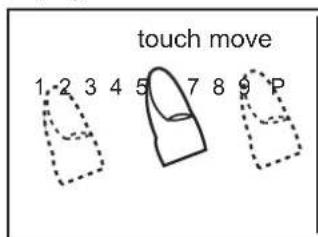
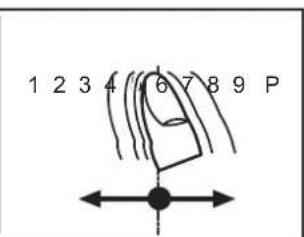
In principle, the slider functions the same as the touch controls; the only difference is that you can put your finger on the glass ceramic surface and then move it around. The sensor fi eld recognises this movement and raises or lowers the display setting (cooking level) in accordance with the movement.
The term sensor fi eld is used to mean slider from now on.
123456789P
Sensor field
What must be observed when operating sensor fields?
Your finger should not be placed flat onto the glass ceramic surface in order to avoid adjacent keys/sensor fi elds from reacting by mistake.
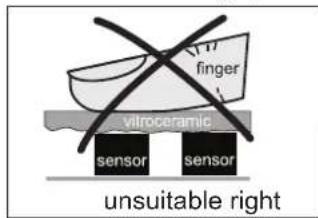
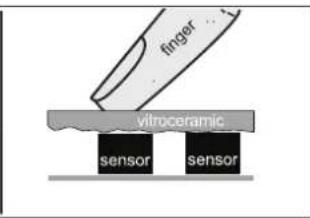
Press the sensor field lightly or move your finger around
You can press the sensor fi eld very lightly with your finger; when this is done the setting on the display (cooking level) will gradually change.
When you put your finger on the sensor field and then move it to the left or right, the display setting will change progressively.
The faster the movement, the faster the change in the display.
4 Operation
4.1 The induction hob
The hob is equipped with an induction cooking mode. An induction coil underneath the glass ceramic hob generates an electromagnetic alternating field which penetrates the glass ceramic and induces the heat-generating current in the pot base.
With an induction cooking zone the heat is no longer transferred from a heating element through the cooking pot into the food being cooked; instead the necessary heat is generated directly in the container by means of induction currents.
Advantages of the induction hob
- Energy-saving cooking through the direct transfer of energy to the pot (suitable pots/pans made of magnetisable material are required).
- Increased safety as the energy is only transferred when a pot is placed on the hob.
- Highly effective energy transfer between an induction cooking zone and the base of a pot.
Rapid heat-up. - The risk of burns is low as the cooking area is only heated through the pan base; food which boils over does not stick to the surface.
Rapid, sensitive control of the energy supply.
4.2 Pan recognition
If a cooking zone is switched on and there is no pan on the zone or if the pan is too small, there will be no transmission of power. A blinking in the power level indicator points this out.
If a suitable pot or pan is placed on the cooking zone, the power setting will switch on and the cooking level indicator will light up. The power supply will be cut off when the pan is removed and the power setting indicator will indicate a blinking
If the pots and pans placed on the cooking zone are of smaller dimension, and the pan recognition still switches on, less power will be supplied.
Please note
The permanent pan recognition recognizes on which cooking zone a pan is set up and shows a 0 in the corresponding power setting display.
Pan recognition limits
| Cooking zone diameter (mm) | Recommended minimal diameter pan base (mm) |
| 220x190 (Octa) 115 |
The base of pots and pans must be of a certain diameter; if it is not, the induction heat will not be switched on. Always place pots and pans in the middle of a cooking zone in order to achieve the best efficiency.
Important: The minimum diameter required to activate the pan recognition device may vary according to the type of pot or pan used!
4.3 Operation time limit
The induction hob has an automatic time limit function. The duration of continuous use of each cooking zone depends on the cooking level selected (see chart).
This requires that the setting of a respective cooking zone is not adjusted during use.
If the operation time limit has been activated, the cooking zone will switch off, a short signal will sound and an H will appear in the display.
The automatic switch-off function overrules the operation time limit, i.e. the cooking zone is only switched off when the period of time of the automatic switch-off device has expired (e.g. automatic switch-off after 99 minutes and cooking level 9 is possible).
Operation time limit
| Selected cooking level | Operation time limit in minutes |
| - = - | 120 |
| 1 | 520 |
| 2 | 402 |
| 3 | 318 |
| 4 | 260 |
| 5 | 212 |
| 6 | 170 |
| 7 | 139 |
| 8 | 113 |
| 9 | 90 |
| P | 10 |
4.4 Other functions
If two or more sensor keys are pressed at the same time (e.g. when a pan is mistakenly put onto a sensor key) no function will be activated.
The symbol Er03 will blink and a time-limited continuous signal will sound. After a few seconds the appliance will switch off. Please remove the item located in front of the sensor keys.
To delete the symbol Er03 press the same key or switch the hob off and on.
4.5 Protection against overheating (induction)
If the hob is used at full power for a longer period, it will not be possible to cool down the electronics system as required at a high room temperature.
In order to ensure that no excessive temperatures occur in the electronics system the power of the cooking zones may be reduced automatically. Should E2 be displayed frequently during normal use of the hob and at normal room temperature, it is likely that cooling is not sufficient.
This may occur if kitchen units have no openings. The installation may have to be checked (see the section on Ventilation).
4.6 Cookware for induction hobs
Cookware for induction cooking zones must be made of metal and have magnetic properties. The base must be sufficiently large.
Only use pots with a base suitable for induction.
| Suitable cookware Unsuitable cookware | |
| Enamelled steel pots with a thick base | Pots made of copper, stainless steel, aluminium, oven-proof glass, wood, ceramic and terracotta |
| Cast iron pots with an enamelled base | |
| Pots made of multi-layer stainless steel, stainless ferrite steel and aluminium with special base | |
This is how to establish the suitability of a pot:
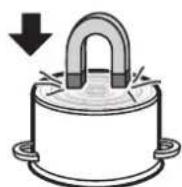
Conduct the magnet test described below or make sure that the pot bears the symbol for suitability for cooking with induction current.
Magnet test:
Move the magnet towards the base of your cookware. If it is attracted, you can use the cookware on the induction hob.
Please note:
When using pans suitable for induction from certain manufacturers, noises may occur which are attributable to the design of these pans.
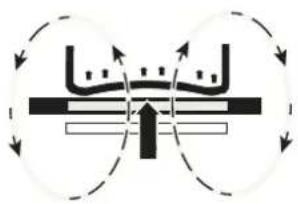
Wrong: the base of the pan is curved. The electronic unit cannot determine the temperature correctly.
4.7 How to cut power consumption
The following are a few useful hints to help you cut your consumption of energy and use your new induction hob and the cookware effi ciently.
- The base of your cooking pots should be the same size as the cooking zone.
- When buying cooking pots, note that it is frequently the diameter of the top of the pot that it indicated. This is usually larger than the base of a pot.
- Pressure cookers are particularly low on energy and time required thanks to the pressure and the fact that they are tightly closed. Short cooking times mean that vitamins are preserved.
Always make sure that there is sufficient fluid in your pressure cooker since the cooking zone and the cooker may be damaged as a result of overheating if the pressure cooker boils dry. - Always close cooking pots with a suitable lid.
- Use the right pot for the quantity of food you are cooking. A large pot which is hardly filled will use up a lot of energy.
4.8 Cooking levels
The heating power of the cooking zones can be set at various power levels. In the chart you will find examples of how to use each setting.
| Setting Suitable for | |
| 0 | Off, using residual heat |
| - | Melting 42°C |
| - | Keeping warm 70°C |
| - | Cooking 94°C |
| 1-2 | Simmering small portions |
| 3 | Simmering level |
| 4-5 | Simmering larger quantities or roasting larger pieces of meat until they are cooked through |
| 6 | Roasting, getting juices |
| 7-8 | Roasting |
| 9 | Bringing to the boil, browning, roasting |
| P | Power boost (highest power output) |
A higher cooking level may need to be selected for cooking pots without a lid.
4.9 Residual heat display H
The glass ceramic hob is equipped with an H as a residual heat indicator.
As long as the H lights up after the cooking zone has been switched off, the residual heat can be used for melting food or for keeping food warm.
The cooking zone may still be hot when the letter H no longer lights up. Risk of burns!
The glass ceramic is not directly heated in the case of an induction cooking zone; it is only heated up by heat reflected by the pan.
4.10 Permanent pan recognition
If the hob has permanent pan recognition, a cooking setting can only be directly switched on via the sensor fi eld after a pan has been detected on the hob and the power display shows 0.
4.11 Operating the keys
The controls described here expect the pressing of a (selection) key to be followed by the pressing of a subsequent key. The next key will need to be pressed within 10 seconds, otherwise the selection will be deleted.
4.12 Switching on the hob and cooking zones
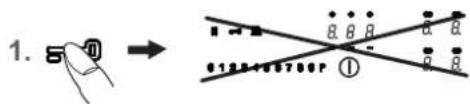
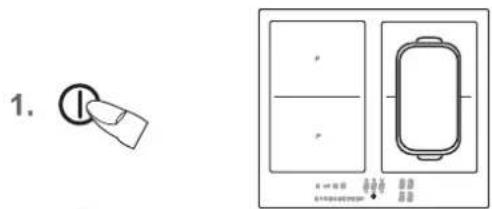
- Press the ON/OFF key (approx. 1 sec.) until the cooking level 0 appears and a short signal will sound. c. The permanent pan recognition recognizes on which cooking zone a pan is set up and shows a 0 in the corresponding cooking level display.
- Use the cooking level display (as a key) to select a cooking zone. The stand-by dot of the cooking zone selected will light up.
- The touch control must be activated immediately afterwards. A cooking level will be switched on.
45878P.....left cooking level 0.
1234 89P.....center cooking level 6.
12345678 P ......right cooking level P*
See the section on Worth knowing about the slider (sensor fi eld)
Press the respective sensor field to change a cooking level or to switch on an additional cooking zone.
Important: the stand-by dot of the cooking zone selected must light up.
- Immediately put cookware suitable for induction cooking onto the cooking zone. The pan recognition device will activate the induction coil. The pot or pan will be heated up.
As long as no cooking pot is placed onto the cooking zone, the display will alternate between the cooking level set and the symbol If no pot is placed on the cooking zone it will switch off after 10 minutes for reasons of safety. Please refer to the Section on pan recognition.
5a. A123456789P → 0.
5b. 012 A89P → O.
5c.
6.
4.13 Switching off a cooking zone
Use the cooking level display (as a key) to select a cooking zone. The stand-by dot of the cooking zone selected must light up.
- a) Press the sensor fi eld on the far left
b) drag your finger to the left across the touch control. to reduce the cooking level to 0
c) press the ON/OFF key The entire hob will be switched off (all the cooking zones are switched off).
4.14 Switching off the hob
- Press the ON/OFF key The hob will be switched off, irrespective of any settings.
Please note:
The hob will switch off automatically after 10 seconds when all the cooking zones are switched of manually (cooking level 0) and no key/sensor fi eld is pressed afterwards.
-
The Power boost function is activated immediately. See the section on Cooking levels.
- 1 2
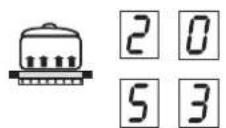
The cooking process can be briefly interrupted with the STOP function, e.g. if the doorbell rings. The STOP function must be released in order to continue cooking at the same cooking level. If a timer has been set it will pause and will then continue.
This function is only available for 10 minutes for reasons of safety. The hob will then be switched off.
- Pots and pans are on the cooking zones and the required cooking levels have been set.
- Press the Stop key. Instead of the selected cooking levels, the interval sign will light up.
- The interruption is ended by firstly pressing the STOP key and then pressing any other key (except the ON/OFF key).
The second key must be pressed within 10 seconds as the hob will otherwise be switched off.
4.16 Recall function
(recovery function)
The most recent setting can be recovered if the hob is switched off unintentionally.
The recall function only works if at least one cooking zone is switched on.
- The hob is inadvertently turned off by the ON/OFF key of the hob ①
- Within 6 seconds after turning it off, press the ON/OFF key of the hob again.
The STOP key blinks.
The STOP key I must be pressed immediately afterwards.
The original cooking levels are restored. The cooking process continues.
What can be restored:
- Cooking levels of all cooking zones
- Minutes and seconds of programmed timer functions
Automatic boost function
Power boost
Not to be restored:
Operation time limit (it is counted from 0)
- approx. 3 sec.
- 0123456789P
- ①
- approx. 3 sec.
- 0 2 3 A^6789 k
4.17 Childproof lock
The childproof lock serves the purpose of preventing children from switching on the induction hob either accidentally or intentionally. The controls are blocked here.
Switching on the childproof lock
- Press the ON/OFF key of the hob (1 s.) until the cooking level 0 appears.
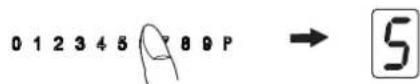
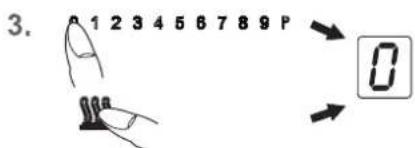
- Immediately afterwards press the cooking level display and keep it pressed (for approx. 3 seconds) until the sensor fi eld lights up from O-P.
- Immediately afterwards slide over the complete sensor fi eld from 0-P to activate the the childproof lock. The power setting indicators will show an L for child lock, the controls will be disabled and the hob will switch off.
Switching off the childproof lock
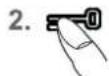
- Press the ON/OFF key.
- Immediately afterwards press the cooking level display and keep it pressed (for approx. 3 seconds) until the sensor fi el d lights up from O-P.
- Immediately afterwards slide over the complete sensor fi eld from 0-P to deactivate the the childproof lock. The L will go off .
Please note
- In the event of a power cut the childproof lock will not be cancelled.
1.
- 0
- 0

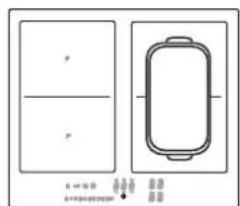
4.18 Bridging function only for Octa cooking zones)
The front and the rear cooking zones may be activated together for a cooking process (bridging function). This enables larger cookware to be used.
- Switch on the hob.
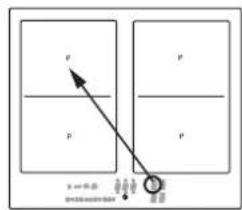
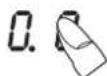
- Press the two cooking zone selection keys of the front and back cooking zones simultaneously to activate the bridging function. The bridging function has been switched on and the back power level setting shows the bridge Operation is carried out with the front power level setting and the sensor fi eld.
- Activate the front and back cooking zones simultaneously again or switch the hob off to deactivate the two power level settings (as a key).
Please note
The roaster or the pot will need to cover at least half of the cooking zones used in order to be recognised by the pan recognition device!
- 0.0.
- 4.
4.19 Automatic switch-off (timer)
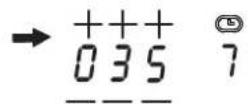
The automatic switch-off device is used to automatically switch off any cooking zone after an adjustable period of time. Cooking times ranging from 0.01 to 9.59 (h.minutes) can be set.
- Switch on the hob.
- Use the cooking level display (as a key) to select a cooking zone. The stand-by dot of the cooking zone selected will light up.
- Then use the Plus--key + or the Minus-key -to set the required time. Left position: hours Centre position: every 10 minutes Right position: every minute After a few seconds the entry will be taken over and the time will be running. The timer symbol of the cooking zone lights up.
- The cooking zone will be switched off when the time has lapsed. A signal will sound for a while and can be switched off by pressing any key (except the ON/OFF key ①
Notes
- Repeat steps 2 to 4 to program the automatic switch-off device for another cooking zone.
- To check the time that has lapsed (automatic switch-off) press the timer display (as a key). The setting displayed can be read and changed.
Terminating the function of the timer: Select the respective cooking zone and press the Minus-key to delete the time (0). -
If several cooking zones have been programmed with the automatic switch-off function, the timer display will always show the cooking zone with the shortest time.
- +0 000 → 005
3.
4.20 Minute minder (egg timer)
- Switch on the hob. Don't select a cooking zone.
- Then use the key for the Minus-key to set the required time.
- Once the time has lapsed a signal will sound for a while and can be switched off by pressing any key (except for the ON/OFF key ①
Notes
- The minute minder will also remain in operation when the right or left side of the hob is switched off. Switch the left or right side of the hob on to adjust the time.
The minute minder will switch off after approx. 120 min. when the ON/OFF key is used for switching off.

Press and keep pressed (for approx. 3 seconds)

| Cooking level Cooking level | Automatic boost function Time (min:sec) |
| 1 | 0:40 |
| 2 | 01:12 |
| 3 | 02:00 |
| 4 | 02:56 |
| 5 | 04:16 |
| 6 | 07:12 |
| 7 | 02:00 |
| 8 | 03:12 |
| 9 | - |

4.21 Automatic boost function
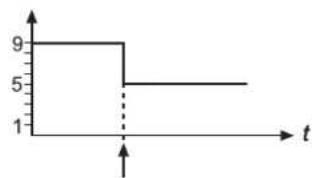
Food is parboiled at power level 9 with the automatic boost function. After a certain time, the power level will switch down automatically to a lower simmering setting (1 to 8).
When using the automatic boost function only the simmering setting with which the food is to be cooked through needs to be selected since the electronic unit switches down automatically.
The automatic boost function is suitable for dishes which are cold initially and are then heated up at high power. These dishes do not need to be constantly monitored when simmering (e.g. boiling meat for soups).
- Switch on the hob.
- Press the sensor fi eld 1234 and keep it pressed (for approx. 3 seconds) to activate the function and immediately select a specific simmering setting: 456789P .left ..Setting 1 1234 69P .center ..Setting 6 12345678 P .right ..Setting 8 A and the selected simmering setting will blink alternately.
- The automatic boost function will operate as programmed. After a certain time (see chart) the cooking process will be continued with the simmering setting. The A symbol will go off.
Please note
- The simmering setting can be changed while the automatic boost function is in operation.
4.22 Keep-warm levels
With the keep-warm function you keep food warm with a specific temperature. The respective cooking zone is operated at a low power level.
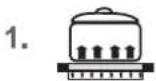
- Cookware is placed on a cooking zone and a cooking level (e.g. 3) is selected.
- By repeatedly pressing the keep-warm key select the setting:
corresponds to about 42^ corresponds to about 70^ corresponds to about 94^
- To switch off the function press the sensor field on the far left or press the Keep-warm key
The keep-warm function is available for 120 minutes, after which the cooking zone will be switched off.
- ①
A. C. D. E.
5 minutes

Modules (power management)
4.23 Locking
The lock can be used to lock key operation and cooking level settings. Only the ON/OFF key can be used to switch the hob off.
Activating the lock
- Press the lock key The lock key will light up brightly.
The lock will now be activated.
Switching off the lock
- Press the lock key. The lock key will light up with a dimmed light.
The lock is now switched off.
Notes
An activated lock will remain activated even if the hob is switched off. It must therefore be de-activated when cooking is re-commenced.
The activated lock will be cancelled, i.e. de-activated, in the event of a power failure and when the ON/OFF key is used for switching off.
4.24 Power boost P
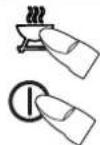
The power boost setting makes additional power available for induction cooking zones. A large quantity of water can be brought to the boil very quickly.
- Switch on the hob. Use the cooking level display (as a key) to select a cooking zone. The stand-by dot of the cooking zone selected will light up.
- Press the sensor field on the far right. The power boost setting will be activated.
- After 5 minutes the power boost setting will switch off automatically. The will go off and the cooking level will switch down to 9.
Please note
Press the sensor fi eld to prematurely de-activate the power boost.
4.25 Power management
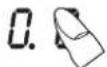
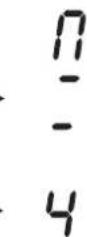
For technical reasons two cooking zones always comprise a module and have a maximum power level. If this power range is exceeded when a higher power setting level or the power boost function is switched on the power management system will reduce the power setting of the corresponding cooking zone of the module. The display for this cooking zone will initially blink, after which the highest-possible power setting will be consistently displayed.
- ①
- 0.0
- 0123A
5.
6.
4.26 Grill function (only for Octa cooking zones)
Use the grill function with the recommended griddle plate for induction.
- Switch on the hob.
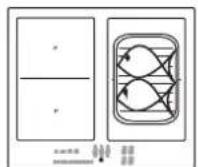
- Use the front cooking level display (as a key) to select a cooking zone. The stand-by dot of the cooking zone selected will light up.
- Press the Grill key to activate the grill function. The front and back cooking zones were switched together.
- The touch control must be activated immediately afterwards. A cooking level will be switched on.
- Put the griddle plate onto the cooking zone and insert the food to be grilled.
Level 1 - 3 for vegetables
Level 4 - 6 for fi sh
Level 7 - 9 for meat
- To switch off the grill function press the Grill key or switch off the hob.
Notes
- Never operate the appliance unattended.
- Set the cooking levels just as you wish.
5 Cleaning and care
- Switch the hob off and let it cool down before you clean it.
- Never clean the glass ceramic hob with a steam cleaner or similar appliance!
- When cleaning make sure that you only wipe lightly over the ON/OFF key. The hob may otherwise be accidentally switched on!
5.1 Glass ceramic hob
Important! Never use aggressive cleaning agents such as rough scouring agent, abrasive saucepan cleaners, rust and stain removers etc.
Cleaning after use
- Always clean the entire hob when it has become soiled. It is recommended that you do so every time the hob is used. Use a damp cloth and a little washing up liquid for cleaning. Then dry the hob with a clean dry cloth to ensure that there is no detergent left on the surface of the hob.
Weekly cleaning
- Clean the entire hob thoroughly once a week with commercial glass ceramic cleaning agents. Please follow the manufacturer's instructions carefully. When applied, the cleaning agent will coat the hob in a protective fi lm which is resistant to water and dirt. All the dirt will remain on the fi lm and can then easily be removed. Then rub the hob dry with a clean cloth. Make sure that no cleaning agent remains on the surface of the hob since this will react aggressively when the hob is heated up and will change the surface.
5.2 Specific soiling
Heavy soiling and stains (limescaling and shiny, mother
of-pearl-type stains) can best be removed when the hob is still slightly warm. Use commercial cleaning agents to clean the hob. Proceed as outlined under Item 2.
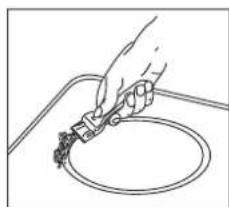
First soak food which has boiled over with a wet cloth and then remove remaining soiling with a
special glass scraper for glass ceramic hobs. Then clean the hob again as described under Item 2.
Burnt sugar and melted plastic must be removed immediately, when they are still hot, with a glass scraper. Then clean the hob again as described under Item 2.
Grains of sand which may get onto the hob when you peel potatoes or clean lettuce may scratch the surface of the hob when you move pots around. Make sure that no grains of sand are left on the hob.
Changes to the colour of the ceramic surface have no effect on the function and stability of the glass ceramic. These colour changes are not changes in the material but food residues which were not removed and which have burnt into the surface.
Shining areas are caused by wear from pan bottoms or unsuitable cleaning agents, especially when using cookware with aluminium bases or by unsuitable cleaning agents. They are difficult to remove with standard cleaning agents. You may need to repeat the cleaning process several times. In time, the decoration will wear off and dark stains will appear as a result of using aggressive cleaning agents and faulty pan bases.
6 What to do if trouble occurs?
Interference with and repairs to the appliance by unqualified persons are dangerous as they can result in an electric shock or a short circuit. Do not interfere with or try to repair the appliance; this could cause injury to persons and damage to the appliance. Always have such work done by an expert, e.g. a Customer Service technician.
Please note
If your appliance is faulty, please check whether you can rectify the problem yourself by consulting these instructions for use.
You may be able to rectify some problems yourself. They are described below.
The fuses blow regularly?
Contact a technical customer service or an electrician!
You can't switch your induction hob on?
- Has the wiring system (fuse box) in the house blown a fuse?
- Has the hob been connected to the mains?
- Are the sensor keys locked (childproof lock)?
- Are the sensor keys partly covered by a damp cloth, fluid or a metallic object? Please rectify.
- Are you using unsuitable cookware? See the section on "Cookware for induction hobs".
The symbol will blink and a time-limited continuous signal will sound.
Food which has boiled over, cookware or other items are causing the touch control sensor keys to be consistently operated.
Remedy: clean the surface or remove the item. To delete the symbol press the same key or switch the hob off and on.
Error code E2 is indicated?
The electronic unit is too hot. Check the installation of the hob. Make sure that there is sufficient ventilation.
See the section on "Protection against overheating". See the section on "Ventilation".
Error code E8 is indicated?
Fault on the left or right fan. The suction opening is blocked or covered or the fan is defect.
Check the installation of the hob. Make sure that there is sufficient ventilation.
See the section on "Protection against overheating". See the section on "Ventilation".
Error code U400 is indicated?
The hob has been incorrectly connected. The controls will switch off after 1sec. and a continuous signal will sound. Connect the appliance to the appropriate power supply.
An error code (ERxx or Ex) is indicated?
The appliance has developed a technical defect. Please call Customer Service.
The pot sign appears?
A cooking zone has been switched on and the hob is expecting a suitable pot or pan to be placed on the cooking zone (pan recognition). Only when a pot has been placed on the cooking zone will power be supplied.
The pot sign still appears, even though a pot or pan was placed on the hob?
The cookware is unsuitable for induction cooking or the pot or pan is too small.
Is the cookware you are using making noises?
This is due to technical reasons; the induction hob and the pot are not at risk.
Does the cooling fan still operate after it has been switched off?
This is normal since the electronic unit is being cooled down.
Is the hob making noises (clicking or cracking sounds)?
This is for technical reasons and cannot be avoided.
Does the hob have tears or cracks?
There is a risk of electric shocks if the glass ceramic hob develops fractures, cracks, tears or damage of any other kind. Immediately switch off the appliance. Disconnect the fuse immediately and call Customer Service.
7 Instructions for assembly
7.1 Safety instructions for kitchen unit fi tters
Veneers, adhesives and plastic surfaces of surrounding furniture must be temperature resistant (at least 75^ ). If the veneers and surfaces are not sufficiently heat resistant they may become deformed.
- Ensure that all live connections are safely insulated when installing the hob.
- Cover strips between the wall and the worktop behind the hob which are made of solid wood are permissible as long as minimum clearances in accordance with the installation diagrams are maintained.
Minimum clearances of the hob cut-out towards the rear are to be maintained in accordance with the installation diagram.
- For installation directly next to a tall cupboard, a safety distance of at least 50~mm must be ensured. The side surface of the tall cupboard should be fitted with heat resistant material. Due to working requirements, however, the distance should be at least 300~mm .
- The packaging materials (plastic foil, polystyrene, nails etc.) must be kept out of reach of children as these parts are potentially dangerous. Small parts can be swallowed and there is a danger of plastic sheeting causing suffocation.
7.2 Ventilation
- The induction hob is fitted with a fan that switches on and off automatically. The fan starts slowly when the electronic system temperatures exceed a specific limit. When the induction hob is used intensively, the fan will switch to a greater velocity. Once the electronic system has cooled down sufficiently, the fan will reduce its velocity and switch off again automatically.
- Clearance between the induction hob and kitchen furniture or built-in units must provide for suffi cients ventilation of the induction hob.
- If the power level of a cooking zone is automatically raised or lowered (see section on thermal cut-off device) it is likely that the cooling system does not cool sufficiently. In this case we recommend that the back wall of the bottom kitchen unit in the area of the worktop cut-out be opened and that the front transverse strip of the unit be removed over the entire width of the appliance in order to promote the circulation of air.
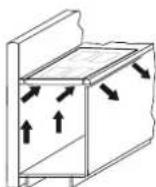
In order to better ventilate the hob, an air gap of 5mm should be left at the front.
7.3 Installation
Important information
- Remove any transverse strips underneath the worktop at least in the area of the worktop cut-out.
- Avoid excessive thermal development from below e.g. from a baking oven without a cross flow cooling device.
The induction hob may not be used when pyrolysis operation is taking place in a built-in oven. - When installing the appliance on top of a drawer it is essential to ensure that no sharp items are stored in the drawer since these could become bent on the underside of the hob and prevent the drawer from being opened and closed.
If a shelf has been inserted underneath the hob, there must be a clearance of at least 20mm to the underside of the hob in order to ensure that the hob is sufficiently ventilated. - The hob may not be installed above refrigerators, freezers, dishwashers, washing machines or dryers.
- To avoid danger of fire, make sure that no combustible objects which could easily catch fire or become deformed on exposure to heat are directly next to or under the surface.
Sealing of the hob
Before installation, correctly insert the sealing unit delivered with the hob.
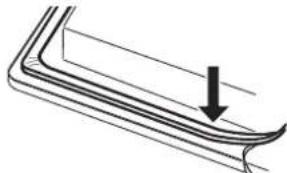
- No liquids may penetrate between the edge of the hob and the worktop or between the hob and the wall and come into contact with any electrical appliances.
- When installing a hob into an uneven worktop, e.g. with a ceramic or similar covering (tiles etc.), the seal on the hob is to be removed and the seal between the hob and worktop made with plastic sealing materials (putty).
- The hob must under no circumstances be sealed with silicone sealant! This would make it impossible to remove the hob at a later date without damaging it.
Worktop cut-out
Cut out the worktop recess accurately with a good, straight saw blade or recessing machine. The cut edges should then be sealed so that no moisture can penetrate. The area is cut out as illustrated. The glass ceramic hob must have a level and flush bearing. Any distortion may lead to fracture of the glass panel. Make sure that the sealing of the hob is properly seated.
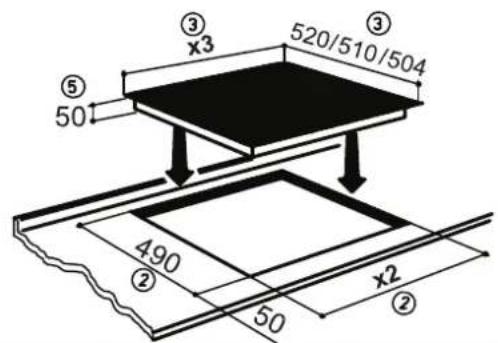
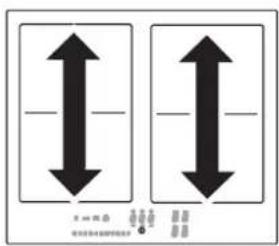
[mm]
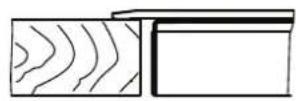
| Type | x3 | x2 |
| 60 | 600 / 580 / 574mm | 560mm±1,0 |
| 80 | 800/ 770/ 764mm | 750mm±1,0 |
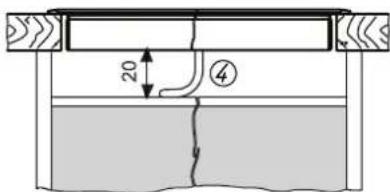
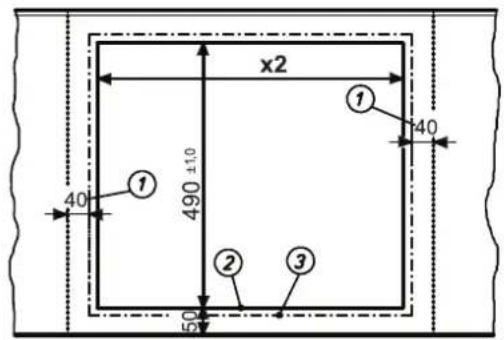
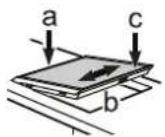
① Minimum distance to adjacent walls
(2) Cutout dimensions
(3) Outer dimensions of the hob
④ Cable routing in rear wall
Important!
There is a risk of breakage if the hob is canted or subjected to stress during installation!
7.4 Electrical connection
WARNING OF ELECTRICAL ENERGY! RISK OF FATAL INJURY!
Live components have been installed near this symbol. Covers bearing this sign may only be removed by a certifi ed skilled electrician.
- The electrical connection must be carried out by a qualified electrician who is authorised to carry out such work!
Statutory regulations and the connection specific cations issued by the local power supply company must be strictly observed. - When connecting the appliance it must be ensured that there is a device which makes it possible to universally disconnect it from the mains with a contact opening width of at least 3mm . Line-protecting switches, fuses or contactors are suitable cut-out devices. When connecting and repairing the appliance disconnect it from the electricity supply with one of these devices.
- The earth wire must be sufficiently long so that if the strain relief fails, the live wires of the connecting cable are subjected to tension before the earth wire.
- Any superfluous cable must be removed from the installation area beneath the appliance.
- Make sure that the local mains voltage is the same as the voltage on the rating label.
Full protection against accidental contact must be ensured on installation. - Attention: Incorrect connection may result in the power electronics unit being destroyed.
Power supply
Mains voltage: 380-415V 2N-, 50/60Hz
Component rated voltage: 220-240V
No mains cable present in the factory
- To connect the appliance, unscrew the cover of the connection socket on the underside of the appliance in order to be able to access the terminal. After connecting the appliance, replace the cover and secure the connection cable with the strain relief clamp.
The connection cable must be at least H05 RR-F.
Electrical connections: 6-pole connection
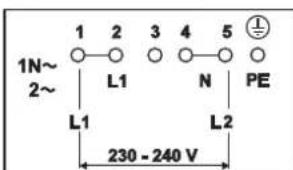
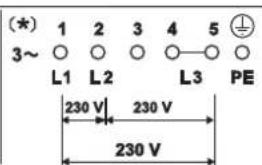
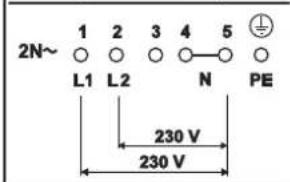
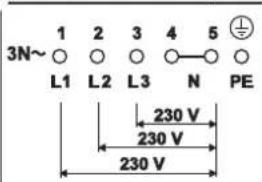
- Attention! Special power supply 230 - 240 V 3~!
Mains cable available in the factory
- The hob has been fitted with a temperature-resistant connection cable in the factory.
- Connection to the mains is carried out in accordance with the circuit diagram, unless the connection cable is already fitted with a plug.
- If the mains cable of this appliance is damaged it will need to be replaced with a special connection cable. In order to avoid any risks, this must be carried out by the manufacturer or his Customer Service.
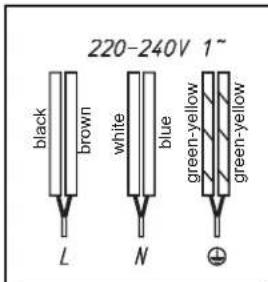
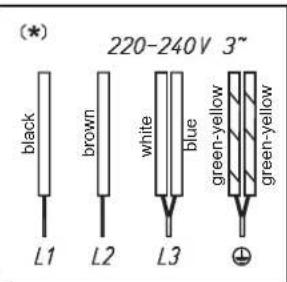
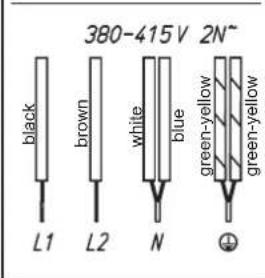

- Attention! Special power supply 230 - 240 V 3~!
7.5 Technical data
| Hob dimensions height/ width/ depth . mm 50 x 600 x 520 50 x 800 x 520 | |
| Cooking zones | |
| Front (left) . . . mm/ kW | 220 x 190 / 2,1 (3,7)* |
| rear (left) . . . . . mm/ kW | 220 x 190 / 2,1 (3,7)* |
| rear right . . . . . mm/ kW | 220 x 190 / 2,1 (3,7)* |
| front right . . . . . mm/ kW | 220 x 190 / 2,1 (3,7)* |
| Hob............kW7.4 | |
- Power when the power boost function is activated
7.6 Initial operation
Once the hob has been installed and the power supply has been provided (mains connected) an automatic test of the controls will be carried out and information for Customer Service will be indicated.
Important: No items may be on the touch control sensor keys when the appliance is being connected!
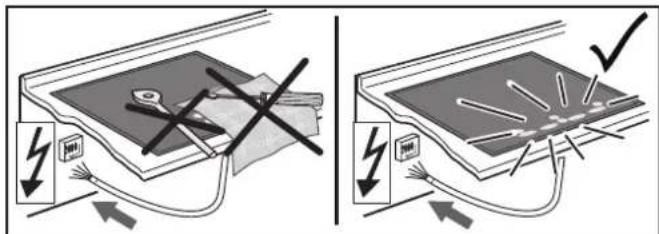
Briefly wipe over the surface of the hob with a sponge and soapy water and then dry with a clean cloth.
8 Decommissioning and disposal of the appliance
8.1 Switching the appliance off completely
The appliance is to be put out of operation when its useful life has finally come to an end.
- Disconnect the safety fuse for the domestic wiring system in order to prevent a risk of electric shocks.
- Ensure the environmentally friendly disposal of the hob once it has been removed.
8.2 Disposing of the packaging
Please ensure the environmentally-friendly disposal of the packaging that came with your appliance. Recycling the packaging material saves on resources and cuts down on waste.
8.3 Disposing of old appliances

The symbol on the product or on its packaging indicates that this product may not be treated as household waste. Instead it must be handed over to the applicable collection point for the recycling
of electrical and electronic equipment.
By ensuring that this product is disposed of correctly you will help to protect the environment and human health, which could otherwise be harmed through the inappropriate disposal of this product. For more detailed information about recycling this product, please contact your local city office, your household waste disposal service or the shop where you purchased the product.
9 Customer Service
FORS appliances are distinguished by their high quality. Each appliance is checked carefully during the production process, when it is delivered and after installation.
Please read the instructions for use carefully. You will soon see how easy it is to operate the appliance.
You can contact one of the numerous FORS customer service centres if you do run into any problem. You will find an updated list on our website under www.fors.ch

FORS SERVICE

0800554650
We will be able to help you most quickly if you indicate your address and the details on the nameplate on your hob. The nameplate is clearly visible on the hob.
Factory service free telephone number: 0800554650
For every contact in writing or by telephone please indicate:
- The type and the brand of the appliance
Product number (see nameplate) - Date of purchase (see invoice/receipt)
Type of fault/fault description - Your exact address
- Your telephone number with your area code, indicating when you are personally available or when you can be reached by telephone.
Induction glass ceramic hob:
IKT 604 FB
IKT 604 ER
IKT 604 FAC
IKT 804 FB
IKT 804 ER
IKT 804 FAC
Table des matieres
1 Généralités 46
4.2 Detection de recipient
Module (Powermanagement)
4.23 Verrouillage
4.25 Powermanagement
- | AO| = 2| OB| = 2
5.
6.
- ca. 3 sec.
- 0123456789P
- ①
- ca. 3 sec.
- 0 2 3 A^6789 x
- 0

- 0