IO 5280C B - Oven INDESIT - Free user manual and instructions
Find the device manual for free IO 5280C B INDESIT in PDF.


User questions about IO 5280C B INDESIT
0 question about this device. Answer the ones you know or ask your own.
Ask a new question about this device
Download the instructions for your Oven in PDF format for free! Find your manual IO 5280C B - INDESIT and take your electronic device back in hand. On this page are published all the documents necessary for the use of your device. IO 5280C B by INDESIT.
USER MANUAL IO 5280C B INDESIT

THANK YOU FOR BUYING AN INDESIT PRODUCT
In order to receive a more complete assistance, please register your product on www.register10.eu

Before using the appliance carefully read the Safety Instruction.
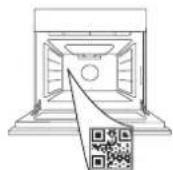
PLEASE SCAN THE QR CODE ON YOUR APPLIANCE IN ORDER TO REACH MORE INFORMATION
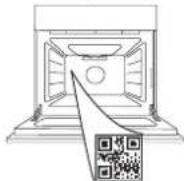
PRODUCT DESCRIPTION
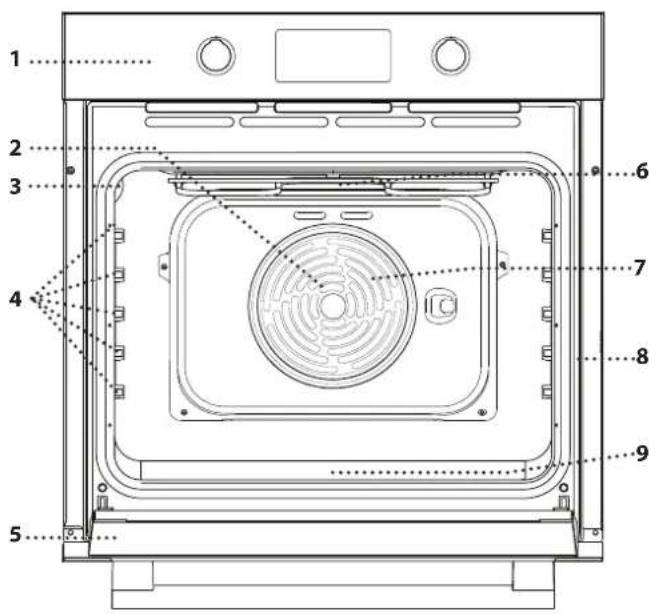
text_image
1 2 3 4 5 6 7 8 9- Control panel
- Fan (not visible)
- Lamp
- Shelf guides (the level is indicated on the wall of the cooking compartment)
- Door
- Upper heating element/grill
- Circular heating element (not-visible)
- Identification plate (do not remove)
- Bottom heating element (not visible)
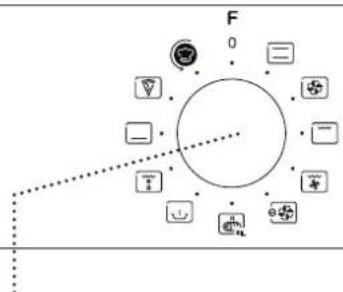
CONTROL PANEL DESCRIPTION
flowchart
graph TD
    A["Central Node"] --> B["Node 1"]
    A --> C["Node 2"]
    A --> D["Node 3"]
    A --> E["Node 4"]
    A --> F["Node 5"]
    A --> G["Node 6"]
    A --> H["Node 7"]
    A --> I["Node 8"]
    A --> J["Node 9"]
    A --> K["Node 10"]
    A --> L["Node 11"]
    A --> M["Node 12"]
    A --> N["Node 13"]
    A --> O["Node 14"]
    A --> P["Node 15"]
    A --> Q["Node 16"]
    A --> R["Node 17"]
    A --> S["Node 18"]
    A --> T["Node 19"]
    A --> U["Node 20"]
    A --> V["Node 21"]
    A --> W["Node 22"]
    A --> X["Node 23"]
    A --> Y["Node 24"]
    A --> Z["Node 25"]
natural_image
Pure electrical circuit lines without any symbols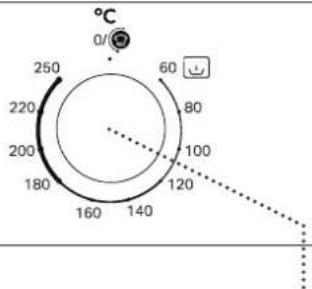
text_image
250 220 200 180 160 140 120 100 80 60 0°C235416
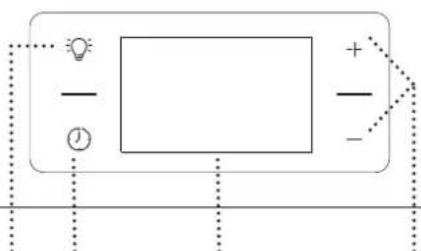
1. SELECTION KNOB
For switching the oven on by selecting a function. Turn to the 0 position to switch the oven off.
2. LIGHT
With the oven switched on, press to turn the oven compartment lamp on or off.
3. SETTING THE TIME
For accessing the cooking time settings, delayed start and timer. For displaying the time when the oven is off.
- DISPLAY
5. ADJUSTMENT BUTTONS
For changing the cooking time settings.
6. THERMOSTAT KNOB
Turn to select the temperature you require when activating manual functions.
For Turn & Go function use 📄.
ACCESSORIES
natural_image
Simple line drawing of a rectangular grid with horizontal lines, no text or symbols present.Use to cook food or as a support for pans, cake tins and other ovenproof items of cookware.
natural_image
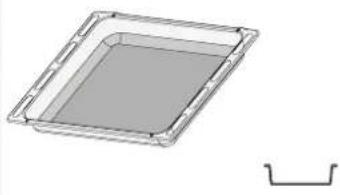
3D rendering of a rectangular tray with a gray inner area and a separate U-shaped outline on the right (no text or symbols)Use as an oven tray for cooking meat, fish, vegetables, focaccia, etc. or position underneath the wire shelf to collect cooking juices.
natural_image
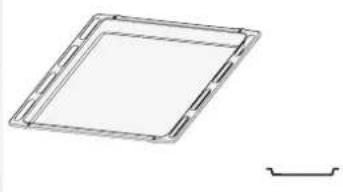
Simple line drawing of a square frame with a small curved line on the right side (no text or symbols)Use for cooking all bread and pastry products, but also for roasts, fish en papillotte, etc.
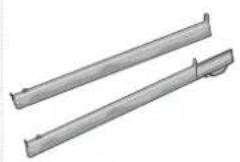
To facilitate inserting or removing accessories.
* Available only on certain models
The number and the type of accessories may vary depending on which model is purchased.
Other accessories can be purchased separately from the After-sales Service.
INSERTING THE WIRE SHELF AND OTHER ACCESSORIES
Insert the wire shelf onto the level you require by holding it tilted slightly upwards and resting the raised rear side (pointing upwards) down first.
Then slide it horizontally along the runners as far as possible.
Other accessories, like the baking tray, are to be inserted horizontally, letting them slide on the runners.
SLIDING SHELVES AND SHELF GUIDES
Before using the oven remove the protective tape [a] and then remove the protective foil [b] from the sliding runners.
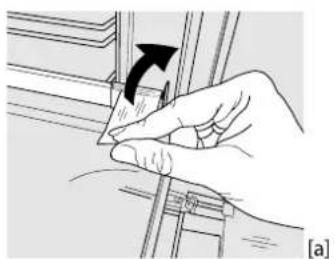
natural_image
Illustration of a hand holding a small object with an arrow indicating rotation (no text or symbols present)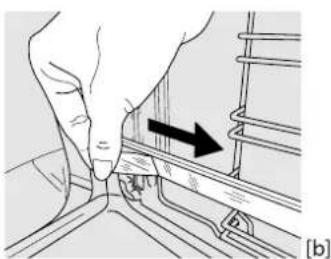
natural_image
Illustration of a hand pressing down on a rail track with an arrow indicating direction (no text or symbols)REMOVING THE SLIDING RUNNERS [c]
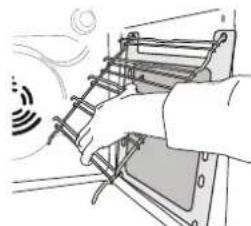
Pull the lower part of the sliding runner to uncouple the lower hooks (1) and pull the the sliding runners upwards, removing them from the upper hooks (2).
REFITTING THE SLIDING RUNNERS [d]
Hook the upper hooks on the shelf guides (1) then press the lower part of the sliding runners against the shelf guides, until the lower hooks are clicking (2).
![INDESIT IO 5280C B - REFITTING THE SLIDING RUNNERS [d] - 1](/content/2026/03/525501/images/0451fe921619b1bbdc79be444876584ea3863eb39a30625c0025ea9eab18119f.jpg)
text_image
Diagram showing a hand pressing down a component labeled with arrows, numbered 1 and 2 indicating sequence or process steps.![INDESIT IO 5280C B - REFITTING THE SLIDING RUNNERS [d] - 2](/content/2026/03/525501/images/048cee7189db082da07d393c6014952faa5e0a7302bdbb646d8e832fb08a4bbb.jpg)
text_image
[c] [d] ① ②REMOVING AND REFITTING THE SHELF GUIDES
-
To remove the shelf guides, firmly grip the external part of the guide, and pull it towards you to extract the support and the two internal pins from the lodging.
-
To reposition the shelf guides, position them near the cavity and initially insert the two pins into their lodgings. Next, position the external part near its lodging, insert the support, and firmly press towards the wall of the cavity to make sure the shelf guide is properly secured.
FIRST TIME USE
1. SET THE TIME
You will need to set the time when you switch on the appliance for the first time: Press ⏻ until the 📣on and the two digits for the hour start flashing on the display.
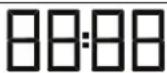

Use + or - to set the hour and press ② to confirm. The two digits for the minutes will start flashing. Use + o -to set the minutes and press to confirm.
Please note: When the ⏻ icon is flashing, for example following lengthy power outages, you will need to reset the time.
2. HEAT THE OVEN
A new oven may release odours that have been left behind during manufacturing: this is completely normal. Before starting to cook food, we therefore recommend heating the oven with it empty in order to remove any possible odours.
Remove any protective cardboard or transparent film from the oven and remove any accessories from inside it. Heat the oven to 250 °C for about one hour. The oven must be empty during this time.
Follow the instructions for setting the function correctly.
Please note: It is advisable to air the room after using the appliance for the first time.
FUNCTIONS

CONVENTIONAL
For cooking any kind of dish on one shelf only.

FORCED AIR
For cooking different foods that require the
same cooking temperature on several shelves (maximum three) at the saame time. This function can be used to cook different foods without odours being transferred from one food to another.

GRILL
For grilling steaks, kebabs and sausages,
cooking vegetables au gratin or toasting bread. When grilling meat, we recommend using a Baking tray to collect the cooking juices: position the pan on any of the levels below the wire shelf and add 200 ml of drinking water.

TURBO GRILL
For roasting large joints of meat (legs, roast
beef, chicken). We recommend using a Baking tray to collect the cooking juices: position the pan on any of the levels below the wire shelf and add 200 ml of drinking water.

ECO FORCED AIR\*
For cooking roasts and stuffed roasting joints, single shelf.
Food is prevented from drying out excessively by gentle, intermittent air circulation. When this ECO function is in use, the light will remain switched off during cooking but can be switched on again by pressing 📋.

MAXI COOKING
For cooking large joints of meat (above 2.5kg).
We recommend turning the meat over during cooking to ensure that both sides brown evenly. We also recommend basting the joint every so often to prevent it from drying out excessively.

KEEP WARM
For keeping just-cooked food hot and crisp, including meat, fried foods or cakes.

FREASY COOK
All the heating elements and the fan come on, guaranteeing the distribution of heat consistently and uniformly throughout the oven. Preheating is not necessary for this cooking mode. This mode is especially recommended for cooking pre-packed food quickly (frozen or pre-cooked). The best results are obtained if you use one cooking rack only.

BOTTOM HEATING
Use this function to brown the bottom of the dishes. It is advisable to place the food on the 1st/2nd level. The function can also be used for slow cooking, suche as vegetables and meat stews; in this case, use the 3rd level. The oven does not have to be preheated.

PIZZA
For baking different types and sizes of pizza and bread. It is a good idea to swap the position of the baking trays halfway through cooking.

TURN & GO
This function automatically selects an ideal temperature and time for baking a wide range of recipes including meat, fish, pasta, sweets and vegetables. Activate the function when the oven is cold.
* Function used as reference for the energy efficiency declaration in accordance with Regulation (EU) No. 65/2014
DAILY USE
1. SELECT A FUNCTION
To select a function, turn the selection knob to the symbol for the function you require: the display will light up and an audible signal will sound.
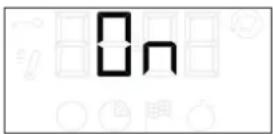
2. ACTIVATE A FUNCTION
MANUAL
To start the function you have selected, turn the thermostat knob to set the temperature you require.

Please note: During cooking you can change the function by turning the selection knob or adjust the temperature by turning the thermostat knob.
The function will not start if the thermostat knob is on 0^ C. You can set the cooking time, cooking end time (only if you set a cooking time) and a timer.
TURN & GO
To start the "Turn & Go" function, select the function turning the selection knob on the relevant icon, keeping the thermostat knob on the 0/©on.
To end the cooking, turn the selection knob on "0".
Please note: To obtain the best cooking results using the "Turn & Go" function, follow the suggested weights for each kind of food in the following table.
| Food Recipe Weight (kg) | ||
| Meat | Roast veal, Roast Beef rare 0.6 - 0.7 | |
| Chicken / Leg of lamb in pieces | 1.0 - 1.2 | |
| Fish | Salmon fillet / Baked fish (whole) | 0.9 - 1.0 |
| Fish en papillote 0.8 - 1.0 | ||
| Vegetables | Stuffed vegetables 1.8 - 2.5 | |
| Vegetable pie 1.5 - 2.5 | ||
| Salty cakes | Quiche lorraine / Flan | 1.0 - 1.5 |
| Pasta | Lasagne / Timbale of pasta or rice | 1.5 - 2.0 |
| Pastry | Leavened cake / Plum cake | 0.9 - 1.2 |
| Baked apples | 1.0 - 1.5 | |
| Bread | Bread loaf | 0.5 - 0.6 |
| Baguettes | 0.5 - 0.8 | |
3. PREHEATING AND RESIDUAL HEAT
Once the function starts, an audible signal and a flashing icon Ⓜ on the display indicate that the preheating phase has been activated.
When the set temperature has been reached, the icon becomes fixed and a new audible signal will sound to indicate that the food can be placed inside and cooking can proceed.
Please note: Placing the food in the oven before preheating has finished may have an adverse effect on the final cooking result.
After cooking and with the function deactivated, the icon Ⓜ may continue to remain visible on the display even after the cooling fan has switched off to indicate that there is residual heat in the compartment.
Please note: The time after which the icon switches off varies because it depends on a series of factors such as ambient temperature and function used. In any case, the product should be considered to be off when the pointer on the selection knob is at "0".
4. PROGRAMMING COOKING
You will need to select a function before you can start programming cooking.
DURATION
Keep pressing ⏻ until the ⏻ icon and "00:00" start flashing on the display.
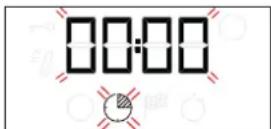
Use + or — to set the cooking time you require, then press ⏻ to confirm.
Activate the function by turning the thermostat knob to the temperature you require: an audible signal will sound and the display will indicate that cooking is complete.
Notes: To cancel the cooking time you have set, keep pressing ⏻ until the 📋 icon starts flashing on the display, then use — to reset the cooking time to "00:00". This cooking time includes a preheating phase.
PROGRAMMING THE END COOKING TIME/DELAYED START
After a cooking time has been set, starting the function can be delayed by programming its end time: press ⏻ until the ⏱ icon and the current time start flashing on the display.
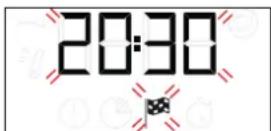
Use + or — to set the time you want cooking to end and press ⏻ to confirm.
Activate the function by turning the thermostat knob to the temperature you require: the function will remain paused until it starts automatically after the period of time that has been calculated in order for cooking to finish at the time you have set.
Notes: To cancel the setting, switch the oven off by turning the selection knob to the 0 position.
Delay to start functionality is not available for Grill and Turbo Grill functions.
END OF COOKING
An audible signal will sound and the display will indicate that the function has finished.
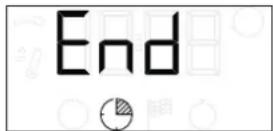
Turn the selection knob to select a different function or to position "0" to switch the oven off.
Please note: If the timer is active, the display will show "END" alternately with the remaining time.
5. SETTING THE TIMER
This option does not interrupt or program cooking but allows you to use the display as a timer, either during while a function is active or when the oven is off.
Keep pressing ⏻ until the ⏱on and "00:00" start flashing on the display.
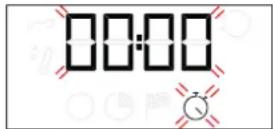
Use for to set the time you require and press to confirm.
An audible signal will sound once the timer has finished counting down the selected time.
Notes: To cancel the timer, keep pressing √ until the ⏻ icon starts flashing, then use — to reset the time to "00:00".
NOTES
- Do not cover the inside of the oven with aluminium foil.
- Never drag pots or pans across the bottom of the oven as this could damage the enamel coating.
- Do not place heavy weights on the door and do not hold on to the door.
COOKING TABLE
| RECIPE FUNCTION PREHEAT | TEMPERATURE(°C) | DURATION(MIN) | LEVEL AND ACCESSORIES | ||||
| Leavened cakes | Yes 160 - 180 30 - 90 | 2/3 | |||||
| Yes 160 - 180 30 - 90 | 4 | 1 | |||||
| Filled cake(cheese cake, strudel, fruit pie) | Yes 160 - 200 35 - 90 | 2 | |||||
| Yes 160 - 200 40 - 90 | 4 | 2 | |||||
| Biscuits/tartlets | Yes 160 - 180 20 - 45 | 3 | |||||
| Yes 150 - 170 20 - 45 | 4 | 2 | |||||
| Yes 150 - 170 20 - 45 | 5 | 3 | 1 | ||||
| Choux buns | Yes 180 - 210 30 - 40 | 3 | |||||
| Yes 180 - 200 35 - 45 | 4 | 2 | |||||
| Yes 180 - 200 35 - 45 | 5 | 3 | 1 | ||||
| Meringues | Yes | 90 | 150 - 200 | 3 | |||
| Yes | 90 | 140 - 200 | 4 | 2 | |||
| Yes | 90 | 140 - 200 | 5 | 3 | 1 | ||
| Pizza / bread | Yes 190 - 250 15 - 50 | 1/2 | |||||
| Yes 190 - 250 20 - 50 | 4 | 2 | |||||
| Frozen pizza | Yes | 250 | 10 - 20 | 3 | |||
| Yes 230 - 250 | 10 -25 | 4 | 2 | ||||
| Salty cakes(vegetable pie,quiche) | Yes 180 - 200 40 - 55 | 3 | |||||
| Yes 180 - 200 45 - 60 | 4 | 2 | |||||
| Yes 180 - 200 45 - 60 | 5 | 3 | 1 | ||||
| Vols-au-vents / puff pastry crackers | - | 190 - 200 20 - 30 | 3 | ||||
| - | 180 - 190 20 - 40 | 4 | 2 | ||||
| - | 180 - 190 20 - 40 | 5 | 3 | 1 | |||
| Lasagne / baked pasta / canneloni / flans | Yes | 190 - 200 | 45 - 65 | 2 | |||
| FUNCTIONS | |||||||
| Conventional | Grill | Turbo grill | Pizza | Forced air | Maxi cooking | Eco Forced Air |
| ACCESSORIES | |||||
| Wire shelf | Baking dish on the wire shelf | Baking tray/Drip tray or baking dish on the wire shelf | Drip tray / Baking tray | Drip tray / Baking tray with 200 ml of water |
COOKING TABLE
| RECIPE FUNCTION PREHEAT | TEMPERATURE(°C) | DURATION(MIN) | LEVEL AND ACCESSORIES | ||
| Lamb / veal / beef /pork 1 kg |  | Yes | 190 - 200 | 80 - 110 | 3 |
| Roast pork with crackling 2 kg |  | Yes | 180 - 190 | 110 - 150 | 2 |
| Chicken/rabbit/duck 1 kg |  | Yes | 200 - 230 | 50 - 100 | 2 |
| Turkey / goose 3 kg |  | - | 190 - 200 | 100 - 160 | 2 |
| Baked fish/en papillote (fillets, whole) |  | Yes | 170 - 190 | 30 - 50 | 2 |
| Stuffed vegetables(tomatoes, courgettes, aubergines) | [YWXX] | Yes 180 - 200 | 50 - 70 | 2 | |
| Toasted bread |  | - | 250 | 2 - 6 | 5 |
| Fish fillets/slices |  | - 230 - 250 20 - 30* | 4 3 | ||
| Sausages/kebabs/spare ribs/hamburgers |  | - | 250 | 15 - 30* | 5 4 |
| Roast chicken 1-1,3 kg |  | Yes | 200 - 220 | 55 - 70** | 2 1 |
| Roast beef rare 1 kg | [AAAAX] | Yes | 200 - 210 | 35 - 50** | 3 |
| Leg of lamb/knuckle |  | Yes | 200 - 210 | 60 - 90** | 3 |
| Roast potatoes |  | Yes | 200 - 210 | 35 - 55** | 3 |
| Vegetable gratin |  | - | 200 - 210 | 25 - 55 | 3 |
| Meat and potatoes | [DZBA] | Yes | 190 - 200 | 45 - 100*** | 4 1 |
| Fish and vegetables |  | Yes | 180 | 30 - 50*** | 4 1 |
| Lasagne and meat |  | Yes | 200 | 50 - 100*** | 4 1 |
| Complete meal: fruit tart (level 5) / lasagne (level 3) / meat (level 1) |  | Yes 180 - 190 40 - 120*** | 5 3 1 | ||
| Roast meat/stuffed roasting joints |  | - | 170 - 180 | 100 - 150 | 2 |
* Turn food halfway through cooking
** Turn food two thirds of the way through cooking (if necessary).
*** Estimated length of time: dishes can be removed from the oven at different times depending on personal preference.
The time indicated does not include the preheating phase: we recommend placing the food in the oven and setting the cooking time only after the required temperature has been reached.
| FUNCTIONS |  |  |  |  |  |  |  |
| Conventional | Grill | Turbo grill | Pizza | Forced air | Maxi cooking | Eco Forced Air |
| ACCESSORIES |  |  |  |  |  |
| Wire shelf | Baking dish on the wire shelf | Baking tray/Drip tray or baking dish on the wire shelf | Drip tray / Baking tray | Drip tray / Baking tray with 200 ml of water |
CLEANING AND MAINTENANCE
Make sure that the oven has cooled down before carrying out any maintenance or cleaning. Do not use steam cleaners.
Do not use wire wool, abrasive scourers or abrasive/corrosive cleaning agents, as these could damage the surfaces of the appliance.
Wear protective gloves. The oven must be disconnected from the mains before carrying out any kind of maintenance work.
EXTERIOR SURFACES
Clean the surfaces with a damp microfibre cloth. If they are very dirty, add a few drops of pH-neutral detergent. Finish off with a dry cloth.
Do not use corrosive or abrasive detergents. If any of these products inadvertently comes into contact with the surfaces of the appliance, clean immediately with a damp microfibre cloth.
INTERIOR SURFACES
- After every use, leave the oven to cool and then clean it, preferably while it is still warm, to remove any deposits or stains caused by food residues. To dry any condensation that has formed as a result of cooking foods with a high water content, leave the oven to cool completely and then wipe it with a cloth or sponge.
- If there is stubborn dirt on the interior surfaces, we recommend running the automatic cleaning function for optimal cleaning results. Avoid activating the pyrolitic cycle cleaning in the presence of limescale residues. Before activating, perform limescale cleaning as described above.
- The door can be easily removed and refitted to facilitate cleaning of the glass.
- Clean the glass in the door with a suitable liquid detergent.
ACCESSORIES
Soak the accessories in a washing-up liquid solution after use, handling them with oven gloves if they are still hot. Food residues can be removed using a washing-up brush or a sponge.
REMOVING AND REFITTING THE DOOR
- To remove the door, open it fully and lower the catches until they are in the unlock position.
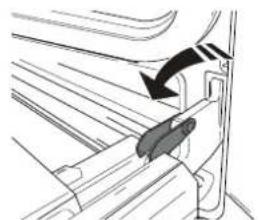
natural_image
Diagram of a mechanical component with an arrow indicating direction (no text or symbols present)- Close the door as much as you can.
Take a firm hold of the door with both hands – do not hold it by the handle. Simply remove the door by continuing to close it while pulling it upwards (a) at the same time until it is released from its seating (b). Put the door to one side, resting it on a soft surface.
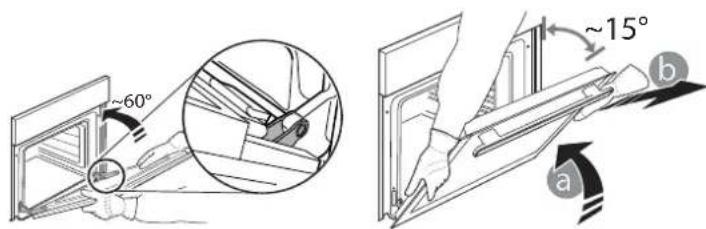
text_image
~60° ~15° a b-
Refit the door by moving it towards the oven, aligning the hooks of the hinges with their seating and securing the upper part onto its seating.
-
Lower the door and then open it fully.
Lower the catches into their original position: Make sure that you lower them down completely.
- Try closing the door and check to make sure that it lines up with the control panel. If it does not, repeat the steps above.
- Extract the heating element from its seating, then lower it.
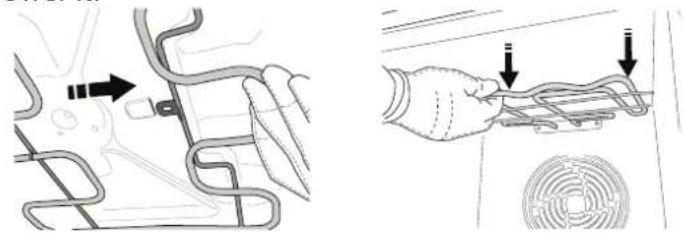
natural_image
Diagram showing a car interior with a hand holding a tool, alongside a magnified view of the interior (no text or symbols present)- To return the heating element to its position, lift it up, pull it slightly towards you and make sure that the tab support is in its proper seating.
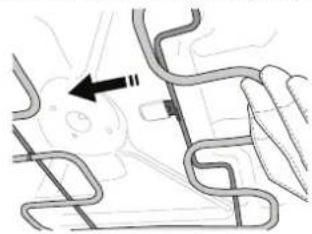
natural_image
Diagram of a vehicle's internal structure with no visible text or symbolsCLICK & CLEAN - CLEANING THE GLASS
- After removing the door and resting it on a soft surface with the handle downwards, simultaneously press the two retaining clips and remove the upper edge of the door by pulling it towards you.
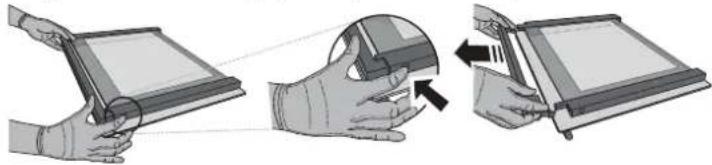
natural_image
Illustration of three-step hand tool application: holding a tablet, adjusting the lens, and inserting a clip into a device (no text or symbols present)- Lift and firmly hold the inner glass with both hands, remove it and place it on a soft surface before cleaning it.
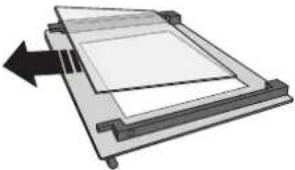
natural_image
Diagram of a mechanical assembly with a rectangular component and directional arrow (no text or symbols)- Refit the intermediate pane (marked with "1R") before refitting the inside pane: To position the panes of glass correctly, make sure that the "R" mark can be seen in the left-hand corner. First insert the long side of the glass marked "R" into the support seats, then lower it into position. Repeat this procedure for both panes of glass.
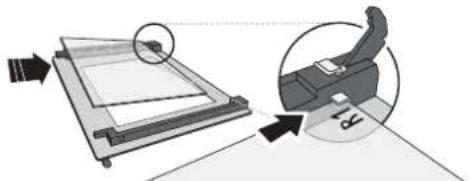
natural_image
Diagram showing a mechanical assembly with an inset close-up of a device, no text or symbols present- Refit the upper edge: A click will indicate correct positioning. Make sure the seal is secure before refitting the door.
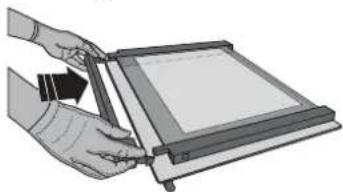
natural_image
Illustration of hands using a tablet to interact with a screen (no text or symbols visible)CLEANING THE CATALYTIC PANELS (ONLY IN SOME MODELS)
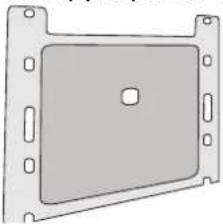
This oven is equipped with special catalytic panels that facilitate cleaning of the cooking compartment thanks to their special self-cleaning coating, which is highly porous and able to absorb grease and grime.
These panels are fitted to the shelf guides: When repositioning and then refitting the shelf guides, make sure that the hooks at the top are slotted into the appropriate holes in the panels.
natural_image
Simple line drawing of a rectangular metal plate with mounting holes and a central square hole (no text or symbols)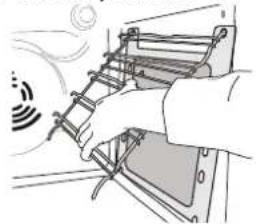
natural_image
Illustration of a hand installing or adjusting a ladder inside a vehicle (no text or symbols visible)To make best use of the catalytic panels' self-cleaning properties, we recommend heating the oven to 200 °C for around one hour using the "Convection Bake" function. The oven must be empty during this time. Then leave the appliance to cool down before removing any remaining food residues using a nonabrasive sponge.
REPLACING THE LAMP
Disconnect the oven from the power supply, unscrew the cover from the light, replace the bulb and screw the cover back on the light.
Reconnect the oven to the power supply. Do not use the oven until the light cover has been refitted.
Please note: Use 25 W/230 V type G9, T300 °C halogen lamps.
The bulb used in the product is specifically designed for domestic appliances and is not suitable for general room lighting within the home (EC Regulation 244/2009).
Light bulbs are available from our After-sales Service. - Do not handle bulbs with your bare hands as your fingerprints could damage them. Do not use the oven until the light cover has been refitted.
TROUBLESHOOTING
| PROBLEM POSSIBLE CAUSE SOLUTION | ||
| The oven does not work. | Power cut. Disconnection from the mains. | Check for the presence of mains electrical power and whether the oven is connected to the electricity supply.Turn off the oven and restart it to see if the fault persists. |
| The display shows the letter “F” followed by a number. | Software problem. | Contact you nearest After-sales Service Centre and state the letter or number that follows the letter “F”. |
| The display is showing the message “Hot” and the selected function will not start. | Temperature too high. | Allow the oven to cool down before activating the function.Select a different function. |
Policies, standard documentation and additional product information can be found by:
• Using the QR code in your appliance
- Visiting our website docs.indesit.eu
• Alternatively, contact our After-sales Service (See phone number in the warranty booklet). When contacting our After-sales Service, please state the codes provided on your product's identification plate.

MERCI D'AVOIR ACHETÉ UN PRODUIT INDESIT
natural_image
Pure electrical circuit lines without any symbols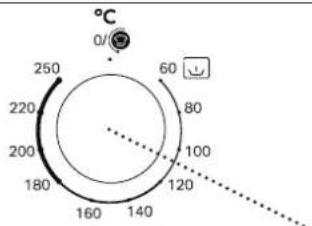
text_image
250 220 200 180 160 140 60 80 100 120 °C 0/235416
1. BOUTON DE SÉLECTION
natural_image
Simple line drawing of a rectangular grid with horizontal lines, no text or symbols present.natural_image
3D rendering of a rectangular tray with a gray interior and a small curved bracket on the right side (no text or symbols)natural_image
Simple line drawing of a square frame with a small curved line on the right side (no text or symbols)natural_image
Illustration of a hand holding a small object with an arrow indicating rotation (no text or symbols present)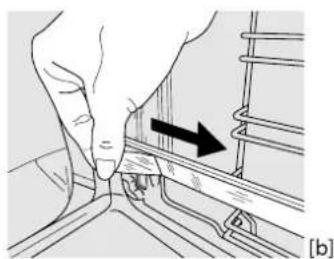
natural_image
Illustration of a hand pressing down on a mechanical component with an arrow indicating direction (no text or symbols)ENLÈVEMENT DES PATINS COULISSANTS [c]
text_image
Diagram showing a hand holding a device with two labeled arrows indicating rotation or adjustment steps.![INDESIT IO 5280C B - ENLÈVEMENT DES PATINS COULISSANTS [c] - 1](/content/2026/03/525501/images/b50b4eee0392f27ad4e261481d5326664bfb23b129bf614c990200f4626561be.jpg)
text_image
[c] [d] ① ②ENLEVER ET REPLACER LES SUPPORTS DE GRILLE
natural_image
Diagram of a mechanical component with an arrow indicating direction (no text or symbols present)natural_image
Diagram of a road intersection with curved and straight lines, no visible text or symbols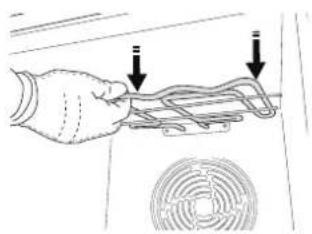
natural_image
Hand holding a mechanical component with two arrows pointing to it, next to a circular fan (no text or symbols)natural_image
Diagram of a mechanical or electrical component with curved lines and a black arrow pointing to a central feature (no text or symbols present)CLICK & CLEAN - NETTOYER LA VITRE
natural_image
Illustration of three-step hand tool application: holding a tablet, adjusting a face mask, and opening a screen (no text or symbols)natural_image
Diagram of a mechanical device with a rectangular component and an arrow indicating direction (no text or symbols)natural_image
Diagram showing a mechanical assembly with an inset view of a person using a device (no text or symbols present)natural_image
Illustration of hands using a tablet to interact with a screen (no text or symbols visible)NETTOYAGE DU REVÊTEMENT CATALYTIQUE (SUR CERTAINS MODÈLES UNIQUEMENT)
natural_image
Simple line drawing of a rectangular panel with mounting holes and a central square hole (no text or symbols)