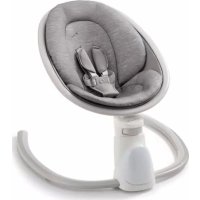
Soothe 'n Sway Bluetooth 3in1 - Baby swing GRACO - Free user manual and instructions
Find the device manual for free Soothe 'n Sway Bluetooth 3in1 GRACO in PDF.



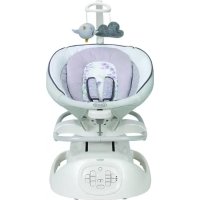
| Brand | Graco |
| Model | Soothe 'n Sway Bluetooth 3in1 |
| Product Type | 3-in-1 baby swing (swing, baby rocker, toddler rocker) |
| Recommended Age | From birth until child attempts to climb out (approx. 9 months) in swing mode; up to 9 kg (20 lb) in baby rocker mode; up to 18 kg (40 lb) in toddler rocker mode |
| Maximum User Weight | 11 kg (25 lb) in swing mode; 9 kg (20 lb) in baby rocker mode; 18 kg (40 lb) in toddler rocker mode |
| Power Supply | AC adapter (wall plug) included; power cord length suitable for home use |
| Swing Modes | 6 swing speeds (back and forth) |
| Vibration | 4 levels (low, medium, high, very high) + off |
| Music and Sounds | Built-in melodies and nature sounds; volume control |
| Connectivity | Bluetooth® to stream audio from a mobile device |
| Favorite Mode | Saves a custom setting (speed, sound, vibration) |
| Seat Recline | 3 positions (including fully reclined for newborns) |
| Height Adjustment | Adjustable height (handle at front of base) |
| Restraint System | Adjustable 5-point harness (shoulders, waist, crotch) |
| Rock Lock™ | Locking mechanism to stop swinging for easy child entry/exit |
| Removable Seat | The seat can be removed from the base for storage |
| Cushion Cleaning | Wipe with a damp cloth; do not use bleach |
| Base Cleaning | Wipe with a dry cloth only |
| Auto Shut-off | After 4 hours of inactivity |
| Warranty | Contact Graco customer service (1-800-345-4109) for warranty information |
| Replacement Parts | Available from Graco (use only original parts) |
Frequently Asked Questions - Soothe 'n Sway Bluetooth 3in1 GRACO
User questions about Soothe 'n Sway Bluetooth 3in1 GRACO
0 question about this device. Answer the ones you know or ask your own.
Ask a new question about this device
Download the instructions for your Baby swing in PDF format for free! Find your manual Soothe 'n Sway Bluetooth 3in1 - GRACO and take your electronic device back in hand. On this page are published all the documents necessary for the use of your device. Soothe 'n Sway Bluetooth 3in1 by GRACO.
USER MANUAL Soothe 'n Sway Bluetooth 3in1 GRACO
Prevent serious injury or death: Failure to follow these warnings and the assembly instructions could result in serious injury or death.
- READ ALL INSTRUCTIONS BEFORE USE OF THE PRODUCT.
- PLEASE SAVE OWNER'S MANUAL FOR FUTURE USE.
- THIS PRODUCT REQUIRES ADULT ASSEMBLY. Follow assembly instructions carefully. If you experience any difficulties, please contact the Customer Service Department.
SUFFOCATION, STRANGULATION, AND FALL HAZARDS
- Young infants have limited head and neck control. If the seat is too upright, infant's head can drop forward and compress the airway.
• ALWAYS keep seat fully reclined until infant is at least 4 months old AND can hold up head without help. - Stay near and watch infant during use. This product is not safe for sleep or unsupervised use. If infant falls asleep, remove infant as soon as possible and place infant on a firm, flat sleep surface such as a crib or bassinet.
• Children have STRANGLED in loose or partially buckled harness straps.
• Infants and children have suffered head injuries falling from swings and rockers.
- Never carry swing or rocker with infant in it.
INFANT SWING
• Always use restraints. Adjust to fit snugly.
- Stop using swing when infant attempts to climb out (9 months).
INFANT/TODDLER ROCKER
• Babies have suffocated when rockers tipped over on soft surfaces.
- NEVER use on a bed, sofa, cushion, or other soft surface.
• Always use restraints until child is able to climb in and out of the rocker unassisted. Adjust to fit snugly.
- STOP using rocker when baby has reached 20 lb (9 kg) in infant rocker mode and 40 lb (18 kg) in toddler rocker mode.
- The upright position is only for children who have developed enough upper body control to sit up without tipping forward.
• Always place rocker on floor. Never use on any elevated surface.
• Properly store harness when using toddler rocker mode.
WARNING
STRANGULATION HAZARD:
- DO NOT suspend strings over the product or attach strings to toys.
- DO NOT place product in any location where there are cords, such as window blind cords, drapes, phone cords, etc.
- Strings can cause strangulation. DO NOT place items with a string around your child's neck, such as hood strings or pacifier cords.
• DO NOT USE THIS PRODUCT if it is damaged or broken.
- DO NOT place product near water and moisture. Do not use the product near possible wet areas, such as a bathtub, shower, wash basin, sink, laundry tub, swimming pool, wet basement, etc.
• DO NOT use the AC adapter if it has been exposed to liquids, has been dropped, or is damaged.
- Protect the power cord. Place it so it is not walked on or pinched by furniture or other items.
• DO NOT use with an extension cord.
- Use only power cord provided.
• Body support for use only with this product.
WARNING
Changes or modifications to this unit not expressly approved by the party responsible for compliance could void the user authority to operate the equipment.
This device complies with part 15 of the FCC Rules. Operation is subject to the following two conditions: (1) This device may not cause harmful interference, and (2) this device must accept any interference received, including interference that may cause undesired operation.
NOTE: This equipment has been tested and found to comply with the limits for a Class B digital device, pursuant to Part 15 of the FCC Rules. These limits are designed to provide reasonable protection against harmful interference in a residential installation. This equipment generates, uses and can radiate radio frequency energy and, if not installed and used in accordance with the instructions, may cause harmful interference to radio communications.
However, there is no guarantee that interference will not occur in a particular installation. If this equipment does cause harmful interference to radio or television reception, which can be determined by turning the equipment off and on, the user is encouraged to try to correct the interference by one or more of the following measures:
• Reorient or relocate the receiving antenna.
- Increase the separation between the equipment and receiver.
- Connect the equipment into an outlet on a circuit different from that to which the receiver is needed.
- Consult the dealer or an experienced radio/TV technician for help.
This Class B digital apparatus meets all requirements of the Canadian Interference-Causing Equipment Regulations. CAN ICES-003(B) / NMB-003(B).
ISED compliance statement
This device contains licence-exempt transmitter(s)/receiver(s) that comply with Innovation, Science and Economic Development Canada's licence-exempt RSS(s). Operation is subject to the following two conditions:
(1) This device may not cause interference.
(2) This device must accept any interference, including interference that may cause undesired operation of the device.
⚠ MISE EN GARDE
Check that you have all the parts for this model BEFORE assembling your product. If any parts are missing, call Customer Service.
No Tools Required
natural_image
Simple line drawing of a symmetrical mechanical or architectural component inside an oval frame (no text or symbols)B
natural_image
Two curved, segmented lines with label 'C' (no text or symbols on the shapes)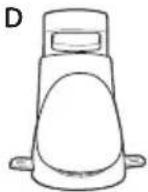
natural_image
Simple line drawing of a symmetrical abstract shape with no text or symbolsF
G
H
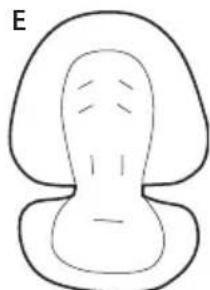
A. Seat Pad and Seat Frame
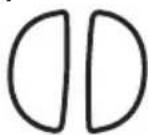
G. Crotch Strap Cover
- Housses de courroie d'entrejambe • Funde de la correa de la entrepierna
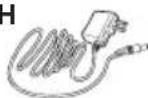
H. Wall Plug
- Prise murale
- Tomacorriente de pared
2-B Features • Caractéristiques • Características
This model may not include some features. DO NOT use any other accessories with this product.
natural_image
Cross-sectional diagram of a human head (no text or labels)Only use this body support on this swing. Never use this body support on any other product.
natural_image
Simple line drawing of a human head in profile view (no text or symbols)Only use harness covers and crotch strap cover on this swing. Never use harness covers and crotch strap cover on any other product.
Infant Swing: For use up to 25 lb (11 kg)
natural_image
Line drawing of a baby seat with a lamp and cord, showing directional arrows indicating movement (no text or symbols)Infant Rocker: For use up to 20 lb (9 kg)
natural_image
Simple line drawing of a light bulb with curved base and filament, no text or symbols presentToddler Rocker: For use up to 40 lb (18 kg)
natural_image
Simple line drawing of a magnifying glass with arrows indicating direction (no text or symbols)▲WARNING Always use restraints until child is able to climb in and out of the product unassisted.
natural_image
Line drawing of a medical device with a bulb and tubing (no text or symbols)3-AAsssemblingSwingBase
• Montage de la base de la balançoire
- Ensamblaje de la base del columpio
B
natural_image
Two curved pipe segments with label 'c' (no text or symbols on the shapes)D
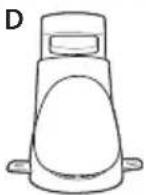
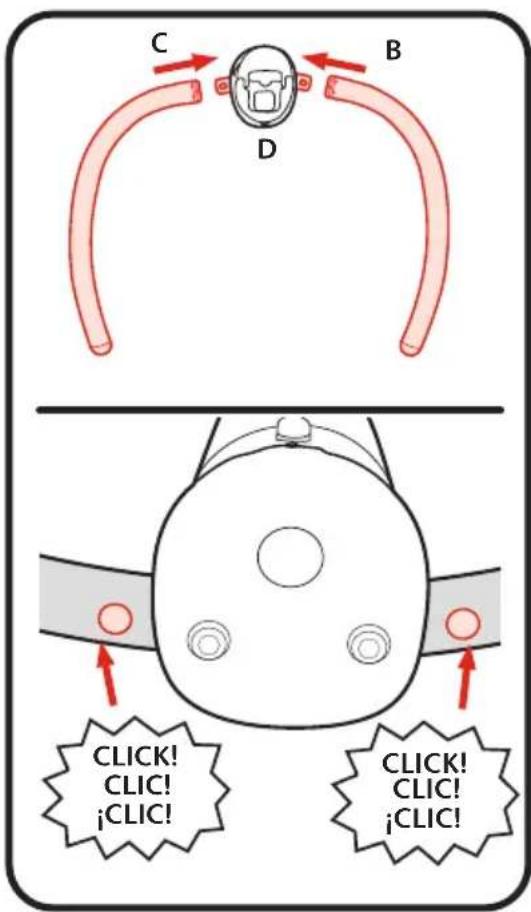
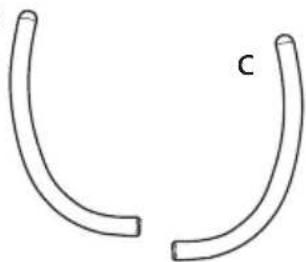
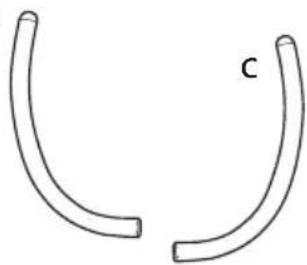
- Insert the ends of base tubes (B) (C) into openings in motor housing (D) as shown.
CHECK that buttons are visible, and pull out on each base tube to ensure it is fully attached.
3-B To Attach Seat to Base
natural_image
Simple line drawing of a symmetrical mechanical or anatomical component inside an oval frame (no text or symbols)natural_image
Diagram of a bird's wing structure with a red upward arrow indicating direction (no text or symbols)3-C To Remove Seat from Base
Seat can be removed from base for storing.
Falling Hazard: Swing Mode: Always use
restraints. Rocker Modes: Always use restraints until child is able to climb in and out of the product unassisted. STRANGULATION HAZARD: Children have STRANGLED in loose or partially buckled harness straps.

MISE EN GARDE
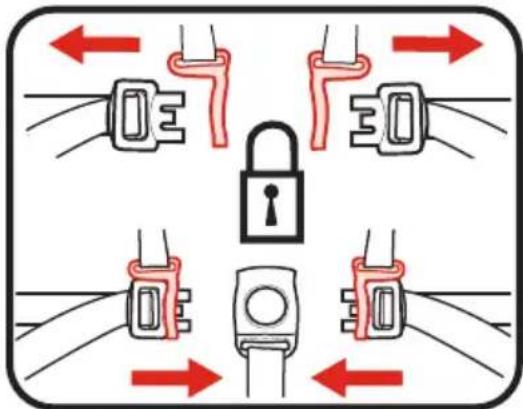
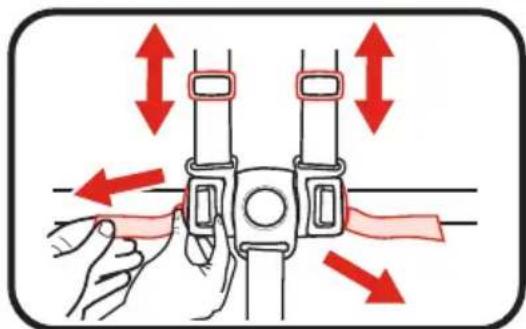
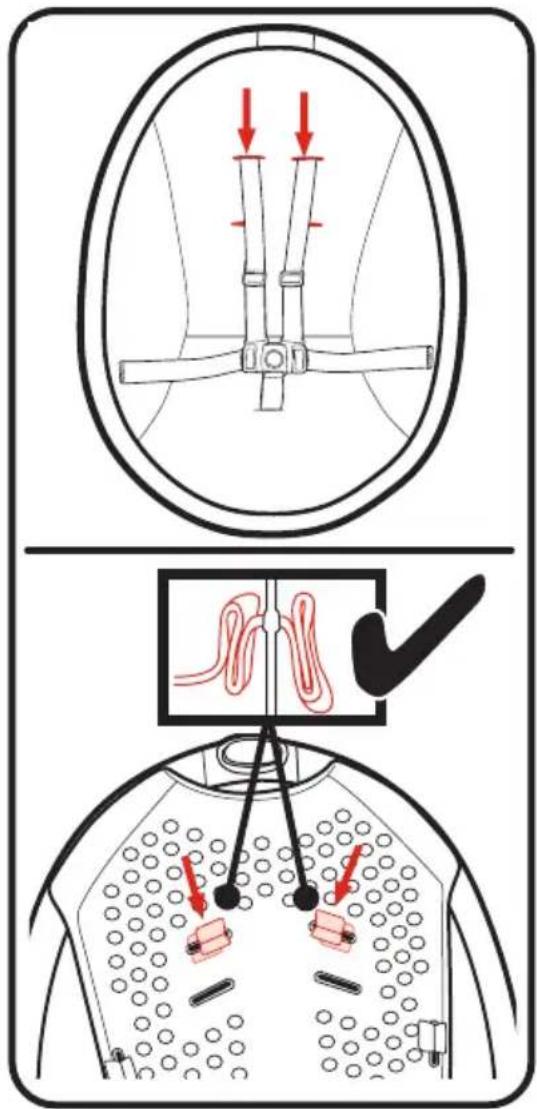
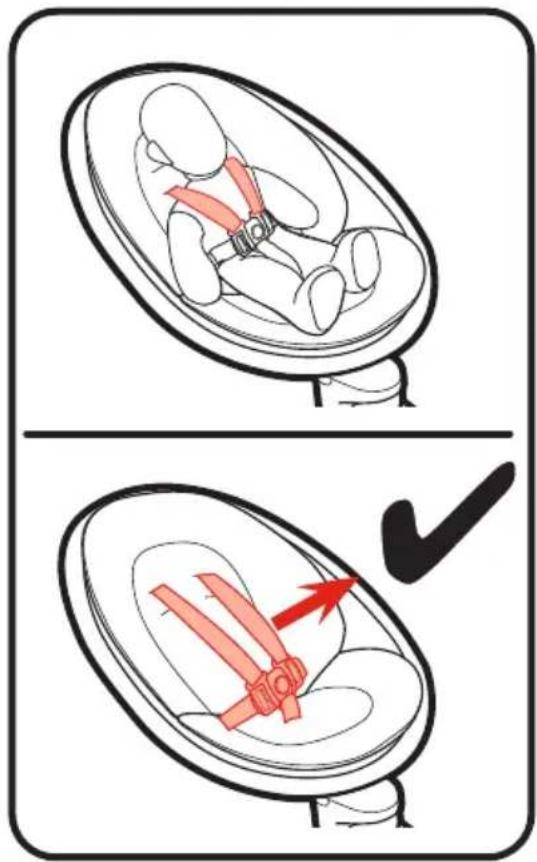
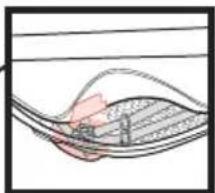
- When changing shoulder strap slots in seat frame, MAKE SURE shoulder straps are going through same slots in seat pad as slot in frame.
CHECK frame is between shoulder strap mounts as shown.
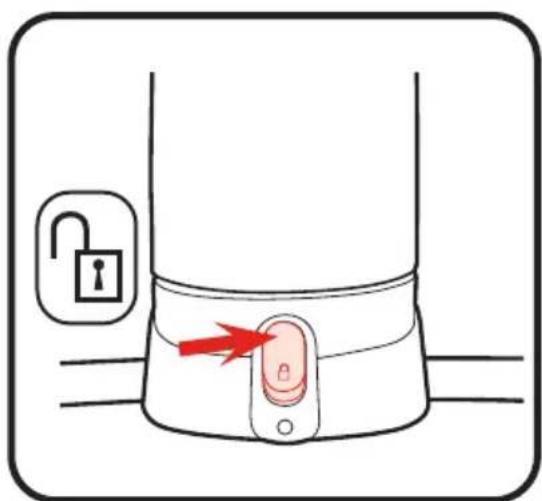
4-B To Use Rock Lock™
LOCK Rock Lock ^™ to help child to get in and out of product.
UNLOCK Rock Lock™ before turning on swing motions.
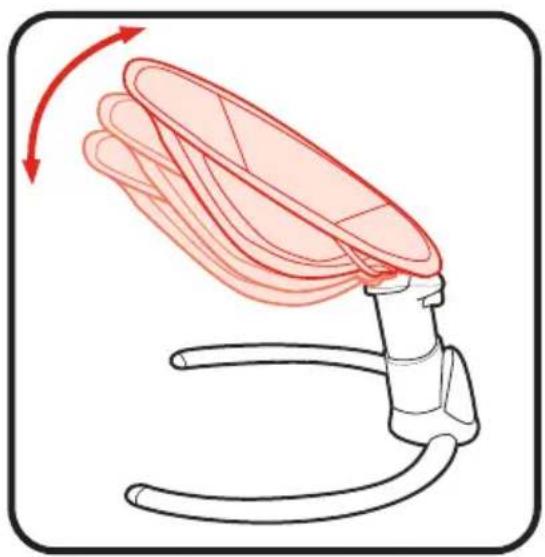
4-C To Adjust Height
- Réglage de la hauteur
- Cómo ajustar la altura
DO NOT adjust height with child in product.
natural_image
Illustration of a medical device with a curved tube and a red arrow indicating upward motion (no text or symbols)4-D To Adjust Recline (3 positions)
- Réglage de l'inclinaison (3 positions)
- Para ajustar la reclinación (e posiciones)
ALWAYS use most reclined position until infant is at least 4 months old and can hold up head without help. Use the more upright position for older, more active infants.
natural_image
Illustration of a medical device with a curved tube and red shaded area indicating movement or force (no text or symbols)Always use restraints until child is able to climb in and out of the product unassisted.

MISE EN GARDE
- To open, press button on buckle to release the waist straps.
- Pour ouvrir, appuyer sur le bouton de la boucle pour libérer les courroies abdominales.
- Para abrirlo, oprima el botón de la hebilla para liberar las correas de la cintura.
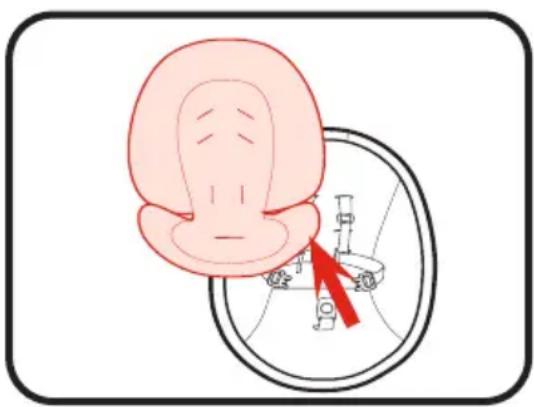
- Remove body support. DO NOT use body support without harnesses.
- Retirer le support corporel. NE PAS utiliser le support corporel sans harnais.
- Saque el soporte del cuerpo. NO use el soporte del cuerpo sin arneses.
natural_image
Illustration of a human head with a magnified inset showing internal anatomy (no text or symbols)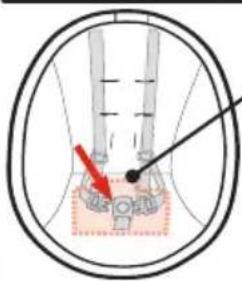
natural_image
Diagram of a curved structure with layered elements and a highlighted section (no text or symbols)DO NOT place product near water or moisture. Do not use the product near possible wet areas, such as a bathtub, shower, wash basin, sink, laundry tub, swimming pool, wet basement, etc.
DO NOT use the AC adapter if it has been exposed to liquids, has been dropped, or is damaged.
Protect the power cord. Place it so it is not walked on or pinched by furniture or other items.
WARNING
Strangulation Hazard: Keep this cord out of the reach of children. DO NOT use with an extension cord. Use only power cord provided.
MISE EN GARDE
4-G Swing Controls
• Commandes de la balançoire
- Controles del columpio
WARNING
avoid serious injury from falling or
sliding out. Always use restraint system. After fastening buckles, adjust belts to get a snug fit around your infant.
TO TURN SWING ON:
Plug product into wall, power (☐) will light up. Press power ( ), @ icons will light up white and swing motion (_) and speed (:) will light up blue. Product will begin to swing. Change speed if needed by pressing Swing motion (_) again until desired speed.
TO TURN SWING OFF: Press and hold power (again to turn off. It will take a few seconds for the swing to stop moving.
MISE EN GARDE
(Power) Press power (©to turn swing controls on. To turn swing controls off press and hold power (©It will take a few seconds for the swing to stop moving. Swing will auto shut off after 4 hours.
Press swing speed ( ) to cycle through 6 motion speed options. Swing speed will flash during mode change and ( ) illuminate solid in full motion. Press swing speed ( ) a 6th time or press and hold swing speed ( ) to turn swing speed off.
(Vitesse de balancement)
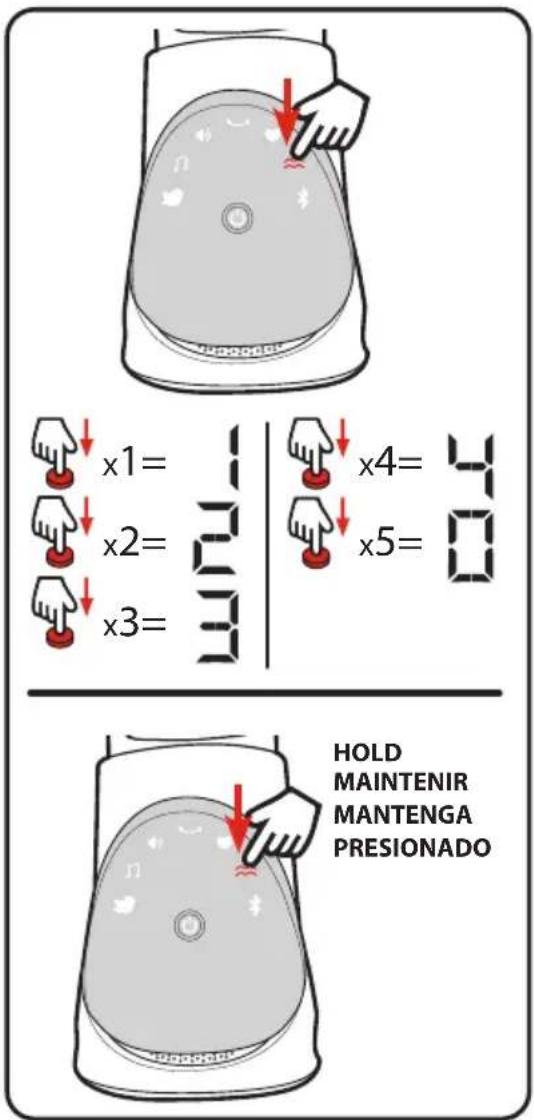
(Vibration)
Press Vibration ( ≈ ) to choose vibration setting.
Vibration settings are:
(1) Low
(2) Medium
(3) High
(4) Highest
(□) Off
Press and hold Vibration (≈) will also turn vibration off.
(Vibration)
Press and hold Vibration (≈) will also turn vibration off.
Sound Controls
Press Music ( ) to turn music on. Song 1 will play at volume ( ) Low. Press Music ( ) to skip to next song(s). Press Sound Volume ( ) until number is ( ) or press and hold Music ( ) to turn off.
(Musique)
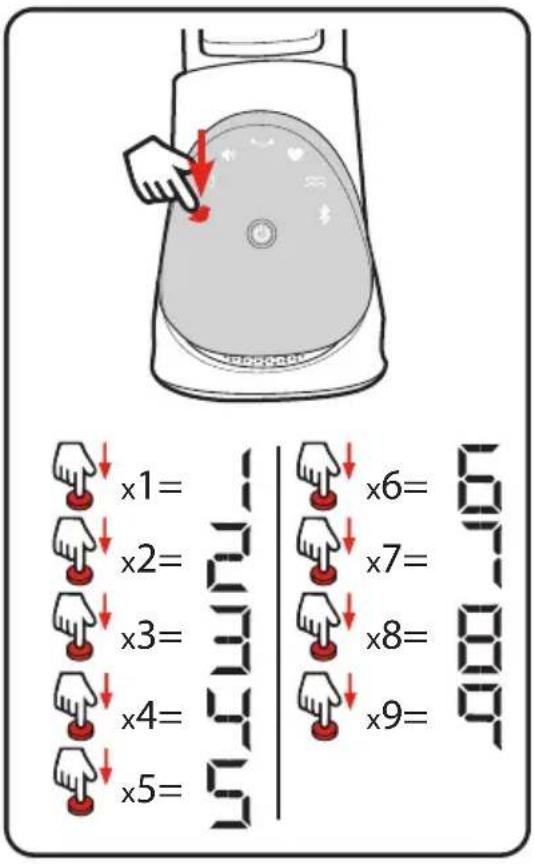
(Nature Sounds)
Press Nature Sounds (💡) to turn sound on. Sound 1 will play at volume ( ! ) Low.
Press Nature Sound (💡) to skip to next song(s).
Press Sound Volume (◀) until number is (□) or press and hold Nature Sounds (◀) to turn off.
(Sons de la nature)
While desired Nature or Music selection is on, press Volume (◀) to choose next volume setting.
Favorite Mode • Mode Favoris • Modo favorito
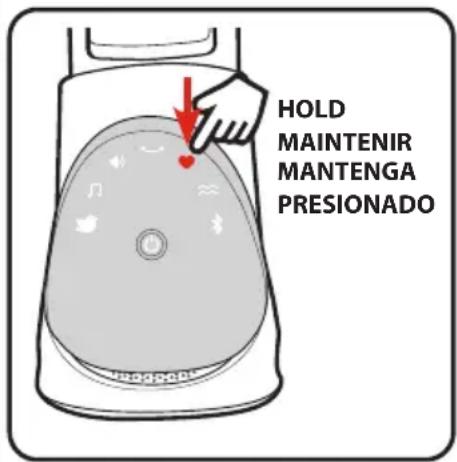
(To Set Favorite Mode)
Press power ( 📊 and then choose desired speed, sound, and vibration settings (see Section 4-G). When swing is at desired settings, press and hold Favorite Mode ( ♥ ) until the icon changes to BLUE. Favorite settings are now saved.
Recall favorite settings at any time by pressing the Favorite button (❤️).
Press ANY button to turn Favorite mode off.
Press Bluetooth ^® ( ) on swing.
On mobile device, go to Bluetooth® Pairing and ensure Bluetooth® is enabled.
Click on “Graco Swing” when it comes up. Swing “Graco Swing” is now paired to the mobile device.
Audio from the phone will now play through the swing speaker.
Brancher la balançoire.
Use the volume on mobile device or swing to control volume while using Bluetooth®.
Disconnect from Bluetooth by pressing Nature Sounds (♡), Music (♡), OR pressing and holding Bluetooth (✗).
Alternatively, disconnect on mobile device.
-
Speed setting too low. Push swing to start.
-
Display is blinking and swing not moving, check for obstacle blocking swing or that load is over 25 lb (11 kg). Turn swing off and turn it back on.
- Rock Lock ^™ is locked. See page 21 for instructions on how to unlock base.
SEAT DOESN'T SWING VERY FAST:
- Control setting too low.
- Blanket hanging down, causing increased wind resistance. Remove all blankets from swing.
- Baby too heavy or too active. (Discontinue use).
- Soft carpet (swings higher on hard floors).
ROCKER WON'T SWAY:
- Rock Lock ^™ is locked. See page 21 for instructions on how to unlock base.
LA BALANÇOIRE NE DÉMARRE PAS :
5-A Care and Maintenance
- FROM TIME TO TIME CHECK YOUR SWING for loose screws, worn parts, torn material or stitching. Replace or repair the parts as needed. Use only Graco replacement parts.
• TO CLEAN SEAT PAD, wipe clean with damp cloth.
- TO CLEAN BODY SUPPORT, refer to care tag on body support for washing instructions. NO BLEACH.
• TO CLEAN BASE, wipe with dry cloth ONLY.
- EXCESSIVE EXPOSURE TO SUN OR HEAT could cause fading or warping of parts.
5-B Replacement Parts
To purchase parts or accessories or for warranty information in the United States, please contact us at the following:
To purchase parts or accessories or for warranty information in
Canada, please contact us at the following:
5-C Product Registration
To register your Graco product from within the U.S.A. visit us online at www.gracobaby.com/productregistration or return registration card provided with your product. In Canada, visit www.gracobaby.com/productregistration to register your product.
- SUFFOCATION, STRANGULATION, AND FALL HAZARDS
- INFANT SWING
- INFANT/TODDLER ROCKER
- WARNING
- STRANGULATION HAZARD:
- ⚠ MISE EN GARDE
- 2-B Features • Caractéristiques • Características
- 3-AAsssemblingSwingBase
- 3-B To Attach Seat to Base
- 3-C To Remove Seat from Base
- MISE EN GARDE
- 4-B To Use Rock Lock™
- 4-C To Adjust Height
- 4-D To Adjust Recline (3 positions)
- 4-G Swing Controls
- TO TURN SWING ON:
- (Vitesse de balancement)
- (Vibration)
- Sound Controls
- (Musique)
- (Nature Sounds)
- (Sons de la nature)
- Favorite Mode • Mode Favoris • Modo favorito
- (To Set Favorite Mode)
- SEAT DOESN'T SWING VERY FAST:
- ROCKER WON'T SWAY:
- LA BALANÇOIRE NE DÉMARRE PAS :
- 5-A Care and Maintenance
- 5-B Replacement Parts
- To purchase parts or accessories or for warranty information in
- 5-C Product Registration
Brand : GRACO
Model : Soothe 'n Sway Bluetooth 3in1
Category : Baby swing