ManualGo.com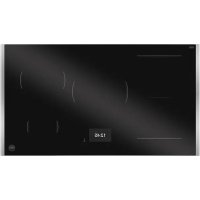
P905I1M37XT - Cooker BERTAZZONI - Free user manual and instructions
Find the device manual for free P905I1M37XT BERTAZZONI in PDF.



Download the instructions for your Cooker in PDF format for free! Find your manual P905I1M37XT - BERTAZZONI and take your electronic device back in hand. On this page are published all the documents necessary for the use of your device. P905I1M37XT by BERTAZZONI.
USER MANUAL P905I1M37XT BERTAZZONI
Dear new owner of a Bertazzoni appliance, I want to thank you for choosing one of our beautiful products for your home. My family started manufacturing kitchen appliances in Italy in 1882, building a reputation for quality of engineering and passion for good food. Today, our products stand out because of their unique blend of authentic Italian design and superior appliance technology. It is our mission to make products that function perfectly and bring joy to their owners. By making beautiful products we respond to our customers’ flair for good design. By making them versatile and easy-to-use, cooking with Bertazzoni becomes a real pleasure. This manual will help you learn to use and care for your Bertazzoni appliance in the safest and most effective way, so that it can give you the highest satisfaction for years to come. Enjoy! Paolo Bertazzoni President 37MANUAL VALIDITY The following manual applies to all the product codes listed below:
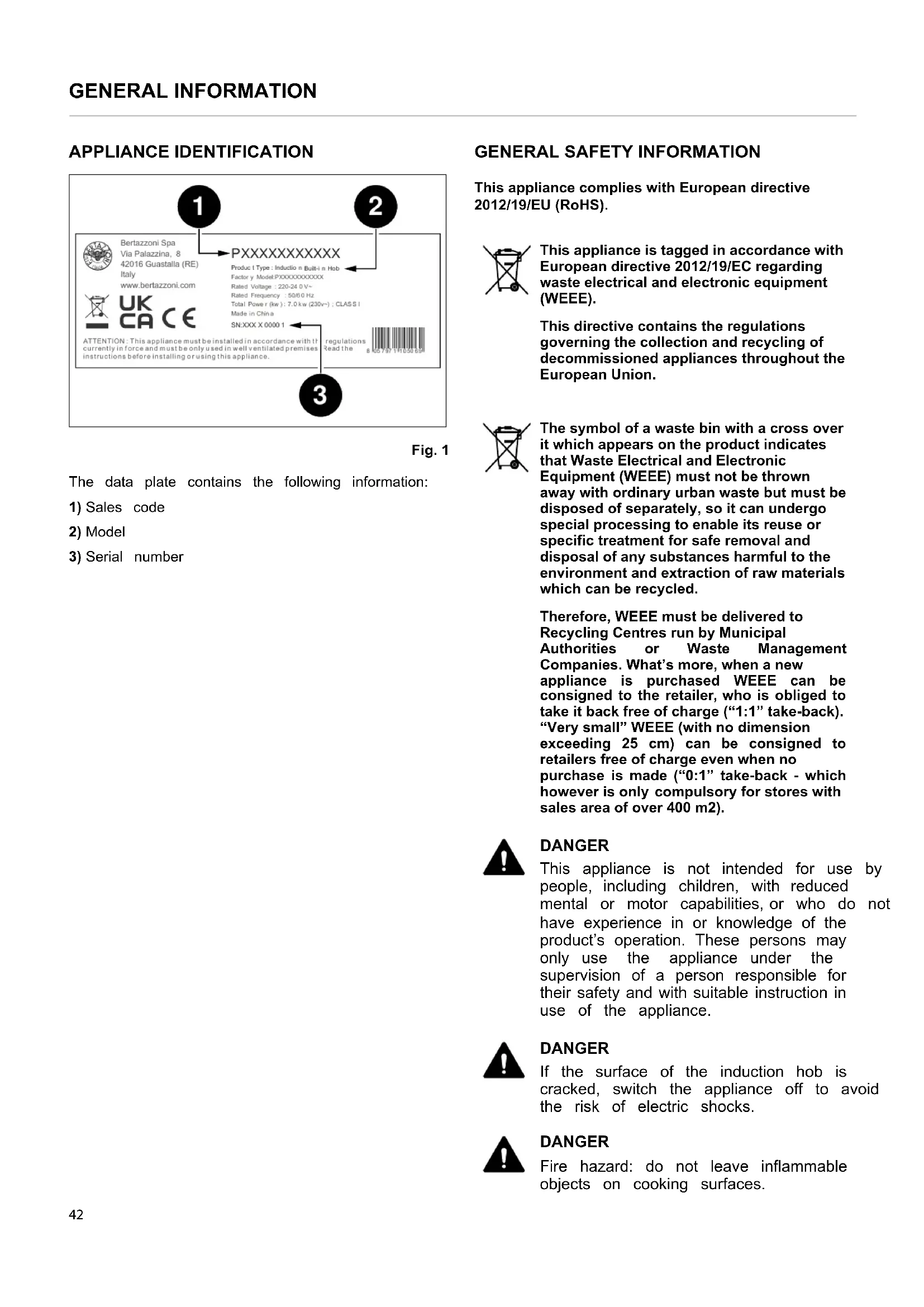
This appliance complies with European directive 2012/19/EU (RoHS). This appliance is tagged in accordance with European directive 2012/19/EC regarding waste electrical and electronic equipment (WEEE). This directive contains the regulations governing the collection and recycling of decommissioned appliances throughout the European Union. The symbol of a waste bin with a cross over it which appears on the product indicates that Waste Electrical and Electronic Equipment (WEEE) must not be thrown away with ordinary urban waste but must be disposed of separately, so it can undergo special processing to enable its reuse or specific treatment for safe removal and disposal of any substances harmful to the environment and extraction of raw materials which can be recycled. Therefore, WEEE must be delivered to Recycling Centres run by Municipal Authorities or Waste Management Companies. What’s more, when a new appliance is purchased WEEE can be consigned to the retailer, who is obliged to take it back free of charge (“1:1” take-back). “Very small” WEEE (with no dimension exceeding 25 cm) can be consigned to retailers free of charge even when no purchase is made (“0:1” take-back - which however is only compulsory for stores with sales area of over 400 m2). DANGER This appliance is not intended for use by people, including children, with reduced mental or motor capabilities, or who do not have experience in or knowledge of the product’s operation. These persons may only use the appliance under the supervision of a person responsible for their safety and with suitable instruction in use of the appliance. DANGER If the surface of the induction hob is cracked, switch the appliance off to avoid the risk of electric shocks. DANGER Fire hazard: do not leave inflammable objects on cooking surfaces. Bertazzoni Spa Via Palazzina, 8 42016 Guastalla (RE)Italywww.bertazzoni.com A T T E N T I O N : T h i s a p p l i a n c e m u s t b e i n s t a l l e d i n a c c o r d a n c e w i t h t h e r e g u l a t i o n s c u r r e n t l y i n f o r c e a n d m u s t b e o n l y u s e d i n w e l l v e n t i l a t e d p r e m i s e s . R e a d t h e i n s t r u c t i o n s b e f o r e i n s t a l l i n g o r u s i n g t h i s a p p l i a n c e . P XXXXXXXXXXX Produc t T ype : Inductio n Built-i n Ho b Factor y Model:PXXXXXXXXXXX Rate d V oltage : 220-24 0 V ~ Rate d Frequency : 50/6 0 H z T ota l Powe r (kw ) : 7. 0 k w (230v~) ; CLAS S I Mad e i n Chin a
42GENERAL INFORMATION DANGER Automatic cooking on the hob with fat or oil may be hazardous and may cause fires. If a fire breaks out, do not attempt to put it out with water. Switch the appliance off and cover the flames with a lid or a fire blanket. DANGER This appliance can be used by children over 8 years of age and persons with reduced physical, sensory or mental capabilities, or without the necessary of experience and knowledge, provided they are supervised or have received instruction concerning safe use of the appliance and an understanding of the hazards involved. Children must not play with the appliance. Cleaning and user maintenance must not be carried out by unsupervised children. WARNING Accessible parts may become hot during use. Children must be kept well away. WARNING The appliance must not be installed on a stand. WARNING Do not use steam cleaners to clean the appliance. CAUTION Do not use an external timer or other remote control systems to operate the appliance. 43IMPORTANT NOTES
READ THESE INSTRUCTIONS CAREFULLY BEFORE
INSTALLING AND USING THE APPLIANCE. These instructions are valid only for the countries whose identifying symbols are included on the cover of this manual and on the appliance label. The manufacturer shall not be held liable for property damage or personal injury resulting from incorrect installation or improper use of the appliance. The manufacturer shall also not be held liable for any imprecisions due to printing or transcription errors in this booklet. The appearance of the gures included herein is only for guidance. The manufacturer reserves the right to make modications to its products when it considers this necessary or benecial; however the essential safety and performance characteristics shall not be aected.
THIS APPLIANCE IS DESIGNED FOR NON-
PROFESSIONAL, DOMESTIC USE. This user manual is an integral part of the appliance and must therefore be kept in its entirety in a place accessible to the user for the entire lifetime of the appliance. Read this manual before using the appliance. MANUFACTURER LIABILITY The manufacturer shall bear no liability for property damage or personal injury due to:
- use of the appliance other than that specied;
- failure to comply with the instructions in the user manual;
- tampering with/unauthorized modications to any part of the appliance;
- use of non-genuine spare parts; CAUTION Applying the marking on this product is a declaration, under the manufacturer’s full responsibility, that the appliance complies with all European health, safety and environmental requirements laid out in the legislation. ENVIRONMENTAL PROTECTION Please think of the environment when disposing of the packaging. This appliance is tagged in accordance with European directive 2012/19/EU regarding waste electrical and electronic equipment (WEEE). This directive contains the regulations governing the collection and recycling of decommissioned appliances throughout the European Union. The packaging of this appliance is composed of the elements strictly necessary to ensure sucient protection during transport. The packaging materials are completely recyclable, thus reducing their environmental impact. Please help to protect the environment by taking the following tips into consideration:
- Sort the packaging materials for recycling.
- Render the old appliance unusable before taking it to the collection facility. Ask the competent local authorities for details of the nearest recycling center you can take the old appliance to.
- Do not dispose of used oil down the drain. Keep it in a closed container and take it to a recycling center; if this is not possible, dispose of it in mixed waste (in this manner it will be disposed of at a monitored facility – although this is not the best solution, it at least prevents contamination of the sewage/water systems). 44INSTALLATION The installation, all adjustments, transformations and maintenance listed in this section must only be performed by qualified technicians (in accordance with applicable legislation). Incorrect installation may cause injury to people and pets or damage to property, for which the manufacturer cannot be held liable. The appliance’s automatic regulation or safety devices may only be modified by the manufacturer or a duly authorized supplier during the appliance’s lifetime. Ensure all necessary PPE is used when carrying out the installation. IMPORTANT NOTES The hob can be inserted between kitchen units or between a unit and a masonry wall. The rear wall and surrounding surfaces must be able to withstand temperatures of up to 90℃. To avoid the plastic laminate covering the unit coming unstuck, the glue that joins them must withstand temperatures of at least 100℃. The top on which the hob is installed must be stable, flat and horizontal. The worktop into which the appliance is fitted must be able to support loads of approx. 60 kg. In the case of thin worktops, use a reinforcing material that is resistant to heat and humidity. Check the flatness of the hob only after it has been fitted. The appliance must be installed in compliance with current regulations. This device is not connected to combustion gas venting devices. It must therefore be connected in accordance with the above-mentioned installation rules. Special attention must be paid to the instructions regarding the aeration and ventilation of rooms. The distance between the extractor hood and the hob must be at least the distance indicated in the extractor hood's assembly instructions. If easily flammable materials are installed above the hob (e. g. a shelf), the safety distance F indicated in Fig. 2 must be maintained.
- Use flat-bottomed pans suitable for induction hobs
- Position the pans before switching on the hob
- Make sure the pan is centred in relation to the hob
- Do not move away when cooking food with oil and fat, which are highly flammable
- To prevent the hob from getting scratched, move the pans by lifting them without sliding them
- Pans with scratched or damaged bases can damage the ceramic glass
- Sand, salt, sugar or other abrasive substances can damage the ceramic glass
- Always keep the cooking area and the bottom of the pans dry
- Never use frozen pans
- Do not place or leave empty pans on the hob, even if it is switched off
- Never place a boiling pan on the control panel. The electronics under the glass could be damaged
- Never use 2 cooking containers at the same time on a single hob
- Do not heat closed containers (e.g. food jars). Due to the overpressure, the containers and/or jars may explode and cause injury
- Ceramic glass is very resistant, but not unbreakable. Avoid dropping objects, even small ones, on the ceramic glass
- Do not hit the edges of the glass with pans
- Use maximum power only to boil water or to fry
- Do not preheat empty pans. The bottom of the pan could quickly reach very high temperatures and damage both the ceramic glass and the inner coating of the pan
- Be especially careful not to spill sugar or sweet mixtures on the hob during cooking, and avoid using materials or substances that could melt (plastic or aluminium foil). In this case, switch off the hob immediately and clean with a scraper while the cooking zone is still warm. If the ceramic hob zone is not cleaned immediately, residues may form that cannot be removed once the cooking zone has cooled down
- The electronic part may cause audible noises during operation. The cooling fan may also be noticeable. The cooling fan can continue to operate even after the cooking process is finished, to cool the electronic components. This does not mean that the induction hob is faulty or that it is not working properly
- If the hob is installed over a drawer, it is essential to respect the distances indicated in the installation drawings and not to use the drawer to store flammable objects. Any objects in the drawer must be heat resistant and remain at least 2cm from the bottom of the worktop 45INSTALLATION
- If the hob is installed over a drawer, the hob ventilation heats the items inside the drawer during the cooking process. Do not store sharp or small objects, paper, napkins, etc. in the drawer. These could penetrate or be sucked in through the ventilation slots and damage the cooling fan or affect cooling
- If the appliance is built-in over an oven equipped with a pyrolytic cleaning system, it must not be used while the pyrolytic process is in progress, as this could trigger the hob's overheating protection
- Warning for people wearing pacemakers: be aware that an electromagnetic field is generated in the immediate vicinity of the appliance when it is in operation. The possibility of affecting the functioning of the pacemaker is very remote. If in doubt, contact the manufacturer of the pacemaker or your doctor.
- The electromagnetic field of the switched-on hob can influence the functioning of objects subject to magnetisation. Do not keep credit cards, memory devices or calculators in the immediate vicinity of the hob
- If you use an adapter for cooking pots that are not induction-compatible, the hob’s heating system could be damaged. CAUTION The cooking process must be constantly monitored
Ensure that the hob is fully present and undamaged after removing all loose parts from their inner and outer packaging. In the event of any uncertainty, do not use the appliance and contact technical support. Considering the critical dimensions of the appliance (see Fig. 2 ), make an opening in the top of the unit following the measurements in the table. 46INSTALLATION Fig. 2 A B
If installed over an oven, space must be left between the bottom of the hob and the top of the installed product to allow for ventilation of the entire compartment (see figure). The oven must be equipped with a cooling device. The manufacturer shall bear no liability in the event of the hob being installed in combination with an oven from another manufacturer. Fig. 3
INSTALLATION OVER A COMPARTMENT OR
DRAWERS The clearance between the oven and the kitchen units or other installed appliances must be enough to ensure sufficient ventilation and air discharge. The internal width of the unit must be at least equal to the internal width of the cut-out in the worktop so that, once embedded, the hob is freely accessible from underneath and the lower casing can be removed for maintenance. If the hob is not freely accessible from below after installation, the seal on the kitchen worktop must be removed so that the hob can be dismantled (once this has been done, the seal must be put back in place). Fig. 4 Fig. 5 NOTE To further optimise the product's performance, a front discharge for the cooling air can be provided in the unit min 20 mm min 50 mm min 20 mm min 50 mm min 70 mmmin 50 mmmin 70 mmmin 50 mm 48INSTALLATION FLUSH-MOUNTED INSTALLATION The hob can be flush-mounted only on natural stone(granite, marble), solid wood and tiled worktops. Forworktops made of other materials, contact themanufacturer to check whether they are suitable for flush-mounting a hob.Check the flatness of the hob only after it has been fitted.After installing the hob in the niche, spray heat-resistantsilicone sealant (at least 160℃) into the gap between thehob and the worktop.The recommended height for applying the seal is indicatedin the drawing.Fig. 6T S U VHob 90 cm 904 mm 524 mm5 mm 5 mm
To prevent accidental infiltration of liquid into the unit below,the appliance is equipped with a special seal.1) After cleaning the surface, spread the sealant along thelower edge of the top where the hob is built-in.
2) Glue it 2 mm from the edge of the outer glass or the
decorative frame.Fig. 73) Fit the hob into the opening in the unit. NOTE The seal must also be inserted for flush- mounted installations.
2 mm2 mm 49INSTALLATION ROOM VENTILATION To guarantee that the appliance functions correctly, the room where it is installed must be properly ventilated. Ventilation of the room must be guaranteed in compliance with current regulations. ELECTRICAL CONNECTION The electrical connection must be made in accordance with applicable standards and legislation. Before making the connection, check that:
- The characteristics of the mains power supply are compatible with the data shown on the label.
- The connection and the system must be earthed in accordance with current regulations. NOTE The cable supplied allows for both single- phase and two-phase connection. Position the power cable in such a way that it does not reach a temperature of 90℃ at any point. The circuit must be tted with an omnipolar circuit breaker of suitable capacity for the appliance's rated load. As an alternative, an RCD may also be used. The earth conductor must not be switched by the breaker and must be connected to the earthing system. 50loading-circle-1USE
GENERAL SAFETY INSTRUCTIONS
- To be used, the appliance must be correctly installed in a kitchen on a suitable work surface, in accordance with current safety regulations and the instructions in this booklet.
- The appliance cannot be used on top of a dishwasher or a tumble dryer: the steam could damage the electronic components of the appliance.
- Have installation and servicing carried out by qualified personnel in compliance with applicable standards and legislation. Do not try to repair the appliance yourself or without the assistance of a qualified technician.
- If the power supply cable is damaged, contact technical support immediately and they will arrange for it to be replaced
- This appliance and its accessible parts become very hot during use.
- Do not touch heating elements during use.
- During use, do not place metal objects on the appliance, as they may become incandescent.
- Switch o the appliance after use.
- Do not leave objects on the cooking surfaces.
- Ensure that hot surfaces are allowed to cool before proceeding to clean the appliance.
- Do not use abrasive or corrosive detergents (e. g. scouring powders, stain removers and metallic sponges) on glass parts.
- Sudden and extreme changes in temperature can cause the glass to break – never pour cold liquids onto the hob when in use.
- In the event of breakage or cracking in the glass top, switch off the hob immediately and disconnect it from the power supply. Contact technical support.
- Damaged containers, those that are the wrong size, that overhang the edge of the hob or are badly positioned can cause serious injury.
- Use of the hob generates heat, humidity and combustion products; ventilate the room thoroughly when it is in operation.
- Do not modify this appliance.
- Do not insert anything in the slots.
- Do not obstruct ventilation openings and heat dispersal slots.
- Do not use the appliance as a space heater for any reason.
- Do not sit on the appliance.
- Do not use steam jets to clean the appliance.
- Keep children under 8 years of age at a safe distance unless they are constantly supervised.
- Children must not play with the appliance.
- This appliance may be used by children from 8 years of age and people with reduced physical, sensory or mental capabilities, or lack of experience and knowledge, provided they are supervised or instructed by adults responsible for their safety.
- Never try to put out a flame/fire with water. Switch the appliance off and cover the flames with a lid or a fire blanket. 52USE HOB DESCRIPTION Fig. 8
Ø 260 mm 2.6 kW / 3.7 kW Fig. 9 ICON DESCRIPTION Switches the hob on and off (icon located at the bottom right outside the display) Setting Timer ICON DESCRIPTION Pause Block controls Indication of active single zone with set value Programs Timer Bridge activation symbol
COOKING WITH INDUCTION
Under each cooking zone there is a coil called an inductor. The inductor generates a variable magnetic field using electrical power. When a pan is placed inside this magnetic field, the base heats up, producing the heat necessary for cooking.
USING THE TOUCH CONTROLS
- The controls respond to touch, so there is no need to apply pressure.
- Use the pad of your finger and not the tip.
- Each detected touch produces an acoustic signal.
- Make sure that the controls are always clean, dry and not covered by any object (such as a tool or cloth). Even a thin layer of water can make it difficult to use the controls. Fig. 10
The induction plate automatically adapts to the size of the pan: however, if the diameter of the pan is too small, the plate will not work. The minimum diameter varies according to the diameter of the plate. COOKING ZONE MINIMUM VALUE Round coil 145 mm ø 100 mm Round coil 210 mm ø 140 mm Round coil 260 mm ø 160 mm OCTA coil (single) ø 120 mm
CHOOSING THE MOST SUITABLE COOKING
CONTAINERS Do not use cooking containers with a rough bottom or a curved base. Fig. 11 Make sure that the base of the pan is smooth, rests evenly on the glass and is the same size as the cooking area. Use pans of a suitable diameter, as shown in the figure of the selected area. By using a slightly wider pan, the energy will be used at maximum efficiency. If you use a smaller pan, the efficiency may be lower than expected. Always centre the pan on the cooking zone. Fig. 12 Always remove the pans from the hob by lifting them, do not drag them, as there is a risk of scratching the glass. 54USE Fig. 13 The bottom of the pan must be iron or steel/iron to generate the magnetic field necessary for the heating process. NOTE Pans made from the following materials are not suitable:
- steel, aluminium or copper without magnetic bottom. Make sure that the material of the pan is suitable for induction. To check the material, place a magnet on the bottom of the pan: if it sticks, the pan is suitable for induction. If you do not have a magnet, to check if a pan is suitable, just pour a little water in it, place it on a cooking zone and switch on the zone. If the symbol appears on the display, the pan is not suitable. When buying pans, make sure they are suitable for use on an induction hob.
COOKING TIME LIMITATION
The appliance has an automatic device that limits the operating time. If the cooking settings of the container are not changed, the maximum operating time depends on the selected power level. POWER LEVEL MAXIMUM OPERATING TIME [H] Melting
SWITCHING ON AND OFF
To switch on the hob press the button for 1 second. When switched on, the interface shows:
- The size and position of any pans already placed on the surface
Induction does not work if there is no pan on the cooking zone. Place a pan (not empty) in the centre of the cooking zone you want to use. The display shows the position and size of the pan that has been placed. You can then set the desired power.
- By sliding your finger on the slider from left to right until you reach the desired value
- By directly touching the desired power level To switch off the cooking zone
- Touch the display of the cooking zone you want to switch off
- Slide your finger on the slider from right to left until it reaches 0
- By directly touching the area of the slider corresponding to 0 (last mark on the left)
- Touching the cooking zone icon twice in quick succession The icon of the cooking zone that is switched on changes colour according to the set power level. POWER FUNCTION This function allows you to have more power (+25%) on a cooking zone for a limited time (for example to reduce the time it takes to heat water). To activate it, directly touch button B. The Booster function remains active at maximum for 15 minutes, after which the power is automatically lowered to 9. For some cooking zones, the double Booster (B2) can also be activated, which increases the power of the zone by 50%. To deactivate the booster, set a lower power level. MULTIZONE The Multizone function allows you to combine two adjacent cooking zones to form a single larger area, ideal for using long or rectangular pans such as grill pans, griddles or fish kettles. The function can be activated on adjacent cooking zones located on the left side of the hob. The Multizone function is automatically activated if a pan is detected that covers both cooking zones. The function can be activated manually by pressing the icon located halfway between the two zones. A tone confirms activation. After activation, the power can be adjusted with the slider. To deactivate Multizone, press the controls of the two zones at the same time. The two zones will return to functioning separately. To deactivate the function, press the icon with the x on the display inside the Multizone indication. TRANSFERRING SETTINGS During cooking, a pan can be moved to another cooking zone while maintaining the cooking settings initially set and any timer. The pan must be repositioned within 20 seconds of being lifted. AUTOMATIC SWITCH-OFF The hob switches off automatically 20 seconds after all cooking zones have been switched off. 56USE TIPS ON THE POWER TO BE USED FOR VARIOUS COOKING METHODS The use of power can vary according to experience and cooking habits.
Quick heating Quickly raising the temperature of food to boiling point in the case of water, or quickly heating up cooking liquids 8–9 Frying, boiling Browning, starting to cook, frying frozen products, quick boiling HIGH POWER 7–8 Browning, light-frying, boiling, grilling Light-frying, keeping at a high boil, cooking and grilling (for short periods, 5– 10 minutes) 6–7 Browning, cooking, stewing, light-frying, grilling Light-frying, keeping at a slow boil, cooking and grilling (for medium periods, 10–20 minutes). Preheating pans MEDIUM POWER 4–5 Cooking, stewing, light- frying, grilling Stewing, keeping at a low boil, cooking (for long periods), creaming pasta 3–4 Cooking, simmering, thickening, creaming Prolonged cooking (rice, mushrooms, roasts, fish) in the presence of accompanying liquids (water, wine, stock, milk), creaming pasta 2–3 Cooking, simmering, thickening, creaming Prolonged cooking (less than a litre: rice, sauces, roasts, fish) in the presence of accompanying liquids (water, wine, stock, milk) LOW POWER 1–2 Melting, defrosting, keeping warm, creaming Melting butter, gently melting chocolate, defrosting small products
Melting, defrosting, keeping warm, creaming keeping small portions of freshly cooked food warm or keeping serving dishes at the right temperature and creaming risotto 57USE POWER MANAGEMENT The hob is equipped with a power management module that optimises consumption, avoiding overloading the electrical mains. If more than one zone is active and the power consumed exceeds the power supply limit, this function distributes the available power among all the cooking zones (connected to the same phase). The electronic control tries to maintain the maximum levels of power that can be delivered. Priority is given to the last zone set, the displays of the other zones flash indicating the new value to which they will be reset. CAUTION In the case of power limitation set at a very low level, the electronic control could switch off a cooking zone because it is not possible to redistribute the power. CAUTION Lower power levels are reached by switching the inductor on and off at pre-set intervals. This method of operation minimises the heat supplied to food when cooking at low temperatures. TIME FUNCTIONS MINUTE-MINDER Press the timer icon on the toolbar. Turn the hour and minute wheels to set the desired time (from 1 minute to 9 hours and 59 minutes) and confirm the setting by pressing the appropriate icon. A tone sounds when the time has elapsed. To change the cooking time, touch the remaining time shown in the toolbar and repeat the same steps as for setting the time. NOTE If you leave the timer menu without saving, the timer will not be set. To cancel the timer, touch the remaining time shown in the toolbar and press the icon at bottom left.
END OF COOKING TIMER
If you want to set an end of cooking timer for a zone:
1) Activate the zone
2) Press the timer icon for the cooking zone
3) Turn the hour and minute wheels to set the desired time
(from 1 minute to 9 hours and 59 minutes) and confirm the setting by pressing the appropriate icon
4) A tone sounds when the time has elapsed
5) To change the cooking time, touch the remaining time
shown in the cooking zone icon and repeat the same steps as for setting the time. To switch off or change the cooking time, repeat the same procedure and change the time (possibly setting it to 0). NOTE If you leave the timer menu without saving, the timer will not be set. To cancel the timer, touch the remaining time shown in the toolbar and press the icon at bottom left. PAUSE With this function it is possible to suspend the operation of ALL cooking zones for 10 minutes. Press the icon on the toolbar, and the play icon will appear on the display to reactivate the hob. The appliance switches off automatically after a 10-minute pause. 58USE RESIDUAL HEAT The residual heat indicator is a safety feature. Once cooking is finished, the cooking zone may be at a high temperature. The symbol appears on the display corresponding to the hot zone. The symbol may also appear:
- for nearby cooking zones, even if they are not in use
- when placing hot pans on the cold cooking zone The symbol disappears when the zone reaches a temperature below 55°C℃ CHILD SAFETY This function allows you to lock the interface to prevent the hob from being used by children. To activate, see USER MENU . To deactivate, press and hold the CHILD SAFETY icon for 3 seconds - the animation around the icon indicates the progress of the time. The hob is temporarily unlocked, deactivate CHILD SAFETY with see USER MENU DISPLAY LOCK This function allows you to lock the display during use to prevent accidental changes to settings or to allow cleaning of the interface during operation. To activate the function, press the icon in the toolbar to unlock the display, then follow the instructions on the display. PAN SENSOR When a pan is placed on a cooking zone with the hob switched on, the controls for that cooking zone are automatically activated and the desired power level can be set directly. The function can be disabled via the user menu. With the function disabled, after positioning the pan you must choose the relative cooking zone before setting the power. NO PAN If the pan is removed from a cooking zone without turning off the zone, the display indicates that there is no pan by changing the colour of the zone. CAUTION If the zone is not turned off, the hob remains active, so it could heat up another pan placed on the same zone by mistake. DISPLAY OVERTEMPERATURE If a hot object is placed on the interface, the interface will first indicate that the hot object should be removed. After a short time, it will go into protection mode, switching off the hob completely and indicating ER21. When the temperature drops below the limit of 85℃, the hob can be switched back on. 59USE ASSISTANT To activate the assistant, press the icon to the left of the cooking zone icon for which you want to select the function. The assistant function is not available on 260 mm diameter induction hobs. HEATING
- MELTING: this function keeps the bottom of the pan at a constant temperature of 44℃. It is very useful for melting chocolate.
- HEATING: this function keeps the bottom of the pan at a constant temperature of 70℃. It is very useful for keeping cooked and hot food warm.
- SLOW HEAT: this function keeps the bottom of the pan at a constant temperature of 94℃. It is very useful for long cooking times when dishes need to simmer. TEMPERATURE MAINTENANCE This function is used to maintain the temperature at the bottom of the pan when the function is set. To activate this function, the cooking zone must be switched on and in use. Once the function has been set, the temperature detection process will begin. The function is activated within 15 seconds. BOILING WATER This function is used to boil water (e. g. for preparing hot beverages). The function must be activated when the pan is cold (temperature < 40℃). There is no need to use a lid. As soon as the water temperature reaches 100℃, operation stops and a tone sounds. The boiling function is optimised for filling the pan with between 3 cm and 9 cm of water. STEAM COOKING This function is used to steam vegetables or other foods with the aid of a basket. The function must be activated when the pan is cold (temperature < 40℃). As soon as the water temperature reaches 100℃, the power of the hob is reduced to keep the water boiling. Once boiling point is reached, the amount of steam produced can be adjusted with the slider. The steam function is optimised for filling the pan with between 2 cm and 6 cm of water. The hob switches off automatically if the water in the pot evaporates completely. PASTA This function is used for cooking pasta. The function must be activated when the pan is cold (temperature < 40℃). There is no need to use a lid. As soon as the water temperature reaches 100℃, a tone sounds to indicate that salt and pasta can be added to the pan. Once the pasta has been added, the cooking time can be set. This function will keep the water temperature at 100℃ for the entire duration of the set time (at certain points during cooking, the water may not be visibly boiling). The boiling function is optimised for filling the pan with between 3 cm and 13 cm of water. The use of baskets is not recommended with this function. FRYING This function is used for frying. The function must be activated when the pan is cold (temperature < 40℃). The function brings the oil or fat to the desired temperature and maintains it throughout the cooking time. Since the optimum frying temperature depends on the type of oil or fat used, you can set the desired heat level (it is best to do this at the beginning of the heating phase). The frying function is optimised for a maximum oil quantity of 500 ml in a 28 cm diameter pan. The function does not handle deep frying. The frying function has 5 settings. To deactivate the assistant, you can:
- Touch the icon of the set function
- Touch the icon of the cooking zone you want to switch off twice
- Touch the cooking zone icon and select “0” on the slider At any time, you can touch the cooking zone icon and set a different power level. CAUTION The precision of the assistant's functions depends on the quality and material of the pan: a pan with a bottom that is not completely made of steel or with a deformed bottom will not give the best results. Do not use pans with aluminium rings, multi-layer bases or cast iron for this function. WARNING The assistant is designed to operate under the conditions indicated. Using empty pans or oil instead of water can be dangerous or damage the hob and the pans. 60USE USER MENU The user menu allows you to customise some basic settings of the induction hob. Press the settings icon to access the menu. FUNCTIONS
- CUSTOMISATION: allows you to remove one of the functions (timer, pause, key lock) from the functions menu. The function can be added at any time The function can be added at any time by accessing the same menu CHILD SAFETY locks the hob so that it cannot be activated accidentally by children. To temporarily unlock the hob for cooking, follow the instructions on the hob. To cancel the function, follow the same procedure as for activation.
- SOUND: allows you to set the volume of the end-of- cooking alarms and the pressure feedback icons. Error signals will always be kept at maximum volume.
- BRIGHTNESS: allows you to set the brightness of the display.
- CLOCK: allows you to set the time display format (12 h or 24 h) and the time (using the wheels).
- LANGUAGE: allows you to choose the language for the messages. The available languages are English (default language), French, Spanish, Italian, Chinese (simplified), Korean, and Vietnamese.
- RETURN TO FACTORY SETTINGS: allows you to return the hob settings to their original settings after each change. You can save the new settings using the icon at bottom right or cancel them. SERVICE MENU NOTE The service menu should only be used by the installer or specialised personnel. To enter the service menu, the hob must be switched off and powered for less than 2 minutes, the automatic start test must have been completed and the display must be off
1) press the icon 3 times for a maximum of 1 second
2) press and hold the icon for 4 seconds.
- Induction calibration
- Power limitation To exit and save the changes made, press the confirmation button at bottom right.
- CONFIGURATION Allows you to choose from 4 preset installation configurations
- 0 - Factory configuration (single-phase or three- phase connection possible)
- 2 - Power limitation for two-phase connection - 3 kW per phase
- 3 - Power limitation for two-phase connection - 2.4 kW per phase
- DEMO MODE Allows you to select DEMO mode for showrooms. In this configuration, the display works but the hob does not consume power and does not heat up.
- POWER LIMITATION In the case of configuration 0 and single-phase connection, it allows the power consumption to be set in steps of 100 W. 61USE RESET MENU If the power supply or installation conditions have changed, you can increase the power consumption by returning to the factory settings if necessary. To enter the reset menu, the hob must be powered for less than 2 minutes, the automatic start test must have been completed and the display must be off.
1) Enter the service menu and set CONFIGURATION 0
5) With the display completely turned off, press the lower
half of the display on the right side with one finger and, at the same time, press the lower half of the display on the left side with another finger for at least 2 seconds
6) A menu similar to the power limitation menu appears,
allowing you to set the new maximum power.
7) Scroll through the available power settings until you
reach the desired power
8) Exit and save the changes by pressing the confirmation
button at bottom right 62MAINTENANCE REPLACING COMPONENTS Disconnect the appliance from the power mains before carrying out any maintenance procedure. Contact an authorized service center if functional and electrical components require replacement. WARNING If the power cable requires replacement, the installer/maintenance technician must use a cable of the type and with the cross-section as per the table and leave the earth lead about 2 cm longer than the phase leads. The instructions given for the initial electrical connection must also be complied with. Permitted cable types: H05VV-F, H05RR-F, H07RN-F TYPE OF CONNECTION VOLTAGE CABLE SECTION SINGLE- PHASE 220-240 V 5x2.5 mm
For the two-phase or three-phase connection, follow the procedure below:
1) Turn the hob over and place it on a cloth or other soft
surface to avoid scratching it.
2) Remove the terminal block cover and the cable clamp
using a screwdriver. Unscrew the cable fixing clamps and remove the cable and jumpers.
3) Depending on the connection required, prepare the
jumpers, insert the cables into the terminals and tighten the screws adequately. Refit the cable clamp and terminal block cover. CAUTION Make sure that the cables and jumpers are correctly fixed and that the screws are properly tightened. For the different electrical connection possibilities, use the brass connection jumpers already assembled in the terminal block. Fig. 14
- Two-phase connection 4x4 mm
220-240 / 380- 415V 2N~ Fig. 15 POWER LIMITATION Power limitation defines how much power is used by the hob in total, within the limits of the fuses for domestic installation. The hob is preset to the maximum power level. To set a different power limit, see chapter POWER FUNCTION, obviously the higher the power set, the greater the number of functions and power levels that can be used simultaneously on the cooking zones.
A pulsating or continuous hum during operation is normal and can vary in intensity depending on the different types of pans and the power setting. The cooling fan protects the electronics from overheating, so it is normal to hear it running even after switching off the induction hob.
CLEANING THE APPLIANCE
Before performing any manual cleaning operation, wait for all parts to cool down and check that the hob is switched off or in cleaning mode.
Do not use steam to clean the hob, as the steam could reach the electronic components and cause a short circuit. All surfaces can become discoloured or damaged if cleaning agents that are too aggressive or unsuitable are used.
CLEANING THE DECORATIVE FRAMES
Clean the parts with soapy water and then dry them with a soft cloth. The shine can be maintained by periodic use of commonly available products. Never use scouring powders or pads.
To degrease, use washing-up liquid and vinegar, then rinse; otherwise, clean with washing-up liquid, rinse, then pass over with a moist cloth before drying. To remove encrusted food, soak with soapy water or washing-up liquid for a few minutes. After a few minutes, rinse o then dry with a soft cloth. Avoid anti-limescale, abrasive and multi-purpose products, as they will aect the look of the glass after a while. 64TROUBLESHOOTING
BEHAVIOUR POSSIBLE CAUSES
The hob will not turn on There is no power supply or it could be interrupted (for example, blown fuse) The hob does not heat up DEMO mode is activated, see section SERVICE MENU No pan symbol The pan has been removed from the cooking zone The power of the chosen cooking zone cannot be selected The pan has not been recognised (it may have been positioned incorrectly, it may not be suitable for induction cooking or its diameter may be too small The power level selected is higher than the maximum power level set for the hob Residual heat symbol does not light up The zone just used for cooking has not reached a high temperature The cooking zones change power autonomously See section POWER MANAGEMENT When a cooking zone is switched on, another one switches off See section POWER MANAGEMENT A cooking zone or the entire hob turns off automatically The hob is overheated, check that there are no obstructions to the lower cooling system (e.g. bulky material inside a drawer under the hob) If the problem persists, contact customer support Food does not heat up in the expected time Although the pan is compatible with induction cooking, it conducts heat poorly The pan is much smaller than the cooking zone and only receives part of the possible power When the hob is on, you can hear a slight ticking sound The noise is due to the automatic pan sensor function (see relevant section) After switching off the hob, you can hear noises The cooling fan works until the electronic components have cooled down completely, after which it switches off automatically The control panel becomes warm to the touch A pan that was too big was placed in the front cooking zones near the control area The food in the pan alternates between boiling and not boiling This is completely normal at lower power levels (below level 5 for the d.145 induction hob, below level 3 for the others). See section POWER MANAGEMENT The cooking platform has dedicated error codes for quick and efficient diagnostics. The Lite Slider shows the error codes on the 7-segment displays of the cooking zones. An error code always begins with the letters E... or ER..., depending on the electronic component that generated the error:
- Error codes that begin with E... refer to a specific zone or component.
- Error codes that begin with ER... refer to the entire hob. Before calling customer service, make sure that the appliance is connected correctly; the following cases are not covered by the warranty
- Damage caused by improper use, storage or maintenance.
- Damage caused by unauthorised disassembly and repair.
- Damage caused by improper use.
- Use of the induction hob for commercial purposes. 65TROUBLESHOOTING NOTE If an anomaly occurs, the induction hob automatically goes into protection mode and displays the corresponding protection codes indicated in the table below. NOTE For other errors, contact technical support.
ERROR CODE BEHAVIOUR POSSIBLE CAUSES REMEDIES
ER03 The hob switches off after 10 seconds Water or pans placed on the user interface Remove the water or pans from the glass ER21 The hob switches off The temperature sensor on the user interface has detected a temperature >85°C Let the hob cool down (the error will disappear if the temperature drops below 75°C). Check the thermal insulation of the user interface E2 / ER21
Incorrect 400V connection, not suitable for the grill board
Bertazzoni is committed to providing the highest quality service to our customers. In the unlikely event that your product should have a manufacturing defect, please contact our service team at: https://uk.bertazzoni.com/more/care-service You will be requested to provide product information, proof of purchase, a photo of the silver data label and a description of the issue. Please have this information ready. 67ASSISTANCE CUSTOMER SERVICE
CONVENTIONAL WARRANTY CERTIFICATE: WHAT DO
I NEED TO DO? Your product is guaranteed, on the terms and conditions set forth in the certified supplied with the product and in accordance with the provisions of current law, for a period of 24 months from the date of delivery of the appliance. As required by the aforesaid Legislative Decrees, you must conserve the duly compiled warranty certificate, so that it can be shown to the Authorised Service Partner if necessary together with a fiscally valid document issued by the dealer at the time of purchase (delivery note, invoice, fiscal receipt, etc.) which carries the dealer’s name, the delivery date, identification of the product and the price of sale It is understood that, unless proven to the contrary, since conformity defects which emerge within six months after delivery of the appliance are assumed to have already existed at that date, unless this assumption is incompatible with the nature of the appliance or the nature of the conformity defect, after checking the warranty cover, the Bertazzoni S.p.A. Authorised After-Sales Service will do the necessary work without charging for the call-out, labour and parts. However, for the subsequent eighteen months of the warranty period, consumers intended to claim remedies granted under the warranty shall be responsible for proving that the conformity defect has been present ever since delivery; therefore, if consumers are unable to provide this proof, the warranty conditions shall not be applied and therefore the Bertazzoni S. p. A. Authorised After-Sales Service will do the work required and charge all the relative costs to the consumer.
ANOMALIES AND MALFUNCTIONS: WHO DO I
CONTACT? The service partner is always ready to assist you with all necessary explanations, but in case of anomalies or malfunctions affecting your product you are urged to perform all the checks listed in the instruction manual before contacting the Authorised After-Sales Service. To order parts or accessories, telephone our service and parts department.
FINDING YOUR NEAREST SERVICE CENTRE
If the problem persists, you can find your local Authorised Service Partner at any time by contacting your dealer or distributor or visiting www.bertazzoni.com. PRODUCT MODEL: WHERE CAN I FIND IT? When talking to the Authorised Service Partner, you must state the product’s model and its serial number (10 figures), which are provided in the instruction manual (silver sticker) or on the decal applied to the product. This will help to avoid unnecessary call-outs and above all save the relative costs.