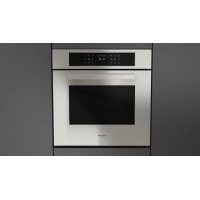
FUTSO 6023 TEM IX - Steam oven Fulgor Milano - Free user manual and instructions
Find the device manual for free FUTSO 6023 TEM IX Fulgor Milano in PDF.



| Product type | Built-in steam oven |
| Brand | Fulgor Milano |
| Model | FUTSO 6023 TEM IX |
| Dimensions (W x H x D) | 595 x 594 x 560 mm |
| Power supply | 230 V ~ 50/60 Hz (see rating plate) |
| Maximum power | See rating plate |
| Capacity | Approximately 70 L |
| Cooking modes | Steam 100, Steam 180, Fan forced, Fan assisted, Grill, Double grill, Fan grill, Bottom heat, Top heat, Pizza, Slow cooking, Defrost, Steam defrost, Sous vide, Dough proofing, AirFry, Drying, Eco cooking, Shabbat, Preheating dishes |
| Special functions | Quick preheat, Delayed cooking, Meat probe, Assisted steam button, Pre-set recipe menu, Timer |
| Steam cooking | Steam 100 (30-100°C), Steam 180 (50-180°C), Sous vide (40-95°C), Steam defrost (30-60°C), Dough proofing (30-50°C) |
| AirFry | Oil-free frying, 150-250°C, with special tray |
| Meat probe | Integrated, automatic stop at desired temperature |
| Display and controls | Digital screen, touch keys, settings menu (language, time, brightness, volume) |
| Cleaning and maintenance | Steam cleaning of cavity, automatic drain, manual drying |
| Descaling | Automatic program about 70-95 minutes, recommended liquid descaler |
| Lighting | G9 25W bulb, user replaceable |
| Door | Removable, inner glass panes removable for cleaning |
| Safety | Automatic shut-off, end tone, child lock not specified |
| Included accessories | Grills, micro-perforated tray, drip tray, AirFry tray (depending on model) |
| Repairability | Repairability index not provided, bulb and seals accessible, parts available via after-sales service |
Frequently Asked Questions - FUTSO 6023 TEM IX Fulgor Milano
User questions about FUTSO 6023 TEM IX Fulgor Milano
0 question about this device. Answer the ones you know or ask your own.
Ask a new question about this device
Download the instructions for your Steam oven in PDF format for free! Find your manual FUTSO 6023 TEM IX - Fulgor Milano and take your electronic device back in hand. On this page are published all the documents necessary for the use of your device. FUTSO 6023 TEM IX by Fulgor Milano.
USER MANUAL FUTSO 6023 TEM IX Fulgor Milano
natural_image
Simple geometric diagram with two black rectangles inside a larger rectangle (no text or symbols)FCSO 6023 TEM *
FCLSO 6023 TEM *
FUTSO 6023 TEM *
FORNO A VAPORE
STEAM OVEN
FOUR À VAPEUR
DAMPFOFEN
HORNO A VAPOR
FORNO A VAPOR
STOOMOVEN
natural_image
Technical line drawing of a rectangular appliance with a circular vent and internal grating (no text or symbols)
IMPORTANTE
natural_image
Technical line drawing of two views of a modular appliance or enclosure, showing internal components and structural details (no text or symbols)GUIDE ESTRAIBILI
natural_image
Technical line drawings of three different kitchen or storage units with internal compartments and structural details (no text or symbols)natural_image
Technical line drawing of a door frame with internal structural elements and a directional arrow indicating movement (no text or symbols)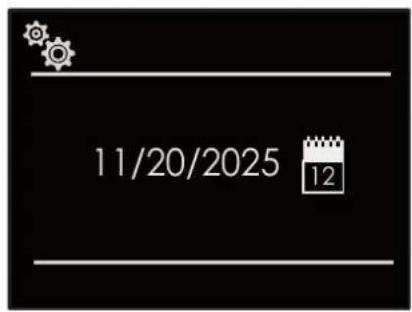
Luminosità
natural_image
Black rectangular tray with a perforated inner surface and side holes (no text or symbols)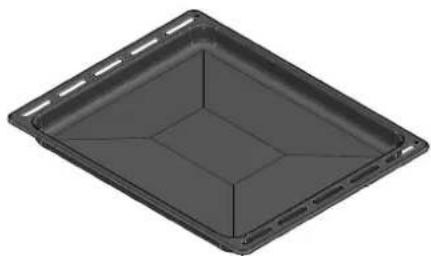
natural_image
3D rendering of a rectangular tray or container with internal compartments (no text or symbols)
ATTENZIONE
natural_image
Technical line drawing of a 3D cabinet or enclosure with numbered components (1-6), no text or symbols present.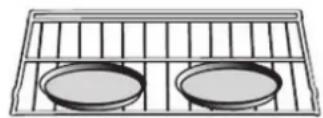
Griglia 3
natural_image
Simple line drawing of two circular plates on a grid-lined rack (no text or symbols)Griglia 1
natural_image
Technical line drawing showing two steps of a hand holding a bracket, with no visible text or symbolsnatural_image
Close-up of a hand inserting a cable into a black plastic panel (no text or symbols visible)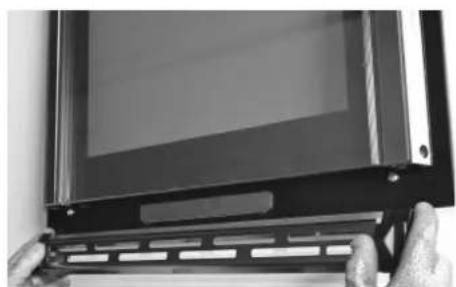
natural_image
Close-up of hands holding a black electronic device with a display screen (no visible text or symbols)natural_image
Close-up of gloved hands holding a transparent rectangular device with visible internal components (no text or symbols)natural_image
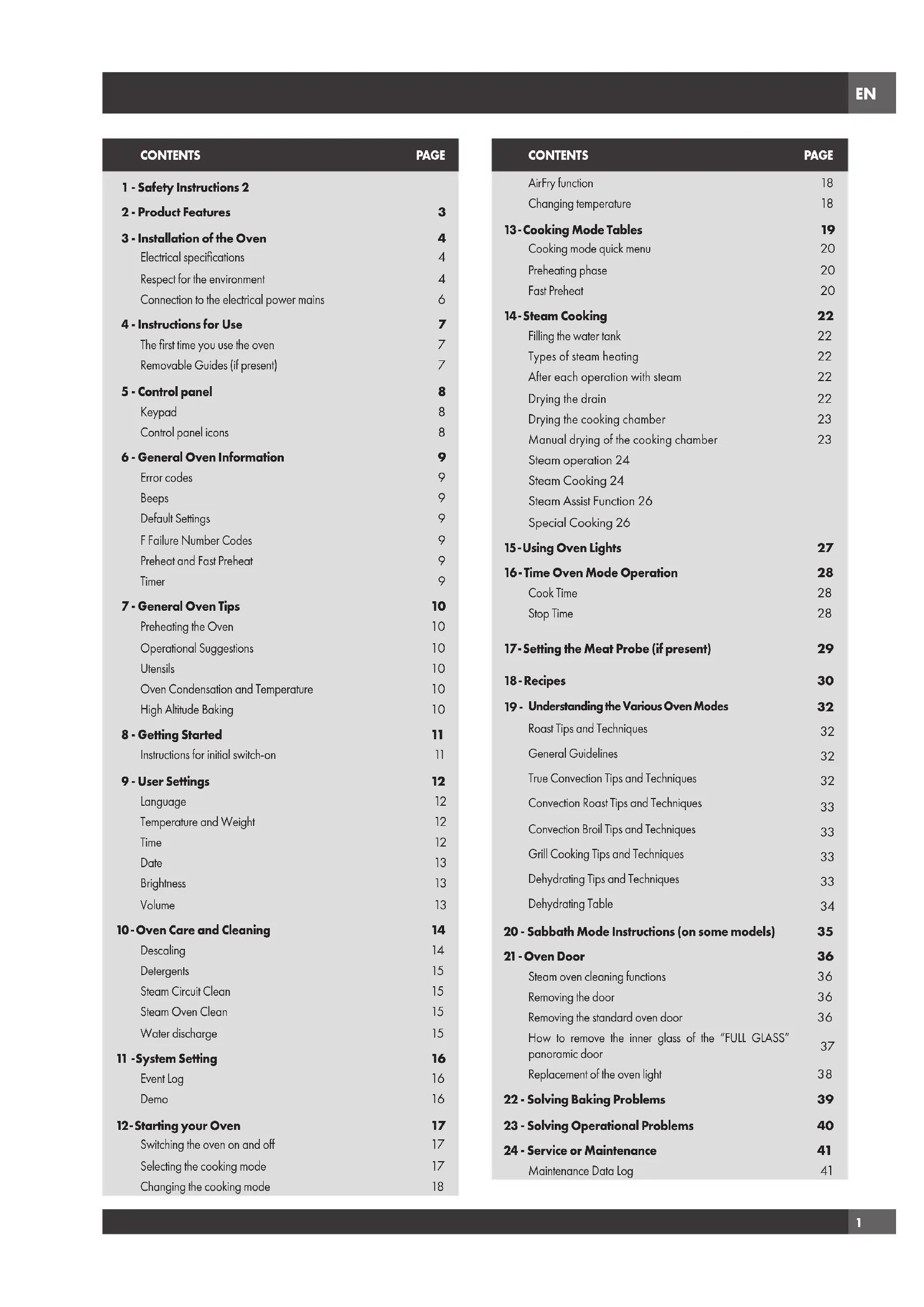
Close-up of a hand gripping a metallic object on a metal surface (no visible text or symbols)1 - Safety Instructions 2
2 - Product Features 3
3 - Installation of the Oven 4
Electrical specifications 4
Respect for the environment 4
Connection to the electrical power mains 6
4 - Instructions for Use 7
The first time you use the oven 7
Removable Guides (if present) 7
5 - Control panel 8
Keypad 8
Control panel icons 8
6 - General Oven Information 9
Error codes 9
Beeps 9
Default Settings 9
F Failure Number Codes 9
Preheat and Fast Preheat 9
Timer 9
7 - General Oven Tips 10
Preheating the Oven 10
Operational Suggestions 10
Utensils 10
Oven Condensation and Temperature 10
High Altitude Baking 10
8 - Getting Started 11
Instructions for initial switch-on 11
9 - User Settings 12
Language 12
Temperature and Weight 12
Time 12
Date 13
Brightness 13
Volume 13
10-Oven Care and Cleaning 14
Descaling 14
Detergents 15
Steam Circuit Clean 15
Steam Oven Clean 15
Water discharge 15
11 -System Setting 16
Event Log 16
Demo 16
12- Starting your Oven 17
Switching the oven on and off 17
Selecting the cooking mode 17
Changing the cooking mode 18
CONTENTS PAGE
AirFry function 18
Changing temperature 18
13-Cooking Mode Tables 19
Cooking mode quick menu 20
Preheating phase 20
Fast Preheat 20
14-Steam Cooking 22
Filling the water tank 22
Types of steam heating 22
After each operation with steam 22
Drying the drain 22
Drying the cooking chamber 23
Manual drying of the cooking chamber 23
Steam operation 24
Steam Cooking 24
Steam Assist Function 26
Special Cooking 26
15 - Using Oven Lights 27
16-Time Oven Mode Operation 28
Cook Time 28
Stop Time 28
17-Setting the Meat Probe (if present) 29
18 - Recipes 30
19 - Understanding the Various Oven Modes 32
Roast Tips and Techniques 32
General Guidelines 32
True Convection Tips and Techniques 32
Convection Roast Tips and Techniques 33
Convection Broil Tips and Techniques 33
Grill Cooking Tips and Techniques 33
Dehydrating Tips and Techniques 33
Dehydrating Table 34
20 - Sabbath Mode Instructions (on some models) 35
21 - Oven Door 36
Steam oven cleaning functions 36
Removing the door 36
Removing the standard oven door 36
How to remove the inner glass of the "FULL GLASS"
panoramic door
Replacement of the oven light 38
22 - Solving Baking Problems 39
23 - Solving Operational Problems 40
24 - Service or Maintenance 41
Maintenance Data Log 41
natural_image
Technical line drawing of a rectangular appliance with a circular vent and internal grating (no text or symbols)
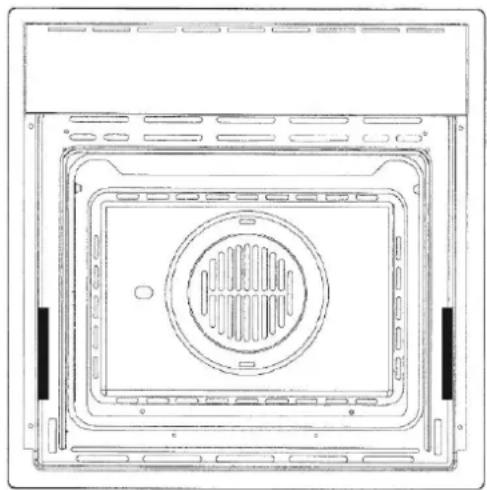
IMPORTANT
The oven's data plate is accessible even with the oven fully installed. The plate is visible simply by opening the door. Always quote the details from it to identify the appliance when ordering spare parts.
- Do not disassemble any parts prior to having disconnected the oven from the mains.
- Do not use the appliance if any part is broken (for example a glass). Disconnect it from the mains and call service.
- Before using the oven, it is recommended to make it operate at no load at the maximum temperature for an hour to eliminate the insulating material odour.
- In all models, leave the door closed when the grill is used.
- The cooling fan may remain in operation so long as the oven is hot, even after it has been switched off.
- During the use the appliance becomes very hot; don't touch the heating elements inside the oven.
- Parents and adults should pay particular attention when using the product in presence of children.
- Children should be overseen so as to ensure that they don't play with the equipment.
- Keep away from children under age 8, unless constantly supervised.
- This appliance is not intended for use by persons (including children over age 8) with reduced physical sensory or mental capabilities, or lack of experience and knowledge,
unless they have been given supervision or instruction concerning use of the appliance by a person responsible for their safety.
• Children may not perform cleaning and maintenance unsupervised.
- In order to avoid damage to the oven enamel coat, do not cover the oven muffle sole with any item (e.g. aluminium foil, pans and the likes).
- Do not use harsh abrasive cleaners or sharp metal scrapers to clean the oven door glass since they can scratch the surface, which may result in shattering of the glass.
- Abrasive detergents and steam cleaning equipment should not be used for cleaning.
- The appliance must not be installed behind a decorative door in order to avoid overheating.
- CAUTION: Ensure that the appliance is switched off before replacing the lamp to avoid the possibility of electric shock.
- The oven is cool and power to the oven has been turned off before removing the door. Failure to do so could result in electrical shock or burns.
- Use only the meat probe supplied with the appliance.

IMPORTANT
If the oven is installed in an ambient temperature below 37^ F ( 3^ C), F^*0117 may appear; when a higher ambient temperature is reached, the error will no longer appear.
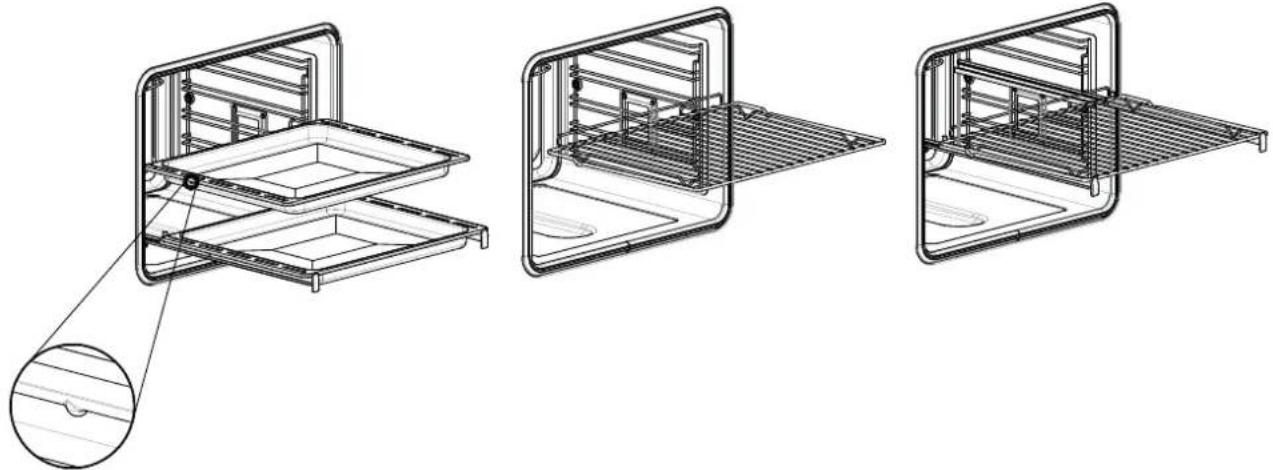
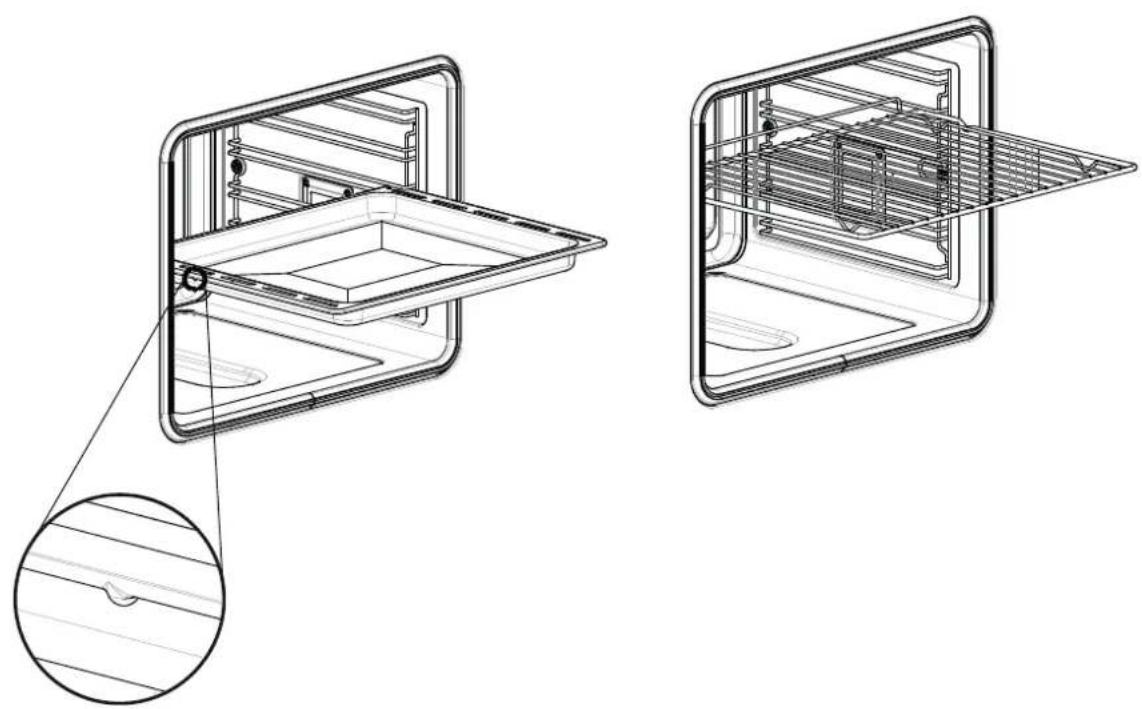
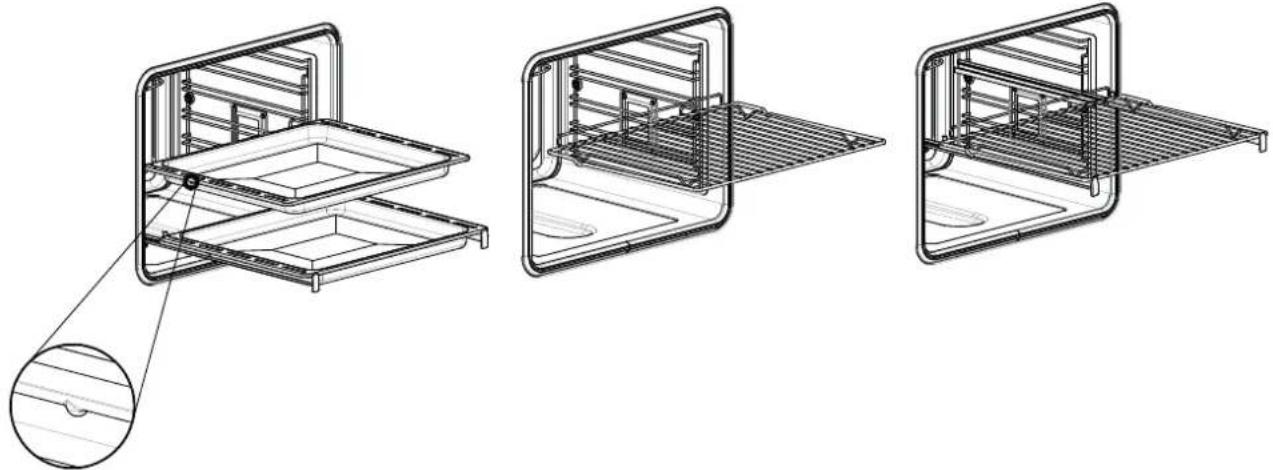
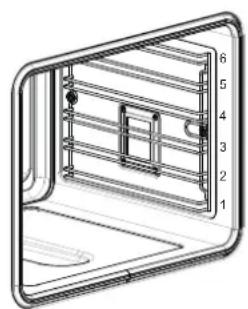
Refer to the figures below for the correct placement of the grills
EMBOSSED GUIDES
natural_image
Technical line drawing of two views of a multi-compartment appliance with internal components and mounting holes (no text or symbols)REMOVABLE GUIDES
natural_image
Technical line drawings of three different kitchen or storage units with internal compartments and a magnified inset showing the exterior panel (no text or symbols present)To install the oven into the kitchen a cutout should be made in accordance with the dimensions shown in the Cutout & Dimensions figure.
The appliance is to be fastened to the top by means of the two screws provided in the kit through the holes made on the oven uprights.

CAUTION
As the appliance is to be fitted in your kitchen furniture, make sure that all surfaces in contact with the oven can resist a temperature of approx 90^ C.
Electrical specifications
Maximum absorbed power: (see data plate)
Supply voltage: (see data plate)
Respect for the environment
The documentation for this appliance is printed on paper bleached without chlorine or recycled paper to contribute to protecting the environment. The packaging was designed to prevent damage to the environment; they are ecological products that can be recovered or recycled.
Recycling the packing saves raw materials and reduces the volume of industrial and domestic waste.

THE PACKING MATERIAL is 100% recyclable and marked with the recycling symbol. Dispose of in conformity with local law. The packing material (plastic bags, polystyrene parts, etc.) must be kept out of the reach of children because it is potentially dangerous. THIS APPLIANCE is marked in conformity with European Directive 2012/96/EU, Waste Electrical and Electronic Equipment (WEEE). By making sure that this product is disposed of correctly, the user contributes to preventing potential negative consequences for the environment and health.
THE SYMBOL on the product or accompanying documentation indicates that this product must not be treated as domestic waste but must be delivered to a suitable collection point for the recycling of electrical and electronic equipment.

MOD.60
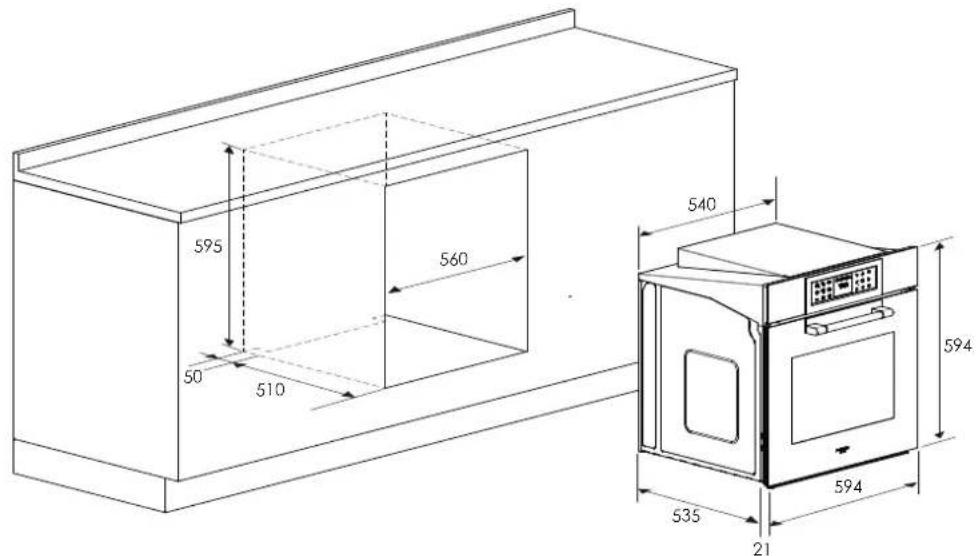
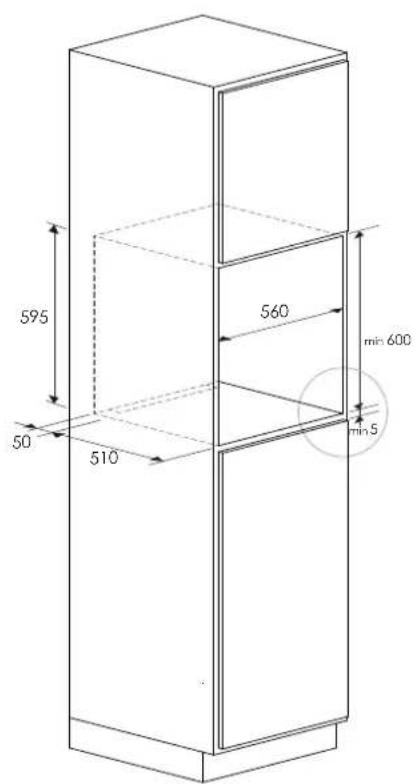
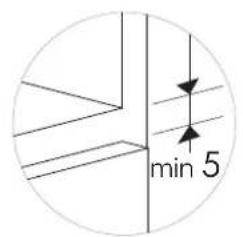
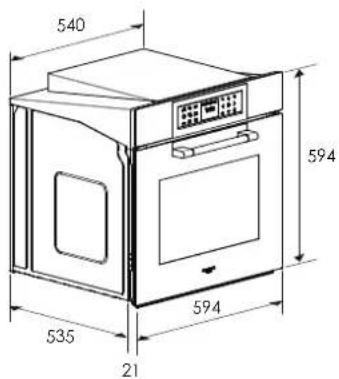
Dimensions are in millimetres
Connection to the electrical power mains

CAUTION
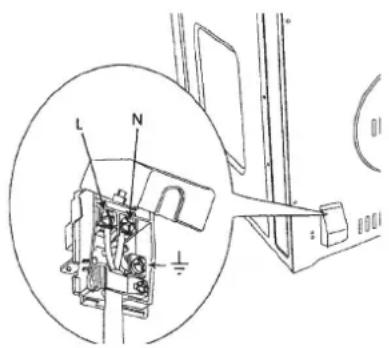
This appliance must be earthed.
The oven is only for domestic use.
The feed voltage and the absorbed power are as indicated on the data plate attached to the left-hand side upright, which can be seen when the oven door is open.
Connecting must be carried out by qualified personnel and in accordance with the regulations currently in force.
The manufacturer can not be held responsible for any damages to persons or objects caused by failure to observe these instructions.
If the supply cord is damaged, it must be replaced by the manufacturer, its service agent or similarly qualified persons in order to avoid a hazard.
The oven must be connected to the mains through a multipole circuit breaker with a contact-to-contact gap of at least 3 mm, making sure that the earth wire is not disconnected. For connecting use a flexible cable remembering to make it long enough to allow the oven to be removed from its housing unit when maintenance work is required.
Such a device must be fitted to the power supply in compliance with the regulations governing electrical installations.
The socket or switch must be easily reachable with the oven fully installed.
CABLE TYPES AND MINIMAL DIAMETERS
| SASO | |
| H05RR-F 3x1.5 mm ^2 H05RR-F 3x2.5 mm ^2 | |
| H05VV-F 3x1.5 mm ^2 H05VV-F 3x2.5 mm ^2 | |
| H05RN-F 3x1.5 mm ^2 H05RN-F 3x2.5 mm ^2 | |
| H05V2V2-F 3x1.5 mm ^2 H05V2V2-F 3x2.5 mm ^2 | |
The first time you use the oven
Clean the oven thoroughly with soapy water and rinse well.
Operate the oven for about 30 minutes at maximum temperature to burn off all traces of grease which might otherwise create unpleasant smells when cooking.

CAUTION
Never use aluminium foil to cover the oven racks or to line the oven. Doing so can cause damage to the oven liner if heat is trapped under the foil.

CAUTION
Make sure you do not force the rack to avoid damage to the enamel.
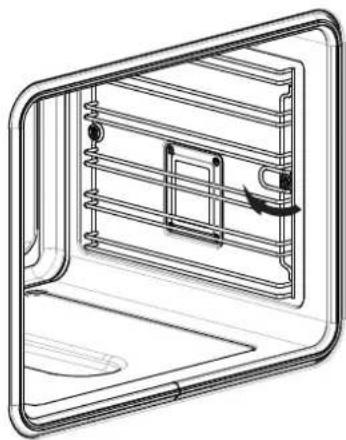
Removable Guides (if present)
To remove the lateral frames from smooth-walled ovens, proceed as shown in the figure.
natural_image
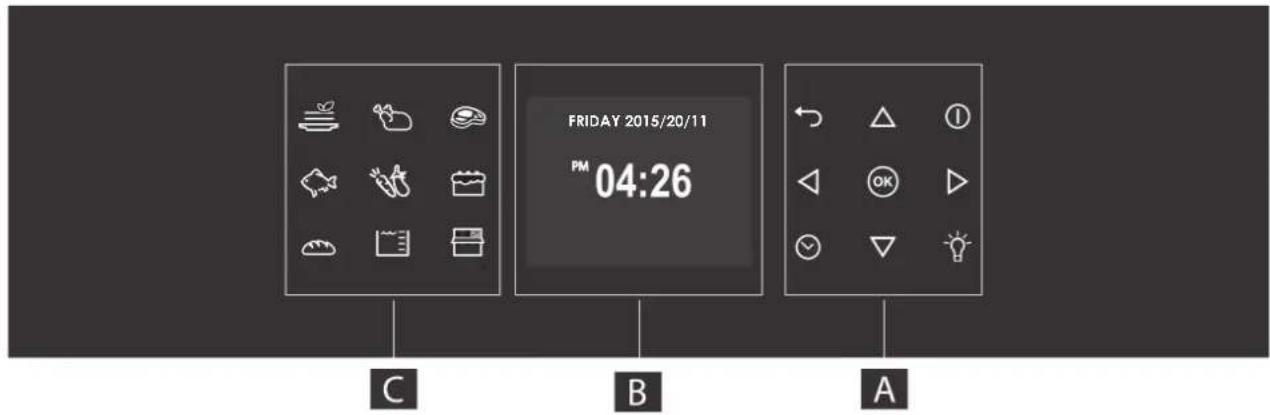
Technical line drawing of a mechanical or electrical component with internal channels and a curved frame (no text or symbols)Your appliance could vary slightly compared to the illustrations below.
A - Function keypad
B - Display screen
C - Shortcut keypad
Keypad
To operate the key, press gently. The keypad will not work if more than one key is pressed at the same time.
| - Movement arrows | |
| - To set the timer.- To enter the functions menu during cooking. | |
| - Switches the inner oven light on and off. The light cannot be switched on during the self-cleaning cycle. | |
| - Switches the oven on and off. | |
| - Confirms the settings and starts cooking operations. When pressed during a cooking operation, the function is placed in pause. Press again to restart. | |
| - Return to previous display page. Keep pressed to return to Home page |
Control panel icons
| Cooking mode quick menu | |
| Control panel opening | |
| Water tank level:0 empty level1st level (minimum) - 1 wave represented2nd level (intermediate) - 3 waves represented3rd level (maximum) - 5 waves represented |
Before using your oven for the first time remove all packing and foreign materials from the oven(s). Any material of this sort left inside may melt or burn when the appliance is used.
Error codes
This code appears in the event of the electronic control indicating a fault. When the error appears, the current function is blocked. If the type of error is related to a safety function, the oven becomes unusable and every time a start attempt is made, the same error appears (in which case call in the after-sales service), while if the error relates to a minor fault, after being restarted the oven can be used for the functions that do not involve the faulty part (e.g., a heating element).
Beeps
Confirms that the command has been received after a key has been pressed.
It also indicates that a time function has been completed (e.g. Timer or Timed Cooking). During the execution of a recipe, an acoustic signal warns the user that the oven is waiting for operation by the user (e.g., insert the dish or turn it over).
Beeps also signal an oven fault.
Default Settings
The cooking modes automatically select a suitable temperature when the cooking mode is selected, these can be changed when a different one is needed.
F Failure Number Codes
These codes are displayed when the electronic control detects a problem in the oven or in the electronics.
The error code is recorded in the Error Log in the Setup menu. This error can be communicated to the service technician so he/she can understand the possible cause of the problem in advance.
Preheat and Fast Preheat
Whenever a cooking mode is set and the oven is heating, the preheating starts, during this period, the instantaneous temperature is displayed together with the thermometer icon.
As soon as the 100% is reached, the control sounds an "end of preheat" tone and the current temperature value disappears.
When it's necessary to heat up the oven rapidly, a Fast Preheat mode is available: it uses the heating elements and the convection fan in a special way, in order to reduce the heating time as long as possible.
After having set one of the cooking functions for which the fast preheat is available and set the desired temperature value touch the key, after entering the functions menu, select the icon by means of the keys and confirm by means of the text OK.
As soon as the set-point temperature is reached, the control sounds a beep and both "Fast Preheat Icon" and "current temperature" disappear. The oven switches automatically to the desired cooking mode that was previously set: put the food inside now.
Timer

CAUTION
The timer on your oven does not turn the appliance on or off, its only purpose is to alert you through the buzzer. When you want to turn off the oven automatically, use the end-of-cooking or delayed cooking function.
NOTE Pressing the OFF button does not reset or stop the timer.
- Press the button √ and set the desired time using the arrows △and confirm with the button OK. To switch the selection between hours and minutes use the arrows ◀
- The time can be set from 1 minute to 12 hours and 59 minutes and, when set, the remaining time is always visible in the bottom status bar until the time expires or is reset.
- To change or cancel the time set, you must reset the timer by pressing and holding the button for a few seconds.
- Timer format is usually HR:MIN, switching into MIN:SEC during the last minute.
- When the time expires, the display shows 00:00 and the buzzer will sound for one minute or until the button is pressed.
Preheating the Oven
- Preheat the oven when using the Bake, Convection Bake and Convection Roast modes.
- Use Fast Preheat mode when a shorter time is desired to preheat the oven.
- Selecting a higher temperature does not shorten the preheat time.
- Preheating is necessary for good results when baking cakes, biscuits, pastry and breads.
- Preheating will help to sear roasts and seal in meat juices.
- Place oven racks in their proper position before preheating.
- During preheating, the selected cooking temperature is always displayed.
- A beep will confirm that the oven is preheated and the "detected temperature" will turn off.
Operational Suggestions
- Do not set pans on the open oven door.
- Use the interior oven lights to view the food through the oven door window rather than opening the door frequently.
Utensils
- Glass baking dishes absorb heat. Reduce oven temperature 25^ (15°C) when baking in glass.
- Use pans that give the desired browning. The type of finish on the pan will help determine the amount of browning that will occur.
- Shiny, smooth metal or light non-stick / anodized pans reflect heat, resulting in lighter, more delicate browning. Cakes and biscuits require this type of utensil.
- Dark, rough or dull pans will absorb heat resulting in a browner, crisper crust. Use this type for cakes and pies.
- For brown, crisp crusts, use dark non-stick / anodized or dark, dull metal utensils or glass bake ware. Insulated baking pans may increase the length of cooking time.
- Do not cook with the empty broiler pan in the oven, as this could change cooking performance.
- Store the broil pan outside of the oven.
Oven Condensation and Temperature
- It is normal for a certain amount of moisture to evaporate from the food during any cooking process. The amount depends on the moisture content of the food. The moisture may condense on any surface cooler than the inside of the oven, such as the control panel.
- Your new oven has an electronic temperature sensor that allows maintaining an accurate temperature. Your previous oven may have had a mechanical thermostat that drifted gradually over time to a higher temperature. It is normal that you may need to adjust your favourite recipes when cooking in a new oven.
High Altitude Baking
- When cooking at high altitude, recipes and cooking time will vary from the standard.
Instructions for initial switch-on
Once the oven has been connected to the power supply for the first time, the control automatically prepares for setting a number of user settings, which remain stored in case of any subsequent switch-on.
- Language
• Temperature and Weight
• Time - Date
Refer to the USER SETTING paragraph for setting instructions.
After making the user settings, the control moves automatically to the "Standby" display page.
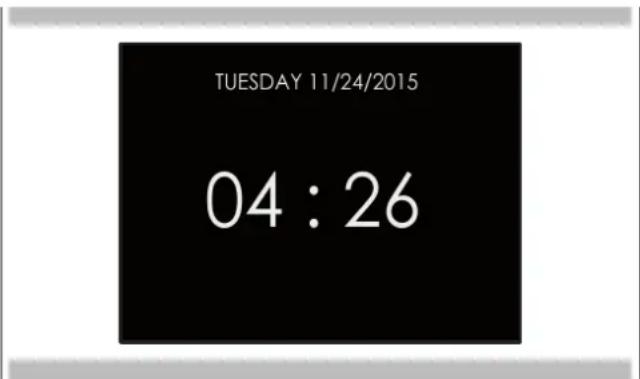
With the oven on, select the icon and confirm with the key to enter the SETTINGS menu. This menu permits personalizing the settings of your oven. To make access, no active cooking or any set time functions must be in progress.
NOTE The Setting menu can never be set if any time function is already set: first delete all the active time functions.
- Press the keys ◀ to select the sub menu and confirm with . OK
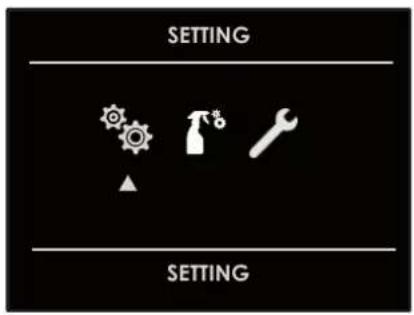
- Use this menu to change the following settings: Press the keys ◀ or △▽ to select the setting or change a sub menu from among the six available ones and confirm by means of OK
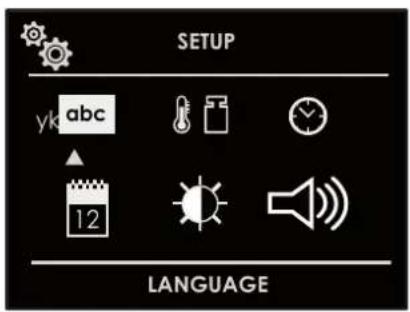
Language
Press the arrow key △ to select a language from among those available, and confirm with OK

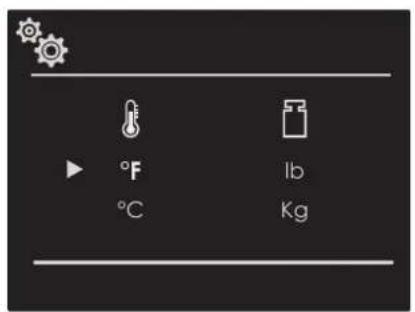
Temperature and Weight
Press the arrow key ◀ ▷ and △ ▽ to select one of the two temperature options "°C/°F" or weight options Kg/lb and confirm with OK.
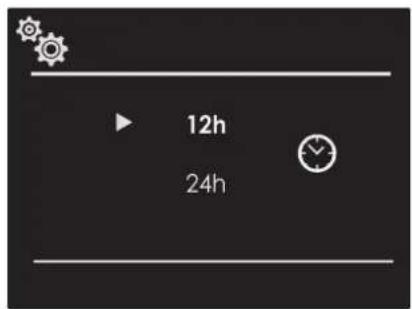
Time
Press the arrow key △to select the time format between the options "12h AM/PM or 24h" and confirm with OK. Subsequently, set the time using the arrows △and confirm with . OK
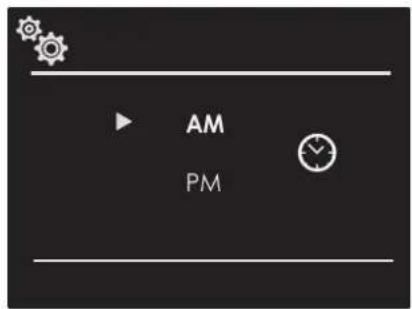
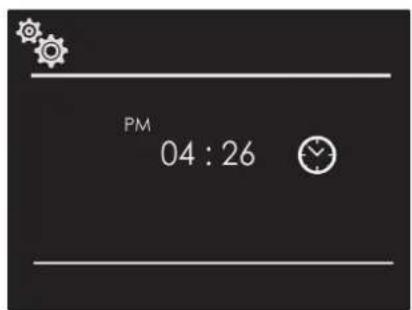
Date
Press the arrow key △ to select the date format from among the options "D.M.Y. - Y.M.D. - M.D.Y." and confirm with OK). Subsequently set the value using the arrows △ and confirm with . OK
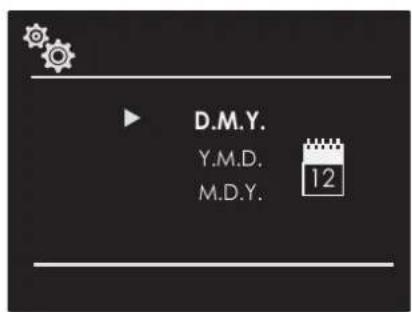
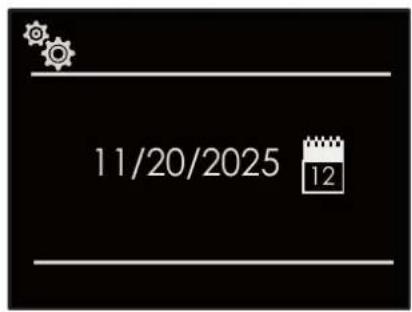
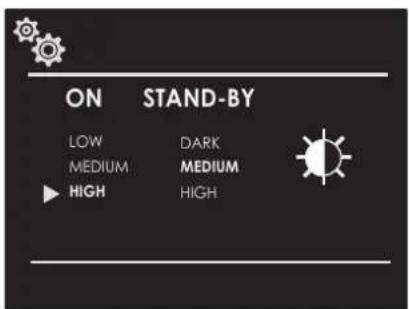
Brightness
Press the arrow key △ choose which brightness setting to change between ON or STANDBY, then by means of the arrows △ ▽ select the required degree of brightness and confirm with OK
Volume
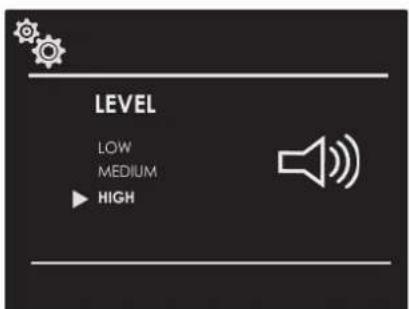
Press the arrow △to select the desired volume level and confirm by pressing OK.

Descaling
To ensure long-lasting operation of the appliance, descale it regularly.
The descaling process consists of several stages. For hygienic reasons, descaling must be completely finished before the appliance can be used again. Descaling takes a total of approx. 70 - 95 minutes.
- Descale (approx. 55 - 70 minutes), then empty the water tank and refill it.
- Carry out an initial rinse (approx. 9 - 12 minutes), then empty the water tank and fill it again.
- Carry out a second rinse (approx. 9 - 12 minutes), then empty the water tank and dry it.
If the descaling program is interrupted (e.g. due to a power cut or the appliance being switched off), you will be prompted to rinse twice after switching the appliance back on. The appliance remains blocked and cannot activate other modes until the end of the second rinse cycle.
The frequency with which the appliance must be descaled depends on the hardness of the water used.
As soon as 1 to 5 steam operations remain available, the appliance reminds you to descale by showing a message on the display.
The quantity of remaining operations is indicated at the time of switching on. This way you can prepare for descaling in advance.
Start

CAUTION
- Damage to the appliance: for descaling, only use the liquid descaler suitable for descaling recommended by us. The action times of the descaling treatment are defined on the descaler. Other types of products could damage the appliance.
- Descaling solution: do not use descaling solution or a descaler on the control panel or other surfaces of the appliance. Surfaces are damaged. If this happens, immediately remove the descaling solution with water.
If steam operation was used before descaling, deactivate the appliance so that the residual water is pumped out of the steam system.
- To prepare a descaling solution, mix 400 ml of water with 200 ml of liquid descaler.
- Press the on/off button to turn on the oven.
- Press the control panel open key.
- Remove the water tank and fill it with the descaling solution.
- Fully insert the water tank filled with the solution descaler.
- Close the panel.
- Select Settings and Care from the menu. The settings menu will open.
- Select Cleaning mode.
- Then select the Descale item. If you press on the OK field, you receive information about cleaning. It is not possible to change the descaling duration.
- Start cleaning with the OK button.
The appliance is descaled. As soon as descaling is completed, an acoustic signal sounds.
First rinse
- Press the control panel open key.
- Remove the water tank, clean it thoroughly, fill it with water and reinsert it correctly.
- Close the panel.
The appliance performs a rinse. As soon as the rinse is finished, an acoustic signal sounds.
Second rinse
- Press the control panel open key.
- Remove the water tank, clean it thoroughly, fill it with water and reinsert it correctly.
- Close the panel.
The appliance performs a rinse. As soon as the rinse is finished, an acoustic signal sounds.
Subsequent cleaning
- Press the control panel open key.
- Empty the water tank and dry it.
- Turn off the appliance.
Descaling is finished and the appliance is ready for use again.

Detergents
Scrupulous care and maintenance help keep the appliance in good condition for a long time.
The correct care and cleaning methods for the appliance are illustrated here.
Suitable detergents
To avoid damaging the various surfaces with the use of inappropriate detergents, pay attention to the instructions in the table. Depending on the type of device, not all fields are present on the device.

CAUTION
Damage to surfaces
Do not use
• aggressive or abrasive detergents
• detergents with a high alcohol content
- hard or abrasive sponges
• high pressure or steam jet cleaners
• special detergents for hot cleaning
Wash new sponges well before using them.
Tip: We recommend purchasing cleaning and care products from the technical support service.
Respect the manufacturer's instructions.

WARNING - Risk of burns!
The appliance overheats. Never touch the hot internal surfaces of the cooking chamber or the heating elements. Always let the appliance cool down. Keep away from children.

Steam Circuit Clean
This function performs a cleaning cycle of the circuit, to keep it clean and efficient over time.
The duration of the circuit cleaning cycle lasts 9 minutes.

CAUTION
Once the functions have been completed, a circuit discharge request will be sent (see WATER DISCHARGE paragraph).

Steam Oven Clean
This function performs a cleaning cycle by injecting steam into the cavity for 15 minutes. At the end of the cycle, any crusting that may have formed due to high temperatures cooking inside the oven cavity will be softened and become much easier to remove.

CAUTION
Once the functions have been completed, a circuit discharge request will be sent (see paragraph WATER DISCHARGE paragraph).
This oven is one of its kind insofar as it does not require any descalers to keep the steam generation system running efficiently.
Water discharge
At the end of any steam function, the system will start a drain of the internal water circuit, lasting approximately 1-2 minutes, to always keep the circuit clean of limescale and stagnant water.
With the oven on, select the icon and confirm with the key to enter the SETTINGS menu. This menu permits setting a number of parameters or special functions. It also permits accessing the error events list.
- Press the keys ◀ to select the sub menu and confirm with . OK
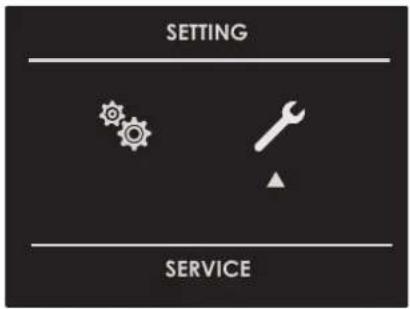
- Use this menu to change the following settings: Press the keys △ √ to select the item to be set or to be displayed from among the three available ones and confirm with OK.
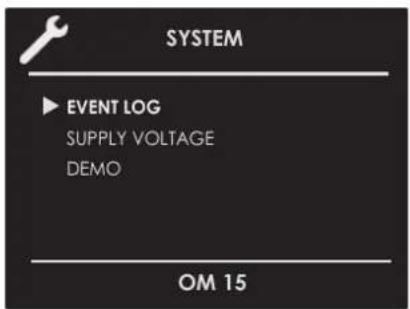
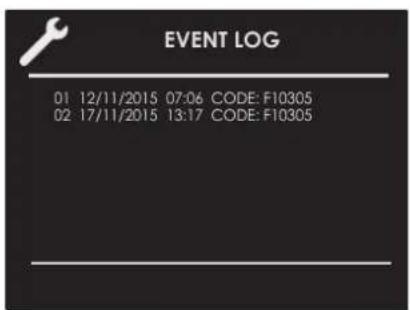
Event Log
The menu permits checking any recorded errors. These codes can be notified to the after-sales service.
Demo
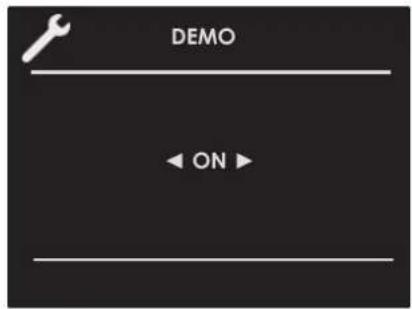
The purpose of this function is to set the DEMO mode, which makes the oven useless for cooking but automatically performs a demonstration of functions.
- Press the keys ◀ to select the item ON.
- Confirm with OK.
- Press the key ①.
After about 30 seconds, the oven starts to operate in this mode.
To temporarily stop the DEMO function, simply keep any key pressed for a few seconds until the oven switches to standby. To start it again, press ①.
To disable the function, enter the DEMO display page and set OFF. Confirm using OK
NOTE Once set, the function remains enabled even if the oven is disconnected from the power mains.
Switching the oven on and off

IMPORTANT
• The key does not stop the function.
- After switching off the oven, the cooling fan could continue to operate until the inner parts of the oven have cooled down.
Press ① to switch the oven on and press again to switch it off. The oven returns to standby mode.
Selecting the cooking mode

IMPORTANT
- Do not leave the door open for a long time during cooking.
• The door must be kept closed during the BROIL functions. - Position the grill or grills on an appropriate level.

TRADITIONAL COOKING

TRUE CONVECTION (FAN HEAT)

ROAST (CONVENTIONAL HEAT)

BROIL (ECO GRILL)

BAKE (BASE HEAT)

DOUBLE GRILL (FULL GRILL)

CONVECTION GRILL (TURBO GRILL & BASE HEAT)

UPPER BAKING (TOP HEAT)

DOUBLE VENTILATED GRILL

CONVECTION BAKE (TURBO BASE HEAT)

PIZZA

CONVECTION ROAST (TURBO CONVENTIONAL HEAT)
| STEAM COOKING | |
| STEAM 100 | |
| STEAM 180 | |
| STEAM & FAN HEAT | |
| SOUS VIDE | |
| DOUGH PROVING | |
| DEFROST STEAM | |
| SPECIAL COOKING | |
| SLOW COOKING | |
| DEFROST | |
| PLATE WARMING | |
| ECO BAKING | |
| SABBATH (On some models) | |
| FOOD DEHYDRATING | |
| AIRFRY | |
- Select the icon and press the key select the appropriate cooking mode according to the food to be cooked using the arrows and confirm with the key OK
- On this display page, it is still possible to change the cooking mode by using the keys ◀◀
- If the proposed temperature is correct, confirm with OK start cooking, otherwise, if the key is not pressed within 10 seconds, the oven switches to automatic mode and the cooking mode icon becomes animated.
Changing the cooking mode
- During untimed cooking, a cooking pause can be set by pressing ☐All the settings of the suspended cooking operation remain stored and can be reactivated by pressing the same key again.
- To change the cooking mode while the oven is working, press 📊 and then ⬇. At this point, another cooking mode can be selected from among those available in the group by means of the arrows ◀.

AirFry function
The AirFry function or frying of food in the oven, thanks to a perfectly distributed air flow, promises to cook crunchy and perfectly cooked food with very little oil and, in some cases, without oil. Eating healthy, cooking dishes in a tasty way and without exaggerating with fats and condiments, is possible.
AirFry by Fulgor Milano allows you to set the function and temperature from the control panel, from 150^ to 250^ C, with a default temperature of 180^ C. The special tray, supplied or sold separately, is equipped with small openings which allow the air to circulate uniformly throughout the oven.
Changing temperature

IMPORTANT
- In all the cooking modes where the temperature is fixed, this is not shown on the screen.
-
At the end of a function, the display screen shows the residual chamber heat temperature from the standby page.
-
From the cooking mode preview display page, the temperature can be changed by means of the arrows and then confirm with . OK
-
Once cooking has started, the temperature can in any case be changed, at any time, by means of the arrows
STEAM OVEN 60 cm
| COOKING MODE ICON FAST | PREHEAT | MEAT PROBE | Min. TEMPERATURE Max.*** Preset *** *** | ||
| DEFROST |  | ||||
| UPPER BAKING (TOP HEAT) | [HGSY] | 50°C 180°C 250°C | |||
| BAKE (BASE HEAT) |  | 50°C 50°C 250°C | |||
| ROAST (CONVENTIONAL HEAT) |  | 50°C 190°C 250°C | |||
| ECO BAKING | [H3GS] | 50°C 165°C 250°C | |||
| TRUE CONVECTION (FAN HEAT) |  | 50°C 165°C 250°C | |||
| PIZZA |  | 50°C 230°C 250°C | |||
| CONVECTION ROAST (TURBO CONVENTIONAL HEAT) |  | 50°C 190°C 250°C | |||
| CONVECTION GRILL (TURBO CONVENTIONAL HEAT) |  | 50°C 165°C 250°C | |||
| DOUBLE VENTILATED GRILL |  | 50°C 165°C 250°C | |||
| CONVECTION BAKE (TURBO BASE HEAT) |  | 50°C 165°C 250°C | |||
| BROIL (ECO GRILL) |  | 50°C 230°C 250°C | |||
| DOUBLE GRILL (FULL GRILL) |  | 50°C 230°C 250°C | |||
| SLOW COOKING |  | 60°C 90°C 130°C | |||
| AIRFRY |  | 150°C 180°C 250°C | |||
| SABBATH(if present) |  | 50°C 65°C 250°C | |||
| PLATE WARMING |  | 30°C | 75°C 100°C | ||
| FOOD DEHYDRATING |  | 50°C 165°C 230°C | |||
| DOUGH PROVING |  | 30°C 35°C 50°C | |||
| STEAM 100 |  | 40/95°C | 30°C 100°C 100°C | ||
| STEAM 180 |  | 50°C 180°C 180°C | |||
| STEAM & FAN HEAT |  | 50°C 165°C 250°C | |||
| SOUS VIDE | [YHWS] | 40°C | 75°C | ||
| DEFROST STEAM |  | 30°C 50°C 60°C | |||
Cooking mode quick menu
The quick menu function allows you to rapidly select the most suitable cooking modes for the type of dish you want to cook.
 | MAIN COURSES |  |  |  |  | |||
 | POULTRY |  |  |  |  |  |  | |
 | MEAT |  |  |  |  |  |  | |
 | FISH |  |  |  |  |  |  | |
 | VEGETABLES |  |  |  |  |  |  | |
 | DESSERTS |  |  |  |  |  | ||
 | BREAD/PIZZA |  |  |  |  |  | ||
Preheating phase
While the oven is in pre-heating phase, the instantaneous temperature is displayed underneath the cooking mode icon.
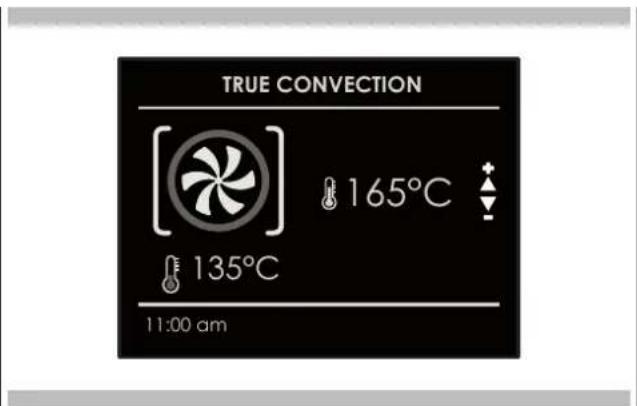
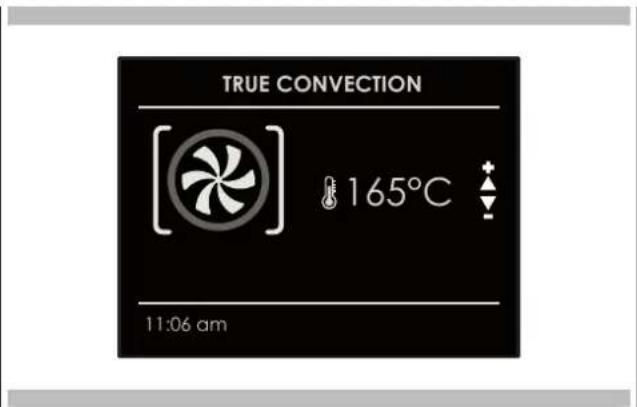
Just as soon as the set temperature is reached, an acoustic signal is heard and the instantaneous temperature indication disappears.
Fast Preheat
The FAST PREHEAT function permits reaching the desired temperature quicker compared to standard preheating. The function can be enabled for all the cooking modes in the BAKE (except the Sabbath and ECO), CONVECT and PIZZA groups.
To select FAST PREHEAT:
- Select the cooking mode as previously indicated and press the key ⓓ display the cooking mode preview display page.
- Press the key √ Select the icon √ by means of the arrows and confirm with Ⓤthe symbol appears at the bottom of the screen.
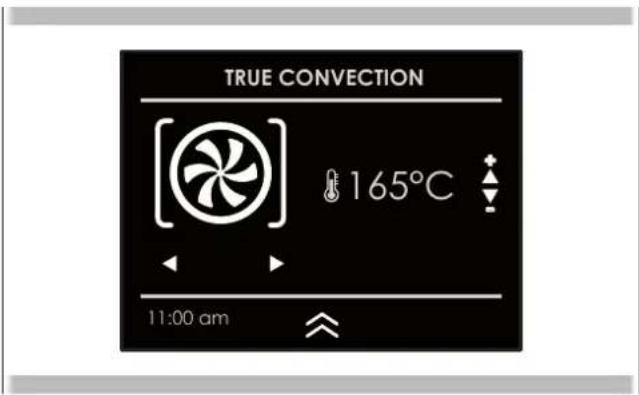
- Press OK again to run the function.
The display page shows the icon of the active functions until the set temperature has been reached. Afterwards, the function switches to automatic in the selected cooking mode.
![TRUE CONVECTION (FAN HEAT) [ ] 165°C 135°C 11:00 am](/content/2026/03/523658/images/ae752a8146d223c3a7b214ed208b0c3d5b1661a960e56ed4a296ea4dc5018442.jpg)
Steam cook particularly delicate dishes.
You can take advantage of steam heating types or activate steam function support in some heating types.

WARNING - Risk of burns!
Hot steam may come out when opening the appliance door. Steam is not visible at certain temperatures.
- Carefully open the appliance door.
- Keep away from children.
Filling the water tank

WARNING - Fire risk!
In the cooking chamber, the vapours generated by flammable liquids could catch fire when they come into contact with hot surfaces (deflagration). The appliance door can blow up if very hot steam or flames escape.
- Do not fill the water tank with flammable liquids (e.g. alcoholic beverages).
- Only fill the tank with water

WARNING - Risk of burns!
The water tank may become hot during appliance operation.
- Wait until the water tank has cooled down after previous appliance operation.
- Remove the water tank from the tank compartment.
REQUIRED: Check that water hardness is at standard levels.
- Press the button to open the control panel.
• The control panel is automatically pushed forward. - Wait until the control panel is completely open.
- Grasp the water tank by the handle and pull it out of the tank compartment.
- Fill the tank with water to the MAX level and place it in the water tank compartment. Make sure that it is inserted all the way in.
- Close the oven control panel by hand.
Types of steam heating
Different types of steam heating are available with which hot steam can be used to gently prepare dishes.
Proving level
The "Proving level" is useful for having dough rise much faster than at room temperature and without drying it out.
Regeneration
With Regeneration mode it is possible to gently reheat already cooked food or to prepare baked goods in advance.
- Press the oven power button.
- Select steam cooking mode.
- Select the desired steam heating type.
- Select the desired temperature or leave the preset temperature.
After each operation with steam
After each operation with steam, the appliance pumps the remaining water back into the water tank. Finally, empty and dry the water tank and the cooking chamber.
Emptying the water tank

WARNING - Risk of burns!
The water tank may become hot during appliance operation.
- Wait until the water tank has cooled down after previous appliance operation.
- Remove the water tank from the tank compartment.

CAUTION
Washing the water tank in the dishwasher causes damage.
- Do not wash the water tank in the dishwasher.
- Clean the water tank with a soft cloth and a common detergent.
Emptying the tank
- Open the control panel using the button on it.
- Remove the water tank.
- Carefully remove the water tank cover.
- Empty the water tank, clean it with detergent and rinse it thoroughly with clean water.
- Dry all components with a soft cloth.
- Dry the cover gasket thoroughly.
- Allow the tank to dry with the cover open.
- Place and press the cover on the water tank.
- Insert the water tank and close the control panel.
Drying the drain

WARNING - Risk of burns!
The appliance becomes hot during operation. Let it cool down before cleaning.
- Open the oven door.
- NOTE: The cooking drain is located in the lower part of the oven, between the door and the oven front.
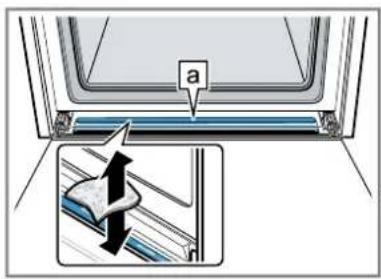
Remove water from the drain on the door with a sponge cloth and wipe carefully. Then clean the oven floor drainage groove and clean it carefully.
Drying the cooking chamber
Dry the cooking chamber after each steam operation.
Manual drying of the cooking chamber

WARNING - Risk of burns!
The appliance becomes hot during operation.
- Let it cool down before cleaning.

CAUTION
Water on the bottom of the cooking chamber can cause damage to the enamel surface when operating the appliance at temperatures above 120°C.
- Do not operate if there is water on the bottom of the cooking chamber.
- Remove any water from the bottom of the cooking chamber before putting into operation.
REQUIRED: The cooking chamber must be cooled.
- Remove dirt from the cooking chamber.
- Dry the cooking chamber with a sponge.
- Let the cooking chamber dry by leaving the door open for 1 hour.
- Remove limescale stains using a cloth soaked in vinegar, rinse with water and dry with a soft cloth.
- Leave the appliance door open for 1-2 minutes so that the cooking chamber dries completely.

WARNING-Using steam functions
Almost all of the internal steam oven accessories are suitable for steam cooking EXCEPT THE BLACK GLAZED TRAY AND THE BLACK GLAZED TRAY WITH PERFORATIONS on THE BOTTOM, which can only be used for traditional cooking.
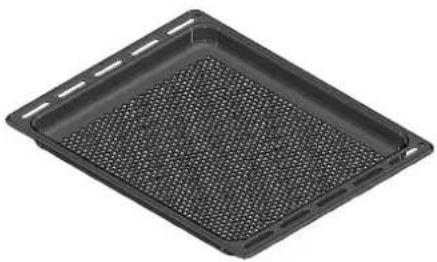
natural_image
Black rectangular tray with a perforated inner surface, no text or symbols visible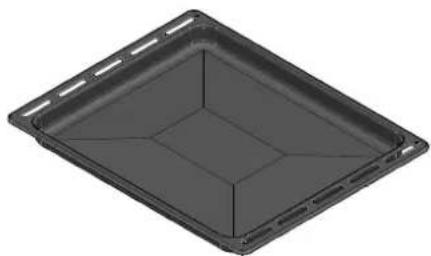
natural_image
3D rendering of a rectangular tray or container with internal grid lines (no text or symbols)
CAUTION
Make sure that the oven gasket is always clean and dried every time the oven is used.
NOTE Carefully read the instructions and warnings for proper use.
Steam operation
Steam cooking is used in most oriental cuisines but it is certainly also widely used in others as well.
It is fat-free cooking and has the advantage of preserving the original flavour of food.
In this case, the food is not cooked with water but with water vapour.
Steam cooking is different from boiling. Water vapour works on the inside of cells, which is fundamentally different from the effect of water boiling.
In fact, the steam also cooks completely, but nothing escapes from the food except the fat.
Cell walls gradually soften, proteins coagulate without leaking, starches swell and combine, and sugars and minerals remain unaffected.
The same applies to odours, which are reduced to a minimum, or to coloured substances.
Only liquids liquefy due to heat and, for this reason, it is never a good idea to steam large pieces of meat or fish. Vitamins are another story as heat generally tends to destroy them; however, depending on the cooking time, some of them are only slightly altered. Therefore, foods that lend themselves to this cooking method are, in general, those without fat, such as for example, fish, certain types of meat, legumes, potatoes, grains, eggs, puddings, vegetables, etc.
It is not recommended for vegetables with hard fibres or for fruit in general.
Useful tips
When using the steam oven, always start with the oven cold. Using steam in a hot oven (immediately after traditional cooking) is not recommended as the benefits of steaming can be neutralised.
For steam cooking, try to use as many stainless steel micro-perforated trays as possible together with their liquid collection trays also made of stainless steel. The former, which rests on the flat rack, allows food to be completely steamed while anything that escapes from the food during cooking drains through the holes.
The second, lower tray, which slides under the grill on its racks, collects the drippings and keeps the inside of the oven cleaner.
Once you have finished cooking, the micro-perforated tray can be used as a support to keep the tray warm away from the cabinet while you remove the food that was just cooked.

CAUTION
Before using any steam function, the water container must be filled. If, while the oven is switched on, the message CHECK WATER CONTAINER (buzzer) appears on the display, open the door, be careful of hot steam that may escape, pull out the container and fill it. When the door is closed, the oven goes into STANDBY mode. Press the key (the) continue.
NOTE: Steam functions will not start until the door is closed. If the door is open, the display will show the message CLOSE DOOR. If the door is open while the oven is on, the oven will go into standby mode. To restart the function, the door must be closed.
Select the desired function and confirm using the key OK; the circuit will now be filled. As soon as the water reaches the right temperature, the steam generated by the boiler will enter in the cooking chamber.
The function can be paused at any time using the key OK, when pressed again OK the function restarts.
Steam Cooking

STEAM 100
By means of radial ventilation, steam is distributed to ensure even heating and cooking of food.
This has the advantage that you can cook on three different levels at the same time, taking care to place the thickest food on the highest level, and the least dense food, such as vegetables, on the lowest levels (first to third).
NOTE: when steaming, always place the stainless steel tray under the micro-perforated tray, to catch any bits of food or condensation that may fall down.

STEAM 180
During regeneration, the cooking chamber is heated with stem and hot air, which allows food to be heated rapidly and evenly without it drying out.
Depending on the type of food being heated, this program offers the possibility to change the temperature inside the oven so that you can manage this function in the way in which you prefer. This type of function is therefore particularly suited for:
• Reheating pre-cooked food from 70°C to 180°C;
- Preparing pre-prepared or semi--prepared meals, frozen food from 70°C to 180°C.
NOTE: for these types of meals, remember to place suitable plates (not of synthetic or similar materials) in the oven and place them on top of the grill, making sure to remove any covers.

CAUTION
Once the functions have been completed, a request to drain the circuit is sent (see paragraph WATER DISCHARGE).

DOUGH LEAVENING
With the "Dough leavening" heating type, the dough rises much faster than at room temperature and does not dry out.
Leavening can be set between 30^ C and 50^ C.

WARNING
If the water tank is empty during operation of the "Dough leavening" function, operation stops. Refill the water tank.

DEFROST STEAM
Use the "Defrost steam" function to defrost frozen and deep-frozen products.

WARNING
If the water tank is empty during defrosting operation, operation stops. Refill the water tank.

VACUUM SEALING (SOUS VIDE)
Vacuum sealing is a variant of low-temperature cooking in which vacuum-packed food is cooked at low temperatures between 40^ and 95^ C and 100% steam.
Vacuum sealing is suitable for meat, fish, vegetables and desserts.
The food is hermetically sealed in special heat-resistant cooking bags using a vacuum chamber packaging machine. Nutrients and flavours are retained thanks to the protective wrapping.

WARNING
- If the water tank is empty during vacuum operation, operation stops.
- During vacuum cooking, more condensation forms at the bottom of the cooking chamber than with other types of heating.

STEAM AND FAN HEAT
This type of cooking is called "professional cooking" because the food being cooked is placed in a cold cooking chamber that has not been preheated.
After the oven is started, the food is first exposed to steam (or "steamed"). After a short time of exposure to steam, depending on the volume occupied by the dish being cooked and thus its size, the appliance automatically switches to the second warm air phase.
This type of function is particularly suited, for example, to large meat and seafood dishes, large loaves of bread made with white or wholemeal flour, with yeast or sourdough at 190^ C to 210^ C, as well as empty or filled puff pastry, both fresh and frozen from 190^ C to 210^ C.
NOTE: For best results when using two consecutive "professional cooking" programs, the oven must be cooled down before inserting the second dish.

CAUTION
Once the functions have been completed, a circuit discharge request will be sent (see WATER DISCHARGE paragraph).
[Steam Assist Function]
This particular function can only be used with traditional oven functions.
![Fulgor Milano FUTSO 6023 TEM IX - [Steam Assist Function] - 1](/content/2026/03/523658/images/0d26511d6b11eaee223bb1f8965869d91402fcda172089c169b0b8639b21f8d4.jpg)
natural_image
Four identical icons showing a fan or turbine component, each with a unique symbol and no accompanying text or labels.![Fulgor Milano FUTSO 6023 TEM IX - [Steam Assist Function] - 2](/content/2026/03/523658/images/ac3a5bf432311dd60d36af055aa030b87e940bbad4fcea2cbb8ec7f427992125.jpg)
natural_image
Four abstract geometric symbols in white on black background: oval, W, W, and fan-like (no text or labels)![[ ] [PIZZA] [ ]](/content/2026/03/523658/images/560acd889128a9753e2f0a3dda628ada3d2a9be178f78e767fbb12ec88f39478.jpg)
Once the oven has been switched on, the steam assist function will only be available once the internal temperature exceeds 100^ C. Only then will the symbol appear on the bottom part of the display.
NOTE: THIS FUNCTION IS NOT ENABLED DURING STEAM COOKING AND SPECIAL COOKING.
To inject steam inside the cavity, press the key, select the icon using the arrows and confirm using the key. OK
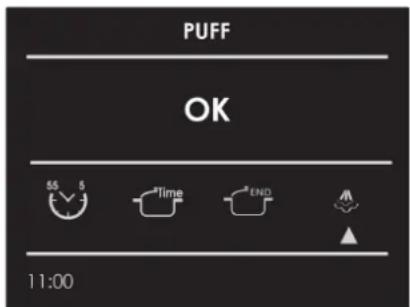
The steam assist function will be enabled and the change of status can be seen on the animated display. The steam assist function will continue for 5 minutes, moistening the food so that does not dry out during cooking. Ideal for roasts in general, large meat/seafood dishes and softer cooking.
After 5 minutes, the oven returns to the previously set cooking function.
Special Cooking
[...]SLOW COOKING
The low temperature slow cooking function can be adjusted between 60^ C and 130^ C. Low temperature slow cooking of meat consists of cooking the various foodstuffs at a constant temperature below 130^ , preferably between 60^ and 70^ , so that the heat can penetrate effectively and evenly even into the centre of those thicker pieces of food.
[◆]DEFROSTING
The function activates internal ventilation without activating any heating.
[ ] PLATE WARMING
The function is used to keep dishes and crockery warm. The function is adjustable between 30^ C and 100^ C. Heating takes place without internal ventilation but only with a lower heating element.
[ECO] ECO COOKING
This mode is intended to save energy.
Ideal for frozen or precooked food and small-portioned meals.
The preheat time is very short and cooking tends to be slower.
It is not recommended for heavy loads e.g. large portions or big meal preparation.
[≡]FOOD DEHYDRATING
This function is adjustable between 50^ C and 230^ C. It is used to dehydrate food, removing the water it contains.
A single light button activates the lights.
Press to switch the lights on or off.
The oven lights are switched on automatically when the door is open.
When using the oven, the lights switch on automatically when a cooking mode is started.
The oven lights will automatically switch off when a cooking mode is cancelled.
NOTE: Once switched on, the lights switch off automatically after 3 minutes. To switch them back on, press the key or open the door.
Make sure that the date and time are set correctly.
The timed mode switches off the oven at the end of the cooking time.
![Fulgor Milano FUTSO 6023 TEM IX - [≡]FOOD DEHYDRATING - 1](/content/2026/03/523658/images/5c48787b7f7d8a4b1e4fba67ae9aa03c89c032298bbb729933a7a604b4f5ea73.jpg)
CAUTION
Never leave food in the oven for more than an hour before and after cooking. This could cause the food itself to deteriorate.
NOTE: Timed functions cannot be used if the meat probe is switched on. The maximum cooking time that can be set is 12 h.
Cook Time
Use the "Cook Time" function to operate the oven for a specific period of time. The oven starts immediately and switches off automatically once the time is up.
Setting a Timed Mode
- Select the cooking mode and the temperature.
-
There are two ways to set the function.
a) Select time to set the duration and press OK
b) Select END to set the stop time and press OK -
After selecting one of the above options, set the time using the arrows and confirm with OK
-
After pressing the key OK, cooking starts and the cooking time information is shown on the display screen.
-
Cooking mode
- Temperature
- Cooking time
• End of cooking time
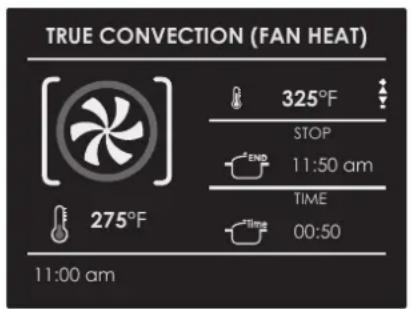
5 After cooking, the oven switches off and a buzzer warns that cooking is finished.
To change the cooking time when the oven is already running, simply press ☑ and enter the new cooking time before pressing the button again OK.
Stop Time
Use the "Stop Time" function to delay the start of timed cooking. Enter the cooking stop time and the oven will automatically calculate the start time. The oven switches on anoff automatically.
To Delay the Start of a Timed Mode
1 First of all, set the required cooking time as indicated in the paragraph "COOK TIME".
2 Select END to set the stop time and press OK
3 Set the stop time for cooking by means of the arrows △ and confirm with OK.
4 After pressing OK, the function is put into standby and the details of the delayed cooking are shown on the screen.
- Cooking mode
- Temperature
- Cooking stop time
- Cooking start time
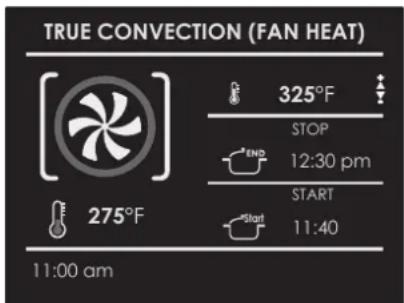
After cooking, the oven switches off and a buzzer warns that cooking is finished.
To change the cooking time when the oven is already running, simply press the key and enter the new cooking time before pressing again. OK
When roasts, steaks or poultry are cooked, this the best way to see when the dish is properly cooked.
This oven is optionally equipped with the meat probe to sense the internal temperature of the meal and stop cooking as soon as the set value is reached.
When the meat probe is used, the oven automatically controls the cooking time.
NOTE: the meat probe for food is an accessory that is only available on some product versions.
The tenderness, taste and flavour are the result of precise and functional control.
The meat probe for food is a thermometer which, when inserted into the food, allows its internal temperature to be checked and used to determined the end of cooking.
The meat, for example, may look cooked on the outside, but inside it may still be rare!
The temperature reached by food during cooking is closely connected with health and hygiene problems. Bacteria can be contained in any type of meat, poultry, fish, as well as in raw eggs.
Some types of bacteria cause food to spoil, others, such as Salmonella, Campylobacter jejuni, Listeria monocytogenes, Escherichia coli and Staphylococcus aureus, can seriously harm health. Bacteria multiply very rapidly above 4.4° up to 60°C. Ground meat is particularly at risk in this respect.
To avoid the multiplication of bacteria, the following measures must be taken:
- Do not defrost food at room temperature but always in the fridge or in the oven using the defrost function. In this case, cook the food immediately after.
- Stuff poultry just before eating it. Never buy pre-packaged ready-stuffed poultry and only buy ready-cooked stuffed poultry when you intend to eat it within 2 hours.
- Marinate the food in the fridge, not at room temperature.
- Use a meat probe for food to check the temperature of meat, fish and poultry if they are thicker than 5 cm to ensure that the minimum cooking temperatures are reached.
- The greatest dangers come from badly cooked poultry, which is especially dangerous due to Salmonella.
- Avoid interrupting the cooking process, for example, by partially cooking food, storing it and finishing to cook it later. This sequence increases the proliferation of bacteria thanks to the "hot" temperatures reached inside the food.
- Roast meat and poultry in an oven at a temperature of at least 165^ .

IMPORTANT
Only use the meat probe supplied with the appliance.
In any case, we recommend consulting the following table taken from the National Food Safety Database (USA).
Food Minimum internal temperature
| Ground meat | |
| Hamburger 71°C | |
| Beef, veal, lamb, pork 74°C | |
| Chicken, turkey 74°C | |
| Beef, veal, lamb | |
| Roasts and steaks: | |
| Rare | The temperature for cooking rare is not reported in the NFSD as it is unsafe for health reasons. |
| Medium-rare 63°C | |
| Medium 71°C | |
| Well done | 77°C |
| Pork | |
| Chops, roasts, ribs: | |
| Medium 71°C | |
| Well done | 77°C |
| Fresh ham | 71°C |
| Fresh sausages | 71°C |
| Poultry | |
| Whole chicken or chicken pieces | 82°C |
| Duck | 82°C |
| Whole turkey (not stuffed) | 82°C |
| Turkey breast | 77°C |
The Recipe function of your oven gives you the chance to cook food without having to set the oven manually every time. By selecting a "SET" recipe, the cooking mode, the temperature and the time are automatically set according to the recipe selected from the menu.
| Recipe List Type of Food Food condition Recipes List Information displayed | ||||
| PRESET OR PERSONAL |  | FRESH | PASTA PIZZA BREAD | TYPE OF ACCESSORYLEVEL POSITIONFOOD WEIGHTCOOKING TIMEPREHEAT REQUIRED(YES/NO) |
| FROZEN | ||||
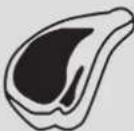 | WHOLE | MEAT | ||
| IN PIECES | ||||
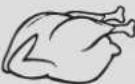 | WHOLE | POULTRY | ||
| IN PIECES | ||||
 | WHOLE | FISH | ||
| IN PIECES | ||||
 | - | VEGETABLES | ||
| - | ||||
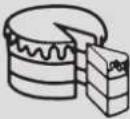 | - | CAKES OR PIES | ||
| - | ||||
Select an already-set recipe:
- Switch on the oven, select the icon 📄 press the key . OK
- Using the arrows △ select either "PRESET" or "PERSONAL" and confirm using OK
- Choose the type of food to be cooked using the arrows △ and the arrows ◀ and confirm with . OK
- Usign the arrows △ choose between "FRESH" or "FROZEN" or in other cases between "WHOLE" or "IN PIECES" and confirm with OK
- Select the required recipe using the arrows △ and confirm with . OK
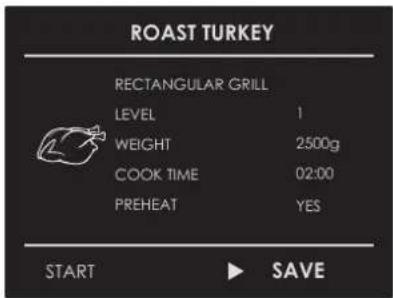
- When the recipe is selected, the following screen appears on the display:
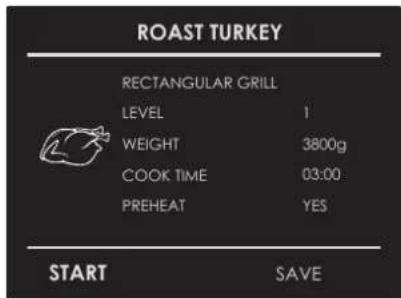
- To start the recipe, confirm with OK
During a recipe, a number of buzzers or visual messages will ask you to perform the following operations. Simply follow the instructions on the screen.
- After cooking, the oven switches off an a buzzer warns that the recipe is finished.
Saving a personalized recipe:
Once a recipe has been selected, the "Time" and "Weight" settings can be changed and the recipe can be saved among the "PERSONAL" ones.
- Once a recipe has been selected, press and confirm with the key OK
- To change the weight, enter the desired weight using the arrows △ and confirm with OK.
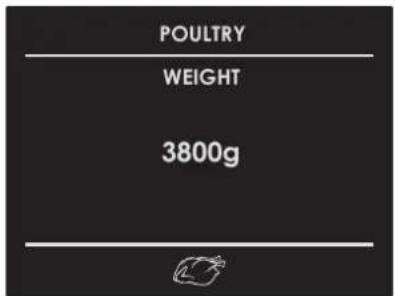
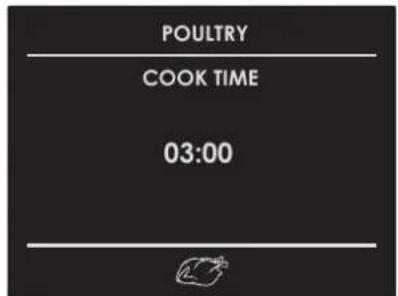
- The oven switches automatically to the cooking time. To change this time, use the arrows △ and confirm again with the key . OK
- At this point, the recipe can be saved on "PERSONAL" recipes by selecting "SAVE" and confirming with the key OK.
NOTE: If the time and weight values are changed and not saved immediately, at the end of the recipe, a message appears asking if you want to save it.
- To start the recipe, press .OK
Cancelling a personalised recipe:
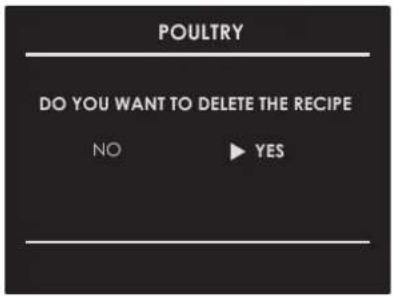
- To eliminate a recipe from the list of personalized recipes, select the recipe.
- Press the key ◀ and select the choice and confirm with OK
Roast Tips and Techniques
Roasting is cooking with heated air. Both the upper and lower elements in the oven are used to heat the air but the fan is not used to circulate the heat.
Follow the recipe or the directions for pre-cooked food for temperatures, times and rack position. Baking time varies with the temperature of the ingredients, size, shape and finish of the baking utensils.
General Guidelines
- For best results, cook food on a single rack with at least 1' - 1 12' (2.5 - 3cm) space between the utensils and oven walls.
- Use a wire rack when selecting the baking mode.
- Check for doneness at the minimum cooking time.
- Use metal (with or without non-stick finish), heat-resistant glass, glass ceramic or other utensils suitable for baking.
- When using heat-resistant glass, reduce the recommended temperature by 25^ (15°C).
- Use rimmed or rimless baking trays or baking dishes.
- Dark metal pans or non-stick coatings will cook faster with more browning. Insulated baking ware will slightly lengthen the cooking time for most foods.
- Do not use aluminium foil or disposable aluminium trays to line any part of the oven. Foil is an excellent heat insulator and heat will be trapped beneath it. This will alter the cooking performance and can damage the finish of the oven.
- Avoid using the opened door as a shelf to place pans.
- Tips for Solving Baking Problems are found on Page 39.
True Convection Tips and Techniques
- Reduce recipe baking temperatures by 25^ (15°C).
- For best results, foods should be cooked uncovered, in low-sided pans to take advantage of the forced air circulation. Use shiny aluminium pans for best results unless otherwise specified.
- Heatproof glass or ceramic can be used. Reduce temperature by another 25^ (15°C) when using heatproof glass dishes for a total reduction of 50^ (30°C).
- Dark metal pans may be used. Note that food may brown faster when using dark metal baking ware.
- The number of racks used is determined by the height of the food to be cooked.
- For the most part, baked goods cook extremely well in convection. Do not try to convert recipes such as custards, quiches, pumpkin pie or cheesecakes, which do not benefit from the convection-heating process. Use standard Bake mode for these foods.
- Multiple rack cooking for oven meals is done on rack positions 1, 2, 3, and 4. All four racks can be used for cookies, biscuits and appetizers.
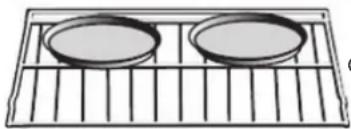
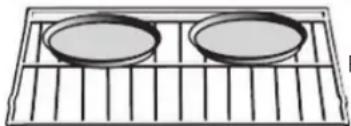
- 2-rack baking: Use positions 1 and 3.
- When baking four cake layers at the same time, stagger pans so that one pan is not directly above another. For best results, place cakes on front of upper rack and back of lower rack (See graphic at right). Leave 1" - 1 ½" (2.5 - 3 cm) air space around pans.
- Converting your own recipe can be easy. Choose a recipe that can work well in convection.
- Reduce the temperature and cooking time if necessary. It may take some trial and error to achieve a perfect result. Keep track of your technique for the next time you want to prepare the recipe using convection.
- Tips for Solving Baking Problems are found on Page 39.
Foods recommended for Convection Bake mode:
Appetizers Biscuits Coffee Cakes
Dessert (2 to 4 racks) Yeast Breads
Puffy pastries
Muffins
Casseroles and Starters
Oven Meals (rack positions 1, 2, 3)
Air Leavened Foods (Soufflé, Meringue Top Desserts, Angel Food Cake, Chiffon Cake)
RACK POSITION
natural_image
Technical line drawing of a 3D cabinet or enclosure with numbered components (1–6), no text or symbols present.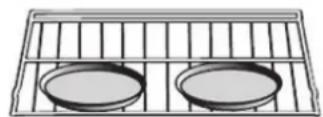
Rack 3
natural_image
Simple line drawing of two circular plates placed on a grid-lined rack (no text or symbols)Rack 1
Quick and easy recipe tips
Converting from standard BAKE to CONVECTION BAKE:
- Reduce the temperature by 25^ (15°C).
- Use the same baking time as Bake mode if under 10 - 15 minutes.
- Foods with a baking time of less than 30 minutes should be checked for doneness 5 minutes earlier than in standard bake recipes.
- If food is baked for more than 40 to 45 minutes, bake time should be reduced by 25% .
Convection Roast Tips and Techniques
- Do not preheat for Convection Roast
- Roast in a low-sided, uncovered pan.
- When roasting whole chickens or turkeys, tuck wings behind back and loosely tie legs with kitchen string.
- Use the 2-piece broil pan for roasting uncovered.
- Use the probe or a meat thermometer to determine the internal doneness at the "END" temperature.
- Double-check the internal temperature of meat or poultry by inserting meat thermometer into a second position.
- Large sized poultry may also need to be covered with foil (and pan roasted) during a portion of the roasting time to prevent over-browning.
Quick and easy recipe tips
Converting from standard LOWER BAKE to CONVECTION ROAST:
• The temperature does not have to be lowered.
- Roasts, large cuts of meat and poultry generally take 10-20% less cooking time. Check doneness early.
- Casseroles or pot roasts baked in the oven covered in CONVECTION ROAST take about the same time to cook.
- For hygiene purposes, the minimum safe temperature for stuffed poultry is 165^ (75°C).
- After removing the item from the oven, cover loosely with foil for 10 to 15 minutes before carving if necessary to increase the final foodstuff temperature by 5^ to 10^ (3° to 6°C).
Cooking times are indicative and also depend on the thickness and starting temperature of the meat before cooking.
Convection Broil Tips and Techniques
- Place the rack in the desired position before turning on the oven.
- Use Convection Broil mode with the oven door closed.
- Do not preheat the oven.
- Use the 2-piece broil pan.
- Turn the meat halfway through cooking (see convection broil cooking chart).
Standard and convection cooking times are indicative and also depend on the thickness and may vary slightly.
Cooking times are indicative and also depend on the thickness and starting temperature of the meat before cooking.
Grill Cooking Tips and Techniques
- Place the rack in the desired position before turning on the oven.
- Use Broil mode with the oven door closed.
• Preheat oven for 5 minutes before use. - Use the 2-piece broil pan.
- Turn the meat halfway through cooking (see convection broil cooking chart).
Standard and convection cooking times are indicative and also depend on the thickness and may vary slightly.
Cooking times are indicative and also depend on the thickness and starting temperature of the meat before cooking.
Dehydrating Tips and Techniques
- Dehydrating can be carried out using the Dehydrate mode. A lower temperature is used and the circulating heated air slowly removes the moisture for food preservation.
- Dehydrate mode temperature is pre-programmed at 140^ (60°C).
- Dehydrate mode temperatures available are 120^ (50°C) to 160^ (70°C).
- Multiple racks can be used at the same time.
• Some foods require as much as 14-15 hours to fully dehydrate. - Consult a food preservation book for specific times and handling of various foods.
- This mode is suitable for a variety of fruits, vegetables, herbs and meat strips.
• Drying screens can be purchased at specialty kitchen shops. - Some food moisture can be absorbed using paper towels before dehydrating begins (for example with sliced tomatoes or sliced peaches).
| Dehydrating Table | |||
| FOOD PREPARATION APPROXIMATE DRYING | TIME* (hrs) | TEST FOR DONENESS | |
| FRUIT | |||
| Apples | Dipped in 1⁄4 cup lemon juice and 2 cups water, 1⁄4 slices | 11 - 15 Slightly pliable | |
| Bananas | Dipped in 1⁄4 cup lemon juice and 2 cups water, 1⁄4 slices | 11 - 15 Slightly pliable | |
| Cherries | Wash and towel dry.Remove pits in fresh cherries | 10 - 15 Pliable, leathery, chewy | |
| Oranges Peels and Slices | 1⁄4 slices of orange;orange part of skin thinly peeled from oranges | Peels: 2 - 4 | Orange peel: dry and brittle |
| Slices: 12 - 16 | Orange slices: skins are dry and brittle, fruit is slightly moist | ||
| Pineapple rings Towel dried | Canned: 9 - 13Fresh 8 - 12 | Soft and pliable | |
| Strawberries | Wash and towel dry.Sliced 1⁄2" thick,skin (outside) down on rack | 12 - 17 Dry, brittle | |
| VEGETABLES | |||
| Peppers | Wash and towel dry.Remove membrane of pepper, coarsely chopped about 1" pieces | 16 - 20 | Leathery with no moisture inside |
| Mushrooms | Wash and towel dry.Cut the stemCut into 1/8" slices | 7 - 12 Tough and leathery, dry | |
| Tomatoes | Wash and towel dry.Cut into 1/8" slices, dry well | 16 - 23 Dry, brick red colour | |
| HERBS | |||
| Oregano, sage, parsley, thyme and fennel | Rinse and dry with paper towel | Dry at 120°F(60°C) 3 - 5 | Crisp and brittle |
| Basil | Use basil leaves 3 to 4 inches from top.Spray with water, shake off moisture and pat dry. | Dry at 120°F(60°C) 3 - 5 | Crisp and brittle |
The Sabbath Mode function on your oven is compliant with Jewish laws. This function allows the oven to perform only the static function.
When the Sabbath function is selected, the following functions are disabled:
- Oven lights
- All keys except ON/OFF
- Meat Probe function
- Timed cooking function
- Timer function
- The icon on the display screen is steady and not animated as in the case of traditional cooking modes.
• Display screen and key acoustic warnings.
To set the Sabbath Mode function, switch on the oven and select the icon
and press 📊 then select "special function icon", the select the Sabbath function by means of the arrows ◀ and confirm with . OK
The function starts by showing the icon on the display screen.
![SABBATH [SAb $$$] 11:06 am](/content/2026/03/523658/images/18357c8da03cd36fde48204505803cb9ed52d4357cfea423dbab84b2a5494f46.jpg)
NOTE This function lasts maximum 72 hours.
The temperature can be set between 50°C (112 °F) a 250°C (482
°F). This function can be disabled at any time by pressing the OFF key.
Steam oven cleaning functions
Abrasive detergents and steam cleaning equipment should not be used for cleaning.

CAUTION
Do not use harsh abrasive cleaners or sharp metal scrapers to clean the oven door glass since they can scratch the surface, which may result in shattering of the glass.
Removing the door

CAUTION
Make sure that:
- The oven is cool and power to the oven has been turned off before removing the door. Failure to do so could result in electrical shock or burns.
- The oven door is heavy and fragile. Use both hands to remove the oven door. The oven door is made of glass. Handle with care to avoid breakage.
- Grasp only the sides of the oven door. Do not grasp the handle as it may slip in your hand and cause damage or injury.
- Failure to grasp the oven door firmly and properly could result in personal injury or product damage.
Removing the standard oven door
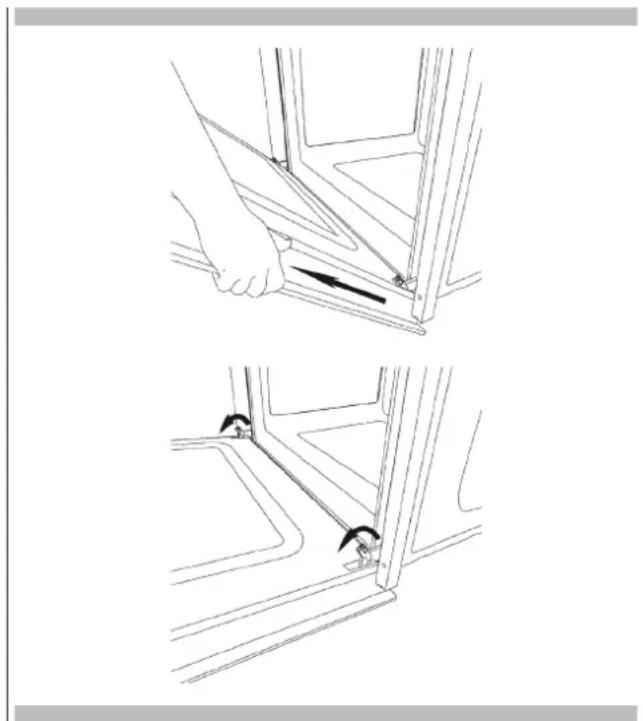
The oven door can be removed quickly and easily. To do so:
- Open the door fully.
- Lift the two levers shown below.
- Close the door as far as the first stop (caused by the raised levers).
- Lift the door upwards and outwards to remove it from its mountings.
To replace fit the door, fit the hinges in their mountings and lower the two levers.
natural_image
Technical line drawing showing two steps of a hand holding a bracket, with no visible text or symbolsHow to remove the inner glass of the "FULL GLASS" panoramic door
- Wear safety gloves.
- Place the door on a flat horizontal surface face down on a soft cloth to avoid scratching the visible part.
- Remove the two lateral caps and pull out the top strip.

natural_image
Close-up of a hand holding a textured object next to a dark panel or bracket (no visible text or symbols)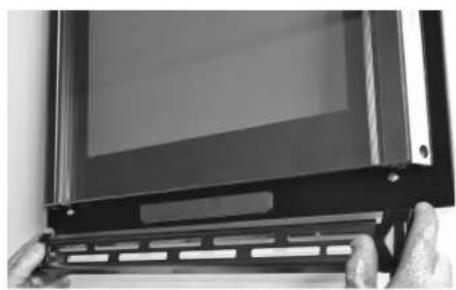
natural_image
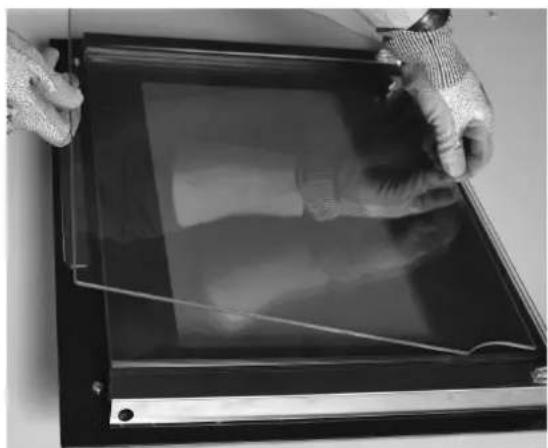
Close-up of a black electronic device with a screen and control panel, held by fingers (no visible text or symbols)- Pull out the internal glass as shown below. Pull out the second and third glass panels (middle panes) to clean them.
natural_image
Close-up of gloved hands holding a transparent rectangular device with visible internal components (no text or symbols)- After cleaning, replace the middle panes in the reverse order, checking that they are oriented so the words INTERNAL SIDE are properly legible.
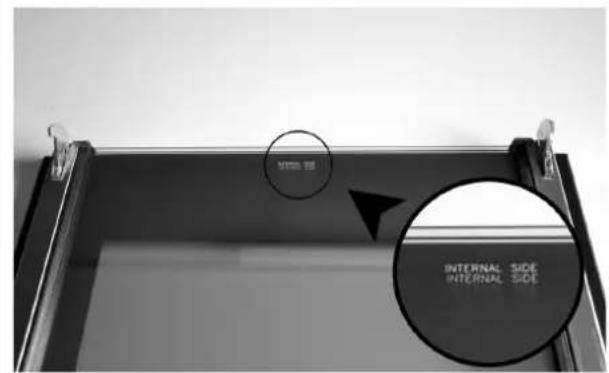
NOTE A slight gap between the middle panes and the side supports is normal because it allows for the heat expansion of the glass.
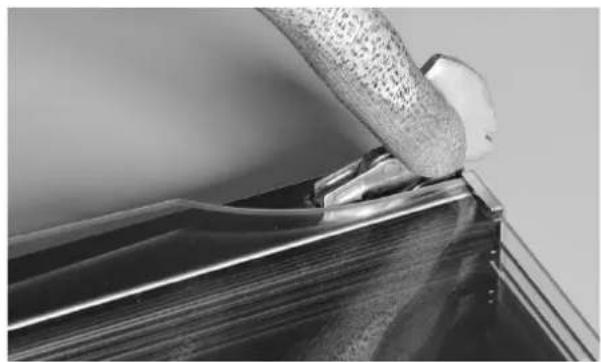
- Place the inner glass between the two uprights and put the upper strip back in place.
natural_image
Close-up of a hand gripping a metallic object on a metal surface (no visible text or symbols)Replacing the oven light

CAUTION
Make sure that:
- The oven and lights are cool and power has been turned off before replacing the light bulb(s). Failure to do so could result in electrical shocks or burns.
- The lens hoods must be in place when using the oven.
- The lens hoods serve to protect the bulb from breakage.
- The lens hoods are made of glass. Handle them with care to avoid breaking them. Broken glass could cause injuries.
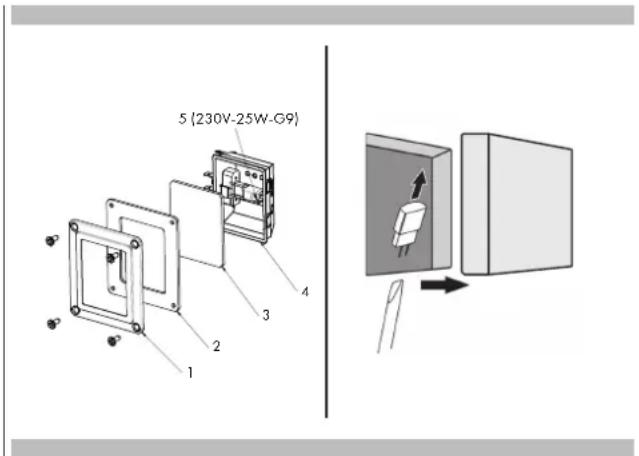
1 Cut off power from the main power supply (fuse or electrical panel)
2 Unscrew the 4 screws with a Phillips screwdriver
3 Remove the frame (1), remove the silicone gasket (2) and the glass (3)
4 Remove the bulb from its seat (4) using a flat-head screwdriver
5 Insert the new G9 type bulb (5), which has the same voltage and power (see figure)
6 Reassemble the frame, gasket and glass, and secure everything with the 4 Phillips screws
7 Restore the power (fuse or electrical panel)
With either Bake or Convection Bake, poor results can occur for many reasons other than an oven malfunction. Check the chart below for causes of the most common problems. Since the size, shape and material of baking utensils directly affect the baking results, the best solution may be to replace old baking utensils that have darkened and warped with age and use.
| Baking Problem Cause | |
| Food browns unevenly - Oven not preheated | - Aluminium foil on oven rack or oven bottom- Baking utensil too large for recipe- Pans touching each other or oven walls |
| Food too brown on bottom - Oven not preheated | - Use of glass, dull or darkened metal pans- Incorrect rack position- Pans touching each other or oven walls |
| Food is dry or has shrunk excessively - Oven temperature too low | - Oven not preheated- Oven door opened frequently- Tightly sealed with aluminium foil- Pan size too small |
| Food is baking or roasting too slowly - Oven temperature too low | - Oven not preheated- Oven door opened frequently- Tightly sealed with aluminium foil- Pan size too small |
| Cake/pie crusts do not brown on bottom or are soggy - Baking time not long enough | - Use of shiny steel pans- Incorrect rack position- Oven temperature too low |
| Cakes/pies pale, flat and may not be done inside - Oven temperature too low | - Incorrect baking time- Cake/pie tested too soon- Oven door opened too often- Pan size may be too large |
| Cakes/pies high in middle with crack on top - Baking temperature too high | - Baking time too long- Pans touching each other or oven walls- Incorrect rack position- Pan size too small |
| Cake/pie crust edges too brown - Oven temperature too high | - Edges of crust too thin |
Before contacting service, check the following to avoid unnecessary service charges.
| Oven problem Problem Solving Steps | |
| Other F__ Error appears on the display screen. | Remove power and turn it back on again after a few seconds. If the condition persists, note the code number (in the EVENT LOG list) and contact service. |
| The oven display stays OFF. | Cut off power from the main power supply (fuse or electrical panel). Turn the breaker back on.If condition persists, call an authorized service centre. |
| The cooling fan continues to run after oven is turned off | The fan turns off automatically when the electronic components have cooled sufficiently. |
| Oven is not heating. | Check the circuit breaker or fuse box in your house. Make sure there is proper electrical power going to the oven. Make sure the oven temperature has been selected. |
| Oven is not cooking evenly. | Refer to cooking charts for recommended rack position. Always reduce recipe temperature by 25°F (15°C) when baking with Convection Bake mode. |
| Oven light is not working properly. | Replace or reinsert the light bulb if loose or defective. See page 38. Avoid touching the bulb glass with bare fingers as oil from fingers may cause bulbs to burn out prematurely. |
| Oven light stays on. | Check for any obstructions in oven door. Check to see if hinge is bent or door switch broken. |
| The clock and timer are not working properly. | Make sure there is proper electrical power going to the oven. See the Clock sections on Page 12. |
| Excessive moisture Preheat the oven first when using Bake mode. Convection Bake and ConvectionRoast eliminate any moisture in the oven (this is one of the advantages of convection). | |
| Porcelain chips When oven racks are removed and replaced, always tilt racks upward and do notforce them to avoid chipping the porcelain. | |
Before contacting service, please check Troubleshooting sections. Doing so may save you the cost of a service call.
If you still need help, follow the instructions below. When calling, please have the purchase date and the complete model and serial number of your appliance on hand. This information will help us to better respond to your request.
Maintenance Data Log
For authorised service or parts information see paragraph "WARRANTY for Home Appliances".
For authorised service or parts information see paragraph "WARRANTY for Home Appliances".
For serial data plate location see Page 2. Now would be a good time to write this information in the space provided below.
Keep your invoice for warranty validation.
Maintenance Data Log
Model
Number
Serial
Number
Date
of
Installation
or
Handover
INDEX
PAGE
natural_image
Technical line drawing of a rectangular appliance with a circular vent and internal grating (no text or symbols)
IMPORTANT
natural_image
Technical line drawing of two views of a multi-compartment appliance or storage unit, showing internal components and mounting brackets (no text or symbols)GUIDES EXTRACTIBLES
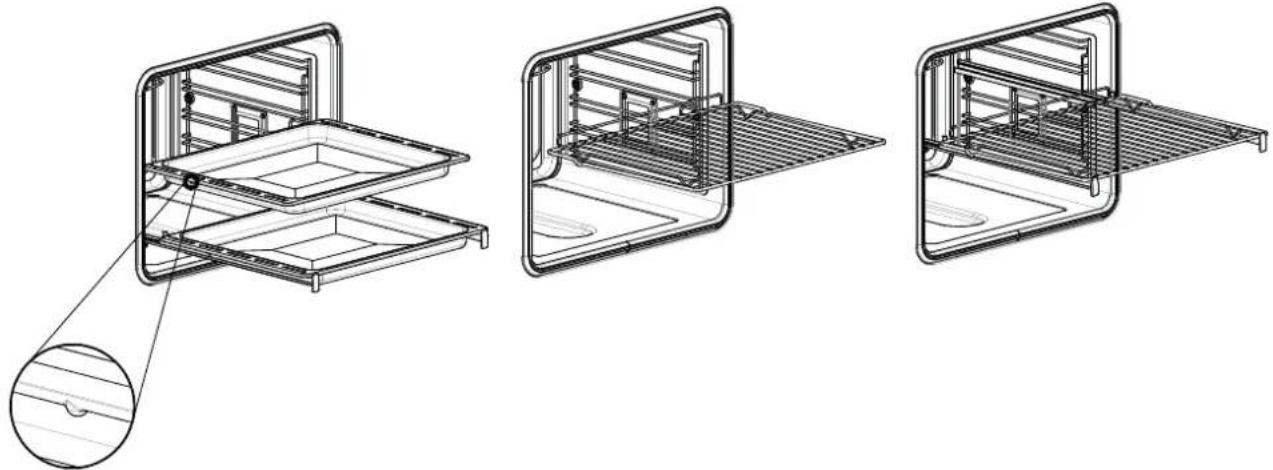
natural_image
Technical line drawings of three different kitchen or oven compartments with internal grilles and a magnified inset showing the interior detail (no text or symbols present)natural_image
Technical line drawing of a door frame with internal compartments and a scroll inside (no text or symbols)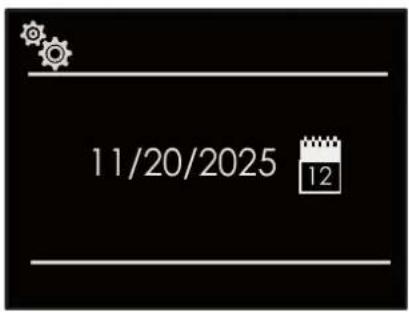
Luminosité
DOUBLE GRILL VENTILÉ

CUISSON VENTILÉE INFÉRIEURE

PIZZA

CUISSON VENTILÉE

CUISSON À LA VAPEUR

VAPEUR 100

VAPEUR 180

VAPEUR ET CIRCULAIRE

SOUS VIDE

LEVAGE DES PÂTES

natural_image
Black rectangular tray with a mesh pattern, no text or symbols visible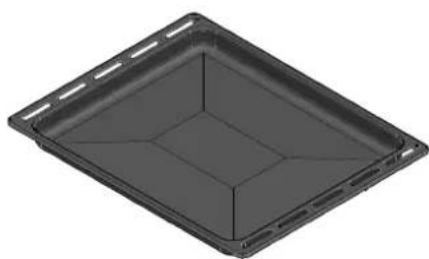
natural_image
3D rendering of a rectangular tray or container with internal compartments (no text or symbols)
ATTENTION
natural_image
Technical line drawing of a 3D cabinet or enclosure with numbered components (1-6), no visible text or symbols.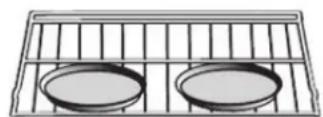
Grille 3
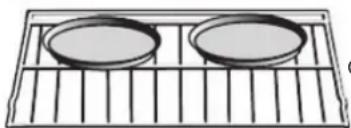
natural_image
Simple line drawing of two circular plates placed on a grid-lined rack (no text or symbols)Grille 1
natural_image
Technical line drawing showing two steps of a hand holding a bracket, with no visible text or symbolsnatural_image
Close-up of a hand inserting a cable into a device panel (no visible text or symbols)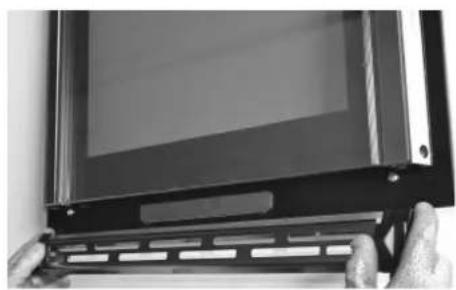
natural_image
Close-up of a black electronic device with a display screen and metal bracket, held by fingers (no visible text or symbols)natural_image
Close-up of gloved hands holding a transparent rectangular panel with visible internal lines (no text or symbols)natural_image
Close-up of a hand gripping a metallic object over a dark surface, likely part of a mechanical or architectural component (no visible text or symbols)natural_image
Technical line drawing of a rectangular appliance with a circular vent and internal grating (no text or symbols)
WICHTIG
natural_image
Technical line drawing of two views of a modular appliance or enclosure, showing internal components and structural details (no text or symbols)natural_image
Technical line drawings of three different kitchen or storage units with internal compartments and mounting brackets (no text or symbols)DE 3 - Installation des Backofens
natural_image
Technical line drawing of a mechanical or electrical component with internal channels and mounting base (no text or symbols)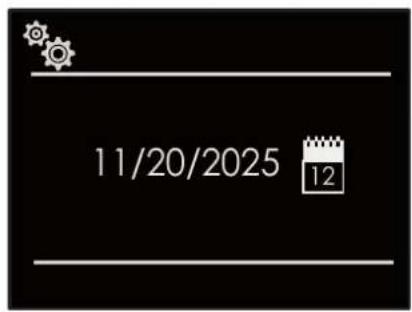
Helligkeit
natural_image
Black rectangular tray with a perforated inner surface, no text or symbols visible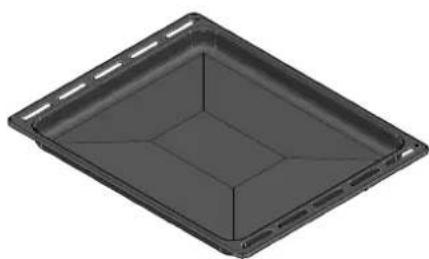
natural_image
3D rendering of a rectangular tray or container with internal compartments (no text or symbols)
ACHTUNG
natural_image
Technical line drawing of a door frame with numbered components (1-6), no text or symbols present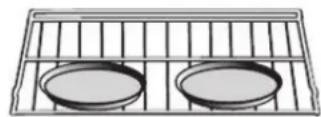
Gitter 3
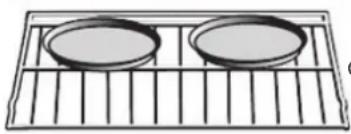
natural_image
Simple line drawing of two circular plates placed on a grid-lined rack (no text or symbols)Gitter 1
natural_image
Technical line drawing showing two steps of installing or adjusting a bracket, with no visible text or symbols.natural_image
Close-up of a hand inserting a cable into a device panel (no visible text or symbols)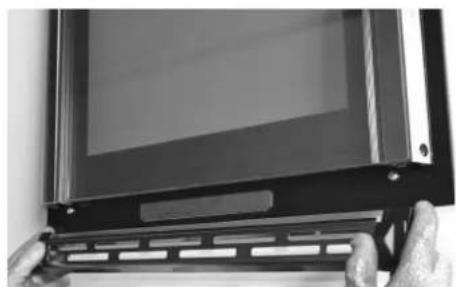
natural_image
Close-up of a black electronic device with a screen and metal bracket, held by fingers (no visible text or symbols)natural_image
Person holding a transparent rectangular device with visible internal components, no text or symbols presentnatural_image
Close-up of a hand gripping a metallic object with textured surface (no visible text or symbols)natural_image
Technical line drawing of a rectangular appliance with a circular vent and internal grating (no text or symbols)
IMPORTANTE
natural_image
Technical line drawing of two views of a multi-compartment appliance or storage unit, showing internal components and mounting points (no text or symbols)GUÍAS EXTRAÍBLES
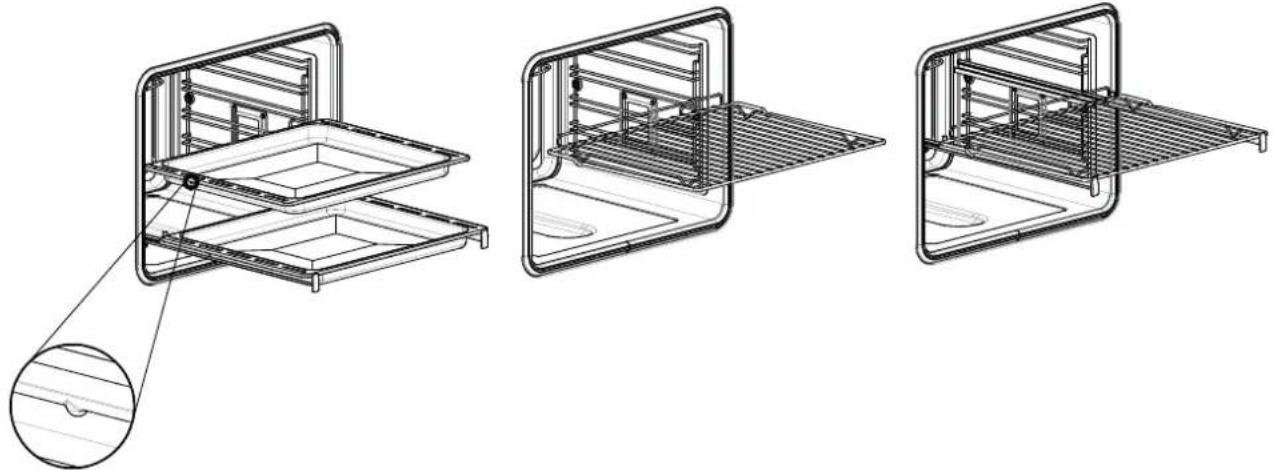
natural_image
Technical line drawings of three different kitchen or oven compartments with internal grilles and a magnified inset showing the interior structure (no text or symbols present)natural_image
Technical line drawing of a mechanical housing or enclosure with internal structural elements and a directional arrow (no text or symbols)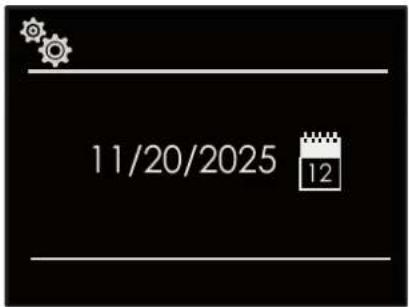
Luminosidad
natural_image
Black rectangular tray with a perforated inner surface and side holes (no text or symbols)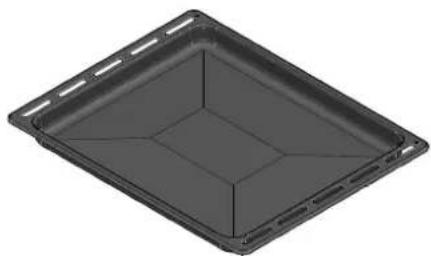
natural_image
3D rendering of a rectangular tray or container with internal compartments (no text or symbols)
ATENCIÓN
natural_image
Technical line drawing of a door frame with internal compartments and numbered components (no text or symbols)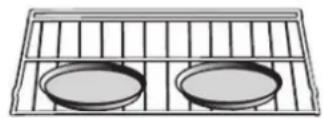
Parrilla 3
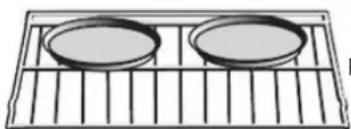
natural_image
Simple line drawing of two circular plates placed on a grid-lined rack (no text or symbols)Parrilla 1
natural_image
Technical line drawing showing two steps of installing a seatbelt on a vehicle door panel (no text or symbols present)natural_image
Close-up of a hand inserting a cable into a black panel, no visible text or symbols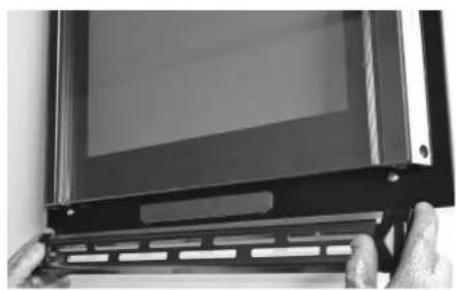
natural_image
Close-up of a black electronic device with a display screen and metal bracket, held by fingers (no visible text or symbols)natural_image
Close-up of gloved hands holding a transparent rectangular panel with visible internal structure (no text or symbols)natural_image
Close-up of a hand gripping a metallic object, possibly a tool or component (no visible text or symbols)natural_image
Technical line drawing of a rectangular appliance with a circular vent and internal grating (no text or symbols)
IMPORTANTE
natural_image
Technical line drawing of two views of a multi-compartment appliance with internal components and mounting holes (no text or symbols)GUIAS EXTRAÍVEIS

natural_image
Technical line drawings of three different kitchen or oven compartments with internal grilles and a magnified inset showing the interior structure (no text or symbols present)natural_image
Technical line drawing of a rectangular device with internal structural lines and a curved frame (no text or symbols)PT 5 - Painel de controlo
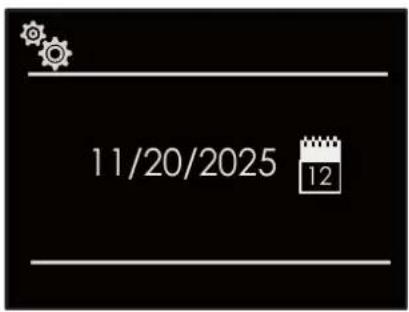
Luminosidade
natural_image
Black rectangular tray with a perforated inner surface, no text or symbols visible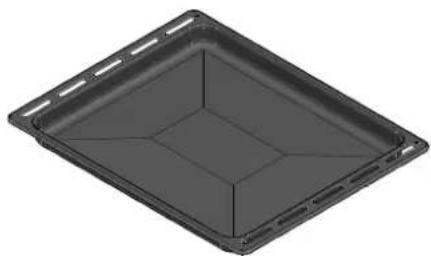
natural_image
3D rendering of a rectangular tray or container with internal compartments (no text or symbols)
CUIDADO
natural_image
Four identical icons of a fan or turbine symbol, each with a unique black square and white outline, arranged horizontally (no text or labels)
natural_image
Four abstract geometric symbols in white on black background: oval, wavy, wavy, and fan-like (no text or labels)![[-] [PIZZA] [ ]](/content/2026/03/523658/images/194ed6092547a48ad67c30d34a3dc4a0d5f5c160e604072ed0a17a71b8c63ec9.jpg)
natural_image
Technical line drawing of a 3D cabinet or enclosure with numbered components (1-6), no text or symbols present.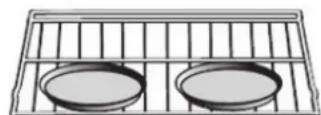
Grelha 3
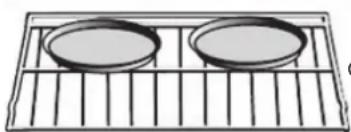
natural_image
Simple line drawing of two circular plates placed on a grid-lined rack (no text or symbols)Grelha 1
natural_image
Technical line drawing showing two steps of a mechanical assembly with a hand holding a bracket and a tool inserted into a frame (no text or symbols present)natural_image
Close-up of a hand inserting a cable into a black panel, no visible text or symbols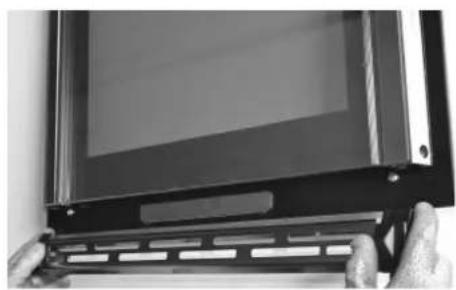
natural_image
Close-up of a black electronic device with a display screen and metal bracket, held by fingers (no visible text or symbols)- Retirar o vidro interior como indicado abaixo. Retirar o segundo e o terceiro vidro (painéis intermédios) para limpeza.
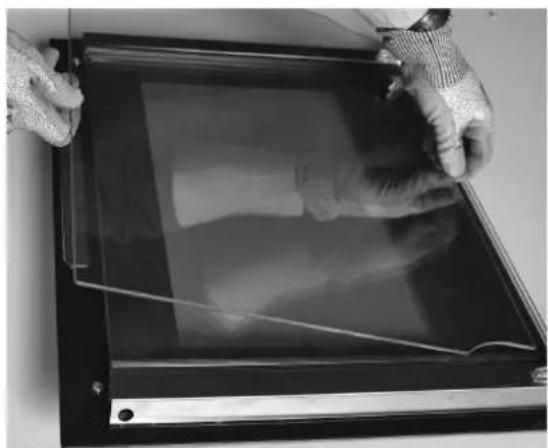
natural_image
Close-up of gloved hands holding a transparent rectangular panel with visible internal structure (no text or symbols)natural_image
Close-up of a hand gripping a metallic object, possibly a tool or component (no visible text or symbols)natural_image
Technical line drawing of a rectangular appliance with a circular vent and internal grating (no text or symbols)
BELANGRIJK
natural_image
Technical line drawing of two views of a multi-compartment appliance or storage unit, showing internal components and mounting brackets (no text or symbols)UITTREKBARE GELEIDERS
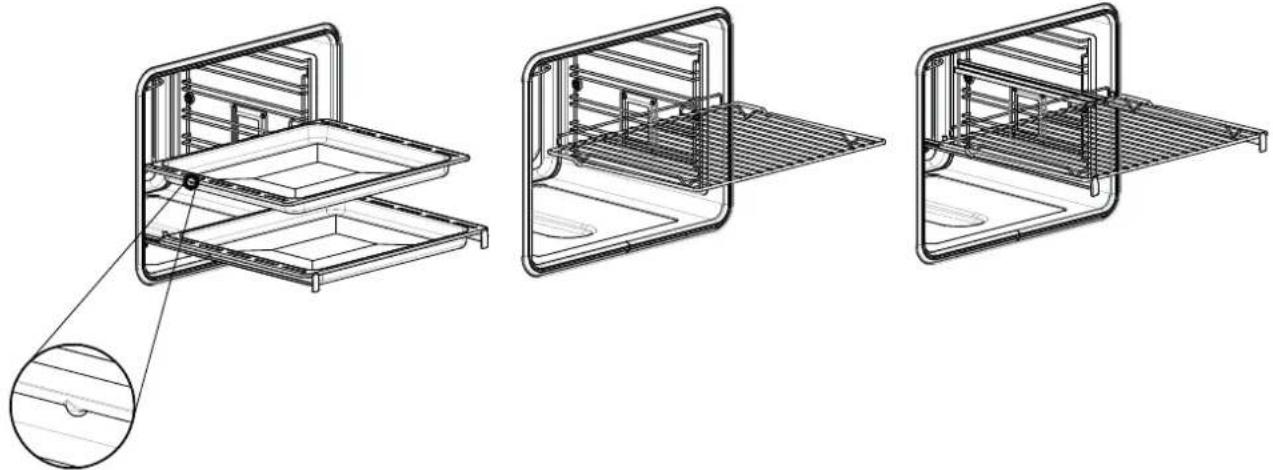
natural_image
Technical line drawings of three different kitchen or oven compartments with internal grilles and a magnified inset showing the interior structure (no text or symbols present)natural_image
Technical line drawing of a door frame with internal structural elements and a directional arrow (no text or symbols)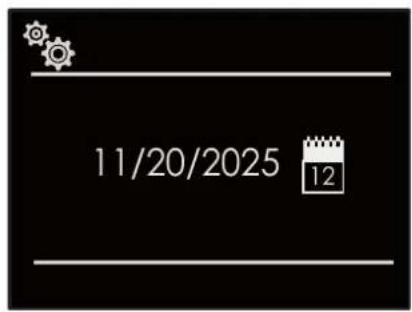
Helderheid
WAARSCHUWING - Kans op verbranding!
WAARSCHUWING - Kans op brand!
natural_image
Two identical black plastic tray trays with perforated inner surface and side compartments (no text or symbols)
LET OP
natural_image
Technical line drawing of a door frame with numbered compartments (1-6), no text or symbols present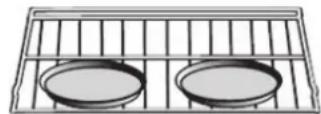
Rooster 3
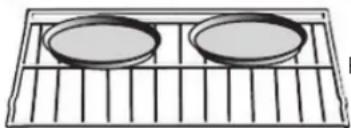
natural_image
Simple line drawing of two circular plates placed on a grid-lined rack (no text or symbols)Rooster 1
natural_image
Technical line drawing showing two steps of a door seat assembly with a hand adjusting the seat (no text or symbols present)natural_image
Close-up of a hand inserting a cable into a device panel (no visible text or symbols)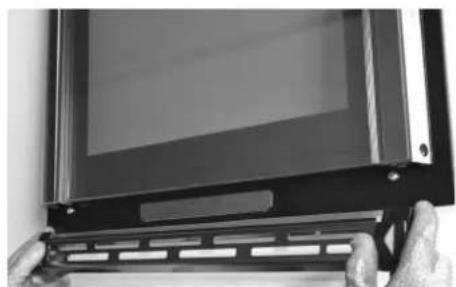
natural_image
Close-up of a black electronic device with a screen and metal bracket, held by fingers (no visible text or symbols)natural_image
Close-up of gloved hands holding a transparent rectangular panel with a visible X-ray or radiographic artifact (no text or symbols)natural_image
Close-up of a metal tool interacting with a textured surface, possibly a mechanical or architectural component (no visible text or symbols)
- IMPORTANTE
- Luminosità
- ATTENZIONE
- CONTENTS PAGE
- IMPORTANT
- CAUTION
- Electrical specifications
- Respect for the environment
- Connection to the electrical power mains
- The first time you use the oven
- Removable Guides (if present)
- Keypad
- Control panel icons
- Error codes
- Beeps
- Default Settings
- F Failure Number Codes
- Preheat and Fast Preheat
- Timer
- Preheating the Oven
- Operational Suggestions
- Utensils
- Oven Condensation and Temperature
- High Altitude Baking
- Instructions for initial switch-on
- Refer to the USER SETTING paragraph for setting instructions.
- Language
- Temperature and Weight
- Time
- Date
- Brightness
- Volume
- Descaling
- Start
- First rinse
- Second rinse
- Subsequent cleaning
- Detergents
- Suitable detergents
- WARNING - Risk of burns!
- Steam Circuit Clean
- Steam Oven Clean
- Water discharge
- Event Log
- Demo
- Switching the oven on and off
- Selecting the cooking mode
- TRADITIONAL COOKING
- Changing the cooking mode
- AirFry function
- Changing temperature
- Cooking mode quick menu
- Preheating phase
- Fast Preheat
- To select FAST PREHEAT:
- Filling the water tank
- WARNING - Fire risk!
- Types of steam heating
- Proving level
- Regeneration
- After each operation with steam
- Emptying the water tank
- Emptying the tank
- Drying the drain
- Drying the cooking chamber
- Manual drying of the cooking chamber
- REQUIRED: The cooking chamber must be cooled.
- WARNING-Using steam functions
- Steam operation
- Useful tips
- Steam Cooking
- STEAM 100
- STEAM 180
- DOUGH LEAVENING
- WARNING
- DEFROST STEAM
- VACUUM SEALING (SOUS VIDE)
- STEAM AND FAN HEAT
- [Steam Assist Function]
- Special Cooking
- [...]SLOW COOKING
- [◆]DEFROSTING
- [ ] PLATE WARMING
- [ECO] ECO COOKING
- [≡]FOOD DEHYDRATING
- Cook Time
- Setting a Timed Mode
- Stop Time
- To Delay the Start of a Timed Mode
- Select an already-set recipe:
- Saving a personalized recipe:
- Cancelling a personalised recipe:
- Roast Tips and Techniques
- General Guidelines
- True Convection Tips and Techniques
- Foods recommended for Convection Bake mode:
- Quick and easy recipe tips
- Convection Roast Tips and Techniques
- Convection Broil Tips and Techniques
- Grill Cooking Tips and Techniques
- Dehydrating Tips and Techniques
- Steam oven cleaning functions
- Removing the door
- Removing the standard oven door
- How to remove the inner glass of the "FULL GLASS" panoramic door
- Replacing the oven light
- Make sure that:
- Maintenance Data Log
- For authorised service or parts information see paragraph "WARRANTY for Home Appliances".
- INDEX
- PAGE
- Luminosité
- CUISSON À LA VAPEUR
- ATTENTION
- WICHTIG
- DE 3 - Installation des Backofens
- Helligkeit
- ACHTUNG
- Luminosidad
- ATENCIÓN
- PT 5 - Painel de controlo
- Luminosidade
- CUIDADO
- BELANGRIJK
- Helderheid
- WAARSCHUWING - Kans op verbranding!
- WAARSCHUWING - Kans op brand!
- LET OP
Brand : Fulgor Milano
Model : FUTSO 6023 TEM IX
Category : Steam oven