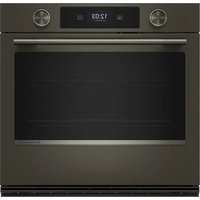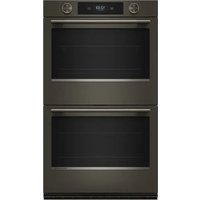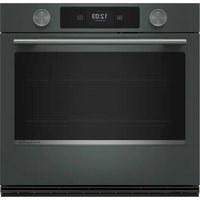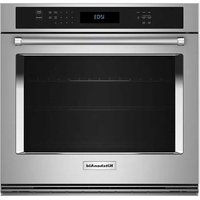
KOEC530PWH - Oven KITCHENAID - Free user manual and instructions
Find the device manual for free KOEC530PWH KITCHENAID in PDF.



User questions about KOEC530PWH KITCHENAID
0 question about this device. Answer the ones you know or ask your own.
Ask a new question about this device
Download the instructions for your Oven in PDF format for free! Find your manual KOEC530PWH - KITCHENAID and take your electronic device back in hand. On this page are published all the documents necessary for the use of your device. KOEC530PWH by KITCHENAID.
USER MANUAL KOEC530PWH KITCHENAID
Combination Safety. 2
Self-Cleaning Cycle. 6
Steam Clean (on some models) ....
INSTALLATION INSTRUCTIONS 8
REQUIREMENTS. 8
Tools and Parts 8
Location Requirements 8
Electrical Requirements 1
INSTALLATIONS 11
Prepare Built-In Oven 11
Remove Oven Door(s) 11
Make Electrical Connection 12
Install Oven 13
Install Deflector Kit 15
Replace Oven Door(s) 16
Complete Installation 17
SECURITE DE L'ENSEMBLE FOUR
Your safety and the safety of others are very important.
We have provided many important safety messages in this manual and on your appliance. Always read and obey messages.

This is the safety alert symbol.
This symbol alerts you to potential hazards that can kill or hurt you and others.
All safety messages will follow the safety alert symbol and either the word "DANGER" or "WARNING." words mean:
safety
These
ADANGER
WARNING
You can be killed or seriously injured if you don't immediately follow instructions.
You can be killed or seriously injured if you don't instructions.
All safety messages will tell you what the potential hazard is, tell you how to reduce the chance of injury, and tell you what can happen if the instructions are not followed.
IMPORTANT SAFETY INSTRUCTIONS
WARNING: To reduce the risk of fire, electric shock, or injury to persons when using the appliance, follow basic precautions, including the following:
- Proper Installation - The appliance, when installed, must be electrically grounded in accordance with local codes, or the absence of local codes, with the National Electrical Code, ANSI/NFPA 70 or the Canadian Electrical Code, CSA C22.1-02. In Canada, the appliance must be electrically grounded in accordance with Canadian Electrical Code. Be sure your appliance is properly installed and grounded by a qualified technician.
- Never Use Your Appliance for Warming or Heating the Room.
- Do Not Leave Children Alone - Children should not be left alone or unattended in area where appliance is in use. They should never be allowed to sit or stand on any part the appliance.
Wear Proper Apparel - Loose-fitting or hanging garments should never be worn while using the appliance. - User Servicing - Do not repair or replace any part of the appliance unless specifically recommended in the manual. All other servicing should be referred to a qualified technician.
Storage in or on Appliance - Flammable materials should not be stored in an oven or near surface units.
This appliance is not intended for storage.
b Do Not Use Water on Grease Fires - Smother fires in or use dry chemical or foam-type extinguisher.
- Do not use replacement parts that have not been recommended by the manufacturer (e.g. parts made at home using a 3D printer).
Use Only Dry Potholders - Moist or damp potholders surfaces may result in burns from steam. Do not let potholder touch hot heating elements. Do not use a other bulky cloth.
Use Care When Opening Door - Let hot air or steam be left escape before removing or replacing food.
DO NOT TOUCH HEATING ELEMENTS OR INTERIOR SURFACES OF OVEN - Heating elements may be hot even though they are dark in color. Interior surfaces of oven become hot enough to cause burns. During and after use, do not touch, or let clothing or other flammable materials contact heating elements or interior surfaces of oven until they have had sufficient time to cool. Other surfaces of the appliance may become hot enough to cause burns - among these surfaces are the coil and cooking oil elements, oven vent openings and surfaces near these opening windows, oven doors, and windows of oven doors.
- Do Not Heat Unopened Food Containers - Build-up of pressure may cause container to burst and result in injury.
- Keep Oven Vent Ducts Unobstructed.
SAVE THESE INSTRUCTIONS
r flame
on hot
bowel or
IMPORTANT SAFETY INSTRUCTIONS
WARNING: To reduce the risk of fire, electric shock, or injury to persons when using the appliance, follow basic precautions, including the following:
- Placement of Oven Racks - Always place oven racks in - Do not use a protective coating to line the oven and do not desired location while oven is cool. If rack must be moved use commercial oven cleaner unless Certified for use in a while oven is hot, do not let potholder contact hot heating self-cleaning oven. element in oven. Clean Only Parts Listed
For self-cleaning ovens:
CAUTION: DO NOT LEAVE FOOD OR COOKING UTENSILS, ETC., IN OVEN DURING THE PYROLYTIC SELF-CLEANING MODE OF OPERATION.
■ Do Not Clean Door Gasket - The door gasket is essential remote operation at any time. Do not store any flammable for a good seal. Care should be taken not to rub, damagematerials or temperature sensitive items inside, on top or or move the gasket. near surface units of the appliance.
SAVE THESE INSTRUCTIONS
IMPORTANT SAFETY INSTRUCTIONS
When using electrical appliances basic safety precautions should be followed, including the following:
WARNING: To reduce the risk of burns, electric shock, fire, injury to persons, or exposure to excessive microwave energy:
- Read all instructions before using the appliance.
■ Read and follow the specific "PRECAUTIONS TO AVOID POSSIBLE EXPOSURE" TO EXCESSIVE MICROWAVE ENERGY" found in this manual.
This appliance must be grounded. Connect only to properly grounded outlet. See "GROUNDING INSTRUCTIONS" found in this section.
Install or locate this appliance only in accordance with the provided Installation Instructions.
Some products such as whole eggs and sealed containers for example, closed glass jars - are able to explode and should not be heated in this oven. - Use this appliance only for its intended use as described in the manual. Do not use corrosive chemicals or vapors in this appliance. This type of oven is specifically designed to heat, cook, or dry food. It is not designed for industrial or laboratory use.
■ As with any appliance, close supervision is necessary when used by children. - Do not operate this appliance if it has a damaged cord or plug, if it is not working properly, or if it has been damaged or dropped.
This appliance should be serviced only by qualified service personnel. Contact nearest authorized service facility for examination, repair, or adjustment. - Do not cover or block any openings on the appliance.
- Do not store this appliance outdoors. Do not use this product near water - for example, near a kitchen sink, in wet basement, near a swimming pool, or similar locations.
- Do not immerse cord or plug in water.
- Keep cord away from heated surfaces.
-
Do not let cord hang over edge of table or counter.
-
Do not use replacement parts that have not been recommended by the manufacturer (e.g. parts made at home using a 3D printer).
See door surface cleaning instructions in the Microwave Oven and Maintenance Care section.
To reduce the risk of fire in the oven cavity:
- Do not overcook food. Carefully attend appliance when the paper, plastic, or other combustible materials are placed inside the oven to facilitate cooking.
- Remove wire twist-ties from paper or plastic bags before and placing bag in oven.
- If materials inside the oven ignite, keep oven door closed, turn oven off, and disconnect the power cord, or shut off power at the fuse or circuit breaker panel.
to - Do not use the cavity for storage purposes. Do not leave or paper products, cooking utensils, or food in the cavity when not in use.
Liquids, such as water, coffee, or tea are able to be overheated beyond the boiling point without appearing to be boiling. Visible bubbling or boiling when the container is damaged moved from the microwave oven is not always present. THIS COULD RESULT IN VERY HOT LIQUIDS
Use SUDDENLY BOILING OVER WHEN THE CONTAINER IS DISTURBED OR A UTENSIL IS INSERTED INTO THE LIQUID.
For microwave ovens not intended for use above another heating appliance:
Do not operate any heating or cooking appliance beneath this appliance.
- Do not mount unit over or near any portion of a heating or cooking appliance.
Do not mount over a sink.
- Do not store anything directly on top of the appliance surface when the appliance is in operation.
SAVE THESE INSTRUCTIONS
PRECAUTIONS TO AVOID POSSIBLE EXPOSURE TO EXCESSIVE MICROWAVE ENERGY
(a) Do not attempt to operate this oven with the door open. Biocnot operate the oven if it is damaged. It is particularly open-door operation can result in harmful exposure to important that the oven door close properly and that there is microwave energy. It is important not to defeat or tamper with damage to the: the safety interlocks. (1) Door (bent)
(b) Do not place any object between the oven front face and things and latches (broken or loosened), door or allow soil or cleaner residue to accumulate on sealing surfaces.
(d) The oven should not be adjusted or repaired by anyone except properly qualified service personnel.
Internet Connectivity Guide for Connected Appliances Only
IMPORTANT: Proper installation of your appliance prior to use is your responsibility. Be sure to read and follow the installation instructions that came with your appliance.
Connectivity requires Wi-Fi and account creation. App features and functionality are subject to change. Data rates may apply. Once installed, launch the app. You will be guided through the steps to set up a user account and to connect your appliance.
You Will Need:
A home wireless router supporting Wi-Fi, 2.4 Ghz with WPA2 security. If you are unsure of your router's capabilities, refer to the router manufacturer's instructions.
The router to be on and have a live internet connection.
The 10-character SAID code for your appliance. The SAID code is either printed on a label on the appliance or found on the LCD screen.
Federal Communications Commission (FCC) Compliance Notice
This device complies with Part 15 of the FCC Rules. Operation is subject to the following two conditions:
- This device may not cause harmful interference, and
- This device must accept any interference received, including interference that may cause undesired operation.
Changes or modifications not expressly approved by the party responsible for compliance could void the user's authority to operate the equipment.
Industry Canada (IC) Compliance Notice
This Device complies with Industry Canada License-exempt RSS standard(s). Operation is subject to the following two conditions:
- This device may not cause interference.
- This device must accept any interference, including interference that may cause undesired operation of the device.
Under Industry Canada regulations, this radio transmitter may only operate using an antenna of a type and maximum (or lesser) gain approved for the transmitter by Industry Canada. To reduce potential radio interference to other users, the antenna type and its gain should be so chosen that the equivalent isotropically radiated power (e.i.r.p.) is not more than that necessary for successful communication.
To comply with FCC and Industry Canada RF radiation exposure limits for general population, antenna(s) used for this transmitter must be installed such that a minimum separation distance of 20~cm is maintained between the radiator (antenna) and all persons at all times and must not be co-located or operating in conjunction with any other antenna or transmitter.
If this equipment does cause harmful interference to radio or television reception, which can be determined by turning the equipment off and on, the user is encouraged to try to correct the interference by one of the following measures:
Reorient or relocate the receiving antenna.
- Connect the equipment into an outlet on a circuit different from over that to which the receiver is connected.
■ Increase the separation between the equipment and receiver that to which the receiver is connected.
■ Consult the dealer or an experienced radio/TV technician for help.
IMPORTANT: Before cleaning, make sure all controls are off the oven and cooktop are cool. Always follow label instructio cleaning products.
Soap, water, and a soft cloth or sponge are suggested first, otherwise noted.
STAINLESS STEEL AND BLACK STAINLESS STEEL (on some models)
NOTE: To avoid damage to stainless steel surfaces, do not soap-filled scouring pads, abrasive cleaners, Cooktop Cleaner, steel-wool pads, gritty washcloths or abrasive paper towels. Damage may occur to stainless steel surfaces, even with one or limited use.
Rub in direction of grain to avoid damaging.
Cleaning Method:
■ Affresh Stainless Steel Cleaner Part Number W10355016 (not included) or affresstainless Steel Cleaning Wipes Part Number W10355049 (not included): See the Quick Start Guide for ordering information.
Liquid detergent or all-purpose cleaner: Rinse with clean and dry with soft, lint-free cloth.
Vinegar for hard water spots.
EXTERIOR PORCELAIN ENAMEL SURFACES
some models)
Food spills containing acids, such as vinegar and tomato, sh be cleaned as soon as the entire oven is cool. These spills affect the finish.
Cleaning Method:
Glass cleaner, mild liquid cleaner or nonabrasive scrubbing pad: Gently clean around the model/serial/rating plate because scrubbing may remove numbers.
- Affresh © Kitchen and Appliance Cleaner Part Number W10355010 (not included): See the Quick Start Guide for ordering information.
MICROWAVE OVEN DOOR AND EXTERIOR
The area where the oven door and frame touch when close should be kept clean.
Cleaning Method:
■ Mild, nonabrasive soaps and detergents:
Rinse with clean water. and dry with soft, lint-free cloth.
Glass cleaner and paper towels or nonabrasive plastic scrubbing pad:
Apply glass cleaner to towel, not directly to surface.
CONTROL PANEL AND OVEN DOOR EXTERIOR
To avoid damage to the control panel, do not use abrasive cleaners, steel-wool pads, gritty washcloths or abrasive paper towels.
The area where the oven door and frame touch when closed should be kept clean.
Cleehing Method:
Glass cleaner and a soft cloth or sponge or nonabrasive unsharp scribbing pad: Apply glass cleaner to soft cloth or sponge, not directly on panel/Surface.
■ Affresh® Kitchen and Appliance Cleaner Part Number W10355010 (not included):
use See the Quick Start Guide for ordering information.
OVEN DOOR INTERIOR
Creding Method:
Self-Cleaning cycle:
For optimal door cleaning result, wipe away any deposits with a damp sponge before running cycle.
OVEN CAVITY
Do not use oven cleaners.
Food spills should be cleaned when oven cools. At high temperatures, foods react with porcelain and staining, etching, etching or faint white spots can result.
Cleaning Method:
Self-Cleaning cycle:
See "Self-Cleaning Cycle" first. Remove racks or they will discolor and become harder to slide. If this happens, a light could coating of vegetable oil applied to the rack guides will help matiem slide.
To avoid damage to microwave oven cavity, do not use soap-fille scouring pads, abrasive cleaners, steel-wool pads, gritty washcloths, or some paper towels.
On stainless steel models, rub in direction of grain to avoid damaging.
The area where the oven door and frame touch when closed should be kept clean.
Cleaning Method:
Average Soil
Mild, nonabrasive soaps and detergents:
Rinse with clean water and dry with soft, lint-free cloth.
Heavy Soil
Mild, nonabrasive soaps and detergents:
Heat 1 cup (250 mL) of water for 2 to 5 minutes in oven. S will soften soil. Rinse with clean water and dry with soft, lint-free cloth.
Odors
Lemon juice or vinegar:
- Heat 1 cup (250 mL) of water with 1 tablespoon (15 mL) of either lemon juice or vinegar for 2 to 5 minutes in oven.
OVEN RACKS
Steel-wool pad
Dishwasher
For racks that have discolored and are harder to slide, a light coating of vegetable oil applied to the rack guides will help them slide.
METALLIC PAINT (on some models)
Do not use abrasive cleaners, cleaners with bleach, rust removers, ammonia or sodium hydroxide (lye) because paint surface may stain.
The broil element does not need cleaning since the intense will burn off any food spatters. However, the ceiling above element may need regular cleaning.
Cleaning Method:
Warm water, mild detergent, and a sponge.
To Clean:
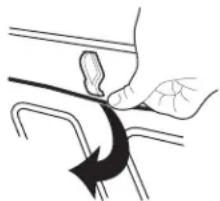
- Push the fastening thread gently towards the back of the ceiling and then lower it to release the broil element.
-
Lower the front of the broil element to access the ceiling cleaning.
-
Raise broil element back up and return the fastening thre back to its original location.
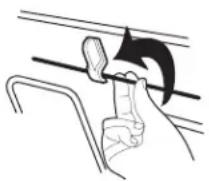
Always return the broil element to the cooking position after cleaning.
+POWERED ATTACHMENTS (on some models)
To avoid damage to the nonstick surfaces, do not use abras cleaners, steel-wool pads, gritty washcloths, or abrasive paper towels. Food spills should be cleaned when the +Powered Attachment cools.
WARNING
Electrical Shock Hazard
Do not immerse heating element in water or place dishwasher.
Doing so can result in death or electrical shock
Do not soak or immerse the Heating Element.
Cleaning Method:
- Soap, water, and a soft cloth or sponge: Wipe the Heating Element when it is cool. All attachments be cleaned with soap, water, and a soft cloth or sponge.
Dishwasher:
The Base Pan, +Grill Attachment, +Baking Stone Attachment, and +Steamer Attachment are dishwasher-safe.
Affresh 假 Cooktop Cleaner:
Stubborn soils on the +Baking Stone Attachment can be cleaned with baking soda and a non scratch heavy duty scrub sponge. Rub cream into surface with a damp paper towel or soft cloth. Continue rubbing until white film disappears.
the Smart Oven +Powered Attachments User Instructions for nnoboeidetailed instructions.
TURNTABLE
Replace turntable immediately after cleaning. Do not operate the microwave oven without the turntable in place.
Cleaning Method:
Mild cleanser and scouring pad
Dishwasher
CRISPER PAN
To avoid damage to browning pan, do not immerse or rinse with water while the crisper pan is hot. Do not use steel-wool pads.
Cleaning Method:
Warm water, mild detergent, and a sponge. Heavily soiled areas can be cleaned with a scouring pad and mild cleanser
Dishwasher
BAKING TRAY
Dishwasher
KITCHENAID™ STEAMER VESSEL
Dishwasher
TURNTABLE SUPPORT AND ROLLERS, HUB, CRISPER PAN HANDLE
Dishwasher
Self-Cleaning Cycle
AWARNING

Burn Hazard
Do not touch the oven during the Self-Cleaning cycle. Keep children away from the oven during Self-Cleaning cycle.
Failure to follow these instructions can result in burns.
IMPORTANT: The health of some birds is extremely sensitive to the fumes given off during the Self-Cleaning cycle. Exposure to the fumes may result in death to certain birds. Always move bird to another closed and well-ventilated room.
Self-clean the oven before it becomes heavily soiled. Heavy soil results in longer cleaning and more smoke.
Keep the kitchen well-ventilated during the Self-Cleaning cycle to help get rid of heat, odors, and smoke.
- Do not block the oven vent(s) during the Self-Cleaning cycle. Air must be able to move freely. See the "Oven Vents" section in the Quick Start Guide.
Do not clean, rub, damage, or move the oven door gasket. The door gasket is essential for a good seal.
Prepare Oven
- Remove the broiler pan, grid, cookware and bakeware, and, on some models, the temperature probe from the oven.
Remove oven racks to keep them shiny and easy to slide. "General Cleaning" section for more information.
Remove any foil from the oven because it may burn or melt damaging the oven.
■ Hand clean inside door edge and 1/2tle (3.8 cm) area around the inside oven cavity frame, being certain not to move or bend the gasket. This area does not get hot enough during self-cleaning to remove soil. Do not let water, cleaner, etc.6 enter slots on door frame. Use a damp cloth to clean this area
■ Wipe out any loose soil to reduce smoke and avoid damage. Delay Start of Self-Cleaning At high temperatures, foods react with porcelain. Staining, etching, pitting or faint white spots can result. This is normal and will not affect cooking performance. 1. Select DELAY STARTor DELAY.
The oven doors will automatically lock.
Follow steps 1 through 4 above, then: - Select DELAY STARTor DELAY.
How the Cycle Works
IMPORTANT:
The heating and cooling of porcelain on steel in the oven may result in discoloring, loss of gloss, hairline cracks and popping sounds.
The Self-Cleaning Cycle uses very high temperatures, burning soil to a powdery ash.
Suggested clean times are 3 hours for light soil, 4 hours for medium soil, and 5 hours for heavy soil (includes a 30 minute cool-down time).
Once the oven has completely cooled, remove ash with a damp cloth. To avoid breaking the glass, do not apply a cool damp to the inner door glass before it has completely cooled.
The oven lights will not work during the Self-Cleaning cycle.
On double-oven models, only one oven can self-clean at a time. If one oven is self-cleaning, the other oven cannot be set or turned on.
NOTE: The oven has a two-speed cooling fan motor. During the Self-Cleaning cycle, the fan(s) will operate at its highest speed to increase airflow to better exhaust the hotter air through the oven's inlet(s). An increase in noise may be noticeable during and after the Self-Cleaning cycle until the oven cools.
To Start Self-Cleaning
Before Self-Cleaning, make sure the door is closed completely. It will not lock and the cycle will not begin. When the oven is locked, the doors of the oven cannot be opened. To avoid damage to the doors, do not force the doors open when the oven is
- Touch the Tools keypad.
- Select the Self Clean icon. (On double-oven models): Select Upper Cavity or Lower Cavity.
- Select type of Self-Cleaning:
Steam: 1 hour: Clean up after everyday light spills using heat and 1/2 cups (295.74 mL) of water.
High temp: 4 hours: 3 hour cycle and 1 hour cooling.
High temp: 5 hours: 4 hour cycle and 1 hour cooling.
High temp: 6 hours: 5 hour cycle and 1 hour cooling. -
Follow the prompts on the oven display to prepare the oven
-
Select START to begin the cleaning process.
OR
Select DELAY START to set a delayed Self-Cleaning cycle. See the "To Delay Start Self-Cleaning Cycle" Section.
NOTE: It may take a couple moments for the oven door to automatically lock after starting the Self-Clean Cycle.
When the self cleaning cycle is complete and the oven cools, the oven doors will unlock.
When the oven is completely cooled, remove ash with a damp cloth.
Delay Start of Self-Cleaning
-
Select the start time of when the Self-Cleaning cycle should begin by scrolling from left to right.
-
Select START DELAY.
The oven doors will automatically lock after the Delay Start countdown.
When the Self-Cleaning cycle is complete and the oven cools, the oven doors will unlock.
When the oven is completely cooled, remove ash with a damp cloth.
To Stop Self-Cleaning anytime
which the Oven Cancel Keypad for single oven models, or the key pads for double oven models. If the oven temperature is too high, the door will remain locked. It will not unlock until the oven is closed.
Steam Clean (on some models)
The Steam Clean feature is designed for light oven cavity bottom cleaning on models that have hidden bake in the oven.
Dotonot use oven cleaners.
Allow the oven to cool to room temperature before using the Steam Clean feature. If your oven cavity is above 200^ (93^) , the Steam Clean feature will not activate until it cools down.
Remove all racks and accessories from the oven cavity.
For best results, use 10 oz (295.7 mL) of distilled or filtered water. The Steam Clean feature will take approximately 1 hour. A tone map is found at the end of the cycle.
IMPORTANT: Because the water in the oven bottom is hot, do open the oven door during the Steam Clean cycle.
Touch the Oven Cancel keypad for single oven models and the Upper/Lower keypads for double oven models at any time to end the cycle. The display will return to the time of day.
Helpful Hints
Once the Steam Clean cycle is complete and the oven is completely cooled, remove all remaining water in the bottom of the oven with a sponge or cloth.
■ Wipe any remaining moisture from the oven door interior, oven cavity interior sides, and cooktop.
Use a soft brush or nylon scrubber to wipe the oven interior. This may help with more stubborn stains.
It is recommended to use distilled or filtered water, as tap water may leave mineral deposits on the oven bottom. Use a cloth soaked with vinegar or lemon juice to remove any mineral deposits that may be left after the Steam Clean cycle.
If the oven is heavily soiled, use the Self-Cleaning cycle. The Steam Clean cycle may be used first to eliminate most of the debris, resulting in a more effective self-cleaning.
To Steam Clean:
- Open the oven door of the selected oven and remove and accessories from the oven cavity.
- Pour 10 oz (295.7 mL) of distilled or filtered water into oven bottom. Then close the oven door.
- Touch the Tools keypad.
On double-oven models: Select Upper Cavity or Lower (
- Select STEAM CLEAN.
- Select START.
- After approximately 1 hour, a tone will sound to signal the of the cycle. Touch the Oven Cancel keypad for single oven models and the Upper/Lower keypad for double oven models to clear the display.
- When the oven is completely cooled, remove any excess water with a sponge or cloth and wipe down oven interior needed, use a non-scratch copper scrubbing pad to remove stubborn soils.
INSTALLATION INSTRUCTIONS REQUIREMENTS
Tools and Parts
Gather the required tools and parts before starting installation. Read and follow the instructions provided with any tools listed here
Tools Needed
■ Phillips screwdriver
Measuring tape
■ Hand or electric drill (for wall cabinet installations)
1" (2.5 cm) drill bit (for wall cabinet installations)
Level
Flat-blade screwdriver
Parts Supplied
■ #8-14 x 3/4" (1.9 cm) screws (2)
■ #8-18 x 3/8" (9.5 mm) Phillips head screws - bottom vent shield (2)
■ #8-18 x 3/8" (9.5 mm) Phillips head screws - bottom vent trim (2)
8-18 x 3/8" (9.5 mm) Hex head screws - plastic feet (4)
Rear feet (2)
Front feet (2)
Bottom vent shield
Bottom vent trim
Parts Needed
- Deflector Kit (on some models) (for ovens installed above warming drawer or for ovens installed using flush installation cabinetry): See the Online Ordering Information section of your Quick Start Guide.
Check local codes. Check existing electrical supply. See the "Electrical Requirements" section.
It is recommended that all electrical connections be made by a licensed, qualified electrical installer
NOTE: Be sure to purchase only whirlpool factory-certified parts and accessories for your appliance. Your installation may require additional parts. To order, refer to the contact information referenced in your Quick Start Guide.
Location Requirements
IMPORTANT: Observe all governing codes and ordinances.
Cabinet opening dimensions that are shown must be used.
The Given dimensions provide minimum clearance with oven.
- Recessed installation area must provide complete enclosure around the recessed portion of the oven.
Grounded electrical supply is required. See "Electrical Requirements" section.
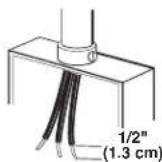
- Electrical supply junction box should be located 3'' (7.6 cm) at the end of maximum below the support surface when the oven is installed in a wall cabinet. A 1'' (2.5 cm) minimum diameter hole should have been drilled in the right rear or left rear corner of the support surface to pass the appliance cable through to the junction box.
Oven support surface must be solid, level and flush with bottom of cabinet cutout. Floor must be able to support a total weight (microwave and built-in oven) of 253 lbs (115 kg) for 2 (68.6 cm) models or 280 lbs (127 kg) for 30" (76.2 cm) mod
IMPORTANT: To avoid damage to your cabinets, check with your builder or cabinet supplier to make sure that the material used will not discolor, delaminate or sustain other damage.
This oven has been designed in accordance with the requirements of UL and CSA International and complies with the maximum allowable wood cabinet temperatures of 194^ (90^) .
Cabinet Dimensions — Built-in Microwave/OvenFlush Installation Combination A 25" (63.5 cm) m Standard Installation These dimensions w
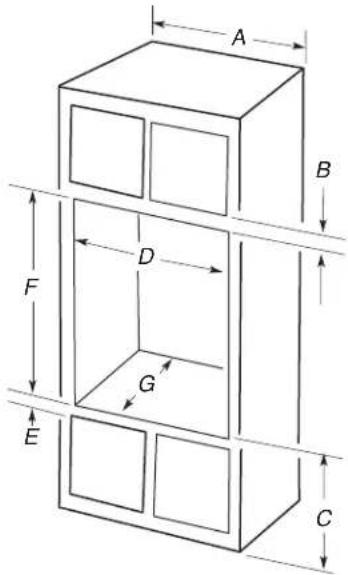
27" (68.6 cm) models
A. 27^ (68.6 cm) minimum cabinet width
B. 1 / 4'' (3.2 cm) top of cutout to bottom of upper cabinet door
C. 19 14'' (48.9 cm) bottom of cutout to floor is recommended. 7.5" - 19/4" (19.1-48.9 cm) bottom of cutout to floor is acceptable.
D. 25 1 / 2 " minimum (64.8 cm) cutout width
E. 1 / 2'' (3.8 cm) minimum bottom of cutout to top of cabinet door
F. 41 5 / 6 (105 cm)* recommended cutout height G.24" (60.7 cm) cutout depth
30^ (76.2 cm) models
A. 30^ (76.2cm) minimum cabinet width
B. 1 / 4'' (3.2 cm) top of cutout to bottom of upper cabinet door
C. 19 14'' (48.9 cm) bottom of cutout to floor is recommended. 7.5"-19/4" (19.1-48.9 cm) bottom of cutout to floor is acceptable.
D. 28 12'' (72.4 ~cm) minimum cutout width
E. 1^1/2 (3.8 cm) minimum bottom of cutout to top of cabinet door
F. 41 5 / 16 (105 cm)* recommended cutout height G.24" (60.7 cm) cutout depth
*NOTE: The cutout height can be between (404.5 cm) and 41½" (105.6 cm) for microwave/oven combination.
A 25" (63.5 cm) minimum cutout depth is required.
These dimensions will result in a 1/4'' (6 mm) reveal on the top, 1/4'' (6 mm) reveal on the sides, and a 1/8'' (3 mm) reveal on bottom of the wall oven. Top and bottom gaps are not required installation.
The front face of the cleats and platform will be visible and show be treated as a finished surface.
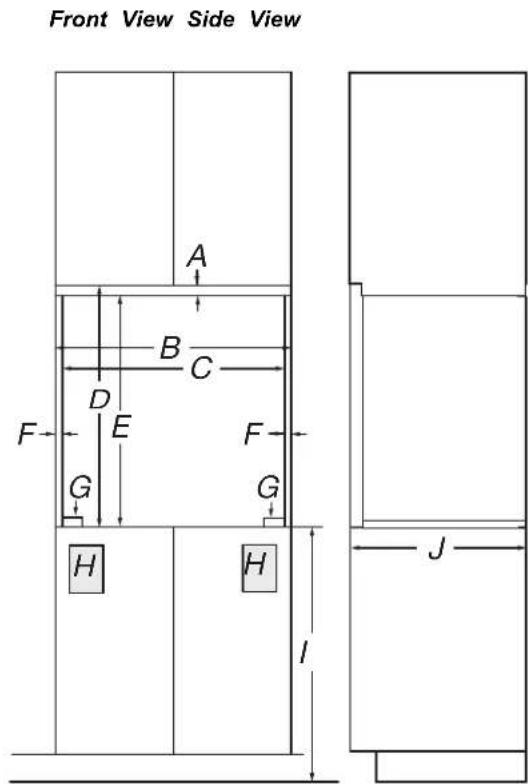
27^ (68.6 cm) models
A. 3 / 4'' (1.9 cm) top cleat
B. 27 14 (69.2 cm) minimum width of flush inset cutout
C. 257 / 8'' (65.7 cm) minimum width of opening
D. 43^ (109.2 cm) minimum height of flush inset cutout
E. 42 12 (107.3 cm) recommended cutout height
F. 11 / 16'' (1.7 cm) side cleat
G. 1 / 4'' (0.6 cm) recommended with foot. 15 / 16'' to / 16'' (2.3 cm to 3.5 cm) allowable without foot.
H. Recommended junction box location
I. 45 / 8^ - 1914^ (11.7-48.9 cm) bottom of cutout to floor
J. 25" (63.5 cm) minimum depth of cutout
30^ (76.2 cm) models
A. 3 / 4'' (1.9 cm) top cleat
B. 30 14 (76.8 cm) minimum width of flush inset cutout
C. 28 7 / 8 (73.3 cm) minimum width of opening
D. 43^ (109.2 cm) minimum height of flush inset cutout
E.42 1 / 2 (107.3 cm) recommended cutout height
F. 11/16" (1.7 cm) side cleat
G. 1 / 4'' (0.6 cm) recommended with foot. 15/16" to 116 (2.3 cm to 3.5 cm) allowable without foot.
H. Recommended junction box location
1. 45 / 8^ - 191 / 4^ (11.7-48.9 cm) bottom of cutout to floor
J. 25^ (63.5 cm) minimum depth of cutout
*Cleats and spacers must be recessed (B.5 cm) from the front of the cabinet.
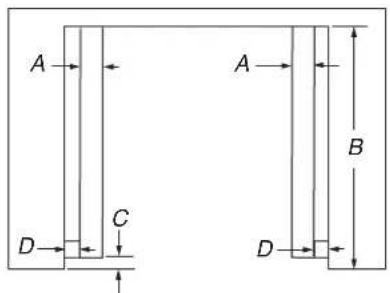
Top View
27" (68.6 cm) models
A. 2^ (5.1cm) spacer the entire depth of the cutout*
B. 25^ (63.5 cm) depth of cutout
C. 1 / 2'' (3.5 cm) recess from front of cabinet
D. 11 / 16'' (1.7 cm) side cleat*
30^ (76.2 cm) models
A. 2^ (5.1cm) spacer the entire depth of the cutout*
B. 25^ (63.5 cm) depth of cutout
C. 1 12 (3.5 cm) recess from front of cabinet
D. 11 / 16'' (1.7 cm) side cleat*
*Cleats and spacers must be recessed (8.5 cm) from the front of the cabinet.
Electrical Requirements
AWARNING
Electrical Shock Hazard
Electrically ground appliance.
Failure to do so could result in death, fire, or shock.
If codes permit and a separate ground wire is used, it is recommended that a qualified electrical installer determine that the ground path and the wire gauge are in accordance with codes.
Check with a qualified electrical installer if you are not sure the oven is properly grounded.
This oven must be connected to a grounded metal, permanent wiring system.
Be sure that the electrical connection and wire size are adequate and in conformance with the National Electrical Code, ANSI/NFPA 70-latest edition or CSA Standards C22.1-94, Canadian Electrical Code, Part 1 and C22.2 No. O-M91-latest edition, and all local codes and ordinances.
A copy of the above code standards can be obtained from:
National Fire Protection Association
1 BatteryMarch Park
Quincy, MA 02169-7471
CSA International
8501 East Pleasant Valley Road
Cleveland, OH 44131-5575
Electrical Connection
To properly install your oven, you must determine the type of electrical connection you will be using and follow the instructions provided for it here.
Oven must be connected to the proper electrical voltage, amperage, and frequency as specified on the model/serial/rating plate. See the following illustration.
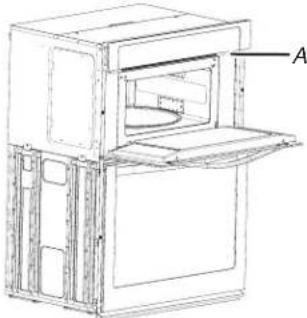
A. Model/serial/rating plate
Models rated from 7.3 to 9.6 kW at 240 V (6.3 to 8.3 kW at 208 V) require a separate 40 A circuit. Models rated from 4.9 to 7.2 kW at 240 V (4.3 to 6.2 kW at 208 V) require a sep 30 A circuit. Models rated at 4.8 kW and below at 240 V (4.2 kW and below at 208 V) require a separate 20 A circuit
A circuit breaker is recommended.
- Connect directly to the fused disconnect (or circuit breaker box) through flexible, armored or nonmetallic sheathed, copper cable (with grounding wire). See the "Make Electrical Connection" section.
- Flexible conduit from the oven should be connected directly to the junction box.
- Do not cut the conduit. The length of conduit provided is for serviceability of the oven.
A UL listed or CSA approved conduit connector must be provided.
If the house has aluminum wiring, follow the procedure below:
Connect the aluminum wiring using special connectors and/or tools designed and UL listed for joining copper to aluminum. Follow the electrical connector manufacturer's recommended procedure. Aluminum/copper connection must conform with local codes and industry accepted wiring practices. Be sure that the electrical connection and wire size are adequate and in conformance with the National Electrical Code, ANSI/ NFPA 70-latest edition or
CSA Standards C22.1-94, Canadian Electrical Code, Part 1 and C22.2 No. O-M91-latest edition, and all local codes and ordinances. A copy of the above code standards can be obtained from: National Fire Protection Association 1 Batterymarch Park Quincy, MA 02169-7471 CSA International 8501 East Pleasant Valley Road Cleveland, OH 44131-5575.
INSTALLATIONS
Prepare Built-In Oven
-
Decide on the final location for the oven. Avoid drilling or cutting into house wiring during installation.
-
Locate the oven door hinge locks in both corners of the oven door, and rotate the hinge locks toward the oven door to the unlocked position. If the door hinge lock is not rotated fully (see unlocked position in illustration), the door will not remove properly.
AWARNING
Excessive Weight Hazard
Use two or more people to move and install or uninstall appliance.
Failure to do so can result in back or other injury.
Oven door hinge lock in locked position
Oven door hinge lock in unlocked position
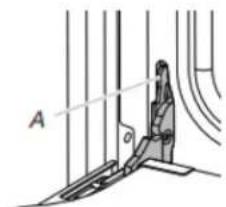

A. Grip here to rotate
- To avoid floor damage, set the oven onto cardboard prior to installation. Do not use handle or any portion of the front frame for lifting.
- Remember to remove bottom vent from the foam packing on top of oven.
- Remove the shipping materials and tape from the oven. Remember to keep the corner posts and other materials that may be needed for installation.
- Remove the hardware package from inside the bag containing literature.
- Remove and set aside racks and other parts from inside the oven.
-
Move oven and cardboard close to the oven's final location.
-
Gently start to close the door. The door will stop at a partial closed position.
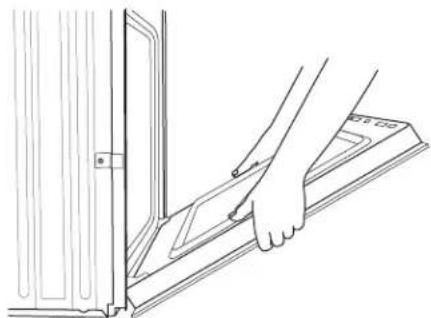
Remove Oven Door(s)
IMPORTANT: Use 2 hands to remove oven door. For double ovens, repeat the process for each door.
- Prior to removing the oven door, prepare a surface where you will place it. This surface should be flat and covered with a soft blanket, or use the corner posts from your packaging material.
- Fully open the oven door.

A. Door hinges
Using 2 hands, grasp the edges of the oven door. Close the oven door slightly past the stop position to take the weight of the door hinges, and then pull the oven door up.
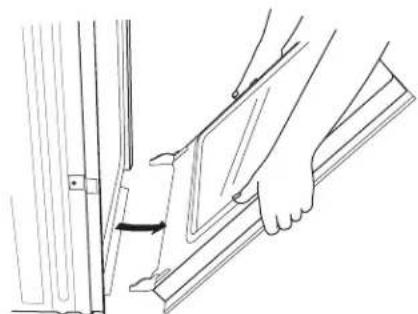
- Pull the oven door toward you, and then remove. You may need to gently shift door from side to side as you pull.
- Set the oven door aside on the prepared covered work surface with the oven door resting on its handle.
- To continue with the oven installation, go to the "Positioning Oven Feet for Multiple Cabinet Cutout Heights" section.
Make Electrical Connection
IMPORTANT: For Flush installation before making electrical connection, the oven feet or spacers need to be installed to allow a microwave/oven combination to be installed in a recommended-wire cutout height.
Please contact service for feet to be shipped to you free of charge.
Electrical Connection Options Chart
If your home has: Go to section: allow
4-Wire Cable from Home Power Supply
AWARNING
Electrical Shock Hazard
Disconnect power before servicing.
Use 8 gauge copper wire.
Electrically ground oven.
Failure to follow these instructions can result in fire, or electrical shock.
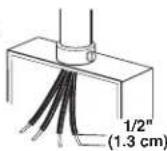
3-wire
3-Wire Cable from Home Power Supply
4-Wire Cable from Home Power Supply
deportant: Use the 4-wire cable from home power supply in the U.S. where local codes do not allow grounding through neutral, New Branch circuit installations (1996 NEC), mobile supply homes and recreational vehicles, new construction and in Canada.
This oven is manufactured with a neutral (white) power supply homes, wire and a cabinet-connected green (or bare) ground wire. Canada.
- Disconnect power.
- Feed the flexible conduit from the oven through the opening in the cabinet.
- Remove junction box cover, if it is present.
- Install a UL listed or CSA approved conduit connector to the junction box.
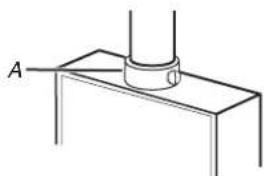
A. UL listed or CSA approved conduit connector
- Route the flexible conduit from the oven to the junction through a UL listed or CSA approved conduit connector.
- Tighten screws on conduit connector.
- See "Electrical Connection Options Chart" to complete installation for your type of electrical connection.
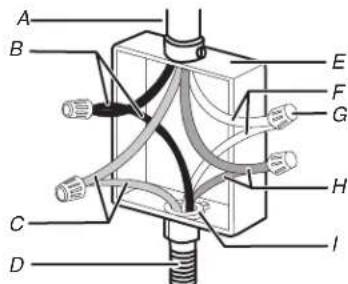
A. Cable from home power supply
B. Black wires
G. UL listed wire connectors
C. Red wires
H. Green (or bare) ground wires
D. 4-wire flexible conduit from
I. UL listed or CSA approved
conduit connector
E.Junction box
- Connect the 2 black wires (B) together using a UL listed wire connector.
- Connect the 2 red wires (C) together using a UL listed wire connector.
- Connect the 2 white wires (F) together using a UL listed wire connector.
- Connect the green (or bare) ground wire (H) from the oven cable to the green (or bare) ground wire (in the junction box) using a UL listed wire connector.
- Install junction box cover.
3-Wire Cable from Home Power Supply - U.S. Securely fasten the oven to the cabinet using the #8-14 x 3/4" screws provided.
IMPORTANT: Use the 3-wire cable from home power supply where local codes permit a 3-wire connection.
Insert the screws through hole in black trim aligning with hole in oven frame. Do not overtighten screws.
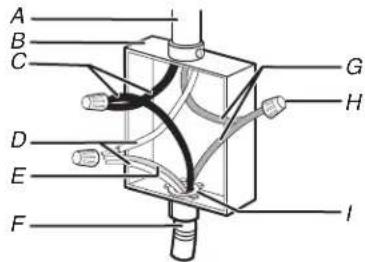
A. Cable from home power supply
F. 4-wire flexible conduit from
B.Junction box
G. Red wires
C. Black wires
H. UL listed wire connectors
D. White wires
I. UL listed or CSA approved
conduit connector
- Connect the 2 black wires connector.
(C) together using a UL listed wire 5. T
- Connect the 2 white wires wire (of the oven cable) u
(D) and the green (or bare) grouting a UL listed wire connector.
- Connect the 2 red wires connector.
6) together using a UL listed wire.
- Install junction box cover.
m - 1 0 ;
Install Oven
- Using two or more people, lift oven partially into cabinet cutout. Use the oven opening as an area to grip. NOTE: Push against seal area of oven front frame when pushing oven into cabinet. Do not push against outside edges.
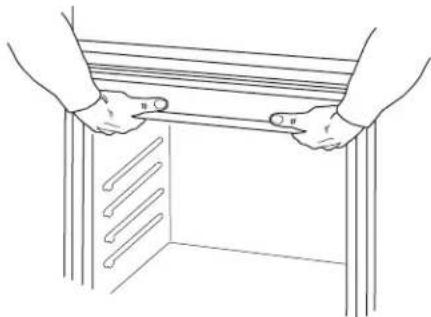
- Push against the seal area of the front frame to push the oven into the cabinet until the back surface of the front frame touches the front wall of the cabinet.

- Push oven completely into cabinet and center oven into cabinet cutout.
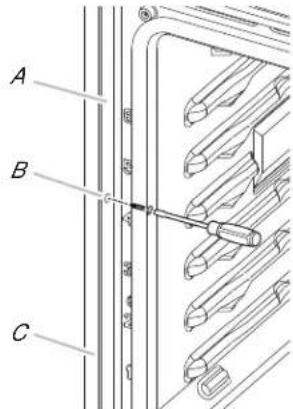
A. Oven frame
B. Side trim hole
C. Side trim piece
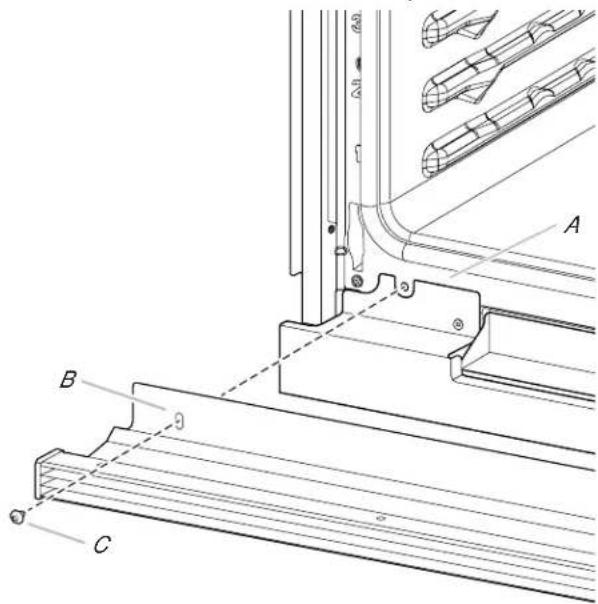
The bottom vent trim and bottom vent shield are shipped in the foam packing at the top of the oven.
Align bottom vent shield tab (B) with oven frame (A) as shown.
Using one #8-18 x 3/8" (9.5 mm) screw (C) on each side the bottom vent shield tab (B), fasten the vent shield securely to the oven frame (A).
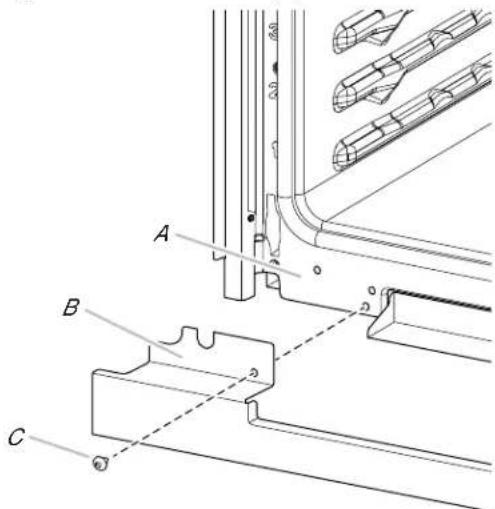
A. Oven frame
B. Bottom vent shield tab
C.#8-18x3/8"(9.5mm)
screws
- After the bottom vent shield is installed.
Align the bottom vent trim tab (B) with the oven frame (A) display as shown. 13. If the
Using one #8-18 x 3/8" (9.5 mm) screw (C) on each side of F9E0 error code is encountered upon powering up the unit the trim tab (B), align the top edge of the bottom vent through the appliance is wired incorrectly at the Junction Box or tab (E) with the hinge receiver edge (D) as shown. Electrical Panel. Contact a qualified electrician to verify the
■ Fasten the bottom vent trim securely to the oven frame (A home electrical supply and the hardwire connection at the Junction Box or Electrical Panel (See the Electrical Connection Options section).
13. If the display panel does not light, refer the Warranty.
If F9E0 error code is encountered upon powering up the unit, the appliance is wired incorrectly at the Junction Box or Electrical Panel. Contact a qualified electrician to verify the
home electrical supply and the hardwire connection at the Junction Box or Electrical Panel (See the Electrical Connection Options section).
- The display panel will light briefly, and "PF" may appear in (A)display.
Positioning Oven Feet
The oven feet need to be installed to allow the microwave/oven combination to be installed in a Flush Installation or in Standard Installations where the cutout height 1/3" 407.9 cm) or more.
NOTE: Do not remove the spacers.
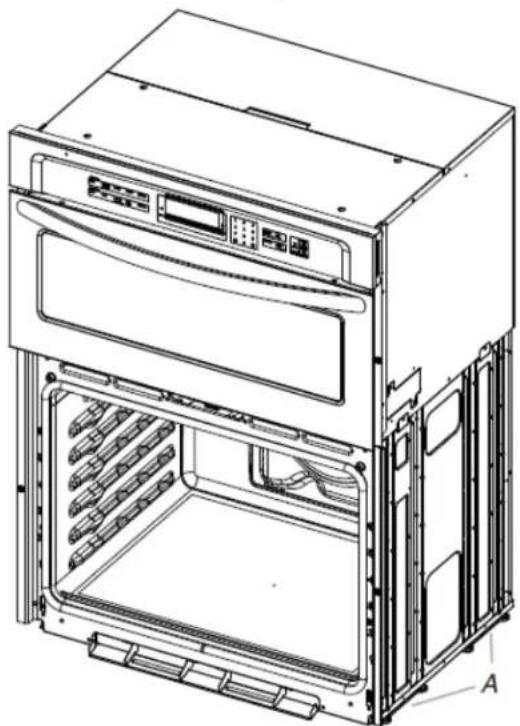
A. Spacers
- Using 2 or more people, place the on its back on a covered surface.
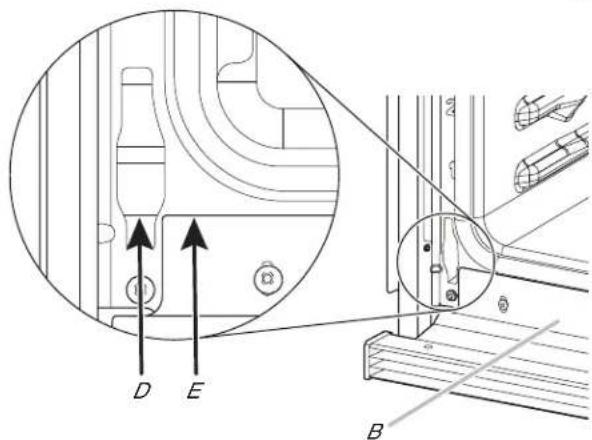
A.Oven frame B.Trim tab
C.#8-18 x3 / 8'' (9.5mm) screw
D. Hinge receiver edge
E. Bottom Vent Trim Tab top edge
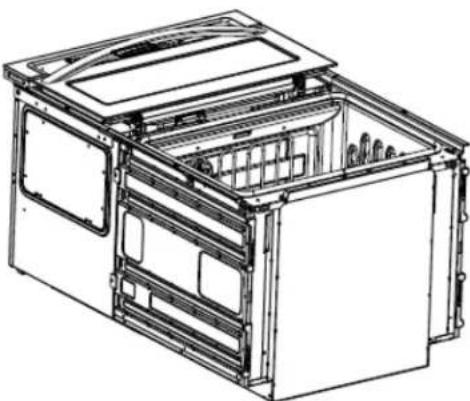
- Replace the oven racks.
- Replace the oven door. See the "Replace Oven Door(s)" section.
-
Check that the door is free to open and close. If it is not, repeat the removal and installation procedures. See the "Prepare Built-In Oven" section.
-
Repeat for lower oven door.
IMPORTANT: For proper oven operation, check that the gap between bottom trim of the door and bottom vent trim is at least 1/4'' (6.4 mm).
11. Reconnect power.
- Install a foot on the left rear spacer using a #8-18 x 3/86. Using 2 or more people, place the oven in its upright position (9.5 mm) screw.
NOTE: Position the foot so the long side of the foot is facing toward the top of the oven.
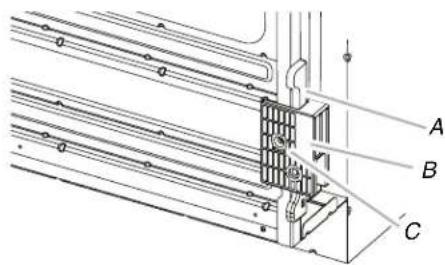
A. Spacers
B. Foot
C.#8-18x3/8"(9.5mm) screw.
- In the same manner, install a foot on the right rear of the oven
- Install a front foot on the left front spacer using a #8-18 x 3/8 (9.5 mm).
NOTE: Position the foot so the long side of the foot is facing toward the inside of the oven.
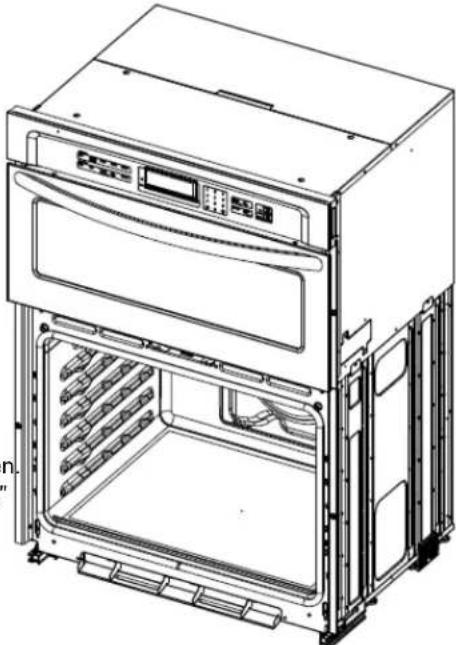
- Go to the "Make Electrical Connection" section in the Installation Instructions provided with your built-in oven.
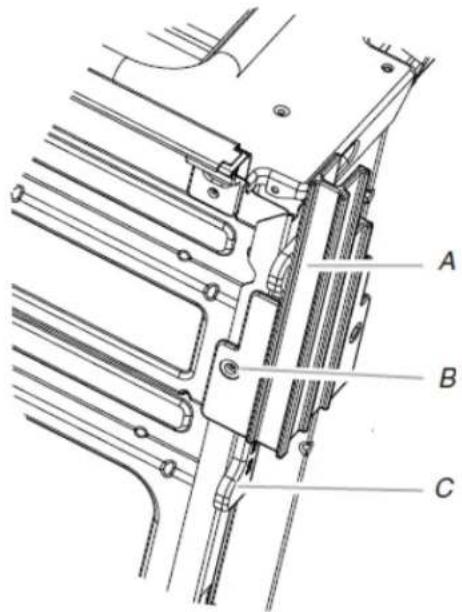
A. Front foot
B.#8-18 x3 / 8'' (9.5mm) screw.
C. Spacer
Install Deflector Kit
On single and double oven models installed above a warming drawer or for ovens installed using flush installation cabinetry, a deflector kit must be installed. See the "Tools and Parts" section for information on ordering.
Parts Supplied in Deflector Kit
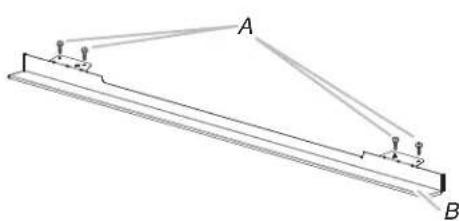
A. Phillips head screws (4), only 2 screws for 27^ (68.6 cm) size
B.Deflector (1)
- In the same manner, install a front foot on the right front of the oven.
Install Deflector Kit
- Install the deflector (B) to the lower vent piece (D) using twdUsing two hands, grasp side edges of door at the midpoint. #8-18 x 1/4" (6.4 mm) screws on each side. Face the oven cavity. NOTE: On 27" (68.6 cm) models, only one #8-18 x 1/4"2. Locate the slots on each side of the oven cavity for the do (6.4 mm) screw is used on each side. hinge locks.
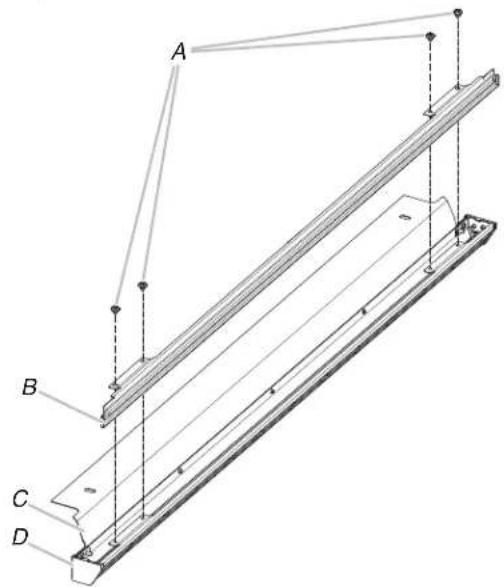
A.#8-18x1/4"
C. Upper vent piece
(6.4 mm) screws
D. Lower vent piece
B. Deflector
- Align vent tab (B) with oven frame (A) as shown in the following illustration.
- Using one #8-18 x 3/8" (9.5 mm) screw (E) on each side of the sure the door hinge notch is engaged on the bottom vent tab (B), fasten the vent securely to the oven. of the oven cavity slot.
- oMathe sure the door hinge notch is engaged on the bottom of the oven cavity slot.
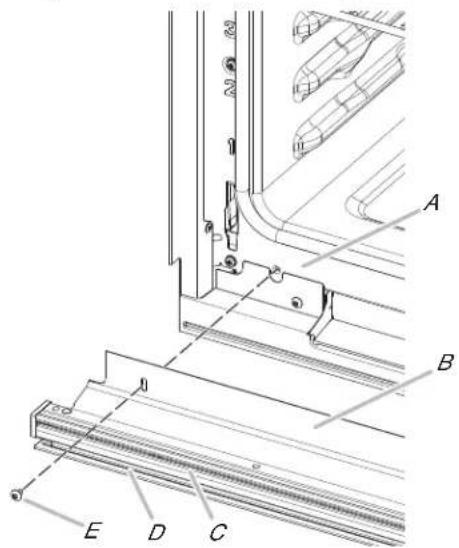
A.Oven frame
D. Deflector
B. Vent tab
E.#8-18 x3 / 8'' (9.5mm) screw
C.Oven vent
Replace Oven Door(s)
Using two hands, grasp side edges of door at the midpoint. Face the oven cavity.
Locate the slots on each side of the oven cavity for the door hinge locks.
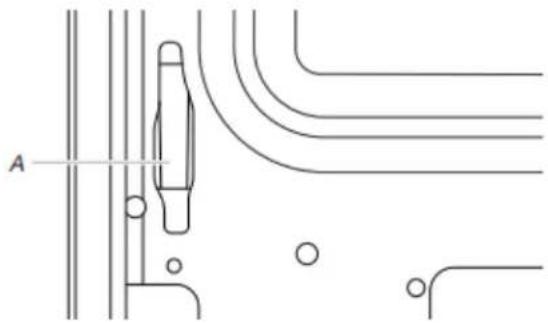
A. Slot in the oven cavity for door hinge lock
- Using 2 hands, grasp the edges of the oven door. At a 45^ angle, insert the hinges at the same time, and push the oven door into the oven cavity slot to replace. You may need to gently shift the door from side to side as you push.
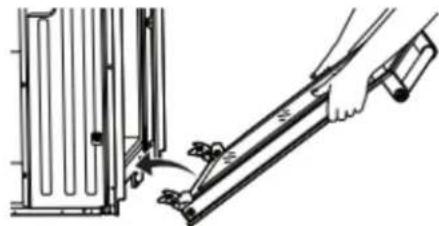

IMPORTANT: Do not close the door at this step or damage may occur to the door hinge.
-
Lower the oven door to the fully open position. If the oven does not open to a full 90^ , repeat steps 1 through 3.
-
Locate the oven door hinge locks in the corners of the door, and rotate the hinge locks toward the oven cavity locked position.
dfe you need Assistance or Service:
To the Please refer to the Quick Start Guide for contact information.
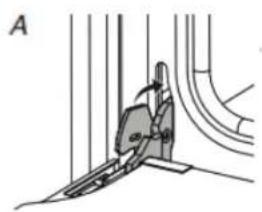
A. Unlocked position
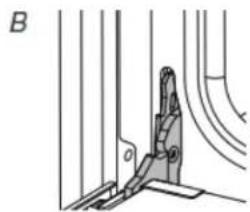
B. Locked position
Check Operation of Microwave Oven
- Fill a microwave-safe container with 1 cup (250 mL) of water and place container inside microwave oven. Close door firmly.
- Press MICROWAVE.
- Select Cooking Method.
- Set microwave oven cook time to 2 minutes.
- Press START. The interior microwave oven light should be on and the remaining cooking time should be displayed. When display reads "1:00", open microwave oven door. The microwave should stop cooking. Close door firmly. The interior microwave oven light should turn off.
-
Press START. Microwave oven should begin cooking, and the microwave oven interior light should be on.
-
After the door hinges have been locked, gently swing the upward to close. The door should not be forced closed.
- When the hinges are properly installed and the door is closed, will shut off. there should be an even gap between the door and the tonpen microwave oven door and slowly remove container. panel. If one side of the oven door is lower than the other, water in container should be hot. hinge on that side is not properly installed.
Complete Installation
contact the dealer from whom you purchased your built-in electric
- Check that all parts are now installed. If there is an extravost, and microwave ovens. go back through the steps to see which step was skipped.
- Check that you have all of your tools.
- Dispos of/recycle all packaging materials.
- For oven cleaning, read the "Oven Maintenance and Care" section.
Check Operation of Single and Double Ovens
- Turn on power.
- At first use, set up the languages, clock, and any other preferences, if available. For more information, read the online "Control Guide".
- Start a broil cycle.
NOTE: Odors and smoke are normal when the oven is used the first few times.
- Wait 5 minutes, then check for heat.
If Oven does Not Operate, Check the Following:
Household fuse is intact and tight; or circuit breaker has not tripped.
Electrical supply is connected.
See the online "Troubleshooting".
- Place the SatinGlide Roll-Out Extension Rack for Smart Oven+ Attachments in the lowest rack position in the unit to make sure the correct accessory rack is on the bottom.
- Press UPPER CANCEL/LOWER CANCEL on double ovens, or press CANCEL on single ovens.
SECURITÉ DE L'ENSEMBLE FOUR ÉLECTRIQUE/FOUR À MICRO-ONDES ENCASTRÉ
National Fire Protection Association
1 BatteryMarch Park
Quincy, MA 02169-7471
CSA International
8501 East Pleasant Valley Road
Cleveland, OH 44131-5575
Paraocular:
Paraoculars are used to measure the distance between two consecutive points. The distance between two points is measured by a scale called a line of reference (LOR). For example, the line of reference for a 100-m-long walk would be a line of reference for a 200-m-long walk.
CAVIDAD DEL HORNO
National Fire Protection Association
1 BatteryMarch Park
Quincy, MA 02169-7471
CSA International
8501 East Pleasant Valley Road
Cleveland, OH 44131-5575
Conexión electrica
Si necessities可以帮助 you to get the best quality of your home.