STWC140GI - Smart glasses SONY - Free user manual and instructions
Find the device manual for free STWC140GI SONY in PDF.


| Product Type | Connected glasses (subtitling and audio assist) |
| Brand | Sony |
| Model | STWC140GI |
| Glasses dimensions | 190 × 43 × 190 mm |
| Glasses weight | Approx. 84 g (without cable) |
| Receiver dimensions | 108 × 45 × 20 mm |
| Receiver weight | Approx. 89 g |
| Display type | Green micro-display, 31 characters × 3 lines |
| Display brightness | 3 to 50 cd/m² (automatic and manual adjustment, 5 levels) |
| Field of view | 19° horizontal × 3.7° vertical |
| Wireless channels | 7 subtitle channels, 7 audio channels |
| Audio selection | HI (hearing impaired) / VI (visually impaired) |
| Available adjustments | Bridge height (3 positions), vertical subtitle position, perceived distance (7/12/18 m), language (6), brightness (5 levels), volume (50 levels) |
| Receiver battery life | Approx. 6 hours (new), approx. 3 hours after 500 cycles |
| Operating temperature | 10 °C to 35 °C |
| Operating humidity | 10 % to 85 % (no condensation) |
| Storage temperature | -20 °C to +60 °C |
| Storage humidity | 0 % to 90 % (no condensation) |
| Maintenance and cleaning | Wipe lenses with microfiber cloth; sterilize with alcohol wipes (IPA 70%) or UV |
| Safety | Avoid shocks, water, condensation; do not expose to harsh chemicals |
| Spare parts and repairability | Replacement receiver battery (contact Sony support) |
| Included accessories | Subtitle glasses, receiver, instruction manual, cleaning cloths |
Frequently Asked Questions - STWC140GI SONY
User questions about STWC140GI SONY
0 question about this device. Answer the ones you know or ask your own.
Ask a new question about this device
Download the instructions for your Smart glasses in PDF format for free! Find your manual STWC140GI - SONY and take your electronic device back in hand. On this page are published all the documents necessary for the use of your device. STWC140GI by SONY.
USER MANUAL STWC140GI SONY
Captioning Glasses with Audio Assist/ Captioning Glasses
Operating Instructions GB
Mode d'emploi FR
Before operating the unit, please read this manual thoroughly and retain it for future reference.
Owner's Record
The model and serial numbers are located on the product. Record these numbers in the spaces provided below. Refer to these numbers whenever you call upon your Sony dealer regarding this product.
Model No.
Serial No.
WARNING
To reduce the risk of fire or electric shock, do not expose this apparatus to rain or moisture.
To avoid electrical shock, do not open the cabinet. Refer servicing to qualified personnel only.
CAUTION
The apparatus shall not be exposed to dripping or splashing. No objects filled with liquids, such as vases, shall be placed on the apparatus.
WARNING
Excessive sound pressure from earphones and headphones can cause hearing loss. In order to use this product safely, avoid prolonged listening at excessive sound pressure levels.
WARNING
Batteries shall not be exposed to excessive heat such as sunshine, fire or the like.
For the customers in the U.S.A.
This equipment has been tested and found to comply with the limits for a Class A digital device, pursuant to part 15 of the FCC Rules. These limits are designed to provide reasonable protection against harmful interference when the equipment is operated in a commercial environment. This equipment generates, uses, and can radiate radio frequency energy and, if not installed
and used in accordance with the instruction manual, may cause harmful interference to radio communications. Operation of this equipment in a residential area is likely to cause harmful interference in which case the user will be required to correct the interference at his own expense.
You are cautioned that any changes or modifications not expressly approved in this manual could void your authority to operate this equipment.
This device complies with part 15 of the FCC Rules. Operation is subject to the following two conditions: (1) This device may not cause harmful interference, and (2) this device must accept any interference received, including interference that may cause undesired operation.
This transmitter must not be co-located or operated in conjunction with any other antenna or transmitter.
This equipment complies with FCC radiation exposure limits set forth for an uncontrolled environment and meets the FCC radio frequency (RF) Exposure Guidelines in Supplement C to OET65. This equipment has very low levels of RF energy that are deemed to comply without testing of specific absorption ratio (SAR).
For the customers in Canada
This Class A digital apparatus complies with Canadian ICES-003.
This device complies with Industry Canada licence-exempt RSS standard(s). Operation is subject to the following two conditions: (1) this device may not cause interference, and (2) this device must accept any interference, including interference that may cause undesired operation of the device.
This equipment complies with IC radiation exposure limits set forth for an uncontrolled environment and meets RSS-102 of the IC radio frequency (RF) Exposure rules. This equipment has very low levels of RF energy that are deemed to comply without testing of specific absorption ratio (SAR).
The term "IC:" before the radio certification number only signifies that Industry Canada technical specifications were met.
For the customers in Europe, Australia and New Zealand
WARNING
This is a Class A product. In a domestic environment, this product may cause radio interference in which case the user may be required to take adequate measures.
For the customers in Europe
This product has been manufactured by or on behalf of Sony Corporation, 1-7-1 Konan Minato-ku Tokyo, 108-0075 Japan. Inquiries related to product compliance based on European Union legislation shall be addressed to the authorized representative, Sony Deutschland GmbH, Hedelfinger Strasse 61, 70327 Stuttgart, Germany. For any service or guarantee matters, please refer to the addresses provided in the separate service or guarantee documents.
This apparatus shall not be used in the residential area.
CE
| Dutch | Hierbij verklaart Sony Corporation dat het toestel STW-C140GI/ Ondertitelingsbril met Audio Assist in overeenstemming is met de essentiele eisen en de andere relevante bepalingen van richtlijn 1999/5/EG. Nadere informatatie=kunt u vinden op: http://www.compliance.sony.de/ |
| English | Hereby, Sony Corporation, declares that STW-C140GI/Captioning Glasses with Audio Assist is in compliance with the essential requirements and other relevant provisions of the Directive 1999/5/EC. For details, please access the following URL: http://www.compliance.sony.de/ |
| French | Par la présente Sony Corporation declare que l'appareil STW-C140GI/Lunettes à sous-titres avec Audio Assist est conforme aux exigences essentielles et aux autres dispositions pertinentes de la directive 1999/5/CE. Pour toute information complémentaire, veuillez consulter l'URL suivante: http://www.compliance.sony.de/ |
| German | Hiermit erklärt Sony Corporation, dass sich das Gerät STW-C140GI/Brille für Untertitel mit Audiunterstützung in Übereinstimmung mit den grundlegenden Anforderungen und den übrigen einschlögigen Bestimmungen der Richtlinie 1999/5/EG befindet. Weitere Informationen erhältlich unter: http://www.compliance.sony.de/ |
| Italian | Con la presente Sony Corporation dichiarare che STW-C140GI/Occhiali con sottotitoli con assistenza audio è conforme ai requisiti essenziali ed alle altre disposizioni pertinenti stabilite alla direttiva 1999/5/CE. Per ulteriori dettagli, si prega di consulfare il seguente URL: http://www.compliance.sony.de/ |
| Norwegian | Sony Corporation erklærer herved at STW-C140GI/briller for teksting med lydassistanse er i samsvar med de grunnleggende krav og øvrige relevante krav i direktiv 1999/5/EF. For flere detaljer, vennligst se: http://www.compliance.sony.de/ |
| Spanish | Por medio de la presente Sony Corporation declara que el STW-C140GI/gafas para subtituales con audio auxiliar cumple con los requisitos esencias y cualesquieraorasdispositiones aplicables o exigibles de la Directiva 1999/5/ CE. Para mayor informacion, por favor consulute el siguientes URL: http://www.compliance.sony.de/ |
| Turkish | Sony Corporation, STW-C140GI/Ses Destekli Altyazı Gözlugu ürünü icin gerekli:tüm testleri 1999/5/EC Direktifine gore yapımş bulunmaktadır. Daha detaylı bilgi:için lutfen web sayfasını ziyaret ediniz: URL:http://www.compliance.sony.de/ |
For the customers in Italy
Use of the RLAN network is governed:
with respect to private use, by the Legislative Decree of 1.8.2003, no. 259 ("Code of Electronic Communications"). In particular Article 104 indicates when the prior obtainment of a general authorization is required and Art. 105 indicates when free use is permitted;
- with respect to the supply to the public of the LAN access to telecom networks and services, by the Ministerial Decree 28.5.2003, as amended, and Art. 25 (general authorization for electronic communications networks and services) of the Code of electronic communications
For the customers in Norway
Use of this radio equipment is not allowed in the geographical area within a radius of 20km from the centre of Ny-Alesund, Svalbard.
For kundene i Norge
Before operating the unit, please read this manual thoroughly and retain it for future reference.
Owner's Record
The model and serial numbers are located on the product. Record these numbers in the spaces provided below. Refer to these numbers whenever you call upon your Sony dealer regarding this product.
Model No.
Serial No.
WARNING
To reduce the risk of fire or electric shock, do not expose this apparatus to rain or moisture.
To avoid electrical shock, do not open the cabinet. Refer servicing to qualified personnel only.
CAUTION
The apparatus shall not be exposed to dripping or splashing. No objects filled with liquids, such as vases, shall be placed on the apparatus.
For the customers in the U.S.A.
This equipment has been tested and found to comply with the limits for a Class A digital device, pursuant to part 15 of the FCC Rules. These limits are designed to provide reasonable protection against harmful interference when the equipment is operated in a commercial environment. This equipment generates, uses, and can radiate radio frequency energy and, if not installed and used in accordance with the instruction manual, may cause harmful interference to radio communications. Operation of this equipment in a residential area is likely to cause harmful interference in which case the user will be required to correct the interference at his own expense.
You are cautioned that any changes or modifications not expressly approved in this
manual could void your authority to operate this equipment.
This device complies with part 15 of the FCC Rules. Operation is subject to the following two conditions: (1) This device may not cause harmful interference, and (2) this device must accept any interference received, including interference that may cause undesired operation.
For the customers in Canada
CANICES-3 (A)/NMB-3(A)
For the customers in Europe, Australia and New Zealand
WARNING
This is a Class A product. In a domestic environment, this product may cause radio interference in which case the user may be required to take adequate measures.
For the customers in Europe
This product has been manufactured by or on behalf of Sony Corporation, 1-7-1 Konan Minato-ku Tokyo, 108-0075 Japan. Inquiries related to product compliance based on European Union legislation shall be addressed to the authorized representative, Sony Deutschland GmbH, Hedelfinger Strasse 61, 70327 Stuttgart, Germany. For any service or guarantee matters, please refer to the addresses provided in the separate service or guarantee documents.
This apparatus shall not be used in the residential area.
AVERTISSEMENT
About this manual 10
Supplied Items 10
System Configuration (Example) .... 11
Precautions 12
Location and Function of
Controls 13
Captioning Glasses 13
Receiver Box
(STW-C140GI only) 14
Instructions to Theater Staff
Charging 16
Mode Selection: Captioning or
Audio 16
Preparation 17
Screen Position Alignment Check
(Captioning Mode) 17
Channel and Audio Selection 17
Language Selection (Captioning
Mode) 18
Providing Customers with Units
(Captioning Mode) 19
Providing Customers with Units
(Audio Mode) 19
Turning Off 20
Cleaning 20
Wiping the Captioning Glasses .... 20
Sterilization 21
Instructions to Customers
Adjustments 23
Setting Screen 24
Setting Screen Operation 24
Appendices
Specifications 25
License 26
About this manual
In this manual, we mention two models; STW-C140GI and STW-C140S. Each model is structured as follows:
| Model name Captioning glasses Receiver box | ||
| STW-C140GI (Captioning Glasses with Audio Assist) | Supplied Supplied | |
| STW-C140S (Captioning Glasses) | Supplied Not supplied* | |
- The receiver box is not included with the STW-C140S. Refer to the description of the receiver box in the discussion of a captioning glasses connected to a receiver box.
Supplied Items
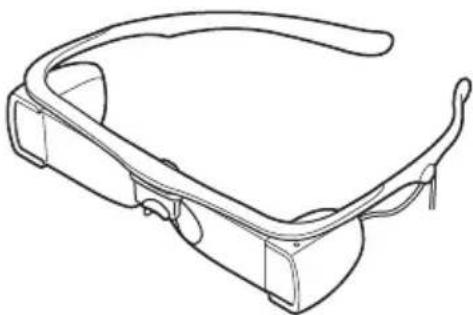
Captioning glasses (1)
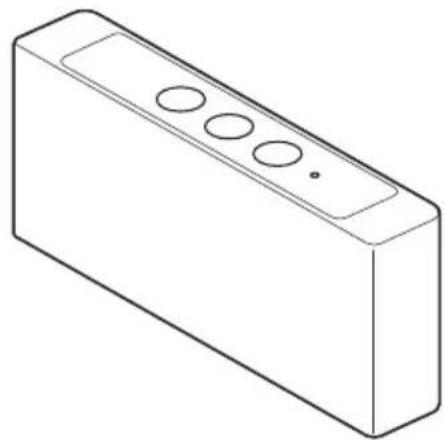
Receiver box (1) (STW-C140GI only)
Operating Instructions (1)
System Configuration (Example)
Closed caption data is transmitted from a D-Cinema (digital cinema) server by the Data Transmitter and received by the receiver box to be displayed on the captioning glasses. Audio data for the visually impaired and/or the hearing impaired can be also transmitted, for listening through headphones.
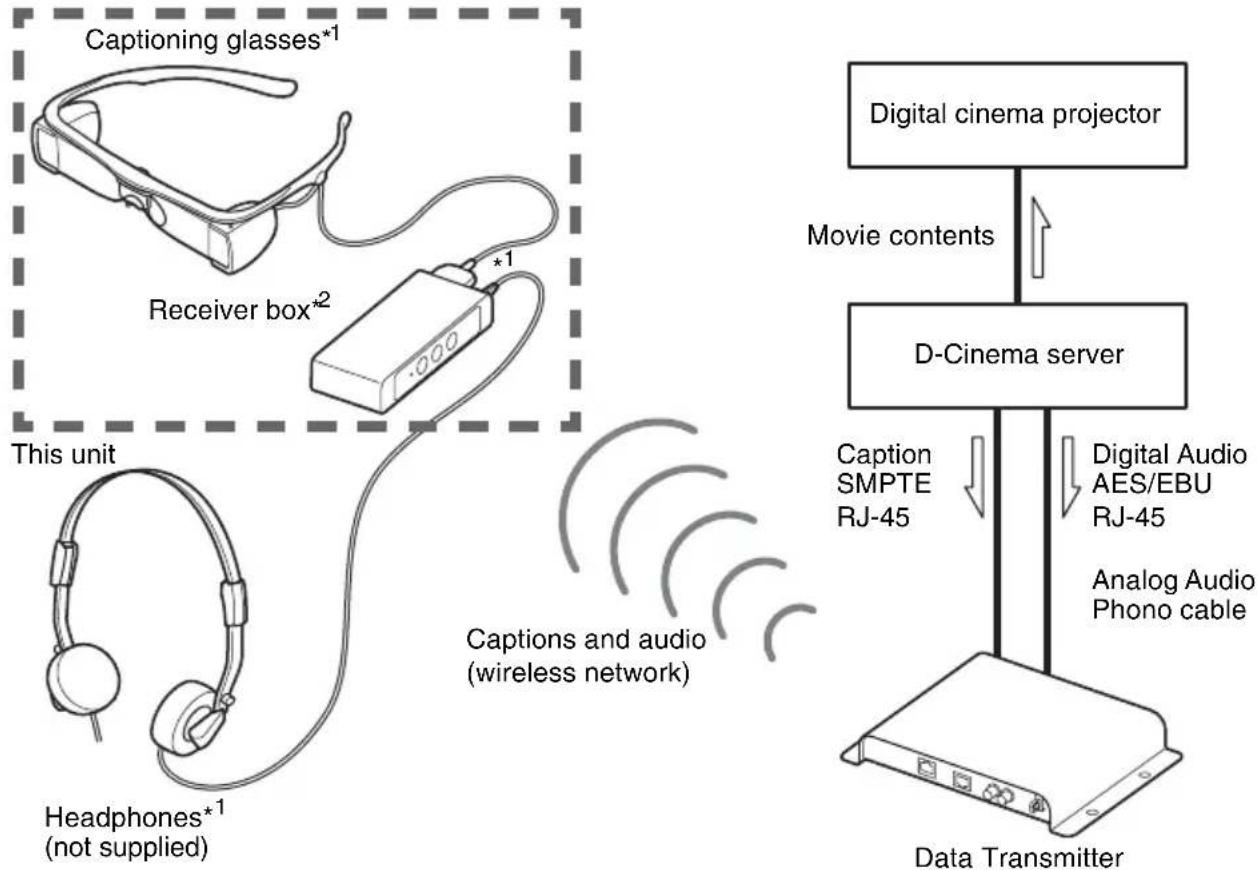
1 The receiver box outputs to only one device at a time; either the captioning glasses or the headphones.
^2 The receiver box is not included with the STW-C140S.
Precautions
- Do not drop or subject to impact.
- Do not stretch the cable.
- Avoid exposing the units to water. If water enters the units, a malfunction may occur, which may not be repairable.
- The units are neither dust-proof, nor splash-proof.
- Do not allow condensation to form in the unit, or use the unit near water.
- Stop using the unit immediately if it gets wet. In an attempt to resume use of the unit, do not charge the battery or dry the unit forcibly using heating apparatus (microwave, etc.).
- Do not leave the unit in a humid place. An environment where a humidifier's vapor is emitted (as a result of sudden temperature change) may cause condensation in the unit.
- Do not place the unit near the vents of an air conditioner. If the unit is brought directly from a cold to a warm location, condensation may occur inside.
- The minimum age for wearing the captioning glasses is seven years old.
- The lenses of the captioning glasses are made of glass. If the glass cracks or breaks, contact your dealer and refrain from touching it or attempting to repair it yourself. Damage may be incurred if the captioning glasses sustain a shock or if they are dropped; therefore, be careful when handling them. Damages resulting from inappropriate handling of the captioning glasses are not covered under warranty.
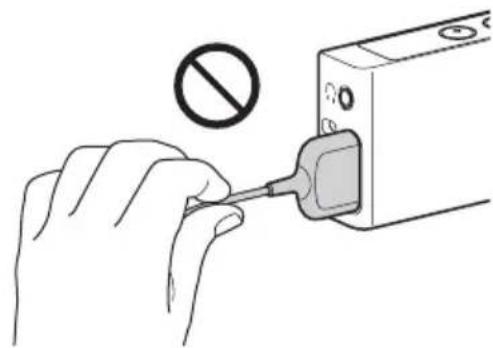
- Hold the connector when disconnecting the cable from the unit; do not hold the cable, as it may be damaged and closed captions may not be displayed.
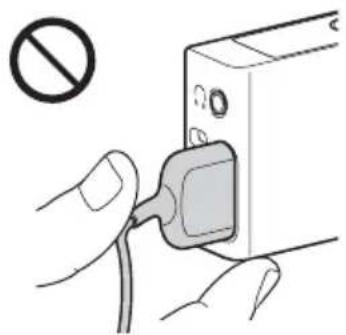
- Hold the connector when connecting the cable to the receiver; do not bend the cable at the connector/cable junction, as it may be damaged and closed captions may not be displayed.
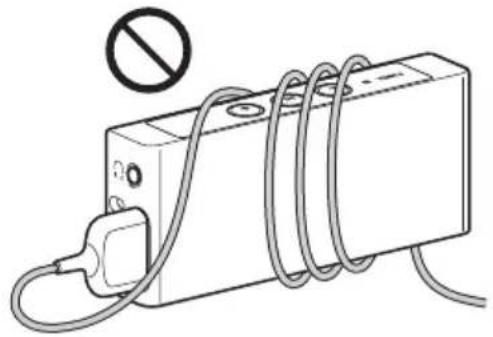
- Do not loop the cable around the unit. The cable may be damaged and closed captions may not be displayed.
Location and Function of Controls
Captioning Glasses
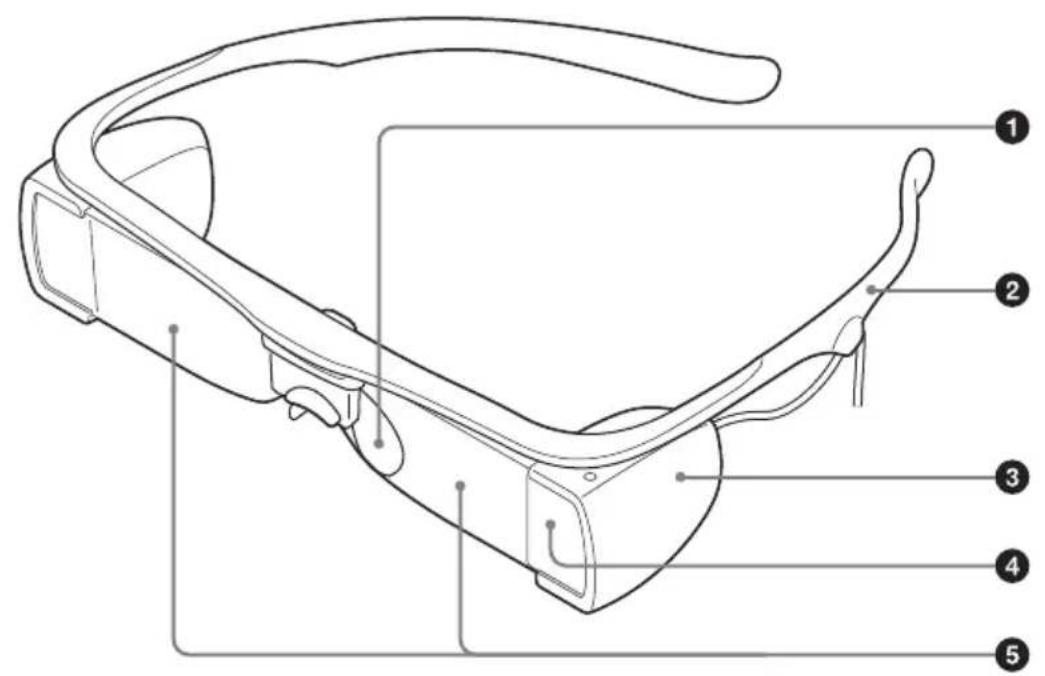
1Nose piece
Slide the nose piece up or down and adjust the angle for a comfortable fit.
2Temple frames
Place the temple frames over your ears, as you would regular glasses. Similarly, handle the captioning glasses by the temple frames.
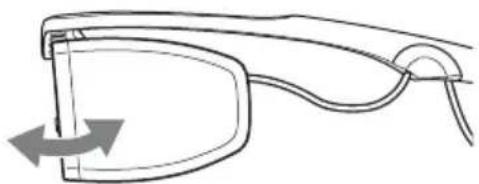
Optical engines
Use to raise or lower the position of the closed captions. The optical engines and lenses are integrated into one component and can rotate back and forth.
4 Photo sensor
Detects the screen image brightness to adjust the closed caption brightness automatically.
Lenses
Keep the lenses clean and avoid touching or staining them.
Receiver Box (STW-C140GI only)
Antenna (inside)
Avoid covering the antenna.
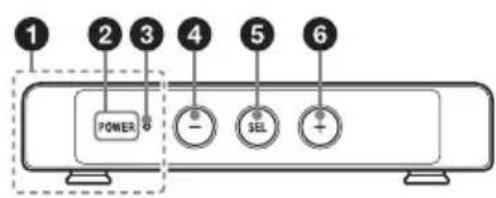
2 POWER button
Press this button to turn on the receiver box. After turned on, channel and audio selection is available.
While turned on, press and hold this button for about two seconds until the POWER indicator starts blinking in amber, and press this button once more to turn off the receiver box.
While turned off and while pressing and holding the SEL button, press this button to call up the screen position alignment check image.
POWER indicator
Displays the status of the receiver box.
Lit in green: The unit is turned on and the battery can last more than three hours.
Lit in amber: The unit is turned on but the battery may run down in less than three hours.
Blinks in red five times at power-on:
The battery may have reached its end of usable life. Contact your Sony sales representative to have the battery
replaced with a new one. The unit may still work with the old battery, though the battery may have lost one half its initial capacity, which means that it may not last three hours even if the indicator lights in green.
Blinking: The unit is in the channel or audio selection mode.
Off: The power of the unit is turned off.
4- button
Use this button to select an item or adjust a value in a setting screen. Also, press and hold the + and - buttons simultaneously while the unit is turned on to display the language selection menu.
In Audio mode, press and hold this button to turn down the volume.
Assistive audio is still audible at the minimum volume.
SEL (Select) button
Press this button to display a setting screen, go to the next setting screen or confirm an adjusted value. Also, press and hold the button to display the adjustment screen.
+ button
Use this button to select an item or adjust the value when a setting screen is displayed.
In Audio mode, press and hold this button to turn up the volume.
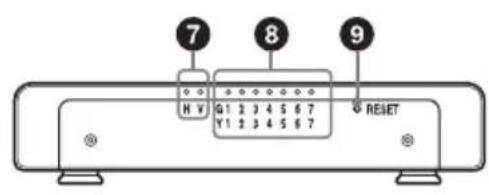
HI/VI indicator
Indicates the type of audio assistance for Audio mode.
H: Assistive audio for the hearing impaired.
V: Audio description for the visually impaired.
Blinking: HI/VI selection is available.
Channel indicator
Indicates the wireless channel.
Lit in green: One of the G group channels (G1 to G7) is selected.
Lit in yellow: One of the Y group channels (Y1 to Y7) is selected.
Blinking: Channel selection is available.
RESET button
Press this button with a thin, straight object (such as an opened paper clip) if all buttons on the unit (including the POWER button) become unresponsive. The power turns off.
Pressing this button has no effect on the power charge cycle count.
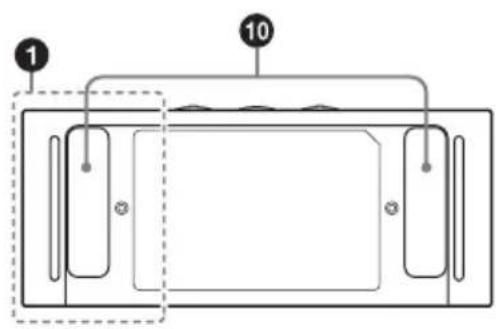
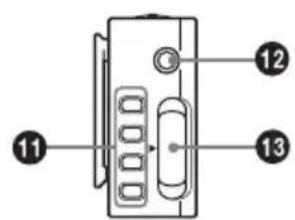
10 Clips
Attach the unit to the holder of the carrying case or lanyard (not supplied) with the clips.
Battery charger terminals
For details on how to charge the battery of the unit, refer to the operating instructions included with the battery charger.
Headphone jack
When using the unit in Audio mode, connect headphones to this jack.
Captioning glasses connector
When using the unit in Captioning mode, connect the cable of the captioning glasses to this connector.
Charging
Use the specified battery charger to charge the battery of the receiver box. (It takes about three hours.) For details on how to charge the battery, refer to the operating instructions supplied with the battery charger.
Note about the battery terminal
The battery terminal of this unit (the connector for battery chargers) is a consumable part.
Power may not be supplied to the unit properly if the pins of the battery terminal are bent or deformed by shock or vibrations, or if they become corroded due to prolonged outdoor use.
If the unit remains turned off for an extended period of time, the battery may discharge. If the unit is not to be used for an extended period, keep the battery of the unit charged by the charger if possible. Otherwise, before resuming use, charge the battery of the unit. Periodic inspections are recommended to keep the unit working properly and to prolong its usable lifetime.
Contact a Sony service or sales representative for more information about inspections.
Mode Selection: Captioning or Audio
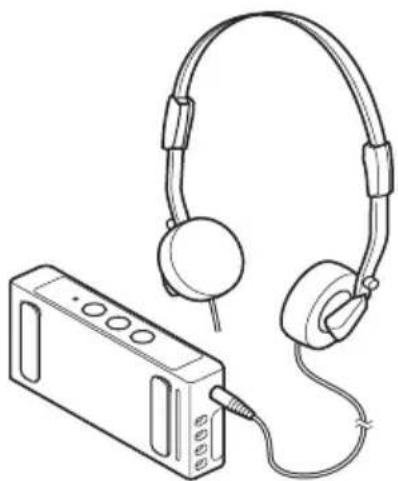
The receiver box works in one of two modes: Captioning mode, or Audio mode. The receiver box switches between these modes by detecting whether the captioning glasses are connected or not.
With the captioning glasses connected, the receiver box works in the Captioning mode, and the captioning glasses display captions. With the captioning glasses not connected, the receiver box works in Audio mode, and headphones play audio descriptions for the visually impaired, or assistive audio for the hearing impaired. The headphones should be connected to the headphone jack of the receiver box.
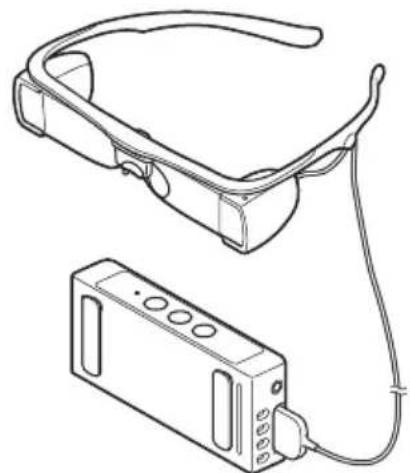
Captioning mode
Audio mode
Preparation
Before providing customers with units, make prepare the units as follows.
Captioning mode:
- Screen position alignment check
- Channel selection
Language selection
Audio mode:
- Channel selection
Audio selection
Screen Position Alignment Check (Captioning Mode)
If the screen position alignment of the captioning glasses is incorrect, do not use them. Contact your dealer for service information.
1 Connect the captioning glasses to the receiver box, and put the glasses on.
Note
The triangular marks of the plug and connector should be aligned.
2 Make sure that the unit is turned off.
3 While pressing and holding the SEL button, press the POWER button to turn the unit on.
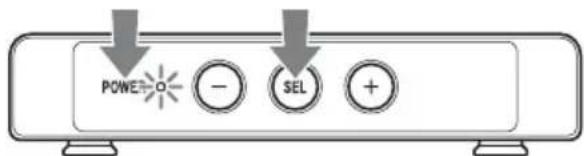
The screen position alignment check image appears on the glasses.
Left screen Right screen
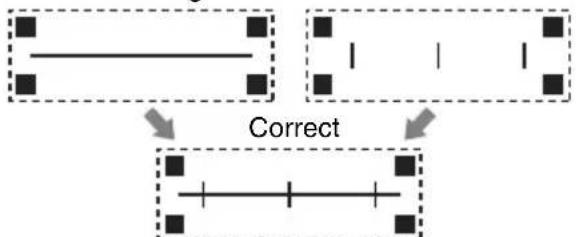
The combined picture you see with both eyes
4 Check that the horizontal line crosses all the vertical lines, as shown below.
Correct

Incorrect

5 Press and hold the POWER button for about two seconds until the POWER indicator starts blinking in amber. Press the POWER button again to turn off the receiver box. The POWER indicator goes out.
Channel and Audio Selection
Set the receiver box and the Data Transmitter to the same channel, and select HI (Hearing Impaired) or VI (Visually Impaired) accordingly.
1 Make sure that the unit is turned off.
2 Press the POWER button to turn on the receiver box.
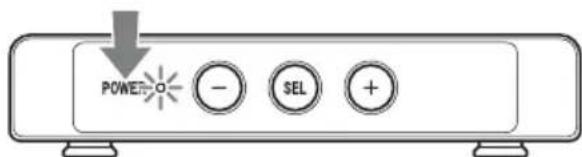
The POWER indicator and channel indicator start blinking.
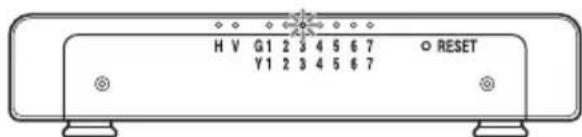
3 Press the + / - button repeatedly to select the channel.
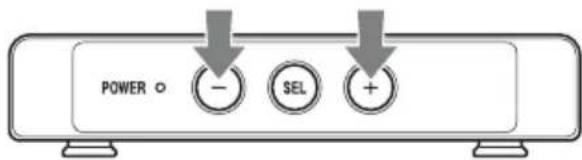
There are two channel groups: "G" (green indicator) and "Y" (yellow indicator).
4 Press the SEL button to set the channel.
The channel indicator stays lit.
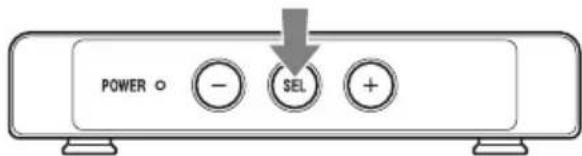
The HI/VI indicator starts blinking.
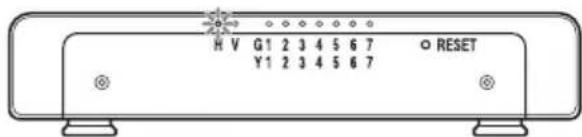
5 Press the + / - button to choose HI or VI.
6 Press the SEL button again to set the audio setting.
The HI/VI indicator and POWER indicator stay lit.
For Captioning mode, follow the instructions as follows to select language.
Language Selection (Captioning Mode)
Select the closed caption language. Selectable languages and their order are set up by the Data Transmitter STWA-C101. For how to set up, refer to the operating instructions included with STWA-C101.
1 Press and hold the + and - buttons simultaneously until the language menu appears on the glasses. It takes about two seconds.
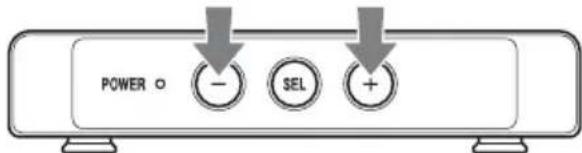
2 Press the + / - button repeatedly to select the language.
Language No.1
3 Press the SEL button to set the language.
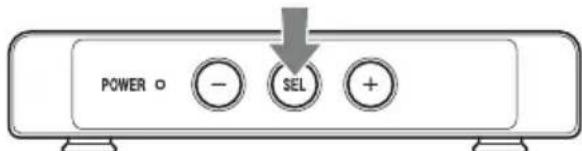
Notes
After 10 seconds of no operation, the menu disappears and the language setting remains unchanged.
- The default language setting is "Language No.1." When the receiver box is turned on, the language setting returns to the default setting.
Providing Customers with Units (Captioning Mode)
Before providing customers with units, check the screen position alignment and select the channel and language (see pages 17 to 18).
1 Connect the cable of the captioning glasses to the connector of the receiver box.
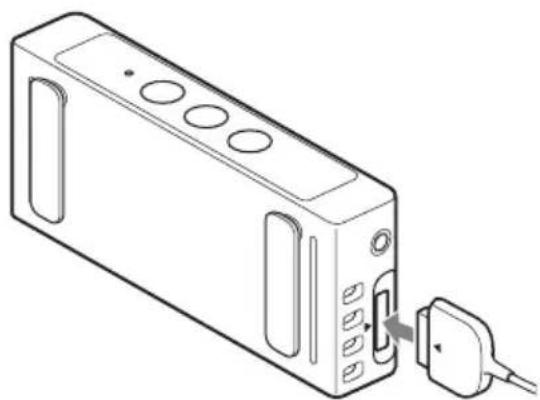
Note
The triangular marks of the plug and connector should be aligned.
2 Have the customer put on the glasses.
Notes
- The captioning glasses can be worn over the customer's own eyeglasses.
- Hold the captioning glasses by the temple frames.
- Any BTE (behind-the-ear) hearing aid should be removed before wearing the captioning glasses.
Providing Customers with Units (Audio Mode)
Before providing customers with units, select the channel and audio (see pages 17 to 18).
1 Connect the headphones to the.
headphone jack of the receiver box.
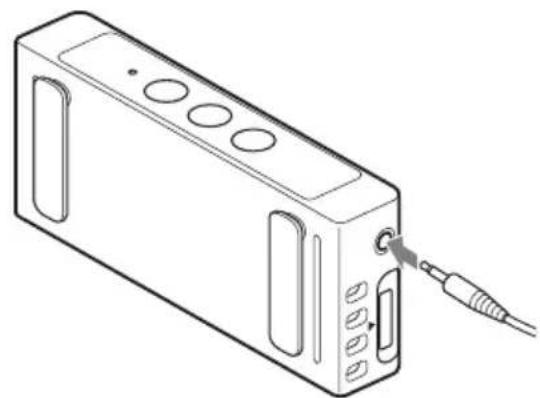
2 Have the customer put on the headphones.
Notes
- Any hearing aid should be removed before wearing the headphones.
- Assistive audio is still audible at the minimum volume.
Tuming Off
After the receiver box is returned from the customer, turn it off.
1 Press and hold the POWER button for about two seconds until the POWER indicator starts blinking in amber.
2 Press the POWER button again. The POWER indicator goes out and the receiver box turns off.
Cleaning
When cleaning the captioning glasses, hold them by the bridge, as illustrated below.
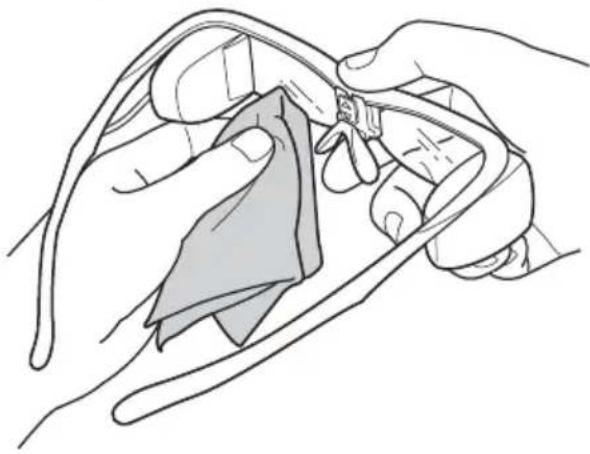
Wiping the Captioning Glasses
Wipe the front and back of each lens with a microfiber lens cleaning cloth (recommendation: Lens Cleaning Cloth 9021, by 3M Company). If the lenses are badly stained by finger prints, oil, etc., wipe them with pre-moistened lens tissues (recommendation: Lens Pre-Moistened Tissues, by Carl Zeiss Optical Inc.). If the lens surfaces are dirty, closed captions may not be displayed clearly. To ensure they are displayed clearly, it is recommended to wipe the lenses periodically, using a pre-moistened lens tissue.
Note
Do not expose the captioning glasses to chemical products such as thinner, benzine, insect repellent, sunscreen or insecticide.
Sterilization
Use alcohol cleaning papers to wipe the parts that contact with skin.
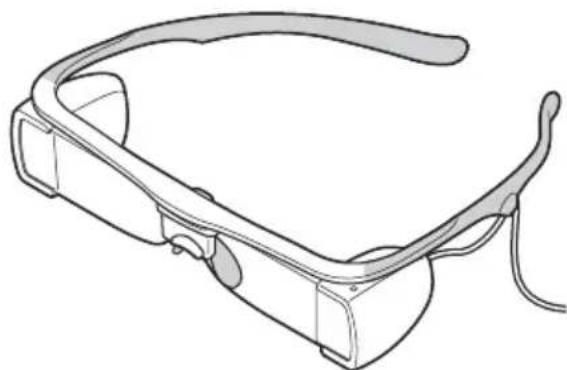
Use eyeglass cleaners to wipe the glasses. If the glasses are badly stained, wipe them with alcohol cleaning papers (IPA 70% ).
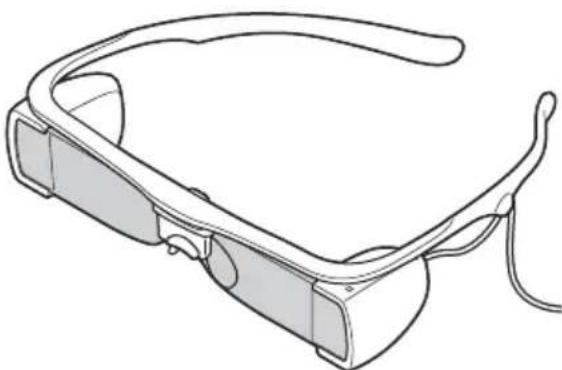
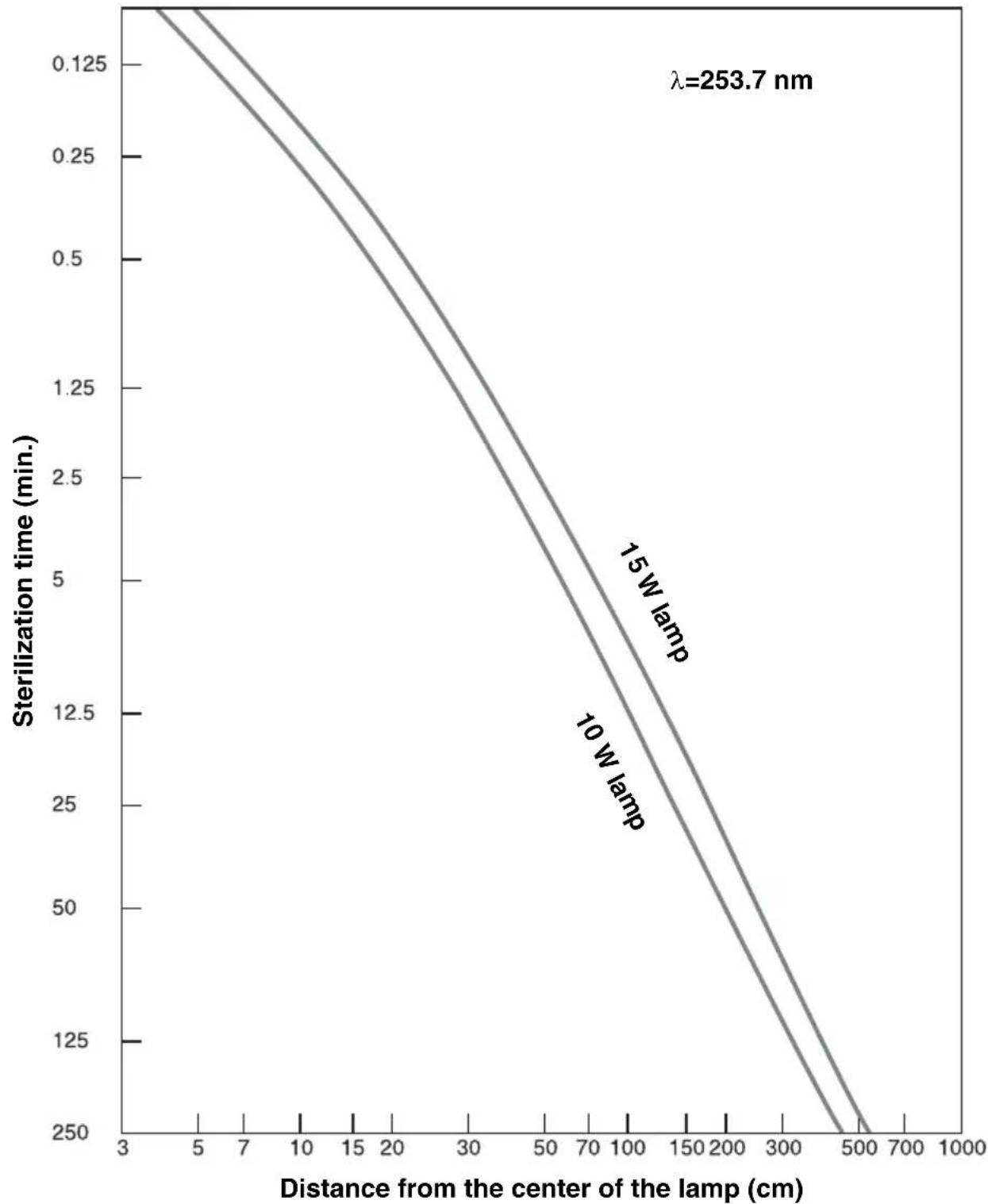
Ultraviolet sterilization equipment can be used to sterilize the captioning glasses. 250 W· minute / cm^2 of ultraviolet irradiation can kill 99.9% of bacteria and viruses.
Sterilization time VS Distance from the lamp to kill 99.9% bacteria and virus
Instructions to Customers
Adjustments
The captioning glasses can be adjusted to fit the customer's face.
Use the adjustment screen to check whether the captioning glasses are correctly adjusted, while fitting the face comfortably.
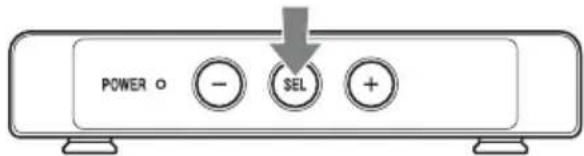
1 Press and hold the SEL button until the adjustment screen appears on the glasses.
It takes about two seconds.
Note
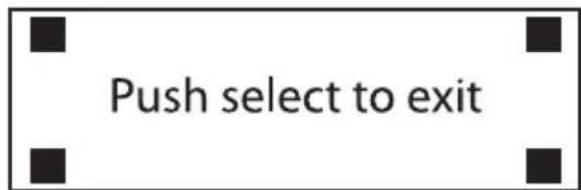
During adjustment, keep all four corner marks visible.
Correct
Incorrect

Note
The screen automatically disappears after two minutes of no operation.
2 Adjust the height and angle of the nose piece so that all four corner marks are visible.
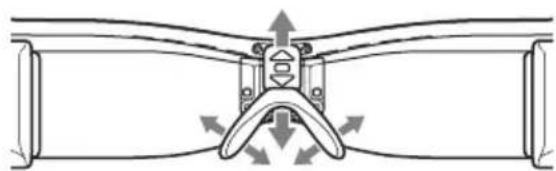
The nose piece height can be set to three levels.
Also, the nose piece angle can be adjusted (open or closed) for a comfortable fit.
3 Adjust the vertical position of the closed captions by rotating the optical engines and lenses. The optical engines and lenses are integrated into one component and can rotate back and forth.
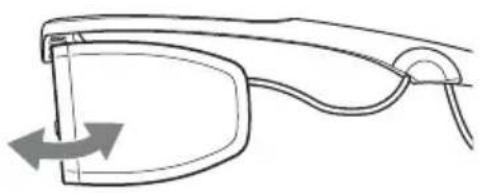
4 Make sure that all four corner marks are visible. If any of them are not visible, return to step 2 to readjust the height and angle of the nose piece.
To close the adjustment screen
Press the SEL button.
Setting Screen
You can adjust the perceived distance and brightness of the closed captions to make them easier to see.
Setting Screen Operation
You can press the SEL button to display one of the following adjustment screens. Each time you press the SEL button, the adjustment screen changes. After three seconds of no operation, the adjustment screen disappears.
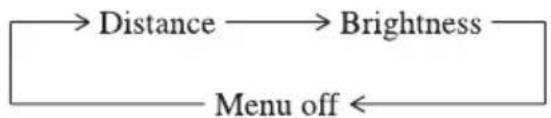
Distance Adjustment
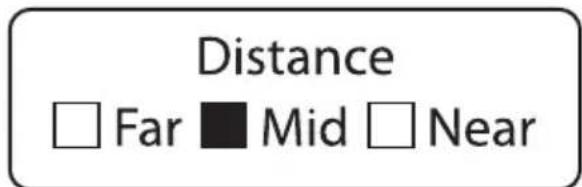
Press the + / - button to set the closed captions to appear as close to the cinema screen as possible (as would normally be viewed). The + button moves the captions away from the wearer, and the - button moves them toward the wearer. Select one of three settings.
Approximate distances:
Near: 7 m (23 feet)
Mid: 12m (39 feet)
Far: 18m (59 feet)
Brightness Adjustment
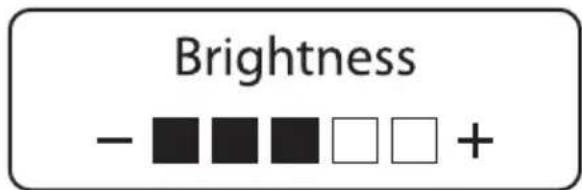
The captioning glasses automatically adjust the closed caption brightness to make it suit the screen image brightness that is detected by the photo sensor incorporated into the captioning glasses.
Furthermore, you can manually adjust the brightness in 5 levels by pressing the + / - button. The + button increases the brightness, and the - button decreases it.
Note
The brightness does not change when the theater is well-lit or pitch-dark, regardless of any brightness adjustment. (The maximum and minimum brightness is constant and only the sensitivity to theater brightness changes.)
Specifications
Captioning glasses
Displayable characters
31^* characters × 3 lines (average font size)
Field of view
19^ (horizontal) × 3.7^ (vertical)
Brightness
3 cd/m² to 50 cd/m²
Text color
Green
Dimensions
Approx. 190 × 43 × 190 ~mm
(7^1 / 2× 1^3 / 4× 7^1 / _2 inches) (w / h / d)
Mass
Approx. 84g (3.0 oz) (excluding cable)
Operating conditions
Temperature
10^ to 35^ (50^ to 95^)
Humidity
10% to 85% (no condensation)
Storage conditions
Temperature
-20^ to +60^ (-4^) to
+140^)
Humidity
0% to 90% (no condensation)
- The maximum number of characters displayed per line varies depending on the number of pixels of each character. (The number of characters is based on the average number of character pixels for the supported fonts).
Receiver box (STW-C140GI only)
Numbers of wireless channels
7 channels for closed captions, 7
channels for audio
Audio selection
HI audio / VI-N audio
Adjustments/Settings
Nose piece height (high, mid, low)
Vertical position of closed captions
Perceived distance of closed
captions (7 m, 12 m, 18 m (23 feet, 39 feet, 59 feet))
Language (6 languages)
Brightness (5 levels)
Volume (50 levels)
Battery life
Approx. 6 hours at shipment.
Longevity decreases through charging/discharging.
Longevity will decrease to approximately 3 hours after 500 charge/discharge cycles.
The LED of the receiver will be lit, to warn when the battery has reached 500 charge/discharge cycles.
Dimensions
Approx. 108× 45× 20mm
(4^3 / 8× 1^13 / 16×^13 / 16 inches (w / h) d)
Mass
Approx. 89g (3.1 oz)
Operating conditions
Temperature
10^ to 35^ (50^ to 95^)
Humidity
10% to 85% (no condensation)
Storage conditions
Temperature
-20^ to +60^ (-4^ to
+140°F)
Humidity
0% to 90% (no condensation)
Supplied items
Captioning glasses (1)
Receiver box (1) (STW-C140GI only)
Operating Instructions (1)
Recommended options
Lens Cleaning Cloth 9021, by 3M Company
Lens Pre-Moistened Tissues, by Carl Zeiss Optical, Inc.
Ultraviolet sterilization equipment
Battery charger
Design and specifications are subject to change without notice.
Note
Always verify that the unit is operating properly before use. SONY WILL NOT BE LIABLE FOR DAMAGES OF ANY KIND INCLUDING, BUT NOT LIMITED TO, COMPENSATION OR REIMBURSEMENT ON ACCOUNT OF THE LOSS OF PRESENT OR PROSPECTIVE PROFITS DUE TO FAILURE OF THIS UNIT, EITHER DURING THE WARRANTY PERIOD OR AFTER EXPIRATION OF THE WARRANTY, OR FOR ANY OTHER REASON WHATSOEVER.
License
standard library
Copyright c Regents of the University of California.
All rights reserved.
Redistribution and use in source and binary forms, with or without modification, are permitted provided that the following conditions are met:
- Redistributions of source code must retain the above copyright notice, this list of conditions and the following disclaimer.
- Redistributions in binary form must reproduce the above copyright notice, this list of conditions and the following disclaimer in the documentation and/or other materials provided with the distribution.
- All advertising materials mentioning features or use of this software must display the following acknowledgement: This product includes software developed by the University of California, Berkeley and its contributors.
- Neither the name of the University nor the names of its contributors may be used to endorse or promote products derived from this software without specific prior written permission.
THIS SOFTWARE IS PROVIDED BY THE REGENTS AND COLNTRIBUTORS "AS IS" AND ANY EXPRESS OR IMPLIED WARRANTY, INCLUDING, BUT NOT LIMITED TO, THE IMPLIED WARRANTY OF MERCHANTABILITY AND FITNESS FOR A PARTICULAR PURPOSE ARE DISCLAIMED. IN NO EVENT SHALL THE REGENTS OR COLNTRIBUTORS BE LIABLE FOR ANY DIRECT, INDIRECT, INCIDENTAL, SPECIAL, EXEMPLARY, OR CONSEQUENTIAL DAMAGES (INCLUDING, BUT NOT LIMITED TO, PROCEDURE OF SUBSTITUTE GOODS OR SERVICES; LOSS OF USE, DATA, OR PROFITS; OR BUSINESS INTERruption) HOWEVER CAUSED AND ON ANY THEORY OF LIABILITY, WHETHER IN CONTRACT, STRICT LIABILITY, OR TORT (INCLUDING
NEGLIGENCE OR OTHERWISE) ARISING IN ANY WAY OUT OF THE USE OF THIS SOFTWARE, EVEN IF ADVISED OF THE POSSIBILITY OF SUCH DAMAGE.
Developed at SunPro, a Sun Microsystems, Inc. business. Permission to use, copy, modify, and distribute this software is freely granted, provided that this notice is preserved.
Pour le STW-C140GI
Bouton SEL (slection)
Distances approximatives :
- Proche: 7m (23 piesds)
Moyen: 12m (39 piesds) - Loin: 18m (59 piesd)
Options recommendees
Copyright c Regents of the University of California.
All rights reserved.
Redistribution and use in source and binary forms, with or without modification, are permitted provided that the following conditions are met:
- Redistributions of source code must retain the above copyright notice, this list of conditions and the following disclaimer.
- Redistributions in binary form must reproduce the above copyright notice, this list of conditions and the following disclaimer in the documentation and/or other materials provided with the distribution.
- All advertising materials mentioning features or use of this software must display the following acknowledgement: This product includes software developed by the University of California, Berkeley and its contributors.
- Neither the name of the University nor the names of its contributors may be used to endorse or promote products derived from this software without specific prior written permission.
THIS SOFTWARE IS PROVIDED BY THE REGENTS AND COLNTRIBUTORS "AS IS" AND ANY EXPRESS OR IMPLIED WARRANTY, INCLUDING, BUT NOT LIMITED TO, THE IMPLIED WARRANTY OF MERCHANTABILITY AND FITNESS FOR A PARTICULAR PURPOSE ARE DISCLAIMED. IN NO EVENT SHALL THE REGENTS OR COLNTRIBUTORS BE LIABLE FOR ANY DIRECT, INDIRECT, INCIDENTAL, SPECIAL, EXEMPLARY, OR CONSEQUENTIAL DAMAGES (INCLUDING, BUT NOT LIMITED TO, PROCEDURE OF SUBSTITUTE GOODS OR SERVICES; LOSS OF USE, DATA, OR PROFITS; OR BUSINESS INTERRUPTION) HOWEVER CAUSED AND ON ANY THEORY OF LIABILITY, WHETHER IN CONTRACT, STRICT LIABILITY, OR TORT (INCLUDING
NEGLIGENCE OR OTHERWISE) ARISING IN ANY WAY OUT OF THE USE OF THIS SOFTWARE, EVEN IF ADVISED OF THE POSSIBILITY OF SUCH DAMAGE.
Developed at SunPro, a Sun Microsystems, Inc. business. Permission to use, copy, modify, and distribute this software is freely granted, provided that this notice is preserved.
Para STW-C140GI
(7 m, 12 m, 18 m (23 pies, 39 pies, 59 pies))
Idiomaa6 idiomas)
Brillo (5 niveles)
Volumen (50 niveles)
Vidautilde la bateria
Carl Zeiss Optical, Inc.
Copyright c Regents of the University of
California.
All rights reserved.
Redistribution and use in source and binary forms, with or without modification, are permitted provided that the following conditions are met:
- Redistributions of source code must retain the above copyright notice, this list of conditions and the following disclaimer.
- Redistributions in binary form must reproduce the above copyright notice, this list of conditions and the following disclaimer in the documentation and/or other materials provided with the distribution.
- All advertising materials mentioning features or use of this software must display the following acknowledgement:
This product includes software developed by the University of California, Berkeley and its contributors.
- Neither the name of the University nor the names of its contributors may be used to endorse or promote products derived from this software without specific prior written permission.
THIS SOFTWARE IS PROVIDED BY THE REGENTS AND COLNTRIBUTORS "AS IS" AND ANY EXPRESS OR IMPLIED WARRANTY, INCLUDING, BUT NOT LIMITED TO, THE IMPLIED
WARRANTIES OF MERCHANTABILITY AND FITNESS FOR A PARTICULAR PURPOSE ARE DISCLAIMED. IN NO EVENT SHALL THE REGENTS OR COLLABORORS BE LIABLE FOR ANY DIRECT, INDIRECT, INCIDENTAL, SPECIAL, EXEMPLARY, OR CONSEQUENTIAL DAMAGES
(INCLUDING, BUT NOT LIMITED TO, PROCEDURE OF SUBSTITUTE
GOODS OR SERVICES; LOSS OF USE, DATA, OR PROFITS; OR BUSINESS INTERRUPTION) HOWEVER CAUSED AND ON ANY THEORY OF LIABILITY
WHETHER IN CONTRACT, STRICT LIABILITY, OR TORT (INCLUDING
NEGLIGENCE OR OTHERWISE) ARISING IN ANY WAY OUT OF THE USE OF THIS SOFTWARE, EVEN IF ADVISED OF THE POSSIBILITY OF SUCH DAMAGE.
Developed at SunPro, a Sun Microsystems, Inc. business. Permission to use, copy, modify, and distribute this software is freely granted, provided that this notice is preserved.
Für STW-C140GI
Copyright c Regents of the University of California.
All rights reserved.
Redistribution and use in source and binary forms, with or without modification, are permitted provided that the following conditions are met:
- Redistributions of source code must retain the above copyright notice, this list of conditions and the following disclaimer.
- Redistributions in binary form must reproduce the above copyright notice, this list of conditions and the following disclaimer in the documentation and/or other materials provided with the distribution.
- All advertising materials mentioning features or use of this software must display the following acknowledgement: This product includes software developed by the University of California, Berkeley and its contributors.
- Neither the name of the University nor the names of its contributors may be used to endorse or promote products derived from this software without specific prior written permission.
THIS SOFTWARE IS PROVIDED BY THE REGENTS AND COLNTRIBUTORS "AS IS" AND ANY EXPRESS OR IMPLIED WARRANTY, INCLUDING, BUT NOT LIMITED TO, THE IMPLIED WARRANTY OF MERCHANTABILITY AND FITNESS FOR A PARTICULAR PURPOSE ARE DISCLAIMED. IN NO EVENT SHALL THE REGENTS OR COLNTRIBUTORS BE LIABLE FOR ANY DIRECT, INDIRECT, INCIDENTAL, SPECIAL, EXEMPLARY, OR CONSEQUENTIAL DAMAGES (INCLUDING, BUT NOT LIMITED TO, PROCEDURE OF SUBSTITUTE GOODS OR SERVICES; LOSS OF USE, DATA, OR PROFITS; OR BUSINESS INTERRUsION) HOWEVER CAUSED AND ON ANY THEORY OF LIABILITY, WHETHER IN CONTRACT, STRICT LIABILITY, OR TORT (INCLUDING
NEGLIGENCE OR OTHERWISE) ARISING IN ANY WAY OUT OF THE USE OF THIS SOFTWARE, EVEN IF ADVISED OF THE POSSIBILITY OF SUCH DAMAGE.
Developed at SunPro, a Sun Microsystems, Inc. business. Permission to use, copy, modify, and distribute this software is freely granted, provided that this notice is preserved.
Per STW-C140GI
Distanze approssimative:
- Vicina: 7 m (23 piedi)
Media: 12m (39 piedi) - Lontana: 18 m (59 piedi)
Copyright c Regents of the University of California.
All rights reserved.
Redistribution and use in source and binary forms, with or without modification, are permitted provided that the following conditions are met:
- Redistributions of source code must retain the above copyright notice, this list of conditions and the following disclaimer.
- Redistributions in binary form must reproduce the above copyright notice, this list of conditions and the following disclaimer in the documentation and/or other materials provided with the distribution.
- All advertising materials mentioning features or use of this software must display the following acknowledgement: This product includes software developed by the University of California, Berkeley and its contributors.
- Neither the name of the University nor the names of its contributors may be used to endorse or promote products derived from this software without specific prior written permission.
THIS SOFTWARE IS PROVIDED BY THE REGENTS AND COLNTRIBUTORS "AS IS" AND ANY EXPRESS OR IMPLIED WARRANTY, INCLUDING, BUT NOT LIMITED TO, THE IMPLIED WARRANTY OF MERCHANTABILITY AND FITNESS FOR A PARTICULAR PURPOSE ARE DISCLAIMED. IN NO EVENT SHALL THE REGENTS OR COLNTRIBUTORS BE LIABLE FOR ANY DIRECT, INDIRECT, INCIDENTAL, SPECIAL, EXEMPLARY, OR CONSEQUENTIAL DAMAGES (INCLUDING, BUT NOT LIMITED TO, PROCEDURE OF SUBSTITUTE GOODS OR SERVICES; LOSS OF USE, DATA, OR PROFITS; OR BUSINESS INTERLUPTION) HOWEVER CAUSED AND ON ANY THEORY OF LIABILITY, WHETHER IN CONTRACT, STRICT LIABILITY, OR TORT (INCLUDING
NEGLIGENCE OR OTHERWISE) ARISING IN ANY WAY OUT OF THE USE OF THIS SOFTWARE, EVEN IF ADVISED OF THE POSSIBILITY OF SUCH DAMAGE.
Developed at SunPro, a Sun Microsystems, Inc. business. Permission to use, copy, modify, and distribute this software is freely granted, provided that this notice is preserved.
Printed on recycled paper.
http://www.sony.net/
Sony Corporation
Printed in Japan
- Captioning Glasses with Audio Assist/ Captioning Glasses
- Owner's Record
- WARNING
- CAUTION
- For the customers in the U.S.A.
- For the customers in Canada
- For the customers in Europe, Australia and New Zealand
- For the customers in Europe
- CE
- For the customers in Italy
- For the customers in Norway
- For kundene i Norge
- AVERTISSEMENT
- Instructions to Theater Staff
- Instructions to Customers
- Appendices
- About this manual
- Supplied Items
- System Configuration (Example)
- Precautions
- Location and Function of Controls
- Captioning Glasses
- 1Nose piece
- 2Temple frames
- Optical engines
- Photo sensor
- Lenses
- Receiver Box (STW-C140GI only)
- Antenna (inside)
- POWER button
- POWER indicator
- 4- button
- SEL (Select) button
- + button
- HI/VI indicator
- Channel indicator
- RESET button
- Clips
- Battery charger terminals
- Headphone jack
- Captioning glasses connector
- Charging
- Note about the battery terminal
- Mode Selection: Captioning or Audio
- Preparation
- Captioning mode:
- Audio mode:
- Screen Position Alignment Check (Captioning Mode)
- Note
- Correct
- Incorrect
- Channel and Audio Selection
- Language Selection (Captioning Mode)
- Notes
- Providing Customers with Units (Captioning Mode)
- Providing Customers with Units (Audio Mode)
- Tuming Off
- Cleaning
- Wiping the Captioning Glasses
- Sterilization
- Sterilization time VS Distance from the lamp to kill 99.9\% bacteria and virus
- Instructions to Customers
- Adjustments
- To close the adjustment screen
- Setting Screen
- Setting Screen Operation
- Distance Adjustment
- Approximate distances:
- Brightness Adjustment
- Specifications
- Recommended options
- License
- standard library
- Pour le STW-C140GI
- Bouton SEL (slection)
- Distances approximatives :
- Options recommendees
- Para STW-C140GI
- Für STW-C140GI
- Per STW-C140GI
- Distanze approssimative:
Brand : SONY
Model : STWC140GI
Category : Smart glasses