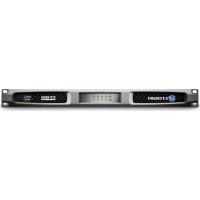
CT 4150 - Receiver CROWN - Free user manual and instructions
Find the device manual for free CT 4150 CROWN in PDF.


| Product Type | Amplified receiver (audio amplifier) |
| Brand | Crown |
| Model | CT 4150 |
| Number of channels | 4 (4 inputs / 4 outputs) |
| Dimensions (H x W x D) | 1.75" x 19" x 15.19" (4.45 cm x 48.3 cm x 38.6 cm) |
| Weight | 4.54 kg |
| Power supply | 100-240 V, 50/60 Hz |
| Efficiency | Greater than 90% thanks to DriveCore technology |
| Deep sleep consumption | Less than 1 W |
| Signal-to-noise ratio | Greater than 110 dB |
| Total harmonic distortion (THD) | Less than 0.05% over the entire band |
| Channel separation | Greater than 70 dB |
| Frequency response | ±0.5 dB |
| High pass filter (HPF) | 70 Hz, second order (12 dB/octave) |
| Operating modes | Normal, Energy saving, Deep sleep, Auto standby |
| Protections | Thermal, Malfunction, Undervoltage/Overvoltage, Circuit breaker, Short circuit |
| Cooling | Convection, fanless |
| Input connectors | Phoenix 3-pin (balanced/unbalanced) |
| Output connectors | Phoenix 4-pin (2 or 5 pins depending on wiring) |
| Auxiliary port | Phoenix 3-pin (deep sleep and amplifier status) |
| Rack mounting | Yes, rack ears provided |
| Optional accessories | XFMR 4/8 transformer for high impedance |
| Maintenance | Clean ventilation grilles regularly; do not obstruct openings |
| Warranty | 3 years, transferable |
Frequently Asked Questions - CT 4150 CROWN
User questions about CT 4150 CROWN
0 question about this device. Answer the ones you know or ask your own.
Ask a new question about this device
Download the instructions for your Receiver in PDF format for free! Find your manual CT 4150 - CROWN and take your electronic device back in hand. On this page are published all the documents necessary for the use of your device. CT 4150 by CROWN.
USER MANUAL CT 4150 CROWN
ComTech DriveCore Operation Manual
CT 475

CT4150

CT 875

CT 8150
Obtaining Other Language Versions: To obtain information in another language about the use of this product, please contact your local Crown Distributor. If you need assistance locating your local distributor, please contact Crown at 574-294-8000.
This manual does not include all of the details of design, production, or variations of the equipment. Nor does it cover every possible situation which may arise during installation, operation or maintenance.
The information provided in this manual was deemed accurate as of the publication date. However, updates to this information may have occurred. To obtain the latest version of this manual, please visit the Crown website at www.crownaudio.com.
Trademark Notice: Corni-Tech, BCA, Crow, Crew Audio, Ancon and Mule-Mode are registered trademarks of Crown International, IQIC, PIP and PIP2 are trademarks of Crown International. Other trademarks are the property of their respective owners.
Some models may be exported under the name Amcron
2011 by Harman International Inc. 1718 W. Mishawaka Rd., Elkhart, Indiana 46517-9439 U.S.A. Telephone: 574-294-8000
143368-2
6/11

CROWN
HARMAN
CT Power Amplifiers
Important Safety Instructions
- Read these instructions.
- Keep thasa instruction
- Feed all earnings
- Follow all instructions.
5.Don't use this apparatus near gait. - Clear polyl with a tiny cirlch
- Do not block any ventilation openings. Install in accordance with the manufacturer's instructions.
- Do not install near any heat sources such as radiators, heat registers, stoves, or other apparatus (including amplifiers) that produce heat.
- Do not delete the safety purpose of the polarized or grounding-type plug. A polarized plug has two blades with one wider than the other. A grounding-type plug has two blades and a third grounding plug. The wide blade or the third plug is provided for your safety. If the provided plug does not fit into your outlet, consult an electrician for replacement of the obsolete outlet.
- Protect the power cord from being walked on or pinched, par lucidity at plugs, convenience receptances, and the point where they exit from the apparatus.
- Only use attachments/ accessories specified by the manufacturer.
- Use only with a cart, stand, tripod, bracket, or tabo specified by the manufacturer, or sold with the apparatus. When a cart is used, use caution when moving the cart/ apparatus combination to avoid injury from lip-over.
- Unplug this apparatus during lightning storms or when unused for long periods of time.
- Rotar all servicing to qualified service personnel. Servicing is required when the apparatus has been damaged in any way, such as power-supply cord or plug is damaged, liquid has been spilled or objects have fallen into the apparatus, the apparatus has been exposed to rain or moisture, does not operate nor really, or has been dropped.
- Use the mains plug to disconnect the apparatus from the mains.
- WARNING: TO REDUCE THE RISK OF FIRE OR ELECTRIC SHOCK,DO NOT EXPOSE THIS APPARATUS TO RAIN OR MOISTURE.
- DO NOT EXPOSE THIS EQUIPMENT TO DRIPPING OR SPASHING ANDENSURE THATNO OBJECTS Filled WITH LIQUIDS, SUCH AS VASICS, ARE PLACED ON THE EQUIPMENT.
- THE MAINS PLUG OF THE POWER SUPPLY CORD SHALL REMAIN READLY OPERABLE.
WATCH FOR THESE SYMBOLS:
The lightning bolt triangle is used to alert the user to the risk of electric shock.
The excamination point triangle is used to alert the user to important coating or maintenance instructions.
REGARDEZ CES SYMBOLES:
CAUTION Do not locate sensitive high-pain equipment such as pre-amplifiers directly above or below the unit. Because this amplifier has a high power density, it has a strong magnetic field which can induce hum into unshielded devices that are located nearby. The field is strongest just above and below the unit.
If an equipment rack is used, we recommend locating the amplifier(s) in the bottom of the rack and the preamplifier or other sensitive equipment at the log.
FCC COMPLIANCE NOTICE
This device complies with part 15 of the FCC rules. Operation is subject to the following two conditions: (1) This device may not cause harmful interference, and (2) this device must accept any interference received, including interference that may cause undesired operation.
CAUTION: Changes or modifications not expressly approved by the party responsible for compliance could void the user's authority to operate the equipment.
NOTE: This equipment has been tested and found to comply with the limits for a Class B digital device, pursuant to part 15 of the FCC Rules. These limits are designed to provide reasonable protection against harmful interference in a residential installation. This equipment generates, uses, and can radiate radio frequency energy and, if not installed and used in accordance with the instruction manual, may cause harmful interference to radio communications. However, there is no guarantee that interference will not occur in a particular installation. If this equipment does cause harmful interference to radio or television reception, which can be determined by turning the equipment off and on, the user is encouraged to try to correct the interference by one or more of the following measures:
- Roarient or relocate the receiving antenna.
- Increase the separation between the equipment and receiver.
- Connect the equipment into an outlet on a circuit different from that to which the receiver is connected.
- Consult the dealer or an experienced radio/TV technician for help.
DECLARATION of CONFORMITY
ISSUED BY: Harnan International
1718W.Mishawaka Road
Eikhart, Indiana 46517 U.S.A.
European Representative's Name and Address:
David Budge
10Harvest Close
YateleyGU466YS
United Kingdom
Equipment Type: Power Amplifiers
Family Name: CT series
Model Names:CT8150,CT875,CT4150,CT475
EMC Standards:
EN 55103-1:1997 Electromagnetic Compatibility - Product Family Standard for Audio, Video, Audio-Visual and Entertainment Lighting Control Apparatus for Professional Use. Part 1: Emissions
EN 55103-1:1997 Magnetic Field Emissions Annex A (2) and 1 M
EN 61000-3-2:2006 & Amd 1:2008 & Amd 2:2009 Limits for Harmonic Current Emissions (equipment input current ≤ 16A per phase)
EN 61000-3-3:1998 Limitation of Voltage Fluctuations and Flicker in Low-Voltage Supply Systems Rated Current ≤16A
EN 55022:2006 Limits and Methods of Measurement of Radio Disturbance Characteristics of ITE: Radialed, Class B Limits: Conducted, Class B
EN 55103-2:1997 Electromagnetic Compatibility - Product Family Standard for Audio, Video, Audio-Visual and Entertainment Lighting Control Apparatus for Professional Use, Part 2: Immunity
EN 61000-4-2:2009 Electrstatic Discharge Immunity (Environment E2-Criteria B, 4kV Contact, 8kV Air Discharge)
EN 61000-4-3:2006 Radiated, Radio-Frequency, Electromagnetic Immunity (Environment E2, Criteria A)
EN 61000-4-4:2007 Electrical Fast Transient/Burst Immunity (Criteria B)
EN 61000-4-5:2006 Surge Immunity (Criteria B)
EN 61000-4-6:2009 Immunity to Conducted Disturbances Induced by Radio-Frequency Fields (Criteria A)
EN 61000-4-11:2001 Voltage Dips, Short Interruptions and Voltage Variation
Safety Standard:
IEC 60065:2001:7Ed & Amd 1:2005 Safety Requirements - Audio Video and Similar Electronic Apparatus
I certify that the product identified above conforms to the requirements of the EMC Council Directive 2004/108/EC and the Low Voltage Directive 2005/95/EC.
Signed
Title/ Director of Engineering
Date of Issue: March 16, 2011

1 Welcome
Crown® ComTech DriveCore® amplifiers provide state-of-the-art technology for installed sound applications. The ComTech amplifiers provide noiseless operation and small footprint with excellent quality and performance.
ComTech DriveCore amplifiers offer:
1.1 Features
Audiophile Sound
A signal-to-noise ratio of better than 110dB
Total harmonic distortion below 0.05% across the full audio bandwidth
- Greater than 70dB crosstalk
Frequency response of 0.5dB
Size Advantage
- Up to 8 channels in a single rack-space
Weight of only 10 pounds (4.54 Kg)
Power Efficiency
Over 90% efficient in the DriveCore amplifier stage
- Power consumption of less than 1W when not in use (In Deep Sleep)
Green Mode delivers power when needed. Amplifier efficiency increases by up to 10% when compared to typical class D amplifiers
Typical applications for ComTech DriveCore amplifiers include boardrooms, video and teleconferencing. VIP suites in salad bars and arenas, and upscale restaurants and retail outlets.
2 How to Use This Manual
This manual provides you with the necessary information to safely and correctly set up and operate your amplifier. It does not cover every aspect of installation, setup, or operation that might occur under every condition. For additional information, please consult Crown's Amplifier Application Guide (available online at www.crownaudio.com). Crown Technical Support, your system installer, or system retailer).
3 Features
4 channel or 8 channel (1 inputs with 4 outputs or 8 inputs with 8 outputs)
- Single rack space
Balanced 3-pin Barrier block-type/line inputs
4-pin Phoenix-type speaker outputs
- Flexible input routing
- Multiple Power Configuration (Auto-Standby, Deep Sleep, and Green Mode)
- Auxiliary port for lamp status and power saving mode (Drop Sleep)
Circuit breaker protection with reset switch
Convection-cooled chassis (no fan)
Three-year, no-fault, fully transferable warranty that completely protects your investment and guarantees its specifications.
Can be used in mass notification and EN 54 systems
Patanned technology including DriveCoreTM
- Fault Reporting through Aux Port
- Adaptive Rail Technology for power on demand.
Complies with Green Edge by Harman
4 Setup
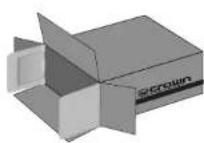
4.1 Unpack Your Amplifier
Please unpack and inspect your amplifier for any damage that may have occurred during transit. If damage is found, notify the transporter company immediately. Only you can initiate a claim for shipping damage. Crown will be happy to help as needed. Save the shipping carton as evidence of damage for the shopper's inspection.
We also recommend that you save all packing materials so you will have them if you ever need to transport the unit. Never ship the unit without the factory pack.
YOU WILL NEED (not supplied):
- Input wiring cables
Output wiring cables - Flathead screwdriver
Rack for mounting amplifier (or a slab surface for stocking)

WARNING: Before you start to set up your amplifier, make sure you read and observe the Important Safety Instructions found at the beginning of this manual.

4.2 Install Your Amplifier
CAUTION: Before you begin, make sure your amplifier is disconnected from the power source and that all level controls (see section 7.6) are set to 0.
The amplifier is 1.75^ ball by 15.19^ deep and 19^ wide (see figure 4.2.1).
Mount the unit in a standard 19-inch (48.3-cm) equipment rack (EIA RS-310B). You can also place a single amp on a solid, stable surface or stack multiple amps.
NOTE: When transporting, amplifiers should be supported at both front and back.
4.3 Ensure Proper Cooling
When using an equipment rack, mount units directly on top of each other. Close any open spaces in the rack with blank panels. DO NOT block front, top or side air vents.
The side walls of the rack should be a minimum of two inches (5.1 cm) away from the amplifier sides, and the back of the rack should be a minimum of four inches (10.2 cm) from the amplifier back panel. While the amplifier is convectioned closed and does not require a fan, it is critical that the air vents are not covered.

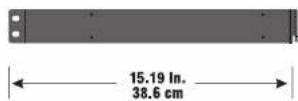
Figure 4.2.1 CT Series Dimensions
4 Setup
4.4 Choose Input Wire and Connectors
Crown recommends using pre-built or professionally wired balanced line (two-conductor plus shield). Balanced wiring provides better rejection of unwanted noise and hum but unbalanced line may also be used. For more Information, refer to the Crown Amplifier Application Guide, available online at www.crownauditor.com.
Use 3-pin Phoenix-type cable ends at the amp input connectors.
Figure 4.4.1 shows connector pin assignments for balanced wiring and figure 4.4.2 shows connector pin assignments for unbalanced wiring

NOTE: Custom wiring should only be performed by qualified personnel. Class 2 wiring is required.
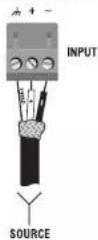
BALANCED LINE
Figure 4.4.1
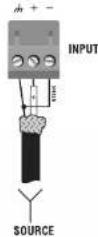
UNBALANCED LINE
Figure 4.4.2
4.5 Choose Output Wire and Connectors
Crown recommends using professionally constructed, high quality, bio-conductor, heavy gauge spoke wire and connectors Use 2-pin Phoenix-type connectors (Included with the amp).
Suggested below are guidelines to select the appropriate size of wire based on the distance from amplifier to speaker. Check with local code as this may vary.
Distance Wire Size
up to 25 (1.6m) 16M AVG 20-40L 7.9-12m 24M AVG
CAUTION: Never use shielded cable for output wiring.

CAUTION: Never connect the speaker return to the chassis of the amplifier, or damage to the amplifier may result.
CAUTION: Output of amplifier channels cannot be bridged. This may damage the amplifier.
4 Setup
4.6 Wire Your System
Before you are your system, you must be familiar with the capabilities of the input routing.
The DriveCore amplifier can be configured in two ways:
- The input for a channel goes out the same channel. This option is the standard configuration.
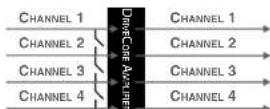
Figure 4.6.1 Four channels with no input routing
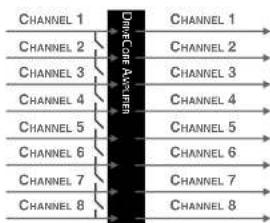
Figure 4.6.2 Eight channels with no input routing
- The input for a channel can be routed to the next channel, overriding the wired input signal for that channel. This method simplifies input wiring and minimizes use of y-cables.
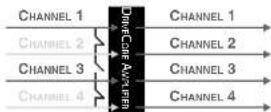
Figure 4.6.3 Two channel to four channel routing
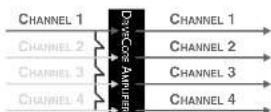
Figure 4.6.4 One channel to four channel routing
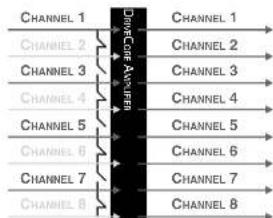
Figure 4.6.5 Four channel to eight channel routing
Input routing is configured using the clip switches on the back of the amplifier. See Section 11 Input Routing for information on configuring switches.
Note: ComTech DriveCore amplifiers can NOT be bridged.
4.7 Connect to AC Mains
Connect your amplifier to the AC mains power source (power outlet) with the supplied AC power cord set. First, connect the IFC end of the cordset to the IFC connector on the amplifier; then, plug the other end of the cord set to the AC mains.

WARNING: The third prong of this connector (ground) is an important safety feature. Do not attempt to disable this ground connection by using an adapter or other methods.
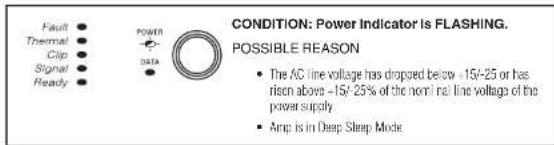
Amplifiers don't create energy. The AC mains voltage and current must be sufficient to deliver the power you expect. If the AC line voltage varies out of an acceptable range, the amplifier's power supply turns off and the blue Power LED flashes. The amplifier will turn back on when the AC line voltage returns to safe operating levels.
Figure 4.7.1 provides voltage limits for all amplifier AC voltage configurations. Also, the amplifier must be run within the specified rms frequency requirements (indicated on the amplifier's back panel layout). If you are unsure of the output voltage of your AC mains, please consult your electrician.
Figure 4.7.1 AC Under-Voltage and Over-Voltage Limits for Various Amplifier Models
| Model Under-Voltage Limit Over-Voltage Limit | |
| All Models BR-284 VNC | |
4 Setup
4.8 Startup Procedure
Use the following procedure when first turning on your amplifier:
- Turn down the level of your audio source.
- Turn down the level controls of the amplifier (see Section 7.6).
- Turn on the "Power" switch. The Power Indicator should glow.
- Turn up the level of your audio source to an optimum level.
- Turn up the Level controls on the amplifier until the desired loudness or power level is achieved.
If you ever need to make any wiring or installation changes, don't forget to turn off the amplifier and disconn net the power cord.
For help with determining your system's optimum gain structure (signal levels) please refer to the Crown Amplifier Application Guide, available online at www.crownaudic.com.
5 Precautions
Your amplifier is protected from internal and external faults, but you should still take the following precautions for optimum performance and safety.
- Before use, your amplifier first must be configured for proper operation, including input and output wiring hookup. Improper wiring can result in serious operating difficulties. For information on wiring and configuration, please consult the Setup section of this manual or, for advanced setup techniques, consult Crown's Amplifier Application Guide available online at www.crownaudio.com.
- Use care when making connections, selecting signal sources and controlling the output level. The load you save may be your own!
- Do not short the ground load of an output cable to the input signal ground. This may form a ground loop and cause oscillations.
4. Never connect the output to a power supply, battery or power main. Electrical shock may result.
- Tampering with the circuitry, or making unauthorized circuit changes may be hazardous and invalidates all agency listings.
- Do not operate the amplifier with the red Clip LEDs constantly flashing.
- Do not overdrive the mixer, which will cause clipping signal to be sent to the amplifier. Such signals will be reproduced with extreme accuracy and loudspeaker damage may result.
- Do not operate the amplifier with less than the rated load impedance. Due to the amplifier's output protection, such a configuration may result in premature clipping and speaker damage.
- Output of amplifier cannot be bridged or multiple channels cannot be connected together.
Remember: Crown is not liable for damage that results from overdriving other system components.
6 Front Panel

1. Fault Indicator
RedLED
One per output channel
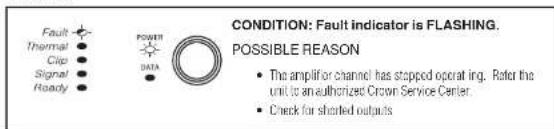
Flashes when the amplifier output channel has stopped operating. Usually this means that the amplifier must be serviced. (See Section 15 Troubleshooting)
2. Thermal Indicator
RedLED
One per output channel
- If exceeds Thermal Limits, output channels will shut down in pairs until thermal levels are within a tolerant range.
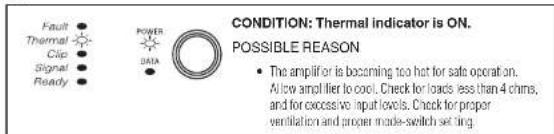
- Illuminates when the channel approaches temperature constraints or is about to shut down. Audible distortion may be heard.
Unit stops amplification for each channel until temperature returns to acceptable level Once the amp costs off enough, lead turns off, audio starts again.
3. Clip Indicator
- Pad LED
One per output channel - Illuminates when the channel is at the threshold of audible distortion (Sea Section 15 Troubleshooting - reduce input level)
- When the limiter is turned on the Trip Indicator will illuminate when the limiter is protecting the amplifier from input overload.
4. Signal Indicator
GreenLED
One per input channel
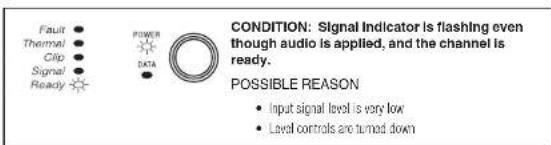
- Illuminates when the input signal exceeds -24dBu
5. Ready Indicator
GreenLED
One per input channel
- Illuminates when the channel is ready for signal
- Illuminates when the channel is initialized and ready to produce audio output.
Ready indicator will flash when the channel is in standby.
Ready Indicitor will not illuminate or flash when the amplifier is in deep sleep.
6. Power Indicator
Blue LED
- Indicates AC power has been applied and is within the safe operating range of the power supply. The LED will flash when the AC line voltage is above or below the nominal rated value. The LED will also flash when the amplifier is in Deep Sleep mode AND the power button has been pushed.
7.Data Indicator
Yellow LED (not functional in analog version)
Indicates network activity
Reserved for future releases (Life and DSP)
8. Power Button
On/off push button
9. Cooling Vent
- Allows for air flow and cooling of the amplifier

CROWN
HARMAN
CT Power Amplifiers
7 Back Panel

1. AC Power Inlet
Standard IEC type 320 inlet for
detachable connector
100-240W
2. Besel Button/Breaker
- Push button switch
- Besets the circuit breaker that protects
the power supply - A circuit breaker located near the EFC power inlet protects the amplifier from excessive AC current draw.
3. Auxiliary Connector
-
3-pin Phoenix type connector
-
A lows for amp to be placed in DEEP
SLEEP mode and monitoring of AMP
STATUS (see Section 10.2)
4. Amp Configuration DIP Switches (see Amp
Status/Configuration in section 10.2
Switches 1-5 turn specific settings on and off
-70HzHPFHighPassFilter
-see Section 8.1)
Auto-Slandby
-Amp Status
Green Power (See Section 9.2)
Llimiler
Switches 6-12 sends input channel audio
signal to corresponding output channel and
adjacent output channel. In four channel model,
switch 6-9 are non-functional. (see section 11)
5. Amp Input Connectors
- 3-pin block connector can be used
serinput
High imgealance balanr
6. Channel Level Controls
One 21-position described rotary
attenuator per channel
- Attenuation range from -100dB to 0dB
7. Output Speaker Connector
4-sin Barter block type per two channels
(2-Pin or 8-Pin Phoenix can be used)
8 Amp Configuration 9 Operating Modes
8.1 70Hz HPF (High Pass Filter)
On the back panel, one 2-position high-pass filter switch will only allow signals above 70kHz to be amplified. This is to prevent transformer saturation. The HFW, when turned on, is activated for all channels. The filter is a 2nd order 12 dB/osc filter.
8.2 Limiter
The limiter reduces amplifier gain to allow over drive without harsh clipping at output.
When Amp Configuration Switch #5 is set on (pushed up), the amplifier will utilize the limiter feature.
DriveCore Amplifiers can work in a variety of power modes.
9.1 Normal
The amplifier automatically operates full output power
9.2 Green Power
Green mode utilizes Crown's adaptive rail technology for higher efficiency or power on demand. When Amp Configuration DIP switch #4 is set to on, the amplifier will operate in green mode.
For low input signal levels (less than -40dB ) the amplifier will operate with minimum power.
The amplifier will increase to full power if either of the following occurs:
1- The input signal goes above -40dBu
2- There is a single clip event from any of the channels
Likewise, if the amplifier is operating with full power, the amplifier will decrease the operating rails to minimum power if the input signal drops below -40dBu.
Through the use of Green Power, the efficiency of the amplifier dramatically increases for lower audio signal reproduction. The adaptive tail technology used in the CT amplifiers can increase the efficiency of the amplifier by up to 10% with low signal levels.
9.3 Deep Sleep
See Section 10.1
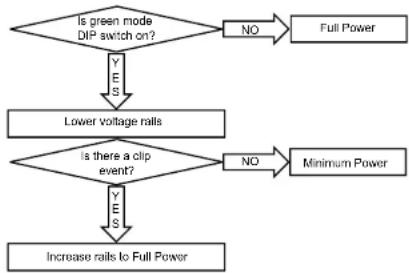
Figure 9.2.1 How Green Power DIP switches work
10 Auxiliary Port 11 Input Routing
10.1 Deep Sleep
In sleep sleep mode, the arms consume less than 1 watt of power. It is activated via the AUX port with a ground closure.
To bring the amplifier out of deep sleep, remove the ground closure via the AUX port.
10.2 Amp Status
The Amplifier Status is designed to work with life safety or supervisory monitoring and control systems, where notification of an amplifier fault is necessary. The Amplifier Status is producing a signal (Heartbeat or tone) when the amplifier is operating within standard working parameters. If the amplifier enters a fault or thermal condition, the Amplifier
Status signal will terminate. This feature in the CamToch amplifier is always on. The Amplifier Status is located on the Auxiliary Port, opposite the DEEP SLEEP function. The configuration of the Amp Status signal is possible through DIP Switch 3:
- ON—the microcontroller will send a 1 Hz pulse to the "AMP STATUS" AUX port line
- OFF - the microcontroller will send a logic high-level to the "AMP STATUS" AUX port line
The voltage output of the AuxPort is SVDG at 50 milliamps. This T1L or similar signal can then be connected to an interface to indicate the status to a supervisory control system.
Amp status can be used in a variety of life safety applications, such as EN54 IEC60649 among others.
This amplifier can route a single channel to the next numbered channel.
In CT 475 and CT 4150, DIP switches 8-9 are non-functional.
When a DIP switch is set to "on" for a specific channel, it sends the signal to its own output AND becomes the input for the next numbered channel, overriding the wired input for that channel.
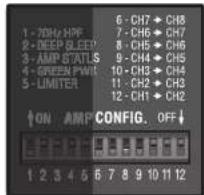
Figure 11.1
Channel 1 input sent to all channel outputs, overriding channel inputs for channels 2,3,and 4
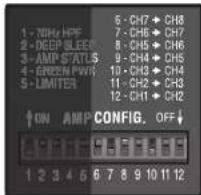
Figure 11.3
Channel 1 input sent to channels 1, 2, and 3
Channel 4 input sent to channels 4, 5, and 6
Channel 7 input sent to channels 7 and 8
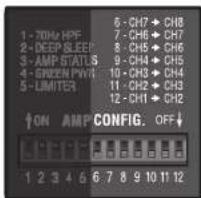
Figure 11.2
Four input signals sent to four outputs
13 Advanced Features
13.1 Protection Systems
Your Crown amplifier provides extensive protection and diagnostic capabilities, including thermal level control, fault indicators, high-pass filtering, DC protect, AC under/over voltage protection, inrush limiting, and a correction-cooler chassis.
13.1.1 Thermal Indicator
If the amplifier becomes too hot for safe operation, the channel trial is generating too much heat will be shut down until the temperature is reduced.
13.1.2 Fault
The amplifier will enter a Fault state if the amplifier senses an unsafe condition. This protection is for both internal and external faults. It is critical to check all wiring to and from the amplifier to ensure the fault is not caused by external conditions. Once wiring has been verified to be correct, and the fault condition persists, see Section 17 Service for Servicing information.
13.1.3 High-Pass Filters
HPF's are traditionally used in Hi-Z applications. The Cam-Tech DriveCore is a low Z amplifier but can be used in conjunction with the XFMR 4/8 transformer box for Hi-Z applications. If the amplifier is to be used in a Hi-Z application, then it is very important to use the HPF to prevent transformer saturation.
13.1.4 AC Under/Over Voltage
Protection
If the AC line voltage drops below 25% or rises above 15% of the nominal operating voltage of the amplifier, the amplifier's power supply turns off and the blue Power LED flashes. The amplifier will turn back on when the AC line voltage returns to safe operating levels (within ± 10% ).
13.1.5 Circuit Breaker
A circuit breaker located near the IFC power inlet protects the amplifier from excessive AC current draw.
13.1.6 Convection-cooled Chassis
The DriveCore amplifiers require no fans for cooling providing quiet operation and optimum efficiency.
13.1.7 Auto-Standby
If amplifier does not see input signals for a period of 30 minutes, the amplifier will go into standby mode. The amplifier will come out of standby mode once an input signal is present. This feature is activated via DIP switch 2 on the back of the amplifier. The amplifier will be configured with Auto- Standby turn-on from the factory. When the amplifier is in Standby, the Ready Indicator on the front panel Display will flash.
13.2 Features
13.2.1 Switching Power Supply
Crown's Switching Power Supply minimizes the amplifier's weight. Typical non-switching power supplies require large, heavy transformers in order to produce the required power at the output stage. These transformers must be large to operate at 50 to 60 Hz (standard AC supplied by the power company).
By contrast, switching power supplies can operate with a much smaller (and lighter) transformer because they first convert the AG up to a much higher frequency, thereby reducing waste. The power supply is voltage-specific, allowing use in regions using 100V or 240V .
13.2.2 Power Mode
Dopso sleep and green mode allow the amplifier to operate at all times with the lowest possible power level.
13.2.3 Adaptive Rail Technology (ART)
Crown has developed a voltage rail technology that delivers power on demand. ART is at the center of CT DriveCore's Green mode that provides up to an additional 10% of efficiency. Through ART, the CT DriveCore is always operating at maximum efficiency.
13.2.4 DriveCore Power Stage
Crown has worked with Texas Instruments to develop an audio amplifier on a micro-chip. The result is DriverCore chipset that introduces audiophile quality for an installation amp:
Greator than 90% Effciency
11B Signal to Noise
-THD less than .05% in midband
frequencies
14 Accessories
14.1XFMR 4/8
The CornTech DriveCore amplifier is only capable of low Z applications. It is necessary to use an outboard transformer for Hi-Z applications. Crown highly recommends the use of the XFMR 4/8 transformer box. This transformer box is designed to make with the loop of the CornTech DriveCore Amplifiers. See XFMR data sheet for writing diagram.
14.2 Rack Support Ears
The ComTech DriveCore amplifier requires front and back rack support for proper mounting. These have been provided with the amplifier.

CROWN
HARMAN
CT Power Amplifiers
15 Troubleshooting
15.1 Power Indicator
OFF
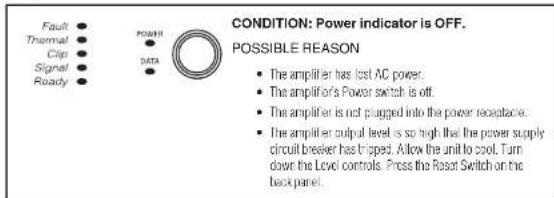
FLASHING
15.2 Fault Indicator
FLASHING
15.3 Thermal Indicator
ON
FLASHING

15.4 Clip Indicator
ON or FLASHING

15.5 Signal Indicator
OFF
15.6 Ready Indicator
OFF

FLASHING

2011 by Harman International Inc. 1718 W. Mishawaka Rd., Elkhart, Indiana 46517-9439 U.S.A. Telephone: 574-294-8000

1 Willkommen
Tumors of the brain, including the thalamus and cerebellum, are common in patients with Alzheimer's disease.
13.2.3 Adaptive Rail Technology (ART)
2011 by Harman International, Inc. 1718 W. Mishawaka Rd., Elkhart, Indiana 46517-9439 U.S.A. Telephone: 574-294-8000

1 Bienvenida
13.2.3 Adaptive Rail Technology (ART)
2011 by Harnan International, Inc. 1718 W. Mishawaka Rd., Elkhart, Indiana 46517-9439 U.S.A. Telephone: 574-294-8000
14368-2
6/11

1 Bienvenue
I' amplificatour ComTech youse offe
ACCESSORIES INDISPENSABLES (non forms):
Cagles d'entree
Calesdesartie
Tournevis plat
Bouton-poussoir on/off
Fault Thermal Clamp Solder Ready

Fault Thermal Clip Signal Ready

Lassar reoldir rappar, vemier sles charges snt
mene 24 hns f 18 hne n 1990n (3p
deve, verme la vistida oer la sotrigation de changement de mode.
CLSIGNOTEMENT
Fulit
Thermal
Clip
Signe
Ready

Thermal Clp Signal Ready

Thermal Clp Signal Ready

Fault Thermal Clip Signal Ready

| Channels 4 4 8 6 | ||||
| Sensitivity 1/AV 1/AV 1/AV | * | ** | * | |
| Rated Power Output | 75W per channel into 8/4 ohms | 125W per channel into 8/4 ohms | 75W per channel into 8/4 ohms | 125W per channel into 8/4 ohms |
| Signal to Noise Ratio (below rated power 20Hz to 20kHz, A-Weighted) | 110 dB | 110 dB | 110 dB | 110 dB |
| Total Harmonic Distortion (THD) (full rated power, 1kHz) | < 0.05% | < 0.05% | < 0.05% | < 0.05% |
| Intermodulation Distortion (from 0dB down to -30dB) | < 0.05% | < 0.05% | < 0.05% | < 0.05% |
| Frequency Response (at 1W into 4/5 ohms) × 0.5 dB ± 0.5 dB ± 0.5 dB ± 0.5 dB | ||||
| Common Mode Rejection (20Hz to 1 kHz) | > 70 dB | > 70 dB | > 70 dB | > 70 dB |
| Load Ranges | 2-8 Ohms | 2-8 Ohms | 2-8 Ohms | 2-8 Ohms |
General
CT475 CT4150 CT875 CT8150
| Dimension (1x W x D) | 1.75" x 19" x 15.19" | 1.75" x 19" x 15.19" | 1.75" x 19" x 15.19" | 1.75" x 19" x 15.19" |
| Net Weight | 10 lbs | 10 lbs | 10 lbs | 10 lbs |
| Net Shipping Weight | 15 lbs | 15 lbs | 15 lbs | 15 lbs |
*26dBgain
**Amplifier Is stable for 20hm loads
17 AC Power Draw and Thermal Dissipation
AC Power Draw and Thermal Dissipation:
Pink noise 12dB crest factor, bandwidth limited 22Hz to 22kHz
Typical line impedance used.
Measurements made with 120/240 VAC mains.
Data based on all channels driven at 8 Ohms.
| ComTech DriveCore 475 | |||||||||||||
| Load | Watts in | Watts out | 120VAC | Watts Dissipated | Watts in Wnts out | 240VAC | Watts Dissipated | Thermal Dispation | |||||
| Line Current | Watts Out Per 1A Line Current | Line Current | Watts Out Per 1A Line Current | btu/hr kca/ahr | |||||||||
| Idle (Deep Sleep) - 0.9 <0.1 | .00 | .90 | 1 | ||||||||||
| Idle (Auto Standby) | - | 11 | 0.30 | 11.00 | 10.00 | 0.22 | 15.8 | 53.88 | 13.57 | ||||
| Idle (Awake) | - | 15 | 0.40 | 15.00 | 13.20 | 0.25 | 25 | 85.25 | 21.48 | ||||
| Idle (Green Power) | - | 9.7 | 0.25 | - | 9 | 0.20 | - | - | - | ||||
| 1/8th Power Pink Noise | 8 | 64 | 38 | 1.25 | 30 | 27 | 62 | 38 | 0.80 | 47 | 25 | 90.37 | 22.76 |
| 6 | 65 | 38 | 1.33 | 28 | 27 | 64 | 38 | 0.84 | 45 | 27 | 92.07 | 23.19 | |
| 4 | 70 | 38 | 1.35 | 28 | 33 | 66 | 38 | 0.90 | 42 | 29 | 110.83 | 27.92 | |
| 1/3rd Power Pink Noise | 8 | 142 | 100 | 2.65 | 38 | 42 | 140 | 100 | 1.60 | 63 | 40 | 143.22 | 36.08 |
| 6 | 147 | 100 | 2.70 | 37 | 47 | 145 | 100 | 1.70 | 59 | 45 | 160.27 | 40.37 | |
| 4 | 150 | 100 | 2.75 | 36 | 50 | 149 | 100 | 1.80 | 56 | 49 | 170.50 | 42.95 | |
| 1/8th Power Sine | 8 | 62 | 38 | 1.22 | 31 | 24 | 60 | 38 | 0.73 | 51 | 23 | 83.27 | 20.98 |
| 6 | 63 | 38 | 1.23 | 30 | 25 | 61 | 38 | 0.74 | 51 | 24 | 85.59 | 21.56 | |
| 4 | 65 | 38 | 1.27 | 30 | 27 | 63 | 38 | 0.76 | 49 | 26 | 92.41 | 23.28 | |
| 1/3rd Power Sine | 8 | 138 | 100 | 2.52 | 40 | 38 | 136 | 100 | 1.50 | 67 | 36 | 130.26 | 32.81 |
| 6 | 141 | 100 | 2.56 | 39 | 41 | 138 | 100 | 1.52 | 66 | 38 | 135.62 | 34.92 | |
| 4 | 146 | 100 | 2.64 | 38 | 46 | 144 | 100 | 1.58 | 63 | 44 | 155.84 | 39.26 | |
17 AC Power Draw and Thermal Dissipation
AC Power Draw and Thermal Dissipation:
Pink noise 12dB crest factor, bandwidth limited 22Hz to 22kHz.
Typical line impedance used.
Measurements made with 120/240 VAC trains
Data based on all channels driven at 80ms.
| ComTech DriveCore 4150 | |||||||||||||
| Load | Watts in | Watts out | 120VAC | Watts Dissipated | Watts in W | Watts out | 240VAC | Watts Dissipated | Thermal Dispation | ||||
| Line Current | Watts Out Per 1A Line Current | Line Current | Watts Out Per 1A Line Current | btu/hr kc | al/hr | ||||||||
| Idle (Deep Sleep) - 0.9 <0.1 | .9 <0.1 | .00 | 0.90 < | 0.86 | |||||||||
| Idle (Auto Standby) | - | 11.9 | 0.35 | 11.90 | 10.90 | 0.28 | 15.8 | 53.88 | 13.57 | ||||
| Idle (Awake) | - | 17.5 | 0.60 | 17.50 | 16.50 | 0.37 | 25 | 85.25 | 21.48 | ||||
| Idle (Groon Power | - | 9.7 | 0.25 | - | 9 | 0.20 | - | - | - | ||||
| 1/8th Power Pink Noise | 8 | 95 | 63 | 1.90 | 33 | 36 | 96 | 63 | 1.20 | 53 | 33 | 121.06 | 30.49 |
| 6 | 102 | 63 | 2.10 | 30 | 40 | 120 | 63 | 1.25 | 50 | 39 | 134.70 | 33.93 | |
| 4 | 115 | 63 | 2.20 | 28 | 53 | 105 | 63 | 1.32 | 48 | 42 | 179.03 | 45.10 | |
| 1/3rd Power Pink Noise | 8 | 225 | 167 | 3.95 | 42 | 58 | 230 | 167 | 2.45 | 68 | 63 | 214.83 | 54.12 |
| 6 | 230 | 167 | 4.00 | 42 | 63 | 244 | 167 | 2.55 | 65 | 77 | 262.57 | 66.14 | |
| 4 | 240 | 167 | 4.15 | 40 | 73 | 248 | 167 | 2.60 | 64 | 81 | 276.21 | 69.58 | |
| 1/8th Power Sine | 8 | 95 | 63 | 1.80 | 35 | 32 | 94 | 63 | 1.08 | 58 | 31 | 109.12 | 27.49 |
| 6 | 96 | 63 | 1.82 | 34 | 34 | 95 | 63 | 1.09 | 57 | 33 | 114.24 | 28.78 | |
| 4 | 100 | 63 | 1.89 | 33 | 38 | 99 | 63 | 1.13 | 55 | 37 | 127.88 | 32.21 | |
| 1/3rd Power Sine | 8 | 222 | 167 | 3.89 | 43 | 55 | 221 | 167 | 2.34 | 71 | 54 | 188.23 | 47.42 |
| 6 | 227 | 167 | 3.98 | 42 | 60 | 225 | 167 | 2.37 | 70 | 58 | 205.96 | 51.88 | |
| 4 | 237 | 167 | 4.12 | 40 | 70 | 235 | 167 | 2.48 | 67 | 68 | 238.02 | 59.96 | |
17 AC Power Draw and Thermal Dissipation
AC Power Draw and Thermal Dissipation:
Pink noise 12dB crest factor, bandwidth limited 22Hz to 22kHz
Typical line impedance used.
Measurements made with 120/240 VAC mains.
Data based on all channels driven at 8 Ohms.
| ComTech DriveCore 875 | |||||||||||||
| Load | Watts in | Watts out | 120VAC | Watts Dissipated | Watts in Wnts out | 240VAC | Watts Dissipated | Thermal Dispation | |||||
| Line Current | Watts Out Per 1A Line Current | Line Current | Watts Out Per 1A Line Current | btu/hr kca/ahr | |||||||||
| Idle (Deep Sleep) - 0.9 <0.1 | .00 | 0.90 < | 0.86 | ||||||||||
| Idle (Auto Standby) | - | 17 | 0.40 | 17.00 | 15.50 | 0.25 | 15.8 | 57.97 | 14.60 | ||||
| Idle (Awake) | - | 23 | 0.50 | 23.00 | 21.00 | 0.32 | 25 | 85.25 | 21.48 | ||||
| Idle (Green Power) | - | 14.5 | 0.40 | - | 14 | 0.30 | - | - | - | ||||
| 1/8th Power Pink Noise | 8 | 117 | 75 | 2.40 | 31 | 42 | 114 | 75 | 1.32 | 57 | 39 | 143.22 | 36.08 |
| 6 | 121 | 75 | 2.50 | 30 | 46 | 117 | 75 | 1.40 | 54 | 42 | 156.86 | 39.51 | |
| 4 | 126 | 75 | 2.60 | 29 | 51 | 122 | 75 | 1.60 | 47 | 47 | 173.91 | 43.81 | |
| 1/3rd Power Pink Noise | 8 | 277 | 200 | 4.66 | 43 | 77 | 270 | 200 | 2.85 | 70 | 70 | 262.57 | 66.14 |
| 6 | 284 | 200 | 4.90 | 41 | 84 | 275 | 200 | 2.90 | 69 | 75 | 286.44 | 72.16 | |
| 4 | 292 | 200 | 5.30 | 38 | 92 | 283 | 200 | 3.00 | 67 | 83 | 313.72 | 79.03 | |
| 1/8th Power Sine | 8 | 115 | 75 | 2.11 | 35 | 40 | 113 | 75 | 1.27 | 59 | 38 | 136.40 | 34.36 |
| 6 | 116 | 75 | 2.14 | 35 | 41 | 114 | 75 | 1.28 | 58 | 39 | 139.81 | 35.22 | |
| 4 | 119 | 75 | 2.20 | 34 | 44 | 118 | 75 | 1.32 | 57 | 43 | 150.04 | 37.80 | |
| 1/3rd Power Sine | 8 | 269 | 200 | 4.60 | 43 | 69 | 266 | 200 | 2.77 | 72 | 66 | 236.31 | 59.53 |
| 6 | 273 | 200 | 4.66 | 43 | 73 | 269 | 200 | 2.80 | 71 | 69 | 248.93 | 62.71 | |
| 4 | 283 | 200 | 4.82 | 42 | 84 | 279 | 200 | 2.90 | 69 | 79 | 285.08 | 71.81 | |
17 AC Power Draw and Thermal Dissipation
AC Power Draw and Thermal Dissipation:
Pink noise 12dB crest factor, bandwidth limited 22Hz to 22kHZ
Typical line impedance used.
Measurements made with 120/240 VAC mains.
Data based on all channels driven at 8 ohms.
| ComTech DriveCore 8150 | |||||||||||||
| Load | Watts in | Watts out | 120VAC | Watts Dissipated | Watts in Wnts out | 240VAC | Watts Dissipated | Thermal Dispation | |||||
| Line Current | Watts Out Por 1A Line Current | Line Current | Watts Out Por 1A Line Current | btu/hr kcal/hr | |||||||||
| Iidle (Deep Sleep) - 0.9 | <0.1 | 1.00 1.00 < | 0.86 | ||||||||||
| Iidle (Auto Standby) | - | 17 | 0.35 | 17.00 | 15.80 | 0.28 | 15.8 | 57.97 | 14.60 | ||||
| Iidle (Awake) | - | 26.5 | 0.60 | 26.50 | 25.00 | 0.37 | 25 | 90.37 | 22.76 | ||||
| Iidle (Green Power) | - | 14.5 | 0.40 | - | 14 | 0.30 | - | - | - | ||||
| 1/8th Power Pink Noise | 8 | 179 | 122 | 3.40 | 36 | 57 | 185 | 125 | 2.10 | 60 | 60 | 204.60 | 51.54 |
| 6 | 221 | 155 | 4.00 | 39 | 66 | 210 | 150 | 2.10 | 71 | 60 | 225.06 | 58.69 | |
| 4 | 207 | 131 | 3.50 | 37 | 76 | 201 | 125 | 2.10 | 60 | 76 | 259.16 | 65.28 | |
| 1/3rd Power Pink Noise | 8 | 438 | 325 | 7.60 | 43 | 113 | 445 | 330 | 4.30 | 77 | 115 | 392.15 | 98.79 |
| 6 | 550 | 400 | 6.50 | 62 | 150 | 525 | 321 | 4.50 | 71 | 204 | 695.64 | 175.24 | |
| 4 | 525 | 349 | 5.70 | 61 | 176 | 510 | 309 | 4.40 | 70 | 201 | 685.41 | 172.66 | |
| 1/8th Power Sine | 8 | 183 | 125 | 3.37 | 37 | 58 | 180 | 125 | 1.93 | 65 | 55 | 197.78 | 49.82 |
| 6 | 221 | 152 | 4.00 | 38 | 68 | 221 | 155 | 2.33 | 67 | 66 | 232.90 | 58.67 | |
| 4 | 205 | 133 | 3.74 | 36 | 72 | 198 | 131 | 2.12 | 62 | 67 | 245.52 | 61.85 | |
| 1/3rd Power Sine | 8 | 452 | 334 | 7.85 | 43 | 118 | 436 | 329 | 4.36 | 75 | 107 | 402.38 | 101.36 |
| 6 | 570 | 413 | 9.93 | 42 | 157 | 558 | 413 | 5.56 | 74 | 145 | 535.37 | 134.86 | |
| 4 | 507 | 349 | 8.79 | 40 | 158 | 495 | 350 | 4.93 | 71 | 145 | 538.78 | 135.72 | |
18 Service
Crown amplifiers are quality units that rarely require servicing. Before returning your unit for service, please contact Crown Technical Support to verify the need for servicing.
This unit has very sophisticated circuitry which should only be serviced by a fully trained technician. This is one reason why each unit bears the following label:
CAUTION: To prevent electric shock, do not remove covers. No user serviceable parts inside. Refer servicing to a qualified technician.
Complete the Crown Audio Factory Service Information form, in the back of this manual, when returning a Crown product to the factory or authorized service center. The form must be included with your product inside the box or in a packing slip envelope securely attached to the outside of the shipping carton. Do not send this form separately.
Warranty is only valid within the country in which the product is purchased.
17.1 International and Canada Service Service may be obtained from an authorized service center. (Contact your local Crown/Amicon representative or our office for a list of authorized service centers.) To obtain service, simply present the bill of sale as proof of purchase along with the defect unit to an authorized service center. They will handle the necessary paperwork and repair. Remember to transport your unit in the original factory pack.
17.2 US Service
Service may be obtained in one of two ways: from an authorized service center or from the factory. You may choose either. It is important that you have your copy of the bill of sale as your proof of purchase.
17.2.1 Service at a US Service Center This method usually saves the most time and effort. Simply present your bill of sale along with the defect unit to an authorized service center to obtain service. They will handle the necessary paperwork and repair
Remon bar to transport the unit in the original factory pack. A list of authorized service centers in your area can be obtained from Crown Factory Service, or online from http://www.crownaudios.com/support/servcenL.htm.
17.2.2 Factory Service
Crown accepts no responsibility for non-serviceable product that is sent to us for factory repair. It is the owner's responsibility to ensure that their product is ser viable prior to sending it to the factory. Serviceable product list is available at http://crownweb.crownint.com/crownmrm/ For more information, please contact us direct.
A Service Return Authorization (SRA) is required for product being sent to the factory for repair. An SRA can be completed online at www.crownaudio.com/support/factory.shtml. If you do not have access to the web, please call Crown's Customer Service at 574.294.8200 or 800.342.6939 extension B205.
For warranty service, we will pay for ground shipping
belt ways in the United States. Contact Crown Customer
Service to obtain prepaid shipping labels prior to sending
the unit. Or, if you prefer, you may prepay the cost of
shipping, and Crown will reimburse you. Send copies of
the shipping receipts to Crown to receive reimbursement.
Your repaired unit will be returned via UPS ground.
Please contact us if other arrangements are required.
17.2.3 Factory Service Shipping Instructions:
-
Service Return Authorization (SRA) is required for product being sent to the factory for service. Please complete the SRA by going to www.crownaudio.com/support/factserv.htm. If you do not have access to our website, call 1,800,342,6939, extension &205 and we'll create the SRA for you.
-
See packing instructions that follow.
-
Ship product to: CROWN AUDIO FACTORY SERVICE 1715W MISHAWKA RD. ELKHART, IN 46517
-
Use a bold black marker and write the SRA number on three sides of the box.
- Record the SRA number for future reference. The SRA number can be used to check the repair status.
17.2.4 Packing Instructions
Important: These instructions must be followed. If they are not followed, Crown Audio, Inc. assumes no responsibility for damaged goods and/or accessories that are sent with your unit.
- Fill out and include the Crown Audio Factory Service Information sheet in the back of this manual.
- Do not ship any accessories (manuals, cords, hard ware, etc.) with your unit. Those items are not needed to service your product. We will not be responsible for these items.
- When shipping your Crown product, It is important that it has adequate protection. We recommend you use the original pack material when returning the product for repair. If you do not have the original box, please call Crown at 800-342-6939 or 574-294-8210 and order new pack material. See instructions for "film-in-place" shipping pack. (Do not ship your unit in a wood or metal cabinet.)
- If you provide your own shipping pack, the minimum recommended requirements for materials are as follows:
a. 275 P.S.I. burst test. Double-wall carton that allows for 2-inch solid Styloom on all six sides of unit or 3 inches of plastic bubble wrap on all six sides of unit.
b. Securely seal the package with an adequate carbon sealing tape.
c. Do not use light boxes or "peanuts". Damage caused by poor packaging will not be covered under warranty.
Using your 'foam-in-place' shipping pack
Note: The foam-in-place packing is molded so that there is only one correct position for your product.
- Open carton and lift canter cushion leaving both end-cushions in place.
- Carefully place your product with the product's front panel facing the same direction as arrows indicate.
- Reset center cushion down over top of product's chassis. The foam-in-place packing was molded to accommodate different chassis depth sizes. If your product's chassis is not completely filled the foam-in-place cavity, you may use a soft but solid packing material (such as paper or bubble wrap) behind the chassis.
- Enclose the completed Crown Audio Factory Service Information form (or securely attach it to the outside of carton) and re-seal the shipping pack with a sturdy carton sealing tape.
17.2.5 Estimate Approval
Approval of estimate must be given within 30 days after being notified by Crown Audio Inc. Units still in the pos session of Crown after 30 days of the estimate will become the property of Crown Audio Inc.
17.2.6 Payment of Non-Warranty Repairs
Payment on out-of-warranty repairs must be received within 30 days of the repair date. Units unclaimed after 30 days become the property of Crown Audio Inc.
If you have any questions, please contact Crown Factory Service.
Crown Factory Service
1718W.Mishawaka Rd.
Elkmart, Indiana 46517 U.S.A.
Telephone:
5742918200
2.6939 (North America)
Puerto Rico, and Virgin Islands only)
Faesimile:
574.294.8301 (Technical Support) 574.294.8124 (Factory Service)
Internet:
http://www.crownmaudio.com
CT Power Amplifiers

CROWN
HARMAN
19 Warranty
18.1 UNITED STATES & CANADA
SUMMARY OF WARRANTY
Crown International, 1718 West Mishawaka Road, Elkhari, Indiana 46517-4095 U.S.A. warrants to you, this ORIGINAL PURCHASER AND ANY SUB SEQUENT OWNER of each NEW Crown product, for a period of three (3) years from the date of purchase by the original purchaser (the "warranty period") that the new Crown product is free of defects in materials and workmanship. We further warrant the new Crown product regardless of the reason for failure, except as excluded in this Warranty.
Warranty is only valid within the country in which the product was purchased.
ITEMS EXCLUDING FROM THIS CROWN WARRANTY
This Crown Warranty is in effect only for failure of a new Crown product which occurred within the Warranty Period. It does not cover any product which has been damaged because of any intentional misuse, accident, negligence, or loss which is covered under any of your insurance contracts. This Crown Warranty also does not extend to the new Crown product if the serial number has been delayed, altered, or removed.
WHAT THE WARRANTYOR WILL DO
We will formally any defect, regardless of the rea san for failure (except as excluded), by repair, replacement, or refund. We may not elect refund unless you agree, or unless we are unable to provide replacement, and repair is not practical or cannot be timely made. If a refund is elected, then you must make the defective or malfunctioning product available to us free and clear of all liens or other encumbrances. The refund will be equal to
the actual purchase price, not including interest, insurance, closing costs, and other finance charges less a reasonable depreciation on the product from the date of original purchase. War rarity work can only be performed at our authorized service centers or at the factory. Warranty work for some products can only be performed at our factory. We will remedy the defect and ship the product from the service center or our factory within a reasonable time after receipt of the defective product at our authorized service center or our factory. All expenses in rempaying the defect, including surface shipping costs in the United States, will be borne by us. (You must bear the expense of shipping the product between any (or sign country and the port of entry in the United States, including the return shipment), and all taxes, duties, and other customs fees for such sign shipments.)
HOW TO OBTAIN WARRANTY SERVICE
You must notify us of your need for warranty service within the warranty period. All components must be shipped in a factory pack. Which, if needed, may be obtained from us free of charge. Corrective action will be taken within a reasonable time of the date of receipt of the defective product by us or our authorized service center. If the repairs made by us or our authorized service center are not satisfactorily, notify us or our authorized service center immediately.
DISCLAIMER OF CONSEQUENTIAL AND INCIDENTAL DAMAGES
YOU ARE NOT ENTITLED TO RECOVER FROM US ANY INCIDENTAL DAMAGES RESULTING FROM ANY DEFECT IN THE NEW CROWN PRODUCT.
THIS INCLUDES ANY DAMAGE TO ANOTHER PRODUCT OR PRODUCTS RESULTING FROM SUCH A DEFECT. SOME STATES DO NOT ALLOW THE EXCLUSION OR LIMITATIONS OF INCIDENTAL OR CONSEQUENTIAL DAMAGES SO THE ABOVE LIMITATION OR EXCLUSION MAY NOT APPLY TO YOU.
WARRANTY ALTERATIONS
No person has the authority to enlarge, amend, or modify this Crown Warranty. This Crown War rarity is not extended by the length of time which you are deprived of the use of the new Crown product. Repairs and replacement parts provided under the terms of this Crown Warranty shall carry only the unexpired portion of this Crown Warranty.
DESIGN CHANGES
We reserve the right to change the design of any product from time to time without notice and with no obligation to make corresponding changes in products previously manufactured.
LEGAL REMEDIES OF PURCHASER
THIS CROWN WARRANTY GIVES YOU SPECIFIC LEGAL RIGHTS, YOU MAY ALSO HAVE OTHER RIGHTS WHICH VARY FROM STATE TO STATE. No action to enforce this Crown Warranty shall be commenced after expiration of the warranty period.
THIS STATEMENT OF WARRANTY SUPERSEDES ANY OTHERS CONTAINED IN THIS MANUAL FOR CROWN PRODUCTS. 10/10
19 Warranty
18.2 WORLDWIDE EXCEPT USA & CANADA
SUMMARY OF WARRANTY
Crown International 1,718 West Mishwaka Road, Elkhart, Indiana 46517-4095 U.S.A. warrants to you, the ORIGINAL PURCHASER and ANY SUB SEQUENT OWNER of each NEW Crown product for a period of three (3) years from the date of purchase by the original purchaser (the "warranty period") that the new Crown product is free of defects in materials and workmanship, and we further warrant the new Crown product regardless of the reason for failure, except as excluded in this Warranty.
Warranty is only valid within the country in which the product is purchased.
- Role (Kunamitsu) in the game "fascin," possesses skillful and powerful "courage" in this warranty
ITEMS EXCLUDING FROM THIS CROWN-WARRANTY
This Crown Warranty is in effect only for failure of a new Crown product which occurred within the Warranty Period. It does not cover any product which has been damaged because of any intent, intentional misuse, accident, negligence, or loss which is covered under any of your insurance contracts. This Crown Warranty also does not extend to the new Crown product if the serial number has been defaced, altered, or removed.
WHAT THE WARRANTYOR WILL DO
We will remedy any defect, regardless of the reason for failure (except as excluded), by repair, replacement, or refund. We may not elect refund unless you agree, or unless we are unable to provide replacement, and repair is not practical or cannot be literally made. If a refund is elected, then you must make the defective or malfunctioning product available to us free and clear of all items or other encumbrances. The refund will be equal to the actual purchase price, not including interest, insurance, closing costs, and other finance charges less a reasonable depreciation on the product from the date of original purchase. War rarity work can only be performed at our authorized service centers. We will remedy the defect and strip the product from the service center within a reasonable time after receipt of the defective product at our authorized service center.
HOW TO OBTAIN WARRANTY SERVICE
You must notify your local Crown Importer of your need for warranty service within the warranty period. All components must be shipped in the original box. Corrective action will be taken within a reasonable time of the date of receipt of the defective product by our authorized service center. If the repairs made by our authorized service can bar are not satisfactory, notify our authorized service center immediately.
DISCLAIMER OF CONSEQUENTIAL AND INCIDENTAL DAWAGES
YOU ARE NOT ENTITLED TO RECOVER FROM US ANY INCIDENTDALMADAGESRESULTING FROM ANY DEFECT IN THE NEW CROWN PRODUCT. THIS INCLUDES ANY DAMAGE TO ANOTHER PRODUCT ORPRODUCTS RESULTING FROM SUCH A DEFECT.
WARRANTY ALTERATIONS
No person has the authority to enlarge, amend, or modify this Crown Warranty. This Crown Warranty is not extended by the length of time which you are deprived of the use of the new Crown product. Repairs and replacement parts provided under the terms of this Crown Warranty shall carry only the unexpiry portion of this Crown Warranty.
DESIGN CHANGES
We reserve the right to change the design of any product from time to time without notice and with no obligation to make corresponding changes in products previously manufactured.
LEGAL REMEDIES OF PURCHASER
No action to enforce this Crown Warranty shall be commenced after expiration of the warranty period.
THIS STATEMENT OF WARRANTY SUPERSEDES ANY OTHERS CONTAINED IN THIS MANUAL FOR GROWN PRODUCTS. 10/10
CT Power Amplifiers

CROWN
HARMAN

Crown
HARMAN
Online registration is also available at http://crownweb.crownintl.com/webregistration.
Warranty is only valid within the country in which the product is purchased.
When this form is used to register your product, it may be mailed or faxed.
Crown Audio, Inc.
Fax:574-294-8329
1718 W Mishawaka Rd
Elkhart IN 46517
Please note that some information is required. Incomplete registrations will not be processed. * Indicates required information.
OWNER'S INFORMATION - PLEASE PRINT
*First name: Middle initial: *Last name:
Company:
^ Mailing address:
*City: *State: *Zip Code:
- Country: E-mail address:
*Phone# (include area code): Fax 出
PRODUCT INFORMATION
\*MODEL
e.g. IT8000, CDi1000, PCC160
* SERIAL #
e.g.8000000000
* PURCHASE DATE
mo/day/yr
Product purchased from: *Business/Individual) Country:
Comments:
THIS PAGE INTENTIONALLY LEFT BLANK
Crown Audio Factory Service Information
Shipping Address: Crown Audio Factory Service, 1718 W. Mishawaka Rd., Elkhart, IN 46517
PLEASE PRINT CLEARLY
SRA (If sending product to Crown factory service.)
Model:
Serial Number:
Purchase Date:
PRODUCT RETURN INFORMATION
Individual or Business Name:
Phone#
Fax:
E-Mail:
Street Address (please, no P.O. Boxes):
City:
State/Prov:
Postal Code:
Country:
Nature of problem:
Other equipment in your system:
If warranty is expired, please provide method of payment. Proof of purchase may be required to validate warranty.
PAYMENT OPTIONS
□ I have open account payment terms. Purchase order required. PO4
□ COD
Credit Card (Information below is required; however if you do not want to provide this information at this time, we will contact you when your unit is repaired for the information.)
Credit card information:
Type of credit card:
MasterCard
Visa
American Express
Discover
Type of credit card account:
□ Personal/Consumer
Business/Corporate
Card
Exp date
Card ID
at it at this time, we will call you to obtain this number when the repair of your unit is complete.
Name on credit card:
Billing address of credit card
THIS PAGE INTENTIONALLY LEFT BLANK
CT Power Amplifiers

CROWN
HABMAN
THIS PAGE INTENTIONALLY LEFT BLANK
Operation Manual

CROWN
by HARMAN