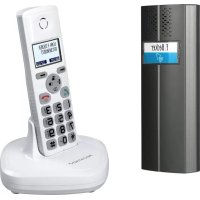
TF04 - Intercom Pentatron - Free user manual and instructions
Find the device manual for free TF04 Pentatron in PDF.


| Product type | DECT/GAP cordless intercom set TF04 including street panel, handset, base, charger and relay module |
| Brand | Pentatron |
| Model | TF04 |
| Street panel dimensions | 60 x 175 x 34 mm |
| Handset dimensions | 48 x 159 x 29 mm |
| Base dimensions | 115 x 115 x 68 mm |
| Relay module dimensions | 83 x 58 x 33 mm |
| Street panel weight | 156 g |
| Handset weight | 132 g |
| Street panel power supply | 12 V DC (stabilized, min. 300 mA) or 2 alkaline LR14 (C) 1.5 V batteries |
| Base power supply | 7.5 V DC via mains adapter 230 V~ 50 Hz |
| Handset power supply | 2 Ni-MH AAA 1.2 V, 600 mAh batteries |
| Main functions | Wireless communication, internal call, call transfer, conference, electric door opener (via relay module), telephone function on analog line, 50-number directory, call list, alarm, hands-free, key lock |
| Range | Up to 30 m indoors and 200 m outdoors (line of sight) |
| Handset battery life | Standby up to 180 hours, talk time up to 8 hours |
| Care and cleaning | Unplug the adapter before cleaning; use a soft damp cloth |
| Safety | Do not expose to moisture (except IP44 panel), do not use in explosive atmospheres, use only identical rechargeable batteries, follow safety instructions |
| Spare parts and repairability | Optional accessories: handset TF04M, relay module RE05, weather protection TFWS1. Repairs by experts only |
| Warranty | 2 years (excluding batteries and wear parts) |
| General information | Brand Pentatron, model TF04, CE certification, DECT/GAP compatible, IP44 protection class for street panel |
Frequently Asked Questions - TF04 Pentatron
User questions about TF04 Pentatron
0 question about this device. Answer the ones you know or ask your own.
Ask a new question about this device
Download the instructions for your Intercom in PDF format for free! Find your manual TF04 - Pentatron and take your electronic device back in hand. On this page are published all the documents necessary for the use of your device. TF04 by Pentatron.
USER MANUAL TF04 Pentatron
ToucheFin/On/Off[44]
Affectationdestouches:
- Appuyezsurlatouche "Select" . "Ame" affiche.
continusymbol = goedeverbinding
14. Werkingdeurintercom
Read through this user manual completely and carefully and while doing so fold outpage 3 with the illustrations. The user manual is an integral part of the product and contains important information about operation and handling. Always observe all the safety instructions. If you have any question or are unsure about using the equipment, ask a specialist or obtain information on line at www.indexa.de. Keep this manual in a safe place and passitontothirdpartiesifnecessary.
2. Properuse
The door intercom TF04 Set consists of door unit TF04T, a handset TF04M withabaseTF04Bandmainsadapter, andarelaymoduleRE05.
When the bell button on the door unit is pressed the handset will ring. After picking up the handset from the base or pressing a key on the handset two-way conversation is enabled. Both components contain a hands-free speaking system. If the base is connected with the cable provided to an analogue telephone socket the handset can be used as a cordless DECT telephone.
The door intercom can be expanded with upto three further handsets TF04M. Internal communication between handsets is possible.
The system uses DECT/GAP standard. Compatibility with components from other manufacturers cannot be guaranteed. Thedoor opening function is not available in combination with such components.
The door unit is for surface mounting. It can be used outdoor in a sheltered location(protectiveclassIP44). The relay module, handset, base and mains adaptermustbekeptdry.
The door unit can be powered using two LR14 (C), 1.5V batteries (not supplied) or via a suitable 12 V DC power supply (stabilised, min. 300mA, not supplied). If the latter is used then an electric door release (12 VDC - not supplied) can be connected through the relay module to the door unit. This can be activated by pressing a key on the handset. The base is powered through the 7.5 V DC mains adapter which is connected to 230 VAC, 50 Hz. The handset is powered by two Ni-MH rechargeable batteries which are automatically recharged when the handset is placed in the base.
Anyotheruseormodificationoftheequipmentisnotauthorisedandpresents significant risks of accident. No liability will be accepted for consequential damagesorfordamagescausedbyimproperuseorincorrectoperation.
This equipment is not suitable for use by persons (including children) with limited physical, sensory, or mental abilities or with lacking experience or lacking knowledge unless they are supervised by a person responsible for theirsafetyorobtaininstructionsonhowtousetheequipment. Childrenmust besupervisedtomakesuretheydonotplaywiththeequipment.
3. Packagecontents(seefig.AandB)
- Doorunit
- Bracket
• Fixingmaterialfordoorunit - Sparenamecard
- Torxscrewdriver
- Handset
• 2xAAANi-MHbatteries - Base
- Mainsadapter7.5Vforbase
- Relaymodule
- Telephonecable
• TAEadapter - Usermanual
4. Description
DoorunitTF04T(seefig.A)
1 doorunit
2 speaker
3 bellbuttonwithnamecard
4 slotforbracket
5 rubbercover
6 cover
7 terminal12VDC+
8 terminal12VDC-
9 terminalCTRL(relaycontrol +)
10 terminalSGND(relaycontrol-)
11 batterycompartmentcover
12 holefortorxscrew
13 batterycompartment
14 microphone
15 bracket
16 mountinghole
17 mountinglug
18 cablehole
19 holefortorxscrew
20 wallplug
21 screw
22 sparenamecard
23 torxscrew
24 torxwrench
RelaymoduleRE05(seefig.A)
25 relaymodule
26 mountinghole
27 holeforcoverscrew
28 timeregulator
29 NC/NOswitch
30 terminalSGND
31 terminalCTRL
32 cablehole
33 terminalPOWER+
34 terminalPGND-
35 terminalLock+
36 terminalLock-
37 cover
38 coverscrew
HandsetTF04M(seefig.B)
39 handset
40 earpiece
41 display
42 Redial/Backkey
43 right/left/up/down/recall/INT/phonebook/LSD
44 endkey
45 hashkey
46 microphone
47 chargingcontact
48 starkey
49 alphanumerickeys
50 dial/speakerkey
51 Menu/Selectkey
52 speaker
53 batterycompartment
54 battery
55 batterycompartmentcover
BaseTF04B(seefig.B)
56 base
57 chargingcontact
58 speaker
59 pagerbutton
60 mainsadapterconnector
61 telephonecableconnection
62 telephonecable
63 TAEadapter(countryspecific)
64 mainsadapter
5. Technicaldata
Doorunit TF04T
Operating voltage: 12 V DC = (min. 300 mA plus power
requirementofthedoorrelease) or
2xLR14(C),1.5Valkalinebatteries
Powerconsumption: max.0.8mA/12 VDC(standby),
max.200mA/12 VDC(use)
Transmissionfrequency: 1880-1900MHz
Transmissionpower: <250mW
RFmodulation: GFSK
RFrangetobase: upto30mindoors, upto200minfreespace
Operating temperature: -20 °C to +50 °C (note: below 0°C the
transmissionrangecanbereduced)
Protectionclass:
IP44
Dimensions:
60x175x34mm
Weight:
approx.156g
HandsetTF04M
Powersupply: 2xNi-MHbatteriesAAA,1.2V;600mAh
Charging voltage: frombase
Initialchargingduration: 15hours
Standbytime: upto180hours
Talktime: upto8hours
RFmodulation: GFSK
RFrangetobase: upto30mindoors, upto200minfreespace
Operatingtemperature: 0°C to +40°C
Dimensions: approx.48x159x29mm
Weight:
approx.132g
BaseTF04B
Operating voltage: 7.5 VDC(moinsadapter)
Currentconsumption: max.300A,
Operatingtemperature: 0°C to +40°C
Dimensions: 115x115x68mm
Mainsadapter
Powersupply: 230V,50Hz,150mA
Poweroutput: 7.5 = V,300mA,2.25VA
Application: indooruseonly
RelaymoduleRE 05
Operating voltage: 12 VDC, max=60mA
Switchingpower: 30 VDC,max.≠0A,
Switchingtime: 1-9sec.
Dimensions: 83x58x33mm
Application: indooruseonly
6. Safetyinstructions
The following instructions are provided for your safety and satisfaction during operation of the machine. Note that non-observance of these safety instructions results in significant risk of accident.
Explanation of symbols and terms used:
Danger! If this point is not needed, life and healthcare endangered.
Attention! Non-observance of these instructions puts property at risk of damage.
① Tip! Optimum resultswillbeachievedbyobservingtheseinstructions.
Danger!
- Do not leave small children unsupervised with the product, packaging material or small parts. Otherwise there is a risk of fatal injury due to choking!
- Do not damage any gas, electricity, water or telecommunication lines during drilling and fixing work. Otherwise there are dangers of personal and fatal injury!
- Treat the supply lines carefully. Lay these so that they cannot be damaged and do not present any tripping hazard. Fix the cables sufficiently. Do not pull the cables over sharp edges and do not crush or crimpthemelsewhere. Otherwise are dangersof personal and fatal injury!
- Do not allow the product to have contact with moisture (except the door unit: protection class IP44). Never immerse the product in water. Otherwise there is danger offatal injury!
- Do not use the handset in moist or explosion-risk environments. Otherwise there is danger off fatal injury!
- Use only the supplied power mains adapter with the base. Before connectinghistothermains,ensurethathemains supplycomplieswith 230VAC,50Hzandisfittedwithafuseaccordingtoregulations.
- Use only rechargeable batteries of the same type in the handset. Do not use primary batteries. Pay attention to the correct polarity. Otherwise there are dangers of personal and fatal injury!
- Ensure that the batteries are not short circuited or exposed to fire. The batteries must not be opened or recharged. Otherwise there is a risk of fatalinjuryduetaexplosion!
- Leaking or damaged batteries can cause burns by contact with skin. Handletheseusingsuitableprotectivegloves.
- The function of medical apparatus can be disturbed by the product. Pay attention to technical constraints in the area of use, for example in medical practices. Otherwisethereisariskoffatalinjury!
- Note that the handset can cause an unpleasant humming sound in hearingaids.
Attention!
- Donotexposetheproducttofireorhightemperature!
- Protect the product against strong magnetic or electrical fields and against strong mechanical loads and vibrations!
- Use the product only with the original components or original accessories!
- Before installing and operating the product check the package for damagesandcompleteness.
- If the unit is to be unused for a longer period, disconnect the mains adapterfromthemainssupplyandremovethebatteries.
- Do not connect any damaged device (e.g. transport damage) and disconnect the powersupply immediately in the case of damage. Unplug the mains adapter from the mains socket. Arrange for the damage to be repaired immediately by a specialist!
TIP!
- This product produces and uses radio frequency. If the product is not installed and used according to the manual it may disturb or be disturbed by other devices. In case of disturbances, relocate the product.
7. Location of the product
Beforeinstallingtheproductplanthelocation.Check the wireless connection and the function of themicrophoneinthedoorunit.
Observethefollowingpoints:
Doorunit:
- Mount the door unit at such a height that conversation is possible. Pay attention to the position of the microphone and speaker, these should be at the average head level of visitors. The bell button must also be accessible.
- Ifthedoor unit is mountedoutdoors the location must be protected from directrainfall.
- If an external supply or a door release is to be connected ensure a suitable cable routing, as the mains adapter and relay module must be located indoors. Use acable with cored diameter 0.2 - 0.7 mm.
Base:
Themaximumradio frequency range is up to 200 mwithfree space between thedoorunitandthebase, andbetweenthebaseandthehandset. Therange indoors is considerably reduced (max. range typically 30 m) through walls and floors (especially of steel reinforced concrete). Metal surfaces, e.g. refrigerators, shelving, andcoatedmirrors, alsoimpederadiotransmission.
The radio transmission can be affected by strong electrical-magnetic fields and other wireless appliances. Ensure adequate distance from microwave ovens, mobile phones, other wireless appliances, electric motors and mains powercables.
Place the base on a suitable level and solid surface, ideally 1 m above the
floor(forbetterreception).
Place the base at a central place inside the residence, e.g. in the hall. Ensure that the chime can be heard everywhere insidetheresidence.
Ensure that there is a mains power socket within the range of the mains adaptercable.
TIP!
- Place the base where there is wireless contact to the door unit. If you wishtoplacethehandselfurtherfromthedoorunititcanbestoredinthe chargerTF04L(optionalaccessory:Art.Nr.34238).
8. Installation and connection
8.1 Doorunit
Labellingthenamecard
- Removethebellbutton[3]carefullyfromthedoorunit[1].
- With the use of a small knife, remove the name card carefully from the bellbutton.
- Labelthenamecard.
• Reinsertthenamecardintothebellbutton. - Reinsertthebellbuttonintothedoorunit.
Installingabattery-operateddoorunit
- Hold the bracket [15] to the desired location and mark the two drilling holesthroughthemountingholes[16].
- Drillthetwoholes.
- Fix the bracket with the supplied screws [21] and wall plugs [20], if required.
- Openthebattery compartment [13] of the door unit by sliding down the battery compartment cover [11].
- Insert two LR14 (C), 1,5 V alkaline batteries into the battery compartment. Pay attention to the correct polarity. The door unit will sound.
- Closethebatterycompartmentwiththebatterycompartmentcover.
• Slidethedoorunitontothebracket.
- Screwthetorxscrew[23]firmlythroughthehole[19]intothehole[12], usingthesuppliedtorxwrench[24].
Installinga12Vdoorunit
- Hold the bracket [15] to the desired location and mark the two drilling holes through the mounting holes [16]. Make sure that there is a lead-throughfortheconnectioncableexactlybehindthecablehole[18].
- Drillthetwoholes.
- Fix the bracket with the supplied screws [21] and wall plugs [20], if required.
-
Removetherubbercover[5]fromthedoorunit.
-
Route the wire ends of the connecting cable through the lead-through and the cable hole [18], as described in fig. C (12 V supply) and fig. D (12Vsupplyanddoorrelease).
- Connect the wire ends to the terminals of the door unit as described in fig.CandD.
- Place the rubber cover back onto the door unit, and route the wires through the slots in the rubber cover.
- Slidethedoorunitontothebracket.
- Screwthetorxscrew[23]firmlythroughthehole[19]intothehole[12], usingthesuppliedtorxwrench[24].
8.2 Optional connection of the relay module and a doorrelease(seefig.D)
- Removethefourcoverscrewsfromtherelaymodule.
• Takethecover[37]offtherelaymodule. - Routeallconnectedwiresthroughthehole[32]intherelaymodule.
- Connect the wire ends to the respective terminals PGND [34], POWER [33], CTRL[31] and SGND[30].
- Connect the two wire ends of a suitable 12 V DC power supply to the terminalsPGND[34]andPOWER[33]intherelaymodule.
- UseacablestrandtoconnecttheterminalPOWER[33]andtheterminalLOCK+[35]intherelaymodule.
- Route a cable through the hole [32] of the relay module and use it to connect the terminal PGND[34] in the relay module with one terminal of the door release.
- Route a cable through the hole [32] of the relay module and use it to connect the terminal LOCK- [36] in the relay module with the other terminalofthedoorrelease.
- SettheNO/NCswitch[29]toNO.
- Turn the time regulator [28] with a small screwdriver to select a time between 1 second and approx. 9 seconds. Press the hash key [45] for at least 3 seconds. The door release will unlock for the selected time, and your visitor can open the door within this time. Replace the cover onto therelaymodule.
8.3 Base/ Handset
- For the telephone function, use the telephone cable [62] to connect the telephone cable connection [61] at the base with the telephone connection in your residence. If necessary, use the TAE adapter [63].
- Connect the low-voltage plug of the supplied mains adapter [64] to the mainsadapterconnector[60]ofthebase.
- Placethebaseinthedesiredlocation.
- Removethebatterycompartmentcover[55]fromthehandset[39].
- Insert the two supplied AAA Ni-MH batteries into the battery compartment[53]ofthehandset.Payattentiontothecorrectpolarity.
• Slidethebatterycompartmentcoverbackontothehandset.
- Place the handset on the base so that the charging contacts [47] of the handsettouchthechargingcontacts[57]ofthebase.
9. Operation
- Connect the mains adapter of the base to the powersupply. The handset will be ept twice.
The batteries in the handset are charged automatically after the handset has been placed in the connected base. The batteries should be fully charged for about 15 hours before initial operation. Watch the battery charge indicator on the display display [41] (three black bars = batteries are fully charged, one black bar = very low battery power). If the batteries do not reach their full capacity after charging, they should be replaced. When you place the handset in the base, it automatically turnson. - Ifdesired, connectthe12 Vpower supplyof thedoorunit. After thedoor unithassoundedtwice,thehandsetwilling.
- Pickupthehandsetandthenplaceitbackinthebase.
Nowthewirelessdoorintercomisreadyforoperation.
10. Turningthehandseton/off
When the handset is in power off mode and you place it in the base, it automatically turnson.
The keys and display illuminate when the handset is removed from the base and also when a key is pressed. The illumination stops automatically after a period of 10 seconds without takey being pressed.
Toturnthehandsetonoroffinstandbymode, followthesesteps:
- Toturn thehandseton, pressand holdthe key, until thedisplay is switched on. While the handset searches for a base, the signal icon will flashandthefollowingmessagewillbedisplayed:

When the handset has found the base, it will enter the standard by mode, the display will show the name of the handset, signal icon, battery icon, date and current time. If the handset is unsuccessful in finding a base, the handset will behave according to the OutofRange condition.
Note: If the battery power is very low when you place the handset in the base, the display will show the charging of the battery.
YOUSHOULDFULLYCHARGETHEANDSETBEFOREUSING.
- Toturn off the handset, keep the keypressed, until the display is switched off.
11. Basicsettings
- Selectingalanguageseechapter22.5
- Factorydefault:German
- Settingdateandtimeseechapter22.8
Settingtheringtone(melodyandvolume)seechapter22.3
Setting the audio volume of your conversational partner see chapter 22.2
12. Registrationoffurtherhandsets
ThesuppliedhandsetisalreadyregisteredwiththenumberMT1. Youcanregisterup to4handsetstothesamebase(seechapter 27"Optional accessories").
- Press and hold the pager button [59] on the bottom of the base for at least5seconds. Thanpressthe"Menu"key.
- Pressthe or key repeatedly to choose "Registration".
- Pressthe"Select"key.
- Use or keytoстро through the basenames list.
- Pressthe "Select" key to chooseabase.
- As soon as the base is found, and the handset is successfully registered, you will be prompted to enter the PIN code (the default one is 0000).
- Press the "Select" key Validation of the PIN code, the registration tone will sound and the base assigns a number to the handset. If the PIN code entered is invalid, a warning tone will sound, and the handset will return to the previous registration state. If the base is not found, the handset will behave according to the OutofRangecondition.
13. Radio range
The range of the radio transmission depends on various parameters. Under ideal conditions up to 200 m can be achieved in free space (between door unit and base as well as between base and handset), indoors the range is only upto30m.
A guarantee for this range cannot be given, as the local conditions at the installationsitemayinterferewithit.
Theradiorangecanbeaffectedbythefollowing:
- walls and ceilings, especially those made from reinforced concrete or metal
coatedwindows (e.g. energy savingwindows), radiators, mirrors, metal surfaces - electricalwiresandelectricdevices(e.g.electricmotor,microwaveoven)
- deviceswiththesameoranadjacentfrequency.
The strength of the received radiosignals is displayed with the icon: blinkingicon = weak or lost signal permanently flashing icon = good radiocommunication
14. Doorintercomfunction
- When the visitor presses the bell button [3], the door unit and all registered handsets will ring for up to 1 minute. The display display showe.g. "HS2Calling".Totalk with the visitor, pickupthe handsetor pressthedial/speakerkey[50].
- To end the conversation, press the end key [44] or place the handset in the base.
- If a door release is connected to the door unit, the door can be unlocked by pressing the hashkey[45] for approx. 4 seconds.
- If a visitor presses the bell button while you are having a telephone conversation, you will hear a call waiting signal, but you cannot answer your visitor'scall. If another handset is registered, it willing and you can talk to your visitor with this handset.
15. Descriptionofthekeys/display
15.1 Keyfunctions (see fig.B)

Dial/speaker[50]
tomake/answer a call;activates the speaker ifpressed during acall

End/power[44]
toendacall;pressingandholdingturnsthehandseton/off

Menu/Select[51]
toopen menufunctionsinstandbymode; toconfirmselection andaction; toperform"flash"function

Redial/Back[42]
Redial, to return to the previous menu; to mute the microphoneduringacall;todeleteanincorrectinput

Navigationkeys/furtherfunctions[43]

up/CIDbook[65]
to scroll up through lists and menu options; to increase the earpiece/speaker volume during a call; to open the CIDbook

down/phonebook[66]
to scroll down through lists and menu options; to reduce the earpiece/speaker volume during a call; to open the phonebook

INT[67]
to set up an internal call to another handset; to transferanincomingcalltoanotherhandset;tos et up aconferencecallwith anexternal lineand aninternal handset
Redial[68]
to enter the redial book; to insert a pause when pre-dialinganumber
![Pentatron TF04 - Redial[68] - 1](/content/2026/03/521710/images/adae0209e755f7516ee1b03a778b8b4042c2adaf21657c39d0351027ca5051c9.jpg)
Star[48]
to turn on/off the keypad lockfunction; to set upa conference call
![Pentatron TF04 - Star[48] - 1](/content/2026/03/521710/images/b988837a4f583a859f8f8a1bb70c39b8e08dd0e62daee04410432fc7a3795878.jpg)
Hashkey[45]
toactivatethedoorrelease
0-9
numbers0-9/lettersfromA-Z /symbols
keyassignment:
| Key | Characters in the displayed order | ||||
| 0 | (spc) | & | / | . | |
| 1 | - | 1 | @ | _ | |
| 2 | A | B | C | 2 | |
| 3 | D | E | F | 3 | |
| 4 | G | H | I | 4 | |
| 5 | J | K | L | 5 | |
| 6 | M | N | O | 6 | |
| 7 | P | Q | R | S | 7 |
| 8 | T | U | V | 8 | |
| 9 | W | X | Y | Z | |
15.2 Iconsonthedisplay display(seefig.B)
![signal icon handset name date HS 1 01/01 00:27 Menu Redial battery icon time The function of the left hand key is described hare [51] The function of the right hand key is described hare [42]](/content/2026/03/521710/images/b647e2fdb56d3a5d48eb03d3e6fddd56868a76854bd434b4bae71f35b9780014.jpg)
(c) indicate that the line is engaged
indicatesthatyouhavemissedoneormorecalls; whenthesymbolflashesthecallerlistisfull
indicate that the hands-free function is enabled
-0 appearswhenthekeypadislocked
16. Basic functions
All descriptions in this manual assume that the handset is in standby mode. Setthetelephonetostandbymodebypassingthe Key.
16.1 Makingacall
- Pick up the handset and press the key. The icon
(4) and the period the handset has been activated in hours (minutes : seconds) appear on the display, the handset is not in standby mode any more.
• Dialatelephonenumber. - To end the call, either press the 🔒 key or replace the handset in the base.
You can also enter the desired phone number in standby mode which allows youtomakecorrectionsbeforedialling.Followthesesteps:
- Pickupthehandset.
- Enter a telephone number. If required, press the ☐ key to insert a pause. "P" appear on the display.
- Check the telephone number. If you made a mistake while entering the number, you can us the "Erase" key to the last digit.
- Whenthenumberappearscorrectly, press the key and the handset will dial thenumber.
- To end the call, either press the 🔒 key or replace the handset in the base.
16.2 Receivingacall
When a new call is received, the call information will appear on the display and the telephonerings.
Ifthecallercanbeidentified, thecaller'sphonenumberisdisplayed.
- To answer the call, press the 🔊 key. If you have activated the Auto Answer function, when the handset is in the base, simply pick it up to answer.
- To end the call, either press the 🔒 key or replace the handset in the base. After hanging up, the display shows the call duration.
16.3 Mutingthemicrophone
During a conversation, you can temporarily switch your handset's microphoneoff, so that the other party cannot be any you.
Example: You want to say something to another person in the room but do not want the other party to hear you.
- To mute your microphone, press the "Mute" — key during the conversation. "CallMuted" appears on the display.
- Tounmutethemicrophone, press the "Mute" — key again.
16.4 Adjustingthevolume
During a conversation, you can use the keys or to adjust the volume of the handset (or the speaker in hands-free mode) from volume 1 to 5. The selected volume is displayed on the display. You can also set the volume in themenu "AudioSetup".
16.5 Lastnumberredial
- Press the "Redial" — or the ⬙ key in standby mode. The displayshowsthelastnumberyoudialed.
- Press the keyodialoutthenumber.
Your phone allows you to retrieve the last 10 numbers you have dialed and recall them quickly.
Notes:
- Ifnonumbersarefound, "Empty" is displayed.
- Whentheredialbookisfull,eachtimeyoudialanewnumber,theoldest numberstoredintheredialbookisautomaticallyerased.
Searchforanddial anumber inthe redialbook
- If you want to scroll through the memory, press repeatedly until you find then number you want to doial.
Usingredialbookoptions
Using the redial book options, you can add a number to the phone book or delete anumberintheredialbook.
- Scrolltothedesirednumberbyusingthe or key.
- Whenthenumberappearsonthedisplay, press the "More" key
- Usethe or a/rotocheseoneofthefollowingoptions:
- AddtoPB: allowsyou toadd thenumbertothephone book. Complete storingtheentrybystarting fromstep4describedinchapter19.2(the numberisalreadyenteredintheappropriatefield).
- Delete: allowsyoutodeletethesetectednumber.
- DeleteAll: allowsyoutodeletethewholerediaalbook.
- Toexit, press the "Select" key.
Note: "When you select the options Delete" or "Delete All", a message "Confirm?" will ask you to confirm the deletion. To confirm press the "Del"/"DelAll" key, escape press the "Cancel" key.
16.6 Keylock
If you turn on this feature, all keys will be locked. You can answer calls by using the ☑. But when you hang up, the phone returns to the locked mode. This feature is useful to avoid pressing keys by mistake.
- Tolockthekeys, inthestandbymodejustkeep the keypressedtill thedisplayshows" HSLocked and the icon.0 - Tounlockthekeys, keep the *keypressedagain till the keylockicon 0 disappears from the display.
Note: If you press any key in locked mode, the phone will generate a warningtoneandthe"HSLocked"messagewillberedisplayed.
16.7 Hands-free talking
During a call, you can turn on the built-in speaker in the handset. In this mode you can simply put your handset on a surface (e.g. a desk) and enjoy
thecomfortofhands-freeconversation.
- To turn the feature on, press the 📄 during a call. The icon appears on the display.
- To turn the feature off, and keep on talking in normal mode, press the keyagain. The icon will disappear.
Notes:
- Make sure you have turned the speaker off before putting the handset nearyouears.
• Toadjustthespeakervolume,seechapter22.2.
16.8 Flashsignal
When the line is engaged, pressing the "Flash" — key sends the Flash signal. This key is used in conjunction with special services (e.g. call waiting) which can be available in your phone network. For further details please contact your network telephone company.
Tousethesaid specialservices, justpress the "Flash" - key whiletheline isengaged: the display will show "R".
16.9 Paging
Youcanpageallhandsetsfromthebaseunitmakingthemringwithaspecial tone.Thisisusefultolocatealosthandset.
- Press the key [59] on the bottom of the base (less than 5 seconds). All handsets registered to the basewilling for about 60 seconds.
- To stop paging, press the key [59] on the base again or any key on the handset.
Note: If you press the key [59] for 5 seconds or longer, the basewill switch to subscription mode.
17. Menu navigation
Toaccessamenu option:
- Todisplaymenuitems, press the "Menu" key.
- Toscrollthroughmenuoptions, press the or key repeatedly.
- To select a menu, press the "Select" — key when the desired menu appears on the display.
- Repeatifnecessary.
Toreturntostandby mode:
If you press the "Back" — key in any menu (not in the number or text inputmode), the phonereturnstothepreviousscreen.
Toreturntostandbymode, press the key
The phone will automatically return to standby mode from any menu if no key is pressed within 40 seconds.
17.1 Menuoverview
CIDBook
AddtoPB
Delete
DeleteAll
Phonebook
New
Edit
Delete
DeleteAll
PBStatus
BSSettings
TerminateHS
DialMode
FlashTime
ModifyPIN
BSReset
HSSettings
Alarm
AudioSetup
RingSetup
ToneSetup
Language
HSName
AutoAnswer
LCDContrast
Date&Time
SelectBase
HSReset
REGISTER
Basel/ Base2/Base3/Base4
18. CIDBook
When you receive a call, if the caller's information is transmitted from the network on which the call was made (and the caller doesn't hide it), the caller's phone number is displayed. If you missed one or more calls, the icon will appear on the display. If the CID memory is full, the icon will flashon the display.
OUT OF AREA - This message will display when someone calls from an area where the telephone company is not offering the caller identification services orisnotyet providing number delivery to your area.
PRIVATE - If the caller has exercised the option to prevent his name and numberfrombeingsent, thismessagewillshowonthedisplay.
18.1 ViewanddialanyoftheCIDnumbers
- Pressthe"Menu" key
- Pressthe KSchchöseCIDB . Thenumberoftheidst calleris displayed. (Youcanalso accesstheCID bookdirectly bypassing the keyinstandbymode.)
- Use 📁 or 📄 keytoselectthedesirednumber.
- Todialanumber, presst he 📋 key.
Note: Numbers that have already been viewed are marked with the symbol in the upper right hand corner, numbers that have been viewed for the first time are marked with the symbol
18.2 Adding a CID number to the phone book (Add to PB)
- Pressthe"Menu" —key.
- Press the "Select" — key to choose "CID Book". The number of the lastcalleris displayed.
- Press 📄 or 📄 keytochoosethedesirednumber.
- When the desired number appears on the display, press the "More" key. "AddtoPB" appears.
- Pressthe"Select" — keyandenterthename.
- Pressthe"Next" key. Thenumberappears.
- Press the "Next" — key. Use the ☐ or ☐ key to select the ring toneyouwanttoassigntothenumber.
- Press the "Save" key to confirm and to exit. You will hear a confirmationbeep.
18.3 Delete one or all numbers from the CID book (Delete / Delete All)
- Pressthe"Menu" — key.
- Pressthe Keytech'ose CIDB . Thenumberoftheidst calleris displayed.
- Press 📁 or 📄 keytochoosethedesirednumber.
- When the desired number appears on the display, press the "More" key. "AddtoPB" appears.
- Use □ or □ keytoselect"Delete"or"DeleteAll".
- Pressthe → key.Thedisplayshows"Confirm?".
- Press the "Del" / "Del All" — key to confirm. You will hear a beep and the display show sthenext number.
19. Phonebook
The phone book built in your cordless phone allows you to store frequently used numbers so that you can easily make a call without having to remember or enter the phonenumber. Upto 50 entries can be stored.
Viewinganddialingphonebookentries
- Inthestandbymode, press the key
- Press or keyropeatedlyuntilthedesirednameisdisplayed.
- Press the "Dial" other key
- to dial out then number.
19.1 Addingentriestothephonebook(New)
- Pressthe"Menu" — key.
- Use and keytoselect"Phonebook".
- Press the 'Select' — "New" appears.
- Press the 'Kglebedisplyshows"N ?". ame
- Enterthedesiredname.
- Press "Next" for confirmation. Thedisplayshows "Number?".
• Enterthedesiredtelephonenumber(upto20digits). - Pressthe"Next" key
- Use □ or □ key to select the ring tone you want to assign to the number.
- Pressthe "Save" keyorconfirmation.
Notes:
- If you make a mistake while entering the number, you can use the "Erase" keycorrectit.Eachtimeyoupressthekeythelastdigit isdeleted.
- Using a pause: A pause is useful when you access an interactive voice response system, such as an automated banking system. A pause provides a delay of 3 seconds. If you want to insert a pause when you dial a number in standby mode or store a number in memory, press the keytilltheletterPappears.
19.2 Changingphonebookentries(Edit)
- Pressthe"Menu" — key.
- Use and key to select "Phonebook".
- Press the 'Select' — "New" appears.
- Use and keytoselect "Edit".
- Press the kSelect"
• Use and keytoselectthedesiredentry. - Pressthe"Select" Keyoconfirm.
- If necessary, press the "Erase" — key to clear digits, then enter the newnameandpressthe"Next" keytoconfirm.
• Ifnecessary, changethephonenumber. - Pressthe"Next"
- If necessary, use a key to change gathering tone.
- Press the "Save" — key to save. The handset generates a confirmationbeep.
19.3 Deleting one or all entries from the phonebook (Delete / Delete All)
- Pressthe"Menu" — key.
- Use and keytoselect"Phonebook".
- Pressthe Keylect" — "New" appears.
- Use and keytoselect "Delete" or "DeleteAll".
- Pressthe KSelect"
• Use and keytoselectthedesiredentry. - Pressthe "Select" key. In display shows "Confirm?".
- Press the "Del" / "Del All" koto confirm. The handset generates a confirmation beep.
19.4 Phonebookstatus(PBStatus)
ThePBstatusshowsthenumberofphonebookentriesalreadystored.
- Pressthe"Menu" - key.
- Use and keytoselect"Phonebook".
- Press the Keylect" — "New" appears.
- Use and keytoselect"PBStatusl".
- Pressthe "Select" —key.E.g. "11/50" is displayed, that means there are 11 out of 50 possible entries in the phonebook.
20. Basesettings (BSSettings)
20.1 Deletingahandsetfromthebase(TerminateHS)
With this function an additional handset (TF04M) can be unenrolled. This procedure must be made on the original handset from the set. The handset fromthesetcannotbeunenrolled.
- Pressthe"Menu" — key.
- Use and keytoselect"BSSettings".
- Press the KSelect" — "TerminateHS" appears.
- Press the Keylect" — Thedisplayshows "PIN ?".
- EnterthecurrentPINcode(thedefaultPINcodeis"0000").
- Pressthe"OK" key.
- Use or keytoselectahandset.
- Press the "Select" key to confirm. If you select the currenthandset or a nonexistent handset, a warning tone will be heard. After a few seconds, theselectedhandsetwillnoteregisteredanymore.
20.2 Diallingmode(DialMode)
This setting is only necessary if required by your telephone system. See user manual of the telephonesystem.
You can select to change the dialling mode by the following steps:
- Pressthe"Menu" - key.
-
Use and keytoselect"BSSettings".
-
Pressthe KSelect" TerminateHS"appears.
- Use and keytoselect "DialMode".
- Pressthe KSelect" — Thedisplayshowstheactualsetting.
- Use ⚠️ and 📄 key to select the desired dialling mode (Tone or Pulse).
- Press the Keep" A confirm beep will be heard.
Note:
If you are not sure which dialling mode to select, please contact your local serviceprovider.
Factorydefault:Tone
20.3 FlashTime
This setting is only necessary if required by your telephone system. See the usermanualofthetelephonesystem.
YoucanchangetheFlashtimewiththefollowingsteps:
- Pressthe"Menu" key.
- Use and keytoselect"BSSettings".
- Pressthe KSelect" "TerminateHS" appears.
- Use and keytoselect"FlashTime"
- Press the Select" The displayshowsthecurrentsetting.
- Use or keyto selected "Flash-1" (short) or "Flash-2" (long).
- Pressthe"Save" key
Factorydefault:Flash-1
20.4 ModifyingthePIN (ModifyPIN)
This function allows you to change the PIN number of the currently active base. The default PIN is 0000.
- Pressthe"Menu" key
- Use and keytoselect"BSSettings".
- Press the Keylect" "TerminateHS" appears.
- Use and keytoselect"ModifyPIN"
- Press the KSelect" — Thedisplayshows"PIN ?".
- EnterthecurrentPIN.
- Pressthe"Next" key. Thedisplayshows"NewPIN".
- Entera4-digitnewPIN.
- Pressthe "Next" key. The display shows "Repeat".
- EnterthenewPINagain.
- Pressthe"Save" keyoconfirm.NowyournewPINisactivated.
Note:
ItisimportantthatyoumemorizeyournewPIN. Ifyoulooseyour
PIN, you cannot make an anomaly modification to the device which require a PIN.
20.5 Resettingthebase(BSReset)
Thisfunctionallowsyoutoresetthebasesettingtothefactorydefault.
- Pressthe"Menu" key.
- Use and keytoselect "BSSettings".
- Pressthe KSelect" TerminateHS" appears.
- Use and keyto selected "FlashTime".
- Pressthe Select" — Thedisplayshows"PIN?".
- EnterthecurrentPINcode.
- pressthe"Reset" key.
21. Handsetsettings(HSSettings)
21.1 Alarm
Youareabletosetthealarmonthehandset.
- Pressthe"Menu" key.
- Use and keytoselect"HSSettings".
- Pressthe Keyelect" Alarm" appears.
- Press the Select" The displayshowsthecurrentsetting.
- Use or keytoselect "On" or "Off".
- Pressthe"Select" key.
- IfyouselectON, the displayshowsthecurrentalarmtime.
- Enterthenewtimewithnumerickeys0to9in24hformatHH:MM.
- Pressthe"Next" key:abeepsounds.
- Press 📄 or keybenableordisablethesnoozefunction
- Pressthe"Save" key.
Notes:
If you choose "Snooze Off", the alarm will ring for about 40 seconds at the selected time. By pressing any key you can switch off the alarm at any time. To deactivate the alarm, choose "Off" in the "Alarm" menu, otherwise the alarmwillringagainthenextday.
If you choose "Snooze On", the alarm will ring in regular intervals approx. every 10 minutes till the batteries of the handset are empty. By pressing any key (not the 📷 key) you can switch off the alarm at any time, after 10 minutesthe alarmwillringagain.Toswitchoff thealarm,pressthe
Thealarmwilling again the next day. Todeactivatethealarm, choose "Off" inthe"Alarm"menu, asdescribedabove.
Factorydefault:Off
21.2 Adjustingthevolume (AudioSetup)
You can adjust the volume of the handset or the speaker when using the hands-freefunctionasfollows:
- Pressthe"Menu" key.
- Use and keytoselect"HSSettings".
- Pressthe KSelect" Alarm" appears.
- Use and keytoselect"AudioSetup".
- Pressthe KSelect"
- Use or keytoselect "SpeakerV." or "EarpieceV.".
- Pressthe "Select" — Thedisplayshowsthecurrentsetting.
- Use ▲ or □ key to select the volume level from "Volume 1" to "Volume5".
- Pressthe"Save" key
Factorydefault:Volume3forboth
21.3 Ringtone(melody andvolume) (RingSetup)
You can choose the ring tone for incoming calls from the telephone network (RING EXT) as well as the ring tone from the door unit or other handsets registeredatthesamebase(RINGINT)andadjustitsvolume.
- Pressthe"Menu" key
• Use and keytoselect "HSSettings". - Press the 'Select' "Atom" appears.
- Use and keytoselect"RingSetup".
- Pressthe kSelect"
- Use of keytoselect"INTRing" or "EXTRing".
- Pressthe"Select" key.
• Use or keytoselect "Melody" or "Volume". - Pressthe"Select" key
- Use a key to selectaring tone from melody 1 to 10 or adjust the volume from 1 to 5 or switch it off completely ("VolumeOff"). When setting the ringtone or the volume, the telephonewill sound these selected melody or ring with the chosen volume.
- Press the "Save" key confirm.
Factorydefault: EXTRing:Melody1 INTRing:Melody8/Volume3forboth
21.4 Settingkeytones(ToneSetup)
KeyTone
Each depression of a key can be confirmed by the handset with a tone. This lone can be tuned off.
Receptionrange
The handset issues a warningsound when it is outside the reception range of the base. This sound can be tuned off.
- Pressthe"Menu" key
• Use and keytoselect"HSSettings".
- Pressthe "Select" Alarm" appears.
- Use and keytoselect "ToneSetup".
- Pressthe "Select"
- Use and keytoselect "KeyTone" or "RangeAlarm".
- Pressthe keyagain. Thedisplayshowsthecurrentsetting.
- Use ☐ or ☐ key to select "On" or "Off", to enable or disable the function.
- Pressthe"Save" key
Notes:
- For normal use, we recommend you leave the key tones enabled. This makes the phone easier to use.
- In certain conditions, a warning tonewillsound when an incorrect key is pressed. This warning tone cannot be disabled in "RangeAlarm".
Factorydefault: forboth:On
21.5 Selectingalanguage onthe display (Language)
The handset supports several predefined languages: English, French, Spanish, German, Italian, Dutch, Russian, Polish. You can change the language of the display texts as follows:
- Pressthe"Menu" key.
- Use and keytoselect"HSSettings".
- Pressthe Keylect" "Arm" appears.
- Use and keytoselect"Language".
- Pressthe KSelect" — Thedisplayshowsthecurrentsetting.
- Use or Keyselectalanguage.Eachlanguageisdisplayed initstranslation.
- Pressthe "Save" key You will hear a confirmation beep.
Factorydefault: German
21.6 Handsetname(HSName)
The default name of the supplied components is HS 1 (handset) and HS 2 (door unit). The default name of a handset or a door unit after registration is "HS N". The number N = 1 to 5 indicates the order in which the device has been registered to the base. Then name is displayed in standby mode. Each handset can be named for easier identification:
- Pressthe"Menu" key.
- Use and keytoselect"HSSettings".
- Pressthe KSelect" "Alum" appears.
- Use and keytoselect"HSName".
- Pressthe KSelect"
- Enter the name of the handset (max. 12 digits) with the alphanumeric keys (you can use the "Erase" — key to erase the last digit, if necessary).
- Pressthe"Save" key.
Notes:
When you make an internal call to another handset, "HS N Calling" will appear on this handset instead of the name given by you.
21.7 Automaticanswering(Auto Answer)
This function allows you to answer a call by simply picking up the handset, withoutpressinganykey.
- Pressthe"Menu" key.
- Use and keytoselect"HSSettings".
- Pressthe KSelect" "Arm" appears.
- Use and keytoselect"AutoAnswer".
- Pressthe KSelect" — Thedisplayshowsthecurrentsetting.
• Use or key to select ON or OFF to enable or disable the function. - Press the "Save" key. You will hear a confirmation beep.
Factorydefault:On
21.8 Settingdateand time(Date&Time)
- Pressthe"Menu" key
- Use and keytoselect"HSSettings".
- Pressthe Keylect" "Arm" appears.
• Use and keytoselect "Date&Time". - Press the Keylect"
- Use or key to choose between "Date Format", "Time Format", "SetDate" or "SetTime". Pressthe "Select" key displayed today show the current setting. DateFormat
- Use of keyto selected "DD-MM" (DayDay-MonthMonth) or "MM-DD" (DayDay-MonthMonth).
- Pressthe"Save" key TimeFormat
- Use or keytoselect "12-Hour" or "24-Hour".
- Pressthe"Save" key.
SetDate
- Enterthedatewiththenumerickeys0to9.
- Pressthe"Save" key.
SetTime
• Enterthetimewiththenumerickeys0to9.
- Pressthe"Save" key
Factorydefault:DateFormat:DD-MM,TimeFormat:24-Hour
21.9 Selectingabase (SelectBase)
This function allows you to select a base from those already registered to the handset(upto4basescanberegisteredtoonehandset).
- Pressthe"Menu" key.
- Use and keytoselect"HSSettings".
- Pressthe KSelect" "Amm" appears.
- Use and keytoselect"SelectBase".
- Press the KSelect" — Thedisplaytheshowsthecurrentbase.
• Use or Keytoselect the desired base. - Press the "Select" — key. If you select a non-existent base, the handset will sound a warning tone. After a short time, a confirmation melody will sound, and the name of the handset will change respectively.
Note:
Thehandset willonlyworkwith thebaseithas lastbeenregisteredto, orwith theselectedbase.
21.10 Resettingthehandset(HSReset)
- Pressthe"Menu" key.
- Use and keytoselect"HSSettings".
- Pressthe KSelect" Alarm" appears.
- Use and keytoselect"HSReset".
- Pressthe KSelect" — Thedisplayshows"PIN ?".
- EnterthecurrentPINcode.
- Press the "Reset" ☐ key. If the PIN code is validated, all Base settings will be returned to the factory default. Otherwise a warning sound will be heard and the settings will remain. After resetting, the handset will return to standby mode.
22. Registering a handset to a base (Registration)
The supplied handset is already registered with the number 1. You can register up to 5 handsets/door units to the same base (see chapter 27 "Optionalaccessories").Ahandsetcanberegisteredtoupto4bases.
- Press and hold the key [59] on the bottom of the base for at least 5 seconds.
- Pressthe"Menu" key
- Use and keytoselect"Registration".
- Pressthe"Select"key.
- Use of a keytoscrollthroughthebasenameslist("Base1" to "Base4".
- Pressthe"Select"key to chooseabase.
- As soon as the base is found, and the handset is successfully registered, you will be prompted to enter the PIN code (the default tone is 0000).
- Press the — key. On validation of the PIN code, the registration tone willsound andthebaseassigns anumbertothehandset. If the PINcode enteredis invalid, awanningtonewillsound, and the handset will return to the previous registration state. If the base is not found, the handset willbehaveaccordingtotheOutofRangecondition.
Notes:
- If the registration of a handset was deleted, it can be registered to the baseagainasdescribedabove.
- To register a registered handset to another base, simply follow the steps described above with another base.
- Thehandsetwill only workwiththebaseithas last beenregisteredto,or withtheselectedbase(seechapter22.9).
23. Callingwithmorethanonehandset
If you have more than one handset registered to the same base, you can makeinternalcalls,transferexternalcallsbetweentheregistered handsets,andsetupaconferencecall.
23.1 Internalcall
- Pressthe key. Thedisplayshowsthefollowingmessage:
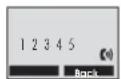
- Enter the number of the handset you want to call (e.g. "3" for handset 3). If the handset entered is valid, the called handset will ring and display "HSXCalling".
- Thehandsetusercanpressthe keyanswertheinternalcall.
• Toendyourconversation, press the key.
Notes:
If an external call comes in during an internal call or a conversation with the door unit, the display will show the caller's number and two short beeps will be heard.
- Press the key to end the internal call. Shortly after that your telephones will bring with their incoming call.
- Nowanswertheexternalcallwiththe key
Itisnotpossibletocalladoorunitfromahandset.
23.2 Calltransferbetweenhandsets
You can transfer an external call between handsets that are registered to the samebase.
• Duringanexternalcall, press the key
• Enterthenumberofthehandsetyouwanttotransferthecallto.
- If the called party wants to answer your call, he/she can press the key to talk with you. At this time you can inform him/her of the incomingcall.
- When the called party wants to answer the external call, press the keyorreplacethehandsettothebasetocompletethetransfer.
23.3 Settingupaconferencecall
When you have both an external call and an internal call in progress, you can setup a 3-way conference call like this:
- During anexternalcall, press the key and then enterthenumber of thehandsetyouwanttojointhe3-waycall.
- Thecalledpartypressesthe keyanswer.
- The calling party presses the keyboard the 3-waycall.
- Eitherofthetwohandsetscanpressthe keyto#etheconference callatanytime.
Note:
Ifoneof thehandsetsleaveshe conference call,theremaining handsets will continuetheconference.
24. CallerIDoncallwaiting
When you subscribe to Call Waiting service from your local telephone company, the handset will display the name and number of these second caller while you are having a conversation.
- Pressthe"flash" keyanswerthesecondcaller.
- If you press the "flash" — key, you can continue with your conversation with the first caller.
Note:
If you have transferred an external call to another handset, you cannot use thecall-waitingfunctionviathesecondhandset.
25. Changingbatteries
25.1 Doorunit
If the ring tone at the door unit is weak or no communication is possible, the batteriesinthedoorunitshouldbereplaced:
- Usethesuppliedtorxwrench[24] to remove thetorx screw[23] from the hole[12].
• Pullthedoorunit[1]upwardsandoutofthebracket[15]. - Open the battery compartment [13] of the door unit by sliding the battery compartment cover[11]down.
- Removeanddisposeoftheoldbatteries.
- Insert two new alkaline LR14 (C), 1.5 V batteries into the battery compartment, watching for the correct polarity. The door unit will ring once.
- Replacethebatterycompartmentcover.
• Slidethedoorunitbackontothebracket. - Screwthetorxscrewbackintothedoorunit.
25.2 Handset
If the batteries in the hand set discharge too quickly, they should be replaced:
- Open the battery compartment [53] of the handset [39] by sliding the battery compartment cover[55]down.
- Removeanddisposeoftheoldbatteries.
- Insert two new Ni-MH batteries AAA, 1.2 V; 600 mAh batteries into the battery compartment, watching for the correct polarity.
- Replacethebatterycompartmentcover.
26. Maintenance + cleaning
- Theunitsaremaintenance-free.Donotopenthem.
- Regularlycheckthetechnicalsafetyandfunction
Before you clean the device, pull the mains adapter out of the mains socket. - Use a soft, dry or slightly moist cloth or a dry brush for cleaning the surfaces.
27. Optional accessories
- HandsetTF04Mincl.charger, itemno.34235
- RelaymoduleRE05, itemno.34232
- WeathershieldTFWS1fordoorunit, itemno.34237
28.Disposal

Packaging material, used batteries or electrical products must not be disposed of as household waste. Use your recycling system. Details are available from your local authority.
29. Declarationofconformity
CE
INDEXA GmbH, Paul-Böhringer-Str.3, D-742290edheim, hereby declares that the TFO4 Set is in compliance with the essential requirements and other relevant provisions of Directive 19995/EC. The original of the conformity assessment can be found on the website www.indexa.de.
The product is designed for analogue telephone connection in German, Austrian, Swiss, Luxembourg Italian or Dutch telephonenetwork.
30.Warranty
In addition to the statutory guarantee from the vendor, the manufacturer warrants this product for 2 years from date of purchase (proof from receipt) according to following conditions. This warranty does not affect your legal rights. Thewarranty covers use of the product in normal conditions in private households. It only covers manufacturing defects and is limited to the replacement or repair of the faulty components. It does not include wear and tear, orbatteries.
The warranty applies only when the product is used according to the operating instructions. It does not cover damage arising from misuse, improper handling, application of force, dust, dirt, water or other environmental factors, or from incorrect voltage from batteries or power supply. The warranty is void when the product has been repaired or tampered by unauthorised persons and when it has been used with components which are not specified by the manufacturer. In case of a warranty claim return the complete product, wellpacked, to the vendor.
Carriage on returned goods must be prepaid, unpaid parcels will not be accepted. Repairs can only be accepted when accompanied by a full description of the fault. When the warranty period is expired repairs will be charged and are not always possible. Warranty claims do not extend the warranty period and the warranty for replacement parts expires with the warrantyfortheproduct.
Unless there is a statutory obligation, the manufacturer is not responsible for further claims, including peronal or material damages, arising from the use of the product from nonfunctionarmisfunctionoftheproduct.
Indexa GmbH
| Symptom Cause Remedy | ||
| Handsetdoesn'treact/ Thehandsetisn'tnomessageonthe Batteriesofthehandsetarenotinsertedcorrectly. Insertthebatteriescorrectly,watchingforcorrect polarity.display. Batteriesareempty,possiblybecausethebaseisn'tpoweredcorrectly. | Switchedon. Switchthehandseton. | |
| Connectthemainsadaptercorrectlytothemainspowerandchargethebatteries. | ||
| Batteriesofthehandsetareusedup. | Insertnewsuitable batteries. | |
| Badconnectionbetweenhechargingcontactsofhandsetandbase | Clean thechargingcontacts. | |
| Handsetreactstopressingakey Thekey padlockisactivated. Deactivatethekeypadlock.onlywithabeep. | ||
| Handsetdisplayshows Thebaseisnotpowered. Connectthemainsadapterofthebasecorrectly. SEARCHING. | ||
| The distance between base and handset is too largeorthebuildingfabricisshieldingtheradiotransmission. | Change the position of the base and/or the handset. | |
| Radiointerference | Switchotherradiotransmittersandinterferingdevicesoff. | |
| Changethepositionofthedevices. | ||
| Thehandsetwasn'tregisteredtothebase. | Registerthehandsettothebase. | |
| No ring can be heard at the door unit when the bell button is pressed. | The door unit is not powered. | Insert faultless batteries with the correct polarity or connect the door unit correctly to a 12 V DC power supply. |
| Handset doesn't react to ringing although it is connected to the base and the ring can be heard at the door unit. | The distance between door unit and base is too large or the building fabric is shielding the radiotransmission. | Change the position of the door unit and/or the base. |
| The door unit wasn't registered to the base. | Register the handset to the base. | |
| After pressing the bell buttontheringatthedoorunitsoundsonlyafewtimesand/ornocommunicationispossible. | The batteries in the door unit are used up. | Insert new batteries with the correct polarity. |
| The electric door release cannot be activated. | The hash key [45] wasn't pressed long enough. | Press and hold the hash key [45] for at least 3 seconds. |
| The door release isn't properly connected or the powersupplyistooweak. | Connect the door release correctly (see chapter 8.2). | |
| The battery life of the batteriesinthehandsetistooshort. | A permanently short battery life can indicate that thebatteriesneedtabereplaced. | Insert new suitable batteries with the correct polarity. |
| Nosuitablebatterieswereinserted. | Insertnewsuitablebatterieswiththecorrectpolarity. | |
| No dial tone | The base isn't connected correctly to the telehponenetwork. | Connect the telephone cable and the TAE adaptercorrectly. |
| Thebaseisn'tpowered. | Connectthebasetothemainspower. | |
| Thehandsetdoesn'tring. | Theringtoneisdeactivated. Activatetherington. | |
| Thecaller'snumberisnotdisplayed. | Youhave not subscribed to a caller ID service via yournetworkprovider. | Subscribe to a caller ID service via yournetworkprovider. |
| Thecaller mayhavewithheldhisdetails. | - | |
| The caller's number is received later. | Let the handset ring several times. |