EPL-3000 - Laser printer EPSON - Free user manual and instructions

Find the device manual for free EPL-3000 EPSON in PDF.
EPSON EPL-3000 - Laser printer
📄 135 pages English EN Download 💬 AI Question 10 questions ⚙️ Specs
Notice EPSON EPL-3000 - page 39
View the manual : Français FR English EN
Pick your language and provide your email: we'll send you a specifically translated version.
Product typeLaser printer
BrandEPSON
ModelEPL-3000
Resolution300 x 300 dpi with RITech technology
Print speedUp to 4 pages per minute
First pageLess than 30 seconds
Memory (RAM)1 MB expandable to 5 MB
Built-in fonts22 vector fonts (including 14 TrueType) and 5 bitmap fonts
Supported paper sizesA4, A5, B5, Letter, Legal, Executive, envelopes (Monarch, Com10, DL, C5, C6, IB5)
Paper tray capacity150 sheets (75 g/m²)
Paper feedAutomatic or manual (single sheet)
Printable area47 dots from the edge
InterfaceBidirectional parallel; optional RS-232C serial
EmulationsHP LaserJet 4L; EpsonScript Level 2 (optional SIMM)
Special featuresToner save mode, RITech, standby mode (Energy Star)
Noise levelSilent operation (laser)
ConsumablesToner cartridge (ref. 550656) up to 4500 pages
WeightApprox. 7 kg
Power supply220-240 V AC, 50/60 Hz
ComplianceEnergy Star, Class 1 laser
MaintenanceInterior and exterior cleaning, toner cartridge replacement, jam recovery
SafetyImportant safety instructions, mandatory grounding

Frequently Asked Questions - EPL-3000 EPSON

How to load paper in the EPL-3000 printer?
Open the front cover, fan the stack of paper, adjust the paper guides to the width of the paper, then insert the stack (up to 150 sheets) into the tray. Close the cover and unfold the paper support.
How to replace the toner cartridge in the EPL-3000?
Open the cover, remove the old cartridge by pulling it towards you. Take the new cartridge out of its bag, shake it horizontally, remove the protective strip, then insert it into the printer by engaging the side pins. Press to lock, close the cover and reset the toner counter by holding down the Continue and Toner Save Mode buttons until the indicator flashes green and orange.
How to clear a paper jam on the EPL-3000?
Remove all paper from the tray and partially fed sheets. Open the cover, remove the toner cartridge, then carefully remove the jammed paper from the paper path. Replace the toner cartridge, close the cover, and the printer will automatically reprint the page. If necessary, press Continue to clear the error.
How to print a status sheet on the EPL-3000?
Make sure the printer is on and no error is indicated. Press the Continue (or Status Sheet) button until the Status Sheet indicator flashes. The status sheet containing the current settings will be printed.
How to activate toner save mode?
Press the Toner Save Mode button on the control panel. The corresponding indicator lights up green. This mode reduces ink consumption by about 50% by substituting a gray pattern for black areas. To deactivate, press the button again.
How to change the language of the status sheet?
Hold down the Continue button while turning on the printer until the Toner Save Mode indicator lights up. Then press Toner Save Mode to turn off all indicators. Use the Continue button to select the indicator combination corresponding to the desired language (French: Status Sheet and Toner Save Mode indicators on, Jam/Cover off). Confirm by pressing Toner Save Mode. The printer initializes with the new language.
How to change the paper size in the remote control utility?
Launch the utility by typing EPRCPL at the DOS prompt. In the Emulation menu, choose the appropriate emulation. Click Paper, then Paper Size. Select the desired size (A4, Letter, etc.) from the list and click OK. Finally, click Send to apply the changes.
What to do if printing is too light or too dark?
In the remote control utility (EPRCPL), click Others and adjust the Density parameter (Darkest to Lightest). For light printing, choose a darker density; for too dark printing, choose a lighter density. Click OK then Send. You can also check the toner level (orange indicator) and replace the cartridge if necessary.
How to reset or initialize the EPL-3000 printer?
For a reset (clears data and returns to current default settings), hold down the Toner Save Mode button until the indicator lights up. For a full initialization (return to factory defaults), hold Toner Save Mode while turning on the printer until the indicator lights up. Initialization erases all downloaded fonts.
How to install the optional memory (SIMM)?
Turn off the printer and unplug the power cord. Open the cover and remove the toner cartridge. Locate the memory connector on the controller board. Insert the SIMM module (70 ns, compatible) at a slight angle, then pivot it to an upright position until it clicks into place. Replace the toner cartridge, close the cover, and reconnect. The memory is recognized automatically (visible in the status sheet).

User questions about EPL-3000 EPSON

0 question about this device. Answer the ones you know or ask your own.

Ask a new question about this device

Your email remains private: it is only used to notify you if someone answers your question.

No questions yet. Be the first to ask one.

Download the instructions for your Laser printer in PDF format for free! Find your manual EPL-3000 - EPSON and take your electronic device back in hand. On this page are published all the documents necessary for the use of your device. EPL-3000 by EPSON.

USER MANUAL EPL-3000 EPSON

Copyright © 1994 by Seiko Epson Corporation, Levallois, France.

Swiss 742 SWC ..... 2-10

Swiss 721 SWM 2-11

Symbol Set SWA 2-11

More Wingbats SWM 2-11

Courier 10 cpi (Bitmap) ..... 2-12

Courier 12 cpi (Bitmap) ..... 2-12

Line Printer 16.66 cpi (Bitmap) 2-12

Continue (Continuer)

Line Printer 16.66 cpi (Bitmap) ..... 2-12

Nom de policePoliceEquivalent HP
Courier 10 cpi(Medium), BoldCourier
Courier 12 cpi(Medium), BoldCourier
Line PrinterLine Printer

Adding Fonts

Line Printer 16.66 cpi (Bitmap)

Chapter 3

Soft Error/CPU Error
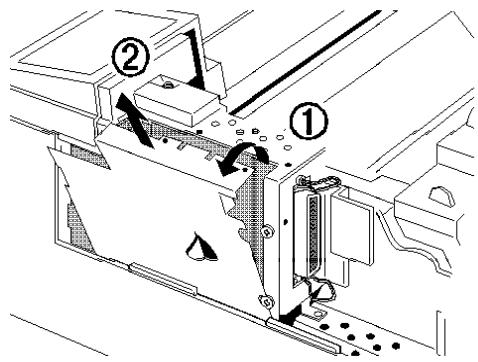
Technical diagram showing mechanical assembly with labeled components and directional arrows indicating movement or flow.

Bitmap font (dot matrix)

READ THIS FIRST

Table of Contents

Copyright © 1994 Seiko Epson Corporation, Levallois, France

Note:

Remark:

Remark:

Table of contents Click a title to access it
Manual assistant
Powered by Anthropic
Waiting for your message
Product information

Brand : EPSON

Model : EPL-3000

Category : Laser printer