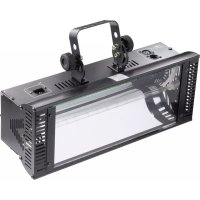
DMX Superstrobe 2700 - Lighting Eurolite - Free user manual and instructions
Find the device manual for free DMX Superstrobe 2700 Eurolite in PDF.



| Product type | DMX Strobe |
| Brand | Eurolite |
| Model | DMX Superstrobe 2700 |
| Power supply voltage | 230 V ~ 50 Hz |
| Power consumption | 1540 W max. |
| Bulb | Flash tube LA601 (1500 W) |
| Fuse | T15AL/250 V (5 x 20 mm) |
| DMX protocol | DMX512 |
| DMX channels | 2 |
| Dimensions (W x H x D) | 445 x 177 x 137 mm |
| Weight | 3.6 kg |
| Max. ambient temperature | 40 °C |
| Max. housing temperature | 65 °C |
| Minimum distance from illuminated surface | 1.5 m |
| Minimum distance from flammable materials | 1 m |
| Protection class | I |
| Operating modes | Manual, music, automatic, DMX |
| Control | DIP switches and potentiometers |
| Mounting | Mounting bracket + safety cable |
| DMX output | Yes (for daisy-chaining) |
| Maintenance | Clean with a soft dry cloth; bulb and fuse replacement by qualified personnel |
| Spare parts and repairability | Replaceable bulb and fuse |
Frequently Asked Questions - DMX Superstrobe 2700 Eurolite
User questions about DMX Superstrobe 2700 Eurolite
0 question about this device. Answer the ones you know or ask your own.
Ask a new question about this device
Download the instructions for your Lighting in PDF format for free! Find your manual DMX Superstrobe 2700 - Eurolite and take your electronic device back in hand. On this page are published all the documents necessary for the use of your device. DMX Superstrobe 2700 by Eurolite.
USER MANUAL DMX Superstrobe 2700 Eurolite
ZUSATZINFORMATION ZUR BEDIENUNGSANLEITUNG ADDITIONAL INFORMATION FOR THE USER MANUAL INFORMATION ADDITIONNEL POUR LE MODE D'EMPLOI INFORMACION ADICIONAL PARA EL MANUAL DEL USUARIO
UPGRADE 03/09
Deutsch
Manuelle Steuerung
When unpacking the strobe, DIP-switch no. 10 is set to OFF and the device is in DMX-mode. In the DMX-mode, the flash frequency and the dimming level cannot be adjusted via the rotary control.
For testing purposes, please switch the device to manual control. For doing so, DIP-switch no. 10 has to be set to ON.
Français
© Copyright 2007 by Conrad Electronic SE. Printed in Germany.
100% recycling paper.
Bleached without chlorine.
GB Imprint
These operating instructions are published by Conrad Electronic SE, Klaus-Conrad-Str. 1, D-92240 Hirschau/ Germany.
No reproduction (including translation) is permitted in whole or part e.g. photocopy, microfiling or storage in electronic data processing equipment, without the express written consent of the publisher.
The operating instructions reflect the current technical specifications at time of print. We reserve the right to change the technical or physical specifications.
© Copyright 2007 by Conrad Electronic SE. Printed in Germany.
F Note de l'éditeur
© Copyright 2007 by Conrad Electronic Benelux B. V. Printed in Germany.

Mc CRYPT
DMX-Stroboskop
DMX stroboscopic light
Stroboscope à DMX
DMX-stroboscoop
TL-1500
Best.-Nr. 59 12 99
© Bedienungsanleitung Version 07/07
GB Instruction manual Version 07/07
© Notice d'emploi Version 07/07
NL Gebruiksaanwijzing Versie 07/07

Inhaltsverzeichnis
Seite
Einführung 3
Safety instructions 16
Functional Description 17
Initial operation 17
Mounting 17
Connection of a DMX controller 19
Setting the operating mode 19
Music control 19
Automatic operation....19
Control via an external DMX controller 19
Mains connection 20
Operation 21
Music control 21
Automatic operation 21
DMX mode 21
Handling 21
Maintenance 22
Cleaning 22
Changing the light bulb 22
Fuse replacement 23
Disposal 23
Technical data 23
Introduction
Dear Customer,
Thank you for purchasing this product.
This product complies with the applicable National and European specifications. We kindly request the user to follow the operating instructions, to preserve this condition and to ensure safe operation!
These operating instructions relate to this product. They contain important notices on commissioning and handling. Please take this into consideration when you pass the product on to third parties. Please keep these instructions for further reference!
All company names and product designations contained herein are trademarks of the respective owners. All rights reserved.
For a fast response of your technical enquiries please use the e-mail address listed below.

Fon. +49 9604 / 40 88 80
Fax +49 9604/40 88 48
e-mail: tkb@conrad.de
Mon to Thurs 8.00am to 4.30pm
Fri 8.00am to 2.00pm
Intended Use
The McCrypt TL-1500 DMX stroboscopic light is used to generate flash-like light effects in light show equipment, party rooms, etc. and is controlled using the built-in controller or an external DMX controller.
This product is only approved for connection to 230 V\~/50 Hz AC power via an earthed mains socket.
The DMX connection may only be connected to suitable DMX controllers.
It can only be used in closed rooms, and therefore not outdoors. Contact with moisture, such as in bathrooms, must be avoided.
Any use other than that described above could lead to damage to this product and involves the risk of short circuits, fire, electric shock, etc.
The product must not be modified or converted, and the casing must not be opened.
The safety instructions must be observed at all times.
Symbols

This symbol on the device indicates that the user should read these operating instructions prior to using the product.

The flash icon in a triangle is used to alert you to potential personal injury hazards such as electric shock. The device contains no parts that should be serviced by the user. Therefore, do not open the device.

The arrow symbol indicates special information and advice on operating the device.

An exclamation mark indicates important notes in these operating instructions that should always be observed.

The F symbol indicates that the device is suitable for direct attachment on normally flammable surfaces.
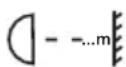
This symbol indicates the minimum distance to the illuminated surface.
Safety instructions

The warranty will lapse for damage due to non-compliance with these operating instructions. We will not assume liability for any resulting damage.
Nor do we assume liability for damage to property or personal injury, caused by improper use or failure to observe the safety instructions. The warranty is voided in these cases.
- For safety and licensing (CE) reasons, unauthorised conversion and/or modifications to the product are not permitted.
- The device is constructed according to protection class I. As a voltage source only a proper power socket (230V\~/50Hz) of the public power supply system with earthing contact may be used.
- All persons operating, installing, setting up, commissioning or servicing this effect beamer must be trained and qualified correspondingly and observe these operating instructions.
- Do not look straight into the light source during operation. Temporarily, the light flashes can lead to visual defects. They can furthermore possibly cause epileptic fits. This applies particularly to epileptics.
- Never touch the mains plug when your hands are wet or damp. There is a risk of a fatal electric shock.
- If the cables show damages, do not touch them. First of all, de-energize the corresponding mains socket (e.g. via the respective circuit-breaker) and afterwards carefully pull the mains plug from the socket. Separate the mains cable from the device and replace it. Never use the product if the power line is damaged.
- When installing the device, make sure that the mains cable is not pinched or damaged by sharp edges.
- The product is not a toy and should be kept out of reach of children! Children cannot judge the dangers involved, when dealing with electrical devices.
- Never position vessels or containers containing liquids, such as glasses, buckets, vases or plants, in the direct vicinity of the system. Liquid could get inside the housing and impair electrical safety. There is furthermore a high risk of fire or of a life-threatening electric shock. If this is the case, de-energize the respective socket (e.g. switch off circuit breaker) and only then pull the plug-in mains unit from the socket. Afterwards, the product must no longer be used, bring it to a specialist workshop.
- Do not expose the device to high temperatures, dripping or splashing water, strong vibrations or high mechanic stress.
- Do not place any sources of open fire, such as burning candles, onto or next to the device.
- Consult an expert when in doubt about the mode of operation, safety or connection of the device.
- Do not operate the light when it is unattended.
- Use the device only in moderate climate regions and not in tropical ones.
Safety instructions
- Do not leave packing material unattended. These may become dangerous playing material for children.
- On industrial sites the accident prevention regulations of the association of the industrial workers' society for electrical equipment and utilities must be followed.
- If you are not sure about the correct connection or if questions arise which are not covered by the operating instructions, please do not hesitate to contact our technical support or another specialist.
Functional Description
This powerful flash stroboscope generated extremely bright flashes controlled by the internal controller or an external DMX controller (not part of the delivery).
The brightness and speed can be adjusted via the DMX controller.
The DMX output serves to loop the DMX signal to other DMX-controlled devices.
An installed sound-to-light control also allows you to operate the device without a connected DMX controller.
Initial operation

Carefully read the complete operating manual and the safety instructions before using the product in order to ensure proper commissioning.
Check the device for damage before using it for the first time. If the device is damaged, do not operate it and consult an expert or our service team.

Smoke and odor may occur when commissioning the device for the first time. This is not a malfunction.
Mounting

The assembly and the installation of the device must be carried out by a specialist who is familiar with the hazards and the relevant regulations. Repairs, operation and maintenance of the product may only be carried out by qualified personnel.
Initial operation

When choosing a location for your device, make sure to avoid vibration, dust, hot and cold temperatures and dampness. Furthermore, no powerful transformers or motors must be set up in the vicinity of the device.
The light effect may only be installed in locations with an ambient temperature of less than 40^ C. The maximum casing temperature is 65^ C.
The device must be mounted out of normal reach.
Illuminated objects must be at least 1.5m away from the device's light emission. Easily-flammable materials such as decorative fabrics must have at least a distance of 1m to the device. Otherwise such objects might catch fire!
When mounting the product make sure that the power cord is neither jammed nor damaged by sharp edges.
During installation and service work, the area underneath the place of installation must be cordoned off.
The installation surface or mounting fixture needs to be designed in a way, that it can take 10 times its load capacity for at least 1 hour without damaging deformation.
It is also essential that the device is secured by means of a second safety restraint that is independent of the actual mounting supports. If the main supports fail, no part of the installation should be able to fall down.
During mounting, all the relevant regulations (in particular BGV C1, in former times VGB 70 and EN 60598-2-17) must be observed.

Acceptance test (by industrial use):
Before first use and after any significant modifications, the installation (including the electrical connections) must be checked by a specialist.
A yearly check by a technical expert is necessary.
At least every four years, a quality inspection must be carried out by a technical expert.
- Install the effect beamer using a mounting bracket (1) on the ceiling, the wall or on a suitable crossbeam.
- Secure the device with fastenings that are compatible with the fastening surface and suitable for carrying the weight of the light effect device.
- Secure the installation with an additional suitable safety restraint cable or net. The safety restraint cable or net must be able to support the light effect device in the event of a fault in the main support system.
- Set the desired angle of inclination and tighten the bracket locking screws well.
Initial operation
Connection of a DMX controller

Only connect the device to a DMX controller with DMX-512 protocol.
- Connect the port DMX IN with the output of the DMX controller.
- Use a screened XLR cable. The controller must have at least two free control channels.
- Connect DMX OUT with the DMX input of the subsequent device. If the DMX stroboscopic flash effect is the last or only device in the DMX chain, plug in a plug with terminators here.

The pin assignment of the connection sockets is imprinted on the device.
Setting the operating mode
The DMX stroboscope flash device can be controlled with the installed controller (music control via microphone or automatic operation) or with an external DMX controller.
Music control
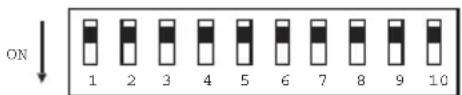
- Switch all DIP switches to "OFF".
text_image
ON 1 2 3 4 5 6 7 8 9 10- This activates the music control. The stroboscope flashes with the beat of the music.
Automatic operation
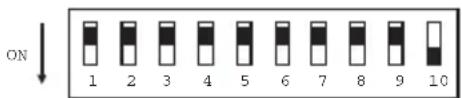
- Switch the DIP switch 10 to „ON“. All other DIP switches must be set to „OFF“.
• The stroboscope flashes permanently.
text_image
ON 1 2 3 4 5 6 7 8 9 10Control via an external DMX controller
Each DMX device in a DMX chain requires a so-called start address to be clearly identified by the controller.
This start address is defined by the DIP switches 1 to 9 on the device.
Each DIP switch is assigned a value. The total of these values then defines the start address.
Initial operation
- Connect your DMX controller to your effect beamer as described above.
- Set the DMX start address with the DIP switches on the device.
- Please refer to the table below for the values of the individual DIP switches. Position „ON“ indicates that the switch is activated, „OFF“ that it is deactivated.
DIP switch Value
1....1
2 2
3 4
4 8
5 16
6 32
7 64
8 128
9 256
Example:
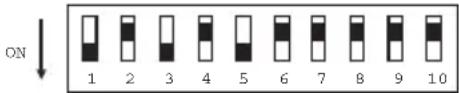
The DIP switches 1, 3 and 5 are „ON“, all other switches „OFF“.
text_image
ON 1 2 3 4 5 6 7 8 9 10Start address = 1 + 4 + 16 = 21
Mains connection

The mains outlets to which the light effect is connected must be easily accessible to quickly separate the device from the mains voltage in case of an error.
Do not let the mains cable come into contact with other cables.
Be careful when handling the mains cables and main connectors. Mains voltage can give severe electric shocks, which can be fatal.
Do not leave the cables trailing free; route them in an orderly and professional way to prevent accidents.
- Insert the non-heating appliance plug of the mains cable into the mains socket on the device.
- Plug the power plug of the power supply cable into a socket with earthing contact.
- As soon as the light effect is connected to the power supply network, it takes up operation.
Operation
Music control
- Start the music playback on your audio system.
- Adjust the volume to the level normally used.
- The stroboscope flashes with the beat of the music.
- The brightness is preset.
Automatic operation
- As soon as the stroboscope is supplied with power, it flashes permanently.
- The brightness and the flash speed are preset.
DMX mode
- Activate the DMX controller.
- The brightness and the speed of the light effect depends on the value settings on the corresponding DMX channel.
Handling
- Never operate the device without protective disk!
- The device is not suitable for continuous use. Pauses in operation increase the working life of the product.
- Never plug the power plug into a mains socket immediately after the device was taken from a cold to a warm environment. The condensation water created thereby may damage the device. Allow the device to reach room temperature before connecting it. Wait until the condensation water has evaporated.
- Never touch the mains plug when your hands are wet.
- Never pull the mains plug by pulling the cable from the socket. Always only use the thus provided grip area.
- Remove the mains plug from the electrical outlet if the device is not in use for a longer period of time.
- For safety reasons always pull the mains plug from the socket during a thunderstorm.
- To ensure sufficient ventilation, do not cover the device. Apart from this, the air circulation may not be obstructed by objects such as magazines, table cloths, curtains or similar. While the device is in operation, keep a free space of at least 1m around the device.
Maintenance
Regularly check the technical safety of effect beamer, for example, for damage to the mains cable or the housing.
The protective disk must be exchanged when it shows visible damage and its effectiveness is impaired, e.g. through cracks or deep scratches.
If you have a reason to believe that the device can no longer be operated safely, disconnect it immediately and secure it against being operated unintentionally. Pull the power plug out of the socket outlet!
It can be assumed that safe operation is no longer possible if:
- the device shows visible damage, especially when the protective disk is damaged
- the illuminant is damaged or has deformed through heat
• the device no longer works - it has been stored for a long time under unfavourable conditions
- it was exposed to extraordinary stress caused by transport
Always observe the following safety instructions before cleaning or servicing the effect beamer:

After switching off the device wait at least 20 minutes before opening it!
Live components may be exposed if the covering is opened or components are removed.
Prior to start of maintenance or repair works, the device must be disconnected from all voltage sources.
Capacitors inside the device may still carry voltage even though they have been disconnected from all voltage sources.
Repairs may only be carried out by qualified personnel who are familiar with the hazards involved and the relevant regulations.
Cleaning
The outside of the light effect should only be cleaned with a soft, dry cloth or brush.
Never use aggressive cleaning agents or chemical solutions as these may damage the surfaces of the housing.
Changing the light bulb
The illuminant has a very long service life. Should you still have to exchange the illuminant at some point, you have to open the casing. This work may only be carried out by specialists familiar with the hazards involved and with the relevant regulations.
Maintenance
Fuse replacement
If you have to replace fuses, ensure that you only use fuses of the same type and rated current (see „Technical data“).

It is absolutely impermissible to repair fuses or to bridge the fuse holder.
- Pull the mains plug out of the outlet and separate the non-heating appliance plug from the mains connection on the device.
- Carefully prise the fuse holder with a screwdriver out of the mains connection.
- Remove the defective fuse and replace it with a fuse of the same type.
- Carefully push the fuse holder with the new fuse back into its holder at the mains connection.
- Only then may you reconnect the device to the mains and put it into operation again.
Disposal
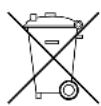
When the product is no longer usable, dispose of it in accordance with the applicable statutory regulations.
Technical data
Operating voltage 230V AC/50 Hz
Power consumption 1540W max.
Illuminant 1500W flash tube LA601
Fuse T15AL/250V (5x20mm)
DMX protocol ...... DMX512
DMX channels.... 2
Dimensions 445 x 177 x 137mm
Weight 3.6kg
Table des matières
Page
Introduction 25