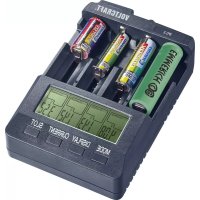
IPC3 for cylindrical cells Liio - Battery charger VOLTCRAFT - Free user manual and instructions
Find the device manual for free IPC3 for cylindrical cells Liio VOLTCRAFT in PDF.


| Product Type | Battery Charger |
| Brand | Voltcraft |
| Model | IPC3 for cylindrical cells Liio |
| Number of Slots | 4, independent |
| Rechargeable Battery Types | NiCd/NiMH 1.2 V: A, AA, AAA, Baby (C), Sub-C; Li-ion 3.7 V: CR-123A, 10440, 14500, 16340, 16650, 17355, 17500, 17670, 18490, 18500, 18650, 22650, 26500, 26650 |
| Adjustable Charge Current | 200 / 300 / 500 / 700 / 1,000 / 1,500* / 2,000* mA (*only for the two external slots) |
| Adjustable Discharge Current | 200 / 300 / 500 / 700 / 1,000 mA (Li-ion only) |
| Maximum Charge Capacity | 20,000 mAh |
| Charge End Detection | -ΔV (NiCd/NiMH), 4.2 V (Li-ion) |
| Discharge End Detection | 0.9 V (NiCd/NiMH), 2.8 V (Li-ion) |
| Trickle Charge | NiCd/NiMH only, max. 10 mA |
| Automatic Li-ion Recharge | If cell voltage < 4.0 V |
| Battery Programs | Charge, Discharge, Conditioning (DISCHARGE REFRESH), Charge Test, Quick Test |
| Display | 4 backlit LCD screens |
| Power Supply | External power adapter: 100‑240 V/AC, 50/60 Hz, output 12 V/DC, 3 A |
| Cooling Fan | Automatic, activates > 40 °C |
| Thermal Safety Cutoff | From 60 °C, automatic reset after cooling |
| Operating Temperature | 0 to +40 °C |
| Maintenance | Clean with a dry, lint-free, antistatic cloth |
| Safety | Reverse polarity protection, defective battery detection, safety timer |
Frequently Asked Questions - IPC3 for cylindrical cells Liio VOLTCRAFT
User questions about IPC3 for cylindrical cells Liio VOLTCRAFT
0 question about this device. Answer the ones you know or ask your own.
Ask a new question about this device
Download the instructions for your Battery charger in PDF format for free! Find your manual IPC3 for cylindrical cells Liio - VOLTCRAFT and take your electronic device back in hand. On this page are published all the documents necessary for the use of your device. IPC3 for cylindrical cells Liio by VOLTCRAFT.
USER MANUAL IPC3 for cylindrical cells Liio VOLTCRAFT
www.business.conrad.at
- Introduction......22
- Explanation of Symbols....23
- Intended Use....23
- Scope of Delivery 24
- Description of Individual Parts....25
- Safety Information 26
- Commissioning....28
a) Connecting the Voltage Supply....28
b) Display Lighting....29
c) Button Functions 29
- Rechargeable Battery Programmes 31
- Operation....33
a) Inserting a rechargeable battery and charging it automatically....33
b) Inserting several rechargeable batteries and charging them automatically 34
c) Inserting a rechargeable battery and charging it manually ....34
d) Inserting several rechargeable batteries and charging them manually....35
e) Estimating the charging time....36
f) Temperature deactivation....36
- Maintenance and Cleaning .... 36
- Disposal....37
a) General information....37
b) Batteries and rechargeable batteries 37
- Technical Data....38
a) Battery charger....38
b) Mains unit....39
1. INTRODUCTION
Dear customer,
Thank you for making the excellent decision to purchase this Voltcraft® product.
You have acquired a quality product from a brand family which has distinguished itself in the fields of measuring, charging and grid technology thanks to its particular expertise and its continuous innovation.
With Voltcraft ^® , you will be able to handle difficult tasks, either as an ambitious hobbyist or as a professional user. Voltcraft ^® offers reliable technology and a great price-performance-ratio.
We are positive: Starting to work with Voltcraft ^® will also be the beginning of a long, successful relationship.
Enjoy your new Voltcraft® product!
If there are any technical questions, please contact:
International: www.conrad.com/contact
United Kingdom: www.conrad-electronic.co.uk/contact
2. EXPLANATION OF SYMBOLS

An exclamation mark shows important notes in these operating instructions that must be strictly observed.

The arrow-symbol indicates that special advice and notes on operation are provided.

This device is CE-compliant and meets the applicable European directives.

For use in dry indoor areas only.

Read the operating instructions carefully before commissioning.

Protection class 2 (protective insulation, double or reinforced insulation)
3. INTENDED USE
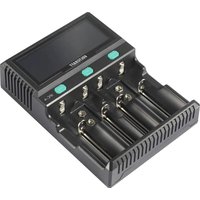
The charger is used to charge 1 to 4 round-cell rechargeable batteries. The charging slots work independently of each other and may also be equipped with different rechargeable battery types.
Ni-MH or Ni-Cd round cell batteries of the type A, AA (Mignon, LR6), AAA (Micro, LR3), Baby (C), sub-C and Li-ion round cell batteries of the type CR-123A (3,7 V), 10440, 14500, 16340, 16650, 17355, 17500, 17670, 18490, 18500, 18650, 22650, 26500 or 26650 can be inserted.
The micro-processor-controlled charger has a single slot monitoring, charge end recognition (minus delta-V for Ni-Cd/Ni-MH and 4.2 V for Li-Ion) and a maintenance charge function for Ni-Cd and Ni-MH rechargeable batteries. The cell voltage of Li-Ion rechargeable batteries is monitored. The rechargeable batteries will be charged fully again when it drops below 4.0 V. Li-Ion rechargeable batteries are charged with a pre-set standardised CC/CV charging programme.
The charger has various charging and discharging programmes as well as test functions integrated that can be used to inspect and condition the rechargeable battery. The two outer charging slots can be used with increased charging current at individual or concurrent use. Batteries of size Baby (C) or batteries with the same diameter must be inserted into the two outer charging slots.
The charge condition is displayed on a dedicated display for each charging slot.
The charger recognises defective rechargeable batteries and incorrect polarity and will terminate charging then. The safety timer protects the device and the rechargeable batteries. The charger is supplied with voltage via an external plug-in mains unit that is enclosed.
No primary batteries (zinc-coal, alkaline, etc.) or other rechargeable battery types than those indicated above must be charged.
The charger must only be operated in dry indoor areas. The mains unit must only be connected to and operated at an alternating voltage of 100 - 240 V/AC.
Any other use than that described above is not permitted and will damage the product. Additionally, this is connected to dangers, such as short circuit, fire, electric shock, etc.
Always observe the safety information!
4. SCOPE OF DELIVERY
- Charger
- Plug-in mains adapter
- Operating Instructions
Up-to-date operating instructions
Download the latest operating instructions via the link www.conrad.com/downloads or scan the QR code. Follow the instructions on the website.

5. DESCRIPTION OF INDIVIDUAL PARTS
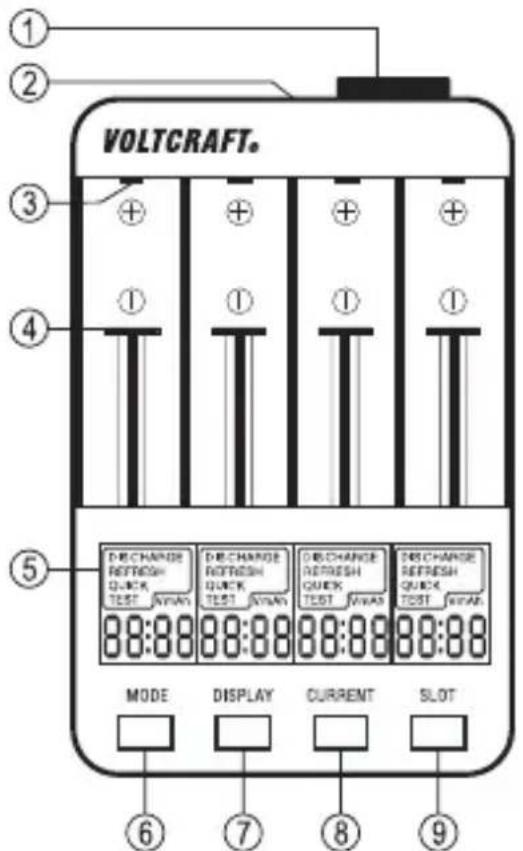
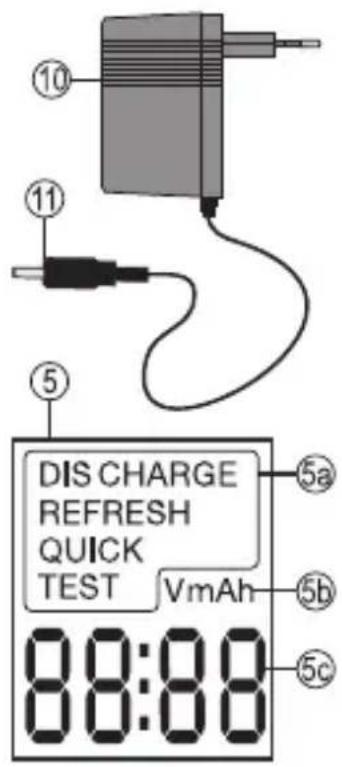
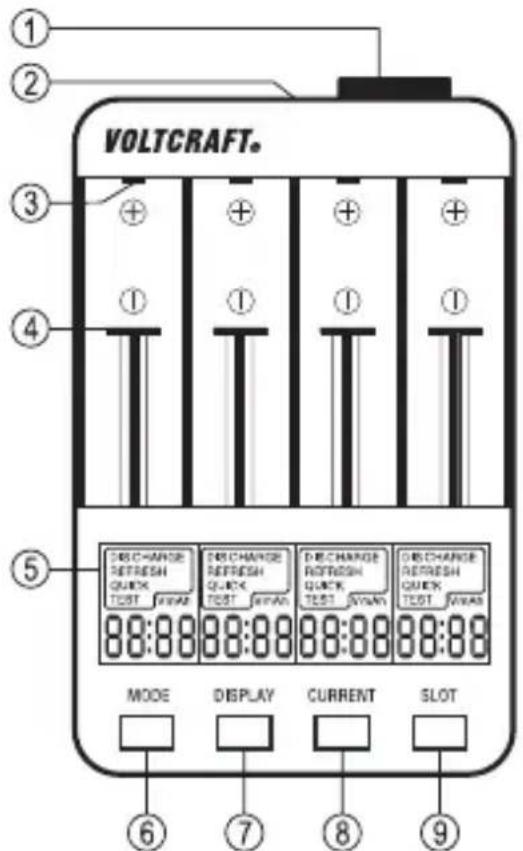
1 Temperature-controlled internal fan
2 Mains adapter socket
3 Charging contact plus pole
4 Movable charging contact minus pole
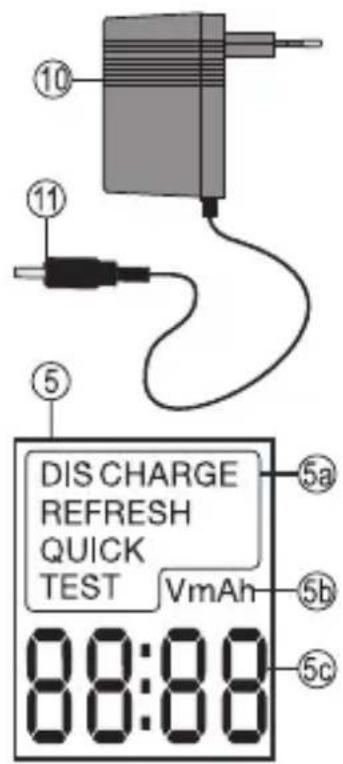
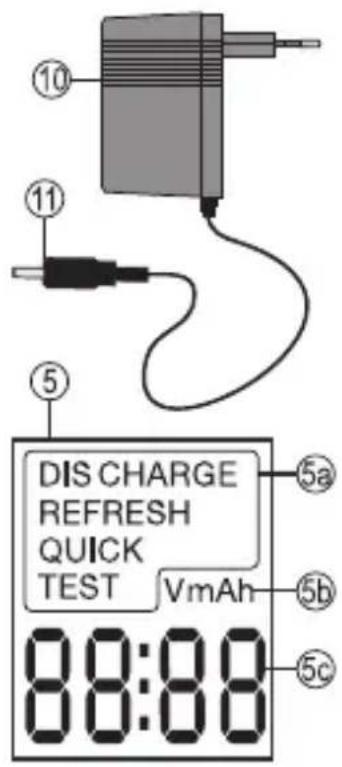
5 Display
5a Mode display
5b Display of the measuring unit
5c Display of the measured value and status (nuLL/FuLL)
6 "MODE" button to set the mode
7 "DISPLAY" button to switch the measured values
8 "CURRENT" button to pre-set the charge/discharge current
9 "SLOT" button to select the charging slot (1, 2, 3, 4 or 1 - 4)
10 Wall power supply
11 DC plug

Please read the operating instructions completely before taking the device into operation. They contain important information for correct operation.
The warranty/guarantee will expire if damage is incurred resulting from non-compliance with these operating instructions. We do not assume any liability for consequential damage!
We do not assume any liability for property damage or personal injury caused by improper use or non-compliance with the safety instructions! In such cases, any warranty/guarantee will expire.
- The unauthorized conversion and/or modification of electrical devices is inadmissible for safety and approval reasons (CE).
- To ensure safe operation, the user must observe the safety information and warning notes in these operating instructions.
- The mains unit is constructed pursuant to protection class 2 (protection-isolated). Observe that the housing insulation is not damaged or destroyed.
- Chargers and accessories have no place in the hands of children! They are no toys.
- In commercial institutions, the accident prevention regulations of the Employer's Liability Insurance Associations for Electrical Systems and Operating Materials are to be observed.
- In schools, training centres, hobby and self-help workshops, operation of chargers and accessories must be supervised by responsible trained personnel.
- Always observe the charging provisions of the respective battery producer when charging batteries.
- In case of improper handling (e.g. wrong rechargeable battery type) the battery may be overcharged or destroyed. In the worst case, the battery may explode and cause considerable damage.
- Conventional batteries, rechargeable alkaline batteries (RAM-cells), lead-acid batteries or lithium batteries must not be charged with this device. Danger of explosion.
transmitter systems (radio phones, transmitter systems for model construction, etc.) away from the charger because the ingressing transmitter radiation may cause interference of the charge operation or destruction of the charger and therefore also the rechargeable battery.
- Never connect your charger to the supply voltage immediately after it has been taken from a cold into a warm environment. The condensation that forms might destroy your device under detrimental conditions. Let the device reach ambient temperature first.
- Place the charger on a resilient, level and smooth surface. The ventilation openings at the device must not be covered or closed.
- The mains socket must be close to the device and easily accessible. Do not leave the charger unattended while it is in operation.
- Protect the product from extreme temperatures direct sunlight, high humidity, moisture, flammable gases, vapours and solvents.
- Never pour any liquids over electrical devices or put objects filled with liquid on top of them (e.g. glasses).
- If you have reason to assume that safe operation is no longer possible, disconnect the device immediately and secure it against inadvertent operation.
- It can be assumed that harmless operation is no longer possible if:
- the device shows visible damage
- the device no longer works and
- the device has been stored under unfavourable conditions for an extended period of time or
- the device has been subjected to heavy stress during transport.


The device heats up in operation. Make sure that the device is sufficiently ventilated. The housing must not be covered! Place the charger only on a resilient and level surface.
The charging output is short-circuit protected. Never short-circuit the charging contacts however.
When connecting the rechargeable batteries, always observe the polarity and the charging provisions of the respective rechargeable battery manufacturer.
To prevent damage to the device from leaking rechargeable batteries, remove the rechargeable batteries from the device if you are not using it for an extended period.
Do not leave rechargeable batteries and batteries lying around carelessly. They could be swallowed by children or pets. If swallowed, consult a doctor immediately.
Batteries and rechargeable batteries must not be short-circuited or thrown into fire. Primary batteries must not be recharged. There is a danger of explosion!
Leaking or damaged batteries/rechargeable batteries may cause alkali burns if they come in contact with the skin. Therefore, use suitable protective gloves.
a) Connecting the Voltage Supply
The charger needs the enclosed plug-in mains unit for operation. Use only the enclosed mains unit or a comparable one with the same power data. First connect the DC plug (11) to the socket at the charger (2). Plug the mains unit into a common mains socket. The device switches on. The left display will show the firmware version briefly and then all displays will show all display segments for control briefly. Then the charger is ready. "nuLL" will appear since no rechargeable battery is inserted yet.
b) Display Lighting
The display lighting will switch on every time a button is pushed and will turn off again automatically after approx. 30 seconds. To keep the lighting on permanently, keep the "DISPLAY" button (7) pushed for at least 3 seconds. The lighting will remain on until the next deactivation. The lighting can also be deactivated again manually in permanent light mode. Keep the "DISPLAY" button (7) pushed for at least 5 seconds for this. The lighting will switch off. Automatic mode (approx. 30 seconds when a button is pushed) is active again.
c) Button Functions
"MODE" button
The "MODE" button permits selection of the rechargeable battery programme.
"DISPLAY" button
The "DISPLAY" button permits switching of the displayed measuring parameters. Each push will switch the display.
The following measuring parameter displays are possible:
| Display Parameter Possible rechargeable battery programmes | ||
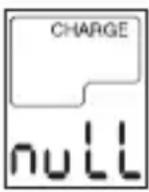 | No rechargeable battery recognised or no rechargeable battery inserted. | |
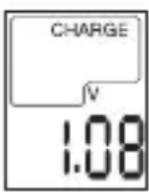 | The cell voltage shows the current rechargeable battery voltage. | Charging (CHARGE)Discharging (DISCHARGE)Test (CHARGE/DISCHARGE TEST) |
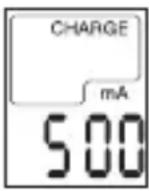 | The currently measured current is displayed. | Charging (CHARGE)Discharging (DISCHARGE)Test (CHARGE/DISCHARGE TEST) |
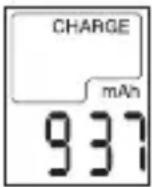 | The capacity is displayed. Charging (CHARGE)Discharging (DISCHARGE)Test (CHARGE/DISCHARGE TEST) | |
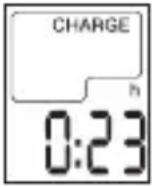 | The runtime of the rechargeable battery programme is displayed. | Charging (CHARGE)Discharging (DISCHARGE)Test (CHARGE/DISCHARGE TEST) |
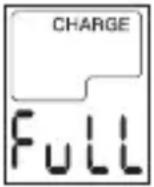 | The rechargeable battery is charged completely. | Charging (CHARGE)Test (CHARGE/DISCHARGE TEST) |
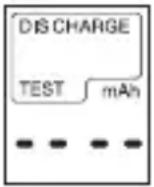 | No measured value has been determined yet. Wait until the rechargeable battery programme has been completed. | Test (CHARGE/DISCHARGE TEST)Quick test (QUICK TEST) |
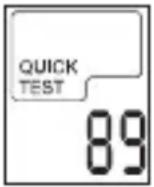 | The dynamic inner resistance of the rechargeable battery cell is displayed in Milli-Ohm (mΩ). | Quick test (QUICK TEST)This parameter is set permanently.The display is not switched with the "DISPLAY" button. |
"CURRENT" button
The “CURRENT” button permits setting of the charge and discharge current. Each push will switch the display.
"SLOT" button
The "SLOT" button selects the current charging slot. Each push will switch the display (slot 1, 2, 3, 4, 1-4, end).
It is also used to confirm "MODE" and "CURRENT" parameter settings and ends the settings.
8. RECHARGEABLE BATTERY PROGRAMMES
In addition to the charging programme, the charger also permits rechargeable battery maintenance and can perform a power test. This permits good estimation of the condition of the individual rechargeable batteries.
The rechargeable battery programmes can be selected manually in advance or after insertion of the rechargeable batteries.
To set rechargeable battery programmes in advance, keep the “MODE” button pushed for approx. 2 seconds. The mode display “5a” will start to flash for all 4 charging slots.
Push the "MODE" button to select the rechargeable battery programme. The programme display will change every time the button is pushed:
CHARGE, DISCHARGE, DISCHARGE REFRESH, CHARGE TEST, QUICK TEST, etc.
If you want to set a single charging slot, select the desired charging slot during the setting phase (flashing display) with the "SLOT" button until only this display is flashing. The "MODE" button selects the programme for this slot only.
To select the rechargeable battery programme after inserting the rechargeable battery, push the "MODE" immediately after it. The programme display will change every time the button is pushed:
CHARGE, DISCHARGE, DISCHARGE REFRESH, CHARGE TEST, QUICK TEST, etc.
The following programmes are available:
Charging programme "CHARGE"
The charging programme is always present after activation. The inserted rechargeable battery is charged and the device switches to maintenance charge after the end of charging NiCd/NiMH rechargeable batteries. The charged capacity is displayed in "mAh".
For Lithium rechargeable batteries, the cell voltage is monitored. When the fixed value is undercut, recharging will be performed automatically. The end of charging is displayed with "FuLL".
Discharging programme "DISCHARGE"
The discharging programme reduces the possible memory effect that occurs in rechargeable batteries that are only recharged and thus lose capacity.
The discharging programme discharges the rechargeable battery completely, permitting controlled and complete charging in the charging programme “CHARGE”. The discharged capacity is displayed in “mAh”. To protect Ni-Cd/NiMH rechargeable batteries, the maintenance charge is switched.
Conditioning programme "DISCHARGE REFRESH"
The conditioning programme refreshes and optimises bad rechargeable batteries by multiple charge and discharge cycles. The programme will perform 3 complete charge and discharge cycles. Depending on rechargeable battery status, set charge/discharge currents and the rechargeable battery capacity, this programme may take anywhere from 10 hours to several days. The capacity is displayed in “mAh” after each cycle, before a new cycle starts.
Test programme "CHARGE TEST"
The test programme permits review of the present rechargeable battery capacity.
The test programme charges the rechargeable battery fully first (CHARGE TEST) and then starts to discharge it (DISCHARGE TEST). After the discharge cycle, the measured discharge capacity in “mAh” is displayed and the rechargeable battery is fully charged again. If the measured capacity is much lower than the indicated rated capacity, this may suggest that the rechargeable battery has reached the end of its service life. If required, perform the conditioning programme “DISCHARGE REFRESH” to revive the rechargeable battery. After the rechargeable battery programme is completed, “FuLL” is displayed. For Ni-Cd/NiMH rechargeable batteries, the maintenance charge is switched.
Quick test programme "QUICK TEST"
The test programme determines the dynamic interior resistance of the rechargeable battery. The lower the interior resistance, the higher the current the rechargeable battery can absorb and deliver. The interior resistance should be <500 m for high-performance devices. If this value is exceeded, the rechargeable battery should only be used for devices with a low current consumption. When using rechargeable batteries, always ensure that the interior resistance of all concurrently used rechargeable batteries is roughly the same. This increases the performance of the entire unit.

The measured value strongly depends on contact quality. For clean contacts, a transfer resistance of approx. 30 milliohm is included in the calculation. A deviation of up to 20% at multiple measurements is normal and does not suggest malfunction. When measuring several times, use the average value.
You can use the charging slots for different rechargeable battery sizes with the sliding contacts (4). Every charging slot is independent and the programmes can be selected individually. The charger can be equipped with different rechargeable battery types and rechargeable battery capacities.

If only the two outer charging slots are equipped (individually or concurrently), a higher charging current up to 2000 mA can be set. Observe the max. charging current of your rechargeable battery.
- Connect the enclosed mains unit to the charger and a freely accessible mains socket.
- Wait until the operating test has completed and the displays show "nuLL".
- Automatic or manual operation is explained in the following charging example. The procedure is identical for the other rechargeable battery programmes.
a) Inserting a rechargeable battery and charging it automatically
- Insert the rechargeable battery in a charging slot in the correct polarity. For this, pull the sliding contact back and let the contact slide against the rechargeable battery. Observe the polarity information in the charging slot and ensure good contact.
- After insertion, the cell voltage of the rechargeable battery will be displayed for approx. 3 seconds. Then the pre-set charging current will be displayed for 3 seconds.
- If no button is pushed within these 6 seconds, charging will take place automatically at a charging current of 500 mA. This current is specified and can be used for most rechargeable batteries without danger of overcharging.
- After the end of charging, charging is ended automatically, or maintenance charging starts for Ni-Cd and Ni-MH rechargeable batteries. The end of charging is signalled with the display “FuLL”.
- Remove the full rechargeable battery from the charging slot and disconnect the charger.
b) Inserting several rechargeable batteries and charging them automatically
- Insert the first rechargeable battery in a charging slot in the correct polarity. For this, pull the sliding contact back and let the contact slide against the rechargeable battery. Observe the polarity information in the charging slot and ensure good contact.
- After inserting each, the cell voltage of the rechargeable battery will be displayed in the corresponding display for approx. 3 seconds. Then the pre-set charging current will be displayed for 3 seconds.
- If no button is pushed within these 6 seconds, charging will take place automatically at a charging current of 500 mA. This current is specified and can be used for most rechargeable batteries without danger of overcharging.
- Repeat this with up to 4 rechargeable batteries.
- After the end of charging, charging is ended automatically, or maintenance charging starts for Ni-Cd and Ni-MH rechargeable batteries for each cell separately. The end of charging is signalled with the display “FuLL”.
- Remove the full rechargeable battery from the charging slot and disconnect the charger if no rechargeable battery is in the charging slot anymore.
c) Inserting a rechargeable battery and charging it manually
- Insert the rechargeable battery in a charging slot in the correct polarity. For this, pull the sliding contact back and let the contact slide against the rechargeable battery. Observe the polarity information in the charging slot and ensure good contact.
- After insertion, the cell voltage of the rechargeable battery will be displayed for approx. 3 seconds. Then the pre-set charging current will be displayed for 3 seconds.
- Within these 6 seconds, push the “CURRENT” (8) button to set the charging current for your rechargeable battery. Every push will change the current value. After this setting, the current display will continue to flash for another 10 seconds. The current value can be corrected again during this time. To abbreviate the setting, you can push the “SLOT” (9) button to confirm. Charging begins.
- After the end of charging, charging is ended automatically, or maintenance charging starts for Ni-Cd and Ni-MH rechargeable batteries. The end of charging is signalled with the display “FuLL”.
- Remove the full rechargeable battery from the charging slot and disconnect the charger.
d) Inserting several rechargeable batteries and charging them manually
- Insert the first rechargeable battery in a charging slot in the correct polarity. For this, pull the sliding contact back and let the contact slide against the rechargeable battery. Observe the polarity information in the charging slot and ensure good contact.
- After inserting each, the cell voltage of the rechargeable battery will be displayed in the corresponding display for approx. 3 seconds. Then the pre-set charging current will be displayed for 3 seconds.
- Within these 6 seconds, push the “CURRENT” (8) button to set the charging current for your rechargeable battery. Every push will change the current value. After this setting, the current display will continue to flash for another 10 seconds. The current value can be corrected again during this time. To abbreviate the setting, you can push the “SLOT” (9) button to confirm. Charging begins.
- Repeat this with up to 4 rechargeable batteries.
- After the end of charging, charging is ended automatically, or maintenance charging starts for Ni-Cd and Ni-MH rechargeable batteries for each cell separately. The end of charging is signalled with the display “FuLL”.
- Remove the full rechargeable battery from the charging slot and disconnect the charger if no rechargeable battery is in the charging slot anymore.

If you want to charge similar rechargeable batteries with similar charging currents, you can set the current once for all occupied charging slots.
For this, push the “CURRENT” button after inserting each rechargeable battery. The display will flash and the input time is extended to 10 seconds. Now insert the next rechargeable battery during this time and push the “CURRENT” button again. Repeat this until all rechargeable batteries have been inserted.
The “CURRENT” button can now be used to set the charging current for all inserted rechargeable batteries.
The “MODE” button can also be used to set the rechargeable battery programme for all charging slots in this setting phase (charge/discharge/refresh, etc.).
e) Estimating the charging time
The expected charging time can be roughly estimated with a calculation formula.
Multiply the rated capacity of the rechargeable battery used by 1.2 (a rechargeable battery takes out about 1.2 times the energy that it can save). Divide this value by the set charging current. The result is roughly the charging time.
This is only a rough estimate, since many factors such as rechargeable battery condition, temperature, etc. will influence charging.
Example: Rechargeable battery rated capacity 1000 mAh x 1.2 = 1200 mAh
1200 mAh / 500 mA charging current = 2.4 hours
f) Temperature deactivation
The charger will automatically switch on the integrated fan at a device temperature of >40 ^ . If the fan cooling is not sufficient and the device temperature exceeds 60 ^ , charging will be interrupted. The charging current display will go down to 0 mA. Do not disconnect the charger and let it cool off. Charging will resume automatically when an acceptable device temperature has been reached.
If the temperature deactivation recurs, you may need to reduce the charging current.
10. MAINTENANCE AND CLEANING
Apart from occasional cleaning, the charger is maintenance-free. Ensure that the contacts at the charger and the rechargeable batteries are always clean and free of oxide layers. Disconnect the device before cleaning it.
Do not use any abrasive cleaning agents or petrol, alcohol or the like to clean the product. They will damage the surface of the device. Furthermore, the fumes are hazardous to your health and explosive. Also do not use any sharp-edged tools, screwdrivers, metal brushes, etc. for cleaning.
Use a clean, lint-free, antistatic, dry cloth for cleaning the device or the displays.
a) General information
Electronic devices must not be disposed of in the domestic waste!
end of its service life, dispose of the product according to the relevant statutory regulations.
b) Batteries and rechargeable batteries
You as the end user are required by law (Battery Ordinance) to return all used batteries/re-chargeable batteries. Disposing of them in the household waste is prohibited!
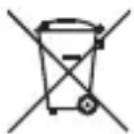
Batteries and rechargeable batteries containing hazardous substances are marked with the adjacent symbol to indicate that disposal in the household waste is prohibited. The descriptions for the respective heavy metals are: Cd=cadmium, Hg=mercury, Pb=lead (the names are indicated on the battery/rechargeable battery e.g. below the rubbish bin symbol shown to the left).
You may return used batteries/rechargeable batteries free of charge at the official collection points of your community, in our stores, or wherever batteries/rechargeable batteries are sold. You thus fulfil your statutory obligations and contribute to the protection of the environment.
12. TECHNICAL DATA
a) Battery charger
Charging slots....4, independent
Display....4x LCD, lit
Rechargeable battery types/sizes.. 1.2V NiCd / NiMH: A, AA (LR06, LR6), AAA (LR03, LR3), Baby (C), sub-C; 3.7 V Li-Ion CR-123A, 10440, 14500, 16340, 16650, 17355, 17500, 17670, 18490, 18500, 18650, 22650, 26500, 26650
Charging current....200 mA, 300 mA, 500 mA, 700 mA, 1000 mA 1500 mA*, 2000 mA*
Discharging current .... 200 mA, 300 mA, 500 mA, 700 mA 1000 mA**
Max. charging capacity....20000 mAh
Charge end recognition ....- -ΔV (for NiCd/NiMH) 4.2 V (for Li-Ion, tolerance: <0.03 V, constant current <5%)
Discharge end recognition....0.9 V (for NiCd/NiMH) 2.8 V (for Li-Ion)
Maintenance charge (trickle) ...... NiCd/NiMH only, max. 10 mA
Recharging mode .... Li-Ion only, cell voltage <4.0 V
Fan control.....>40 °C device temperature
Temperature deactivation ....>60 °C device temperature, charge deactivation 0 mA
Operating temperature .... 0 to +40 °C
Operating voltage 12 V/DC
Power consumption......max. 3 A
Dimensions (LxWxH)....150 x 100 x 49 (mm)
Weight .... approx. 240 g
*Only at individual or concurrent occupation of the two outer charging slots.
**Only for Li-Ion cells.
b) Mains unit
Operating voltage 100 - 240 V/AC, 50/60 Hz
Power consumption......max. 0.8 A
Output voltage 12 V/DC
Output current....max. 3 A
DC-plug (outer-/inner-∅)....5.5 x 2.1 mm, plus pole inside
Protection class 2
Page
France (email): technique@conrad-france.fr
Suisse: www.conrad.ch www.biz-conrad.ch
2. EXPLICATION DES SYMBOLES

5. DÉSIGNATION DES PIÈCES CONSTITUTIVES
Tension de service....12 V/CC
Courant absorbé....max. 3 A
Dimensions (Lxlxh) 150 x 100 x 49 (mm)
Poids....env. 240 g
5. OMSCHRIJVING VAN DE ONDERDELEN
© Copyright 2022 by Conrad Electronic SE.

Legal Notice
This is a publication by Conrad Electronic SE, Klaus-Conrad-Str. 1, D-92240 Hirschau (www.conrad.com).
All rights including translation reserved. Reproduction by any method, e.g. photocopy, microfilming, or the capture in electronic data processing systems require the prior written approval by the editor. Reprinting, also in part, is prohibited. This publication represents the technical status at the time of printing.
© Copyright 2022 by Conrad Electronic SE.

Information légales
© Copyright 2022 by Conrad Electronic SE.

Colofon
© Copyright 2022 by Conrad Electronic SE. V4_0222_02_VTP_m_4L
- INTRODUCTION
- Dear customer,
- EXPLANATION OF SYMBOLS
- INTENDED USE
- SCOPE OF DELIVERY
- Up-to-date operating instructions
- DESCRIPTION OF INDIVIDUAL PARTS
- a) Connecting the Voltage Supply
- b) Display Lighting
- c) Button Functions
- "MODE" button
- "DISPLAY" button
- "CURRENT" button
- "SLOT" button
- RECHARGEABLE BATTERY PROGRAMMES
- The following programmes are available:
- Charging programme "CHARGE"
- Discharging programme "DISCHARGE"
- Conditioning programme "DISCHARGE REFRESH"
- Test programme "CHARGE TEST"
- Quick test programme "QUICK TEST"
- a) Inserting a rechargeable battery and charging it automatically
- b) Inserting several rechargeable batteries and charging them automatically
- c) Inserting a rechargeable battery and charging it manually
- d) Inserting several rechargeable batteries and charging them manually
- e) Estimating the charging time
- f) Temperature deactivation
- MAINTENANCE AND CLEANING
- a) General information
- b) Batteries and rechargeable batteries
- TECHNICAL DATA
- a) Battery charger
- b) Mains unit
- Page
- EXPLICATION DES SYMBOLES
- DÉSIGNATION DES PIÈCES CONSTITUTIVES
- OMSCHRIJVING VAN DE ONDERDELEN
- Legal Notice
- Information légales
- Colofon
Brand : VOLTCRAFT
Model : IPC3 for cylindrical cells Liio
Category : Battery charger