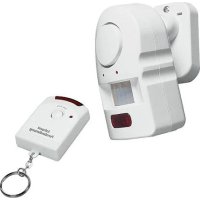
MA03 - Motion detector Pentatech - Free user manual and instructions
Find the device manual for free MA03 Pentatech in PDF.
Questions des utilisateurs sur MA03 Pentatech
0 question sur cet appareil. Repondez a celles que vous connaissez ou posez la votre.
Poser une nouvelle question sur cet appareil
Download the instructions for your Motion detector in PDF format for free! Find your manual MA03 - Pentatech and take your electronic device back in hand. On this page are published all the documents necessary for the use of your device. MA03 by Pentatech.
USER MANUAL MA03 Pentatech
INDEXA GmbH, D-74229 Oedheim Figure 7: Utilisation 2x bipOWNERS MANUAL This manual contains important information on the use and handling of the product. Therefore, please keep this manual for future reference. Please read this users manual before using your Mini Alarm. Check the unit for damage. Do not operate a damaged unit. Safety instructions Only use the Mini Alarm and the mains adapter in dry locations and indoors. Do not place the unit or the mains adapter in the rain or in water. Only use a suitable and approved mains adapter. Handle the connecting cable with care. Before drilling, check the wall for concealed electric cables. The siren is loud! Do not switch it on near your ears. Keep it out of children’s reach. Ready to use everywhere – very easy to install At home, in a shop, in an office or a hotel room, the mini alarm is immediately ready to use. The built-in passive infrared motion detector (PIR) reacts to body heat. The alarm is activated as soon as somebody enters the PIR range. The mini alarm can easily be switched on and off with the remote control. Use the mini alarm to secure rooms or doorways. The unit is powered by the supplied mains adapter. It is not necessary to insert batteries but in the case of mains power failure they will provide emergency power. Inserted batteries will only be activated in the case of a power failure. Prolongend use on battery power only is not recommended. Alow battery voltage will be indicated by beeping sounds. Technical features Alar m unit Power supply: mains adapter 9V, 200 mA (inner pole of the plug negative) Backup-power 4 x AA batteries (alkaline) 1,5 V (mignon cells) Power consumption: 1 mA (stand-by), 120 mA (alarm) Sensor: Passive infrared motion detector (PIR) PIR range: approx 6 m distance x 90° angle (mounting height 2 m) Alarm siren: piezo alarm 100 dB(A) Control system: Infrared remote control Field of application: Use only in dry locations, protect unit from moisture and frost. Operating temperature: 0°C – 35°C, Optimal function at room temperature (20°C). Very high or low temperatures can be detrimental to the function of the unit, especially when battery operated. Remote contr
MA03Preparation for use (Fig. 1) Inser ting the batteries (alarm unit) Push the lid of the battery compartment down. Insert 4 pcs. AA batteries (alkaline). Check the polarity (+/-). Close the lid again. Inser ting the batteries (remote control) The battery has already been inserted by the manufacturer. To replace it, loosen the screw and remove the back part of the remote control. (Fig. 2) Replace the battery (type 23 A) and check the polarity (+/-). Connect the mains adapter Connect the DC-Jackplug in to the side of the unit. Then plug the mains adapter into a 230 V Socket.
esting the PIR range The unit is switched off. Move within the area you wish to protect. When the movement is detected, the red light behind the sensor lens will flash. alarm unit Contents mains adapter green LED connection for mains adapter red LED receiver for remote control red LED ON/OFF button remote control mounting sliding the unit onto the mountinginserting the batteries fig. 1 fig. 2 fig. 3 GBInstallation – Where to locate
- Look for a suitable place (near a socket, for the mains adapter). Optimal function is at a height of 2 m and pointed downwards at an angle of approx 15°.
- Locate the unit at a place where most of the movements are transverse to the PIR. These movements can be detected more quickly than movements towards the PIR (Fig. 5 + 6).
- Fix the mounting device to the wall, using one or two screws. Then slide the alarm unit onto it (Fig. 3). If necessary, tighten the socket joint with the adjusting screw.
- If you need to drill a hole in the wall, check the wall for concealed electric cables.
- The alarm unit can also be placed on a shelf or hung on a screw head or wall hook.
- The PIR reacts to changes in temperature. Do not place the unit near heaters or ventilating shafts (and not directed towards there). The intruder alarm will also react to animals and cars ! Operation (Figure 7) When plugging the mains adapter or inserting new batteries, the unit is in stand-by mode or switched off. The mi- ni alarm is operated by pressing the remote control (turn the transmit window towards the alarm unit). The remote control has a range of approx. 6m at an angle of 30°. By pressing the remote control once, the unit is switched on – the green LED will shine and the unit will sound a beep. You may now leave the covered area within 30 seconds. After 30 seconds, the unit is armed. The green LED will go off, and the red LED will flash. If a person or any other warm object moves within the covered area, the unit will switch to the detection mode. It can be switched off by pressing the button on the remote control within 15 seconds. Otherwise the unit will switch to the alarm mode. The alarm siren can be turned off with the remote control. Otherwise the siren will stop automatically after 45 se- conds. The unit will stay in the armed mode and can trigger a new alarm. Replace the batteries if the siren becomes quieter or if the LEDs flash irregularly or they become dim or if the re- mote control does not operate correctly. Troubleshoooting The device does not work. Check the condition of the batteries and the connecting for mains adapter. The device only works partially. Allow for detection and delay periods Reduced range of the PIR- sensor. Is the recommended height of 1,5 m observed? Is the location too warm? unreliable or unwanted detection Change the postion. (see "Where to locate”) Is the location too warm? Unit activates without any obvious reason, or this may be a sign that the batteries have gives beeping sounds reached the end of their lives, should be replaced. Figure. 6 less sensitive Figure 5 sensitive Figure 4 6 m PIR-detection range height 2 m
GBpress OFF double beep OFF red - off green - off ACTIVATED red - off green - on single beep ARMED red - flashes green - off DETECTION red - flashes green - off ALARM red - flashes green - off siren activated (stops automatically after ca. 45 seconds) press 30 seconds exit - delay 15 seconds entrance delay
EasyManual