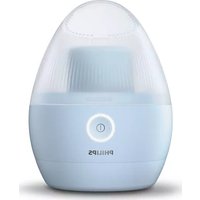
Series 9000 S9712 - Shaver PHILIPS - Free user manual and instructions
Find the device manual for free Series 9000 S9712 PHILIPS in PDF.



User questions about Series 9000 S9712 PHILIPS
0 question about this device. Answer the ones you know or ask your own.
Ask a new question about this device
Download the instructions for your Shaver in PDF format for free! Find your manual Series 9000 S9712 - PHILIPS and take your electronic device back in hand. On this page are published all the documents necessary for the use of your device. Series 9000 S9712 by PHILIPS.
USER MANUAL Series 9000 S9712 PHILIPS
natural_image
Close-up of a Philips electric shaver with three rotary dials and a digital display (no visible text or symbols on the device body)PHILIPS
natural_image
Diagram showing five panels with arrows pointing to each panel, connected by an open door (no text or symbols)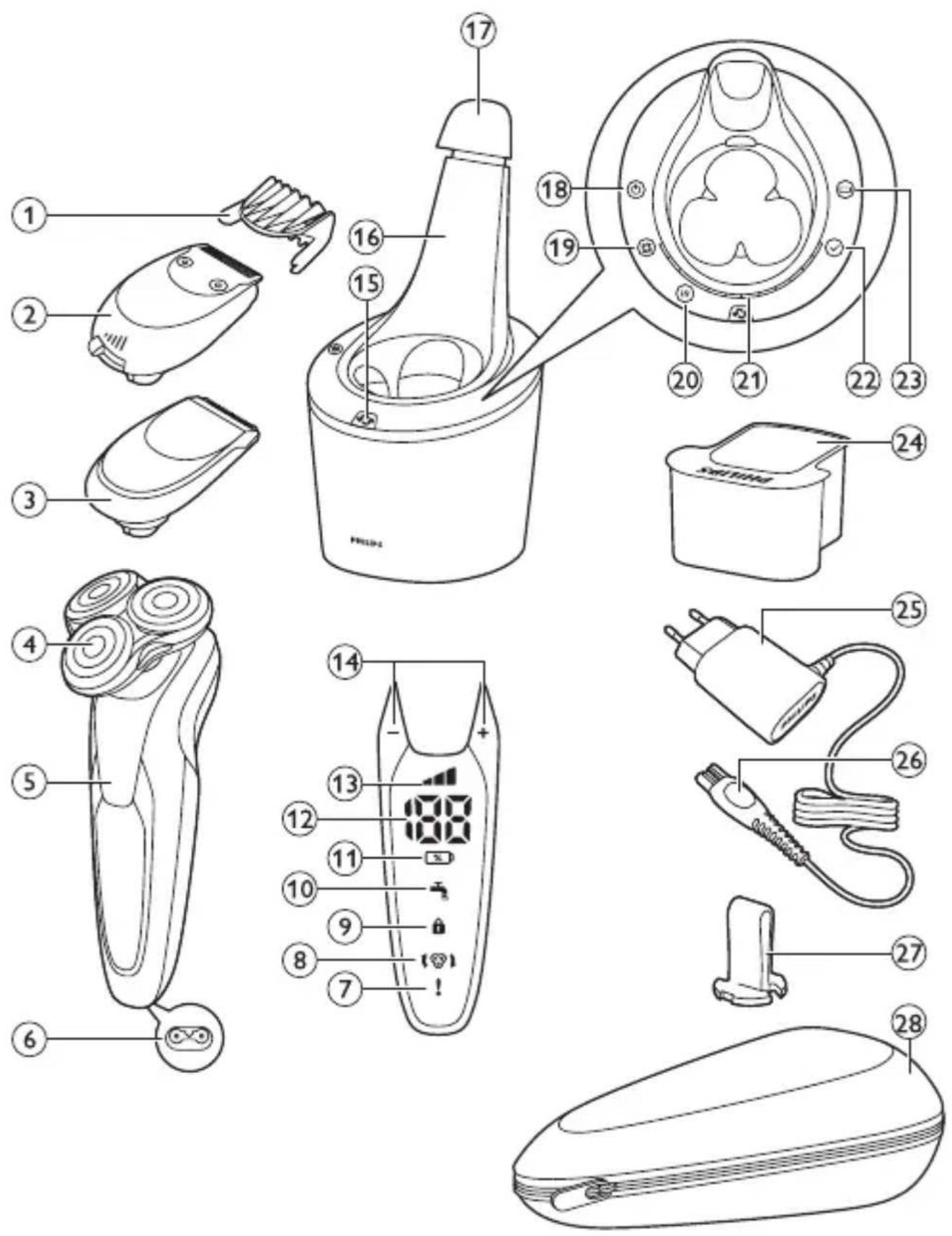
text_image
S99XX S97XX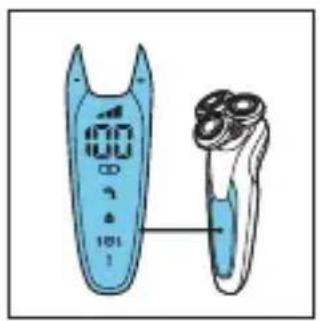
natural_image
Illustration of a handheld electric shaver with a digital display showing 100% frequency (no text or symbols on the device itself)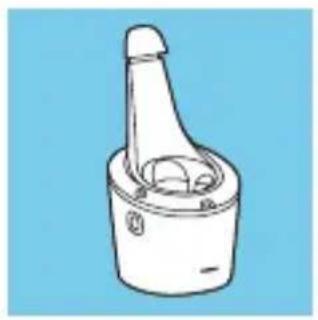
natural_image
Line drawing of a mechanical component with a handle and central shaft (no text or symbols)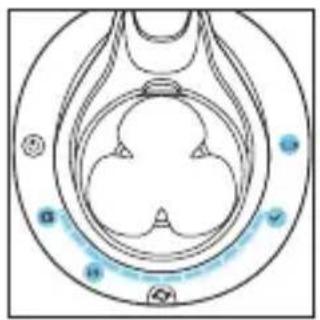
natural_image
Diagram of a biological structure with circular and petal-like elements, no visible text or symbols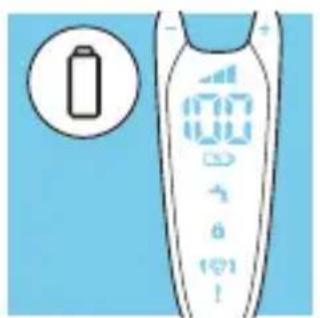
text_image
Diagram of a remote control device with battery icon and display screen showing battery status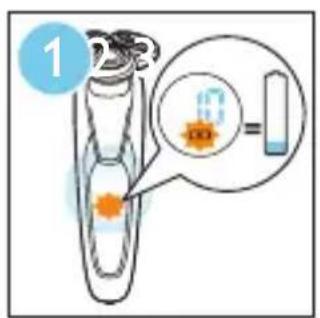
text_image
1 6 =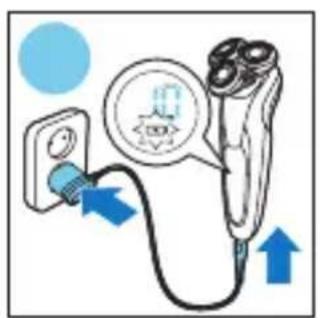
text_image
Diagram showing a plug inserted into a device with an icon and blue arrows indicating direction of charging or discharging.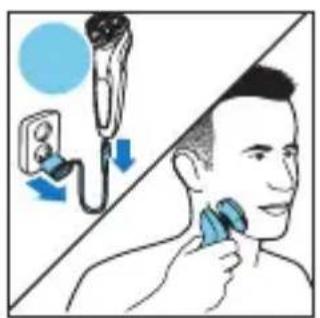
text_image
Illustration showing facial hair application with a brush and magnified view of the brush tip, likely for cosmetic or cosmetic procedure.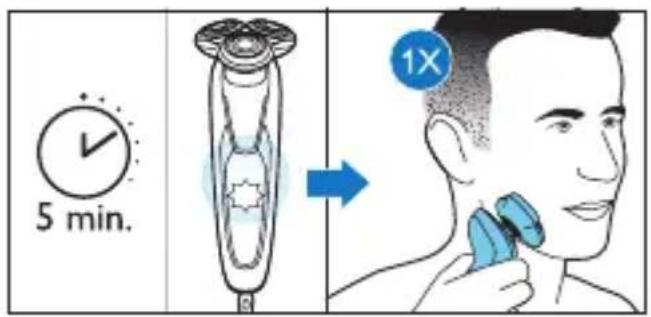
text_image
5 min. 1X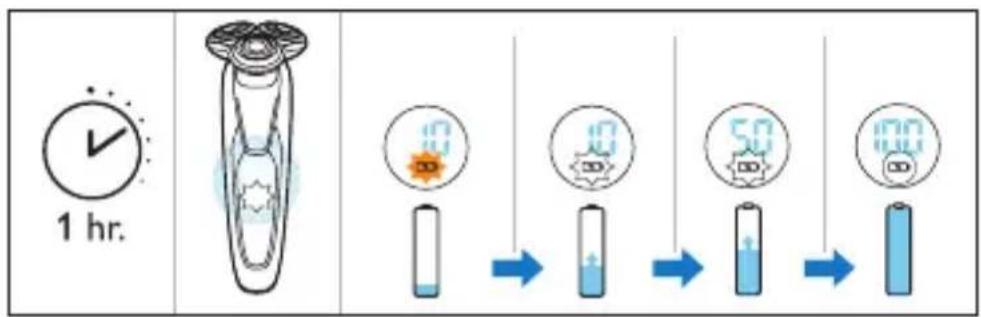
text_image
1 hr. 0 0 50 100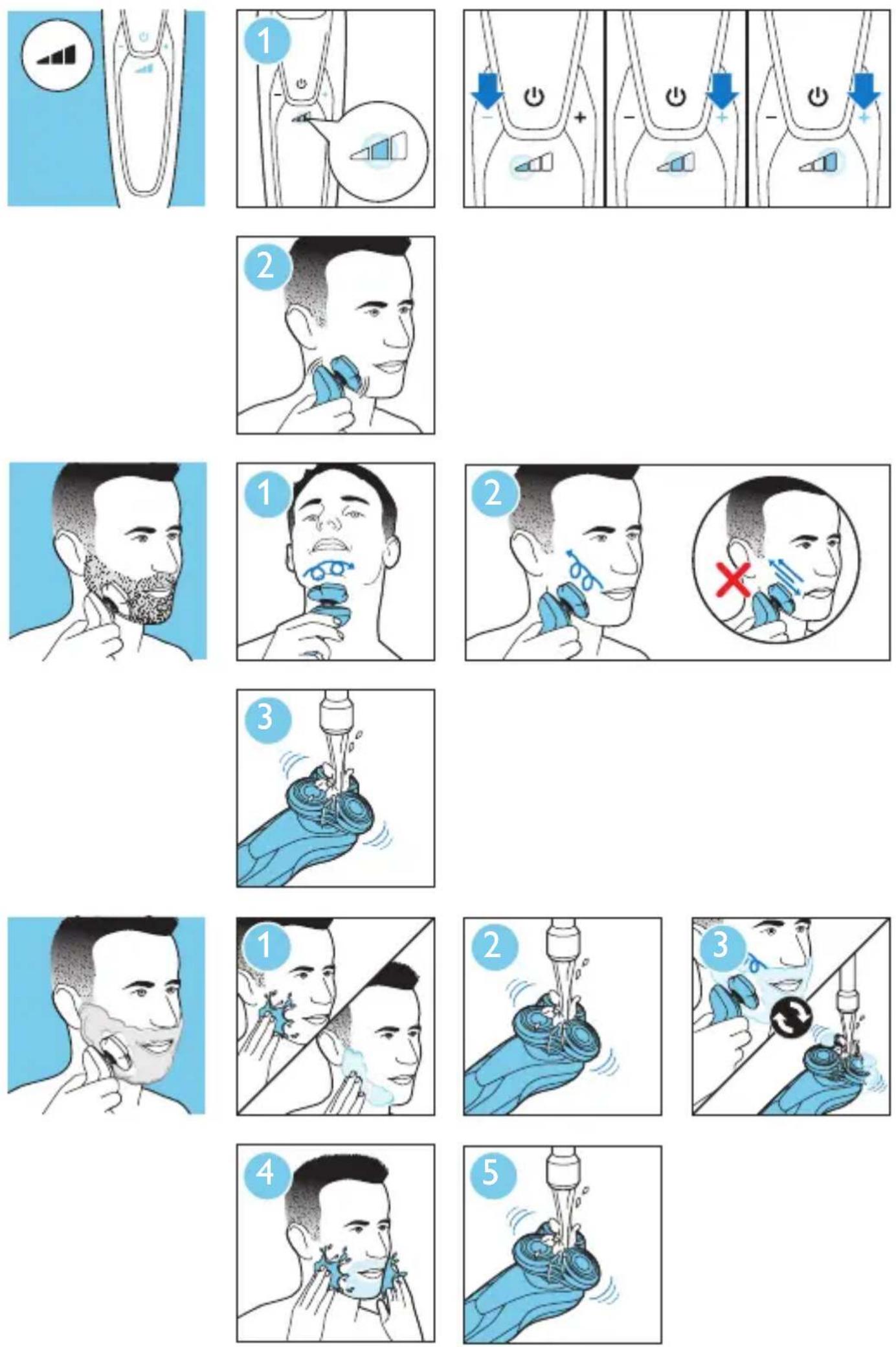
natural_image
Illustration of two handheld electric shaver units with cutouts (no text or symbols)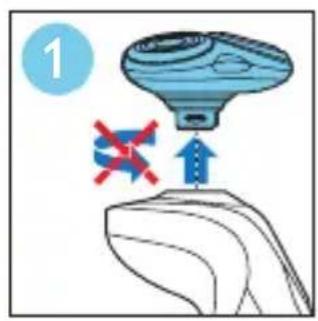
text_image
1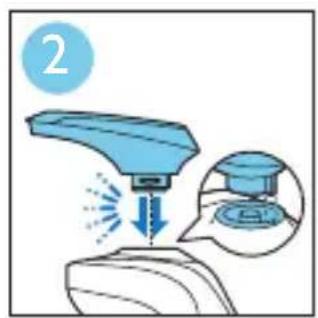
text_image
2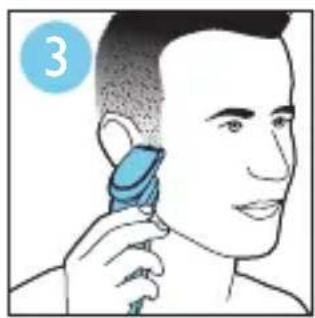
natural_image
Illustration of a person using a blue hairdryer to apply product (no text or symbols present)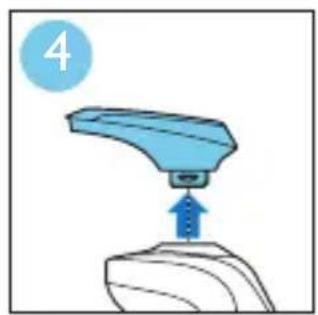
natural_image
Illustration of a blue mechanical component pressing a button, with a numbered label '4' in the top-left corner (no text or symbols on the object itself)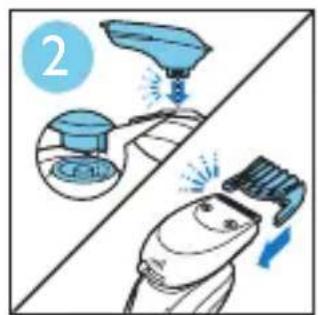
text_image
2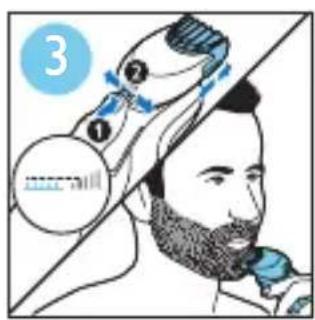
text_image
3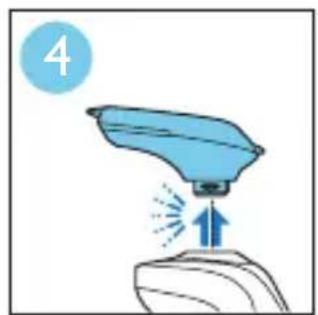
natural_image
Illustration of a blue spray gun on a surface with an upward arrow indicating motion (no text or symbols)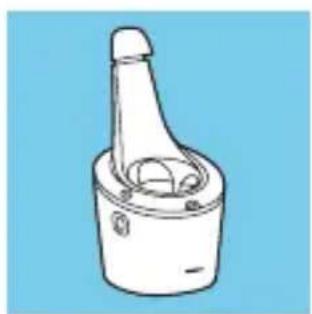
natural_image
Line drawing of a mechanical component with a cylindrical shaft and flange (no text or symbols)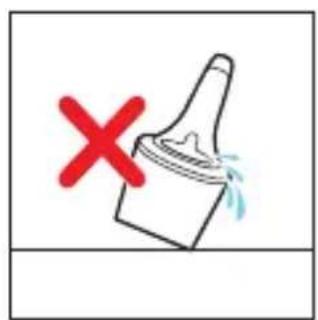
text_image
Warning symbol with red X and paintbrush icon, indicating no need for cleaning or damage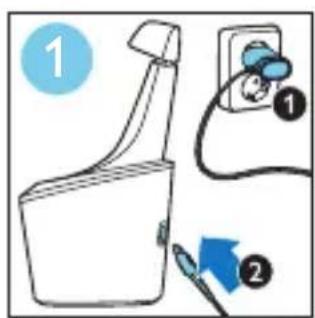
text_image
Diagram showing a spray bottle with two labeled parts: one with a blue arrow and the other with a blue icon, indicating a process step.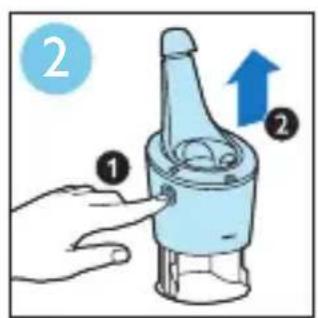
text_image
Diagram showing a hand holding a bottle with labeled parts and an upward arrow indicating motion or change.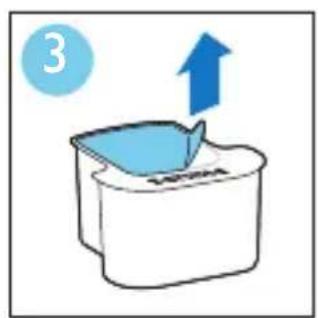
natural_image
Simple line drawing of a container with a blue lid and an upward arrow, no text or symbols present.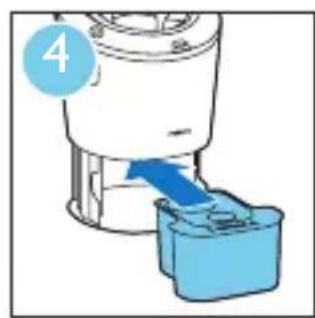
natural_image
Illustration of a blender being inserted into a blue container (no text or symbols)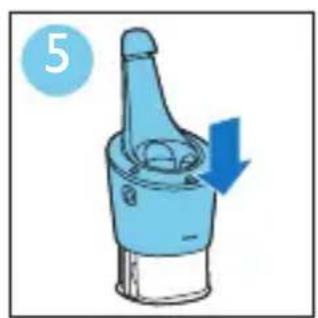
natural_image
Illustration of a blue mechanical component with a downward arrow indicating motion (no text or symbols)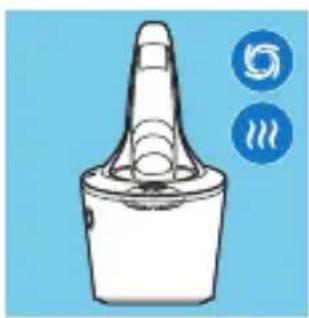
natural_image
Illustration of a bottle-shaped object with a lid and two circular icons labeled 'S' and 'T' on the side (no text or symbols on the object itself)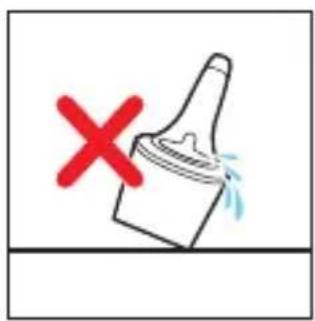
text_image
Warning symbol with red X and blue splash, indicating incorrect safety or toxicity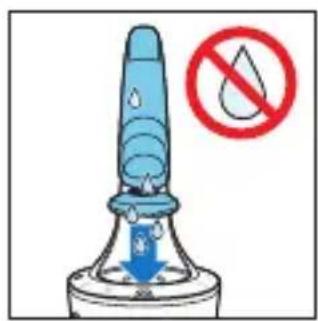
text_image
Safety warning symbol for a droplet drop, showing a blue spike and downward arrow with Chinese text.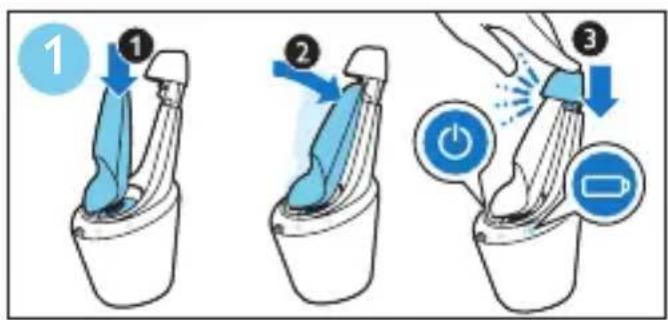
text_image
Diagram illustrating three-step instructions for using a battery in a shared seat, with numbered steps and directional arrows.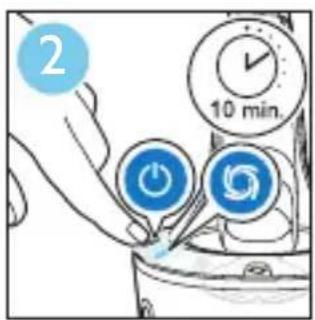
text_image
2 10 min.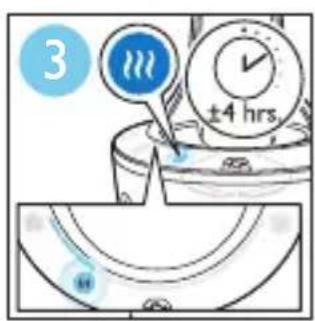
text_image
3 ±4 hrs.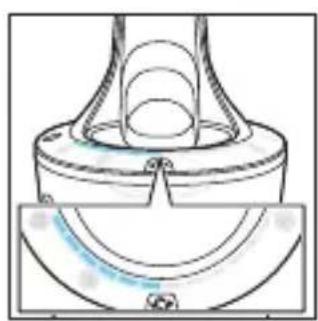
natural_image
Technical line drawing of a mechanical component with no visible text or symbols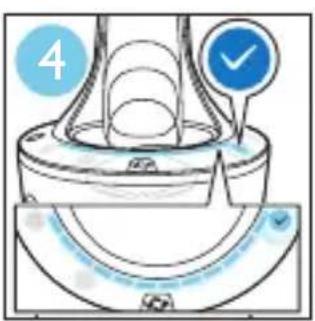
text_image
4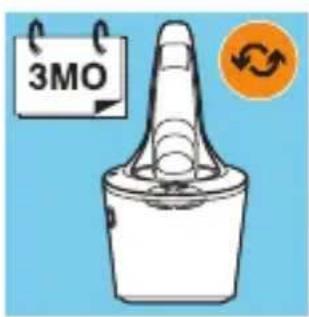
text_image
3MO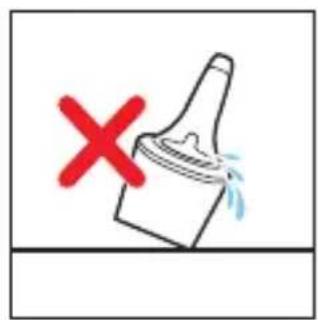
text_image
Warning symbol with red X and downward arrow, indicating incorrect safety or hazard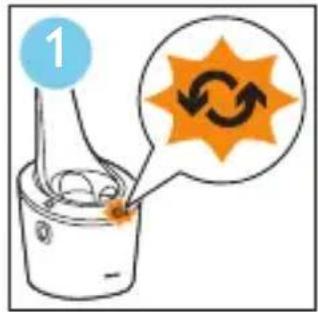
text_image
1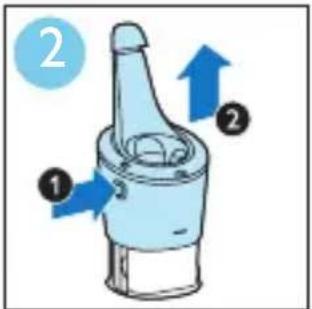
text_image
Diagram of a mechanical component with numbered parts and directional arrows indicating motion or flow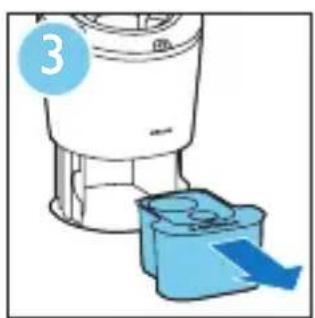
natural_image
Illustration of a blender with a blue bucket being inserted, no text or symbols present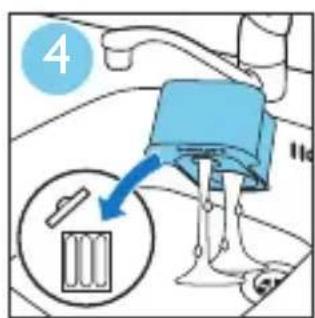
text_image
4 11c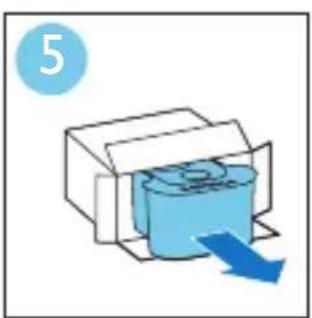
natural_image
Illustration of a printer with a blue cover and blue arrow indicating print direction (no text or symbols)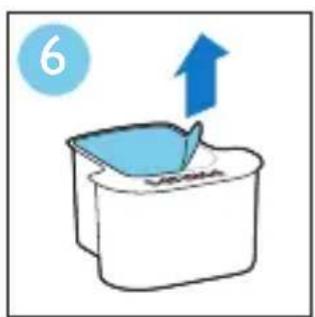
natural_image
Simple line drawing of a container with a blue lid and an upward arrow, no text or symbols present.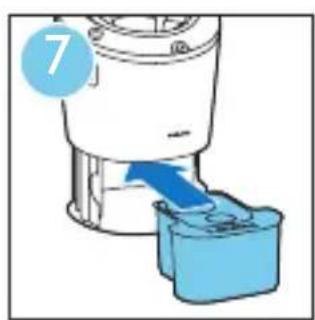
natural_image
Illustration of a blender with a blue arrow indicating fluid flow (no text or symbols)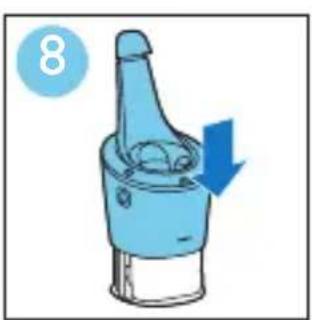
natural_image
Illustration of a blue mechanical component with a downward arrow indicating motion (no text or symbols)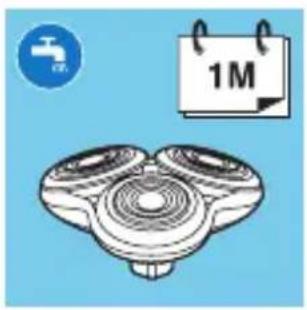
natural_image
Illustration of a three-bladed mechanical component with a 1-month-old calendar icon (no text or symbols on the diagram itself)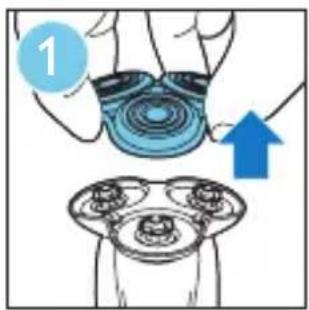
text_image
1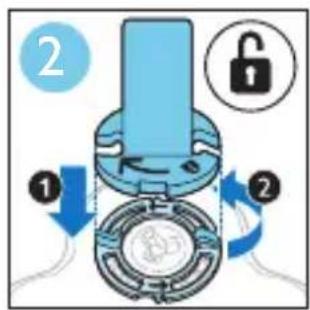
text_image
Diagram illustrating a mechanical or electrical component with labeled parts and directional arrows indicating rotation or adjustment.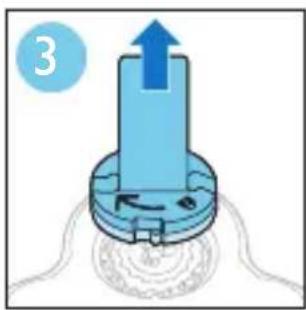
natural_image
Diagram of a mechanical component with an upward arrow and circular base, no text or symbols present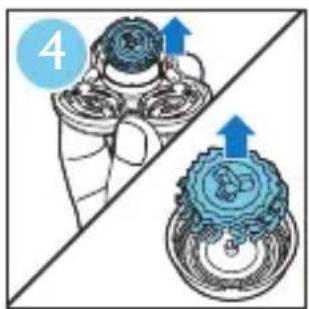
text_image
4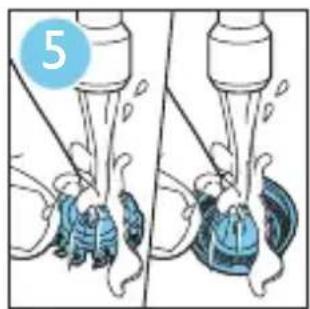
natural_image
Illustration of a mechanical device with two views showing internal components (no text or symbols)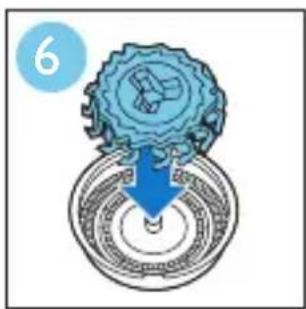
text_image
6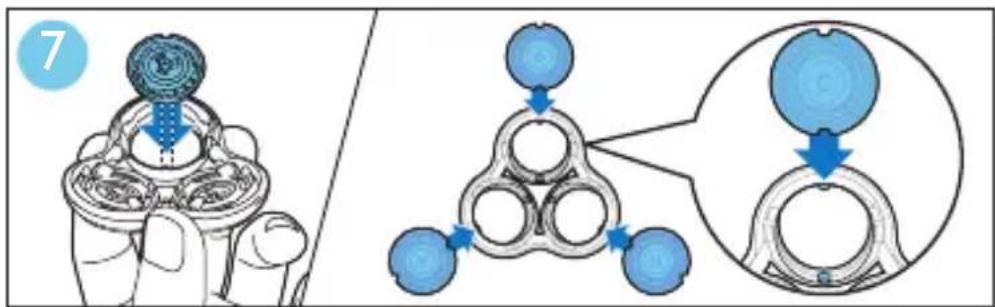
text_image
7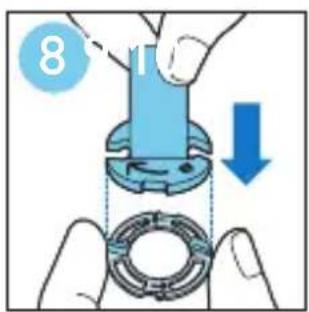
text_image
8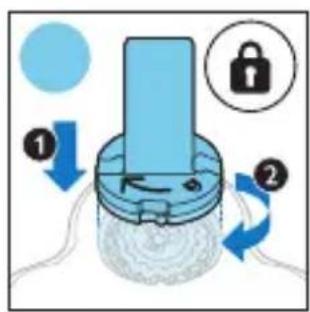
text_image
Diagram illustrating a lock mechanism with labeled steps ① and ②, showing directional arrows and lock symbols.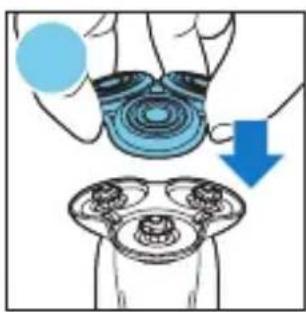
text_image
Diagram illustrating a hand holding a circular object with a blue circle and a downward arrow, above a magnified view of a device with three ports.ENGLISH 12 DEUTSCH 35 FRANÇAIS 59 NEDERLANDS 84
Congratulations on your purchase and welcome to Philips! To fully benefit from the support that Philips offers, register your product at www.philips.com/welcome.
Please read this user manual, as it contains information about the features of this shaver as well as some tips to make shaving easier and more enjoyable.
General description (Fig. 1)
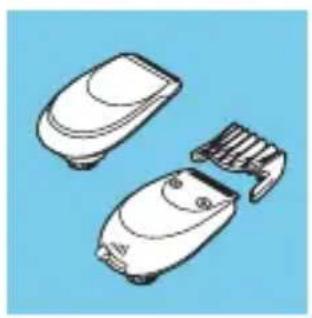
1 Comb for beard styler attachment
2 Click-on beard styler attachment
3 Click-on trimmer attachment
4 Click-on shaving unit
5 On/off button
6 Socket for small plug
7 Exclamation mark
8 Replacement reminder
9 Travel lock symbol
10 Cleaning reminder
11 Charge symbol
12 Battery charge percentage
13 Personal settings
14 + and - buttons for personal settings
15 Replacement symbol
16 SmartClean system
17 Cap of SmartClean system
18 On/off button
19 Cleaning symbol
20 Drying symbol
21 Progress bar
22 Ready symbol
23 Charge symbol
24 Cleaning cartridge for SmartClean system
25 Adapter
26 Small plug
27 Retaining ring holder
28 Pouch
Important
Read this user manual carefully before you use the shaver and the SmartClean system. Save this user manual for future reference.
natural_image
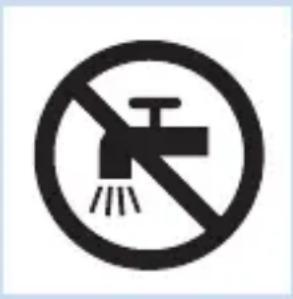
No sign depicting a faucet with a diagonal line and a circular border (no text or symbols)Danger
- Keep the adapter dry.
Warning
- The adapter contains a transformer. Do not cut off the adapter to replace it with another plug, as this causes a hazardous situation.
- The shaver and the SmartClean system are not intended for use by persons (including children) with reduced physical, sensory or mental capabilities, or lack of experience and knowledge, unless they have been given supervision or instruction concerning use of these appliances by a person responsible for their safety.
- Children should be supervised to ensure that they do not play with the shaver and the SmartClean system.
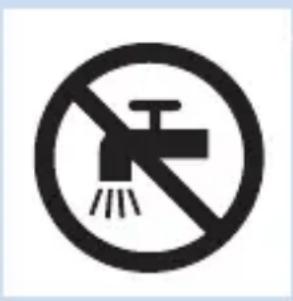
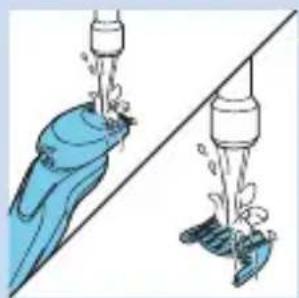
- Always unplug the shaver before you clean it under the tap.
natural_image
No sign depicting a faucet with a diagonal line and a circular background (no text or symbols)Caution
- Never immerse the SmartClean system in water nor rinse it under the tap.
- Never use water hotter than 80^ C to rinse the shaver.
- Do not use the shaver, SmartClean system, adapter or any other part if it is damaged, as this may cause injury. Always replace a damaged adapter or part with one of the original type.
- Only use the SmartClean system with the original cleaning cartridge.
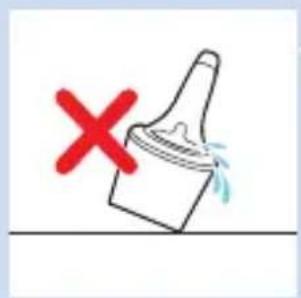
- Always place the SmartClean system on a stable, level and horizontal surface to prevent leakage.
- Always make sure that the cartridge compartment is closed before you use the SmartClean system to clean or charge the shaver.
- When the SmartClean system is ready for use, do not move it to prevent leakage of cleaning fluid.
natural_image
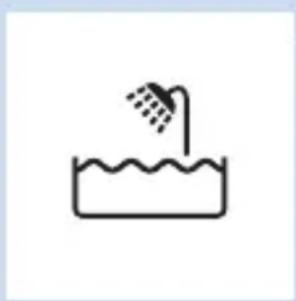
Simple line drawing of a showerhead spraying over water in a container (no text or symbols)- The SmartClean system thoroughly cleans but does not disinfect your shaver, therefore do not share the shaver with others.
- Never use compressed air, scouring pads, abrasive cleaning agents or aggressive liquids such as petrol or acetone to clean the appliance.
- Water may leak from the socket at the bottom of the shaver when you rinse it. This is normal and not dangerous because all electronics are enclosed in a sealed power unit inside the shaver.
Compliance with standards
- This shaver is waterproof and complies with the internationally approved safety regulations. It is suitable for use in the bath or shower and for cleaning under the tap. For safety reasons, the shaver can therefore only be used cordlessly.
- The shaver and the SmartClean system comply with all applicable standards and regulations regarding exposure to electromagnetic fields.
General
- The adapter is equipped with an automatic voltage selector and is suitable for mains voltages ranging from 100 to 240 volts.
- The adapter transforms 100-240 volts to a safe low voltage of less than 24 volts.
- Maximum noise level: Lc = 69dB(A)
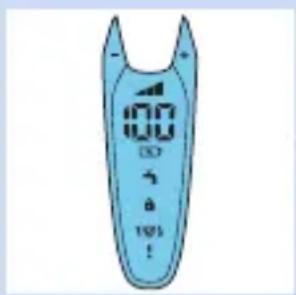
The display
text_image
100 3 3 100 !Note: Before you use the shaver for the first time, remove the protective foil from the display.
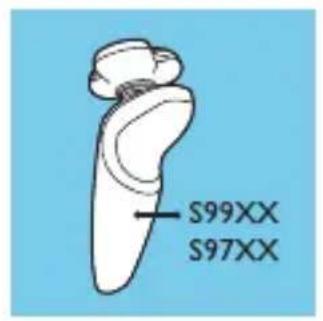
- S99XX/S97XX
Personal settings
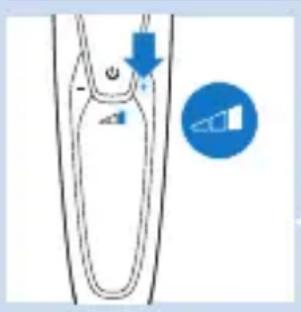
text_image
Diagram showing a device with an arrow pointing to a component and a blue circle with a triangle symbol indicating a directional relationship.The appliance has a feature that allows you to personalise your settings. You can choose between three settings depending on your personal shaving needs: comfort, dynamic or efficiency.
- When you press the - or + buttons, the bar lights up white continuously.
Charging
- Charging takes approx. 1 hour.
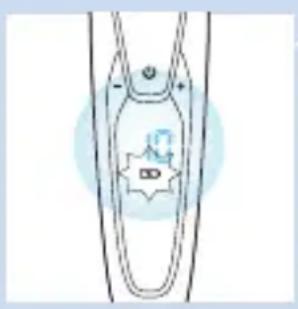
natural_image
Simple line drawing of a U-shaped object with a star-like symbol on the side (no text or symbols present)Note: This appliance can only be used cordlessly.
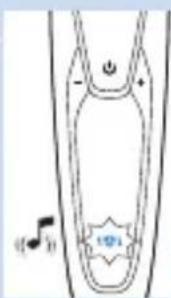
- When the shaver is charging, the battery charge percentage and the battery symbol flash white. You hear a sound when you connect the shaver to the mains.
- The remaining battery capacity is indicated by the battery charge percentage shown on the display.
- Quick charge: When the battery symbol flashes white more quickly than normal, the shaver contains enough charge for one shave.
Battery fully charged
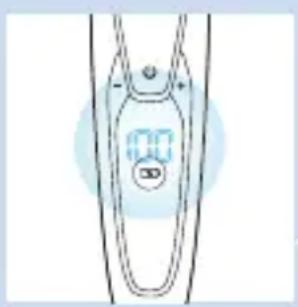
natural_image
Simple line drawing of a medical or laboratory device with a digital display (no text or symbols)Note: This appliance can only be used cordlessly.
Note: When the battery is full, the display switches off automatically after 30 minutes. When you press the on/off button during or after charging, you hear a sound to indicate that the shaver is still connected to the mains.
- When the battery is fully charged, the battery charge percentage lights up white continuously.
Battery low
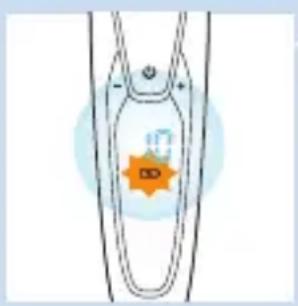
natural_image
Simple line drawing of a mechanical component with an orange star and label (no text or symbols)- When the battery is almost empty, the battery symbol starts to flash orange and you hear a sound.
Remaining battery capacity
- The remaining battery capacity is indicated by the battery charge percentage shown on the display.
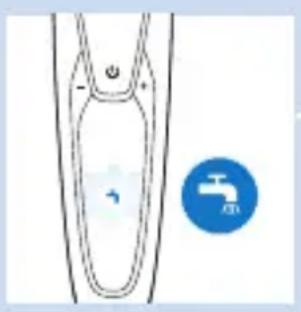
Cleaning reminder
natural_image
Simple line drawing of a funnel with a water symbol inside, and a blue circular icon showing a faucet symbol (no text or labels)For optimal shaving performance, we advise you to clean the shaver after every use.
- When you switch off the shaver, the cleaning reminder flashes to remind you to clean the shaver.
Travel lock
You can lock the shaver when you are going to travel. The travel lock prevents the shaver from being switched on by accident.
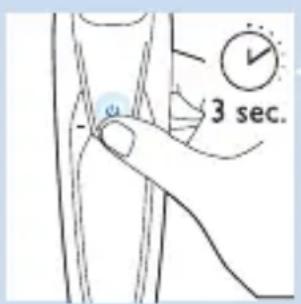
Activating the travel lock
text_image
3 sec.1 Press the on/off button for 3 seconds to enter the travel lock mode.
natural_image
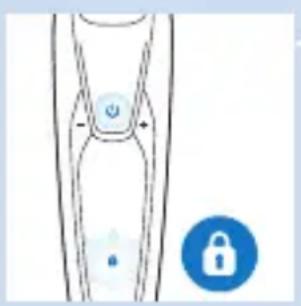
Simple line drawing of a human leg with a small circular icon and a blue lock icon (no text or symbols)While you activate the travel lock, the travel lock symbol lights up white continuously. When the travel lock is activated, the shaver produces a sound and the travel lock symbol flashes.
Deactivating the travel lock
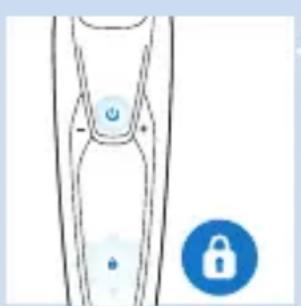
1 Press the on/off button for 3 seconds. The travel lock symbol flashes and then lights up continuously. The shaver is now ready for use again.
natural_image
Simple line drawing of a human leg with a lock icon and a small blue lock symbol (no text or labels)Note: You can also deactivate the travel lock by connecting the appliance to the mains.
Replacing shaving heads
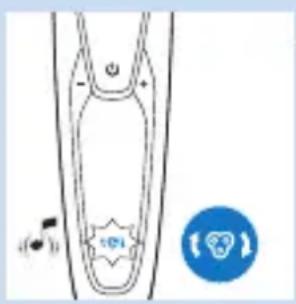
natural_image
Simple line drawing of a device with a button and a circular icon (no text or symbols)For maximum shaving performance, we advise you to replace the shaving heads every two years.
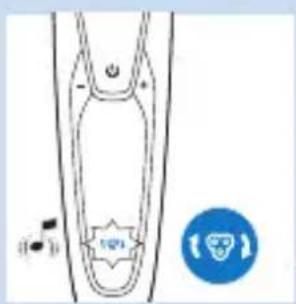
- The appliance is equipped with a replacement reminder which reminds you to replace the shaving heads. The replacement reminder lights up white continuously and the arrows flash white. You hear a beep to indicate you have to replace the shaving heads.
Note: After replacing the shaving heads, you need to reset the shaver by pressing the on/off button for 7 seconds.
Exclamation mark
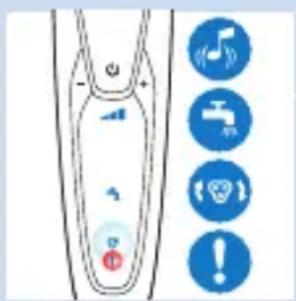
text_image
Diagram showing a device with labeled buttons and icons, including a music note, faucet, phone, and warning symbols.Blocked shaving heads
- If the shaving heads are blocked, the exclamation mark lights up orange continuously. The replacement reminder and the cleaning reminder flash white alternately and you hear a sound. In this case, the motor cannot run because the shaving heads are soiled or damaged.
- When this happens, you have to clean the shaving heads or replace them.
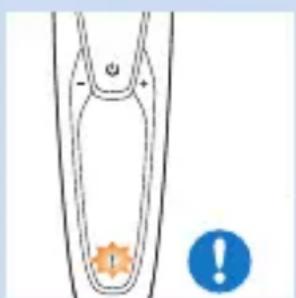
natural_image
Simple line drawing of a symmetrical object with an orange star-like symbol at the bottom and a blue warning circle (no text or symbols)Overheating
- If the appliance overheats during charging, the exclamation mark flashes orange.
- When this happens, the shaver automatically switches off. Charging continues once the appliance is back to the normal temperature.
Charging
Charging takes approx. 1 hour.
A fully charged shaver has a shaving time of up to 50 minutes.
Note: You cannot use the appliance while charging.
Note: When the battery is fully charged, the display shows the actual remaining battery charge percentage.
Charge the shaver before you use it for the first time and when the display indicates that the battery is almost empty.
Charging with the adapter
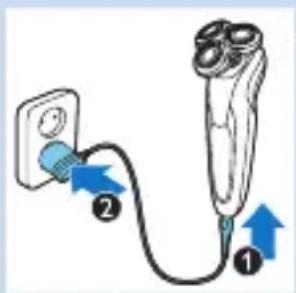
text_image
Diagram showing a plug connected to a device with labeled parts and blue arrows indicating direction of connection.1 Make sure the appliance is switched off.
2 Insert the small plug into the appliance (1) and put the adapter in the wall socket (2).
Charging in the SmartClean system
natural_image
Simple line drawing of a blue pen tip inserted into a cylindrical container (no text or symbols)1 Put the small plug in the SmartClean system.
2 Put the adapter in the wall socket.
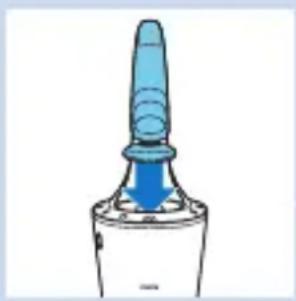
3 Hold the shaver upside down above the holder. Make sure the front of the shaver points towards the SmartClean system.
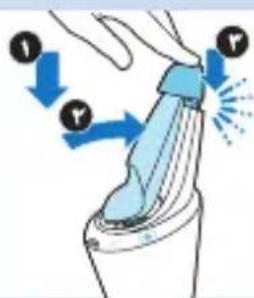
4 Place the shaver in the holder (1), tilt the shaver backwards (2) and press down the top cap to connect the shaver ('click') (3).
Note: The battery symbol lights up to indicate the appliance is charging.
Using the shaver
Shaving
Skin adaptation period
Your first shaves may not bring you the result you expect and your skin may even become slightly irritated. This is normal. Your skin and beard need time to adapt to any new shaving system.
We advise you to shave regularly (at least 3 times a week) with this shaver for a period of 3 weeks to allow your skin to adapt to the new shaver.
natural_image
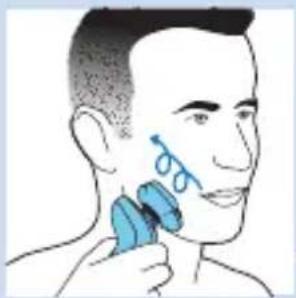
Illustration of a person applying a blue hairbrush to their face (no text or symbols)Tip: To ensure the best result, we advise you to pre-trim your beard if you have not shaved for 3 days or longer.
Note: This appliance can only be used cordlessly.
1 Press the on/off button once to switch on the shaver.
Tip: Select your personal settings (see chapter 'The display'). The display lights up for a few seconds.
2 Move the shaving heads over your skin in circular movements.
- Do not make straight movements.
3 Press the on/off button once to switch off the shaver.
The display lights up for a few seconds and then shows the remaining battery charge.
Wet shaving
You can also use this shaver on a wet face with shaving foam or shaving gel.
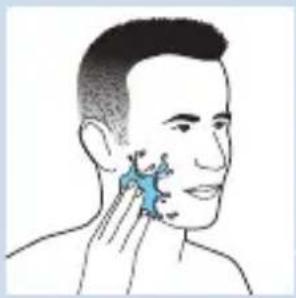
To shave with shaving foam or shaving gel, follow the steps below:
natural_image
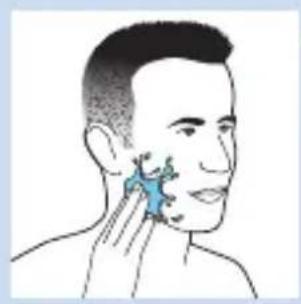
Illustration of a person's face with a blue highlighted area on the cheek (no text or symbols)1 Apply some water to your skin.
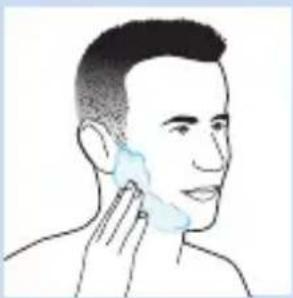
2 Apply shaving foam or shaving gel to your skin.
natural_image
Line drawing of a person's face with a hand near the ear area (no text or symbols)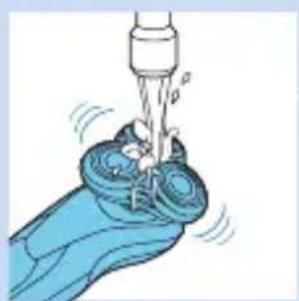
natural_image
Illustration of a hand washing a small object with a water tap (no text or symbols)3 Rinse the shaving unit under the tap to ensure that the shaving unit glides smoothly over your skin.
4 Press the on/off button once to switch on the shaver.
natural_image
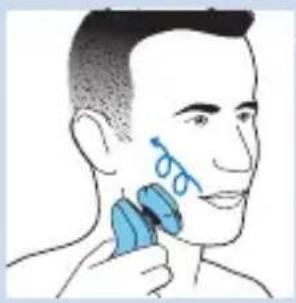
Illustration of a person applying a blue brush to their ear with a circular mark (no text or symbols)5 Move the shaving heads over your skin in circular movements.
Note: Rinse the shaver under the tap regularly to ensure that it continues to glide smoothly over your skin.
6 Dry your face and thoroughly clean the shaver after use (see chapter ‘Cleaning and maintenance’).
Note: Make sure you rinse all foam or shaving gel off the shaver.
Using the click-on attachments
natural_image
Illustration of a blue flying saucer with an upward arrow and a red cross symbol, placed on a curved surface (no text or labels)Using the trimmer attachment
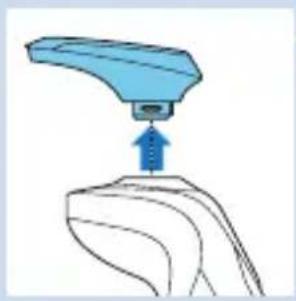
You can use the trimmer attachment to groom your sideburns and moustache.
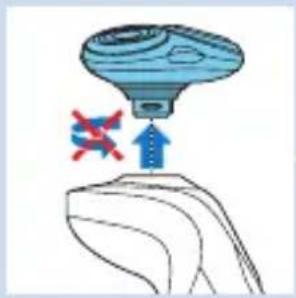
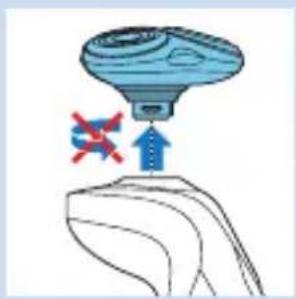
1 Pull the shaving unit straight off the appliance.
Note: Do not twist the shaving unit while you pull it off the appliance.

natural_image
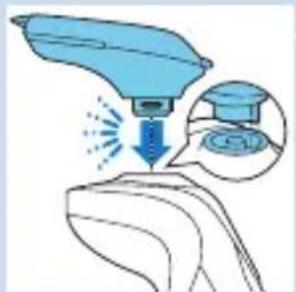
Illustration of a blue handheld device interacting with a surface, showing a droplet impact and a magnified inset (no text or symbols)2 Insert the lug of the trimmer attachment into the slot in the top of the shaver. Then press down the trimmer attachment to attach it to the appliance ('click').
3 Press the on/off button once to switch on the appliance.
The display lights up for a few seconds.
natural_image
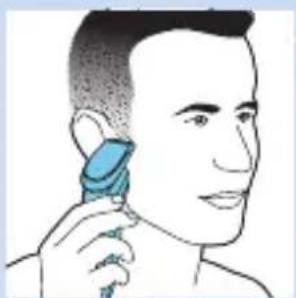
Illustration of a person using a hairdryer to apply product (no text or symbols present)4 You can now start trimming.
5 Press the on/off button once to switch off the appliance.
The display lights up for a few seconds to show the remaining battery charge.
natural_image
Illustration of a blue robotic arm pressing a curved surface with an upward arrow (no text or symbols)6 Pull the trimmer attachment straight off the appliance.
Note: Do not twist the trimmer attachment while you pull it off the appliance.
7 Insert the lug of the shaving unit into the slot in the top of the appliance. Then press down the shaving unit to attach it to the appliance ('click').
Using the beard styler attachment
natural_image
Illustration of a blue flying saucer with red cross symbols and an upward arrow, placed on a curved surface (no text or labels)1 Make sure the appliance is switched off.
2 Pull the shaving unit straight off the appliance.
Note: Do not twist the shaving unit while you pull it off the appliance.
natural_image
Illustration of a medical procedure on a hand, showing a blue needle inserted into a cup and a magnified inset showing the same step (no text or symbols present)3 Insert the lug of the beard styler attachment into the slot in the top of the appliance. Then press down the beard styler attachment to attach it to the appliance ('click').
Using the beard styler attachment with comb
You can use the beard styler attachment with the comb attached to style your beard at one fixed setting, but also at different length settings. The hair length settings on the beard styler attachment correspond to the remaining hair length after cutting and range from 1 to 5mm.
natural_image
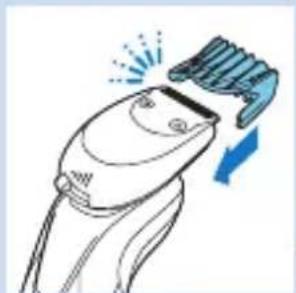
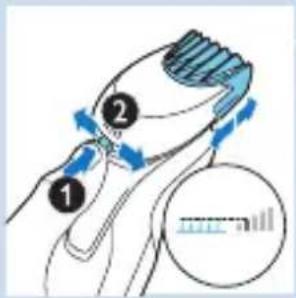
Line drawing of a hairbrush with a brush applying material, showing motion and angle (no text or symbols)1 Slide the comb straight into the guiding grooves on both sides of the beard stylist attachment ('click').
2 Press the length selector and then push it to the left or right to select the desired hair length setting.
3 Press the on/off button once to switch on the appliance.
text_image
Diagram illustrating hair styling technique with numbered steps and magnified view of measurement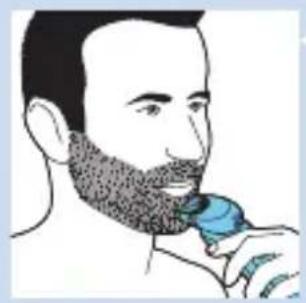
natural_image
Illustration of a person brushing their beard with a blue brush (no text or symbols)4 You can now start styling your beard.
Using the beard styler attachment without comb
You can use the beard styler attachment without the comb to contour your beard, moustache, sideburns or neckline.
text_image
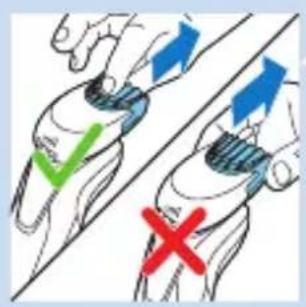
Diagram showing hand positioning with checkmark and cross symbols indicating correct and incorrect states1 Pull the comb off the beard styler attachment.
Note: Grab the comb in the centre to pull it off the beard styler attachment. Do not pull at the sides of the comb.

natural_image
Illustration of a person applying a blue-tipped hair accessory to their neck (no text or symbols)2 Press the on/off button once to switch on the appliance.
3 You can now start contouring your beard, moustache, sideburns or neckline.
Cleaning and maintenance
Cleaning the shaver in the SmartClean system
natural_image
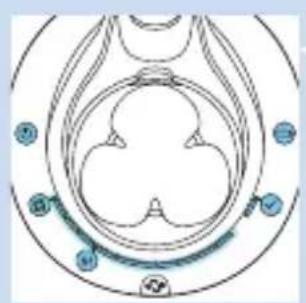
Symmetrical abstract diagram with circular and petal-like shapes, no text or symbols present- SmartClean system Pro also has two phases: the rinsing phase and the drying phase. It also has a progress bar to show the progress of the two phases.
natural_image
Simple line drawing of a paintbrush with a red X mark and blue liquid, no text or symbols present.Preparing the SmartClean system for use
Do not tilt the SmartClean to prevent leakage.
Note: Hold the SmartClean while you prepare it for use.
1 Put the small plug in the back of the SmartClean system.

2 Put the adapter in the wall socket.
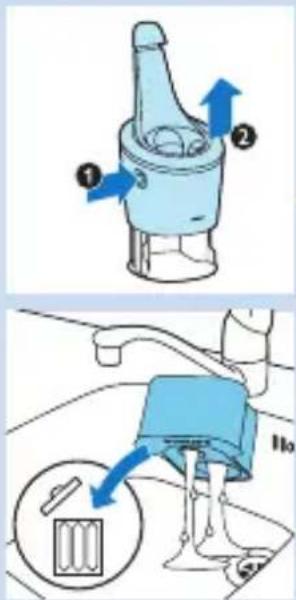
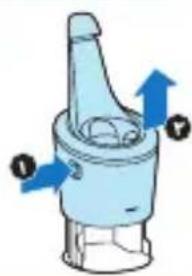
3 Press the button on the side of the SmartClean system (1) and lift the top part of the SmartClean system (2).
4 Pull the seal off the cleaning cartridge.
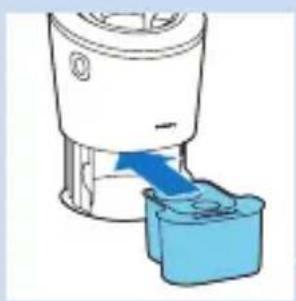
5 Place the cleaning cartridge in the SmartClean system.
6 Push the top part of the SmartClean system back down ('click').
Using the SmartClean system
Always make sure to shake excess water off the shaver before you place it in the SmartClean.
1 Hold the shaver upside down above the holder. Make sure the front of the shaver points towards the SmartClean system.

text_image
Diagram illustrating three-step robotic manipulation process with labeled steps 1, 2, and 32 Place the shaver in the holder (1), tilt the shaver backwards (2) and press down the top cap to connect the shaver ('click') (3).
The battery symbol and the on/off button start to flash, which indicates that the shaver is charging.
natural_image
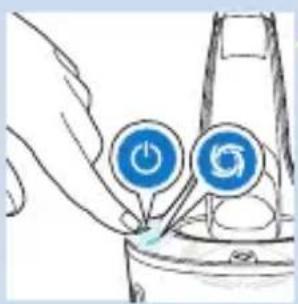
Illustration of a hand inserting a power button into a device (no text or symbols)3 Press the on/off button on the SmartClean system to start the cleaning program.
The on/off button and the rinsing symbol both light up continuously.
Note: The rinsing phase takes approx. 10 minutes.
Note: The progress bar shows the progress of the rinsing phase.
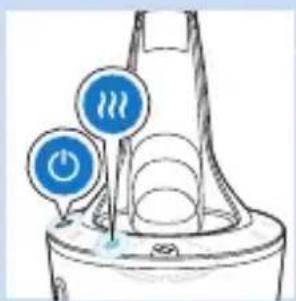
During the drying phase, the drying symbol lights up continuously.
natural_image
Simple line drawing of a speaker emitting sound waves, no text or symbols presentNote: The drying phase takes approx. 4 hours.
Note: The progress bar shows the progress of the drying phase.
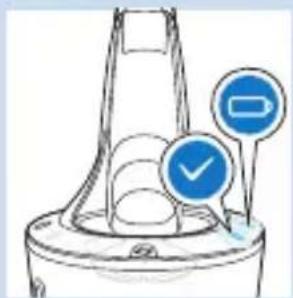
When the cleaning program has been completed, the ready symbol lights up continuously.
The battery symbol lights up continuously to indicate that the shaver is fully charged.
natural_image
Diagram of a funnel-shaped container with two blue circular indicators (one checked, one not checked) pointing to it, no text or symbols present.Note: Charging takes approx. 1 hour.
Note: If you press the on/off button of the SmartClean system during the cleaning program, the program aborts. In this case, the rinsing or drying symbol stops flashing.
Note: If you remove the adapter from the wall socket during the cleaning program, the program aborts.
Note: 30 minutes after the cleaning program and charging have been completed, the SmartClean switches off automatically.
text_image
Diagram illustrating a mechanical device with labeled parts and directional arrows, including a magnified inset showing internal components.Replacing the cartridge of the SmartClean System
- Replace the cleaning cartridge when the replacement symbol flashes orange or when you are no longer satisfied with the result.
1 Press the button on the side of the SmartClean system (1) and lift the top part of the SmartClean system (2).
2 Take the empty cleaning cartridge from the SmartClean system and pour any remaining cleaning fluid out of the cleaning cartridge.
You can simply pour the cleaning fluid down the sink.
3 Throw away the empty cleaning cartridge.
4 Unpack the new cleaning cartridge and pull the seal off the cartridge.
5 Place the new cleaning cartridge in the SmartClean system.
6 Push the top part of the SmartClean system back down ('click').
Cleaning the shaver under the tap
Clean the shaver after every shave for optimal shaving performance.
Be careful with hot water. Always check if the water is not too hot, to prevent your hands from getting burnt.
Never dry the shaving unit with a towel or tissue, as this may damage the shaving heads.
natural_image
Diagram of a blender with a blue arrow indicating fluid flow or insertion (no text or symbols)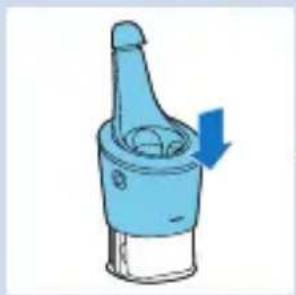
natural_image
Illustration of a blue mechanical component with a downward arrow indicating direction (no text or symbols)ENGLISH26

natural_image
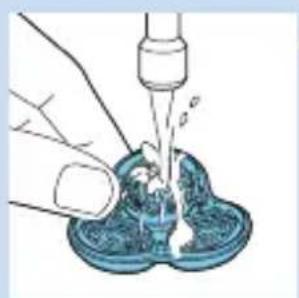
Illustration of a hand washing a blue plastic cup with a water dispenser above (no text or symbols)1 Switch off the shaver.
2 Rinse the shaving unit under a warm tap for some time.
natural_image
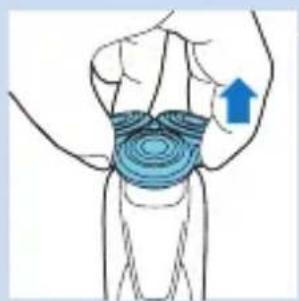
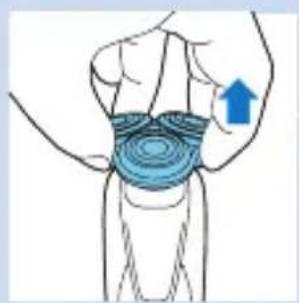
Illustration of a human leg with a blue arrow indicating upward motion or pressure point (no text or symbols present)3 Pull the shaving head holder off the bottom part of the shaving unit.
natural_image
Illustration of a hand pouring liquid into a blue container with a dropper (no text or symbols)4 Rinse the shaving head holder under a warm tap.
5 Carefully shake off excess water and let the shaving head holder dry.
6 Reattach the shaving head holder to the bottom part of the shaving unit ('click').
Thorough cleaning method
natural_image
Illustration of a person's lower torso with concentric blue contour lines and an upward arrow indicating pressure or movement (no text or symbols)Make sure the appliance is switched off.
1 Pull the shaving head holder off the bottom part of the shaving unit.
text_image
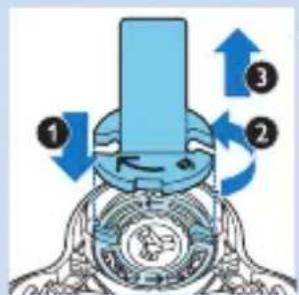
Diagram of a mechanical device with numbered components and directional arrows indicating motion or flow.2 Place the retaining ring holder on the retaining ring (1), turn it anticlockwise (2) and lift it off the shaving head (3).
Remove the retaining ring from the retaining ring holder and repeat this process for the other retaining rings.
natural_image
Diagram showing two mechanical components with blue arrows indicating upward motion, no text or symbols present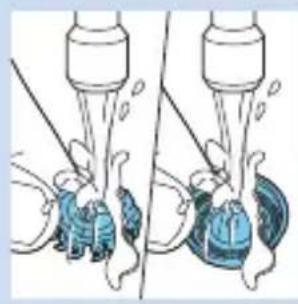
natural_image
Illustration of a person using a tool to lift a bottle, showing liquid level changes (no text or symbols)
natural_image
Diagram of a mechanical component with a blue arrow pointing downward, no visible text or symbols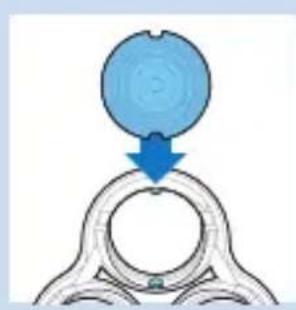
natural_image
Diagram showing a blue circular object being lifted by a blue arrow into a metallic ring (no text or symbols)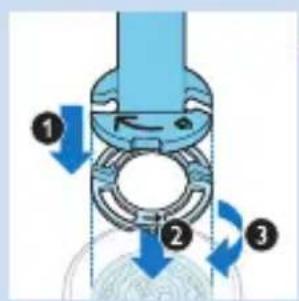
text_image
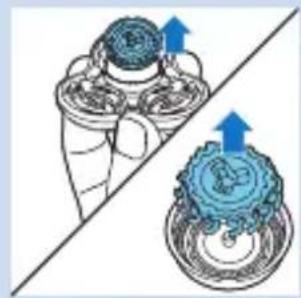
Diagram of a mechanical device with numbered components and directional arrows indicating motion or flow.3 Remove the shaving heads from the shaving head holder. Each shaving head consists of a cutter and guard.
Note: Do not clean more than one cutter and guard at a time, since they are all matching sets. If you accidentally put a cutter in the wrong shaving guard, it may take several weeks before optimal shaving performance is restored.
4 Clean the cutter and guard under the tap.
5 After cleaning, place the cutter back into the guard.
6 Put the shaving heads back into the shaving head holder.
Note: Make sure the projections of the shaving heads fit exactly into the recesses.
7 Place the retaining ring holder on the retaining ring (1), place it on the shaving head (2) and turn it clockwise (3) to reattach the retaining ring.
Repeat this process for the other retaining rings.
8 Reattach the shaving head holder to the bottom part of the shaving unit.
Cleaning the click-on attachments
Cleaning the trimmer attachment
Clean the trimmer attachment every time you have used it.
natural_image
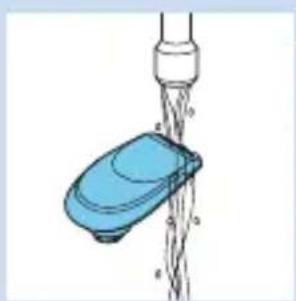
Illustration of a blue pushpin securing a chain of wires from a pipe (no text or symbols)1 Switch on the appliance with the trimmer attachment attached.
2 Rinse the trimmer attachment under a hot tap for some time.
3 Carefully shake off excess water and let the trimmer attachment dry.
4 After cleaning, switch off the appliance.
Tip: For optimal trimmer performance, lubricate the trimmer teeth with a drop of sewing machine oil every six months.
Cleaning the beard styler attachment
Clean the beard styler attachment every time you have used it.
natural_image
Illustration of two blue water droplets spraying from a pipe, connected by a diagonal line (no text or symbols)1 Pull the comb off the beard styler attachment.
2 Rinse the beard styler attachment and the comb separately under a hot tap for some time.
3 Carefully shake off excess water and let the beard styler attachment and comb dry.
4 Lubricate the teeth with a drop of sewing machine oil every six months.
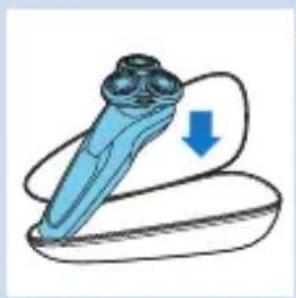
1 Store the shaver in the pouch supplied.
natural_image
Illustration of a blue dental implant with a downward arrow indicating compression (no text or symbols)Note: We advise you to let the shaver dry before you store it in the pouch.
Replacement
Replacing the shaving heads
For maximum shaving performance, we advise you to replace the shaving heads every two years.
Replacement reminder
The shaving unit symbol lights up to indicate that the shaving heads need to be replaced. Replace damaged shaving heads right away.
Only replace the shaving heads with original SH90 Philips shaving heads.
text_image
Diagram showing a device with a music note and a speaker icon, likely illustrating audio or voice control concepts.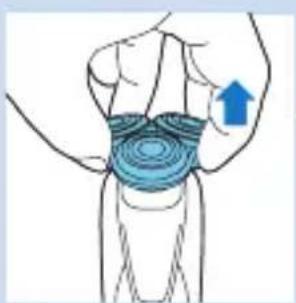
natural_image
Illustration of a human leg with a blue contour overlay and an upward arrow indicating motion or pressure direction (no text or symbols)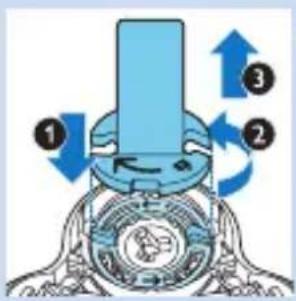
text_image
Diagram of a mechanical device with numbered components and directional arrows indicating motion or flow.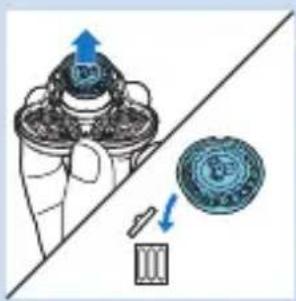
natural_image
Illustration of a hand holding a mechanical component with an arrow indicating direction, alongside a close-up of a circular component (no text or symbols present)1 The shaving unit symbol lights up continuously, the arrows flash white and you hear a beep when you switch off the shaver.
2 Pull the shaving head holder off the bottom part of the shaving unit.
3 Place the retaining ring holder on the retaining ring (1), turn it anticlockwise (2) and lift it off the shaving head (3).
Remove the retaining ring from the retaining ring holder and repeat this process for the other retaining rings.
4 Remove the shavings heads from the shaving head holder and throw them away.

natural_image
Diagram showing a blue circular object pressing into a ring with a blue arrow indicating direction (no text or symbols)5 Place new shaving heads in the holder.
Note: Make sure the projections of the shaving heads fit exactly into the recesses.
text_image
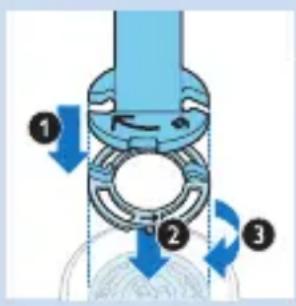
Diagram of a mechanical device with labeled parts and directional arrows indicating motion or flow6 Place the retaining ring holder on the retaining ring (1), place it on the shaving head (2) and turn it clockwise (3) to reattach the retaining ring.
Repeat this process for the other retaining rings.
text_image
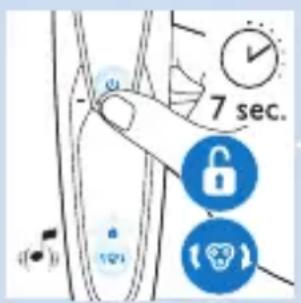
7 sec.7 Reattach the shaving head holder to the bottom part of the shaving unit.
8 To reset the shaver, press and hold the on/off button for approx. 7 seconds. Wait until you hear two beeps.
Ordering accessories
To buy accessories or spare parts, visit
www.shop.philips.com/service. or go to your Philips dealer. You can also contact the Philips Consumer Care Centre in your country (see the worldwide guarantee leaflet for contact details).
The following parts are available:
- HQ8505 adapter
- SH90 Philips shaving heads
- HQ110 Philips Shaving Head Cleaning Spray
- RQ111 Philips beard styler attachment
- RQ585 Philips cleansing brush attachment
- RQ560/RQ563 Philips cleansing brush heads
- JC301/JC302/JC303/JC304/JC305 cleaning cartridge
text_image
2yrsShaving heads
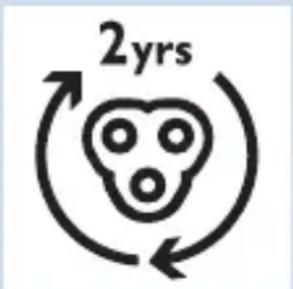
- We advise you to replace your shaving heads every two years. Always replace the shaving heads with original SH90 Philips shaving heads.
Environment
natural_image
Symbol of a waste bin with crossed lines and a blank rectangular base (no text or numbers)- Do not throw away the shaver and the SmartClean system with the normal household waste at the end of their life, but hand them in at an official collection point for recycling. By doing this, you help to preserve the environment.
- The built-in rechargeable shaver battery contains substances that may pollute the environment. Always remove the battery before you discard or hand in the shaver at an official collection point. Dispose of the battery at an official collection point for batteries. If you have trouble removing the battery, you can also take the shaver to a Philips service centre. The staff of this centre will remove the battery for you and will dispose of it in an environmentally safe way.
Removing the rechargeable shaver battery
Only remove the rechargeable battery when you discard the shaver. Make sure the battery is completely empty when you remove it.
Be careful, the battery strips are sharp.
1 Insert the screwdriver into the slot between the front and back panel in the bottom of the appliance. Remove the back panel.
2 Remove the front panel.
3 Unscrew the two screws at the top of the inner panel and remove the inner panel.
4 Remove the rechargeable battery with a screwdriver.
Guarantee and support
If you need information or support, please visit www.philips.com/support or read the separate worldwide guarantee leaflet.
Guarantee restrictions
The shaving heads (cutters and guards) are not covered by the terms of the international guarantee because they are subject to wear.
Troubleshooting
This chapter summarises the most common problems you could encounter with the appliance. If you are unable to solve the problem with the information below, visit www.philips.com/support for a list of frequently asked questions or contact the Consumer Care Centre in your country.
Problem Possible cause Solution
| The shaver does not work when I press the on/off button. | The shaver is still attached to the mains. For safety reasons, the shaver can only be used cordlessly. | Unplug the shaver and press the on/off button to switch on the shaver. |
| The rechargeable battery is empty. | Recharge the battery (see chapter ‘Charging’). | |
| The travel lock is activated. | Press the on/off button for 3 seconds to deactivate the travel lock. | |
| The shaver does not shave as well as it used to. | The shaving heads are damaged or worn. | Replace the shaving heads (see chapter ‘Replacement’). |
| Hairs or dirt obstruct the shaving heads. | Clean the shaving heads (see chapter ‘Cleaning and maintenance’). |
Problem Possible cause Solution
| Clean the shaver thoroughly before you continue shaving (see chapter ‘Cleaning and maintenance’). | ||
| I replaced the shaving heads, but the replacement reminder is still showing. | You have not reset the shaver. | Reset the shaver by pressing the on/off button for approx. 7 seconds (see chapter ‘Replacement’). |
| A shaving head symbol has suddenly appeared on the display. | This symbol is a replacement reminder. | Replace the shaving heads (see chapter ‘Replacement’). |
| An exclamation mark has suddenly appeared on the display while charging. | The shaver is overheated. | Disconnect the shaver from the mains for approx. 10 minutes. |
| An exclamation mark, replacement reminder and the cleaning reminder have suddenly appeared on the display. | The shaving heads are soiled or damaged. | Replace (see chapter ‘Replacement’) or clean the shaving heads (see chapter ‘Cleaning and maintenance’). |
| Water is leaking from the bottom of the shaver. | During cleaning, water may collect between the inner body and the outer shell of the shaver. | This is normal and not dangerous because all electronics are enclosed in a sealed power unit inside the shaver. |
| The SmartClean system does not work when I press the on/off button. | The SmartClean system is not connected to the mains. | Put the small plug in SmartClean system and put the adapter in the wall socket. |
Problem Possible cause Solution
| The shaver is not entirely clean after I clean it in the SmartClean system. | You have not placed the shaver in the SmartClean system properly, so there is no electrical connection between the SmartClean system and the shaver. | Press down the top cap ('click') to ensure a proper connection between the shaver and the SmartClean system. |
| The cleaning cartridge needs replacement. | Replace the cleaning cartridge (see chapter 'Cleaning and maintenance'). | |
| The cleaning cartridge is empty.The replacement symbol flashes to indicate you have to replace the cleaning cartridge. | Place a new cleaning cartridge in the SmartClean system (see chapter 'Cleaning and maintenance'). | |
| You have used another cleaning fluid than the original Philips cleaning cartridge. | Only use the Philips cleaning cartridge. | |
| The drain of the cleaning cartridge might be blocked. | Push the hairs down the drain with a toothpick. | |
| The shaver is not fully charged after I charge it in the SmartClean system. | You have not placed the shaver in the SmartClean system properly. | Press down the top cap ('click') to ensure a proper connection between the shaver and the SmartClean system. |
Einführung
text_image
Prohibition sign with a faucet symbol and diagonal line, indicating no fire or water discharge.Gefahr
natural_image
Prohibition sign showing a faucet crossed out by a diagonal line, indicating no pollution or barrier (no text present)Achtung
natural_image
Simple line drawing of a showerhead spraying over water (no text or symbols)natural_image
Simple line drawing of a mechanical component with a blue circular icon containing a triangular shape (no text or symbols)natural_image
Simple line drawing of a symmetrical object with a star-like symbol inside, no text or symbols present.natural_image
Illustration of a medical or laboratory device with a digital display on the left side (no text or symbols visible)natural_image
Simple line drawing of a symmetrical object with an orange star-like symbol inside, no text or symbols present.natural_image
Simple line drawing of a funnel shape with a water drop symbol and a blue circular icon labeled '水' (water drop) in the corner.natural_image
Diagram of a human leg with a lock icon and a blue lock symbol (no text or labels)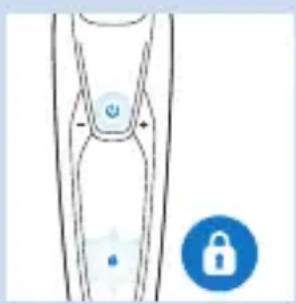
natural_image
Simple line drawing of a human leg with a lock icon and a blue lock symbol (no text or labels)natural_image
Simple line drawing of a mechanical component with a circular symbol and a blue circular icon (no text or labels)text_image
Diagram showing a device with labeled icons and warning symbols, including music notes, hands-on keys, and alarm signs.natural_image
Simple line drawing of a symmetrical object with an orange star and a blue warning symbol (no text or labels)Überhitzen
text_image
Diagram showing a hairpin plug connected to a power outlet with blue directional arrows indicating movement or force.natural_image
Illustration of a blue pen tip inserted into a glass container with a downward arrow (no text or symbols)text_image
Diagram illustrating three-step robotic arm motion with labeled arrows and motion indicatorsnatural_image
Illustration of a person applying a blue tool to their face, showing the brush (no text or symbols present)Nassrasur
natural_image
Illustration of a person's face with a blue object on the cheek, no text or symbols presentnatural_image
Line drawing of a person's face with hand near ear area, no text or symbols presentnatural_image
Illustration of a hand washing a blue object with a water droplet above (no text or symbols)natural_image
Illustration of a person applying a blue brush to their face, showing motion direction (no text or symbols)natural_image
Illustration of a hand holding a device with a blue funnel and red/blue warning symbols (no text or labels)natural_image
Illustration of a robotic arm with a blue tool and a magnified inset showing a graduation cap and a circular seal (no text or symbols)natural_image
Illustration of a person using a hairdryer (no text or symbols present)natural_image
Illustration of a blue mechanical component pressing down on a curved surface (no text or symbols)natural_image
Illustration of a blue flying saucer with a warning symbol and red cross, above a curved surface (no text or labels)natural_image
Illustration of a medical procedure on a hand, showing a blue instrument being injected with a magnified inset showing a graduation cap (no text or symbols present)natural_image
Line drawing of a hairbrush with a blue brush applying powder to the jaw (no text or symbols)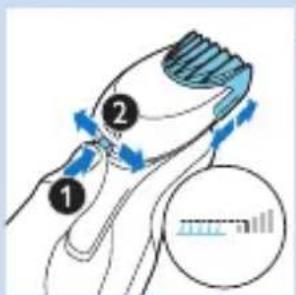
text_image
Diagram illustrating hair styling technique with numbered steps and magnified view of measurementnatural_image
Illustration of a person brushing their beard with a blue brush (no text or symbols)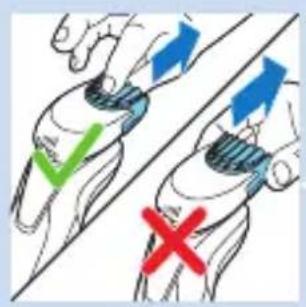
text_image
Diagram showing hand positioning with checkmark and cross symbols indicating correct and incorrect states
natural_image
Illustration of a person applying a blue hair accessory to their neck (no text or symbols)natural_image
Diagram of a symmetrical abstract shape with circular elements and blue circular markers (no text or symbols)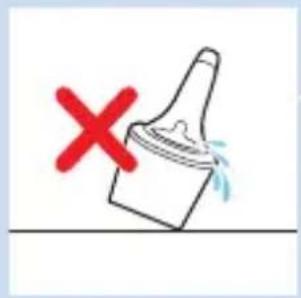
natural_image
Simple line drawing of a paintbrush with a red X mark and blue liquid droplets, no text or symbols present.text_image
Diagram illustrating three-step robotic manipulation process with labeled arrows and motion indicators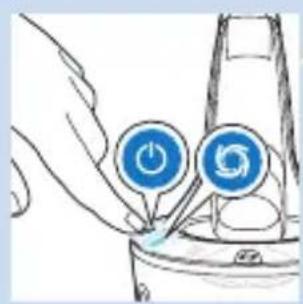
natural_image
Hand holding two blue circular icons with 'Power' and 'Recycle' symbols, connected to a device (no text or labels)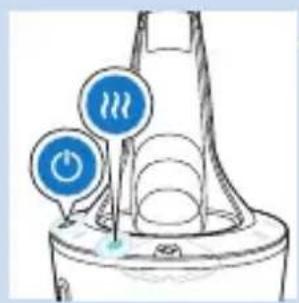
text_image
Diagram showing two blue circular icons with 'power' symbols and a green checkmark, likely indicating status or warning.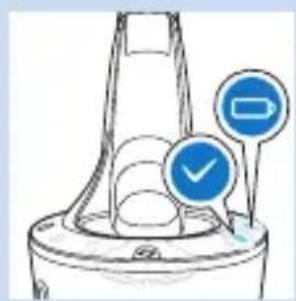
natural_image
Diagram of a mechanical component with two circular indicators (blue checkmark and blue circle) pointing to features, no text or symbols present.text_image
Diagram of a mechanical component with numbered parts and directional arrows indicating motion or forcenatural_image
Diagram of a blender with a blue arrow pointing to its interior component (no text or symbols present)natural_image
Illustration of a blue mechanical component with a downward arrow indicating motion (no text or symbols)natural_image
Illustration of a hand washing a blue object with a tool above it (no text or symbols)natural_image
Illustration of a human leg with concentric contour lines and an upward arrow indicating pressure or movement (no text or symbols)natural_image
Illustration of a hand pouring liquid into a blue container with bubbles (no text or symbols)natural_image
Illustration of a human leg with concentric contour lines and an upward arrow indicating pressure or movement (no text or symbols)text_image
Diagram of a mechanical device with numbered components and directional arrows indicating motion or flow.natural_image
Diagram showing two mechanical components with blue arrows indicating direction, no text or symbols presentnatural_image
Illustration of two mechanical components with blue parts and connecting rods (no text or symbols)natural_image
Diagram of a mechanical component with a blue arrow pointing downward, no text or symbols presentnatural_image
Diagram showing a blue circular object pressing into a ring, with a blue arrow indicating direction (no text or symbols)text_image
Diagram of a mechanical device with numbered components and directional arrows indicating motion or flownatural_image
Illustration of a blue plastic bag attached to a pipe with coiled wires (no text or symbols)natural_image
Illustration of a blue spray bottle pouring liquid onto a white surface, separated by a diagonal line (no text or symbols)natural_image
Illustration of a blue dental implant with a downward arrow indicating compression or dislocation (no text or symbols)text_image
Diagram showing a device with a music note and a speaker icon, likely illustrating audio or voice control concepts.natural_image
Illustration of a human leg with a blue arrow indicating upward motion (no text or symbols)text_image
Diagram of a mechanical device with numbered components and directional arrows indicating motion or flow.natural_image
Illustration of a hand holding a mechanical component with an arrow indicating direction, alongside a close-up of a circular component (no text or symbols present)natural_image
Diagram showing a blue circular object being lifted by a blue arrow into a ring structure (no text or symbols)text_image
Diagram of a mechanical device with numbered components and directional arrows indicating motion or flow.natural_image
Symbol of a trash bin crossed with no text or labels, accompanied by a solid black rectangle below (no readable text or symbols)natural_image
No sign depicting a faucet crossed out by a diagonal line, indicating no pollution or barrier (no text present)Danger
natural_image
No smoking sign with faucet symbol (no text or numbers)Attention
natural_image
Simple line drawing of a mechanical component with an arrow and a blue circular icon (no text or symbols)natural_image
Simple line drawing of a symmetrical object with a star-like symbol inside, no text or symbols present.natural_image
Simple line drawing of a medical or laboratory device with no visible text, numbers, or symbols.natural_image
Simple line drawing of a U-shaped object with an orange star and label (no text or symbols)natural_image
Simple line drawing of a funnel shape with a water symbol and a blue circular icon (no text or labels)natural_image
Simple line drawing of a human leg with a lock icon and a padlock symbol (no text or labels)natural_image
Diagram of a human leg with a padlock icon and lock symbol (no text or labels)natural_image
Simple line drawing of a microphone with sound waves and a small icon (no text or symbols)text_image
Diagram showing a device with control buttons and four blue circular icons representing function keys, settings, health, and alerts.natural_image
Simple line drawing of a symmetrical object with an orange star and a blue warning circle (no text or symbols)Surchauffe
text_image
Diagram showing a cable being inserted into a socket with labeled parts and directional arrows indicating movement.natural_image
Illustration of a blue pen tip inserted into a glass container with a blue arrow indicating direction (no text or symbols)text_image
Diagram illustrating three-step cleaning or cleaning process with labeled steps 1, 2, and 3natural_image
Illustration of a person applying a blue hair accessory to their face (no text or symbols present)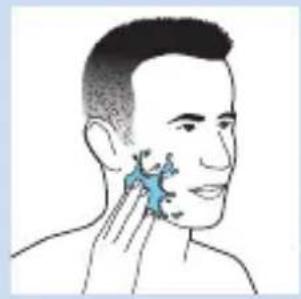
natural_image
Illustration of a person's face with a blue object on the cheek, no text or symbols presentnatural_image
Illustration of a person applying a blue-tinted product to their ear (no text or symbols)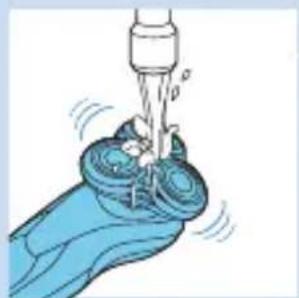
natural_image
Illustration of a hand holding a water dispenser with bubbles and spray, no text or symbols present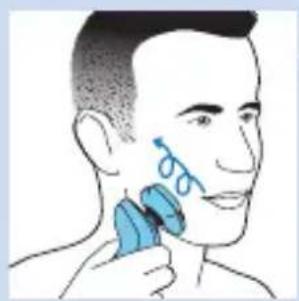
natural_image
Illustration of a person applying a blue brush to their face, no text or symbols presentnatural_image
Illustration of a blue flying saucer with a red 'X' symbol and an upward arrow, placed on a curved surface (no text or symbols)natural_image
Illustration of a blue robotic arm with a magnified inset showing a graduation cap and coins (no text or symbols)natural_image
Illustration of a person using a hairdryer (no text or symbols present)natural_image
Diagram of a blue mechanical component pressing into a curved surface with an upward arrow (no text or symbols)natural_image
Illustration of a medical device with a blue dome and red X marks, showing no text or symbols on the device itself.natural_image
Illustration of a medical procedure on a hand, showing a blue needle inserted into a cup (no text or symbols present)natural_image
Illustration of a hairbrush cutting down with a blue brush (no text or symbols)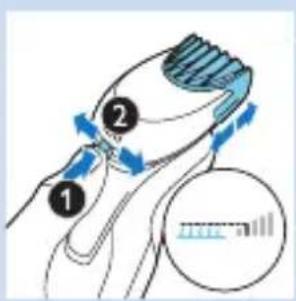
text_image
Diagram illustrating hair styling technique with numbered steps and directional arrows indicating movementtext_image
Diagram showing hand positioning with checkmark and cross symbols indicating correct and incorrect states
natural_image
Illustration of a person applying a blue hair accessory to their neck (no text or symbols)natural_image
Diagram of a symmetrical abstract shape with numbered annotations (no readable text or symbols)natural_image
Simple line drawing of a paintbrush with a red X mark and blue liquid, no text or symbols present.text_image
Diagram of a mechanical component with numbered parts and directional arrows indicating motion or flow.natural_image
Simple line drawing of a container with a blue lid and an upward arrow, no text or symbols present.natural_image
Diagram of a blender with a blue arrow pointing to its interior component (no text or symbols present)natural_image
Illustration of a blue mechanical component with a blue arrow indicating direction (no text or symbols)text_image
Safety warning illustration showing a blue spray bottle with downward arrow and a red prohibition symbolnatural_image
Illustration of a blue pen tip inserted into a glass container with a downward arrow (no text or symbols)text_image
Diagram illustrating three-step robotic arm motion with labeled arrows and motion indicatorsnatural_image
Hand holding a device with two blue circular buttons labeled 'Power' and 'Spiral', no text or symbols present.natural_image
Simple line drawing of a water dispenser with two blue circular buttons and a power symbol (no text or labels)natural_image
Diagram of a mechanical component with two blue circular indicators (✓ and □) pointing to features, no text or symbols present.natural_image
Illustration of a hand washing a baby's mouth with a faucet (no text or symbols)natural_image
Illustration of a human knee joint with concentric contour lines and an upward arrow indicating pressure or force (no text or symbols)
natural_image
Illustration of a hand pouring liquid into a blue container with a dropper (no text or symbols)natural_image
Illustration of a human leg with concentric contour lines and an upward arrow indicating pressure or movement (no text or symbols)text_image
Diagram illustrating a mechanical or electrical system with numbered components and directional arrows indicating motion or flow.natural_image
Diagram showing two mechanical components with blue arrows indicating direction, no text or symbols presentnatural_image
Illustration of two mechanical components with ropes and a blue gear, no text or symbols presentnatural_image
Diagram of a mechanical device with a blue arrow pointing to a circular component (no text or symbols)natural_image
Diagram showing a blue circular object pressing into a ring, with a blue arrow indicating direction (no text or symbols)text_image
Diagram of a mechanical valve or pump assembly with numbered components and directional arrows indicating flow or movement.natural_image
Illustration of a blue plastic bag pouring liquid from a pipe into a container (no text or symbols)natural_image
Illustration of two different water spray methods, one spraying water onto a surface and the other spraying water onto a surface (no text or symbols)natural_image
Illustration of a blue dental tool with a downward arrow indicating compression or disassembly (no text or symbols)text_image
Diagram showing a guitar body with a music note and a blue circular icon containing a skull symbol.natural_image
Illustration of a human wrist with concentric circular patterns and an upward arrow indicating motion (no text or symbols)text_image
Diagram illustrating a mechanical or electrical system with numbered components and directional arrows indicating motion or flow.natural_image
Illustration of a hand holding a mechanical component with a close-up view of its internal structure (no text or symbols)natural_image
Diagram showing a blue circular object being lifted by a blue arrow into a ring structure (no text or symbols)text_image
Diagram of a mechanical device with numbered components and directional arrows indicating motion or flow.natural_image
Symbol of a trash bin with crossed lines indicating no waste or restriction, and a solid black rectangle below (no text or symbols)natural_image
No sign depicting a faucet with a showerhead, enclosed in a circle (no text or symbols)
natural_image
No sign depicting a faucet with a diagonal line, crossed out by a diagonal line (no text or symbols)Let op
natural_image
Simple line drawing of a showerhead spraying over a water-filled basin (no text or symbols)text_image
Diagram showing a mechanical component with an arrow indicating direction and a blue circular icon with a triangular symbol.natural_image
Simple line drawing of a symmetrical object with a central star-like symbol and surrounding circular elements (no text or labels)natural_image
Simple line drawing of a medical or laboratory device with no visible text, numbers, or symbols.natural_image
Simple line drawing of a symmetrical object with an orange star-shaped label inside, no text or symbols present.natural_image
Simple line drawing of a funnel with a water symbol inside, next to a blue circular icon labeled 'A#1' (no text or symbols on the diagram itself)natural_image
Simple line drawing of a human leg with a padlock icon and a small droplet, no text or symbols present.natural_image
Simple line drawing of a human leg with a padlock icon and a small blue lock symbol (no text or labels)De reisvergrendeling deactiveren
text_image
Diagram showing a mechanical component with labeled parts and a blue circular icon containing a skull symbol.text_image
Diagram of a remote control device with labeled buttons and warning icons for music, water, ear, and alert symbolsnatural_image
Simple line drawing of a symmetrical object with an orange star and a blue warning symbol (no text or labels)Opladen
text_image
Diagram showing a medical device with labeled parts and directional arrows indicating connection or movement.natural_image
Illustration of a blue pen tip inserted into a glass container with a downward arrow (no text or symbols)text_image
Diagram illustrating three-step cleaning or cleaning process with labeled arrows and directional arrowsnatural_image
Illustration of a person applying a blue brush to their face, showing the brush tip and mouth area (no text or symbols)NEDERLANDS92
natural_image
Illustration of a person's face with a blue shaded area highlighting the ear area (no text or symbols present)natural_image
Line drawing of a person's head and neck with a blue shaded area on the cheek (no text or symbols)natural_image
Illustration of a hand holding a mechanical device with a tool inserted, showing motion lines (no text or symbols)natural_image
Illustration of a person applying a blue hair accessory to their face (no text or symbols present)natural_image
Illustration of a flying saucer with a red cross symbol and an upward arrow, placed on a curved surface (no text or symbols)natural_image
Illustration of a blue handheld device emitting powder onto a surface, with an inset showing a magnified view of the device (no text or symbols present)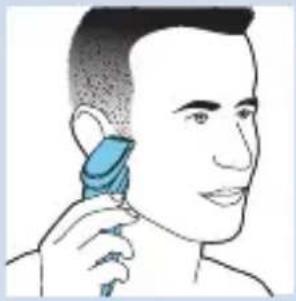
natural_image
Illustration of a person using a hairdryer to apply product (no text or symbols present)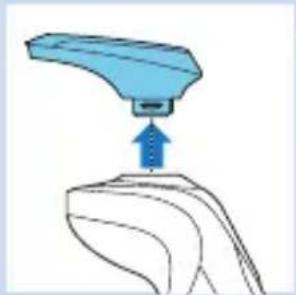
natural_image
Illustration of a blue mechanical component pressing down on a curved surface (no text or symbols)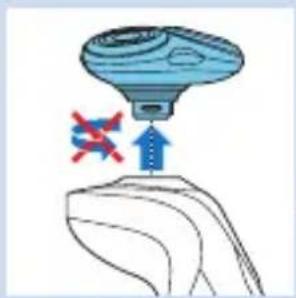
natural_image
Illustration of a flying saucer with an airplane and red cross symbol, no text or labels present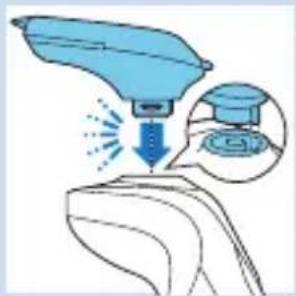
natural_image
Illustration of a medical procedure with a blue instrument and magnified view of a device (no text or symbols)natural_image
Illustration of a hairbrush cutting into a toothbrush with motion arrows (no text or symbols)text_image
Diagram illustrating hair follicle behavior with numbered instructions and a magnified view of hair follicle measurement.natural_image
Illustration of a person applying a toothbrush to their beaded beard (no text or symbols)4 U kunt nu beginnen uw baard te stylen.
text_image
Diagram showing hand positioning with checkmark and cross symbols indicating correct and incorrect statesnatural_image
Illustration of a person applying a blue hair accessory to their neck (no text or symbols)natural_image
Abstract diagram with concentric circles and blue circular elements, no text or symbols presentnatural_image
Simple line drawing of a paintbrush with a red X mark and water droplets, no text or symbols present.text_image
Diagram of a mechanical component with numbered parts and directional arrows indicating flow or movement.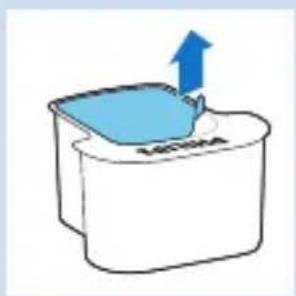
natural_image
Simple line drawing of a container with a blue lid and an upward arrow, no text or symbols present.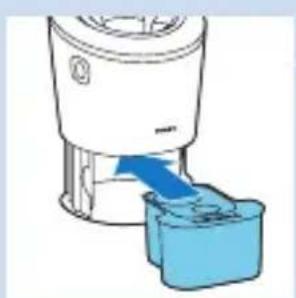
natural_image
Illustration of a blender with a blue arrow pointing to its water level, no text or symbols presentNEDERLANDS96

natural_image
Diagram of a mechanical component with two blue circular indicators (one checked, one not checked) pointing to features, no text or symbols present.text_image
Diagram of a mechanical component with numbered parts and directional arrows indicating flow or movement.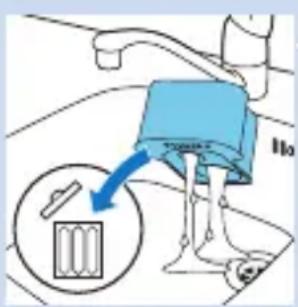
text_image
IIonatural_image
Diagram of a blender with a blue arrow pointing to its interior component (no text or symbols present)natural_image
Blue mechanical component with a blue arrow indicating direction (no text or symbols)natural_image
Illustration of a hand washing a blue plastic bag with a water dispenser above (no text or symbols)natural_image
Illustration of a human leg with a blue arrow indicating upward motion or pressure direction (no text or symbols)natural_image
Illustration of a hand pouring liquid into a blue container with a pipette (no text or symbols)Grondige reinigingsmethode
natural_image
Illustration of a human leg with a blue arrow indicating upward motion or pressure direction (no text or symbols)text_image
Diagram of a mechanical device with numbered components and directional arrows indicating motion or flow.natural_image
Diagram showing two mechanical components with blue arrows indicating direction of movement (no text or symbols)natural_image
Illustration of a medical procedure showing two steps: first with surgical tools and second with a blue object (no text or symbols)natural_image
Diagram of a mechanical component with a blue arrow pointing downward, showing internal structure (no text or symbols)natural_image
Diagram showing a blue circular object with a downward arrow above a ring structure (no text or symbols)text_image
Diagram of a mechanical device with numbered components and directional arrows indicating motion or flow.natural_image
Illustration of a blue plastic bag pouring liquid into a pipe (no text or symbols)natural_image
Illustration of two blue objects pouring liquid from a pipe into a container, separated by a diagonal line (no text or symbols)natural_image
Illustration of a blue dental tool with a downward arrow indicating compression or dislocation (no text or symbols)natural_image
Diagram of a device with a sensor and signal icon, no readable text or symbols presentnatural_image
Illustration of a human leg with a blue circular pattern and an upward arrow indicating motion or pressure (no text or symbols)text_image
Diagram of a mechanical device with numbered components and directional arrows indicating motion or flow.natural_image
Diagram showing a mechanical device with a rotating component and a circular component, no text or symbols present.natural_image
Diagram showing a blue circular object falling into a ring with a blue arrow pointing downward (no text or symbols)text_image
Diagram of a mechanical device with numbered components and directional arrows indicating motion or flow.natural_image
Symbol of a trash bin with crossed lines indicating no waste or restriction, and a solid black rectangle below (no text or symbols)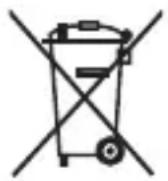
natural_image
Symbol of a trash bin crossed with no text or labels, representing waste sorting or recycling (no text present)natural_image
Diagram of a mechanical or electrical component with blue arrows indicating rotational direction (no text or symbols)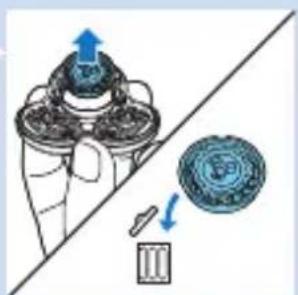
natural_image
Diagram showing a hand holding a mechanical component with an arrow indicating upward motion, alongside a circular component with arrows and a base (no text or symbols)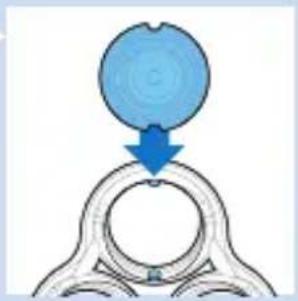
natural_image
Diagram showing a blue circular object pressing into a ring with a blue arrow indicating direction (no text or symbols)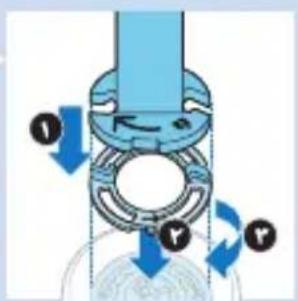
text_image
Diagram illustrating fluid flow through a valve mechanism with labeled directional arrows and force indicators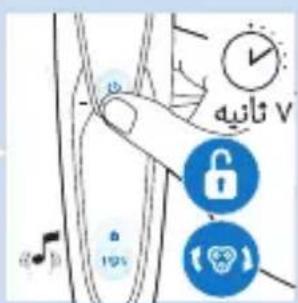
text_image
Diagram illustrating a hand interacting with a device, accompanied by icons for lock, alarm, and phone.سفارش دادن لوازم
natural_image
Illustration of a blue brush applying material to a flat surface with a downward arrow (no text or symbols)تعويض
تعويض سريهاي اصدح
natural_image
Simple line drawing of a microphone with a speaker icon and sound wave symbol (no text or labels)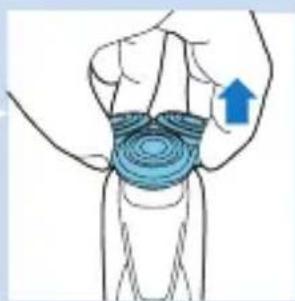
natural_image
Illustration of a human wrist with concentric blue wave patterns and an upward arrow indicating motion (no text or symbols)natural_image
Diagram showing a blue circular object being lifted by a downward arrow into a ring structure (no text or symbols)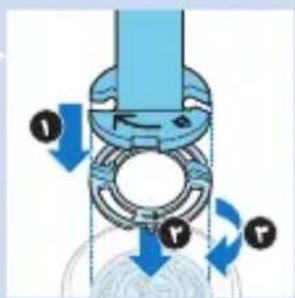
text_image
Diagram illustrating mechanical assembly with labeled forces and motion arrows, showing a rotating component with force vectors F and T.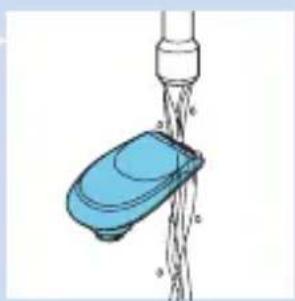
natural_image
Illustration of a blue plastic bag pouring liquid into a pipe (no text or symbols)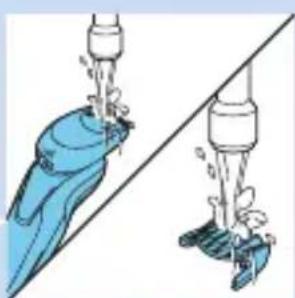
natural_image
Illustration of two blue water droplets spraying from a pipe against a diagonal line (no text or symbols)natural_image
Diagram showing a blue circular object with a downward arrow pointing to a ring structure (no text or symbols)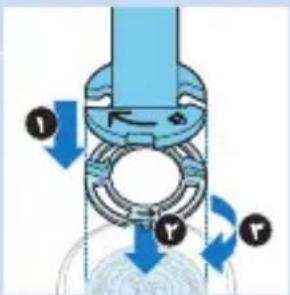
natural_image
Mechanical assembly diagram showing a rotating component with blue arrows indicating motion (no text or symbols)natural_image
Illustration of a blue plastic bag pouring liquid from a pipe outlet (no text or symbols)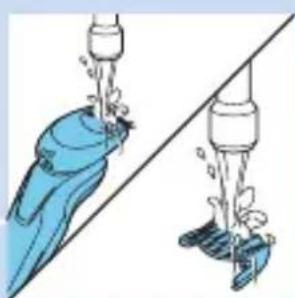
natural_image
Illustration of two blue water purifiers pouring from a pipe into a shared surface, no text or symbols presentnatural_image
Illustration of a human leg with concentric circles and an upward arrow indicating pressure or movement (no text or symbols)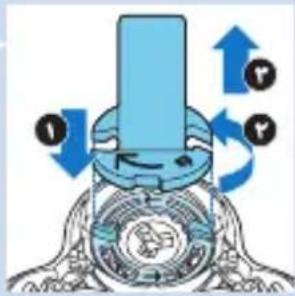
natural_image
Diagram of a mechanical device with blue arrows indicating rotational motion (no text or symbols)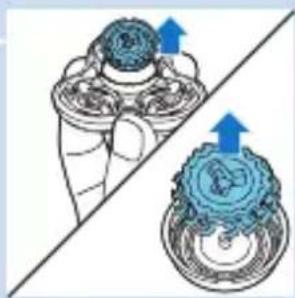
natural_image
Mechanical assembly diagram showing two components with blue arrows indicating motion direction (no text or labels)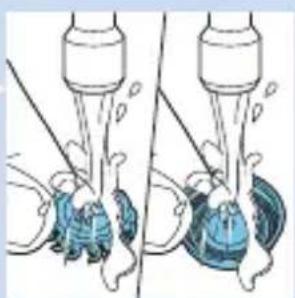
natural_image
Illustration of two mechanical devices with blue components and a tool, no text or symbols present
natural_image
Diagram of a mechanical component with a blue arrow pointing downward, no text or symbols presentnatural_image
Illustration of a blender with a blue arrow pointing to its liquid level (no text or symbols)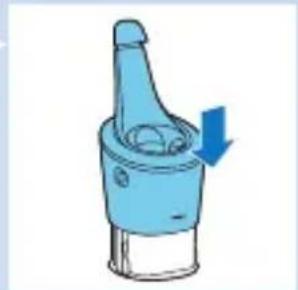
natural_image
Illustration of a blue mechanical component with a directional arrow indicating motion (no text or symbols)natural_image
Illustration of a hand washing a blue object with a water dispenser above (no text or symbols)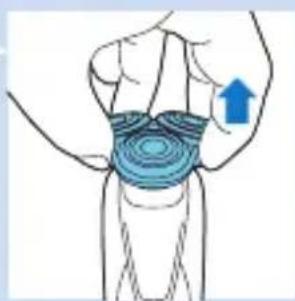
natural_image
Illustration of a human leg with concentric circular patterns and an upward arrow indicating motion or pressure (no text or symbols)natural_image
Illustration of a hand pouring liquid into a blue container with a dropper (no text or symbols)natural_image
Simple line drawing of a funnel with two circular indicators (one checked, one not checked) and no text or symbols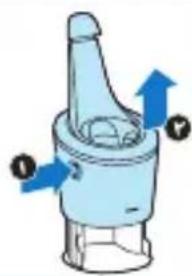
natural_image
Diagram of a blue mechanical component with directional arrows and labeled points (no text or symbols beyond labels)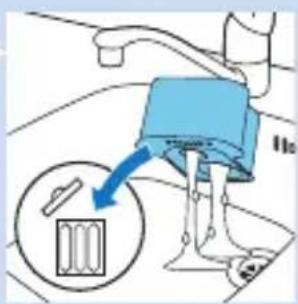
text_image
Diagram showing a mechanical device with a blue lever and a magnified inset highlighting a component labeled '100'.natural_image
Pure diagram of a symmetrical mechanical or architectural component with no text, numbers, or symbols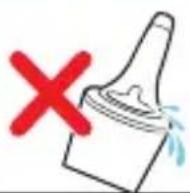
natural_image
Diagram of a mechanical component with directional arrows (no text or symbols)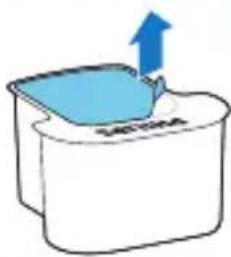
natural_image
Simple line drawing of a container with a blue lid and an upward arrow, no text or symbols present.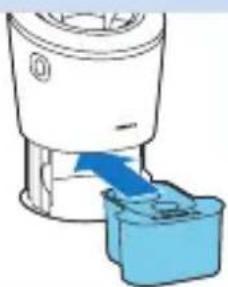
natural_image
Diagram of a blender with a blue plastic container inserted, showing fluid flow direction (no text or symbols)natural_image
Illustration of a medical procedure with a blue tool and magnified view showing a graduation cap (no text or symbols)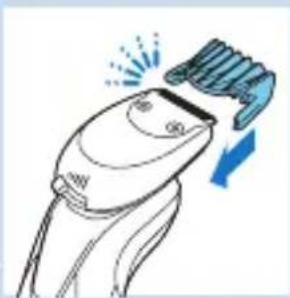
natural_image
Line drawing of a hairbrush with a brush applying powder to the jaw (no text or symbols)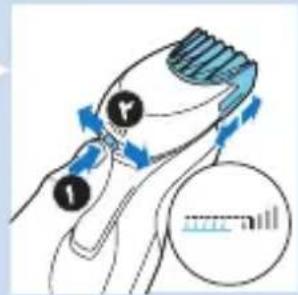
text_image
Diagram illustrating hair styling technique with labeled parts and directional arrows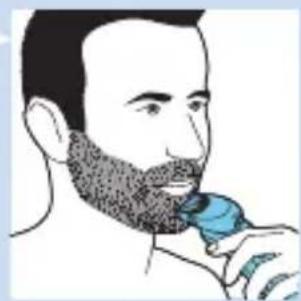
natural_image
Illustration of a man brushing his beard with a blue brush (no text or symbols)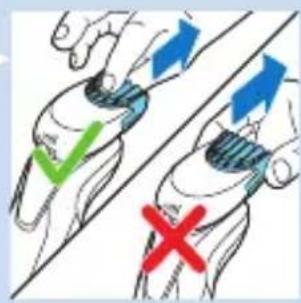
text_image
Diagram showing hand positioning with checkmark and cross symbols indicating correct and incorrect states
natural_image
Illustration of a person applying a blue tool to their neck (no text or symbols)natural_image
Illustration of a blue flying saucer with a red cross symbol above it, placed on a curved surface (no text or symbols present)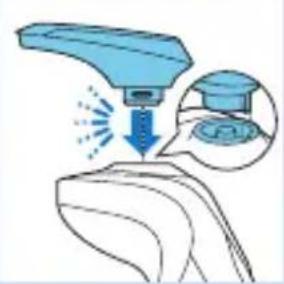
natural_image
Illustration of a blue spray gun on a surface with an inset showing a graduation cap and a magnified view of the gun (no text or symbols)
natural_image
Illustration of a person using a hairdryer to apply product (no text or symbols present)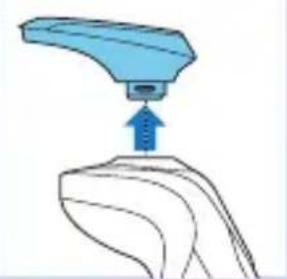
natural_image
Illustration of a blue robotic arm pressing down on a curved surface (no text or symbols)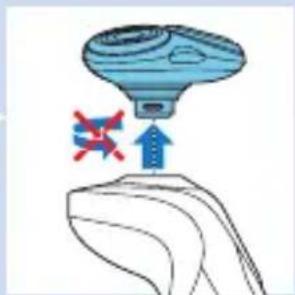
natural_image
Illustration of a medical device with a syringe and a hand holding a tablet, marked with red X symbols (no text or labels)natural_image
Illustration of a person's face with a blue shaded area highlighting the ear area (no text or symbols)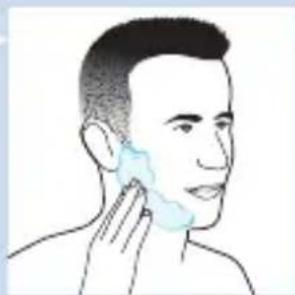
natural_image
Line drawing of a person's face with a shaded area highlighting the lower jaw (no text or symbols)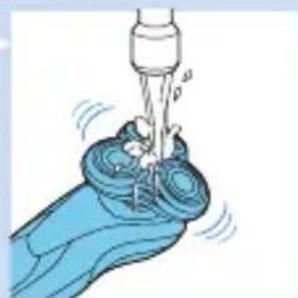
natural_image
Illustration of a hand washing a small object with liquid, no text or symbols present
natural_image
Illustration of a person applying a blue hair accessory to their face (no text or symbols)text_image
Diagram illustrating finger movement and force application on a device, with labeled arrows and motion indicatorsاستفاده ازريش تراش
اصادح کردن
دوره تطابق پوست
natural_image
Illustration of a person applying a blue brush to their face, no text or symbols presentداغ شدن بیش ازحد
natural_image
Simple line drawing of a symmetrical object with a small star-like symbol inside, and a blue circular icon with an exclamation mark (no text or labels)بشارز کردن
natural_image
Diagram of a plug connecting a socket to a device with blue arrows indicating direction (no text or symbols)natural_image
Illustration of a blue pen tip inserted into a glass container with a downward arrow (no text or symbols)natural_image
Simple line drawing of a human leg with a lock icon and number 6, no text or symbols present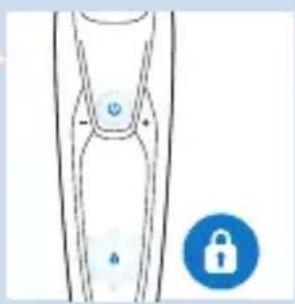
natural_image
Simple line drawing of a human leg with a lock icon (no text or symbols)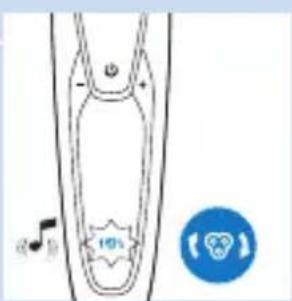
text_image
Diagram showing a device with a music note and a circular icon labeled '10%' in the center.text_image
Diagram showing a medical device with labeled buttons and warning icons, including 'I', 'P', 'A', 'C', and an exclamation mark.natural_image
Simple line drawing of a medical or laboratory device with no visible text, numbers, or symbols.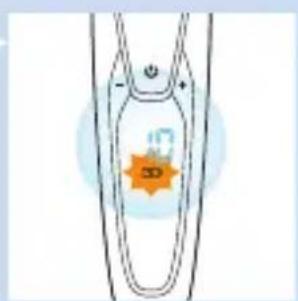
natural_image
Simple line drawing of a symmetrical object with an orange star-like symbol inside, no text or symbols present.natural_image
Simple line drawing of a funnel-like shape with a water drop symbol and a blue circular icon labeled '水' (water) in the corner.قفل مسافرتى
text_image
Diagram showing a U-shaped tube with a blue arrow pointing to a labeled point and a blue circle with a triangular symbol below.شارزکردن
natural_image
Simple line drawing of a symmetrical U-shaped object with a star-like symbol inside, no text or labels present.باتری کاملا شارزشده
natural_image
No sign depicting a faucet with a diagonal line, crossed out by a diagonal line (no text or symbols)
natural_image
Prohibition sign showing a faucet without spraying water, enclosed in a circle (no text)مقدمه
natural_image
Symbol of a trash bin crossed with no text or labels, accompanied by a solid black rectangle below (no readable text or symbols)
text_image
Diagram illustrating mechanical assembly with labeled components and directional arrows indicating motion or force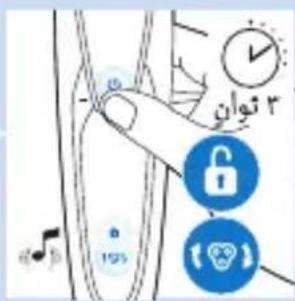
text_image
Diagram showing a hand interacting with a device, alongside icons for lock, Wi-Fi, and alarm clock.طلب الملاحظات
text_image
Diagram showing a device with a music note and a star-shaped button labeled '100%', alongside a blue circular icon with a skull and signal symbol.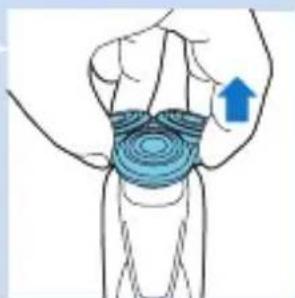
natural_image
Illustration of a human hand with concentric blue wave patterns and an upward arrow, no text or symbols presentnatural_image
Diagram of a mechanical or electrical component with directional arrows indicating motion (no text or symbols)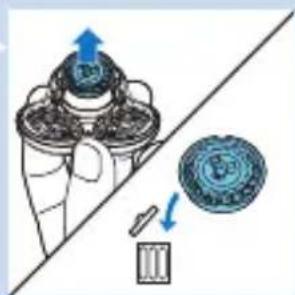
natural_image
Diagram showing a mechanical device with a blue arrow indicating upward motion and a blue arrow pointing to a circular component (no text or symbols present)natural_image
Diagram showing a blue circular object being lifted by a blue arrow into a metallic ring (no text or symbols)
natural_image
Illustration of a blue soap dispenser pouring liquid from a pipe (no text or symbols)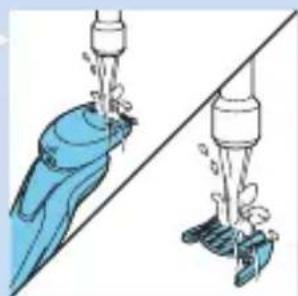
natural_image
Illustration of a diverging water pump with blue liquid and green fittings, no text or symbols presentال tangزين
natural_image
Illustration of a blue dental implant with a blue arrow indicating direction (no text or symbols)natural_image
Diagram showing two mechanical components with blue arrows indicating direction, no text or symbols present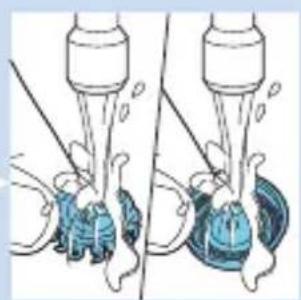
natural_image
Illustration of a medical procedure showing two steps of catheter insertion (no text or symbols present)
natural_image
Diagram of a mechanical component with a blue arrow pointing to a circular base (no text or symbols)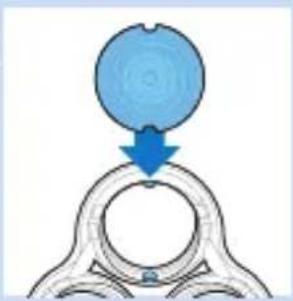
natural_image
Diagram showing a blue circular object pressing into a ring with a blue arrow indicating direction (no text or symbols)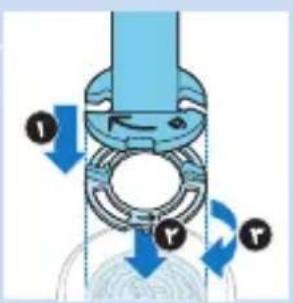
text_image
Diagram of a mechanical device with labeled components and directional arrows indicating motion or flownatural_image
Illustration of a hand washing a blue object with a tool above it (no text or symbols)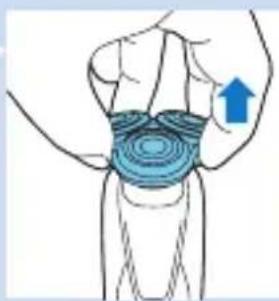
natural_image
Illustration of a human knee joint with concentric blue contour lines indicating stress or pressure distribution (no text or symbols)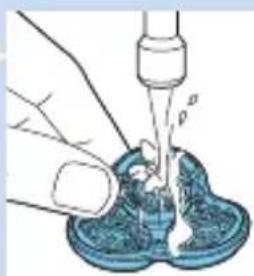
natural_image
Illustration of a hand using a pipette to lift liquid into a container (no text or symbols)natural_image
Illustration of a hand holding a wrist with a blue arrow indicating upward motion (no text or symbols)natural_image
Diagram of a mechanical device with rotating components and directional arrows (no text or symbols)natural_image
Illustration of a blue pen tip inserted into a glass container with a blue arrow indicating direction (no text or symbols)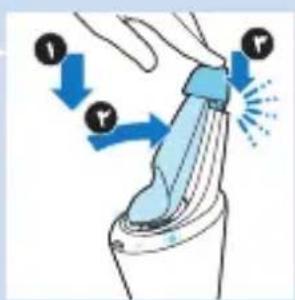
text_image
Diagram illustrating finger movement and force application on a device, with labeled arrows and motion indicators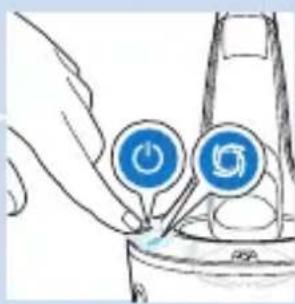
natural_image
Illustration of a hand using a power button to interact with a device (no text or symbols visible)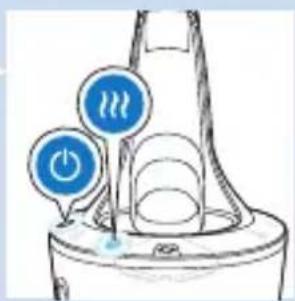
text_image
Diagram showing two blue circular icons labeled 'Power' and 'Hot Water' with a water drop, likely illustrating a water cycle or thermal management concept.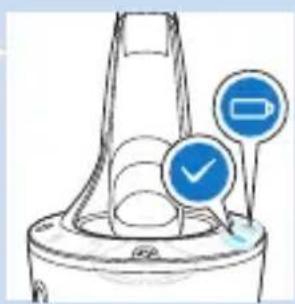
natural_image
Diagram of a mechanical component with two blue circular indicators (one checked, one not checked) pointing to features, no text or symbols present.(1) SmartClean rèمّر رَفْعِ الْزَرَالَّمُجُودِ عَلَى جَانِبِ نَظَامِ (٢) SmartClean rèمّر بَرْفَعِ الْجَزَءِ الْعَلَوِيِ مِنْ نَظَامِ
natural_image
Illustration of a person brushing a beaded tooth with a blue tool (no text or symbols)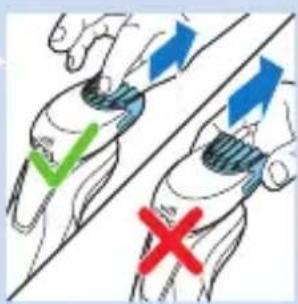
text_image
Diagram showing hand positioning with checkmark and cross symbols indicating correct and incorrect states
natural_image
Illustration of a person using a hairbrush to trim a neck (no text or symbols)التنظيف والصيانة
natural_image
Diagram of a symmetrical mechanical or biological structure with circular elements and blue circular markers (no text or symbols)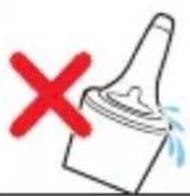
natural_image
Illustration of a blue tool pressing down on a curved surface (no text or symbols)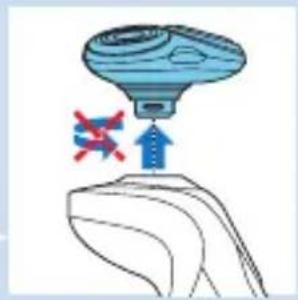
natural_image
Illustration of a blue flying saucer with a red cross symbol above it, placed on a curved surface (no text or symbols)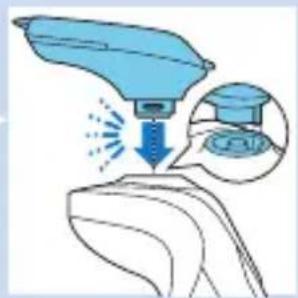
natural_image
Illustration of a medical procedure on a patient's hand, showing a blue tool and magnified view of the procedure (no text or symbols present)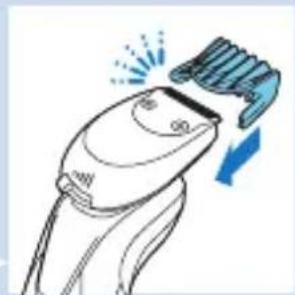
natural_image
Line drawing of a hairbrush with a brush applying force, showing motion and angle (no text or symbols)
text_image
Diagram illustrating hair styling technique with labeled parts and directional arrowsnatural_image
Illustration of a hand washing a blue object with a water dispenser above (no text or symbols)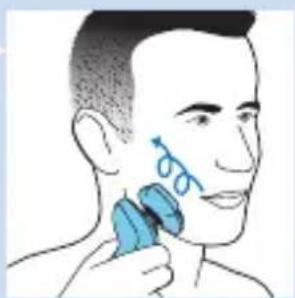
natural_image
Illustration of a person applying facial massage to their ear with a blue brush (no text or symbols)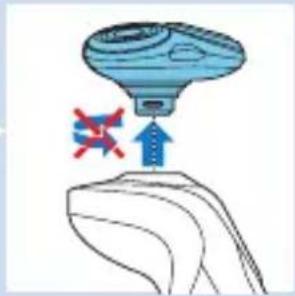
natural_image
Illustration of a flying saucer with an upward arrow and a red cross symbol, no text or labels present.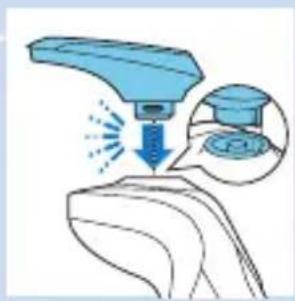
natural_image
Illustration of a blue robotic arm with motion arrows and a magnified inset showing a graduation cap (no text or symbols)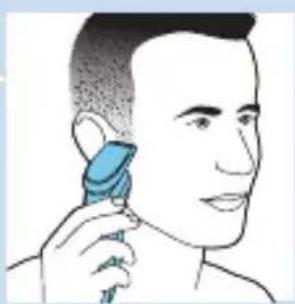
natural_image
Illustration of a person using a hairdryer to apply product (no text or symbols present)natural_image
Illustration of a person applying a blue brush to their face, showing the brush tip and mouth area (no text or symbols)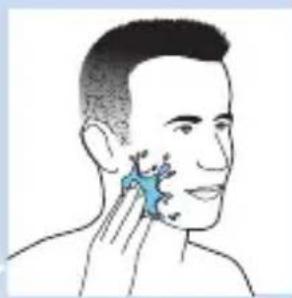
natural_image
Illustration of a person's face with a blue star-like object on the cheek, no text or symbols present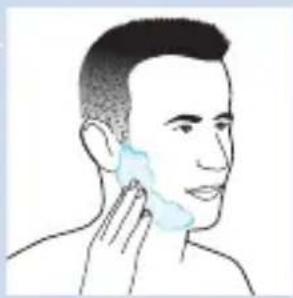
natural_image
Illustration of a person applying facial care to the ear (no text or symbols present)natural_image
Diagram of a plug inserted into a socket connected to a device with blue arrows indicating direction (no text or symbols)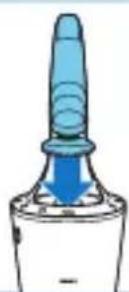
text_image
Diagram illustrating finger movement and force application on a device, with labeled arrows and motion indicatorsnatural_image
Simple line drawing of a human leg with two marked points and a small symbol inside (no text or labels)
text_image
Diagram of a guitar fretboard with musical note and button labels
text_image
Diagram of a device with labeled components and directional arrows, including symbols like '1', '2', and '3'.
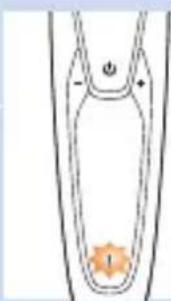
natural_image
Simple line drawing of a symmetrical object with an orange star-like shape at the bottom (no text or symbols)
الشحن
natural_image
Simple line drawing of a U-shaped object with an orange star-like symbol inside, no text or symbols present.natural_image
Simple line drawing of a funnel-shaped object with a handle and a blue circular icon containing a faucet symbol (no text or labels)قال الحركة
natural_image
Simple line drawing of a human leg with a lock icon and a warning symbol (no text or labels)text_image
Diagram showing a mechanical or electrical component with an arrow and a blue circular icon containing a triangular symbol.الشحن
natural_image
Simple line drawing of a symmetrical object with a star-like symbol inside, no text or symbols present.natural_image
Line drawing of a handheld device with a digital display and control buttons (no text or symbols)natural_image
Prohibition sign showing a faucet without raindrops, enclosed in a circle (no text)
natural_image
No sign depicting a faucet crossed out by a diagonal line, indicating no pollution or leakage (no text present)مقدمة
All rights reserved.
Document order number: 4222.002.5610.1 (04/2014)

100% recycled paper
100% papier recyclé