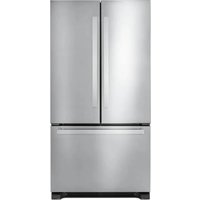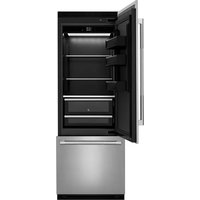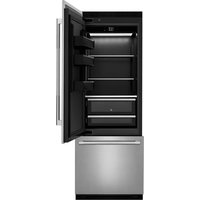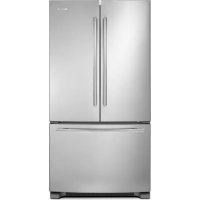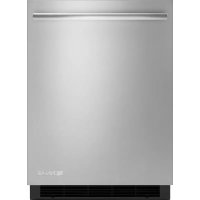
JUR24FRERS - Fridge JENN-AIR - Free user manual and instructions
Find the device manual for free JUR24FRERS JENN-AIR in PDF.



User questions about JUR24FRERS JENN-AIR
0 question about this device. Answer the ones you know or ask your own.
Ask a new question about this device
Download the instructions for your Fridge in PDF format for free! Find your manual JUR24FRERS - JENN-AIR and take your electronic device back in hand. On this page are published all the documents necessary for the use of your device. JUR24FRERS by JENN-AIR.
USER MANUAL JUR24FRERS JENN-AIR
For questions about features, operation/performance, parts, accessories, or service, call:
1-800-JENNAIR (1-800-536-6247) or visit our website at www.jennair.com.
In Canada, call: 1-800-JENNAIR (1-800-536-6247), or visit our website at www.jennair.ca.
MANUAL DE USO Y CUIDADO
Location Requirements. 4
Product Dimensions. 4
Custom Overlay Panel 5
Custom Handle (optional) 5
Electrical Requirements 6
INSTALLATION INSTRUCTIONS 6
Unpack the Refrigerator. 6
Install Custom Overlay Panel and Handle. 7
Door Closing. 8
REFRIGERATOR USE. 8
Normal Sounds 8
Using the Controls 9
REFRIGERATOR FEATURES 10
Refrigerator Shelves. 10
DOOR FEATURES 11
Door Bins. 11
Lighting the Refrigerator. 11
REFRIGERATOR CARE 11
BaseGrille 11
Cleaning. 11
Vacation and Moving Care. 12
TROUBLESHOOTING 12
ASSISTANCE OR SERVICE 13
In the U.S.A. 13
In Canada 13
WARRANTY 14
ÍNDICE
ASSISTANCE OU SERVICE. 40
Aux Etats-Unis. 41
Au Canada. 41
GARANTIE. 42
REFRIGERATOR SAFETY
Your safety and the safety of others are very important.
We have provided many important safety messages in this manual and on your appliance. Always read and obey all safety messages.

This is the safety alert symbol.
This symbol alerts you to potential hazards that can kill or hurt you and others.
All safety messages will follow the safety alert symbol and either the word "DANGER" or "WARNING."
These words mean:
ADANGER
You can be killed or seriously injured if you don't immediately follow instructions.
WARNING
All safety messages will tell you what the potential hazard is, tell you how to reduce the chance of injury, and tell you what can happen if the instructions are not followed.
IMPORTANT SAFETY INSTRUCTIONS
WARNING: To reduce the risk of fire, electric shock, or injury when using your refrigerator, follow these basic precautions:
Plug into a grounded 3 prong outlet.
- Do not remove ground prong.
Do not use an adapter.
Do not use an extension cord.
- Disconnect power before servicing.
Replace all parts and panels before operating.
Remove doors from your old refrigerator.
Use nonflammable cleaner.
- Keep flammable materials and vapors, such as gasoline, away from refrigerator.
Use two or more people to move and install refrigerator.
SAVE THESE INSTRUCTIONS
State of California Proposition 65Warnings:
WARNING: This product contains one or more chemicals known to the State of California to cause cancer.
WARNING: This product contains one or more chemicals known to the State of California to cause birth defects or other reproductive harm.
Proper Disposal of Your Old Refrigerator
WARNING
Suffocation Hazard
Remove doors from your old refrigerator.
Failure to do so can result in death or brain damage.
IMPORTANT: Child entrapment and suffocation are not problems of the past. Junked or abandoned refrigerators are still dangerous - even if they will sit for "just a few days." If you are getting rid of your old refrigerator, please follow these instructions to help prevent accidents.
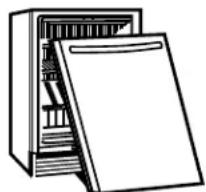
Before You Throw Away Your Old Refrigerator or Freezer:
Take off the door.
Leave the shelves in place so that children may not easily climb inside.
Important information to know about disposal of refrigerants:
Dispos of refrigerator in accordance with Federal and Local regulations. Refrigerants must be evacuated by a licensed, EPA certified refrigerant technician in accordance with established procedures.
INSTALLATION REQUIREMENTS
Tools and Parts
Gather the required tools and parts before starting installation
Tools Needed
Phillips screwdriver
Parts Needed
Custom Overlay Door Panel—See "Overlay Panel—Rear View."
Hardware (optional)
Parts Supplied
M4 x 14 wood screws (8)
Location Requirements
WARNING
Explosion Hazard
Keep flammable materials and vapors, such as gasoline, away from refrigerator.
Failure to do so can result in death, explosion, or fire.
NOTES:
For the refrigerator to be flush with the front of the base cabinets, remove any baseboards or moldings from the rear of the opening. See "Product Dimensions" and later in this section "Opening Dimensions."
It is recommended that you do not install the refrigerator near an oven, radiator, or other heat source.
- Do not install in a location where the temperature will fall below 55^ (13^) . For best performance, do not install the refrigerator behind a cabinet door or block the base grille.
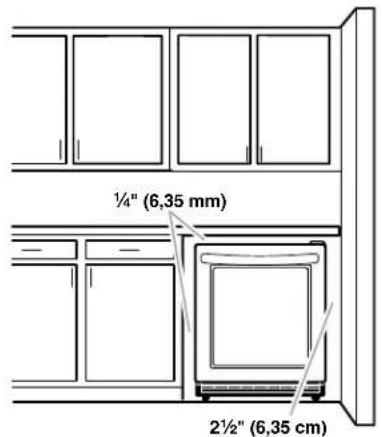
Opening Dimensions
- Height dimensions are shown with the leveling legs extended to the minimum height.
NOTE: When leveling legs are fully extended, add 5% (15 mm) to the height dimensions. See "Product Dimensions."
If the floor of the opening is not level with the kitchen floor, shim the opening to make it level with the kitchen floor.
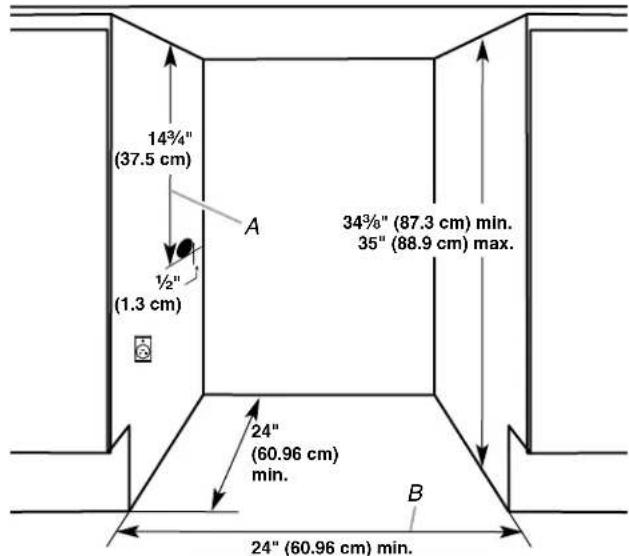
Critical Dimensions:
A. 1434 (37.5 cm) utility opening
B. 24^ (60.96 cm) minimum opening width
Product Dimensions
Height dimensions are shown with the leveling legs NOT extended.
The power cord is 60^ (152.4 cm) long.
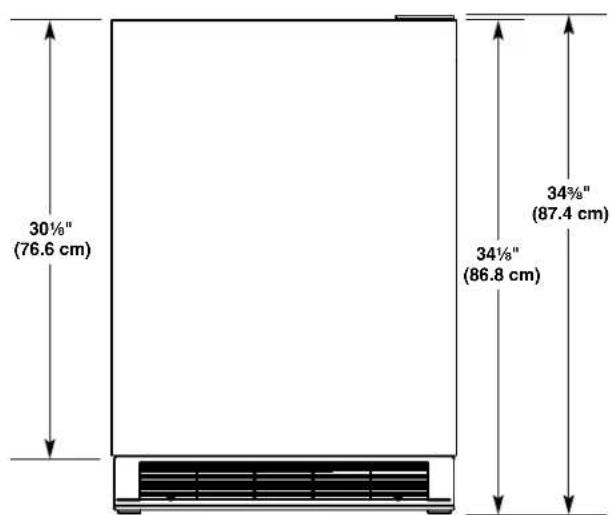
Front View
Side View (door open 90^ )
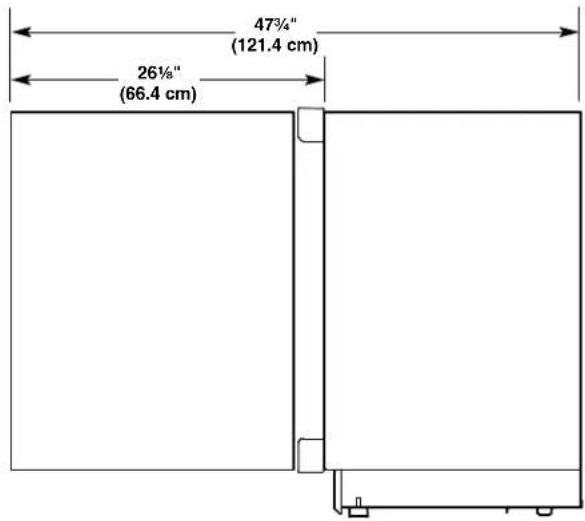
Top View
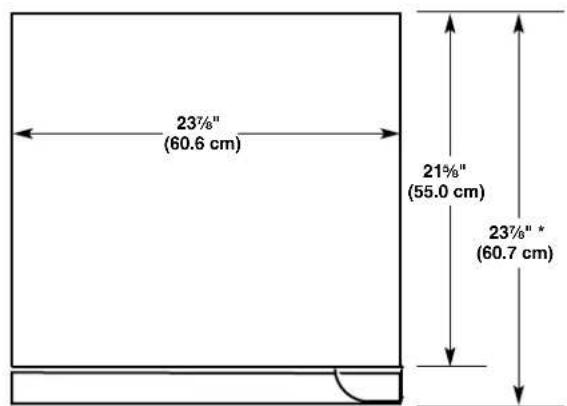
*Dimension includes 3/4" (19 mm) thick custom door panel
Custom Overlay Panel
If you plan to install a custom overlay panel, you will need to create the panel yourself or consult a qualified cabinetmaker or carpenter. See dimension drawings for panel specifications.
IMPORTANT:
The thickness of the overlay panel must be 3/4'' (19 mm).
- Overlay panel must not weigh more than 20 lbs (9.07 kg).
Overlay panels weighing more than recommended may cause damage to your appliance.
Overlay Panel—Rear View
Create the custom overlay panel using the dimensions shown.
IMPORTANT: The following graphic shows a custom panel for a door with the hinges installed on the right-hand side. If your refrigerator has the hinges installed on the left-hand side, rotate the custom frame 180^ so the hinge markings will be on the left.
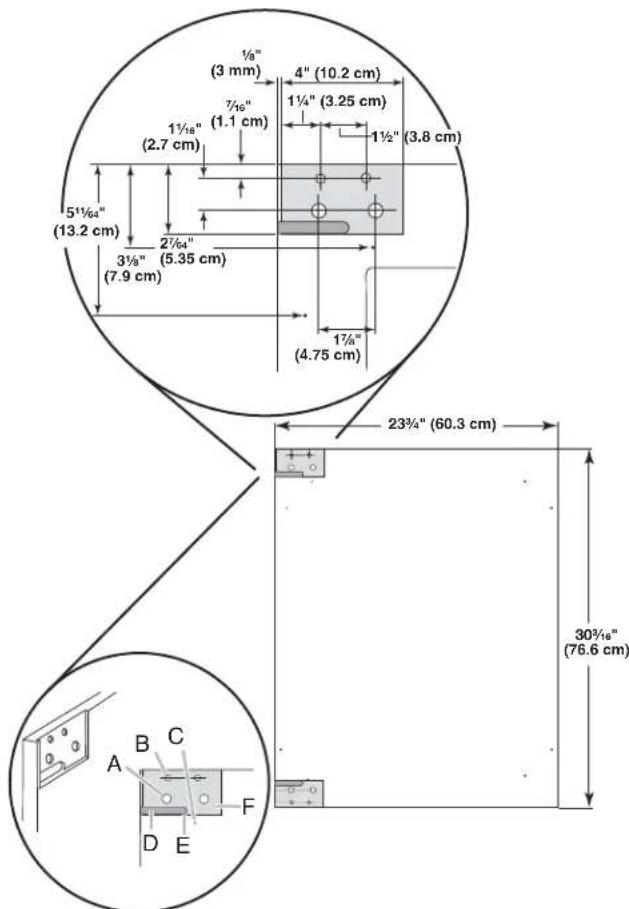
A. Drill holes using a 1932 (12 mm) drill bit to a depth of approximately 112 (13 mm) before routing. (4 holes total)
B. Drill holes using a 5% (8 mm) drill bit to a depth of approximately 1/2 (13 mm) before routing. (4 holes total)
C. Drill holes using a 1 / 64 " (2.8 mm) drill bit to a depth of approximately 1 / 2 " (13 mm) before routing. (8 holes total)
D. Rout shaded areas for hinges to a 79 12 (15 mm) depth.
E. Rout shaded areas for hinges to a 14 (4 mm) depth.
F. Corner radius of 14 (3 mm) using a 14 drill bit when routing (5 radiuses total)
Custom Handle (optional)
Custom handles are typically attached to the custom overlay door panel only. There are two custom handle locations provided on the refrigerator where the handle may be attached through the custom overlay door panel and to the inside of the refrigerator door for enhanced stability. The two locations provided accommodate popular kitchen cabinet pull/handle sizes of 8" (203 mm) and 614 " (160 mm).
- Follow the instructions to make the custom overlay panel.
- See the following dimension drawings for custom handle specifications.
-
Drill custom handle holes to match the size of your custom handle—8" (203 mm) or 6¼" (160 mm).
-
Install custom handle before installing overlay panel on refrigerator door.

A. 8'' (203 mm) handle holes
B. 6'' (160 mm) handle holes
C.Drill holes using a 3 / 6
(4.5 mm) drill bit (2 holes)
NOTE: Custom handles that are placed in a different location (see preceding drawing) or are not the recommended size (8^ [203mm] or 61 / 4'' [160 mm]) need to be installed on the door panel with countersunk holes and installed before the custom overlay door panel has been installed on the refrigerator door.
Electrical Requirements
AWARNING
Electrical Shock Hazard
Plug into a grounded 3 prong outlet.
Do not remove ground prong.
Do not use an adapter.
Do not use an extension cord.
Failure to follow these instructions can result in death, fire, or electrical shock.
Before you move your refrigerator into its final location, it is important to make sure you have the proper electrical connection.
Recommended Grounding Method
A 115 volt, 60Hz AC only, 15- or 20-amp fused, grounded electrical supply is required. It is recommended that a separate circuit serving only your refrigerator be provided. Use an outlet that cannot be turned off by a switch. Do not use an extension cord.
NOTE: Before performing any type of installation, cleaning, or removing a light bulb, unplug refrigerator or disconnect power.
INSTALLATION INSTRUCTIONS
Unpack the Refrigerator
WARNING
Excessive Weight Hazard
Use two or more people to move and install refrigerator.
Failure to do so can result in back or other injury.
Remove the Packaging
- Remove tape and glue residue from surfaces before turning on the refrigerator. Rub a small amount of liquid dish soap over the adhesive with your fingers. Wipe with warm water and dry.
- Do not use sharp instruments, rubbing alcohol, flammable fluids, or abrasive cleaners to remove tape or glue. These products can damage the surface of your refrigerator. For more information, see "Refrigerator Safety."
Dispose of/recycle all packaging materials.
When Moving Your Refrigerator:
Your refrigerator is heavy. When moving the refrigerator for cleaning or service, be sure to cover the floor with cardboard or hardboard to avoid floor damage. Always pull the refrigerator straight out when moving it. Do not wiggle or "walk" the refrigerator when trying to move it, as floor damage could occur.
Clean Before Using
After you remove all of the package materials, clean the inside of your refrigerator before using it. See the cleaning instructions in "Refrigerator Care."
Important information to know about glass shelves and covers:
Do not clean glass shelves or covers with warm water when they are cold. Shelves and covers may break if exposed to sudden temperature changes or impact, such as bumping. Tempered glass is designed to shatter into many small, pebble-size pieces. This is normal. Glass shelves and covers are heavy. Use both hands when removing them to avoid dropping.
Install Custom Overlay Panel and Handle
IMPORTANT:
Create custom overlay panel according to the specifications in the "Custom Overlay Panel" section.
Jenn-Air is not responsible for the removal or addition of molding or decorative panels that would not allow access to the refrigerator for service.
Install Custom Panel
- Open the door completely to 90^ .
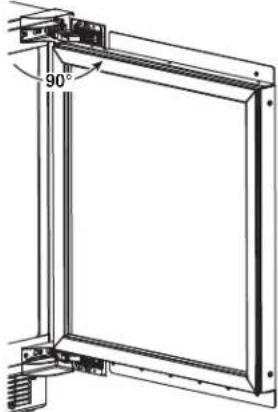
- Remove the gasket from the corners of the door, pulling gently until the two screws in each corner of the door can be seen.
NOTE: The gasket does not have to be removed from the door, only the corners.
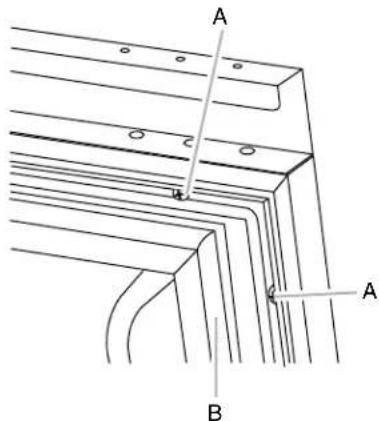
A.Screws B.Gasket
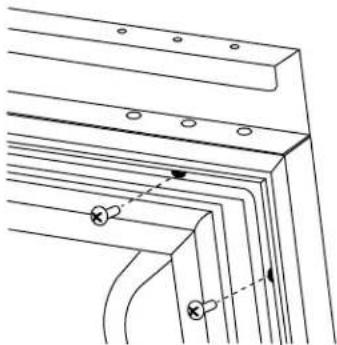
-
Remove the four pairs of screws from the door.
-
Using two people, hold the custom overlay panel so that the holes in the back of the panel align with the holes on the door.
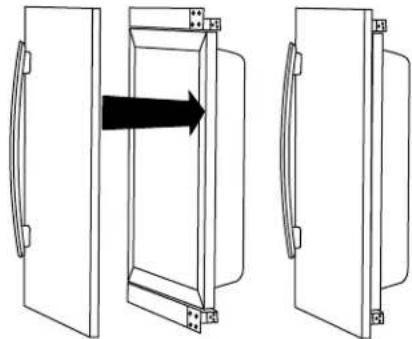
NOTE: Custom handles that are placed in a different location (see the "Custom Handle (optional)" section) or are not the recommended size (8" [203 mm] or 6¼" [160 mm]) need to be installed on the door panel with countersunk holes, and installed before the custom overlay door panel has been installed on the refrigerator door.
5. Fasten the custom panel to the door using two wood screws (provided in installation kit) at each corner.
NOTE: Do not use the same screws that were previously removed.
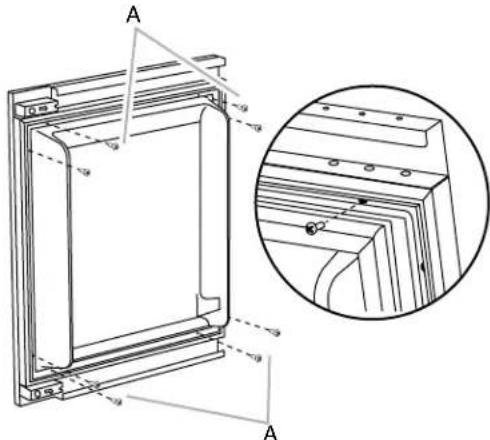
A. M4 x 14 wood screws (provided in installation kit)
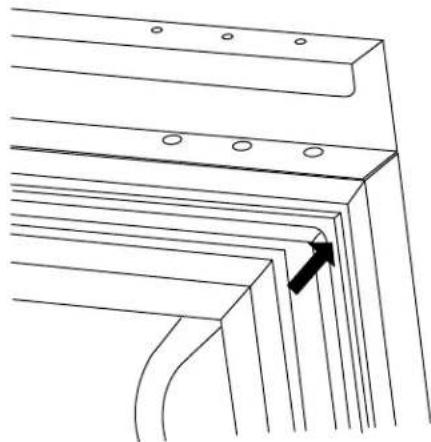
- Press the gasket firmly back into it's original position.
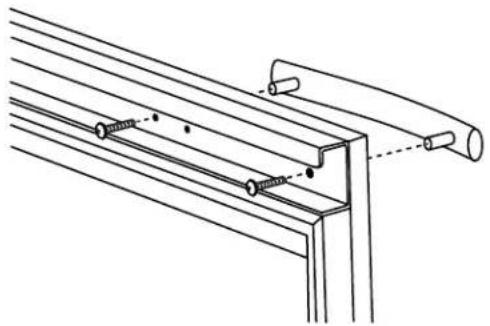
- For 8'' (203 mm) or 614'' (160 mm) custom handles, install the custom handle from the inside/back of the refrigerator door using screws provided with the handle.
Door Closing
Door Closing
Your refrigerator has four leveling legs. If your refrigerator seems unsteady or you want the door to close more easily, adjust the refrigerator's tilt using the instructions below.
AWARNING
Electrical Shock Hazard
Plug into a grounded 3 prong outlet.
Do not remove ground prong.
Do not use an adapter.
Do not use an extension cord.
Failure to follow these instructions can result in death, fire, or electrical shock.
- Plug into a grounded 3 prong outlet.
WARNING
Excessive Weight Hazard
Use two or more people to move and install refrigerator.
Failure to do so can result in back or other injury.
-
Move the refrigerator into its final location.
-
Turn the leveling legs to the right to lower the refrigerator or turn the leveling legs to the left to raise it. It may take several turns of the leveling legs to adjust the tilt of the refrigerator.
NOTE: Having someone push against the top of the refrigerator takes some weight off the leveling legs. This makes it easier to adjust the leveling legs.
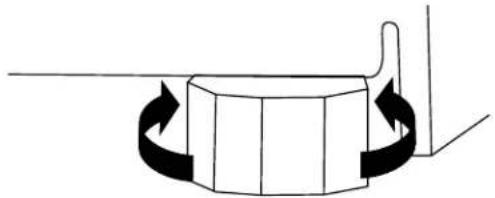
- Open the door again to make sure that it closes as easily as you like. If not, tilt the refrigerator slightly more to the rear by turning both front leveling screws to the left. It may take several more turns, and you should turn both leveling legs the same amount.
REFRIGERATOR USE
Normal Sounds
Your new refrigerator may make sounds that your old one didn't make. Because the sounds are new to you, you might be concerned about them. Most of the new sounds are normal. Hard surfaces, such as the flooring and surrounding structures, can make the sounds seem louder. The following describes the kinds of sounds and what may be making them.
■Your refrigerator is designed to run more efficiently to keep your food items at the desired temperatures and to minimize energy usage. The high efficiency compressor and fans may cause your refrigerator to run longer than your old one. You may also hear a pulsating or high-pitched sound from the compressor or fans adjusting to optimize performance.
Rattling noises may come from the flow of refrigerant or items stored inside the refrigerator.
As each cycle ends, you may hear a gurgling sound due to the refrigerant flowing in your refrigerator.
You may hear water running into the drain pan when the refrigerator is defrosting.
You may hear clicking sounds when the refrigerator starts or stops running.
Using the Controls
The control panel is located at the top of the compartment and facing front. The control of the refrigerator has no mechanical parts or buttons. When disconnected, the control panel displays nothing and may be difficult to locate.
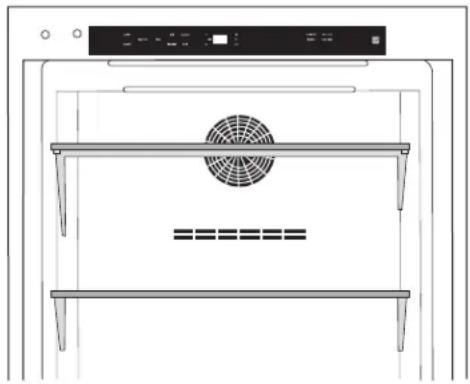
Turning Control On/Off
The first time that the refrigerator is plugged in, the control will be in Cool Off mode. Cool On and Cool Off will be the only options that display.
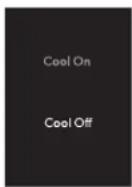
Press COOL ON for 3 seconds to turn on the refrigerator. All menus and recommended temperature settings will be displayed.
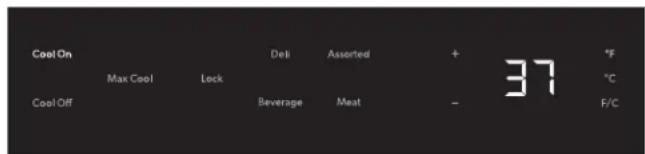
Viewing Celsius Temperatures
Press the F/C touch pad to toggle between displaying the temperature in degrees Fahrenheit and degrees Celsius. The corresponding indicator will illuminate.
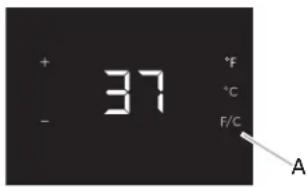
A. F/C touch pad
Set to Recommended Temperatures
When the refrigerator is turned On for the first time, a recommended temperature is set by default.
To adjust set point temperatures, press "+" (plus) or "-" (minus) until the desired temperature setting is reached.
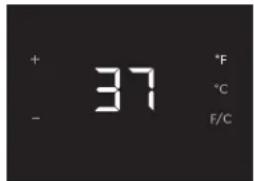
NOTE: The default recommended temperature for the refrigerator is 37^ (2^) . The set point range for this model is 32^ to 42^ (0^ to 5^)
The control is set correctly when milk and beverages are as cold as you like.
NOTE: Wait at least 24 hours between adjustments so the refrigerator can acclimate.
Using Presets
For your convenience, your refrigerator also has controls that are preset to recommended storage temperatures for specific products.
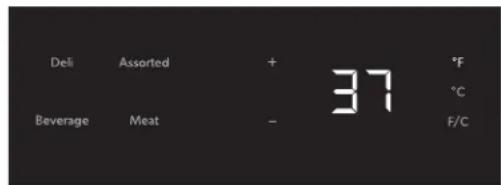
Pressing any preset option will set the temperature value to recommended temperature for each category:
Deli: 39^ (3^)
Assorted: 37^ (2^)
■Beverage: 34^ (1^)
Meat: 32^ (0^)
Max Cool
The Max Cool feature assists with periods of heavy usage, full grocery loads or temporarily warm room temperatures.
Max Cool will reset the temperature for the refrigerator to the coldest setting (32^[0^]) for a 24-hour period.
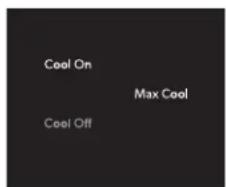
NOTE: The temperature display will remain at the coldest setting(s) and the indicator light will remain On for a 24-hour period unless any of the following happens:
Temperature is adjusted
Cool Off Mode is selected
Sabbath Mode is selected
After 24 hours, the temperature will automatically return to the previous temperature set point and the indicator light will turn Off.
Sabbath Mode
Sabbath Mode is designed for the traveler or for those whose religious observances require turning off the lights. By selecting this feature, the temperature set points remain unchanged, but the control panel lights, interior lights, and control audio turn off. For most efficient operation, it is recommended to exit the Sabbath Mode when it is no longer required.
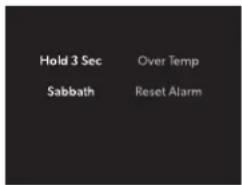
■Press and hold SABBATH for 3 seconds to turn on the feature. After the 3-second countdown, the feature will activate and all other displays will turn Off.
Press and hold SABBATH for 3 seconds to turn off the feature and turn on the display.
Door Open
If the door is open longer than 5 minutes, an alarm will sound every 2 minutes until the door is closed or any control is pressed.
Lock Mode
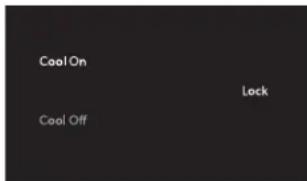
The Lock mode deactivates all other options to avoid any changes being made to your desired temperature settings.
To activate, press and hold LOCK for 3 seconds. After the 3-second countdown, all other displays will turn off and become unavailable except Cool On, Cool Off, and Lock
Over Temperature Alarm
NOTE: If the Over Temperature Alarm activates, your food may spoil. See "Power Interruptions." Minimize door openings until temperatures return to normal.
The Over Temperature feature is designed to let you know when the refrigerator temperature rises above 45^ (7^) longer than 4 hours. The audio alarm will shut off automatically when the temperature returns to normal, but the indicator light will continue to flash until an Alarm Reset has been performed to let you know that an over temperature condition occurred.
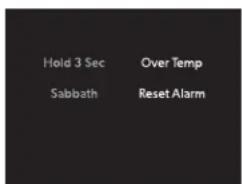
If the over temperature condition is still present when an Over Temp reset is performed, the indicator light will continue to reactivate every 4 hours until refrigerator temperatures are below 45^ (7^) .
NOTE: These features will not appear on your control unless your refrigerator is over temperature and the alarm requires a reset.
Showroom Mode
This mode is used only when the refrigerator is on display in a retail store. If you unintentionally turn on Showroom Mode, Cool Off will light up on the display, and the controls will appear to work. Exit Showroom Mode by pressing and holding COOL ON and SABBATH at the same time for 3 seconds.
REFRIGERATOR FEATURES
Important information to know about glass shelves and covers:
Do not clean glass shelves or covers with warm water when they are cold. Shelves and covers may break if exposed to sudden temperature changes or impact, such as bumping. Tempered glass is designed to shatter into many small, pebble-size pieces. This is normal. Glass shelves and covers are heavy. Use both hands when removing them to avoid dropping.
Refrigerator Shelves
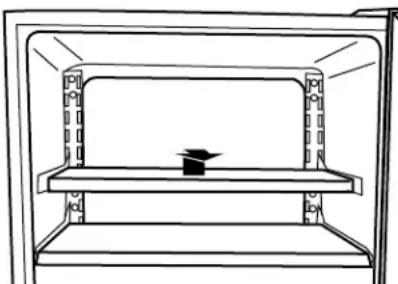
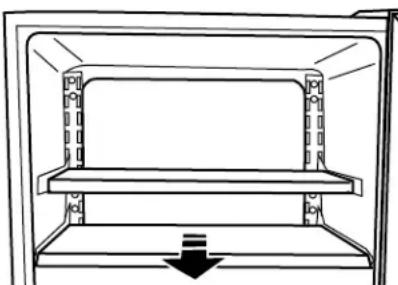
To Remove or Adjust Upper Shelves:
- Remove the shelf by lifting it up and out of the shelf brackets.
- Remove the two shelf brackets and reposition them in the desired location.
- Replace the shelf by inserting it into the shelf brackets. NOTE: Be sure the shelf is level.
To Remove and Replace Lower Shelf:
- The very bottom glass shelf slides straight out.
- Replace the shelf by aligning the edges with the guides and pushing it in toward the back of the refrigerator.
DOOR FEATURES
Door Bins
Your refrigerator has two door bin locations for maximum storage capacity.
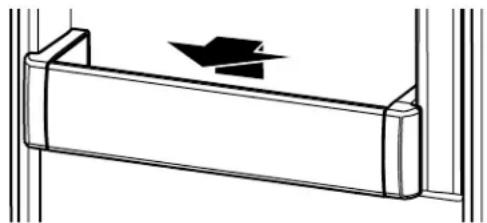
To Remove and Replace the Door Bins:
- Remove the door bin by tilting it forward and pulling it out.
- Replace the bin by placing the rear of the bin under the support on the door and sliding into place.
Lighting the Refrigerator
The refrigerator has an interior light that comes on any time the door is opened.
NOTE: The light is an LED which does not need to be replaced. If the LED does not illuminate when the door is opened, call Service to replace the light. See Assistance or Service for contact information.
REFRIGERATOR CARE
BaseGrille
You must remove the base grille to access the condenser coils for cleaning.
To Remove the Base Grille:
- Open the refrigerator door.
- Using a Phillips screwdriver, remove the two screws. Push both tabs in toward the center to release the base grille from the refrigerator.
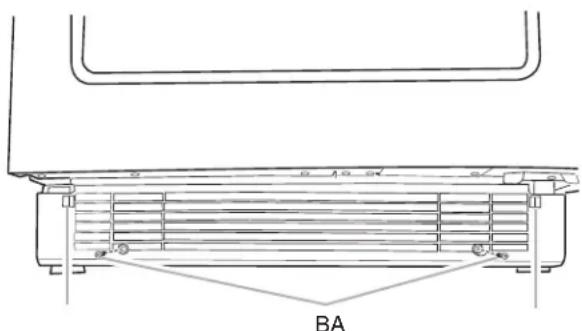
A. Tabs
B. Screws
- Remove the base grille.
To Replace the Base Grille:
- Open the refrigerator door.
- Position the base grille so that both tabs align and the base grille snaps into place. Replace the two screws. Tighten the screws.
Cleaning
WARNING
Explosion Hazard
Use nonflammable cleaner.
Failure to do so can result in death, explosion, or fire.
Clean the refrigerator about once a month to avoid buildup of odors. Wipe up spills immediately.
To Clean Your Refrigerator:
- Unplug refrigerator or disconnect power.
- Remove all removable parts from inside, such as shelves, etc.
-
Hand wash, rinse, and dry removable parts and interior surfaces thoroughly. Use a clean sponge or soft cloth and a mild detergent in warm water.
-
Do not use abrasive or harsh cleaners such as window sprays, scouring cleansers, flammable fluids, cleaning waxes, concentrated detergents, bleaches or cleansers containing petroleum products on plastic parts, interior and door liners or gaskets. Do not use paper towels, scouring pads, or other harsh cleaning tools. These can scratch or damage materials.
To help remove odors, you can wash interior walls with a mixture of warm water and baking soda (2 tbs to 1 qt [26 g to 0.95 L] of water). -
Wash stainless steel and painted metal exteriors with a clean sponge or soft cloth and a mild detergent in warm water. Do not use abrasive or harsh cleaners, or cleaners containing chlorine. These can scratch or damage materials. Dry thoroughly with a soft cloth.
NOTE: To keep your stainless steel refrigerator looking like new and to remove minor scuffs or marks, it is suggested that you use the manufacturer's approved Stainless Steel Cleaner and Polish.
IMPORTANT: This cleaner is for stainless steel parts only!
Do not allow the Stainless Steel Cleaner and Polish to come into contact with any plastic parts such as the trim pieces, dispenser covers or door gaskets. If unintentional contact does occur, clean plastic part with a sponge and mild detergent in warm water. Dry thoroughly with a soft cloth.
- Replace the removable parts.
- Clean the condenser coils regularly. They are located behind the base grille. Coils may need to be cleaned as often as every other month. This may help save energy.
■Remove the base grille. See "Base Grille."
Use a vacuum cleaner with an extended attachment to clean the condenser coils when they are dusty or dirty.
Replace the base grille.
- Plug in refrigerator or reconnect power.
Vacation and Moving Care
Vacations
If you choose to leave the refrigerator on while you're away, use up any perishables and freeze other items.
If you choose to turn the refrigerator off before you leave, follow these steps.
- Remove all food from the refrigerator.
- Unplug the refrigerator.
- Clean the refrigerator. See "Cleaning."
- Tape a rubber or wood block to the top of the door to prop it open far enough for air to get in. This stops odor and mold from building up.
Moving
When you are moving your refrigerator to a new home, follow these steps to prepare it for the move.
- Remove all food from the refrigerator.
- Unplug the refrigerator.
- Clean, wipe, and dry it thoroughly.
- Take out all removable parts, wrap them well, and tape them together so they don't shift and rattle during the move.
- Tape the doors shut and tape the power cord to the back of the refrigerator.
When you get to your new home, put everything back and refer to the "Installation Instructions" section for preparation instructions.
TROUBLESHOOTING
Try the solutions suggested here first in order to avoid the cost of an unnecessary service call.
Your refrigerator will not operate
AWARNING

Electrical Shock Hazard
Plug into a grounded 3 prong outlet.
Do not remove ground prong.
Do not use an adapter.
Do not use an extension cord.
Failure to follow these instructions can result in death, fire, or electrical shock.
Is the power supply cord unplugged? Plug into a grounded 3 prong outlet.
■Has a household fuse blown, or has a circuit breaker tripped? Replace the fuse or reset the circuit.
■ Is the Refrigerator Control in Cool Off mode? See "Using the Controls."
The motor seems to run too much
Is the temperature outside hotter than normal? Expect the motor to run longer under warm conditions. At normal outdoor temperatures, expect your motor to run about 40% to 80% of the time. Under warmer conditions, expect it to run even more of the time.
■Has a large amount of food just been added to the refrigerator? Adding a large amount of food warms the refrigerator. It is normal for the motor to run longer in order to cool the refrigerator back down.
Is the door opened often? Expect the motor to run longer when this occurs. In order to conserve energy, try to get everything you need out of the refrigerator at once, keep food
organized so it is easy to find, and close the door as soon as the food is removed.
Is the control set correctly for the surrounding conditions? See "Using the Controls."
■ Is the door closed completely? Push the door firmly shut. If it will not shut all the way, see "The door will not close completely" later in this section.
Are the condenser coils dirty? This obstructs air transfer and makes the motor work harder. Clean the condenser coils. See "Cleaning."
Temperature is too warm
■ Is the door opened often? Be aware that the refrigerator will warm when this occurs. In order to keep the refrigerator cool, try to get everything you need out of the refrigerator at once, keep food organized so it is easy to find, and close the door as soon as the food is removed.
■Has a large amount of food just been added to the refrigerator? Adding a large amount of food warms the refrigerator. It can take several hours for the refrigerator to return to the normal temperature.
■Is the control set correctly for the surrounding conditions? See "Using the Controls."
Is the base grille blocked? For best performance, do not install the refrigerator behind a cabinet door or block the base grille.
There is interior moisture buildup
Is the door opened often? To avoid humidity buildup, try to get everything you need out of the refrigerator at once, keep food organized so it is easy to find, and close the door as soon as the food is removed. When the door is opened, humidity from the room air enters the refrigerator. The more often the door is opened, the faster humidity builds up, especially when the room itself is very humid.
Is it humid? It is normal for moisture to build up inside the refrigerator when the air is humid.
■ Is the food packaged correctly? Check that all food is securely wrapped. Wipe off damp food containers before placing in the refrigerator.
■Is the control set correctly for the surrounding conditions? See "Using the Controls."
WARNING
Explosion Hazard
Use nonflammable cleaner.
Failure to do so can result in death, explosion, or fire.
Is the gasket dirty or sticky? Clean the gasket and the surface that it touches. Rub a thin coat of paraffin wax on the gasket following cleaning.
The door will not close completely
Are food packages blocking the door open? Rearrange containers so that they fit more tightly and take up less space.
Are the shelves out of position? Put the shelves back into their correct positions. See "Refrigerator Use" for more information.
WARNING
Explosion Hazard
Use nonflammable cleaner.
Failure to do so can result in death, explosion, or fire.
Is the gasket sticking? Clean the gasket and the surface that it touches. Rub a thin coat of paraffin wax on the gasket following cleaning.
ASSISTANCE OR SERVICE
Before calling for assistance or service, please check
"Troubleshooting." It may save you the cost of a service call. If you still need help, follow the instructions below.
When calling, please know the purchase date and the complete model and serial number of your appliance. This information will help us to better respond to your request.
If You Need Replacement Parts
If you need to order replacement parts, we recommend that you only use factory specified replacement parts. Factory specified replacement parts will fit right and work right because they are made with the same precision used to build every new Jenn-Air® appliance.
To locate factory specified replacement parts in your area, call us or your nearest designated service center.
In the U.S.A.
Call the Jenn-Air Customer eXperience Center toll free:
1-800-JENNAIR (1-800-536-6247).
Our Consultants Provide Assistance With:
Features and specifications on our full line of appliances.
Installation information.
Use and maintenance procedures.
■Accessory and repair parts sales.
Specialized customer assistance (Spanish speaking, hearing impaired, limited vision, etc.).
Referrals to local dealers, repair parts distributors, and service companies. Jenn-Air designated service technicians are trained to fulfill the product warranty and provide afterwarranty service, anywhere in the United States.
To locate the Jenn-Air designated service company in your area, you can also look in your telephone directory Yellow Pages.
For Further Assistance
If you need further assistance, you can write to Jenn-Air with any questions or concerns at:
Jenn-Air Brand Home Appliances
Customer eXperience Center
553 Benson Road
Benton Harbor, MI 49022-2692
Please include a daytime phone number in your correspondence.
In Canada
Call the Jenn-Air Canada Customer eXperience Centre toll free:
1-800-JENNAIR (1-800-536-6247).
Our Consultants Provide Assistance With:
Features and specifications on our full line of appliances.
Use and maintenance procedures.
■Accessory and repair parts sales.
Referrals to local dealers, repair parts distributors, and services companies. Jenn-Air Canada designated service technicians are trained to fulfill the product warranty and provide after-warranty service, anywhere in Canada.
For Further Assistance
If you need further assistance, you can write to Jenn-Air Canada with any questions or concerns at:
Jenn-Air Canada
Customer eXperience Centre
200-6750 Century Ave.
Mississauga, Ontario L5N 0B7
Please include a daytime phone number in your correspondence.
JENN-AIR® REFRIGERATION LIMITED WARRANTY
ATTACH YOUR RECEIPT HERE. PROOF OF PURCHASE IS REQUIRED TO OBTAIN WARRANTY SERVICE.
Please have the following information available when you call the Customer eXperience Center:
■Name, address and telephone number
■Model number and serial number
A clear, detailed description of the problem
Proof of purchase including dealer or retailer name and address
IF YOU NEED SERVICE:
- Before contacting us to arrange service, please determine whether your product requires repair. Some questions can be addressed without service. Please take a few minutes to review the Troubleshooting or Problem Solver section of the Use and Care Guide, scan the QR code on the right to access additional resources, or visit https://jennair.custhelp.com.
- All warranty service is provided exclusively by our authorized Jenn-Air Service Providers. In the U.S. and Canada, direct all requests for warranty service to:
Jenn-Air Customer eXperience Center
1-800-JENNAIR (1-800-536-6247)
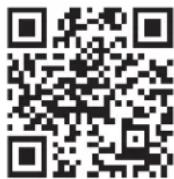
https://jennair.custhelp.com
If outside the 50 United States or Canada, contact your authorized Jenn-Air dealer to determine whether another warranty applies.
FIVE YEAR LIMITED WARRANTY
WHAT IS COVERED
WHAT IS NOT COVERED
TWO YEAR LIMITED WARRANTY
For two years from the date of purchase, when this major appliance is installed, operated and maintained according to instructions attached to or furnished with the product, Jenn-Air brand of Whirlpool Corporation or Whirlpool Canada LP (hereafter "Jenn-Air") will pay for Factory Specified Replacement Parts and repair labor to correct defects in materials or workmanship that existed when this major appliance was purchased, or at its sole discretion replace the product. In the event of product replacement, your appliance will be warranted for the remaining term of the original unit's warranty period.
THIRD THROUGH FIFTH YEAR LIMITED WARRANTY ON CAVITY LINER AND SEATED REFRIGERATION SYSTEM
In the third through fifth years from the date of purchase, when this major appliance is installed, operated and maintained according to the instructions attached to or furnished with the product, Jenn-Air brand will pay for factory specified replacement parts and repair labor for the following components to correct non-cosmetic defects in materials and workmanship in this part that prevent function of the refrigerator and that existed when this major appliance was purchased:
Refrigerator/freezer cavity liner if the part cracks due to defective materials or workmanship.
Sealed Refrigeration system (includes compressor, evaporator, condenser, dryer and connecting tubing).
YOUR SOLE AND EXCLUSIVE REMEDY UNDER THIS LIMITED WARRANTY SHALL BE PRODUCT REPAIR AS PROVIDED HEREIN. Service must be provided by a Jenn-Air designated service company. This limited warranty is valid only in the United States or Canada and applies only when the major appliance is used in the country in which it was purchased. This limited warranty is effective from the date of original consumer purchase. Proof of original purchase date is required to obtain service under this limited warranty.
- Commercial, non-residential or multiple-family use, or use inconsistent with published user, operator or installation instructions.
- In-home Instruction on how to use your product.
- Service to correct improper product maintenance or installation, installation not in accordance with electrical or plumbing codes or correction of household electrical or plumbing (i.e. house wiring, fuses or water inlet hoses).
- Consumable parts (i.e. light bulbs, batteries, air or water filters, preservation solutions, etc.).
- Defects or damage caused by the use of non-genuine Jenn-Air parts or accessories.
- Damage from accident, misuse, abuse, fire, floods, acts of God or use with products not approved by Jenn-Air.
- Repairs to parts or systems to correct product damage or defects caused by unauthorized service, alteration or modification of the appliance.
- Cosmetic damage including scratches, dents, chips, and other damage to appliance finishes unless such damage results from defects in materials and workmanship and is reported to Jenn-Air within 30 days.
- Discoloration, rust or oxidation of surfaces resulting from caustic or corrosive environments including but not limited to high salt concentrations, high moisture or humidity or exposure to chemicals.
- Food or medicine loss due to product failure.
- Pick-up or delivery. This product is intended for in-home repair.
- Travel or transportation expenses for service in remote locations where an authorized Jenn-Air servicer is not available.
- Removal or reinstallation of inaccessible appliances or built-in fixtures (i.e. trim, decorative panels, flooring, cabinetry, islands, countertops, drywall, etc.) that interfere with servicing, removal or replacement of the product.
- Service or parts for appliances with original model/serial numbers removed, altered or not easily determined.
The cost of repair or replacement under these excluded circumstances shall be borne by the customer.
DISCLAIMER OF IMPLIED WARRANTY
IMPLIED WARRANTY, INCLUDING ANY IMPLIED WARRANTY OF MERCHANTABILITY OR IMPLIED WARRANTY OF FITNESS FOR A PARTICULAR PURPOSE, ARE LIMITED TO ONE YEAR OR THE SHORTEST PERIOD ALLOWED BY LAW. Some states and provinces do not allow limitations on the duration of implied warranties of merchantability or fitness, so this limitation may not apply to you. This warranty gives you specific legal rights, and you also may have other rights that vary from state to state or province to province.
DISCLAIMER OF REPRESENTATIONS OUTSIDE OF WARRANTY
Jenn-Air makes no representations about the quality, durability, or need for service or repair of this major appliance other than the representations contained in this warranty. If you want a longer or more comprehensive warranty than the limited warranty that comes with this major appliance, you should ask Jenn-Air or your retailer about buying an extended warranty.
LIMITATION OF REMEDIES: EXCLUSION OF INCIDENTAL AND CONSEQUENTIAL DAMAGES
YOUR SOLE AND EXCLUSIVE REMEDY UNDER THIS LIMITED WARRANTY SHALL BE PRODUCT REPAIR AS PROVIDED HEREIN. JENN-AIR SHALL NOT BE LIABLE FOR INCIDENTAL OR CONSEQUENTIAL DAMAGES. Some states and provinces do not allow the exclusion or limitation of incidental or consequential damages, so these limitations and exclusions may not apply to you. This warranty gives you specific legal rights, and you also may have other rights that vary from state to state or province to province.
La puerta no cierra Completely
Customer eXperience Centre
200-6750 Century Ave.
Mississauga, Ontario L5N 0B7
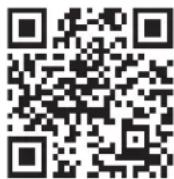
https://jennair.custhelp.com
ASSISTANCE OU SERVICE

http://www.jennair.ca