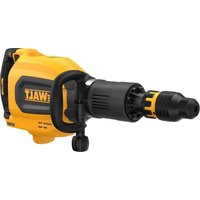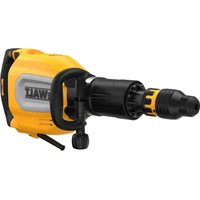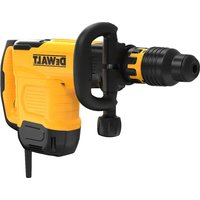
DW005 - Hammer DEWALT - Free user manual and instructions
Find the device manual for free DW005 DEWALT in PDF.


| Product Type | 24 V cordless hammer drill with chiseling mode |
| Brand | DeWalt |
| Model | DW005 |
| Voltage | 24 V |
| No-load speed | 0 – 1,150 rpm |
| Impact rate | 0 – 5,800 bpm |
| Drilling capacity - Metal | Up to 1.27 cm (1/2 in) |
| Drilling capacity - Wood | Up to 3.81 cm (1 1/2 in) |
| Drilling capacity - Masonry | Up to 2.22 cm (7/8 in) |
| Battery technology | Nickel-Cadmium (Ni-Cd) |
| Chuck type | SDS |
| Operating modes | Drilling, hammer drilling, chiseling |
| Forward/reverse | Yes, with lock-off |
| Side handle | Yes, adjustable (left/right) |
| Weight (estimated with battery) | Approximately 2.5 kg |
| Maintenance | Clean with damp cloth and mild soap; automatic bearing lubrication |
| Included accessories | Charger, battery (depending on kit), protective cap |
| Warranty | 1 year against material and workmanship defects + 30-day satisfaction guarantee |
| Repairability | Authorized service center only; identical replacement parts recommended |
Frequently Asked Questions - DW005 DEWALT
User questions about DW005 DEWALT
0 question about this device. Answer the ones you know or ask your own.
Ask a new question about this device
Download the instructions for your Hammer in PDF format for free! Find your manual DW005 - DEWALT and take your electronic device back in hand. On this page are published all the documents necessary for the use of your device. DW005 by DEWALT.
USER MANUAL DW005 DEWALT
DEWALT Industrial Tool Co., 701 East Joppa Road, Baltimore, MD 21286
(AUG03-CD-1)
Form No. 578992-02
Printed in U.S.A.
Copyright © 2003
The following are trademarks for one or more DeWALT power tools: the yellow and black color scheme; the "D" shaped air intake grill; the array of pyramids on the handgrip; the kit box configuration; and the array of lozenge-shaped humps on the surface of the tool.
Questions? See us in the World Wide Web at www.dewalt.com
INSTRUCTION MANUAL
GUIDE D'UTILISATION
24 Volt 7/8" Cordless Rotary Hammer with Chipping Feature
General Safety Rules - For All Battery Operated Tools
⚠ WARNING! Read and understand all instructions. Failure to follow all instructions listed below may result in electric shock, fire and/or serious personal injury.
SAVE THESE INSTRUCTIONS
WORK AREA
- Keep your work area clean and well lit. Cluttered benches and dark areas invite accidents.
- Do not operate power tools in explosive atmospheres, such as in the presence of flammable liquids, gases, or dust. Power tools create sparks which may ignite the dust or fumes.
- Keep bystanders, children, and visitors away while operating a power tool. Distractions can cause you to lose control.
ELECTRICAL SAFETY
- A battery operated tool with integral batteries or a separate battery pack must be recharged only with the specified charger for the battery. A charger that may be suitable for one type of battery may create a risk of fire when used with another battery.
- Use battery operated tool only with the specifically designed battery pack. Use of any other batteries may create a risk of fire.
PERSONAL SAFETY
- Stay alert, watch what you are doing and use common sense when operating a power tool. Do not use tool while tired or under the influence of drugs, alcohol, or medication. A moment of inattention while operating power tools may result in serious personal injury,
- Dress properly. Do not wear loose clothing or jewelry. Contain long hair. Keep your hair, clothing, and gloves away from moving parts. Loose clothing, jewelry, or long hair can be caught in moving parts. Air vents often cover moving parts and should also be avoided.
- Avoid accidental starting. Be sure switch is in the locked or off position before inserting battery pack. Carrying tools with your finger on the switch or inserting the battery pack into a tool with the switch on invites accidents.
- Remove adjusting keys or switches before turning the tool on. A wrench or key that is left attached to a rotating part of the tool may result in personal injury.
- Do not overreach. Keep proper footing and balance at all times. Proper footing and balance enables better control of the tool in unexpected situations.
- Use safety equipment. Always wear eye protection. Dust mask, non-skid safety shoes, hard hat, or hearing protection must be used for appropriate conditions.
TOOL USE AND CARE
- Use clamps or other practical way to secure and support the workpiece to a stable platform. Holding the work by hand or against your body is unstable and may lead to a loss of control.
- Do not force tool. Use the correct tool for your application. The correct tool will do the job better and safer and the rate for which it is designed.
- Do not use tool if switch does not turn it on or off. Any tool that cannot be controlled with the switch is dangerous and must be repaired.
- Disconnect battery pack from tool or place the switch in the locked or off position before making any adjustments, changing accessories, or storing the tool. Such preventative safety measures reduce the risk of starting the tool accidentally.
- Store idle tools out of reach of children and other untrained persons. Tools are dangerous in the hands of untrained users.
-
When battery pack is not in use, keep it away from other metal objects like: paper clips, coins, keys, nails, screws, or other small metal objects that can make a connection from one terminal to another. Shorting the battery terminals together may cause sparks, burns, or a fire.
-
Maintain tools with care. Keep cutting tools sharp and clean. Properly maintained tools, with sharp cutting edges are less likely to bind and are easier to control.
- Check for misalignment or binding of moving parts, breakage of parts, and any other condition that may affect the tools operation. If damaged, have the tool serviced before using. Many accidents are caused by poorly maintained tools.
- Use only accessories that are recommended by the manufacturer for your model. Accessories that may be suitable for one tool, may become hazardous when used on another tool.
SERVICE
- Tool service must be performed only by qualified repair personnel. Service or maintenance performed by unqualified personnel could result in a risk of injury.
- When servicing a tool, use only identical replacement parts. Follow instructions in the Maintenance section of this manual. Use of unauthorized parts or failure to follow Maintenance Instructions may create a risk of electric shock or injury.
Important Safety Instructions for Battery Chargers
SAVE THESE INSTRUCTIONS: This manual contains important safety instructions for battery chargers.
- Before using charger, read all instructions and cautionary markings on (1) charger, (2) battery pack, and (3) product using battery pack.
- CAUTION: To reduce the risk of injury, charge only nickel cadmium rechargeable batteries. Other types of batteries may burst causing personal injury and damage.
- △DANGER: 120 volts present at charging terminals. Do not probe with conductive objects. Danger of electric shock or electrocution.
- DANGER: If battery pack case is cracked or damaged, do not insert into charger. Danger of electric shock or electrocution.
-
The charger and battery pack are specifically designed to work together. DO NOT attempt to charge the battery pack with any chargers other than the ones in this manual.
-
Do not expose charger to rain or snow.
• These chargers are not intended for any uses other than charging DeWalt rechargeable batteries. Any other uses may result in risk of fire, electric shock or electrocution. - To reduce risk of damage to electric plug and cord, pull by plug rather than cord when disconnecting charger.
- Make sure cord is located so that it will not be stepped on, tripped over, or otherwise subjected to damage or stress.
- An extension cord should not be used unless absolutely necessary. Use of improper extension cord could result in risk of fire, electric shock, or electrocution.
- An extension cord must have adequate wire size (AWG or American Wire Gauge) for safety. The smaller the gauge number of the wire, the greater the capacity of the cable, that is 16 gauge has more capacity than 18 gauge. When using more than one extension to make up the total length, be sure each individual extension contains at least the minimum wire size.
- The charger is ventilated through slots in the top and the bottom of the housing. Do not place any object on top of charger or place the charger on a soft surface that might block the ventilation slots and result in excessive internal heat. Place the charger in a position away from any heat source.
- Do not operate charger with damaged cord or plug — have them replaced immediately.
- Do not operate charger if it has received a sharp blow, been dropped, or otherwise damaged in any way; take it to an authorized service center.
- Do not disassemble charger; take it to an authorized service center when service or repair is required. Incorrect reassembly may result in a risk of electric shock, electrocution or fire.
Recommended Minimum AWG Size for Extension Cords
Total Extension Cord Length (feet)
| 25 | 50 | 75 | 100 | 125 | 150 | 175 |
| Wire Gauge | ||||||
18 18 16 16 14 14 12
- To reduce risk of electric shock, unplug charger from outlet before attempting any cleaning. Removing the battery pack will not reduce this risk.
• NEVER attempt to connect 2 chargers together. - DO NOT store or use the tool and battery pack in locations where the temperature may reach or exceed 105^ F (such as outside sheds or metal buildings in summer).
- The charger is designed to operate on standard household electrical power (120 Volts). Do not attempt to use it on any other voltage!
READ ALL INSTRUCTIONS.
Important Safety Instructions for Battery Packs
The battery pack is not fully charged out of the carton! First read the safety instructions below. Then follow charging notes and procedures.
- Do not incinerate the battery pack even if it is severely damaged or is completely worn out. The battery pack can explode in a fire.
- A small leakage of liquid from the battery pack cells may occur under extreme usage or temperature conditions. This does not indicate a failure. However, if the outer seal is broken and this leakage gets on your skin:
a. Wash quickly with soap and water.
b. Neutralize with a mild acid such as lemon juice or vinegar.
c. If battery liquid gets into your eyes, flush them with clean water for a minimum of 10 minutes and seek immediate medical attention. (Medical note: The liquid is 25-35% solution of potassium hydroxide.)
- Never attempt to open the battery pack for any reason. If the plastic housing of the battery pack breaks or cracks, immediately discontinue use and do not recharge.
- Do not carry extra battery packs in aprons, pockets, or tool boxes along with other metal objects. Battery pack could be short circuited causing damage to the battery pack and possibly causing severe burns or fire.
- Charge the battery packs only in DEWALT chargers.
- DO NOT probe pack with conductive objects.
- DO NOT splash or immerse in water or other liquids.
- Maintain clean and open vent holes.
- NOTE: Review and observe all of the "Important Charging Notes" in the charger instruction section of this manual.
NOTE: The batteries in your battery pack are the nickel-cadmium type. Cadmium is considered to be a toxic material by the Environmental Protection Agency. Before disposing of damaged or worn out Nickel-Cadmium battery packs, check with your state Environmental Protection Agency to find out about special restrictions on the disposal of these battery packs or return them to a D_E WALT certified service center for recycling.
Battery Packs
Your tool uses a 24 Volt DeWALT battery pack. When ordering replacement battery packs, be sure to include catalog number and voltage.
⚠️ CAUTION: Some tools with large battery packs will stand upright on the battery pack but may be easily knocked over. When not in use, place tool on its side on a stable surface where it will not cause a tripping or falling hazard.
NOTE: Battery storage and carrying caps are provided for use whenever the battery is out of the tool or charger. Remove cap before placing battery in charger or tool.
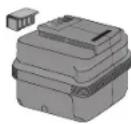
⚠ WARNING: Do not store or carry battery so that metal objects can contact exposed battery
terminals. For example, do not place battery in aprons, pockets, tool boxes, product kit boxes, drawers, etc. with loose nails, screws, keys, etc. without battery cap. Without cap in place, battery could short circuit causing fire or burns or damage to battery.
Charging Procedure
-
Plug the charger into an appropriate outlet.
-
Insert the battery pack into the charger. The red (charging) light will blink continuously indicating that the charging process has started.
-
The completion of charge will be indicated by the red light remaining ON continuously. The pack is fully charged and may be used at this time or left in the charger.
BATTERY PERFORMANCE
Some chargers have a tune-up feature optimizes battery pack performance. Your charger may provide Automatic Tune-Up™ Mode or manual (i.e. push button) Tune-Up™ mode. For information on this feature, please see the appropriate section below. Because batteries slowly lose their charge when they are not on the charger, the best place to keep your battery pack is on the charger at all times.
USING AUTOMATIC TUNE-UP™ MODE
The Automatic Tune-Up ^™ Mode equalizes or balances the individual cells in the battery pack allowing it to function at peak capacity. Battery packs should be tuned up after every 10th charge/discharge cycle or whenever the pack no longer delivers the same amount of work. To use the automatic tune-up mode, simply place the battery pack in the charger and leave it for at least eight hours. The charger will cycle through the following modes.
-
The red light will blink continuously indicating that the 1-hour charge cycle has started.
-
When the 1-hour charge cycle is complete, the light will stay on continuously and will no longer blink. This indicates that the pack is fully charged and can be used at this time.
-
Whenever the pack is left in the charger after the initial 1-hour charge, the charger will begin the Automatic Tune-Up™ Mode. This mode continues up to 8 hours or until the individual cells in the battery pack are equalized. The battery pack is ready for use and can be removed at any time during the Tune-Up™ Mode.
-
Once the Automatic Tune-Up™ Mode is complete the charger will transition to a maintenance charge; no indicator light shows the completion of the Automatic Tune-Up™ Mode.
USING THE MANUAL TUNE-UPTM MODE
The manual Tune-up ^™ mode equalizes or balances the individual cells in the battery pack at its peak capacity. This mode takes up to 8 hours to complete. Battery packs should be tuned up weekly or after 10 to 20 charge/discharge cycles or whenever the pack no longer delivers the same amount of work.
- To tune up your battery pack, place the battery in the charger as usual. The red light will blink continuously indicating that the charge cycle has started.
- Press the Tune-Up™ Mode button any time after the charge cycle has started. The red light will stop blinking momentarily, blink quickly 3 times, and then resume blinking continuously. The charger is now tuning up the cells in your battery.
- When the Tune-Up™ mode cycle is complete, the light will stay on continuously. The pack is fully charged and may be used at this time or left in the charger.
- If you select Tune-Up™ Mode and then change your mind, remove the battery from the charger. After 5 seconds, insert the battery into the charger. The normal charge cycle will begin.
Fan Cooling
This charger is equipped with an internal fan that provides rapid cooling of DeWALT DW0242 battery packs. The fan operation is automatic and will turn on when required during battery charging. The fan will also cycle periodically when there is no battery in the charger in order to blow dust from the fan vents.
⚠ WARNING: Fan may blow debris from vent area at any time. Keep face and eyes away from area above vents. To minimize the risk of eye injury, always use eye protection.
Installing and Removing the Battery Pack
NOTE: Make sure your battery pack is fully charged. To install the battery pack into the tool handle, align the base of the tool with the notch inside the tool's handle and slide the battery pack firmly into the handle until you hear the lock snap into place as shown.
To remove the battery pack from the tool, press the release buttons and firmly pull the battery pack out of the tool handle. Insert it into the charger as described in the charger section of this manual.
Important Charging Notes
- Longest life and best performance can be obtained if the battery pack is charged when the air temperature is between 65^ F and 75^ F ( 18^-24^ C). DO NOT charge the battery pack in an air temperature below +40^ F (+ 4.5^ C), or above +105^ F (+ 40.5^ C). This is important and will prevent serious damage to the battery pack.
- The charger and battery pack may become warm to touch while charging. This is a normal condition, and does not indicate a problem.
- If the battery pack does not charge properly — (1) Check current at receptacle by plugging in a lamp or other appliance, (2) Check to see if receptacle is connected to a light switch which turns power off when you turn out the lights. (3) Move charger and battery pack to a location where the surrounding air temperature is approximately 65^ F - 75^ F ( 18^ - 24^ C). (4) If charging problems persist, take or send the tool, battery pack and charger to your local service center.
- The battery pack should be recharged when it fails to produce sufficient power on jobs which were easily done previously. DO NOT CONTINUE to use under these conditions. Follow the charging procedure. You may also charge a partially used pack whenever you desire with no adverse effect on the battery pack.
- Under certain conditions, with the charger plugged into the power supply, the exposed charging contacts inside the charger can be shorted by foreign material. Foreign materials of a conductive nature such as, but not limited to, steel wool, aluminum foil, or any
buildup of metallic particles should be kept away from charger cavities. Always unplug the charger from the power supply when there is no battery pack in the cavity. Unplug charger before attempting to clean.
- Do not freeze or immerse charger in water or any other liquid.
⚠ WARNING: Don't allow any liquid to get inside charger. Electric shock may result. To facilitate the cooling of the battery pack after use, avoid placing the charger or battery pack in a warm environment such as in a metal shed, or an uninsulated trailer.
⚠ CAUTION: Never attempt to open the battery pack for any reason. If the plastic housing of the battery pack breaks or cracks, return to a service center for recycling.
Charge Indicators
HOT/COLD PACK DELAY
When the charger detects a battery that is excessively hot or excessively cold, it automatically starts a Hot/Cold Pack Delay, suspending charging until the battery temperature has normalized. After this happens, the charger automatically switches to the Pack Charging mode. This feature ensures maximum battery life. The red light flashes long, then short while in the Hot/Cold Pack Delay mode.
REPLACE PACK
These chargers are designed to detect certain problems that can arise with battery packs which would be indicated by the red light flashing at a fast rate. If this occurs, re-insert battery pack. If problem persists, try a different battery pack to determine if the charger is OK. If the new pack charges correctly, then the original pack is defective and should be returned to a service center for recycling. If the new battery pack gives the same trouble indication as the original, have charger tested at an authorized service center.
PROBLEM POWER LINE
When these chargers are used with some portable power sources such
as generators or sources that convert DC to AC, the chargers may temporarily suspend operation, flashing the red light with two fast blinks followed by a pause. This indicates the power source is out of limits. Your power supply may need service.
LEAVING THE BATTERY PACK IN THE CHARGER
The charger and battery pack can be left connected with the red light glowing indefinitely. The charger will keep the battery pack fresh and fully charged.
NOTE: A battery pack will slowly lose its charge when kept out of the charger. If the battery pack has not been kept on maintenance charge, it may need to be recharged before use. A battery pack may also slowly lose its charge if left in a charger that is not plugged into an appropriate AC source.
Additional Specific Safety Instructions When Using DW0247 AC Adapter
- Double insulated tools are equipped with a polarized plug (one blade is wider than the other.) This plug will fit in a polarized outlet only one way. If the plug does not fit fully in the outlet, reverse the plug. If it still does not fit, contact a qualified electrician to install a polarized outlet. Do
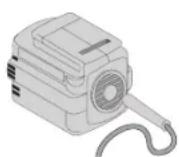
not change the plug in any way. Double insulation eliminates the need for the three wire grounded power cord and grounded power supply system. Applicable only to Class II (double insulated) tools.
- Avoid body contact with grounded surfaces such as pipes, radiators, ranges and refrigerators. There is an increased risk of electric shock if your body is grounded.
-
Don't expose power tools to rain or wet conditions. Water entering a power tool will increase the risk of electric shock.
-
Do not abuse the cord. Never use the cord to carry the tools or pull the plug from an outlet. Keep cord away from heat, oil, sharp edges or moving parts. Replace damaged cords immediately. Damaged cords increase the risk of electric shock.
- When operating a power tool outside, use an outdoor extension cord marked "W-A" or "W." These cords are rated for outdoor use and reduce the risk of electric shock.
Recommended Minimum Wire Size for Extension Cords
Total Length of Cord
25 ft. 50 ft. 75 ft. 100 ft. 125 ft. 150 ft. 175 ft.
7.6 m 15.2 m 22.9 m 30.5 m 38.1 m 45.7 m 53.3 m
Wire Size
18 AWG 18 AWG 16 AWG 16 AWG 14 AWG 14 AWG 12 AWG
- Avoid accidental starting. Be sure switch is off before plugging in. Carrying tools with your finger on the switch or plugging in tools that have the switch on invites accidents.
- Disconnect the plug from the power source before making any adjustments, changing accessories, or storing the tool. Such preventative safety measures reduce the risk of starting the tool accidentally.
- The label on your tool may include the following symbols.
V ......volts
A......amperes
Hz ......hertz
W ...... watts
min .....minutes
\~ ......alternating current
= = = = .....DC
n_0 ......no load speed
□……Class II
⊕ ....earthing terminal
Construction
.../min ....revolutions per minute
⚠️ ......safety alert symbol
The RBRC™ Seal
The RBRC ^™ (Rechargeable Battery Recycling Corporation) Seal on the nickel-cadmium battery (or battery pack) indicates that the costs to recycle the battery (or battery pack) at the end of its useful life have already been paid by DeWALT. In some areas, it is illegal to place spent nickel-cadmium batteries in the trash or municipal solid waste stream and the RBRC program provides mentally conscious alternative.

RBRC in cooperation with DeWALT and other battery users, has established programs in the United States to facilitate the collection of spent nickel-cadmium batteries. Help protect our environment and conserve natural resources by returning the spent nickel-cadmium battery to an authorized DeWALT service center or to your local retailer for recycling. You may also contact your local recycling center for information on where to drop off the spent battery.
Additional Safety Instructions for Rotary Hammers
- Hold tool by insulated gripping surfaces when performing an operation where the cutting tool may contact hidden wiring or its own cord. Contact with a "live" wire will make exposed metal parts of the tool "live" and shock the operator.
- Wear safety goggles or other eye protection. Hammering operations cause chips to fly. Flying particles can cause permanent eye damage. Wear a dust mask or respirator for applications that generate dust.
- Keep a firm grip on the tool at all times. Do not attempt to operate this tool without holding it with both hands. Operating this tool with one hand will result in loss of control. Breaking through or encountering hard materials such as re-bar may be hazardous as well.
- Do not operate this tool for long periods of time. Vibration caused by hammer action may be harmful to your hands and arms. Use gloves to provide extra cushion and limit exposure by taking
frequent rest periods.
- Wear gloves when operating tool or changing bits. Bits may get extremely hot during operation. Small bits of broken material may damage bare hand.
- Never place the tool down until the bit has come to a complete stop. Moving bits could cause injury.
- Do not strike jammed bits with a hammer to dislodge them. Fragments of metal or material chips could dislodge and cause injury.
- Do not recondition bits yourself. Chisel reconditioning should be done by an authorized specialist. Improperly reconditioned chisels could cause injury.
- Slightly worn chisels can be resharpened by grinding. NOTE: Do not overheat the bit (discoloration) while grinding a new edge. Badly worn chisels require reforging. Do not reharden and temper the chisel.
⚠️CAUTION: Wear appropriate personal hearing protection during use. Under some conditions and duration of use, noise from this product may contribute to hearing loss.
⚠ WARNING: Some dust created by power sanding, sawing, grinding, drilling, and other construction activities contains chemicals known to cause cancer, birth defects or other reproductive harm. Some examples of these chemicals are:
- lead from lead-based paints,
• crystalline silica from bricks and cement and other masonry products, and
• arsenic and chromium from chemically-treated lumber (CCA).
Your risk from these exposures varies, depending on how often you do this type of work. To reduce your exposure to these chemicals: work in a well ventilated area, and work with approved safety equipment, such as those dust masks that are specially designed to filter out microscopic particles.
- Avoid prolonged contact with sawdust from treated lumber.
Do not allow dust to get into your mouth, eyes or lay on the skin. Wear protective clothing whenever possible.
- The label on your tool may include the following symbols.
V.....volts A .....amperes
Hz.....hertz W.....watts
min ......minutes ......alternating current
---- .....direct current n_0 .....no load speed
☐ ......Class II Construction ⊕ ......earthing terminal
⚠️ ......safety alert symbol .../min ......revolutions per minute
Motor
Your DEWALT tool is powered by a DEWALT-built motor. Be sure your power supply agrees with the nameplate markings.
Voltage decrease of more than 10% will cause loss of power and overheating. All DeWALT tools are factory tested; if this tool does not operate, check your battery pack.
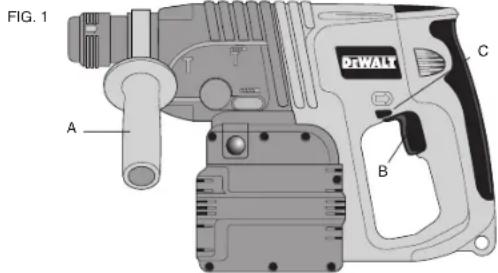
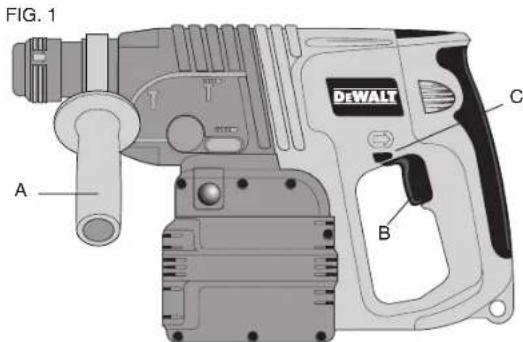
Side Handle (Fig. 1)
CAUTION: Always use side handle and hold rotary hammer with both hands. It clamps to the front of the gear case as shown in Figure 1 and can be rotated 360° to permit right or left hand use.
Variable Speed Switch
To turn the tool on, squeeze the trigger switch (B). To turn the tool off, release the trigger switch. Your tool is equipped with a brake. The chuck will stop as soon as the trigger switch is fully released.
The variable speed switch enables you to select the best speed for a particular application. The farther you squeeze the trigger, the faster the tool will operate. Use lower speeds for starting holes without a centerpunch, drilling in metals or plastics, driving screws and drilling ceramics. For maximum tool life, use variable speed only for starting holes or fasteners.
NOTE: Continuous use in variable speed range is not recommended. It may damage the switch and should be avoided.
Forward/Reverse Control Button
A forward/reverse control button (C) determines the direction and also serves as a lock off button. To select forward rotation, release the trigger switch and depress the forward/reverse control button on the right side of the tool. To select reverse, depress the forward/reverse control button on the left side of the tool. The center position of the control button locks the tool in the off
position. When changing the position of the control button, be sure the trigger is released. NOTE: The first time the tool is run after changing the direction of rotation, you may hear a click on start up. This is normal and does not indicate a problem.
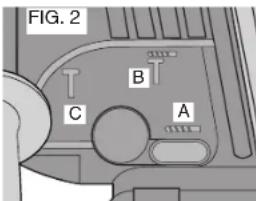
Function Selector (Fig. 2)
For straight drilling, align the dial with the drill bit symbol (A). For rotary hammer, align the dial with the symbol (B). To select chipping align the dial with the hammer symbol (C). NOTE: The selector must be in either drill, or hammer/drill or hammer mode at all times. There are no operable positions in between.
Operation
DRILLING
- Always lock the trigger switch and remove the battery when attaching or changing bits or accessories.
- Use sharp drill bits only. For WOOD, use the low speed setting and twist drill bits, spade bits, power auger bits, or hole saws. For METAL, use the low speed setting and steel twist drill bits or hole saws. For MASONRY, such as brick, cement, cinder block, etc., use carbide-tipped bits rated for percussion drilling.
- Be sure the material to be drilled is anchored or clamped firmly. If drilling thin material, use a wood "back-up" block to prevent damage to the material.
- Always apply pressure in a straight line with the bit. Use enough pressure to keep drill biting, but do not push hard enough to stall the motor or deflect the bit.
- Hold tool firmly to control the twisting action of the drill.
- IF DRILL STALLS, it is usually because it is being overloaded or improperly used. RELEASE TRIGGER IMMEDIATELY, remove drill bit from work, and determine cause of stalling. DO NOT CLICK TRIGGER OFF AND ON IN AN ATTEMPT TO START A STALLED DRILL — THIS CAN DAMAGE THE DRILL.
- To minimize stalling or breaking through the material, reduce pressure on drill and ease the bit through the last fractional part of the hole.
- Keep the motor running when pulling the bit back out of a drilled hole. This will help prevent jamming.
- With variable speed drills there is no need to center punch the point to be drilled. Use a slow speed to start the hole and accelerate by squeezing the trigger harder when the hole is deep enough to drill without the bit skipping out.
DRILLING IN METAL
Start drilling with slow speed and increase to full power while applying firm pressure on the tool. A smooth even flow of metal chips indicates the proper drilling rate. Use a cutting lubricant when drilling metals. The exceptions are cast iron and brass which should be drilled dry.
NOTE: Large (5/16" to 1/2") holes in steel can be made easier if a pilot hole (5/32" to 3/16") is drilled first.
DRILLING IN WOOD
Start drilling with slow speed and increase to full power while applying firm pressure on the tool. Holes in wood can be made with the same twist drills used for metal. These bits may overheat unless pulled out frequently to clear chips from the flutes. Work that is apt to splinter should be backed up with a block of wood.
DRILLING IN MASONRY
When drilling in masonry, use carbide tipped bits rated for percussion drilling. Be certain that the bit is sharp. Ensure that the hammer mode is selected. Use a constant and firm force on the tool to drill most effectively. A smooth, even flow of dust indicates the proper drilling rate.
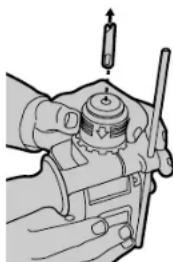
SDS Chuck
To insert bit, insert shank of bit about 3/4" into chuck and twist the bit until it clicks into place. The bit will be securely held.
To release bit, pull the collar back and remove the bit.
Maintenance
CLEANING
Use only mild soap and damp cloth to clean the tool. Never let any liquid get inside the tool; never immerse any part of the tool into a liquid.
Self-lubricating bearings are used in the tool and periodic relubrication is not required. In the unlikely event that service is ever needed, take your tool to an authorized service location.
natural_image
Illustration of a hand holding a mechanical component with a screwdriver inserted (no text or symbols)Lubrication
Your tool was properly lubricated before leaving the factory. In from two to six months, depending upon use, take or send your tool to a Service Center, or authorized service station, for a complete cleaning, inspection and lubrication. Tools used constantly on production jobs will need relubrication more often. Also, tools "out of service" for long periods should be relubricated before being put back to work.
Accessories
Recommended accessories for use with your tool are available at extra cost from your distributor or local service center.
⚠️ CAUTION: The use of any non-recommended accessory may be hazardous.
If you need assistance in locating any accessory, please contact DeWALT Industrial Tool Co., 701 East Joppa Road, Baltimore, MD 21286 or call 1-800-4 DeWalt (433-9258).
MAXIMUM RECOMMENDED CAPACITIES DW005
R.P.M. 0–1,150
B.P.M 0-5800
BITS, METAL DRILLING 1/2"
WOOD, FLAT BORING 1 1/2"
BITS, MASONRY DRILLING 7/8" bit - Concrete, brick, block
Repairs
To assure product SAFETY and RELIABILITY, repairs, maintenance and adjustment (including brush inspection and replacement) should be performed by authorized service centers or other qualified service organizations, always using identical replacement parts.
Full Warranty
DEWALT heavy duty industrial tools are warranted for one year from date of purchase. We will repair, without charge, any defects due to faulty materials or workmanship. For warranty repair information, call 1-800-4-DEWALT. This warranty does not apply to accessories or damage caused where repairs have been made or attempted by others. This warranty gives you specific legal rights and you may have other rights which vary in certain states or provinces.
In addition to the warranty, DEWALT tools are covered by our:
30 DAY NO RISK SATISFACTION GUARANTEE
If you are not completely satisfied with the performance of your DEWALT heavy duty industrial tool, simply return it to the participating seller within 30 days for a full refund. Please return the complete unit, transportation prepaid. Proof of purchase may be required.
FREE WARNING LABEL REPLACEMENT: If your warning labels become illegible or are missing, call 1-800-4-DEWALT for a free replacement.
SI VOUS AVEZ DES QUESTIONS OU VOULEZ NOUS FAIRE PART DE VOS COMMENTAIRES CONCERNANT CET OUTIL OU TOUT AUTRE OUTIL DEWALT, COMPOSEZ SANS FRAIS LE : 1 800 433-9258.
= ....direct current
□ ......Class II
Construction
⚠️ ......safety alert
symbol
\~......alternating current
n_0 ......no load speed
⊕ ....earthing terminal
.../min .....revolutions or
reciprocations
per minute
Le sceau RBRC ^mc
| V | volts A | amperes |
| Hz | hertz W | watts |
| min | minutes | alternating current |
| ---- | direct current | no no load speed |
| □ | Class II Construction | earthing terminal |
| ⚠️ | ....safety alert .../min .....revolutions or symbol | reciprocations |
per minute
Moteur
25 ft. 50 ft. 75 ft. 100 ft. 125 ft. 150 ft. 175 ft.
Blvd. Manuel J. Clouther 3027
Col. Lomas del Blvd. 667-717-89-99
SAN LUIS POTOSI