USER MANUAL AP 4200 Orbegozo
Read this manual carefully before running this appliance and save it for reference in order to obtain the best results and ensure safe use.
IMPORTANT SAFETY PRECAUTIONS
When using electrical devices it is necessary to observe safety precautions both, for the product purchased and for the user.
- This appliance can be used by children aged from 8 years and above and persons with reduced physical, sensory or mental capabilities or lack of experience and knowledge if they have been given supervision or instruction concerning use of the appliance in a safe way and understand the hazards involved. Children must never play with the appliance. Cleaning and user maintenance must never be carried out by children without supervision.
- Children should be supervised to ensure that they do not play with the appliance.
- Keep the appliance and the cable cord out of the reach of children less than 8 years old.
- WARNING: In order to ensure your children's safety, please keep all packaging (plastic bags, boxes, polystyrene etc.) out of their reach.
- If the supply cord is damaged it must be repaired by the Authorized Service Agent in order to avoid hazards.
-
Never pull on the cord when unplugging.
-
Do not use the unit with a damaged cord or plug, or if it is not working properly.
- Do not handle the appliance with wet hands.
- Never immerse the appliance in water or any other liquid.
10.Make sure the appliance has been unplugged before cleaning.
- This appliance must be installed following the national regulations for electrical installations.
- This appliance is for household use only.
- In case that you need a copy of the instruction manual, you can ask for it writing an email to sonifer@sonifer.es.
- WARNING: In case of misuse, there is a risk of possible injury.
- Do not use to vacuum water.
- Do not leave vacuum cleaner when plugged in. Unplug from outlet when no use and before servicing.
- Connect the appliance only if the installation and power point have a capacity of 16A. It is recommended that before starting the motor, you adjust the power to the minimum position and increase it to the desired power setting once the motor is in operation.
- To reduce the risk of electric shock, do not use outdoors or on wet surfaces.
-
After removing the packaging, check the condition of the product. In the event of any doubt or query,
-
This appliance must be used only for domestic cleaning, to vacuum dust and dry dirt from floors, carpets, rugs and other fabrics, as described in these instructions. Any other use is considered inappropriate and dangerous.
- Use only as described in this manual. Use only manufacturers recommend attachments.
- Do not put any object into openings. Do not use with any opening blocked. Keep free of dust, lint, hair and anything that may reduce airflow.
- Keep hair, loose clothing, fingers and all parts of body away from openings and moving parts.
- Use extra care when cleaning on stairs.
- Do not use to pick up flammable or combustible liquids, such as gasoline, or use in areas where they may be present.
- Do not pick up anything that is burning or smoking, such as cigarettes, matches, or hot ashes.
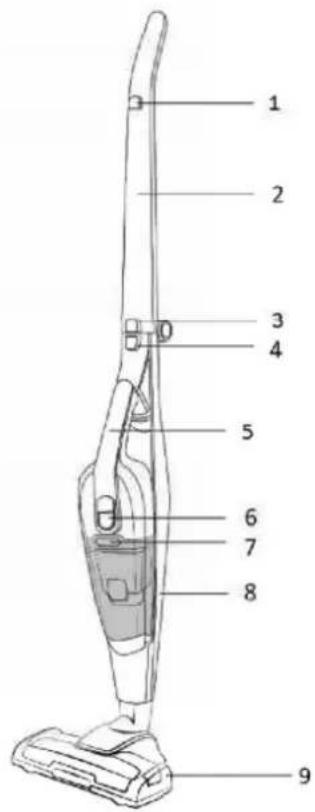
- Main unit power button
- Handle
- Handle release button
- Handle vac release button
- Handheld vac handle
- Handheld power button/charging indicator
- Dust container release
- Vac unit frame
- Floor head
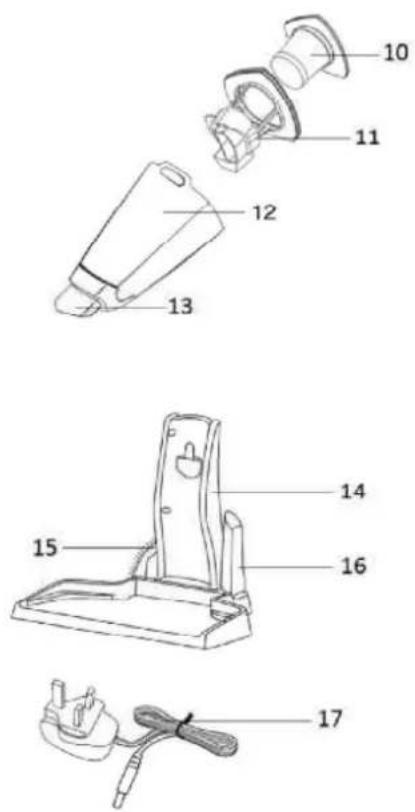
- HEPA Filter
- Filter container
- Dust container
- Nozzle
- Charging stand
- Brush tool
- Crevice tool
- Charging cable
POWER VAC ASSEMBLY
Before using your cleaner
Remove all packaging and lay out the separate components. Check the unit after unpacking for any visual damage such as:
- Misaligned or damaged parts
- Damage to the main body and separate components
- Damage to the plug or cable.
If you can see any damage do not use the cleaner and contact customer services.
Ensure the power is switched off before assembling.
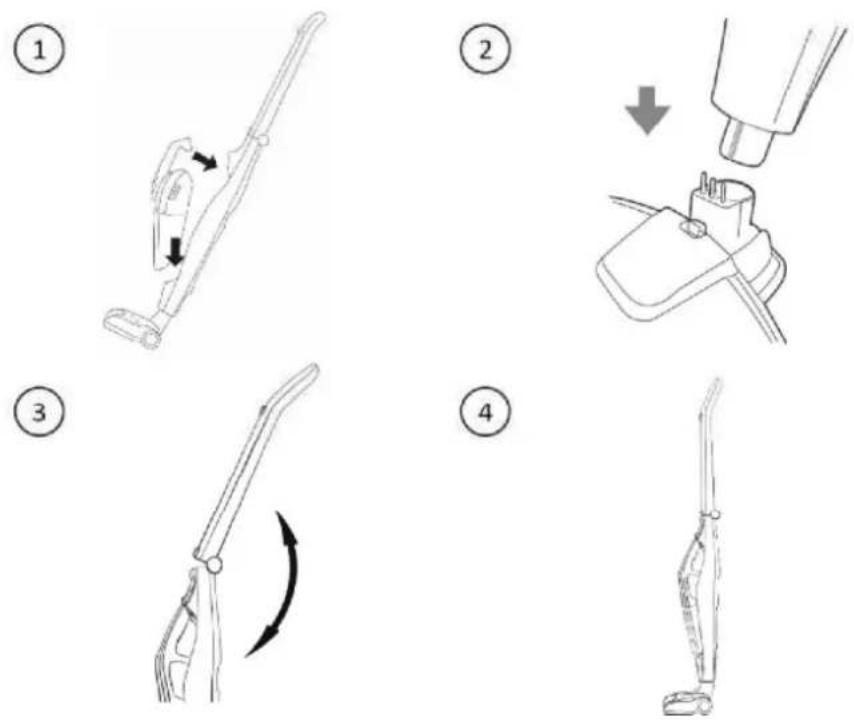
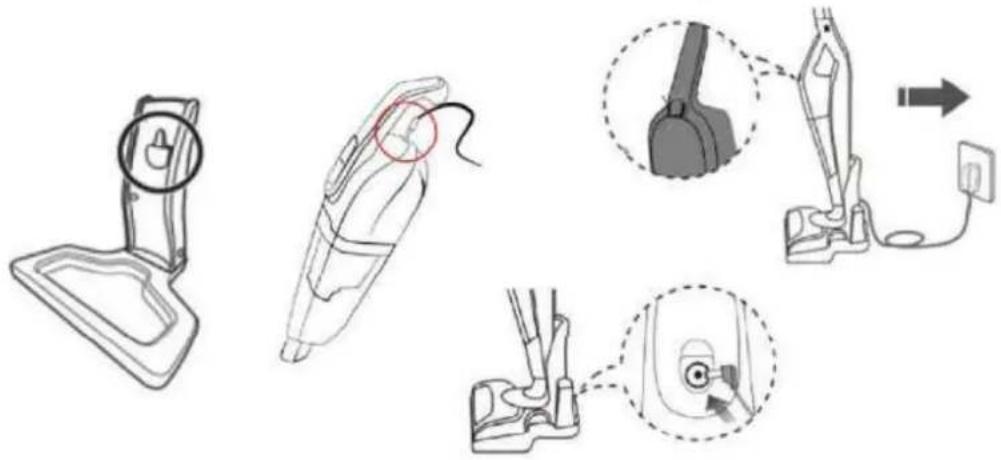
- Insert the assembled handheld vacuum unit into the main frame as shown on the diagram -suction inlet first then securing the handle into place.
- Align the bottom of the frame with the connector on the ball joint of the floor head, lowering the frame until it is securely in place. Ensure the pins are correctly aligned. Tilt the cleaner forward so it stands up independently.
- Lift the main handle up until it clicks into place. Note: Take care not to trap skin or hair.
- The main vacuum unit is now assembled.
CHARGING YOUR POWER VAC
Before using for the first time you will need to charge the cleaner.
-
First, assemble the charging stand. Before charging ensure the cleaner is switched off.
-
Plug the charging cable into the adaptor socket on the back of the charger dock and insert the charging plug into a suitable 13 Amp mains socket, pressing the switch on.
-
Lift the assembled cleaner onto the charger dock, ensuring that the lip on the back of the unit clips onto the charging dock and secures correctly. There is an additional charging port that can be found in the back of the hand held vacuum cleaner, shown in the diagram below.
The charging indicator light on the handheld vacuum will illuminate red, flashing in 2 second intervals to show that the unit is charging.
A full first time charge should be given, of 3-5 hours.
Once charged, the indicator light will illuminate solid red.
Note:
The body may become warm during charging and this is completely normal.
Make sure the battery is charged when the product will not be used for prolonged periods of time.
USING YOUR VAC
Once assembled and charged:
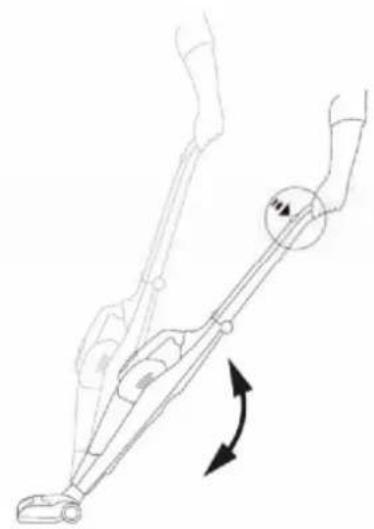
- Lift the cleaner off the charging dock and place on the floor.
- Support the floor head with your foot and pull back the handle
- Press the main unit power button to start the power at the lower setting. Press again for higher speed setting.
- Move the cleaner floor head in a forwards and backwards motion over the areas you would like to clean. Note: Large items can get trapped in the brush/floor head which could cause the unit to overheat. Make sure you pick up larger items that could get trapped before vacuuming.
- To turn off the power, press the power button.
USING YOUR POWER VAC-HANDLED
-
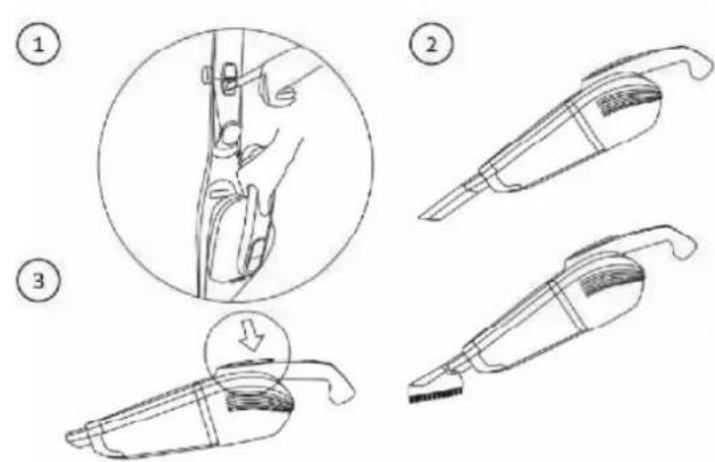
To convert from full sized vac to handheld cleaner, make sure the unit is stood in the upright position and press in the handheld vac release button. Ensure you are holding the handheld unit handle so that it can be pulled out safely.
-
Attach the tool of choice by slotting it into the suction inlet of the handheld unit. To remove the tool, simply pull away from the inlet to slide it out.
-
The crevice tool can be attached for cleaning hard to reach areas, such as sofas, cobwebs and skirting.
The brush tool is ideal for cleaning upholstery and stairs.
-
To start cleaning, press the handheld unit power switch. Press again to higher speed setting.
- Move the cleaner suction inlet over the areas you would like to clean, avoiding any liquids and large or sharp objects.
- To turn off the power, press the power button.
CLEANING AND CARE
Emptying the dust container
When the dust container reaches the MAX fill line indicated on the side of the product, it will need to be emptied. This will help it to maintain suction performance.
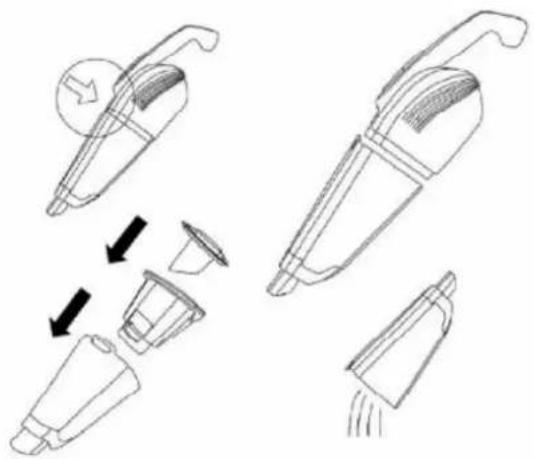
- To remove the dust container, press the release button located just above where the container is attached.
- Pull the dust container away from the unit.
- Over a bin, remove the whole filter assembly and tap off the trapped dirt. Tip the container upside down to empty the contents. You may need to tap the sides to dispose of all of the dirt.
Important: You may wish to empty the dust container outdoors as emptying may create a dust cloud.
- Place the filter back into the dust container in the direction indicated by the diagram.
- Place the assembled dust container back onto the unit and click into place.
Cleaning the filter
It is necessary to clean the filters regularly with frequent use in order to maintain suction performance and prolong the life span of your cleaner.
- Follow steps 1 to 3 on the previous page.
- Carefully wash the filter in warm water and allow drying for 24 hours. Also clean the dust container in the same manner.
- Once dried, place the filter back into the dust container in the direction indicated by the diagram.
- Place the assembled dust container back onto the unit, until it clips into place.
After around 6 months of regular use the filters may need replacing.
Floor head brush maintenance
If any threads or hairs get trapped in the brush you may need to carry out maintenance.
For regular maintenance, pull out the waste from around the bar.
If you cannot manually rotate the brush, unlock the cover and remove the brush to clean it.
When reinserting, make sure the brush cover is securely fixed and that the brush rotates properly.
Before you clean the appliance, make sure the power is switched off and that the unit is not on the charging stand.
It is recommended to store the appliance on the charging stand. Do not leave plugged in for extended periods of time.
You can fold the handle by pressing in the handle release button and folding backwards.
It is not recommended to remove the floor head.
To clean the exterior of the device, use a damp, soft cloth and mild detergent.
NEVER IMMERSE THE CLEANER IN WATER.
Wash non-electrical removable accessories in warm soapy water and allow to dry thoroughly before next use.
If the cleaner is damaged, contact the customer service helpline using the details at the bottom of this page.
Storage
Store it in a clean and dry environment.
Checking for blockages
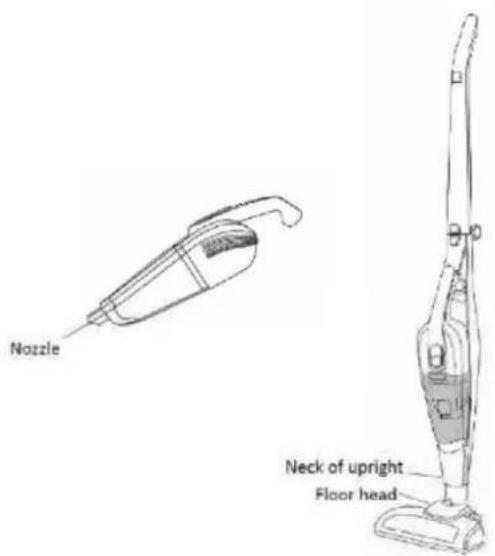
To check for blockages, remove the floor head from the main body of the vacuum cleaner and check the floor head and neck of the upright for dust and dirt that may have built up. Blockages could also occur around the nozzle of the hand held vacuum.
PROBLEM SOLVING
| PROBLEM | POSSIBLE PROBLEM | POSSIBLE SOLUTION |
| The cleaner won't turn on | The cleaner hasn't had enough charge | Make sure you have plugged in the cleaner to charge for 3 hours. The light will flash when charging |
| Charging cable is damaged | Make sure there is no signs of damage to the charging cable |
| The power button has not been pressed | Make sure you have turned on the power using either the main unit power button or the handheld power button |
| The suction is decreasing and the cleaner is not picking up dirt | Dust container | Check if the dust container is full, if so, empty it. |
| Filters are dirty | Clean the filters. After around 6 months of regular use the filters may need replacing. |
| Handheld/head blockages | Check that there are no blockages in the handheld suction inlet or cleaning head. If so, clean them. |
| Cleaner is over heating | Filters are dirty | Check that the filters are not blocked. If so, clean them following the instructions in this booklet |
| The charging stand is not working | The unit is not fitted correctly on the stand or the stand is not correctly plugged in to the mains | Make sure that the unit is fitted correctly on the charging stand and the charging adaptor is plugged into the mains |
| Dust is coming out of the vacuum cleaner | Dust container fitting | The dust container has not been fitted correctly. Refit the container following the instructions in this booklet |
| The air coming out of the vacuum cleaner smells | Filters are dirty | Clean the filters and dust container |
| Filters are not dry | Ensure the filters have been left to dry for 24 hours before refitting back into the vacuum cleaner and using |
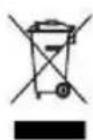
Disposal of old electrical appliances
The European directive 2002/96/EC on Waste Electrical and Electronic Equipment (WEEE), requires that old household electrical appliances must not be disposed of in the normal unsorted municipal waste stream. Old appliances must be collected separately in order to optimize the recovery and recycling of the materials they contain, and reduce the impact on human health and
the environment.
The crossed out "wheeled bin" symbol on the product reminds you of your obligation, that when you dispose of the appliance, it must be separately collected.
Consumers should contact their local authority or retailer for information concerning the correct disposal of their old appliance.
DECLARATION OF CONFORMITY: This device complies with the requirements of the Low Voltage Directive 2014/35/EU and the requirements of the EMC directive 2014/30/EU.
RÉGLES DE FONCTIONNEMENT
Neck of upright = Couen position vertical