KR60L - Hammer BLACK & DECKER - Free user manual and instructions
Find the device manual for free KR60L BLACK & DECKER in PDF.



| Product type | Hammer drill |
| Brand | Black & Decker |
| Model | KR60L |
| Supply voltage | 230 V |
| Power consumption | 600 W |
| No-load speed | 0 - 3 000 min⁻¹ |
| Max drilling capacity (steel/concrete) | 13 mm |
| Max drilling capacity (wood) | 25 mm |
| Weight | 2.3 kg |
| Chuck | Keyless chuck |
| Straight-line drilling indicator | Levelok™ (red light) |
| Variable speed trigger switch | Yes |
| Continuous operation lock button | Yes |
| Right/left rotation selector | Yes |
| Drilling mode selector | 2 positions (percussion and normal) |
| Side handle | Yes, adjustable |
| Depth stop | Yes |
| Double insulation | Yes |
| Maintenance | Clean ventilation slots with a dry brush; exterior cleaning with a damp cloth and mild detergent |
| Safety instructions | Wear protective equipment (goggles, hearing protection); do not use in explosive environments; unplug before adjustment |
| Repairs | Have repaired only by qualified personnel using original spare parts |
| Warranty | 24 months (domestic use) |
| Compatible accessories | Drill bits, screwdriver bits, Quick Connect™ chuck (depending on version) |
Frequently Asked Questions - KR60L BLACK & DECKER
User questions about KR60L BLACK & DECKER
0 question about this device. Answer the ones you know or ask your own.
Ask a new question about this device
Download the instructions for your Hammer in PDF format for free! Find your manual KR60L - BLACK & DECKER and take your electronic device back in hand. On this page are published all the documents necessary for the use of your device. KR60L by BLACK & DECKER.
USER MANUAL KR60L BLACK & DECKER

natural_image
Line drawing of a manual power drill (no text or symbols)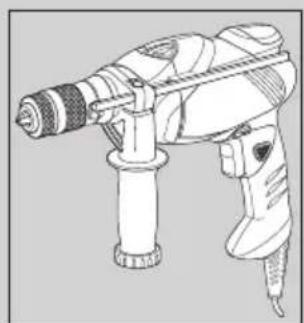
natural_image
Line drawing of a manual drill bit with trigger and base mount (no text or symbols)
natural_image
Line drawing of a manual drill bit with handle and screwdriver (no text or symbols)
natural_image
Line drawing of a hand holding a drill bit, no text or symbols present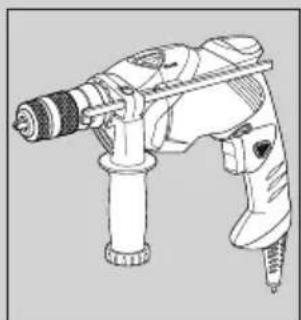
natural_image
Line drawing of a handheld electric drill bit with trigger and screwdriver (no text or symbols)English 3
Deutsch 7
Français 11
Italiano 15
Nederlands 19
Español 23
Português 28
Svenska 32
Norsk 36
Dansk 40
Suomi 44
Ελληνικά


natural_image
Technical diagram of a mechanical component with labeled parts (no text or symbols beyond '18' and label)Intended use
Your Black & Decker hammer drill has been designed for drilling in wood, metal, plastics, and masonry as well as for screwdriving purposes. This tool is intended for consumer use only.
General safety rules
Warning! Read all instructions. Failure to follow all instructions listed below may result in electric shock, fire and/or serious injury. The term "power tool" in all of the warnings listed below refers to your mains operated (corded) power tool or battery operated (cordless) power tool. SAVE THESE INSTRUCTIONS.
1. Work area
a. Keep work area clean and well lit. Cluttered and dark areas invite accidents.
b. Do not operate power tools in explosive atmospheres, such as in the presence of flammable liquids, gases or dust. Power tools create sparks which may ignite the dust or fumes.
c. Keep children and bystanders away while operating a power tool. Distractions can cause you to lose control.
2. Electrical safety
a. Power tool plugs must match the outlet. Never modify the plug in any way. Do not use any adapter plugs with earthed (grounded) power tools. Unmodified plugs and matching outlets will reduce risk of electric shock.
b. Avoid body contact with earthed or grounded surfaces such as pipes, radiators, ranges and refrigerators. There is an increased risk of electric shock if your body is earthed or grounded.
c. Do not expose power tools to rain or wet conditions. Water entering a power tool will increase the risk of electric shock.
d. Do not abuse the cord. Never use the cord for carrying, pulling or unplugging the power tool. Keep cord away from heat, oil, sharp edges or moving parts. Damaged or entangled cords increase the risk of electric shock.
e. When operating a power tool outdoors, use an extension cord suitable for outdoor use. Use of a cord suitable for outdoor use reduces the risk of electric shock.
3. Personal safety
a. Stay alert, watch what you are doing and use common sense when operating a power tool. Do not use a power tool while you are tired or under the influence of drugs, alcohol or medication. A moment of inattention while operating power tools may result in serious personal injury.
b. Use safety equipment. Always wear eye protection.
Safety equipment such as dust mask, non-skid safety shoes, hard hat, or hearing protection used for appropriate conditions will reduce personal injuries.
c. Avoid accidental starting. Ensure the switch is in the off position before plugging in. Carrying power tools with your finger on the switch or plugging in power tools that have the switch on invites accidents.
d. Remove any adjusting key or wrench before turning the power tool on. A wrench or a key left attached to a rotating part of the power tool may result in personal injury.
e. Do not overreach. Keep proper footing and balance at all times. This enables better control of the power tool in unexpected situations.
f. Dress properly. Do not wear loose clothing or jewellery. Keep your hair, clothing and gloves away from moving parts. Loose clothes, jewellery or long hair can be caught in moving parts.
g. If devices are provided for the connection of dust extraction and collection facilities, ensure these are connected and properly used. Use of these devices can reduce dust related hazards.
4. Power tool use and care
a. Do not force the power tool. Use the correct power tool for your application. The correct power tool will do the job better and safer at the rate for which it was designed.
b. Do not use the power tool if the switch does not turn it on and off. Any power tool that cannot be controlled with the switch is dangerous and must be repaired.
c. Disconnect the plug from the power source before making any adjustments, changing accessories, or storing power tools. Such preventive safety measures reduce the risk of starting the power tool accidentally.
d. Store idle power tools out of the reach of children and do not allow persons unfamiliar with the power tool or these instructions to operate the power tool. Power tools are dangerous in the hands of untrained users.
e. Maintain power tools. Check for misalignment or binding of moving parts, breakage of parts and any other condition that may affect the power tools operation. If damaged, have the power tool repaired before use. Many accidents are caused by poorly maintained power tools.
f. Keep cutting tools sharp and clean. Properly maintained cutting tools with sharp cutting edges are less likely to bind and are easier to control.
g. Use the power tool, accessories and tool bits etc., in accordance with these instructions and in the manner intended for the particular type of power tool, taking into account the working conditions and the work to be performed.
ENGLISH
Use of the power tool for operations different from those intended could result in a hazardous situation.
5. Service
a. Have your power tool serviced by a qualified repair person using only identical replacement parts. This will ensure that the safety of the power tool is maintained.
Additional safety instructions for impact drills
◆Wear ear protectors with impact drills. Exposure to noise can cause hearing loss.
◆Use auxiliary handles supplied with the tool. Loss of control can cause personal injury.
Electrical safety

This tool is double insulated; therefore no earth wire is required. Always check that the power supply corresponds to the voltage on the rating plate.
◆This appliance is not intended for use by young or infirm persons without supervision. Children must be supervised to ensure they do not play with the appliance.
◆If the supply cord is damaged, it must be replaced by the manufacturer or an authorised Black & Decker Service Centre in order to avoid a hazard.
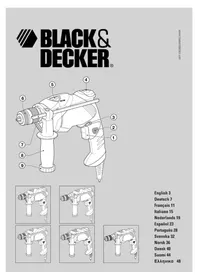
Features
This tool includes some or all of the following features.
- Variable speed switch
- Lock-on button
- Forward/reverse slider
- Levelok ^TM straight drilling indicator
- Drilling mode selector
-
Keyless chuck (KR60(L)/KR70(L)) Quick Connect™ chuck (KR60QC/KR70QC)
-
Depth stop
-
Side handle
-
Bit storage
Assembly
Warning! Make sure that the tool is switched off and unplugged.
Fitting the side handle and depth stop (fig. A)
◆Turn the grip (10) counterclockwise until you can slide the side handle (8) onto the front of the tool as shown.
◆Rotate the side handle into the desired position.
◆Insert the depth stop (7) into the mounting hole as shown.
◆Set the depth stop to the desired position. The maximum drilling depth is equal to the distance between the tip of the drill bit and the front end of the depth stop.
◆Tighten the side handle by turning the grip clockwise.
Fitting a drill bit or screwdriver bit
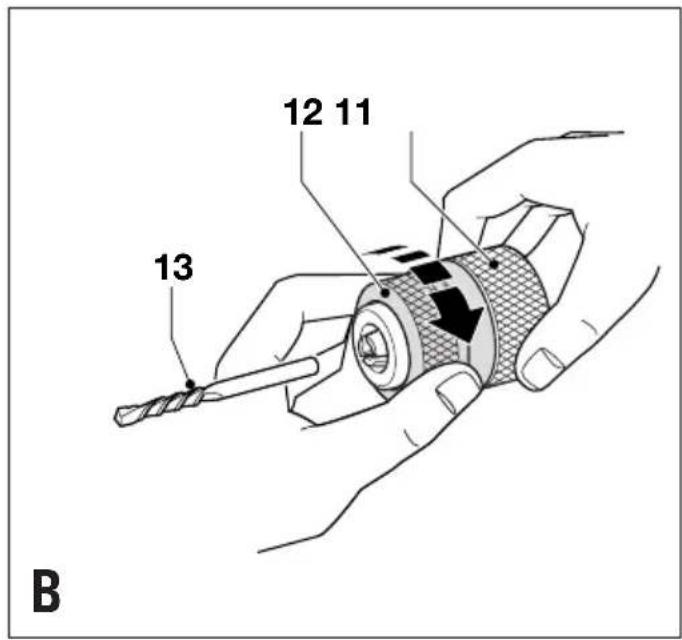
KR60(L)/KR70(L) - Keyless chuck (fig. B)
◆Open the chuck by turning the front part (12) with one hand while holding the rear part (11) with the other.
◆Insert the bit shaft (13) into the chuck and firmly tighten the chuck.
KR60QC/KR70QC - Quick Connect™ chuck (fig. B & C)
The chuck on these models can be easily removed and refitted. When your project entails both drilling and screwdriving, fit a screwdriver bit in the spindle and a drill bit in the chuck: you will then only need to remove the chuck for screwdriving and refit it for drilling. The screwdriver bit can be left in the spindle while drilling. You can also fit drill bits with a hexagonal shaft in this way.
◆To fit a drill bit, proceed as described above.
◆To fit a screwdriver bit, proceed as follows:
◆Remove the chuck (6).
◆Install a screwdriver bit (16) by pushing it into the spindle (15) as shown.
◆To remove the screwdriver bit, pull the ring (17) back and pull the screwdriver bit out of the spindle.
Removing and refitting the chuck
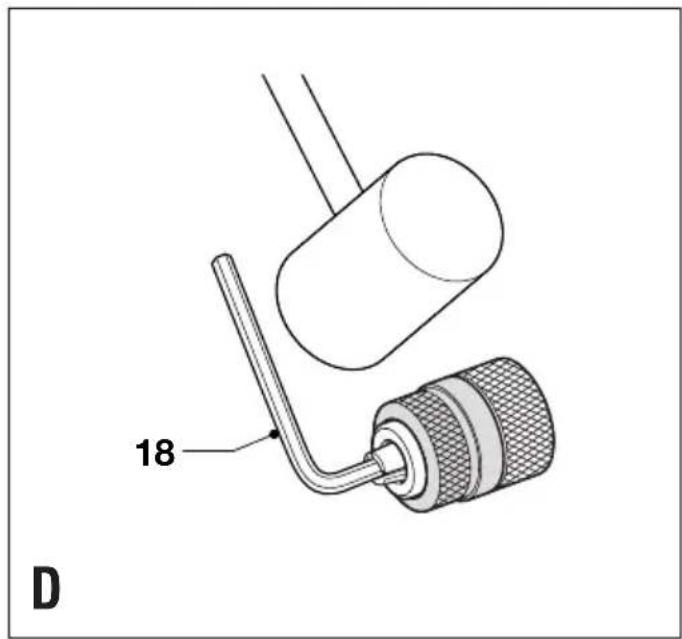
KR60(L)/KR70(L) - Keyless chuck (fig. D)
◆Open the chuck as far as possible.
◆Remove the chuck retaining screw, located in the front part of the chuck, by turning it clockwise using a screwdriver.
◆Tighten an Allen key (18) into the chuck and strike it with a hammer as shown.
◆Remove the Allen key.
◆Remove the chuck by turning it counterclockwise.
◆To refit the chuck, screw it onto the spindle and secure it with the chuck retaining screw.
KR60QC/KR70QC - Quick Connect™ chuck (fig. C)
◆To remove the chuck (6), keep the release tabs (14) depressed and pull the chuck off the spindle (15).
◆To refit the chuck, push it onto the spindle until it is firmly locked into place.
Warning! Always make sure that the chuck is securely fitted.
Use
Warning! Before drilling into walls, floors or ceilings, check for the location of wiring and pipes.
Selecting the direction of rotation
For drilling and for tightening screws, use forward (clockwise) rotation. For loosening screws or removing a jammed drill bit, use reverse (counterclockwise) rotation.
◆To select forward rotation, push the forward/reverse slider (3) to the left.
◆To select reverse rotation, push the forward/reverse slider to the right.
Warning! Never change the direction of rotation while the motor is running.
Selecting the drilling mode
◆For drilling in masonry, set the drilling mode selector (5) to the T position.
◆For drilling in other materials and for screwdriving, set the drilling mode selector (5) to the 2 position.
KR60L/KR70L - Levelok™ straight drilling indicator
This tool is fitted with an indicator to facilitate straight drilling. This feature can be used both in horizontal and in vertical position. The indicator is activated while the tool is connected to the mains.
◆Position the tool as required.
- Slowly move the rear of the tool until the red indicator (4) lights up and remains on.
Switching on and off
◆To switch the tool on, press the variable speed switch (1). The tool speed depends on how far you press the switch. As a general rule, use low speeds for large diameter drill bits and high speeds for smaller diameter drill bits.
◆For continuous operation, press the lock-on button (2) and release the variable speed switch. This option is available only at full speed.
◆To switch the tool off, release the variable speed switch. To switch the tool off when in continuous operation, press the variable speed switch once more and release it.
Accessories
The performance of your tool depends on the accessory used. Black & Decker and Piranha accessories are engineered to high quality standards and designed to enhance the performance of your tool. By using these accessories you will get the very best from your tool.
Maintenance
Your tool has been designed to operate over a long period of time with a minimum of maintenance. Continuous satisfactory operation depends upon proper tool care and regular cleaning.
◆Regularly clean the ventilation slots with a clean, dry paint brush.
◆To clean the tool, use only mild soap and a damp cloth. Never let any liquid get inside the tool and never immerse any part of the tool into liquid.
Protecting the environment
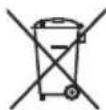
Separate collection. This product must not be disposed of with normal household waste.
Should you find one day that your Black & Decker product needs replacement, or if it is of no further use to you, do not dispose of it with household waste. Make this product available for separate collection.

Separate collection of used products and packaging allows materials to be recycled and used again. Re-use of recycled materials helps prevent environmental pollution and reduces the demand for raw materials.
Local regulations may provide for separate collection of electrical products from the household, at municipal waste sites or by the retailer when you purchase a new product.
Black & Decker provides a facility for the collection and recycling of Black & Decker products once they have reached the end of their working life. To take advantage of this service please return your product to any authorised repair agent who will collect them on our behalf.
You can check the location of your nearest authorised repair agent by contacting your local Black & Decker office at the address indicated in this manual. Alternatively, a list of authorised Black & Decker repair agents and full details of our after-sales service and contacts are available on the Internet at: www.2helpU.com
Technical data
| KR60 KR70 | |
| Voltage V | 230 230 |
| Power input W 600 730 | |
| No-load speed min | -1 0-3,000 0-3,000 |
| Weight kg 2.3 2.3 |
Max drilling capacity
| Steel/concrete mm 13 13 |
| Wood mm 25 25 |
ENGLISH
EC declaration of conformity
KR60/KR70
Black & Decker declares that these products conform to: 98/37/EC, 89/336/EEC, 73/23/EEC, EN 55014, EN 60745, EN 61000
L_pA (sound pressure) 97.3 dB(A), L_WA (acoustic power) 108.3 dB(A), hand/arm weighted vibration 10.7 m/s ^2 K_pA (sound pressure uncertainty) 3 dB(A), K_WA (acoustic power uncertainty) 3 dB(A)

Kevin Hewitt
Director of Consumer Engineering
Spennymoor, County Durham DL16 6JG, United Kingdom 1-9-2005
Guarantee
Black & Decker is confident of the quality of its products and offers an outstanding guarantee. This guarantee statement is in addition to and in no way prejudices your statutory rights. The guarantee is valid within the territories of the Member States of the European Union and the European Free Trade Area.
If a Black & Decker product becomes defective due to faulty materials, workmanship or lack of conformity, within 24 months from the date of purchase, Black & Decker guarantees to replace defective parts, repair products subjected to fair wear and tear or replace such products to ensure minimum inconvenience to the customer unless:
◆The product has been used for trade, professional or hire purposes;
◆The product has been subjected to misuse or neglect;
◆The product has sustained damage through foreign objects, substances or accidents;
◆Repairs have been attempted by persons other than authorised repair agents or Black & Decker service staff.
To claim on the guarantee, you will need to submit proof of purchase to the seller or an authorised repair agent. You can check the location of your nearest authorised repair agent by contacting your local Black & Decker office at the address indicated in this manual. Alternatively, a list of authorised Black & Decker repair agents and full details of our after-sales service and contacts are available on the Internet at:
www.2helpU.com.
Please register at our website www.blackanddecker.com
to be kept up to date on new products and special offers.
Further information on the Black & Decker brand and our range of products is available at www.blackanddecker.com.
KR60(L)/KR70(L) - Schlüsselloses Bohrfutter (Abb. D)
Director of Consumer Engineering
Spennymoor, County Durham DL16 6JG,
Spennymoor, County Durham DL16 6JG,
Royaume Uni
1-9-2005
Garantie
98/37/CEE, 89/336/CEE, 73/23/CEE, EN 55014, EN 60745,
EN 61000
L_pA (pressione sonora) 97,3 dB(A),
L_WA (potenza acustica) 108,3 dB(A),
Spennymoor, County Durham DL16 6JG,
Regno Unito
1-9-2005
Garanzia
Director of Consumer Engineering
Spennymoor, County Durham DL16 6JG,
Verenigd Koninkrijk
1-9-2005
Garantie
Spennymoor, County Durham DL16 6JG,
Reino Unido
1-9-2005
Garantía
Director de Engenharia do Consumo
Spennymoor, County Durham DL16 6JG,
Reino Unido
1-9-2005
Garantia
Director of Consumer Engineering
Spennymoor, County Durham DL16 6JG,
Storbrittannien
1-9-2005
Reservdelar / reparationer
Spennymoor, County Durham DL16 6JG,
Storbritannia
1-9-2005
98/37/E∅F, 89/336/E∅F, 73/23/E∅F, EN 55014, EN 60745, EN 61000
L_pA (lydtryk) 97,3 dB(A), L_WA (lydintensitet) 108,3 dB(A), hånd/arm vægtet vibration 10,7 m/s² K_pA (lydtryk usikkerhed) 3 dB(A), K_WA (lydintensitet usikkerhed) 3 dB(A)
Kevin Hewitt
Director of Consumer Engineering
Spennymoor, County Durham DL16 6JG,
Storbritannien
1-9-2005
Reservedele / reparationer
Director of Consumer Engineering
Spennymoor, County Durham DL16 6JG,
Iso-Britannia
1-9-2005
County Durham DL16 6JG,
Αγγλία
1-9-2005
ΕΛΛΗΝΙΚΑ
Εγγύηση
• International, or Taylor, despite being said
◆ A.U.D. on takeaway Bankurban bank
◆ Data protection act: Tick the box if you prefer
(No text)


koneesi ◆ Eival to evaporatio auto in Trump days ago?
Yes Ja Qu! Si Ja Si Sim Ja Ja Ka La Na
No Nei in Non No Nee No Nao Nei Nei Nei
◆ Dealer addresses ◆ Handleradresse ◆ Cachet du revenuder ◆ indirizzo del rivenditore ◆ Adres van de dealer
♦ Jalleennyman osote ♦ Forhandelvers adresse ♦ Forhandler a ♦ Artofrasjares adresses revendedor ♦ Arenforsjares adresses ♦ Direcicien del detallista ♦ Morada do
revendor - Artificialis layers address
♦ Yes ♦ Ja ♦ Qu! ♂ Si ♀ Ja ♦ Si ♦ Sim ♦ Ja ♦ Ja ♦ Ja ♦ Ja ♦ Sim ♦ ♦ Na N ♦ Ja ♦ Ja ♦ Na N
O X E N O N O N O N O N O N O N O

♦ To expaizio activ grupo?
◆ Onko kone laha?
presente? ♦ Ar verktyet en gava?
◆ is this tool a gift? ◆ lst dieses Great etin
◆ Address ◆ Adresse ◆ Adresse ◆ indirizzo ◆ ◆ Addresses ◆ Adresse ◆ Adresse ◆ Iradice ◆ ◆ Directors ◆ Directors ◆ Morales ◆ Address ◆
Adresse ◆ Adresse ◆ Osite ◆ Διε™θυνη:
♦ Town ◆ Ort ◆ Ville ◆ Citta ◆ Plaats ◆ Ciudad ◆ Localeide ◆ Ort ◆ Wy ◆ By ◆ Parkakunita ◆ To'an:
♦ Town ◆ Ort ◆ Ville ◆ Citta ◆ Plants ◆ Ciudad ◆ Localidade ◆ Ort ◆ By ◆ By
• Tigrp + Otd. Vellb. Cittip. Bioc
◆ Address ◆ Adresse ◆ Adresse ◆ indirizzo ◆
[Non-Text]
♦ Naven ♦ Naven ♦ Nimm ♦ Ovola:
Name Name Nom Name


natural_image
Pure dotted line with a small star icon at the top-left corner (no text or symbols)


natural_image
Pure dotted line with a small star icon at the top-left corner (no text or symbols)
。
.
。
。
.
。
。
。
.
.
。
。
.
.
。
。
.
。
。
。
.
。
。
。
.
。
。
。
.
。
。
.
。
。
。
.
。
。
。
.
。
。
.
。
。
。
.
。
。
。
. .
。
[Non-Text]
[Non-Text]
(No text to output)
→
。
。
.
。
。
。
。
。
.
.
。
。
.
.
。
。
.
。
English Please complete this section immediately after the purchase of your


- Intended use
- General safety rules
- Work area
- Electrical safety
- Personal safety
- Power tool use and care
- ENGLISH
- Service
- Additional safety instructions for impact drills
- Electrical safety
- Features
- Assembly
- Fitting the side handle and depth stop (fig. A)
- Fitting a drill bit or screwdriver bit
- Removing and refitting the chuck
- Use
- Selecting the direction of rotation
- Selecting the drilling mode
- KR60L/KR70L - Levelok™ straight drilling indicator
- Switching on and off
- Accessories
- Maintenance
- Protecting the environment
- EC declaration of conformity
- Guarantee
- www.2helpU.com.
- KR60(L)/KR70(L) - Schlüsselloses Bohrfutter (Abb. D)
- Garantie
- Garanzia
- Garantía
- Garantia
- Reservdelar / reparationer
- Reservedele / reparationer
- ΕΛΛΗΝΙΚΑ
- Εγγύηση
Brand : BLACK & DECKER
Model : KR60L
Category : Hammer