
Blue 3210 - Air purifier BLUEAIR - Free user manual and instructions
Find the device manual for free Blue 3210 BLUEAIR in PDF.



| Product type | Air purifier |
| Brand | Blueair |
| Model | Blue 3210 |
| Power supply | 100-240 V~, 50/60 Hz |
| Power consumption | 2-10 W |
| Noise level | 18-48 dB |
| Recommended room size | 17 m² |
| CADR Smoke | 210 m³/h |
| CADR Dust | 181 m³/h |
| CADR Pollen | 163 m³/h |
| Main filter | Particulate filter + activated carbon (non-washable) |
| Pre-filter | Machine-washable fabric (delicate cycle) |
| Control | Touch button with Auto, Night, Daily, Boost modes |
| Air quality indicator | Yes (PM2.5, color scale) |
| Filter replacement indicator | Red light after 6 months of use |
| Auto restart function | Yes (after power cut) |
| Maintenance | Regular cleaning of pre-filter; replace main filter every 6 months |
| Safety | Unplug before maintenance; do not use outdoors or in water |
| Warranty | See www.blueair.com/warranty |
| Use | Indoor only |
Frequently Asked Questions - Blue 3210 BLUEAIR
User questions about Blue 3210 BLUEAIR
0 question about this device. Answer the ones you know or ask your own.
Ask a new question about this device
Download the instructions for your Air purifier in PDF format for free! Find your manual Blue 3210 - BLUEAIR and take your electronic device back in hand. On this page are published all the documents necessary for the use of your device. Blue 3210 by BLUEAIR.
USER MANUAL Blue 3210 BLUEAIR
Please read this user manual carefully and keep it for future reference.
The latest version of this user manual can be found on www.blueair.com
Note: There may be local variations of these models.
Product name: Model number:
| 3210 3231101000 |
| 3410 3431101000 |
Content
| Blue 3210/3410 4 | |
| Safety instructions 6 | |
| Get started 8 | |
| Filters | 11 |
| Care and maintenance 15 | |
| Disposal and recycling 17 | |
| Help and support 17 | |
| Warranty information 17 | |
| Specifications | 18 |
Blue 3210/3410
Blueair purifiers are available in two models. All models have a pre-filter and a HEPASilent ^™ main filter to purify air. All Blue models have control functions and a built in sensor.
The air purifier is mainly composed of a motor, a fan and filters. The air purifier removes contaminants from the air in a room to improve indoor air quality.
You can change the air purifier settings at any time, using the control panel on the air purifier.
Recommendations for best performance
- Use the air purifier in a room that does not exceed the room size recommendation.
- Place the air purifier in a location where air can circulate freely in, out and around the air purifier.
- Do not place the air purifier closer than 10 cm to another object.
- During operation, keep doors and windows in the room with the air purifier closed.
- Only use original Blueair filters.
- Change the main filter when the filter replacement indicator appears on the control panel.
- Follow the maintenance instructions in this user manual.
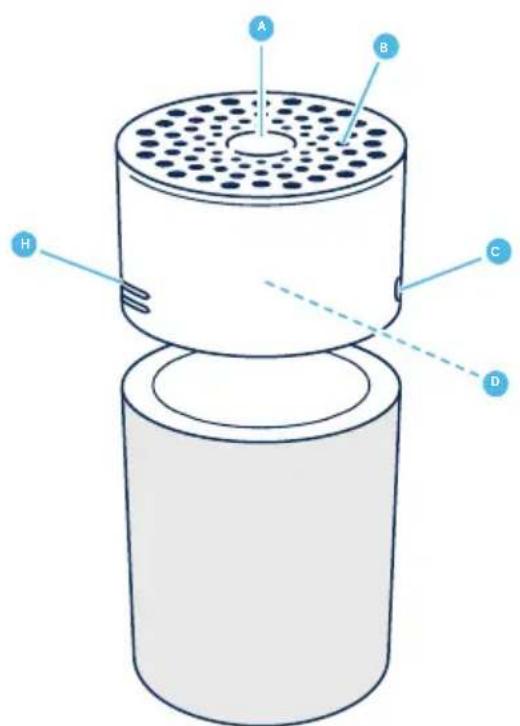
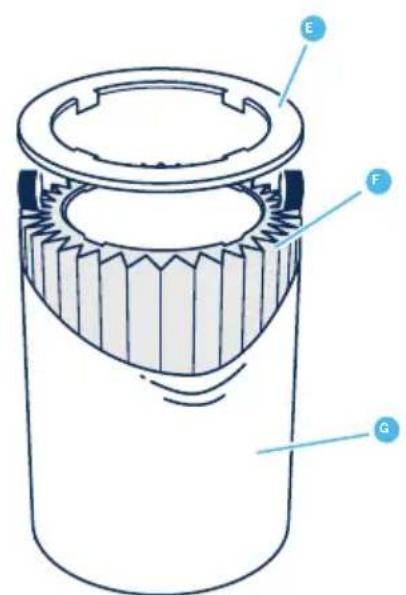
A Touch button F Main filter (Particle + Carbon filter)
B Air outlet G Pre-filter
C Air quality indicator
H Air quality sensor
D Fan and motor I Power cable (not in picture)
E Filter shelf ring
J User Manual (not in picture)
Safety instructions
Blue 3210/3410 air purifiers are electrical appliances for indoor use only, take the necessary precautions to reduce the risk of fire, electric shock or injury.
- This appliance can be used by children aged from 8 years and above and persons with reduced physical, sensory or mental capabilities or lack of experience and knowledge if they have been given supervision or instruction concerning use of the appliance in a safe way and understand the hazards involved.
• Children shall not play with the appliance. - Cleaning and user maintenance shall not be made by children without supervision.
- Always disconnect the appliance from the power supply before maintenance.
- Do not attempt to open or service the appliance yourself. Service must be done by the manufacturer, service agent or similarly qualified personnel using only original Blueair spare parts.
- Ensure that the power cable and the power plug are not at risk of getting damaged. To avoid hazard, a damaged power cable must always be replaced by the manufacturer, service agent or similarly qualified person.
- If the appliance is damaged or malfunctions, turn it off, disconnect it from the power supply and contact Blueair.
- The power plug must be firmly inserted in the power socket.
- When disconnecting the unit from the power supply, do not pull on
the power cord, pull on the power plug.
- Use the power cable provided with your Blueair air purifier to plug directly and firmly into an appropriate, electrical outlet.
- Do not use an extension cord or a power strip. Refer to the rating label on your appliance.
- Do not alter the power plug in any way. If the plug does not fit into the outlet, contact qualified personnel to install the proper outlet.
- Do not use the included power cord for anything else but the appliance.
- Do not allow objects to enter or block the air inlets and air outlets as this can cause electric shock or damage the appliance.
- Do not place any objects on top of or directly against the appliance.
- Do not sit on, stand, climb onto or hang from the appliance.
- Keep the appliance, including the power cable, at a safe distance from heated surfaces and open fire.
- Keep the appliance and power plug away from water and other liquids.
- Keep the appliance and power plug away from chemicals such as pesticides and deodorants.
- Place the appliance on the floor. The appliance must be placed on a stable surface.
- Do not use the appliance outdoors or in wet environments such as bathrooms, laundry rooms or pool areas.
Get started
Step 1
Plug the power cable into a wall outlet.

natural_image
Simple blue icon of a plug inside a circle (no text or symbols)Step 2
Press the button to turn the air purifier on and adjust the fan speed mode.
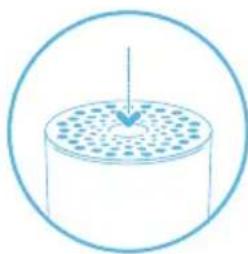
natural_image
Simple line drawing of a cylindrical container with a downward arrow inside, enclosed in a circle (no text or symbols)On/Off and fan speed controls
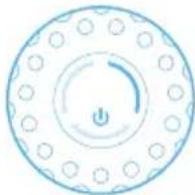
Available settings are: Auto, Night, Everyday, Boost and Off.
The indicator lights on the touch button indicate the selected fan speed. The lights automatically dim down completely 5 seconds after pressing the touch button, indicating a deactivated fan speed control mode. Press the touch button once to reactivate on/off and fan speed control. The indicator lights light up and you can adjust the fan speed mode again.
Autostart
The autostart feature automatically restarts the air purifier at the last set speed if it has been unplugged, used with a power switch timer, or if a power failure occurs.
Auto mode
In auto mode the air purifier automatically controls the airflow based on air quality information from the sensor.
On/Auto mode

Press once to turn the unit On and to set it to Auto mode.
Night mode
Press twice to set to Night mode (low fan speed)
Everyday mode

Press three times to set to Everyday mode (medium fan speed).
Boost mode

Press four times to set to Boost mode (high fan speed).
Off

Press five times to turn the unit Off.
Air quality information
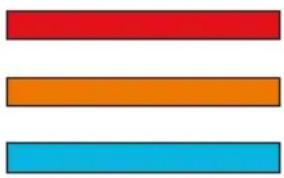
The air quality levels for particulate matter (PM) are indicated using a color scale on the air quality indicator. The air quality indicator is completely dimmed in Night mode.
PM2.5, Particulate matter, particles with diameter of size 2.5 micrometers or less.
Air quality level (PM 2.5)
natural_image
Three horizontal colored bars (red, orange, cyan) with no text or symbolsPolluted
Moderate
Good
Filters
The air purifier is delivered with a fabric pre-filter and a main filter. The filters purify the air from both particles and gases. For best performance, clean the pre-filters regularly and change the main filter when the air purifier indicates filter change.
To find the right main filter for your air purifier, use the Blueair app or visit www.blueair.com.
The model number of your air purifier can be found on the rating label on the air purifier.
Important! Always turn off and disconnect the appliance from the power supply before changing filters, cleaning or carrying out maintenance procedures.
Blueair filter subscription program
Use the Blueair app or visit www.blueair.com to sign up for the Blueair filter subscription program. (Not available in all markets)
Button control functions
Change filter
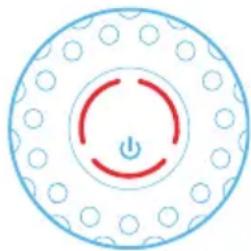
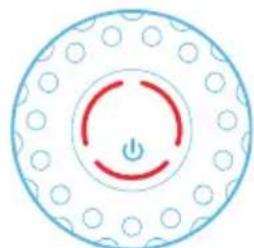
When the indicator light turns red (after 6 months of operation) you should change the main filter.
natural_image
Circular diagram with a red power button and dotted pattern, no text or symbols presentFilter replacement indicator
Press the button down for 7 seconds to reset the filter replacement indicator.

natural_image
Circular diagram with concentric rings and a central arrow, no text or symbols presentClean and change the pre-filters
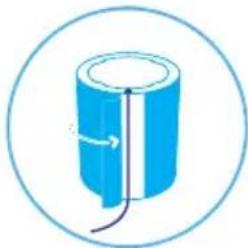
For best performance, clean the pre-filter regularly. Vacuum the exterior of the fabric pre-filter with a soft brush attachment to remove dust. If the pre-filter requires a deeper clean, wash it on a gentle, low-temperature cycle in the washing machine.
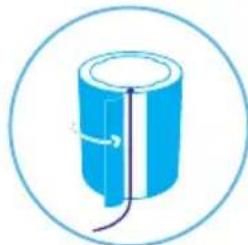
Important! Press the Velcro strips together on the pre-filter before machine wash.
Step 1
Turn the unit off and unplug it.

natural_image
Simple line drawing of a blue electrical plug with three leads, enclosed in a circle (no text or symbols)Step 2
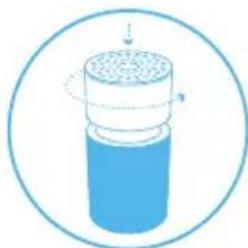
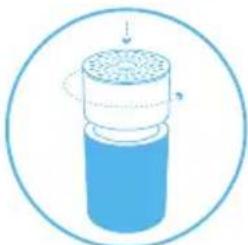
Carefully push the top cylinder down while rotating counterclockwise to unlock.
natural_image
Diagram of a cylindrical container with internal structure and directional arrows, enclosed in a circular border (no text or symbols)Step 3
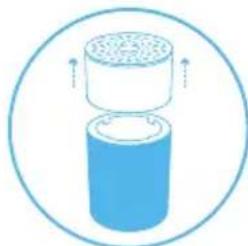
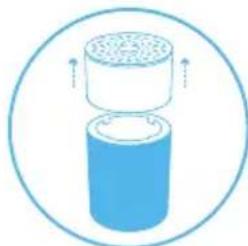
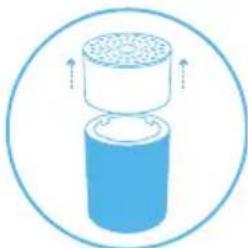
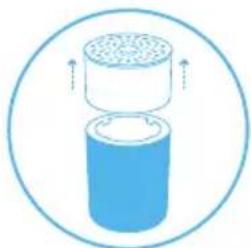
Remove the top cylinder from the unit.
natural_image
Diagram of a cylindrical container with a top container and side outlet, enclosed in a circle (no text or symbols)Step 4
Open the pre-filter panel and remove the pre-filter.

natural_image
Blue cylindrical object enclosed in a circular border, no text or symbols presentStep 5
Wash the pre-filter in the washing machine, according to instructions on the pre-filter's label.

natural_image
Simple blue circular icon with a bowl and water droplet inside, no text or symbols present.Step 6
Place the pre-filter back onto the unit.
natural_image
Simple line drawing of a cylindrical object with internal lines and arrows, enclosed in a circle (no text or symbols)Step 7
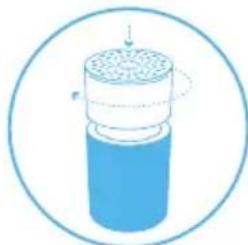
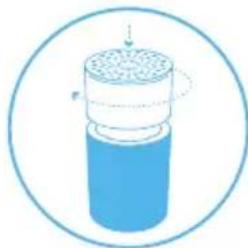
Carefully push the top cylinder down, at the same time rotating it clockwise to secure it back into the lock.
natural_image
Diagram of a cylindrical container with internal structure and directional arrows, enclosed in a circular border (no text or symbols)Step 8
Plug in the unit.

natural_image
Simple line icon of a plug with three wires, enclosed in a circle (no text or symbols)Change the main filter
When changing the filter, vacuum any dust that may have accumulated inside the unit.
Important! Use only original Blueair filters suitable for the model to ensure proper function and performance of the air purifier, and to qualify for full warranty coverage.
Step 1
When the indicator light glows red, it's time to change the main filter.
Step 3
Carefully push the top cylinder down while rotating counterclockwise to unlock.
Step 5
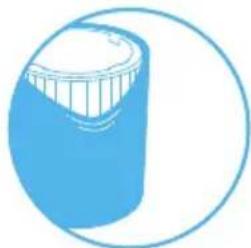
Open the pre-filter panel and remove the pre-filter.
Step 7
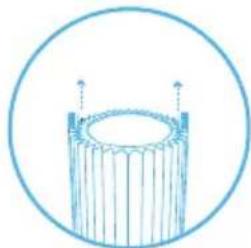
Grip the filter handles and pull upwards to remove the main filter from the inner structure.
natural_image
Circular diagram with a red power button and dotted pattern, no text or symbols present.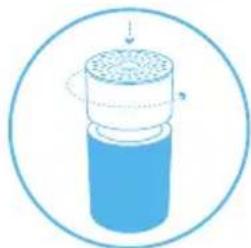
natural_image
Diagram of a cylindrical container with a lid and internal structure, enclosed in a circular border (no text or symbols)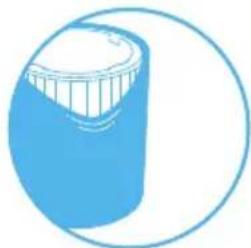
natural_image
Simple line drawing of a blue cylindrical object with a lid, enclosed in a circle (no text or symbols)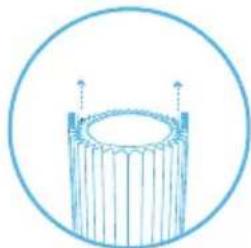
natural_image
Simple line drawing of a cylindrical object with vertical supports, enclosed in a circle (no text or symbols)Step 2
Turn the unit off and unplug it.
Step 4
Remove the top cylinder from the unit.
Step 6
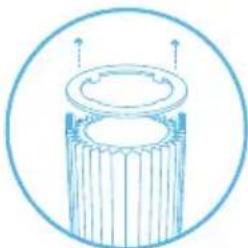
Carefully remove the filter shelf ring.
Step 8
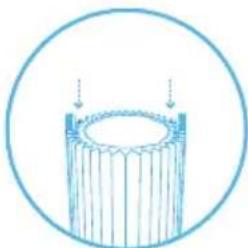
Position the new main filter onto the inner structure. The filter handles should face upwards.

natural_image
Simple line icon of a blue electrical plug with three leads, enclosed in a circle (no text or symbols)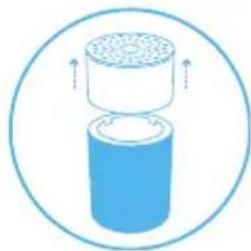
natural_image
Diagram of a cylindrical container with a top container and upward arrows indicating flow or movement (no text or symbols)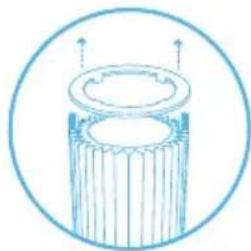
natural_image
Simple line drawing of a cylindrical object with a flanged base and top, enclosed in a circle (no text or symbols)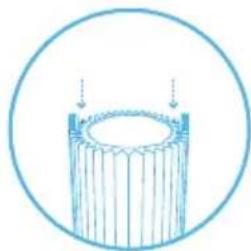
natural_image
Simple line drawing of a cylindrical object with vertical lines, enclosed in a circle (no text or symbols)Step 9
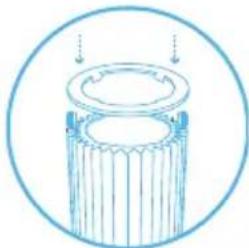
Press the filter shelf ring firmly into position above the main filter. The filter shelf ring protects the top edge of the main filter from damage.
Step 11
Carefully push the top cylinder down while rotating clockwise to secure the lock.
Step 13
Press the touch button for a duration of 7 seconds to reset the filter replacement timer.
This lets the air purifier know that you have changed the filter.
The indicator light flashes for 4 seconds, and then changes from red to white.
natural_image
Simple line drawing of a cylindrical object with a lid and base, enclosed in a circle (no text or symbols)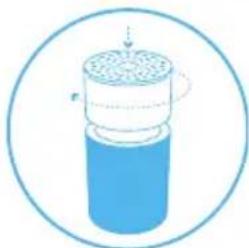
natural_image
Diagram of a cylindrical container with internal structure and arrows indicating motion (no text or symbols)
natural_image
Circular diagram with concentric rings and a central arrow, no text or symbols presentStep 10
Place the pre-filter back onto the unit.
Adjust the pre-filter and the panel to hide the power cord in the back.
Step 12
Plug in the unit.
natural_image
Simple blue cylindrical object with a curved arrow indicating rotation, enclosed in a circle (no text or symbols)
natural_image
Simple line icon of a blue electrical plug inside a circle (no text or symbols)Care and maintenance
General
- Disconnect the air purifier from the power supply before maintenance.
- Do not allow foreign objects to enter the air inlets or air outlets. This may cause electric shock or damage the air purifier.
- Never clean with gasoline, chemical solvents or corrosive materials as these agents may damage the air purifier.
- Make sure the air purifier is completely dry before connecting it to power.
- Do not wash the main filter. The main filter is not washable or reusable.
Cleaning
- Wash the pre-filter according to the instructions on the pre-filter's label or vacuum the pre-filter with a soft brush attachment.
- Wipe the exterior of the air purifier with a soft, clean, damp cloth.
- Clean and check the power cable and power plug for wear or damages.
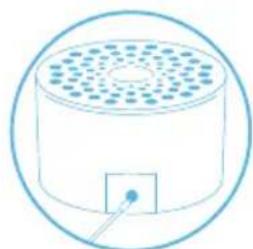
- Clean the sensor when changing the main filter.
Clean the air quality sensor
The inlet for the air quality sensor is located at the back of the air purifier.
Important! Do not use fingers or any unrecommended objects to clean inside the sensor inlet.
Step 1
Turn the unit off and unplug it.
Step 3
Remove the top cylinder from the unit.
Step 5
Gently clean the sensor with a cotton swab, and attach the sensor lid
Step 7
Plug in the unit.

natural_image
Simple line icon of a blue electrical plug inside a circle (no text or symbols)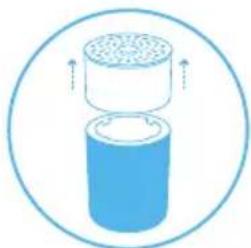
natural_image
Diagram of a cylindrical container with granular top and bottom, enclosed in a circle (no text or symbols)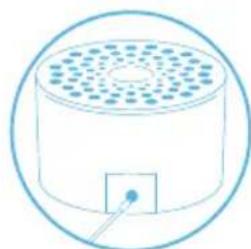
natural_image
Simple line drawing of a cylindrical container with a square outlet and circular top, enclosed in a circle (no text or symbols)
natural_image
Simple blue icon of a plug with three blades, enclosed in a circle (no text or symbols)Step 2
Carefully push the top cylinder down while rotating counterclockwise to unlock.
Step 4
Press the button on the inside of the unit to open the lid covering the sensor and remove the lid.
Step 6
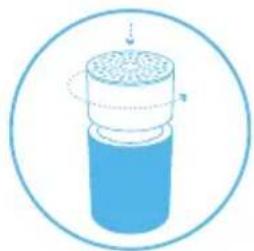
Carefully push the top cylinder down while rotating clockwise to secure the lock.
natural_image
Illustration of a cylindrical container with internal structure and a dotted line indicating rotation (no text or symbols)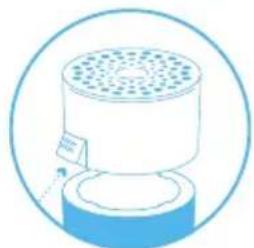
natural_image
Simple line drawing of a cylindrical device with a perforated top and base, enclosed in a circular border (no text or symbols)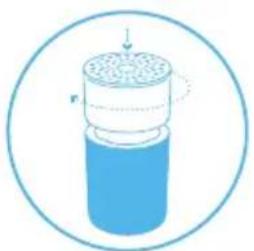
natural_image
Diagram of a cylindrical container with internal structure and directional arrows, enclosed in a circular border (no text or symbols)Disposal and recycling
This air purifier should be recycled as electronic waste and the filter recycled as plastic according to local regulations. If you have questions regarding the disposal of this air purifier, please contact your local authorities or Blueair dealer and ask for the correct method of recycling.
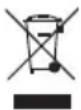
The crossed-out waste bin symbol on the appliance or on its packaging means that at the end of its useful lifespan, the product must be disposed of separately from ordinary household wastes.
Help and support
If you have questions about your product, please visit www.blueair.com or contact your local Blueair retailer.
To contact Blueair for personalized support, please visit www.blueair.com/customer-support
Warranty information
The Blueair Limited Warranty applies only if the air purifier is installed, used and maintained according to the instructions in this manual.
For warranty conditions, please visit www.blueair.com/warranty
Warranty and returns
If you purchased the air purifier at one of our authorized retailers, please contact the same store to request assistance.
Specifications
Blue 3210 Blue 3410
| Input Power, Frequency 100-240VAC | 50/60Hz 100-240VAC 50/60Hz | |
| Power consumption/Rated input power | 2-10W 3-35W | |
| Sound level (min/max) ^1 | 18-48 dB 23-53 dB | |
| Recommended room size ^2 | 17 m ^2 | 36 m ^2 |
| CADR Smoke ^2 | 210 m3/h 425 m3 | ^1 h |
| CADR Dust ^2 | 181 m3/h 425 m3 | ^1 h |
| CADR Pollen ^2 | 163 m3/h 415 m3 | ^1 h |
^1 Sound pressure according to GB/T18801 and GB4214.1
^2 According to ANSI/AHAM AC-1-2019
FR
natural_image
Simple blue line icon of a plug with three leads inside a circle (no text or symbols)Étape 2
natural_image
Simple line drawing of a cylindrical container with a downward arrow inside, enclosed in a circle (no text or symbols)natural_image
Circular diagram with a central power button and concentric rings of circular elements (no text or symbols)natural_image
Three horizontal colored bars (red, orange, cyan) with no text or symbolsPollution
Moyenne
Bonne
Filtres
natural_image
Circular diagram with a red power button and dotted pattern, no text or symbols present.natural_image
Circular diagram with concentric rings and a central arrow, no text or symbols presentnatural_image
Simple line icon of a plug with three leads inside a circle (no text or symbols)Étape 2
natural_image
Diagram of a cylindrical container with a lid and internal structure, enclosed in a circular border (no text or symbols)Étape 3
natural_image
Diagram of a cylindrical container with a perforated top and side arrows indicating flow or movement (no text or symbols)Étape 4
natural_image
Simple blue cylindrical object inside a circle, no text or symbols presentÉtape 5
natural_image
Simple blue circular icon with a globe and bubbles, no text or symbols present.Étape 6
natural_image
Simple blue cylindrical object with internal lines and a loop, enclosed in a circular border (no text or symbols)Étape 7
natural_image
Diagram of a cylindrical container with a dotted top surface and internal structure, enclosed in a circular border (no text or symbols)Étape 8
Branchez l'unité.

natural_image
Simple blue icon of a plug with three leads inside a circle (no text or symbols)natural_image
Circular diagram with a red circular center and dotted pattern, no text or symbols present.Étape 2
natural_image
Simple blue icon of a plug with three leads inside a circle (no text or symbols)Étape 3
natural_image
Diagram of a cylindrical container with a lid and internal structure, enclosed in a circular border (no text or symbols)Étape 4
natural_image
Diagram of a cylindrical container with a perforated top and upward arrows indicating flow or movement (no text or symbols)Étape 5
natural_image
Simple line drawing of a blue cylindrical object with a white top, enclosed in a circle (no text or symbols)Étape 6
natural_image
Simple line drawing of a cylindrical object with internal structure and upward arrows, enclosed in a circle (no text or symbols)Étape 7
natural_image
Simple line drawing of a cylindrical object with vertical supports, enclosed in a circle (no text or symbols)Étape 8
natural_image
Simple line drawing of a cylindrical object with internal vertical lines, enclosed in a circle (no text or symbols)Étape 9
natural_image
Simple line drawing of a cylindrical object with a lid and side ribs, enclosed in a circle (no text or symbols)Étape 10
natural_image
Simple blue cylindrical object with a wire and arrow, enclosed in a circle (no text or symbols)Étape 11
natural_image
Diagram of a cylindrical container with a perforated top and side arm, enclosed in a circular border (no text or symbols)Étape 12
Branchez l'unité.

natural_image
Simple blue icon of a plug inside a circle (no text or symbols)Étape 13
natural_image
Circular diagram with concentric rings and a central downward arrow, no text or symbols present.natural_image
Simple line icon of a plug with three leads inside a circle (no text or symbols)Étape 2
natural_image
Illustration of a cylindrical container with internal structure and directional arrows, enclosed in a circular border (no text or symbols)Étape 3
natural_image
Diagram of a cylindrical container with a top cylindrical component, enclosed in a circular border (no text or symbols)Étape 4
natural_image
Simple line drawing of a cylindrical device with a perforated top and base, enclosed in a circular border (no text or symbols)Étape 5
natural_image
Simple line drawing of a cylindrical device with a perforated top and a small square base, enclosed in a circle (no text or symbols)Étape 6
natural_image
Diagram of a cylindrical container with a perforated top and side arm, enclosed in a circular border (no text or symbols)Étape 7
Branchez l'unité.

natural_image
Simple line drawing of a blue electrical plug inside a circle (no text or symbols)natural_image
Simple line drawing of a cylindrical container with a downward arrow inside, enclosed in a circle (no text or symbols)natural_image
Circular diagram with a central power button and concentric rings of dots (no text or symbols)natural_image
Circular diagram with a red power button and dotted pattern, no text or symbols presentnatural_image
Circular icon with a central downward arrow and concentric circles, no text or symbols present.natural_image
Simple line icon of a plug with three leads inside a circle (no text or symbols)Paso 2
natural_image
Diagram of a cylindrical container with a lid and internal structure, enclosed in a circular border (no text or symbols)Paso 3
natural_image
Diagram of a cylindrical container with internal structure and upward arrows indicating flow or movement (no text or symbols)Paso 4
natural_image
Blue cylindrical object with a side cutout, enclosed in a circular border (no text or symbols)Paso 5
natural_image
Blue circular icon with a bowl of water and bubbles, resembling a stylized sun or bubble (no text or symbols)Paso 6
natural_image
Simple illustration of a blue cylindrical object with a curved line inside, enclosed in a circular border (no text or symbols)Paso 7
natural_image
Illustration of a cylindrical container with a perforated lid and internal structure, enclosed in a circular border (no text or symbols)Paso 8
Enchufar la unidad.

natural_image
Simple blue icon of a plug with three leads inside a circle (no text or symbols)natural_image
Circular diagram with a red power button and dotted pattern, no text or symbols present.Paso 2
natural_image
Diagram of a cylindrical container with internal filter structure, enclosed in a circular border (no text or symbols)Paso 4
natural_image
Diagram of a cylindrical container with a perforated top and upward arrows indicating flow or movement (no text or symbols)Paso 5
natural_image
Simple line drawing of a blue cylindrical object with a curved top and side grooves, enclosed in a circular border (no text or symbols)Paso 6
natural_image
Simple line drawing of a cylindrical object with internal structure and two upward arrows, enclosed in a circle (no text or symbols)Paso 7
natural_image
Simple line drawing of a cylindrical object with vertical supports, enclosed in a circle (no text or symbols)Paso 8
natural_image
Simple line drawing of a cylindrical object with vertical bars, enclosed in a circle (no text or symbols)Paso 9
natural_image
Simple line drawing of a cylindrical object with a lid, enclosed in a circle (no text or symbols)Paso 10
natural_image
Simple blue cylindrical object with a curved line inside, enclosed in a circle (no text or symbols)Paso 11
natural_image
Diagram of a cylindrical container with internal structure and labeled dimensions (no text or symbols)Paso 12
Enchufar la unidad.

natural_image
Blue electrical plug symbol inside a circle (no text or labels)Paso 13
natural_image
Circular icon with a central downward arrow and a small 'Power' button, surrounded by a patterned border (no text or symbols)natural_image
Simple line icon of a blue electrical plug inside a circle (no text or symbols)Paso 2
natural_image
Simple line drawing of a cylindrical object with a perforated top and side arrows, enclosed in a circle (no text or symbols)Paso 3
natural_image
Diagram of a cylindrical container with a perforated top and upward arrows indicating flow or movement (no text or symbols)Paso 4
natural_image
Simple line drawing of a cylindrical device with a perforated top and base, enclosed in a circular border (no text or symbols)Paso 5
natural_image
Simple line drawing of a cylindrical device with a perforated top and a small square base, enclosed in a circle (no text or symbols)Paso 6
natural_image
Simple line drawing of a cylindrical container with a top and side, no text or symbols present.Paso 7
Enchufar la unidad.

natural_image
Simple blue icon of a plug with three leads inside a circle (no text or symbols)natural_image
Simple blue icon of a plug with three leads inside a circle (no text or symbols)Punto 2
natural_image
Simple line drawing of a cylindrical container with a downward arrow inside, enclosed in a circle (no text or symbols)natural_image
Circular diagram with a central power button and evenly spaced circular elements (no text or symbols)natural_image
Three horizontal colored bars (red, orange, cyan) with no text or symbolsInquinata
Moderata
Buona
Filtri
natural_image
Circular diagram with a red power button and dotted pattern, no text or symbols presentnatural_image
Circular diagram with concentric rings and a central downward arrow, no text or symbols present.natural_image
Simple blue icon of a plug with three leads inside a circle (no text or symbols)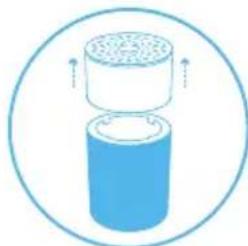
natural_image
Diagram of a cylindrical container with a top container and side outlet, enclosed in a circle (no text or symbols)
natural_image
Simple blue circular icon with a bowl and water droplet inside, no text or symbols present.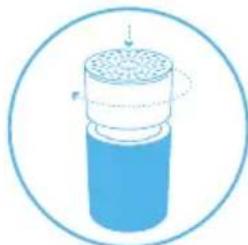
natural_image
Diagram of a cylindrical container with internal structure and a dotted line indicating rotation (no text or symbols)Punto 2
natural_image
Diagram of a cylindrical container with a lid and internal structure, enclosed in a circle (no text or symbols)
natural_image
Blue cylindrical object enclosed in a circular border, no text or symbols present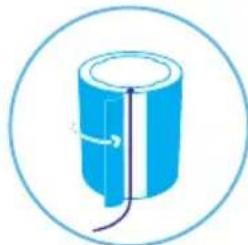
natural_image
Simple line drawing of a cylindrical object with internal lines and arrows, enclosed in a circle (no text or symbols)
natural_image
Simple line icon of a plug with three leads inside a circle (no text or symbols)natural_image
Circular diagram with a red power button and dotted pattern, no text or symbols present.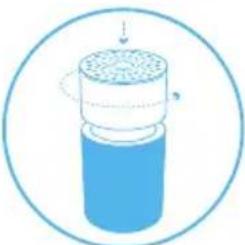
natural_image
Diagram of a cylindrical container with a perforated lid and internal structure, enclosed in a circle (no text or symbols)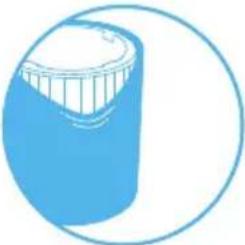
natural_image
Simple line drawing of a blue cylindrical object with a white top, enclosed in a circular border (no text or symbols)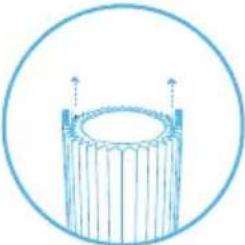
natural_image
Simple line drawing of a cylindrical object with vertical supports and a circular outline (no text or symbols)Punto 2
natural_image
Simple blue icon of a plug with three leads inside a circle (no text or symbols)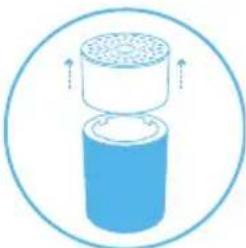
natural_image
Diagram of a cylindrical device with a perforated top and base, enclosed in a circle (no text or symbols)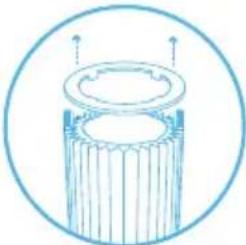
natural_image
Simple line drawing of a cylindrical object with a top and side supports, enclosed in a circle (no text or symbols)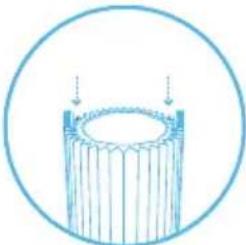
natural_image
Simple line drawing of a cylindrical object with vertical lines, enclosed in a circle (no text or symbols)Punto 9
natural_image
Simple line drawing of a cylindrical object with a lid and base, enclosed in a circle (no text or symbols)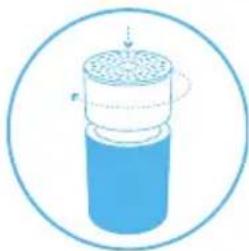
natural_image
Illustration of a cylindrical container with internal structure and arrows indicating flow or movement (no text or symbols)
natural_image
Circular icon with a central downward arrow and a power button, surrounded by a patterned border (no text or symbols)Punto 10
natural_image
Simple blue cylindrical object with a curved arrow indicating rotation, enclosed in a circle (no text or symbols)
natural_image
Simple blue icon of a plug with three leads inside a circle (no text or symbols)Cura e manutenzione
Procedure generali
natural_image
Simple line icon of a blue electrical plug inside a circle (no text or symbols)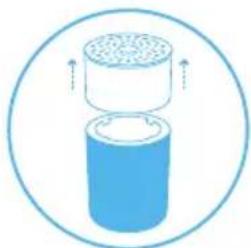
natural_image
Diagram of a cylindrical container with granular top and bottom, enclosed in a circle (no text or symbols)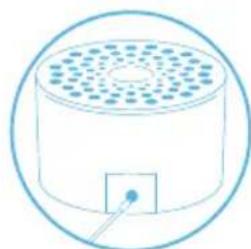
natural_image
Simple line drawing of a cylindrical container with a square outlet and circular top, enclosed in a circle (no text or symbols)
natural_image
Simple blue icon of a plug with three blades, enclosed in a circle (no text or symbols)Punto 2
natural_image
Illustration of a cylindrical container with internal structure and a dotted line indicating rotation (no text or symbols)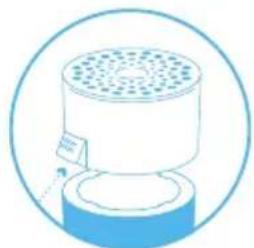
natural_image
Simple line drawing of a cylindrical device with a perforated top and base, enclosed in a circular border (no text or symbols)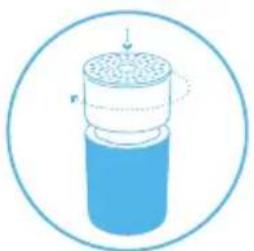
natural_image
Diagram of a cylindrical container with internal structure and directional arrows, enclosed in a circular border (no text or symbols)natural_image
Simple line drawing of a cylindrical container with a downward arrow inside, no text or symbols present.natural_image
Circular diagram with a central power button and evenly spaced circular elements (no text or symbols)natural_image
Three horizontal colored bars (red, orange, cyan) with no text or symbolsVerschmutzt
Moderat
Gut
Filter
natural_image
Circular diagram with concentric rings and a central power button, no text or symbols presentnatural_image
Circular diagram with concentric rings and a central downward arrow, no text or symbols present.natural_image
Simple blue icon of a plug with three leads inside a circle (no text or symbols)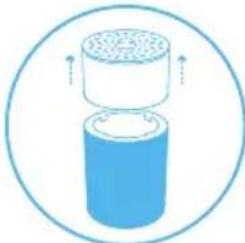
natural_image
Diagram of a cylindrical container with internal structure and upward arrows indicating flow or movement (no text or symbols)
natural_image
Simple blue circular icon with a bowl and bubbles, no text or symbols present.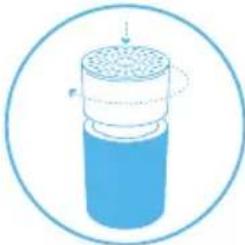
natural_image
Diagram of a cylindrical container with internal structure and flow arrows, enclosed in a circular border (no text or symbols)Schritt 2
natural_image
Illustration of a cylindrical container with granular top and side arrows indicating flow or movement (no text or symbols)
natural_image
Blue cylindrical object enclosed in a circular border, no text or symbols present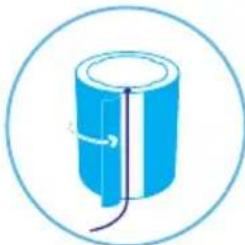
natural_image
Simple blue cylindrical object with a wire and curved line inside, enclosed in a circle (no text or symbols)
natural_image
Simple blue icon of a plug with three blades, enclosed in a circle (no text or symbols)natural_image
Circular diagram with a red power button and dotted pattern, no text or symbols present.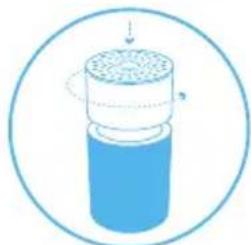
natural_image
Diagram of a cylindrical container with a top layer and internal structure, enclosed in a circle (no text or symbols)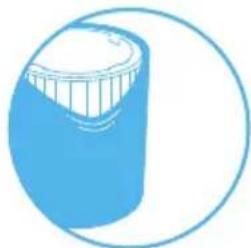
natural_image
Simple line drawing of a blue cylindrical object with a white top, enclosed in a circle (no text or symbols)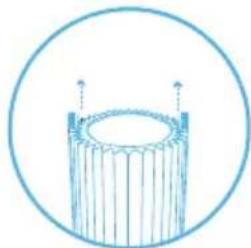
natural_image
Simple line drawing of a cylindrical object with vertical supports, enclosed in a circle (no text or symbols)Schritt 2
natural_image
Simple line drawing of a blue electrical plug with three leads inside a circle (no text or symbols)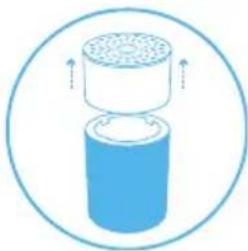
natural_image
Diagram of a cylindrical container with a top container and upward arrows indicating flow or movement (no text or symbols)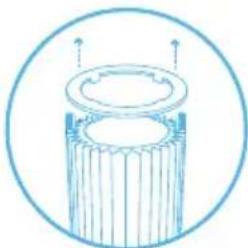
natural_image
Simple line drawing of a cylindrical mechanical component with internal grooves and two upward arrows, enclosed in a circle (no text or symbols)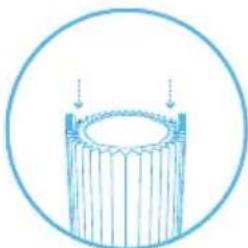
natural_image
Simple line drawing of a cylindrical object with vertical lines, enclosed in a circle (no text or symbols)Schritt 9
natural_image
Simple line drawing of a cylindrical object with a lid and base, enclosed in a circle (no text or symbols)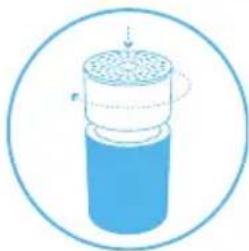
natural_image
Illustration of a cylindrical container with internal porous structure, enclosed in a circular border (no text or symbols)
natural_image
Circular icon with a central downward arrow and a power button, surrounded by a patterned border (no text or symbols)Schritt 10
natural_image
Simple blue cylindrical object with a curved arrow indicating rotation, enclosed in a circle (no text or symbols)
natural_image
Simple blue icon of a plug with three leads inside a circle (no text or symbols)Pflege und Wartung
Allgemeines
natural_image
Simple line icon of a blue electrical plug inside a circle (no text or symbols)Schritt 2
natural_image
Diagram of a cylindrical container with granular top and bottom, enclosed in a circle (no text or symbols)Schritt 4
natural_image
Simple line drawing of a cylindrical container with a square base and circular top, enclosed in a circle (no text or symbols)Schritt 6
natural_image
Simple blue icon of a plug with three blades, enclosed in a circle (no text or symbols)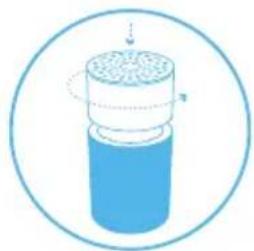
natural_image
Illustration of a cylindrical container with internal structure and a dotted line indicating rotation (no text or symbols)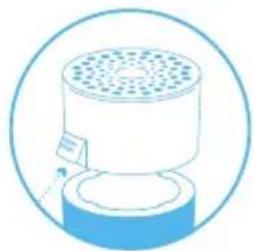
natural_image
Simple line drawing of a cylindrical device with a perforated top and base, enclosed in a circular border (no text or symbols)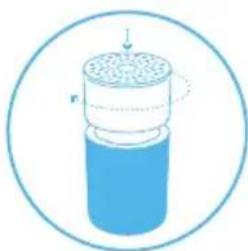
natural_image
Diagram of a cylindrical container with internal structure and labeled arrows (no text or symbols)natural_image
Simple line drawing of a cylindrical container with a downward arrow inside, no text or symbols present.natural_image
Three horizontal colored bars (red, orange, cyan) with no text or symbolsVerontreinigd
Matig
Goed
Filters
natural_image
Circular diagram with concentric rings and a central red power button, no text or symbols present.natural_image
Circular diagram with concentric rings and a central downward arrow, no text or symbols present.natural_image
Simple blue icon of a plug with three leads inside a circle (no text or symbols)Stap 2
natural_image
Diagram of a cylindrical container with internal structure and directional arrows, enclosed in a circular border (no text or symbols)Stap 3
natural_image
Diagram of a cylindrical container with internal granular structure, enclosed in a circular border (no text or symbols)Stap 4
natural_image
Blue cylindrical object enclosed in a circular border, no text or symbols presentStap 5
natural_image
Simple blue circular icon with a bowl and bubbles, no text or symbols present.Stap 6
natural_image
Simple line drawing of a blue cylindrical object with internal lines and a curved arrow, enclosed in a circle (no text or symbols)Stap 7
natural_image
Diagram of a cylindrical container with internal structure and a dotted line indicating rotation (no text or symbols)Stap 8
natural_image
Simple blue icon of a plug with three leads inside a circle (no text or symbols)natural_image
Circular diagram with a red power button and dotted pattern, no text or symbols present.Stap 3
natural_image
Diagram of a cylindrical container with a top layer and internal structure, enclosed in a circle (no text or symbols)Stap 5
natural_image
Simple line drawing of a blue cylindrical object with a white top, enclosed in a circle (no text or symbols)Stap 7
natural_image
Simple line drawing of a cylindrical object with vertical supports, enclosed in a circle (no text or symbols)Stap 2
natural_image
Simple line drawing of a blue electrical plug with three leads inside a circle (no text or symbols)Stap 4
natural_image
Diagram of a cylindrical container with a top container and upward arrows indicating flow or movement (no text or symbols)Stap 6
natural_image
Simple line drawing of a cylindrical mechanical component with internal grooves and two upward arrows, enclosed in a circle (no text or symbols)Stap 8
natural_image
Simple line drawing of a cylindrical object with vertical lines, enclosed in a circle (no text or symbols)Stap 9
natural_image
Simple line drawing of a cylindrical object with a lid and side supports, enclosed in a circle (no text or symbols)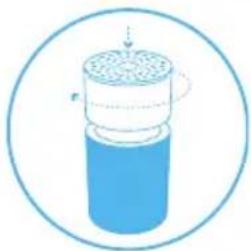
natural_image
Diagram of a cylindrical container with internal structure and arrows indicating flow or movement (no text or symbols)
natural_image
Circular icon with a central downward arrow and a power symbol, surrounded by concentric circles (no text or labels)Stap 10
natural_image
Simple blue cylindrical object with a curved line inside, enclosed in a circle (no text or symbols)
natural_image
Simple blue icon of a plug with three leads inside a circle (no text or symbols)Onderhoud
Algemeen
natural_image
Simple line icon of a blue electrical plug inside a circle (no text or symbols)Stap 2
natural_image
Illustration of a cylindrical container with internal structure and a dotted line indicating rotation (no text or symbols)Stap 3
natural_image
Diagram of a cylindrical container with granular top and bottom, enclosed in a circle (no text or symbols)Stap 4
natural_image
Simple line drawing of a cylindrical device with a perforated top and base, enclosed in a circular border (no text or symbols)Stap 5
natural_image
Simple line drawing of a cylindrical container with a square outlet and circular top, enclosed in a circle (no text or symbols)Stap 6
natural_image
Diagram of a cylindrical container with internal structure and directional arrows, enclosed in a circular border (no text or symbols)Stap 7
natural_image
Simple blue icon of a plug with three blades, enclosed in a circle (no text or symbols)natural_image
Simple blue icon of a plug with three leads inside a circle (no text or symbols)Krok 2
natural_image
Simple line drawing of a cylindrical container with a downward arrow inside, enclosed in a circle (no text or symbols)natural_image
Circular diagram with a central power button and concentric rings of dots (no text or symbols)natural_image
Three horizontal colored bars (red, orange, cyan) with no text or symbolsZanieczyszczone
Umiarkowany
Dobry
Filtry
natural_image
Circular diagram with concentric rings and a central red power button, no text or symbols present.natural_image
Circular icon with concentric rings and a central downward arrow, no text or symbols present.natural_image
Simple blue icon of a plug with three leads inside a circle (no text or symbols)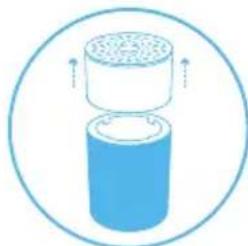
natural_image
Diagram of a cylindrical container with a top container and side outlet, enclosed in a circle (no text or symbols)
natural_image
Simple blue circular icon with a bowl and water droplet inside, no text or symbols present.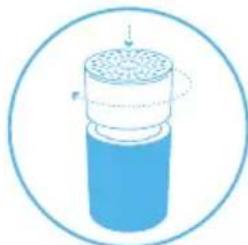
natural_image
Diagram of a cylindrical container with internal structure and directional arrows, enclosed in a circular border (no text or symbols)Krok 2
natural_image
Diagram of a cylindrical container with a lid and internal structure, enclosed in a circle (no text or symbols)
natural_image
Blue cylindrical object enclosed in a circular border, no text or symbols present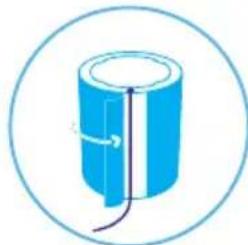
natural_image
Simple line drawing of a cylindrical object with internal lines and arrows, enclosed in a circle (no text or symbols)
natural_image
Simple line icon of a plug with three leads inside a circle (no text or symbols)natural_image
Circular diagram with a red power button and dotted pattern, no text or symbols present.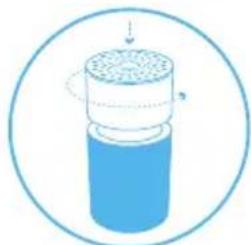
natural_image
Diagram of a cylindrical container with a top layer and internal structure, enclosed in a circle (no text or symbols)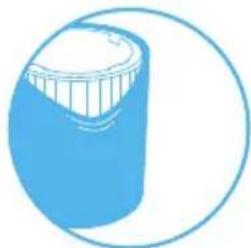
natural_image
Simple line drawing of a blue cylindrical object with a white top, enclosed in a circle (no text or symbols)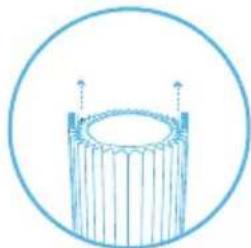
natural_image
Simple line drawing of a cylindrical object with vertical supports, enclosed in a circle (no text or symbols)Krok 2
natural_image
Simple line drawing of a blue electrical plug with three leads inside a circle (no text or symbols)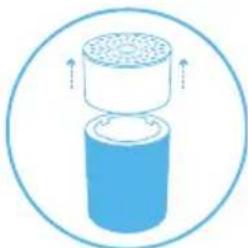
natural_image
Diagram of a cylindrical container with a top container and upward arrows indicating flow or movement (no text or symbols)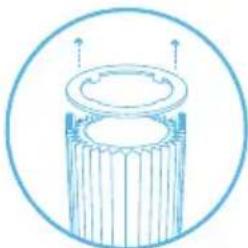
natural_image
Simple line drawing of a cylindrical mechanical component with internal grooves and mounting holes, enclosed in a circular border (no text or symbols)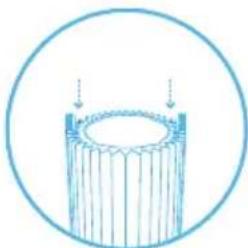
natural_image
Simple line drawing of a cylindrical object with vertical lines, enclosed in a circle (no text or symbols)Krok 9
natural_image
Simple line drawing of a cylindrical object with a lid and base, enclosed in a circle (no text or symbols)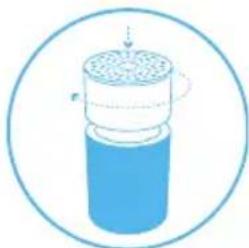
natural_image
Illustration of a cylindrical container with internal structure and arrows indicating flow or movement (no text or symbols)Krok 10
natural_image
Simple blue cylindrical object with a curved arrow indicating rotation or force, enclosed in a circle (no text or symbols)
natural_image
Simple line icon of a blue electrical plug inside a circle (no text or symbols)Krok 13
natural_image
Circular icon with a central downward arrow and a small 'P' symbol, surrounded by concentric circles (no text or numbers)natural_image
Simple line icon of a blue electrical plug inside a circle (no text or symbols)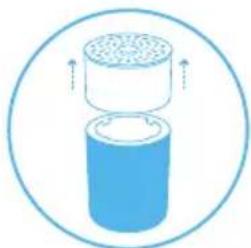
natural_image
Diagram of a cylindrical container with granular top and bottom, enclosed in a circle (no text or symbols)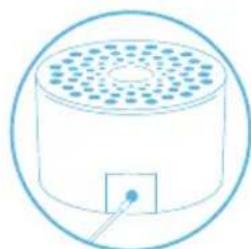
natural_image
Simple line drawing of a cylindrical container with a square outlet and circular top, enclosed in a circle (no text or symbols)
natural_image
Simple blue icon of a plug with three blades, enclosed in a circle (no text or symbols)Krok 2
natural_image
Illustration of a cylindrical container with internal structure and a dotted line indicating rotation (no text or symbols)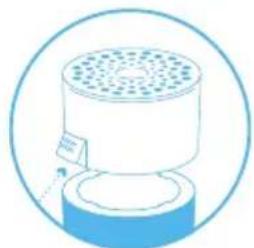
natural_image
Simple line drawing of a cylindrical device with a perforated top and base, enclosed in a circular border (no text or symbols)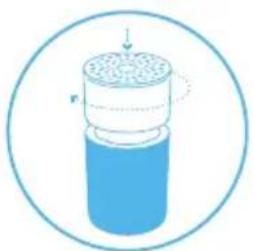
natural_image
Diagram of a cylindrical container with internal structure and directional arrows, enclosed in a circular border (no text or symbols)natural_image
Simple line drawing of a cylindrical container with a downward arrow inside, enclosed in a circle (no text or symbols)Komande za uključivanje, isključivanje i upravljanje brzinom ventilatora
Dostupna su naredna podešavanja: Automatski, noćni i dnevni režim rada i isključivanje uređaja.
Svetlosni indikatori na tasteru označavaju izabranu brzinu ventilatora. Svetlosni indikatori će automatski u potpunosti potamneti 5 sekundi nakon pritiska na taster čime se označava isključivanje režima podešavanja brzine ventilatora. Pritisnite taster jedanput da biste ponovo uključili režim podešavanja uključivanja i isključivanja uređaja i brzine ventilatora. Svetlosni indikatori će se ponovo uključiti i možete da podesite brzinu ventilatora.
Automatsko čuvanje prethodnog podešavanja
natural_image
Circular diagram with a central power button and evenly spaced circular elements (no text or symbols)Pritisnite pet puta da biste isključili uređaj.
Informacije o kvalitetu vazduha
natural_image
Three horizontal colored bars (red, orange, cyan) with no text or symbolsLoš (zagađen)
Srednji
Dobar
Filteri
natural_image
Circular diagram with a red power button and dotted pattern, no text or symbols presentIndikator za zamenu filtera
Držite taster pritisnutim u trajanju od 7 sekundi da biste poništili stanje indikatora za zamenu filtera.

natural_image
Circular diagram with concentric rings and a central downward arrow, no text or symbols present.Čišćenje i zamena predfiltera
Redovno čistite predfilter da biste ostvarili najbolje rezultate u radu uređaja. Usisajte spoljašnjost predfiltera od tkanine priključkom sa mekanom četkom kako biste uklonili nataloženu prašinu. Ukoliko je neophodno temeljnije čišćenje predfiltera, operite ga u mašini za veš koristeći program niske temperature za osetljive tkanine.
Važno! Pritisnite zajedno čičak trake pre pranja u mašini za veš.
Korak 1
natural_image
Simple blue icon of a plug with three leads inside a circle (no text or symbols)Korak 3
Uklonite gornji cilindar sa uređaja.
natural_image
Diagram of a cylindrical container with a top container and upward arrows indicating flow or movement (no text or symbols)Korak 5
Operite predfilter u mašini za veš u skladu sa uputstvima sa nalepnice na predfilteru.

natural_image
Simple blue circular icon with a bowl and water droplet inside, no text or symbols present.Korak 7
Pažljivo gurnite gornji cilindar nadole dok ga istovremeno rotirate u smeru kretanja kazaljki na satu da biste ga učvrstili.
natural_image
Diagram of a cylindrical container with internal structure and a dotted line indicating rotation (no text or symbols)Korak 2
Pažljivo gurnite gornji cilindar nadole dok ga istovremeno rotirate u smeru suprotnom od kretanja kazaljki na satu da biste ga otpustili.
Korak 4
Otvorite odeljak predfiltera i uklonite predfilter.
Korak 6
natural_image
Diagram of a cylindrical container with internal structure and arrows indicating flow or movement (no text or symbols)
natural_image
Blue cylindrical object enclosed in a circular border, no text or symbols present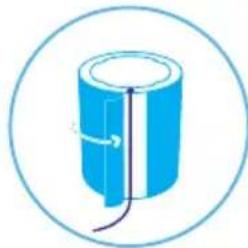
natural_image
Simple line drawing of a blue cylindrical object with a curved line inside, enclosed in a circle (no text or symbols)
natural_image
Simple blue icon of a plug with three wires, enclosed in a circle (no text or symbols)Zamena glavnog filtera
natural_image
Circular diagram with a red power button and dotted pattern, no text or symbols present.Korak 3
Pažljivo gurnite gornji cilindar nadole dok ga istovremeno rotirate u smeru suprotnom od kretanja kazaljki na satu da biste ga otpustili.
natural_image
Diagram of a cylindrical container with a perforated lid and internal structure, enclosed in a circular border (no text or symbols)Korak 5
Otvorite odeljak predfiltera i uklonite predfilter.
natural_image
Simple line drawing of a blue cylindrical object with a white top, enclosed in a circle (no text or symbols)Korak 7
Uhvatite držače filtera i povucite ih nagore kako biste uklonili glavni filter iz unutrašnjosti uređaja.
natural_image
Simple line drawing of a cylindrical object with vertical supports, enclosed in a circle (no text or symbols)Korak 2
natural_image
Simple line drawing of a blue electrical plug with three leads, enclosed in a circle (no text or symbols)Korak 4
Uklonite gornji cilindar sa uređaja.
natural_image
Diagram of a cylindrical container with a lid and top filter, enclosed in a circle (no text or symbols)Korak 6
Pažljivo uklonite prsten za filter.
natural_image
Simple line drawing of a cylindrical mechanical component with internal grooves and two upward arrows, enclosed in a circle (no text or symbols)Korak 8
Postavite novi glavni filter u unutrašnjost uređaja. Držači filtera treba da budu okrenuti nagore.
natural_image
Simple line drawing of a cylindrical object with vertical lines, enclosed in a circle (no text or symbols)Korak 9
natural_image
Simple line drawing of a cylindrical object with a lid and base, enclosed in a circle (no text or symbols)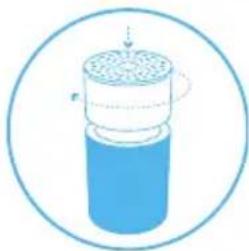
natural_image
Illustration of a cylindrical container with internal porous structure, enclosed in a circular border (no text or symbols)
natural_image
Circular icon with a central downward arrow and a power symbol inside, surrounded by a patterned border (no text or numbers)Korak 10
Ponovo postavite predfilter u uređaj.
natural_image
Simple blue cylindrical object with a curved arrow indicating rotation, enclosed in a circle (no text or symbols)
natural_image
Simple blue icon of a plug with three leads inside a circle (no text or symbols)Nega i održavanje
Opšte stavke
natural_image
Simple line icon of a blue electrical plug inside a circle (no text or symbols)Korak 2
Pažljivo gurnite gornji cilindar nadole dok ga istovremeno rotirate u smeru suprotnom od kretanja kazaljki na satu da biste ga otpustili.
natural_image
Diagram of a cylindrical container with granular top and bottom, enclosed in a circle (no text or symbols)Korak 4
Pritisnite taster u unutrašnjosti jedinice da biste otvorili poklopac za senzor i uklonite poklopac.
natural_image
Simple line drawing of a cylindrical container with a square base and circular top, enclosed in a circle (no text or symbols)Korak 6
Pažljivo gurnite gornji cilindar nadole dok ga istovremeno rotirate u smeru kretanja kazaljki na satu da biste ga učvrstili.

natural_image
Simple blue icon of a plug with three blades, enclosed in a circle (no text or symbols)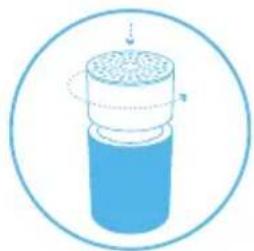
natural_image
Illustration of a cylindrical container with internal structure and a dotted line indicating rotation (no text or symbols)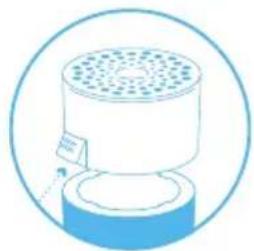
natural_image
Simple line drawing of a cylindrical device with a perforated top and base, enclosed in a circular border (no text or symbols)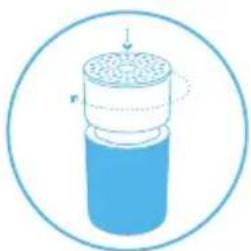
natural_image
Diagram of a cylindrical container with internal structure and directional arrows, enclosed in a circular border (no text or symbols)Odlaganje i recikliranje
natural_image
Simple line drawing of a cylindrical container with a downward arrow inside, enclosed in a circle (no text or symbols)natural_image
Circular diagram with a red power button and dotted pattern, no text or symbols presentnatural_image
Circular diagram with concentric rings and a central arrow, no text or symbols presentnatural_image
Simple blue icon of a plug with three leads inside a circle (no text or symbols)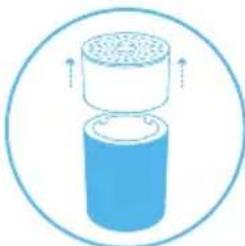
natural_image
Diagram of a cylindrical device with a perforated top and bottom, enclosed in a circle (no text or symbols)
natural_image
Simple blue circular icon with a bowl and bubbles, no text or symbols present.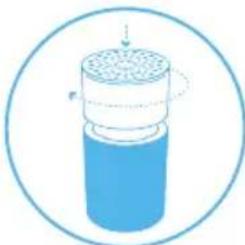
natural_image
Diagram of a cylindrical container with internal structure and arrows indicating flow or movement (no text or symbols)2. Adim
natural_image
Diagram of a cylindrical container with a perforated top and side arrows indicating flow or movement (no text or symbols)
natural_image
Blue cylindrical object with a vertical gap, enclosed in a circular border (no text or symbols)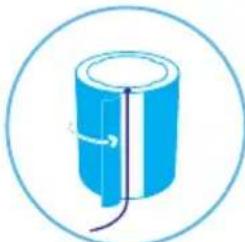
natural_image
Simple blue cylindrical object with internal lines and a loop, enclosed in a circular border (no text or symbols)
natural_image
Simple line drawing of a plug with three wires, enclosed in a circle (no text or symbols)natural_image
Circular diagram with a red power button and dotted pattern, no text or symbols present.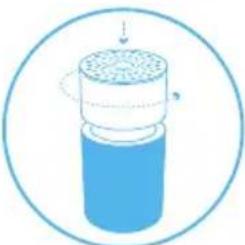
natural_image
Diagram of a cylindrical container with internal structure and circular motion arrows, enclosed in a circle (no text or symbols)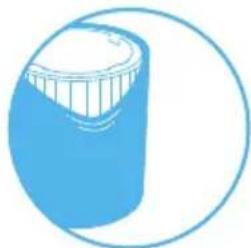
natural_image
Simple line drawing of a blue cylindrical object with a white top, enclosed in a circle (no text or symbols)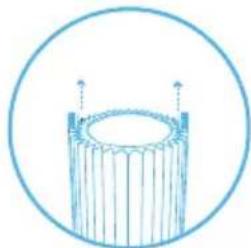
natural_image
Simple line drawing of a cylindrical object with vertical supports, enclosed in a circle (no text or symbols)2. Adim
natural_image
Simple line drawing of a blue electrical plug with three leads inside a circle (no text or symbols)
natural_image
Diagram of a cylindrical container with a lid and top filter, enclosed in a circle (no text or symbols)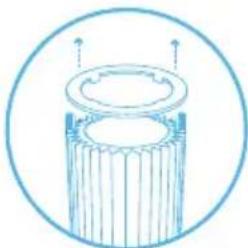
natural_image
Simple line drawing of a cylindrical mechanical component with internal grooves and two upward arrows, enclosed in a circle (no text or symbols)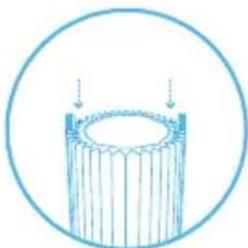
natural_image
Simple line drawing of a cylindrical object with vertical lines, enclosed in a circle (no text or symbols)9. Adim
natural_image
Simple line drawing of a cylindrical mechanical component with a lid and base, enclosed in a circular border (no text or symbols)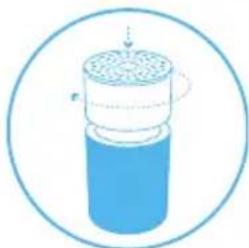
natural_image
Diagram of a cylindrical container with internal structure and arrows indicating motion (no text or symbols)
natural_image
Circular diagram with concentric rings and a central arrow, no text or symbols present10. Adim
natural_image
Simple blue cylindrical object with a curved line inside, enclosed in a circle (no text or symbols)
natural_image
Simple blue icon of a plug with three leads inside a circle (no text or symbols)Bakım ve onarım
Genel
natural_image
Simple line icon of a blue electrical plug inside a circle (no text or symbols)2. Adım
natural_image
Illustration of a cylindrical container with internal structure and a dotted line indicating rotation (no text or symbols)3. Adim
natural_image
Diagram of a cylindrical container with granular top and bottom, enclosed in a circle (no text or symbols)4. Adim
natural_image
Simple line drawing of a cylindrical device with a perforated top and base, enclosed in a circular border (no text or symbols)5. Adim
natural_image
Simple line drawing of a cylindrical container with a square base and circular top, enclosed in a circle (no text or symbols)6. Adim
natural_image
Diagram of a cylindrical container with internal structure and directional arrows, enclosed in a circular border (no text or symbols)7. Adim
Üniteyi fişe takın.

natural_image
Simple blue icon of a plug with three leads inside a circle (no text or symbols)natural_image
Simple blue icon of a plug with three leads inside a circle (no text or symbols)Step 2
natural_image
Simple line drawing of a cylindrical container with a downward arrow inside, enclosed in a circle (no text or symbols)natural_image
Circular diagram with a central power button and concentric rings of dots (no text or symbols)natural_image
Three horizontal colored bars (red, orange, cyan) with no text or symbolsFörorenad
Måttlig
Bra
Filter
natural_image
Circular diagram with concentric rings and a central power button, no text or symbols presentnatural_image
Circular diagram with concentric rings and a central arrow, no text or symbols presentnatural_image
Simple blue icon of a plug with three leads inside a circle (no text or symbols)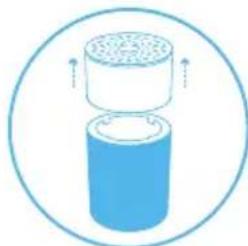
natural_image
Diagram of a cylindrical container with a top container and upward arrows indicating flow or movement (no text or symbols)
natural_image
Simple blue circular icon with a bowl and water droplet inside, no text or symbols present.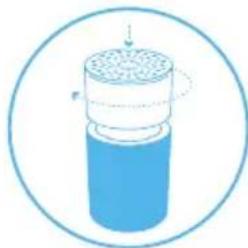
natural_image
Diagram of a cylindrical container with internal structure and a dotted line indicating rotation (no text or symbols)Step 2
natural_image
Diagram of a cylindrical container with internal structure and arrows indicating flow or movement (no text or symbols)
natural_image
Blue cylindrical object enclosed in a circular border, no text or symbols present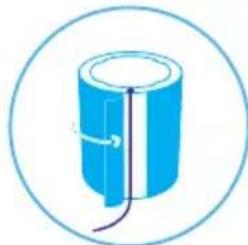
natural_image
Simple line drawing of a cylindrical object with internal lines and arrows, enclosed in a circle (no text or symbols)
natural_image
Simple blue icon of a plug with three wires, enclosed in a circle (no text or symbols)Byta huvudfilter
natural_image
Circular diagram with a red power button and dotted pattern, no text or symbols present.Step 3
natural_image
Diagram of a cylindrical container with a top layer and internal structure, enclosed in a circle (no text or symbols)Step 5
natural_image
Simple line drawing of a blue cylindrical object with a white top, enclosed in a circle (no text or symbols)Step 7
natural_image
Simple line drawing of a cylindrical object with vertical supports, enclosed in a circle (no text or symbols)Step 2
natural_image
Simple line drawing of a blue electrical plug with three leads, enclosed in a circle (no text or symbols)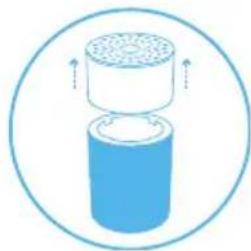
natural_image
Diagram of a cylindrical container with a top container and upward arrows indicating flow or movement (no text or symbols)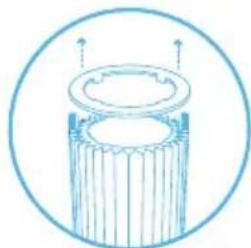
natural_image
Simple line drawing of a cylindrical object with internal structure, enclosed in a circular border (no text or symbols)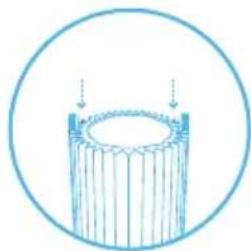
natural_image
Simple line drawing of a cylindrical object with vertical lines, enclosed in a circle (no text or symbols)Step 9
natural_image
Simple line drawing of a cylindrical object with a lid and base, enclosed in a circle (no text or symbols)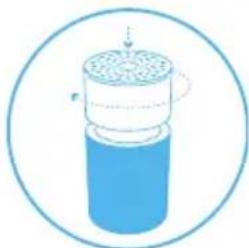
natural_image
Diagram of a cylindrical container with internal structure and arrows indicating motion (no text or symbols)
natural_image
Circular diagram with concentric rings and a central arrow, no text or symbols presentStep 10
natural_image
Simple blue cylindrical object with a curved line inside, enclosed in a circle (no text or symbols)
natural_image
Simple blue icon of a plug with three leads inside a circle (no text or symbols)natural_image
Simple line icon of a blue electrical plug inside a circle (no text or symbols)Step 2
natural_image
Illustration of a cylindrical container with internal structure and a dotted line indicating rotation (no text or symbols)Step 3
natural_image
Diagram of a cylindrical container with granular top and bottom, enclosed in a circle (no text or symbols)Step 4
natural_image
Simple line drawing of a cylindrical device with a perforated top and base, enclosed in a circular border (no text or symbols)Step 5
natural_image
Simple line drawing of a cylindrical container with a square base and circular top, enclosed in a circle (no text or symbols)Step 6
natural_image
Diagram of a cylindrical container with internal structure and directional arrows, enclosed in a circular border (no text or symbols)Step 7
Koppla in enheten.

natural_image
Simple blue icon of a plug with three leads inside a circle (no text or symbols)natural_image
Simple line drawing of a cylindrical container with a downward arrow inside, enclosed in a circle (no text or symbols)natural_image
Circular diagram with a central power button and evenly spaced circular elements (no text or symbols)natural_image
Three horizontal colored bars (red, orange, cyan) with no text or symbolsForurenset
Moderat
Bra
Filtre
natural_image
Circular diagram with concentric rings and a central power button, no text or symbols presentnatural_image
Circular diagram with concentric rings and a central arrow, no text or symbols presentnatural_image
Simple blue icon of a plug with three leads inside a circle (no text or symbols)Trinn 3
natural_image
Diagram of a cylindrical container with a top container and upward arrows indicating flow or movement (no text or symbols)Trinn 5
Vask forfilteret i vaskemaskinen i henhold til instruksjonene på etiketten på forfilteret.

natural_image
Simple blue circular icon with a bowl of water inside, no text or symbols present.Trinn 7
natural_image
Diagram of a cylindrical container with internal structure and directional arrows, enclosed in a circle (no text or symbols)Trinn 2
natural_image
Diagram of a cylindrical container with a perforated lid and internal structure, enclosed in a circular border (no text or symbols)
natural_image
Blue cylindrical object enclosed in a circular border, no text or symbols present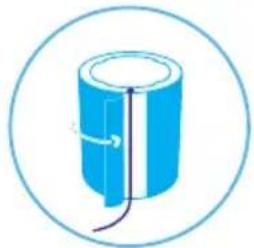
natural_image
Simple line drawing of a blue cylindrical object with a wire, enclosed in a circle (no text or symbols)
natural_image
Simple blue icon of a plug with three pins inside a circle (no text or symbols)Bytte hovedfilteret
Når du skifter filteret, må du støvsuge bort eventuelt støv som har samlet seg inne i enheten.
natural_image
Circular diagram with a red power button and dotted pattern, no text or symbols present.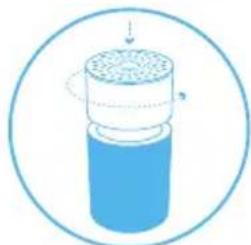
natural_image
Diagram of a cylindrical container with a top layer and internal structure, enclosed in a circle (no text or symbols)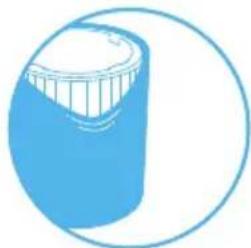
natural_image
Simple line drawing of a blue cylindrical object with a white top, enclosed in a circle (no text or symbols)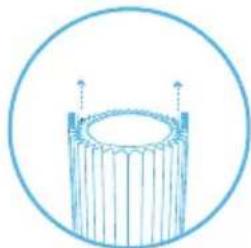
natural_image
Simple line drawing of a cylindrical object with vertical supports, enclosed in a circle (no text or symbols)Trinn 2
natural_image
Simple line drawing of a blue electrical plug with three leads, enclosed in a circle (no text or symbols)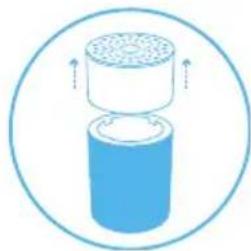
natural_image
Diagram of a cylindrical container with a top container and upward arrows indicating flow or movement (no text or symbols)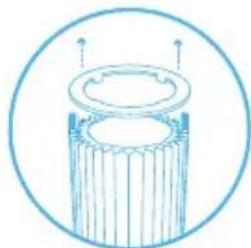
natural_image
Simple line drawing of a cylindrical object with internal structure, enclosed in a circular border (no text or symbols)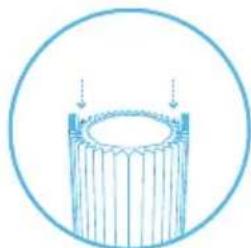
natural_image
Simple line drawing of a cylindrical object with vertical lines, enclosed in a circle (no text or symbols)Trinn 9
Trykk filterdekkringen godt på plass over hovedfilteret. Filterdekkringen beskytter den øverste kanten av hovedfilteret mot skade.
Trinn 11
natural_image
Simple line drawing of a cylindrical object with a lid and base, enclosed in a circle (no text or symbols)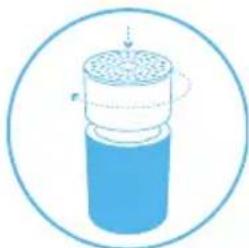
natural_image
Illustration of a cylindrical container with internal structure and arrows indicating flow or movement (no text or symbols)
natural_image
Circular icon with a central downward arrow and a small 'P' symbol, surrounded by a patterned border (no text or numbers)Trinn 10
natural_image
Simple blue cylindrical object with a curved arrow indicating rotation or force, enclosed in a circle (no text or symbols)
natural_image
Simple line icon of a blue electrical plug inside a circle (no text or symbols)natural_image
Simple line icon of a blue electrical plug inside a circle (no text or symbols)Trinn 2
natural_image
Illustration of a cylindrical container with internal structure and a dotted line indicating rotation (no text or symbols)Trinn 3
natural_image
Diagram of a cylindrical container with granular top and bottom, enclosed in a circle (no text or symbols)Trinn 4
natural_image
Simple line drawing of a cylindrical device with a perforated top and base, enclosed in a circular border (no text or symbols)Trinn 5
natural_image
Simple line drawing of a cylindrical container with a square base and circular top, enclosed in a circle (no text or symbols)Trinn 6
natural_image
Diagram of a cylindrical container with internal structure and directional arrows, enclosed in a circular border (no text or symbols)Trinn 7
Sett inn støpselet.

natural_image
Simple blue icon of a plug with three leads inside a circle (no text or symbols)natural_image
Simple line drawing of a cylindrical container with a downward arrow inside, no text or symbols present.natural_image
Circular diagram with a central power button and concentric rings of dots (no text or symbols)natural_image
Three horizontal colored bars (red, orange, cyan) with no text or symbolsHuono
Kohtuullinen
Hyvä
Suodattimet
natural_image
Circular diagram with concentric rings and a central power button, no text or symbols presentnatural_image
Circular icon with concentric rings and a central downward arrow, no text or symbols present.natural_image
Simple blue icon of a plug with three leads inside a circle (no text or symbols)Vaihe 3
natural_image
Diagram of a cylindrical container with a top container and upward arrows indicating flow or movement (no text or symbols)Vaihe 5
natural_image
Simple blue circular icon with a bowl of water inside, no text or symbols present.Vaihe 7
natural_image
Diagram of a cylindrical container with internal structure and directional arrows, enclosed in a circle (no text or symbols)Vaihe 2
natural_image
Diagram of a cylindrical container with a perforated lid and internal structure, enclosed in a circular border (no text or symbols)
natural_image
Blue cylindrical object enclosed in a circular border, no text or symbols present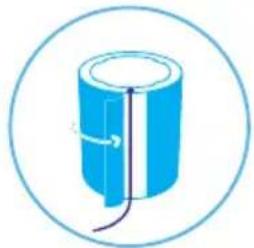
natural_image
Simple line drawing of a blue cylindrical object with a wire, enclosed in a circle (no text or symbols)
natural_image
Simple blue icon of a plug with three pins inside a circle (no text or symbols)natural_image
Circular diagram with a red power button and dotted pattern, no text or symbols present.Vaihe 3
natural_image
Diagram of a cylindrical container with a top layer and internal structure, enclosed in a circle (no text or symbols)Vaihe 5
natural_image
Simple line drawing of a blue cylindrical object with a white top, enclosed in a circle (no text or symbols)Vaihe 7
natural_image
Simple line drawing of a cylindrical object with vertical supports, enclosed in a circle (no text or symbols)Vaihe 2
natural_image
Simple line drawing of a blue electrical plug with three leads inside a circle (no text or symbols)Vaihe 4
natural_image
Diagram of a cylindrical container with a lid and top filter, enclosed in a circle (no text or symbols)Vaihe 6
natural_image
Simple line drawing of a cylindrical mechanical component with internal grooves and mounting holes, enclosed in a circular border (no text or symbols)Vaihe 8
natural_image
Simple line drawing of a cylindrical object with vertical lines, enclosed in a circle (no text or symbols)Vaihe 9
natural_image
Simple line drawing of a cylindrical object with a lid and base, enclosed in a circle (no text or symbols)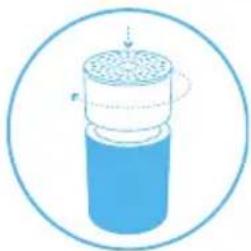
natural_image
Diagram of a cylindrical container with internal structure and arrows indicating flow or movement (no text or symbols)
natural_image
Circular icon with a central downward arrow and a power symbol, surrounded by a dotted pattern (no text or numbers)Vaihe 10
natural_image
Simple blue cylindrical object with a curved arrow indicating rotation, enclosed in a circle (no text or symbols)
natural_image
Simple blue icon of a plug with three leads inside a circle (no text or symbols)Hoito ja huolto
Yleisohjeet
natural_image
Simple line icon of a blue electrical plug inside a circle (no text or symbols)Vaihe 2
natural_image
Illustration of a cylindrical container with internal structure and a dotted line indicating rotation (no text or symbols)Vaihe 3
natural_image
Diagram of a cylindrical container with granular top and bottom, enclosed in a circle (no text or symbols)Vaihe 4
natural_image
Simple line drawing of a cylindrical device with a perforated top and base, enclosed in a circular border (no text or symbols)Vaihe 5
natural_image
Simple line drawing of a cylindrical container with a square base and circular top, enclosed in a circle (no text or symbols)Vaihe 6
natural_image
Diagram of a cylindrical container with internal structure and directional arrows, enclosed in a circular border (no text or symbols)Vaihe 7
natural_image
Simple blue icon of a plug with three blades, enclosed in a circle (no text or symbols)natural_image
Simple line drawing of a cylindrical container with a downward arrow inside, enclosed in a circle (no text or symbols)natural_image
Circular diagram with a central power button and evenly spaced circular elements (no text or symbols)natural_image
Three horizontal colored bars (red, orange, cyan) with no text or symbolsForurenet
Moderat
God
Filtre
natural_image
Circular diagram with concentric rings and a central power button, no text or symbols presentIndikator for filterudskiftning
Tryk på knappen i 7 sekunder for at nulstille indikatoren for filterudskiftning.

natural_image
Circular icon with a central power symbol and concentric rings, no text or labels present.natural_image
Simple blue icon of a plug with three leads inside a circle (no text or symbols)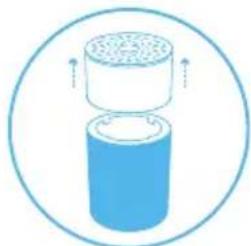
natural_image
Diagram of a cylindrical container with a top container and side outlet, enclosed in a circle (no text or symbols)
natural_image
Simple blue circular icon with a bowl of water inside, no text or symbols present.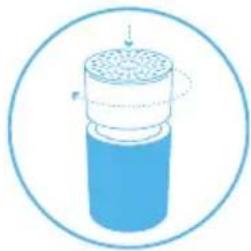
natural_image
Diagram of a cylindrical container with internal structure and directional arrows, enclosed in a circle (no text or symbols)Trin 2
natural_image
Diagram of a cylindrical container with a perforated lid and internal structure, enclosed in a circular border (no text or symbols)
natural_image
Blue cylindrical object enclosed in a circular border, no text or symbols visible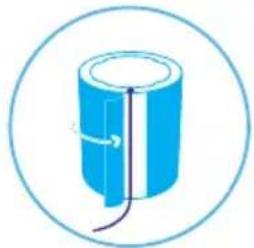
natural_image
Simple line drawing of a blue cylindrical object with a wire, enclosed in a circle (no text or symbols)
natural_image
Simple blue icon of a plug with three pins inside a circle (no text or symbols)natural_image
Circular diagram with a red power button and dotted pattern, no text or symbols present.Trin 3
natural_image
Diagram of a cylindrical container with a top layer and internal structure, enclosed in a circle (no text or symbols)Trin 5
natural_image
Simple line drawing of a blue cylindrical object with a white top, enclosed in a circle (no text or symbols)Trin 7
natural_image
Simple line drawing of a cylindrical object with vertical supports, enclosed in a circle (no text or symbols)Trin 2
natural_image
Simple line drawing of a blue electrical plug with three leads, enclosed in a circle (no text or symbols)Trin 4
natural_image
Diagram of a cylindrical container with a lid and top, enclosed in a circle (no text or symbols)Trin 6
natural_image
Simple line drawing of a cylindrical object with internal structure, enclosed in a circular border (no text or symbols)Trin 8
natural_image
Simple line drawing of a cylindrical object with vertical lines, enclosed in a circle (no text or symbols)Trin 9
natural_image
Simple line drawing of a cylindrical object with a lid, enclosed in a circle (no text or symbols)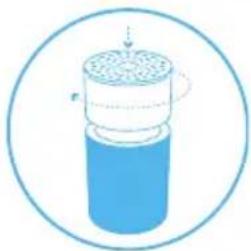
natural_image
Diagram of a cylindrical container with internal structure and arrows indicating flow or movement (no text or symbols)
natural_image
Circular icon with a central downward arrow and a power symbol inside, surrounded by a dotted pattern (no text or numbers)Trin 10
natural_image
Simple blue cylindrical object with a curved line inside, enclosed in a circle (no text or symbols)
natural_image
Simple blue icon of a plug with three leads inside a circle (no text or symbols)natural_image
Simple line icon of a blue electrical plug inside a circle (no text or symbols)Trin 2
natural_image
Illustration of a cylindrical container with internal structure and a dotted line indicating rotation (no text or symbols)Trin 3
natural_image
Diagram of a cylindrical container with granular top and bottom, enclosed in a circle (no text or symbols)Trin 4
natural_image
Simple line drawing of a cylindrical device with a perforated top and base, enclosed in a circular border (no text or symbols)Trin 5
natural_image
Simple line drawing of a cylindrical container with a square base and circular top, enclosed in a circle (no text or symbols)Trin 6
natural_image
Diagram of a cylindrical container with internal structure and directional arrows, enclosed in a circular border (no text or symbols)Trin 7
Tilslut luftrenseren.

natural_image
Simple blue icon of a plug with three leads inside a circle (no text or symbols)Besøg blueair.com/customer-support for at få personlig support
Garantiinformation
natural_image
Simple blue icon of a plug with three leads inside a circle (no text or symbols)Langkah 2
natural_image
Simple line drawing of a cylindrical container with a downward arrow inside, enclosed in a circle (no text or symbols)natural_image
Circular diagram with concentric rings and a central power button (no text or symbols)natural_image
Circular diagram with a central power button and evenly spaced circular elements (no text or symbols)natural_image
Circular diagram with a central power button and concentric rings of dots (no text or symbols)natural_image
Circular diagram with a central power button and concentric rings of dots (no text or symbols)natural_image
Circular diagram with a central power button and evenly spaced circular elements (no text or symbols)Program langganan filter Blueair
natural_image
Circular diagram with concentric rings and a central red power button, no text or symbols present.Indikator penggantian filter
Tekan tombol ke bawah selama 7 detik untuk mereset indikator penggantian filter.

natural_image
Circular diagram with concentric rings and a central arrow, no text or symbols presentnatural_image
Simple blue icon of a plug with three leads inside a circle (no text or symbols)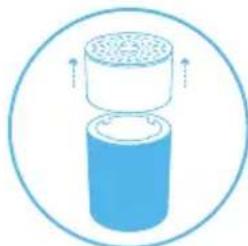
natural_image
Diagram of a cylindrical container with a top container and upward arrows indicating flow or movement (no text or symbols)
natural_image
Simple blue circular icon with a bowl and water droplet inside, no text or symbols present.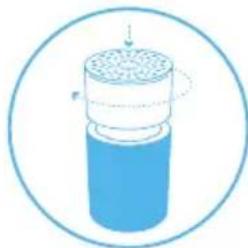
natural_image
Diagram of a cylindrical container with internal structure and a dotted line indicating rotation (no text or symbols)Langkah 2
natural_image
Diagram of a cylindrical container with internal structure and arrows indicating flow or movement (no text or symbols)
natural_image
Blue cylindrical object enclosed in a circular border, no text or symbols present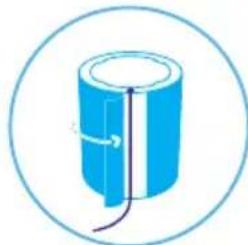
natural_image
Simple line drawing of a cylindrical object with internal lines and arrows, enclosed in a circle (no text or symbols)
natural_image
Simple blue icon of a plug with three wires, enclosed in a circle (no text or symbols)Mengganti filter utama
natural_image
Circular diagram with a red power button and dotted pattern, no text or symbols present.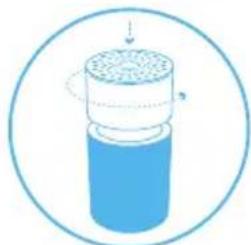
natural_image
Diagram of a cylindrical container with a top layer and internal structure, enclosed in a circle (no text or symbols)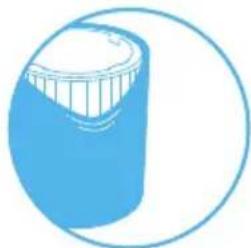
natural_image
Simple line drawing of a blue cylindrical object with a white top, enclosed in a circle (no text or symbols)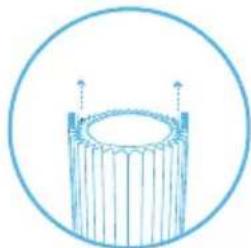
natural_image
Simple line drawing of a cylindrical object with vertical supports, enclosed in a circle (no text or symbols)Langkah 2
natural_image
Simple line drawing of a blue electrical plug with three leads inside a circle (no text or symbols)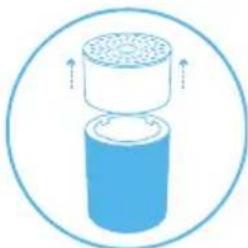
natural_image
Diagram of a cylindrical container with a lid and top filter, enclosed in a circle (no text or symbols)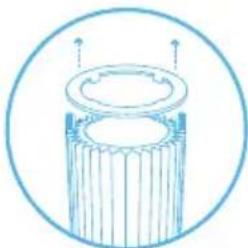
natural_image
Simple line drawing of a cylindrical mechanical component with internal grooves and two upward arrows, enclosed in a circle (no text or symbols)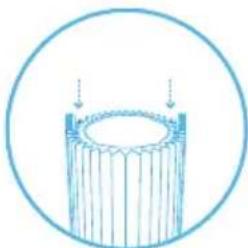
natural_image
Simple line drawing of a cylindrical object with vertical lines, enclosed in a circle (no text or symbols)Langkah 9
natural_image
Simple line drawing of a cylindrical object with a lid and base, enclosed in a circle (no text or symbols)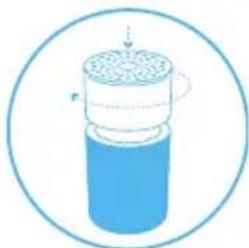
natural_image
Diagram of a cylindrical container with internal structure and arrows indicating motion (no text or symbols)
natural_image
Circular diagram with concentric rings and a central arrow, no text or symbols presentLangkah 10
natural_image
Simple blue cylindrical object with a curved arrow indicating rotation, enclosed in a circle (no text or symbols)
natural_image
Simple line icon of a blue electrical plug inside a circle (no text or symbols)natural_image
Simple line icon of a blue electrical plug inside a circle (no text or symbols)Langkah 2
natural_image
Illustration of a cylindrical container with internal structure and a dotted line indicating rotation (no text or symbols)Langkah 3
natural_image
Diagram of a cylindrical container with granular top and bottom, enclosed in a circle (no text or symbols)Langkah 4
natural_image
Simple line drawing of a cylindrical device with a perforated top and base, enclosed in a circular border (no text or symbols)Langkah 5
natural_image
Simple line drawing of a cylindrical container with a square base and circular top, enclosed in a circle (no text or symbols)Langkah 6
natural_image
Diagram of a cylindrical container with internal structure and directional arrows, enclosed in a circular border (no text or symbols)Langkah 7
Sambungkan kabel daya unit.

natural_image
Simple blue icon of a plug with three leads inside a circle (no text or symbols)(Particle + Carbon filter) و المreshح الرئيسي (مرشح
natural_image
Circular diagram with concentric rings and a central power button, no text or symbols presentالوضع الليي
natural_image
Circular diagram with a central power button and concentric rings of dots (no text or symbols)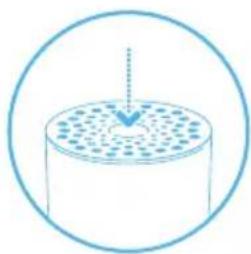
natural_image
Simple line drawing of a cylindrical container with a dotted pattern inside, enclosed in a circle (no text or symbols)2 alخطوة
natural_image
Simple blue icon of a plug with two wires, enclosed in a circle (no text or symbols)بدء الاستخدام
1 alخطوة
natural_image
Circular diagram with concentric rings and a central power button, no text or symbols present.natural_image
Circular diagram with concentric rings and a central red power button (no text or symbols)natural_image
Simple line icon of a blue electrical plug inside a circle (no text or symbols)2 alخطوة
natural_image
Diagram of a cylindrical container with a perforated top and upward arrows indicating flow or movement (no text or symbols)4 alخطوة
natural_image
Simple line drawing of a cylindrical object with a lid and two upward arrows, enclosed in a circle (no text or symbols)6 alخطوة
natural_image
Simple line drawing of a cylindrical object with vertical lines, enclosed in a circle (no text or symbols)8 alخطوة
natural_image
Circular diagram with a red power button and dotted pattern, no text or symbols present.1 alخطوة
natural_image
Diagram of a cylindrical container with internal structure and directional arrows, enclosed in a circular border (no text or symbols)3 alخطوة
natural_image
Simple line drawing of a blue cylindrical object with a circular outline (no text or symbols)الخطوة 5
natural_image
Simple line drawing of a cylindrical object with vertical bars and two protruding points, enclosed in a circle (no text or symbols)الخطوة 7
natural_image
Diagram of a cylindrical container with a lid and internal structure, enclosed in a circular border (no text or symbols)2 alخطوة
natural_image
Simple blue icon of a plug with three leads inside a circle (no text or symbols)الخطوة 1
natural_image
Blue cylindrical object with a side split, enclosed in a circular border (no text or symbols)4 alخطوة
natural_image
Diagram of a cylindrical container with internal granular structure, enclosed in a circle (no text or symbols)3 alخطوة
natural_image
Simple line drawing of a blue cylindrical object with a purple line and arrow indicating direction, enclosed in a circular border (no text or symbols)الخطوة 6
natural_image
Simple blue circular icon with a bowl of water and bubbles, no text or symbols present.5 alخطوة
natural_image
Simple blue icon of a plug with three leads inside a circle (no text or symbols)8 alخطوة
وصل الوحدة.
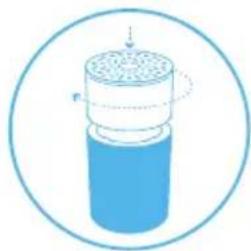
natural_image
Diagram of a cylindrical container with a dotted top layer and internal structure, enclosed in a circle (no text or symbols)الخطوة 7
natural_image
Two circular icons: top shows a blue cylindrical component with internal wires, bottom shows a blue plug with three pins (no text or symbols)10 alخطوة
natural_image
Simple line drawing of a cylindrical object with a lid, enclosed in a circular border (no text or symbols)الخطوة 9
natural_image
Diagram of a cylindrical container with internal granular structure, enclosed in a circular border (no text or symbols)11 alخطوة
natural_image
Circular diagram with concentric rings and a central power symbol (no text or labels)13 alخطوة
www.blueair.com/customer-support لل九十اصل مع Blueair
معلومات الضمان
natural_image
Simple line drawing of a cylindrical container with a perforated lid and internal structure, enclosed in a circle (no text or symbols)2 alخطوة
natural_image
Simple blue icon of a plug with three leads inside a circle (no text or symbols)1 alخطوة
natural_image
Simple line drawing of a cylindrical device with a base, enclosed in a circular border (no text or symbols)4 alخطوة
natural_image
Diagram of a cylindrical container with a porous top layer, enclosed in a circular boundary (no text or symbols)3 alخطوة
natural_image
Illustration of a cylindrical container with internal structure and a dashed line indicating motion (no text or symbols)الخطوة 6
natural_image
Simple line drawing of a cylindrical container with a square outlet and circular top, enclosed in a circle (no text or symbols)5 alخطوة
natural_image
Simple blue icon of a plug with three pins, enclosed in a circle (no text or symbols)الخطوة 7
وصل الوحدة.
Blue 3210Blue 3410
Blueair AB Middle East
Jafza One, Office No. AB1503
Jebel Ali Free Zone
P.O. Box No. 263947
Dubai, United Arab Emirates
Tel:+971(4)8821244
salesme@blueair.se
Blueair Inc.
125 S Clark
Suite 2000
Chicago, IL. 60603
USA
Tel: +1 888 258 3247
info@blueair.com
Blueair (Shanghai) Trading Co. Ltd.
Room 1001, City Gateway
No. 398 North Caoxi Road
Xuhui Distr, Shanghai,
China
Tel: 400 006 9693
info@unilever-le.com
Blueair Asia Ltd.
Unit 8C, 8/F, MG Tower,
133 Hoi Bun Road,
Kwun Tong, Kowloon,
Hong Kong
Tel: +852 2345 8988
blueairasia@blueair.se