NSP4112 - Mp3 player INSIGNIA - Free user manual and instructions
Find the device manual for free NSP4112 INSIGNIA in PDF.


| Product type | Portable CD player |
| Brand | Insignia |
| Model | NSP4112 (NS-P4112) |
| Power supply | 2 AA alkaline batteries or optional AC/DC adapter 4.5 V DC (center positive) |
| Power consumption | 0.8 W (3 V DC) |
| Digital/analog conversion | 1-bit DAC, 8x oversampling |
| Frequency response | 20 – 20,000 Hz |
| Number of channels | 2 (stereo) |
| Anti-shock | 60 seconds (ESP) |
| Bass boost (DBBS) | +6 dB at 100 Hz |
| Line output level | 0.6 V rms (47 kΩ) |
| Headphone output level | 15 mW (32 Ω) |
| Wow and flutter | Below measurable limits |
| Playback functions | Play, pause, stop, forward/backward search, repeat track/CD, random play, intro play (10 s), program up to 20 tracks |
| Display | LCD screen: track number, time, icons (repeat, random, etc.) |
| Connectors | Headphone jack (PHONE), line out jack (LINE OUT), DC input jack (4.5 V) |
| Disc compatibility | Audio CD (12 cm and 8 cm without adapter) |
| Dimensions | Not specified in the manual |
| Weight | Not specified in the manual |
| Auto power off | After 60 seconds in standby mode |
| Care and cleaning | Clean the exterior with a soft cloth dampened with lukewarm water; clean CDs with a soft cloth from the center outward; do not use solvents |
| Safety | Class 1 laser; do not open the case; hearing protection: adjust volume gradually; use surge protection if plugged into mains |
| Warranty | 90-day limited (defects in materials and workmanship) |
Frequently Asked Questions - NSP4112 INSIGNIA
User questions about NSP4112 INSIGNIA
0 question about this device. Answer the ones you know or ask your own.
Ask a new question about this device
Download the instructions for your Mp3 player in PDF format for free! Find your manual NSP4112 - INSIGNIA and take your electronic device back in hand. On this page are published all the documents necessary for the use of your device. NSP4112 by INSIGNIA.
USER MANUAL NSP4112 INSIGNIA
Setting up your CD Player. 8
Using your CD Player 10
Troubleshooting. 14
Maintaining 15
Specifications 16
Legal notices. 17
90-day limited warranty 19
Francais 21
Espanol. 41
Welcome
Congratulations on your purchase of a high-quality Insignia product.
Your NS-P4112 represents the state of the art in portable CD player design and is designed for reliable and trouble-free performance.
Safety information
| CAUTION RISK OF ELECTRIC SHOCK DO NOT OPEN | |
| Warning To reduce the risk of electric shock, do not remove the cover or back. There are no user-serviceable parts inside. Refer all servicing to qualified service personnel. | |
| The lightning flash with the arrowhead inside an equilateral triangle is intended to alert you to the presence of un-insulated, dangerous voltage within your CD player's enclosure. This voltage may be of sufficient magnitude to constitute a risk of electrical shock. | |
| The exclamation point within an equilateral triangle is intended to alert you to the presence of important operating and maintenance (servicing) instructions in the literature accompanying your CD player. | |
| This product utilizes a Class 1 laser to read CDs. Your CD player is equipped with safety switches to avoid exposure when the CD compartment door is open and the safety interlocks are defeated. Invisible and hazardous laser radiation exist when the door is open and interlocks are failed or defeated. Avoid direct exposure to the laser beam. Do not attempt to defeat or bypass the safety switches. | |
Surge protectors:
We recommend that you use a surge protector when you connect your CD player to AC power. A surge protector will help protect your CD player from lightning and power surges, which are not covered by your warranty.
Follow these safety precautions:
- Read and retain all instructions.
- Do not open the CD door while the CD is spinning.
- Always keep the CD door closed when not in use.
-
Keep all foreign objects out of the CD compartment.
-
Place your CD player on a stable surface.
- Avoid installing your CD player in any of the following locations:
- Places exposed to direct sunlight or close to heat radiating appliances, such as electric heaters.
- On top of other stereo equipment that radiates too much heat.
- Places that lacks correct ventilation or dusty places.
- Places subject to constant vibration.
- Places that are humid or moist.
Caution
Do not expose your CD player to dripping or splashing and do not set objects filled with liquid, such as vases, on top of your CD player.
Hearing protection
To protect your hearing, make sure that the volume is set at a safe level, one that lets the sound come through loud and clear without annoying blaring or distortion.
Sound can be deceiving. Over time, your hearing "comfort level" adapts to higher volumes of sound. So what sounds "normal" can actually be loud and harmful to your hearing. To protect your hearing, set the volume at a safe level before your hearing adapts.
To establish a safe level:
1 Start playback with your volume control at a low setting.
2 Slowly increase the volume until you can hear comfortably and clearly, but without distortion.
3 After you find a comfortable volume level, leave the volume set at this level.


Because hearing damage from loud noise is often undetectable until it is too late, Insignia and the Electronic Industries Association's Consumer Electronics Group recommend you avoid prolonged exposure to excessive noise.
The following list of sound (decibel) levels is included for your protection.
| Level Example | |
| 30 Quiet library, soft whispers | |
| 40 Living room, refrigerator, bedroom away from traffic | |
| 50 Light traffic, normal conversation, quiet office | |
| 60 Air conditioner at 20 feet (6 meters), sewing machine | |
| 70 Vacuum cleaner, hair dryer, noisy restaurant | |
| 80 Average city traffic, garbage disposals, alarm clock at 2 feet (0.6 meters) |
The following decibel levels can be dangerous under constant exposure:
| Level Example | |
| 90 Subway, motorcycle, truck traffic, lawn mower | |
| 100 Garbage truck, chain saw, pneumatic drill | |
| 120 Rock band concert in front of speakers, thunderclap | |
| 140 Gunshot blast, jet engine | |
| 180 Rocket launching pad |
Note Information courtesy of the Deafness Research Foundation.
Features
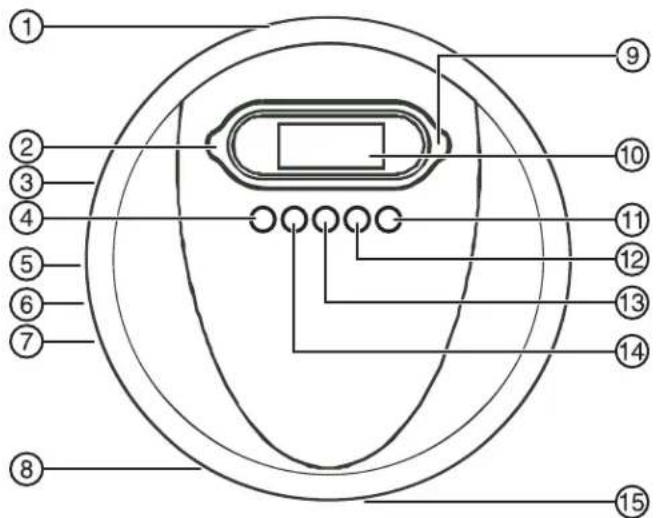
| No. | Component Description | |
| 1 | DC INPUT jack (4.5 V) Plug the optional AC/DC power cord into this jack and into an AC power outlet. | |
| 2 | Stop button Press to stop playback. | |
| 3 | HOLD switch Slide to lock button controls so you do not accidentally press a button. | |
| 4 | Skip backward button Press to go to the previous CD track. Press and hold to search backward at high speed. | |
| 5 | LINE OUT jack Plug an audio cable into this jack and into the CD/AUX jack on an external audio system. | |
| 6 | PHONE jack Plug headphones into this jack. | |
| 7 | Volume control switch Slide to adjust the volume. | |
| 8 | DBBS (bass boost) switch Slide to the ON position to turn on bass boost. Slide to the OFF position to turn off bass boost. | |
| 9 | Play/Pause button Press to start or pause playback. | |
| 10 | LCD display Displays information about the currently playing CD and various functions of your CD player. | |
| 11 | MODE button Press once to repeat a | track. Press twice to repeat a CD. Press three times to start Intro playback mode. Press four times to start random playback mode. |
| 12 | ESP button Press to turn the anti-shock feature on or off. | |
| 13 | PROG. button Press to program a playback list. For more information, see “Programming a playback list” on page 12. | |
| 14 | Skip forward button Press to go to the next track on the CD. Press and hold to search forward at high speed. | |
| 15 | CD compartment door and OPEN button | Press to open the CD compartment door, insert a CD (label side up) into the CD compartment, then close the door. |
Setting up your CD Player
Installing batteries
To install batteries:
1 Slide the battery compartment door (located on the bottom of your CD player), then lift it up. Do not remove the door.
2 Insert 2 AA alkaline batteries into the battery compartment. Make sure that the + and - symbols on the batteries match the + and - symbols inside the battery compartment.
3 Close the battery compartment door.
Caution
Use only the size and type of batteries specified.
Make sure that you match the + and - symbols on the batteries with the + and - symbols inside the battery compartment. If you insert the batteries backwards, your CD player may be damaged.
Do not mix different types of batteries together (such as alkaline, rechargeable, and carbon/zinc).
Do not mix old batteries and new batteries.
When you do not plan to use your CD player for a long period of time, remove the batteries to prevent damage or injury from possible battery leakage.
Do not try to recharge batteries not intended to be recharged. They can overheat and rupture.
Using the optional AC/DC power cord
To use the optional AC/DC power cord:
1 Plug one end of the AC/DC power cord into the DC INPUT jack on the back of your CD player.
2 Plug the other end of the AC/DC power cord into an AC power outlet.
1
If the AC adapter is connected when regular batteries are installed, the power supply automatically switches to the AC power source.
Use only the supplied AC/DC power cord. Using other types of power cords may damage your CD player.
Make sure that the AC/DC power cord matches with your household voltage before connecting it into an outlet.
When you are not using AC power, unplug the AC/DC power cord.
Do not touch the AC/DC power cord with wet hands when it is connected to AC power.
Connecting to an external audio system
To connect your CD player to an external audio system:
1 Make sure that your CD player is turned off and unplugged (if you are using an AC/DC power cord).
2 Plug one end of an audio cable into the LINE OUT jack on your CD player.
3 Plug the other end of the audio cable into the CD/AUX jack on the external audio system. Do not plug the cable into an amplifier PHONE jack.
Connecting the headphones
To connect the headphones:
- Plug the headphone cable into the PHONE jack on your CD player.
Using your CD Player
Playing a CD
Caution
Your CD player is designed to play audio CDs. Do not try to play any other type of discs.
To play a CD:
1 Connect the headphones (included) or optional earphones into the PHONE jack on your CD player.
2 Press the OPEN button to open the CD compartment door.
3 Insert a disc with the label side facing up.
4 Press down on the CD compartment door until it clicks into place.
5 Set the VOLUME control to minimum.
6 Press the button. Your CD player turns on and starts playing the CD. The total number of tracks and playing time appear on the display. During playback, the track number and the elapsed playing time appears on the display.
7 Adjust the volume to a comfortable level. Do not play a CD at a loud volume level because you may damage your hearing.
8 To pause playback, press the button. The elapsed time and track number flash on the display. Press the button again to resume playback.
9 To stop playback, press the button once.
10 To turn off your CD player, press the button twice.
Note
If the CD compartment door opens accidentally during playback, OPEN appears on the display.
Make sure that the CD has stopped spinning before you open the CD compartment door.
Your CD player can play 3-inch (8 cm) single CDs without an adapter.
Automatic power off
When your CD player stops playing, it enters standby mode. After 60 seconds in standby mode, your CD player turns off automatically to save battery power.
Searching for a track or a section of a track
To search for a track or a section of a track:
- Press the button once to go to the beginning of the currently playing track.
- Press the button repeatedly to go to backwards through the tracks on the CD.
- Press the button once to go to the next track.
- Press the button repeatedly to go to forward through the tracks on the CD.
- Press and hold the button to search backwards or forwards at high speed. When you find the section you want, release the button.
Note
To help you locate the track or section you want, low level audio is played when you search.
Repeating a track
To repeat a track:
1 Press the MODE button. The indicator appears on the display.
2 Press the button. Your CD player repeats the current track until your press the button.
Repeating a CD
To repeat a CD:
1 Press the MODE button twice during playback. The ALD indicator appears on the display, and your CD player plays the CD repeatedly.
2 To cancel the repeat mode, press the MODE button three times. The repeat indicator disappears from the display.
Using Intro play mode
You can play the first 10 seconds of each track on a CD to help you find the track you want.
To use Intro play:
1 Press the MODE button three times to start Intro play mode. INTRO flashes on the display.
2 Press the button. Your CD player plays the first 10 seconds of each track on the CD.
3 Press the MODE button twice to cancel Intro play mode and resume normal playback.
Tip
After your CD player plays the first 10 seconds of all the tracks on the CD, your player waits 30 seconds, then turns off.
Playing tracks randomly
You can play the tracks on a CD in random order.
To play tracks randomly:
1 Press the MODE button four times to start random playback. RAND appears on the display.
2 Press the button. Your CD player starts playing the tracks in random order.
Note
If a CD is playing when you press the MODE button, random playback begins when the currently playing track ends.
3 Press the button to go to the previous or next random track.
4 Press the MODE button once to return to the normal playback.
Programming a playback list
You can specify the order you want tracks to play in by programming a playback list.
To program a playback list:
1 Press the button.
2 Wait three seconds, then press the button.
3 Press the PROG. button. The track number and PROG flash on the display to indicate the first selection.
4 Press button to select the track you want to program. The track number you selected flashes on the display.
5 Press the PROG. button to store the track number into memory.
6 Repeat Steps 3 through 5 to program as many as 20 tracks.
7 Press the button to start playing your playlist.
8 To cancel the playlist, press the button twice,
Or
Press the button, then press and hold the PROG. button for three seconds.
Note
CD playback must be stopped to program a playlist. If you want to play your playlist repeatedly, press the MODE button one or more times until ALL appears on the display.
Using bass boost
Your CD player has a DBBS (dynamic bass boost sound) feature that lets you enhance the bass during playback.
Note
Because bass volume changes during playback, using bass boost at a high volume level may produce distorted sound. If this happens, lower the volume level until the distortion disappears.
To enhance the bass:
1 Slide the DBBS switch to the ON position. Your CD player enhances the bass.
2 Slide the DBBS switch to the OFF position to play the bass normally.
Using the anti-shock feature
When your CD player moves during playback (for example, when your are walking or in a moving vehicle), your player may be subject to bumps or vibrations.
When you press the button, the anti-shock feature turns on automatically and appears on the display. The CD spins faster and your CD player stores the audio in memory to make sure that playback does not pause or skip. If your player is bumped or vibrated too much, the memory buffer gets full and ears on the display. If the memory buffer is full, playback may skip or pause. After the bumping or vibration stops, your player resumes normal playback.
Note
You should use the anti-shock feature only when necessary. Using the anti-shock feature while your CD player is running on battery power uses additional battery power. To turn off the anti-shock feature, press the ESP button. The anti-shock feature will not correct playback errors if the CD is scratched or dirty.
Troubleshooting
| Problem Possible | cause Solution | |
| No sound. Your CD player does not have power. | Replace the batteries or make sure that the optional AC/DC power cord is plugged into your CD player and a AC power outlet. | |
| Playback has not been started. | Press the button. | |
| The volume is set too low. | Increase the volume. | |
| A CD is inserted, but tracks are not displayed. | The CD is inserted upside down. | Make sure that the CD is inserted with the label side up. |
| The CD is dirty. Clean the CD. | ||
| The CD is scratched or warped. | Use a different CD. | |
| Moisture has formed inside the CD compartment. | Remove the CD and leave the CD door open for about an hour to dry. | |
| Certain sections of a CD do not play normally. | The CD is dirty. Clean the CD. | |
| The CD is scratched. | Skip over the scratched sections, or replace the CD. |
Maintaining
Handling CDs
- To remove a CD from its case, hold it at the edges while you press down gently on the center hole.
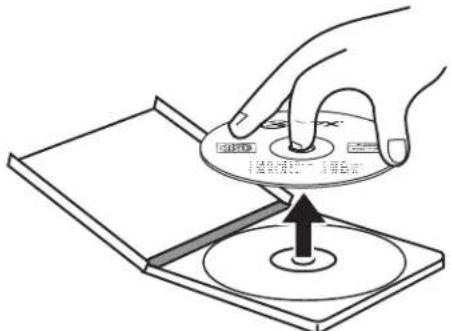
- Do not touch the shiny surface of the CD or bend the CD.
- Place the CD into the CD compartment with the label facing up.
- Store CDs in their cases when you are not using them.
- Do not store CDs in areas where they can get hot, such as an automobile.
- Do not write on the label side of the CD with a ballpoint pen because you may scratch the surface.
Cleaning CDs
A dirty CD may not play correctly.
To clean a CD:
- With a soft cloth, wipe the CD in a straight line from the center to the edge.
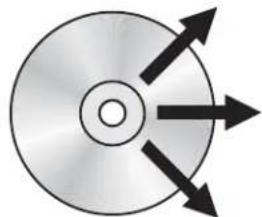
Caution
Do not use any solvent, such as record spray, thinner, or benzene, to clean a CD.
Cleaning your CD player
To clean your CD player:
- Use a soft, clean cloth moistened with plain, luke-warm water to clean the exterior of your CD player.
- Never use solvents such as benzene or other strong chemical cleaners, because these could damage your CD player's finish.
- Do not let liquid drip into the inside of your CD player.
Specifications
Audio
| D/A conversion 1-bit DAC, 8x | over-sampling |
| Frequency response 20-20,000 Hz | |
| Anti-shock 60 seconds | |
| Wow and flutter Below measurable limits | |
| Number of channels 2 (stereo) | |
| Output level Line output: 0.6 V rms (47K Ohm) Headphone: 15 mW (32 Ohm) | |
| Bass Boost effect (100 Hz) +6 dB | |
General
| Power requirements • 2 × AA | alkaline battery • DC in 4.5V jack accepts AC power adapter (center positive) |
| Power consumption 0.8 W (DC 3 V) | |
Note
Specifications and the design are subject to possible modifications without notice.
Legal notices
FCC Part 15
Warning
Modifications not authorized by the manufacturer may void the user's authority to operate this device.
This device complies with Part 15 of the FCC Rules. Operation of this product is subject to the following two conditions: (1) this device may not cause harmful interference, and (2) this device must accept any interference received, including interference that may cause undesired operation.
This equipment has been tested and found to comply within the limits for a class B digital device, pursuant to Part 15 of the FCC Rules. These limits are designed to provide reasonable protection against harmful interference in a residential installation. This equipment generates, uses, and can radiate radio frequency energy and, if not installed and used in accordance with the instructions, may cause harmful interference to radio communications. However, there is no guarantee that interference will not occur in a particular installation. If this equipment does cause harmful interference to radio or television reception, which can be determined by turning the equipment off and on, the user is encouraged to try to correct the interference by one or more of the following measures:
- Reorient or relocate the receiving antenna.
- Increase the separation between the equipment and receiver.
- Connect the equipment into an outlet on a circuit different from that to which the receiver is connected.
- Consult the dealer or an experienced technician for help.
Canada ICES-003 statement
This Class B digital apparatus complies with Canadian ICES-003.
Copyright
© 2007 Insignia. Insignia and the Insignia logo are trademarks of Best Buy Enterprise Services, Inc. Other brands and product names are trademarks or registered trademarks of their respective holders. Specifications and features are subject to change without notice or obligation. For service and support call (877) 467-4289.
90-day limited warranty
Insignia Products ("Insignia") warrants to you, the original purchaser of this new NS-P4112 ("Product"), that the Product shall be free of defects in the original manufacture of the material or workmanship for a period of 90 days from the date of your purchase of the Product ("Warranty Period"). This Product must be purchased from an authorized dealer of Insignia brand products and packaged with this warranty statement. This warranty does not cover refurbished Product. If you notify Insignia during the Warranty Period of a defect covered by this warranty that requires service, terms of this warranty apply.
How long does the coverage last?
The Warranty Period lasts for 90 days from the date you purchased the Product. The purchase date is printed on the receipt you received with the Product.
What does this warranty cover?
During the Warranty Period, if the original manufacture of the material or workmanship of the Product is determined to be defective by an authorized Insignia repair center or store personnel, Insignia will (at its sole option): (1) repair the Product with new or rebuilt parts; or (2) replace the Product at no charge with new or rebuilt comparable products or parts. Products and parts replaced under this warranty become the property of Insignia and are not returned to you. If service of Products or parts are required after the Warranty Period expires, you must pay all labor and parts charges. This warranty lasts as long as you own your Insignia Product during the Warranty Period. Warranty coverage terminates if you sell or otherwise transfer the Product.
How to obtain warranty service?
If you purchased the Product at a retail store location, take your original receipt and the Product to the store you purchased it from. Make sure that you place the Product in its original packaging or packaging that provides the same amount of protection as the original packaging. If you purchased the Product from an online web site, mail your original receipt and the Product to the address listed on the web site. Make sure that you put the Product in its original packaging or packaging that provides the same amount of protection as the original packaging.
To obtain in-home warranty service for a television with a screen 25 inches or larger, call 1-888-BESTBUY. Call agents will diagnose and correct the issue over the phone or will have an Insignia-approved repair person dispatched to your home.
Where is the warranty valid?
This warranty is valid only to the original purchaser of the product in the United States and Canada.
What does the warranty not cover?
This warranty does not cover:
- Customer instruction
- Installation
- Set up adjustments
Cosmetic damage - Damage due to acts of God, such as lightning strikes
- Accident
-
Misuse
Abuse -
Negligence
-Commercial use
-
Modification of any part of the Product, including the antenna
-
Plasma display panel damaged by static (non-moving) images applied for lengthy periods (burn-in).
This warranty also does not cover:
-
Damage due to incorrect operation or maintenance
-
Connection to an incorrect voltage supply
-
Attempted repair by anyone other than a facility authorized by Insignia to service the Product
-
Products sold as is or with all faults
-
Consumables, such as fuses or batteries
-
Products where the factory applied serial number has been altered or removed REPAIR REPLACEMENT AS PROVIDED UNDER THIS WARRANTY IS YOUR EXCLUSIVE REMEDY. INSIGNIA SHALL NOT BE LIABLE FOR ANY INCIDENTAL OR CONSEQUENTIAL DAMAGES FOR THE BREACH OF ANY EXPRESS OR IMPLIED WARRANTY ON THIS PRODUCT, INCLUDING, BUT NOT LIMITED TO, LOST DATA, LOSS OF USE OF YOUR PRODUCT, LOST BUSINESS OR LOST PROFITS. INSIGNIA PRODUCTS MAKES NO OTHER EXPRESS WARRANTY WITH RESPECT TO THE PRODUCT, ALL EXPRESS AND IMPLIED WARRANTYES FOR THE PRODUCT, INCLUDING, BUT NOT LIMITED TO, ANY IMPLIED WARRANTY OF AND CONDITIONS OF MERCHANTABILITY AND FITNESS FOR A PARTICULAR PURPOSE, ARE LIMITED IN DURATION TO THE WARRANTY PERIOD SET FORTH ABOVE AND NO WARRANTYES, WHETHER EXPRESS OR IMPLIED, WILL APPLY AFTER THE WARRANTY PERIOD. SOME STATES, PROVINCES AND JURISDICTIONS DO NOT ALLOW LIMITATIONS ON HOW LONG AN IMPLIED WARRANTY LASTS, SO THE ABOVE LIMITATION MAY NOT APPLY TO YOU. THIS WARRANTY GIVES YOU SPECIFIC LEGAL RIGHTS, AND YOU MAY ALSO HAVE OTHER RIGHTS, WHICH VARY FROM STATE TO STATE OR PROVINCE TO PROVINCE.
Contact Insignia:
For customer service please call 1-877-467-4289
www.insignia-products.com
INSIGNIA™ is a trademark of Best Buy Enterprise Services, Inc. Distributed by Best Buy Purchasing, LLC.
Insignia, 7601 Penn Avenue South, Richfield, Minnesota, U.S.A.
3 REPLACER LE couvercle du compartment.
Precautions
Insignia, 7601 Penn Avenue South, Richfield, Minnesota, U.S.A.
Reproductor de CD Portátil Insignia NS-P4112
Contedio
Bienvenido 41
Insignia, 7601 Penn Avenue South, Richfield, Minnesota, U.S.A.

Distributed by Insignia™ Products Distribué par Insignia™ Products Distribuido por Insignia™ Products
7601 Penn Avenue South
Richfield, MN USA 55423-3645
www.Insignia-Products.com
© 2007 Insignia™ Products
All rights reserved. All other products and brand names are trademarks of their respective owners.

- Welcome
- Safety information
- Surge protectors:
- Follow these safety precautions:
- Caution
- Hearing protection
- To establish a safe level:
- Features
- Setting up your CD Player
- Installing batteries
- To install batteries:
- Using the optional AC/DC power cord
- To use the optional AC/DC power cord:
- 1
- Connecting to an external audio system
- Connecting the headphones
- Using your CD Player
- Playing a CD
- To play a CD:
- Note
- Automatic power off
- Searching for a track or a section of a track
- To search for a track or a section of a track:
- Repeating a track
- To repeat a track:
- Repeating a CD
- To repeat a CD:
- Using Intro play mode
- To use Intro play:
- Playing tracks randomly
- To play tracks randomly:
- Programming a playback list
- To program a playback list:
- Or
- Using bass boost
- To enhance the bass:
- Using the anti-shock feature
- Maintaining
- Handling CDs
- Cleaning CDs
- To clean a CD:
- Cleaning your CD player
- To clean your CD player:
- Specifications
- Audio
- General
- Legal notices
- FCC Part 15
- Warning
- Canada ICES-003 statement
- Copyright
- 90-day limited warranty
- How long does the coverage last?
- What does this warranty cover?
- How to obtain warranty service?
- Where is the warranty valid?
- What does the warranty not cover?
- Precautions
- Reproductor de CD Portátil Insignia NS-P4112
- Contedio
- Distributed by Insignia™ Products Distribué par Insignia™ Products Distribuido por Insignia™ Products
Brand : INSIGNIA
Model : NSP4112
Category : Mp3 player