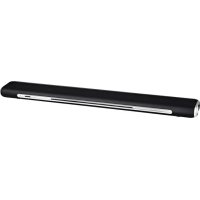
PSB350BT - Soundbar Proscan - Free user manual and instructions
Find the device manual for free PSB350BT Proscan in PDF.


| Product type | Soundbar |
| Brand | Proscan |
| Model | PSB350BT |
| Power supply | 120 V~60 Hz, 48 W |
| Standby power consumption | ≤ 0.5 W |
| Output power (RMS) | 15 W + 15 W (30 W total) |
| Bluetooth version | V2.1 + EDR |
| Supported Bluetooth profiles | A2DP, AVRCP |
| Wireless range | Up to 10 m (30 ft) |
| Frequency response | 60 Hz - 18 kHz |
| Signal-to-noise ratio | 50 dB |
| Audio inputs | AUX 3.5 mm input, RCA (L/R) input, Bluetooth |
| USB port | Yes (charging only, 5 V 1 A) |
| Remote control | Yes (AAA batteries × 2) |
| Operating temperature | 0 °C to 35 °C |
| LED indicator | Red (standby), Green (AUX/RCA), Blue (Bluetooth) |
| Cleaning | Soft dry cloth, no solvents |
| Safety | Do not expose to water or excessive heat, unplug during storms |
| Included accessories | Power cable, AUX/RCA cable, remote control (batteries not included) |
| Repairability | Contains no user-serviceable parts, refer to qualified technician |
| Dimensions (estimated) | Approximately 80 × 10 × 7 cm (not specified) |
| Weight (estimated) | Approximately 2 kg (not specified) |
Frequently Asked Questions - PSB350BT Proscan
User questions about PSB350BT Proscan
0 question about this device. Answer the ones you know or ask your own.
Ask a new question about this device
Download the instructions for your Soundbar in PDF format for free! Find your manual PSB350BT - Proscan and take your electronic device back in hand. On this page are published all the documents necessary for the use of your device. PSB350BT by Proscan.
USER MANUAL PSB350BT Proscan
natural_image
Technical line drawing of a cylindrical electronic device with internal components and mounting holes (no text or symbols)PLEASE READ BEFORE OPERATING THIS EQUIPMENT.
Model No.:PSB350BT

Bluetooth®
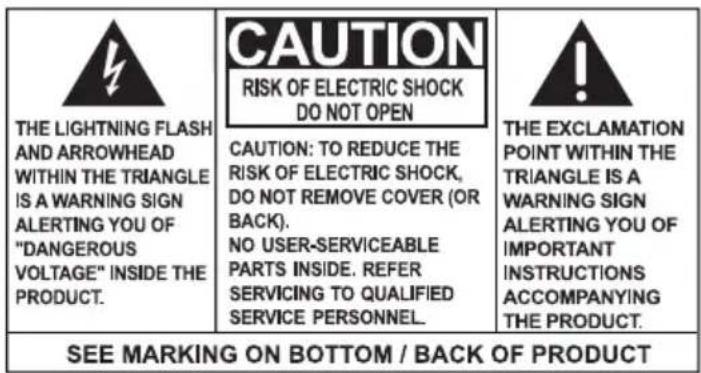
WARNING: TO PREVENT FIRE OR ELECTRICAL SHOCK HAZARD. DO NOT EXPOSE THIS PRODUCT TO RAIN OR MOISTURE.
WARNING: REMOVE THE BATTERY FROM REMOTE CONTROL IF WILL NOT BE IN USE FOR A LONG PERIOD. DO NOT PLACE BATTERY IN TRASH. PLEASE RECYCLE OR MANAGE AS HAZARDOUS WASTE.
Some of the following information may not apply to your particular product; however, as with any electronic product, precautions should be observed during handling and use.
Road these instructions.
Keep these instructions.
Höed all warnings.
Follow all instructions.
Do not use this apparatus near water.
Clean only with dry cloth.
DO not block any ventilation openings. Install in accordance with the manufacturer's instructions.
Do not install near any heat sources such as radiators, heat registers, stoves, or others apparatus (including amplifiers) that produce heat.
Do not defeat the safety purpose of the polarized or grounding plug. A polarized plug has two blades with one wider than the other. A grounding plug has two blades and a third grounding prong. The wide blade or the third prong is provided for your safety. If the provided plug does not fit into your outlet, consult an electrician for replacement of the obsolete outlet.
Protect the power cord from being walked on or pinched particularly at plugs, convenience receptacles, and point where they exit from the apparatus.
Ooly use attachments/accessories specified by the manufactured by the manufacturer.
Use only with the cart, stand, tripod, bracket, or table specified by the manufacturer, or sold with the apparatus. When a cart is used, use caution when moving the cart/apparatus combination to avoid injury from tip-over.

natural_image
Symbolic icon of a person pushing a cart with a large box, enclosed in a circle (no text or symbols)Portable Cart Warning
Unplug this apparatus during lightning storms or when unused for long periods of time.
Refer all servicing to qualified service personnel. Servicing is required when the apparatus has been damaged in any way, such as power-supply cord or plug is damaged, liquid has been spilled or objects have fallen into the apparatus, the apparatus has been exposed to rain or moisture has been exposed to rain or moisture, does not operate normally, or has been dropped.
WARNING: Please refer the information on exterior bottom (enclosure) for electrical and safety information before installing or operating the apparatus.
WARNING: To reduce the risk of fire or electric shock, do not expose this apparatus to rain or moisture. The apparatus shall not be exposed to dripping or splashing and that objects filled with liquids, such as vases, shall not be placed on apparatus.
WARNING: The battery (battery or batteries or battery pack) shall not be exposed to excessive
heat such as sunshine, fire or the like.
WARNING: The main plug is used as disconnect device, the disconnect device shall remain readily operable.
ADDITIONAL SAFETY INFORMATION
Apparatus shall not be exposed to dripping or splashing and no objects filled with liquids, such as vases. Should be placed on the apparatus.
Always leave sufficient space around the product for ventilation. Do not place product in or on a bed, rug, or in a bookcase or cabinet that may prevent air flow through vent openings.
Do not place lighted candles, cigarettes, cigars, etc. on the product.
Care should be taken so that objects do not fall into the product.
Do not attempt to disassemble the cabinet. This product does not contain customer serviceable components.
● The marking information is located at the rear panel of apparatus.
The ventilation should not be impeded by covering the ventilation openings with items such as newspaper, table-cloths ,curtains etc.
Nonaked flame sources such as lighted candles should be placed on the apparatus.
Only use this in moderate climates.
IMPORTANT BATTERY INFORMATION
Warning: Your product contains a battery and charging system which is designed to work in temperatures that do not exceed 50° C ( 122° F). Leaving this product in a closed automobile or the trunk of an automobile where temperatures may result in permanent battery damage, fire, or explosion. Please remove your product from the automobile when you exit, do not place your product in the trunk of your automobile, and do not leave your product in any location where temperatures may exceed 50° C.
ECOLOGY
Your product must be disposed of properly according to local laws and regulations. Because this product contains a battery, the product must be disposed of separately from the household waste.
PRECAUTIONS FOR THE UNIT
● not use the unit immediately after transportation from a cold place to a warm place; condensation problems may result.
● not store the unit near fire, places with high temperature or in direct sunlight. Exposure to direct sunlight or extreme heat (such as inside a parked car) may cause damage or malfunction.
Clean the unit with a soft cloth or a damp chamois leather. Never use solvents.
The unit must only be opened by qualified personnel.
FCC STATEMENT
This device complies with Part 15 of the FCC Rules. Operation is subject to the following two conditions:
(1) this device may not cause harmful interference.
(2) this device must accept any interference received, including interference that may cause undesired operation.
NOTE : This equipment has been tested and found to comply with the limits for a Class B digital device, pursuant to Part 15 of the FCC Rules. These limits are designed to provide reasonable protection against harmful interference in a residential installation. This equipment generates, uses and can radiate radio frequency energy and, if not installed and used in accordance with the instructions, may cause harmful interference to radio communications.
However, there is no guarantee that interference will not occur in a particular installation. If this equipment does cause harmful interference to radio or television reception, which can be determined by turning the equipment off and on, the user is encouraged to try to correct the interference by one or more of the following measures:
-Reorient or relocate the receiving antenna.
-Increase the separation between the equipment and receiver.
-Connect the equipment into an outlet on a circuit different from that to which the receiver is connected.
-Consult the dealer or an experienced radio/TV technician for help.
CAUTION: Any changes or modifications not expressly approved by the party responsible for compliance could void the user's authority to operate the equipment.
INDUSTRY CANADA REGULATORY INFORMATION
This device complies with Industry Canada license-exempt RSS standard(s).
Operation is subject to the following two conditions: (1) this device may not cause interference, and (2) this device must accept any interference, including interference that may cause undesired operation of the device.
CAUTION: Any changes or modifications not expressly approved by the party responsible for compliance could void the user's authority to operate the equipment.
Controls
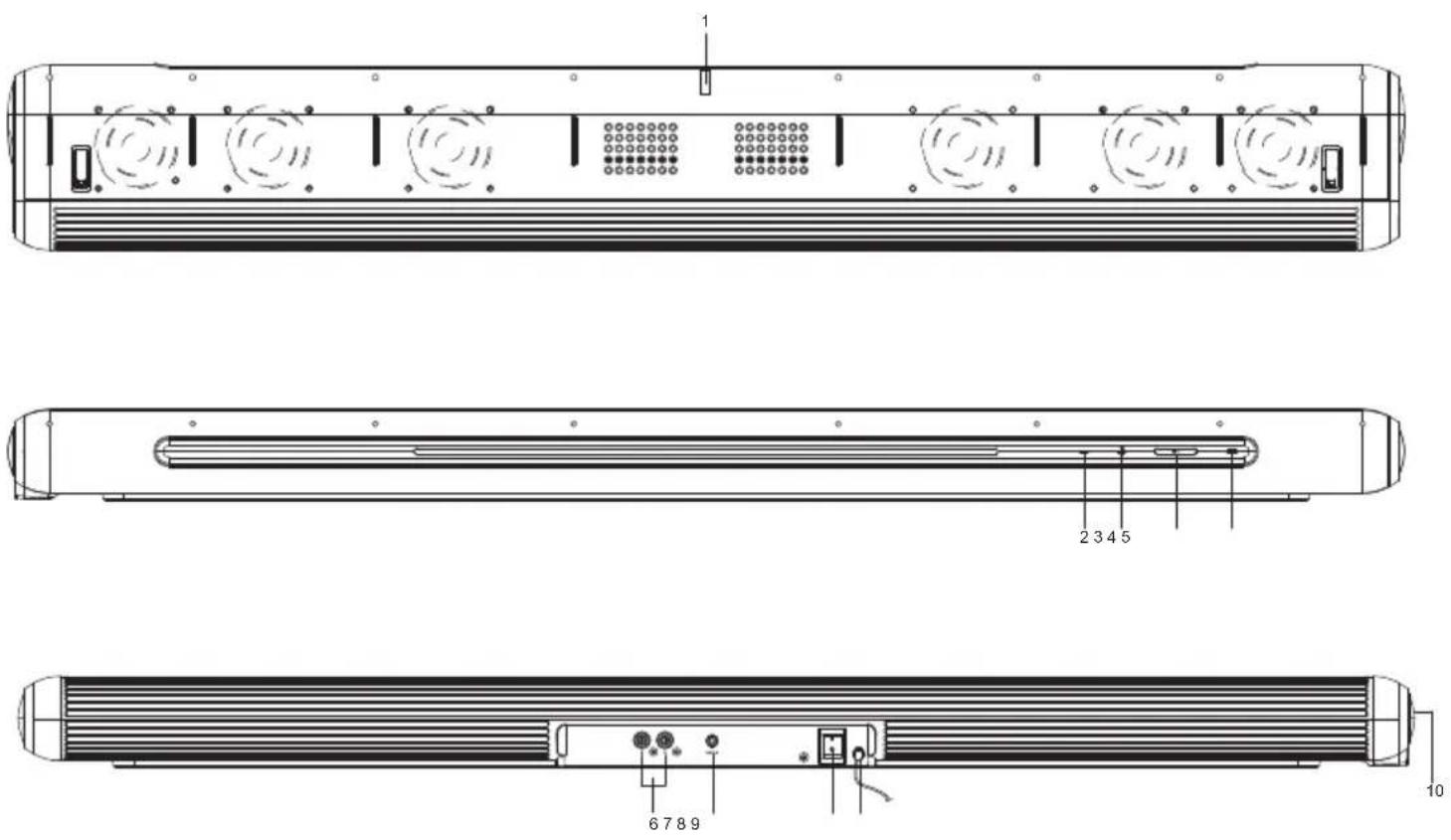
-
Remote Control Sensor
-
- Button
Press to decrease the volume level.
- +Button
Press to increase the volume level.
- ⏻ | ➕ Button
Press this button to turn ON or press and hold to Standby mode.
Short press this button to select different play mode during power on.
- LED Status Indicator
Red=Standby mode
Blue=Bluetooth mode
Green=AUX/RCA input mode
- RCA (L, R) Socket
- 3.5mm Aux-in Socket
- Main Power ON/OFF Switch
- Power Cord
- USB Port (only for charging)
REMOTE CONTROL
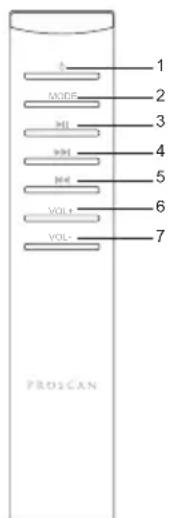
- ⏻ Power Button (On/Standby)
- MODE button (Bluetooth/AUX)
- Play/Pause ▶II button
- ▶▶▶ Next track
- Previous track
- Vol + Button
- Vol - Button:
Before using the speaker
Plug the power cord to a wall outlet (120V\~60Hz). Status indicator will be red.
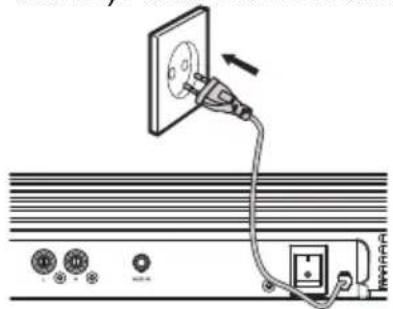
3.5mm AUX/RCA inputs operation
- Ensure that the unit is well connected to the TV or other audio device via the accompanied 3.5mm-RCA cable.
- While in Power On mode, press the ⏻|→ button on the main unit repeatedly or press the AUX/RCA button on remote control to select the AUX/RCA input mode.
- Operate your audio device directly for playback features.
- Press “▲” / “▼” button on remote control or tap the“+”/ “-” button on the main unit to raise/lower the volume level.
Note: If the 3.5mm AUX-IN socket and the RCA socket are both connected, the
3.5mm AUX input mode will be the default choice. To select the RCA input mode, make sure the 3.5mm Aux in socket is not plugged in
Connect and use the speaker (Bluetooth mode)
- Power on the speaker.
- Change to Bluetooth mode. Status indicator will blink blue.
- On your Bluetooth device, turn on Bluetooth and scan for device in its Bluetooth menu. When "PSB350BT" appears on the device list of your Bluetooth device, select and connect .
- The status indicator will change to solid blue after Bluetooth pairing established.
Specification
Input voltage: 120V\~60Hz
USB output: DC 5V 1A
Output power (RMS): 15W+15W
Power Consumption: 48W
Standby power Consumption: ≤0.5W
Transmission distance: up to 30ft (10m)
Working temperature: 0°C-35°C
Bluetooth version: V2.1+EDR
Supported protocol: A2DP, AVRCP
Frequency response: 60Hz-18KHz@-10dB
Signal noise ratio: 50dB
Dimension: 33.10x4.37x2.17in (840x111x55mm)
Weight: 82.88 oz (2.35 Kg)
Remote control
Use battery: 2pcsxAAA
Working current: 8mA
Sleep mode current: 8μA
Operation distance: up to 10ft (3m)
Operation angel: ±30°
Trouble shooting
| Problem Cause | Solution | |
| No audio signal via the Bluetooth connection | Speaker is not paired to the audio source. | Check whether a connection exists. If necessary, pair the speaker again to the audio source. |
| Volume is setting too low | Increase the volume on the speaker | |
| Increase the volume on the the audio source. | ||
| Speaker cannot be connected | Pairing does not work | Check whether the audio source supports the A2DP protocol |
| Audio source is switched off | Switch on the audio source | |
| Bluetooth is switched off at the audio source. | Switch on the Bluetooth function in the audio source. | |
| Existing Bluetooth connection is not unpaired normally | Unpaired current Bluetooth connection and pair again. | |
| Poor sound quality from a Bluetooth® device | Bluetooth device is almost out of range of the speaker | Move your Bluetooth device closer to this unit |
| Remote control is not functioning properly. | Low battery. | Replace the battery with correct type AAA |
| Remote Control is not pointed toward the IR window | Point the Remote Control toward the unit IR window, use within 10 feet of the unit. |
PROSCAN
2.0CH Sans Fil Soundbar

natural_image
Technical line drawing of a cylindrical electronic device with internal components and mounting holes (no text or symbols)Se IL VOUS PLAÎT LIRE AVANT DE FAIRE FONCTIONNER CET APPAREIL
natural_image
Symbolic illustration of a person pushing a cart with a diagonal line, enclosed in a circle (no text or symbols)This device complies with Industry Canada license-exempt RSS standard(s).
Operation is subject to the following two conditions: (1) this device may not cause interference, and (2) this device must accept any interference, including interference that may cause undesired operation of the device.
Bleu = Bluetooth mode
Dimensiones: 33.10x4.37x2.17in (840x111x55mm)
Peso: 82.88 oz (2.35 Kg)
Remote control


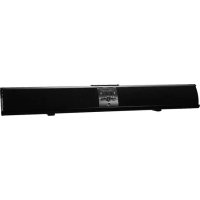
Brand : Proscan
Model : PSB350BT
Category : Soundbar