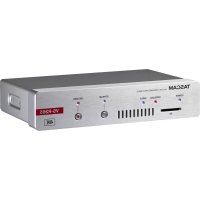
VSR265 - Video recorder TASCAM - Free user manual and instructions
Find the device manual for free VSR265 TASCAM in PDF.




| Product Type | Video Recorder |
| Brand and Model | Tascam VSR265 |
| Dimensions (W x H x D) | 214 x 44.5 x 136.1 mm |
| Weight | 850 g |
| Power Supply | PoE+ Class 4 (via Ethernet) or optional PS-P1220E AC adapter |
| Power Consumption | 12.2 W |
| Video Inputs | HDMI IN (type A), resolutions up to 2160p30 (4K) |
| Video Outputs | HDMI OUT (type A) |
| Audio Inputs | 2 x balanced analog (Euroblock), 1 x unbalanced analog (3.5 mm mini-jack) |
| Audio Outputs | 2 x balanced analog (Euroblock), 1 x unbalanced analog (3.5 mm mini-jack) |
| Video Encoding | H.264, H.265 (4K), bitrate 500 kbps to 30 Mbps |
| Network | Gigabit Ethernet 1000BASE-T with PoE+ (RJ-45) |
| USB Port | USB 3.0 type A for setup and updates |
| Operating Temperature | 0°C to 40°C |
| Main Functions | Video/audio recording and streaming, encoding/decoding, web browser control |
| Maintenance and Cleaning | Wipe with a dry, soft cloth; do not use chemical agents |
| Safety | Do not expose to water, do not open the unit, entrust repairs to qualified personnel |
| Spare Parts and Repairability | No user-serviceable parts; contact customer service or the point of purchase |
| General Information | PDF user manual included; warranty valid in the country of purchase |
Frequently Asked Questions - VSR265 TASCAM
User questions about VSR265 TASCAM
0 question about this device. Answer the ones you know or ask your own.
Ask a new question about this device
Download the instructions for your Video recorder in PDF format for free! Find your manual VSR265 - TASCAM and take your electronic device back in hand. On this page are published all the documents necessary for the use of your device. VSR265 by TASCAM.
USER MANUAL VSR265 TASCAM
• TASCAM is a registered trademark of TEAC Corporation.
- The terms HDMI and HDMI High-Definition Multimedia Interface, and the HDMI Logo are trademarks or registered trademarks of HDMI Licensing LLC in United States and other countries.
• The SDHC logo is a trademark of SD-3C, LLC.

- Microsoft, Windows and Windows Vista are either registered trademarks or trademarks of Microsoft Corporation in the United States and/or other countries.
• Apple, Mac, Mac OS X, and Lightning are trademarks of Apple Inc. - Other company names, product names and logos in this document are the trademarks or registered trademarks of their respective owners.
IMPORTANT SAFETY INSTRUCTIONS
WARNING: TO PREVENT FIRE OR SHOCK HAZARD, DO NOT EXPOSE THIS APPLIANCE TO RAIN OR MOISTURE.
For U.S.A.
Declaration of Conformity
Model Number: VS-R264 / VS-R265
Trade Name: TASCAM
Responsible party: TEAC AMERICA, INC.
Address: 10410 Pioneer Blvd. Suite #1 Santa Fe Springs, California 90670, U.S.A.
Telephone number: 1-323-726-0303

This device complies with Part 15 of the FCC Rules. Operation is subject to the following two conditions:
(1) this device may not cause harmful interference, and (2) this device must accept any interference received, including interference that may cause undesired operation.
INFORMATION TO THE USER
This equipment has been tested and found to comply with the limits for a Class B digital device, pursuant to Part 15 of the FCC Rules. These limits are designed to provide reasonable protection against harmful interference in a residential installation.
This equipment generates, uses, and can radiate radio frequency energy and, if not installed and used in accordance with the instruction manual, may cause harmful interference to radio communications. However, there is no guarantee that interference will not occur in a particular installation.
If this equipment does cause harmful interference to radio or television reception, which can be determined by turning the equipment off and on, the user is encouraged to try to correct the interference by one or more of the following measures.
a) Reorient or relocate the receiving antenna.
b) Increase the separation between the equipment and receiver.
c) Connect the equipment into an outlet on a circuit different from that to which the receiver is connected.
d) Consult the dealer or an experienced radio/TV technician for help.
CAUTION
Changes or modifications to this equipment not expressly approved by TEAC CORPORATION for compliance could void the user's authority to operate this equipment.
For Canada
THIS CLASS B DIGITAL APPARATUS COMPLIES WITH CANADIAN ICES-003.
CET APPAREIL NUMERIQUE DE LA CLASSE B EST CONFORME A LA NORME NMB-003 DU CANADA.


This product complies with the European Directives request and the other Commission Regulations.
- Read these instructions.
- Keep these instructions.
- Heed all warnings.
- Follow all instructions.
- Do not use this apparatus near water.
- Clean only with dry cloth.
- Do not block any ventilation openings. Install in accordance with the manufacturer's instructions.
- Do not install near any heat sources such as radiators, heat registers, stoves, or other apparatus (including amplifiers) that produce heat.
- Do not defeat the safety purpose of the polarized or grounding-type plug. A polarized plug has two blades with one wider than the other. A grounding type plug has two blades and a third grounding prong. The wide blade or the third prong are provided for your safety. If the provided plug does not fit into your outlet, consult an electrician for replacement of the obsolete outlet.
- Protect the power cord from being walked on or pinched particularly at plugs, convenience receptacles, and the point where they exit from the apparatus.
- Only use attachments/accessories specified by the manufacturer.
- Use only with the cart, stand, tripod, bracket, or table specified by the manufacturer, or sold with the apparatus. When a cart is used, use caution when moving the cart/apparatus combination to avoid injury from tip-over.

-
Unplug this apparatus during lightning storms or when unused for long periods of time.
-
Refer all servicing to qualified service personnel. Servicing is required when the apparatus has been damaged in any way, such as power-supply cord or plug is damaged, liquid has been spilled or objects have fallen into the apparatus, the apparatus has been exposed to rain or moisture, does not operate normally, or has been dropped.
-
The apparatus draws nominal non-operating power from the AC outlet with its POWER or STANDBY/ON switch not in the ON position.
- The mains plug is used as the disconnect device, the disconnect device shall remain readily operable.
- Caution should be taken when using earphones or headphones with the product because excessive sound pressure (volume) from earphones or headphones can cause hearing loss.
- If you are experiencing problems with this product, contact TEAC for a service referral. Do not use the product until it has been repaired.
CAUTION
- Do not expose this apparatus to drips or splashes.
- Do not place any objects filled with liquids, such as vases, on the apparatus.
- Do not install this apparatus in a confined space such as a book case or similar unit.
- The apparatus should be located close enough to the AC outlet so that you can easily grasp the power cord plug at any time.
- If the product uses batteries (including a battery pack or installed batteries), they should not be exposed to sunshine, fire or excessive heat.
- CAUTION for products that use replaceable lithium batteries: there is danger of explosion if a battery is replaced with an incorrect type of battery. Replace only with the same or equivalent type.
For European Customers
Disposal of electrical and electronic equipment
(a) All electrical and electronic equipment should be disposed of separately from the municipal waste stream via collection facilities designated by the government or local authorities.
(b) By disposing of electrical and electronic equipment correctly, you will help save valuable resources and prevent any potential negative effects on human health and the environment.
(c) Improper disposal of waste electrical and electronic equipment can have serious effects on the environment and human health because of the presence of hazardous substances in the equipment.
(d) The Waste Electrical and Electronic Equipment (WEEE) symbol, which shows a wheeled bin that has been crossed out, indicates that electrical and electronic equipment must be collected and disposed of separately from household waste.
If a battery or accumulator contains more than the specified values of lead (Pb), mercury (Hg), and/or cadmium (Cd) as defined in the Battery Directive (2006/66/EC, 2013/56/EU), then the chemical symbols for those elements will be indicated beneath the symbol.
(e) Return and collection systems are available to end users. For more detailed information about the disposal of old electrical and electronic equipment, please contact your city office, waste disposal service or the shop where you purchased the equipment.

CAUTION
- DO NOT REMOVE THE EXTERNAL CASES OR CABINETS TO EXPOSE THE ELECTRONICS. NO USER SERVICEABLE PARTS ARE INSIDE.
- IF YOU ARE EXPERIENCING PROBLEMS WITH THIS PRODUCT, CONTACT THE STORE WHERE YOU PURCHASED THE UNIT FOR A SERVICE REFERRAL. DO NOT USE THE PRODUCT UNTIL IT HAS BEEN REPAIRED.
- USE OF CONTROLS OR ADJUSTMENTS OR PERFORMANCE OF PROCEDURES OTHER THAN THOSE SPECIFIED HEREIN MAY RESULT IN HAZARDOUS RADIATION EXPOSURE
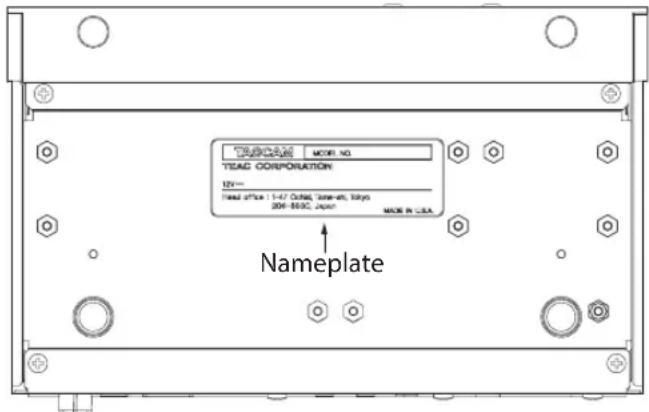
The nameplate is located on the bottom of the unit as shown below.
Front side
Contents
Introduction......5
Note about the Reference Manual ....5
Included items 5
Conventions used in this manual 6
Precautions for placement and use......6
Beware of condensation ....6
Cleaning the unit 6
Using the TEAC Global Site ....6
Product registration....6
About TASCAM customer support service......6
System requirements ......6
Supported web browser 6
Setup procedure....7
Specifications....7
Video inputs and outputs....7
Audio inputs and outputs....7
Control input/output......8
Audio performance....8
Other 8
Introduction
Thank you very much for purchasing a TASCAM VS-R264 VIDEO STREAMER/RECORDER or VS-R265 4K/UHD VIDEO STREAMER/RECORDER.
Before connecting and using this unit, please take time to read this manual thoroughly to ensure you understand how to properly set it up and connect it, as well as how to use its many useful and convenient functions. After you have finished reading this manual, please keep it in a safe place for future reference.
You can also download this Owner's Manual from the TEAC Global Site (http://teac-global.com/).
Note about the Reference Manual
This Owner's Manual explains each of the functions of this unit. Please see the Reference Manual for detailed information about each of the functions.
The Reference Manual can be downloaded from the included USB flash drive and the TEAC Global Site (http://teac-global.com/).
Included items
This product includes the following items.
Take care when opening the package to avoid damaging the items. Keep the box and packing materials for transportation in the future.
Please contact the store where you purchased this unit if any of these items are missing or have been damaged during transportation.
● Main unit ....x 1
- USB flash drive....x 1
●TASCAM DISCOVERY application
●Reference Manual
● Installation brackets....×2
- Euroblock plug....×4
● Cable band kit ....... × 1
- Owner's Manual (this document) including warranty ....... × 1
Conventions used in this manual
In this manual, we use the following conventions:
- SD/SDHC memory cards are called "SD cards".
●"USB flash drives" are sometimes called "USB drives".
●As necessary, additional information is provided under TIP, NOTE and CAUTION headings.
TIP
These are tips about how to use the unit.
NOTE
These provide additional explanations and describe special cases.
ATTENTION
Failure to follow these instructions could result in damage to equipment or lost data, for example.
CAUTION
Failure to follow these instructions could result in injury.
Precautions for placement and use
●The operating temperature range of this unit is 0–40 °C.
- Do not install this unit in the following types of locations. Doing so could make the sound quality worse or cause malfunction.
Places with significant vibrations
Next to a window or in another location exposed to direct sunlight
Near heaters or other extremely hot places
Extremely cold places
Very humid or poorly ventilated places
Very dusty places
●To enable good heat dissipation, do not place anything on top of the unit.
- Do not place this unit on top of a power amplifier or other device that generates heat.
- When installing this unit on or under a desk, use the included attachment brackets.
●To mount this unit in a rack, use a TASCAM AKRS1 (sold separately).
Beware of condensation
Condensation could occur if the unit is moved from a cold place to a warm place, it is used immediately after a cold room has been heated or it is otherwise exposed to a sudden temperature change.
To prevent this, or if this occurs, let the unit sit for one or two hours at the new room temperature before using it.
Cleaning the unit
Use a dry soft cloth to wipe the unit clean. Do not wipe with chemical cleaning cloths, thinner, alcohol or other chemical agents. Doing so could damage the surface or cause discoloration.
Using the TEAC Global Site
You can download updates for this unit from the TEAC Global Site:
http://teac-global.com/
In the TASCAM Downloads section, select the desired language to open the Downloads website page for that language.
Product registration
Customers in the USA, please visit the following TASCAM website to register your TASCAM product online.
https://tascam.com/us/
About TASCAM customer support service
TASCAM products are supported and warranted only in their country/region of purchase.
To receive support after purchase, on the TASCAM Distributors list page of the TEAC Global Site (http://teac-global.
com/), search for the local company or representative for the region where you purchased the product and contact that organization.
When making inquiries, the address (URL) of the shop or web shop where it was purchased and the purchase date are required.
Moreover, the warranty card and proof of purchase might also be necessary.
System requirements
Check the TEAC Global Site (http://teac-global.com/) for the latest information about supported operating systems.
Supported web browser
Google Chrome version 39 or newer
Setup procedure
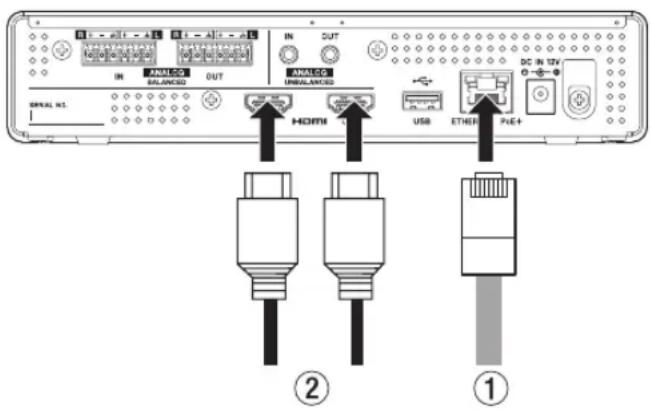
- Using a category 5E or higher LAN cable (①) connect the VS-R264/VS-R265 to a switching hub that supports PoE Plus power supply.
NOTE
To connect to a switching hub that does not support PoE Plus power supply, use a dedicated PS-P1220E AC adapter (sold separately) to supply power.
- Connect HDMI devices to the HDMI IN/OUT connectors (②).
To encode:
Connect a camera or other video source to the HDMI IN connector.
When the video source becomes active, the INPUT indicator on the front of the unit lights.
To decode:
Connect a video monitor or TV to the HDMI OUT connector.
- Connect the included USB flash drive to a computer connected to the network and open the "Setup" folder.
- Select the file for the operating system being used and install TASCAM DISCOVERY.
- Launch TASCAM DISCOVERY.
- Click "Open" for the VS-R264/VS-R265 that you want to log into and launch the "Streaming Dashboard".
- Click the tab area screen selection buttons to open the encoder or decoder settings screen.
To encode:
- Click "Encoder Control" to open the Encoder Control screen.
- Click the Output Settings button on the Encoder Control screen to open the encoder output screen.
- Select the tab for the desired streaming type.
To decode:
- Click "Decoder Control" to open the Decoder Control screen.
- Click the Stream Settings button on the Decoder Control screen to open the Decoder Stream Settings screen.
- Select the tab for the desired streaming type.
Specifications
Video inputs and outputs
HDMI IN and OUT connectors
Connector: Type A receptacle
Input resolutions
2160p30/p29.97/p25/p24/p23.98 (VS-R265 only), 1080p60/p59.94/p50/p30/p29.97/p25/p24/p23.98, 720p60/p59.94/p50, 576p50, 480p60, 480p59.94
Frame rate limiting
On/Off
Encode scaling resolution
Passthrough, 320 x 180p, 480 x 270p, 640x360p, 720x480p, 720x576p, 960x540p, 1280x720p, 1920x1080p, 3840x2160p (VS-R265 only)
Encoding formats
H.264, H.265 (VS-R265 only)
Encoding bit rates
500 kbps - 30 Mbps
Bit rate control
Variable, Constant
Key frame interval
Seconds: 0.25 - 16.5 (default: 1) in 0.25 intervals Frames: 3 - 1000
Audio inputs and outputs
ANALOG IN connectors (balanced)
Connectors: Euroblock 3.81mm pitch
Nominal input levels:
+4 dBu (1.23 Vrms, when Ref.Level set to other than
-9 dBFs)
+6 dBu (1.55 Vrms, when Ref. Level set to -9 dBFS)
Maximum input level (switchable):
+15 dBu (4.36 Vrms, Ref. Level: -9 dBFS)
+18 dBu (6.16 Vrms, Ref. Level: -14 dBFS)
+20 dBu (7.75 Vrms, Ref. Level: -16 dBFS)
Input impedance: 10 kΩ or higher
ANALOG IN connectors (unbalanced)
Connector: 3.5mm (1/8") stereo mini jack
Input impedance: 10 kΩ
Minimum input level: -10 dBV (0.316 Vrms)
Maximum input level: +6 dBV (2.0 Vrms)
ANALOG OUT connectors (balanced)
Connectors: Euroblock 3.81mm pitch
Nominal output levels:
+4 dBu (1.23 Vrms, when Ref.Level set to other than
-9 dBFs)
+6 dBu (1.55 Vrms, when Ref. Level set to -9 dBFS)
Maximum output level (switchable):
+15 dBu (4.36 Vrms, Ref.Level: -9 dBFS)
+18 dBu (6.16 Vrms, Ref.Level: -14 dBFS)
+20 dBu (7.75 Vrms, Ref.Level: -16 dBFS)
Output impedance: 200 Ω or lower
ANALOG OUT connectors (unbalanced)
Connector: 3.5mm (1/8") stereo mini jack
Output impedance: 200 Ω
Minimum output level: -10 dBV (0.316 Vrms)
Maximum output level: +6 dBV (2.0 Vrms)
● 0 dBu=0.775 Vrms
Control input/output
Ethernet/PoE+ connector
Connector: RJ-45
Transmission protocol: TCP/IP
Gigabit Ethernet standard: 1000BASE-T (IEEE 802.3ab)
Cables: category 5e or faster STP cables
USB port
Connector: 4-pin USB A-type
Protocol: USB 3.0
Audio performance
Built-in AD converter performance
Distortion (THD+N)
0.002%
S/N ratio
102dB
Built-in DA converter performance
Distortion (THD+N)
0.00035%
S/N ratio
130dB
Analog input - digital (HDMI) output performance (AAC encoding/decoding 512 kbps)
Frequency response
20 Hz - 16.5 kHz: ±0.5 dB (JEITA)
Distortion (THD+N)
0.008% or less (Full scale -0.5 dB, JEITA)
S/N ratio
94 dB or higher (JEITA)
Dynamic range
95 dB or higher (JEITA)
Channel crosstalk
90 dB or higher (JEITA)
Digital (HDMI) - analog output performance (AAC encoding/decoding 512 kbps)
Frequency response
20 Hz - 16.5 kHz: ±0.5 dB (JEITA)
Distortion (THD+N)
0.007% or less (Full scale -0.5 dB, JEITA)
S/N ratio
Balanced output: 113 dB or higher (JEITA)
Unbalanced output: 109 dB or higher (JEITA)
Dynamic range
96 dB or higher (JEITA)
Channel crosstalk
100 dB or higher (JEITA)
Note: JEITA indicates compliance with JEITA CP-2150
Other
Power
PoE Plus Class 4
TASCAM PS-P1220E AC adapter (sold separately)
Power consumption
12.2W
Dimensions
214×44.5×136.1mm
(W x H x D, including protrusions)
Weight
850g
Operating temperature range
0 - 40°C (32 - 104°C)
●Illustrations in this manual might differ in part from the actual product.
●Specifications and external appearance might be changed without notification to improve the product.
●Detailed specifications are provided in the Reference Manual.
INSTRUCTIONS DE SÉCURITÉ IMPORTANTES
AVERTISSEMENT : POUR PRÉVENIR LES RISQUES D'INCENDIE ET D'ÉLECTROCUTION, N'EXPOSEZ PAS CET APPAREIL À LA PLUIE NI À L'HUMIDITÉ.
Pour le Canada
THIS CLASS B DIGITAL APPARATUS COMPLIES WITH CANADIAN ICES-003.
CET APPAREIL NUMÉRIQUE DE LA CLASSE B EST
CONFORME À LA NORME NMB-003 DU CANADA.

Sommaire
Introduction....11
Performances audio....14
Autres....14
Introduction
•Application TASCAM DISCOVERY
- Barrette Euroblock....×4
- Kit serre-câble....×1
Configurations requises
Responsible: TEAC AMERICA, INC.
Dirección: 10410 Pioneer Blvd. Suite #1 Santa Fe Springs, California 90670, U.S.A.
Conector Ethernet/PoE+
Conector: RJ-45
720x480p, 720x576p, 960x540p, 1280x720p,
1920x1080p, 3840x2160p (solo VS-R265)
Formati di codifica
H.264, H.265 (solo VS-R265)
10410 Pioneer Blvd. Suite #1 Santa Fe Springs, California 90670, U.S.A.
TEAC UK Ltd. https://www.tascam.eu/en/
Phone: +44-1923-797205
Meridien House, Ground Floor,69 - 71, Clarendon Road, Watford, Hertfordshire, WD17 1DS, United Kingdom
TEAC EUROPE GmbH https://www.tascam.en/de/
Phone: +49-611-71580
Room 817, Xinian Center A, Tairan Nine Road West, Shennan Road, Futian District, Shenzhen, Guangdong Province 518040, China