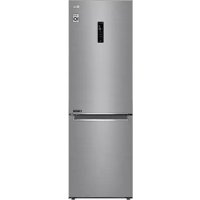
GBB61PZFFN - Fridge LG - Free user manual and instructions
Find the device manual for free GBB61PZFFN LG in PDF.


| Product type | Refrigerator freezer |
| Brand | LG |
| Model | GBB61PZFFN |
| Dimensions (H x W x D) | 1860 mm x 595 mm x 675 mm |
| Total net capacity | Not specified in the manual |
| Climate class | SN to T (10 °C to 43 °C) |
| Refrigerant | Isobutane (R600a) |
| Voltage | 220-240 V, 50 Hz |
| Energy consumption | Not specified in the manual |
| Noise level | Not specified in the manual |
| Main functions | Express cool, Express freeze, Eco mode, Wi-Fi (LG ThinQ), Smart Diagnosis, open door alarm |
| Water dispenser | Yes, manual reservoir 2.3 L |
| Ice tray | Yes, manual |
| Lighting | LED |
| Maintenance and cleaning | Clean with soft cloth and mild detergent; automatic defrost; do not use abrasive products |
| Safety | Control lock, high temperature alarm, child safety (lock on some models) |
| Spare parts and repairability | Contact LG Electronics center; parts available for 7 years (gaskets 10 years) |
| Warranty | Not specified in the manual |
| General information | Reversible doors, leveling feet, folding shelf, Fresh Converter |
Frequently Asked Questions - GBB61PZFFN LG
User questions about GBB61PZFFN LG
0 question about this device. Answer the ones you know or ask your own.
Ask a new question about this device
Download the instructions for your Fridge in PDF format for free! Find your manual GBB61PZFFN - LG and take your electronic device back in hand. On this page are published all the documents necessary for the use of your device. GBB61PZFFN by LG.
USER MANUAL GBB61PZFFN LG
Read this owner's manual thoroughly before operating the appliance and keep it handy for reference at all times.
EN ENGLISH ES ESPANOL IT ITALIANO PL POLSKI SR SRPSKI
BG 5bJIAPCKN ET EESTI LT LIETUVIU PT PORTUGUES SV SVENSKA
CZ CESTINA FI SUOMI LV LATVIESU RO ROMAN
DA DANSK FR FRANCAIS MK MAKEJOHCKI SK SLOVENCINA
DE DEUTSCH HR HRVATSKI NL NEDERLANDS SL SLOVENSCINA
EL EAMNIKA HU MAGYAR NO NORSK SQ SHQIP
MFL70584303
Rev.06_201210
www/lg.com
TABLE OF CONTENTS
This manual may contain images or content different from the model you purchased.
This manual is subject to revision by the manufacturer.
SAFETYINSTRUCTIONS 3
IMPORTANT SAFETY INSTRUCTIONS 3
Disposal of Your Old Appliance 10
INSTALLATION 11
Dimensions and Clearances 11
Ambient Temperature 11
Accessories 12
Reversing Doors 12
Leveling the Appliance 12
Connecting the Appliance 12
Moving the Appliance 12
OPERATION 13
Parts and Functions 13
Notes for Operation 15
Control Panel 17
Water Dispenser (^*) 19
Water Dispenser Tank 19
Ice Tray 20
Fresh Converter (^*) 20
Fresh Vegetable Printer (^*) 21
Folding Shelf 21
Other Functions 22
SMART FUNCTIONS 23
LG ThinQ Application 23
Using Smart DiagnosisTM 25
MAINTENANCE 26
Notes for Cleaning 26
Cleaning the Door Basket 26
Cleaning the Shelf 27
Cleaning the VegetableDrawer 27
Cleaning the Crisper Cover 27
Cleaning the Freezer Drawer 28
Cleaning the Water Dispenser 28
TROUBLESHOOTING 29
The following safety guidelines are intended to prevent unforeseen risks or damage from unsafe or incorrect operation of the appliance.
The guidelines are separated into 'WARNING' and 'CAUTION' as described below.

This symbol is displayed to indicate matters and operations that can cause risk. Read the part with this symbol carefully and follow the instructions in order to avoid risk.

WARNING
This indicates that the failure to follow the instructions can cause serious injury or death.

CAUTION
This indicates that the failure to follow the instructions can cause the minor injury or damage to the product.
IMPORTANT SAFETY INSTRUCTIONS

WARNING
To reduce the risk of explosion, fire, death, electric shock, injury or scalding to persons when using this product, follow basic precautions, including the following:
Children in the Household
-
This appliance is not intended for use by persons (including children) with reduced physical, sensory or mental capabilities, or lack of experience and knowledge, unless they have been given supervision or instruction concerning use of the appliance by a person responsible for their safety. Children should be supervised to ensure that they do not play with the appliance.
-
If the appliance is equipped with a lock (some models only), keep the key out of reach of children.
For use in Europe:
This appliance can be used by children aged from 8 years and above and persons with reduced physical, sensory or mental capabilities or lack of experience and knowledge if they have been given supervision or instruction concerning use of the appliance in a safe way and understand the hazards involved. Children shall not play with the appliance. Cleaning and user maintenance shall not be made by children without supervision.
Installation
-
This appliance should only be transported by two or more people holding the appliance securely.
-
Ensure that the socket outlet is properly grounded, and that the earth pin on the power cord is not damaged or removed from the power plug. For more details on grounding, inquire at an LG Electronics customer information centre.
- This appliance is equipped with a power cord having an equipment-grounding conductor and a grounding power plug. The power plug must be plugged into an appropriate socket outlet that is installed and grounded in accordance with all local codes and ordinances.
- If the power cord is damaged or the hole of the socket outlet is loose, do not use the power cord and contact an authorized service centre.
-
Do not plug the appliance into a multi socket adapter which does not have a power cable (mounted).
-
Do not modify or extend the power cable.
-
The appliance should be connected to a dedicated power line which is separately fused.
-
Do not use a multi socket outlet which is not properly grounded (portable). In case of using a properly-grounded multi socket outlet (portable), use the multi socket outlet with the current capacity of the power code rating or higher and use the multi socket outlet only for the appliance.
-
Install the appliance in a place where is easy to unplug the power plug of the appliance.
- Be careful not to point the power plug up or let the appliance lean against the power plug.
Install the appliance on a firm and level floor.
-
Do not install the appliance in a damp and dusty place. Do not install or store the appliance in any outdoor area, or any area that is subject to weathering conditions such as direct sunlight, wind, rain, or temperatures below freezing.
-
Do not place the appliance in direct sunlight or expose it to the heat from heating appliances such as stoves or heaters.
- Be careful not to expose the rear of the appliance when installing.
- Be careful not to let the appliance door fall during assembly or disassembly.
-
Be careful not to pinch, crush, or damage the power cable during assembly or disassembly of the appliance door.
-
Do not connect a plug adapter or other accessories to the power plug.
Operation
-
Do not use the appliance for any purpose (storage of medical or experimental materials or shipping) other than any domestic household food storage use.
-
Unplug the power plug during a severe thunderstorm or lightening or when not in use for a long period of time.
-
Do not touch the power plug or the appliance controls with wet hands.
-
Do not bend the power cable excessively or place a heavy object on it.
-
If water penetrates electrical parts of the appliance, disconnect power plug and contact an LG Electronics customer information centre.
-
Do not place hands or metallic objects inside the area emitting the cold air, cover or heat releasing grille on the back.
-
Do not apply excessive force or impact to the back cover of the appliance.
- Do not put animals, such as pets into the appliance.
-
Be careful of nearby children when you open or close the appliance door. The door may bump the child and cause injury.
-
Avoid the danger of children getting trapped inside the appliance. A child trapped inside the appliance can cause suffocation.
- Do not place heavy or fragile objects, containers filled with liquid, combustible substances, flammable objects (such candles, lamps, etc.), or heating devices (such as stoves, heaters, etc.) on the appliance.
-
If there is a gas leakage (isobutane, propane, natural gas, etc.), do not touch the appliance or power plug and ventilate the area immediately. This appliance uses a refrigerant gas (isobutane,R600a). Although it uses a small amount of the gas, it is still combustible gas. Gas leakage during appliance transport, installation or operation can cause fire, explosion or injury if sparks are caused.
-
Do not use or store flammable or combustible substances (ether, benzene, alcohol, chemical, LPG, combustible spray, insecticide, air freshener, cosmetics, etc.) near the appliance.
- Immediately unplug the power plug and contact an LG Electronics customer information centre if you detect a strange sound, odour, or smoke coming from the appliance.
- Fill with potable water only into icemaker or dispenser water tank.
- Do not damage the refrigerant circuit.
- Do not place any electronic appliance (such as heater and mobile phone) inside the appliance.
Maintenance
- Disconnect the power cord before cleaning the appliance or replacing the inside lamp (where fitted).
- Securely plug the power plug in the socket outlet after completely removing any moisture and dust.
- Never unplug the appliance by pulling on the power cable. Always grip the power plug firmly and pull straight out from the socket outlet.
- Do not spray water or inflammable substances (toothpaste, alcohol, thinner, benzene, flammable liquid, abrasive, etc.) over the interior or exterior of the appliance to clean it.
- Do not clean the appliance with brushes, cloths or sponges with rough surfaces or which are made of metallic material.
- Only qualified service personnel from LG Electronics service centre should disassemble, repair, or modify the appliance.
Contact an LG Electronics customer information cent move and install the appliance in a different location.
- Do not use a hair drier to dry the inside of the appliance or place a candle inside to remove the odours.
- Do not use mechanical devices or other means to accelerate the defrosting process.
Disposal
- When discarding the appliance, remove the door gasket while leaving the shelves and baskets in place and keep children away from the appliance.
- Dispose of all packaging materials (such as plastic bags and styrofoam) away from children. The packaging materials can cause suffocation.
Technical Safety
- Keep ventilation openings, in the appliance enclosure or in the built-in structure, clear of obstruction.
- Do not use electrical appliances inside the refrigerator.
- The refrigerant and insulation blowing gas used in the appliance require special disposal procedures. Consult with service agent or a similarly qualified person before disposing of them.
- Refrigerant leaking out of the pipes could ignite or cause an explosion.
- The amount of refrigerant in your particular appliance is shown on the identification plate inside the appliance.
- Never start up an appliance showing any signs of damage. If in doubt, consult your dealer.
- This appliance is intended to be used in household and similar applications only. It should not be used for commercial, or catering purposes, or in any mobile application such as a caravan or boat.
- Do not store explosive substances such as aerosol cans with a flammable propellant in this appliance.
- Children aged from 3 to 8 years are allowed to load and unload refrigerating appliances.
- This refrigerating appliance is not intended to be used as a built-in appliance.
Risk of Fire and Flammable Materials
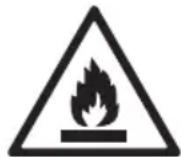
This symbol alerts you to flammable materials that can ignite and cause a fire if you do not take care.
-
This appliance contains a small amount of isobutane refrigerant (R600a), but it is also combustible. When transporting and installing the appliance, care should be taken to ensure that no parts of the refrigerating circuit are damaged.
-
If a leak is detected, avoid any naked flames or potential sources of ignition and air the room in which the appliance is standing for several minutes. In order to avoid the creation of a flammable gas air mixture if a leak in the refrigerating circuit occurs, the size of the room in which the appliance is used should correspond to the amount of refrigerant used. The room must be 1m^2 in size for every 8 g of R600a refrigerant inside the appliance.
- When positioning the appliance, ensure the supply cord is not trapped or damaged.
- Do not locate multiple portable socket-outlets or portable power supplies at the rear of the appliance.

CAUTION
To reduce the risk of minor injury to persons, malfunction, or damage to the product or property when using this product, follow basic precautions, including the following:
Installation
- Do not tilt the appliance to pull or push it when transporting.
- Make sure not to get a body part such as a hand or foot stuck while moving the appliance.
Operation
- Do not touch frozen food or the metal parts in the freezer compartment with wet or damp hands. It may cause frostbite.
- Do not place glass containers, bottles or cans (especially those containing carbonated drinks) in the freezer compartment, shelves or ice bin that will be exposed to temperatures below freezing.
- The tempered glass on the front side of the appliance door or the shelves can be damaged by an impact. If it is broken, do not touch it with hands.
-
Do not hang from the appliance doors, storage room, shelf or climb up into it.
-
Do not store an excessive amount of water bottles or containers for side dishes on the door baskets.
- Prevent animals from nibbling on the power cable or water hose.
-
Do not open or close the appliance door with excessive force.
-
If the hinge of the appliance door is damaged or operates improperly, stop using the appliance and contact an authorized service centre.
- Do not clean glass shelves or covers with warm water when they are cold.
-
Never eat frozen foods immediately after they have been taken out in the freezer compartment.
-
Make sure not to get a hand or foot stuck upon opening or closing the appliance door.
Maintenance
- Do not insert the shelves upside down. The shelves may fall.
- To remove frost from the appliance, contact an LG Electronics customer information centre.
Disposal of Your Old Appliance
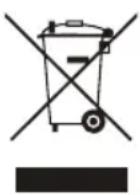
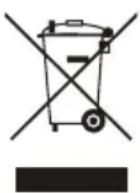
- This crossed-out wheeled bin symbol indicates that waste electrical and electronic products (WEEE) should be disposed of separately from the municipal waste stream.
- Old electrical products can contain hazardous substances so correct disposal of your old appliance will help prevent potential negative consequences for the environment and human health. Your old appliance may contain reusable parts that could be used to repair other products, and other valuable materials that can be recycled to conserve limited resources.
- You can take your appliance either to the shop where you purchased the product, or contact your local government waste office for details of your nearest authorised WEEE collection point. For the most up to date information for your country please see www/lg.com/global/recycling.
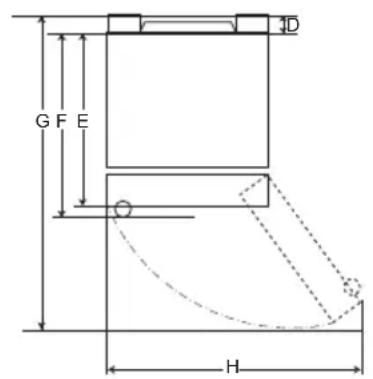
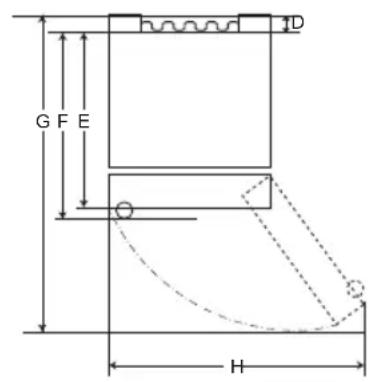
Dimensions and Clearances
Too small of a distance from adjacent items may result in the degradation of freezing capability and increased electricity costs. Allow over 50mm of clearance from each adjacent wall when installing the appliance.
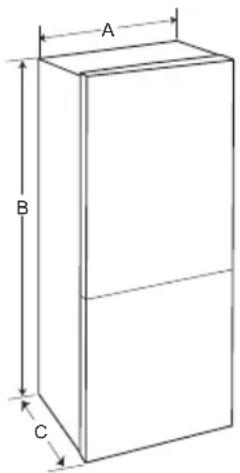
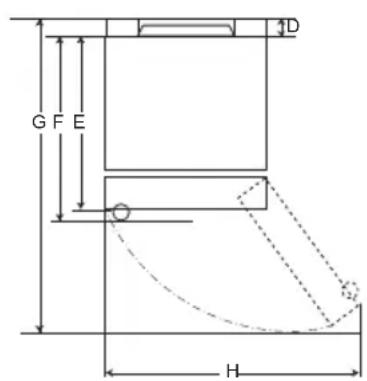
Type A
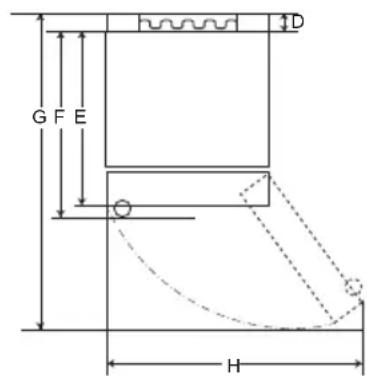
Type B
| Type A Type B | ||||||||
| Pocket Handle Bar | Handle Pocket Handle | Bar Handle | ||||||
| Size [mm] | ||||||||
| A | 595 595 5 | 95 595 595 | 595 595 595 | |||||
| B | 1860 | 2030 | 1860 | 2030 | 1860 | 2030 | 1860 | 2030 |
| C | 675 675 7 | 12 712 682 | 682 718 718 | |||||
| D | 9 | 9 | 9 | 9 | 15 | 15 | 15 | 15 |
| E | 667 667 6 | 67 667 667 | 667 667 667 | |||||
| F | - | - | 703 | 703 | - | - | 703 | 703 |
| G | 1124 | 1124 | 1124 | 1124 | 1130 | 1130 | 1130 | 1130 |
| H | 995 995 9 | 95 995 995 | 995 995 995 | |||||
Ambient Temperature
- The appliance is designed to operate within a limited range of ambient temperatures, depending on the climate zone.
- The internal temperature could be affected by the location of the appliance, the ambient temperature, the frequency of door opening and so on.
- The climate class can be found on the rating label.
| Climate Class | Ambient Temperature Range °C |
| SN (Extended Temperate) | +10 - +32 |
| N (Temperate) | +16 - +32 |
| ST (Subtropical) | +16 - +38 |
| T (Tropical) | +16 - +43 / +10 - +43* |
*Australia, India, Kenya
NOTE
The appliances rated from SN to T are intended to be used at an ambient temperature between 10^ and 43^ .
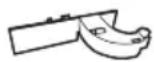
Accessories
1
2

3

1
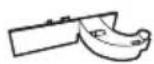
Hinge cover
2
Lower hinge
3
Sticker
Reversing Doors
Your appliance is designed with reversible doors, do that they may open from either the left of right hand side to suit your kitchen design.
NOTE
- Reversing the doors must be performed by the qualified personnel of LG Electronics. If not, the doors will not be covered by the warranty.
Leveling the Appliance
To avoid vibration, the unit must be leveled.
If required, adjust the leveling screws to compensate for the uneven floor.
The front should be slightly higher than the rear to aid in door closing.
Leveling screws can be turned easily by tipping the cabinet slightly.
Turn the leveling screws counterclockwise to raise the unit, clockwise to lower it.

Connecting the Appliance
After installing the appliance, connect the power plug into a socket outlet.
NOTE
- After connecting the power supply cord (or plug) to the outlet, wait 2 or 3 hours before you put food into the appliance. If you add food before the appliance has cooled completely, your food may spoil.
Moving the Appliance
1 Remove all food from inside the appliance.
2 Pull the power plug out, insert and fix it into the power plug hook at the rear or on top of the appliance.
3 Tape parts such as shelves and the door handle to prevent from falling off while moving the appliance.
4 Move the appliance with more than two people carefully. When transporting the appliance over a long distance, keep the appliance upright.
5 After installing the appliance, connect the power plug into a socket out to switch on the appliance.
Parts and Functions
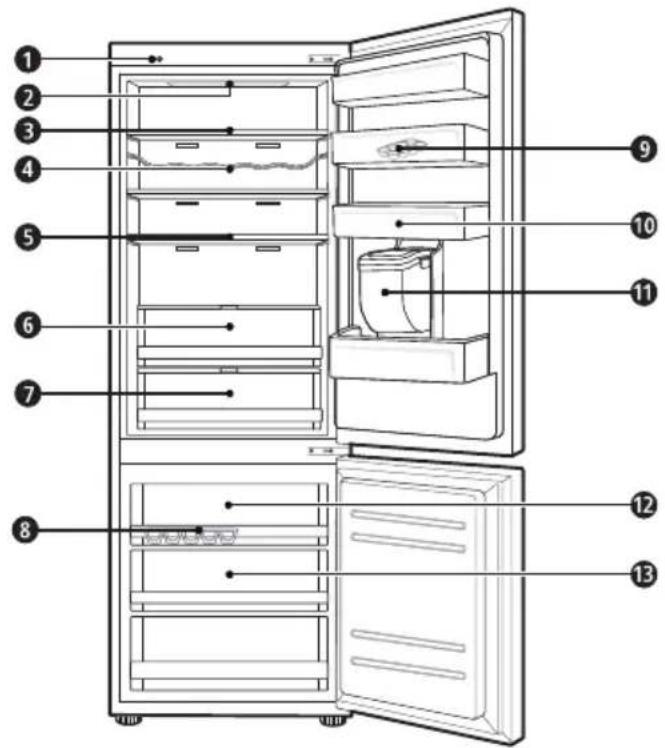
Smart Diagnosis Unit (^*)
This function is used when contacting LG Electronics customer information centre to help make an accurate diagnosis when the appliance operates abnormally or a failure occurs.
LED Lamp
The LED lamps inside the appliance light up when you open the door.
Fridge Shelf
This is where refrigerated foods and other items are stored.
- The shelf height can be adjusted by inserting the shelf in another groove of different height.
- Store the foods with higher moisture content at the front of the shelf.
The actual number of shelves will differ from model to model.
Bottle Rack (^*)
This is where drinks tall bottles or containers are stored.
Folding Shelf (^*)
This is where refrigerated foods and high items are stored.
Fresh Vegetable Painter (^*)
This is where fruits and vegetables are stored to help maintain freshness by adjusting the humidity controller.
- The appearance or components of the appliance may differ from model to model.
7 Fresh Converter (^*)
As a chill compartment, this is where meat, fish and vegetables are stored. Help maintain freshness by adjusting the humidity controller located in the back of the fridge compartment.
- For more space, you can use chill area without chill compartment drawer.
Ice Tray
This is where ice is produced and stored.
- For more space, you can remove the ice tray or ice cubes bucket.
Movable Egg Tray
This is where eggs are stored.
- You can move it to and use it at a desired position as needed. However, do not use it as the ice bin or place it on the shelf on top of the fridge or the vegetables drawer.
Fridge Door Basket
This is where small packages of refrigerated foods, drinks and sauce containers are stored.
Water Dispenser Tank (^*)
This is where water to supply the dispenser or the automatic icemaker is stored. It requires manual filling. (Non plumbed models only)
Top drawer
To freeze food items quickly, store the food in the top drawer. Food items will freeze most quickly in the drawer.
3 Freezer Drawer
This is for long-term storage of frozen items.
CAUTION
- Do not store short bottles or containers on the bottle rack. The items may fall and cause an injury or appliance damage.
NOTE
- (^*) : This feature varies depending on the model purchased.
Notes for Operation
- Users should keep in mind that frost can form. If the door is not closed completely, if the humidity is high during the summer, or if the freezer door is opened frequently.
- Ensure there is sufficient space between food stored on the shelf or door basket to allow the door to close completely.
- Opening the door for long periods can cause a significant increase of the temperature in the compartments of the appliance.
- If the refrigerating appliance is left empty for long periods, switch off, defrost, clean, dry, and leave the door open to prevent mould developing within the appliance.
Suggestion for Energy Saving
- Ensure there is sufficient space between stored foods. This allows cold air to be circulated evenly and lowers electricity bills.
-
Store hot food only after it has cooled in order to prevent dew or frost.
-
When storing food in the freezer compartment, set the freezer temperature lower than the temperature indicated on the food.
-
Do not put food near the temperature sensor of the fridge compartment. Keep a distance of at least 3cm from the sensor.
- Note that a temperature rise after defrosting has a permissible range in the appliance specifications. If you wish to minimise the impact this may have on the food storage due to a temperature rise, seal or wrap the stored food in several layers.
- The automatic defrosting system in the appliance ensures that the compartment remains free of ice buildup under normal operating conditions.
- For the most efficient use of energy, make sure that door bins, drawers and shelves are assembled properly.
Storing Foods Effectively
- Store frozen food or refrigerated food inside sealed containers.
- Check the expiration date and label (storage instructions) before storing food in the appliance.
- Do not store food for a long period of time (more than four weeks) if it spoils easily at a low temperature.
- Place the refrigerated food or frozen food in each fridge or freezer compartment immediately after purchasing.
- Place the refrigerated food or frozen food in each fridge or freezer compartment immediately after purchasing.
- Avoid refreezing any food which has been completely thawed. Freezing any food which has been completely thawed again will lower its taste and nutrition.
- Do not wrap and store vegetables with newspaper. Printing material of newspaper or other foreign substances may smear and contaminate food.
- Do not overfill the appliance. Cold air can not circulate properly if the appliance is overfilled.
- If you set an excessively low temperature for food, it may become frozen. Do not set a temperature lower than the required temperature for the food to be stored correctly.
- For more space, you can remove bottle rack, egg tray, ice tray and fresh converter drawer.
- Store raw meat and and fish in suitable containers in the refrigerator, so that it is not in contact with or drip onto other food.
Max Freezing Capacity
- The Express Freeze function will set the freezer to its maximum freezing capacity. This generally takes up to 24 hours and automatically switches off.
Express freeze must be switched on for 7 hours before fresh products are placed in the freezer compartment.
Maximum Storage
- To get better air circulation, insert all drawers.
- If large quantities of food are to be stored, all the freezer drawers shall be taken out of the appliance and the food shall be stacked directly on the freezer shelves in the freezer compartment.
NOTE
- To remove the drawers, first pick the food out of drawers. Then use the handle of drawers, pull out the drawers carefully. It may cause injury.
- The shape of each drawer may be different, insert in the right position.
Control Panel
Units and Functions
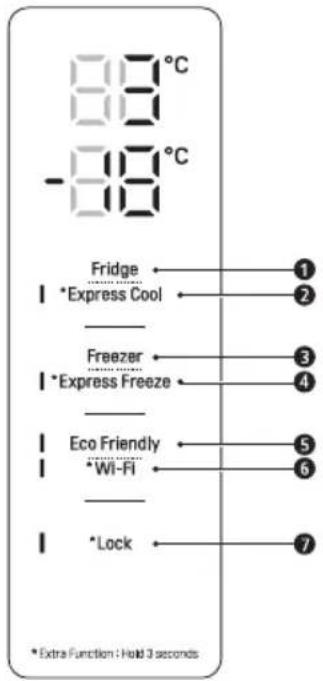
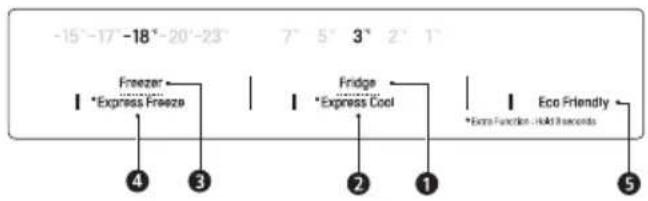
Fridge Temperature
- This sets the fridge target temperature.
^ 念 Express Cool
- This sets the Express Cool Functions.
3 Freezer Temperature
- This sets the freezer target temperature.
4 \*Express Freeze
- This sets the Express Freeze Functions.
Eco Friendly
- This controls the Power Save mode for lowering energy consumption.
\*Wi-Fi
- This sets the refrigerator to connect to your home's Wi-Fi network.
\*Lock
- This locks the buttons on the control panel.
NOTE
The actual control panel may differ from model to model.
- The control panel will turn off automatically for energy saving.
- If there is any finger or skin contacts to the control panel while cleaning it, the button function may operate.
Setting the Temperature
This sets the fridge temperature or freezer temperature.
- Press the Fridge button or Freezer button to adjust the temperature.
The temperature can be adjusted.
- Fridge: from 1^ to 7^
- Freezer: from -15 °C to -23 °C
The initial temperature is set.
- Fridge: 3^ C
- Freezer: -18 °C
The actual inner temperature varies depending on the food status, as the indicated setting temperature is a target temperature, not actual temperature within the appliance.
NOTE
- The default temperature setting may vary depending on the appliance.
- Wait until 2 or 3 hours have passed after connecting the appliance to the outlet before storing food in the appliance.
- For ice making in normal climates, the freezer temperatures should be set to -18^ or colder.
Setting Express Freeze
The function can quickly freeze a large amount of ice or frozen foods.
- When you press and hold the Express Freeze button for three seconds, the Express Freeze icon lights on the control panel.
The function is enabled and disabled in turn each time you press the button.
The Express Freeze function automatically terminates after a specific period has passed.
NOTE
- When Express Freeze is switched on, noise may occur and energy consumption may increase.
Setting Express Cool
The function can quickly cool a large amount of foods such as vegetable, fruit and so on.
-
When you press and hold the Express Cool button for three seconds, the Express Cool icon lights on the control panel.
-
The function is enabled and disabled in turn each time you press the button.
The Express Cool function automatically terminates after a specific period has passed.
NOTE
- When Express Cool is switched on, noise may occur and energy consumption may increase.
Setting Eco Friendly
- The function makes the fridge-freezer work in the power saving mode which is useful when you are away on a holiday as it reduces energy consumption.
- Pressing the Eco Friendly button starts the operation with the lamp on, and pressing it again stops the operation.
- When the Eco Friendly mode is on, the other buttons will not operate. When you finish using the Eco Friendly mode, turn it off so that other buttons work and the refrigerator returns to its previous temperature setting.
Setting and Resetting Lock
This locks the buttons on the control panel.
- Press and hold the Lock button for three seconds. When the Lock function is set, all buttons are locked.
NOTE
- You must deactivate Lock function before you can access any other functions.
High Temperature Alarm
When the freezer temperature goes too high due to power failure, the freezer temperature LED lamp blinks and an alarm sounds.
-
Press the Freezer button to stop.
If the temperature is sufficiently cold, the blinking and alarm will automatically stop.
This function operates: -
When the refrigerator is turned on.
- When the freezer compartment gets too warm.
- When there is a power outage that lasts for a long period of time.
- When large amounts of warm food are placed in the freezer compartment.
- When the freezer door is left open for too long or too frequently.
Water Dispenser (^*)
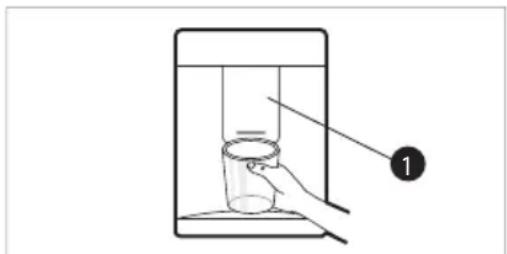
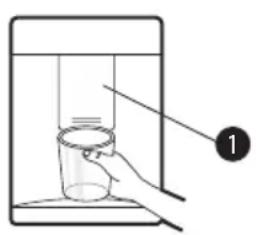
Press the lever 1 of the water dispenser to get cold water.
CAUTION
- Keep children away from the dispenser to prevent children playing with or damaging the controls.
- To clean the water dispensing system, flush the water through the dispenser about 5 minutes and throw away the first few batches of ice.
- Clean regularly surfaces that can come in contact with food and accessible drainage systems.
NOTE
- (*): This feature varies depending on the model purchased.
-
If you open the freezer door while water is being dispensed, the water supply will stop.
-
If you open the fridge door while water is being dispensed, dispensing will be paused.
- If the cup rim is small, water may splash out of the glass or miss it completely.
- Use a cup with a rim of over 68~mm in diameter when dispensing water.
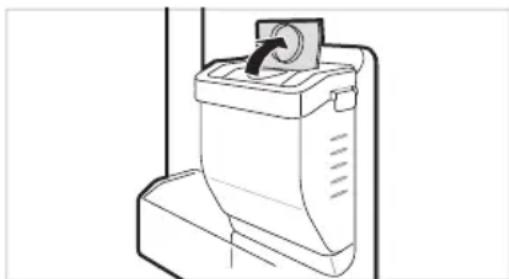
Water Dispenser Tank
1 Open the cap (small cover) on the top of the water tank.
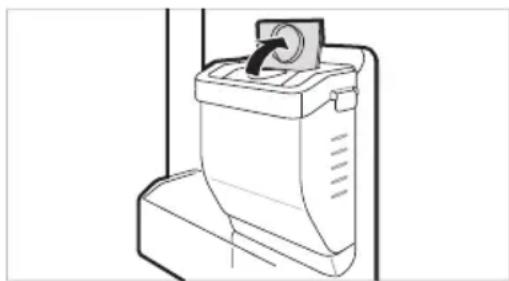
2 Fill the water tank with potable water and close the cap (small cover).
The water tank can hold up to 2.3 L.
CAUTION
- Children should not be allowed near the dispenser tank. If the child drops the water dispenser tank while it is completely filled with water, injury may occur. Do not fill the water tank with drinks other than water or fill with hot water.
- Do not apply excessive force or impact when removing or assembling the water dispenser tank. Doing so can cause appliance damage or injury.
NOTE
- Before using the water dispenser tank after installing the appliance, it should be washed before filling it with water.
-
Check if the water dispenser tank has been placed on the appliance correctly. If it is not assembled correctly, water may leak from the tank into the appliance.
-
If there is no water in the water dispenser tank, the cold water function of the dispenser cannot be used. Check if there is water in the water dispenser tank and then fill it with water if there is not.
-
Wait at least 15 seconds before removing the water tank after having dispensed water.
Sound from the water tank will be normal when supplying water to the dispenser. It is not a sign of malfunction.
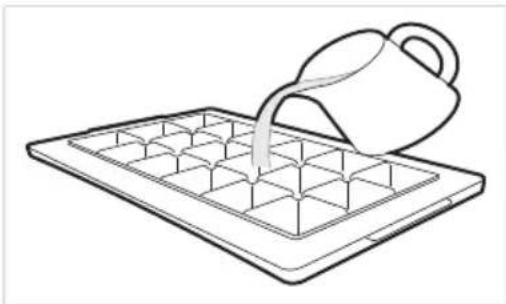
Ice Tray
Fill the ice tray with water.
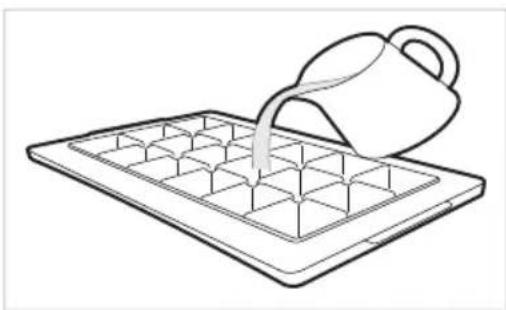
WARNING
- Fill with potable water only.
CAUTION
-
Check whether there is any ice remaining in theice tray before putting water into it.
-
Do not slam the freezer door after filling the ice tray with water.
If you open and close the freezer door frequently, it may take longer for the water to freeze.
The time it takes for the water to freeze may vary according to the season.
-
The temperature inside the appliance can take up to 24 hours to stabilize after initial installation. Water may take longer to freeze because of this.
-
Be careful when handling the ice as the edges of the ice may be sharp.
NOTE
-
If the ice tray is overfilled, the ice may stick together and be difficult to remove.
-
Press the Express Freeze button on the control panel to make ice quickly.
-
Do not store ice that has not frozen completely. Unfrozen water could cause the ice to clump together.
-
Be careful not to use excessive force when twisting the ice tray. Doing so could break the ice tray.
-
To easily remove ice, fill water up the tray in advance.
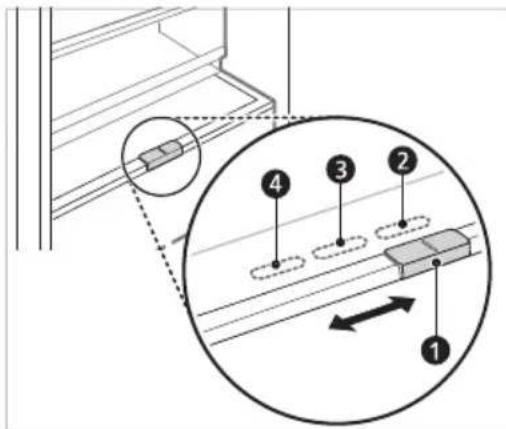
Fresh Converter (^*)
As a chill compartment, the temperature in the fresh converter can be controlled by sliding the lever 1, where located in front of compartment, in either direction.
When keeping vegetables after setting up Meat or Fish, the cold injury may occur.
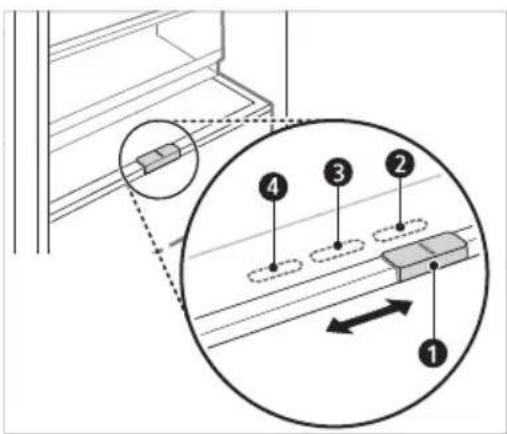
For storing vegetables.(Recommended)
For storing fish.
4 For storing meat.
NOTE
- (*): This feature varies depending on the model purchased.
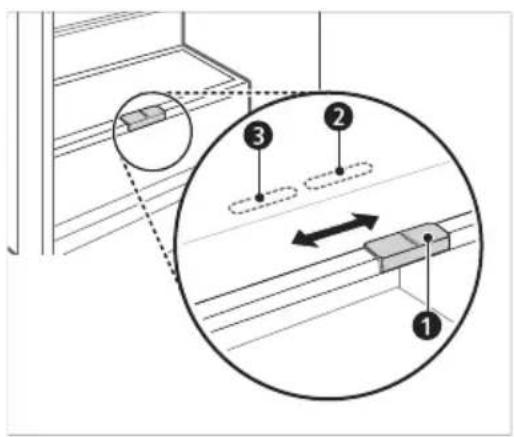
Fresh Vegetable Printer ( * )
Vegetable compartment can adjust the humidity by moving the knob 1.
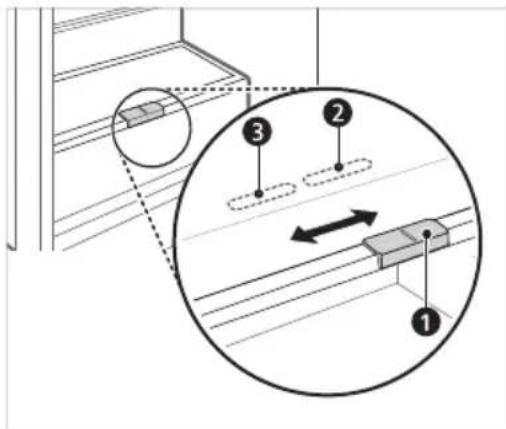
For storing vegetables.(Recommended)
For storing fruit.
NOTE
- (*): This feature varies depending on the model purchased.
Folding Shelf
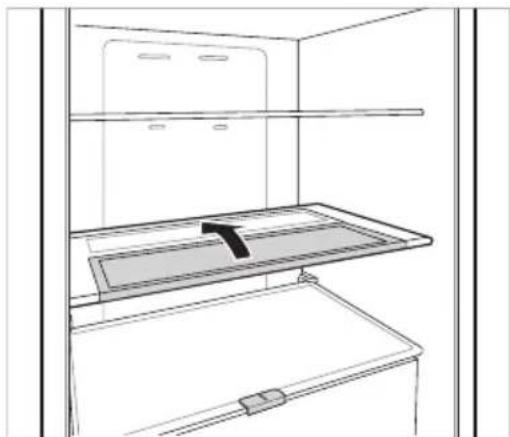
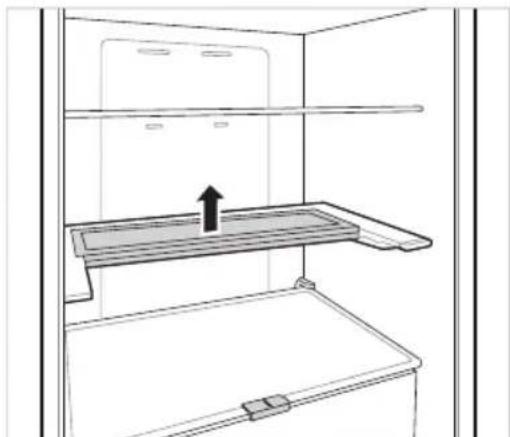
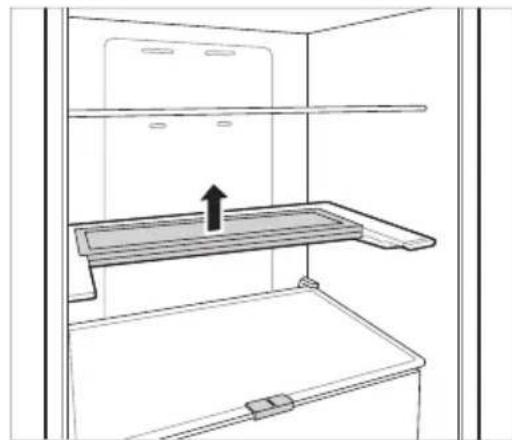
Store taller items, such as a gallon container or bottles, by pushing the front half of the shelf underneath the back half the shelf. Pull the front of the shelf forward to return to a full shelf.
1 Lift the front side of the shelf and shift it on its back side.
2 Lift the front side of the shelf and shift it under its back side. From this position, both sides of the shelf can be lifted up to free more space.
Other Functions
Door Open Alarm
The alarm sounds 3 times in a 30 seconds interval if the door (fridge compartment) is left open or not completely closed for one minute.
- Contact an LG Electronics customer information centre if the alarm sound continues even after closing the door.
Failure Detection
The appliance can automatically detect problems during the operation.
- If a problem is detected, the appliance does not operate and an error code is displayed even when any button is pressed.
- When this occurs, do not turn off the power and immediately contact an LG Electronics customer information centre. If you turn off the power, the repair technician from an LG Electronics customer information center may have difficulty finding the problem.
LG ThinQ Application
This feature is only available on models with Wi-Fi
The LG ThinQ application allows you to communicate with the appliance using a smartphone.
LG ThinQ Application Features
Communicate with the appliance from a smartphone using the convenient smart features.
Smart Diagnosis
If you experience a problem while using the appliance, this smart diagnosis feature will help you diagnose the problem.
Settings
- Allows you to set various options on the appliance and in the application.
NOTE
If you change your wireless router, internet service provider, or password, delete the registered appliance from the LG ThinQ application and register it again.
- The application is subject to change for appliance improvement purposes without notice to users.
- Functions may vary by model.
Before Using LG ThinQ Application
1 Check the distance between the appliance and the wireless router (Wi-Fi network).
- If the distance between the appliance and the wireless router is too far, the signal strength becomes weak. It may take a long time to register or installation may fail.
2 Turn off the Mobile data or Cellular Data on your smartphone.
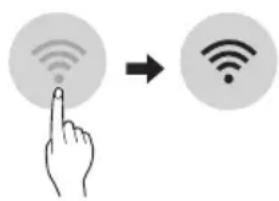
3 Connect your smartphone to the wireless router.
NOTE
To verify the Wi-Fi connection, check that the icon on the control panel is lit.
- The appliance supports 2.4 GHz Wi-Fi networks only. To check your network frequency, contact your Internet service provider or refer to your wireless router manual.
LG ThinQ is not responsible for any network connection problems or any faults, malfunctions, or errors caused by network connection.
- If the appliance is having trouble connecting to the Wi-Fi network, it may be too far from the router. Purchase a Wi-Fi repeater (range extender) to improve the Wi-Fi signal strength.
- The Wi-Fi connection may not connect or may be interrupted because of the home network environment.
- The network connection may not work properly depending on the Internet service provider.
- The surrounding wireless environment can make the wireless network service run slowly.
- The appliance cannot be registered due to problems with the wireless signal transmission. Unplug the appliance and wait about a minute before trying again.
- If the firewall on your wireless router is enabled, disable the firewall or add an exception to it.
- The wireless network name (SSID) should be a combination of English letters and numbers. (Do not use special characters.)
- Smartphone user interface (UI) may vary depending on the mobile operating system (OS) and the manufacturer.
- If the security protocol of the router is set to WEP, you may fail to set up the network. Please change it to other security protocols (WPA2 is recommended) and register the product again.
Installing the LG ThinQ Application
Search for the LG ThinQ application from the Google Play Store or Apple App Store on a smart phone.
- Follow instructions to download and install the application.
Connecting to Wi-Fi
The Wi-Fi button, when used with the LG ThinQ application, allows the appliance to connect to a home Wi-Fi network. The icon shows the status of the appliance's network connection. The icon illuminates when the appliance is connected to the Wi-Fi network.
Initial Appliance Registration
- Run the LG ThinQ application and follow the instructions in the application to register the appliance.
Re-registering the Appliance or Registering Another User
- Press and hold the Wi-Fi button for 3 seconds to temporarily turn it off. Run the LG ThinQ application and follow the instructions in the application to register the appliance.
NOTE
- To disable the Wi-Fi function, press and hold the Wi-Fi button for 3 seconds. If con will be turned off.
Open Source Software Notice Information
To obtain the source code under GPL, LGPL, MPL, and other open source licenses, that is contained in this product, please visit http://opensource.lge. com.
In addition to the source code, all referred license terms, warranty disclaimers and copyright notices are available for download.
LG Electronics will also provide open source code to you on CD-ROM for a charge covering the cost of performing such distribution (such as the cost of media, shipping, and handling) upon email request to opensource@lge.com. This offer is valid for a period of three years after our last shipment of this product. This offer is valid to anyone in receipt of this information.
Smart Diagnosis
This feature is only available on models with the @ or @logo.
Use this feature to help you diagnose and solve problems with your appliance.
NOTE
- For reasons not attributable to LGE's negligence, the service may not operate due to external factors such as, but not limited to, Wi-Fi unavailability, Wi-Fi disconnection, local app store policy, or app unavailability.
- The feature may be subject to change without prior notice and may have a different form depending on where you are located.
Using LG ThinQ to Diagnose Issues
If you experience a problem with your Wi-Fi equipped appliance, it can transmit troubleshooting data to a smartphone using the LG ThinQ application.
- Launch the LG ThinQ application and select the Smart Diagnosis feature in the menu. Follow the instructions provided in the LG ThinQ application.
Using Audible Diagnosis to Diagnose Issues
Follow the instructions below to use the audible diagnosis method.
- Launch the LG ThinQ application and select the Smart Diagnosis feature in the menu. Follow the instructions for audible diagnosis provided in the LG ThinQ application.
Display panel is on the Fridge door.
1 Close the freezer and fridge doors, then press and hold the Lock button to activate the lock function.
- If the display has been locked for over 5 minutes, you must deactivate the lock and then reactivate it.
2 Press and hold the Freezer button for 3 seconds or longer.
- The control panel will be turned off, and then '3' will be displayed on the fridge temperature display part.
3 Open the fridge door and then hold the phone near the speaker hole.
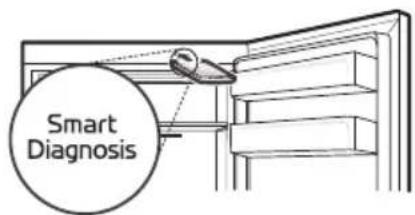
4 After the data transfer is complete, the diagnosis will be displayed in the application.
Display panel is inside the Fridge door
1 Open the fridge door.
2 Press the Eco Friendly button.
- If the door has been open for longer than 60 seconds, close the door and repeat steps 1 and 2.
3 Hold the phone near the speaker hole.
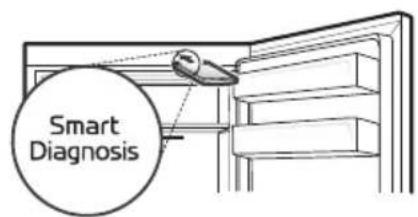
4 Press and hold the Freezer button for 3 seconds while holding your phone in front of the speaker.
5 After the data transfer is complete, the diagnosis will be displayed in the application.
NOTE
- For best results, do not move the phone while the tones are being transmitted.
Notes for Cleaning
-
When removing a shelf or drawer from inside the appliance, remove all stored foods from the shelf or drawer to prevent injury or damage to the appliance.
-
Otherwise, injury may occur due to the weight of stored foods.
-
If cleaning the outside air vents of the appliance by means of vacuuming, then the power cord should be unplugged from the outlet to avoid any static discharge that can damage the electronics or cause an electric shock.
- Detach the shelves and drawers and clean them with water, and then dry them sufficiently, before replacing them.
- Regularly wipe the door gaskets with a wet soft towel.
- Door basket spills and stains should be cleaned as they can compromise storage ability of the basket and could even be damaged.
After cleaning, check if the power cable is damaged, warm or improperly plugged. -
Keep the air vents on the exterior of the appliance clean.
-
Restricted air vents can cause fire or appliance damage.
-
When cleaning inside or outside of the appliance, do not wipe it with a rough brush, toothpaste, or flammable materials. Do not use cleaning agents containing flammable substances.
-
This may cause discoloration or damage to the appliance.
-
Flammable substances: alcohol (ethanol, methanol, isopropyl alcohol, isobutyl alcohol, etc.), thinner, bleach, benzene, flammable liquid, abrasive, etc.
-
For the appliance exterior, use a clean sponge or soft cloth and a mild detergent in warm water. Do not use abrasive or harsh cleaners. Dry thoroughly with a soft cloth.
-
Never clean the shelves or containers in the dishwasher.
The parts may become deformed due to the heat. - If the appliance is equipped with an LED lamp, do not remove lamp cover and LED lamp in any attempt to repair or service it. Please, contact an LG Electronics customer information centre.
- Clean regularly surfaces that can come in contact with food and accessible drainage systems.
Cleaning the Door Basket
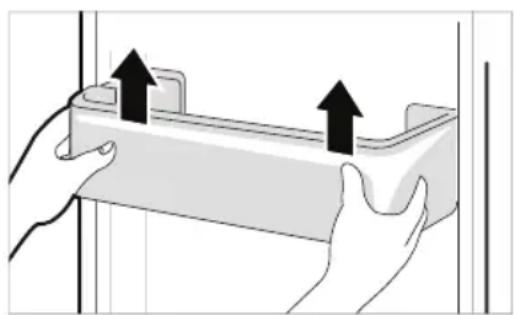
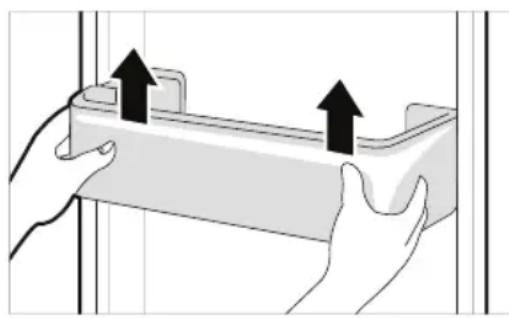
Removing the Fridge Door Basket
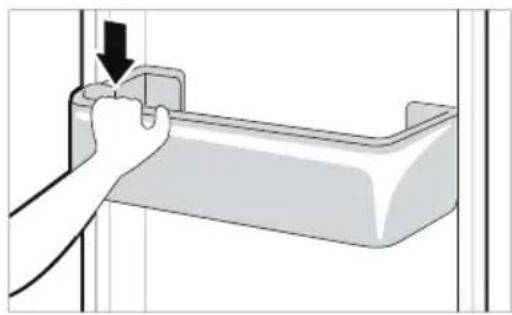
Hold both edges of the basket and remove it by lifting it upward.
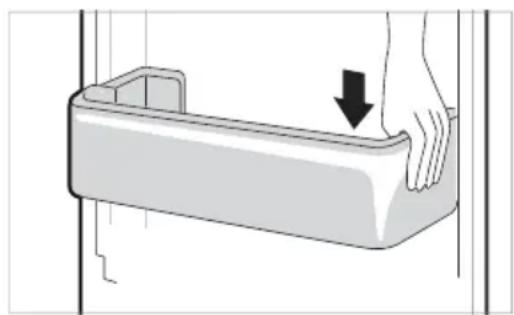
Refitting the Fridge Door Basket
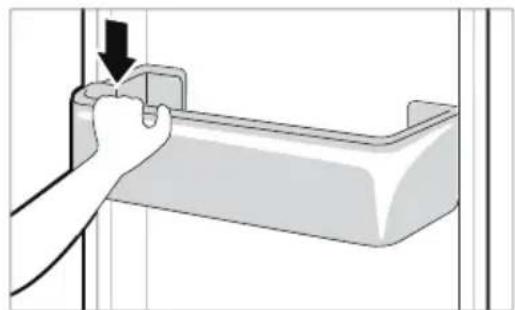
1 Hold both edges of the door basket, gently push one edge to assemble, and then in the same manner assemble the other edge.
2 After assembling, tap the door basket gently to fix it horizontally.
Cleaning the Shelf Removing the Fridge Shelf
Lift the rear edge of the fridge shelf and then pull it out.
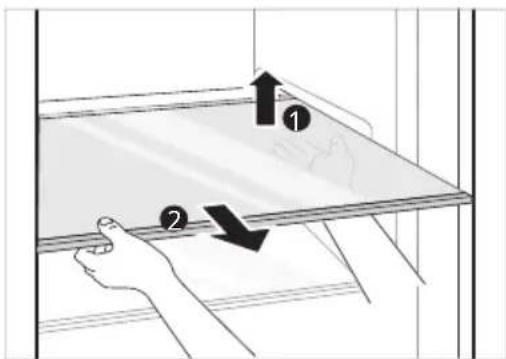
Refitting the Fridge Shelf
Refit the shelf in the reverse order of the removal process.
Cleaning the Vegetable. Drawer
Removing the Vegetable Printer
1 Remove the contents of the drawer. Hold the handle of the vegetable drawer and pull it out completely until it stops.
2 Lift the vegetable drawer up and remove it by pulling it out.
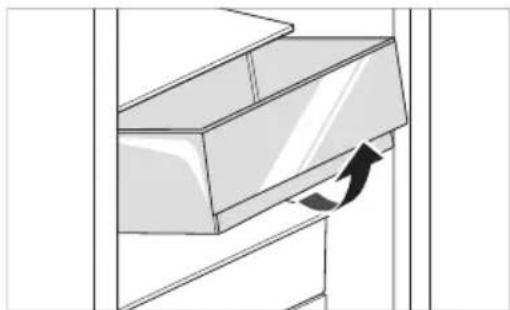
CAUTION
Note that injuries can be caused by the weight of stored foods when removing the vegetable drawer.
Refitting the Vegetable Printer
Refit the vegetable drawer in the reverse order of the removal process.
Cleaning the Crisper Cover Removing the Crisper Cover
1 After removing the vegetable drawer cover, pull the top section of the crisper cover down.
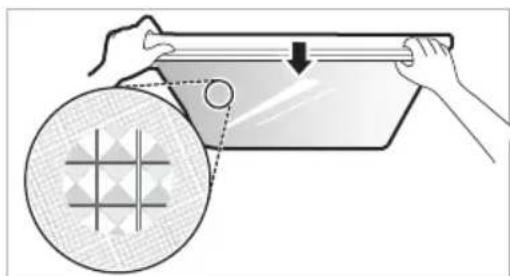
2 Remove the crisper cover by pulling it out.
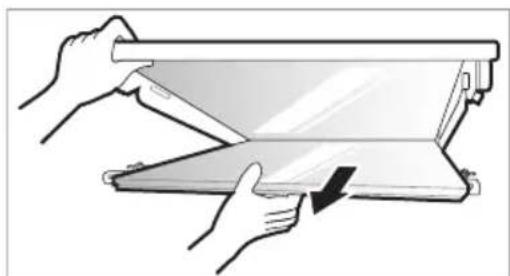
Refitting the Crisper Cover
1 Place the protrusions inside the risper cover on the grooves inside the shelf.
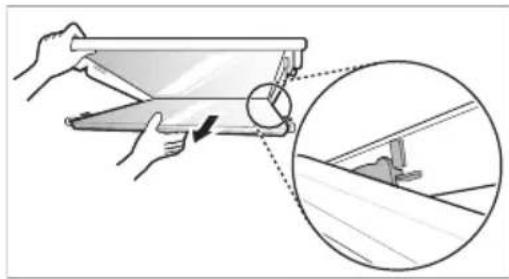
2 Insert the protrusions in front of the crisper cover into the grooves in front of the shelf and push the crisper cover up to assemble.
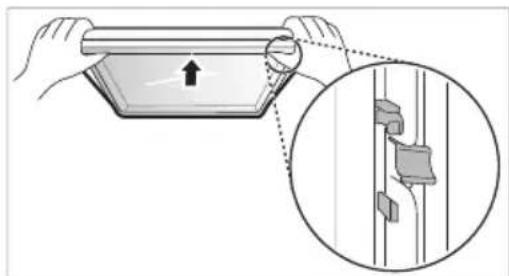
Cleaning the Freezer Drawer
1 Remove the contents of the drawer. Hold the handle of the freezer drawer and pull it out completely until it stops.
2 Lift the freezer drawer up and remove it by pulling it out.
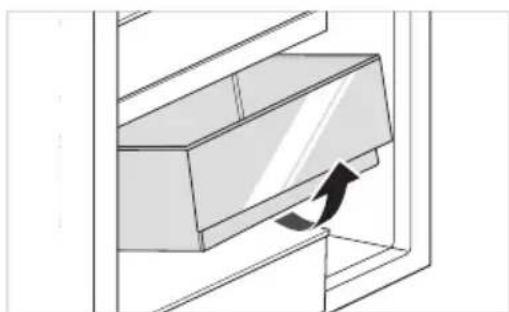
Refitting the Freezer Drawer
Refit the freezer drawer in the reverse order of the removal process.
Cleaning the Water Dispenser Cleaning the Dispenser Tray
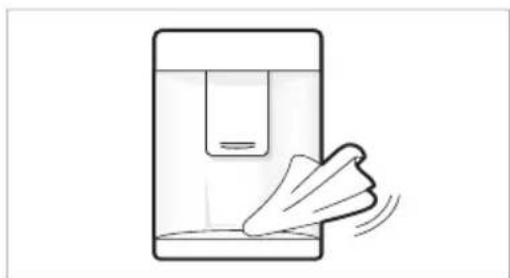
The dispenser tray may become wet easily due to spilled ice or water. Wipe the entire area with a damp cloth.
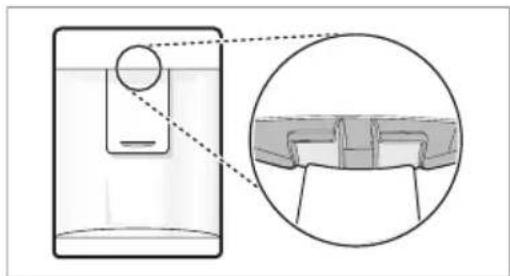
Cleaning the Water and Ice Outlet
Wipe the water or ice outlet frequently with a clean cloth as it may get dirty easily. Please note that lint from a cloth may adhere to the outlet.
| Symptoms Reason | n&Solution |
| There is no refrigeration or freezing. | Is there a power interruption?Check the power of other appliances. |
| If the power plug unplugged from the outlet?Plug the power plug in the outlet properly. | |
| A fuse in your homeOr the appliance is connected to a GFCI (Ground Fault Circuit Interrupter) outlet, and the outlet's circuit breaker has tripped.Check the main electrical box and replace the fuse or reset the circuit breaker. Do not increase fuse capacity. If the problem is a circuit overload, have it corrected by a qualified electrician.Set the circuit breaker on the GFCI. If the problem persists, contact an electrician. | |
| There is poor refrigeration or freezing. | Is the fridge or freezer temperature set to its warmest setting?Set the fridge or freezer temperature to 'Medium'. |
| Is the appliance in direct sunlight, or is it near a heat generating object such as cooking oven or heater?Check the installation area and reinstall it away from heat generating objects. | |
| Did you store hot food without cooling it first?Cool the hot food first before putting it in the fridge or freezer compartment. | |
| Did you put in too much food?Maintain an appropriate space between food. | |
| Are the appliance doors completely closed?Completely close the door and make sure that stored food is not obstructing in the door. | |
| Is there enough space around the appliance?Adjust the installation position to make enough space around the appliance. | |
| The appliance contains a bad smell. | Is the fridge or freezer temperature set to 'Warm'?Set the fridge or freezer temperature to 'Medium'. |
| Did you put in food with a strong smell?Store foods with strong smells in a sealed containers. | |
| Vegetables or fruit may have spoiled in the drawer?Throw away rotten vegetables and clean the vegetable drawer. Do not store vegetables too long in the vegetable drawer. | |
| The inside lamp in the appliance does not turn on. | Does the inside lamp in the appliance turn off?It is hard for customers to replace the inside lamp in the appliance as they are not serviceable. If the inside lamp does not turn on, please contact the LG Electronics customer information centre. |
| The appliance door is not closed tightly. | Is the appliance leaning forward?Adjust the front feet to raise the front side slightly. |
| Were the shelves properly assembled?Refit the shelves if needed. | |
| Did you close the door with excessive force?If you apply too much force or speed when closing the door, it may remain briefly open before closing. Make sure that you do not slam the door closed. Close without force. | |
| Вразата на уреда не e пьтуно за ворега. | Уреът наklонен ли e habред? • Коригирaite подоче крачета, за дамовдогге лесу п徕нatable част. |
| Рафтовete правлно ли са сглобени? • Ако e hyжно, поставе отоно рафтовete. | |
| Вераяно стve за ворейи Вразата с пекомерна сима? • Ако за воряte Вразата Тьрде симно лл рязко, тя може ду OCTанец оторега за мостент, п徕ни ду се за вори. Уberе тс, чу не SFьскате Вразата по за ворянec. 3отварайтse 6e3 сима. | |
| It is difficult to open the appliance door. | Did you open the door right after you closed it? • If you try to open the appliance door within one minute after you closed it, you may have difficulties because of the pressure inside the appliance. Try to open the appliance door again in a few minutes so that the internal pressure stabilizes. |
| There is condensation inside the appliance or on the bottom of the vegetable drawer cover. | Did you store hot food without cooling it first? • Cool the hot food first before putting it in the fridge or freezer compartment. |
| Did you leave the appliance door open? • Although the condensation will disappear soon after you close the appliance door, you can wipe it with a dry cloth. | |
| Do you open and close the appliance door too frequently? • Condensation can form due to the temperature difference from the outside. Wipe out the dampness with a dry cloth. | |
| Did you put warm or moist food inside without sealing it in a container? • Store food in a covered or sealed container. | |
| Frost has formed in the freezer compartment. | Doors may not be closed properly? • Check if the food item inside the appliance is blocking the door and make sure that the door is tightly closed. |
| Did you store hot food without cooling it first? • Cool the hot food first before putting it in the fridge or freezer compartment. | |
| Frost has formed in the freezer compartment. | Is the air entry or exit of the freezer compartment blocked? • Make sure that air entry or exit is not blocked so that the air can circulate inside. |
| Is the freezer compartment overfilled? • Maintain an appropriate space between items. | |
| Frost or condensation has formed inside or outside the appliance. | Did you open and close the appliance door frequently or is the appliance door improperly closed? • Frosts or condensation can form if the outside air penetrates inside the appliance. |
| Is the installation environment humid? • Condensation can appear on the exterior of the appliance if the installation area is too humid or on a humid day such as a rainy day. Wipe off any moisture with a dry cloth. | |
| The appliance is noisy and generates abnormal sounds. | Is the appliance installed on a weak floor or improperly leveled?Install the appliance on a solid and flat area. |
| Does the rear of the appliance touch the wall?Adjust the installation position to allow enough clearance around the appliance. | |
| Are objects scattered behind the appliance?Remove the scattered objects from behind the appliance. | |
| Is there an object on top of the appliance?Remove the object on top of the appliance. | |
| The side or front of the appliance is warm. | There are anti condensation pipes fitted to these areas of the appliance to reduce condensation forming from around the door area.The heat releasing pipe to prevent condensation is installed on the front and side of the appliance. You may feel it particularly hot right after the appliance is installed or during the summer. You can be assured that this is not a problem and is quite normal. |
| There is water inside or outside of the appliance. | Is there water leakage around the appliance?Check if the water has leaked from a sink or another place. |
| Is there water on the bottom of the appliance?Check if the water is from the thawed frozen food or a broken or dropped container. | |
| Clicking noises | The defrost control will click when the automatic defrost cycle begins and ends. The thermostat control (or appliance control on some models) will also click when cycling on and off.Normal Operation |
| Rattling noises | Rattling noises may come from the flow of appliance, the water line on the back of the unit (for plumbed models only), or items stored on top of or around the appliance.Normal Operation |
| Appliance is not resting evenly on the floor.Floor is weak or uneven or leveling legs need to be adjusted. See the Door Alignment section. | |
| Appliance with linear compressor was moved while operating.Normal operation. If the compressor does not stop rattling after three minutes, turn the power to the appliance off and then on again. | |
| Whooshing noises | Evaporator fan motor is circulating air through the fridge and freezer compartments. ·Normal Operation |
| Air is being forced over the condenser by the condenser fan. ·Normal Operation | |
| Gurgling noises | Appliance flowing through the cooling system ·Normal Operation |
| Popping noises | Contraction and expansion of the inside walls due to changes in temperature. ·Normal Operation |
| Vibrating | If the side or back of the appliance is touching a cabinet or wall, some of the normal vibrations may make an audible sound. ·To eliminate the noise, make sure that the sides and back do not make any contact with any wall or cabinet. |
| Your home appliance and smartphone is not connected to the Wi-Fi network. | The password for the Wi-Fi that you are trying to connect to is incorrect. ·Find the Wi-Fi network connected to your smartphone and remove it, then register your appliance on LG ThinQ |
| Mobile data for your smartphone is turned on. ·Turn off the Mobile data of your smartphone and register the appliance using the Wi-Fi network. | |
| The wireless network name (SSID) is set incorrectly. ·The wireless network name (SSID) should be a combination of English letters and numbers. (Do not use special characters.) | |
| The router frequency is not 2.4 GHz. ·OAI2.4 GHz router frequency is supported. Set the wireless router to 2.4 GHz and connect the appliance to the wireless router. To check the router frequency, check with your Internet service provider or the router manufacturer. | |
| The distance between the appliance and the router is too far. ·If the distance between the appliance and the router is too far, the signal may be weak and the connection may not be configured correctly. Move the location of the router so that it is closer to the appliance. |
Customer Care and Service
Contact an LG Electronics customer information centre.
To find information on LG authorized service centre, visit our website at www.lg.com.
- Only qualified service personnel from LG authorized service centre should disassemble, repair, or modify the appliance.
- To purchase spare parts, contact an LG Electronics customer information centre or our website at www/lg.com.
- Spare parts referenced in Regulation EU 2019/2019 are available for 7 years (only door gaskets are available for 10 years).
NOTE
- For more information about the energy efficiency of the appliance, visit https://ec.europa.eu and search using the model name (valid from 1st March 2021).
- Regulation EU 2019/2019, valid from 1st March 2021, is related to the Energy Efficiency classes by Regulation EU 2019/2016.
- Scan the QR code on the energy label supplied with the appliance, which provides a web link to the information related to the performance of the appliance in the EU EPREL database. Keep the energy label for reference and all other documents supplied with the appliance (valid from 1st March 2021).
- The model name can be found on the rating label of the appliance.
Memo
PbKOBOdCTBO 3A EKcIIOATAUЯ
XIIADINJIHNI ΦРИЗЕР
IpooyetepebKOBOCTBOTO 3a ekCnloataunnoDpo6Ho, npEi da pa6oTne Cypeda, nTo cBxpaHraBaTe Ha ydo6Ho MAcTO 3a cnpaBKn NO BcKo BpeMe.
CbДьРЖAHNE
Toba pBKOBOCTBO MOKe Da CbDbpKa H3o6paXeHnI Nn CbDbPkaHne, pa3nUHO OT MoDeJa, KOITO CTe 3aKynnn.
PbKOBOOCTBOTO noJIeKHa peaKunr O T npON3BOOnTeJI.
MHCTPYKUN 3A BE3OJACHOCT. 3
BaxHN INCTpyKcnn 3a 6e3oNaChocT 3
I3XbBpJIHe Ha cTapn ypei 10
MOHTUNPAHE 11
Pa3mepn n OTCToHnra 11
OkoHa TemnepaTypa 11
Akecoapu 12
PebepcnBn BpaTn 12
HinbelaunHa ypea 12
Cbbp3BaHe Ha ypeHa 12
IpeMeCTBaHe Ha ypeDa 12
EKCPIIOATAU 13
Uactn u yHKun 13
Beneckn no ekcnloataaeta 15
KoHTpOJIeH nane1 17
Диспенерзвога(*) 19
Pe3epBoap c nncnHcep 3a Boda 19
TabniuKa 3a IeI 20
KoHBeptop 3a npecn npodyktn (^*) 20
UekmeJke 3a CBexn 3eJeHuyu ( *) 21
CrbBaem paT 21
Дугн Функци.. 22
HHTENIHTHN FyHKcN 23
PpinoxeneTo LG ThinQ 23
I3noJI3BaHe Ha Smart DiagnosisTM 25
ПОДРьЖKA 26
3a6eKKn OTHOCHO NOUcTBaHeTo 26
I3xBbprJHe Ha cTapn ypeD
CmbbT cbc 3aepTaHnKaTeHep noka3Ba, ye OTnaDbuNTe OT eJeKtpnuecknte n eEeKtpoHHte npOdykTN (WEEE) Tp6Ba da ce n3XbPjrt OTdEJIHO OT bHTOBtE OTnAbu.
- Ctapinte eIektpnueckn npOyKTn MORaT da cbDbpKxat onacH BeuecTba n npabunHOTo n3xBbPnA He Ha Baunr ypei ne nomorhe 3a npedotbpaTbaHe Ha HeratNBHTe NocneDCTBn 3a OKonHaTa cpea u OBeWkoTo 3dpabe. Baunr CTap ypei moKe Da cbDbPxqA qactn 3a MHOROKpaTHa ynoTppe6a, KOtO bxa MoJIn da 6bDat n3NON3BaHn 3a peMOHT Ha dpyrn npOyKTn, KaKTo n dpyrn ceHHMaTePnaJI, KOtO Morat Da 6bDat peuNKnpaHn c cen 3ana3BaHe Ha orpaHueHnte pecypcn.
- Moxete Da 3aHeceTe Baun ypei nn B mara3nHa, ot KoITo cTe ro 3akynnnn moxete da ce CbpxeTe C MeCTHnA DpbXaBeH oΦnc 3a OTnaDbuTte, 3a da nOlyuHTe HOpMaun 3a Na-6n3kn PA3PEUHEWEEE nyKt 3a cb6npaHe Ha OtnaDbu. 3a Na-AkTuAnHa HOpMaun oT Baata DpbXaba, MoJn, norleDHeTe tyk: www.lg.com/global/recycling
Pa3mepn n OTCTOHNH
Tbbpde MaNKOTo pa3cToHne Do CbceHN IppeMeTN MOKe Da IOBeDe Do HAmnBaHe Ha 3aMPa3HTeHATA cNoC6HocN yBEnuHcNoTpe6NeHne Ha eHepn. OctabTe NOBuee ot 50 MM pa3CTOHaNE DO BcRAKa OT CbCeHNte CTeH, KOrato INHCTaHnPate ypeDa.

TnA
TnB
| Тип A Тип B | ||||||||
| Джобна дрьжka Лостова дрьжka | Джобна дрьжka | Лостова дрьжka | ||||||
| Размер [mm] | ||||||||
| A | 595 595 5 | 95 595 595 | 595 595 595 | |||||
| B | 1860 2030 | 1860 2030 | 1860 | 2030 18 | 60 2030 | |||
| C | 675 675 7 | 12 712 682 | 682 718 718 | |||||
| D | 9 | 9 | 9 | 9 | 15 | 15 | 15 | 15 |
| E | 667 667 6 | 67 667 667 | 667 667 667 | |||||
| F | - | - | 703 | 703 | - | - | 703 | 703 |
| G | 1124 | 1124 | 1124 | 1124 | 1130 | 1130 | 1130 | 1130 |
| H | 995 995 9 | 995 995 995 | 995 995 995 | |||||
OkoJa TeMnepaTypa
- UpeT e npEHa3HaueH 3a pa6Ota B OrpaHueH TemnepaTypeH dnaIa3OH B 3aBNCIMOCT OT KINMaTUnHaTa 3OHa.
- TemnepaTypa T ypeJa MoKe Ja 6bJe NOBJIyHa OT MecTONOIOXeHHeTo My, OKOIHaTa TEMnepaTypa, YecTOTaTa Ha OTBapAHe Ha BpaTAt N T.H.
KImmatuHnT KnaC MoKe Da Ce BnDn Ha eTNKeTa C daHHN.
| Климатinueн Клас | Диапазон на okолна темпатура в °C |
| SN (Разширени умерени) | +10 - +32 |
| N (Умерени) | +16 - +32 |
| ST (Субто рочени) | +16 - +38 |
| T (Трочени) | +16 - +43 / +10 - +43* |
*Abctpailn, INndn, KeHn
3ABeJIeXKKA
Upeinte c kateropn oT SN do T ca npedHa3HaeH 3a n3noJ3BaHe npi TeMepaTypa Ha OKoJHaTa CpeDa ot 10^ do 43^ .
Akecoapn
1
2

3

1
Kanaue Ha naHTata
2
DOnHa nHaTa
3
CTnKepe
Pebepcbn BpaTn
Baunr ype npoektnpanc pebepcnBn BpaTn, Taka Ye Te MoRat Da ce OTbaprT OTJBO nn OTdACHO, Cbo6pa3HO c pa3noJoxeHneTo Ha KxHrta Bn.
3ABeJIeXKKA
O6pbuHaTe Ha BpaTHe Tp8Ba Da ce
H3BbPn OT KbAnΦnUpaH NepcoHaN Ha LG
Electronics. B npToBHeN CnyaH, BpaTHe Hma
da 6bDat NOKpTN oT rapaHcIyTa.
HnVeJaunHa ypeDa
3a da ce n36eHHe Bn6paqua, ypeBt Tp8Ba Da 6bJe HnBeNipapH.
Ako e Heo6xOДmo, perylnpaTe BnHTOBeTe 3a HnBeNaCua, 3a Da KaMpeHcnpaTe HepaBnna PoiD.
IpeHaTa CtpaHa CneBa Da e MaIKO
NO-BuCOKO OT 3aHaTa, 3a Da Ce 3aTbapr JecHO
BpaTaTa.
BnHTOBete 3a HbEnaunr Moat da ce 3aBbptTJeCHO KaTO Ce HaKNOH JeKO Wka.
3aBbPTeBEHTOBETe 3a HNBelaCnB NOcOKa
ObpaTHo Ha YacOBHnKOBaTa CTePknKa , 3a
Da NOBdNHeTe ypeDa, B NocOKa Ha
YacOBHnKOBaTa CTePknKa , 3a Da ro
CHNXHTe.
Cbbp3BaHe Ha ypeDa
Cleq KaTo HcTaInpaTe ypeDa, CbPKeTe ⅢeNcena Ha 3axpaHbaunKa6eJ KbM KOHTaKtA.
3ABeJIENKKA
CJed Cbbp3BaHeTo Ha 3axpaHbAunKa6eI (Upe3 uencela My) KbM KOHTaKTa, n3yaKaIte 2-3 Yaca, npdN da cNoXnTe xpHa B ypeDa. Ako doabnte XpHa npeDypeBt Da ce e oxnaHn HnblHo, xpaHata MoKe da ce pa3BaJIi.
13 YeKMeJKe Ha KaMepaTa
ToBa e mrcTOTo 3a npOdbJIknteHNO cbxpaHeHne Ha 3ampa3eHn apTkyJIn.
BHIMAHNE
- He cxbxpaHbAaTe Kbcn 6ytnIKN nn CbIOBe Bbpxy paΦTa 3a 6ytnIKN. MoKe da naHaT n da npuHHr HapAHBaHe nn nobpeDa Ha ypeDa.
3ABEJIENKKA
() :Ta3nФункцЯВарupaВЗвсIMOCOTOT3aKypeHryMOdeJI.
3aKJIIOUbaHe Ha HacTpoIKn HynipaHe
OTyK ce 3akIIOUbAT 6yTOHInTe Ha KOHTPOJHHnaHeI.
- HatncheTe n 3aDpBxTe 6yToHa Lock 3a Tpu CekyHn. KoraTo e 3aJaDeHa yHKuYra Ta Lock, BCnKn 6yToHn ca 3aknOueHn.
3ABEJIEXKA
Tp6Ba Da DeakTnBnPaTe yHKuNg Lock npedn da moKeTe da n3noJ3BaTe npyIn yHKuN.
Anapma 3a BncoKa Tempepatya
Korato TemnepaTypata Ha φριηερa cTaHe TBbPde BnCoka nopadi cnPpaHe Ha eNeKTpO3axpaHbAHeTo, JAmnata LED 3a TemnepaTypata npMmRbN n PpO3ByaBa anapma.
- Hatnche 6yToHa Freezer 3a cnnpaHe.
- Ako TemnepaTypata e DocTaTbUHO CTyndeHa, npMmRbaHeTo n aIapMaTa aBtOMaTHUHO Iue cnpaT.
-Функцятapa60tN:
-Korato xnaaunHKnbTe BKNIOueH.
-Korato OTdeneHneTo Ha φpnsεpa cTaHe TBbpe TOnNo.
-Korato mMa npeKbCbaHe Ha eNeKTpo3axpaHbAHeTo 3a npOdbNkUTeJeH nepNoD OT BpeMe.
-Korato B OTdeneHneTo Ha cPn3epa ce NOCTABRT TOnEMN KOJNUeCTBa TOnJa XpaHa.
-Korato BpataHa HcPn3epa e ocTaBeHa OTBopeHa 3a TBbpDe IbJIro BpeMe INI IN TBbpDe YecTo.
Диспенецьа Вора (^*)
HaTncheteNocta 1 Ha dncneHcep a3a BODaTa,3a Da nOnyuTe cTydeHa BOJa.
BHUMAHNE
- Na3eTe DecaTa DaJIeY OT DnCneHcepa, 3a Da He CN IrpaT C Hero NIn Da He NOBpeJr KOHTPOJHInTe KOnHeta.
3aДа NOUHCTNTE CnCTeMaTa 3a CHa6dЯBaHe C BODa, INPOMInTe C BOda B INpOdbJIxKeHne Ha OKOJIO 5 MNHyTN.
3ABeJIeXKKA
· (^) :Ta3nФункцьВapирвЗвсIMOCTOT 3aKyIeHnMoJeJ.
- Ako OTBOpIte BpaTata Ha φpns3epa DOKaTo ce NoidaBA BOda, BOIOChA6nBaHHeTO Ue cnpe.
- Ako OTbOpITE BpaTata Ha XlaIINHnKa DOkato Ce IoIaBA BOa, BOIOChA6JaBaHeTo Ⅲe HapabN nay3a.
- Ako OTBopbT Ha yawata e MaIbK, BOaTaMOKe Da ce pa3nNcKa OT yawata nIN Bbo6e Da He yuei.
-ИЗпОзBAиTeЧаСДиАмТьрНаOTВОРа. над 68mm пи подаВане на ВОДа.
Pe3epBoap c dncnpeHcep 3a Boda
1 OTBopete KaanaykaTa (MaKna KanaK) B rohpata Yact Ha pe3epBoapa 3a BOda.
2 HanbJIHeTe pe3epBoapac nIteHa Boga n 3aTbOpTe KanaKata (MaIka KaNaUka).
- Pe3epBoapbT 3a BOda MoKe Ja cBdbpKa do 2,3 nItpa.
BHIMAHNE
- He trp6Ba da ce no3Bolra Ba Ha deca da ce do6nKabat Do pe3epBoapc DnCneHcepa. Ako Deteto n3nyche BoHNy pe3epBoap c DnCnEhcepa DOkato Toe n3qIIO nbJeH C BOda, TO MOKe Da ce HapaHn.
He npunaraTe npekomepHa cuna nInn Bb3deIcTBne, KOraTO OTcTpaHraBaTe nIn crNo6BaTe pe3epBoapa 3a BOda. Toba moKe Da npuHH noBpeDa Ha ypeDa nIn HapahRaBe.
3ABEJIEXKKA
-ПпeДи Дa ИЗПОЛЗВаTe pe3ePBoAp 3a BODa CNeД ИСТАЛИРаНе Ha урEDA,ТрЯБВа Дa ГИЗМЕTe,ппeДи Дa ГИЧБЛHInTe C BODa.
-Пюверета Ддпpe3epBoapbT 3a BОДа e noctabeH npabnHbBpXy ypeDA.Ак He e crIIO6e HnpaBnHOb,BOdATo MOnKe Da npOTeHe OT pe3epBoapaВуpeDA.
AkoBpe3epBoapa 3a BOJa HMa BOJa, cyHKnraTa Ha dncnEhcep a 3a CTydeHa BOJa He MoKe Da Ce n3noJ3Ba. IpobepTe daHIMa BOJa B pe3epBoapa I Go HanbIHeTe C BOJa, Ako HJaMa.
-Изчakайтпонe 15 cekyнnpeДида CBaNTe pe3epBOapac BOda cneД kaTo cTe OCBO6OJIN BOJa.
3ByKbT OT pe3epBoapa C BOda, KOrato DnCneHcepBc Ce Cha6JaBa C BOda, e HopMaJIeH. He e npn3HaK 3a HEn3npaBHOCT.
Ta6nueka 3a nei
HanbJIHeTe Ta6NIuKata 3a JeIc B0Da.
I P E D U N P E X K D E H N E
- PbHHeTa cMo C nTeHa Boga.
BHUMAHNE
- PpOBepeTe DaJIIMa OCTaHaJI NeI B TaBnUkata 3a JeI npeIN da NoCTaBNTe BOda B HeJ.
He xnonBaIte BpaTata Ha ppu3epa, cneKaTo HAnbHnHTe C BODa Ta6NnuKata 3a NeD.
AkoOTbaprTe 3aTbaprTe BpTaTa Ha oepa YecTo, 3amp3BaHTo Ha BOdaTa MOKe Da OTHE MIO-DJNTO BpeMe.
BpeMeTo 3a 3ampb3BaHe Ha BOdaTa MoKe Da Bapnpa cnopei ce30Ha. - Cta6nH3npaHTo Ha TeMnepaTypaTa BbB BbTpewHOCTTa Ha ypeDa MOKe Da OTHeme Do 24 Yaca Cnei NpBBOHaayHnHO To HcTaNipaHe. Iopadn TOBa, 3ampb3BaHTo Ha BOdaTa MOKe Da OTHeme No-DbNro BpeMe.
-Бдete BHMATEHn, KOrato 6opabnte c IeDa, TbN KaTo p6bOBeTe Ha NeDa MoKe da ca octpn.
3ABEJIEXKA
Ako TaBnukata 3a neJa e npenbHeHa, JeBt MoKe Da 3aJIeHHe 3aeDHO n Da e TpydHO da ce n3BaDi.
HaTnCHHe 6yToHa Express Freeze Bbpxy KOHTpOHHa NaHJI, 3a da ce o6pa3yBa 6bp30 JIeI.
He cbxpaHraBaIteJe, KOITo He e 3ampb3HaJI HanbIHO. Pa3mpa3eHaTa BOda 6n MORna Da npuHH cIenBaHe Ha JeDa.
BHMaBaIe Da He n3nON3BaTe npeKoMEpHa cnJa, KOrato n3BbATE Ta6JNcKaTa 3a Jei. Toba 6n MorNo da a cyyn.
3a da npemaxhe Te necho nega, HanbneTe Ta6nukata C BODa PpeBapntenHO.
KoHBeptOp 3a npecn npOdykTN (^*)
Kato oxnaqdaa oTdeeneHne, Temnepaypata B KOHBepTopa 3a npesChi npoDyKTN MOKe da ce KOHTponpa qpe3 nIb3raHe Ha Nocta 1, HAMnpauch Ce B npedHaTa Yact Ha OTdeeneHneTo BB BCsKa Nocoka.
Korato cxbpaaHbate 3eHcyu cned kaTO cTe hactponn Meco nn Pu6a, moKe da hactbnn yBpeXdahe OT CTyda.
3a cbxpaHHe Hn 3eHcyu (PpenopbUba ce)
3a cbxpaHeHne Ha pna.
3a cbxpaheHne Ha Meco.
3ABEJIEXKA
(^*) Ta3nФункцьВарupaB3aBcHMOCTOT 3akynehmmoJ.
YeKeMeJxke 3a CBeXn 3eJeHcyu (^*)
BnaKHOCTa B OTdeneHneTo 3a 3eHeuM OMOKe Da ce peryInpa Ype3 3aBbPtaHe Ha KOnHTo 1.
3a cbxpaHHeH He 3eJHcyu (PpenopbUba ce)
3a cbxpaHHeHa nIOdoBe.
3ABeJIeXKKA
(^*) Ta3nФyHKuB BapupaB 3aBNCMOCT O3aKynHmMoDen.
CrbBaem paT
CbxpaaBaTe NO-BnCOKn IpeDMeTn KaTo raIHOHeN KOHTeHep Hn6yTNkN, KaTO HaTNCHeTe IpeHaTa NIOBnHa Ha paTa nO3aHaTa NIOBnHa Ha paTa. DpbHete npEHaTa CtpaHa Ha paTa HAnpeD, 3a Da BbPHeTe KbM NIOXKeHne Ha NbNeH paT.
1 IOBnHHeTe npedHaTa cTpaHa Ha paΦTa n I3MeCTe Bbpxy 3aHaTa My cTpaHa.
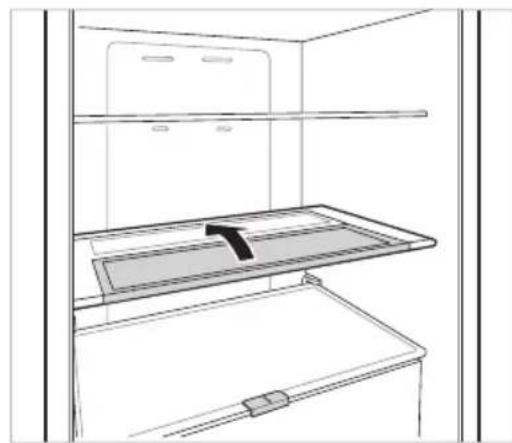
2 NOBdHHeTe npedHaTa cTpaHa Ha paΦTa n IIN3MeCTe IOI 3aHaTa My cTpaHa. OT TOBa IIOJKeHne, DBeTe CTPaHn Ha paΦTa MORaT Da Ce NOBdHrHaT, 3a Da ce OCBO6Ou INOBeYe IpocTpaHCTBO.
Дрги Функции
AnapMa 3a OTBopeHa BpaTa
AnapMaTa npo3ByuBa 3 nTn B INTEpeBan OT 30 cekyn, ako Bpata (XnaDnHo OTdienHe) octane OTbOeHa nn He e HanbJHO 3aTbOeHa 3a eHa MNHyTa.
Cbpxte ce c ceHTbpa HOpmaun 3a KnneHn Ha LG Electronics, ako anapmeHnT cnHa npOdbJxaba cJeD 3aTbaprHe Ha Bpata.
OTkpNbAHe Ha noBpeDa
UpeBt Moke cam da oKpNb a npo6n m no BpeMe Ha ekCnloatauia.
Ako 6bnde oTKpnt npo6nem, ypeBt Hma da pa60tn uIe ce noka3Ba kOd 3a rpeuka dopn npn HaTnCKaHe Ha HkOJ OT 6yToHInTe.
Korato TOBa Ce Cnyu, He N3KnHouBaIte 3aXpaHbAHeTo n He3a6abHo Ce CBbPKeTe C ceHTbpa 3a INHΦopMaucn 3a KIneHTn Ha LG Electronics. Ako N3KnIOUHTe 3axpaHbAHeTo, TEXNkBT OT cEHTbPa 3a INHΦopMaucn 3a KIneHTn Ha LG Electronics Moke da ce 3aTpydHi npi OTKpNbAhe Ha npo6Iema.
ПрилобжениTo LG ThinQ
Tazn xapaKTepeNCTnKa e HaNuHa cMoB MoJeIN C Wi-Fi.
PnnoKeHneTo LG ThinQ Bn no3Bolra Da KOMyHKnPaTe CypeDa NocpeDCTBOM CMapTFOH.
XapakTepncTnKn Ha npInJoxKeHneTo Ha LG ThinQ
Komyнкраite c ypeda ot cmaptfoH c nomoTuHa ydo6hnte yMHN xapaKtepncTNKn.
Smart Diagnosis
AkoBb3HnKHe npo6Jem DOkATO n3NOJ3BaTe npuIOKeHHeTO, Ta3n XapaKTepNCtNka 3a yMHa DnaHocCTNka (smart diagnosis) ue BN NOMORHe da DnaHocTnucnPate npo6Jema.
Hactpoyn
-ДаВаВиВьзМожнocT3aЗдаваHeHa pa3ЛчИпОцИN BуpeDAИВпрложeHneTO.
3ABEJIENKKA
Ako CMeHnTe CBo 6e3xKuHe npTep, IOCTaBnK Ha nHTepHe Tnn NapoNa, n3TpniTe peRnCTpnpaHny ypeD OT npNIOKeHneTo LG ThinQ n ropeRnCTpnpaTe OTHOB.
- PpInIOxKeHHeTo e npEiMeT Ha npOMeHc cen IpoIob6paBaHe Ha ypeHa, 6e3 npEiBapuTeHNO YBeIDOMBaHe Ha nOTpebTeNITe.
- ΦyHKUInTe MoKe Ja ca pa3NnHn npu pa3NnHnTe MoDeJI.
Ipei Da H3NoJ3BaTe npJIOxHeNeTo LG ThinQ
TbPBOHaayHapereNCTpaunHa ypeDa
3a Hau-do6pn pe3yntaTn, He MeCTeTe TenefoHa DOKaTO Ce N3Nb4BaT TOHOBe.
3a6eJexKn OTHoCHO nOuHCTBaHeTo
Korato cBaIaTe paTnIyueKeMdxKeOT BbTpewHOCCTHa hypeTa,IN3BaJeTe CraJaTa CbXpaHReBaHa XpaHa OT padTa nIyueKeMeJKeTo,3a Da npedeOTBpaTHe HapaHReBaHe IInIOBpeHa Ha ypeDa.
-B npoTnBeH cnyaM MoKe Da ce noNyH HapaHbAHe NopaN TeIIOTo Ha CbxpaHbAHHTe XpaH.
AkoNoHnCTBaTe BbHUnHInTe OTBOpn 3a Bb3DyX Ha ypeJa c NOMOuTa Ha npaxOCMyKaHa, eNektpnuecknT Ka6e Tp6Ba Da Ce OTkaun OT KOHTaKa, 3a Da ce n36erHe CTatUeH pa3paHa eNektpnueCTBO, KOITo MoKe Da NobpeiN eNektpoHnKaTa nn da npnuHn eJektpnueckn ydap.
CbaIepepaTOBeTe NyeKMeJKeTaTaNrNoHCTeTe CBoa, cNeD KoETo rN 3CyUeTeDo6pe, npEn Da rN NoCTabNTe o6pato.
- PeIOBHO n36bpcBaIte yIJIbTHHeHnraHa bpaTata c MOKpa MeKa Kbpna.
-Nethata n pa3nBaHnraTn NO K0uHncaTa 3a Bpata Tpr6Ba Da ce NouchTbA, Tb' KaTo Te HapyuBaTcNooc6HoCTTa 3a CbXpaHeHne Ha KOUHncaTa N MORaT DOpN Da a NOBpeJr.
CneK KaTo NoHCTnTe, npOBepTe DaJIIN 3axpaHbAunrKa6eI He e NOBpeJeH, daJI IN He e TOnbI INn HEnpaBUNHO BKNIOueH.
-Плдьржайтчистп OTBOPNTe 3a Bb3dYx OT bHnHaTa CtpaHa Ha ypeJa.
-3anyueHn OTBOpn 3a Bb3dyx MoRat da npuynHr noxap nn NobpeHa Ha ypea.
Korato noHCTBaTe ypeDa OTBbTpE nJIn OTBbH, He ro n36bpCbaIte C rpy6a YETka, nacta 3a 3b6n nn 3anaNIM BeUeCTBa. He n3noJI3BaIte NoHCTBaIu npenapatn, CbIbPkaIu 3anaJIIMM BeUeCTBa.
ToBa MoKeHpaHH OBe3cBETraHe nnIOBpeHa Ha ypeHa.
-3anaJIMn BeueCTBa: anKoxon (eTaHOn, MeaHOJ, n3OpPONn aKoxon, n3O6yTnI aKoxon n T.H.), pa3peINTeI, 6eINHa, 6eH3oJ, 3anaJIMn TeHocIn, a6pa3NBn np.T.
3a BbHnHaTa YacT Ha ypeDa n3noJ3BaIte YnCTa Tb6a nn MeKa KbpNa m MeK noHcTbaU npenapat, pa3peDen C tonla Boda. He n3noJ3BaIte a6pa3nBn nn rpy6n noHcTbaU n cpeDCTBa. PocSyWe Te Do6pe C MeKa KbPna.
- Hnkora He nouchBaIte paTobete nIN CbdoBETe B MnaJIHa MaunHa.
- Yactnte Morat da ce deopmnpat npaTTOJIINHATA.
- Ako ypeBt e cha6dEn c LED lamna, He cBaIaIte kanaKa ha LED lamnata n camata lamna B ONIT da r peMOHTnpate nn 06cnyknte. CbpxeTe ce c eHTbpa 3a INHΦopMaunr 3a KIneHTn Ha LG Electronics.
- Почиствашие рedingовноьрхон'tи, конт можеда влгзатВ Контakтсханс дocьнштесстems3a Дрehж.
I3BaJdaHe Ha K0uHnUcaTa Ha BpaTaTa Ha XJaDnHnka
XBaHete DbTa Kpa Ha KoUHnUcaTa nЯ n3BaTe KeTo nOBdInrHeTe Harope.
Noctabraye Ha KooshncaTaHa BpaTaTa Ha XlaadnHnka
1 XbaheTe Dbata KaPra Ha KoUHnuaTaHa BpaTata,JeKO 6yTHeTe eDHHa Kpa,3a Da crIIO6nte,a NocLe No Cbunr Haunr CrIIO6Te dpytna Kpa.
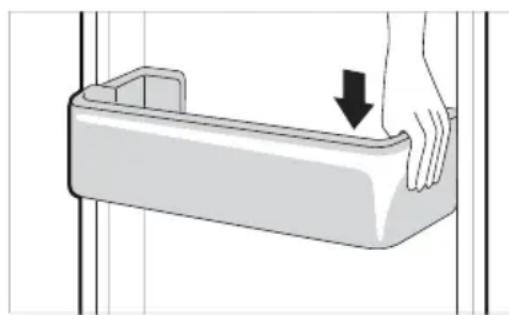
2 CneI kaTo crNoBnte, notynaiTe neko KOuHnUcaTa, 3a Da r 3akpenTe XOpN3OHTaJIHO.
IocTaBHe Ha YekMeJxKeTo Ha 4pn3epa
IocTabraHTo Ha YekMeJxKeTo Ha φpns3epa ce n3BbPwBa B o6paTeH peH Ha npoueca Ha cBaJIHe.
Tryk pa knappen Fridge erer Freezer for at justere temperature.
-
Temperaturek an justeres.
-Koleskab: fra 1^ til 7^
-Fryser:fra-15 ^ C til-23 ^ C -
Den indledende temperatur indstilles.
-Koleskab: 3^
-Fryser: -18 °C
Installation of LG ThinQ-application
Sog after LG ThinQ-appen fra Google Play Store, eller Apple's App Store pa en smartphone.
MnV xTUTATE TNY TIOPTA TOU KAATUOKTN, apou YEUIAETE TOV DIAKO TAYOU ME VEPo.
Eav avoiyete kai kLeivete ouxva TnV TnOpta Tou katayuktn, mTopei va xpeiaotei TEPIOOTepoc Xpovoc ia va TAYWoei To Vepo.
O xpovoc Tou xpeiaZeTai yia va Taywoei To vepo mTopei va diaqepei avaloya u Tnv ETOXn.
MTOpei va xpeiaotouv EWC kai 24 wpc syia va otaepoTointheta i n epuokpaoia mea a tno oukeun e ta nvy apxikn totoetnon. Ia tov loyo auto mTOpei va xpeiaotei TepiooTepos cxpovoS yia va tanywoeI TO vepo.
- PooEeTe oTav xeiPiZeote Tov TAYo KaOwC or akpeTou mTopei va eivai aixmnpes.
ZHMEIΩ
Eav o biokoc panyou evai napayeioevoc, O
Tayoc mTropei va koanoei kai va eivai
duokolo va aqapieo
- Patnote To Koupti Express Freeze oTov Tivaka eLeyxou yia va 8nmuOpynoTe ypnyopa Tayo.
Mny aTOnOKeUeTe TAYo Tou EV Exi katauuxEviEvAeLwC.Eav To Vepo Eev Exi TAYwoeTa TAYAKIA MTopeiva KOLAnouv MUeTuouc.
- PpooEeTE va uny xpnoiouoieu utepboAikn duvaun otav oTpiBETe Tov biKO npou. Kati TEIO th a TOpOSe va OTaOeI Tov biKO npou.
Tia va aapaipoeote eukoataov Trayo, ymuote vepo tov bioko ek twv Tpotepwv.
Eco-Friendly (Modo Eco)
OLULISED OHUTUSJUHISED 3
Teie vana seadme havitamine 10
PAIGALDAMINE 11
OLULISED OHUTUSJUHISED

OHT
Plateau a oeufs mobile
Application LG ThinQ
VAZNE SIGURNOSNE UPUTE 3
Zbrinjavanje starog ureda 10
POSTAVLJANJE 11
Dimenzije i slobodan prostor 11
Temperatura okoline 11
Pribor 12
Preokretanjevrata 12
VAŽNE SIGURNOSNE UPUTE

UPOZORENJE
Kako biste smanjili opasnost od eksplozije, požara, smrti, strujnog udara, ozljede ili opekotina osoba prilikom upotrebe ovog proizvoda, slijedite osnovne mjere opreza, uključujuci sljedeće:
Djeca u kućanstvu
-
Ovim se uredağem ne bi trebale koristiti osobe (uključujuci djecu) smanjenih tjelesnih, osjetilnih ili mentalnih sposobnosti, ili s manjkom iskustva i znanja, osim ako ih osoba koja je odgovorna za njihovu sigurnost ne nadzire ili im daje upute u vezi s upotrebam uredağaj. Djecu treba nadgledati kako bi se osiguralo da se ne igraju s uredağem.
-
Ako je urejad opremljen bravom (samo kod nekih modela), držite ključ izvan dosega djece.
Za uporabu u Europi:
HnBeIipaHe Ha ypeDoT
YpeoT Mopa da e HnBepnPan 3a da HeMa Bn6paun.
ДOKOLKY e NOTpe6Ho, OdBpTeTe ИИЗ 3aBpTeTe Ги 3aBpTKuTe 3a ИИБeПира№ Б ДOKOLKY ypeIOT ro NOCTaByBaTe Ha HepaMeH NOД.
IpeHnOT dEHa ypeoT Tpe6a da e nocTaBeH MaIKy NOBcOKO OJ 3aDHnOT 3a NOECHO 3aTBopaHe Ha BpaTaTa.
Habane ro anapatot 3a necho da npuctannte do 3aBPTKte 3a HNBenipahe.
BpTe Tn 3aBPTKITe CnpOTuBHO Ha HAcOKaTa Ha CTpeJIKITE Ha YacOBHKnOT 3a Da ro NODIrHeTe ypeIoT, a o6paTHo 3a Da ro cnuytnte noHnCKO.
Pobp3yBaHbe Ha ypeDoT
IIO nHCTaJaujata Ha ypeIoT, npNKnyeTe ro Bo WTekep npNKlyOkoT 3a HanojyBaHe.
HANOMEHA
- IIO NOBp3yBaHbETo Ha Ka6eIOT 3a HanojyBaHe (nnn npNKnyuOkOT) co uTekePOT, npuekajTe 2 nnn 3 yaca nped Da cTabNTe xpaHa BO ypeDTo. DOKONky cTabNTe xpaHa BO ypeDTo npd ToJ ceNoCHO da Ce n3JaDi, XpaHaTa MOKe Da ce pacIne.
PpeMeCTyBaHbe
1 OtctpaHeTe ja ceTa xpaHa.
2 3BaTeTo npKnyOKOT 3a ctpya, BMeTHeTe To nΦHKcapajTe To BO KyKaTa 3a npKnyOKOT Ha 3aHaTcTaHa NJIHa roPHNOT DeI OJ anapaTOT.
3 Co nomou Ha JennBa JeHtA, 3aeneTe rH noIuTe n paKaTa Ha BpaTaTa 3a Da He naHaT npn npMeCTyBaHbETo Ha ypeDTo.
4 IpnemecTyBaJTe cmo aKO cTe NOBeKeMnHa. Kora ro npehecyBaTe Ha noDOnrnpactoJaHnja, dpxTe ro nCnpaBeH.
5 OTKaKO ke ce noCTaBn, NOBp3eTe ro co cTpyja co npNKnyyBaHbe BO wTeKepe n BKnyteTe ro.
MoNaTcIyKx3a npaBeHue N yBaHbe Mpa3.
- 3a ДОПОЛНТЕLEн порстор, можeteда ja ИЗВадиTe моДпаТа Ил Кофчкata 3a Мра3.
9 IopBnKeH dpKauch a jajua
Tuka ce yybaat jajca.
- Mojkete da ro nomectte ng da ro noctabute BO nocakybaHata nooX6a. Meytoa, He Kopnctete ro kako moJna 3a mpa3 nnnoctabete ro Hajrope Ha qpnjNepot nn BO noJnIuata 3a 3eNeHcyK.
10 Kopna Ha BpaTaHa φpuxnepot
Tyka ce cybaat mann naketn xpaHa, njaauu caobu co cocobn.
1 Pe3epBoap Ha dncneH3epoT 3a BOda (^*)
Bo pe3epboapot ce cTaba BOda 3a dinCneH3epoT nIN 3a aBTOMaTCKNOT aBTOMaT 3a Mpa3. Pe3epboapot ce noJIHn paHNO. (Camo 3a moJeJn KOn He ce NOBp3yBaAT Ha BOIOBOHaTa HCTaIaujia BO dOmot)
12 TogHaTa qnoka
3a 6p3o 3amp3HyBaHbe npexpaH6eHn npOn3BODn, cKnadnpajTe ja xpaHaTa Bo rOpHaTa fnoka. Bo Taa fnoKa, npexpaH6eHnte npOn3BODn ce 3amp3HyBaAT haj6p3o.
12ΦnokaHa3amp3HyBa4OT
Oba ce Kopnctn 3a doIropouHc yBaHbe 3amp3HaTa xpaHa.
BHIMAHNE
- He yubajTe kpaTkn uunuHb a nn caobn Ha noonuata 3a uunuHa. Moke da naHaT n da dojde do nobpeDa nn OwTeTyBaHe Ha ypeDoT.
HANOMEHA
(^*) :OBaaKapakTepcntkaBapnpaBO3aBnCHoCTODKyneHnotMOdeJ.
HannomeHH 3a pa6oTeHbeTo
Kopuchnuntpe6a da nmaat npedBn deka Moxe da ce opmnpa Mpa3 ako Bpata He e ueIOcho 3aTbopeha, aKO BIAJXHOCTe MHORY BICOKA BO TEKOT Ha JeTOTO INI aKO BpataHa 3amp3HyBaHT CE OTBOPa MHORY yeCTO.
- IorpuKTe ce da nMa DOBONHO npocTop MeIy XpaHata wTo ce cyBa Ha noNtata N Kopnata Ha Bpata 3a Da OBO3MOXHTe BpTaTata ueIOCHO da ce 3aTBopa.
- Ako ja octaBaTe BpaTata OTBopeHa Ha nooJtn nepnoi, Toa MoKe Da npedn3Bnka 3NaHTeHNOkayBaBe Ha TempepaTypaBo npepraDnte Ha ypeDoT.
- Ako naHnHKoT e npa3eH noOJr nepNoD, nCKnyteTe ro, Odmp3HeTe Ro mpa3OT, nCnCTeTe ro, nCyWeTe ro n OCTaBeTe ja BpaTaTa OTBopeHa 3a da He ce CO3daJe MyBna.
IpeДлоЗи 3a 3awTeDA ha eHeprNiJa
- IorpiKTe ce da nMa IOBOJHO npocTope MyxpaHata wTO ce cyBa. Oba oBO3MOkyBa NaDHOT BO3dyx Da uPKyInpa paMHOMepHo, a co Toa n CMeTKnte 3a cTpyja da 6nDaT NOHcKn.
- TOnIaTa XpaHa MoKe Da ja caTaNrTe BO
ФрnxKnIep, cAmO OTKaKO Ke ce N3NaIu, 3a Da
cnpeuHrte φopMnpaHb e poCA uN Mpa3.
Kora yBaTe HeKaOB ypeI BO 3amp3HyBaOT, nOCTaBeTe ja TemnepaTypaHa 3amp3HyBaOT noHnCKa OJ TemnepaTypaHa HabeHeHa XpaHaTa.
He cTabajTe xpaHa BO 6n3nHa Ha ceH3OpOT 3a Tempepatya Ha pnnKepeoT. PactoJaaneto Od ceH3Opnt Tpe6a Da 6nDe MNHNmym 3 cm.
-ImajTe npedBn Deka nokayBaHe Ha TempeaTypaTn Odmp3HyBaHe NMa DO3BOJeh ONcer KOjTuTo e HabeJeH BO CneuФkaunTe. Ako cakTe Da ro MInHMn3npaTe BJIJaHHeTo WTo OBA MoKe da Ro NMa Bp3 YuBaHeTo XpaHa NopadN NOKaUyBaHe Ha TempeaTypaTa, 3aneuAteTe ja INn Bp3eTe ja KecaTa CO XpaHa BO HeKoNky CNoEBN.
CTeMOT 3a ABTomATCKO OdMp3HyBaHbe BO anapaTOT,OCnrgpyBa DeKa OndJeNt Ke octaHe 6e3 Co3daBaHBe Ha Mpa3,BO HopMaHn pa60THN yCIOBn.
3a HajeФИКАСHA NCKOPINCTEHOCT Ha eHepriJaTAsnpKTe ce KOpNTe,ΦNOKITE n NOINuTe Da ce CKNIOENI npaBnIHO.
EeKacHo cyBaHe xpaHa
3amp3HaTaTaNIN OaHeHata xpaHa yBajTe ja BO 3aTBOpEH caIOBn.
- Поберете рокот на Траеви и ETИКЕТа(TyaTCTBa 3a УВаБe)педда ja CTaBITEханATA BO anapatOT.
- He chybajte xpaHa DoJIr nepIOd (noJOnIro oD 4 HeJeH), aKO JecHO ce pacuNpyBa npn HnCKa TempepaTypa.
CTaBeTeoJaDeHaTa Nn 3amp3HaTata XpaHa BO cPnKnIepOT Nn 3amp3HyBaOT BeHaH No KnyBaHbeto.
- I36eHbajTe NOBtOPO 3amp3HyBaHe Ha XpaHa Koja e ueNoCHO Odmp3HaTa. IOBtOPO To 3amp3HyBaHe Ha KaKBa 6nIoo XpaHa wTo e ueNoCHO Odmp3HaTa Ke ro BLOHN HeJ3HHOT BKyc n XpaHInBa BpeHocT.
- UyBaJTe rO CBexTo MECO n pI6a BO COoBETHn CaIOBn BO qpnKnIepOT 3a Da He DojDat BO KOHTaKT INI DA KAnT Bp3 dpyra XpaHa.
He yBajTe 3eJehyK 3aBNTkAH BO BECHNK. NeateH MaTePnJaN KaKo BEChNK IIN DpyrN HAdBOpeWH CyntaHcUN MOKe da ja KOHTAMHHPaAT NpacuNaT XpaHata.
He npenonHyBajTe ro ypeIoT. CtydeHnot BO3dyx He MoKe da uPKyInpa npabnHO aKO 3amp3HyBaOH e npenONHeT. - Ako nopeCNTe MHORY HnCKa TemnepaTpa, xpaHata MoKe Da 3amp3He. He noDecyBajTe TemnepaTpa NOHcKa OJ NOTpe6HaTa TemnepaTpa 3a npabINHO yBaBe Ha xpaHata.
a noBeKe npocToP, MoKeTe da ja otCTpaHnTE nOJIuTa 3a uINbHa, 3a jaua, 3a Mpa3 uΦnOKaTa 3a CBexKa XpHa.
- CyBajTe ro CBexOTo Meco n pnbAo BO COoDBeTHn CaIOBN Bo pnxNepOT 3a Da He DojTaT BO KOHTaKT INI Da KanaT Bp3 Dpyra XpaHa.
MaKcImaJIeH kanaIuTet Ha 3aMp3HyBaIbe
Co yHKnjuata 3a ekcnpecho 3amp3HyBaHbe ro nocTaByBaTe 3amp3HyBaOH da pa60Tu co MAKCmAlHnOT KaanHT Ha 3amp3HyBaHbe. ObNo HO Notpe6Hn Ce do 24 Yaca 3a Toa, a Notoa cyHKnjuata ABTomatcN CE NCKnyBa.
Ako e ynoTpe6eMaKcImaJIHNOT KanaHTet Ha 3amp3HyBaHe, Mopa da ja nckIyHnTe cyHKunjata 3a ekCnpecHO 3amp3HyBaBe ceDym Yaca nped da CTabNTe CBexa XpaHa BO 3amp3HyBaOT.
MaKcImaJIHoUyBaHbe
3a da ro noo6pnte znpkynapaheTo Ha BO3dyxOT, BmETHeTe r nCnTe fNOKN.
- Ako Tpe6a Da ce cKlaInpaaT norOJEMn KOJIueCTBa XpaHa, ToraU cIte qNOKn Ha 3aMp3HyBaYOT Tpe6a Da ce n3BaIaT N XpaHATA Da CE CTaBn DnpeKTHO Ha NOJIuNTe Ha 3aMp3HyBaYOT, BO OdJeIOT Ha 3aMp3HyBaYOT.
HANOMEHA
3a da rH n3BaInte cIte fIOKn, npBO n3BaIeTe ja xpaHaT a od HnB. IToa, ynotpe6eTe ja paKaTa Ha fIOknte 3a BHIMATEJHo da rH n3BJIeYeTe hAIBop. Toa MOKe da npEiN3BnKa NOBpeJa.
-ΦopMaTa Ha cekoja φnoka moKe da e pa3nUHa, 3aToa BMeTHeTe rN BO COoDBeTHaTa nOIOx6a.
KoHTpoJHa Ta6Ja
EduHnI n yHKuIN
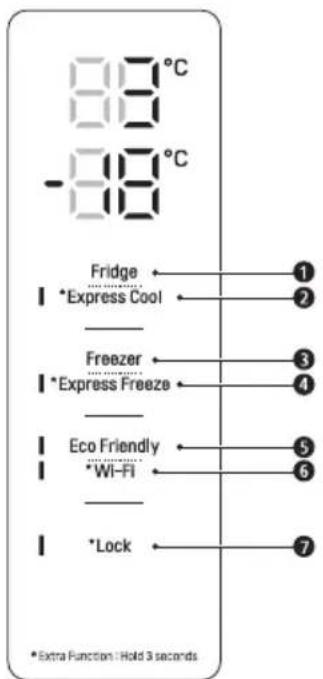
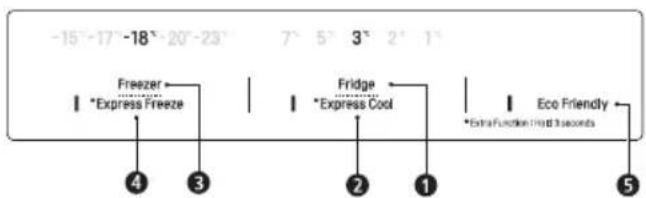
Fridge Temperature (TemnepaTypa Ha cnepkndep)
Ja noDecyBa ueHnHaTa TemnepaTypa HaФpnKndepOT.
^ 念 Express Cool (Ekcnpecho naehebe)
Co Oba ce nocTaByBaat yHKunnte 3a eknpecno naJehe.
3 Freezer Temperature (TemnepaTypa Ha 3amp3HyBa)
Ja noctabyBa ceJIHaTa TEMepaTpa Ha 3amp3HyBaHT.
4 * Express Freeze (Ekcnpecho 3amp3HyBaHe)
Co Oba ce nocTaByBaat yHKunTe 3a ekpccho 3amp3HyBaHe.
Eco Friendly (Ekolouka onuja)
Ha oBoj haunH ce KOHTpoJnpa pexnMOT 3a ,Power Save" (3aTeJa Ha eHepnja) co cen HamaJyBaHe Ha nToPoWyBaUkata Ha eNeKtpnHa eHepnja.
*Wi-Fi
Co ObaФрикнерOT ce NOBp3yBa co BaWata DomaUnHa Wi-Fi Мрека.
Lock (EpaBa)
- ⅠЗaknyuBa KONUHbata Ha KOHTpoJIHaTa Ta6na.
HANOMEHA
-
KoHTpOJIHaTa Ta6Ja MoKe Da ce pa3JInKyBa Od MoeJ Do MoeJ.
KohtpoJIHaTa Ta6NaKe ce nCKnyn ABTomatcKn 3a 3aTeJa Ha eHepriJa. -
Ako dojde do KOHTaKT MeIy npCT IIN KOxA CO KOHTpOHaTa Ta6na DoeKa ja YnCTnte, MoKe da ce aKTHBnpa cyHKunjata Ha DonpeHOTo KOnye.
NocTaByBaHe TemnepaTypa
Ja noctabya Temnepaypata Ha pnnkndepot nn 3amp3HybaOT.
-ПиТиСHTe ro konTuTo Fridge nH Freezer 3a da ja peryInpaTe TemnepaTypaTa.
Temnepatypata moxe da ce noodecyBa.
Φpnxnep: o1 1^ do 7°C
3aMp3HyBaH: oD -15°C Do -23°C
- Nocetnata TemnepaTpa e noceha.
ΦpnxnIep:3°C
- 3amp3HyBaq: -18°C
PeaHaTa BHaTpeuHa TemnepaTypa Bapupa Bo 3aBnCHoCT Od CTatycot Ha xpaHaTa, bUdejKn HabeDeHTo NoDecyBaHe 3a TemnepaTypa e UenHaTa TemnepaTypa, a He peaHaTa TemnepaTypa BO anapaTOT.
HANOMEHA
-ФабрункOTO noDecyBaHBe Ha TempepaTypata MoKe Da ce pa3JnKyBa 3aBnCHO OД ypeDTo.
- Почекajte 2 до 3 уа са по пиклунуваьeto
на anapatot BOструja пedingдаставпесхана BO Hero.
3a da npabnte Mpa3 BO HopmaJHa KInMa, Tempepatpata Ha 3amp3HyBaOT Tpe6a da ce noctabn Ha -18 ^ C nnn noJaHO.
IopecyBaHe Ha ekCnpecho 3aMp3HyBaHe
CoФункида може да ce 3amp3He 6p30 roJema KOnuHa Mpa3 Ил 3amp3HaTa XpaHa.
Kora Ke ro npTnCHete n dpXnTe KOnYeTo Express Freeze Tpu CEkyHn, IKoHaTa Express Freeze CBETHyBa Ha KOHTpOJHaTa Ta6na.
-Функида ce BKnyuBa n ce NCKnyuBa cekoj nat Kora Ke ro npTnCHete konyeTo.
- Φункциjuana 3a ekcnpecho 3amp3Hybahe abTomatcN 3abppsiBa OTkako Ke nomnHe daDeH nepnoi.
HANOMEHA
Kora e BknyeHa onuJaTa Express Freeze, MoKe Da DoJDe DO 3rOJeMyBaHe Ha HnBOTO Ha 6yAba N NotpoWbAqKaTa Ha eHeprJa.
IopecyBaBe Ha ekCppeCHO naDeHbe
Co nomou Ha OBaa cyHKunja, 6p3o MoKeTe da Hn3JaNTe rOJIema KOJInuHa Ha XpaHa, KaKo ITo e 3eIeHcyk, OBOwJe N dpyro.
Kora ke ro npuTnchHe T npxuTe KOnyeTo Express Cool Tpu CekyHn, IKoHaTa Express Cool Ke CBETHe Ha KOHTpOJHaTa Ta6na.
- Φύнкύија tc Bклучы n ce nckлучыBa cekoj nat Kora Ke ro npntncheTe konheTo.
-Функида 3a eknpecho nahebe aBTOMaTcN 3aBpUyBa OTkako Ke NOMnHe daDeH nepnoD.
HANOMEHA
Kora e BknyeHa onuJaTa Express Cool MoKe Da doJde Do 3roJeMaBaHe Ha HnBTo Ha 6yaba NOTpoWbAqKaTa Ha eHepnja.
IopecyBaHe Ha ekOLOwkaTa onuja
Co nomow Ha OBaa onuja, pprnxnepot H 3amp3HyBaVOT Ke pa6oTat BO peXIM Ha 3aWTeHa eNEKtpnHa eHeprJa, koj e MHORY KOpncen BO cIyaj Da OndTe Ha ODMop Nopadn HamaJeHaTa NotpoWByBaUka Ha cTpyja.
- PnTnucHe Ha KOnYeTo Eco Friendly 3a da ja BknyuHte cyHKunjaTa, no To Ke ce BKnyu CBetNkata, a Ke ce NCKlyu Co yUTe eDHO nPtTnckaHe Ha KOnYeTo.
Kora e BknyeH peXIMOT 3a ekOJOnKO pa6oTeHe, octHaTnTE KOUHbA HeMa Da cyHKuOHnpaat. Kora BeKe Hema Da BN Tpe6a OBoj peXIM, ncknyeTe ro, no To cpNKeIepOT Ke ce BpaTH Ha npTeXODHnTe NOCTaBKn HA TEMpePaTypaTa.
IopecyBaHe n peceTnpaHbe Ha 6paBaTa
Iи 3aknyyba konyuHaTa Ha KOHTponHaTa Ta6na.
- PnTnCHeTe n 3aDpxKeTe ro KOnyTeTo Lock 3 ceKyn. Kora yHKunjata 3a 3aknyBahe e eoDeCeHa, CnTe KOHNb Ce 3aknyeHn.
HANOMEHA
3a da npncTannte do dpynte yHKun, Tpe6a da ja deaktnBnpate FyHKunjata 3a 3aKnyuBaHe.
Anapm 3a BncoKa TemnepaTypa
Kora tempepatyata Ha 3amp3HybaOT e npebncoka nopadn depekt,LED cbetnknata Ha 3amp3HyBaOT Ke noUHe da Tpenka nKe ce ornapa anapMOT.
- PnTncHeTe ro KonUeTo Freezer 3a da ce NCKIyU.
-ДOKOLKY Tempepatypata e DOBOJHO HNCKA, TpenkaHeto n anapmot aBtOMaTcKn Ke ce NCKnyuat.
-Функида CTBKNyUBA BO Cnyaj Kora:
-ФпnxндероьКнусн.
-Kora TemnepaTpya BO nperpadaTa Ha 3amp3HyBaOH Ke ce 3roJemn 3HaunTeHNO.
-Bo cnuyaj Ha npeknHa cna6dyBaheTo co eNeKtpuHa eHeprJa KOe Tpae noDOnro.
-Bo cnuyaj Ha cTaBaHbe Ha noroJeMo KOINueCTBO TOIJa XpaHa BO 3aMp3HyBaHT.
-Bo cnyaj BpataHa Ha 3amp3HyBaHOT da CTOn OTBopeHa NDoJnro INIe OTBopa MHORY YecTo.
Диспензерза Вда (^*)
IOnnHrHeTe ja paKaTa 1 Ha nucneH3epoT 3a BOda 3a da HanoHnTe YaSha CtydeHa BOda.
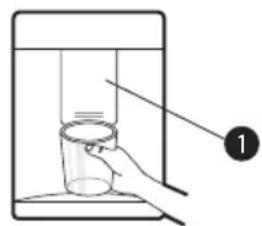
BHUMAHNE
- UybajTe rN DecaTa hAcTpaHa oD dncpeH3epOT 3a da cnpeuNTe da cn irpaat nn n da rN OWTetAT KOHTpOJIte.
3a Da ro nCnCTNte CNCTEMOT 3a TOeHe BOda, OCTabete 5 MNHyTn da Teue BOda od DnCnEh3epOT nIOTOa QpPNeTe rO Mpa3OT OTkako Ke ce HAnpaBn IpBnTE HeKoJky NaTn.
HANOMEHA
() :OBaa KapakTePncTnKa Bapupa Bo 3aBnCHOCT OJ KyneHnot MoJeI.
-ДOKOLKY BO TEKOT Ha NOJIHeHbTeO BODa OДИСпeнЗeрOT ja OTBOPHTe BpTaTAt O3amp3HyBaHOT, BODaTKe IpeCTaHe Da TeYe.
-ДOKONky BO TEKOT Ha NOJIHeHbTeO BOJa Od
ДиСпeнЗерOT ja OTBOPnTE BpAtpaTа Od
ФрИкNiDEpOT, BOJaTa Ke IpeCTaHe Da TeYe.
- Ako OKBnpoT Ha Ⅲonjata e MaJ, BODaTa MoKe Da ce pa3nee HauBop oD yauaTa uJIn UeIocHO da ja npomauu.
- KopncTeTe 10onJa co DnJaMeTap oD 68 mm Kora nonHnte BODa OD nCneH3epoT.
Pe3epBoap Ha dncpeH3epoT 3a Boda
1 OTbopete ro kanaeTo (MaHnOT 3aTbOpa) Ha rOpHaTa cTpaHa Ha pe3epBoapot 3a BOda.
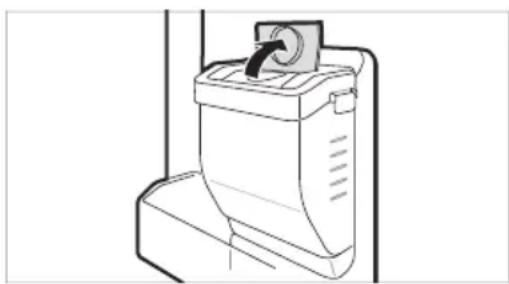
2 HanoHHeTe ro pe3epBoapOT co B0da 3a PnneBHe n 3aTbOpTe rO KanaeTo (MaIInOT 3aTbOpa).
- Pe3epBoaopT co6upa 2,3 Jntpn Boda.
BHIMAHNE
He mdo3BOyBajTe Ha decaTa npuctan do pe3epBoaPot. Doklky naHne pe3epBoaPot 3a BOda Kora e cenocho HanoJIHeT, MoKe da doJde Do nobpeDa. He nonHete ro pe3epBoaPot co dpyrN TeuHOCTn OCBeH BOda n He nonHete ro Co TOnJa BOda.
He npimehybajTe cnna npn BaedeheTo n CTaBaHBeTo Ha dncneH3epoT. MoKe da dojde DO OWTeYBaHbE Ha ypeoT uNn nobpea.
HANOMEHA
- PpeДа NOUHeTe CO KOpNCTeHBe Ha ДиСпЕнЗЕРOT NO ИНСТАЛАЦИJAТA HA ypeДОТ, ИЗМЛЛТЕ Го CO BOДa.
- PpOBepTe DaJIu DNcIeH3epOT e NocTAbEN npaBnIHo. Ako He nocTabeN npaBnIHo, MOKe da Dojde Do npOTEkyBaHe Ha BODa od pe3epBoapOT BO ypeDToT.
-ДOKONky BO ДИССЕНЗЕРOT HEMA BOДA, HEMA DA MOXETe Да ja KOPINCTITE Функциида 3a CTUDEHa BOДA. Пюверетe ДдИ ИМА BOДA BO pe3epBOapOT, na aKO HEMA, HANOHNHe TOr.
- Пичекajte Нajmanky 15 cekyн 3a da ro n3BaInte pe3epBoapot ako npetxOJHO cTe nonHeJe Boda.
3ByKOT OJ pe3epBoaPOT 3a BOJa Ke 6nDe HOpMaJIeH npI CTaBaHbETo BOJa BO IINcneH3epoT. He yKaKyBa Ha DepeKT.
Mодna 3a mpa3
HanoJIHeTe ja MoДlaTa 3a Mpa3 co BoJa.
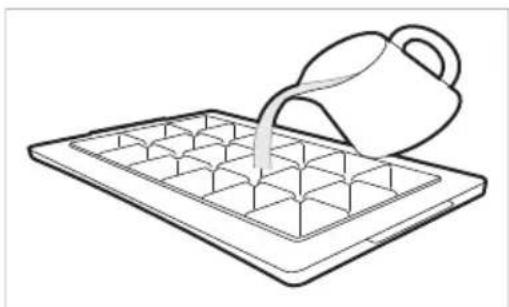
APDEyPDEyBAHbE
- HanoJIHeTe cAmO co BOda 3a nneHe.
BHIMAHNE
- PpeIa Tpynte BODa, npOBepTe daJIb BO MoJnata Ima IpeOCTaHaT Mpa3.
BHMMaTeHNO 3aTbOpTe ja BpaTaTa Ha 3aMp3HyBaVOT NO NJIHeHBeTO Ha MoJaTa 3a Mpa3. - Okonky cheTo ja OTbopate n 3aTbopate BpaTata oJ 3amp3HyBaOT, Ke Tpe6a noOnro 3a da ce do6ne mpa3.
- Notpe6HOTo Bpeme 3a 3amp3HyBaHe Ha BOdaTa 3aBnCn OJ rOdNtHOTo Bpeme.
- IopTe6Hn ce do 24 yaca 3a TempepaTypaTa BO ypeoT da ce cta6nH3npa no npBnuHaTa HCTanaJia. Iopadn Toa, MoKe da Tpe6a n NOBeke Bpeme 3a BOdaT a Da 3amp3He.
BHHMaTeHNO paKyBaJte Co Mpa3OT,napaTOa ITO pa6OBnTe Ha KOUKe TEmpa3 MoKe da ce ocTpN.
HANOMEHA
-ДOKолуку ja npenonHnTe MoJnata 3a Mpa3,MOKte Da DoJde Do JneHBe Ha KOUknte NNOTeWko BaJeHBe Ha KOUknte.
- Ппнше На КОчЕТу Express Freeze Ha KOHTponHaTа Ta6la 3a 6p30 Do6nBaHe Ha Mpa3.
He yBajTe Mpa3 Koj He e cIeNoCHO 3aMp3HaT. IopaOn Odmp3HyBaHbeto, KoUKeTe Mpa3 MoKe Da ce 3aJenat.
He KopncTe Te nperoIema cna npn BNTKaHbTo Ha MoJaNata 3a Mpa3. Bo CnpOTIBHO,MOKe Da Dojde Do KpWeHBe Ha MOJaTa.
3a IecHO da ro n3BaIte Mpa3OT, HanoHete caIco BOdaI CTabate ja MoDaTa BHaTpe,
IperpaДa 3a CBexn npOdykTn (^*)
Bo nperpadaTata 3a nahebe, temepaTypaTO nperpadaTata 3a CBexn npou3BOOn MOxke da ce KOHTpOInpa CO NOMoH Ha paKaTa Koja ce Haora HAnpeB IO nperpadaTata, Co Hej3uHO NOMeCTyBaHe BO DBe HAcOKN.
Ipn yBaBe Ha 3eJenHcyK CO nocTabKn 3a Meco nn p6a, Moke da Dojde Do OwTeTyBaHe oD CMP3HyBaHe.
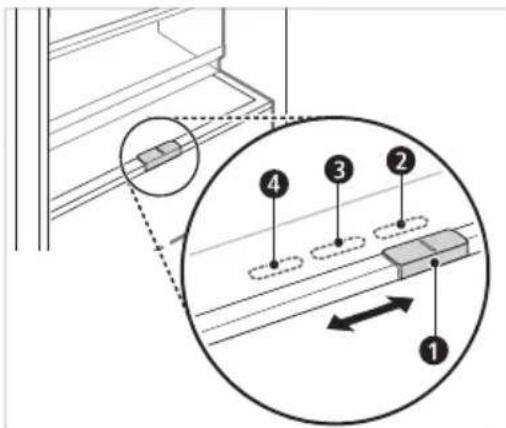
3a yBaHe 3eJenHcyK. (PpenopaHaHO)
3a yBaHbe np6a.
3a 乌BaHbE Meco.
HANOMEHA
(^*) :OBaa KapaKTepnCTnKa Bapupa Bo 3aBnCHOCT OJ KynHeHNOT MoJeI.
Φnoka 3a CBex 3eJehyK (^*)
CoBpTeHeHaKoNueTo, npnnaOeTe ja BnaxKnocTa BoΦnOKaTa 3a 3eNeHcyk
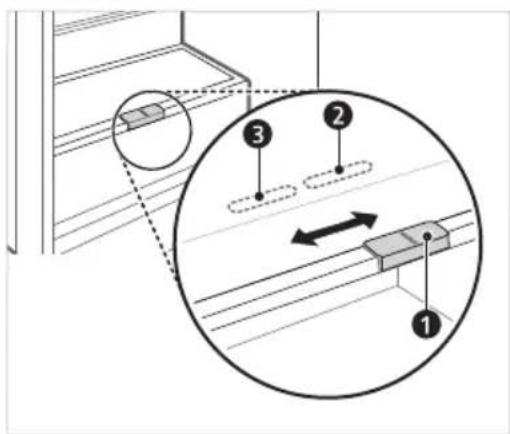
23aCyBaHBe 3eJenHcyK.(IpenopaayHo)
3a yyBaHbHe Ha OBOuJe.
HANOMEHA
(^*) OBaa KapaKTePncTnKa Bapnpa BO 3aBnCHoCT OJ KyneHNOt MoJeI.
PpeknonyBauchka noHua
CTabajTe NOMaII npEdMeTn, KaKo caI 3a BOda nnu shuHbA, noTTypHyBajKn ja npedHaTa nOIOBnHa OD nOIuCaTa NOd 3aDHNO T DeI ODN oNlncata. IOBneYeTo npedHnOT DeI ODN oNlncata HaHaPpeD, 3a Da Do6nTe ceNocha noNtca.
1 IopnrHHeTe ja npedHaTa cTpaHa Ha noPiuata n npEbpTeTe ja Ha 3aHaTa cTpaHa.
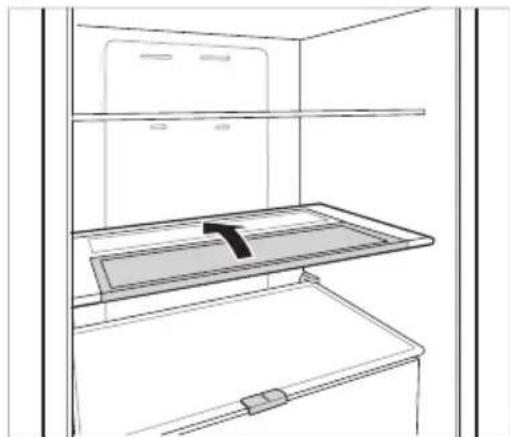
2 IOnnHHe ja npedHaTc TpaHa Ha nOnuata N npemecTe ja Ha 3aHaTa cTpHa. Od OBaa No3uJa, MoKeTe da rN IOnnHHe Te DBeTe CTPaHN Ha NOUaTa 3a Da Do6neTe NOBeKe npocToP.
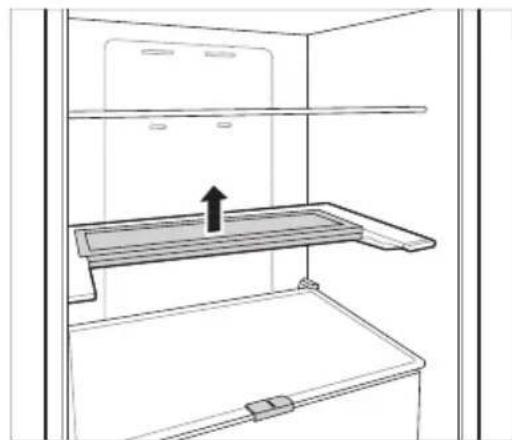
OctaHaTn yHKcnn
Anapm 3a OTBopeHa BpaTa
Anapmot ce orlacyba 3 nATn BO nHTepBaJIN Od 30 cekyHn DOKoNkBpata (Ha pnnKnepeoT) e OTbOpeHa n He e qeNoCHO 3aTBOpeha noDIOIro oEHa MNHyTa.
- KoHTaKTnpajTe ro LcHApOT 3a INHΦopMaun 3a KIneHTn Ha ,LG Electronics",doKoIky anapMOT npOIoJx n da CBnPn n OTKaKO cTe ja 3aTBOpNle Bpata.
TeKtnpaHe Ha deFeKTH
AnapaTOMMOKe aBtOMaTCKn Da OTKpNBA np6JIeMn 3a BpeMe Ha pa6oTaTata.
Ako e otkpneH npo6Jem, anapaTOT npecTaHyBa co pa6ota n ce nojaByBa KOD 3a rpeuKa dypn u Kora Ke ce npTuNChe Koe 6nno konue.
Bo BaKOB cnyaj, He ncknyuBajTe ro od Ctpyja N BeHaaw CTaneTe BO KOHTaKT CO UeHTapOT 3a INHOpMaun 3a KIneHTn Ha LG Electronics. Ako ro ncknyuTe OD Ctpyja, cepBucepot OJ LcHTapOT 3a INHOpMaun 3a KIneHTn Ha LG Electronics MoKe noteUko da ro Hajde npo6JeMOT.
Anlkaunja LG ThinQ
ObaaФyHKuJa e DoCTaHa cAmo Ha MoJeJIte co Wi-Fi.
AnikaJata LG ThinQ" Bu OBO3MoKyBa da komyHnupate co ypeoT co NOMOW Ha nameTeH TeJeΦoH.
KapakTepncTnKn Ha anIIkaunjaTa LG ThinQ
Komyu npajTe co anapatot od namteH TelefoH co nomow Ha npakTuHnTe nameTHn yHKun.
Pametha DnjarHoctnka
Ako nckycnte npo6nem dokeka ja Kopucntte annkaunjata, onnjaata 3a naMeTHa DnjarHOCTNkKe Bn NOMORHe da ro DnjarHOCTuNPate npo6nemOT.
NoDecyBaHa
- Bn obo3moxyBa da noodeCte pa3nHn onuKaj anapaTOn BO annkaunjata.
HANOMEHA
Ako ro npomeHnte cbojoT 6e3Kuueh pyTepeBabByBaOT Ha nHTepHET ycnyr nnIIO3nHKata, n36pniweTe ro perncTpupaHnot anapat od anNkaujata LG ThinQ n nobTopho pernctpapajre.
Annkaunjata noJnxHa npomeH 3apan noobpyBaHe Ha anapaToT,6e3 da im ce dae npedynpeDyBaBe Ha KOpNCnUTe.
- KapakTePncTnKnte MoKe Da BapuPaat Bo 3aBnCHOCT OJ MOJeNOT.
IpeД користelve на anлкauцида LG ThinQ
1 IpoBepete ro pactojaHneTo nomery anapatot n 6e3KmHnOpyTe (Wi-Fi mpeXkata).
Ako e nperoIeMo pactoJHnETo nomery anapatot n 6e3xNHyNt pyTe,doar do cna6eeHe ha cnHaIOT. MoKe da 6nDe notpe6en noD0JIr BpemeHcN nepno3a perncTpaunja,nn MoKe da DOBeJe Do HeycneuHa Hnctalaunja.
2 Ncknyte rMo6nHnTe nOaTouN nn KeHnCKnTe nOaToUHa BaUNOT NaMeTeH TeNeoH.

3 Iobp3eTe ro Baunot nAmTeH TeJefoH co 6e3KnHnOpyTeP.
HANOMEHA
3a da ja notbprnte Wi-Fi KOHeKunjata, npoBepe DaJIncBETN IKOHATA Ha KOHTPOJHNO T NaHEn.
Anapatot noDpkyBa eHnHCTBeHO 2,4 GHz Wi Fi mpeKn.3a da ja npOBepnte ppeKBeHnJaTa Ha BaWata MpeKa, KOHTaKTnpajTe ro BAuNt CH6dyBaU CO HHTepHET ycIyU, INI NOrJeHHeTo BO yNaTcBTO 3a BAuNt 63KmUeH pyTeP.
LG ThinQ He oOroBopeH 3a 6nIO KaKBN npo6IeMn OKOJy KOHeKTnpaHbeto Ha MPeKaTa Nn KaKBN n da 6nIO rpeuKN, DepeKTn Nn rpeuKn npedN3BnKaHN OD KOHeKTnpaHbeto Ha MPeKaTa.
- Ako anapaTOT nma npo6Iemn Okony KOHeKTIpaHBeTo Ha Wi-Fi mpeXaTa, MoKe6u e npedaleky od pyTePoT. Ha6abete Wi-Fi 3acnnyBauch (3acnnyBauch Ha doCTpeNOT) 3a da ja na noDobpnte jaunHaT ha Wi-Fi cnHaNOT.
Wi-Fi KOHeKunjata MoXe6n He ce NOBp3yBa NIMoXe6n e IpeKnHaT a nopadn OnkpykYBaHbeto Ha Domaushata Mpeka.
MpexHTo IOBp3yBaHe MoXe6n Hema da pa60TN IpaBUNHO BO 3aBnCHOCT OI npOBajdepot Ha INHTepHET ycnyrnte.
- OkonHTo 6e3KNUHO NOBp3yBaHe MoKe6n npDoHecyBa 6e3KNUHNO TpeKeH cepBnC da pa60Tu 6aHo.
AnapatOT He Moke da ce peRnCTpnpa, npaPi npo6IeMn co npeHocot Ha 6e3KuHnO T CnHaI. N3Bneye To Ka6eNoT Od anapatOT n NoyekajTe OKJy eHa MNHyTa, nped NOBTOPO Da ce oNideTe.
Ako e OBO3MOXKeH 3aUHTTHNOT SuHa BaUNOT 6e3KuHeH pyTeP, OHeBO3MOXeTe rO IIN IOdaTe NCKJlyQK BO HeRo.
- Imeto Ha 6e3xuHaTa MpeXa (SSID) Tpe6a da 6nde KOMbHaCuJa od aHrnnckn 6yKbN u 6poEBN. (He KopucTeTe rncneunjannHte kapaTepn)
KopnchNCHKNOT INHTeppejc (UI) Ha naMeTHNOT Tepeoh MOKe Da Bapnpa, BO 3aBnCHOC T Od Mo6uHNOt OnepaTHeh CnCTeM (OS) n Ipn3BODNTeNoT.
Ako 6e36eHOCnOT npOTOKoHa pyTePOte noCTaBeH Ha WEP,MOKe Da He ycneete BO noDecyBaHeTo Ha MpeXata. Be monime npomHeTe ro Ha dpyrN 6e36eHocn npOTOKo (Ce npenopayBa WPA2) n NOBTOpHO perncTpnpajTe ro npOn3BOIoT.
Инста的答案 Ha anikaanjaLG ThinQ
Побapajte ja anпикauида LG ThinQ Ha Google Play Store & Apple App Store п配电у вшиотnameteб телфон.
CneTe Tn HNCTpyKUInTE 3a npEeMaHe INHCTaINpaHBe Ha anNIkauNJata.
UncTeHbe Ha 3aWTNTHOTOCTaKNo
BaedeHa 3aWHTHOTO cTaKIO
1 OTKako Ke ro n3BaIte KaIakOT Ha 0nOKata 3a 3eNeHcyK, HADOny NOBneHTe Ro rOpHnOt DeN od 3aWHTHTOcTakNo.
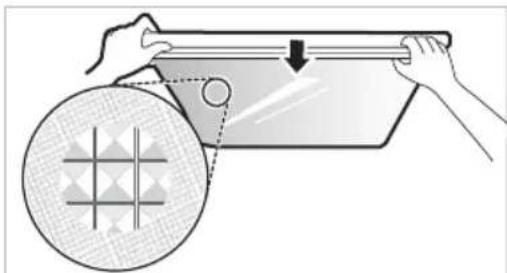
2 NOBJIeHTe rO 3aWTnTHOTo CTAKIO 3a Da rO n3BaJNTe.
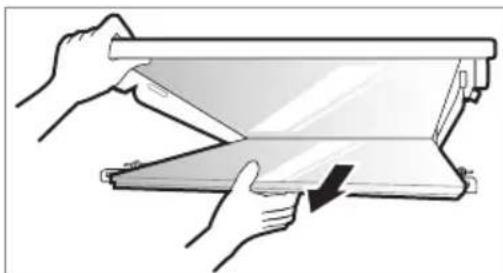
Повторно мостеные на 3аштITHOTO CTaKIO
1 CTabete rN nCnakHaTne DeIOBn Ha 3aHTnTHOTo CTAKNO BO XJIe6OBnTe Ha NOnuata.
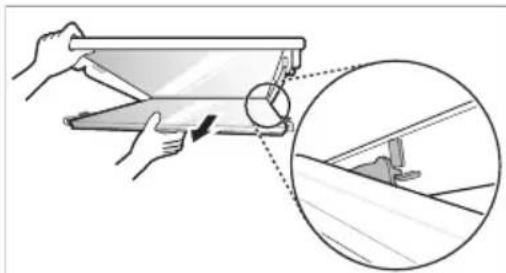
2 NocTaBete rN nCnakHaTnte DeNoBN npE3aHTHTOTo cTakNO BO XNe6oBnTe npEINuCaTa I TpyHeTe Ro 3aHTHTOTo cTakNO 3a Da rnoCTaBnTe Ha MecTO.
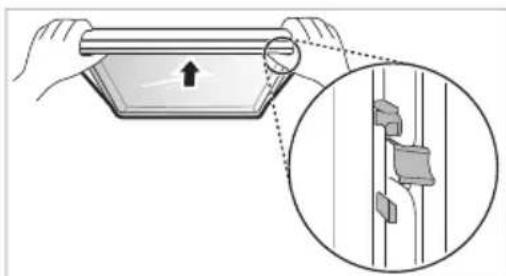
UncTeHbe HaΦnOKaTa Ha 3amp3HyBaQOT
1 N3BaTe ja coOpXnHaTa od fnoKaTa. DpxKeTe ja paKaTa Ha fnoKaTa Ha 3aMp3HyBaOHT NOEka, cIeNoCHO N3BneTe ja HAnBOp, ce DoNeKa He 3anpe.
2 IOnnHHeTe ja 0nOKaTa Ha 3amp3HyBaOHaIrope n 3BaJeTe ja NOBNeKyBajKn Ja HAdBOp.
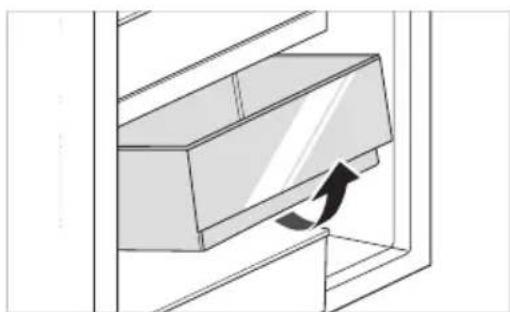
Verbinding makes met Wi-Fi
Anbefalinger for strømsparing
- Start - temperatureer innstilt.
Kjoleskap: 3^
Fryser: -18 °C
Den faktiske innvendige temperaturen varierer, avhengig av matstatus, selv om den angitte innstilte temperaturen er en mältemperatur, er det/DDke den virkelige temperaturen i Produktet.
MERK
Reverter as Portas 12
Prateleira rebativel 21
Outras Funções 22
FUNÇÖES SMART 23
Aplicacao LG ThinQ. 23
Utilizar o Smart DiagnosisTM 25
MANUTENÇA 26
Observacoes relativamente a limpeza 26
Para Inverter as portas
Limar as saidas de agua e gelo
Eco Friendly (Ecologic)
RIESENIE PROBLEMOV 29
VAŽNA BEZBEDNOSNA UPUTSTVA

UPOZORENJE
Fridge Temperature (Kyltemperatur)
- Medenna knapp stalls kylskapstemperaturen in.
^ 念 Express Cool (Snabbkylning)
Stalla in temperature
Medenna knapp stalls kylskaps-ller frystemperaturen in.
Tryck pa knappen Fridge erer knappen Freezer for att justera temperatures.
- Temperaturen kan justeras.
Kylskap: frän 1^ till 7^
- Frys: fran -15 °C till -23 °C
Den initiala temperaturen ar installd.
Kylskap: 3^
- Frys: -18 °C