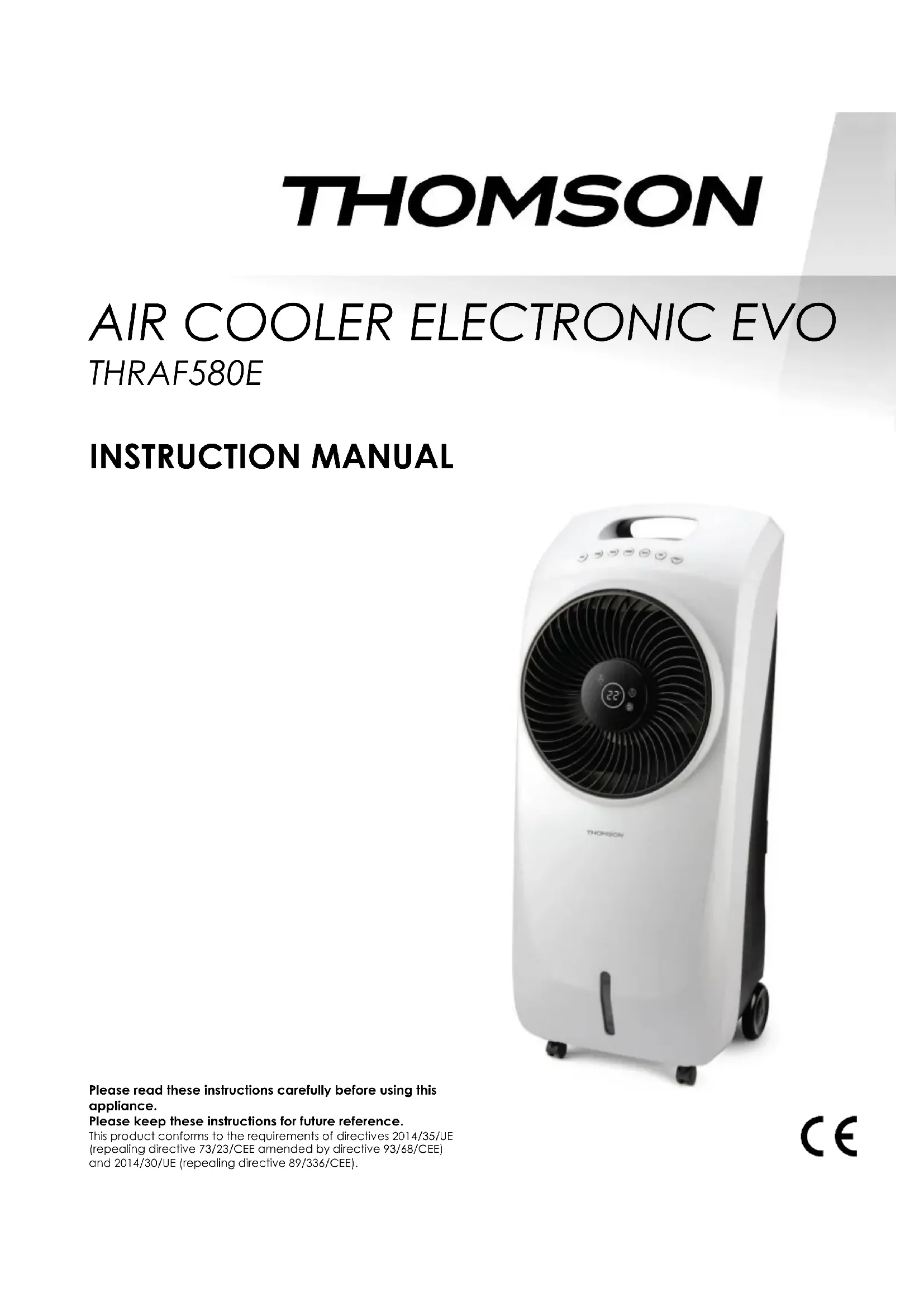
USER MANUAL THRAF580E THOMSON
natural_image
White and black electric air conditioner unit with fan blades and wheels (no visible text or symbols)
1. RÈGLES DE SÉCURITÉ
natural_image
Line drawing of a mechanical cart with wheels and a grid-patterned panel (no text or symbols)
natural_image
Line drawing of a mechanical device with wheels and a bucket, no text or symbols present
natural_image
Simple line drawing of a container with a handle and side legs, no text or symbols present
natural_image
Diagram of a device box with an arrow indicating transformation or insertion (no text or symbols present)
natural_image
White and black electric air conditioner unit with fan blades and wheels (no visible text or symbols)
Please read these instructions carefully before using this appliance.
Please keep these instructions for future reference.
This product conforms to the requirements of directives 2014/35/UE (repealing directive 73/23/CEE amended by directive 93/68/CEE) and 2014/30/UE (repealing directive 89/336/CEE).
1. WARNINGS
The product must be installed in accordance with the national wiring rules.
This unit is intended for household and domestic indoor use only.
- Use the appliance in a room size corresponding to its cooling capacity.
- Do not use the appliance near gas appliances, fireplaces or flammable liquids.
- Handle the appliance with care
- Keep your appliance about 1 meter away from any other electrical device to avoid the risk of electromagnetic interference.
- To avoid overheating, please put the appliance about 50 cm away from a wall and do not cover it.
- Do not expose to direct or indirect heat sources.
- Do not use this appliance in wet area, and not to have contact with water.
- Do not submit the unit to strong shocks or vibrations.
- The plug must be easily accessible when the device is connected.
-
Before connecting the appliance, check that:
-
The supply voltage is the same as the nameplate,
- The power supply socket is suitable to the device,
-
The cable plug is adapted to the socket. The product is intended only for a socket with a main voltage of 230 volts (50 Hz).
-
Always remove the plug from the socket when not in use.
- Do not use the unit with a damaged cord or plug
- The appliance should be unplugged when filling and cleaning
- This appliance can be used by children aged from 8 years and above and persons with reduced physical, sensory or mental capabilities or lack of experience and knowledge if they have been given supervision or instruction concerning use of the appliance in a safe way and understand the hazards involved. Children shall not play with the appliance. Cleaning and user maintenance shall not be made by children without supervision.
-
Never insert fingers, pencils or other objects through the grid when the appliance is running.
-
This product complies with the requirements of directives 2014/35/EU (repealing Directive 73/23/EEC amended by Directive 93/68/EEC) and 2014/30/EU(repealing Directive 89/336/EEC)
- Never run the product in the presence or within reach of unsupervised children.
- If the power cord is damaged, it must be replaced by the manufacturer, its service or similarly qualified persons in order to avoid a hazard.
- User instructions should be provided with the device so that it can be used safely.
- For cleaning and maintenance instruction, refer to the corresponding section.
2. OPERATING CHARACTERISTICS
IMPORTANT
- Always make sure there is water in the tank when your air cooler is running in COOL mode.
- Do not move the appliance when it is filled with water. Empty before moving.
■ Use the air cooler on a stable, flat and level surface.
■ Never use the air cooler without the filters
2.1 DESCRIPTION
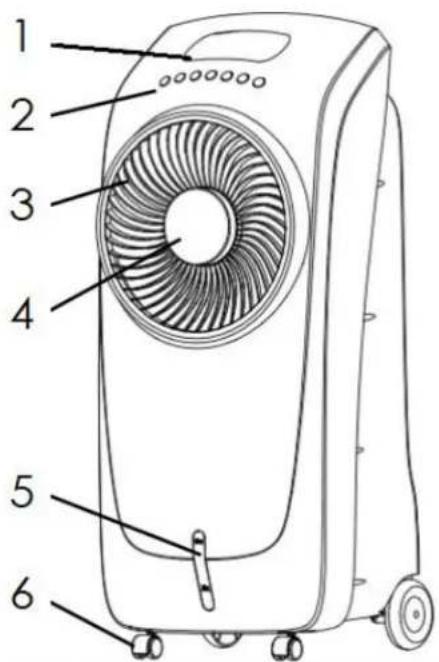
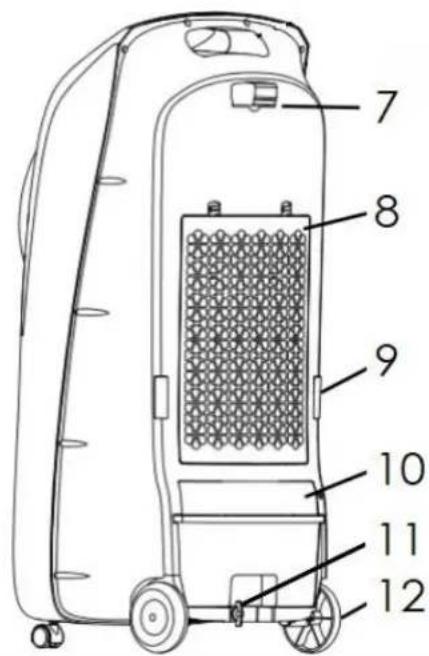
- Handle 7. Remote storage
- Control panel 8. Filter
- Air outlet 9. Support for winding cable
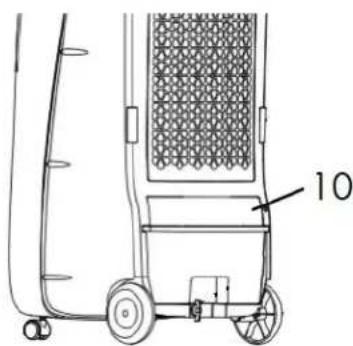
- Display 10. Water tank safety cut
- Water level indicator 11. Water tank lock
- Front casters 12. Back casters
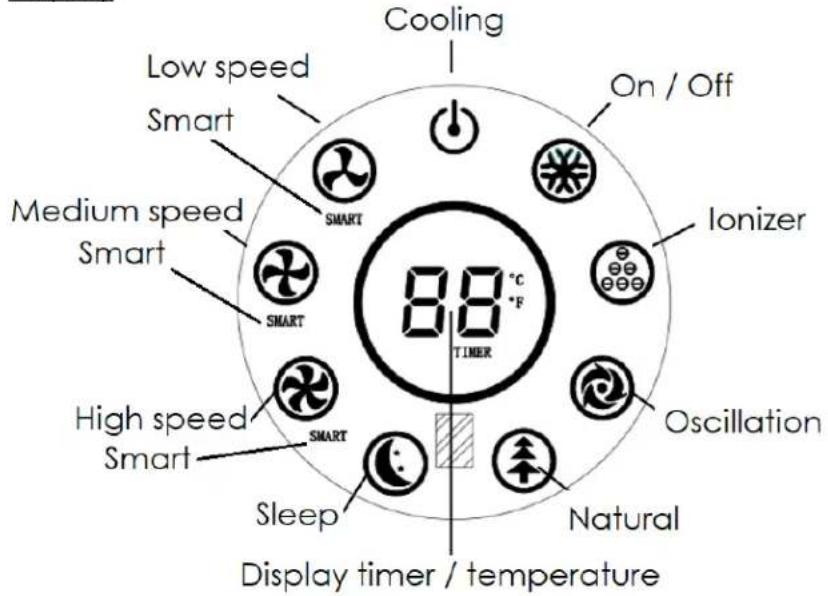
Control panel
On/Off

Speed
Cooling
Mode
Oscillation
lonizer
Timer
Display
2.2 OPERATION
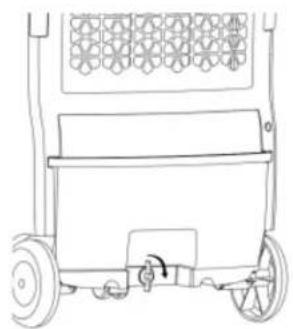
The appliance must be switched off before water filling
natural_image
Line drawing of a wheeled cart with wheels and a decorative panel (no text or symbols)
Unlock and pull out the tank
natural_image
Line drawing of a hand truck with a bucket and wheel, no text or symbols present
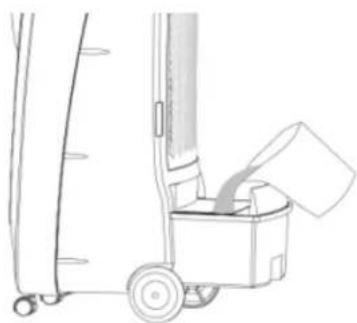
Fill the tank with water
natural_image
Technical line drawing of a container with a side-mounted rod and a labeled cap (no text or symbols present)
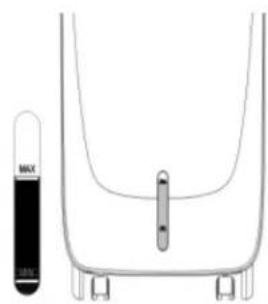
Do not exceed the maximum level
- Remove the water tank.
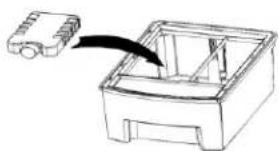
- If required, place the frozen ice boxes or ice cubes in the water tank to increase cooling effect.
- Fill water tank with cold water, taking care to not exceed the maximum line marked on the water tank, and not below the minimum level.
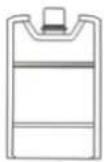
Using Ice Packs
Put the ice pack in the freezer until the liquid inside becomes the ice, then put the ice pack in the water of the tank. During the cooling function, the air will be cooler.
natural_image
Diagram showing a device being inserted into a plastic housing (no text or symbols present)
When using for the first time, the water may slightly have the color of the filter and have unusual odor. This is normal and does not constitute a health risk.
- Replace the water tank making sure it fits in place in order to desactivate the safety cut allowing to power the product.
-
Connect the product. Press on the button M/A (On/Off) to turn the appliance on.
-
Press VITES repeatedly to select one of the different fan speeds (High / medium / slow). The indicator corresponding to the selected speed lights up.
-
Press RAFR to activate the cooling function.the water pump inside the unit starts working to humidify the evaporator filter and cool the air. The tank at the rear must be filled with demineralized water up to a level not exceeding the maximum level indicated. When the water in the tank falls below the minimum level indicated on the tank, the unit emits a continuous sound for a few seconds to signal a low water level, then the cooling mode is stopped. The unit stops automatically when the tank is removed.
Caution: After use, if you wish to empty the tank or fill it up, wait 2 minutes to allow the water in the system to flow into the tank before removing it.
- Press MODE to select the mode, Normal, Natural, or Sleep. The corresponding indicator lights up to indicate the selected mode.
In NORMAL mode
The ventilation speed is to be selected according to your choice, LOW 🎨 / MEDIUM 🎨 /

In NATURAL mode
The indicator light on. The device changes rhythm randomly to give you the feeling of a natural breeze.
In this mode the selectable fan speed is slow / medium / high.
Slow speed: automatic alternation between slow speed and stop.
Medium speed: Automatic alternation between medium, slow speed and stop.
High speed: automatic alternation between high, medium, slow and stop.
In SLEEP mode
The indicator light on. In this mode the selectable fan speed is slow / medium / high. Slow speed: it works in slow speed until it stops.
Medium speed: it works in medium speed during 30min, then in slow speed until it stops.
High speed: it works in high speed during 30min, then in medium speed during 30min, then in slow speed until it stops.
SMART mode
The indicator SMART light on.
When the ambient temperature is below 25^ C, the unit runs at a slow speed.
When the ambient temperature is between 25-29°C, the unit operates at medium speed.
When the ambient temperature is above 29^ C, the unit operates at a high speed.
-
Press OSC to make the fan oscillate. To stop press the button again.
-
This device has a function lonizer, intended to clean the ambient air of the room. To activate this function, press the button ION.
-
Repeatedly press MINU to set the appliance turn off automatically within a desired period from 1 to 8 hours.
The display will show by default the room temperature.
Remote control
It works with 2 batteries AAA, 1.5V (not included) respect the polarity when inserting.
Used batteries must be safely disposed. Place them in collection bins provided (please ask your dealer) to protect the environment.
Replace the battery only with a battery of the same type.
3. CLEANING AND MAINTENANCE
- Always disconnect the appliance from the mains by switching it off and removing the plug from the power outlet before cleaning.
- Do not use solvents, acidic detergents, petrol or alcohol etc. to clean the plastic components, as these could be deformed or damaged.
Cleaned with a damp cloth and allow to dry.
If you do not use the product for a long period, please empty the water tank.
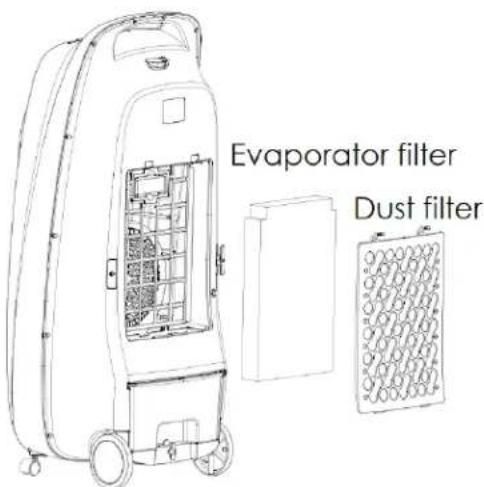
Dust filter:
To improve the effectiveness of the cooler, we recommend that you clean the dust filter periodically.
Unscrew the locking screw on the filter and remove the dust filter by sliding it upwards.
Evaporator filter
The filter is designed for a period of use for several years.
You can take it out of its compartment and rinse it.
Never use the air cooler without the filters
Regularly clean the water tank.
WARNING: If you do not use the product for several days, please empty the water tank.
Descale
- Remove the water tank
- Clean the water tank by filling the tank with 2 liters of water and 30ml of vinegar. Leave the solution for 20 minutes.
3.Drain the water from the tank.
- Clean the entire interior surface with a soft brush. Wet a rag with undiluted white vinegar and wipe the inner base in contact with water to remove scale.
- Rinse with warm, clean water to remove scale and white vinegar.
4. TECHNICAL SPECIFICATIONS
| Model : | THRAF580E | Power : | 95W |
| Tension : | 220-240V~ | Timer : | 8h |
| Frequency : | 50Hz | Water tank capacity : | 8L |
| Class II | |
| Description | Symbol | Value | Unit |
| Maximum fan flow rate | F | 29,6 | m^3/min |
| Fan power input | P | 81,2 | W |
| Service value | SV | 0,37 | (m^3/min)/W |
| Standby power consumption | P_SB | N/A | W |
| Off power consumption | P_OFF | 0,42 | W |
| Fan sound power level | L_WA | 66,5 | dB(A) |
| Maximum air velocity | C | 2,9 | meters/sec |
| Seasonal electricity consumption | Q | N/A | kWh/a |
| Measurement standard for service value | IEC 60879:1986+Cor1:1992 |
| Contact details for obtaining more information | Schneider consumer group, 12 rue Jules Ferry, 93110 Rosny sous bois, France |
Never attempt to disassemble or repair the unit yourself. In the case of not competent repair, the guarantee is void.
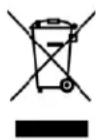
The European directive 2012/19/CE on Waste Electrical and Electronic
Equipment (WEEE), requires that old household electrical appliances must not be disposed in the normal unsorted municipal waste stream. Old appliances must be collected separately in order to optimize the recovery and recycling of the materials they contain and reduce the
impact on human health and the environment.
The crossed out "wheeled bin" symbol on the product reminds you of your obligation, that when you dispose of the appliance it must be separately collected.
Consumers should contact their local authority or retailer for information concerning the correct disposal of their old appliance
The warranty does not cover the wear parts of the product, nor the problems or damage resulting from:
(1) surface deterioration due to normal wear and tear of the product;
(2) defects or deterioration due to contact with liquids and corrosion caused by rust or the presence of insects;
(3) any incident, abuse, misuse, alteration, disassembly or Unauthorized repair;
(4) improper maintenance, improper use concerning the product or connection to an incorrect voltage;
(5) any use of accessories not supplied or not approved by the manufacturer.
The guarantee will be cancelled if the nameplate and / or serial number of the product are removed.
IMPORTED BY SCHNEIDER CONSUMER GROUP
12, rue Jules Ferry, 93110 Rosny-sous-Bois, FRANCE
THOMSON is a trademark of TECHNICOLOR S.A used under license by