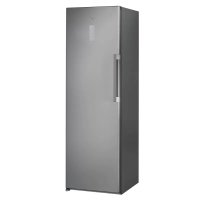
SW8 AM2 D XR 2 - Fridge WHIRLPOOL - Free user manual and instructions
Find the device manual for free SW8 AM2 D XR 2 WHIRLPOOL in PDF.



User questions about SW8 AM2 D XR 2 WHIRLPOOL
0 question about this device. Answer the ones you know or ask your own.
Ask a new question about this device
Download the instructions for your Fridge in PDF format for free! Find your manual SW8 AM2 D XR 2 - WHIRLPOOL and take your electronic device back in hand. On this page are published all the documents necessary for the use of your device. SW8 AM2 D XR 2 by WHIRLPOOL.
USER MANUAL SW8 AM2 D XR 2 WHIRLPOOL
ENGLISH Instructions for use Page 3
Chapter 1: INSTALLATION 4
1.1 INSTALLING SINGLE APPLIANCE 4
1.2. INSTALLING TWO APPLIANCES 4
1.3.ADJUST DOORS (IF AVAILABLE) 4
Chapter 2: FUNCTIONS 5
2.1.ON/STAND BY 5
2.2.SMART DISPLAY* 5
2.3.6TH SENSE FRESH CONTROL / PROFRESH 5
2.4. DOOR OPEN ALARM 5
2.5.VACATION 5
2.6.FAST COOL 5
2.7.ZERO DEGREES DRAWER* 6
2.8.FAN. 6
2.9.TEMPERATURE SETTING 6
2.10.NO-FROST REFRIGERATOR COMPARTMENT 6
2.11. LED LIGHT SYSTEM 7
2.12.HUMIDITY CONTROLLED CRISPER 7
Chapter 3: USE
3.1. HOW TO INCREASE FRIDGE STORAGE CAPACITY 7
3.2 NOTES 7
Chapter 4: FOOD-STORAGE TIPS
4.1.AIR VENTILATION 7
4.2. HOW TO STORE FRESH FOOD AND BEVERAGE 7
4.3.WERE TO STORE FRESH FOOD AND BEVERAGE 8
Chapter 5: FUNCTIONAL SOUNDS 8
Chapter 6: RECOMMENDATION IN CASE OF NO USE OF THE APPLIANCE.9
6.1.ABSENCE/VACATION 9
6.2.Moving 9
6.3. POWER FAILURE 9
Chapter 7: MAINTENANCE AND CLEANING. 9
Chapter 8: TROUBLESHOOTING GUIDE 10
8.1. BEFORE CONTACTING AFTER-SALES SERVICE 10
8.2. FAILURES 10
Chapter 9: AFTER-SALES SERVICE 11
Others:
REVERSE DOOR SWING (VERSION_1) 102
REVERSE DOOR SWING (VERSION_2) 104
NOTE:
The instructions apply to several models, so there may be differences. Sections which only apply to certain appliances are indicated with an asterisk (^*) .
Functions which are dedicated specially for your already bought model of product you will find in QUICK START GUIDE.
1. INSTALLATION
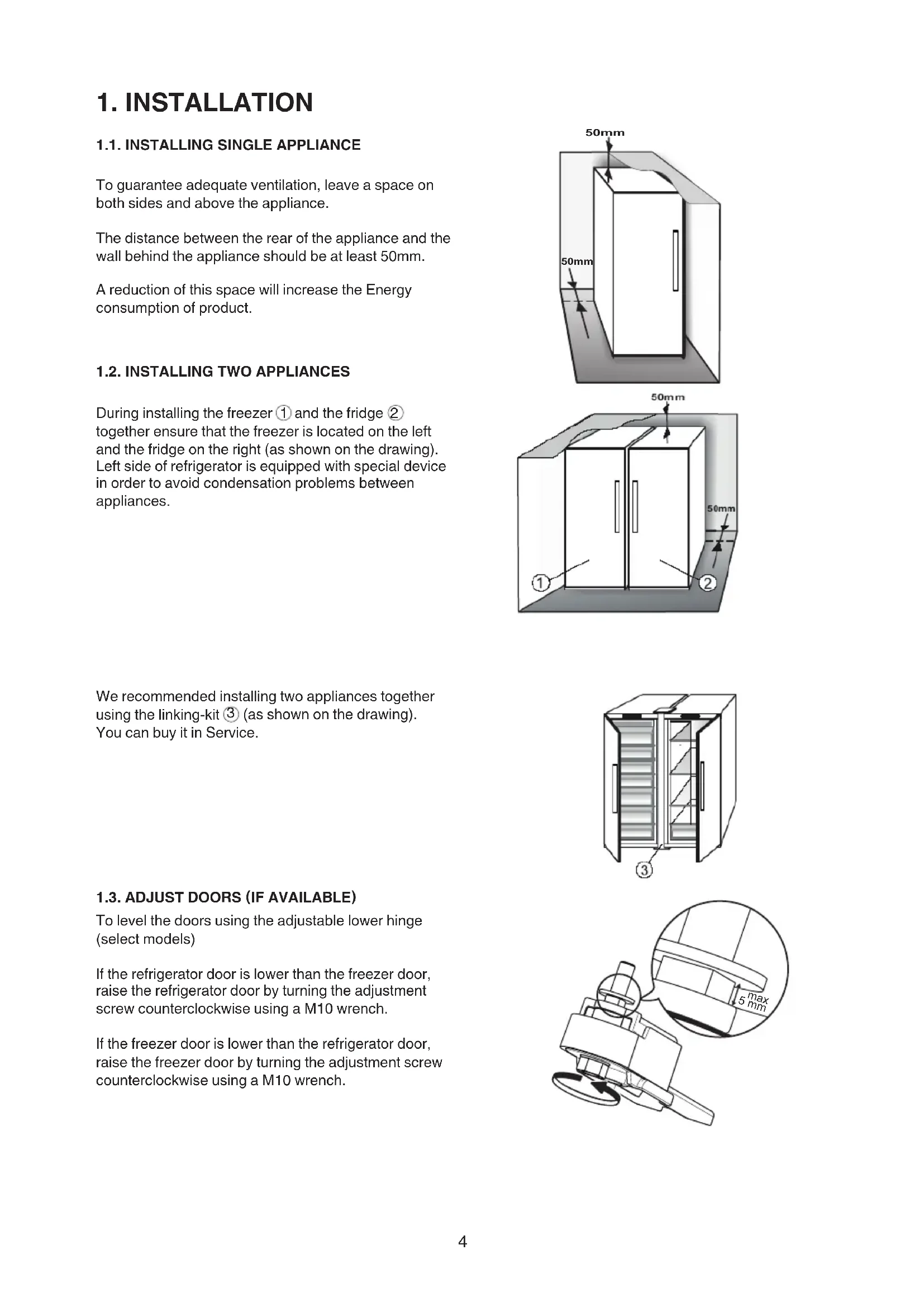
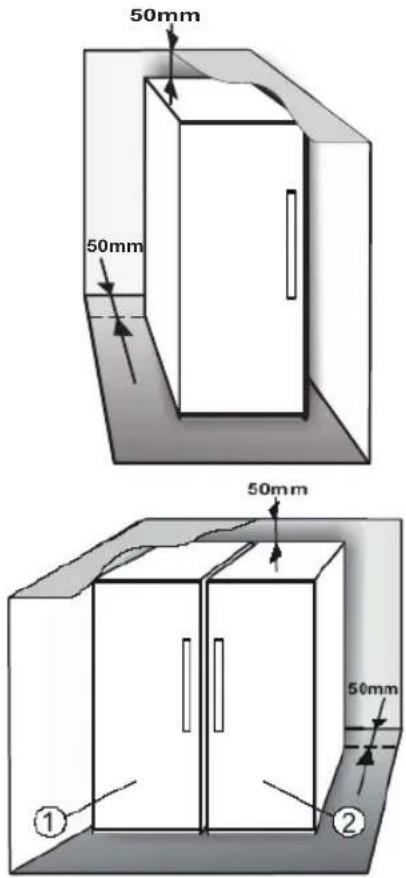
1.1. INSTALLING SINGLE APPLIANCE
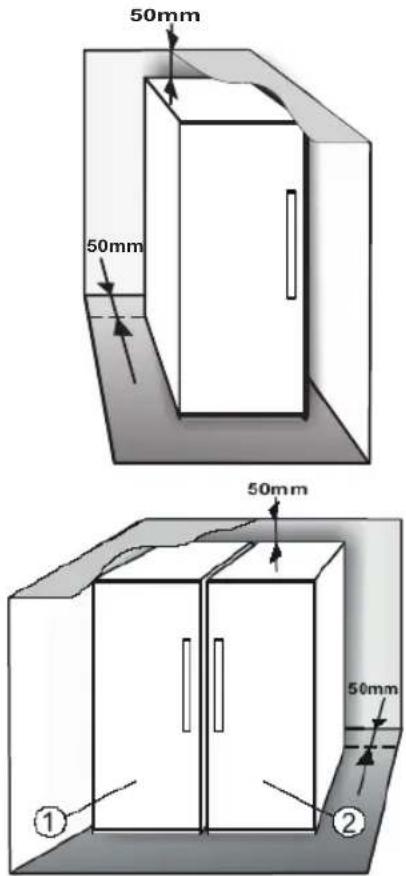
To guarantee adequate ventilation, leave a space on both sides and above the appliance.
The distance between the rear of the appliance and the wall behind the appliance should be at least 50mm
A reduction of this space will increase the Energy consumption of product.
1.2. INSTALLING TWO APPLIANCES
During installing the freezer ① and the fridge ② together ensure that the freezer is located on the left and the fridge on the right (as shown on the drawing). Left side of refrigerator is equipped with special device in order to avoid condensation problems between appliances.
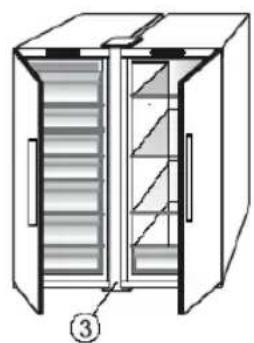
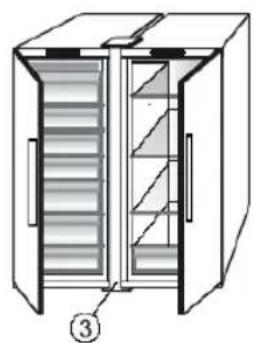
We recommended installing two appliances together using the linking-kit 3 (as shown on the drawing). You can buy it in Service.
1.3. ADJUST DOORS (IF AVAILABLE)
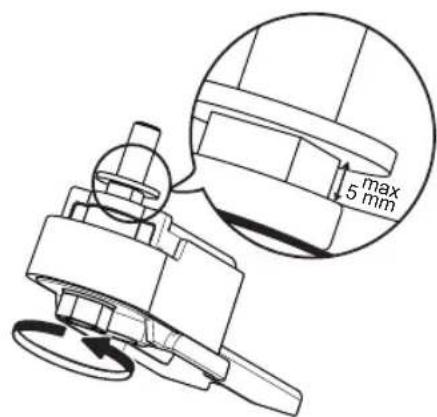
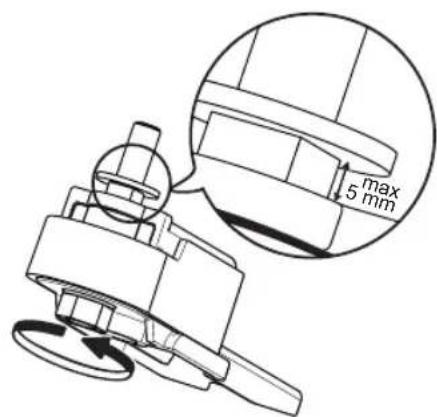
To level the doors using the adjustable lower hinge (select models)
If the refrigerator door is lower than the freezer door, raise the refrigerator door by turning the adjustment screw counterclockwise using a M10 wrench.
If the freezer door is lower than the refrigerator door, raise the freezer door by turning the adjustment screw counterclockwise using a M10 wrench.
2. FUNCTIONS
2.1. ON/STAND BY
This function turns On/Stand-by the refrigerator. To put the product in Stand-by, press & hold the On/Stand-by button for 3 seconds. When the appliance is in Stand-by, the light inside the refrigerator compartment does not work. Remember that this operation does not disconnect the appliance from the power supply. To switch the appliance On again, simply press the On/ Stand-By button .
2.2.SMART DISPLAY*
This optional function can be used to save energy. Please follow the instructions contained in the Quick Start Guide to activate/deactivate the function. Two seconds after activation of the Smart Display, the display goes off. To adjust the temperature or use other functions, it is necessary to activate the display by pressing any button.
After activation of the Smart Display, the display goes off, except the "6 Sense Fresh Control" / ProFresh indicator. If Smart Display is active - to adjust the temperature or use other functions, it is necessary to activate the display by pressing any button.
After about 15 seconds without performing any action, the display goes off again and only the "6 Sense Fresh Control" / "8 ProFresh" indicator remains visible. When function is deactivated the normal display is restored. The Smart Display is automatically disabled after a power failure. Remember that this function does not disconnect the appliance from the power supply, but only reduces the power consumed by external display.
Note: The declared appliance energy consumption refers to operation with the Smart Display function activated.
2.3.6TH SENSE FRESH CONTROL / PROFRESH
This function allows optimum storage conditions (regarding temperature and humidity) to be quickly reached inside the appliance. The fan must also be switched on for it to work properly. The "6th Sense Fresh Control" / "ProFresh" is activated by default To activate or deactivate this function - see enclosed Quick Start Guide.
After a power blackout or exit from Stand-by to normal mode, the "6th Sense Fresh Control" / "ProFresh" status resets to default i.e. active.
2.4. DOOR OPEN ALARM
The Alarm icon lights up blinking and the acoustic alarm sounds. The alarm is activated when the door is left open for more than 2 minutes. To disengage the door alarm close the door, or press once Stop Alarm button to mute the acoustic alarm.
2.5. VACATION
This function can be activated to reduce the energy consumption of the appliance during a period of absence.
Before activating the feature, all perishable food should be removed from the refrigeration compartment and make sure that the door is closed properly, since the refrigerator will maintain a suitable temperature to prevent the formation of unpleasant odors (+12^)
To activate/deactivate press the Vacation mode button for 3 seconds. When the function is enabled, the related symbol will light up and the temperature of the refrigerator compartment will be set to a higher setpoint (the temperature display will show the new temperature setpoint of +12^ ).
Changing the temperature setpoint will automatically deactivate the function.
Attention:
- Incompatibility with the "Fast Cool" function
To guarantee optimal performance, the "Vacation" and "Fast Cool" functions cannot be used at the same time. Therefore, if the "Fast Cool" function has been already engaged, it has to be disengaged first to activate the "Vacation" function (and vice-versa).
2.6.FASTCOOL
The use of this function is recommended when placing a very high quantity of food in the refrigerator compartment.
Using Fast Cool function it is possible to increase the cooling capacity in the refrigerator compartment. To maximize the cooling capacity, please keep the fan switch on.
Attention:
- Incompatibility with the "Vacation" function
To guarantee optimal performance, the "Vacation" and "Fast Cool" functions cannot be used at the same time. Therefore, if the "Vacation" function has been already engaged, it has to be disengaged first to activate the "Fast Cool" function (and vice-versa).
2.7. ZERO DEGREES DRAWER*
The Zero Degrees Painter is specifically designed to maintain a low temperature and a suitable humidity level, in order to keep foods fresher for longer (e.g. meat, fish, fruit and winter vegetables).
Activating and deactivating the box
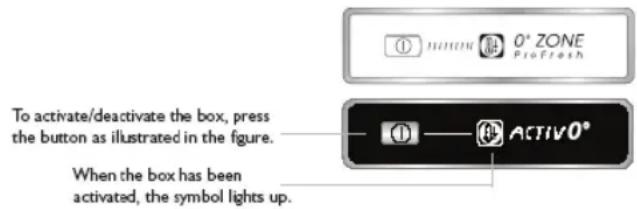
The temperature inside the box, when active, is approximately 0^ . The following factors are vital for the "Zero Degrees" box to work properly:
- the refrigerator compartment must be switched on
- the temperature of the refrigerator compartment must be between +2^ and +5^
- the box must be inserted to enable activation
- no special functions must have been selected (Standby, Vacation - where applicable).
If one of these special functions has been selected, the "Zero Degrees" box must be deactivated manually, and any fresh food inside it removed. If manual deactivation does not take place, the box will be deactivated automatically after 8 hours.
Note:
- if the symbol does not light up when the function is activated, check that the drawer is properly inserted; if the problem persists, contact your nearest authorized After-sales Service
- if the function is active and the drawer open, the symbol on the control panel may be deactivated automatically. If the drawer is inserted, the symbol will become active again
- irrespective of the state of the function, a slight noise may be heard: this is normal and is not a cause for concern.
- when the function is not active, the temperature in the drawer depends on the general temperature inside the refrigerator.
In this case, we recommend it is used to store fruit and vegetables which are not sensitive to cold temperatures (fruits of the forest, apples, apricots, carrots, spinach, lettuce, etc.).
Important: when the function is activated and there are foodstuffs with a high water content, condensation may form on shelves. In this case, disable the function temporarily.
2.8.FAN
The Fan improves temperature distribution inside the product, allowing better preservation of stored food. By default, the fan is switched on. It is advisable to keep the fan switched on, so that the 6th Sense Fresh Control / ProFresh function can work properly and also when the ambient air temperature is above 27 ÷ 28^ C or if you notice drops of water on the glass shelves or in sever humidity conditions. Please note that when the fan is switched on it will not continuously work. The fan will start/stop working depending on the temperature and/or humidity level inside the product. It is therefore absolutely normal if the fan does not move even if the fan is switched on.
To activate or deactivate this function - see enclosed Quick Start Guide.
Attention: Switching-off the Fan deactivate the 6th Sense Fresh Control / ProFresh function.
Note:
Do not obstruct the air intake area with food items.
To guarantee the right performance at lower ambient temperature (colder than 18^ ) and to minimize Energy Consumption, turn off the fan.
To turn off the fan please see above procedure.
If the appliance has the Fan it can be equipped with the antibacterial filter.
Remove it from the box placed in the risper drawer and insert into the cover of fan.
The replacement procedure is included in the filter box.
2.9. TEMPERATURE SETTING
The appliance is normally factory-set for operation at the recommended temperature of 5^ . The internal temperature can be adjusted between 8^ and 2^ , proceeding as follows:
- Press the temperature setting button (^) . The storage temperature can be changed by -1^ with each pressure of the button: the value changes cyclically between 8^ and 2^ .
Note: Displayed set points correspond to the average temperature throughout the whole refrigerator.
2.10. NO-FROST REFRIGERATOR COMPARTMENT
Refrigerator compartment defrosting is completely automatic.
Droplets of water on the rear wall inside the refrigerator compartment indicate that the automatic defrost phase is in progress. The defrost water is automatically run into a drain hole and collected in a container, where it evaporates.
2.11. LED LIGHT SYSTEM*
The light system inside the fridge compartment uses LEDs light, allowing a better lightning as well as very low energy consumption. If the LED light system does not work, please contact the Service to replace it.
Important:
The refrigerator compartment light switches on when the refrigerator door is opened. If the door is kept open for more than 10 minutes the light will be automatically switched off.
3. USE
3.1. HOW TO INCREASE FRIDGE STORAGE CAPACITY
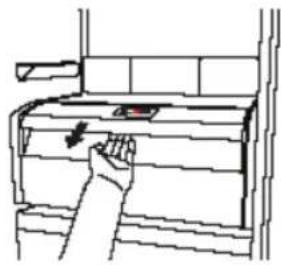
You can increase storage capacity by removing the "ZERO DEGREES DRAWER"*
In this case proceed as follows:
- switch off the box
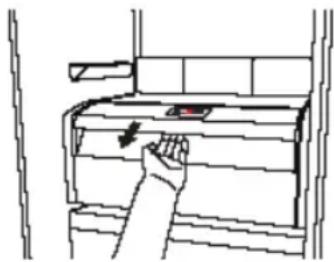
- pull out the drawer and the white plastic shelf underneath the box.
Note: the upper shelf and the side support cannot be removed. To restore "Zero
Degrees Printer operation, make sure you replace the white plastic shelf underneath the box before inserting the drawer and reactivating the function. To optimise energy consumption, we recommend you
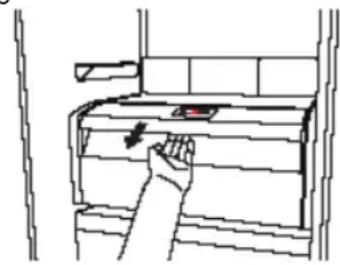
deactivate the "Zero Degrees Printer" and remove it.
4. FOOD-STORAGE TIPS
The refrigerator is the ideal storage location for ready meals, fresh and preserved food, dairy products, fruit and vegetables and beverage.
4.1.AIR VENTILATION
- The natural circulation of air in the refrigerator compartment results in zones with different temperatures. It is coldest directly above the fruits and vegetables crisper and at the rear wall. It is warmest at the top front of the compartment.
Insufficient ventilation results in an increase in energy consumption and reduction of the refrigerating performance.
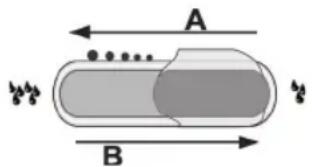
2.12.HUMIDITY CONTROLLED CRISPER*
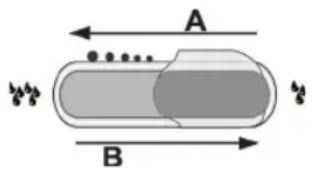
The salad crispers fitted inside the fridge have been specially designed for the purpose of keeping fruit and vegetables fresh and crisp. Open the humidity regulator (position B) if you want to store food in a less humid environment like fruit, or close it (position A) to store food in a more humid environment like vegetable.
3.2. NOTES
- Do not block the air outlet area (on the back wall inside the product) with food products.
- If the freezer is provided with a flap, it is possible to maximize the storage volume by removing the flap.
- All shelves, flaps and pull-out baskets are removable.
- The internal temperatures of the appliance may be affected by the ambient temperature, frequency of door opening, as well as location of the appliance. Temperature setting should take into consideration these factors.
- Unless otherwise specified the appliance accessories are not dishwasher safe.
- Use Smart Display function as frequently as possible.
4.2. HOW TO STORE FRESH FOOD AND BEVERAGE
- Use recyclable plastic, metal, aluminum and glass containers and cling film to wrap foods.
Always use closed containers for liquids and for food that may give off or be tainted by odor or flavor transfer or cover them. - Foods which give off a large amount ethylene gas and those that are sensitive to this gas, such as fruit, vegetables and salad, should always be separated or wrapped so as not to reduce the storage life; for example do not store tomatoes together with kiwi fruits or cabbage.
- Do not store food too close together to enable sufficient air circulation.
- To avoid bottles falling over, you can use the bottle holder (available on selected models).
If you have a little quantity of food to store in the refrigerator, we recommend to use the shelves above the crisper for fruits and vegetables since this is the coolest area of the compartment.
4.3. WERE TO STORE FRESH FOOD AND BEVERAGE
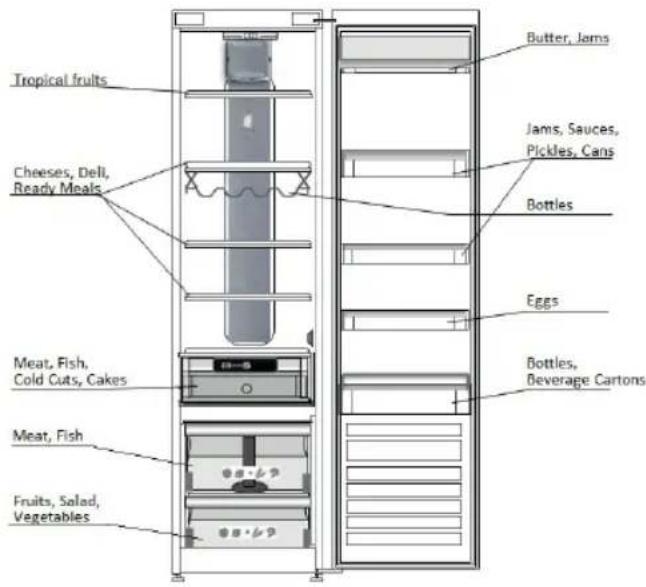
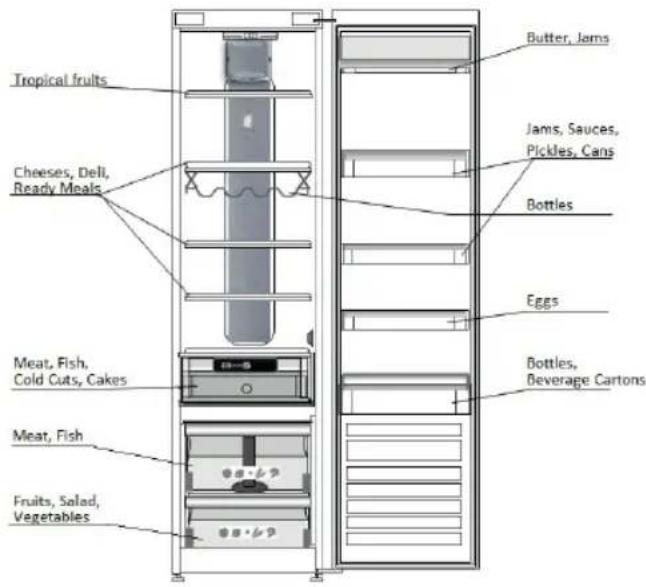
- On the fridge shelves: ready meals, tropical fruits, cheeses, deli.
- In the coldest area - Zero Degrees drawer* (the one above cooler Compartment): meat, fish, cold cuts, cakes.
- In the fruits and vegetables crisper: fruits, salad, vegetables.
- In the door: butter, jams, sauces, pickles, cans, bottles, beverage cartons, eggs.
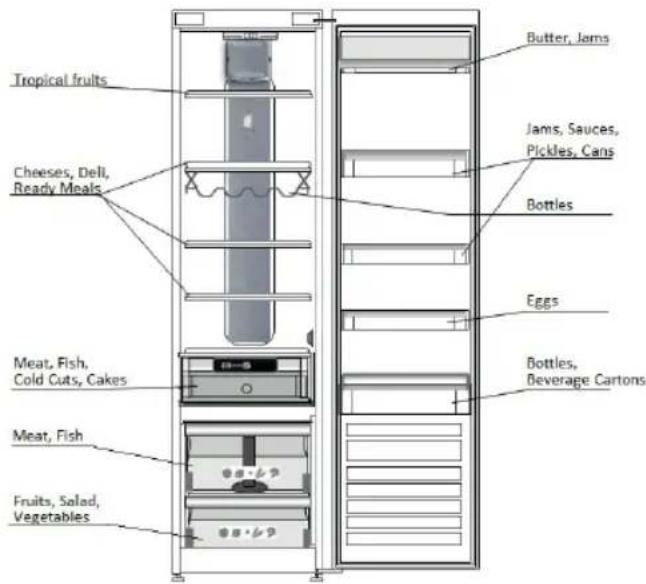
EXAMPLE OF FOOD ARRANGEMENT
5. FUNCTIONAL SOUNDS
Sounds coming from your appliances are normal since it has a number of fans and engines to regulate performances that switch on and off automatically.
Some of the functional sounds can be reduced through
- Leveling the appliance and installing it on an even surface.
-
Separating and avoiding contact between the appliance and furniture.
-
Checking if the internal components are correctly placed.
- Checking if bottles and containers are not in contact with each other.
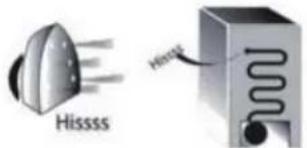
A hissing sound when switching on the appliance for the first time or after a long pause.
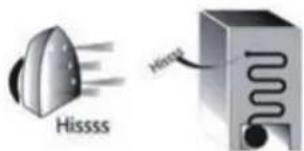
Some of the functional sounds you might hear:
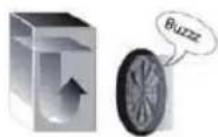
Buzzing sound when water valve or fan start working.
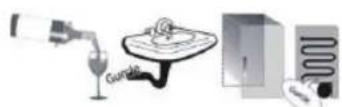
A gurgling sound when refrigerant fluid enters into the pipes.
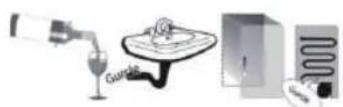
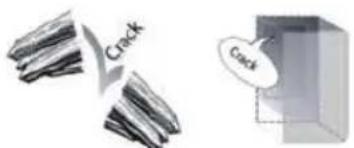
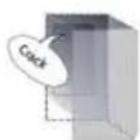
A cracking sound when compressor starts or when ready ice drops into ice box abrupt clicks when compressor switches on and off.
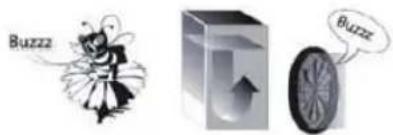
BRRR sound is from the compressor running.
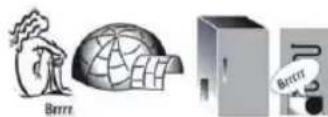
The Click is from the thermostat which adjusts how often the compressor is running.

6. RECOMMENDATION IN CASE OF NO USE OF THE APPLIANCE
6.1.ABSENCE/VACATION
In case of vacation its recommended to use up food and to disconnect the appliance to save energy.
6.2.MOVING
- Take out all internal parts.
- Wrap them well, and fix them together with adhesive tape so that they do not bang together or get lost.
- Screw the adjustable feet so that they do not touch the support surface.
- Close and fix door with adhesive tape and, again using adhesive tape, fix the power cable to the appliance.
6.3. POWER FAILURE
In the event of a power failure, call the local office of your electricity supply company and ask how long it is going to last.
Note: Bear in mind that a full appliance will stay cold longer than a partially filled one.
If food is found to be in a poor condition, it is best to throw it away.
For power failures lasting up to 24 hours.
- Keep the door of the appliance closed. This will allow the stored food to stay cold as long as possible.
For power failures lasting more than 24 hours.
- Try to use up the food, which is more easily perishable.
7. MAINTENANCE AND CLEANING
Before any cleaning or maintenance operation, unplug the appliance from the mains or disconnect the electrical power supply.
Periodically clean the appliance with a cloth and a solution of lukewarm water and neutral detergent specifically for refrigerator interiors. Never use abrasives. Never clean refrigerator parts with flammable fluids. The fumes can create a fire hazard or explosion. Clean the outside of the appliance and the door seal with a damp cloth and dry with a soft cloth. Do not use steam cleaners.
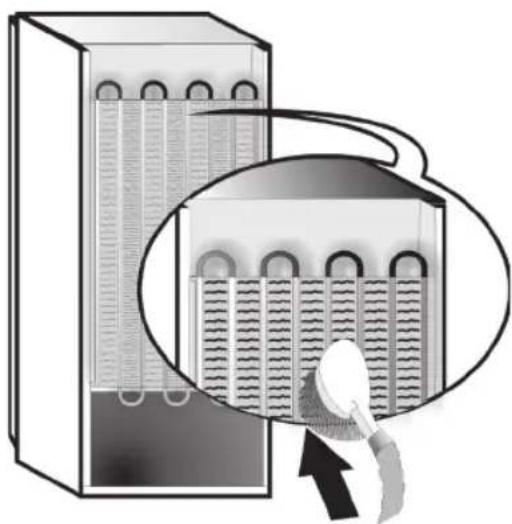
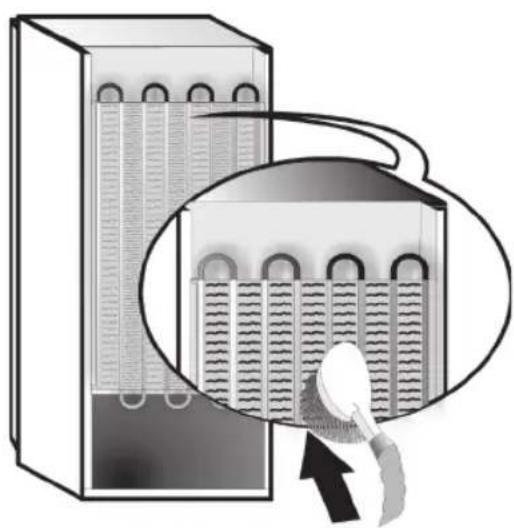
Condenser placed in the rear of the appliance should be cleaned regularly using a vacuum cleaner.
Condenser placed in the rear of the appliance should be cleaned regularly using a vacuum cleaner.
Important:
- The buttons and control panel display must not be cleaned with alcohol or alcohol-derived substances, but with a dry cloth.
- The refrigeration system pipes are located near the defrost pan and can become hot. Periodically clean them with a vacuum cleaner.
To ensure continuous and correct flow of defrost water, regularly clean the inside of the draining hole on the back of the refrigerator near the fruit and vegetable drawer, using the tool provided.
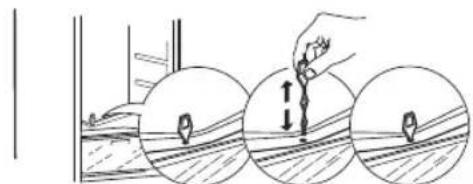
Before cleaning the "Zero Degrees Printer" (including the outside), remove the printer so as to disconnect the box from the electricity supply.
Clean the box and all its parts regularly, using a cloth and a solution of warm water and neutral detergent specifically formulated for refrigerator interiors (take care not to immerse the white plastic shelf underneath the box in water).
Never use abrasive detergents.
8. TROUBLESHOOTING GUIDE
8.1. BEFORE CONTACTING AFTER-SALES SERVICE...
Performance problems often result from little things you can find and fix yourself without tools of any kind.
| PROBLEM SOLUTION | |
| The appliance is not working: • Is the power cable plugged into a live socket with the proper voltage? • Have you checked the protection devices and fuses of the electrical system in your home? | If there is water in the defrost pan: • This is normal in hot, damp weather. The pan can even be half full. Make sure the appliance is level so that the water does not overflow. |
| If the edges of the appliance cabinet, which come in contact with the door seal, are warm to the touch: • This is normal in hot weather and when the compressor is running. | If the light does not work: • Have you checked the protection devices and fuses of the electrical system in your home? • Is the power cable plugged into a live socket with the proper voltage? • In case the LEDs are broken the user must call the Service for exchange of the same type available only at our After-sales Service Centers or authorized dealers. |
| If the motor seems to run too much: • Motor running time depends on different things: number of door openings, amount of food stored, temperature of the room, setting of the temperature controls. • Is the condenser (back the appliance) free of dust and fluff? • Are the door properly closed? • Are the door seals properly fitted? • On hot days or if the room is warm, the motor naturally runs longer. • If the appliance door has been left open for a while or if large amounts of food have been stored, the motor will run longer in order to cool down the interior of the appliance. | If the motor seems to run too much: • Motor running time depends on different things: number of door openings, amount of food stored, temperature of the room, setting of the temperature controls. • Is the condenser (back the appliance) free of dust and fluff? • Are the door properly closed? • Are the door seals properly fitted? • On hot days or if the room is warm, the motor naturally runs longer. • If the appliance door has been left open for 1/2 hour or if large amounts of food have been stored, the motor will run longer in order to cool down the interior of the appliance. |
| If the appliance temperature is too high: • Are the appliance controls correctly set? • Has a large amount of food been added to the appliance? • Check that the door is not opened too often. • Check that the door close properly. | If the doors do not open and close properly: • Check that food packages are not blocking the door. • Check that the internal parts or automatic ice maker are not out of position. • Check that the door seals are not dirty or sticky. • Ensure the appliance is level. |
8.2. FAILURES
In the event of operation alarms, they will also be displayed in the digits LEDs, (e.g. Failure1, Failure 2, etc...) call After-sales Service and specify the alarm code. The acoustic alarm sounds, the Alarm icon lights up and the F letter on the digit display blinks according to failure code described below:
| Failure code Visualization | ||
| Error 2 | F letter blink on/off at 0,5 sec. Blinks ON 2 times then remain off for 5 seconds. Pattern repeats. | -88 x2 |
| Error 3 | F letter blink on/off at 0,5 sec. Blinks ON 3 times then remain off for 5 seconds. Pattern repeats. | -88 x3 |
| Error 6 | F letter blink on/off at 0,5 sec. Blinks ON 6 times then remain off for 5 seconds. Pattern repeats. | -88 x6 |
*Available on selected models only. Please check on the QUICK START GUIDE if this function is actually available on your model.
9. AFTER-SALES SERVICE
Before contacting After-Sales Service:
Switch the appliance on again to see if the problem has been solved. If it has not, disconnect the appliance from the power supply and wait for about an hour before switching on again.
If, after performing the checks described in the Troubleshooting Guide and switching the appliance on again, your appliance still does not work properly, contact the After-sales Service, explain the problem.
Specify:
- the model and appliance serial number (stated on the rating plate),
the nature of the problem,
- the Service number (the number after the word SERVICE on the data plate on the inside of the appliance),
- your full address,
- your telephone number and area code.
Note:
The direction of door opening can be changed. If this operation is performed by After-sales Service it is not covered by the warranty.
INDEX
Kapitel 1: INSTALLATION 13
1.1. INSTALLATION EINES EINZELGERÄTS 13
1.2. INSTALLATION VON ZWEI GERÄTEN 13
1.3.TURENEINSTITELLEN (FALLSVORHANDEN) 13
Kapitel 2:FUNKTIONEN 14
2.1.EIN/STANDBY 14
2.2.SMARTDISPLAY* 14
2.3.6TH SENSE FRESH CONTROL / PROFRESH 14
2.4.ALARM TUR OFFEN 14
2.5. URLAUB 14
2.6.SCHNELLKUHLEN 14
2.7. NULL-GRAD-SCHUBLADE 15
2.8.GEBLASE 15
2.9.TEMPERATUREINSTELLUNG 15
2.10.NO-FROST KUHLRAUM 15
2.11. LED-LICHTSYSTEM 16
2.12.GEMUSEFACH MIT FEUCHTIGKEITSREGULIERUNG* 16
Kapitel 3:GEBRAUCH 16
3.1.AUFNAHMEKAPAZITAT DES KUHLSCHRANKS ERHOHEN 16
3.2.HINWEISE 16
1.2. OPSTILLING AF TO APPARATER
EKSEMPEL PÅ OPTIMAL FYLDNING
5. FUNKTIONELLE LYDE
Luku 2: TOIMINNOT 59
2.1.VIRTA-/VALMIUSTILA 59
2.2.SMART-NAYTTO* 59
2.3.6TH SENSE FRESH CONTROL / PROFRESH 59
2.4. OVI AUKI-HALYTYS 59
2.5.LOMATOIMINTO 59
2.6.PIKAJAAHDYTS 59
2.7.NOLLA-ASTELOKERO* 60
2.8.TUULETIN 60
2.9.LAMPOTILA-ASETUS 60
2.10.NO-FROST HUURTUMATON JAAKAAPPIOSASTO 60
2.11. LED-VALOJARJESTELMA* 61
2.12.KOSTEUSSÄDETTY VIHANNESLAATIKKO* 61
Luku 3: KÄYTTÖ 61
3.1.JAAKAAPIN SAILYTYSTILAN LISAAMINEN 61
3.2.HUOMAUTUKSA 61
Luku 4: VINKKEJÄ RUOAN SÄILTYKSEEN 61
4.1.ILMANKIERTO 61
4.2.TUORETARVIKKEIDEN JA JUOMIEN SÄILTYSOHJEITA 61
4.3.TUORETARVIKKEIDEN JA JUOMIEN SÄLYTYSPAIKAT 62
Luku 5: TOIMINTAAÄNET 62
Luku 6: SUOSITELTAVAT TOIMENPITEET, JOS LAITETTA EI KAYTETÄ. 63
6.1.PITKÄ POISSAOLO/LOMA-AIKA 63
6.2.MUUTTAMINEN 63
6.3.SAHKOKATKO 63
Luku 7: LAITTEEN HUOLTO JA 63
8.VIANETSINTAOPAS 64
8.1. ENNEN KUIN OTAT YHTEYTTA HUOLTOON 64
8.2.VIAT 64
Luku 9: HUOLTOPALVELU 65
Muut:
OVEN KATISYYDEN VAIHTAMINEN (VERSION 1) 102
OVEN KATISYYDEN VAHTAMINEN (VERSION 2) 104
HUOM.:
3.1.ÖKA KYLSKAPETS FÖRVARINGSUTRYMME
Tlaba9:UEHTP IICJIAPDAHHO OBCJYROBYAHHRA 92
Inwe:
NEPEBIUBAHHA DBEPAT (BEPC1_1) 102
NEPEBIUBAHHI DBEPAT (BEPCI2) 104
NIPMMITHA:
Ihctpyu3actocobybca do hiibhox moJe, TOMy MOHytb MiCTHTn PO36iHHoCTi. Po3di, uO MicTb iHopmaio npo KOHKpeTHi npua, no3HaueHO 3ipouHO (^*)
IhOpMaicIO npo FyHKcii, npTamaHNI Jnwe npd6aHOMy Bamn npOdyKty, HabeJeHO y HOPOTOMY IOCIBHNK 3 NOATHY POBOTN.
1. YCTAHOBJIENHЯ
1.1.YCTAHOBJIeHHO OJHORO BIDJIJIeHHH
Uo6 3a6e3neHTn HaleKHy BeHTnlaio, notyp6yntec, uo6 mix 6iHmTa BepxHbOCTIHkAMn npnaLy 3aHnHBcra neBHN BiIbHn npoctip.
BiDCTaHbMiK3aIhBIO CTIHHO npIaNy Ta CTiHOIO 103aMy HeI MaE CTAHOHTN NOHa50 MM.
Kaio BiCTaHb 6yde MeHIO, 36JIbHTbcra pBeHb cNoKuBaHH eHepri npHaDom.
1.2.YCTAHOBLEHHRABOXBIDJIIEHb
Ypa3i OndHocHOro BCTaHOBHeHHa MOpO3nHbHorO ① TaXoJOnIbHorO ② BiDJIeHb po3TaWyTe MOpO3nJIbHe BiDJIeHHaIbOPuy,aXoJOnIbHe- npabOpuy (HK 306paKeHo Ha MaIbHky).JIbe BiDJIeHHaXoJOnIbHNka OcHaSeHo CneuaJIbHM npNCtPoEM,IO 3anO6irae yTBopeHHIO KOHeHCaty MIK BiDJIeHHaM.
PekomeHdyEmo yctaHOBHTu 6nDbBa BiDJIeHHA npuy OndHe 3 ODNHM, 6'edHaBUnix 3a DonOMOrOcneiaIbHoro Habopy ③ (Rk 3o6paKeHo Ha MaIIOHNky).
Ley Hapip MoHHa PnpI6aTN B LcHTpi 6cbnyroByBaKlIEHTIB.
1.3.PEYJIOBAHHA DBEPAT (3AHARBHOCTI)
BupHBOHnA BepaT 3a DOnOMOHO HNHHbOi 3aBicn, opeyIIOeTbcra (o6epitb MoJeI)
Hkuo DBepuTa XoJIoNbHnKa HnKu 3a DBepuTa MOpO3HbHoro BiDJIeHNr, NiHimItb DBepuTa XoJIoNbHnKa, NOBepTaUOn peRyIIOBaIbHn IBNHT IpOTN rOuHHNKOBoi CTpIKN 3a DOIpOMoTO raikOBoro KluOa M10.
Hkuo DBepuTa MOp03nIbHOrO BiDJIeHH HnKHi 3a DBePura XoIoNIIbHnKa, NiDHiMItb DBePura MOp03nIbHOrO BiDJIeHH, NOBepTaIOuH peryIIOBaIbHn IBrHT npOTn rOINHHKOBoi CTPIHN 3a DonOMorIO raIKOBOrO KIOUa M10.
2.ФУнкцi
2.1.yBIMKHEHO/OUHKYBAHH
L4yHkui aHTnBye peKIM «YBIMKHeHO/ouKyBaHHa y xoIodnIbHOMy BiDJIeHNHi. 106 nepeBecTn npIaNd y peKIM OUYBaHHa,HaTNCiTB i yTpmyTe npOTAROM 3ceHynd KhoNky «YBIMKHeHO/ouKyBaHHa 10. KoI npIaNad nepe6yBaC B peKIMi OUYBaHHa,OCBITJeHHa B xoIodnIbHOMy BiDJIeHNHi He npaioe. Parn'raTne, 10 eJeleKTPOHINBJIeHHa npIaNady npI cboMy He BIMKaETbcA. 106 3HOby yBIMKHyTN npIaNad, HATNCiTB KHONKY «YBIMKHeHO/ouKyBaHHa
2.2.CMAPT-ДИСПЛЕN\*
LIOdoaTHOBy cyHKUIO MOHb BVNKOpNCOTByBatn 13a0uzaJxHeHHeJeKtPoEheprii. 106 aHTNByBaTH/ BIMKHyTN cIoo fyHKUIO, dOtpmMyTecb yka3ibOK y HopotkOMy noci6Hky 3 noaTHky po6oTH. Ype3 dBi CEkyHdN iCnla aKTNaBuaII cyHKUII «CMapr-Dncnnei» DnCnnei 3rache. 106 BiDperyIHOBaTN TemnepaTyPy aBOCKOpCTaTNCb IHsMMFyHKUIMN, Heo6XiHO aKTHyBaTN DnCnnei, HaTCHyBUN 6yDb-ky KhoNky. PcIra aKTHBaui cyHKUII «CMapr-Dncnnei» IHdNkaia HA DnCnnei 3rache 3a BHNrTOM 3HauchKa "Sense Fresh Control" / ProFresh". RaKuo cyHKUIO «CMapr-Dncnnei» yBIMKHeHO, 106 halaHTyBaTI N TemnepaTyPy aBO aKTHyBaTaN iHwi cyHKUII, HATNCHTb 6yDb-ny KHOHcy aKTHByTe dnCnnei.
HaNo ha npot3i np6n3HO 15 ckyHd He 6yde BHKoHaHO 6yb-8nX Di, DcNpNe 3HOBy BmKHeTbCra, Ondak iHnKaTOp 6 Sense Fresh Control / ProFresh" npOobHyBaTme Cbitntncr. Nicna BmKHeHHa ciEi Fynu II cyde BiHOBHeHO HopMaIbHy poBoTy nCnIeR. Y BnAHy 360IO B eJeKtpomepeKi Fynuia "CmapT-DnCnIeR" BmKHeTBcABTomaTHHO. Cnid Nam'raTn IpO Te, 0o 3a BnKOpCTaHHa ciEi Fynuie EeKTPoHNBleHHa npnAdy He BmNkaETbCra. Hatomictb npocTo 3MeHwYetbcra pBeHb CnoJHBAHHeEeKTPoeHepri30BHIM dncnneM.
Pnmitka. OroLoWeHn piBeHcNoKuBaHHeNeKTpoeHeprI npHaJOM BmIpraHO 3 yBIMKHeHOO cyHKiEIO «CmapT-dncneJ".
2.3. 6TH SENSE FRESH CONTROL /PROFRESH
L4f yHKiJdo3BOLJe WbNDKo 3a6e3neHTN ONTMalbHi yMOBn 36epirAHn (BiHocHO TEMnepaTpy Ta BOIorOCTi) ycepeHNi npnaady. Dn HOpMaJIbHOi pOBOTn FyHKii BEHTNIATOP TAOH Ma6 6Ty BBIMKHeHm. FyHKiJg «6th Sense Fresh Control》/«ProFresh» aHTNbYeTBcR 3a 3aMOBuaHHM. IHopMaIIO npTo Te, Jk YBMKHUTn a60 BIMKHUTn 1O fYHKUIO dVB. y KOpOTKOMy noc6Hky i3 noaTHy pOBOTn, 1O NOCTaueTbcR B KOMnIeHTI. RkIo CTABcR 36iB E eJeKTpomepeKi a60 y BInaHy cKacyBaHHra peKIMy ouikyBaHHaFyHKUia «6th Sense Fresh Control》/«ProFresh» noBeptTaetbCra do cTaHy 3aMOBHaHHM, TO6TO BMKaETCBr.
2.4. NONEPEJXEHH NPO BIDKPNITI DBEPLRTA
3acBITbcTa TnOHTe 6JIIMaTH 3HaQOK
nonepdHexHH i LyHae 3ByKOBn CnHaN.
JHKIO DBepTuTa 3aIIuHaIbTBcR BiIDKpTtHMn
npOTARo 6IbWe 2 XBUNH, AKTNByETbcR
CnHaN nonepdHexHH. I06 BmKHyTN CnHaN
nonepdHexHH nPo BiIDkpTi DBePcTa, 3aKnHTe
DBepTuTa a6o Odn pa3 HaTNCiHb KHOhky «BmKHyTN
nonepdHexHH>
Ybara NicnBIMKHeHHBeHTnIaTopa FyHKuio 6th Sense Fresh Control》/“ProFresh”TaKoH 6yde BIMKHeHO.
PnmiTka.
He nepekpuBaIte npOdyHTamn 3OnHy nobItpo3a6ipHnHa.
Lio6 rapaHTyBaTH HaJIeHHe FyHKIOHyBaHHra 3a HnKcOi HABKOINHbOiT TemNepaTpyn (MeHsE 18 ^ C) Ta MIHiMi3yBaTH eHEpROcNOHNBaHH, BIMKHITb BEHTIaTOp.
LIOB BIMKHyTN BEHTNIAJTOP,INB. IHCTpykuii BNUe.
RkIo npnlaO cHaSeHO BEHTNIAJTOPOM,y HbOMy MOKe 6yTN BCTaHOBJIeHNI aHTN6aHTepiaIbHHNI
fInbTp.
BntrHnIb Horo 3 Kopo6H, po3aUoBaHOi y KOHTeHepi dI ppyKtIB i OBOHi, IBCTaBTE B KpnuKy BeHTnIyTopa. IpoceDpy 3amHN HabeJeHO B DOkymeHTaui, 10 NoctaHaETbcR B KOMJIeKTI 3 fIbTpom.
2.9.HAJAIHTYBAHHI TEMNEPATYNI
3a 3amOByBaHHm peKOMeHIOBaHa TemnepaTpy fHHcioHyBaHH npuIaNy cTaHOBtB 5^ Ioo6 ycTAHOBHTN TEMnepaTpy BCEpeHNi npuIaNy B MeHXax BiD 8^ Do 2^ BHKoHaIte KpOHi, UHO HabeDeHi HnKHe:
HaTnCHiB KONHy peRyIIOBaHHaTeMnepaTypn (^) .PiCJIa KOxHOro HaTnCKaHHaKHO3HaueHHaTeMnepaTypn 3MiHOBaTMeTbCra Ha-1°C:3HaueHHaIKJIuHO 3MiHOBaTMeTbCra B diana3OHi BiD 8^ do 2^
PnmiHa. Biio6paKeHe 3NaueHnB iDnOBiJaecpeEhboMy pIBHIO TemnepaTyPi Bycbomy XoIoNlNbHOMy BiDJIeHHi.
2.10.XOJIOIJIbHE BIDJIIEHHRA 3 CNTTEMIO NO-FROST
Po3MOpOxHyBaHHXoJIoNlBHoro BiDIIJIeHHB iD6yBaETbcra IOBHcTIO ABTomaTHHO. HpaIi BoHn Ha 3aHi N CTIH CBepeHHxoJIoNlBHoro BiDIIJIeHHBA3yIOb Ha Te, 0o 3aIyueHo Ipouec ABTomaTHORo po3MOpOxHyBaHHa. TaIa BODa ABTomaTHHO CTiKaE B DpeHaKHNOTBip I hAkonuyeTbcra B KOHTeHepi, 3BiKn NOTIM BInapOByETbcR.
2.11.CNCTEMAOCBITJIeHHRA 3ICBITIOIOHMMI INIKKATOPAMN\*
IIOOCBITNEHHBCEPeHNI XOLOINbHO BIDINHBNKOPNCOTBYETBCSCTEMA CBITIOIOIB,AKIHEJIN3a6e3neuyIOb Kpaue OCBITNEHHA,a 3aouaJHyOTbCNOHNBAHH eEKeTPOEheprii. KaO cNCTMaCBITIOIOHOOCBITNEHHHe npaioe,3BepHiTbcDo ueHTpy OBCNYROByBaHHKJIeHTIB,IO6 BAM II3amInn.
Baxnbo!
BHytpiHcOCBITJeHHXoJIOINbHO BIDJIeHHBAIMKaETbcnIac BiKpNBHaHH DBepaT. RaioDBepaTa3aIIuWATMyTbcraBIDHHeHHmnpOTARMOHAD 10XBUNH, Cbitno BIMKHETbcrABTomTuHo.
3. BHKOPNUCTAHHJ
3.1.36JIbWeHHIPOCTOPYXOJIOJNbHOro BIIJIeHHI 36EPiHaHHIPOyHTIB
PnoctipIy36epirAHHH npOdyKTIB MOHHa 36JIbHHTN, BITrHyBwn KOHTEIN HEP «HYJb IPAyCIB»* Uo6 ue 3po6nTn, BVKOHaTe TaKi dii:
BIMKHTbpeHMM «HyIb rpaDyciB
BITaOHHTb KOHTeHep i 6iiny nlaactnKoby noIky, po3taWOBaHy nID Hm.
PnmuTHa:BepxHIO uxyIy Ta 6iHne KpinJIeHHB BuIyHTN He BdaCTbC. Lio6
BIDHOBNIPOBO TY KOHTeHepa Hylb rpaucib》,nepu HIX BCTABJNTN Ioro Ha3ad, OOB'3KOBO BCTABTe nlaactNKOBY uxyxJy,rKa Ma6byNpo3TaWOBaHa NiHMM. ⅢO63MeHUNTI pIBeH cNOXHBAHn npnilaDM eNEKTPoEHePPI, peKOMeHNObaHO BIMKHHTN
peHIM «HyIb rpaIyciB» I BNTaIHyTI KOHTeINHeP.
2.12. KOHTENHEP JIA OBOYIB I ΦPYKTIB 3 PEYJIOBAHHM BOJIOROCTI*
KoHTeHepn dIaCaIaTy, rki BCTaHOBIOIObTcR ycepeHNHy xOLOINbHOrO BiIDiIneHHra, MaOTb 6yTN cneiaIbHo pO3pObleHmN dI rPiITpIMaHHra FpyKTIB Ta OBOuIB CbiHmN. BImKHITb peryIaTOp BOIorOCTI (noLoKeHHra B), kIso bKaAeTe 36epiratn npOdykTu y MeHw BOIorOMy cepeOBnU, 0o 6IbW nIXoNDtB dIra FpyHTiB, aObYBMKnITb Noro (noLoKeHHra A), RkIo 6BaKaTe 36epiratn npOdykTu y 6IbW BOIorOMy cepeOBnU, 0o 6IbWe nIXoNDtB dIra OBOuIB.
3.2. ПИМITHN
He 6lokyte npodykTAMx xapyBaHHa 3OHy nobITpHoi BEHTnIaui (3adHIO CTiHKY BCEpeDNI Hi npuIaIy).
- RaKIO MOpO3NlBHe BiINIeHnO6NaIHaHO BIDKNHIOI NOIHKOIO,MOHb36JIbWHTN IPOCTip BiINIeHnI 36epirAHnIPOyKTIB,BINHBAuBiIKNDHyNOIHKy.
Yci noiui, BiHnHi nIuHn Ta KOHN MOHb BNIHHTN.
Ha TemnepaTyPb BCEpeiHPi npIaNMy MoKe BnHHTN TemnepaTypa HABKOLIuHbOro CepeOBuIua, YaCToTa BiKpNBaHHaBepaT, a TaKOH po3TaUyBaHH npIaNy. YcTaHOBIIOUH TemnepaTypy, cIiD 3BepTaTH yBaRy Ha ci foAKTOpN.
Akcsecyapn npnilady He cnid MNTB NOcydommHIM MaunHi, kuo He hadaHO IHUX BkazIBOK.
- RaKOMORA qactiue 3aCtOCOByIe ΦyHkuio «CmapTINcPJIeJ.
4. ПОТади сюдо 3бЕРIGАнгЯ ПОДУНТIB
XoIodnJIbHe BiDIIileHnIeaeJIbHO nIXOAnITb IIN 36epirAHn npiroTOBaHnx CtpaB, CBIXN npOyKTiB i 3aKOHcepBOHaOH iKi, MIOUHnX npOyKTiB, ppyKTiB i OBOHiB, a TAKoH HanoIB.
4.1. BEHTNIAZI NOBITPA
-ПирогнанцИркУляп IOВITРу y XOLOДиьHOMy BiDIIJIeHHi npIN3BOIDHTdo CTBOpEHHH 3OH i3 pi3HOIO TemNepaTPOIO. HAIHNKHa TemNepaTpa cNoCTepiraEbCra NaI KOHTeHepOM dIЯ OBOUIBi IpykTIB, a TAKOX 6IЯ 3aJHbOI CTIHKn XOLOДиьHnKa. HAIBNuA TemNepaTpy -y BepxHII YacTHNI BiDIIJIeHnRA 6IЯ NepeDHbOI CTIHKN BiDIIJIeHnRA.
HeIOCTaTHB EHTINLJcIg PnH3BOIDtB Do NiIBNueHOro eHEproCNOJBBaHH Ta 3MeHWeHHO OxIoNDyBaJIbHnx BlaCTHBOCTeI npHaNy.
4.2.36EPIIAHH CBIKINX IPOyHTIB HANOIB
- 36epiraHH npodykTIB BHKOpHCTOByIte PnlaactmacOBI,MetaJIeBI,aiOMiHiEbi Ta CkJIaHI KOHTeHepN,IOPiDAHOtBCB BTOPHHHI nepepo6ci,a
TaKoX XapOBy NJIbHy.
3aBHN BnKOpNCToByTe 3aKnpti KOHTeHepn dIa 36epirAHn piIN H i npOyKTIB, RHI MOHyTB BNIDJTN CneuΦHn 3anax a6o MOHyTB 3iNcYBaTnCpe3 TaHn CneuΦHn 3anax a6o MOHyTB Ha6yTN Ioro.
- PpOdyKTH, 10 BnDJIJIHOb BeINHy KJIbKICtB eTInJeHy, Ta pOdyKTH, RKi E CHTJINBMN Do cIbOro Ra3y, HApnKlAid, FpyKTn, OBOci Ta caIaT, 3ABKn Dn Heo6XiIdNo 36epiratn OkpemO a6o 3arOpTaTn, IHaKWe CKOpOTNbC8CTPOK IXHbOro 36epiraHHr; HApnKlAid, He 36epiraTe nomIDopn pa3OM 3 KiBi YN KaNyCTOIO.
He 36epiraTe npOdyKTn 3aHaTTo 6JIi3bKO OdIH Do OJHO, 0o6 3a6e3neHTn HaleKHy cIpyJIyIciIO nobITpr.
- Uio6 yHnKHyTN BnnaDaHHN PIAWOK, BnHOpNCTOByTe nIDCTaBky DnI PIAWOK (DOCTyTHO y DeRKnX MoDEJAX).
KuO KlbHcTb npOdykTIB dIy 36epirAHy XIOIOINbHNky E HeBENKOIO, peKOMeHdyEMO BnKOpNCTOByBaTN dIy HIX NOniHi NaKOTHePOM dIy OBOvib iΦpykTIB, aDne y ciN 30Hi BiDiJIeHHa TempepaTypa e HaHNNKHOIO.
4.3.MICUEJIA 3BEPIAGHHCBIHX NPOUYHTIB I HANOIB
Ha noIinx xoJIoDnIbHnKa: npiroToBneHi cTpaBn, TponiHi fpykTN, Cnpu, DeIkaTecu.
Y haXoJIoNDHiSiI 30Hi-B KOnTeHepi Hylb rpaDyciB* (po3TaioBaHn Ha, OxOIOHyBaJIbHIM BiDiJIeHHaM): M'RCO, Pn6a, M'raCHA Hapi3ka, nporH.
- Y KOHTeHepi DnA OBOUIB i φpyKTiB: φpyKTH, caNaT, OBOUi.
Ha noIyKax DBePzT: MacNo, BapeHH, coycn, coiHnH, KOHcepBn, HanoY nnLHkax i KapToHHnx naketax, Rz.
PINKJIAD PO3TAWYBAHHIPODyKTIB
jglal bai jia yie gao ylc aia/ajll jiayip jaiy jaiy jaiy jaiy jaiy jaiy jaiy jaiy jaiy jaiy jaiy jaiy jaiy jaiy jaiy jaiy jaiy jaiy jaiy jaiy jaiy jaiy jaiy jaiy jaiy jaiy jaiy jaiy jaiy jaiy jaiy jaiy jaiy jaiy
*SMART DISPLAY 2.2
SsIglll lal y jy ailll yjll lla 1234567890123456789012345678901234567890123456789012345678901234567890123456789012345678901234567890123456789
15 1
/“6 Sense Fresh Control" aagg g y
Llal lal gaae alaie alae alae alae alae alae alae alae alae alae alae alae alae alae alae alae alae alae alae alae alae alae alae alae alae alae alae alae alae alae alae alae alae alae alae alae alae alae alae alae alae alae alae alae alae alae alae alae alae alae alae alAE
Sill sll sll sll sll sll sll sll sll sll sll sll sll sll sll sll sll sll sll sll sll sll sll sll sll sll sll sll sll sll sll sll sll sll sll sll sll sll sll sll sll sll sll sll sll sll sll sll sll sll sll sall

6TH SENSE FRESH CONTROL 2.3

PROFRESH
aJ 100000000000000000000000000000000000000000000000000000000000000000000000000000000000000000
2.8
*a.2.7
Jie jie jie jie jie jie jie jie jie jie jie jie jie jie jie jie jie jie jie jie jie jie jie jie jie jie jie jie jie jie jie jie jie jie jie
/6th Sense Fresh Control 127 140 140 140 140 140 ProFresh
28
y 1 y
6th Sense Fresh
.ProFresh / Control
4k = 3
gll jda aol
aiaaaal aayaae yall cag aaiy aaiy jaii
S ACD = S COD + S DCE - S CDE
y jill slalall jilally ojj jay aiaa yjla Jaiy jll jS [
a 100
a a a a a a a a a a a a a a a a a a a
NO FROST 2.10
To activate/deactivate the box, press the button as illustrated in the figure.


ACTIV0°
When the box has been activated, the symbol lig
0 0
J 1
-
5+2+ 1
Jusit 2
- -
( 1,2) ( OA + OB + OD) = 3
j 1
8 5
45 = x_0^2
J 1
aill jolil 1000
al gally (jglal jals jll) el gell jia 2
a1l2
Jn Jzill aolssy j kay cblg 12000000000000000000000000000000000000000000000000000000000000000000000
i 1000000000000000000000000000000000000000000000000000000000000000000000000000
aJ11n jia aee 3.1
"Jaiall a jy Jg Jj 10000000000000000000000000000000000000000000000000000000000
J 10000000000000000000000000000000000000000000000000000000000000
pabai jzilai.4
a jlll lglal g aabla 4.2
yai yil 10000000000000000000000000000000000000000000

Jilu Jia Liic jie
1 1 1 1 1 1 1 1 1 1 1 1 1 1 1 1 1 1 1 1 1 1 1 1 1 1 1 1 1 1 1 1 1

j 1 j 1 j 1 j 1 j 1 j 1 j 1 j 1 j 1 j 1 j 1 j 1 j 1 j 1 j 1 j 1 j 1 j 1 j 1 j 1 j 1 j 1 j 1 j 1 j 1 j 1 j 1 j 1 j 1 j 1 j 1 j 1 j 1 j 1 j
a g aol gl clal plao i ylaic jy C

y
jglalpduuulpuu.6
yjE.6.3
a a
Jell Ealil jaiy wll aoll ie pail
jgl jglal jgljlyjlyjll jj jsi:
jgsgaleal
Aio calisill Jiaaiyaiyaiyaiyaiy
24 24
plabll j 1
AiS i = aiS i
a 24 15
1
ybal/ yj.6.1
jgl jgl glg, pgl glg y ggl ggl
a
J.6.2
ai a ai
aiaaiia aagaae
2
3
y 4
jLg=0.1g≤1.1 gS 1
a. 7
Jalil jaiyjgll kajl jglal Jaii jai jai jai jai jai jai
y
jell ell jolg, wlae aabe alswly jall aabti aabti cjiie
piai y aaiy 10a ay piaiy y jalil no ay aanl janae Jlaie bia
jai j 1
111 111 111 111 111 111 111 111
auii aaiy iiai ylln lal ae bialily
j1j2j3·s jn = 1
A. 125 k a. i. 101 125 k a. 101
jia aiall al gai jgsll plsiy pssill ayg jn lity gaay
a
Lgaiy 1 1 1 1 1 1 1 1 1 1 1 1 1 1 1 1 1 1 1 1
ai a ai 的最小值为 k .
aill aie 1
a 1
a2 = a1 + 2,a3 = a2 + 3
y 1
yssll juaa 2gaae
clll joljog jolae aebplxuuiyabaii ci jie al jajg jiljliybi y
(olal)
1
...8.1
1 1
4k > 3l
yLa aosd yj 0e jy1 12
aill 1y y
9
:
- Aii 1 J 154
