BF350 - Scale TANITA - Free user manual and instructions
Find the device manual for free BF350 TANITA in PDF.



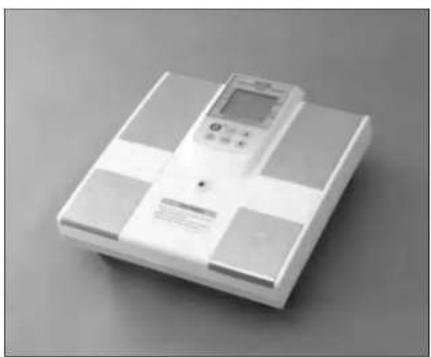
| Product type | Impedance meter scale |
| Brand | Tanita |
| Model | BF350 |
| Measurement method | Bioelectrical impedance via multipolar electrodes |
| Measurement frequency | 50 kHz |
| Current intensity | 50 μA |
| Electrode material | Stainless steel |
| Impedance measurement range | 150 - 300 Ω |
| Maximum weighing capacity | 200 kg / 440 lb |
| Minimum graduation | 0.1 kg / 0.2 lb |
| Input parameters | Gender (Male/Female), Body type (Normal/Athletic), Age (7-95 years), Height (30-240 cm) |
| Output parameters | Weight, Body fat %, BMI |
| Display | 2 rows, 5 digits, LCD screen |
| Output interface | RS-232C (D-sub 9-pin connector) |
| Power supply | AC adapter 9V DC 200 mA (included) |
| Power consumption | 0.7 W |
| Operating temperature | 0 - 35°C / 25 - 55°F |
| Equipment weight | 7.5 kg / 16.5 lb |
| Main functions | Weight, body fat %, BMI measurement; weight-only mode; athletic mode |
| Maintenance and cleaning | Clean the platform with a soft cloth dampened with water or mild detergent; do not use abrasive products; disinfect the electrodes |
| Safety | Do not use by persons with a pacemaker or other implanted electronic medical device; do not plug/unplug with wet hands |
| Spare parts and repairability | Use only the provided Tanita AC adapter; for any repairs, contact the dealer or Tanita |
| General information | Professional scale for adults of normal or athletic build; requires stepping barefoot onto the electrodes |
Frequently Asked Questions - BF350 TANITA
User questions about BF350 TANITA
0 question about this device. Answer the ones you know or ask your own.
Ask a new question about this device
Download the instructions for your Scale in PDF format for free! Find your manual BF350 - TANITA and take your electronic device back in hand. On this page are published all the documents necessary for the use of your device. BF350 by TANITA.
USER MANUAL BF350 TANITA
TANITA Corporation of America, Inc.
265 South Chester Bank (city) 100th Ave. N. 13, St
01:32:420:376:322
74.37-610-8211
(二)本次减持计划
TANITA Health Equipment H.X.LTD.
Ln301 301 35-4Wing On Plan
KoRy, 13. 13.
[1]:+252711
fxx-452-2858-8667
TANITA Europe GmbH
Dzudner Strasse 2
D-PSS Sinehng
11.979189-5
Fax:0703-6189-71
TANITA UK LTD.
The Ram Philes Close
Yuewei, Wei Duan, Miao, Li Jinyi
W
14-1826-3877
TAMITA France S.A.
yibao
61 Baulik and Bader, 2004 Kulte-Sur San
H
Tel:0155249988
2017年1月1日

Please read this instruction manual carefully and keep it handy for future reference.
1. Contents
1.Contents 2
2. Specifications 3
3. Important Notes for Users 4
Caution Symbols
■△Warning
Warning 4
Caution
■ maintenance 5
General Instructions for Accurate Measurement 5
- Parts List and Scale Components 5
ParsList
Scale Components
Display and Kennag 7
Bor et Unl
- Set Up 9
■Power Supply 8
Leveling the Weighing Platform 8
- Operating Instructions 3
Body Composition Analysis Mode
Weight Only Mean 12
■BMMode 12
- Troubleshooting 11
-
Optional Software 14
-
Specifications
| Model BF-350 | |||||
| Impedance Measurement | Measurement System | Tetrapolar Bioelectrical Impedance Analysis | |||
| Measurement Frequency | 50kHz | ||||
| Measurement Current | 500μA | ||||
| Electrode Material | Pressure Contact Stainless Steel Foot Pads | ||||
| Measurement Style | Between Bolts Feet | ||||
| Measurement Range | 150 - 900Ω | ||||
| Weight Measurement | Measurement System | Strain Gauge Load Cell | |||
| Maximum Capacity | 200kg | 440lb 31st 6th | 0.2lb | ||
| Minimum Graduation | 0.1kg | 0.2lb | 0.2lb | ||
| Input Items | Gender | Male/Female | |||
| Body Type | Standard/Athletic | ||||
| Age | 7-89 years old/1 year increments | ||||
| Height | 30-240cm 1cm increments | 30-7811.5m 0.5in increments | |||
| Output Items | Display | Weight | 0-200g 0.1kg increments | 0-440lb 0.2lb increments | 0-31st 6th 0.2lb increments |
| Gender | Male/Female | ||||
| Body Type | Standard/Athletic | ||||
| Age | 7-89 years old/1 year increments | ||||
| Height | 30-240cm 1cm increments | 30-7811.5m 0.5in increments | |||
| Body Fat % | 1.0-75.0% / 0.1% increments | ||||
| Display | 2 Rows: 5 Digits LCD | ||||
| Output Data Interface | RS-232C (D-subs 9 pins Male Connector) | ||||
| Power Source | AC Adapter | included | Carder Minus | ||||
| Rated Power | DC9V 200mA | ||||
| Power Consumption | 0.7W | ||||
| Temperature Range of usage | 0-35°C/22-55°F | ||||
| Weight of Equipment | 7.5kg*16½lb | ||||
3. Important Notes for Users
Caution Symbols
Thank you for purchasing this precision made lanta product. For optimum performance and safety, please familiarize yourself with the Caution Symbols below. These symbols are designed to alert the user to potential hazards when using this equipment. Ignoring these Caution Symbols may result in serious injury, or damage to the product.
Please read carefully before proceeding with the instruction manual.

This symbol indicates the possibility of death or serious injury if the product is mishanded or instructions are ignored.
This symbol indicates the possiblity of elec rshock. Please pay special attention to sections bearing this mark
This symbol indicates the possiblity of physical injury or equipment damage if instructions are immeded.
This symbol indicates general precautions that should be taken when using this product.

- Individuals with pacemakers or other internal medical devices
Because Tanita's body composition analyses and a weak electric current through the body, individuals who have pacemakers or other internal medical devices should not use this product. The weak electric signal could cause such internal devices to malfunction.
Cross contamination
This product must be used in bare test. Please be sure to clean the weighing platform with appropriate disinfectant after each use. Never pour any liquid directly onto the platform, as it may leak into the product and cause it to malfunction. Use a soft cloth and appropriate disinfectant or a neutral detergent to wipe off the platform. Do not wire with strong chemicals.
- Inserting and removing the power cord
To reduce the risk of electric shock or damage to the product, never plug in or unplug the
- AC adaptor with wel hands.
To avoid risk of fire, make sure the wall outlet is functioning properly. Avoid using multiple outlet extension cords.
To reduce the chance of inaccurate measurement, place the weighing platform on a firm, level surface
To reduce the risk of injury or equipment malformation, always ship on the platform slowly.
To reduce the risk of fire or damage to the product, use only the Tanilla AC adapter provided
- On not use the product near equipment such as cellular phones and therapeutic microwave devices. Such equipment could cause the product to malfunction and affect the accuracy of results.
Maintenance
In order to insure optimum performance from this product, please observe the following instructions:
- Urolg the AC acper from the wall outlet when the product will not be in use for long periods.
Always switch off before unplugging the AC adapter from the wall outlet
- Never disassemble the equipment. Always call your maresi Tarita allie or cai for instruetions.
- Do not drop the unit and avoid locations exposed to constant vibration
Do not plan the unit too close to a heating unit or in direct sunlight.
- Avoid rapid temperature fluctuations.
- Excessurities:hydidity may damage the equipment
- When transferred to any location where there is a difference of more than 20^ C( 68^ F) ,wait at least 2 hours before use.
General Instru Measurement
This product is designed for use by people of normal and sterile build. However, certain individuals may not receive accurate results as they fall outside the population for which Taniel's equations were developed.
- Because this product uses a weak electric current to measure impedance, best results will be achieved when measurements are taken in bare feet.
- Poor contact between the feet and electrodes may produce an error message. Here's should be passed directly on top of the posterior electrodes, while the front part of the foot needs to be in contact with the anterior electrodes. Also make sure the soles of the feet are free of excess dirt, as this may act as a barrier and prevent the milic current from flowing properly.
- Accurate measurement may still be possible even if there are caluities on the soes of the feet or the user is wearing thin pyrroln. Page 0.02 (0.01) of saline solution or water in the center of each electrode. This will act as a conductor, and may allow the current to pass freely through a thin barrier.
- Keep the electrodes clean by wicking with disinfectant.
- Fluctuations in hydration status (ie the water content of body tissues) can affect the results of body composition analysis.
The user's innerthighs should not be in contact. If they are a dry line, should he held between the user's legs
Interpretation of results
This calls provided by this product, as well as any supplementary information such as diet or exercise programs based on this data, should be interpreted by a licensed professional.
For more information on how to obtain accurate measurements, please refer to the Technical Notes booklet.
4. Parts List and Scale Components

Parts List
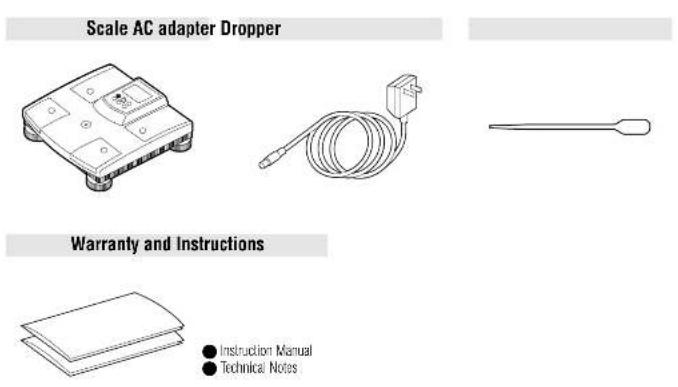
Scale Components - Top View

6
Display and Keypad
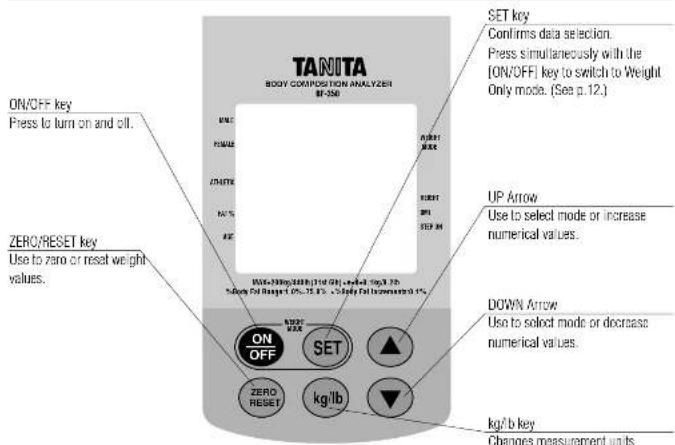
Rear of Unit

7
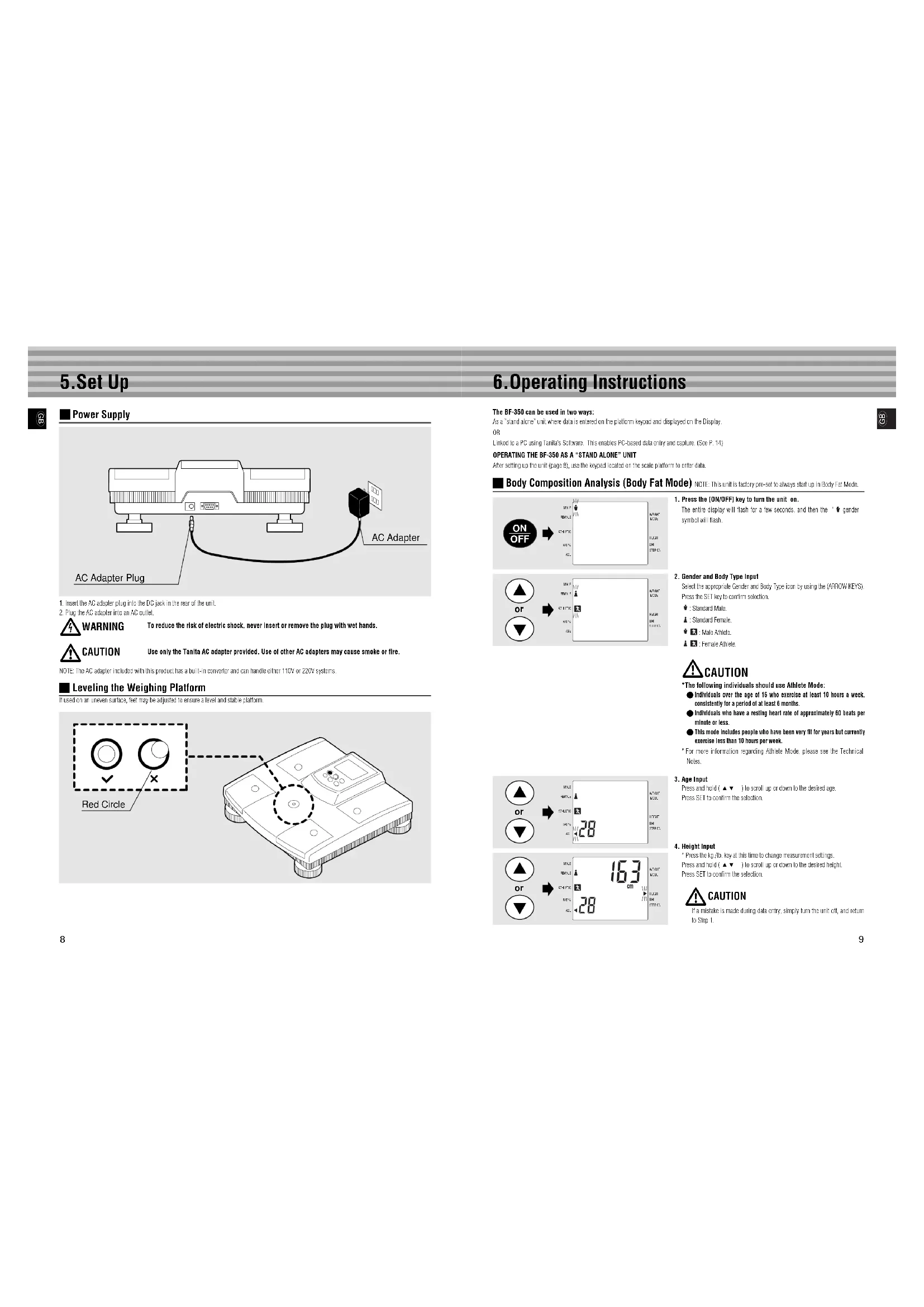
5.Set Up

Power Supply

-
Insert the AC adaptor plug into the DC jack in the ear at the unit.
-
Plug the AC adapter into an AC outlet.


To reduce the risk of electric shock, never insert or remove the plug with wet hands.
NOTE: The AC adaptor included with this product has a built-in converter and can handle oilers 110V or 220V systems.
Leveling the Weighing Platform
It used on an uneven surface, feet may be adjusted to ensure a level and stable platform.
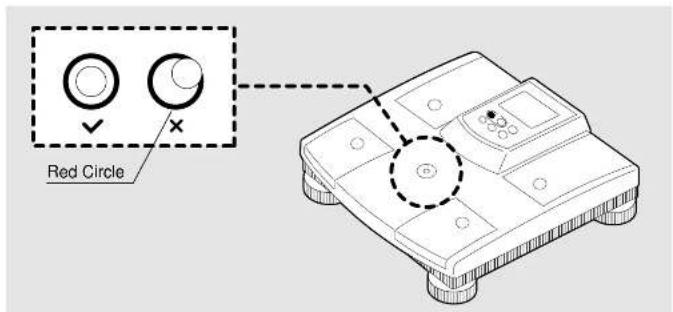
6.Operating Instructions
The BF-350 can be used in two ways:
As a stand alone unit where data is entered on the platform keypad and displayed on the Display
DF
Linked In a PC us no Tanila's Sullare. This prahns PC-based data sry and saphm. (Soc P. 14)
OPERATING THE BF-350 AS A "STAND ALONE" UNIT
After setting up the unit (page 8), use the keyspdd located on the scale pattern to enter data.
Body composition analysis (body fat model) NOTE: This is a ictic lctory ple selo wavy sall up in body fat model.
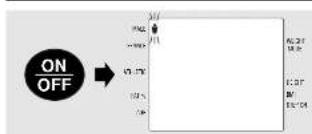
- Press the [ON/OFF] key to turn the unit on.
The entire display will flash for a few seconds, and then the " gencer symbol will flash.
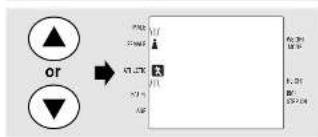
- Gender and Body Type Input
Select the appropriate Gender and Body type loci by using the (HNOwKeyS)
Press the SET key to confirm selection.
Standard May:
- Shrood Famie
1
A
Female Arie.

*The following individuals should use Athlete Mode:
Individuals over the age of 16 who exercise at least 10 hours a week.
consisently for a period of at least 6 months.
Individuals who have a resting heart rate of approximately 60 beats per
minute or less
This mode includes people who have been very fit for years but currently
exercise less than 10 hours per week.
For more information regarding Athlete Mode, please see the Technical Notes.
- Age Input
Press and hold (▲▼), to scroll up an arrow to the desired age. Press SET to confirm the selection.
-
Height Input
-
Press the key at this time to change measurement settings
Press and hold (A) to scroll up or down to the desired height.
Press SET to confirm the selection.

If a mistake is made during this entry, simply turn the unit cell, and return to Step 1.

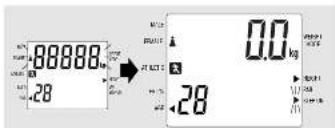
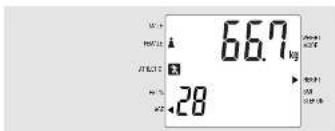

- When the cursor next to "STEP ON" flashes, step onto the weighing platform.
Stand with both feet on the surface of the electrodes. Make sure your heel is positioned across the anterior electrodes and posterior electrodes. I face forward, stand still and do not bend your knees.
Once stabilized, body weight will appear on the top portion of the Display.
- Measuring Body Fat
Theur appear on the bottom portion of the Display indicat% bocty tax to be measured. These marks will disappear one by one as a successful measurement is taken. This should only last approximately 13 seconds.

Do not stop off the weight plan before all disperse and the unit ends a short break. Doing so will cause an interruption, and all will be stopped. (Measurement may be continued if test subject steps back on immediately.)

Stance as still as possible on the weighing platform. If the measurement values remain unstable beyond a certain length of time, error message = 18^ will be displayed, and the unit will automatically turn off. If this occurs, turn the unit back on, and return to Step 2.

- A disasperse completely, make sure the fuel are properly placed on each electronic, and that the subject is either bare fuel or the proper amount of same conductor is used.

- Results
The unit will emit a short beep at which one the subject may stop actually off the weighing platform. Weight will appear on the top portion of the Display, while % body to speakers on his lower tail. These results will remain in the display for approximately 30 seconds.

6.Continuing Measurement
The scale automatically reesits itself after approximately 30 seconds. Press any key (other than OK/AFY) to reset the scale before 30 seconds. To start a new subject, return in Step 2.


WEIGHT ONLY MODE
It is possible to deactivate the % body let function of the BF-350, and use the unit only as a weight scale

- Press [OW/Off] and [SET] simultaneously to activate Weight
Only"Mode.
The entire display will flash for a few seconds and then display 0.0'. A cursor will appear on the display read to "Weight Mode". When a cursor begins to flash next to "Step 0", the subject may step on the weight dial in. -4 minus sign may appear when the [ON/OFF] and [SET] keys are released If this happens, press [ZERO/RESIST] in display 0.0' again. Press the key, say at this time to change measure or settings.

- Taking Weight Measurement
Weight will be displayed in the upper portion of the disability. After weight stabilizes, the subject can carefully step off the weighing platform.

3.Continuing Measurement
Wall until the display returns to "C0" and the "Stop ON" cursor begins to flash. Carefully step on to the weighing platform.


Scale will automatically return to "color" at Model when unit is "urned all."
■ BMIMODE
This mace aternatally calcaes Body Mass Index (BMI) and measures weight. For an expaion of BMI, prese reor to the Technical Notes.

- Press [ON/OFF] and [SET] simultaneously.
The entire display will flash for a few seconds, and then display "0." cursor will appear on the Display menu to "Wright Motors" and the "Step On" cursor will flash.
A. A min sign may appear when the [ON/OFF] and [SET] keys are released If this happens, press [75710/RSF1] in Display 0.0' again.
FRES 10.15.12 at the time of change in measurement sources

2.To activate BMI Mode, press the SET key once more.
A default height setting will appear in either f0n. or cm. Press the kgf. key at this time to change measurement settings.
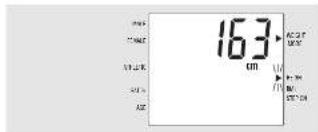
- Height Input1
Press and hold arrow keys to scroll to the eastward height. Press SET to confirm smiling.

This display will then show "0". One cursor will flash on the Display port to BMT, and another will flash next to "Stop Gnt."
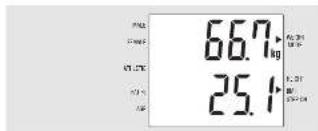
- Measuring BMI
When the cursor need to Step ON faxes, carefully step on to the warning pattern.
*Weight will appear on the upper portion of the Display BMI appears on this portion.
Results will disappear when the subject steps off the scale.

- Continuing BMI Measurement
mss the SFT key twice
Jun 3, "Heal rul
To return to "Weight Only" Mode: Press the SLI key once.
'To return to "Bery Fat" Made Turn the unit all and back on using the
7.Troubleshooting

Listed below are some common problems and simple solutions.
| Problem | Solution |
| Unit does not switch on when the [ON/OFF] key is pressed. | •Check that the AC adapter is properly connected to the unit.•Make sure the AC adapter is unplugged into a wall outlet.•Make sure you are using a Tanita AC adapter. |
| "E-01" is shown. | • "L C" is displayed when inexperience is abnormal compared with height and weight.• Make sure measurements were taken in bare feet and that the feet were in contact with the electrodes.• If the subject is wearing thin uniforms or has thick sleeves, please use cotton (0170) of saline solution or water in the center of each electrode. Thick ryalons or socks will produce an "L-C" reading and so should be removed.• Check the personal data for accuracy. |
| "E-11/12/13/14" are shown. | •These appear when an internal malfunction has occurred. Call your nearest Tanita office or customer. |
| "E-16" is shown. | •Do not step off the platform until all the upper and the unit emits a short beep. |
| "......" is shown. • The maximum weight capacity has been exceeded. | |
| "E-17" is shown. | • Do not step onto the platform while entering personal data. Stand on the platform only after the flashing arrow appears near "Step On". |
8. Optional Software -
Tanita Corporation has software available that greatly enhances the functionality and capability of this unit. In addition to operating the 3F-350 from a remote computer keyboard, Tanita's software acts as a client database, record generator, and a turn-key weight management solution. Please contact your nearest Tanita doctor for more information.
If your facility wishes to incorporate the BF-350 into an existing interactive software program, please contact your nearest Tanita branch office for RS-232 communication protocol and transmission specification.
TANITA
KÖRPERFETTANALYSEGERÄT BF-350
BEDIENUNGSANLEITUNG

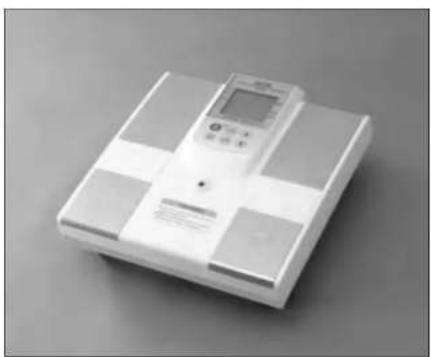

This devices features radio interference suppression in compliance with valid EC Regulation 89.326/EEC.

FEDERAL COMMUNICATIONS COMMISSION NOTICE
The equipment has been tested and found to comply with the limits for a Class B digital device, pursuant to Part 15 of the FCC Rules. These limits are designed to provide reasonable protection against harmful interference in a residential installation. The equipment's generation, uses and cost are not subject to any other regulation or requirement that may be required by the Federal Aviation Administration (FAA) or other regulatory agencies regarding communications. However, there is no guarantee that interference will not occur in a particular installation. If this equipment does cause harmful interference to the safety of persons or property, it shall be determined by turning the equipment on and off. The user is discouraged to try to correct the interference by one or more of the following measures:
- Recurrent or recalcic the receiving antenna.
- Increase the difference between the antenna
Gerees the apoument into an oulet on a ciuit different from that in which the reaiver is coonstn
Cansult the daler or an exer enood radio ar oiovion tectiion lor nela.
Modifications
The FCS requires the user to be notified that any changes or modifications made to this device that are not expressly approved by Tanita Corporation may void the user's authority to operate the equipment.
TANITA
TANITA Corporation
1-11
T
T
TANITA Corporation of America, Inc.
265 South Chester Bank (city) 100th Ave. N. 13, St
0123456789
Tel.347-610-8211
134 847-540.9261
100
TANITA Health Equipment H.K.LTD.
LIn 101 101 101 101 101 101
Ko Koo
102 252 711
103 482 388 867
TANITA Europe GmbH
Deutdner Strae 7
D-708S SinoHg
00719
TANITA UK LTD.
The Ram Philes Close
Yuewei, Wei Duan, Miao, Li Jinyi
United Kingdom
Tel: +44 8193-498577
Fax:44-505-432511
TAMITA France S.A.
Witn Lusie
61Bouls and Rounion 9207Kout-Ser-Sour
Frantz Tel.01524909
Fax:0102423686

TANITA Corporation of America, Inc.
265 South Chester Bank (city) 100th Ave. NE 1-5
01:32:40 32:40
74.37-610-8211
4.4.4.1.6
TANITA Corporation
1-1
102.5991
Trn1386-273/35366-048 00(03)867-5785
TANITA Corporation of America, Inc.
265 South Chester Bank (city) 100th Ave. NE 1-5
01:32:40 32:40
Tel:347-610-8211
34847-040.9261
100
TANITA Health Equipment H.X.LTD.
Linc 101 JBI 35 Wn On Plan 61 MwN Roan, Combonyk had
Kooyuan Hong Kong
052259711
fxx-852388-8667
TANITA Europe GmbH
Desmester Strasse 2, B. DILLIN GORET
D705
0701-6191
TANITA UK LTD.
The Ram Philedes Class,
Wampas, New England
H
United Kingdom
Tel: +44 8186 498377
Fax:44-505-432511
TAMITA France S.A.
'ivb Loe:lt
6:00 PM 8:00 PM 9:00 PM 10:00 PM 11:00 PM 12:00 PM
France Tel:0155249999
Fx:01242861
TANITA
ANALYSEUR DE LA COMPOSITION DU CORPS
BF-350
MODE D'EMPLOI

TANITA Corporation of America, Inc.
2025 South Caribbean Award (Oceans, 100km) (1.5)
10.23.450.376.33
Tel.347-610-2211
F:847-640-9261
H
TANITA Health Equipment H.X.LTD.
Linc 101 JBI ABW On Plane
Bj Mwri Roan, Combmya bad
Koyon Han Keng
[+:0258711
f452-2838-8667
TAMTA Europe GmbH
Desotrter Strasse 20, D. GENESE, Germany
1
11.0791-8925
Fax:0703-6189-71
TANITA UK LTD.
The Ram Ekhides Close,
Wampas, Wampas Road.
1
W
14-44826-3877
TAMITA France S.A.
yibinmei
63. Boulard and Bourdor, 92120 Keuleu+Su-Ser France
Tel:01552490908Fax:01552490907

Pessie his dme a mne nane dae eaepeaed 1000 1000

TANITA Corporation of America, Inc.
2025 South End Market
Aeropan Hospits, 110s 2
T
17.847609261
http://www.taobao.com
TANITA Health Equipment H.K.LTD.
Ln301-3013HwngOnPlaza
Mody Rau, Lamshtsu East,
903500Kg 10.80025000
00:2584667
Germany Tel:021-5894
100705619271
TAMITA UK LTD
The Ram Phileos Close.
Yessies, Wes. Deylon.
Naeess, CEB7H,
10
105-438511
TANITA FRANCE S.A.
2018年1月26日
61 Bollard Rosthar,
92205 Keuly-Sur-Senre
Hace Tel:0155240999
F:192486
Lds dae FS-2320 s uinianr nck mnnn

6.Medicones consecutivas

- Contents
- Important Notes for Users
- Caution Symbols
- Maintenance
- General Instru Measurement
- Parts List and Scale Components
- 5.Set Up
- 6.Operating Instructions
- WEIGHT ONLY MODE
- ■ BMIMODE
- 7.Troubleshooting
- Optional Software -
- TANITA
- KÖRPERFETTANALYSEGERÄT BF-350
- FEDERAL COMMUNICATIONS COMMISSION NOTICE
- TANITA Corporation
- TANITA Corporation of America, Inc.
- TANITA Health Equipment H.K.LTD.
- TANITA Europe GmbH
- TANITA UK LTD.
- TAMITA France S.A.
- ANALYSEUR DE LA COMPOSITION DU CORPS
- BF-350
- MODE D'EMPLOI
Brand : TANITA
Model : BF350
Category : Scale