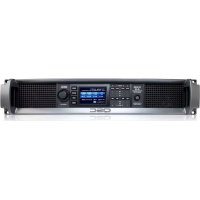
CXD4.2 - Receiver QSC - Free user manual and instructions
Find the device manual for free CXD4.2 QSC in PDF.


User questions about CXD4.2 QSC
0 question about this device. Answer the ones you know or ask your own.
Ask a new question about this device
Download the instructions for your Receiver in PDF format for free! Find your manual CXD4.2 - QSC and take your electronic device back in hand. On this page are published all the documents necessary for the use of your device. CXD4.2 by QSC.
USER MANUAL CXD4.2 QSC
CXD4.2 - 4 Channel, 1600 W Amplifier
CXD4.3 - 4 Channel, 2500 W Amplifier
CXD4.5 - 4 Channel, 5000 W Amplifier
EXPLANATION OF SYMBOLS
The term "WARNING!" indicates instructions regarding personal safety. If the instructions are not followed the result may be bodily injury or death.
The term "CAUTION!" indicates instructions regarding possible damage to physical equipment. If these instructions are not followed, it may result in damage to the equipment that may not be covered under the warranty.
The term "IMPORTANT!" indicates instructions or information that are vital to the successful completion of the procedure.
The term "NOTE" is used to indicate additional useful information.

The intent of the lightning flash with arrowhead symbol in a triangle is to alert the user to the presence of un-insulated "dangerous" voltage within the product's enclosure that may be of sufficient magnitude to constitute a risk of electric shock to humans.

The intent of the exclamation point within an equilateral triangle is to alert the user to the presence of important safety, and operating and maintenance instructions in this manual.

IMPORTANT SAFETY INSTRUCTIONS


WARNING! TO PREVENT FIRE OR ELECTRIC SHOCK,DO NOT EXPOSE THIS EQUIPMENT TO RAIN OR MOISTURE.
- Keep these instructions.
Heed all warnings.
Follow all instructions. - Do not use this apparatus near water.
Clean only with a dry cloth. - Do not block any ventilation opening. Install in accordance with the manufacturer's instructions.
- Do not install near any heat sources such as radiators, heat registers, stoves, or other apparatus (including amplifiers) that produce heat.
- Do not defeat the safety purpose of the polarized or grounding-type plug. A polarized plug has two blades with one wider than the other. A grounding type plug has two blades and a third grounding prong. The wide blade or the third prong are provided for your safety. If the provided plug does not fit into your outlet, consult an electrician for replacement of the obsolete outlet.
- Protect the power cord from being walked on or pinched particularly at plugs, convenience receptacles, and the point where they exit from the apparatus.
Only use attachments/accessories specified by the manufacturer.
Unplug this apparatus during lightning storms or when unused for long periods of time.
Refer all servicing to qualified service personnel. Servicing is required when the apparatus has been damaged in any way, such as power-supply cord or plug is damaged, liquid has been spilled or objects have fallen into the apparatus, the apparatus has been exposed to rain or moisture, does not operate normally, or has been dropped. - The appliance coupler, or the AC Mains plug, is the AC mains disconnect device and shall remain readily operable after installation.
- Adhere to all applicable, local codes.
- Consult a licensed, professional engineer when any doubt or questions arise regarding a physical equipment installation.
FCC Statement

NOTE: This equipment has been tested and found to comply with the limits for a Class A digital device, pursuant to Part 15 of the FCC Rules. These limits are designed to provide reasonable protection against harmful interference when the equipment is operated in a commercial environment. This equipment generates, uses, and can radiate radio frequency energy and, if not installed and used in accordance with the instruction manual, may cause harmful interference to radio communications. Operation of this equipment in a residential area is likely to cause harmful interference in which case the user will be required to correct the interference at his own expense.
RoHS STATEMENT
The QSC CXD4.2, CXD4.3 and CXD4.5 amplifiers are in compliance with European Directive 2002/95/EC - Restriction of Hazardous Substances (RoHS).
The QSC CXD4.2, CXD4.3 and CXD4.5 amplifiers are in compliance with "China RoHS" directives. The following chart is provided for product use in China and its territories:
| QSC CXD4.2, CXD4.3, and CXD4.5 Amplifiers | ||||||
| 部件名称(Part Name) | 有毒有害物质或元素(Toxic or hazardous Substances and Elements) | |||||
| 铅(Pb) | 汞(Hg) | 镉(Cd) | 六价铬(Cr(vi)) | 多溴联苯(PBB) | 多溴二苯醚(PBDE) | |
| 电路板组件(PCB Assemblies) | XO O O | O O | ||||
| 机壳装配件(Chassis Assemblies) | XO O O | O O | ||||
| O:表明这些有毒或有害物质在部件使用的同类材料中的含量是在 SJ/T11363_2006 极限的要求之下。(O:Indicates that this toxic or hazardous substance contained in all of the homogeneous materials for this part is below the limit requirement in SJ/T11363_2006.)X:表明这些有毒或有害物质在部件使用的同类材料中至少有一种含量是在 SJ/T11363_2006 极限的要求之上。(X:Indicates that this toxic or hazardous substance contained in at least one of the homogeneous materials used for this part is above the limit requirement in SJ/T11363_2006.) | ||||||
Warranty (USA only; other countries, see your dealer or distributor)
QSC Audio Products 3 Year Limited Warranty
QSC Audio Products, LLC ("QSC") guarantees its products to be free from defective material and/or workmanship and will replace defective parts and repair malfunctioning products under this warranty when the defect occurs under normal installation and use, provided the unit is returned to our factory, one of our authorized service stations or an authorized QSC International Distributor via pre-paid transportation with a copy of proof of purchase (i.e., sales receipt). This warranty provides that the examination of the return product must indicate, in our judgment, a manufacturing defect. This warranty does not extend to any product which has been subjected to misuse, neglect, accident, improper installation, or where the date code has been removed or defaced. QSC shall not be liable for incidental and/or consequential damages. This warranty gives you specific legal rights. This limited warranty is freely transferable during the term of the warranty period. The warranty on QSC products is NOT VALID if the products have been purchased from an unauthorized dealer/online e-tailer, or if the original factory serial number has been removed, defaced, or replaced in any way. Damage to, or loss of any software or data residing on the product is not covered. When providing repair or replacement service, QSC will use reasonable efforts to reinstall the product's original software configuration and subsequent update releases, but will not provide any recovery or transfer of software or data contained on the serviced unit not originally included in the product.
Customers may have additional rights, which vary from state to state or from country to country. In the event that a provision of this limited warranty is void, prohibited or superseded by local laws, the remaining provisions shall remain in effect.
The QSC limited warranty is valid for a period of three (3) years from date of purchase in the United States and many (but not all) other countries.
For QSC warranty information in countries other than the United States, contact your authorized QSC international distributor. A list of QSC International distributors is available at www.qsc.com.
To register your QSC product online, go to www.qsc.com and select "Product Registration". Other questions regarding this warranty can be answered by calling, e-mailing or contacting your authorized QSC distributor.
Phone: 1-800-854-4079 within US and Canada, +1-714-754-6175 international, Email: warranty@qscaudio.com, Website: www.qsc.com.
Introduction
Built for system integrators, the CXD series amplifiers provide multi-channel amplification with built-in DSP and enough power to drive wide varieties of speaker systems with optimal energy efficiency. The CXD Series consists of three light-weight, 2RU, four-channel amplifiers with on-board DSP and flexible channel combining as well as 70V and 100V direct drive. These amplifiers not only provide the power and processing to make your system perform better, they offer outstanding efficiency ensuring that energy costs are kept to a minimum over the life of the installation.
CXD amplifiers feature Flexible Amplifier Summing Technology (FAST). Depending on the model, 1600, 2500, or 5000 Watts of total power can be distributed across one to four outputs. In addition, the CXD4.3 and CXD4.5, can drive 70V or 100V speaker lines directly from any one or all of the four outputs. This flexibility allows CXD Series amplifiers to drive (for example) two full-range, surface-mounted loudspeakers along with a subwoofer and one 100 V distributed loudspeaker line; or a high-power subwoofer and a bi-amplified full-range loudspeaker; three 70V distributed loudspeaker lines and a subwoofer; or a single very high-power channel to drive monster subwoofer.
The CXD Series amplifiers use QSC's third-generation class-D power amp design in combination with a custom power stage utilizing a new output device. In addition, CXD amplifiers employ the proven PowerLight power supply in conjunction with Power Factor Correction (PFC) which aligns the current waveform with the AC mains voltage waveform. PFC enables the CXD Series amplifiers to draw current from the wall in a more efficient and controlled manner resulting in very high power from a single standard AC breaker. Additionally, the CXD Series amplifiers offer multi-stage sleep modes saving energy when possible without sacrificing performance. The result is an exceptionally powerful and flexible platform that offers low weight and efficiency.
With four channels of amplification plus signal processing in just 2RUs, the CXD series replaces equipment taking up as much as three times the rack-space.
A single CXD Series amplifier is a capable and sophisticated loudspeaker processor. Integration of processing and amplification means that the DSP knows exactly what the amplifier is doing so dynamics processing can be far more accurate and effective. This approach employs both RMS and Peak Limiters that allow the amplifier and loudspeaker to produce more output without being pushed to distortion or destruction.
The on-board DSP offers four channels of cross-over filters, parametric EQ/Low-shelf/High-shelf, alignment delay and dynamics processing - everything needed to optimize a loudspeaker system. Additionally when using QSC loudspeakers, CXD amplifiers provide Intrinsic Correction™, a combination of filtering, limiting and loudspeaker knowhow that was first developed for QSC's WideLine line-array loudspeakers. Intrinsic Correction compensates for the non-linearity in array and horn design resulting in exceptional performance.
The CXD also includes manufacturers' recommended tunings for the most popular passive loudspeakers. A system setup wizard helps you select the right preset, or select one of the 20 configuration templates and create tunings that you can save in the user preset library.
With a dedicated front panel user interface, complete with LED meters and indicators, a 400 × 240 TFT color display, a rotary encoder and navigation buttons, the CXD amplifiers provide an intuitive means to control the system.
Unpacking
There are no special unpacking instructions. You may want to keep the shipping material for the unlikely event that the amplifier should need returning for service.
Package Contents
- Quick-Start Guide TD-000350-00
- Warning Information Sheet TD-000420-00
- CXD Amplifier
- IEC AC Power Cord
-
Euro-style Connector Plug, 3-pin (4)
-
Euro-style Connector Plug, 8-pin (1)
- Euro-style Connector Plug, 3.5 mm, 2-pin (1)
- Euro-style Connector Plug, 3.5 mm, 3-pin (1)
- USB Cable (1)
Features
Amplifier Front Panel
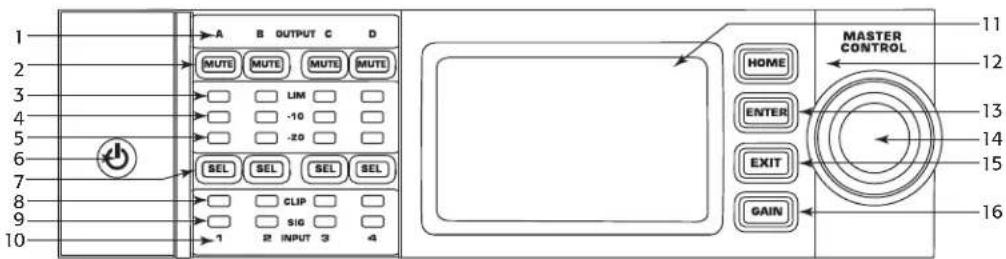
Figure 1
- Output channels are labeled A, B, C, and D
- Input Channel Signal-Present LEDs (Blue)
- Output Channel Mute Buttons and LEDs (Red)
- Input channels are labeled 1, 2, 3, and 4
- Output Channel Limiter LEDs (Red)
- LCD Graphic Display
- Output Channel -10 dB Below Limiter Activation LEDs (Blue)
12.HOMEButton - Output Channel -20 dB Below Clip LEDs (Blue)
- ENTER Button
- Soft Power Button (Blue/Red)
- MASTER CONTROL Knob
- Channel Select Buttons and LEDs (Amber for Input, Blue for Output)
- EXIT Button
- Input Channel Clip LEDs (Red)
- GAIN Button
Amplifier Rear Panel

NOTE: The CXD4.3, and CXD4.5 models have a different rear panel configuration than the CXD4.2 rear panel. The difference is that the position of the fan and the eight-pin Euro-style connector and associated information are interchanged.
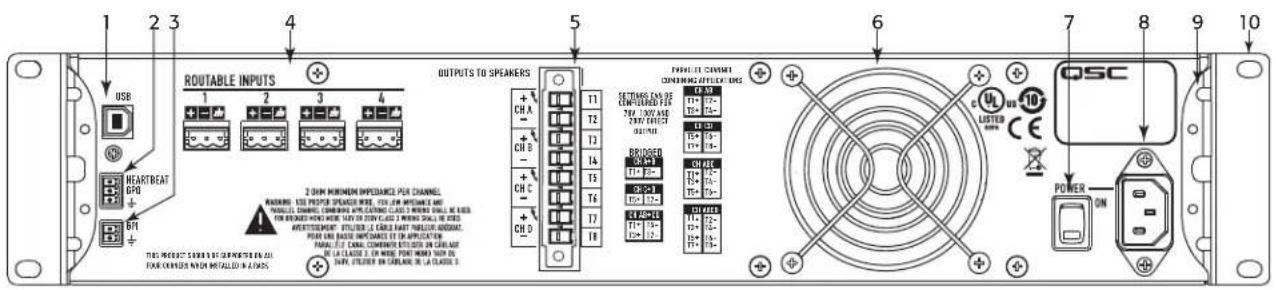
Figure 2
- USB Type B, four-pin
- Cooling fan
- GPO/Heartbeat (output) Euro-style Connector, 3-pin
- AC Power Switch
- GPI (input) Euro-style Connector, 2-pin
- Locking IEC Power Connection
- Four three-pin Euro-style Connectors
- Rear Rack-mount Bracket (CXD4.3 and CXD4.5)
- One eight-pin Euro-style Loudspeaker Connector
- Front Rack-mount Brackets
Amplifier Control
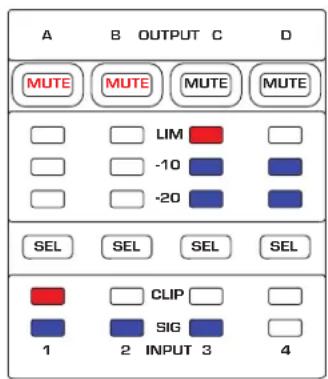
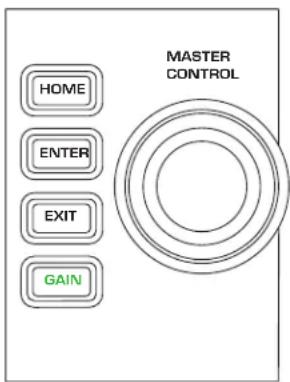
Figure 3
Off Mode


- Rear power switch is off, the amplifier is not operable. The power switch is the AC Mains disconnect.
The power button is not illuminated. - Turn the power switch to on. The amplifier enters the mode it was in when power was removed. The power button is illuminated based on the mode.
If GPI is enabled, the Off Mode button is disabled.
Run Mode

- From Standby or Mute All modes, press and release the power button on the front panel.
The power button is illuminated blue.
The amplifier is fully operable; audio can pass.
If GPI is enabled, the Run Mode button is disabled.
Standby Mode

From Mute All or Run modes, press and hold the power button on the front panel for two to three seconds.
The power button illuminates solid red.
The front panel LCD is off.
The amplifier is not operable; audio will not pass.
If GPI is enabled, the Standby Mode button is disabled.
Mute All Mode

From the Run Mode, quickly press and release the power button.
The power button flashes red.
The outputs are muted and amplifiers are off.
- The front panel and DSP functionality are fully operable. Any changes you make are saved and take effect in the Run Mode.
If GPI is enabled, the Mute All Mode button is disabled.
Master Control Knob

- Scrolls up/down and right/left to select menu items and parameters
- Adjusts parameters
ENTER Button

Navigates into the menu structure
- Enters the edit mode for adjusting parameters
- Confirms the changes you make, and exits the edit mode.
EXIT Button

Navigates out of the menu structure and parameter selection.
- In the edit mode, pressing EXIT reverts the value back to its prior state, and exits the edit mode.
HOME Button

- If you are on the Home screen, pressing HOME displays the alternate Home screen. Pressing HOME again returns you to the primary Home screen.
If you are on a navigation screen, pressing HOME takes you to the home screen.
If you are on an edit screen, pressing HOME will confirm any value being edited and take you to the Home screen.
GAIN Button
- Pressing the GAIN button from any screen takes you to the output gain screen for the most recently accessed output channel.
- Pressing GAIN again confirms the gain change and returns to the screen you were on when you pressed GAIN.
The Gain button illuminates green when selected.
SEL Buttons

- Use these buttons to navigate between input channels or output channels. For example, if you are adjusting output gain on channel A, pressing the channel B SEL button takes you to the gain adjustment for channel B.
- The SEL buttons are active only when the LCD screen is on an input or output parameter adjustment screen.
- The SEL buttons illuminate blue for output channels, and amber for input channels.
LIM LEDs

- Illuminates red when the Limiter is engaged.
-10 and -20 LEDs

- Indicates the output level of the channel.
CLIP LEDs

- Illuminates red when the input signal is being clipped.
SIG LEDs

- Illuminates blue when a signal is present.
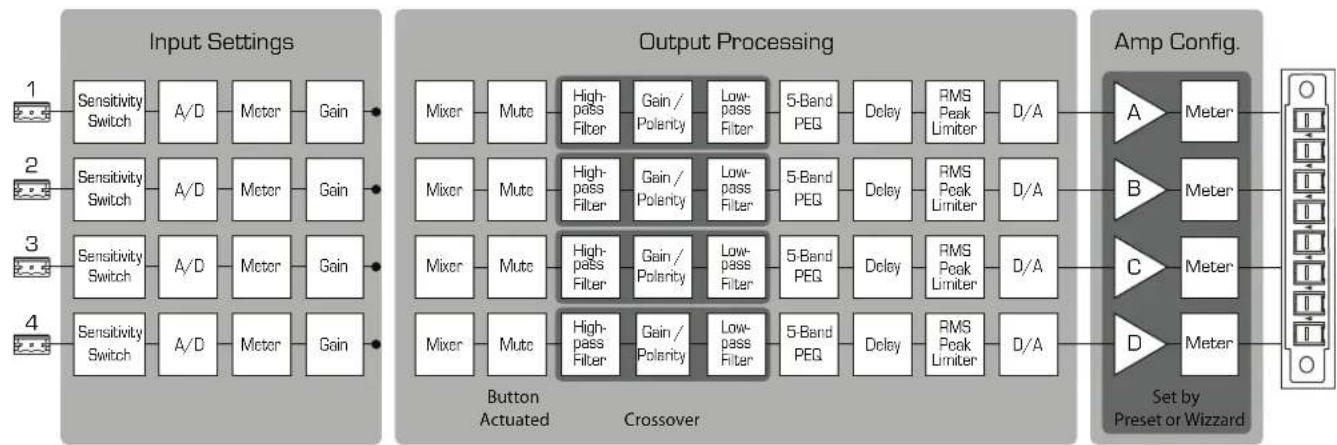
CXD Amplifier Signal Flow
Figure 4
EN
Screen Types
Informational
Informational screens, like the HOME screen, are designed to provide you with a good amount of useful information at a glance.
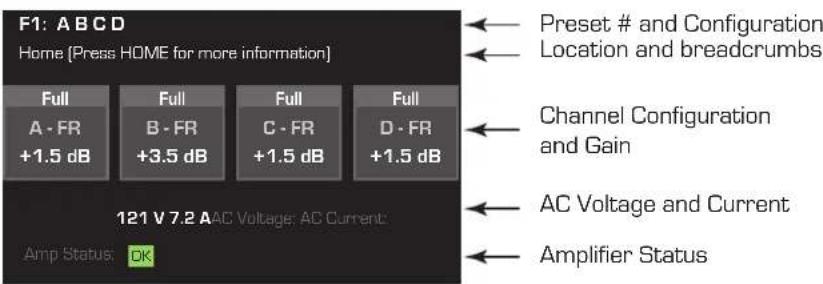
Figure 5
Navigational
Navigational screens provide the means to move around and select menu items. Use the Master Control knob, ENTER and EXIT buttons for navigation. This is an example of one type of navigational screen, there are others.
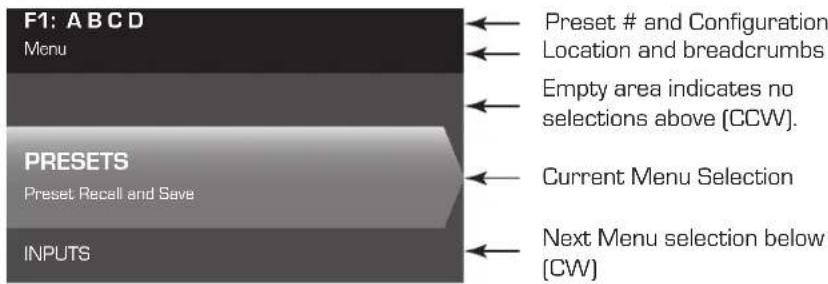
Figure 6
Parameter Editing
Parameter editing screens allow you to select, edit, and confirm changes for various system parameters. Use the ENTER button to edit and confirm changes to parameters. Use the Master Control knob to select parameter, and make adjustments. Use the EXIT button to exit the edit mode without saving changes.
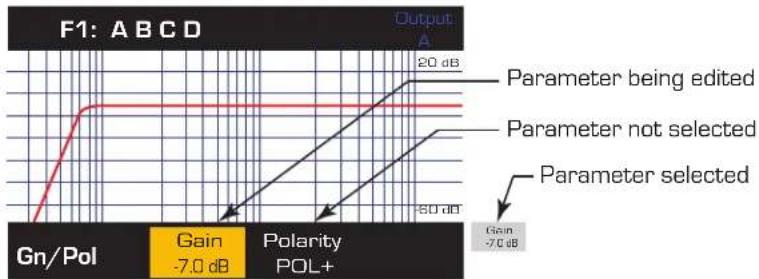
Figure 7
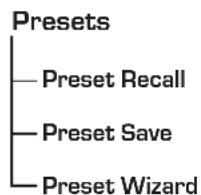
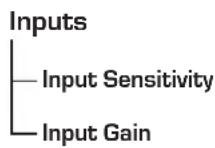
Menu Tree
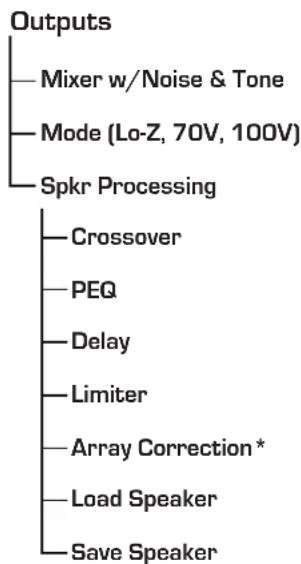
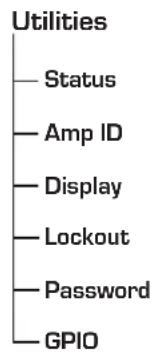
*For QSC Line Arrays only
About Presets
The CXD amplifiers are preset driven. In order to get the most out of the amplifiers, an understanding of how presets work is essential. A Preset, in the context of the CXD amplifiers, is a combination of amplifier configuration (inputs and outputs), DSP and loudspeaker assignments. When a preset is recalled it can change the output routing and wiring and/or any of the DSP settings.
The CXD amplifiers come with 20 unchangeable factory presets, and 50 user-defined preset. The factory preset are designed to be starting points for creating the preset you need for your particular installation. Factory preset F1: thru F9: have no DSP or loudspeaker assignments, only output configurations. Factory preset F10: thru F20: include basic settings along with the output configurations.
Creating User-defined Presets
A preset can be created in two ways, the first is to modify an existing preset, then save this as a new preset. The second is to use the Preset Wizard to create a Preset from scratch.
Save As a New Preset
After selecting a starting preset, navigate through the Input and Output menus to select and modify the parameters needed for your system. After modifying the parameters for each channel, return to the Preset menu and save your work. If you started with a user-defined preset, you can update the preset you started with using the SAVE function or, you can use the SAVE AS function.
Preset Wizard
The Preset Wizard simplifies the preset creation process, and allows you to create a preset from the ground up. The Preset Wizard provides a mechanism for you to select the desired power and load. Based on these selections, the best amplifier configuration is selected and you are then allowed to select and assign loudspeakers to each output.

NOTE: By default, all 50 of the user-defined presets are configured the same as factory preset F1. Either method described above "overwrites" some existing preset. The main difference is the SAVE function overwrites only the preset number you started with, and the SAVE AS function allows you to save to a different user preset number and change the name.
Installation
The following steps are written in the recommended installation order.
Mount the CXD Amplifier
The CXD Series amplifiers are designed to be mounted in a standard rack-mount unit. The amplifiers are 2RU high, the CXD4.3 and CXD4.5 are 381mm (15 in) deep, the CXD4.2 is 229mm (9 in) deep.
Depending on the depth of your rack, the Rear Rack Ear Support kit (FG-000031-00) may be required for rack mounting. Refer to http://qsc.com/products/ under Accessories for details.
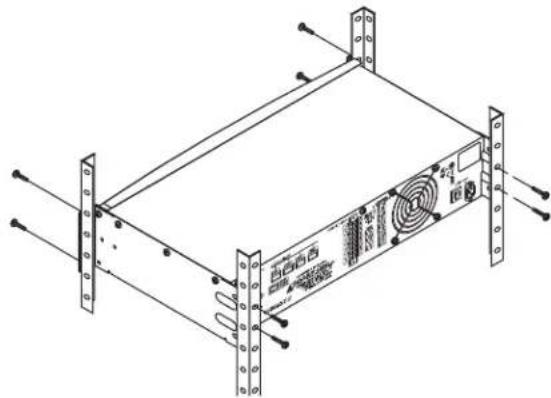
Figure 8

CAUTION: Be sure that nothing is blocking the front or rear ventilation openings, and that each side has a minimum of 2 cm clearance.
- Use the proper fastening hardware (not included) to secure the amplifier in the rack. The CXD4.3 and CXD4.5 have four front and four rear mounting tabs. The CXD4.2 has four front mounting tabs.
AC Mains

WARNING!: When the AC Power is on, there is a potential of having dangerous voltage at the output terminals on the rear of the amplifier. Use caution not to touch these contacts. Turn off the AC Mains disconnect switch prior to making any connections.
The CXD amplifiers have a Universal power supply 100 - 240 VAC, 50 - 60 Hz, with an IEC locking connector.
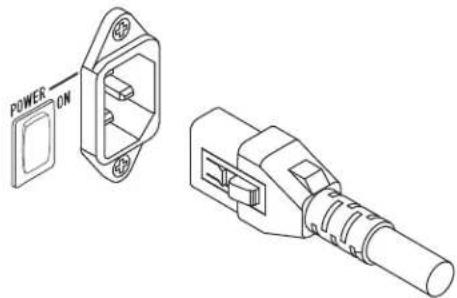
Figure 9
- Connect the IEC AC cable between the amplifier rear AC connector and the AC source.
AC Power

NOTE:
If the amplifier has no audio for fifteen minutes, the amplifier stops switching. The amplifier returns to the Run mode the instant audio is present."
When you remove power from the amplifier, then re-apply the power, the amplifier returns to its last state.
Inputs
Connect the Audio Inputs
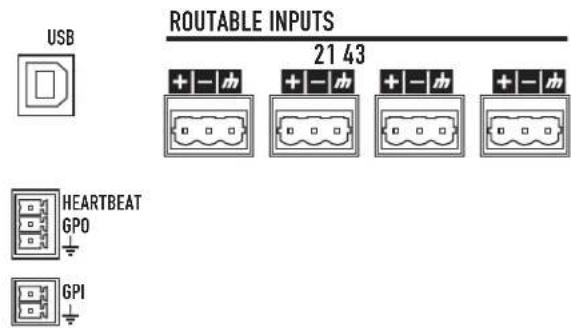
Figure 10 - Figure 11
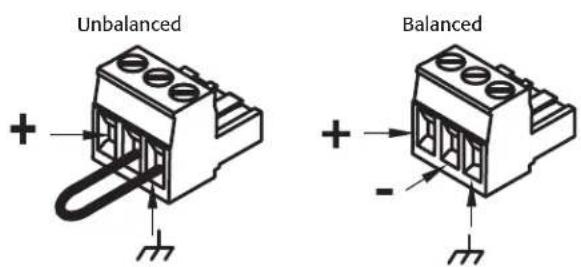
Figure 12
There are four three-pin Euro-style connectors labeled 1 through 4 providing the audio inputs on the CXD Amplifiers. A single input can be mixed to one or a combination of outputs. You can use from one to four of the inputs. The inputs are 10k balanced or unbalanced, with a sensitivity of either +4 or +14dBu .
- Make sure your audio source devices are powered off.
- Connect the input source wires to the Euro-style connectors as shown. (Figure 11 and Figure 12)
- The CXD Series has the capability of routing the inputs to different outputs. Be sure that the connections you make here match the configuration of the amplifier.
- Plug the Euro-style audio connectors into the appropriate inputs on the rear of the amplifier.
USB (Optional)
The USB cable (supplied) connects to a Mac or PC for use with the Amplifier Navigator software. You can update the amplifier firmware, save and deploy configuration files, and more. Refer to the Amplifier Navigator online help for details.
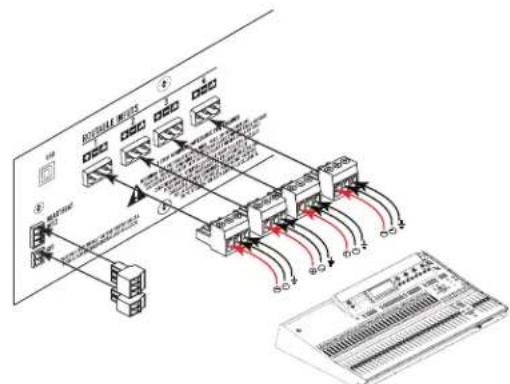
Figure 13
NPIO/Heartbeat
There are two 3.5mm Euro-style connectors on the rear of the amplifier.
Heartbeat - The heartbeat output supplies a square wave signal of 1 Hz @ 3.3 V. This signal can connect to a life-safety system to monitor the go/no-go condition of the amplifier. The amplifier must be completely incapable of producing output for the heartbeat signal to stop. A missing heartbeat alerts the life-safety system of the disabled condition. A user-initiated condition such as muting the outputs, placing the amplifier in Standby mode, or placing the amplifier in Mute All mode, does not stop the heartbeat.
GPO - The functionality of this general purpose output pin has not been determined as of the release of this document.
- GPI - This input is used to put the amplifier into Standby from a remote location. When the GPI is enabled in the Utilities menu, then is shorted to ground, the amplifier goes into the Standby mode. The front-panel power button is disabled when GPI is enabled.
Outputs
The CXD amplifiers have four configurable outputs. You can set the power, combine outputs (bridged and parallel), and adjust the DSP for each output. When the output configuration of the amplifier changes, the output terminals, controlled by relays, change accordingly. Use the diagrams shown in Figure 15 thru Figure 23 as a reference for wiring the loudspeakers.
Select the Output Configuration
The first step in configuring your amplifier is to select a Preset based on the loudspeakers being connected to the amplifier. You can use a factory preset, and then adjust the parameters as needed, then save the configuration as a user-defined preset. In addition, you can use the "Preset Wizard" on page 16 to create presets from the ground up. When the configuration is changed, all four channels are automatically muted.
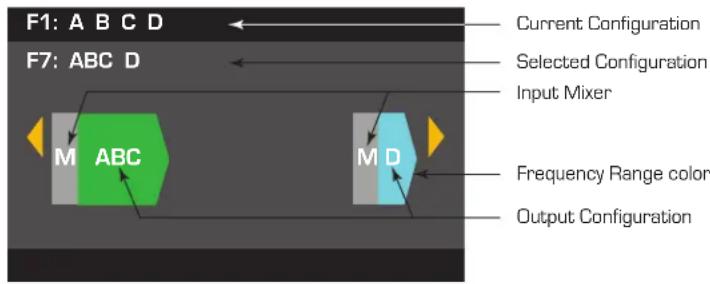
Figure 14

WARNING: When the AC Power is on, there is a potential of having dangerous voltage at the output terminals on the rear of the amplifier. Use caution not to touch these contacts. Turn off the AC Mains disconnect switch prior to making any connections.

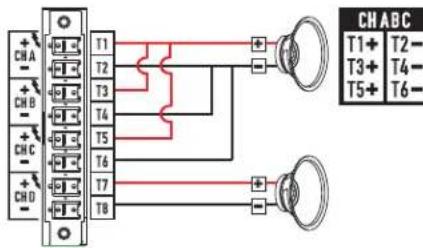
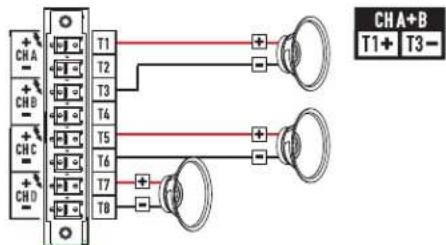
IMPORTANT: QSC recommends that you connect jumpers between the output terminals where the terminals are the same points electrically. When configuring your amplifier, there are going to be some loudspeaker connections that are noted as being "electrically the same point". In Figure 15, all four channels are in parallel with the "electrically the same" terminals jumpered as recommended. In addition, you can connect one loudspeaker to each of the four output channel terminals, and the four loudspeakers are in parallel; in this case you would not need to jumper the terminals. You can connect four loudspeakers to one channel's output terminals (i.e. T1 and T2), and the four loudspeakers are in parallel; in this case you would want to jumper the terminals. In all of the examples below, the "electrically the same" terminals are shown with jumpers installed.
- Turn the AC Mains power switch on the back of the amplifier to on. The amplifier starts in the Run mode.
- Press and release the front-panel power button. The button flashes red, the amplifier is in Mute All mode.
- Select the configuration appropriate for your loudspeakers, using either Preset Recall, or the Preset Wizard.
The following is a list of configurations for 1, 2, 3, and 4-channel outputs. This is not an exhaustive list, but is intended to give you an idea of what is available and how the outputs would be wired.
One-Channel Configurations
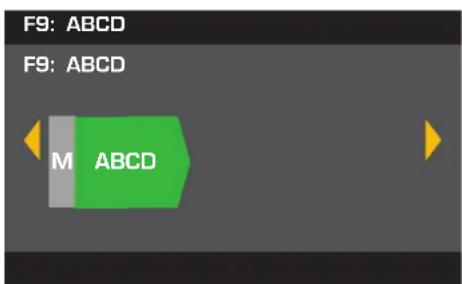
ABCD Parallel
The following are electrically the same point T1 + ,T3 + ,T5 + and T7+ T2,T4,T6,and T8-
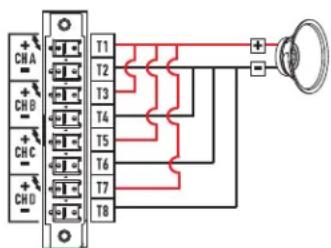
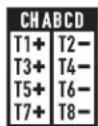
Figure 15
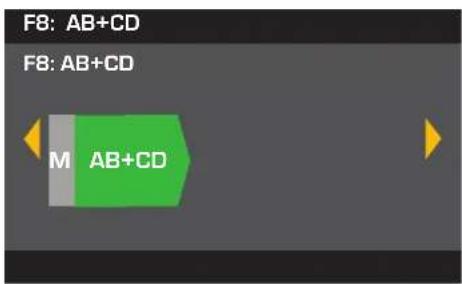
AB Parallel Bridged with CD Parallel
The following are electrically the same point T1+and T3+ TS-and T7
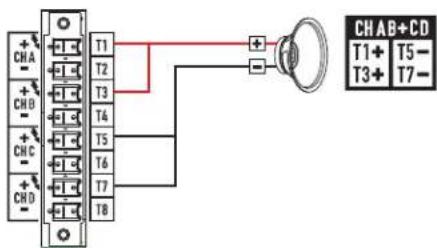
Figure 16
Two-Channel Configurations
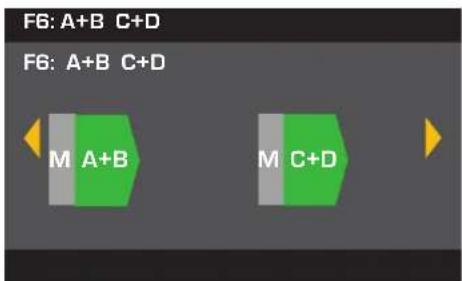
A+B Bridged C+D Bridged
Figure 17
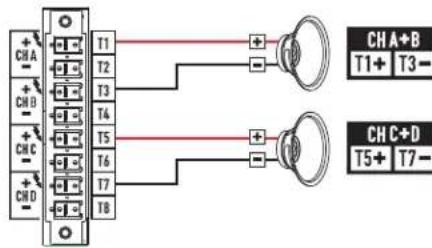
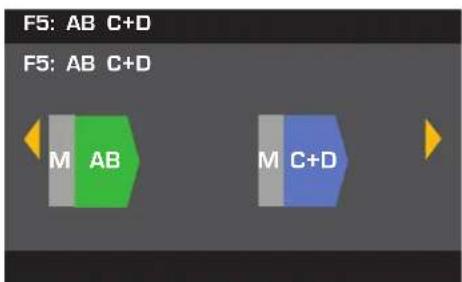
AB Parallel C+D Bridged
The following are electrically the same point T1+ and T3+ T2- and T4
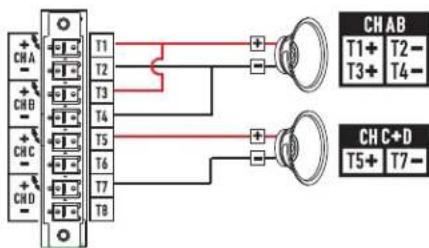
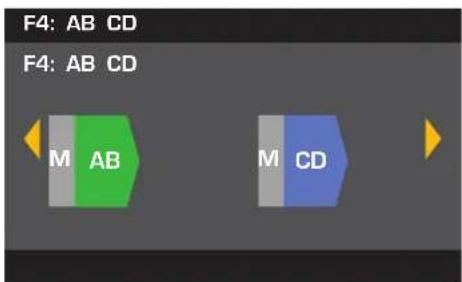
Figure 18
AB Parallel CD Parallel
The following are electrically
the same point
T1+and T3+
T5+and T7+
T2-and T4-
T6-and t8
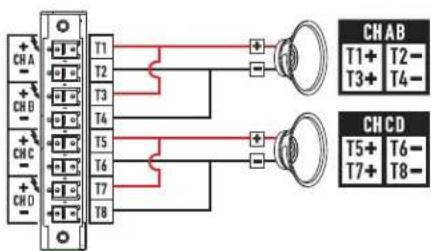
Figure 19
ABC Parallel D Single
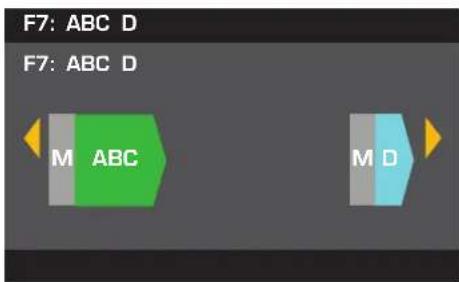
The following are electrically the same point T1+,T3+,and T5+ T2-,T4-,and T6-
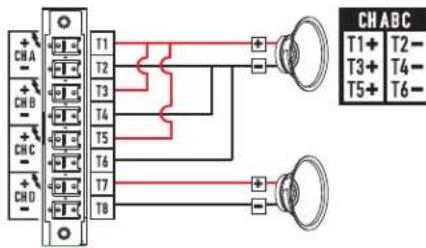
Figure 20
Three-Channel Configurations
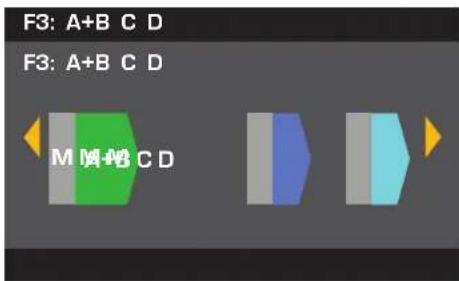
A+B Bridged C Single D Single
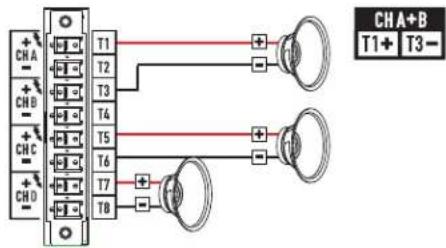
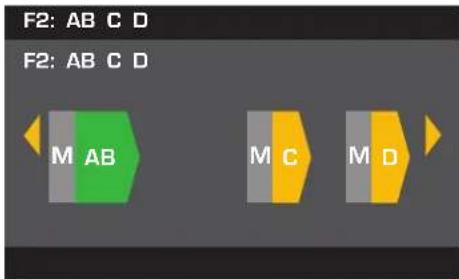
Figure 21
AB Parallel C Single D Single
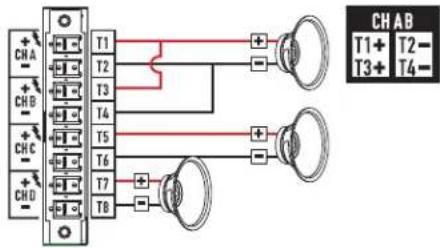
Figure 22
Four-Channel Configuration
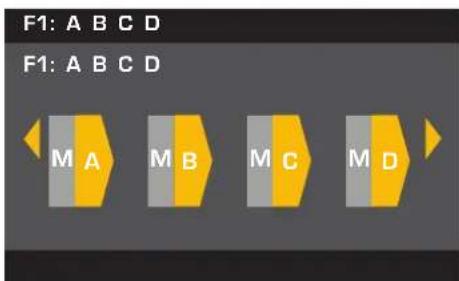
A Single B Single C Single D Single
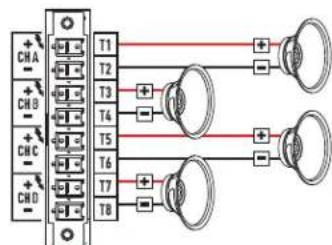
Figure 23
Connect the Loudspeakers

WARNING!: When the AC Power is on, there is a potential of having dangerous voltage at the output terminals on the rear of the amplifier. Use caution to not touch these contacts. Turn off the AC Mains disconnect switch prior to making any connections.
- Turn the AC Mains power switch, on the back of the amplifier, to OFF.
- Connect the loudspeaker wiring to the 8-pin Euro-style connector. Refer to Figure 15 thru Figure 23. When combining channels, QSC recommends that you connect jumpers between the electrically same output terminals. Refer to Figure 15 and the WARNING above the figure.
- Install the Euro-style connector onto the rear of the amplifier as shown in Figure 24.
- Use a Phillips screwdriver to secure the connector.
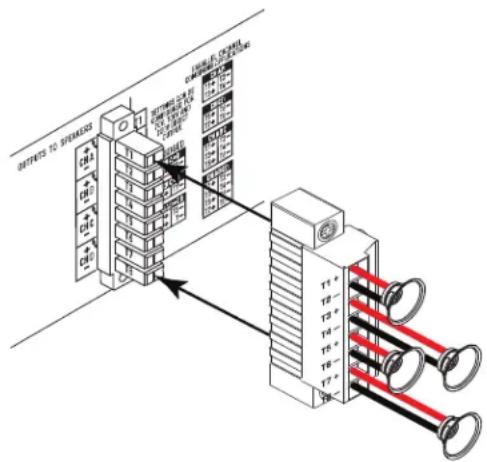
Figure 24
AC Power On
After connecting the outputs to the loudspeakers, you may turn the amplifier on.
- Make sure the output gain settings for all audio-source devices (CD Players, Mixers, Instruments, etc.) at the lowest output (max attenuation).
- Turn on all audio sources.
- Turn the AC Mains power switch on the back of the amplifier to ON. The amplifier starts in the state it was in when power was removed.
- You can now bring up the outputs of your audio sources.
Power Distribution Charts
The following charts show the maximum power output for each channel in each configuration, and under different loads.
-Table1-
| CXD 4.3 - Total Power: 2500W | ||||||||||||
| 625 | 8Ω Load 4Ω Load | 2Ω Load | ||||||||||
| Configuration | ABC | DABC | DABC D | |||||||||
| 4 CH (A B C D) 625 | 625 625 | 650 650 | 650 650 | 600 600 | 600 | |||||||
| 3 CH (AB CD) | 1000 | 625 | 625 | 1200 | 650 | 650 | 1200 | 600 | ||||
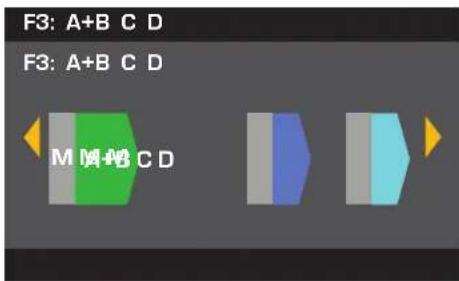
| 3 CH (A+B C D) | 1250 | 625 | 625 | 1150 | 650 | 650 | 625 | 600 | ||||
| 2 CH (AB CD) | 1000 | 1000 | 1200 | 1200 | 1200 | 1200 | ||||||
| 2 CH (AB C+D) | 1000 | 1250 | 1200 | 1150 | 1200 | 625 | ||||||
| 2 CH (A+B C+D) | 1250 | 1250 | 1150 | 1150 | 625 | 625 | ||||||
| 2 CH Alt (ABC D) | 1100 | 625 | 2000 | 650 | 2500 | 600 | ||||||
| 1 CH (ABCD) | 1100 | 2100 | 2500 | |||||||||
| 1 CH (AB+CD) | 2500 | 2370 | 2230 | |||||||||
-Table 2
| CXD 4.5 - Total Power: 5000W | |||||||||||||
| 8Ω Load | 4Ω Load | 2Ω Load | |||||||||||
| Configuration | A | B | C | D | A | B | C | D | A | B | C | ||
| 4 CH (A B C D) | 1150 | 1150 | 1150 | 1150 | 1250 | 1250 | 1250 | 1250 | 625 | 625 | 625 | ||
| 3 CH (AB CD) | 1200 | 1150 | 1150 | 2250 | 1250 | 1250 | 2100 | 625 | |||||
| 3 CH (A+B C D) | 2250 | 1150 | 1150 | 1150 | 1250 | 1250 | 625 | 625 | |||||
| 2 CH (AB CD) | 1200 | 1200 | 2250 | 2250 | 2100 | 2100 | |||||||
| 2 CH (AB C+D) | 1200 | 2250 | 2250 | 1150 | 2100 | 625 | |||||||
| 2 CH (A+B C+D) | 2250 | 2250 | 1150 | 1150 | 625 | 625 | |||||||
| 2 CH Alt (ABC D) | 1150 | 1150 | 2400 | 1250 | 4100 | 625 | |||||||
| 1 CH (ABCD) | 1150 | 2300 | 4200 | ||||||||||
| 1 CH (AB+CD) | 4200 | 4250 | 2250 | ||||||||||
Preset Wizard

NOTE: The power levels shown in this procedure are taken from the CXD4.3 unless indicated otherwise. CXD4.2 will show less power and CXD4.5 will show greater power. For complete details refer to the "Specifications" on page 28.
HOME > PRESETS > PRESET WIZARD > ENTER
Step 1 - Adjust Impedance and Power
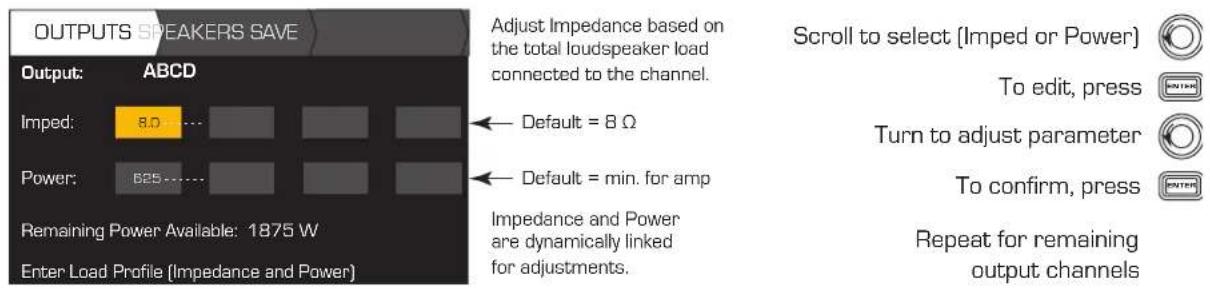
Possible Output Mode Combinations using the Preset Wizard

Figure 25
- Precentages are used to represent the power for different amplifier models.
Step 2 - Select Output Channel for Speaker Assignment
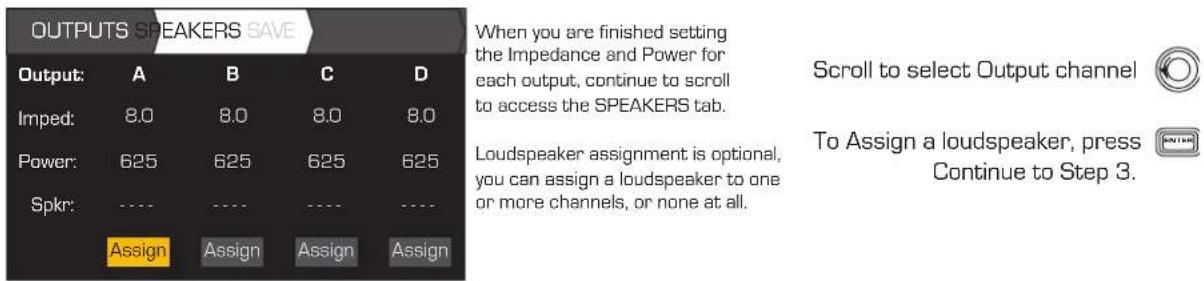
Step 3 - Select Speaker Type for Channel
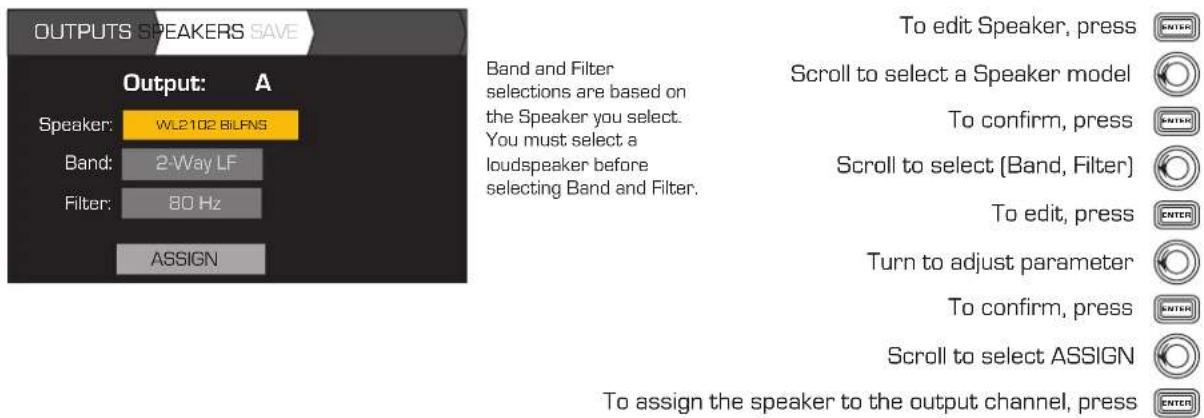
Step 4 - Save Wizard Preset
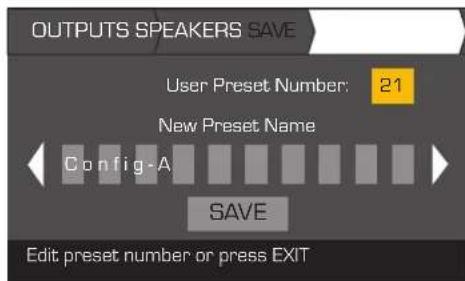
When you have finished selecting loudspeakers, continue to scroll to access the SAVE tab.
Scroll to the Save screen
To edit User Preset number, press
Turn to adjust parameter
To confirm, press


Create New Preset from an Existing Preset
To create a preset from an existing preset, recall the preset with the desired output configuration, modify the Input parameters, Output parameters, then save the preset. In addition, you can save the preset as you are going thru the creation process.
Recall a Preset
A Preset includes the output configuration, input parameters, and loudspeaker profiles (DSP, load, and assignments). There are 20 factory presets that can be recalled, but not overwritten. Factory preset F1: Config thru F9: Config contain output configurations only. Factory preset F10: thru F20: contain the output configurations and basic DSP for the configurations. There are 50 user preset that can be recalled and overwritten. HOME > PRESETS > PRESET RECALL > ENTER
Step 1 - Select Preset
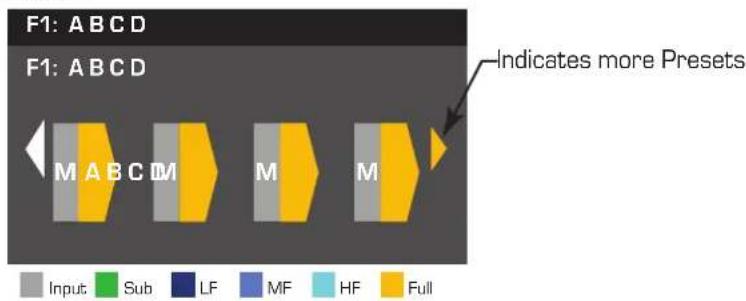
Step 2 - Confirm Selection
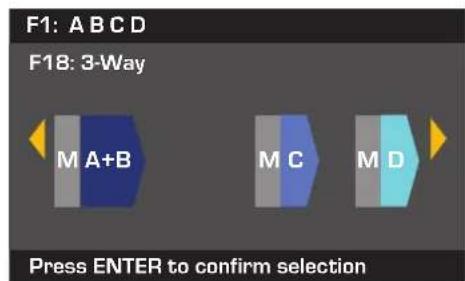
Scroll to desired Preset 20 Factory, 50 User-defined

To select the Preset configuration, press

To confirm the selection, press

The message at the bottom changes to: "Recalling Preset now..." You may hear relays clicking
Set up the Inputs

NOTE: Changes made to input levels are in real time.
HOME > INPUTS > INPUT SENS > ENTER
Step 1 - Select Input Sensitivity
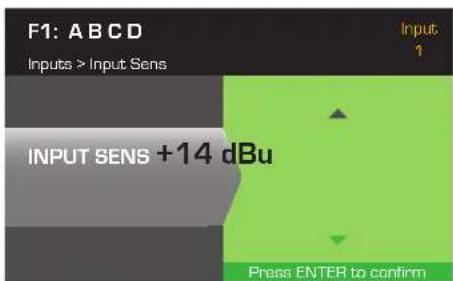
Scroll to select [+14 or +4 dBu] [The background turns to green.]
To confirm selection, press
To move to the next input, press
Repeat procedure for remaining input channels.


HOM >INPUTS>INPUT GAIN>ENTER
Step 2 - Set Input Gain
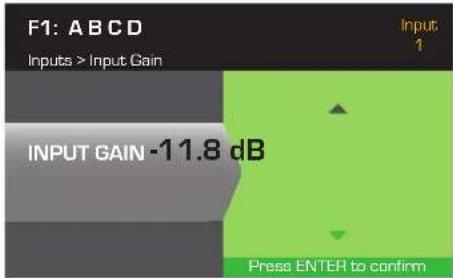
Scroll to select (-100 thru 20 dB) (0.1 dB increments)
To confirm selection, press
To move to the next input, press
Repeat procedure for remaining input channels.


Set up the Outputs

NOTE: Changes made to outputs are in real time.
Mixer
The CXD amplifiers are equipped with an internal mixer that allows you to adjust the signals from each input to each of the four outputs. Figure 26 is a diagram of the Mixer for Output Channel A.
The default setting for the Input Gain is 0.0 dB, and is set in the INPUTS section.
Each output channel has four inputs, each controlled by a Mixer Gain.
- The Input Gain and Mixer Gain are cumulative. For example, if you set the Input Gain to +2.0 dB, and the Mixer Gain to -5.0 dB, the resulting output is -3.0 dB
As a default one channel is mixed to each output: 1 - A, 2 - B, 3 - C, 4 - D, all other input channels are set to -100. Adjusting an Input Gain changes that channel's input to the mixers of all channels. Changing a Mixer Gain affects only that input for the selected output channel.
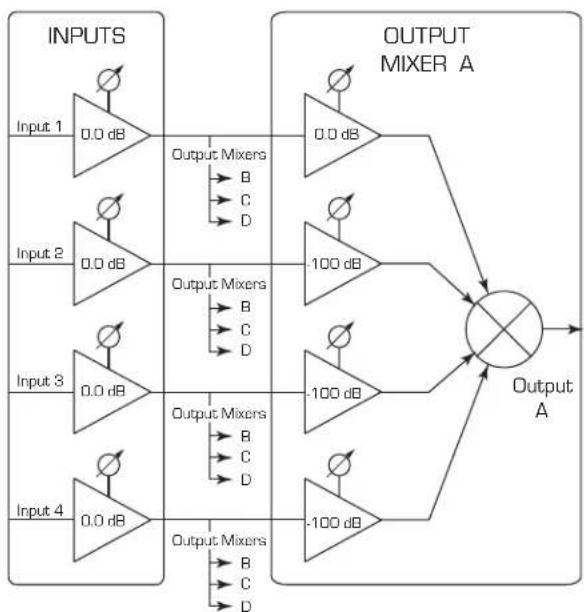
Figure 26
HOM > OUTPUTS >MIXER>ENTER
Step 1 - Set Mixer Gains
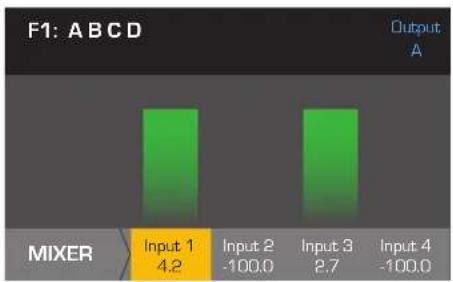
Adjust the Mixer Gain for the selected Input
To confirm, press

Scroll to remaining Inputs and repeat

After confirming all settings, press

To move to the next output, press

Mode Select
HOM > OUTPUTS>MODE ENTER
Step 2 - Select the Output Mode
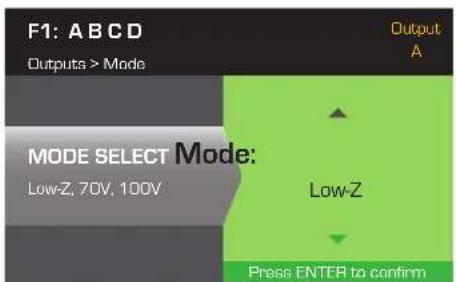
Scroll to select Low-Z, 100V, or 70V

To confirm selection, press

Loudspeaker Processing
The Speaker Processing section allows you to make adjustments to the Crossover, EQ, Delay, Limiter, and QSC Array details for each output channel. In addition, you can load a pre-defined loudspeaker then make any adjustments needed, and save the changes as a user-defined loudspeaker. Depending on the loudspeaker selection, various parameters are not available for adjustment. When you make adjustments, you are making them in real time. If audio is passed while making changes, it is affected by the change.
The following instructions are not all in menu order, and all are optional. Repeat the following procedure for each output channel as necessary.
Load Speaker Profile
A loudspeaker profile includes all the DSP and loudspeaker characteristics available in the SPKR PROC section. When you LOAD a loudspeaker, you are loading all of the DSP and characteristics of that loudspeaker. You can start by loading a loudspeaker and then make modifications and save your new profile, or you can build the profile without loading a loudspeaker, and then save it as a new profile. If you load a QSC loudspeaker, the amplifier is set for that specific loudspeaker and some parameters may be locked out because they are set to their optimal value by the Intrinsic Correction Calculator, and should not be adjusted. The CXD comes with a number of supported loudspeakers from other manufacturers. Refer to the list under "Supported Loudspeakers" on page 27. There may be additions to this list in the futrue that can be loaded with firmware updates.

NOTE: If you make changes to any of the loudspeaker processing parameters, and then LOAD a loudspeaker profile, all the changes you made are overwritten.
HOME > OUTPUTS > SPKR PROC > LOAD SPKR > ENTER
Step 1 - Load an Existing Loudspeaker for the Selected Output
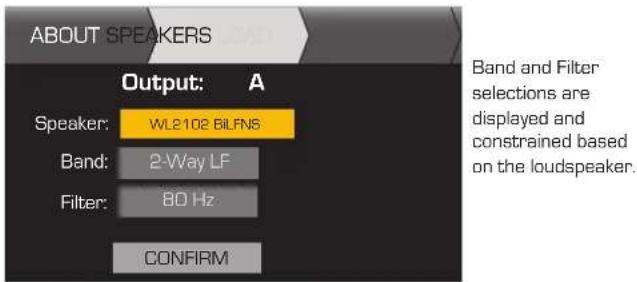
To edit Speaker, press
Scroll to select Speaker model
To confirm, press
Scroll to [Band, Filter]
To adjust, press
Adjust selected parameter
To confirm, press
Scroll to LOAD
To Load the speaker profile to the selected output, press

Crossover
HOME > OUTPUTS > SPKR PROC > CROSSOVER > HIGH-PASS (OR LOW-PASS) > ENTER
Step 1 - Set the Crossover High- and/or Low-pass filters
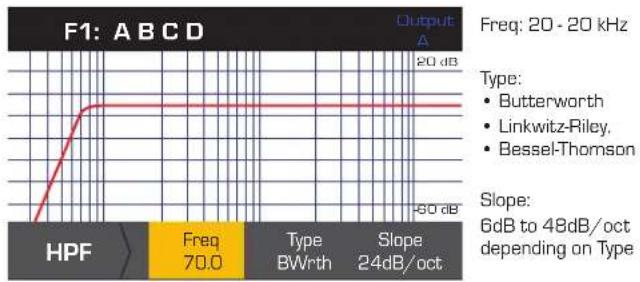
Scroll to select [Freq, Type, Slope]
To edit, press

Turn to adjust parameter
To confirm, press

To exit, press

HOME > OUTPUTS > SPKR PROC > CROSSOVER > GAIN/POL > GAIN > ENTER
Step 2 - Set the Crossover Gain and Polarity
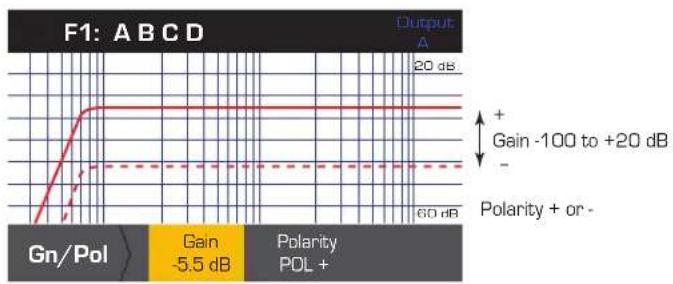
Scroll to select [Gain or Polarity]
To edit, press
Turn to adjust parameter
To confirm, press

To exit, press


EQ
HOME>OUTPUTS>SPKR PROC>PEQ>BAND1,2,3,4,OR5>ENTER
The graph is a composite of all five bands. Each band has a full range of 20Hz to 20kHz .
Step 1 - Set the EQ
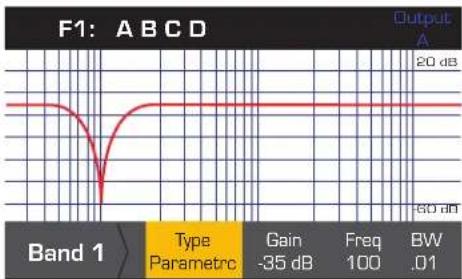
Type: Bypass, Parametric, Low Shelf, High Shelf (Default Bypass)
Gain: -40 to +20 dB (Default 0.00)
Freq: 20 to 20kHz [Band 1 Def 100 Hz]
[Band 2 Def 500 Hz]
[Band 3 Def 1 kHz]
[Band 4 Def 2.5 kHz]
[Band 5 Def 5 kHz]
BW: 0.01 to 3.00 Active (Default 1.00 Oct.)
Scroll to select
(Type, Gain, Freq, BW)
To edit, press

Turn to adjust parameter

To confirm, press

To exit, press

Delay
HOME > OUTPUTS > SPKR PROC > DELAY > ENTER
Step 1 - Set the Output Delay Time
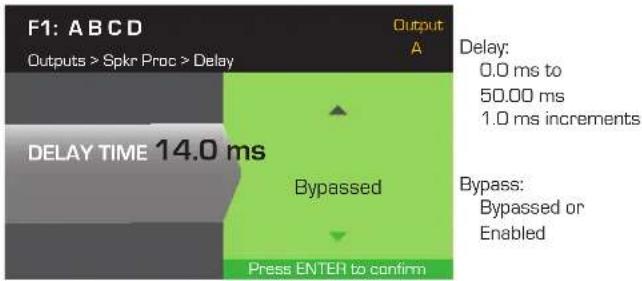
Scroll to [Delay Time or Bypass]

To edit, press

Turn to adjust parameter

To confirm, press

To exit, press

Limiter
HOME > OUTPUTS > SPKR PROC > LIMITER > ENTER > ENTER
Step 1 - Set the Limiter Mode

To edit the Limiter mode, press

Turn to select the mode for the Limiter


To confirm setting, press


NOTE: SpkrPwr maximum output depends on the amplifier and the output configuration you select. The maximum for separate channels is 1250 W, a single combined channel (ABCD or AB+CD) can be up to 5000 W depending on the amplifier.
Step 2 - Set the AUTO Mode Parameters
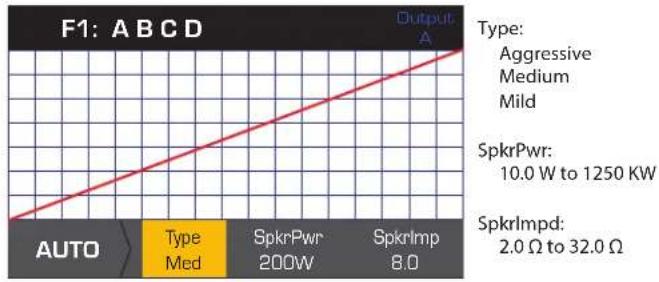
Scroll to select [Type, SpkrPwr, SpkrTmp]
To edit, press
Turn to adjust parameter
To confirm, press
To exit, press


Type - the Auto Limiter Type is a protection level and its values are, Mild, Medium and Aggressive. This Type parameter, along with the Power Rating and Impedance drive an algorithm designed to maximize the performance of your loudspeakers. They set the RMS and Peak threshold values as well as their attack and release setting.
SpkrPwr - if a single speaker is being driven, the SpkrPwr should be the continuous power rating of that loudspeaker. If multiple speakers are being driven this value should be the combined power rating for the load.
Spkrlmp - if a single speaker is being driven, the Spkrlmp should be the nominal impedance of that loudspeaker. If multiple speakers are being driven this value should be the combined impedance for the load.
HOME > OUTPUTS > SPKR PROC > LIMITER > ADV
Step 3 - Set the ADV Mode Parameters
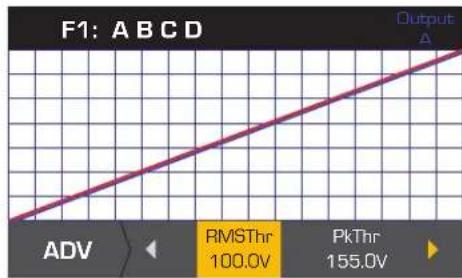
RMSThr: 3.0V to 100.0V
PkThr: 5.0V to 155.0V
PkAttk:0.10 ms to 20.0 ms
PkRel: 1.00 ms to 1.0 s
RMSAttk:0.05s to 10.0 s
RMSRel: 1.0 s to 60.0 s
Thr = Threshold, Pk = Peak, Attk = Attack, Rel = Release
Scroll to select [RMSThr, PkThr, PkAttk, PkRel, RMSAttk, & RMSRel]
To edit, press
Turn to adjust parameter
To confirm, press
To exit, press


Array Correction

NOTE: You must have a QSC line array loaded in order to access the Array Correction parameters.
HOME > OUTPUTS > SPKR PROC > ARRAY > ENTER
Step 1 - Set Splay Angle and Number of Boxes in the Array
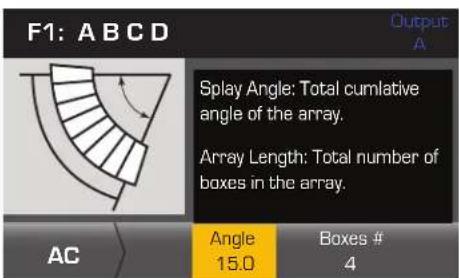
Angle: 0.0° to 90.0°
Boxes #: 0 to 24
Scroll to select [Angle or Boxes#]
To edit, press

Turn to adjust parameter
To confirm, press
To exit, press


HOME > OUTPUTS > SPKR PROC > SAVE SPKR > ENTER
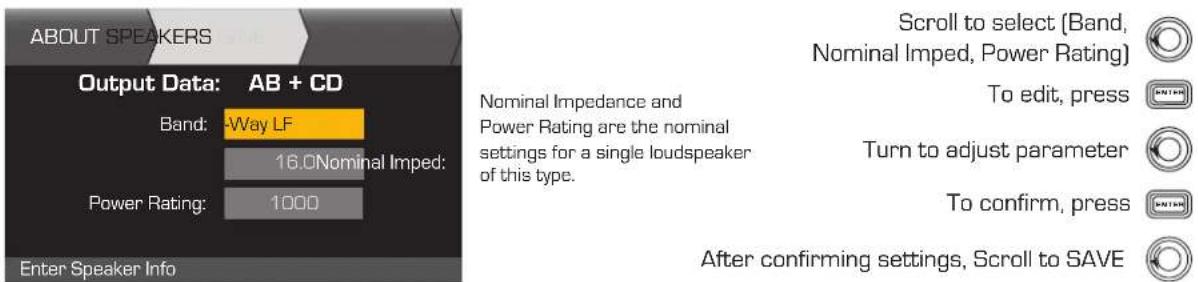
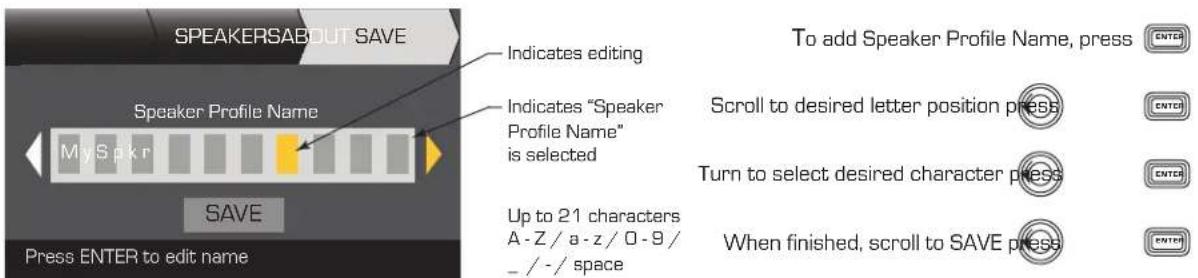
When you Save a speaker profile, you are saving all of the Output settings currently active for the channel. The new profile you save does not need to be Loaded, it is already active.
Step 1 - Save a Loudspeaker with Custom Load Profile
Step 2 - Name the Loudspeaker Profile
Save the Preset
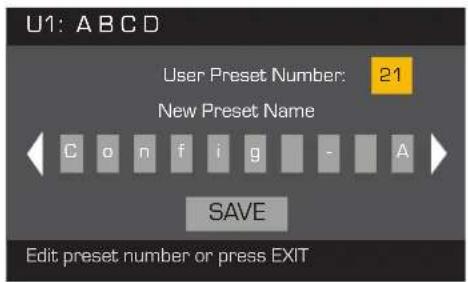
After modifying the Inputs and Outputs for all channels, save the current settings as one of the 50 user-defined preset (U1: thru U50:) Each of the user preset, by default, is the same as factory preset F1: A B C D, so when you save the preset you are "overwriting" the preset currently in that numbered position. If you started by recalling a factory preset, you must use the SAVE AS feature. If you started with a user-defined preset, you can overwrite the preset you started with using the SAVE feature, or use the SAVE AS feature to overwrite a different user preset.
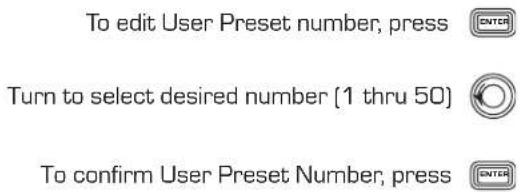
HOME > PRESETS > PRESET SAVE > SAVE AS > ENTER
Step 1 - Save a New Preset - Select and Edit Preset Number
Step 2 - Name the Preset
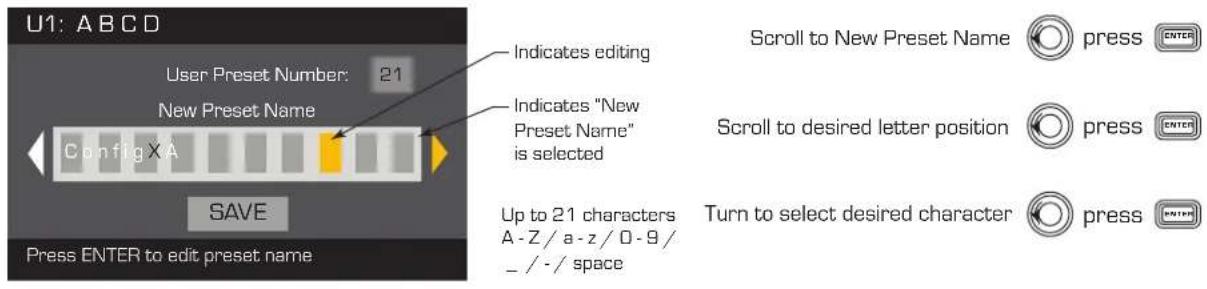
Step 3 - Save Preset
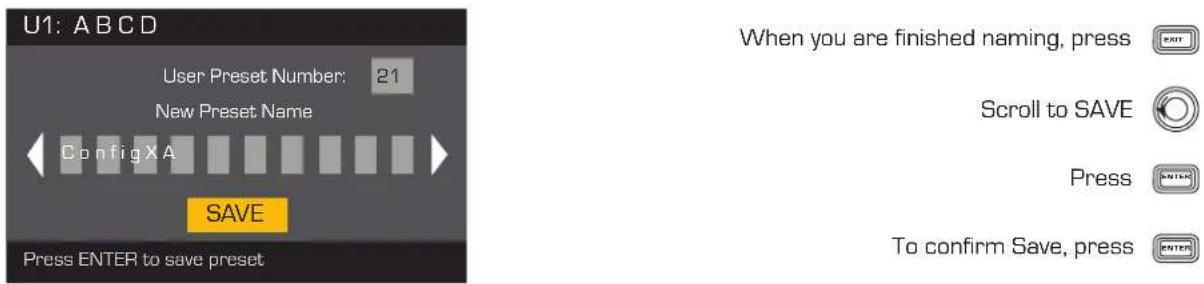
HOME > PRESETS > PRESET SAVE > SAVE > ENTER
Use this procedure when you are saving the preset by overwriting the currently active user preset. After you use the SAVE AS feature to save the preset you are working on, it then becomes the currently active preset, and you can use the SAVE feature to save as you work on the preset.
Step 1 - Overwrite Preset
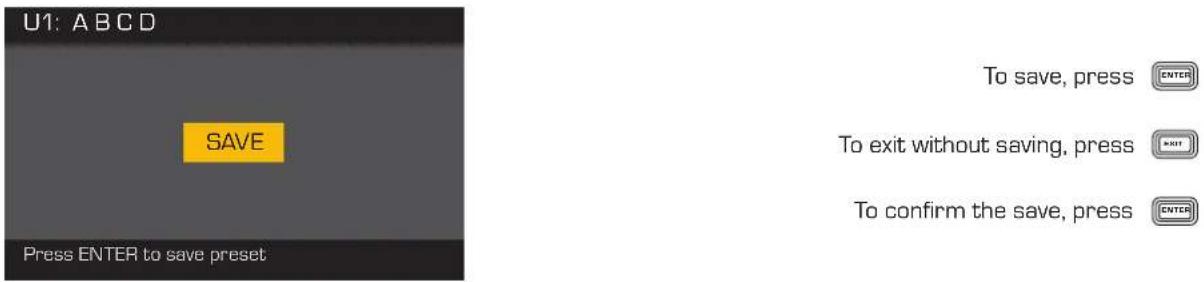
Utilities
The Utilities section provides the following amplifier information and functionality:
HOME > UTILITIES > STATUS > ENTER
Check the Amplifier's Health
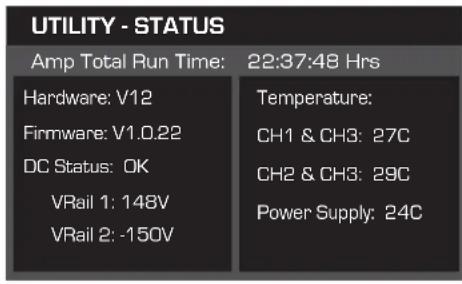
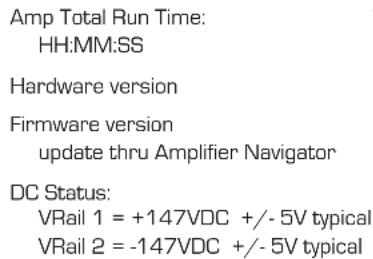
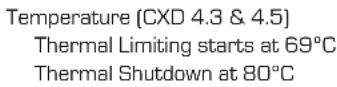
HOME > UTILITIES > AMP ID > ENTER
Name the Amplifier
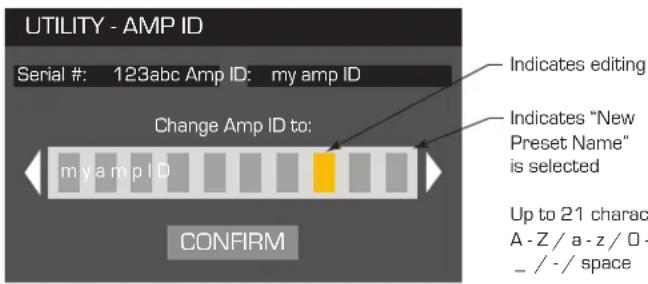
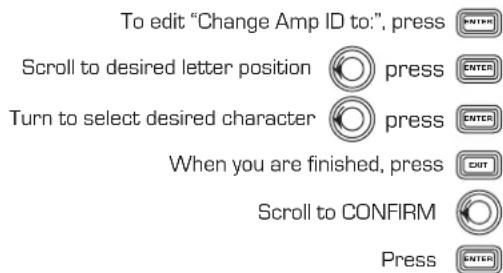
HOME > UTILITIES > PASSWORD > ENTER
Add or Change the Password
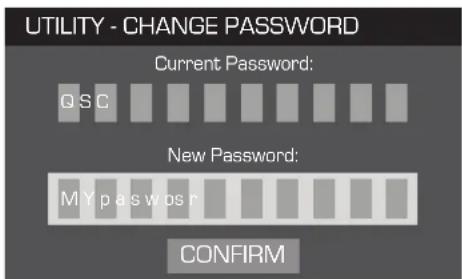
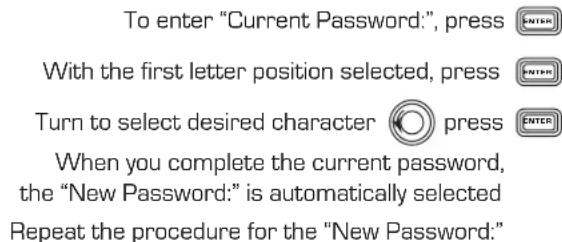
The default password for all amplifiers is QSC - all uppercase. The password can be up to 10 characters long, and contain, A-Z a-z 0-9 - space
Scroll to CONFIRM

HOME > UTILITIES > LOCKOUT > ENTER
All controls are locked except the Mute buttons, the front-panel and rear power buttons, the Enter button and Master Control knob to unlock the amplifier.
Enter Password to Lock or Unlock
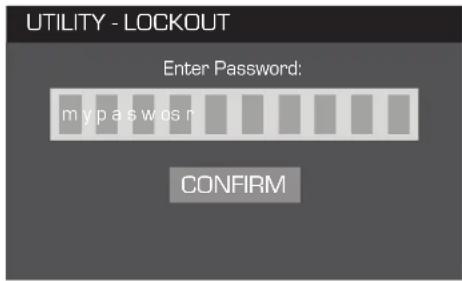
With "Enter Password:" selected, press
With the first letter position selected
Scroll to desired character

When you complete the password correctly, CONFIRM is automatically selected.
To lock or unlock the amplifier, press

NPIO Connections
Step 1 - Connect 3-pin and 2-pin Euro-style Connectors on the Back Panel of the Amplifier
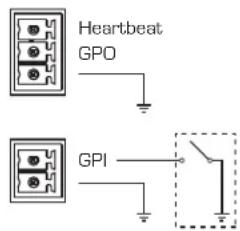
Heartbeat - 1 Hz square wave @ 3.3 V output
NPO - Functionality is to be added.
NPI - Standard logic trigger with 1.5 V threshold. Short pin 1 to ground to put amplifier in Standby mode. GP Input must be Enabled. (Switch is not included.)
HOME > UTILITIES > GPIO > ENTER
Step 2 - Enable or Disable the GP Input Feature
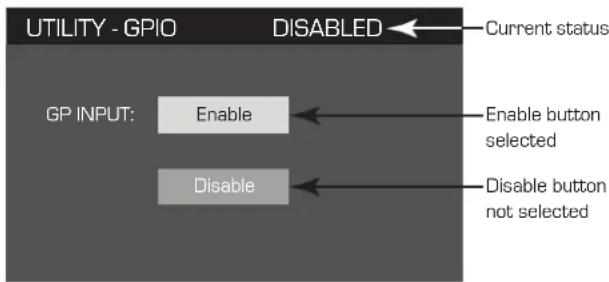
Scroll to Enable or Disable To confirm your selection, Press

After pressing ENTER, the LCD returns to the HOME page.
Supported Loudspeakers
QSC Audio
AP-5102
AP-5122
AP-5122m FOH
AP-5122m MON
AP-5152
GP118-SW
GP212-sw
GP218-SW
S8T
S10T
S12
WL118-sw
WL-2102
WL212-sw
WL218-sw
B52
LX1515V3
LX18V3
MX1515
MX18S
Cerwin-Vega (CV)
EL-36C
TS-42
EV
ELX112
ELX115
ELX215
TX2152
TX2181
JBL
JRX112M
JRX115
JRX118S
JRX125
MRX515
MRX518S
MRX525
MRX528S
PRX415M
PRX425
SRX712M
SRX715
SRX718S
SRX722
SRX725
SRX728S
SRX738
VRX932LA
Peavey
PR10
PR12
PR15
PV115
PV118
PV12M
PV215
PVX12
PVX15
SP218
SP4
Yamaha
BR12
BR12M
BR15
C115V
S115V
S215V
SM15V
SW218V
Specifications
| CXD4.2 CXD4.3 CXD4.5 | |||
| 4 Ch. Continuous1 | |||
| 8Ω | 400 Watts | 625 Watts | 1150 Watts |
| 4Ω | 400 Watts | 625 Watts | 1250 Watts |
| 2Ω | 325 Watts | 625 Watts | 625 Watts |
| 2 Ch. Continuous1 | |||
| 8Ω | 800 Watts | 1250 Watts | 2250 Watts |
| 4Ω | 800 Watts | 1200 Watts | 2250 Watts |
| 2Ω | 650 Watts | 1200 Watts | 2100 Watts |
| 1 Ch. Continuous1 | |||
| 8Ω | 1600 Watts | 2500 Watts | 4200 Watts |
| 4Ω | 1600 Watts | 2500 Watts | 4200 Watts |
| 2Ω | 1600 Watts | 2500 Watts | 4250 Watts |
| 1Ω | 1600 Watts | 2500 Watts | 3700 Watts |
| Typical Distortion | |||
| 8Ω | 0.01 - 0.03% | 0.01 - 0.03% | 0.01 - 0.03% |
| 4Ω | 0.03 - 0.06% | 0.03 - 0.06% | 0.03 - 0.06% |
| Maximum Distortion 4Ω - 8Ω1.0% 1.0% 1.0% | |||
| Frequency response (8Ω) 20 Hz - 15 kHz +/- 0.2 dB | 20 Hz - 15 kHz +/- 0.2 dB | 20 Hz - 15 kHz +/- 0.2 dB | |
| 20 Hz - 20 kHz +0.2 dB / -0.7 dB | 20 Hz - 20 kHz +0.2 dB / -0.7 dB | 20 Hz - 20 kHz +0.2 dB / -0.7 dB | |
| Noise | |||
| Unweighted Output Unmuted | -101 dB | -101 dB | -101 dB |
| Weighted Output Muted | -109 dB | -109 dB | -109 dB |
| Gain (1.2V setting) 34.0 dB 38.4 dB 38.4 dB | |||
| Damping factor >150>150>150 | |||
| Input impedance >10k, balanced or unbalanced >10k, balanced or unbalanced >10k, balanced or unbalanced | |||
| Maximum input level | |||
| (3.9V setting) | 12.28V (+24 dBu) | 12.28V (+24 dBu) | 12.28V (+24 dBu) |
| (1.2V setting) | 3.88V (+14 dBu) | 3.88V (+14 dBu) | 3.88V (+14 dBu) |
| Controls and indicators (front) | Power • Channel MUTE Buttons • Channel SELECT Buttons • Channel Input Signal and CLIP LED Indicators • Channel Output and LIMIT LED Meters • HOME, ENTER, EXIT, GAIN Navigation Buttons • Control Knob | ||
| Controls and indicators (rear) | AC Power Disconnect | AC Power Disconnect | AC Power Disconnect |
| Input connectors | |||
| Line Input | 3-pin Euro-style | 3-pin Euro-style | 3-pin Euro-style |
| GPI Input | 2-pin Euro-style 3.5 mm | 2-pin Euro-style 3.5 mm | 2-pin Euro-style 3.5 mm |
| Output connectors | |||
| Loudspeaker Output | 8-pin Euro-style | 8-pin Euro-style | 8-pin Euro-style |
| GPIO Output | 3-pin Euro-style 3.5 mm | 3-pin Euro-style 3.5 mm | 3-pin Euro-style 3.5 mm |
| Amplifier and load protection | Short circuit, open circuit, thermal, RF protection. On/Off muting, DC fault shutdown, active inrush limiting, input current limiting | ||
| AC Power Input | Universal Power Supply 100 - 240 VAC, 50 - 60 Hz | ||
| Dimensions (HWD) | 3.5" x 19" x 12" (89 x 482 x 305 mm) | 3.5" x 19" x 16" (89 x 482 x 406 mm) | 3.5" x 19" x 16" (89 x 482mm x 406mm) |
| Weight, Net / Shipping | 18.5 lb (8.4 kg) / 22 lb (10.0 kg) | 21.0 lb (9.5 kg) / 25 lb (11.3 kg) | 22.0 lb (10.0 kg) / 26 lb (11.8 kg) |
1-1.0 kHz sine wave, 1% THD, 1 channel driven
Heat Loss Charts
Heat losses are the thermal emissions from an amplifier while it is operating. It comes from dissipated waste power-i.e., real AC power in minus audio power out. Measurements are provided for various loads at idle, 1/8 of average full power, 1/3 of average full power, and full power, with all channels driven simultaneously. For typical usage, use the idle and 1/8 power figures. This data is measured from representative samples; due to production tolerances, actual heat emissions may vary slightly from one unit to another. Bridged mono into 8 ohms is equivalent to 4 ohms per channel; into 4 ohms is equivalent to 2 ohms per channel.
BTU/hr kcal/hr
| Idle | ||
| CXD 4.3 225 57 | ||
| CXD 4.5 286 72 | ||
| Load per Channel 8Ω4Ω2Ω25V-70V-100V | ||||||||
| BTU/hr kcal/hr BTU/hr kcal/hr BTU/hr kcal/hr | ||||||||
| 1/8th Power | ||||||||
| CXD 4.3 | 684 | 172 | 794 | 200 | 1040 | 262 | 794 | 200 |
| CXD 4.5 | 811 | 204 | 1144 | 288 | 1124 | 283 | 1144 | 288 |
| 1/3rd Power | ||||||||
| CXD 4.3 | 983 | 248 | 1261 | 318 | 1869 | 471 | 1261 | 318 |
| CXD 4.5 | 881 | 222 | 1708 | 430 | 1737 | 438 | 1708 | 430 |
| Full Power | ||||||||
| CXD 4.3 | 2498 | 629 | 2925 | 737 | 4198 | 1058 | 2925 | 737 |
| CXD 4.5 | 3116 | 785 | 5318 | 1340 | 4208 | 1060 | 5318 | 1340 |
Idle
Thermal loss at idle or with very low signal level.
1/8 Power
Thermal loss at 1/8 of full power is measured with pink noise. It approximates operating with music or voice with light clipping and represents the amplifier's typical "clean" maximum level, without audible clipping. Use these figures for typical maximum level operation.
1/3 Power
Thermal loss at 1/3 of full power is measured with pink noise. It approximates operating with music or voice with very heavy clipping and a very compressed dynamic range.
Full Power
Thermal loss at full power is measured with a 1 kHz sine wave. However, it does not represent any real-world operating condition.
QSC
Mailing Address:
QSC Audio Products, LLC
1675 MacArthur Boulevard
Costa Mesa, CA 92626-1468 USA
Telephone Numbers:
Main Number: (714) 754-6175
Sales & Marketing: (714) 957-7100 or toll free (USA only) (800) 854-4079
Customer Service: (714) 957-7150 or toll free (USA only) (800) 772-2834
Facsimile Numbers:
Sales & Marketing FAX: (714) 754-6174
Customer Service FAX: (714) 754-6173
World Wide Web:
www.qsc.com
E-mail:
info@qscaudio.com
service@qscaudio.com
Amplificadores CXD
Manual del usuario
QSC
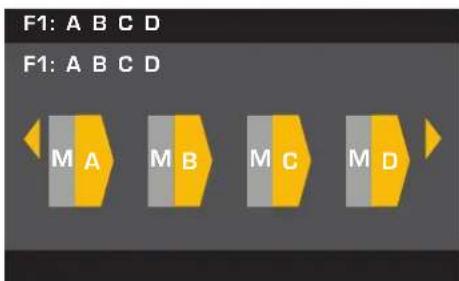
A individual B individual C individual D individual
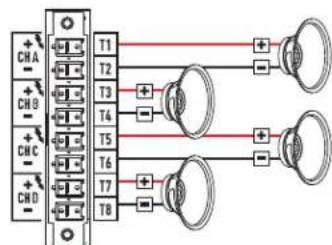
Figura 23
Para cointormprnesease
ParaBelixiprease


Limitador
HOME > OUTPUTS > SPKR PROC > LIMITER > ENTER > ENTER (INICIO > SALIDAS > PROC ALTAVOCES > LIMITADOR > INTRO > INTRO)
PkThr: 5,0 V a 155,0 V
PkAttk: 0,10 ms a 20,0 ms
PkRel:1.00msa1.0s
RM5Attk:0,0s a 10,O s
RMSRel: 1,0 s a 60,0 s
Thr = Umbral, Pk = Pico, Attk = Ataque, Rel = Liberación
Para editor "Change Amp ID to: [Cambiar ID amp a], presione
QSC Audio Products, LLC
1675 MacArthur Boulevard
service@qscaudio.com
Amplificateurs CXD

ABC parallele
D simple
The following amounts are not included in the results:
electriquement
identiques
T1+T3+etT5+
T2-T4-et T6
- Illustration 20 -
Configurations 3 canaux
A+B ponté
C simple
D simple
Freq: 20 à 20 kHz (Band 1 Def 100 Hz)
[Band 2 Def 500 Hz]
[Band 3 Def 1 kHz]
[Band 4 Def 2,5 kHz]
[Band 5 Def 5 kHz]
Supported Loudspeakers
QSC Audio
AP-5102
AP-5122
AP-5122m FOH
AP-5122m MON
AP-5152
GP118-SW
GP212-sw
GP218-SW
S8T
S10T
S12
WL118-sw
WL-2102
WL212-sw
WL218-sw
B52
LX1515V3
LX18V3
MX1515
MX18S
Cerwin-Vega (CV)
EL-36C
TS-42
EV
ELX112
ELX115
ELX215
TX2152
TX2181
JBL
JRX112M
JRX115
JRX118S
JRX125
MRX515
MRX518S
MRX525
MRX528S
PRX415M
PRX425
SRX712M
SRX715
SRX718S
SRX722
SRX725
SRX728S
SRX738
VRX932LA
Peavey
PR10
PR12
PR15
PV115
PV118
PV12M
PV215
PVX12
PVX15
SP218
SP4
Yamaha
BR12
BR12M
BR15
C115V
S115V
S215V
SM15V
SW218V
QSC Audio Products, LLC
1675 MacArthur Boulevard
service@qscaudio.com
Thr = Schwellenwert, Pk = Spitze, Attk = Attack, Rel = Release
CXD4.2 CXD4.3 CXD4.5
QSC Audio Products, LLC
1675 MacArthur Boulevard
Costa Mesa, CA 92626-1468 USA
Telefonnummern:
service@qscaudio.com
CXD放大器
用户手册
QSC Audio Products, LLC
1675 MacArthur Boulevard
Costa Mesa, CA 92626-1468 USA
电话:
总机:(714)754-6175
销售和市场部门:(714)957-7100或(仅限美国)免费电话
(800)854-4079
service@qscaudio.com