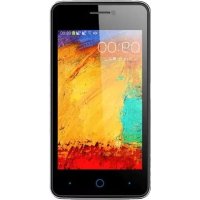
Blade C341 - Smartphone ZTE - Free user manual and instructions
Find the device manual for free Blade C341 ZTE in PDF.



| Product type | Smartphone |
| Brand | ZTE |
| Model | Blade C341 |
| Operating system | Android |
| Network | WCDMA/GSM dual band |
| Connectivity | Bluetooth, Wi-Fi, GPS |
| Expandable storage | microSDHC |
| Battery | Rechargeable lithium-ion |
| Main functions | Calls, SMS, camera, media player |
| Maintenance and cleaning | Keep dry, avoid liquids and extreme temperatures |
| Safety | Do not use while driving, keep at 15 mm from body, turn off in airplanes and hospitals |
| General information | Manual available in multiple languages, support at ztedevice.com |
Frequently Asked Questions - Blade C341 ZTE
User questions about Blade C341 ZTE
0 question about this device. Answer the ones you know or ask your own.
Ask a new question about this device
Download the instructions for your Smartphone in PDF format for free! Find your manual Blade C341 - ZTE and take your electronic device back in hand. On this page are published all the documents necessary for the use of your device. Blade C341 by ZTE.
USER MANUAL Blade C341 ZTE
Tomorrow never waits.
www.2016.com
Quick Start Guide
ZTE Blade C341 Mobile Phone Quick Start Guide. 2
Copyright © 2015 ZTE CORPORATION.
All rights reserved.
No part of this publication may be quoted, reproduced, translated or used in any form or by any means, electronic or mechanical, including photocopying and microfilm, without the prior written permission of ZTE Corporation.
ZTE Corporation reserves the right to make modifications on print errors or update specifications in this guide without prior notice.
Trademarks
ZTE and the ZTE logos are trademarks of the ZTE Corporation. Google and Android are trademarks of Google, Inc. The Bluetooth® trademark and logos are owned by the Bluetooth SIG, Inc. and any use of such trademarks by ZTE Corporation is under license.

microSDHC Logo is a trademark of
SD-3C, LLC.
Other trademarks and trade names are the property of their respective owners.
We offer self-service for our smart terminal
device users. Please visit the ZTE official website (at www.ztedevicemc) for more information on self-service and supported product models. Information on the website takes precedence.
Visit http://www.ztedevicemc to download the user manual. Just click Service Support>User's manual from the home page and then select your location, product type, and name to search for related support information.
Disclaimer
ZTE Corporation expressly disclaims any liability for faults and damages caused by unauthorized modifications of the software.
Product Safety Information
| Do not use hand-held while driving |
| For body-worn operation maintain a separation of 15 mm |
| Small parts may cause a choking hazard |
| This device may produce a loud sound |
| Avoid contact with magnetic media |
| Keep away from pacemakers and other personal medical devices |
| Switch off when instructed in hospitals and medical facilities |
| Switch off when instructed in aircrafts and airports |
| Switch off in explosive environments |
| Do not use while re-fuelling |
| This device may produce a bright or flashing light |
| Do not dispose of it in a fire |
| To prevent possible hearing damage, do not listen at high volume levels for long periods. |
| Avoid Extreme Temperatures |
| Avoid any contact with liquid, keep it dry |
| Do not attempt to disassemble |
| Only use approved accessories |
| Do not rely on this device for emergency communications |
C∈0700
Getting to Know Your Phone
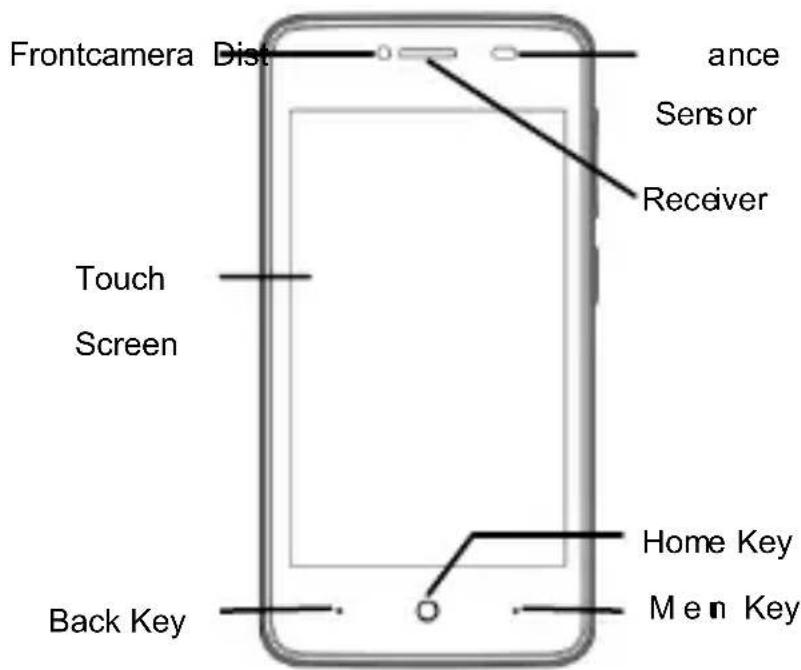
Note: If you get a phone no front camera, please prevail in kind
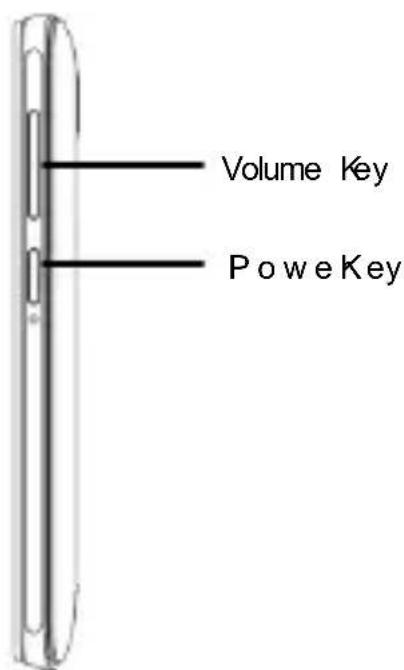
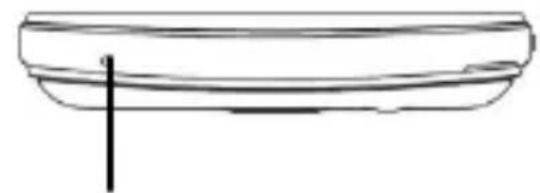
Microphone
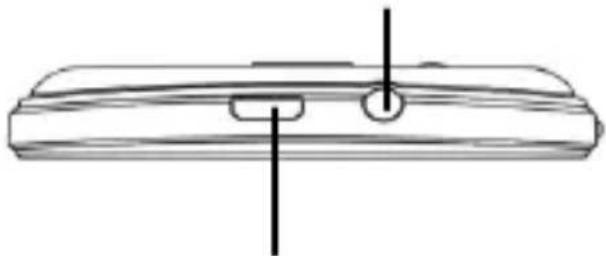
Headset Jack
Charging/USB Jack
Power Key
- Hold to turn on or off Silent or vibrate or standard or Airplane mode,or to Restart, or to power off.
- Press to switch your phone to Sleep mode.
- Press to wake up your phone.
Home Key
- Press to return to the Home Screen from any application or screen.
- Hold to see Google search.
Menu Key
- Press to get the options for the current screen.
- Hold to see recently used applications.
Back Key
- Press to go to the previous screen.
Volume Up/Volume Down
- Press or hold to turn the volume up or down.
Staring Up
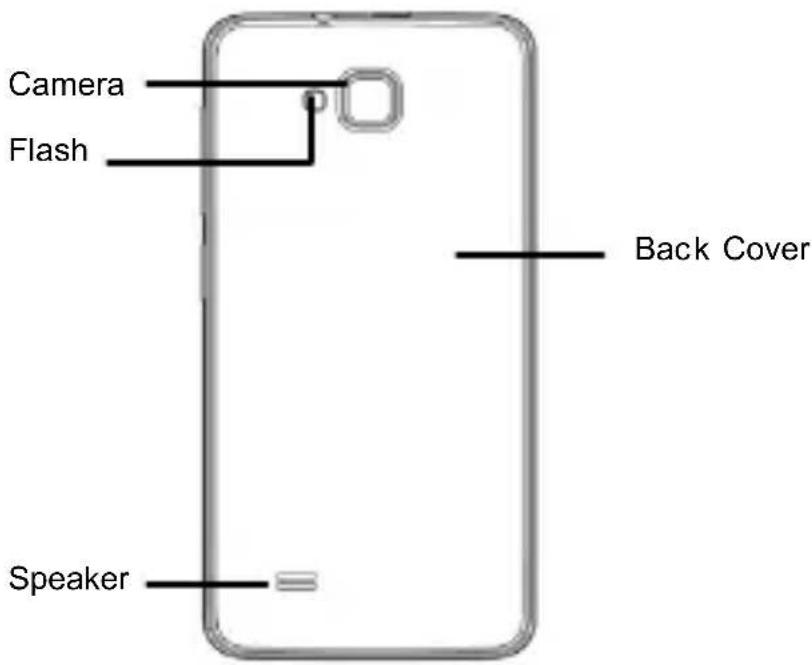
- Removing the Back Cover
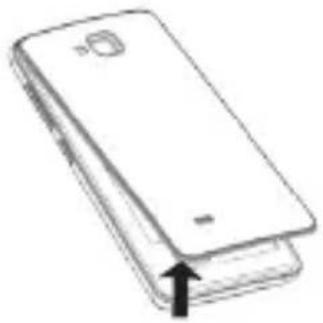
2.Installing the SIM Card
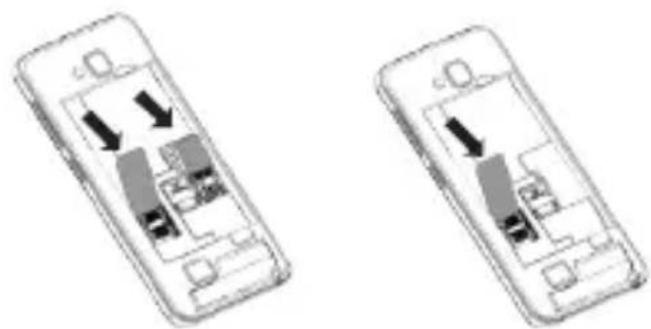
Notes:SIM card slot to prevail in kind
Before installing or replacing the SIM card, be sure to turn off the phone. If you're using a small card, please buy standardization SIM dedicated card sets from the formal channels, and then push the whole into the slot.
3.Installing the microSD Card
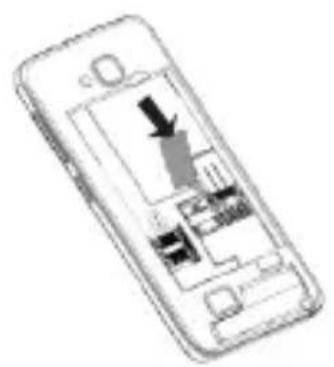
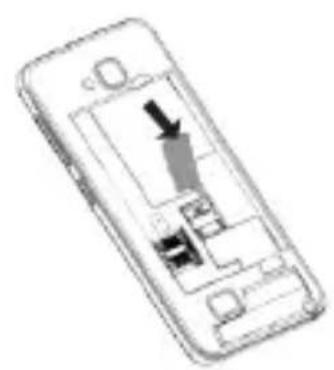
Notes: Some applications may require a microSD card to work normally or may store certain data on it. Therefore, it is recommended that you keep a microSD card installed and not remove or replace it randomly.
4.Insert the headset
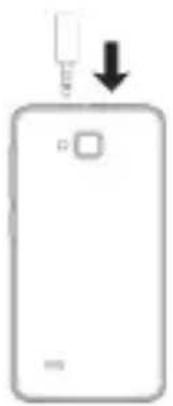
5. Charging the Battery
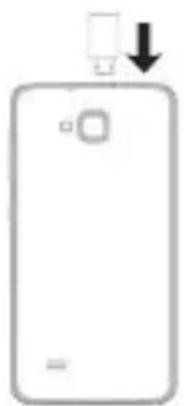
When you first get your new phone you'll need to charge the battery like this:
- Connect the adapter to the charging jack.
- Connect the charger to a standard AC power outlet.
- Disconnect the charger when the battery is fully charged.
Notes: If excessive discharge of the battery, the chargingicon will display delay.
CAUTION:
Do not change the built-in rechargeable battery in your phone by yourself. The battery can only be changed by ZTE orZTE authorized service provider.
Powering On/Off Your Phone
Make sure the battery is charged before powering on.
- Press and hold the Power Key to turn on your phone.
- To turn it off, press and hold the Power Key to open the options menu. Touch Power off>OK.
Waking Up Your Phone
- Press the Power Key to activate your screen display.
- Long press con to unlock
Notes: If you have set an 'unlock pattern', or a PIN/password for your phone, you'll need to draw the pattern or enter the PIN/password to unlock your screen.
Using the Touch Screen
Your phone's touch screen lets you control actions through a variety of touch gestures.
- Touch
When you want to type using the onscreen keyboard, select items onscreen such as application and settings icons, or press onscreen buttons, simply touch them with your finger.
- Touch and Hold
To open the available options for an item (for example, a message or link in a Web page), touch and hold the item.
Drag
To drag, press and hold your finger with some pressure before you start to move your finger. While dragging, do not release your finger until you have reached the target position.
Pinch
In some apps (such as Maps, Browser, and Gallery), you can zoom in and out by placing two fingers on the screen at once and
pinching them together (to zoom out) or spreading them apart (to zoom in).
How to add contact to your Contacts
There are some numbers that you may want to call again and again, so it makes sense to add these numbers to your contact list. You can then access these numbers quickly and easily.
Press Home Key > tap Contacts.

Ta pselect the place to store the contact input the name and number or other content > Save.
How to make a call
You can make a call from Phone, also you can make a call from Contacts.
PressHomekey>ta>Phone

- Enter Dialer > input the number you want to call> tap to dial.
How to answerorreject a call
Non lock screen to answer the call
- Tap the cento answer the call
- Tap th cen to reject the call
Lock screen to answer the call
Drag the Answer 1condown to answer thecall. Drag the Icondown to reject the call.
During a call
- Muting a Call
During a call, you can mute your microphone so that theperson you are speaking to cannot hear you, but you canstill hear him.
Tape turn on or off your microphone.
- Speaker On/Off
Tape turn on or off the speaker.
Ending a Call
Tapo finish a call.
How to send a message
- Press Home key > tap > Messaging.

- Ta tφcreate a new message.
- Input the recipient's number or name. As you type, matching contacts will appear. Tap a suggested contact to add as a recipient. You can also tap to select recipients from the Contacts.
- Ta input the message
you want to send.
Tap Menu Key to insert common phrases or contacts.
- If you are sending an MMS, tap Menu Key to add a subject, or tap attach pictures, videos, audio, or slideshow.
- Ta tpsend your message.
Notes: Add an attachment to text message and it will beconverted into an MMS automatically.
Likewise if youremove all attachments and the subject from an MMS, it'llautomatically become a text message.
EC DECLARATION OF CONFORMITY
It is hereby declared that following designated product:
Product Type: WCDMA/GSM (GPRS)
Dual-Mode Digital Mobile Phone
Model No:ZTE T221/ZTE Blade C341/ZTE Blade
Q2 3G
Product Description:WCDMA/LTE Dual-Mode
Digital Mobile Phone
Complies with the essential protection requirements of Directives on Radiond
Telecommunication TerminalEquipment (Directive1999/5/EC), Restriction of the Certain Hazardous Substances in electrical and electronic equipment (Directive 2011/65/EU), Eco-design Requirements for Energy-Related Products (Directive 2009/125/EC)andtheiramendments.
This declaration applies to all specimens manufactured identical to the samplelesssubmitted for testing/evaluation.
Assessment of compliance of the product with the requirements relating to
Directive1999/5/ECwas performed byPHOENIX
TESTLAB GmbH (Notified Body
No.0700)andssessment of compliance of the
product with therequirements relating
toDirective2011/65/EUandDirective 2009/125/EC was performed byIntertek TestingServices Ltd., Shanghai LAB and Directive 2009/125/EC was performed by Shenzhen Huatongwei InternationalInspection Co.,Ltd.The assessments were based on the followingregulations andstandards:
| Requirement | Standard | Report |
| Health and safety | EN 62209-1:2006, EN50360:2001+A1 :2012, EN 62209-2:2010 EN 50566:2013 EN 62479:2010 | I15D00088-SAR |
| EN 60950-1:2006+A11 :2009+A1:2010+A1 2:2011 EN 50332-1:2000; EN50332-2:2003 | I15D00088-SAF I15D00088-ACO | |
| EMC | EN 301 489-1 V1.9.2 EN 301 489-7 V1.3.1 EN 301 489-3 V1.6.1 EN 301 489-24V1.5.1 EN 301 489-17 V2.2.1 EN 55022: (2010), EN 55024: (2010) EN 55013: 2001+A1:2003+A2: 2006 EN 55020: 2007/A11:2011 | I15D00088-EMC |
| Radio Spectrum | EN 301 511 V9.0.2 EN301 908-1 V6.2.1 EN301 908-2 V6.2.1 EN 300328 V1.8.1 EN 300 440-1 V1.6.1; EN 300 440-2 V1.4.1; | I15D00088-RFG I15D00088-RFW I15D00088-GPS I15D00088-WLA I15D00088-RFB BL-SZ1570 076-602 BL-SZ1570 076-601 |
| RoHS | IEC 62321:2008 | 150700297 SHA-001 |
| ErP (EC) No 2 | 78/2009 | ES1506121 62S |
This declaration is the responsibility of the manufacturer:
ZTE Corporation
ZTE Plaza, Keji Road South, Hi-Tech, Industrial Park,Nanshan District,Shenzhen, Guangdong, 518057, P.R.China
Authorised person signing for the company:
Yao CuifengChief Quality Officer of ZTE Corporation
Name in block letters & position in the company
Shenzhen,4thAugust 2015
Place & dateLegally valid signature
ZTE Blade C341
Mobiletelefon
Kurzanleitung
RECHTliche HINWEISE
Copyright © 2015 ZTE CORPORATION.
ZTE Plaza, Keji Road South, Hi-Tech, Industrial Park,Nanshan District, Shenzhen, Guangdong, 518057, P.R.China
Yao Cuifeng Chief Quality Officer der ZTE Corporation
Copyright © 2015 ZTE CORPORATION.
Copyright © 2015 ZTE CORPORATION.
ZTE Plaza, KejiRoad South, Hi-Tech, Industrial Park,Nanshan District, Shenzhen, Guangdong, 518057, P.R.C
Tegningsberettiget:
Copyright © 2015 ZTE CORPORATION.
International Inspection Co., Ltd on
ZTE Plaza, Keji Road South, Hi-Tech, Industrial Park,Nanshan District, Shenzhen, Guangdong, 518057, P.R.China
YaoCuifengChiefQualityOfficer of ZTE Corporation
Opphavsrett © 2015 ZTE CORPORATION.
Med enerett.
ZTE Plaza, Keji Road South, Hi-Tech, Industrial Park,Nanshan District,Shenzhen, Guangdong, 518057, Kina
Copyright © 2015 ZTE CORPORATION.
Med ensamratt.
ZTE Plaza, Keji Road South, Hi-Tech, Industrial Park,Nanshan District,Shenzhen,Guangdong, 518057, Kina
Telif Hakki © 2015 ZTE CORPORATION.
ZTE Plaza, Keji Road South, Hi-Tech, Industrial Park,Nanshan District, Shenzhen, Guangdong, 518057, Qin Halk Cumhuriyeti
- Trademarks
- Disclaimer
- Product Safety Information
- Getting to Know Your Phone
- Power Key
- Home Key
- Menu Key
- Back Key
- Volume Up/Volume Down
- Staring Up
- 3.Installing the microSD Card
- 4.Insert the headset
- Charging the Battery
- CAUTION:
- Powering On/Off Your Phone
- Waking Up Your Phone
- Using the Touch Screen
- How to add contact to your Contacts
- How to make a call
- How to answerorreject a call
- During a call
- How to send a message
- EC DECLARATION OF CONFORMITY
- ZTE Blade C341
- Mobiletelefon
- Kurzanleitung
- RECHTliche HINWEISE
- Copyright © 2015 ZTE CORPORATION.
- Opphavsrett © 2015 ZTE CORPORATION.
- Med enerett.
- Med ensamratt.
- Telif Hakki © 2015 ZTE CORPORATION.
Brand : ZTE
Model : Blade C341
Category : Smartphone