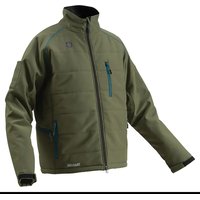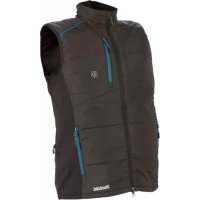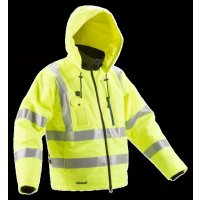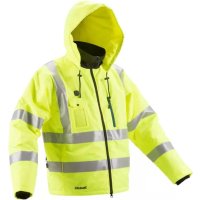
DCJ206Z - Wireless heated clothing MAKITA - Free user manual and instructions
Find the device manual for free DCJ206Z MAKITA in PDF.



User questions about DCJ206Z MAKITA
0 question about this device. Answer the ones you know or ask your own.
Ask a new question about this device
Download the instructions for your Wireless heated clothing in PDF format for free! Find your manual DCJ206Z - MAKITA and take your electronic device back in hand. On this page are published all the documents necessary for the use of your device. DCJ206Z by MAKITA.
USER MANUAL DCJ206Z MAKITA
| EN | Cordless Heated Jacket / Cordless Heated Vest | INSTRUCTION MANUAL 5 | |
| FRCA | Veste Chauffante / Blouson sans manche sans fil | MANUEL D'INSTRUCTION 12 | |
| ESMX | Chamarra Electro-Térmica a Bateria / Chaleco Electrotérmico | MANUAL DE INSTRUCCIONES | 20 |
| PTBR | Jaqueta Térmica a Bateria / Colete Térmico a Bateria | MANUAL DE INSTRUÇOES | 28 |
| ID | Jaket Penghangat Nirkabel / Rompi Penghangat Nirkabel | PETUNJUK PENGGUNAAN | 35 |
| VI | Áo Khoác Dài Tay Làm Àm Düng Pin / Áo Khoác Khòng Tay Làm Àm Düng Pin | TÀI LIÊU HUÔNG DAN 43 | |
| TH | 50 | ||
| ZHCN | 充电式发热保暖外套 / 充电式电热背心 | 使用说明书 | 58 |
| ZHTW | 充電式發熱保暖外套 / 充電式發熱背心 | 使用說明書 | 66 |
| KO | CHKTN BOUN JATKET / CHKTENKIN BAIH MEL | HQG SELMONG | 74 |
IMPORTANT: Read Before Using.
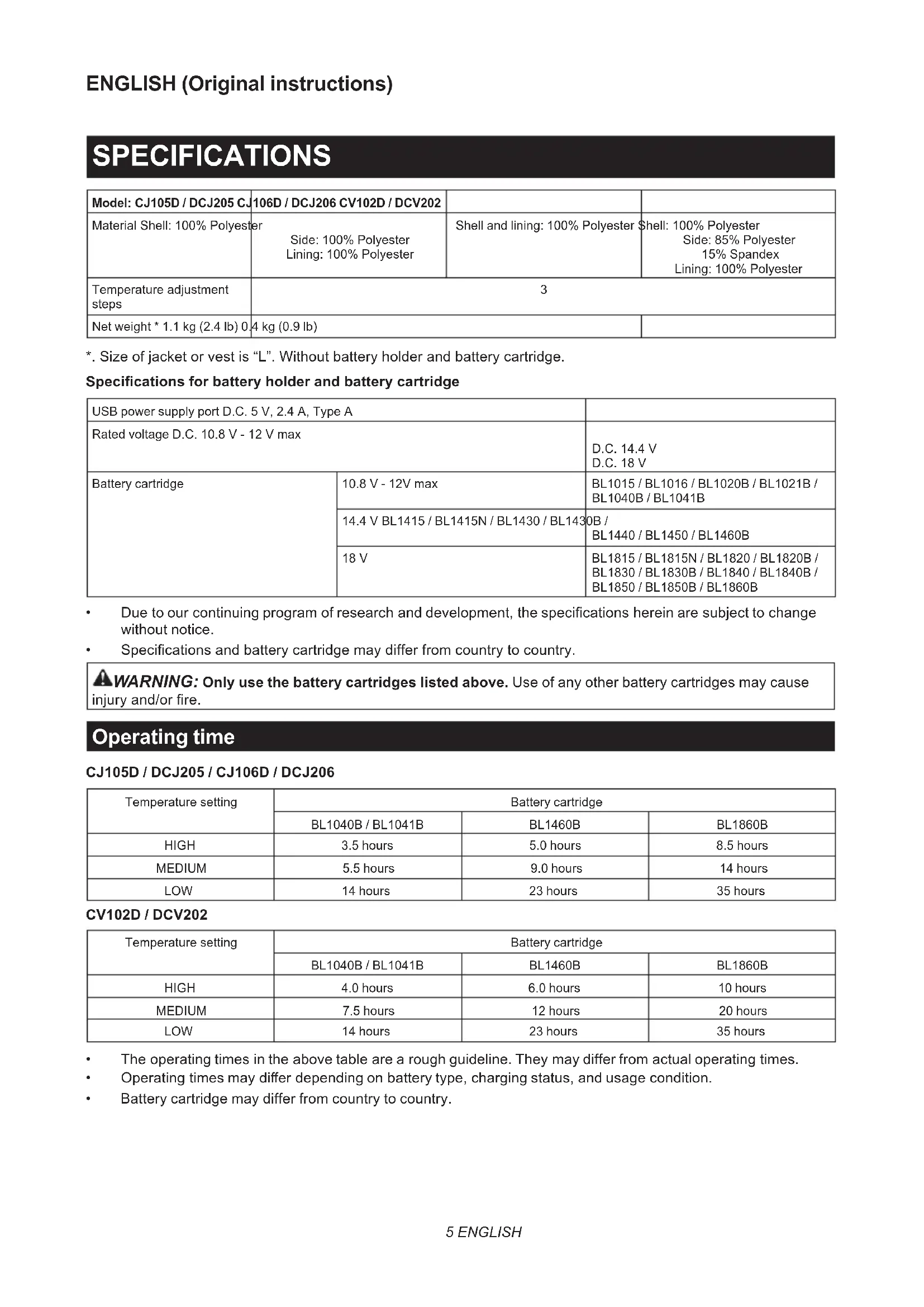
*. Size of jacket or vest is "L". Without battery holder and battery cartridge.
Specifications for battery holder and battery cartridge
| USB power supply port D.C. 5 V, 2.4 A, Type A | ||
| Rated voltage D.C. 10.8 V - 12 V max | D.C. 14.4 V D.C. 18 V | |
| Battery cartridge | 10.8 V - 12V max | BL1015 / BL1016 / BL1020B / BL1021B / BL1040B / BL1041B |
| 14.4 V BL1415 / BL1415N / BL1430 / BL1430B / BL1440 / BL1450 / BL1460B | ||
| 18 V | BL1815 / BL1815N / BL1820 / BL1820B / BL1830 / BL1830B / BL1840 / BL1840B / BL1850 / BL1850B / BL1860B | |
Due to our continuing program of research and development, the specifications herein are subject to change without notice.
Specifications and battery cartridge may differ from country to country.

WARNING: Only use the battery cartridges listed above. Use of any other battery cartridges may cause battery failure and/or fire.
Operating time
CJ105D/DCJ205/CJ106D/DCJ206
CV102D/DCV202
| Temperature setting | Battery cartridge | ||
| BL1040B / BL1041B | BL1460B | BL1860B | |
| HIGH | 3.5 hours | 5.0 hours | 8.5 hours |
| MEDIUM | 5.5 hours | 9.0 hours | 14 hours |
| LOW | 14 hours | 23 hours | 35 hours |
| Temperature setting | Battery cartridge | ||
| BL1040B / BL1041B | BL1460B | BL1860B | |
| HIGH | 4.0 hours | 6.0 hours | 10 hours |
| MEDIUM | 7.5 hours | 12 hours | 20 hours |
| LOW | 14 hours | 23 hours | 35 hours |
The operating times in the above table are a rough guideline. They may differ from actual operating times.
- Operating times may differ depending on battery type, charging status, and usage condition.
Battery cartridge may differ from country to country.
Symbols
Some of the following symbols are used for the product. Be sure to understand their meaning before use.
| Read the instruction manual. | |
| Machine wash at below 30°C on the gentle cycle. | |
| Do not bleach. | |
| Do not wring. | |
| Do not iron. | |
| Do not dry clean. | |
| Not to be used by very young children (0-3 years). | |
| Do not insert pins. | |
| Tumble dry with low heat. | |
| Line drying. | |
| Class III appliance. | |
| volts | |
| direct current |
Intended use
The heated jacket or vest is intended for warming up the body in cold environments.
SAFETYWARNINGS
WARNING: Read all safety warnings and all instructions. Failure to follow the warnings and instructions may result in electric shock, fire and/or serious injury.
Save all warnings and instructions for future reference.
The term "jacket" in the warnings and precautions refers to the jacket or vest.
Important safety instruction
-
When not in use, store as follows:
-
Allow it to cool down before folding.
-
Do not crease the appliance by placing items on top of it during storage.
-
Examine the appliance frequently for signs of wear or damage. If there are such signs or if the appliance has been misused, return it to the supplier to any further use.
- This appliance is not intended for medical use in hospitals.
- This appliance must not be used by persons insensitive to heat and other very vulnerable persons who are unable to react to overheating.
Children under the age of three are not allowed to use this appliance due to their inability to react to overheating. - The appliance is not to be used by young children over the age of three unless the controls have been pre-set by a parent or guardian, or unless the child has been adequately instructed on how to operate the controls safely.
- The switch or control unit must not be allowed to get wet during washing and that during drying the cord must be positioned to ensure that water does not flow into the switch or control.
- For users in Europe: This appliance can be used by children aged from 8 years and above and persons with reduced physical, sensory or mental capabilities or lack of experience and knowledge if they have been given supervision or instruction concerning use of the appliance in a safe way and understand the hazards involved. Children shall not play with the appliance. Cleaning and user maintenance shall not be made by children without supervision.
- For users in areas other than Europe: This appliance is not intended for use by persons (including children) with reduced physical, sensory or mental capabilities, or lack of experience and knowledge, unless they have been given supervision or instruction concerning use of the appliance by a person responsible for their safety. Children should be supervised to ensure that they do not play with the appliance.
General safety warnings
Children, handicapped persons, or anyone who are insensitive to heat, for example a person with poor blood circulation, shall refrain from using the jacket.
- Do not use the jacket other than its intended use.
- Never use the jacket when inside of it is wet.
- Do not wear the jacket with bare skin.
- If you sense anything unusual, switch off the jacket and remove the battery holder immediately.
- Do not let the power cable be pinched. Damaged cable may cause electric shock.
- If any abnormality is found, contact your local service center for repair.
- Do not use pins or like. The electric wiring inside may be damaged.
- Keep maintenance labels and nameplate. If they become unreadable or missing, contact our authorized service center for repair.
- Choose appropriate temperature settings in accordance with the usage environment for continuous use.
- The battery cartridge, battery holder and connectors must not be allowed to get wet during washing and drying.
- The appliance is not to be used by young children unless the controls have been pre-set by a parent or guardian, or unless the child has been adequately instructed on how to operate the controls safely.
- Be careful not to touch the same part of the skin with the heating section for a long time. If the heating section touches the same part of the skin for a long time, there is a possibility of low temperature burns even at a relatively low temperature (40 to 60^ ).
- Stop using the jacket when you feel it is hot.
- Never use the jacket while you are sleeping.
- In order to avoid the possibility of heatstroke, disconnect the clothing when moving to an environment having significantly higher temperature.
- Check carefully on the marking in the internal part of the cloth. Do not insert pins on the cloth from external or internal parts.
- Remove the batteries from the jacket before charging.
- Remove exhausted batteries from the jacket and dispose of them safely.
- Before storing the jacket for a long period, remove the batteries.
- Do not short-circuit the supply terminals.
Washing
- When washing the jacket, follow the instructions in the caution tag on the jacket.
- Before cleaning the jacket, remove the battery holder and the battery cartridge and then place the power cable in the battery pocket and close the fastener.
Work area safety
- Keep work area clean and well lit. Cluttered or dark areas increase accident risk.
Electrical safety
- Do not expose the jacket to rain or wet conditions. Water entering the jacket may increase the risk of electric shock.
- Do not abuse the cord. Never use the cord for carrying, pulling or unplugging the jacket. Keep cord away from heat, oil, sharp edges.
- Do not connect power source to USB port. Otherwise there is risk of fire. The USB port is only intended for charging lower voltage device.
Always place the cover onto the USB port when not charging the lower voltage device. - Do not insert a nail, wire, etc. into USB power supply port. Otherwise a circuit short may cause smoke and fire.
- Do not handle the cord and battery with wet or greasy hand.
- Never use the jacket when the cord or plug is damaged.
Always use the battery holder specified by Makita.
- Do not leave any cord disconnected while the battery power is supplied. Young children may put the live plug in their mouth and cause injury.
- Do not connect the plug of the battery holder to appliances other than the jacket specified by Makita.
Personal safety
- Stay alert, watch what you are doing and use common sense when using the jacket. Do not use the jacket while you are tired or under the influence of drugs, alcohol or medication. A moment of inattention while using the jacket may result in serious personal injury.
Jacket use and care
- Do not use the jacket if the switch does not turn it on and off. Any jacket that cannot be controlled with the switch is dangerous and must be repaired.
- Maintain the jacket. Check for breakage of parts and any other condition that may affect the jacket's operation. If damaged, have the jacket repaired before use.
- Use the jacket in accordance with these instructions, taking into account the working conditions and the work to be performed. Use of the jacket for operations different from those intended could result in a hazardous situation.
- If the fuse link has ruptured, return the jacket to our authorized service center for repair.
Battery tool use and care
- Recharge only with the charger specified by the manufacturer. A charger that is suitable for one type of battery pack may create a risk of fire when used with another battery pack.
- Use power tools only with specifically designated battery packs. Use of any other battery packs may create a risk of injury and fire.
- When battery pack is not in use, keep it away from other metal objects, like paper clips, coins, keys, nails, screws or other small metal objects, that can make a connection from one terminal to another. Shorting the battery terminals together may cause burns or a fire.
- Under abusive conditions, liquid may be ejected from the battery; avoid contact. If contact accidentally occurs, flush with water. If liquid contacts eyes, additionally seek medical help. Liquid ejected from the battery may cause irritation or burns.
- Do not use a battery pack or tool that is damaged or modified. Damaged or modified batteries may exhibit unpredictable behaviour resulting in fire, explosion or risk of injury.
- Do not expose a battery pack or tool to fire or excessive temperature. Exposure to fire or temperature above 130^ may cause explosion.
- Follow all charging instructions and do not charge the battery pack or tool outside the temperature range specified in the instructions. Charging improperly or at temperatures outside the specified range may damage the battery and increase the risk of fire.
Important safety instructions for battery cartridge
- Before using battery cartridge, read all instructions and cautionary markings on (1) battery charger, (2) battery, and (3) product using battery.
- Do not disassemble battery cartridge.
- If operating time has become excessively shorter, stop operating immediately. It may result in a risk of overheating, possible burns and even an explosion.
- If electrolyte gets into your eyes, rinse them out with clear water and seek medical attention right away. It may result in loss of your eyesight.
- Do not short the battery cartridge:
(1) Do not touch the terminals with any conductive material.
(2) Avoid storing battery cartridge in a container with other metal objects such as nails, coins, etc.
(3) Do not expose battery cartridge to water or rain.
A battery short can cause a large current flow, overheating, possible burns and even a breakdown.
- Do not store the tool and battery cartridge in locations where the temperature may reach or exceed 50^ (122^) .
- Do not incinerate the battery cartridge even if it is severely damaged or is completely worn out. The battery cartridge can explode in a fire.
- Be careful not to drop or strike battery.
- Do not use a damaged battery.
- The contained lithium-ion batteries are subject to the Dangerous Goods Legislation requirements.
For commercial transports e.g. by third parties, forwarding agents, special requirement on packaging and labeling must be observed.
For preparation of the item being shipped, consulting an expert for hazardous material is required.
Please also observe possibly more detailed national regulations.
Tape or mask off open contacts and pack up the battery in such a manner that it cannot move around in the packaging.
- Follow your local regulations relating to disposal of battery.
- Use the batteries only with the products specified by Makita. Installing the batteries to non-compliant products may result in a fire, excessive heat, explosion, or leak of electrolyte.
SAVE THESE INSTRUCTIONS.
CAUTION: Only use genuine Makita batteries. Use of non-genuine Makita batteries, or batteries that have been altered, may result in the battery bursting causing fires, personal injury and damage. It will also void the Makita warranty for the Makita tool and charger.
Tips for maintaining maximum battery life
- Charge the battery cartridge before completely discharged. Always stop tool operation and charge the battery cartridge when you notice less tool power.
- Never recharge a fully charged battery cartridge. Overcharging shortens the battery service life.
- Charge the battery cartridge with room temperature at 10^ - 40^ (50°F - 104°F). Let a hot battery cartridge cool down before charging it.
- Charge the battery cartridge if you do not use it for a long period (more than six months).
FCC caution
For United States
This device complies with Part 15 of the FCC Rules. Operation is subject to the following two conditions:
(1) this device may not cause harmful interference, and
(2) this device must accept any interference received, including interference that may cause undesired operation.
Changes or modifications not expressly approved by the party responsible for compliance could void the user's authority to operate the equipment.
Note: This equipment has been tested and found to comply with the limits for a Class B digital device, pursuant to part 15 of the FCC Rules. These limits are designed to provide reasonable protection against harmful interference in a residential installation. This equipment generates, uses and can radiate radio frequency energy and, if not installed and used in accordance with the instructions, may cause harmful interference to radio communications. However, there is no guarantee that interference will not occur in a particular installation. If this equipment does cause harmful interference to radio or television reception, which can be determined by turning the equipment off and on, the user is encouraged to try to correct the interference by one or more of the following measures:
Reorient or relocate the receiving antenna.
Increase the separation between the equipment and receiver.
- Connect the equipment into an outlet on a circuit different from that to which the receiver is connected.
Consult the dealer or an experienced radio/TV technician for help.
ICES-003 standard
CAN ICES-3(B)/NMB-3(B)
PARTS DESCRIPTION
Battery holder (optional accessory)
Fig.1
| 1 Battery holder (10.8 V - 12 V max) | 2 Battery holder (14.4 V / 18 V) | 3 Belt hook 4 Strap hole |
Model CJ105D / DCJ205
Fig.2
| 1 | Power button | 2 | Battery pocket | 3 | Jack | 4 | Code lock |
Model CJ106D / DCJ206
Fig.3
| 1 | Power button | 2 | Battery pocket | 3 | Jack | 4 | Code lock |
| 5 | Hood 6 Name tag holder - - - - | - | - | - | - | - | - |
Model CV102D / DCV202
Fig.4
| 1 | Power button | 2 | Battery pocket | 3 | Jack |
INSTALLATION
Installing or removing the battery cartridge
CAUTION: Always switch off the device before installing or removing the battery cartridge.
CAUTION: Hold the battery holder and the battery cartridge firmly when installing or removing the battery cartridge. Failure to hold the battery holder and the battery cartridge firmly may cause them to slip out of your hands and result in damage to the battery holder and battery cartridge and/or a personal injury.
Fig.5: 1. Red indicator 2. Button 3. Battery cartridge 4. Battery holder (optional accessory)
To install the battery cartridge, align the tongue on the battery cartridge with the groove in the housing and slip it into place. Insert the battery cartridge all the way until it locks in place with a small click. If you can see the red indicator on the upper side of the button, it is not locked completely.
To remove the battery cartridge, slide it from the battery holder while pressing the button on the front of the cartridge.
CAUTION: Always install the battery cartridge fully until the red indicator cannot be seen. Otherwise the battery cartridge may accidentally fall out of the battery holder, causing injury to you or someone around you.
CAUTION: Do not forcibly install the battery cartridge. If the battery cartridge does not slide in easily, it is not being inserted correctly.
Battery pocket
The battery holder (with battery cartridge) can be stored in the battery pocket. Connect the power cable jack pulled out of the battery pocket to the battery holder plug. Then put the battery holder into the battery pocket and fasten the fastener.
Fig.6: 1. Power cable 2. Jack 3. Plug 4. Battery pocket
The belt hook on the battery holder can be detached by removing the screws.
Fig.7: 1. Screw 2. Belt hook
Attaching the battery holder
You can hang the battery holder on your waist belt. To prevent the battery holder from dropping accidentally, attach a strap using the strap hole and secure it.
1. Pull the power cable out of the upper hole in the battery pocket and feed the jack through the lower hole in the battery pocket and pull it through to the inside of the jacket or vest.
▶ Fig.8: 1. Power cable 2. Upper hole 3. Battery pocket 4. Jack 5. Lower hole
2. Attach the belt hook of the battery holder to your waist belt, and connect the jack to the battery holder plug.
Fig.9: 1. Belt hook 2. Battery holder 3. Waist belt 4. Plug 5. Jack
The battery holder has an anti-drop function. When removing the battery holder from the belt, pull up the battery holder while pressing the unlock button.
Fig.10: 1. Unlock button
FUNCTIONAL DESCRIPTION
Power button
To turn on the jacket or vest, press and hold the power button (about 1.5 seconds). To turn off, press and hold the power button again.
Temperature adjustment
There are three temperature settings (high, medium, low). When you switch on the jacket or vest, the temperature is set to "high". Each time you press the power button, the temperature setting changes as shown in the figure. The color of the power button shows the current setting.
Fig.11: 1. Red: "high" 2. White: "medium" 3. Blue: "low"
Indicating the remaining battery capacity
Only for battery cartridges with the indicator
Fig.12: 1. Indicator lamps 2. Check button
Press the check button on the battery cartridge to indicate the remaining battery capacity. The indicator lamps light up for a few seconds.
| Indicator lamps Remaining | capacity | ||
| Lighted Off | Blinking | ||
| 75% to 100% | |||
| 50% to 75% | |||
| 25% to 50% | |||
| 0% to 25% | |||
| (For 14.4 V and 18 V batteries only) | Charge the battery. | ||
| (For 14.4 V and 18 V batteries only) | The battery may have malfunctioned. | ||
NOTE: Depending on the conditions of use and the ambient temperature, the indication may differ slightly from the actual capacity.
Battery protection system
The device is equipped with a battery protection system. This system automatically cuts off power to the heating parts to extend battery life. If the remaining battery capacity is too low, the device will not operate. When you turn the device on, the power is supplied to the heating parts again, but stops soon. In this situation, remove and recharge the battery cartridge.
Connecting USB devices
CAUTION: Connect only devices that are compatible with the USB power supply port. Not doing so may cause a malfunction of the battery holder.
NOTICE: Before connecting a USB device to the battery holder (with the battery), always back up the data on the USB device. Not doing so may cause a loss of your data.
The battery holder (with the battery cartridge) can work as an external power supply for USB devices.
Open the cover and connect a USB cable (not included) to the power supply port of the battery holder. Then connect the other end of the cable to the device and turn on the switch next to the USB port.
The battery holder (with the battery cartridge) supplies DC 5 V, 2.4 A (maximum).
Fig.13: 1. Cover 2. Switch
The USB cable can be placed inside the jacket or vest for convenience using the hole in the pocket and the cable holder.
For CJ105D / DCJ205 / CJ106D / DCJ206
Fig.14: 1. USB cable
For CV102D / DCV202
Fig.15: 1. USB cable
NOTE: The battery holder may not supply power to some USB devices.
NOTE: When not in use or after charging, remove the USB cable and close the cover.
NOTE: Battery power is consumed while the switch is turned on. Always turn off the switch when not in use.
NOTE: When charging multiple USB devices in succession, wait about 10 seconds after charging of the previous device has completed before beginning to charge the next device.
MAINTENANCE
CAUTION: Always be sure that the jacket is switched off and the battery cartridge is removed before attempting to perform inspections or maintenance.
CAUTION: If the jacket does not switch on or any fault is found with a fully charged battery cartridge, clean the terminals of the battery holder and the battery cartridge. If the jacket still does not work properly, stop using the jacket and contact our authorized service center.
NOTICE: Never use gasoline, benzine, thinner, alcohol or the like. Discoloration, deformation or cracks may result.
To maintain product SAFETY and RELIABILITY, repairs, any other maintenance or adjustment should be performed by Makita Authorized or Factory Service Centers, always using Makita replacement parts.
Cleaning the jacket or vest
For all models
- Detach the battery holder from the jacket or vest before washing.
- Follow the instructions on the tag.
- Do not wash the jacket or vest with other clothes. Doing so may cause color fading or color transfer.
- Use a laundry net when using a washing machine.
- Do not use the fabric softener.
- Use only neutral detergent.
After washing, take out the jacket or vest from washing machine at once. - Be sure to close the zip fastener before washing.
For CJ106D / DCJ206 only
- The performance of light reflector parts may be weakened by washing.
- Machine wash in gentle cycle (The number of times for washing is up to 25 times.)
- The number of times for washing is not the only the factor to decide the lifetime of the jacket.
- The life of the jacket changes by how to use, how to care and store state.
- If the light reflector parts or clothes have been deteriorated, replace to a new jacket.
OPTIONAL ACCESSORIES
CAUTION: These accessories or attachments are recommended for use with your Makita tool specified in this manual. The use of any other accessories or attachments might present a risk of injury to persons. Only use accessory or attachment for its stated purpose.
If you need any assistance for more details regarding these accessories, ask your local Makita Service Center.
- Battery holder
- Makita genuine battery and charger
NOTE: Some items in the list may be included in the tool package as standard accessories. They may differ from country to country.
MAKITA LIMITED WARRANTY
Please refer to the annexed warranty sheet for the most current warranty terms applicable to this product. If annexed warranty sheet is not available, refer to the warranty details set forth at below website for your respective country.
United States of America: www.makitatools.com
Canada: www.makita.ca
Other countries: www.makita.com
SPÉCIFICATIONS
Fig.14: 1. Cable USB
Pour CV102D / DCV202
Fig.15: 1. Cable USB
ACCESSIONS EN OPTION
Fig.14: 1. Cable USB
Para CV102D/DCV202
Fig.15: 1. Cable USB
Canh bao an toan chung
Tré em, nguòi tan tāt, hoac bát cu ai khong nhay cām vòi nhiet, vi du, nguòi bi luru thong máu kém, nén ngung sù dung áo khoac.
- Khong duoc su dung ao khoac cho muc dich khac ngoai muc dich thiet ké.
- Khong bao giò suì dung ào khoác khi bèntrong cón uôt.
- Khong duoc mac ao khoac tiep xuc tryc tiep len da.
- Néu ban cām giac bát ky dieu gi bát thuong, hyay tát cóng tác cua ao khoac va thao gia do pin ngay láp tuc.
Dung de cap dien bi bat cheo. Cap bi hong co thegay ra dien giat.
- Neu phat hiên bát ký dieu gi bát thuòng, hy liên hé trung tám djch vu taji dja phuong cua ban de sùa chu.
Khong su dung dinghim hao c vat twong tv. Cac day dien ben trong co the bi hu hong.
Giu bang ten và nhān bao duong. Neu chung khong con doc duoc hoac bi mat, hyi lien hé trung tam dich vu tai dia phuong de sua chuia. - Chon cai dāt nhiet do phu hop voi mi truong su dung de su dung lien tuc.
- Khong duoc de hop pin, già dō pin va cac dαu néi bi uot khi giāt va say.
Tré em khong duoc su dung thiet bj nay tru khi cha me hoac nguovi giam ho dā thiet dat truc cac nut dieu khien hoac tru khi trduoc hóng dan day du v cach van hanh cac nut dieu khien. - Hay can than khong de cung mot phan da ma cham voi khu vu cia nhiét trong mot thoi bian dai. Néu khu vu cia nhiét cham vao cung mot phan da trong mot thoi bian dai, co kha nang bi bong o nhiét do thap, tham chi o nhiét do tzung doi thap (40 den 60 °C).
Dung su dung ao khoac khi ban cam thay nong. - Khong bao giò suì dūng áo khoác trong khi bàn dang ngù.
- De tranh nguy co' say náng, ngung mç quan ao khi di chuyen dén mi truong có nhiet do cao hon dang ke.
- Kiem tra can than dαu trong phan ben trong cua vai. Khong chén dinh ghim tu cac bo phan ben ngoai hoac ben trong len quan ao.
- Tháo pin ra khói ao khoac truoc khi sac.
- Tháo pin ra khói ao khoac và thai bó an toan.
Háy tháo in truck hci kat giu ao khoac tong mot thai gian dai. - Khong lam doan mach cac thiet bj dai cuoi cung cap.
Giät
Khi giat ao khoac, hy lam theo cac huong dan trong the can tong tren ao khoac.
Truoc khi lam sach ao khoac, thao giadopin va hop pin, sau do dat cap dien vao tui dung pin va dong bo phan kep.
An toan tai noi lam viec
Lap hoac thao hop pin
THAN TRONG: Luon tát thiet bi trucoc khi lap hoac thao hop pin.
ATHAN TRONG: Giu giacdo pin va hop pin that chac khi lap hoac thao hop pin. Khong giu giadopin va hop pin that chac co the khien chung truot khoi tay va lam hu hong giadopin va hop pin va/hoac gay thuong tich canhan.
Hinh5: 1. Den chia bao mau do 2. Nut 3. Hop pin 4. Gi d' pin (phu kien tuy chon)
Dé lap hop pin, dāt thäng häng phan chot nhô ra cua hop pin vao phan rānh nam trén vo va truot hop pin vao vi tri. Lap hop pin vao het muc cho den khi no khoa dung vao vi tri voi mot tieng tach nhô. Nou ban vān con nhin thany den chi bao mau do o mat tren cua nut, dieu do có nhiglia la chot vān chuá duoc khôa hoàn toán.
De thao hop pin, vua truot pin ra khoi giadop pin vua nhan nut o phia truchop pin.
A THAN TRONG: Luon lap hop pin khop hoin toan vao Vietri cho den khi khong the nhin thay den chi bao mau do. Neu khong hop pin co the votinh roi ra khoi giadopin, gay ra thuong tich cho ban hoac nguoi xung quanh ban.
THAN TRONG: Khong duoc dung suc de lap hop pin. Neu hop pin khong nhe nhang truot vao vi tri, có ngia la pin van chua duoc lap dung.
Tui dung pin
Gia do pin (co hop pin) co the duoc luu tru strong tui dung pin. Noi day cam cap nguan da keo ra khoi tui dung pin vao phich cam gia do pin. Sau do dat gia do pin vao tui dung pin va van chat bo phan kep.
▶Hinh6: 1. Cap dien 2. Jac cam 3. Chot 4. Tui dung pin
Co the thao moc treo day dai tren giad pin bang cach thao cac oc vit.
Hinh7: 1. Vít 2. Móc treo日照 dai
Gan giá dō' pin
Ban co the treo giadod pin trnd day that lung cua ban. De ngan giadod pin vó y bi roi, hay gán day deo bang lo xódaydeo va that chat no.
- KéoDay cap dien ra khoi Itrenc cua tui dung pin va gan jac cam vao lo duoi trong tui dung pin roi keo no vao ben trong ao khoac hoac ao gi lê.
▶Hinh8: 1. Cap dien 2. Lô trèn 3. Túi du ng pin 4. Jáç cam 5. Lô duovi - Gan moc treoDay dai cua giad pin vao dai lung cua ban, va noi jac cam vao phich cam giad pin.
▶Hinh9: 1. Moc treo day dai 2. Già do' pin 3. Dai lung 4. Chôt 5. Jac cam
Gia do pin co chuc nang chong roi. Khi thao gia do pin khoi that lung, hy vua keo gia do pin len vua nhan nut mo khoa.
Hinh10: 1. Núm go hóa
MÔ TÀ CHUC NÁNG
Nút nguôn
De bat ao khoac hoac ao gi le, nhan giu nut nguon (khoang 1,5 giay). De tat chuc nang cua san pham, nhnan va giu nut nguon lan nua.
Dieu chinh nhiet do
Co ba cai dāt nhiet do (cao, trung binh, thap). Khi ban bat nguño áo khoac hoac ao gi le, nhiet do duoc dat o mucc "cao". Moi lan ban nhan nut nguón, cai dāt nhiet do se thay dai nhur minh hoastrong hinh. Mau cua nut nguón sien thi cai dāt hién tai.
Hinh11: 1. Mau do: "cao" 2. Trang: "trung binh"
- Mau xanh duong: "thap"
Chi bao dung luong pin con lai
| ###: CJ105D / DCJ205 CJ106D / DCJ206 CV102D / DCV202 | |||
| ###: ###:###: 100% [###] | ###:###:###: 100% [###] | ###:###:###: 100% [###] | ###: 100% [###] |
| ###:###:###: 100% [###] | ###: 85% [###] | ||
| ###: 100% [###] | 15% [###] | ||
| ###: 100% [###] | |||
| ###:###:###: 3 | |||
| ###:###:###: 1.1 kg (2.4 lb) | 0.4 kg (0.9 lb) | ||
" 1
y
| w̅s̄s̄s̄s̄s̄s̄s̄s̄s̄s̄s̄s̄s̄s̄s̄s̄s̄s̄s̄s̄s̄s̄s̄s̄s̄s̄s̄s̄s̄s̄s̄s̄s̄s̄ | ||
| w̅s̄s̄s̄s̄s̄s̄s̄s̄s̄s̄s̄s̄s̄s̄s̄s̄s̄s̄s̄s̄s̄s̄s̄s̄s̄s̄s̄s̄s̄s̄s̄s̃ | D.C. 14.4 V D.C. 18 V | |
| w̅s̄s̄s̄s̄s̄s̄s̄s̄s̄s̄s̄s̄s̄s̄s̄s̄s̄s̄s̄s̄s̄s̄s̄s̄s̄s̄s̄s̄s̄s̄s̃ | 5 / BL1016 / BL1020B / BL1021B / | BL1040B / BL1041B |
| 14.4 V | BL1415 / BL1415N / BL1430 / BL1430B / BL1440 / BL1450 / BL1460B | |
| 18 V | BL1815 / BL1815N / BL1820 / BL1820B / BL1830 / BL1830B / BL1840 / BL1840B / BL1850 / BL1850B / BL1860B | |
-
A 10000000000000000000000000000000000000000000000000000
1
CJ105D / DCJ205 / CJ106D / DCJ206
| 广西壮族自治区 | |||
| BL1040B / BL1041B | BL1460B | BL1860B | |
| 3.5 | 5.0 | 8.5 | |
| 9.0 | 14 | ||
| 14 | 23 | 35 | |
| namrnnnnaaannnne nnnn | |||
| BL1040B / BL1041B BL1 | 460B BL1860B | ||
| 4.0 5.0 6.0 | |||
| 7.5 8.0 10.0 | |||
| 12 13 20 20 | |||
| 14 15 23 | |||
- 1
·
#
yannnnnnaanennnnnnnnnnnnnnnnnnnnnnnnnnnnnnnnnnnnnnnnnnnnnnnnnnnnnnnnnnnnnnnnnnnnnnnnnnnnnnnnnnnnnnnnnnnnnnnnnnnnnnnnnnnnnnnnnnnn
1
y
#
A 1600000000000000000000000000000000000000000000000000000
NNTNNTNNTNNTNNTNNTNNTNNTNNTNNTNNTNNTNNTNNTNNTNNTNNTNNTNNTNNTNNTNNTNNTNNTNNTNNTNNTNNTNNTNNTNNTNNTNNTNNTNNTNNTNNTNNTNNTNNTNNTNNTNNTNNTNNTNNTNNTNNTNNTNNTN
CAN ICES-3(B)/NMB-3(B)
#
aunnnnna (aunnnnna)
1
| 1 | (10.8 V - 12 V) | 2 | (14.4 V /18 V) | 3 | 4 |
CJ105D/DCJ205
2
| 1 | ยงleennam | 2 | ywaseuwenma | 3 | ywaseuwenma | 4 | ywaseuwenma |
12 u CJ106D / DCJ206
3
| 1 | 成语 | 2 | 3 | 4 | |||
| 5 |
12 u CV102D / DCV202
4
▶ n7n6 6: 1. n7nW 2. n7nHnHnHnHnHnHnHnHnHnHnHnHnHnHnHnHnHnHnHnHnHnHnHnHnHnHnHnHnHnHnHnHnHnHnHnHnHnHnHnHnHnHnHnHnHnHnHnHnHnHn
4. nssii#u
y
7: 1. 2.
nnaaannnnnnaaaananaananaananaananaananaananaananaananaananaananaananaananaananaananaananaananaananaananaananaananaananaananaananaananaananaananaananaananaananaananaananaananaananaananaananaananaananaananaananaananaananaananaananaananaananaananaananaananaananaananaanaraannnna
- 1
nunua 8: 1. w 2. nnuu 3. nnuu 4. 5.
2. 2
1. 1. 2. 3. 4. 5.
y
10: 1.
n
Jnnn
nunnnnnnnnnnnnnnnnnnnnnnnnnnnnnnnnnnnnnnnnnnnnnnnnnnnnnnnnnnnnnnnnnnnnnnnnnnnnnnnnnnnnnnnnnnnnnnnnnnnnnnnnnnnnnnnnnnnnnnnnnnnnnnn
m
(,)
- 6nq:“2. y72: “yunna"3. nq:
a7777777777777777777777
12: 1. wuaanana 2. ynnaaayu nnaa anan uunauuauauauauauauauuuuauuuuuuuuuuuuuuuuuuuuuuuuuuuuuuuuuuuuuuuuuuuuuuuuuuuuuuuuuuuuuuuuuuuuuuuuuuuuuuuuuuuuuuuuuuuuuuuuuuuuuuuuuuuuuuuuuuuuuuuuuuuuuuuuuuuuuuuuuuuuuuuuuuuuuuuuuuuuuuuuuuuuuuuuuuuuuuuuuuuuuuuuuuuuuuuuuuuuuuuuuUU
wunwnnnaaananaanana USB (nnnnnnnn) nnnn wannnnnnaananaananaananaananaananaananaananaananaananaananaananaananaananaananaananaananaananaananaananaananaananaananaananaananaananaananaananaananaananaananaananaananaananaananaananaananaananaananaananaananaananaananaananaananaananaananaananaananaananaananaanara ane W DC 5 V, 2.4 A (
13: 1. 2.
USB 1000000000000000000000000000000000000000000000000000000000000000000000000000000000
14: 1. USB
CV102D/DCV202
15: 1. USB
nnttn: 1aovlauuuaanranae wwnnuuus USB uuvssnn
| 사용 | |||
| 모部份:CJ105D / DCJ205 CJ106D / DCJ206 CV102D / DCV202 | |||
| so재 썸相关内容: 100%几乎所有enstein => => => => => => => => => => => => => => => => => => => => => => => => => => => => => => => => => => => => => => => => => => => => => => => => => => => => => => => => => => => => => => => => => => => => => => => => => => => => => => => => => => => => => => => => => => => => => => => => => => => => >> >> >> >> >> >> >> >> >> >> >> >> >> >> >> >> >> >> >> >> >> >> >> >> >> >> >> >> >> >> >> >> >> >> >> >> >> >> >> >> >> >> >> >> >> >> >> >> >> >> >> >> >> >> >> >> >> >> >> >> >> >> >> >> >> >> >> >> >> >> >> >> >> >> >> >> >> >> >> >> >> >> >> >> >> >> >> >> >> >> >> >> >> >> >> >> >> >> >> >> > >> >> >> >> >> >> >> >> >> >> >> >> >> >> >> >> >> >> >> >> >> >> >> >> >> >> >> >> >> >> >> >> >> >> >> >> >> >> >> >> >> >> >> >> >> >> >> >> >> >> >> >> >> >> >> >> >> >> >> >> >> >> >> >> >> >> >> >> >> >> >> >> >> >> >> >> >> >> >> >> >> >> >> >> >> >> >> >> >> >> >> >> >> >> >> >> >> >> >> >>> >> >>> >> >>> >> >>> >> >>> >> >>> >> >>> >> >>> >> >>> >> >>> >> >>> >> >>> >> >>> >> >>> >> >>> >> >>> >> >>> >> >>> >> >>> >> >>> >> >>> >> >>> >> >>> >> >>> >> >>> >> >>> >> >>> >> >>> >> >>> >> >>> >> >>> >> >>> >> >>> >> >>> >> >>> >> >>> >> >>> >> >>> >> >>> >> >>> >> >>> >> >>> >> >>> >> >>> >> >>> >> >>> >> >>> >> >>> >> >>> >> >>> >> <<< >>> >> >>> >> >>> >> >>> >> >>> >> >>> >> >>> >> >>> >> >>> >> >>> >> >>> >> >>> >> >>> >> >>> >> >>> >> >>> >> >>> >> >>> >> >>> >> >>> >> >>> >> >>> >> >>> >> >>> >> >>> >> >>> >> >>> >> >>> >> >>> >> >>> >> >>> >> >>> >> >>> >> >>> >> >>> >> >>> >> >>> >> >>> >> >>> >> >>> >> >>> >> >>> >> >>> >> >>> >> >>> >> >>> >> >>> >> >>> >> >>> >> >>> > >>> >> >>> >> >>> >> >>> >> >>> >> >>> >> >>> >> >>> >> >>> >> >>> >> >>> >> >>> >> >>> >> >>> >> >>> >> >>> >> >>> >> >>> >> >>> >> >>> >> >>> >> >>> >> >>> >> >>> >> >>> >> >>> >> >>> >> >>> >> >>> >> >>> >> >>> >> >>> >> >>> >> >>> >> >>> >> >>> >> >>> >> >>> >> >>> >> >>> >> >>> >> >>> >> >>> >> >>> >> >>> >> >>> >> >>> >> >>> >> >>> >> >>>>> >>> >> >>> >> >>> >> >>> >> >>> >> >>> >> >>> >> >>> >> >>> >> >>> >> >>> >> >>> >> >>> >> >>> >> >>> >> >>> >> >>> >> >>> >> >>> >> >>> >> >>> >> >>> >> >>> >> >>> >> >>> >> >>> >> >>> >> >>> >> >>> >> >>> >> >>> >> >>> >> >>> >> >>> >> >>> >> >>> >> >>> >> >>> >> >>> >> >>> >> >>> >> >>> >> >>> >> >>> >> >>> >> >>> >> >>> >> >>> >> >>> >> >>> » >> >> >> >> >> >> >> >> >> >> >> >> >> >> >> >> >> >> >> >> >> >> >> >> >> >> >> >> >> >> >> >> >> >> >> >> >> >> >> >> >> >> >> >> >> >> >> >> >> >> >> >> >> >> >> >> >> >> >> >> >> >> >> >> >> >> >> >> >> >> >> >> >> >> >> >> >> >> >> >> >> >> >> >> >> >> >> >> >> >> >> >> >> >> >> >> >> >> >> << >> >> >> >> >> >> >> >> >> >> >> >> >> >> >> >> >> >> >> >> >> >> >> >> >> >> >> >> >> >> >> >> >> >> >> >> >> >> >> >> >> >> >> >> >> >> >> >> >> >> >> >> >> >> >> >> >> >> >> >> >> >> >> >> >> >> >> >> >> >> >> >> >> >> >> >> >> >> >> >> >> >> >> >> >> >> >> >> >> >> >> >> >> >> >> >> >> >> >> \( > > > > > > > > > > > > > > > > > > > > > > > > > > > > > > > > > > > > > > > > > > > > > > > > > > > > > > > > > > > > > > > > > > > > > > > > > > > > > > > > > > > > > > > > > > > > > > > > > > > > * > > > > > > > > > > > > > > > > > > > > > > > > > > > > > > > > > > > > > > > > > > > > > > > > > > > > > > > > > > > > > > > > > > > > > > > > > > > > > > > > > > > > > > > > > > > > > > > > > > > < > > > > > > > > > > > > > > > > > > > > > > > > > > > > > > > > > > > > > > > > > > > > > > > > > > > > > > > > > > > > > > > > > > > > > > > > > > > > > > > > > > > > > > > > > > > > > > > > > > > - > > > > > > > > > > > > > > > > > > > > > > > > > > > > > > > > > > > > > > > > > > > > > > > > > > > > > > > > > > > > > > > > > > > > > > > > > > > > > > > > > > > > > > > > > > > > > > > > > > > = > > > > > > > > > > > > > > > > > > > > > > > > > > > > > > > > > > > > > > > > > > > > > > > > > > > > > > > > > > > > > > > > > > > > > > > > > > > > > > > > > > > > > > > > > > > > > > > > > > >> >>> so재 => >> >> >> >> >> >> >> >> >> >> >> >> >> >> >> >> >> >> >> >> >> >> >> >> >> >> >> >> >> >> >> >> >> >> >> >> >> >> >> >> >> >> >> >> >> >> >> >> >> >> >> >> >> >> >> >> >> >> >> >> >> >> >> >> >> >> >> >> >> >> >> >> >> >> >> >> >> >> >> >> >> >> >> >> >> >> >> >> >> >> >> >> >> >> >> >> >> >> >>>> >>> ondu => >> >> >> >> >> >> >> >> >> >> >> >> >> >> >> >> >> >> >> >> >> >> >> >> >> >> >> >> >> >> >> >> >> >> >> >> >> >> >> >> >> >> >> >> >> >> >> >> >> >> >> >> >> >> >> >> >> >> >> >> >> >> >> >> >> >> >> >> >> >> >> >> >> >> >> >> >> >> >> >> >> >> >> >> >> >> >> >> >> >> >> >> >> >> >> >> >> >> >> >>> onleg => >> >> >> >> >> >> >> >> >> >> >> >> >> >> >> >> >> >> >> >> >> >> >> >> >> >> >> >> >> >> >> >> >> >> >> >> >> >> >> >> >> >> >> >> >> >> >> >> >> >> >> >> >> >> >> >> >> >> >> >> >> >> >> >> >> >> >> >> >> >> >> >> >> >> >> >> >> >> >> >> >> >> >> >> >> >> >> >> >> >> >> >> >> >> >> >> >> >> \( \rightarrow \) >> >> >> >> >> >> >> >> >> >> >> >> >> >> >> >> >> >> >> >> >> >> >> >> >> >> >> >> >> >> >> >> >> >> >> >> >> >> >> >> >> >> >> >> >> >> >> >> >> >> >> >> >> >> >> >> >> >> >> >> >> >> >> >> >> >> >> >> >> >> >> >> >> >> >> >> >> >> >> >> >> >> >> >> >> >> >> >> >> >> >> >> >> >> >> >> >> >> >>> >>> onleg => >> >> >> >> >> >> >> >> >> >> >> >> >> >> >> >> >> >> >> >> >> >> >> >> >> >> >> >> >> >> >> >> >> >> >> >> >> >> >> >> >> >> >> >> >> >> >> >> >> >> >> >> >> >> >> >> >> >> >> >> >> >> >> >> >> >> >> >> >> >> >> >> >> >> >> >> >> >> >> >> >> >> >> >> >> >> >> >> >> >> >> >> >>>> >>> onleg => >> >> >> >> >> >> >> >> >> >> >> >> >> >> >> >> >> >> >> >> >> >> >> >>>> >>> onleg =>>> >>>>>>>>>>>>>>>>>>>>>>>>>>>>>>>>>>>>>>>>>>>>>>>>>>>>>>>>>>>>>>>>>>>>>>>>>>>>>>>>>>>>>>>>>>>>>>>>>>>>>>>>>>>>>>>>>>>>>>>>>>>>>>>>>>>>>>>>>>>>>>>>>>>>>>>>>>>>>>>>>>>>>>>>>>>>>>>>>>>>>>>>>>>>>>>>>>>>>>>>>>> | |||
*.JtK'IeNnEoJHJiJIeHJiJIeHJiJIeHJiJIeHJiJIeHJiJIeHJiJIeHJiJIeHJiJIeHJiJIeHJiJIeHJiJIeHJiJIeHJiJIeHJiJIeHJiJIeHJiJIeHJiJIeHJiJIeHJiJIeHJiJIc
映TREI鑫贝贝映TREI卡德RJ
| USB征程官方网站 | D.C. 5V, 2.4A, A骑行 | |
| 终端端到端 | D.C. 10.8V - 12V 最大 D.C. 14.4V D.C. 18V | |
| 带DTR1/3或TDR1/3 | 10.8V - 12V 最大 | BL1015 / BL1016 / BL1020B / BL1021B / BL1040B / BL1041B |
| 14.4V BL1415 / BL1415N / BL1430 / BL1430B / BL1440 / BL1450 / BL1460B | ||
| 18V BL1815 / BL1815N / BL1820 / BL1820B / BL1830 / BL1830B / BL1840 / BL1840B / BL1850 / BL1850B / BL1860B | ||
- 轻薄的简历,如:
- 者人和 1.
| 30°C 30° | 30°C 30° | 30°C 30° | 30°C 30° | 30°C 30° |
| 30° | 30° | 30° | 30° | 30° |
| 30° | 30° | 30° | 30° | 30° |
| 30° | 30° | 30° | 30° | 30° |
| 30° | 30° | 30° | 30° | 30° |
| 30° | 30° | 30° | 30° | 30° |
| 30° | 3.0 | 30° | 30° | 30° |
| 30° | 30° | 30° | 30° | 30° |
| 30° | 30° | 30° | 30° | 30° |
| 30° | 30° | 30° | 30° | 30° |
| 30° | 30° | 30° | 30° | 30 |
| 30° | 30° | 30° | 30° | 30 |
| 30° | 30° | 30° | 30° | 30 |
| 30° | 30° | 30° | 30° | 30 |
| 30° | 30° | 30° | 30° | 30 |
| 30° | 30° | 30° | 29 | 30 |
京
IiJHtFCCF15hTnJxuHnL.
[BaT]RlHrIeHrIeBtEeHhSs