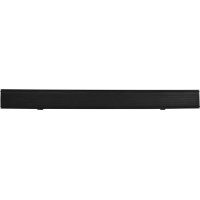
SBO680 - Soundbar SALORA - Free user manual and instructions
Find the device manual for free SBO680 SALORA in PDF.


| Product Type | Soundbar |
| Brand | Salora |
| Model | SBO680 |
| Dimensions (W x H x D) | 810 x 83 x 95 mm |
| Weight | Approximately 2.5 kg |
| Power Supply | Power adapter 20 V / 1.2 A (input 100-240 V~50/60 Hz) |
| Power Consumption | 50 W (standby ≤ 0.5 W) |
| Output Power | 60 W RMS |
| Speakers | 2 full-range speakers 55 mm (2.5 inches), impedance 4 Ω |
| Frequency Response | 20 Hz - 20 kHz |
| Input Sensitivity | 700 mV |
| Connections | 1x optical input, 1x HDMI ARC, 1x USB, 1x 3.5 mm line input, 1x DC jack |
| Wireless | Bluetooth (version not specified) |
| Main Functions | Audio modes (Music, Movie, Voice, Default), bass and treble adjustment, remote control |
| Wall Mounting | Possible (wall plugs and screws included) |
| Package Contents | Soundbar, remote control, adapter, optical cable, 3.5 mm audio cable, wall plugs, screws, user guide |
| Safety | Double insulation, automatic standby shutdown |
| Maintenance | Clean with a dry cloth, do not use liquids |
| Remote Control Batteries | 2 AAA batteries (included) |
Frequently Asked Questions - SBO680 SALORA
User questions about SBO680 SALORA
0 question about this device. Answer the ones you know or ask your own.
Ask a new question about this device
Download the instructions for your Soundbar in PDF format for free! Find your manual SBO680 - SALORA and take your electronic device back in hand. On this page are published all the documents necessary for the use of your device. SBO680 by SALORA.
USER MANUAL SBO680 SALORA
BARRE DE SON MODELE: SBO680
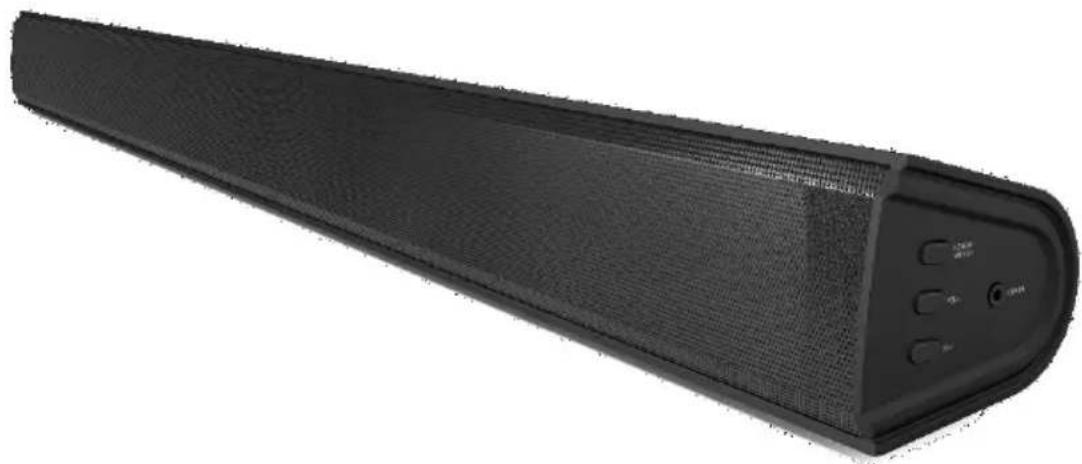
Guide d'utilisation
VEUILLEZ LIRE AVANT D'UTILISER CET APPAREIL.
- Read these Instructions.
- Keep these Instructions.
Heed allWarnings. - Follow all instructions.
- Do not use this apparatus near water.
- Clean only with a dry cloth.
- Do not block any ventilation openings. Install in accordance with the manufacturer's instructions.
- Do not install near any heat sources such as radiators, heat registers, stoves, or other apparatus (including amplifiers) that produce heat.
- Do not defeat the safety purpose of the polarized or grounding - type plug. A polarized plug has two blades with one wider than the other. A grounding type plug has two blades and a third grounding prong. The wide blade or the third prong is provided for your safety. When the provided plug does not fit into your outlet, consult an electrician for replacement of the obsolete outlet.
- Protect the power cord from being walked on or pinched particularly at plugs, convenience receptacles, and the point where they exit from the apparatus.
- Only use attachments/accessories specified by the manufacturer.
- This symbol indicates that this product incorporates double insulation between hazardous mains voltage and user accessible parts. Use only with a cart, stand, tripod, bracket, or table specified by the manufacturer, or sold with the apparatus. When a cart is used, use caution when moving the cart/apparatus combination to avoid injury from tip-over.

- Unplug this apparatus during lightning storms or when unused for long periods of time.
- Refer all servicing to qualified service personnel. Servicing is required when the apparatus has been damaged in any way, such as power-supply cord or plug is damaged, liquid has been spilled or objects have fallen into the apparatus, the apparatus has been exposed to rain or moisture, does not operate normally, or has been dropped.
Special note: When placing your unit on a lacquered or natural finish, protect your furniture with a cloth or other protective material.
FCC AND IC STATEMENT FOR USERS
This device complies with part 15 of the FCC Rules. Operation is subject to the following two conditions: (1) This device may not cause harmful interference, and (2) this device must accept any interference received, including interference that may cause undesired operation.
Federal Communication Commission Interference Statement
This equipment has been tested and found to comply with the limits for a Class B digital device, pursuant to Part 15 of the FCC Rules. These limits are designed to provide reasonable protection against harmful interference in a residential installation. This equipment generates, uses and can radiate radio frequency energy and, if not installed and used in accordance with the instructions, may cause harmful interference to radio communications. However, there is no guarantee that interference will not occur in a particular installation. If this equipment does cause harmful interference to radio or television reception, which can be determined by turning the equipment off and on, the user is encouraged to try to correct the interference by one or more of the following measures:
Reorient or relocate the receiving antenna.
- Increase the separation between the equipment and receiver.
- Connect the equipment into an outlet on a circuit different from that to which the receiver is connected.
- Consult the dealer or an experienced radio/TV technician for help.

This symbol indicates that this product incorporates double insulation between hazardous mains voltage and user accessible parts.
Warnings and Precautions
CAUTION: TO PREVENT ELECTRIC SHOCK, MATCH WIDE BLADE OF PLUG TO WIDE SLOT, FULLY INSERT.
WARNING: To reduce the risk of fire or electric shock, do not expose this apparatus to rain or moisture. When the mains plug or an appliance coupler is used as the disconnect device, the disconnect device shall remain readily operable.
CAUTION: These servicing instructions are for use by qualified service personnel only. To reduce the risk of electric shock, do not perform any servicing other than that contained in the operating instructions unless you are qualified to do so.
WARNING: Changes or modifications to this unit not expressly approved by the party responsible for compliance could void the user's authority to operate the equipment.
WARNING: Do not install this equipment in a confined or building-in space such as a book case or similar unit, and remain a well ventilation conditions at open site. The ventilation should not be impeded by covering the ventilation openings with items such as newspaper, table-cloths, curtains etc.
WARNING: Use of this unit near fluorescent lighting may cause interference regarding use of the remote. If the unit is displaying erratic behavior move away from any fluorescent lighting, as it may be the cause.
CAUTION: Only use attachments/accessories specified or provided by the manufacturer (such as the exclusive supply adapter, battery etc).
WARNING: The battery, batteries, and battery pack shall not be exposed to excessive heat such as sunshine, fire, or the like.
WARNING: Lithium batteries, like all rechargeable batteries are recyclable and should be recycled or disposed or be thrown away with the special waste. Contact your local government for disposal or recycling practices in your area. They should never be incinerated since they might explode.
WARNING: Shock hazard - Do Not Open.
Mains Plug or Direct plug-in adapter is used as disconnect device and it should remain readi-ly operable during intended use. In order to disconnect the apparatus from the mains completely, the Mains Plug or Direct plug-in adapter should be disconnected from the mains socket outlet completely.
WARNING: To reduce the risk of fire or electric shock, do not expose this product to smoke, rain, dust or moisture!

The lightning flash with arrow-head symbol, within an equilateral triangle, is intended to alert the user to the presence of non-insulated "dangerous voltage" within the product's enclosure that may be of sufficient magnitude to constitute a risk of electric shock to persons.

To reduce the risk of electric shock, do not remove cover (or back). No user-serviceable parts inside. Refer servicing to qualified service personnel.
Thank you for purchasing the excellent quality sound bar for your home.
We recommend that you spend some time reading this instruction manual in order that you fully understand all the operational features it offers. You will also find some hints and tips to help you resolve any issues. Read all the safety instructions carefully before use and keep this instruction manual for future reference.
Check the package contents
Remove all items from the packing. Retain the packaging. If you dispose of it please do so according to local regulations.
The following items are included:

Sound bar product

Remote Control
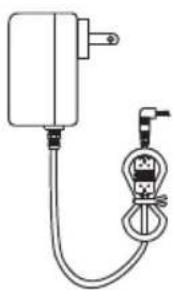
Adapter
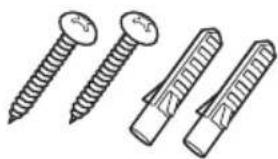
Dowels & Screws
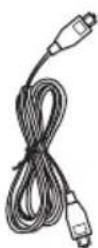
OPTICAL cable
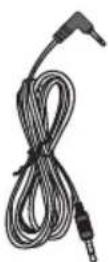
3.5mm to 3.5mm Audio Cable

Instruction Manual
Product description
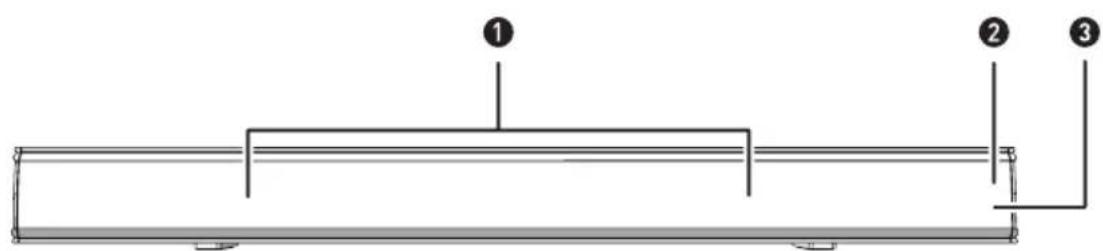
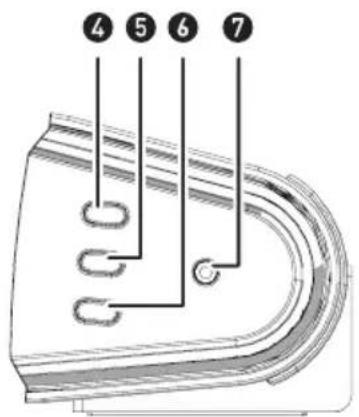
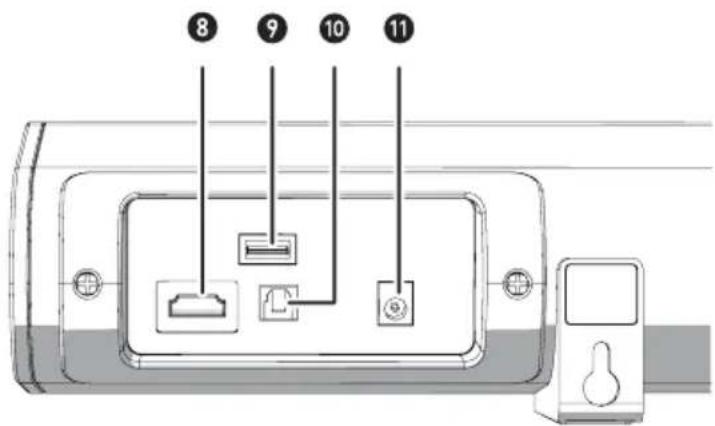
- Speaker drivers
- LED indicator light
- The remote control sensor
- Power/source
---- (Pess and hold 3 seconds for switching on or off the unit. One touch for selecting a mode during power on.)
- Volume down
- 3.5mm line in socket
- ARC socket
- USB socket
- OPTICAL IN socket
-
DC [20V 1.2A] socket
-
Volume up
Indicator lights
| STATE INDICATOR LIGHTS | |
| Power off Red | |
| Optical mode White | |
| USB mode Yellow | |
| Line in mode Green | |
| HDMI(ARC) mode Purple | |
| Bluetooth ready Flashing | blue |
| Bluetooth connected Blue | |
Remote control (batteries installation)
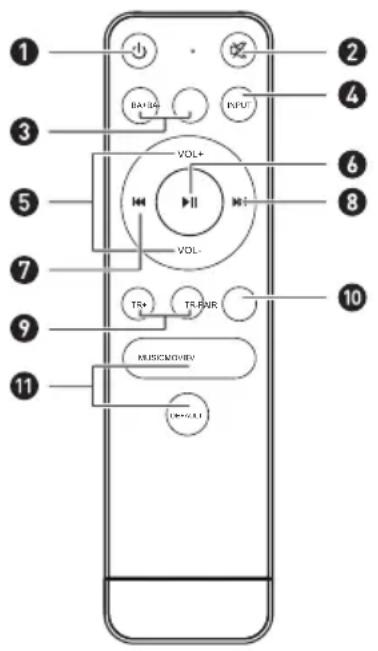
- button --- Press the unit between On and Standby mode.
- button --- Press to mute the sound. Press again resume.
- BASS+/BASS- buttons ---- (It can adjust the Bass volume in mode of DEFAULT.)
- INPUT button --- Select the modes.
- VOL +/- buttons --- Adjust the volume.
- button ---- Play/pause/resume playback in Bluetooth mode.
- button --- Skip backwards to the beginning of the track or to the previous track in Bluetooth mode.
- button --- Skip forwards to the next track in Bluetooth mode.
- Treble+/Treble- buttons ---- (It can adjust the Treble volume in mode of DEFAULT.)
- BT PAIR button --- Disconnect the bluetooth device.
- Music/TV/Movie/Voice/DEFAULT buttons --- Press the button to select a desired music mode: MUSIC, MOVIE,VOICE, DEFAULT.
Battery Replacement for the Remote Control
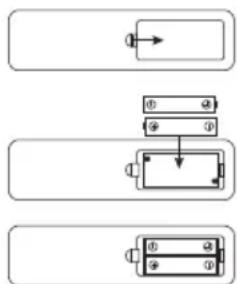
- Press and slide the back cover to open the battery compartment.
- Insert two "AAA" size batteries (supplied). Make sure the (+) and (-) ends of the batteries match (+) and (-) ends indicated in the battery compartment.
- Close the battery compartment cover.

Handling the battery
- Improper of incorrect use of batteries may cause corrosion or battery leakage which can cause fire personal injury or damage to property.
We recommend to use the battery type indicated in this manual. - Don't install or mix new and old batteries OR mix different types of batteries.
- Don't dispose used batteries as a kind of domestic waste. Dispose of them accords to local regulations.
Handling the Remote Control
- Don't drop the remote control.
- Don't spill water or any liquid on the remote control.
- Don't place the remote control on a wet object or near any source of excessive heat.
- Take out the batteries from the remote control if it is not necessary to use for a long period of time. Otherwise, they may have corrosion and leakage which incurs physical injury, property damage or fire etc.
Product installation
Wall Mounting
Precautions :
Installation must be carried out by qualified personnel only. Incorrect assembly can result in severe personal injury and property damage.
If you are going to install this soundbar yourself, you must have studied installations, such as electrical wiring and plumbing that may be buried inside the wall.
It is installer's responsibility to verify that the wall safely support the total load of the Soundbar.
Additional tools (not included) are required for the installation.
Do not overtighten screws.
Keep this user manual for future reference.
Use an electric stud finder to check the wall type before drilling and mounting.
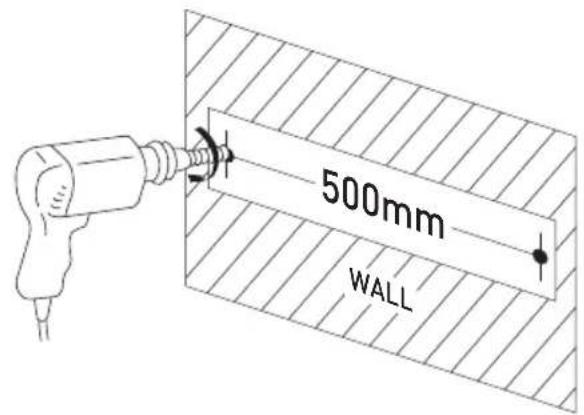
- Drill 2 parallel holes (Ø3-8mm each according to wall type) in the wall. The distance between 2 holes should be 500mm.
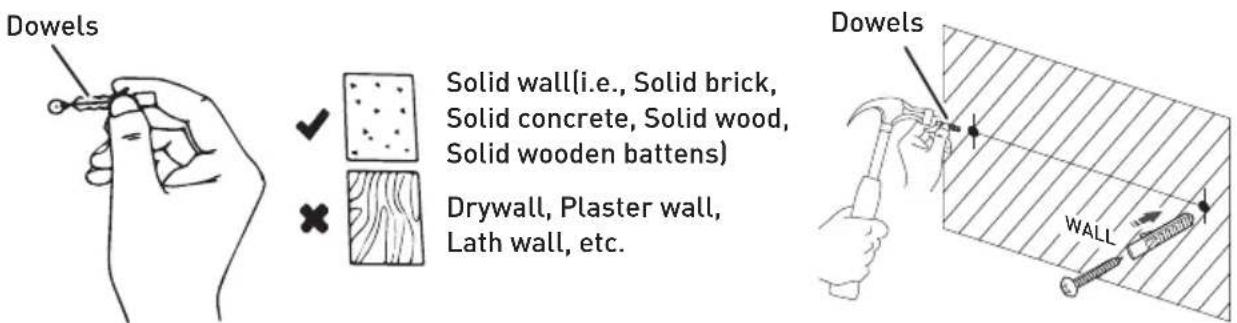
- Firmly fix a dowel (included) into each hole in the wall if necessary.
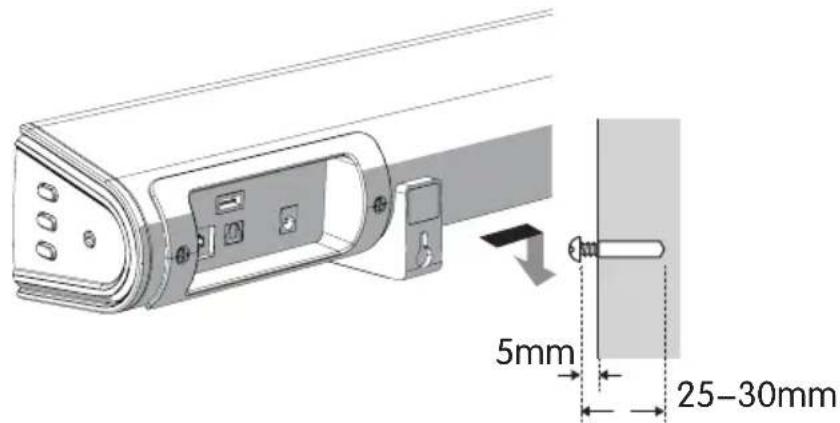
- Insert a screw (included) into each dowel. Make sure to leave a 5mm gap between the wall and the screw's head. Lift the Bar over the heads of the screws and slot into place.
Connections
Using the OPTICAL Connection
You will need: An audio source with an optical audio output and a digital optical audio cable (not included)
Connect the Digital Optical Audio cable to the optical output on the audio source and to the Optical Input on the speaker bar.
Press the POWER/SOURCE button on side panel or POWER button directly on the remote control to switch on the unit.
Press the OPTICAL button on the remote control to switch to Optical mode or one touch POWER/SOURCE button on main unit repeatedly to select the Optical mode. The mode indicator LED will turn White.
Using the native controls on your connected device, make sure the audio settings are set to PCM or Optical Audio and are turned on.
Audio from the connected audio source will now be played through the speakers.
Using the native controls on your connected device, make sure the audio settings are set to PCM or optical audio and are turned on.
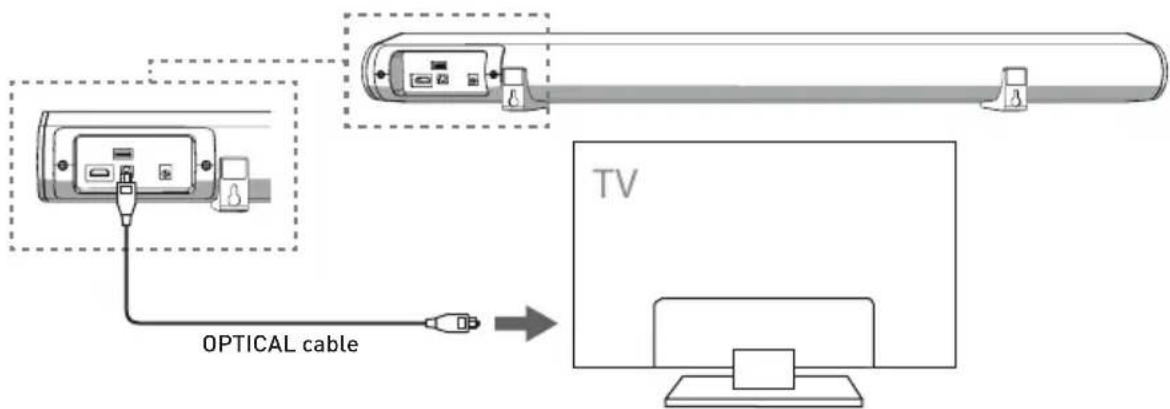
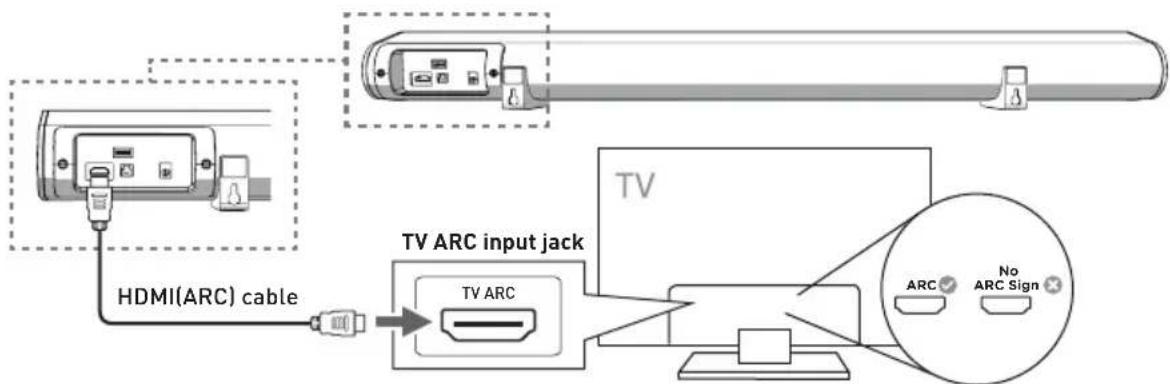
Using the ARC Connection (not included)
-
TV ARC connection transmits digital audio signals between devices. If your TV have TV ARC connector, using them will provide the best possible audio performance quality.
-
Using a Version 1.4 or above of TV ARC cable (not supplied).
- Connect the cable to the TV's TV ARC out to the Soundbar TV ARC in.
-
Press the "INPUT" button on the remote control or "SOURCE" button on main unit repeatedly to select the TV ARC in mode, the LED will be Purple.
-
If your TV is equipped with TV ARC function, you can deliver its sound to the Soundbar via the TV ARC TV out connection. It will not require additional audio connections to the Soundbar. The ARC signal is active when the TV ARC source is selected. The detailed benefits are as follows:
-
TV remote control is able to control the power on or off the Soundbar.
- TV remote control is able to control the volume up or down of the Soundbar.
Remarks:
- The transmission of digital audio signals between devices is not workable for all the TV brands in the markets because the branded TVs are not cross-brand compatibility to each other.
- Use yoursource device (such as a TV, CD player, or cable tellite receiver). The audio output mode is set to ARC, or turn o the sound source output.
Using the USB Connection
Connect your USB device to the USB jack on the soundbar. Press the "INPUT" button on the remote, and the LED indicator will be Yellow. Play music files from the USB device through the Soundbar.

Using the MP3 LINK Connection (Line In)
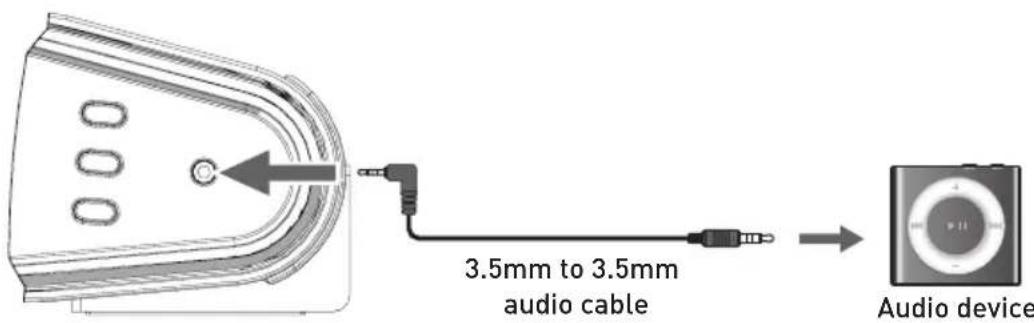
Plug one end of a 3.5mm audio input cable (included) into the Line in on the unit. Before use, disconnect any cables connected to the Stereo RCA Inputs.
Plug the other end of the cable into the audio output/headphone output on an MP3 player or other audio source.
Press the POWER button on side panel or POWER button directly on the remote control to switch on the unit.
One touch the SOURCE button repeatedly or directly press LINE in button on remote control to enter LINE in mode. The mode indicator will turn green.
Audio played through the connected device will now be heard through the speakers.
Connecting to the Mains Supply
Ensure that the power supply voltage is in the voltage of 100V 240V
This unit is designed to use adapter.
Connecting the unit to any other power source may cause damage to the unit.
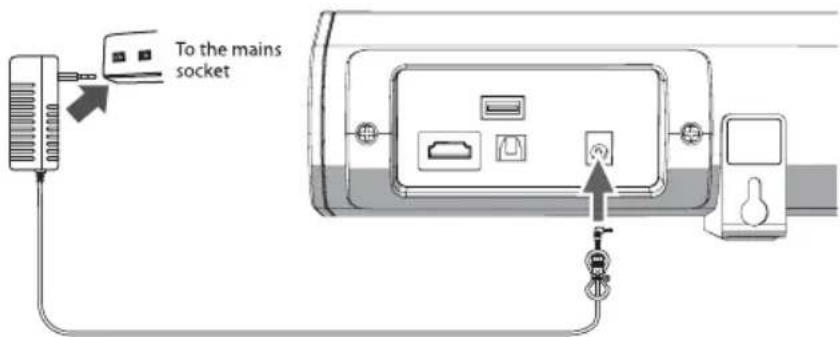
Unwind the mains cable to its full length. Connect the mains plug to a mains socket. Make sure the mains plug is fully inserted into the mains socket.
The mains plug/appliance coupler is used as the disconnect device, the disconnect device must remain readily operable.
Connect the Adapter to the unit and AC Socket.
Ensure all audio connections of the unit are connected before connecting to the mains power socket. Unplug the power cord from the outlet when the unit is use for an extended period of time.
Bluetooth Operation
Pairing a Bluetooth Device for the First Time
Press the POWER button on the unit or the POWER button on the remote control to switch on the unit.
Select and press the BT button directly on the remote control or press the SOURCE button repeatedly to enter Bluetooth mode, indicated by a flashing blue light.
Using the native controls on your Bluetooth device, selects the "SB0680" in your Bluetooth settings to pair.
If your device requests a password, enters the default "0000". Refer to the "user manual" for your specific device for instructions on pairing and connecting Bluetooth devices.
When successfully paired and connected, a beep will issue from the unit and the Pairing Indicator will display a solid blue light. After initial pairing, the unit will stay paired unless unpaired manually by the user, or until it is erased due to a reset of the device.
Soundbar has Bluetooth connected to a device, you can press and hold the MUTE/PAIR button 3 seconds to exit this device in order to pair the device with another Bluetooth device.
If your device should become unpaired or you find it is unable to connect, repeat the above steps.
Playing Audio Wirelessly
Follow the instructions for Pairing a Bluetooth Device.
Use the native controls on the connected Bluetooth Device to select a track.
To play, pause or skip the selected track, use the native controls on the connected Bluetooth Device.
Audio played through the connected Bluetooth device will now be heard through the speakers.
Specifications
| Amplifier | |
| Power output | 60W RMS |
| Frequency response | 20Hz - 20KHz ± 3dB |
| Input sensitivity | 700mV |
| Main unit | |
| Power supply | Input: 100-240V ~ 50-60Hz Output: 20V --- 1.2A |
| Power consumption | 50W |
| Standby power consumption | ≤0.5W |
| Full range speaker drivers | Impedance: 4 Ohm, 55mm(2.5") Frequency response: 20Hz-20KHz |
| Dimensions | 810 x 83 x 95mm |
| Mains cable length | 1 metre |
- Guide d'utilisation
- FCC AND IC STATEMENT FOR USERS
- Federal Communication Commission Interference Statement
- Warnings and Precautions
- Check the package contents
- Product description
- Indicator lights
- Remote control (batteries installation)
- Battery Replacement for the Remote Control
- Handling the battery
- Handling the Remote Control
- Product installation
- Wall Mounting
- Connections
- Using the OPTICAL Connection
- Using the ARC Connection (not included)
- Remarks:
- Using the USB Connection
- Using the MP3 LINK Connection (Line In)
- Connecting to the Mains Supply
- Bluetooth Operation
- Playing Audio Wirelessly
- Specifications
Brand : SALORA
Model : SBO680
Category : Soundbar