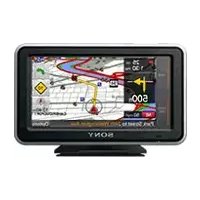
NVU83T - Gps SONY - Free user manual and instructions
Find the device manual for free NVU83T SONY in PDF.



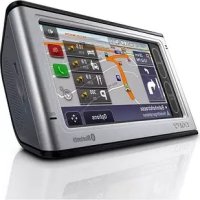
| Product Type | Car navigation GPS |
| Brand | Sony |
| Model | NVU83T |
| Dimensions | Approx. 145 x 87 x 20 mm (W x H x D) |
| Weight | Approx. 250 g |
| Power Supply | 5 V DC via supplied USB cable or optional AC adapter |
| Display | 4.8-inch LCD screen (16:9), resolution 816 x 480 pixels |
| Battery | Rechargeable lithium-ion, battery life up to 2 h, charge 1.5 h in standby |
| Main Functions | GPS navigation, hands-free Bluetooth (NV-U83T), Memory Stick Duo support, POSITION plus positioning |
| Wireless Communications | Bluetooth version 2.0, profiles HFP and OPP |
| GPS Reception | Integrated GPS antenna; optional external antenna for NV-U73T |
| Maintenance and Cleaning | Clean the suction cup with a soft non-lint cloth; screen with cleaning cloth |
| Safety | Use the supplied car battery adapter; do not obstruct driver's view; obey traffic laws |
| Spare Parts and Repairability | Replaceable 2.5A fuse; removable battery for disposal; optional accessories: AC adapter XA-AC13, car adapter XA-DC3, TMC mount NVA-CU5T |
| General Information | Operating temperature: 5 to 45 °C; max. consumption 1.5 A |
Frequently Asked Questions - NVU83T SONY
User questions about NVU83T SONY
0 question about this device. Answer the ones you know or ask your own.
Ask a new question about this device
Download the instructions for your Gps in PDF format for free! Find your manual NVU83T - SONY and take your electronic device back in hand. On this page are published all the documents necessary for the use of your device. NVU83T by SONY.
USER MANUAL NVU83T SONY
Personal Navigation System Before You Use
The model and serial numbers are located on the back of the unit in the built-in GPS antenna compartment.
Record these numbers in the spaces provided below.
Refer to these numbers whenever you call upon your Sony dealer regarding this product.
Model No. Serial No.
nav-u


NV-U83T
NV-U73T
© 2008 Sony Corporation
Using the manuals
The following manuals are included with the unit.
Before installing or operating the unit, read these manuals thoroughly and retain them for future reference.
- Read This First
Contains instructions on how to install the unit in your car, the location of controls, and the featured navigation operations.
Before You Use (this manual)
Contains important notices to be read prior to use, including warnings, specifications, and troubleshooting instructions.
- Quick Guide for Bluetooth Hands-free Calling (NV-U83T only)
Contains instructions on Bluetooth function basic operations. - Instruction Manual (PDF on the supplied disc)
Contains descriptions of all functions.
Notes on this manual
- This manual contains instructions for the NV-U83T and U73T.
Available functions such as POSITION plus or Bluetooth differ depending on the model. Check your model name and refer to the different indications in each section of this manual. - Illustrations in this manual may differ from the actual device.
Warning
Operation is subject to the following two conditions;
- this device may not cause interference.
- this device must accept any interference, including interference that may cause undesired operation of the device.
This equipment has been tested and found to comply with the limits for a Class B digital device, pursuant to Part 15 of the FCC Rules.
These limits are designed to provide reasonable protection against harmful interference in a residential installation.
This equipment generates, uses, and can radiate radio frequency energy and, if not installed and used in accordance with the instructions, may cause harmful interference to radio communications. However, there is no guarantee that interference will not occur in a particular installation. If this equipment does cause harmful interference to radio or television reception, which can be determined by turning the equipment off and on, the user is encouraged to try to correct the interference by one or more of the following measures:
- Reorient or relocate the receiving antenna.
- Increase the separation between the equipment and receiver.
- Connect the equipment into an outlet on a circuit different from that to which the receiver is connected.
- Consult the dealer or an experienced radio/TV technician for help.
You are cautioned that any changes or modifications not expressly approved in this manual could void your authority to operate this equipment.
If you have any questions about this product, you may contact:
Sony Customer Information Services Center
Call: 1-(800)-222-7669
Address: 12451 Gateway Blvd., Fort Myers, FL 33913
URL: www.sony.com/nav-u/support
For users of the NV-U83T
This equipment has been tested and found to comply with the limits for a Class B digital device, pursuant to Part 15 of the FCC Rules and RSS-Gen of IC Rules.
This transmitter must not be co-located or operated in conjunction with any other antenna or transmitter. This equipment complies with FCC and IC radiation exposure limits set forth for uncontrolled equipment and meets the FCC radio frequency (RF) Exposure Guidelines in Supplement C to OET65 and RSS-102 of the IC radio frequency (RF) Exposure rules. This equipment has very low levels of RF energy that it deemed to comply without maximum permissive exposure evaluation (MPE). But it is desirable that it should be installed and operated with at least 20~cm and more between the radiator and person's body (excluding extremities: hands, wrists, feet and ankles).
For customers in Canada
The installer of this radio equipment must ensure that the antenna is located or pointed such that it dose not emit RF field in excess of Health Canada limits for the general population; Consult Safety Code 6, obtainable from Health Canada's website www.hc-sc.gc.ca/rpb.
Declaration of Conformity
Trade Name: Sony
Model No.: NV-U83T, NV-U73T
Responsible Party: Sony Electronics Inc.
Address: 16530 Via Esprillo,
San Diego, CA 92127
U.S.A.
Telephone number: 858-942-2230
This device complies with Part 15 of the FCC Rules. Operation is subject to the following two conditions: (1) This device may not cause harmful interference, and (2) this device must accept any interference received, including interference that may cause undesired operation.
Disposal of Old Electrical & Electronic Equipment (Applicable in the European Union and other European countries with separate collection systems)
This symbol on the product or on its
packaging indicates that this product shall not be treated as household waste. Instead it shall be handed over to the applicable collection point for the recycling of electrical and electronic equipment. By ensuring this product is disposed of correctly, you will help prevent potential negative consequences for the environment and human health, which could otherwise be caused by inappropriate waste handling of this product. The recycling of materials will help to conserve natural resources. For more detailed information about recycling of this product, please contact your local Civic Office, your household waste disposal service or the shop where you purchased the product.
Applicable accessory: Car battery adapter
Caution
IN NO EVENT SHALL SONY BE LIABLE FOR ANY INCIDENTAL, INDIRECT OR CONSEQUENTIAL DAMAGES OR OTHER DAMAGES INCLUDING WITHOUT LIMITATION LOSS OF PROFITS, LOSS OF REVENUE, LOSS OF DATA, LOSS OF USE OF THE PRODUCT OR ANY ASSOCIATED EQUIPMENT, DOWNTIME, AND PURCHASER'S TIME RELATED TO OR ARISING OUT OF THE USE OF THIS PRODUCT, ITS HARDWARE AND/OR ITS SOFTWARE.

Table of Contents
Warning. 6
Precautions 9
On Bluetooth communication (NV-U83T only). 9
About“Memory Stick” 10
What is a "Memory Stick"? 10
Types of "Memory Stick Duo" that the system can use 10
Note on LCD panel 10
Maintenance 11
Cleaning 11
Fuse replacement. 11
Notes on unit disposal. 11
Specifications 12
Troubleshooting. 14
Resetting the unit. 15
Warning
PLEASE READ THIS MANUAL AND THE SUPPLIED "READ THIS FIRST" COMPLETELY BEFORE INSTALLING OR OPERATING YOUR PERSONAL NAVIGATION SYSTEM. IMPROPER INSTALLATION OR USE OF THIS DEVICE MAY CAUSE ACCIDENT, INJURY OR DEATH.
Be sure to use the supplied or optional car battery adapter or AC adapter, which is compatible with the unit/cradle. Otherwise, excessive voltage may be applied to the unit/ cradle and may cause smoke, fire, or accident. For details on optional accessories for your model, see "Specifications" on page 12.
On safety
-
Besureto:
-
install the navigation system in a safe place where it does not obstruct the driver's view.
not install the unit above an airbag. - place the cables and cradle where they do not obstruct driving.
- attach the unit to the cradle properly, otherwise the unit may fall.
clean the surface of the suction cup and attachment surface before attaching. When installing on the dashboard, clean the surface on which the suction cup will be attached.
Also, confirm that the suction cup is securely attached after installation. Otherwise, the unit or cradle may fall.
Failure to do so may result in unsafe driving conditions.
- Do not apply excessive force to the unit or cradle as it may fall.
- Comply with local traffic rules, laws and regulations.
- Do not continuously watch the unit while driving. It is dangerous and may cause a traffic accident.
- If you need to operate the navigation system while driving, be sure to stop the car in a safe place before operating.
-
Do not modify the unit.
-
Do not disassemble the unit except when disposing of it.
On handling
- Do not let foreign objects get inside the connector of the unit, as it may cause malfunction.
- When the unit is not in use, turn it off by pressing/sliding l / 0 . Remove the unit from the cradle, then disconnect the car battery adapter, otherwise battery drain may result. Note the following:
If your car's cigarette lighter socket is not connected to ACC on your ignition switch, power will continue to be supplied to the unit's built-in power supply even when the ignition is off or the unit is not in use.
- Do not connect any accessory other than those supplied or optional.
- Do not expose the unit to fire or water, as it may cause malfunction.
- To disconnect a cable, pull it out by grasping the plug, not the cable.
- Be sure to remove the unit out of the car when leaving your car to prevent theft or high temperature damage inside the car.
Note that the built-in battery cannot be charged outside the temperature range 5 - 45^ (41 - 113°F). - Do not leave the unit in high ambient temperature as the built-in battery capacity will deteriorate, or will become unchargeable.
On GPS
As GPS information is obtained from satellites, it may be impossible or difficult to obtain information in locations such as:
- Tunnel or underground
Under a highway - Between high buildings
- Between tall trees with dense foliage
Note
GPS signal reception may be poor depending on the material of the car's windshield.
On the positioning system (POSITION plus) (NV-U83T only)
The system has a function that allows the current car position to be correctly displayed even at locations where the GPS signal is temporarily interrupted or poorly received, as when going under an overpass. To activate this function, do the following:
- Attach the unit to the cradle.
- Drive for a while in an area where the GPS signal is clearly received.
The positioning system will become ready for operation after you have driven a little with the unit on.
Notes
- The accuracy of this function may deteriorate if the unit is installed near a heated or heat-reflecting windshield.
- Depending on the conditions, the current car position or the movement may not be accurately displayed. This, however, will be corrected as soon as the GPS signal reception resumes.
IMPORTANT NOTICE for the Bluetooth function! (NV-U83T only)
Safe and efficient use
Changes or modifications to this unit not expressly approved by Sony may void the user's authority to operate the equipment.
Please check for exceptions, due to national requirement or limitations, in usage of Bluetooth equipment before using this product.
Driving
Check the laws and regulations on the use of cellphones and hands-free equipment in the areas where you drive.
Always give full attention to driving and pull off the road and park before making or answering a call if driving conditions so require.
Radio frequency exposure
RF signals may affect improperly installed or inadequately shielded electronic systems in cars, such as electronic fuel injection systems, electronic antiskid (antilock) braking systems, electronic speed control systems or airbag systems. For installation or service of this device, please consult with the manufacturer or its representative of your car. Faulty installation or service may be dangerous and may invalidate any warranty that may apply to this device.
Consult with the manufacturer of your car to ensure that the use of your cellphone in the car will not affect its electronic system.
Check regularly that all wireless device equipment in your car is mounted and operating properly.
Connecting to other devices
When connecting to any other device, please read its user guide for detailed safety instructions.
Emergency calls
This Bluetooth car hands-free and the electronic device connected to the hands-free operate using radio signals, cellphone, and landline networks as well as user-programmed function, which cannot guarantee connection under all conditions. Therefore do not rely solely upon any electronic device for essential communications (such as medical emergencies).
Remember, in order to make or receive calls, the hands-free and the electronic device connected to the hands-free must be switched on in a service area with adequate cellular signal strength.
Emergency calls may not be possible on all cellphone networks or when certain network services and/or phone features are in use.
Check with your local service provider.
On the software
Read the "END-USER LICENSE
AGREEMENT" carefully before use.
continue to next page
Warning
- This navigation system should not be used to replace your own judgment. No itinerary suggested by this navigation system should ever override any highway regulations, your own judgment, or a knowledge of safe driving practices. Do not follow the navigation system's suggested itinerary if it would cause you to perform a dangerous or illegal act, place you in a dangerous situation, or take you into an area you consider unsafe.
- The advice provided by the navigation system is to be regarded as a suggestion only. There may be times when the navigation system displays the vehicle's location incorrectly, fails to suggest the shortest route, or fails to direct you to your desired destination. In such instances, rely on your own driving judgment, taking into account the driving conditions at the time.
- Do not use the navigation system to locate emergency services. The database does not contain a complete listing of emergency services such as police stations, fire halls, hospitals and walk-in clinics. Please show discretion and ask for directions in such instances.
-
As the driver, you alone are responsible for your driving safety.
-
In order to avoid a traffic accident, do not operate the system while driving.
- In order to avoid a traffic accident, operate the system only when the vehicle is stopped at a safe place and the parking brake is on.
- In order to avoid a traffic accident or traffic offence, remember that actual road conditions and traffic regulations take precedence over the information contained on the navigation system.
- The Software may contain inaccurate or incomplete information due to the passage of time, changing circumstances, and the sources of information used. Please respect current traffic conditions and regulations at all times while driving.
-
Where actual road conditions and highway regulations differ from the information contained on the navigation system, abide by the highway regulations.
-
Keep the amount of time spent viewing the screen while driving to a strict minimum.
The navigation system does not provide, nor represent in any way information on: traffic and highway regulations; technical aspects of the vehicle including weight, height, width, load and speed limits; road conditions including grade, percentage of incline and surface conditions; obstacles such as the height and width of bridges and tunnels; and other current driving or road conditions. Always rely on your own judgment when driving a car, taking into account current driving conditions.
Precautions
On Bluetooth communication (NV-U83T only)
- Bluetooth wireless technology operates within a range of about 10m (about 30 ft).
Maximum communication range may vary depending on obstacles (person, metal, wall, etc.) or electromagnetic environment.
- When using the Bluetooth function, install the unit within 60~cm (about 20 in) from the driver.
-
The following conditions may affect the sensitivity of Bluetooth communication:
-
There is an obstacle such as a person, metal, or wall between this unit and cellphone.
-
A device using 2.4GHz frequency, such as a wireless LAN device, cordless telephone, or microwave oven, is in use near this unit.
-
Because Bluetooth devices and wireless LAN (IEEE802.11b/g) use the same frequency, microwave interference may occur and resulting in communication speed deterioration, noise, or invalid connection if this unit is used near a wireless LAN device. In such as case, perform the following:
-
Use this unit at least 10m (about 30 ft) away from the wireless LAN device.
- If this unit is used within 10m of a wireless LAN device, turn off the wireless LAN device.
-
Install this unit and cellphone as near to each other as possible.
-
Microwaves emitting from a Bluetooth device may affect the operation of electronic medical devices. Turn off this unit and the cellphone in the following locations, as it may cause an accident:
where inflammable gas is present, in a hospital, train, airplane, or a petrol (gas) station
- near automatic doors or a fire alarm
- This unit supports security capabilities that comply with the Bluetooth standard to provide a secure connection when the Bluetooth wireless technology is used, but security may not be enough depending on the setting. Be careful when communicating using Bluetooth wireless technology.
- We do not take any responsibility for the leakage of information during Bluetooth communication.
-
Connection with all cellphones cannot be guaranteed.
-
A cellphone featuring Bluetooth function is required to conform to the Bluetooth standard specified by Bluetooth SIG, and be authenticated.
- Even if the connected cellphone conforms to the above mentioned Bluetooth standard, some cellphones may not be connected or work correctly, depending on the features or specifications of the cellphone.
- While talking on the phone hands-free, noise may occur, depending on the model of your cellphone or communication environment.
- Depending on the cellphone to be connected, it may require some time to start communication.
Others
- Using the Bluetooth device may not function on cellphones, depending on radio wave conditions and location where the equipment is being used.
- If you experience discomfort after using the Bluetooth device, stop using the Bluetooth device immediately. Should any problem persist, consult your nearest Sony dealer.
About "Memory Stick"
What is a "Memory Stick"?
"Memory Stick" is a compact-size IC recording medium with a large capacity. It has been designed not only for exchanging/sharing digital data among "Memory Stick" compatible products, but also for serving as an insertable/removable external storage medium that can save data.
Types of "Memory Stick Duo" that the system can use
With the system, you can use the following types of "Memory Stick Duo."
- "Memory Stick Duo" (Not compatible with MagicGate)
"MagicGate Memory Stick Duo"* 2
"Memory Stick PRO Duo"*2
1 The system has been demonstrated as operable with a "Memory Stick Duo" with a capacity of 8 GB or smaller. However, we do not guarantee the operations of all the "Memory Stick Duo" media.
2 "MagicGate Memory Stick Duo" and "Memory Stick PRO Duo" are equipped with MagicGate functions. MagicGate is copyright protection, using encryption technology. Data with MagicGate protection cannot be played with this unit.
Notes
- This system does not support parallel high-speed data transfer.
- Standard-size "Memory Stick" cannot be used in this system.
- When using a "Memory Stick Duo," make sure to check correct insertion direction. Wrong usage may cause trouble with the system.
- Do not insert "Memory Stick Micro" directly into "Memory Stick PRO" compliant product without M2 adapter supplied with the media (or sold separately). If you attempt to insert it without attaching to the M2 adapter, it may not be able to be removed.
- Do not place the "Memory Stick Duo," "Memory Stick Micro," or M2* adapter within the reach of children to prevent them from swallowing it by accident.
- Avoid removing the "Memory Stick Duo" from the system while the system is reading or writing data.
Data may be damaged in such occasions:
-
"Memory Stick Duo" is removed or the system is turned off during a read or write operation.
"Memory Stick Duo" is used in a location subject to static electricity or electrical noises. -
We recommend that you backup any important data.
- Do not bend, drop or apply strong shock to the "Memory Stick Duo."
- Do not disassemble or modify the "Memory Stick Duo."
- Do not allow the "Memory Stick Duo" to get wet.
-
Do not use or store the "Memory Stick Duo" in a location that is subject to:
-
Extremely high temperature, such as in a car parked in the sun
- Direct sunlight
High humidity or places with corrosive substances
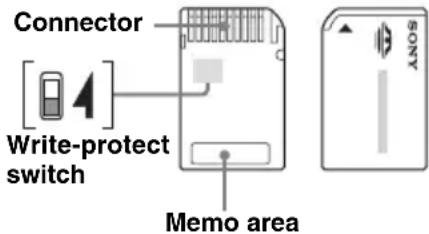
- Do not touch the "Memory Stick Duo" connector with your finger or metallic objects.
- You cannot record, edit or delete data if you slide the write-protect switch to LOCK.
- When you slide the write-protect switch of the "Memory Stick Duo," use a thin-pointed device.
- When you use a "Memory Stick Duo" without the write-protect switch, be careful not to edit or delete the data by accident.
- When you write on the memo area of the attached label, do not write forcefully.
- When you carry or store the "Memory Stick Duo," put it in the case supplied with it.
- Abbreviation for "Memory Stick Micro."
Note on LCD panel
Some stationary blue, red or green dots may appear on the monitor. These are called "bright spots," and can happen with any LCD. The LCD panel is precision-manufactured with more than 99.99% of its segments functional. However, it is possible that a small percentage (typically 0.01% ) of the segments may not light up properly. This will not, however, interfere with your viewing.
Maintenance
Cleaning
- Clean the surface of the suction cup with a soft, wet lint-free cloth if it becomes dirty and attachment strength weakens.
Be sure to dry the suction cup before reattaching. - Clean the display window with a commercially available cleaning cloth.
Note
If the suction cup leaves a trace on the windshield, wipe with water.
Fuse replacement
When replacing the fuse in the car battery adapter, be sure to use one matching the amperage rating stated on the original fuse (2.5 A). If the fuse blows, check the power connection and replace the fuse. If the fuse blows again after replacement, there may be an internal malfunction. In such a case, consult your nearest Sony dealer.
Warning
Never use a fuse with an amperage rating exceeding the one supplied with the unit as this could damage the unit.
Notes on unit disposal
Remove the built-in lithium-ion battery when disposing of the unit, and return the battery to a recycling location.
The procedure for removing the battery is explained below.
Note
Never disassemble the unit except when disposing of it.
NV-U83T
1 Press the RESET button to turn off the unit.
2 Remove the 2 rubber plugs on the rear of the unit, then the 4 screws using a screw driver.
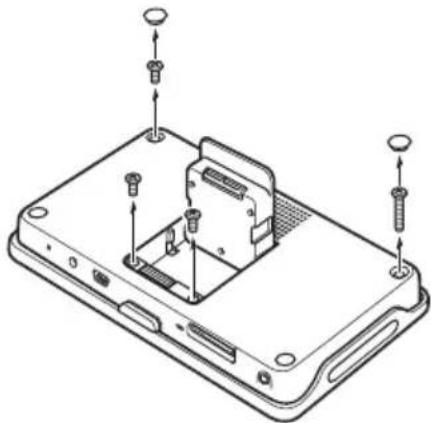
3 Remove the rear cover.
Use a sharp object, such as a flat head driver, in the places shown in the illustration to release the catches and open the rear cover.

4 Remove the screw and battery as shown below.
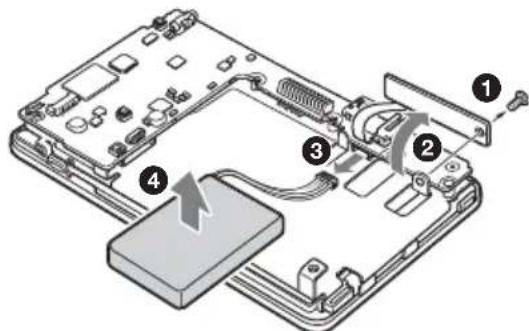
5 Insulate the connector terminal by wrapping with a tape.
NV-U73T
1 Press the RESET button to turn off the unit.
2 Remove the 4 rubber plugs on the rear of the unit, then the 4 screws using a screw driver.
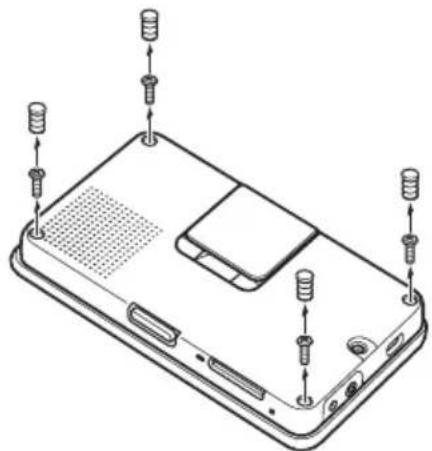
3 Remove the rear cover.
Press where shown in the illustration 1 and 2 to release the catches, then open the rear cover with your hands 3.
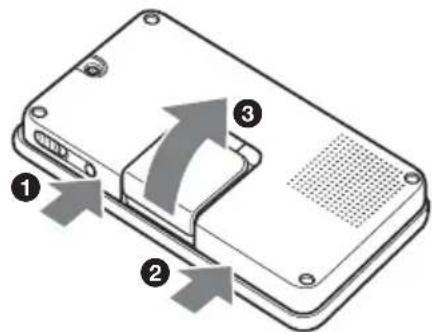
4 Remove the battery.

5 Insulate the connector terminal by wrapping with a tape.
Notes on the lithium-ion battery
- Keep the battery out of the reach of children.
- Do not hold the battery with metallic tweezers, otherwise a short-circuit may occur.
WARNING
Battery may explode if mistreated.
Do not recharge, disassemble, or dispose of in fire.
RECYCLING LITHIUM-ION BATTERIES
Lithium-ion batteries are recyclable.
You can help preserve our environment by returning your used rechargeable batteries to the collection and recycling location nearest you.

For more information regarding recycling of rechargeable batteries, call toll free 1-800-822-8837, or visit http://www.rbrc.org/.
Caution: Do not handle damaged or leaking Lithium-ion batteries.
Specifications
NV-U83T
Main unit
Operating temperature: 5 - 45^ (41 - 113^)
Power requirements: DC 5 V
from supplied USB cable or optional AC adapter
Connection terminals:
Cradle connector
DC IN 5V jack
USB jack
Headphone jack
Memory card slot: Memory Stick Duo slot
Speaker: 20 × 40 ~mm (0.8 × 1.6 in) oval speaker
Consumption current: Max. 1.5 A
Dimensions: Approx. 145 × 87 × 20 ~mm
(5.7× 3.4× 0.8 in)
(w× h× d , protruding parts excluded)
Mass: Approx. 250g (8.8 oz)

Monitor
System: Transmissive liquid crystal display
Drive system: a-Si TFT active matrix system
Dimensions: 4.8 in (16:9)
Approx. 106× 60 122mm
(4.2× 2.4,4.8 in) (h× v,d)
Segment: 391,680 (816 × 480) dots
Wireless Communication
Communication System:
Bluetooth Standard version 2.0
Output: Bluetooth Standard Power Class 2 (Max. +4 dBm)
Maximum communication range:
Line of sight approx. 10m (32.8 ft)*1
Frequency band:
2.4 GHz band (2.4000 - 2.4835 GHz)
Modulation method: FHSS
Compatible Bluetooth Profiles*2:
HFP (Hands-free Profile)
OPP (Object Push Profile)
*1 The actual range will vary depending on factors such as obstacles between devices, magnetic fields around a microwave oven, static electricity, reception sensitivity, antenna's performance, operating system, software application, etc.
*2 Bluetooth standard profiles indicate the purpose of Bluetooth communication between devices.
Cradle
Operating temperature: 5 - 45^ (41 - 113^)
Power requirements: DC 5.2 V
from supplied 12V / 24V car battery adapter (negative ground)
Connection terminals:
Unit connector
DC IN 5.2V jack
TMC antenna jack
Reception frequency: 87.5 - 107.9MHz
Built-in battery charging time/usage time
Charging time
With the supplied car battery adapter/optional AC adapter: Approx. 3 hours (with unit turned on), or 1.5 hours (in standby mode)
With the supplied USB cable:
Approx. 3 hours (in standby mode)
Usage time
Up to 2 hours (depending on usage)
Optional accessories
AC Adapter:XA-AC13
Car Battery Adapter:XA-DC3
TMC Car Cradle: NVA-CU5T
Design and specifications are subject to change without notice.

- Halogenated flame retardants are not used in the certain printed wiring boards.
- Use of rechargeable lithium ion batteries.
Corrugated cardboard is used for the packaging cushions.
VOC (Volatile Organic Compound)-free vegetable oil based ink is used for printing the carton.
NV-U73T
Main unit
Operating temperature: 5 - 45^ (41 - 113^)
Power requirements: DC 5 - 5.2 V
from supplied USB cable, optional AC adapter, or supplied 12V / 24V car battery adapter (negative ground)
Connection terminals:
DC IN 5-5.2V jack
USB jack
External GPS antenna jack
TMC antenna jack
Reception frequency: 87.5 - 107.9 MHz
Memory card slot: Memory Stick Duo slot
Speaker: 30 mm (1.2 in) circular speaker
Consumption current: Max. 1.5 A
Dimensions: Approx. 133 × 79 × 20 ~mm
(5.2× 3.1× 0.8 in)
(w× h× d , protruding parts excluded)
Mass: Approx. 210g (7.4 oz)
Monitor
System: Transmissive liquid crystal display
Drive system: a-Si TFT active matrix system
Dimensions: 4.3 in (16:9)
Approx. 95 × 54 , 109 ~mm
(3.7× 2.1,4.3 in) (h× v,d)
Segment: 391,680 (816 × 480) dots
continue to next page
Built-in battery charging time/usage time
Charging time
With the supplied car battery adapter/optional AC adapter: Approx. 2 hours (with unit turned on), or 1 hour (in standby mode)
With the supplied USB cable: Approx. 2 hours (in standby mode)
Usage time
Up to 2 hours (depending on usage)
Optional accessories
AC Adapter:XA-AC13
Car Battery Adapter:XA-DC3
External GPS Antenna: VCA-42
Design and specifications are subject to change without notice.

- Halogenated flame retardants are not used in the certain printed wiring boards.
- Use of rechargeable lithium ion batteries.
Corrugated cardboard is used for the packaging.
cushions.
VOC (Volatile Organic Compound)-free vegetable oil based ink is used for printing the carton.
Troubleshooting
The following checklist will help you remedy problems you may encounter with your unit. Before going through the checklist below, check the connection and operating procedures.
General
The unit does not turn on.
Charge the built-in battery.
- Check that the car battery adapter is securely inserted into the cigarette lighter socket.
The built-in battery cannot be charged.
Turn on the unit, then turn off the unit.
If the car battery adapter is being used, disconnect it from the cigarette lighter socket, then reconnect.
The built-in lithium-ion battery can be charged at temperatures between 5 - 45^ (41 - 113^) . The battery may not be charged if the temperature inside the unit increases because of direct sunlight exposure, etc. This is not a malfunction.
Turn on the computer during USB charge. Note that the CHG indicator may light up in green in the computer standby mode, even though the built-in battery is not fully charged.
GPS signal cannot be received.
Firstly, read the GPS overview (page 6), then check the GPS status by touching in the main menu
"General" "GPS Status."
- The system cannot receive GPS signals due to an obstruction.
Move your car to a place where signals can be received clearly. - There is an obstacle in front of the GPS antenna.
Install the unit where the signal is not interrupted by the body of the car, etc. - GPS signal reception may be poor depending on the material of the car's windshield.
Use the optional External GPS Antenna VCA-42. (NV-U73T only)
The car position on the map does not match the current road.
The error margin of the signal from the GPS satellites is too large. A maximum error margin of a few hundred meters can exist.
Voice guidance cannot be heard.
The volume is set too low.
Raise the volume.
The LCD is not displayed normally.
In high temperatures, the LCD may darken and not display clearly. In low temperatures, afterimage may occur on the LCD. These are not malfunctions, and the LCD will return to normal when the temperature returns to within the specified operating range.
The cradle comes off the attachment surface.
Attachment strength weakens if the surface of the suction cup or attachment surface becomes dirty.
Clean the surface of the suction cup and the attachment surface with a soft, wet lint-free cloth (page 11).
The demonstration mode starts automatically even if no operation is performed.
Turn off the auto demonstration mode by touching

in the main menu "General"
"Demonstration Mode." Then, confirm that
"Automatic Demonstration" is set to off.
Bluetooth function (NV-U83T only)
The connecting cellphone cannot detect this unit.
→Set "Bluetooth Signal" to "ON."
- While connecting to the cellphone, this unit cannot be detected from another cellphone. Disconnect the current connection and search for this unit from another cellphone.
Bluetooth connection is not possible.
Perform pairing again.
- Depending on the model of your cellphone, searching from this unit may not be possible.
Search for this unit from the cellphone. - Depending on the status of the cellphone, searching from this unit may not be possible.
Search for this unit from the cellphone.
Check the pairing and connection procedures in the manual of the cellphone, etc., and perform the operation again.
Go to the Sony website to verify that the cellphone model is one that can be connected to this unit.
The name of the detected cellphone does not appear.
Depending on the status of the cellphone, it may not be possible to obtain the name.
The caller's voice volume is low.
Adjust the volume by touching + / - in the display.
Echo or noise occurs in phone call conversations.
- Lower the volume.
- "Noise / Echo Cancellation" is set to "OFF."
Set "Noise / Echo Cancellation" to "Mode 1" or "Mode 2." - If the ambient noise other than the phone call sound is loud, try reducing this noise. E.g.: If a window is open and road noise, etc., is loud, shut the window. If the air conditioner is loud, lower the air conditioner.
The sound quality of the caller's voice is poor.
Phone sound quality depends on reception conditions of cellphone.
Move your car to a place where you can enhance the cellphone's signal if the reception is poor.
Some functions do not work.
Check that the connecting cellphone supports the functions in question.
The name of the other party does not appear when a call is received.
- The other party is not stored in the phone book. Store in the phone book.
- The calling phone is not set to send the phone number.
Pairing failed due to time out.
Depending on the connecting cellphone, the time limit for pairing may be short. Try completing the pairing within the time.
No sound is output from the unit's speaker during hands-free call.
If the sound is output from the cellphone, set the cellphone to output the sound from the unit's speaker.
Resetting the unit
If the navigation software freezes, try resetting the unit.
Press the RESET button, then turn on the unit.
Note
After you reset the unit, it may take some time to receive GPS signals when turning on the unit.
URL: www.sony.com/nav-u/support
3 Retirez le capot arrriere.
The map and POI data may contain copyrighted material. Copyrighted data on a "Memory Stick Duo" should be used within the limits of the copyright law. Do not violate the provisions of the copyright law.
On trademarks
- Microsoft and Windows are registered trademarks of Microsoft Corporation.
"Memory Stick", "Memory Stick Duo",
MEMORY STICK DUO, "Memory Stick PRO Duo", MEMORY STICK PRO DUO, "Memory Stick Micro" ("M2"), "MagicGate", MagicGate and Trademarks of Sony
Corporation.
"MagicGate" is a generic name of a copyright protection technology, developed by Sony Corporation.
- The Bluetooth word mark and logos are owned by the Bluetooth SIG, Inc. and any use of such marks by Sony Corporation is under license.
- All other trademarks are trademarks of their respective owners.
© 2007 NAVTEQ. All Rights Reserved.
The data for areas of Canada includes information taken with permission from Canadian authorities, including: © Her Majesty the Queen in Right of Canada, © Queen's Printer for Ontario, © Canada Post Corporation, GeoBase®.
Copyright © 2007 ZENRIN CO., LTD. All Rights Reserved.
Portions of this software are copyright © 2007 The FreeType Project (www.freetype.org). All rights reserved.
http://www.sony.net/
Sony Corporation Printed in Thailand



- Personal Navigation System Before You Use
- Using the manuals
- Notes on this manual
- Warning
- For users of the NV-U83T
- For customers in Canada
- Declaration of Conformity
- Disposal of Old Electrical & Electronic Equipment (Applicable in the European Union and other European countries with separate collection systems)
- Caution
- Table of Contents
- On safety
- On handling
- On GPS
- Note
- On the positioning system (POSITION plus) (NV-U83T only)
- Notes
- IMPORTANT NOTICE for the Bluetooth function! (NV-U83T only)
- Safe and efficient use
- Driving
- Radio frequency exposure
- Connecting to other devices
- Emergency calls
- On the software
- Precautions
- On Bluetooth communication (NV-U83T only)
- Others
- About "Memory Stick"
- What is a "Memory Stick"?
- Types of "Memory Stick Duo" that the system can use
- Note on LCD panel
- Maintenance
- Cleaning
- Fuse replacement
- Notes on unit disposal
- NV-U83T
- Remove the rear cover.
- NV-U73T
- Insulate the connector terminal by wrapping with a tape.
- RECYCLING LITHIUM-ION BATTERIES
- Specifications
- Main unit
- Monitor
- Wireless Communication
- Cradle
- Built-in battery charging time/usage time
- Charging time
- Usage time
- Optional accessories
- Troubleshooting
- General
- The unit does not turn on.
- The built-in battery cannot be charged.
- GPS signal cannot be received.
- The car position on the map does not match the current road.
- Voice guidance cannot be heard.
- The LCD is not displayed normally.
- The cradle comes off the attachment surface.
- The demonstration mode starts automatically even if no operation is performed.
- Bluetooth function (NV-U83T only)
- The connecting cellphone cannot detect this unit.
- Bluetooth connection is not possible.
- The name of the detected cellphone does not appear.
- The caller's voice volume is low.
- Echo or noise occurs in phone call conversations.
- The sound quality of the caller's voice is poor.
- Some functions do not work.
- The name of the other party does not appear when a call is received.
- Pairing failed due to time out.
- No sound is output from the unit's speaker during hands-free call.
- Resetting the unit
- Retirez le capot arrriere.
- On trademarks
Brand : SONY
Model : NVU83T
Category : Gps