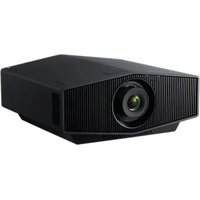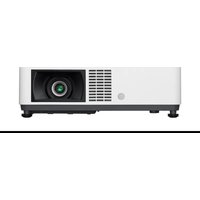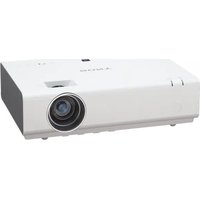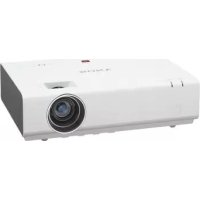
VPLEX226 - Projector SONY - Free user manual and instructions
Find the device manual for free VPLEX226 SONY in PDF.


User questions about VPLEX226 SONY
0 question about this device. Answer the ones you know or ask your own.
Ask a new question about this device
Download the instructions for your Projector in PDF format for free! Find your manual VPLEX226 - SONY and take your electronic device back in hand. On this page are published all the documents necessary for the use of your device. VPLEX226 by SONY.
USER MANUAL VPLEX226 SONY
Sony Corporation Printed in China
VPL-EW276/EW246/EW226 VPL-EX276/EX272/EX246/EX242/EX226/EX222
© 2013 Sony Corporation
安全のために
natural_image
Line drawing of a steam machine with smokestacks and a prohibition symbol above (no text or labels)natural_image
Simple line drawing of a rectangular object with a circular opening, next to a prohibition symbol (no text or labels)natural_image
Simple line drawing of a chimney with smoke rising, no text or symbols present熱感知器や煙感知器のそばに設置しない

禁止
natural_image
Simple line drawing of a kitchen appliance with a plate, chimney, and dish (no text or symbols)natural_image
Simple line drawing of a box with a diagonal bar and a prohibition symbol (no text or labels)natural_image
Simple line drawing of a rectangular block with a shaded side and a circular symbol above (no text or labels)natural_image
Illustration of a steam rising from a chimney next to a computer with smoke, no text or symbols presentnatural_image
Diagram of a ventilation system with a fan array and exhaust pipe, no text or symbols presentnatural_image
Simple line drawing of a kitchen sink with a plate and a bowl, emitting steam or smoke (no text or symbols)natural_image
Illustration of a cigarette being smoked or stayed in a smoking tray, with no text or symbols present.natural_image
Line drawing of a remote control with buttons and triangular indicators (no text or symbols)電源コード(1 本)
natural_image
Line drawing of a multi-pin cable with two connectors and a central connector (no text or symbols)簡易說明書(本書)(1 部)
保証書 (1 部)
取扱説明書(CD-ROM)(1 枚)
Projector Station for Network
natural_image
Simple diagram of a U-shaped container with a downward arrow indicating downward motion (no text or symbols)2 リチウム電池をはめ込む。
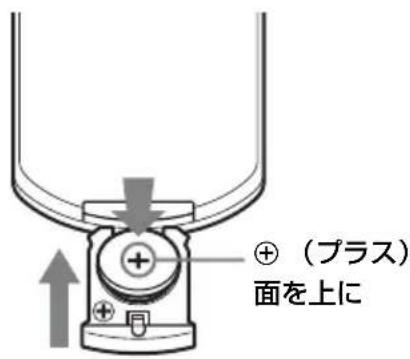
text_image
④ (プラス) 面を上に3 リチウム電池入れを差し込む。
警告
text_image
Operation Language English Status On Security Lock Off Control Key Lock Off i Sel Settmack RETURNtext_image
Technical diagram showing a device's internal components with numbered annotations indicating assembly steps.ご注意
natural_image
Technical line drawing of a mechanical component with a screwdriver inserted, showing no text or symbolstext_image
Technical diagram of a mechanical assembly with numbered components and directional arrows indicating parts of the component.natural_image
Technical line drawing of a mechanical assembly with a screwdriver inserted into a rectangular component (no text or symbols)ご注意
To reduce the risk of fire or electric shock, do not expose this apparatus to rain or moisture.
To avoid electrical shock, do not open the cabinet. Refer servicing to qualified personnel only.
WARNING
THIS APPARATUS MUST BE EARTHED.
WARNING
When installing the unit, incorporate a readily accessible disconnect device in the fixed wiring, or connect the power plug to an easily accessible socket-outlet near the unit. If a fault should occur during operation of the unit, operate the disconnect device to switch the power supply off, or disconnect the power plug.
CAUTION
About the LAN connector
For safety, do not connect the connector for peripheral device wiring that might have excessive voltage to this port.
WARNING: THIS WARNING IS
APPLICABLE FOR USA ONLY.
If used in USA, use the UL LISTED power cord specified below.
DO NOT USE ANY OTHER POWER CORD.
Plug Cap Parallel blade with ground pin (NEMA 5-15P Configuration)
Cord Type SJT, three 16 or 18 AWG wires
Length Minimum 1.5 m (4 ft. 11 in.), Less than 4.5 m (14 ft. 9 in.)
Rating Minimum 10 A, 125 V
Using this unit at a voltage other than 120V may require the use of a different line cord or attachment plug, or both. To reduce the risk of fire or electric shock, refer servicing to qualified service personnel.
WARNING: THIS WARNING IS APPLICABLE FOR OTHER COUNTRIES.
1 Use the approved Power Cord (3-core mains lead) / Appliance Connector / Plug with earthing-contacts that conforms to the safety regulations of each country if applicable.
2 Use the Power Cord (3-core mains lead) / Appliance Connector / Plug conforming to the proper ratings (Voltage, Ampere).
If you have questions on the use of the above Power Cord / Appliance Connector / Plug, please consult a qualified service personnel.
IMPORTANT
The nameplate is located on the bottom.
For kundene i Norge
Dette utstyret kan kobles til et IT-strømfordelingssystem.
For the customers in the U.S.A.
This equipment has been tested and found to comply with the limits for a Class B digital device, pursuant to part 15 of the FCC Rules. These limits are designed to provide reasonable protection against harmful interference in a residential installation. This equipment generates, uses, and can radiate radio frequency energy and, if not installed and used in accordance with the instructions, may cause harmful interference to radio communications. However, there is no guarantee that interference will not occur in a particular installation. If this equipment does cause harmful interference to radio or television reception, which can be determined by turning the equipment off and on, the user is encouraged to try to correct the interference by one or more of the following measures:
- Reorient or relocate the receiving antenna.
– Increase the separation between the equipment and receiver. - Connect the equipment into an outlet on a circuit different from that to which the receiver is connected.
- Consult the dealer or an experienced radio/TV technician for help.
If you have any questions about this product, you may call; Sony Customer Information Service Center 1-800-222-7669 or http://www.sony.com/
Declaration of Conformity
Trade Name : SONY
Model : VPL-EW276
VPL-EW246
VPL-EW226
VPL-EX276
VPL-EX272
VPL-EX246
VPL-EX242
VPL-EX226
VPL-EX222
Responsible party : Sony Electronics Inc.
Address : 16530 Via Esprillo,
San Diego, CA
92127 U.S.A.
Telephone Number: 858-942-2230
This device complies with part 15 of the FCC Rules. Operation is subject to the following two conditions: (1) This device may not cause harmful interference, and (2) this device must accept any interference received, including interference that may cause undesired operation.
You are cautioned that any changes or modifications not expressly approved in this manual could void your authority to operate this equipment.
All interface cables used to connect peripherals must be shielded in order to comply with the limits for a digital device pursuant to Subpart B of part 15 of FCC Rules.
This device complies with part 15 of the FCC Rules. Operation is subject to the following two conditions: (1) This device may not cause harmful interference, and (2) this device must accept any interference received, including interference that may cause undesired operation.
For the customers in Canada
CAN ICES-3 (B)/NMB-3(B)
For the customers in Europe
This product has been manufactured by or on behalf of Sony Corporation, 1-7-1 Konan Minato-ku Tokyo, 108-0075 Japan. Inquiries related to product compliance based on European Union legislation shall be addressed to the authorized representative, Sony Deutschland GmbH, Hedelfinger Strasse 61, 70327 Stuttgart, Germany. For any service or guarantee matters, please refer to the addresses provided in the separate service or guarantee documents.
For the customers in Taiwan only

廢電池請回收
For the State of California, USA only
Perchlorate Material - special handling may apply, See www.dtsc.ca.gov/hazardouswaste/perchlorate
Perchlorate Material : Lithium battery contains perchlorate.
For the Customers in Brazil only DESCARTE DE PILHAS E BATERIAS

- Check that the operating voltage of your unit is identical with the voltage of your local power supply. If voltage adaptation is required, consult with qualified Sony personnel.
- Should any liquid or solid object fall into the cabinet, unplug the unit and have it checked by qualified Sony personnel before operating it further.
- Unplug the unit from the wall outlet if it is not to be used for several days.
- To disconnect the cord, pull it out by the plug. Never pull the cord itself.
- The wall outlet should be near the unit and easily accessible.
- The unit is not disconnected from the AC power source (mains) as long as it is connected to the wall outlet, even if the unit itself has been turned off.
- Do not look into the lens while the lamp is on.
- Do not place your hand or objects near the ventilation holes — the air coming out is hot.
- Be careful not to catch your fingers by the front feet (adjustable) when you adjust the height of the unit. Do not push hard on the top of the unit with the front feet (adjustable) out.
- Avoid using an extension cord with a low voltage limited since it may cause the short-circuit and physical incidents.
- Do not catch your finger between the unit and surface of the floor when moving the projector installed on the floor.
- Do not move the projector when it is turned on and the cabinet cover is open.
- Do not install the unit in a location near heat sources such as radiators or air ducts, or in a place subject to direct sunlight, excessive dust or humidity, mechanical vibration or shock.
- Never mount the projector on the ceiling or move it by yourself. Be sure to consult with qualified Sony personnel (charged).
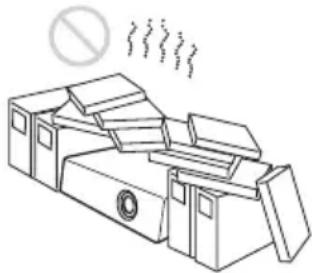
- If the ventilation holes are blocked, internal heat builds up, and it may cause a fire or damage the unit. To allow adequate air circulation and prevent internal heat build-up, follow the items below:
- Leave space around the unit (page 6).
natural_image
Line drawing of a steam machine with smoke and a prohibition symbol above (no text or labels)- Avoid using something to cover the ventilation holes (exhaust/intake).
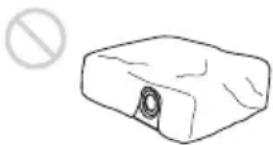
natural_image
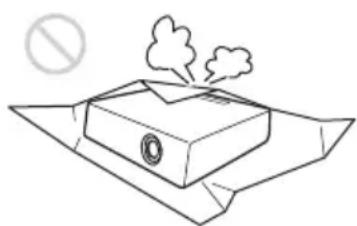
Simple line drawing of a rectangular block with a circular opening and a prohibition symbol above it (no text or labels)- Do not place the unit on surfaces such as an original packing sheet, soft cloth, papers, rugs, or scraps of paper. The ventilation holes may take in such materials.
natural_image
Simple line drawing of a smokestack emitting smoke from a tray, with a no-smoking symbol above (no text or labels)- Do not place any object just in front of the lens that may block the light during projection. Heat from the light may damage the object. Use the picture muting function to cut off the picture.
natural_image
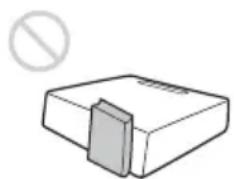
Simple line drawing of a rectangular block with a shaded side and a prohibition symbol above (no text or labels)- Do not use the Security bar for the purpose of preventing theft for transporting or installing the unit. If you lift the unit by the Security bar or hang the unit by this bar, it may cause the unit to fall and be damaged, and may result in personal injury.
natural_image
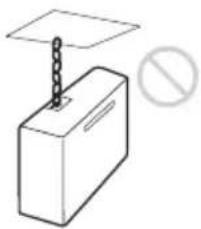
Simple line drawing of a box with a diagonal bar and a prohibition symbol (no text or labels)For dealers
- Be sure to secure the cabinet cover firmly when installing to the ceiling firmly.
Safety precautions for installing the unit on a ceiling
- Never mount the projector on the ceiling or move it by yourself. Be sure to consult with qualified Sony personnel (charged). - When installing the unit on a ceiling, be sure to use a safety wire, etc., to prevent the unit from falling. Entrust the installation to an experienced contractor or installer.
On Installation
- When installing the unit, leave space between any walls, etc. and the unit as illustrated.
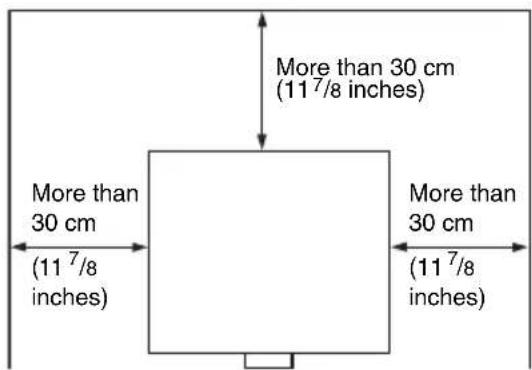
text_image
More than 30 cm (11 7/8 inches) More than 30 cm (11 7/8 inches) More than 30 cm (11 7/8 inches)- Avoid using if the unit is tilted more than 15 degrees horizontally.
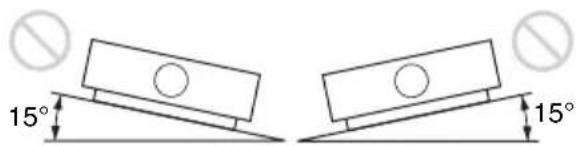
text_image
15° 15°- Avoid using the unit in a location where the temperature or humidity is very high, or temperature is very low.
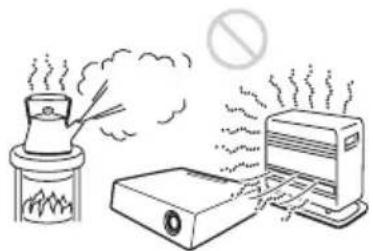
natural_image
Illustration of a steam rising from a chimney to a computer with smoke, no text or symbols present- Avoid installing the unit in a location subject to direct cool or warm air from an air-conditioner. Installing in such a location may cause malfunction of the unit due to moisture condensation or rise in temperature.
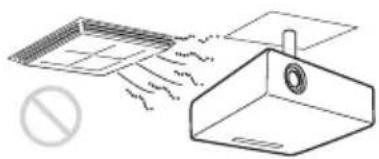
natural_image
Diagram showing airflow around a ventilation duct with a prohibition symbol (no text or labels)- Avoid installing the unit in a location near a heat or smoke sensor. Installing in such a location may cause malfunction of the sensor.
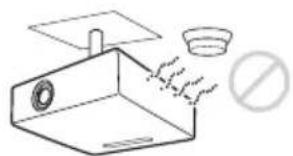
natural_image
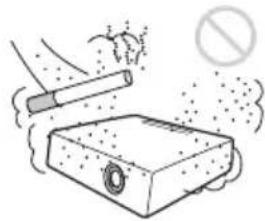
Simple line drawing of a kitchen sink with a plate and a bowl, no text or symbols present- Avoid installing the unit in a very dusty or extremely smoky environment. Otherwise, the air filter will become obstructed, and this may cause a malfunction of the unit or damage it.
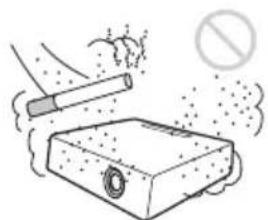
natural_image
Illustration of a cigarette being washed with a stopper, no text or symbols present- When using the unit at an altitude of 1,500 m or higher, set “High Altitude Mode” to “On” in the Installation menu. Failing to set this mode when using the unit at high altitudes could have adverse effects, such as reducing the reliability of certain components.
- Set “Installation Attitude” on the Installation menu correctly to suit to the Installation angle. Continuing to use the wrong setting may affect component reliability.
On cleaning the lens and the cabinet
- Be sure to disconnect the AC power cord from the AC outlet before cleaning.
- If you rub on the unit with a stained cloth, the cabinet may be scratched.
- If the unit is exposed to volatile materials such as insecticide, or the unit is in contact with a rubber or vinyl resin product for a long period of time, the unit may deteriorate or the coating may come off.
- Do not touch the lens with bare hands.
- On cleaning the lens surface: Wipe the lens gently with a soft cloth, such as a glass cleaning cloth. Stubborn stains may be removed with a soft cloth lightly dampened with water. Never use solvent such as alcohol, benzene or thinner, or acid, alkaline or abrasive detergent, or a chemical cleaning cloth.
- On cleaning the cabinet: Clean the cabinet gently with a soft cloth. Stubborn stains may be removed with a soft cloth lightly dampened with mild detergent solution and wrung, followed by wiping with a soft dry cloth. Never use solvent such as alcohol, benzene or thinner, or acid, alkaline or abrasive detergent, or a chemical cleaning cloth.
On Illumination
To obtain the best picture, the front of the screen should not be exposed to direct lighting or sunlight.
On Screen
When using a screen with an uneven surface, stripes pattern may rarely appear on the screen depending on the distance between the screen and the unit or the zooming magnifications. This is not a malfunction of the unit.
On Fan
Since the projector is equipped with fans inside to prevent internal temperature from rising, there may be some noise. This is a normal result of the manufacturing process and does not indicate a malfunction. If, however, in a case of abnormal noise, consult with qualified Sony personnel.
On Lamp
The lamp used as a light source contains mercury that has high internal pressure. A high-pressure mercury lamp has the following characteristics:
- Brightness of the lamp will be lowered as the elapse of time used.
- The lamp may break with a loud noise as a result of shock, damage, or deterioration caused by the elapse of time. The lamp may become unlit and may burn out.
- The lamp life varies with individual differences or usage conditions of each lamp. Therefore, it may break or will not light even before the specified replacement time.
- It may possibly break after the replacement time has elapsed. Replace the lamp with a new one as soon as possible if a message displayed on the projected image, even if the lamp normally lights.
For carrying
This unit is precision equipment. When carrying the unit, do not subject the unit to shocks, or fall. It may damage the unit.
On LCD Projector
The LCD projector is manufactured using high-precision technology. You may, however, see tiny black points and/or bright points (red, blue, or green) that continuously appear on the LCD projector. This is a normal result of the manufacturing process and does not indicate a malfunction.
Also, when you use multiple LCD projectors to project onto a screen, even if they are of the same model, the color reproduction among projectors may vary, since color balance may be set differently from one projector to the next.
On Condensation
If the room temperature where the projector is installed changes rapidly, or if the projector is moved suddenly from a cold to a warm place, condensation in the projector may occur. As the condensation may cause malfunction, be careful in adjusting temperature settings of the air conditioner. If condensation occurs, leave the projector turned on for about two hours before use.
Checking the Supplied Accessories
RM-PJ8 Remote Commander (1)
Lithium battery (CR2025) (1)
The battery is already installed. Before using the remote commander, remove the insulation film.
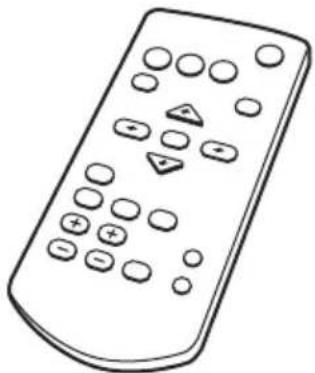
natural_image
Line drawing of a remote control with buttons and triangular indicators (no text or symbols)AC power cord (1)
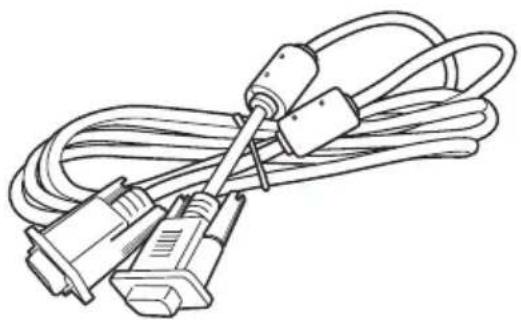
Mini D-sub 15 pin cable (1.8 m) (1)
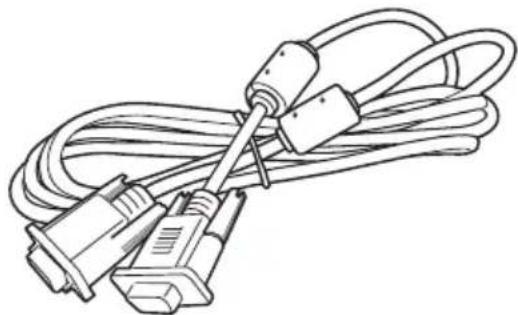
natural_image
Line drawing of a coiled electrical plug with two connectors (no text or symbols)Quick Reference Manual (this manual) (1)
Operating Instructions (CD-ROM) (1)
Projector Station for Network Presentation application (CD-ROM) (1)
Using the CD-ROM Manuals
Insert the supplied CD-ROM into the CD-ROM drive of your computer, and the CD-ROM will start automatically in a few moments. Select the Operating Instructions you want to read. If the CD-ROM does not start automatically, open the “index.htm” file on the CD-ROM.
You must have Adobe Acrobat Reader 5.0 or higher installed in your computer to read the Operating Instructions stored on the CD-ROM.
Installing Projector Station for Network Presentation
1 Close all running applications.
2 Insert the supplied CD-ROM into the CD-ROM drive of the computer.
3 Open the CD-ROM and double-click the .exe file.
When the message "User Account Control" is displayed, click "Allow" or "Yes."
4 Follow the on-screen instructions to install the software.
Installing Batteries
1 Pull out the lithium battery compartment.
Pull out the battery compartment with a stick as shown in the illustration.
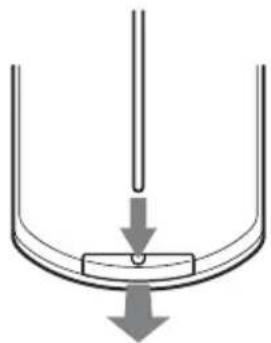
natural_image
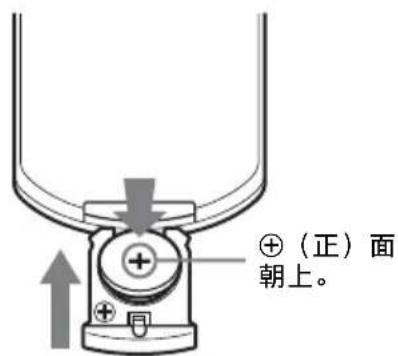
Simple diagram of a U-shaped container with a downward arrow indicating downward motion (no text or symbols)2 Insert a lithium battery.
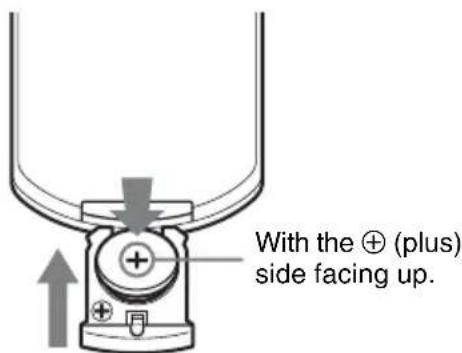
text_image
With the ⊕ (plus) side facing up.3 Close the lithium battery compartment.
CAUTION
Danger of explosion if battery is incorrectly replaced.
Replace only with the same or equivalent type recommended by the manufacturer. When you dispose of the battery, you must obey the law in the relative area or country.
Installing batteries
One lithium battery (CR2025) is supplied for the RM-PJ8 Remote Commander. To avoid risk of explosion, use a lithium battery (CR2025).
Selecting the Menu Language
The factory setting for the language for displaying menus, messages, etc. is English. To change the on-screen language, proceed as follows:
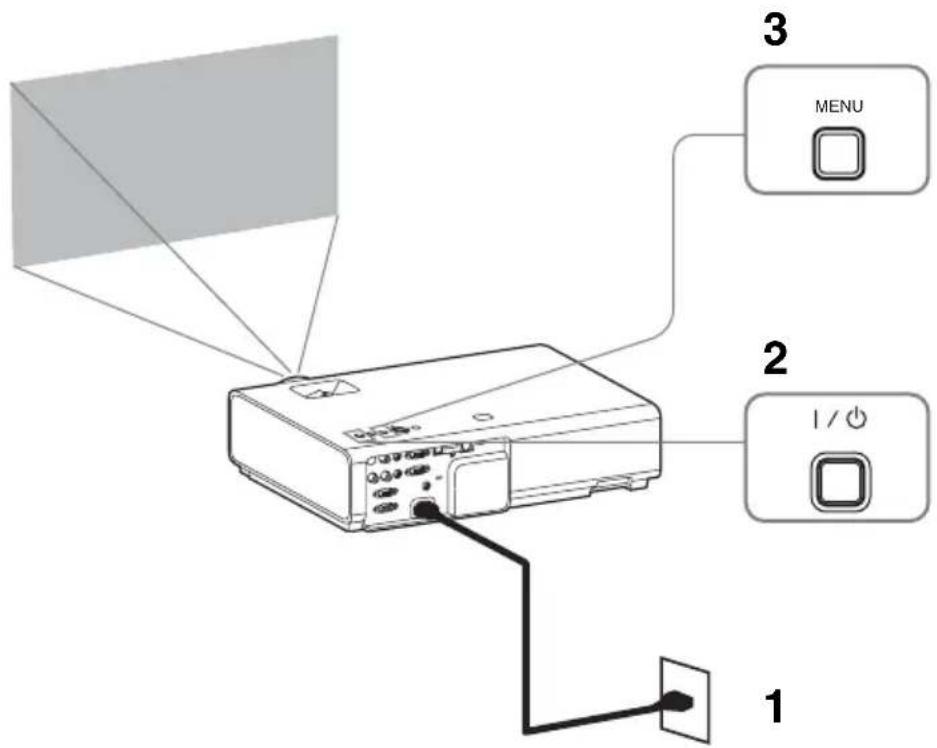
text_image
1 2 3 I / O MENU1 Plug in the AC power cord into a wall outlet.
2 Turn on the projector.
Press the I/⏻ key.
3 Press the MENU key to display the menu.
If the display cannot be properly seen, adjust the focus, size, and position of the projected image (page 16).
4 Select the menu language.
① Press the ↑ or ↓ key to select the Operation (☐) menu then press the ENTER key.
② Press the or key to select "Language (A) then press the ENTER key.
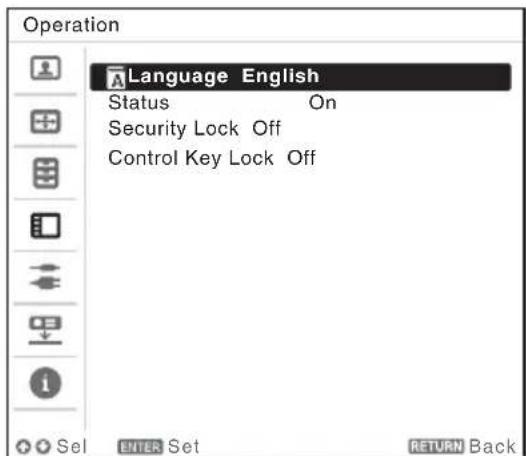
text_image
Operation Language English Status On Security Lock Off Control Key Lock Off SEL BITER Set RETURN Back③ Press the /// key to select a language, then press the ENTER key.
5 Press the MENU key to turn off the menu screen.
Connecting the Projector
You can connect the projector to external devices with an RGB or HDMI output connector. In addition, you can use the following methods to connect the projector to external devices:
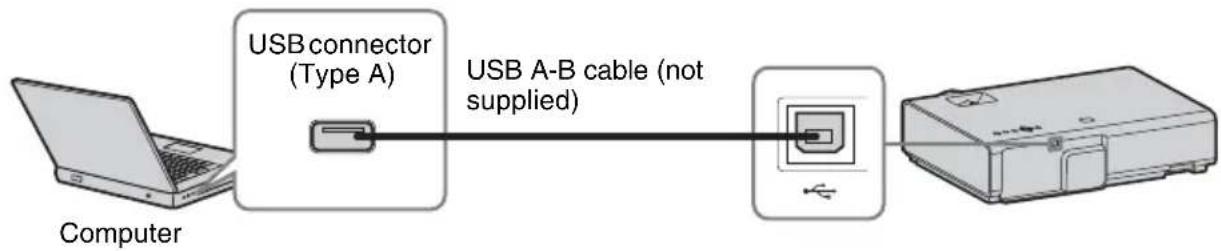
USB connector (Type B) ()
For connecting to a computer with a USB connector (“Projecting an Image using USB Connection”).
flowchart
graph LR
    A["Computer"] --> B["USB connector (Type A)"]
    B --> C["USB A-B cable (not supplied)"]
    C --> D["Printer"]
USB connector (Type A) ()
For connecting a USB memory device (“Using USB Media Viewer”).

text_image
USB memory device (not supplied)LAN connector
For connecting to a computer, tablet PC, or smartphone via a hub or router (“Presentation Function via Network”).
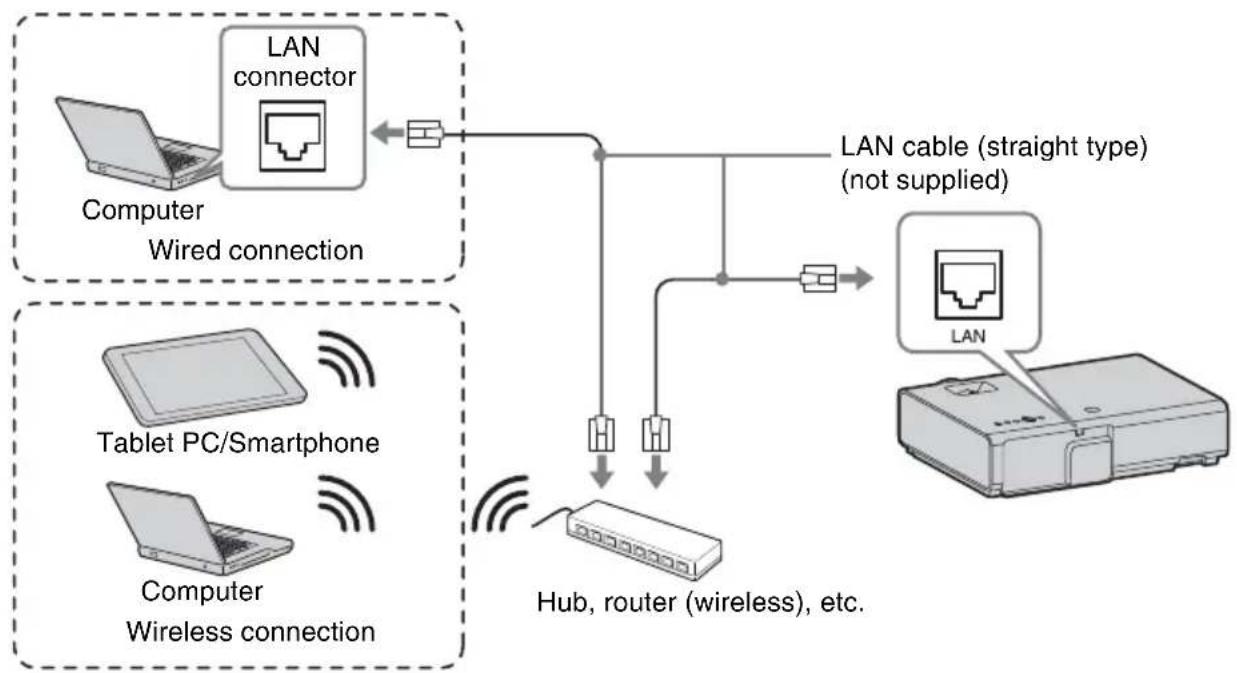
flowchart
graph TD
    A["Computer"] --> B["Wired connection"]
    B --> C["LAN connector"]
    C --> D["LAN cable (straight type) (not supplied)"]
    E["Tablet PC/Smartphone"] --> F["Web interface"]
    G["Computer Wireless connection"] --> H["Hub, router (wireless), etc."]
    I["Computer"] --> H
    H --> J["LAN"]
USB connector (Type A) ()
For connecting a USB wireless LAN module IFU-WLM3 (not supplied) (“Presentation Function via Network”).
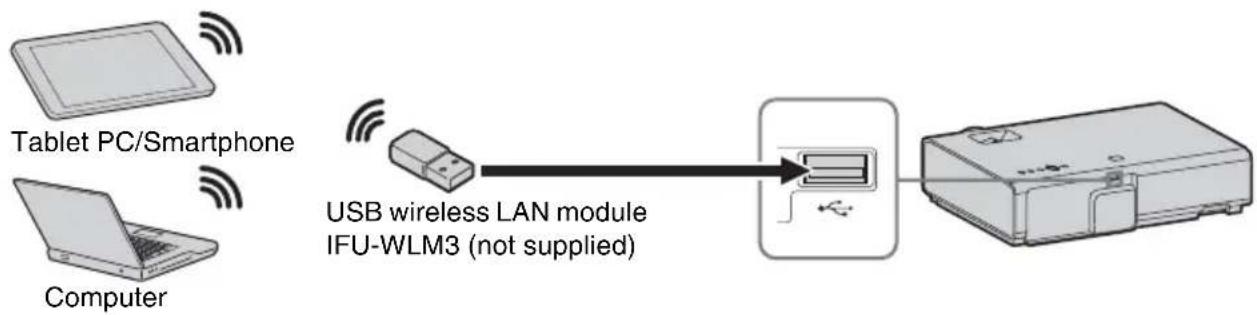
flowchart
graph LR
    A["Tablet PC/Smartphone"] -->|Wireless Signal| B["USB wireless LAN module IFU-WLM3 (not supplied)"]
    C["Computer"] -->|Wireless Signal| B
    B --> D["Device with USB cable"]
Notes
- Undesignated USB wireless LAN modules do not work.
- When connecting/disconnecting the USB wireless LAN module, make sure that the projector is in Standby mode (Standby Mode: “Low”), or the AC power cord is unplugged from the wall outlet.
- When wirelessly connecting a tablet PC/smartphone to the projector via USB wireless LAN Module IFU-WLM3 (not supplied), set “Access Point Setup” to “Manual” in the projector’s “WLAN Settings”.
- The factory default settings for "Manual" are as follows.
SSID: VPL + MAC address for LAN
Security Method: WEP(64bit)
Password: sony1
Projecting an Image
The size of a projected image depends on the distance between the projector and screen. Install the projector so that the projected image fits the screen size. For details on projection distances and projected image sizes, see “Projection Distance”.
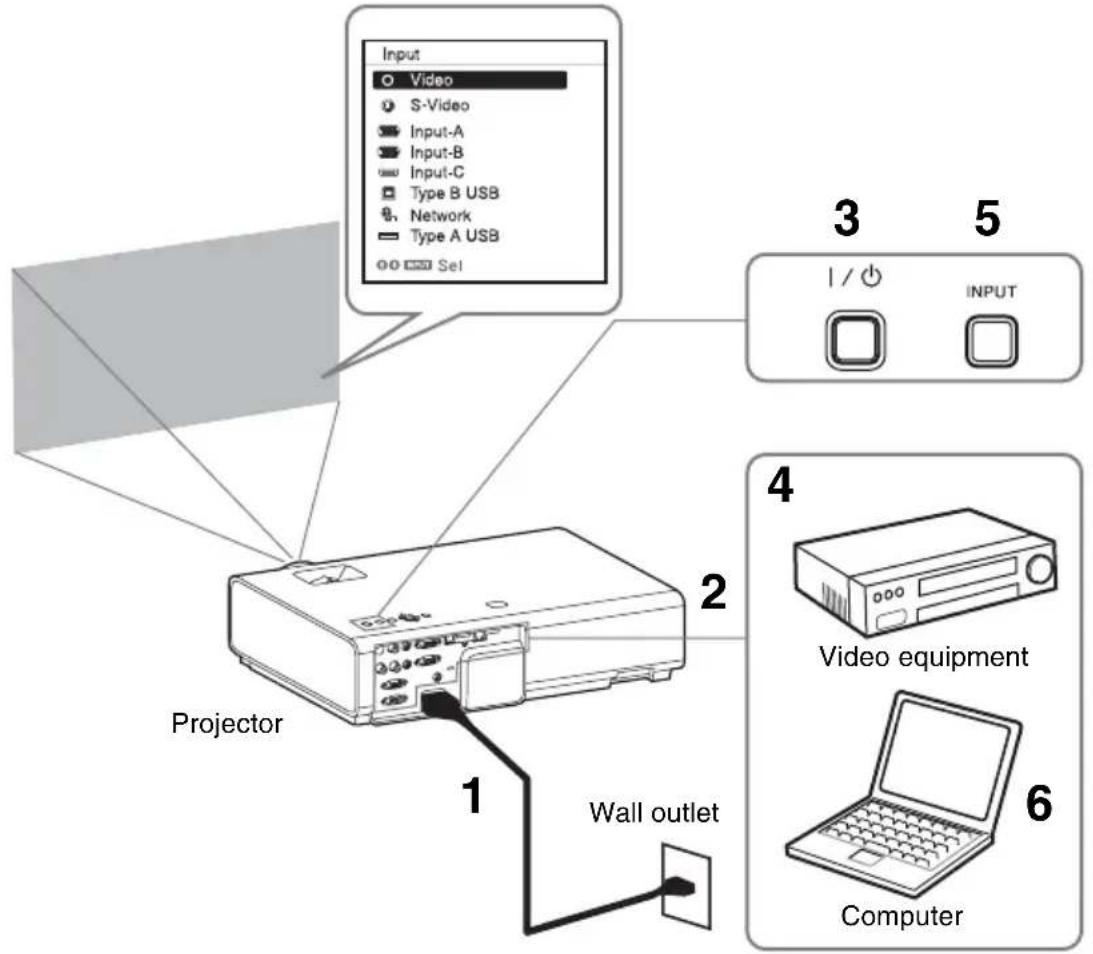
text_image
Input Video S-Video Input-A Input-B Input-C Type B USB Network Type A USB Sel 3 5 1 / ○ INPUT 2 Projector Wall outlet 4 Video equipment 6 Computer1 Plug the AC power cord into the wall outlet.
2 Connect all equipment to the projector.
3 Press the I/⏻ key to turn on the unit.
4 Turn on the connected equipment.
5 Select the input source.
Press the INPUT key on the projector to display the menu for switching input signal on the screen. Press the INPUT key repeatedly, or press the ↑/↓ key to select an image to be projected.
6 When projecting a computer image, switch your computer's output to external display.
The method to switch the output varies depending on the type of computer.
(Example)
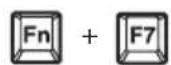
To project image files stored in a USB memory device, see “USB Media Viewer”. To project an image using USB Connection, see “Projecting an Image using USB Connection”. To use Presentation Function via Network, see “Presentation Function via Network”.
7 Adjust the focus, size and position of the projected image (page 16).
Displaying Images or Files Sent from a Tablet PC/ Smartphone
You can project JPEG images, PDF files, etc. stored in a tablet PC/smartphone wirelessly by using a specific application. ^*1
For downloading ^*2 or detailed method of using the application, access the following URL.
http://PWPresenter.pixelworks.com
*1: To use the application, one of the following conditions is required.
- Connected to network where wireless connection can be established (page 12).
- Connected to a wireless network via USB wireless LAN module IFU-WLM3 (not supplied) that is connected to the projector (page 13).
*2: Depending on your Internet connection, a data communication fee for downloading the application may apply.
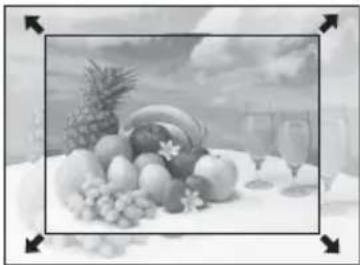
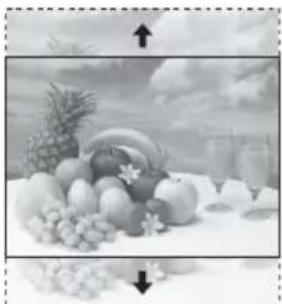
Adjusting the Projected image
| Focus Size (Zoom) | Position | |
 ↓ ↓ |  |  |
Focus ring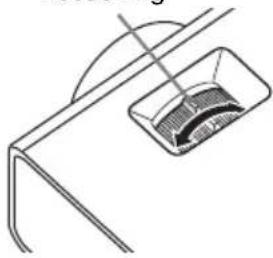 | 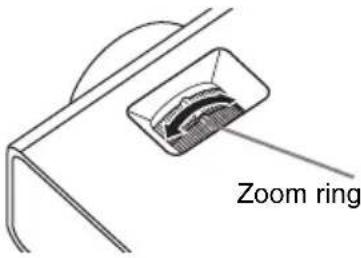 | 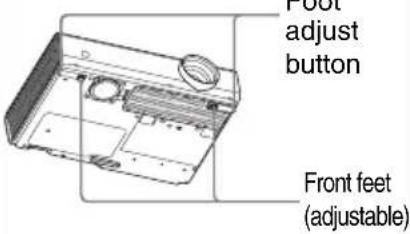 |
Adjusting the tilt of the projector with the front feet (adjustable)
By changing the tilt of the projector with the foot adjust buttons/front feet (adjustable), you can adjust the position of the projected image.
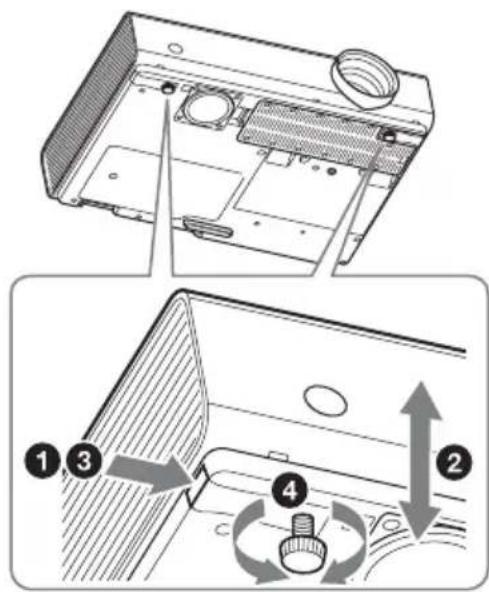
How to adjust the angle
1 Press and hold the foot adjust buttons.
2 Lift up the front of the projector to adjust the angle.
3 Release the foot adjust buttons.
4 Turn the front feet (adjustable) to set the angle of the projector precisely.
text_image
Diagram showing a device interior with labeled parts and directional arrows indicating rotation or adjustment.Notes
- Be careful not to let the projector down on your fingers.
- Do not push hard on the top of the projector with the front feet (adjustable) extended.
Changing the aspect ratio of the projected image
Press the ASPECT key on the remote commander to change the aspect ratio of the projected image. You can also change the setting in Aspect of the Screen menu.
Correcting trapezoidal distortion of the projected image (Keystone feature)
Normally the Keystone feature automatically adjusts the projected image. The Keystone feature may not work automatically if the screen is tilted. In this case, set Keystone manually.
1 Press the KEYSTONE key on the remote commander or select V Keystone in the Installation menu.
2 Use the /// keys to set the value. The higher the value, narrower the top of the projected image. The lower the value, the narrower the bottom.
Note
Since the Keystone adjustment is an electronic correction, the image may be deteriorated.
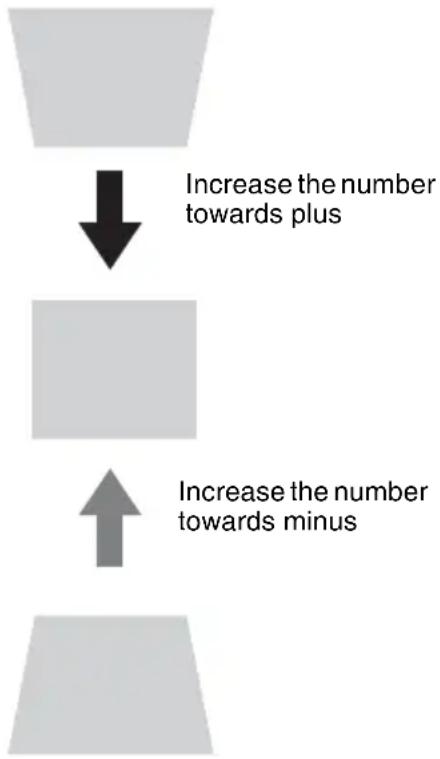
flowchart
graph TD
    A["Increase the number towards plus"] --> B["Increase the number towards minus"]
Displaying a pattern
You can display a pattern for adjusting the projected image or a grid pattern with the PATTERN key on the remote commander. Press the PATTERN key again to restore the previous image. You can use a grid pattern as a guide to write text or to draw lines and shapes on the whiteboard or blackboard without using a computer.
Note
You cannot use this key when “Type A USB”, “Type B USB” or “Network” is selected as the input.
Automatically adjusts Phase, Pitch and Shift of projected image while a signal is input from a computer (APA (Auto Pixel Alignment))
Press the APA key on the remote commander. Press again to cancel adjusting during the setting. You can also set APA in the Screen Menu. If Smart APA in the Function menu is set to “On”, executes APA automatically when a signal is input.
Turning Off the Power
1 Press the I/⏻ key on the unit or the remote commander.
The projector starts shutdown and turns off. If you press the I/⏻ key within 10 seconds again, shutdown is cancelled.
Note
Do not turn off the projector soon after the lamp lights. It may cause a malfunction of the lamp (does not light, etc.).
2 Unplug the AC power cord from the wall outlet.
To turn off without displaying confirmation message
Press and hold the / key on the unit for a few seconds.
ECO gauge
This gauge indicates the current effectiveness of the projector's ECO function. (For details on the ECO function, see “ECO MODE key” and “ECO”.)
The leaf icons are displayed when the projector is shut down. The number of displayed icons varies according to how much energy is saved as a result of using the ECO function.
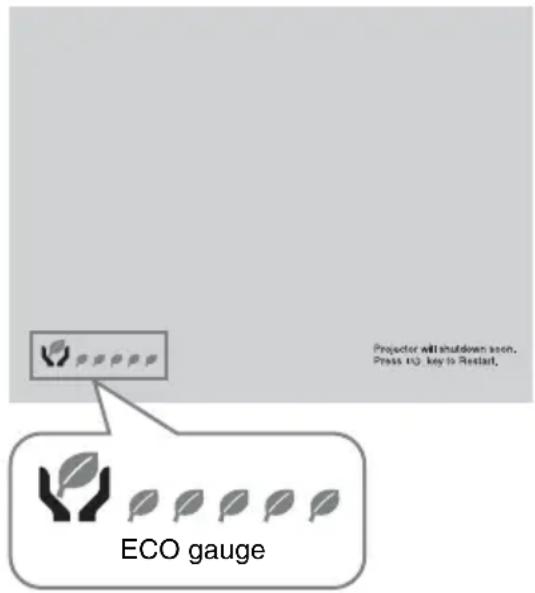
text_image
Projector will shutdown soon. Press (13) key to Restart. ECO gaugeIndicators
The indicators allow checking the status and notify you of abnormal operation of the projector. If the projector exhibits abnormal status, address the problem in accordance with the table below.
ON/STANDBY indicator
| Status Meaning/Remedies | |
| Lights in red The projector is in Standby mode. | |
| Flashes in green • The projector is ready to operate after having been turned on.• The lamp cools after the projector is turned off. | |
| Lights in green The projector's power is on. | |
| Lights in orange The projector is in With No Input (Lamp Cutoff). | |
| Flashes in red The projector is in abnormal status. Symptoms are indicated by number of flashes. Address the problem in accordance with the following. If the symptom is shown again, consult with qualified Sony personnel. | |
| Flashes twice The internal temperature is unusually high. Check the items below.• Check if nothing is blocking the ventilation holes.• Check if the air filter is not clogged (page 23).• Check if the Installation Attitude in the Installation menu is set correctly. | |
| Flashes six times Unplug the AC power cord from a wall outlet. After checking that the ON/STANDBY indicator goes out, plug the power cord to a wall outlet again then turn on the projector. | |
| Other number of flashes | Consult with qualified Sony personnel. |
LAMP/COVER indicator
| Status Meaning/Remedies |
| Flashes in red Symptoms are indicated by number of flashes. Address the problem in accordance with the following. |
| Flashes twice The lamp cover is not attached securely (page 21). |
| Flashes three times The temperature of lamp is unusually high. Turn off the power and wait for lamp to cool then turn on the power again. If the symptom is shown again, the lamp may be burnt out. In this case, replace the lamp with a new one (page 21). |
Replacing the Lamp
Replace the lamp with a new one if a message displayed on the projected image (page 20). Use an LMP-E212 projector lamp (not supplied) for replacement.
Caution
- The lamp remains hot after the projector is turned off. If you touch the lamp, you may burn your finger. When you replace the lamp, wait for at least an hour after turning off the projector for the lamp to cool sufficiently.
- Do not allow any metallic or inflammable objects into the lamp replacement slot after removing the lamp, otherwise it may cause electrical shock or fire. Do not put your hands into the slot.
Notes
- If the lamp breaks, contact qualified Sony personnel. Do not replace the lamp yourself.
- When removing the lamp, be sure to pull it out straight, by holding the designated location. If you touch a part of the lamp other than the designated location, you may be burned or injured. If you pull out the lamp while the projector is tilted, the pieces may scatter if the lamp breaks any may cause injury.
1 Turn off the projector, and disconnect the AC power cord from a wall outlet.
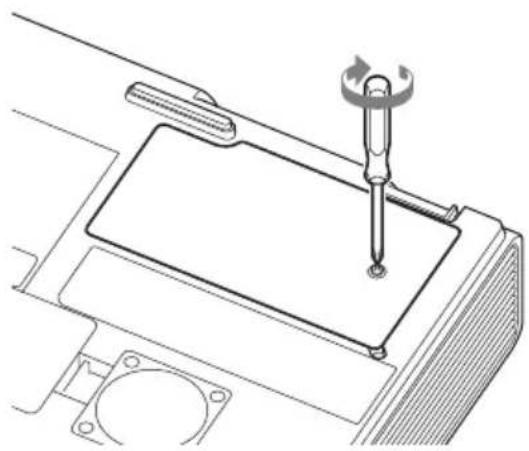
2 When the lamp has cooled sufficiently, open the lamp cover by loosening 1 screw.
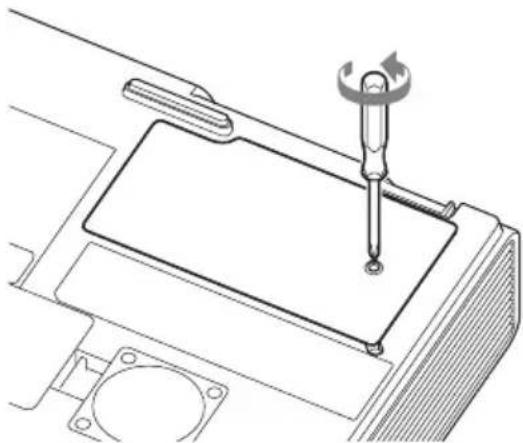
natural_image
Technical line drawing of a mechanical assembly with a screwdriver inserted into a component (no text or symbols)3 Loosen the 2 screws on the lamp then pull out the lamp by its grab.
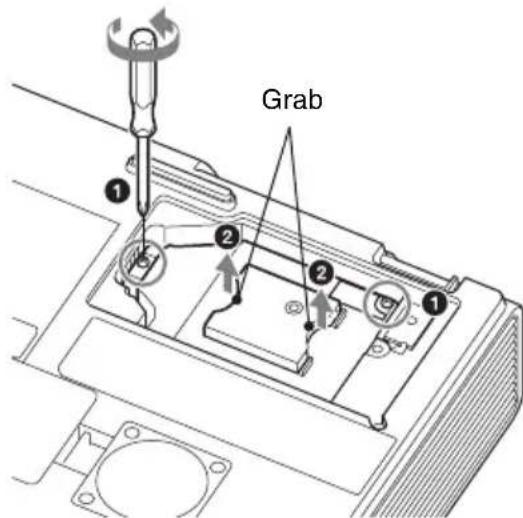
text_image
Grab ① ② ② ①4 Insert the new lamp all the way in until it is securely in place. Tighten the 2 screws.
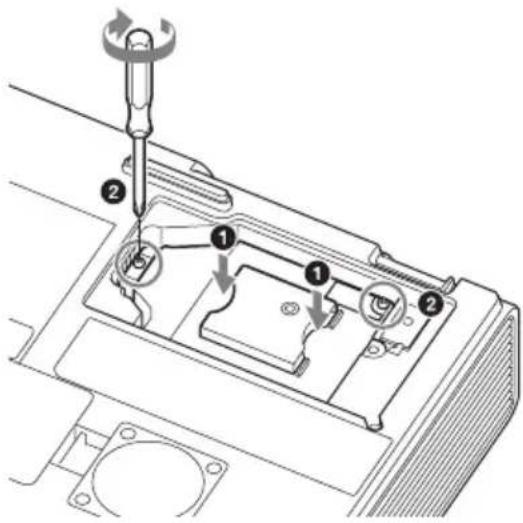
text_image
Technical diagram showing a mechanical assembly with numbered components and a tool inserted into a component.5 Close the lamp cover and tighten the 1 screw.
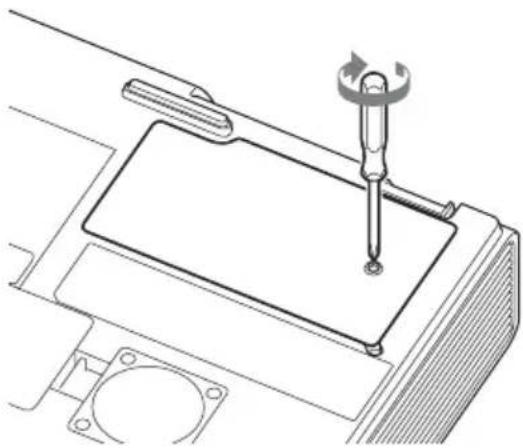
natural_image
Technical line drawing of a mechanical assembly with a screwdriver inserted into a component (no text or symbols)Note
The power will not turn on if the lamp is not secured properly.
6 Connect the AC power cord to a wall outlet and turn on the projector.
7 Reset the lamp timer for notification of the next replacement time.
Select “Lamp Timer Reset” on the Function menu then press the ENTER key. When a message appears, select “Yes” to reset the lamp timer.
Caution
Disposal of the used lamp
For the customers in the USA
Lamp in this product contains mercury. Disposal of these materials may be regulated due to environmental considerations. For disposal or recycling information, please contact your local authorities or the Telecommunications Industry Association (www.eiae.org).
Cleaning the Air Filter
When a message appears on the projected image indicating time for a filter cleaning, clean the air filter (page 20).
If the dust cannot be removed from the air filter even after cleaning, replace the air filter with a new one. For details on a new air filter, consult with qualified Sony personnel.
Caution
If you neglect to clean the air filter, dust may accumulate, clogging it. As a result, the temperature may rise inside the unit, leading to a possible malfunction or fire.
1 Turn off the projector, and disconnect the AC power cord from the AC outlet.
2 Slide out and remove the air filter cover from the unit.
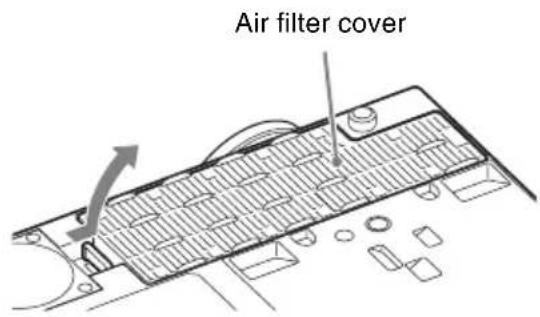
text_image
Air filter cover3 Clean the air filter with a vacuum cleaner.
Pull out and remove the air filter cover, and clean it with a vacuum cleaner.
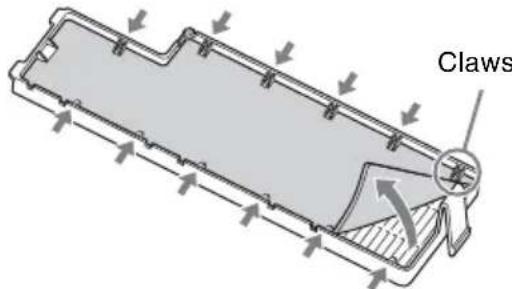
text_image
Claws4 Reattach the air filter cover to the unit.
Note
Be sure to attach the air filter cover firmly, otherwise it may cause a malfunction.
AVERTISSEMENT
natural_image
Line drawing of a portable air conditioner unit emitting steam (no text or symbols)natural_image
Simple line drawing of a rectangular object with a circular opening and a diagonal line above it (no text or symbols)natural_image
Simple line drawing of a smokestack emitting smoke from a tray, with a prohibition symbol above (no text or labels)natural_image
Simple line drawing of a rectangular block with a shaded side and a circular symbol above (no text or labels)natural_image
Simple line drawing of a box with a chain attached to top, and a prohibition symbol (no text or labels)Pour les revendeurs
natural_image
Illustration of a steam rising from a steaming stove next to a portable heater and a printer emitting smoke, with a no-smoking symbol above (no text or labels)natural_image
Diagram showing a filtration or dust removal setup with a gridded tray and a container, no text or symbols present.natural_image
Simple line drawing of a kitchen appliance with a plate, chimney, and a prohibition symbol (no text or labels)natural_image
Illustration of a hand using a tool to cut a rectangular object with a circular opening, emitting exhaust smoke (no text or symbols)natural_image
Line drawing of a remote control with buttons and triangular indicators (no text or symbols)natural_image
Line drawing of a coiled electrical plug with two connectors (no text or symbols)Application Projector Station for Network Presentation (CD-ROM) (1)
Installation de Projector Station for Network Presentation
natural_image
Simple diagram of a U-shaped container with a downward arrow indicating downward motion (no text or symbols)text_image
Operation Language English Status On Security Lock Off Control Key Lock Off SEL BITER Set RETURN Backtext_image
Technical diagram showing a device with labeled parts and directional arrows indicating rotation or adjustment.Remarques
natural_image
Technical line drawing of a mechanical assembly with a screwdriver inserted into a component (no text or symbols)text_image
Technical diagram of a mechanical device with numbered components and a wrench indicating tool applicationnatural_image
Technical line drawing of a mechanical assembly with a screwdriver inserted into a component (no text or symbols)Remarque
natural_image
Line drawing of a cluttered industrial machine with smoke and a no-smoking symbol above (no text or labels)natural_image
Simple line drawing of a rectangular block with a circular hole and a diagonal line (no text or symbols)natural_image
Simple line drawing of a chimney with smoke and a prohibition symbol (no text or labels)natural_image
Simple line drawing of a rectangular block with a shaded side and a circular symbol above (no text or labels)natural_image
Simple line drawing of a box with a diagonal bar and a prohibition symbol (no text or labels)natural_image
Illustration of a portable stove emitting steam, a printer emitting smoke, and a computer emitting smoke (no text or symbols)natural_image
Diagram showing a filtration or dust removal process with a gridded tray and a container, no text or symbols present.natural_image
Simple line drawing of a kitchen sink with a chimney and a bowl, emitting steam (no text or symbols)natural_image
Illustration of a cigarette emitting smoke next to a box with a stop sign (no text or symbols on the diagram itself)natural_image
Line drawing of a remote control with buttons and triangular indicators (no text or symbols)natural_image
Line drawing of a multi-pin electrical plug with coiled cable (no text or symbols)natural_image
Simple diagram of a U-shaped container with a downward arrow indicating downward motion (no text or symbols)text_image
Technical diagram showing a device with labeled parts and directional arrows indicating rotation or adjustment.Notas
natural_image
Technical line drawing of a mechanical assembly with a lever and mounting bracket (no text or symbols)text_image
Asa ① ② ② ①text_image
Technical diagram of a mechanical device with numbered components and a wrench indicating tool applicationnatural_image
Technical line drawing of a mechanical assembly with a screwdriver inserted into a component (no text or symbols)Nota
natural_image
Line drawing of a portable air conditioner unit emitting steam, with no text or symbols present.natural_image
Simple line drawing of a rectangular object with a circular opening and a circular hole, accompanied by a prohibition symbol (no text or labels)natural_image
Simple line drawing of a smokestack emitting smoke from a tray, with a no-smoking symbol above (no text or labels)natural_image
Simple line drawing of a rectangular block with a shaded side and a prohibition symbol above (no text or labels)natural_image
Simple line drawing of a box with a diagonal chain and a circular symbol (no text or labels)Für Händler
natural_image
Illustration of a portable stove emitting steam, next to a computer with cooling effect (no text or symbols)natural_image
Diagram of a ventilation system with a gridded fan and vent, emitting exhaust smoke (no text or symbols)natural_image
Simple line drawing of a device with a lid, emitting exhaust smoke, and a prohibition symbol (no text or labels)natural_image
Illustration of a hand using a cigarette to exhaust smoke from a device, with no text or symbols present.natural_image
Line drawing of a remote control with buttons and triangular indicators (no text or symbols)Netzkabel (1)
Mini-D-Sub 15-poliges Kabel (1,8 m) (1)
natural_image
Line drawing of a multi-pin cable with two connectors and a central connector (no text or symbols)natural_image
Simple diagram of a U-shaped container with a downward arrow indicating downward motion (no text or symbols)text_image
Operation Language English Status On Security Lock Off Control Key Lock Off i Sel ENTER Set RETURN Backtext_image
Tablet/Smartphone Computer
text_image
Diagram showing a device interior with labeled parts and directional arrows indicating rotation or adjustment.Hinweise
natural_image
Technical line drawing of a mechanical assembly with a screwdriver inserted into a rectangular component (no text or symbols)text_image
Technical diagram of a car intake mechanism with labeled parts and tool pathnatural_image
Technical line drawing of a mechanical assembly with a screwdriver inserted into a rectangular component (no text or symbols)Hinweis
natural_image
Line drawing of a portable air conditioner unit emitting steam (no text or symbols)natural_image
Simple line drawing of a rectangular block with a circular hole and a diagonal line (no text or symbols)natural_image
Simple line drawing of a smokestack emitting smoke from a tray, with no text or symbols present.natural_image
Simple line drawing of a rectangular object with a shaded central section, no text or symbols present.natural_image
Simple line drawing of a box with a diagonal chain and a flat top, no text or symbols present.Per rivenditori
natural_image
Illustration of a portable stove emitting steam, with a printer and a server nearby (no text or symbols)natural_image
Diagram showing a filtration or dust removal setup with a gridded tray and a container, no text or symbols present.natural_image
Simple line drawing of a kitchen appliance with a plate, chimney, and a prohibition symbol (no text or labels)natural_image
Illustration of a hand using a cigarette to exhaust smoke from a rectangular device, with no text or symbols present.natural_image
Line drawing of a remote control with buttons and triangular indicators (no text or symbols)natural_image
Line drawing of a multi-pin electrical connector with coiled cable (no text or symbols)natural_image
Simple diagram of a U-shaped container with a downward arrow indicating downward motion (no text or symbols)text_image
Operation Language English Status On Security Lock Off Control Key Lock Off Sel LITER Set RETURN Backtext_image
Technical diagram showing a device with labeled parts and directional arrows indicating assembly or operation steps.Note
natural_image
Technical line drawing of a mechanical assembly with a lever and mounting bracket (no text or symbols)text_image
Technical diagram of a mechanical device with numbered components and a wrench indicating tool applicationnatural_image
Technical line drawing of a mechanical assembly with a screwdriver inserted into a component (no text or symbols)Note
natural_image
Line drawing of a portable air conditioner unit emitting steam (no text or symbols)natural_image
Simple line drawing of a rectangular block with a circular opening and a prohibition symbol above it (no text or labels)natural_image
Simple line drawing of a smokestack emitting smoke from a tray, with a no-smoking symbol above (no text or labels)natural_image
Simple line drawing of a rectangular block with a shaded side and a prohibition symbol above (no text or labels)natural_image
Simple line drawing of a box with a diagonal chain and a circular symbol (no text or labels)致经销商
natural_image
Illustration of a portable stove emitting steam, a printer emitting smoke, and a computer with a prohibition symbol (no text or labels)natural_image
Diagram of a kitchen sink with a grater and a plate, showing no text or symbolsnatural_image
Simple line drawing of a kitchen sink with a plate and a bowl, no text or symbols present- 勿将本机安装在多尘或多烟雾的环境中。否则,空气滤网会被堵塞,并可能导致本机故障或损坏。
natural_image
Illustration of a hand using a cigarette to exhaust smoke from a box, with no text or symbols present.natural_image
Line drawing of a remote control with buttons and triangular indicators (no text or symbols)交流电源线(1)
natural_image
Line drawing of a multi-pin electrical connector with coiled cable (no text or symbols)快速参考手册 (本手册)(1)
使用说明书(CD-ROM)(1)
Projector Station for Network
安装 Projector Station for Network Presentation
1 关闭所有正在运行的应用程序。
natural_image
Simple diagram of a U-shaped container with a downward arrow indicating downward motion (no text or symbols)2 插入锂电池。
text_image
Operation Language English Status On Security Lock Off Control Key Lock Off i Sel ENTER Set RETURN Backtext_image
Diagram showing a device's internal components with numbered annotations indicating parts of the main body and rotation direction.注意
natural_image
Technical line drawing of a mechanical assembly with a screwdriver inserted into a component (no text or symbols)text_image
Technical diagram of a mechanical device with numbered components and a tool, likely for assembly or repair instructions.5 关闭投影灯盖并拧紧 1 个螺丝。
natural_image
Technical line drawing of a mechanical assembly with a screwdriver inserted into a component (no text or symbols)注意
如果投影灯未正确固定,则无法打开电源。