
KV-14CT1K - TV SONY - Free user manual and instructions
Find the device manual for free KV-14CT1K SONY in PDF.


| Product type | Color television |
| Brand | SONY |
| Model | KV-14CT1K |
| Screen technology | FD Trinitron (flat screen cathode ray tube) |
| Screen diagonal | 14 inches (approx. 36 cm) |
| TV systems | PAL, SECAM, NTSC 3.58/4.43 (video input only) |
| Channel coverage | VHF E2-E12, UHF E21-E69, CATV S1-S20, HYPER S21-S41, D/K R1-R12/R21-R69 |
| Sound output | 1 x 6 W (music) / 1 x 3 W (RMS) |
| Rear connectors | 1 SCART socket (21-pin) with audio/video input, RGB input, TV audio/video output |
| Front connectors | 1 video input (phono), 2 audio inputs (phono), headphone jack |
| Remote control | RM-W100 (supplied) |
| Supplied accessories | Remote control, 2 batteries, indoor antenna (depending on model) |
| Main functions | Teletext, Fastext, TOPtext, Sleep timer, On timer, RGB centering correction |
| Power consumption | 50 W (operation), less than 1 W (standby) |
| Power supply | 220-240 V AC, 50 Hz |
| Dimensions (W x H x D) | Approx. 374 x 355 x 420 mm |
| Weight | Approx. 11 kg |
| Operating temperature and humidity | Avoid hot, humid, or dusty places; do not expose to mechanical vibrations |
| Maintenance and cleaning | Unplug before cleaning; use a soft, slightly damp cloth; do not use abrasive products, solvents, or antistatic sprays |
| Safety | Do not open the casing; do not insert objects or spill liquids; do not block ventilation openings; leave at least 10 cm space around the device |
| General information | Manual available in multiple languages; 128-page manual; online Q&A support |
Frequently Asked Questions - KV-14CT1K SONY
User questions about KV-14CT1K SONY
0 question about this device. Answer the ones you know or ask your own.
Ask a new question about this device
Download the instructions for your TV in PDF format for free! Find your manual KV-14CT1K - SONY and take your electronic device back in hand. On this page are published all the documents necessary for the use of your device. KV-14CT1K by SONY.
USER MANUAL KV-14CT1K SONY
FD Trinitron Colour Television
Instruction Manual
Hnctpykun 3a eKcnnoatauia
Návod k obsluze
Kezelési utmutató
Instrukcja obstugi
Thank you for choosing this Sony FD Trinitron Colour Television.
Before operating the TV, please read this manual thoroughly and retain it for future reference.
Symbols used in the manual:
- Important information.
- ① Information on a feature.
-
1,2...Sequence of instructions.
-
Shaded buttons on the remote control show you the buttons you have to press to follow the sequence of the instructions.
- Informs you of the result of instructions.
Table of Contents
Introduction 3
Safety Information 4
Overview
Overview of Remote Control Buttons 5
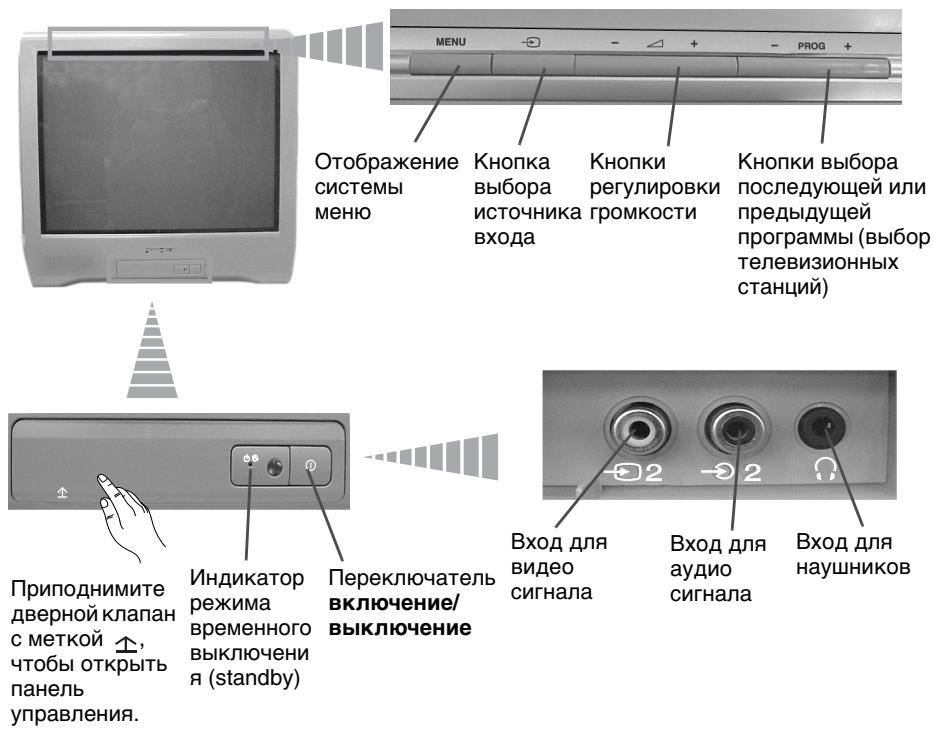
Overview of TV Buttons 6
Installation
Inserting Batteries into the Remote Control 6
Connecting an Indoor Aerial (only for KV-14CT1K). 7
Connecting an Outdoor Aerial and VCR 7
First Time Operation
Switching On the TV and Automatically Tuning 8
Menu system
Introducing and Using the Menu System 10
Picture 10
Sound 11
Timer. 12
Channel Set Up 13
Set Up 15
Teletext 16
Additional Information
Connecting Optional Equipment 17
Using Optional Equipment 17
Specifications 18
Troubleshooting 19
Safety Information
| This set is to operate on a 220-240V AC supply only. Take care not to connect too many appliances to the same power socket as this could result in fire or electric shock. | For environmental and safety reasons, it is recommended that the TV set is not left in standby mode when not in use. Disconnect from the mains. | Never push objects of any kind into the set as this could result in a fire or electric shock. Never spill liquid of any kind on the set. If any liquid or solid object does fall through, do not operate the TV. Have it checked immediately by qualified personnel. |
| Do not open the cabinet and the rear cover of the TV. Refer to qualified service personnel only. | For your own safety, do not touch any part of the TV, power lead or aerial lead during lightning storms. | To prevent fire or shock hazard, do not expose the TV to rain or moisture. |
| Do not cover the ventilation openings of the TV. For ventilation, leave a space of at least 10cm all around the set. | Never place the TV in hot, humid or excessively dusty places. Do not install the TV where it may be exposed to mechanical vibrations. | To prevent fire, keep inflammable objects or naked lights (e.g. candles) away from the TV. |
| Clean the screen and cabinet with a soft, lightly dampened cloth. Do not use any type of abrasive pad, alkaline cleaner, scouring powder or solvent, such as alcohol or benzine, or antistatic spray. As a safety precaution, unplug the TV before cleaning it. | Pull out the power lead by the plug. Do not pull on the power lead itself. | Take care not to place heavy objects on the power lead as this could result in damage. We recommend you wind any excess lead around the holders provided on the rear of the TV. |
| Place the TV on a secure stable stand. Do not allow children to climb on to it. Do not place the TV on its side or face up. | Unplug the power lead before moving the TV. Avoid uneven surfaces, quick steps or excessive force. If the set has been dropped or damaged, have it checked immediately by qualified service personnel. | Do not cover the ventilation openings of the TV with items such as curtains or newspapers, etc. |
Overview of Remote Control Buttons
Displaying on screen information
Press to display all on-screen indications. Press again to cancel.
Muting the sound
Press to mute TV sound. Press again to restore the sound.
Selecting input source
Press repeatedly until the desired input symbol of the source appears on the TV screen.
This button only works in Teletext mode.
Function A / B associated to this button does not work with this TV.
Selecting channels
Press to select channels.
For double-digit programme numbers, enter the second digit within 3 seconds.
or
Press -//-- and then the first and second digit.
If you enter an incorrect first digit, this should be corrected by entering another digit (0-9) and then selecting -/-- button again to enter the programme number of your choice.
On timer
Set TV to switch on automatically.
Sleep timer
Set TV to switch off automatically.
This button does not work on this set.
Adjusting TV volume
Press to adjust the volume of the TV.
This button only works in Teletext mode.
Function associated to this button does not work with this TV.
Selecting picture mode
Press repeatedly to change the picture mode.
To temporarily switch off TV
Press to temporarily switch off TV (the standby indicator on TV lights up). Press again to switch on TV from standby mode.
To save energy we recommend switching off completely when TV is not in use.

After 15 minutes without a signal and without any button being pressed, the TV switches automatically into standby mode.
Selecting TV mode
Press to switch off teletext or video input.
Back to the channel last watched
Press to watch the last channel selected (watched for at least 5 seconds).
Selecting channels
Press to select the next or previous channel.
Displaying the menu system
Press to display the menu on the TV screen. Press again to remove the menu display from the TV screen.
Menu selection
4 Scroll Up
Scroll Down
Previous menu or selection
Next menu or selection Confirm your selection
Selecting Teletext
Press to switch on teletext.
Selecting screen format
Press to view programmes in 16:9 mode. Press again to return to 4:3 mode.
Besides TV functions, all coloured buttons as well as green symbols are also used for Teletext operation. For more details, please refer to "Teletext" section of this instruction manual (see page 16).
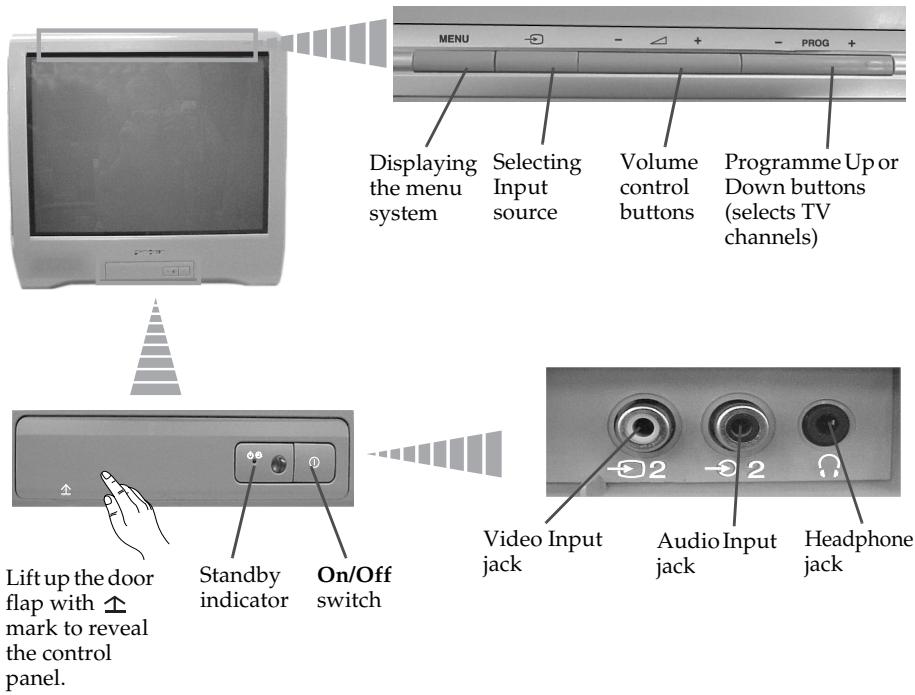
Overview of TV Buttons
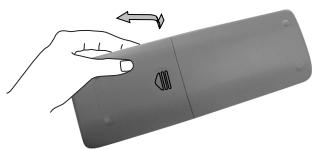
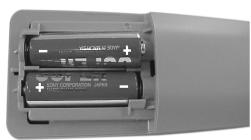
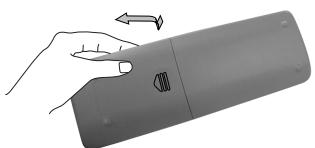
Inserting Batteries into the Remote Control

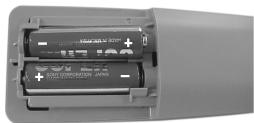
Make sure you insert the supplied batteries using the correct polarities.
Always remember to dispose of used batteries in an environmental friendly way.
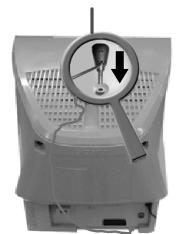
Connecting an Indoor Aerial (only for KV-14CT1K)

For a better reception we recommend you connect an external aerial. However, where an external aerial is not available and your local VHF/UHF signal is strong, you can connect the supplied indoor aerial as follows:
1 Insert the aerial into the opening on top of the set until it clicks.
2 Connect the aerial connector to the aerial socket on the rear of the set.
3 After switching on the TV, adjust the aerial for optimum reception.
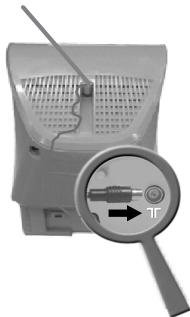
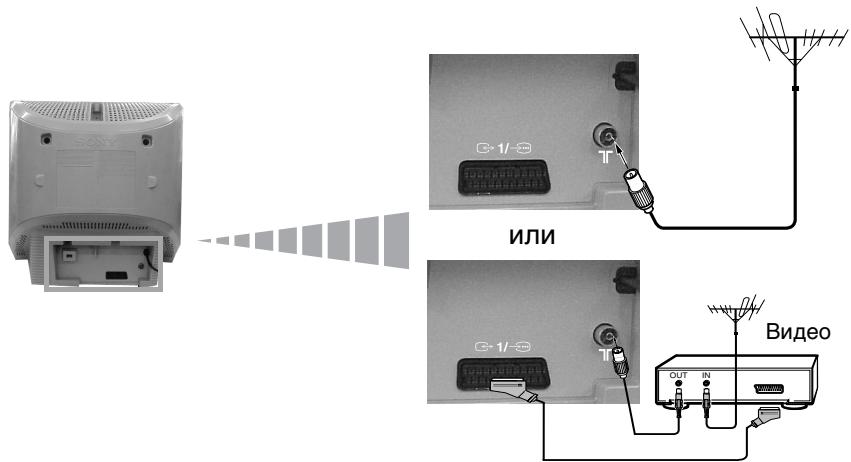
Connecting an Outdoor Aerial and VCR

Connecting cables are not supplied.
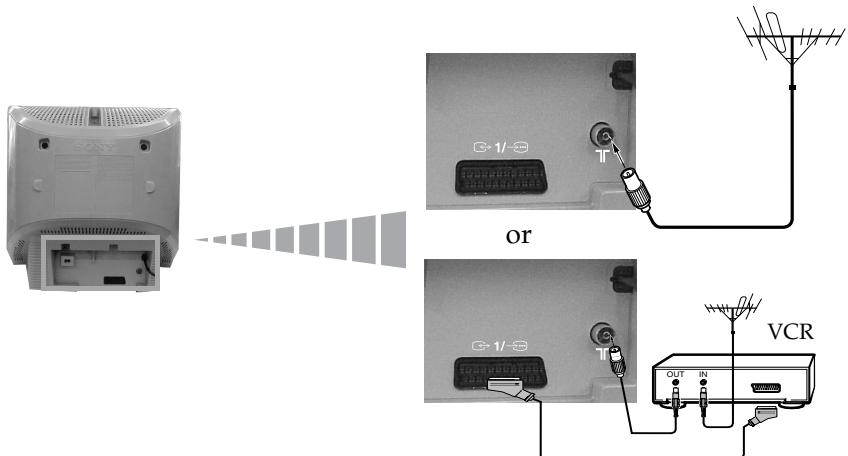
Scart lead is optional.
For more details of VCR connection, please refer to the section "Connecting Optional Equipment" of this instruction manual (see page 17).
Switching On the TV and Automatically Tuning

The first time you switch on your TV, a sequence of menu screens appear on the TV enabling you to: 1) choose the language of the menu screen, 2) choose the country in which you wish to operate the TV, 3) search and store all available channels (TV Broadcast), 4) change the order in which the channels (TV Broadcast) appear on the screen and 5) adjust the picture slant (only for KV-21CT1K).
However, if you need to change any of these settings at a later date, you can do that by selecting the appropriate option in the (Set Up) or (Channel Set Up) menu.
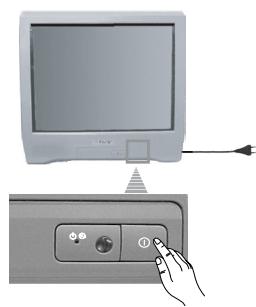
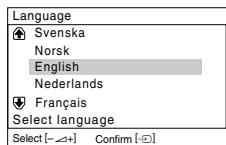
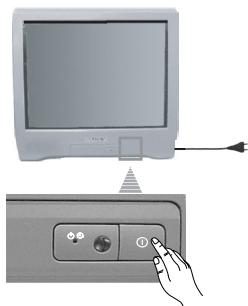
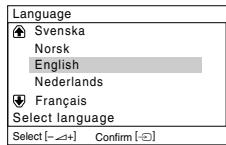
1 Connect the TV plug to the mains socket (220-240 V AC, 50 Hz). Press ① On/Off button on the TV set to switch on the TV. The first time you switch on the TV, a Language menu displays automatically on the TV screen.
2 Press + / - button on the top control panel to select the language, then press to confirm your selection. From now on all menus will appear in the selected language.
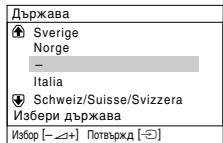
3 The Country menu appears automatically on the TV screen. Press + / - button to select the country in which you will operate the TV set, then press to confirm your selection.
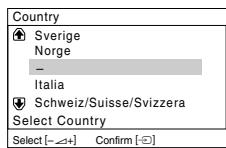

- If the country in which you want to use the TV set does not appear in the list, select " - " instead of a country.
- In order to avoid wrong teletext characters for Cyrillic languages we recommend to select Russia in the case that your own country does not appear in the list.
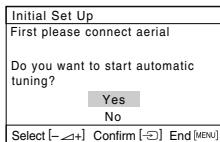
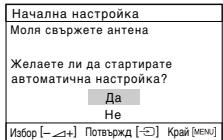
4 Ensure the aerial is connected as instructed, then press to confirm. The TV automatically starts searching and storing all available broadcast channels for you.

- This procedure could take some minutes. Please be patient and do not press any buttons, otherwise automatic tuning will not be completed.
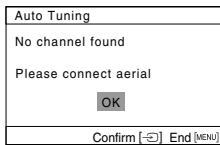
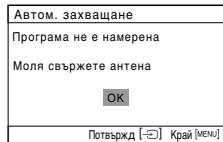
- If no channels were found during the auto tuning process, a new menu appears automatically on the screen asking you to connect the aerial. Please connect the aerial (see page 7) and press . The auto tuning process will start again.
5 After all available channels are captured and stored, the
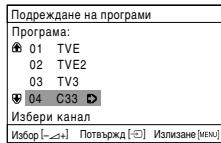
Programme Sorting menu appears automatically on the screen enabling you to change the order in which the channels appear on the screen.
a) If you wish to keep the broadcast channels in the tuned order, press MENU.
b) If you wish to store the channels in a different order:
1 Press + / - to select the programme number with the channel (TV Broadcast) you wish to rearrange, then press.
2 Press + / - to select the new programme number position for your selected channel (TV Broadcast), then press .
3 Repeat steps b) 1 and b) 2 if you wish to change the order of the other channels.
| Programme Sorting |
| Programme: |
| 01 TVE |
| 02 TVE2 |
| 03 TV3 |
| 04 C33 |
| Select channel |
| Select [←+] Confirm [→] Exit [MENU] |
| Programme Sorting | |
| Programme: | |
| 01 | TVE |
| 02 | TVE2 |
| 03 | TV3 |
| 04 | C33 |
| 05 | 03 TV3 |
| Select new position | |
| Select [←+] Confirm [→] Exit [Menu] | |
6 The following option is only available for KV-21CT1K.
Because of the earth's magnetism, the picture might slant. The
Picture Rotation menu allows you to correct the picture slants if it is necessary.
a) If it is not necessary, press
b) If it is necessary, press + / - to correct any slant of the picture. Finally press to store.
| Picture Rotation |
| [←Δ]↓[→Δ+] |
| Select [←Δ+] Confirm [→] End [ksw] |
To allow this menu to appear again, press and hold MENU button at top control panel for about 5 seconds.
- The MENU, + and / / buttons on the remote control can also be used for the operations above.
Your TV is now ready for use.
Introducing and Using the Menu System
Your TV uses an on-screen menu system to guide you through the operations. Use the following buttons on the Remote Control to operate the menu system:
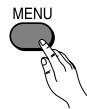
1 Press MENU to switch the menu on.
2 • To highlight the desired menu or option, press or .
- To enter to the selected menu or option, press .
To return to the last menu or option, press - To alter settings of your selected option, press / / or .
To confirm and store your selection, press 13 .
3 Press MENU to remove the menu from the screen.
Picture
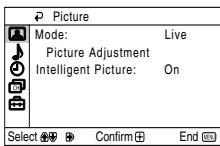

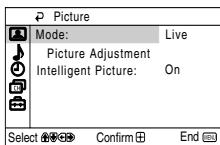
The "Picture" menu allows you to alter the picture adjustments.
To do this:
After selecting the item you want to alter, press , then press / / or repeatedly to adjust it and finally press + to store the new adjustment.
This menu also allows you to customize the picture mode based on the programme you are watching:
| Mode | Live (for enhanced picture contrast and sharpness). Movie (for a finely detailed picture). Game (for a picture from game). Personal (for your own custom settings). | |
| Picture Adjustment | Contrast | Press ↓ or ↓ to reduce picture contrast. Press ↑ or ↑ to enhance picture contrast. |
| Brightness | Press ↓ or ↓ to darken the picture. Press ↑ or ↑ to brighten the picture. | |
| Colour | Press ↓ or ↓ to decrease colour intensity. Press ↑ or ↑ to increase colour intensity. | |
| Hue | Press ↓ or ← to decrease the green tones. Press ↑ or → to increase the green tones. | |
| Hue can only be adjusted for NTSC colour signal (e.g. USA video tapes). | ||
| Sharpness | Press ↓ or ← to soften the picture. Press ↑ or → to sharpen the picture. | |
| Reset | Select ∅ to reset the picture to the factory preset levels. | |
| Intelligent Picture | On/Off | Select to optimize the picture quality. E.g. reduce noise level when signal is weak. |

If any changes are made to "Picture Adjustment", "Mode" will switch automatically to "Personal" and the new setting will be stored as "Personal".

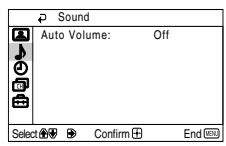

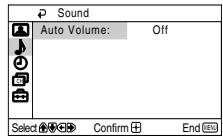
The "Sound" menu allows you to alter the sound adjustments.
Auto
Volume
On/Off
Volume level of the channels will stay the same, independent of the broadcast signal (e.g. in the case of advertisements).
| Sleep Timer | The "Sleep Timer" option in the "Timer" menu allows you to select a time period for the TV to switch itself automatically into the standby mode. To do this: After selecting the option, press ↓, then press ↓ or ↓ to set the time period delay (max. of 1 hour 30 minutes) and finally press ↓ to store. While watching the TV, you can press the ⊥ button on the remote control to display the time remaining. One minute before the TV switches itself into standby mode, "TV will turn off soon" is displayed on the TV screen automatically. |
| On Timer | The "On Timer" option in the "Timer" menu allows you to select a time period for the TV to switch itself automatically on from standby mode. To do this: After selecting the option, press ↓, then press ↓ or ↓ to set the time period delay (max. of 12 hours) and finally press ⊙ to store. Finally press the standby button I/ ⊙ on the remote control. After the selected length of time, the TV switches on automatically and "On Timer" will appear on the screen. The standby indicator ⊙ on the TV set lights up in amber to indicate that "On Timer" is active. Any loss of power will cause these settings to be cleared. If no buttons are pressed for more than one hour after the TV is turned on using the "On Timer", the TV automatically goes into standby mode. |
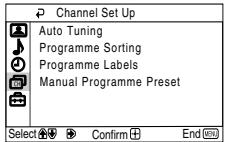

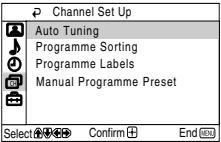
The "Channel Set Up" menu allows you to preset channels on this TV.
Auto Tuning
The "Auto Tuning" option in the "Channel Set Up" menu allows you to automatically search and store all available TV channels.
To do this:
After selecting the option, press and then proceed in the same way as in the step 4 of the section "Switching On the TV and Automatically Tuning" (see page 8).
Programme Sorting
The "Programme Sorting" option in the "Channel Set Up" menu allows you to change the order in which the channels (TV Broadcast) appear on the screen.
To do this:
After selecting the option, press and then proceed in the same way as in step 5b) of the section "Switching On the TV and Automatically Tuning" (see page 9).
Programme Labels
The "Programme Labels" option in the "Channel Set Up" menu allows you to name a channel using up to five characters (letters or numbers).
To do this:
1 After selecting the option, press . Press or to select the programme number with the channel you wish to name, then press + .
2 Press . With the first element of the label column highlighted, press or to select a letter or number (select " _ " for a blank), then press to confirm this character. Select the other four characters in the same way. Finally press + to store.
continued...
Manual Programme Preset
The "Manual Programme Preset" option in the "Channel Set Up" menu allows you to:
a) Preset channels or a video input source one by one to the programme order of your choice.
To do this:
1 After selecting the "Manual Programme Preset" option, press . Highlight the Programme option and press . Press or to select a programme number on which you want to preset the channel (for VCR, select programme number "0"), then press .
The following option is only available depending on the country you have selected in the "Language/Country" menu.
2 After selecting the System option, press . Press or to select the TV Broadcast system (B/G for western European countries or D/K for eastern European countries), then press + .
3 After selecting the Channel option, press . Then press or to select the channel tuning (C for terrestrial channels or S for cable channels). Next press . After that, press the number buttons to directly enter the channel number of the TV Broadcast. If you do not know the channel number, press or to search for it. When you tune the desired channel, press twice to store.
Repeat all the above steps to tune and store more channels.
b) Normally the automatic fine tuning (AFT) will give the best possible picture, however you can manually fine tune the TV to obtain a better picture if the picture is distorted.
To do this:
While watching the channel (TV Broadcast) you wish to fine tune, select the AFT option and press . Next press or to adjust the fine tuning between -15 and +15. Finally press twice to store.
c) Skip any unwanted programme numbers when they are selected with the PROG + / - button.
To do this:
Highlighting the Programme option, press PROG + / - to select the programme number you want to skip. When the programme you want to skip appears on the screen, select the Skip option and press . Next press or to select Yes. Finally press twice to confirm and store.
To cancel this function afterwards, select No instead of Yes in the step above.
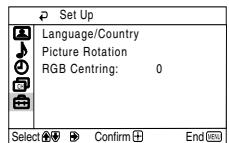

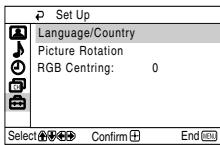
The "Set Up" menu allows you to alter various options on this TV.
Language/ Country
The "Language/Country" option in the "Set Up" menu allows you to select the language that the menus are displayed in.
To do this:
After selecting the option, press and then proceed in the same way as in the step 2 and 3 of the section "Switching On the TV and Automatically Tuning" (see page 8).
Picture Rotation (only for KV-21CT1K)
Because of the earth's magnetism, the picture might slant. In this case, you can correct the picture slant by using the option "Picture Rotation" in the "Set Up" menu.
To do this:
After selecting the option, press . Press or ( or ) to correct any slant of the picture. Finally press ± to store.
RGB Centring
When connecting an RGB source, such as a "PlayStation", you may need to readjust the horizontal position of the picture. In that case, you can readjust it through the "RGB Centring" option in the "Set Up" menu.
To do this:
While watching an RGB source, select the "RGB Centring" option and press . Press or to adjust the centre of the picture between -10 and +10. Finally press + to confirm and store.
Teletext
Teletext is an information service transmitted by most TV stations. The index page of the Teletext service (usually page 100) gives you information on how to use the service. To operate Teletext, use the remote control buttons as indicated below.
A Be sure to use a channel (TV Broadcast) with a strong signal, otherwise Teletext errors may occur.
To switch on Teletext :
After selecting the TV channel which carries the Teletext service you wish to view, press l .
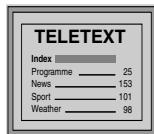
To select a Teletext page:
Input 3 digits for the page number, using the numbered buttons.
- If you have made a mistake, retype the correct page number.
- If the counter on the screen continues searching, it is because this page is not available. In that case, input another page number.
To check the contents of a Teletext service:
Press
To access the next or preceding page:
Press or
To superimpose teletext on to the TV:
Whilst you are viewing Teletext, press 且 . Press it again to cancel Teletext mode.
To freeze a teletext page:
Some Teletext pages have sub-pages which follow on automatically. To stop them, press 2 . Press it again to cancel the freeze.
To reveal concealed information (e.g., answer to a quiz):
Press ②. Press it again to conceal the information.
To enlarge the Teletext display:
Press 5 . Each time you press 3 , the Teletext display changes as follows: Enlarge upper half → Enlarge lower half → Normal size.
To stand by for a Teletext page while watching a TV program.
1 Enter the Teletext number that you want to refer to, then press
2 When the page number is displayed, press l to show the Text.
To switch off Teletext:
Press
Fastext
Fastext service lets you access pages with one push of a button.
While you are in Teletext mode and Fastext is broadcast, a colour coded menu appears at the bottom of the teletext page. Press the colour button (red, green, yellow or blue) to access the corresponding page.
Connecting Optional Equipment

Using the following instructions, you can connect a wide range of optional equipment to your TV set (connecting cables are not supplied).
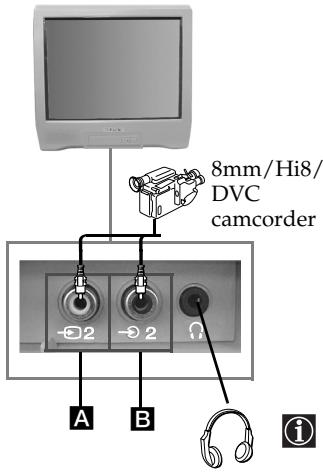
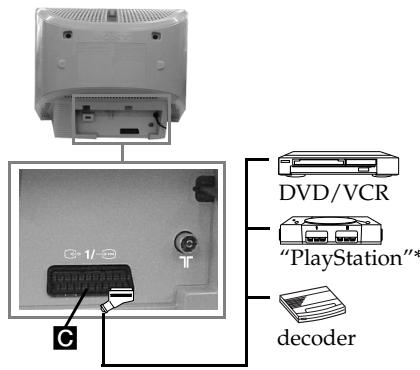
When you connect the headphones, the TV speakers will automatically be muted
- "PlayStation" is a product of Sony Computer Entertainment, Inc.
- "PlayStation" is a trademark of Sony Computer Entertainment, Inc.
Connecting a VCR:
To connect a VCR, please refer to the section "Connecting an outdoor aerial and VCR" of this instruction manual. We recommend you connect your VCR using a Scart lead. If you do not have a Scart lead, tune in the VCR test signal to the TV programme number "0" by using the "Manual Programme Preset" option (for details on how to manually programme these presets, see page 14, step a).
Refer to your VCR instruction manual to find out how to find the output channel of your VCR.
Using Optional Equipment
1 Connect your equipment to the designated TV socket, as indicated above.
2 Switch on the connected equipment.
3 To watch the picture of the connected equipment, press repeatedly until the correct input symbol appears on the screen.
Symbol
Input Signals
1
- Audio/video input signal through the Scart connector C.
1
- RGB input signal through the Scart connector C . This symbol appears only if a RGB source has been connected.
2
- Video input signal through the phono socket A and Audio input signal through B.

Press button on the remote control to return to the normal TV picture.
Specifications
TV system:
Depending on your country selection:
B/G/H, D/K
Colour system:
PAL, SECAM
NTSC 3.58, 4.43 (only Video In)
Channel Coverage:
VHF: E2-E12
UHF: E21-E69
CATV: S1-S20
HYPER: S21-S41
D/K: R1-R12, R21-R69
Picture Tube:
Flat Display FD Trinitron
Rear Terminals
→1/
21-pin Scart connector (CENELEC standard) including audio/video input, RGB input, TV audio/video output.
Front Terminals
-2 video input - phono jack
2 audio input - phono jack
headphones jack
Sound Output:
1 × 6 ~W (music power)
1 × 3 ~W (RMS)
Power Consumption:
KV-21CT1K:56 W
KV-14CT1K:50W
Standby Power Consumption:
<1W
Accessories supplied:
1 Remote Control (RM-W100)
2 Batteries (IEC designated)
1 Aerial (only for KV-14CT1K)
Other features:
- Teletext, Fastext, TOPtext
- Sleep Timer
- On Timer
Design and specifications are subject to change without notice.
Ecological Paper- Totally Chlorine Free

Troubleshooting

Here are some simple solutions to the problems which may affect the picture and sound.
| Problem | Solution |
| No picture (screen is dark) and no sound. | ·Check the aerial connection. ·Plug the TV in and press the ① button on the front of TV. ·If the standby indicator ① is on, press 1/① button on the remote control. |
| Poor or no picture (screen is dark), but good sound. | ·Using the menu system, select the “Picture Adjustment” menu and select “Reset” to return to the factory settings (see page 10). |
| No picture or no menu information from equipment connected to the Scart connector. | ·Check that the optional equipment is on and press repeatedly on the remote control until the correct input symbol is displayed on the screen (see page 17). |
| Good picture, no sound. | ·Press the ➀ + button on the remote control. ·Check that headphones are not connected. |
| No colour on colour programmes. | ·Using the menu system, select the “Picture Adjustment” menu and select “Reset” to return to factory settings (see page 10). |
| Distorted picture when changing programmes or selecting teletext. | ·Turn off any equipment connected to the Scart connector on the rear of the TV. |
| Wrong characters appear when viewing teletext. | ·Using the menu system, enter the “Language/ Country” option in the “Set Up” menu and select the country in which you operate the TV set. For Cyrillic languages, we recommend to select Russia in the case that your own country does not appear in the list (see page 15). |
| Picture slanted. (only for KV-21CT1K) | ·Using the menu system, select the “Picture Rotation” option in the “Set Up” menu to correct the picture slant (see page 15). |
| Noisy picture when viewing a TV channel. | ·Using the menu system, select the “Manual Programme Preset” menu and adjust Fine Tuning (AFT) to obtain better picture reception (see page 14). ·Using the menu system, select the “Intelligent Picture” option in the “Picture” menu and select “On” to reduce the noise in the picture (see page 10). |
| Remote control does not function. | ·Replace the batteries. |
| The standby indicator ① on the TV flashes red. | ·Contact your nearest Sony service centre. |

In case of problems, have your TV serviced by qualified personnel. Never open the casing yourself.
yBOD
Бларим Ви за Избopa на тоицьетен телевизор Sony с пльськ ekpan FD Trinitron.
Ipei n3no3BaHe Ha TeLeBn3Opa npoYeTe BnHMaTeJHO TOBa pKOBODCTBO 3a ekCnIloatauHa ro 3ana3ete 3a 6bJeun N3rCHEHn.
CnmboIu3noJI3BaHbI BTOBa p'koBOOdCTBO:
Baxha nHΦopMaua.
1 VHΦopMaζηa 3a ΦyHKζηraTa.
1,2...PocneIobaTeJIHOCT 3a CJIeIbAHe Ha INCHcpyKUnITE.
ПOTьмненTe 6byToHnHa
ДИСТАЦИОНTOуРаВЛЕнe
пOKa3ВaT KОN 6byToHn Tpr6Ba Дa ce
нATиСКaT 3a ИЗMbЛнEHNeTO Ha
pa3JIuHnTe ONEpaUIM.
HnΦopMaζηa pe3yntata oTHCTpyKcUInTe.
CbDpbXaHne
yBOI 3
Mepkn 3a 6e3oNaChocT 4
OCHOBHO OINCAHne
OchOBHO onicAHne Ha 6yToHnTe Ha nCTaHcIOHHoTo ynpabNeHne 5
OchOBHO onncanHe Ha 6byToHnTe Ha TeJeBn3opa. 6
UHCTaJIpaHe
HCTaIpaHe Ha 6atePmTe B yctpoiCTBoto 3a DnCTaHcIOHNO ynpaBLeHne 6
Cbpb3BaHe Ha nopTaTnBHa aHTeHa (cAmo 3a KV-14CT1K) 7
Cbbp3BaHe Ha BbHnHa aHTeHa n BnDeo. 7
TbpBOHaayalHO BkIIOvBaHe
BkIIOUbaHe n aBTOMaTNUHO HacTpOBAHe Ha TeJIeBn3opa. 8
Cntema ot MeHToHa ekpaHa
YbOnd 6opabeHe Cbc CnCTeMaTa OT MeHIOTa. 10
KaptnHa 10
3ByK 11
① Yacobnik 12
Hactp. Ha KaHaJInte 13
UHCTaIipaHe 15
TenetekeCT 16
DonbJIHHTeJHa HOpMaUa
Cbbp3BaHe Ha donbHnTeJHn anapaTn. 17
Bopabene c donbHnTeJHn anapatu. 17
XapakTepeuCTnKu 18
OTCTpaHraBaHe Ha HEn3npaBHOctn. 19
Cbbp3BaHe Ha BbHUnHa aHTeHa N BnDeo

KabeniTe 3a Cbbp3BaHe He ca npinoxKeH cepnHO.
Cbbp3BaHeTo Upe3 EbpokoHeKTopa e onuHa.

3a noBeeJe DeTaimn 3a CBp3BaHeto Ha BnIeOTo BnXTe B rIaNbTa "Cbbp3BaHe Ha donblHnTeJIHn anapatn" B TOBA pKOBODCTBO 3a ekCnNoaTaun (Ha cTp.17).
BkIIOUBaHe n aBTOMaTNUHO hAcTpoIBaHe ha TeJIeBn3opa

Korato BKIOUHTe 3a IIbPbN PbT TeLEBUN3Opa, Ha ekpHa Iue Ce NOABIN NocIeBOBaTeJHOCCT OT MeHOTa Ype3 KOITTO Iue MOXeTe Da: 1) I36epTe E3Nka Ha MeHOTaTa, 2) I36epTe DpbXbaTa B KORTo XeJIaTe Da I3N0JI3BaTe anapata, 3) TbPCnTe I 3anaMeTIne ABTomATuH0 BCNUK KaHAn Ha pa3NoIooXeHne (TB npOrpAMn), 4) CmEHnTe peDa Ha NoBRAHe Ha KaHAnTE (TB npOrpAMn) n 5) HacTpOnTe HAKIoHa Ha KapTHnAta (cAmo 3a KV-21CT1K).
Ako 3a B 6bDeeze JeenaTe Da npomeHnTe HrKoN OT Te3n HaCtpoKn, TOBa MoKe da ce n3BbPm n3bnpaKn CbOTBeTHaT a ONuR B (VHcTaInpaHe) uIn (HaCtp. Na KaHaJIne).
1 BkIIOUeTe KaBena 3a 3axpaHbAHeTO (220-240V AC, 50Hz).HaTnCHete 6byToHa 3a BKn./ n3Kn. ① OT IInceBaTa C7paHa Ha TEJIeM3Opa, 3a Da BKJIOuHTe. KOrATo BKJIIOUHTe TEJIeN3Opa 3a IIpbBn IIbT, Ha ekpHa aBTOMaTHUHO ue CE NOBm MEHIO TO Language (E3nk).
2HaTnCHeTe 6yToHa +/OT DnCTaHNoHHoTO UnpaBneHne,3a da n36epete e3nka nocne HaTnCHeTe 6yToHa ,3a da NotbypnTe n36opa.OT To3n MOMeHT BCnKm MeHToA ue ce NoRBAbaT ha N36paHnaE3NK.
3Ha ekpaHa aBtOMaTHUHcIe Ce cIe NOBm MeHIOTo DbpxkAba. HaTusCHETe 6byTOHa + / - 3a I36Op HaDbpxkABaTa, KbDETo JxenaTe Da I3nOJ3BaTe TeJIeBUN3Op, CNEI KOEt HAUsCHETe 3a IOTbpxJaBaHe Ha I36Opa.

- AkoB CnncbKa He qnrgpnpa DbpXbaTa, B KOrTo Ue n3non3BaTe TeJeBn3Opa, N36pepeT " Ha MRCTOHO DaPbXba.
3a da 6bdaT npabnHn 3NaUte Ha KnpnMa B TeJeTeKCTa BN, npenopbUBaMe da n3bepeTe Pycna, B cnyuante Korato Baata cTpaHa He pfurpura B cnncbKa.
4YBepete ce,ye aHTehatae Cbbp3aHa B CbOTBeTCTBne c YkAs3AHnTa, HATNCHETe 6yToHa 3a NOTBbpXDaBaHe. TeJeBn3OpBt 3NoCbA bTOMaTHo Da TbpCn 3aAnamETBa BCnKn KaHn (TB nporpAmn) Ha pa3noJoxKeHne.

To3n npoec MOxE Da npoDbJnx HraKoJIko MmHyTu. BbTeT TbpneJIbN I He NaHcKaIe HnTO eDnH bTyOH, DOKATO npoDbJxaba npoecbT HaHaCtpoBaHe, BnpOTnBHeN cLyuayn npoEcBbT HMa DA 3aBbPSh.
AkoTeLEBn3OpbT He OTKPHe HnTo eHN KaHAn (TeLEBn3NoHOH npOrpama) CneI 3abPbWBAHe Ha ABTOMATmHATA HAcTPOKa,Ha ekpaHa Ie Ce NOBn CbO6EHe, KOTo Bn NODkaHBA da BKIOHTe aHTeHa. MoN BkIOUHTe Ra Taka KaKTo e ONCaHo HA cTp.7 B TOBa pKOBoDCtBO HaNTCHETe .PiOueCtHa abTOMATnHa HAcTPOKa 3aONuBA OTHOBO.
5 CneI KaTO TeIeBn3OpT Ce HAcTPOI 3aIaMaTeN BCNUKn KaHJI (TB nporpaM), Ha ekpaHa aBTOMaTHUHO ue CE NOBu MEHOTO POpExxDaHe Ha nporpaM, 3a Da MoKeTe da CMeHITe peDa Ha NOBBAVeHa nporpaMITE Ha ekpaHa.
a) Ako He JeIaeTe Da CMeHITe peJa Ha KaHaJIte, HATINCHTe MENU.
6) Ako xeelaete da cmeHnte peda Ha KaHaJInte:
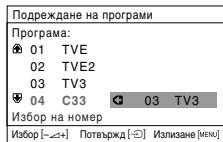
1 HaTnchTe 6byToHa +/-, 3a da n3bepeTe Homepa Ha nporpama Ha cBoTBeTHna KaHJI (TB npoRpama), YnraTO I03nIg XeJaTe Da CMeHInTe, IN CneI TOBa HaTnchTe
2 HaTnchete +/- 3a n3bOp Ha HOBnH OHomep Ha nporpaMaTa, Ha KOaTO JxenaTe Da 3aNaMeTIne N3bpaHn KaHAn (TB nporpaMa), cIeN KoTo HaTnchete
3 Повторе CTынкITE 6)1 n 6)2, akо кениerte д npelenopdneITe dpyTN KaHAn.
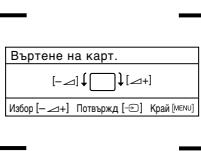
6 CneHaTa onuIe ne ppeIar a camo 3a KV-21CT1K.
Bb3MOxH0e, BpezIyTAt Ha 3emHnMaHHeTN3bM, Obpa3bT da ce nOBn HAKIOHeh. MeHIO To BpTeHe Ha KapT. N03BOJIraBa hAcToPoiBaHeTo Ha opa3a npi Heo6XoIMocT.
a) Ako He e Heo6xoDIMO, HaTnCHete
6) Ako e Heo6xOДIMO, HaTnCHeTe + / - 3a Ja KaOpuHpaTe n3KpNBraBaHe Ha KapTuHaTa. HAppar HaTnCHeTe 3a 3aNaMeTBAhe.
3a da ce noBn TOBa MEHIO OTHOBO, HATNCHEte 3a npkTe 3a 5 ckyHn6yToHa MENU,HAMnpaCce B rohpata Yact Ha KOHTpOHNnaHeJ.
- BytoHnTe Ha nIctaHnOHHoTo ynpaBJIeHne MENU, n / / cBIO MoRat da ce n3NoJ3BaT 3a DeiCTBnRArTa, OINCAHN no-rope.
"MeHIOTo No3BOJRABa Da HApBaNTe npEiBapNTeHa HAcTpoJa Ha KaHaJIte Ha To3N TeJeBUN3Op.
YBODI 6opabeHe CbC CNCTemata OT MeHOTa

To3n TeIeBn3Op n3noI3Ba CnCTema OT MeHOTo Ha ekpaHa, 3a da Bn BoDn npi pa3nUHnTe Opeaun. N3noI3BaIte CneIhnte 6yTOHn OT DnCTaHcNHOHTo ynpaBJIeHne, 3a da Ce DbIXKIne ppe3 MeHOTota:
1 HaTnCHeTe 6yToHa MENU 3a noRbHa nIbPBoTo HnBO OT MeHIO To Ha ekpaHa.
2·3a noJuepTaBaHe Ha JeNaHTo MeHIO IINI N3bOp HATnCHeTe IINI
- 3a Да ВпeЗeTe B ИЗБраHTo MЕн ИИ NИ N3БОp, HATиСеTe
- 3a BpüaHe B ppeXoJHO MeHIO nIIN I36Op, HATNCHETe
- 3aПромяна На Настюка.Tа Нжелая Избор натус悔Te / / Или
- 3a oOo6pBaHe n 3aNaMeTBAVe Ha BaWnI rN36Op hAtnCHeTe (12)
3HaTncheTe 6yToHa MEnu 3a BpbShaHe KbM HopMaJIeH TB peJxIM.

Kapturna
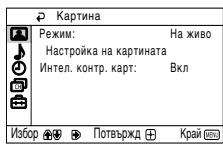

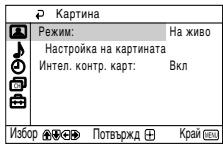
MehIoTO "KapTIna" Bu nO3B0JIraBa da npOMeHnTe HacTpOiKaTa Ha o6pa3a.
3a zentra:
CleI KaTo n36epeTe onueta, KOaTO JeNaeTe Da Ipomehnte, HaTnCHete 一 _ · CneI Koeto HAtncHeTe HAKOJIKO NTi 14 /U ININ 3a IpomraHa Ha HactpoiKaTa I NocJe HaTnCHete 3a 3anametBahe. TOBA MeHcBto Bn no3BoJBa Da Ipomehnte pexima Ha o6pa3a B 3aBnCmOCT OT Tnna Ha nporpaMaTa, KOaTO rKeJaTe:
ΦaCTeKCTbT I03BOLIBA DoCTbI Do CTpaHnCIte Ha TeIeTeKCTa, Ype3 HATnCKaHTo CaMo Ha eDIN 6yTOH.
Korato cTe n36paJIteKeKT, n B cnUyAn Ha n3JIbYBaHe Ha CnHaN Ha paCTeKCT, Ha DOnHaTa CTpAHa Ha ekPapa Hc Ce NOBn EJHO MEHIO OT cBeTHN KOIOBE, NO3BOJRABaO Bu dIpeKTeH DoctbIdo eJHa cTpaHua. 3a CEJIa HAtNCHe TcOTBETHNA cBeTeH 6yTOH (YeBPEN, 3eJIeH, XbJIr IIN CnH) O t DInCTaHUnOHHTo ynpabJeHne.
Cbbp3BaHe Ha donbHnTeJHn anapatn

Bb3MOxHcBbP3BaHeToHa ⅢnPoKa rama O T OIObJIHITeHn anapaTn KbM TeIeBUN3Opa, Taka KaKTo e NOKa3BaHO NO-DOny (Ka6eJInte 3a CbP3BaHe He ce npInarat cepinHo).
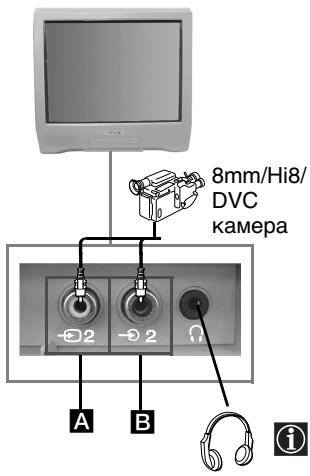
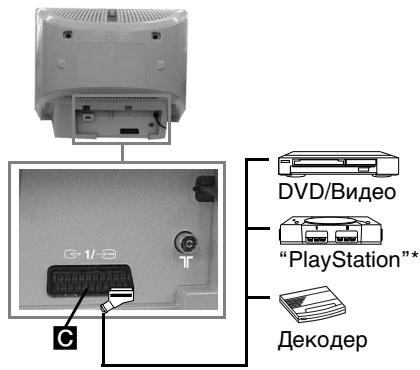
Korato BKJIOHNTe cnUaJIKNITE, ROBOPINTeIneHa TeNeB3Opa ige ce n3KJIOuHaT aBtOMaTHHO.
- "PlayStation" e pnoДукт ha Sony Computer Entertainment, Inc.
- "PlayStation" e peɪnctpɪpaHa Mapka Ha Sony Computer Entertainment, Inc.
Cbbp3BaHe Ha BnDeo:
3a cBp3BaHe Ha BnDeo BnKTe B rIaBaTa "CbBp3BaHe Ha BbHsHa aHTeHaTaN BnDeo".
PpenOpBvBa ce CbBp3BaHeTo Ha BnDeoTo Da ce N3BbPmNpe3 TepMnHaJa EbpokOHeKTOp.
AKe He n3NoJ3BaTe To3n TepMnHaJ, e H06xOIMo Da hAcTPOnte pUyHO KaHaJa 3a BnDeo
CnHaJa Ype3 MeHIOTo "Pporpama PbueH N36op" (3a TOba BnKTe ToCuKa a) Ha cTp.14).
KOhcynTnPaTe Ce cbIo Ta c PbKOBodCTBOTo 3a ekCnloaatauHa Ha BaWeTo BnDeo, 3a da
BnDte KAK Ce Hamnpa KaHaJa 3a BnDeo CnHaJa.
NTSC 3.58, 4.43 (camo Bndeo BxoI)
1x6W (My3nKaJHa MoUHocT)
1x3W (RMS)
EheprnHno notpe6JeHne:
KV-21CT1K:56W KV-14CT1K:50W
EheprnHNo nTope6JIeHne B peKm Ha BpeMeHHo N3KJIIOuBaHe (standby): <1 W
Pa3mepn (Unp. x Buc. x Dbl6.):
KV-21CT1K:Пи6Л.497x461x487MM
KV-14CT1K:Пибл.374x355x420MM
Terno:
KV-21CT1K:Пибл.24Кr.
KV-14CT1K:Прибл.11Кr.
Cepinno npinloxeno o6opydahe:
1 yctpoiCTBO 3a nCTaHcIOHNOynpabJeHne RM-W100
26aTePmH, HopMa IEC
1 CtaHa aHTeHa (cAmo 3a KV-14CT1K)
Дугх.apактерстук:
- Tetetekct, Factekct, TOPtext
- ABTomatuHNO n3KnUOvaHe
- ABTomatuHOBIIouBaHe
ДизайньхаразкетерстIKITEпдлжат Ha помен 6e3 п徳варпелно cбобшени.
EkoIorHua xapTna-6e3 xlop

OTcTpaHЯBaHe Ha HEn3IpaBHOCTN
Ipo-dony ca n36poeHn Haryon npocTn peueHn npnpo6nem, Cbbp3aHn c o6pa3a n 3Byka.
Ipo6Jem
PeseHne
| Линca на образа ( ekраньт e тьмен) и 3BYK. | ·Проберете сбврзовeto на антугата. ·Вкlioочete телевизорь и натус悔ete бутона ① от лincьотастра на anapata. ·Ако Иndикаторь ① на телевизорь CBETN, натс悔ete 6bytoha / ① ot диспунноу уразаленie. |
| Овразыт e绛д пли OTСьства, ho Качесвotingу на 3Byka e дообр. | ·Чeрз сисмата OT мениота bVEЗTE B менио “Hacstpoиka на kap'tинота" и n3беретe "Hynipанe" ЗА Вьзстановаяне на Фабричnatа нахтояka (Haстp.10). |
| Линca на образа пли на ИнфоматICALTO мени OT Довл致电ллгия anapat, CBvp3an Кьм ТВ чрзЕвроконтopa. | ·Проберете дали СТЕ ВКLOЧИМ Довл致电ллгия anapat и натус悔ete наюлко пьтSt butoяTo OT дисстанц�ното урразаленie, ДOKATO Лени ВхODEN символ с пови на ekран(a Naстp.17). |
| Добр качесвotingу на образа, ho НЯма 3Byk. | ·Натс悔ete 6bytoha ∆ + OT дисстанц�ното уразаленie. ·Уberетe се, че сныалкite с пови наду. - |
| ЦвetedITE рedingавaningа сбeзцгг. | ·Чeрз сисмата OT мениота bVEЗTE B менио “Hacstpoиka на kap'tинота" и n3беретe "Hynipанe" ЗА Вьзстановаяне на Фабричnatа нахтояka (Haстp.10). |
| Овразыт eизкравен пли сизнога прогамп'tу пли пли n3бор на Тelenект. | ·Изкlioочete усточьTO, CBvp3ano KBm Тelenевизорь чрзЕ Вроконтopa c 21 Кразета. |
| Г_REшни здаи сигирраит, korato се гегда телевизтБ. | ·Чeрз сисмата OT мениота bVEЗTE B ржим “EзNK/Дьржава" и n3беретe STРANATA, в кordу с; изпаловате телевизорь.За сизи на корплиca Ви прений вaramе дд n3беретe Рсь в сныал; Когато вашата дьржава не с повявь в списьka (Haстp.15). |
| Овразыт e налонен. (Camо за KV-21CT1K) | ·Чeрз сисмата OT мениота n3беретe onцягатa "Bьртое на кар.T", в менио "Инсталларе", и perugларе 텍лona(Haстp.15). |
| Овразс cшum. | ·Чeрз сисмата OT мениота n3беретe onцягатa "Ф. (Haстp., в менио "Прогама рьчел n3бop", и n3вьрше ТьчнOTO насточьане за по-достр приема на образа(Haстp.14). ·Чeрз сисмата OT мениота n3беретe onцягатa "ИнTEL.КOHТР.КAPТ", в менио "КарТин", и n3беретe "ВКЛ" за hamalяване нашиma на образа (Haстp.10). |
| Дистанцiohhoto уразаленie He разоти. | ·Сmenete bateprinte. |
| Инданайт STа ржим Ha �отовьост ① на телевизорь мига в черveho. | ·Влесные в Koontakт с на-близката сервизна 6аза нэ_Sony. |
B cnuya ha nobpea n3nckai Te TneBn30pa da ce npobepn ot cneuaJn3npan nepcoha. Hnkora He OTbapre anapaTa.
Uvod
Dekujeme Vám,Že jste si vybrali televizor Sony s plochou obrazovkou FD Trinitron.
HaxaTbeepepa3nBOCCTaHOBNEHn3BYK
Bb6op BxOndoro CnHa
HaxMMTE HeCKOJIbKO pa3, noka
O603NaueHne Tpe6yEmoro
BXoDHOrCnHraHe
NoBNTcRa Ha 3KpaHe.
3Ta KaHONka pa6OtaeT TOnbKO B peXnme TeJeTeKCTa.
ФунклгАI/B данноги Kногнke He npdycmTopeHa ДЯдданного Telenb3Opa.
Bb6opKaHaJIOB
ДлгHomepoB nporpamMbIи3 ДычЦфр,нжмтЕТБУЮ ЦфрВТechене 3секунд.
Haxmite/---,nocne Yero BBeinte nepByo n BTOpyu cnPpb.
Ecni BbO uOINcB npn BBOJe nepBoo uΦpBb, BBeNITe IIO6yI dpyTu uΦpy (OT 0 Do 9), nOcne Yero ChOba HaxMnTe KHOKNKY-/- IN BBeNTe HOMep HxKHOI pOrpaMMbl.
Taimep BKJIIOUeHn
YCTaHOBka aBTOMaTmUeCKoR O BKNIOUeHnTeNeBu3Opa.
Taimep BbIKIOueHn
YCTaHOBka aBTOMaTmUeCKoRo BbIKNoUeHnTeJeBn3Opa.
3ta KhoNka He pa6oTaet dna daHHoro TeNeBn3opa.
Perynnpobka ypOBHra rpOMKoCTN
HaxmTeI pyerynpOBKn yobHr pOMKoCT TeLEBn3opa.
3ta knonka pa6oTaet TOnbKO B pexime TeTekeCTa.
ΦYHKJIaJ DAHNOH KHOKNHe npedyCMOTpeHa Jn DaHHOTo TENEbUN3opa.
Bb6op Pekima N3o6paXeHn
HaKmTe HeckoIbko pa3ДЯ CmehbI PeKIma IV3o6paXeHnA.
Bpemehhoe OTKJIIOUeHne TeJIeBu3opa
HaXMMTe dIa BpeMeHHoro OTKIOUOeHn TENEb3opa (3arOpHTcN HINkAToT peXhMa OxNdaHn ()HaXMMTe eEe pa3 dN BKIOUHO TENEb3Opa I erO bXbXoJa n3 pexHMa BpeMeHHoro OTKIOUOeHn (standby).
B ueJx 3KoHOMnn
3JeKTKPO3eHrPmMbl
peKoMeHnE mONHOCTbIO
BbIKIyOaTb TeneBIm3Op, eCNI
BbIM He nOJIb3yETecb.

Ecnn B TeueHne 15 MnHyT
Het TeJeBn3NoHHO
CnHaJn e NcBb He
NaXkMaTe e H Na OdHy n3
KHONOK, TeJeBn3Op
aBTOMATuCheKn NepeJDeT
B pKm BpEmeHnO
OTKnIOeHn (standby).
Bb6oppekma TeleBn3opa HaxmTe JnA OTKIooHnna TeteKCTa NiN BXoHOrO CnHaNA BnDeO.
Bo3bpaaehne K nocneHemy Bbl6paHHOMKaHany
HaxmnteIJN B03BpaueHnK nocJeHemy BbIbaHNOHMy KAhany (KOTOpBny IpoCMAtpnbAunCe H meHee5 cekyHd).
Bb6op KaHaJIOB
Haxmte Inna BbIbopa cneyioero nIn npdeyujoero KaHana.
Bb6op CnCTembl MeHIO
HaxMMTe DnBbVbOda MeHIO Ha 3KpaH. HaxMMTe eue paz dner ero BbIKUHOeH NnDBoBpauSeHHN K obHyOMy 3KpaHy TelenBHa3Opa
KhoNkBbIbopa MeHIO
PnOHaTbCnHa OndHy CTPOChy.
OnyctntbcaHaOndHy CTPOUky.
BepHyTbCnpeDblUyEmMy MeHIO nIIN BblOpy.
IpeTNI K nocJeDyUoEmy MeHIO Nn VBiopy.
ΠΟΤΒερπιΤΑ ΒΙδόρ.
Bb6op TeJTeKcTa
HaxmiteДЯнвКIOУЕНЯ TetenekCTA.
Bb6opΦopMaTa 3KpaHa
HaKMMTe dI pyocMoTpa nporpamM B pexkMe 16:9. HaKMMTe eIe pa3 dJIro BO3BpTa B pexkM 4:3.

ПOMМо Функ榴 TeLEBn3Opa, BCE CBeTHbIe KHONK (a TaKxE KHONKc 3eJIeHbIMN CmBOLam) TAKKx EICNObl3yOToCДЯ paObTb c TeteKTcOM.Ди nIoNyueHn6Boee noPdOboHn IHOpormaOn ΜobpatntecbΚ pazDeny "TeNETeKCT" daHNo HNCTpykUmno 3KnLnyatau (Ha CTpaHnue 16).
Ошеме описанne Кнорok Телевизopa
YcTaHOBka 6aTapeek B pyIbT dNCTaHcNoHHOrO ynpaBJIeHnA

Y6eIntecb V TOM, YTO 6aTapeiKn BCTabIeHbI C co6JIIOJeHnEM HaIJIeKaIeI nonpHOCTN.
Bepexkno OTHOCInTeCb K OKpykaIoUe CpeI N BbIbpaCbIbAaTe OTPa60TaHHbIe
6aTaapeKn B CneuJaIbHO yCTaHOBJIeHHIe IJN 3TOr KOHTHeHepbl.
Tenepb TeIeBn3op roTOB K 3KcNpyatauH.
| Hасторіка кананов |
| Астонаторіka |
| Сор'tроріba knorpамm |
| Меткі порамm |
| Чу. Нсторіka поррамm |
| БуоогФФФФФФФФФФФФФФФФФФФФФФФФФФФФФФФФФФФФФФФФФФФФФФФФФФФФФФФФФФФФФФФФФФФФФФФФФФФФФФФФФФФФФФФФФФФФФФФФФФФФΦФФФФФФФФФФФФФФФФФФФФФФФФФФФФФФФФФФФФФФФФФФФФФФФФФФФФФФФФФФФФФФФФФФФФФФФФФФФФФФФФФФФФФФФФФФФФФФФФФФФφФФФФФФФФФФФФФФФФФФФФФФФФФФФФФФФФФФФФФФФФФФФФФФФФФФФФФФФФФФФФФФФФФФФФФФФФФФФФФФФФФФФФФФФФФФФФФФФФФФФфФФфФфФфФфФфФфФфФфФфФфФфФфФфФфФфФфФфФфФфФфФфФфФфФфФфФфФфФфФфФфФфФфФфФфФфФфФфФфФфФфФфФфФфФфФфФфФфФфФфФфФ�ФфФфФфФфФфФфФфФфФфФфФфФфФфФфФфФфФфФфФфФфФфФфФфФфФфФфФфФфФфФфФфФфФфФфФфФфФфФфФфФфФфФфФфФфФфФфФфФфФфФ<|rotate_right|>ФФфФфФфФфФфФфФфФфФфФфФфФфФфФфФфФфФфФфФфФфФфФфФфФфФфФфФфФфФфФфФфФфФфФфФфФфФфФфФфФфФфФфФфФфФфФфФфФфФфΦΦΦΦΦΦΦΦΦΦΦΦΦΦΦΦΦΦΦΦΦΦΦΦΦΦΦΦΦΦΦΦΦΦΦΦΦΦΦΦΦΦΦΦΦΦΦΦΦΦΦΦΦΦΦΦΦΦΦΦΦΦΦΦΦΦΦΦΦΦΦΦΦΦΦΦΦΦΦΦΦΦΦΦΦΦΦΦΦΦΦΦΦΦΦΦΦΦΦΦPhiΦΦΦΦΦΦΦΦΦΦΦΦΦΦΦΦΦΦΦΦΦΦΦΦΦΦΦΦΦΦΦΦΦΦΦΦΦΦΦΦΦΦΦΦΦΦΦΦΦΦΦΦΦΦΦΦΦΦΦΦΦΦΦΦΦΦΦΦΦΦΦΦΦΦΦΦΦΦΦΦΦΦΦΦΦΦΦΦΦΦΦΦΦΦΦΦΦΦΦΩΦΦΦΦΦΦΦΦΦΦΦΦΦΦΦΦΦΦΦΦΦΦΦΦΦΦΦΦΦΦΦΦΦΦΦΦΦΦΦΦΦΦΦΦΦΦΦΦΦΦΦΦΦΦΦΦΦΦΦΦΦΦΦΦΦΦΦΦΦΦΦΦΦΦΦΦΦΦΦΦΦΦΦΦΦΦΦΦΦΦΦΦΦΦΦΦΦΦΦ℉ΦΦΦΦΦΦΦΦΦΦΦΦΦΦΦΦΦΦΦΦΦΦΦΦΦΦΦΦΦΦΦΦΦΦΦΦΦΦΦΦΦΦΦΦΦΦΦΦΦΦΦΦΦΦΦΦΦΦΦΦΦΦΦΦΦΦΦΦΦΦΦΦΦΦΦΦΦΦΦΦΦΦΦΦΦΦΦΦΦΦΦΦΦΦΦΦΦΦΦ─ΦΦΦΦΦΦΦΦΦΦΦΦΦΦΦΦΦΦΦΦΦΦΦΦΦΦΦΦΦΦΦΦΦΦΦΦΦΦΦΦΦΦΦΦΦΦΦΦΦΦΦΦΦΦΦΦΦΦΦΦΦΦΦΦΦΦΦΦΦΦΦΦΦΦΦΦΦΦΦΦΦΦΦΦΦΦΦΦΦΦΦΦΦΦΦΦΦΦΦ∅ΦΦΦΦΦΦΦΦΦΦΦΦΦΦΦΦΦΦΦΦΦΦΦΦΦΦΦΦΦΦΦΦΦΦΦΦΦΦΦΦΦΦΦΦΦΦΦΦΦΦΦΦΦΦΦΦΦΦΦΦΦΦΦΦΦΦΦΦΦΦΦΦΦΦΦΦΦΦΦΦΦΦΦΦΦΦΦΦΦΦΦΦΦΦΦΦΦΦΦ ΦΦΦΦΦΦΦΦΦΦΦΦΦΦΦΦΦΦΦΦΦΦΦΦΦΦΦΦΦΦΦΦΦΦΦΦΦΦΦΦΦΦΦΦΦΦΦΦΦΦΦΦΦΦΦΦΦΦΦΦΦΦΦΦΦΦΦΦΦΦΦΦΦΦΦΦΦΦΦΦΦΦΦΦΦΦΦΦΦΦΦΦΦΦΦΦΦΦΦΦθΦΦΦΦΦΦΦΦΦΦΦΦΦΦΦΦΦΦΦΦΦΦΦΦΦΦΦΦΦΦΦΦΦΦΦΦΦΦΦΦΦΦΦΦΦΦΦΦΦΦΦΦΦΦΦΦΦΦΦΦΦΦΦΦΦΦΦΦΦΦΦΦΦΦΦΦΦΦΦΦΦΦΦΦΦΦΦΦΦΦΦΦΦΦΦΦΦΦΦ±ΦΦΦΦΦΦΦΦΦΦΦΦΦΦΦΦΦΦΦΦΦΦΦΦΦΦΦΦΦΦΦΦΦΦΦΦΦΦΦΦΦΦΦΦΦΦΦΦΦΦΦΦΦΦΦΦΦΦΦΦΦΦΦΦΦΦΦΦΦΦΦΦΦΦΦΦΦΦΦΦΦΦΦΦΦΦΦΦΦΦΦΦΦΦΦΦΦΦΦΔΦΦΦΦΦΦΦΦΦΦΦΦΦΦΦΦΦΦΦΦΦΦΦΦΦΦΦΦΦΦΦΦΦΦΦΦΦΦΦΦΦΦΦΦΦΦΦΦΦΦΦΦΦΦΦΦΦΦΦΦΦΦΦΦΦΦΦΦΦΦΦΦΦΦΦΦΦΦΦΦΦΦΦΦΦΦΦΦΦΦΦΦΦΦΦΦΦΦΦ°ΦΦΦΦΦΦΦΦΦΦΦΦΦΦΦΦΦΦΦΦΦΦΦΦΦΦΦΦΦΦΦΦΦΦΦΦΦΦΦΦΦΦΦΦΦΦΦΦΦΦΦΦΦΦΦΦΦΦΦΦΦΦΦΦΦΦΦΦΦΦΦΦΦΦΦΦΦΦΦΦΦΦΦΦΦΦΦΦΦΦΦΦΦΦΦΦΦΦΦ−ΦΦΦΦΦΦΦΦΦΦΦΦΦΦΦΦΦΦΦΦΦΦΦΦΦΦΦΦΦΦΦΦΦΦΦΦΦΦΦΦΦΦΦΦΦΦΦΦΦΦΦΦΦΦΦΦΦΦΦΦΦΦΦΦΦΦΦΦΦΦΦΦΦΦΦΦΦΦΦΦΦΦΦΦΦΦΦΦΦΦΦΦΦΦΦΦΦΦΦ—ΦΦΦΦΦΦΦΦΦΦΦΦΦΦΦΦΦΦΦΦΦΦΦΦΦΦΦΦΦΦΦΦΦΦΦΦΦΦΦΦΦΦΦΦΦΦΦΦΦΦΦΦΦΦΦΦΦΦΦΦΦΦΦΦΦΦΦΦΦΦΦΦΦΦΦΦΦΦΦΦΦΦΦΦΦΦΦΦΦΦΦΦΦΦΦΦΦΦΦ—— |
B MeHIO "HacTpoiKa KaHaIob"
MOXHO BbIIOJIHATb
IpeDbapITeJIbHyIO HAcTpoiKy
KaHaIob Ha DaHHOM TeJIeBn3ope.
Автоансторка
IyHKT MeHIO "AByToHaCTpoiKa" B MeHIO "HAcToPoiKa KaHaJIOB" DaET BO3MOXKHOCTb IONCKa N 3aONOMHaHNBa BCEX DOCTYINbIX KaHaJIOB (TeJIeBN3IOHbIX CTaHcN).
Длгэтoro:поссе Вьбopa 3тOTO pyнкт MaHIO,HaЖмnte Ha 一 a 3aTeM bIbIoNInTe DeiCtBnA,уKa3aHHbIe BpyHKTe 4 pa3dena "ВКlioчени и abTomatuecka HabTpoIka TeJeBn3opa" (Ha cTpaHnue 8).
CoptnpoBka nporpamM
IyHKT MeHIO "CopTnOpBKa IpoRpaMM" B MeHIO "HaCTpOka KaHaJIOB" Daet BO3MOXHOCTb N3MeHHTb NOPaOK NOrBJIeHnHa 3KpaHe KaHaJIOB (TeLeBn3IOHHbIX CTaHcN).
ДлгЗ耗о:поссе Вьбора 3耗оунКТа MeHIO,надKMЛTe Ha 一 ,поссе чero ВьиOLHNTe DeIcTBИ,уka3aHHbIe BpyHKTe 56) pa3дena "Включени n abTomatUHecka nactpoJka TeLEBn3Opa" (Ha CTpaHnYe 9).
MeTk nporpaMM
IyHKT "MeTkN Iporpamm" B MeHIO "HacTroKa KaHaJIOB" dae Bo3MOxHOCTb IpiNCBOiTb KaHaNy Ha3BaHne, COcToaUee He 6oJIee Yem n3 5 CmBOJOB (6yKB NIIu NzΦp).
Диэтoro:
1 Pocne Bblbopa 3Toro nyHKta, Haxmnte .Pocne yero Haxmnte nIIN nIy Bblbopa Homepa nporpaMMbl, KOTopoB Bbl XoNTte DaTb Ha3BaHne, Pocne yero Haxmnte Ha
2 Haxmnte .BbIeINB nepBbI 3JIeMeH TcON6nKa MeTOK, HaxmTe nII nA BbIbOpa 6yKBbl, UcIpbl IIN " _ DnA BBOda npO6eNa, NocLe Yero HaxmTe nIa NODTBepXKeHnRA BbIbpaHHoro 3HaKa. ToUHO TaK JKe BbIbepTE OCTaIbHbIe YeTbIpe 3HaKa. NocLe 3TOrO HaxmTe DnA 3aONMHaHnA.
IpoDOnJKeHne Ha cIeNyIoUeI cTpaHnIe...
1x6Bt(My3bikalhnaMOUHOCTB)
1x3B(RMS)
Iotppe6JIeHne 3JIeKtpo3Heprn:
KV-21CT1K:56BT
KV-14CT1K:50BT
Iotpe6JIeHHe 3JIeKToP03HepRnB COCTOARHH OXuHaHn (standby):
<1Bt
T6apntbI (snpnaX Bicota x rny6nHa):
KV-21CT1K: npn6Jn3nteJbHo
497 x 461 x 487 MM
KV-14CT1K: npn6Jln3nteIbHo
374 × 355 × 420 MM
Bec:
KV-21CT1K: npn6n3nteJbHO 24 kr.
- KV-14CT1K: пиблзительно 11 к.
KomnJIeKr npHaJNeXHoCTeH:
1пльт диссанционно уравлени (RM-W100)
26aTapeKn no cTaHdapTy IEC.
1 aHTeHHa (Tolbko JnK V-14CT1K)
Почихаразкетерстук:
- TeNeteKCT, Fastext, TOITeKCT.
- Taɪmep BbɪkJIHOueHɪn
- TaMep BKLIOUeHnIa.
Printed in Spain
Sony Spain S. A.
Pol. Ind. Can Mitjans s/n
08232 Viladecavalls (Barcelona)
Spain
OTneuTaHO B UcnaHm
COHn Cn3nH C.A. 3aBOv B BapceIone
Pon.KaH MuTbAHC/H 08232
Bilanaekabanb, BapceNoHa,
UcnaHn
BHeceHne n3MeHEnn B dN3aHn CneuΦkaun npOn3BOoNTc8e3 npEdbapntelbHoro onOBeueHH.
3KoJorHueckn Yncta8bymara 6e3 xlopa

BbIaBJIeHne HeNCpPaBHOCTeI
HnXe npINBOoTcH eKoTOpIbe IpocTbI NO yCTpaHEHIO BO3MOXHbIX HapUeHn KaecTbA n3O6paXeHn I 3ByKa.
HemicnpabHocTb
Mepbl no yctpaehnio