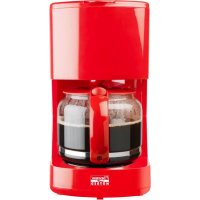
ACM300HR - Coffee machine BESTRON - Free user manual and instructions
Find the device manual for free ACM300HR BESTRON in PDF.



| Brand | Bestron |
| Model | ACM300HR |
| Product type | Drip coffee maker |
| Maximum capacity | 15 cups |
| Water tank | With level indicator |
| Filter | Removable permanent filter (compatible with 1x4 paper filter) |
| Anti-drip system | Yes, allows serving during brewing |
| Hot plate | Keeps warm for 30 min with auto shut-off |
| Switch | On/off with indicator light |
| Power | 1000 W |
| Voltage | 230 V ~ 50 Hz |
| Dimensions (W x D x H) | 25 x 20 x 35 cm |
| Weight | 1.5 kg |
| Materials | Plastic, glass |
| Carafe | Glass with hinged lid, dishwasher safe |
| Filter holder | Removable with anti-drip system |
| Cleaning | Permanent filter and filter holder washable with water, carafe dishwasher safe |
| Descaling | Recommended regularly with a suitable descaler |
| Safety | Auto shut-off, overheat protection |
| Warranty | 60 months (5 years) on manufacturing defects |
| Included accessories | Measuring spoon, permanent filter |
| Usage | Household use only |
| After-sales service | www.bestron.com/service |
| CE compliance | Directives EMC 2014/30/EU, Low Voltage 2014/35/EU, RoHS 2011/65/EU |
Frequently Asked Questions - ACM300HR BESTRON
User questions about ACM300HR BESTRON
0 question about this device. Answer the ones you know or ask your own.
Ask a new question about this device
Download the instructions for your Coffee machine in PDF format for free! Find your manual ACM300HR - BESTRON and take your electronic device back in hand. On this page are published all the documents necessary for the use of your device. ACM300HR by BESTRON.
USER MANUAL ACM300HR BESTRON
Instruction manual coffee maker

CONDITIONS DE GARANTIE
SAFETY INSTRUCTIONS - General
Please read these instructions carefully and retain them for future reference.
- Use this appliance solely in accordance with these instructions.
- This appliance can be used by children older than 8 years and persons with reduced physical, sensory or mental capabilities or lack of experience and knowledge, but only if they have been given supervision or instruction concerning use of the appliance in a safe way and understand the hazards involved.
Children should be supervised to ensure that they do not play with the appliance
- Cleaning and maintenance must not be done by children, except if they are older than 8 years and supervised.
- Keep the appliance and the cable out of reach of children under 8 years.
- Have any repairs carried out solely by a qualified electrician. Never try to repair the appliance yourself.
SAFETY INSTRUCTIONS - Electricity and heat

Certain parts of the appliance may get hot. Not touch these parts to prevent burning yourself.
- Make sure that the mains voltage is the same as that indicated on the type plate on the appliance before use.
- Make sure the socket into which you plug the appliance is earthed.
- Make sure that the appliance, the power cord and plug do not come into contact with water.
Always remove the plug from the wall socket when the appliance is not in use.
Always remove the plug from the wall socket by pulling on the plug, not on the power cord. - Check the appliance's power cord regularly to make sure it is not damaged. Do not use the appliance if the power cord is damaged. Have a damaged power cord replaced by a qualified service department.
Certain parts of the appliance can become hot; do not touch them, as you could burn yourself. - The appliance needs space to allow heat to escape, thereby avoiding the risk of fire. Make sure that the appliance has sufficient space around it, and does not come in contact with flammable materials. The appliance may not be covered.
- Make sure that the appliance, the power cord and the plug do not come in contact with sources of heat, such as a hot hob or naked flame.
SAFETY INSTRUCTIONS - Use
- Never allow the power cord to hang over the edge of the draining board, worktop or table.
- Make sure that your hands are dry before touching the appliance, cable or plug.
- Never use the appliance in a humid room.
- Never immerse the appliance, the plug or the power cord in water or other liquid.
- Do not pick up the appliance if it falls into water. Remove the plug from the
wall socket immediately. Do not use the appliance any more.
- This appliance may not be used through an external timer or by means of a remote control.
OPERATION - General
The appliance is intended only for domestic use, not for professional use.
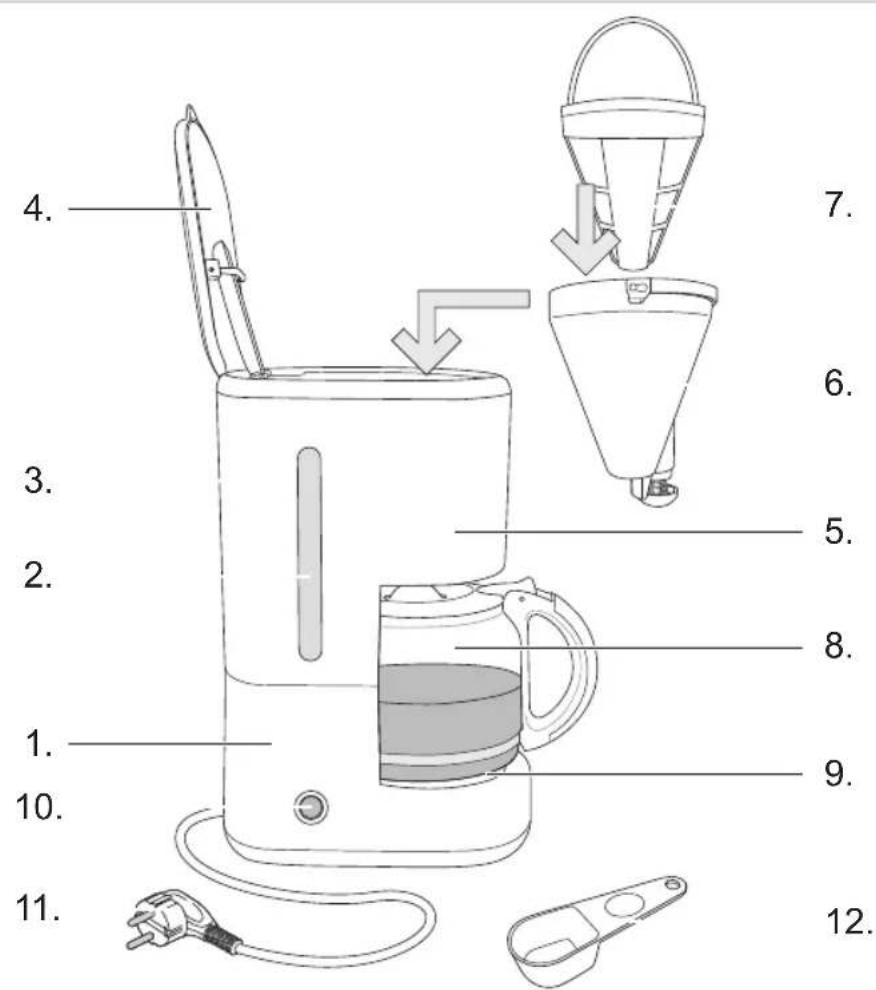
- Housing
- Water-level indicator
- Water reservoir
- Filter cover with vents
- Filter casing
-
Filter holder with pause-and-serve function
-
Permanent filter
- Glass pot with hinged lid
- Hotplate
- On/off switch with pilot light
- Cable with plug
- Measuring spoon
OPERATION - Before first use
Clean the appliance a couple of times by filling it with water only. Please observe the following instructions. Dispose of the water after use.
OPERATION - Making coffee
- Place the appliance on a flat and stedy surface. Connect the appliance to the wall socket. Make sure the On/Off switch is set to 'O' (pilot light is extinguished).
- Open the filter cover. Pour sufficient water into the reservoir (not less than 2 cups and not more than 15 cups, as shown on the water-level indicator).
- This coffee maker is supplied with a permanent filter, no more paper filters needed. But if you prefer, you can also fit a paper filter (1 x 4) in the filter holder. Fill the filter with the required amount of ground coffee (the customary quantity is 1 level scoop for each cup).
- Close the filter cover.
- Place the glass pot on the hotplate.
- Switch on the appliance (On/off switch in the '1' position: the pilot light illuminates). The coffee will now be prepared.
- The pause-and-serve function enables you to pour a cup of coffee before the coffee maker has finished. Replace the carafe quickly, to prevent the filter from overflowing.
The hot plate keeps the coffee warm for another 30 minutes before it switches off automatically. The indicator light goes off.
If you want to make coffee again, please reset the appliance first by manually switching to 0 and then to 1. The indicator light goes on. But let the appliance cool down for approx. 10 minutes first.
- In case you are finished making coffee, please turn off the appliance by manually switching to 0. The indicator light goes off.
CLEANING AND MAINTENANCE
- Switch off the appliance (On/off switch in the 'O' position: the pilot light extinguishes).
- Remove the plug from the wall socket, and if necessary allow the appliance to cool.
- Dispos of the paper filter, where relevant. Remove the permanent filter from the casing, and clean it under running water. Unlock the filter holder by pulling up the handle. Remove the filter holder from the casing, and clean it under running water also. Place the filter holder back into the casing and push the handle down to lock the filter holder. When refitting the filter holder make sure that the non-drip nozzle projects through the opening in the filter casing.
- Clean the glass pot in hot washing-up water, or put it in a dishwasher.
-
Clean the outside of the appliance with a damp cloth. Make sure no moisture gets into the appliance.
-
Never immerse the appliance, plug or power cord in water. Never put the appliance in a dishwasher. Only the loose parts may be immersed in water.
-
Never use corrosive or scouring cleaning agents or sharp objects (such as knives or hard brushes) to clean the appliance.
CLEANING AND MAINTENANCE - Descalng
Limescale can reduce the efficiency of your coffee maker. Limescale is common in areas with hard water. We advise the use of a suitable descending agent to remove any scale. Always follow the instructions for the descending agent. The amount of scale will be reduced when you use a water softener.
THE ENVIRONMENT

-
Dispos of packaging material, such as plastic and boxes, in the appropriate waste containers. When this product reaches the end of its useful life do not dispose of it by putting it in a dustbin; hand it in at a collection point for the reuse of electrical and electronic equipment. Please refer to symbols on the product, the user's instructions or the packaging.
-
The materials can be re-used as indicated. Your help in the re-use, recycling or other means of making use of old electrical equipment will make an important contribution to the protection of the environment.
- Contact your municipality for the address of the appropriate collection point in your neighbourhood.
GUARANTEE TERMS
The importer guarantees the appliance against defects caused by manufacturing and/or material faults for 60 months from the date of purchase, subject to the following conditions.
- No charges will be made for labour costs or materials during the warranty period. Any repairs carried out during the warranty period do not extend the warranty period.
- The importer automatically becomes the owner of any faulty parts that he replaces or a faulty appliance (in the event of replacement of the appliance).
- All claims submitted under warranty must be accompanied by the original bill of sale.
- Claims under warranty must be submitted to the dealer where the appliance was purchased or to the importer.
- The warranty is issued solely to the first purchaser and cannot be transferred.
- The warranty does not cover damage caused by:
a. Accidents, incorrect use, wear and/or neglect.
b. Faulty installation and/or use in a manner contravening the prevailing legal, technical or safety regulations.
c. Connection to a mains voltage other than the voltage specified on the type plate.
d. Unauthorized modifications.
e. Repairs carried out by third parties.
f. Careless transport, i.e. without suitable packaging materials or protection.
- No claims may be made under this warranty for:
a. Losses incurred during transport.
b. The removal or changing of the appliance's serial number.
3. The guarantee does not cover power cords, lamps or glass parts.
9. No claims can be submitted under this warranty for damage other than the repair or replacement of faulty parts. The importer can never be held responsible for any consequential loss or damage or any other consequences, resulting either directly or indirectly from the appliance supplied by the importer.
10. In case of claims under guarantee you can contact your dealer where the appliance is purchased. Bestron offers you also the possibility to send the appliance directly to our Service Department. Do not send your appliance without consulting us. The package may be refused and any any costs will be for your account. Please contact the Service Department and they will tell you how to pack and send the appliance.
11. This appliance is not suitable for professional use.
SERVICE
If a fault should occur please contact the BESTRON service department: www.bestron.com/service
CE DECLARATION OF CONFORMITY
This product conforms to the essential requirements of the following EU safety directives:
EMC Directive 2014/30/EU
Low Voltage Directive 2014/35/EU
RoHS - Directive 2011/65/EU
R. Neyman
Quality control

- CONDITIONS DE GARANTIE
- SAFETY INSTRUCTIONS - General
- SAFETY INSTRUCTIONS - Electricity and heat
- SAFETY INSTRUCTIONS - Use
- OPERATION - General
- OPERATION - Before first use
- OPERATION - Making coffee
- CLEANING AND MAINTENANCE
- CLEANING AND MAINTENANCE - Descalng
- THE ENVIRONMENT
- GUARANTEE TERMS
- SERVICE
- CE DECLARATION OF CONFORMITY
Brand : BESTRON
Model : ACM300HR
Category : Coffee machine