ManualGo.com
 HG9572MDA1E - Cooker Atag - Free user manual and instructions
Find the device manual for free HG9572MDA1E Atag in PDF.



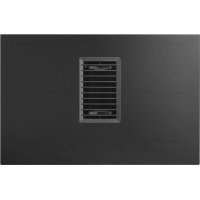
Download the instructions for your Cooker in PDF format for free! Find your manual HG9572MDA1E - Atag and take your electronic device back in hand. On this page are published all the documents necessary for the use of your device. HG9572MDA1E by Atag.
USER MANUAL HG9572MDA1E Atag
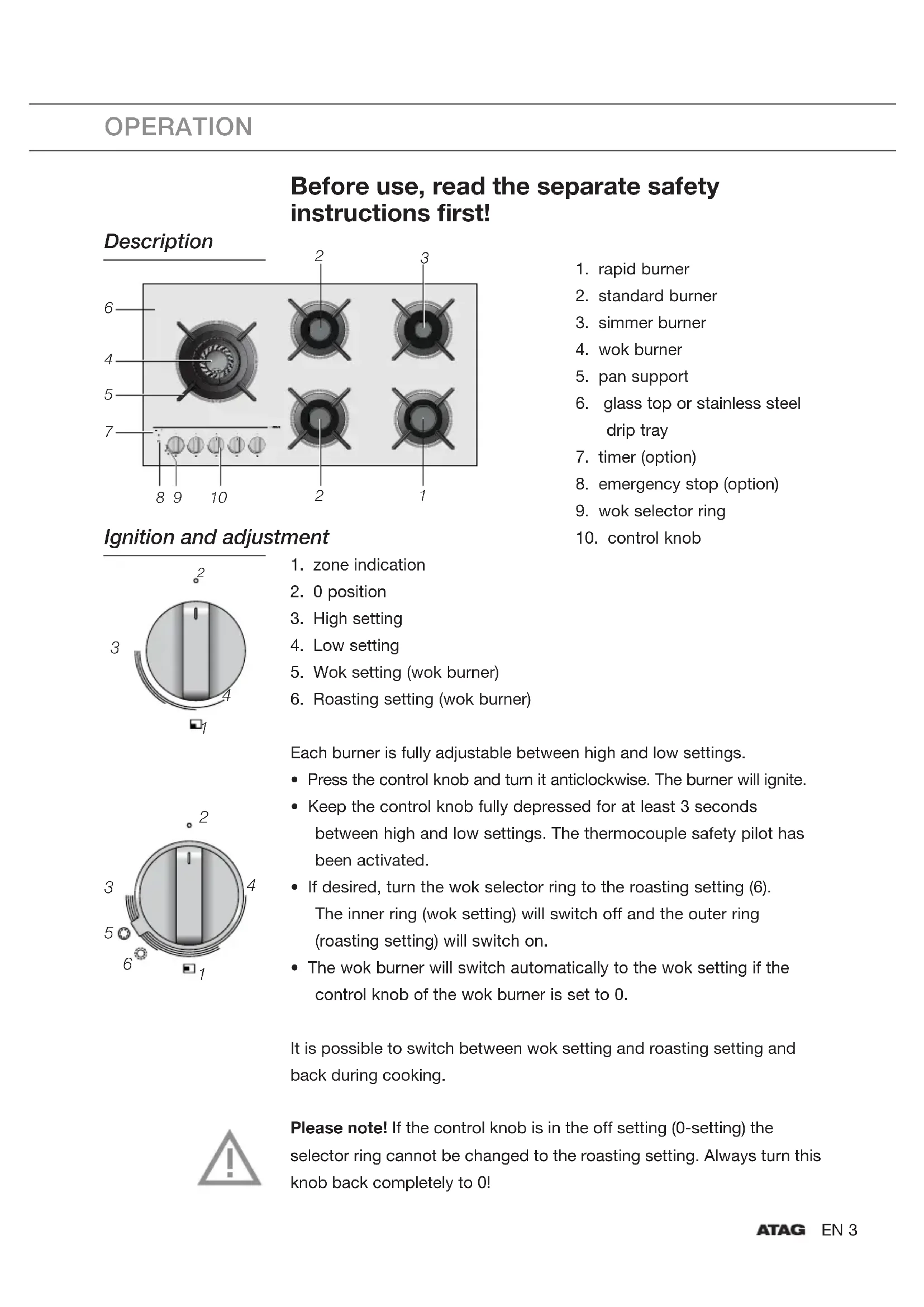
5. Wok setting (wok burner)
6. Roasting setting (wok burner)
Each burner is fully adjustable between high and low settings.
- Press the control knob and turn it anticlockwise. The burner will ignite.
- Keep the control knob fully depressed for at least 3 seconds between high and low settings. The thermocouple safety pilot has been activated.
- If desired, turn the wok selector ring to the roasting setting (6). The inner ring (wok setting) will switch off and the outer ring (roasting setting) will switch on.
- The wok burner will switch automatically to the wok setting if the control knob of the wok burner is set to 0. It is possible to switch between wok setting and roasting setting and back during cooking. Please note! If the control knob is in the off setting (0-setting) the selector ring cannot be changed to the roasting setting. Always turn this knob back completely to 0!
6. glass top or stainless steel
- Using the timer button (2) select the burner that you wish to turn off automatically. Press the timer button repeatedly until the timer display above the control knob of the selected burner flashes "00" (4).
- Use the + and - buttons (1) to set the cooking time (maximum 6 hours). Pressing the button shortly increases the time by 1 minute; pressing longer (3 seconds) increases the time by 10 minutes. Staring from 1 hour the display (4) will show "1h" and will then alternate between the number of hours and minutes.
- In the final minute the time in the display (4) will count down in seconds to "00".
- When the set time has expired you will hear a beep. The timer operated burner will switch off. Press the timer button (2) to turn off the beep. Please note The timer does not keep the dish at the desired temperature, you can regulate this using the control knob. Kitchen timer Set the timer in the same way as the timer function, however, for a burner you're not using. When the set time has expired you will hear a beep. Press the selection button (2) to turn off the beep. Please note! The burner is not switched off automatically. Cooking time display To monitor the cooking process you can set 'display cooking time'.
1. Using the timer button (2) select the burner for which you wish to
display the cooking time. Press the timer button repeatedly until the timer display above the selected burner flashes "00" (4).
2. Do not set a time, but wait for 5 seconds. The timer will start to run.
Emergency stop Press the emergency stop button (3) to switch off all burners in one go. OPERATION
4EN 5 USE Switching off one or more timers
- Using the timer button select the burner for which you wish to turn off the timer function.
- Press the timer button again and keep it depressed for at least 3 seconds. The burner's timer function will be switched off. If you want all timer functions to be switched off in one go, depress the timer button for at least 3 seconds. Switching off beep The signals that sound (when touching buttons) can be switched on or off.
- Press the emergency stop button until you hear a long beep.
- Press (within 5 seconds) the timer's + and - buttons simultaneously.
- A long beep indicates that the sound signals have been switched on or off. Use Pans
- Always ensure than the flames stay under the pan. A lot of energy is lost if flames burn around the pan. The handles may also become too hot.
- Do not use pans with a base diameter smaller than 12 cm. Smaller pans are not as stable. Wok ring and small pan grid The wok ring for use with the wok burner supplied or obtainable as an accessory provides extra stability for woks with a round base. The small pan grid supplied or obtainable as an accessory makes it possible to use very small pans. Do not use the small pan grid on the wok burner. Do not use the wok ring on the wok roasting setting. This can result in discolouring. Pan support Place the pan supports vertically, without sliding over the drip tray. Use the leads to position the pan supports on the drip tray. error good wok ring small pan gridEN 6 MAINTENANCE Burner Use the leads (1) to put together the burner parts. Wok burner Place the wok burner correctly. Placing the wok burner parts incorrectly can result in a poorly functioning burner.
1. Place the burner distributor (2) in the burner housing (1).
2. Use the leads to place the inner ring (3) on the burner distributor (2).
3. Use the leads to place the outer ring (4) on the burner distributor (2).
position distributor side view position rings
4EN 7 MAINTENANCE Maintenance Regular maintenance after use prevents spilt food from setting too long and creating stubborn stains. Use a mild detergent for this. First clean the control knobs, burners and pan supports and only then the drip tray or glass cover. This prevents the drip tray or glass cover to becoming dirty again after cleaning. Please note! Do not clean burner parts in the dishwasher. Dishwasher detergent can corrode burner parts! Persistent stains on enamel (pan supports, burner caps) Persistent stains can best be removed with a fluid detergent or a plastic scouring sponge. Never use scouring powder, scouring pads, sharp objects or aggressive cleaning products. Persistent stains on the glass cover Clean the glass cover with a special cleaning product for ceramic hobs. Water stains or limescale are best cleaned using cleaning vinegar. Persistent stains on the stainless steel (drip trays) Persistent stains on stainless steel are best removed with a special stainless steel cleaning product. Always wipe with the structure of the steel to prevent scraping away the protective layer (damage caused in this way does not fall under the guarantee!) The surface of stainless steel drip trays can discolour slightly over time. Brass wok burner parts Some wok burner parts are made from brass. It is normal for the brass colour to change as a result of the high temperatures involved in wok use. Consult the www.atagservice.nl website for additional maintenance and cleaning instructions!EN 8 ERRORS Fault list If your gas hob does not work properly, this does not always mean that it is defective. Try to deal with the problem yourself first by checking the points below or check the 'www.atagservice.nl' website for more information.
SYMPTOM POSSIBLE CAUSE SOLUTION
You smell gas near the appliance. The appliance connection is leaking. Close the main gas switch. Contact the your installer. A burner does not ignite. Plug not in socket. Fuse defective/fuse switched off in fuse cupboard. Spark plug (1) dirty/damp. Burner parts not placed correctly. Burner parts dirty/damp. Main gas tap closed. Fault in gas mains. Gas bottle or tank is empty. Wrong type of gas used. Put the plug into the socket. Put in a new fuse or switch on the fuse in the fuse box. Clean/dry the spark plug. Use the centring leads to put the burner parts together. Clean/dry the burner parts. Make sure that the outflow holes are open. Open the main gas tap. Consult you gas supplier. Connect a new gas bottle or have the tank refilled. Check whether the gas used is suitable for the appliance. Contact your installer if it is not correct. The burner does not burn evenly. Burner parts not placed correctly. Burner parts dirty/damp. Wrong type of gas used. Use the centring leads to put the burner parts together. Clean/dry the burner parts. Make sure that the outflow holes are open. Check whether the gas used is suitable for the appliance. Contact your technician if it is not correct. Burner extinguishes after igniting. The control knob has not been depressed long or deep enough (at least 3 seconds). Thermocouple (2) is dirty. Keep the control knob fully depressed for at least 3 seconds between high and low settings. This can take longer the first time because of the gas supply. Clean/dry thermocouple.
SYMPTOM POSSIBLE CAUSE SOLUTION
Timer indicates error code F0 – F6 (if present). There is an object, water or dirt on the buttons. Button used for too long. Ensure that there is nothing on the buttons. Ensure that the buttons are clean and there is no water on them. Contact the technician if the error code does not disappear. Ceramic glass plate broken. Object fallen onto it. Close the gas main switch and pull the plug out of the socket. Contact the your installer. Please note! Do not throw a broken ceramic glass plate in the glass recycling bin but take this to the Municipality's waste recycling centre.EN 10 ENVIRONMENTAL CONSIDERATIONS Disposal of the appliance and packaging Sustainable materials have been used during manufacture of this appliance. The appliance packaging is recyclable. The following may have been used: