15268 - Watch Lotus - Free user manual and instructions
Find the device manual for free 15268 Lotus in PDF.



User questions about 15268 Lotus
0 question about this device. Answer the ones you know or ask your own.
Ask a new question about this device
Download the instructions for your Watch in PDF format for free! Find your manual 15268 - Lotus and take your electronic device back in hand. On this page are published all the documents necessary for the use of your device. 15268 by Lotus.
USER MANUAL 15268 Lotus
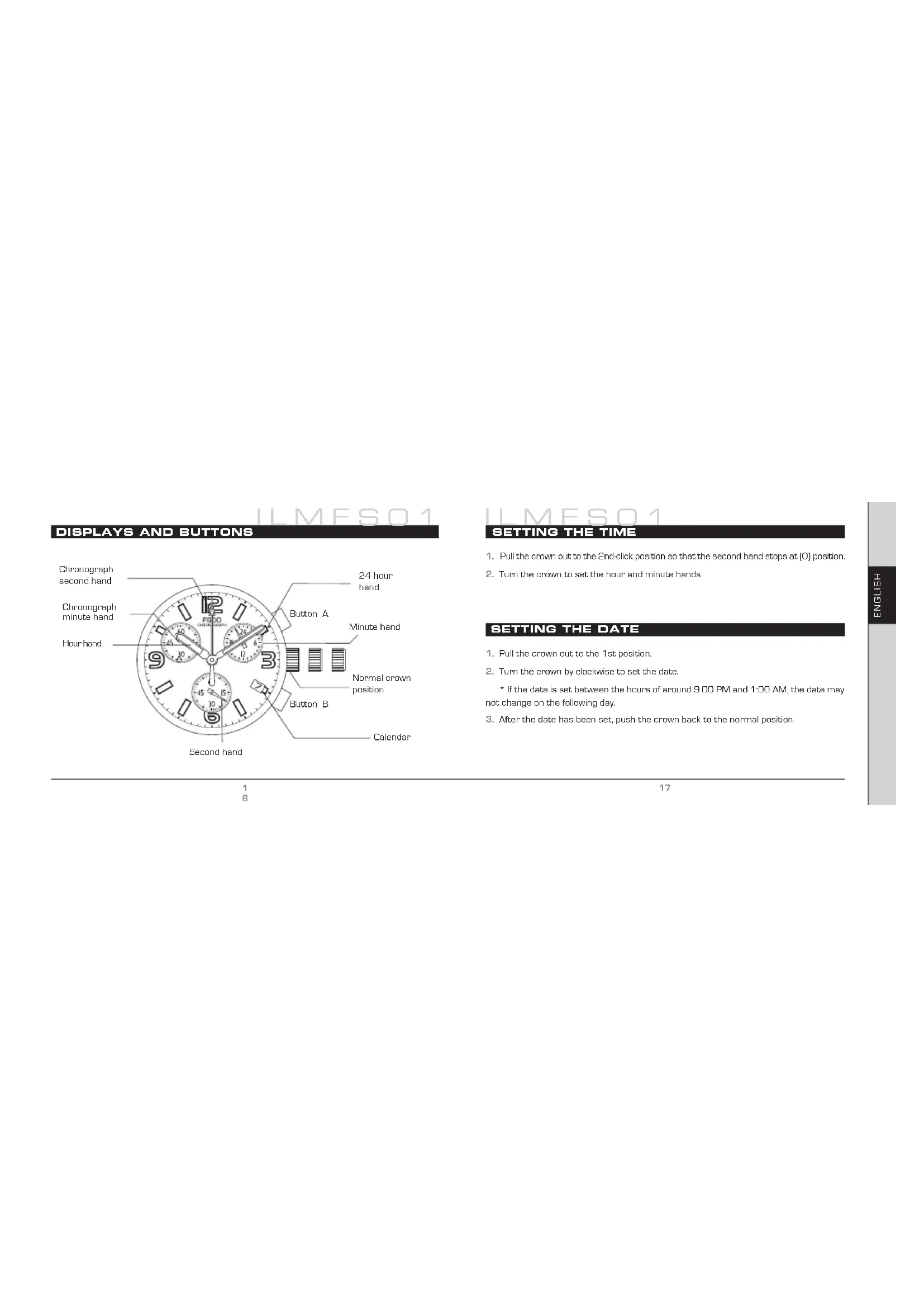
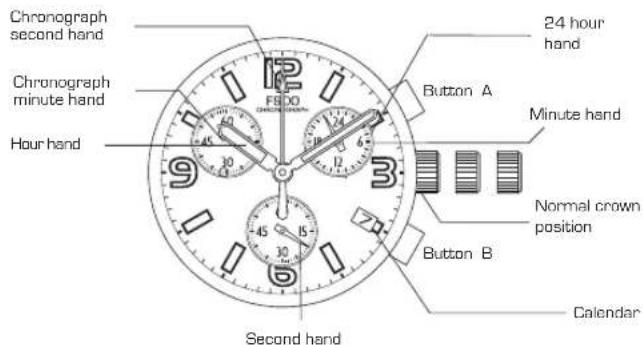
Displays and buttons 16
Setting the time 17
Setting the date 17
Using the chronograph 18
Tachymeter 22
Basic specifications 24
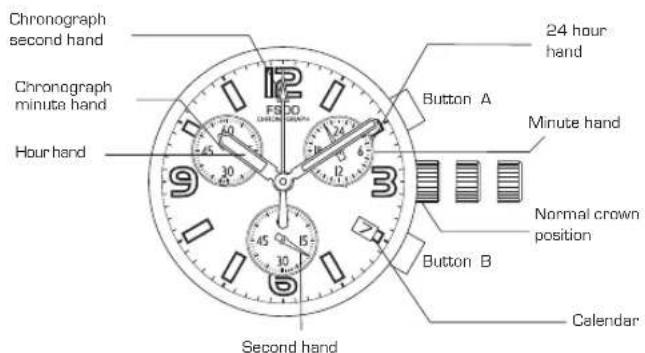
DISPLAYS AND BUTTONS
ILMESO1
SETTING THE TIME
- Pull the crown out to the 2nd-click position so that the second hand stops at [O] position.
- Turn the crown to set the hour and minute hands
SETTING THE DATE
- Pull the crown out to the 1st position.
-
Turn the crown by clockwise to set the date.
-
If the date is set between the hours of around 9:00 PM and 1:00 AM, the date may not change on the following day.
- After the date has been set, push the crown back to the normal position.
LLMES01
USING THE CHRONOGRAPH
LLMESQ1
USING THE CHRONOGRAPH
This chronograph is able to measure and display time in 1/1 second united up to maximum of 1 hour.
(Measuring time with the chronograph)
- The chronograph can be started and stopped each time button [A] is pressed.
- To reset, press button (B) and the chronograph second & minute hands return to their (O) positions.

[Chronograph reset, incl. after replacing battery]
USING THE CHRONOGRAPH
This procedure should be performed when the chronograph second hand do not return to the [0] second position after the chronograph has been reset, and including after battery has been replaced.
1.Pull the crown out to the 2nd. position.
2. Press button (A) to set the chronograph second hand to the (O) position.
3. The chronograph hands can be advanced rapidly by continuously pressing button (A).
4. Once the hands have been zeroed, reset the time and return the crown to its normal position.
*Do not return crown to normal position while chronograph second hand return to 12:00 [Zero] position.
Hand stops on the way when crown are returned to normal position and these positions are recognized as 12:00 [zero] position.
ILMES01
USING THE CHRONOGRAPH
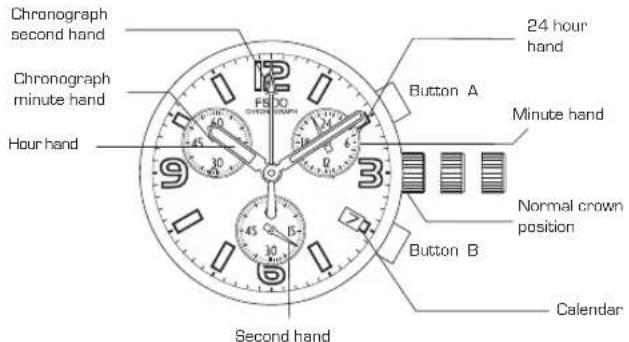
TACHYMETER

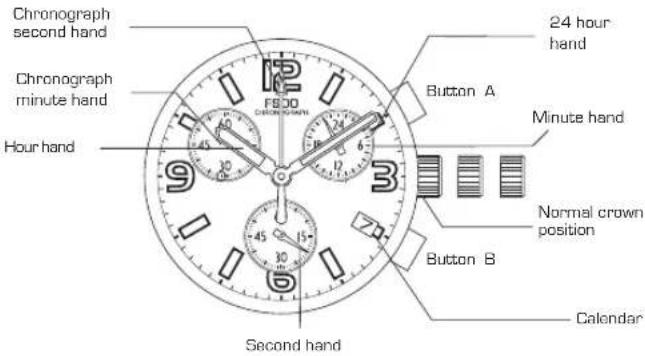

TACHYMETER
The tachymeter is the device which measures the speed of an automobile. Knowing is how many seconds the car covers a distance of 1Km the meter can measure the approximate average speed per hour during a journey [up to the maximum measurable range of tachymeter is 60 seconds].
If the chronograph is started at the same time as measurement, and stopped after 1 Km, the average speed per hour can be determined according to the position of the second hand.
- If the car covers the distance of 1 Km in 45 seconds, the average hourly speed during the journey will be about 80 Km.
BASIC SPECIFICATIONS

- To confirm with mov't drawing attached
| Calibre FS00 FS01 | ||
| Pusher | Slanted Parallel | |
| Ligne Size* mm | 10 - 1/2 ø 23,7 x 22 mm [3H - 9H] | |
| Date | 0 | |
| Total height | 4,13 mm 4,28 mm | |
| Figure (push button placed angle) | Slanted Parallel | |
| Power cell and life SR626SW 2 years* | ||
- Based on the chronograph being used 1 hour per day

BASIC SPECIFICATIONS
[Time standard]
Type of quartz: Tuning fork type quartz crystal
Frequency: 32.768 Hz
Accuracy: ± 20 s/month worn under normal circumstances
[Balanceable weight of hand]
Other small hands: Max. 0.02 N.m
[Function]
CAL. IFMFS00/01: Chronograph 1/1 sec. basis (Up to 59 min, 59 sec.)
Powercell Saving Reset Mechanism (PSRM)
Overloading Compensation Device (OLCD)
Digital Frequency Control (DFC) for time adjustment
MANUEL D'INSTRUCTION
CHRONOGRAPHE

By virtue of the regulations pursuant to the handling of waste products deriving from electronic and electrical equipment, end of lifecycle watch making products are selectively collected for processing. You may therefore dispose of your quartz watch products at any of our retail outlets or any other authorized collection point. The above collection, processing, rating and recycling of these products helps contribute to safeguarding the environment and protecting our health.