
15641 - Watch Lotus - Free user manual and instructions
Find the device manual for free 15641 Lotus in PDF.



| Product type | Analog wristwatch |
| Brand | Lotus |
| Model | 15641 |
| Movement | Quartz |
| Display | Hands (hours, minutes, seconds) with subdials |
| Main functions | Hour, minute, second, date, day of week, 24-hour dial, second time zone (depending on variant) |
| Power source | Button cell battery (type not specified, replace by a watchmaker) |
| Case dimensions | Not specified in the manual |
| Case material | Not specified (likely stainless steel or alloy) |
| Strap | Not specified (likely leather or metal) |
| Water resistance | Not specified (avoid any contact with water) |
| Time setting | Crown in position 2 (pulled all the way out) |
| Date setting | Crown in position 1 (first notch), turn to the left |
| Day of week setting | Crown in position 2, turn until passing 24 hours |
| Precautions | Do not set the date between 9pm and 1am |
| Care and cleaning | Clean with a soft dry cloth. Avoid chemical products. |
| Battery replacement | Entrust to a qualified watchmaker |
| Spare parts | Crown, battery (available at authorized retailers) |
| Repairability | Repair possible by a professional watchmaker |
| Warranty | Not specified (check with the retailer) |
| Country of origin | Not specified |
| Manual available online | Yes, on notice-facile.com |
Frequently Asked Questions - 15641 Lotus
User questions about 15641 Lotus
0 question about this device. Answer the ones you know or ask your own.
Ask a new question about this device
Download the instructions for your Watch in PDF format for free! Find your manual 15641 - Lotus and take your electronic device back in hand. On this page are published all the documents necessary for the use of your device. 15641 by Lotus.
USER MANUAL 15641 Lotus
natural_image
Empty white rectangle with black border (no text or symbols)MULTIFUNCTION

natural_image
Abstract clock face design with concentric rings and arrows, no text or symbols presentILMULTIFUNCTION
MANUAL DE INSTRUCCIONES
INSTRUCTION MANUAL
MANUEL D'INSTRUCTION
BETRIEBSANLEITUNG
MANUALE DI FUNZIONAMENTO


text_image
LOTUS LOTUS LOTUS LOTUS LOTUS LOTUS LOTUS LOTUS LOTUS LOTUS LOTUS LOTUS LOTUS LOTUS LOTUS LOTUS LOTUS LOTUS LOTUS LOTUS LOTUS LOTUS LOTUS LOTUS LOTUS LOTUS LOTUS LOTUS LOTUS LOTUS LOTUS LOTUS LOTUS LOTUS ROTUS ROTUS ROTUS ROTUS ROTUS ROTUS ROTUS ROTUS ROTUS ROTUS ROTUS ROTUS ROTUS ROTUS ROTUS ROTUS ROTUS ROTUS ROTUS ROTUS ROTUS ROTUS ROTUS ROTUS ROTUS ROTUS ROTUSILMULTIFUNCTION
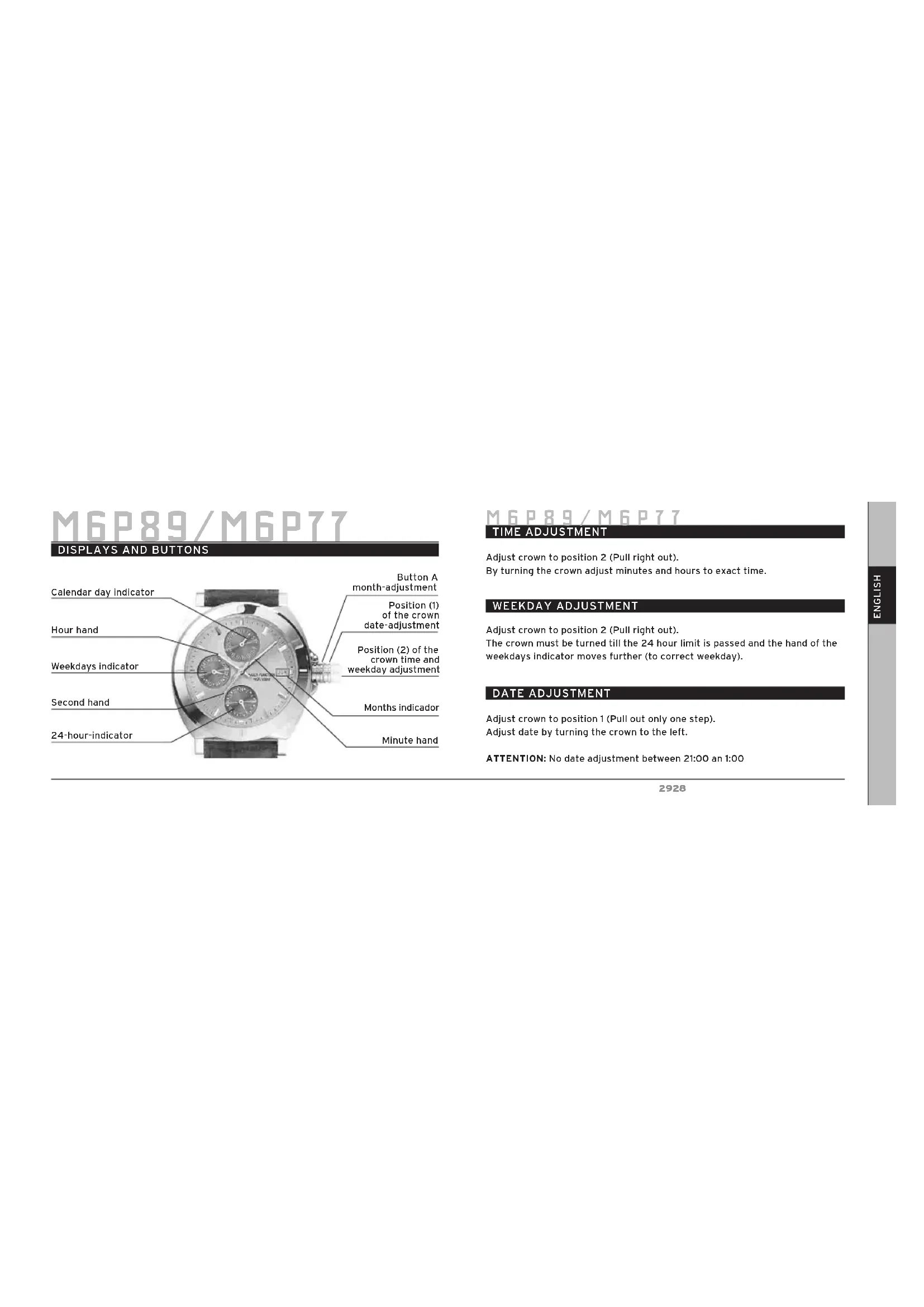
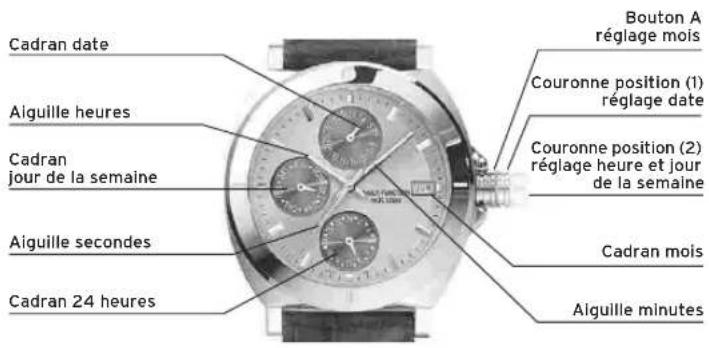
DISPLAYS AND BUTTONS
text_image
Calendar day indicator Hour hand Weekdays indicator Second hand 24-hour-indicator Button A month-adjustment Position (1) of the crown date-adjustment Position (2) of the crown time and weekday adjustment Months indicator Minute handM6P89/M6P77
TIME ADJUSTMENT
Adjust crown to position 2 (Pull right out).
By turning the crown adjust minutes and hours to exact time.
WEEKDAY ADJUSTMENT
Adjust crown to position 2 (Pull right out).
The crown must be turned till the 24 hour limit is passed and the hand of the weekdays indicator moves further (to correct weekday).
DATE ADJUSTMENT
Adjust crown to position 1 (Pull out only one step).
Adjust date by turning the crown to the left.
ATTENTION: No date adjustment between 21:00 an 1:00
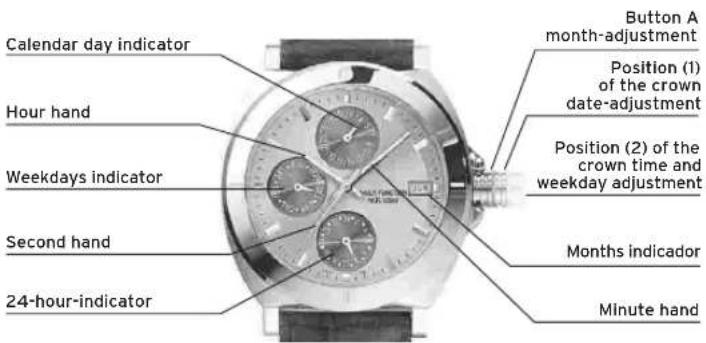
DISPLAYS AND BUTTONS
text_image
Calendar day indicator Hour hand Weekdays indicator Second hand 24-hour-indicator Position (1) of the crown date-adjustment Position (2) of the crown time and weekday adjustment Minute handTIME ADJUSTMENT
Adjust crown to position 2 (Pull right out). By turning the crown, adjust the minute; hour and 24 hour hands to exact time.
ATTENTION: No date adjustment between 21:00 and 01:00!
WEEKDAY ADJUSTMENT
Adjust crown to position 2 (Pull right out). The crown must be turned till the 24 hour limit is passed and the hand of the weekdays indicator moves further (to correct weekday).
DATE ADJUSTMENT
Adjust crown to position 1 (Pull out only one step). Adjust date by turning the crown to the left.
ATTENTION: No date adjustment between 21:00 and 01:00!
M6P25
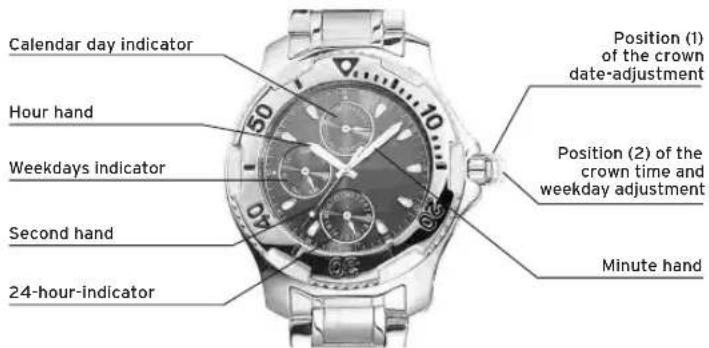
DISPLAYS AND BUTTONS
text_image
Hour hand Weekdays indicator Second hand Position (1) of the crown date-adjustment Position (2) of the crown time and weekday adjustment Calendar day indicator Minute handM6P25
TIME ADJUSTMENT
Adjust crown to position 2 (Pull right out).
By turning the crown adjust minutes and hours to exact time.
ATTENTION: No date adjustment between 21:00 and 01:00!
WEEKDAY ADJUSTMENT
Adjust crown to position 2 (Pull right out).
The crown must be turned till the 24 hour limit is passed and the hand of the weekdays indicator moves further (to correct weekday).
DATE ADJUSTMENT
Adjust crown to position 1 (Pull out only one step). Adjust date by turning the crown to the left.
ATTENTION: No date adjustment between 21:00 and 01:00!
M6P29/M6P79
DISPLAYS AND BUTTONS

text_image
Hour hand Weekdays indicator Second hand 24-hour-indicator Position (1) of the crown date-adjustment Position (2) of the crown time and weekday adjustment Calendar day indicator Minute handM6P29/M6P79
TIME ADJUSTMENT
Adjust crown to position 2 (Pull right out).
By turning the crown adjust minutes and hours to exact time.
WEEKDAY ADJUSTMENT
Adjust crown to position 2 (Pull right out).
The crown must be turned till the 24 hour limit is passed and the hand of the weekdays indicator moves further (to correct weekday).
DATE ADJUSTMENT
Adjust crown to position 1 (Pull out only one step).
Adjust date by turning the crown to the left.
ATTENTION: No date adjustment between 21:00 and 01:00!
M6P23
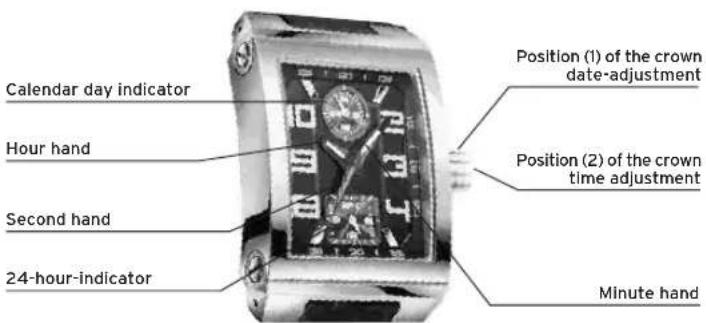
DISPLAYS AND BUTTONS
text_image
Calendar day indicator Hour hand Second hand 24-hour-indicator Position (1) of the crown date-adjustment Position (2) of the crown time adjustment Minute handM6P23
TIME ADJUSTMENT
Adjust crown to position 2 (Pull right out).
By turning the crown adjust minutes and hours to exact time.
DATE ADJUSTMENT
Adjust crown to position 1 (Pull out only one step).
Adjust date by turning the crown to the left.
ATTENTION: No date adjustment between 21:00 and 01:00!
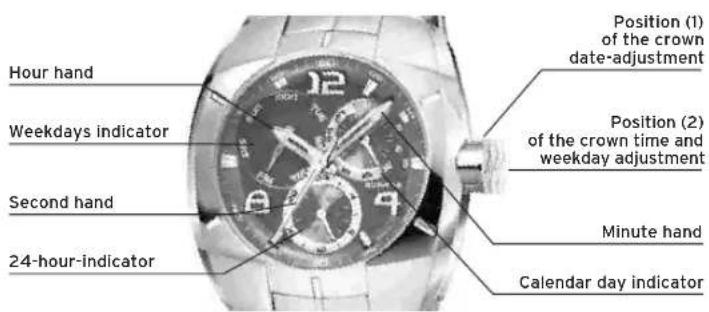
DISPLAYS AND BUTTONS
text_image
Hour hand Weekdays indicator Second hand 24-hour-indicator Position (1) of the crown date-adjustment Position (2) of the crown time and weekday adjustment Minute hand Calendar day indicatorTIME ADJUSTMENT
Adjust crown to position 2 (Pull right out).
By turning the crown adjust minutes and hours to exact time.
WEEKDAY ADJUSTMENT
Adjust crown to position 2 (Pull right out).
The crown must be turned till the 24 hour limit is passed and the hand of the weekdays indicator moves further (to correct weekday).
DATE ADJUSTMENT
Adjust crown to position 1 (Pull out only one step).
Adjust date by turning the crown to the right.
ATTENTION: No date adjustment between 21:00 and 01:00!
MVX3SE
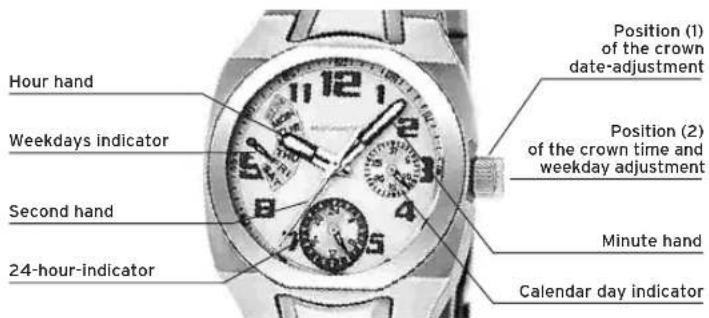
DISPLAYS AND BUTTONS
text_image
Hour hand Weekdays indicator Second hand 24-hour-indicator Position (1) of the crown date-adjustment Position (2) of the crown time and weekday adjustment Minute hand Calendar day indicatorMVX3SE
TIME ADJUSTMENT
Adjust crown to position 2 (Pull right out).
By turning the crown adjust minutes and hours to exact time.
WEEKDAY ADJUSTMENT
Adjust crown to position 2 (Pull right out).
The crown must be turned till the 24 hour limit is passed and the hand of the weekdays indicator moves further (to correct weekday).
DATE ADJUSTMENT
Adjust crown to position 1 (Pull out only one step).
Adjust date by turning the crown to the left.
ATTENTION: No date adjustment between 21:00 and 01:00.
MVX3JA
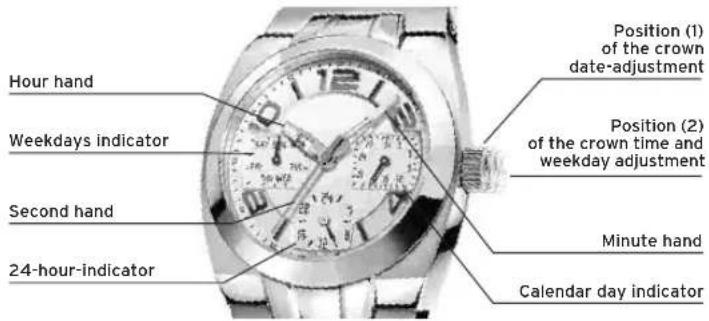
DISPLAYS AND BUTTONS
text_image
Hour hand Weekdays indicator Second hand 24-hour-indicator Position (1) of the crown date-adjustment Position (2) of the crown time and weekday adjustment Minute hand Calendar day indicatorMVX3JA
TIME ADJUSTMENT
Adjust crown to position 2 (Pull right out).
By turning the crown adjust minutes and hours to exact time.
WEEKDAY ADJUSTMENT
Adjust crown to position 2 (Pull right out).
The crown must be turned till the 24 hour limit is passed and the hand of the weekdays indicator moves further (to correct weekday).
DATE ADJUSTMENT
Adjust crown to position 1 (Pull out only one step).
Adjust date by turning the crown to the left.
ATTENTION: No date adjustment between 21:00 and 01:00.
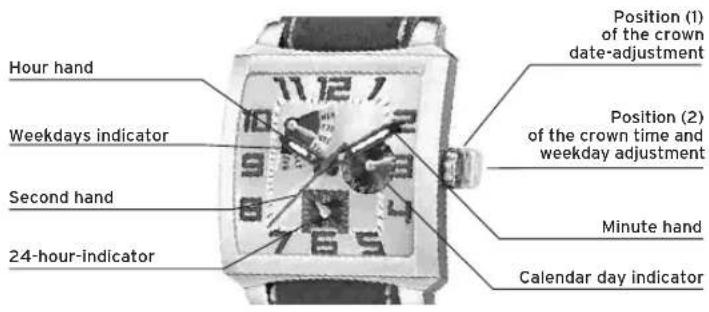
MVX3T
DISPLAYS AND BUTTONS
text_image
Hour hand Weekdays indicator Second hand 24-hour-indicator Position (1) of the crown date-adjustment Position (2) of the crown time and weekday adjustment Minute hand Calendar day indicatorMVX3T
TIME ADJUSTMENT
Adjust crown to position 2 (Pull right out).
By turning the crown adjust minutes and hours to exact time.
WEEKDAY ADJUSTMENT
Adjust crown to position 2 (Pull right out).
The crown must be turned till the 24 hour limit is passed and the hand of the weekdays indicator moves further (to correct weekday).
DATE ADJUSTMENT
Adjust crown to position 1 (Pull out only one step).
Adjust date by turning the crown to the left.
ATTENTION: No date adjustment between 21:00 and 01:00.
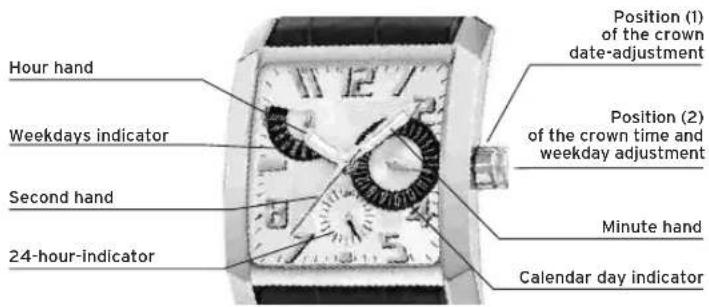
MVX3TE
DISPLAYS AND BUTTONS
text_image
Hour hand Weekdays indicator Second hand 24-hour-indicator Position (1) of the crown date-adjustment Position (2) of the crown time and weekday adjustment Minute hand Calendar day indicatorMVX3TE
TIME ADJUSTMENT
Adjust crown to position 2 (Pull right out).
By turning the crown adjust minutes and hours to exact time.
WEEKDAY ADJUSTMENT
Adjust crown to position 2 (Pull right out).
The crown must be turned till the 24 hour limit is passed and the hand of the weekdays indicator moves further (to correct weekday).
DATE ADJUSTMENT
Adjust crown to position 1 (Pull out only one step).
Adjust date by turning the crown to the left.
ATTENTION: No date adjustment between 21:00 and 01:00.
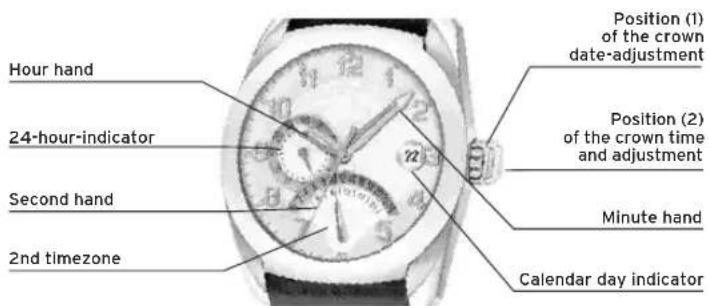
DISPLAYS AND BUTTONS
text_image
Hour hand 24-hour-indicator Second hand 2nd timezone Position (1) of the crown date-adjustment Position (2) of the crown time and adjustment Minute hand Calendar day indicatorM6P03
TIME ADJUSTMENT
Adjust crown to position 2 (Pull right out).
By turning the crown adjust minutes and hours to exact time.
DATE ADJUSTMENT
Adjust crown to position 1 (Pull out only one step).
Adjust date by turning the crown clock wise.
2ND TIMEZONE ADJUSTMENT
Adjust crown to position 1.
Adjust 2nd timezone by turning the crown anti clock wise.
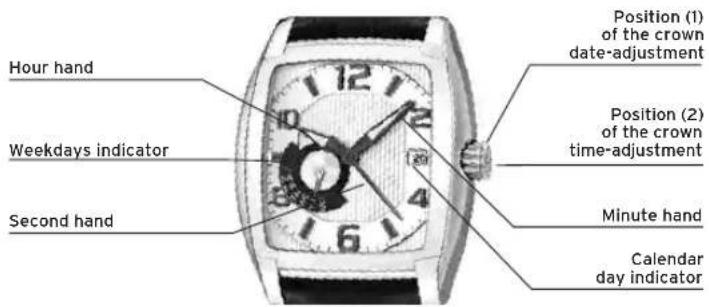
DISPLAYS AND BUTTONS
text_image
Hour hand Weekdays indicator Second hand Position (1) of the crown date-adjustment Position (2) of the crown time-adjustment Minute hand Calendar day indicatorTIME ADJUSTMENT
Adjust crown to position 2 (Pull right out).
By turning the crown adjust minutes and hours to exact time.
WEEKDAY ADJUSTMENT
Adjust crown to position 1 (Pull out only one step).
Adjust weekday by turning the crown clock wise.
DATE ADJUSTMENT
Adjust crown to position 1 (Pull out only one step).
Adjust date by turning the crown anti clock wise.
ATTENTION: No date adjustment between 21:00 and 1:00.
ILMULTIFUNCTION
By virtue of the regulations pursuant to the handling of waste products deriving from electronic and electrical equipment, end of lifecycle watch making products must be selectively collected for processing. You may therefore dispose of your quartz watch making products at any of our retail outlets or any other authorized collection point. The selective collection, processing, rating and recycling of these products helps contribute to safeguarding the environment and protecting our health.
ILMULTIFUNCTION
■ Instructions M6P89 / M6P77 54
■ Instructions M6P27 ____ 56
■ Instructions M6P25 58
■ Instructions M6P29 / M6P79 60
■ Instructions M6P23 62
■ Instructions MVX3L 64
■ Instructions MVX3SE 66
■ Instructions MVX3JA 68
■ Instructions MVX3T 70
■ Instructions MVX3TE 72
■ Instructions MGPO3 74
■ Instructions MVX46 76
M6P89/M6P77
AFFICHAGE ET BOUTONS
Adjust crown to position 1 (Pull out only one step).
Adjust date by turning the crown clock wise.
RÉGLAGE 2e FUSEAU HORAIRE
Tirer la couronne en position (1).
Adjust crown to position 1 (Pull out only one step).
Adjust weekday by turning the crown clock wise.
RÉGLAGE DATE
text_image
LOTUS LOTUS LOTUS LOTUS LOTUS LOTUS LOTUS LOTUS LOTUS LOTUS LOTUS LOTUS LOTUS LOTUS LOTUS LOTUS LOTUS